

1. 簡介
總覽
現在要如何開始使用 AI 建構內容?首先,您需要一個值得製作原型的想法。Google AI Studio 的建構模式可透過「直覺式程式開發」,將靈感化為現實。運用 Gemini 模型,您就能完全透過對話式程式碼生成功能,設計、測試及部署全端網頁應用程式。
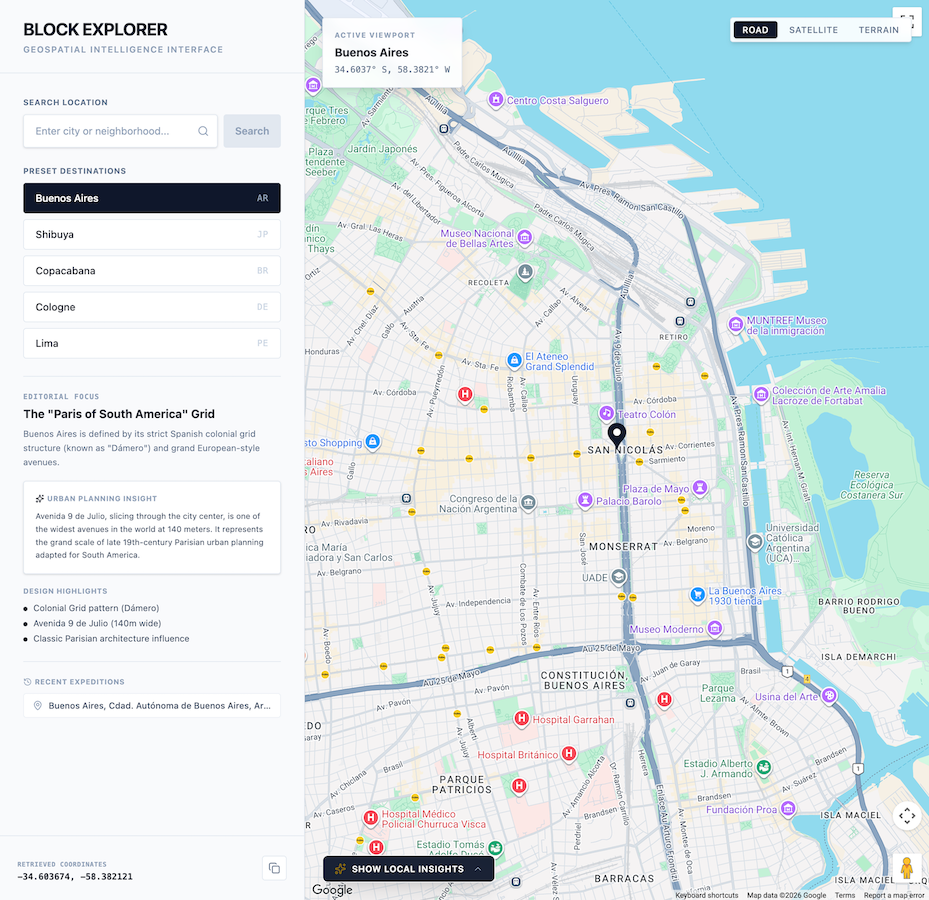
在本程式碼研究室中,您將建構 Block Explorer,這是一款結合真實世界地圖資料和生成式 AI 的互動式地理空間遊戲。您將使用 AI Studio 生成應用程式,並與 Google Maps Platform和 Gemini API 整合。接著,您將瞭解如何直接將完成的應用程式部署至 Cloud Run,供其他人試用。
學習內容
- 使用 Google AI Studio 設計互動式地理空間地圖和知識問答網頁應用程式原型。
- 直接在 AI Studio 工作區中啟用並自動佈建 Google 地圖平台試用金鑰。
- 使用自然語言提示實作動態地址地理編碼、地點探索和 AI 生成的益智測驗。
- 整合 Maps Grounding Lite,提高知識問答的準確度。
- 在互動式預覽沙箱中測試及反覆調整應用程式。
- 直接從 Google AI Studio UI 將應用程式部署至 Cloud Run。
課程內容
- 瞭解如何使用 Google AI Studio 的建構模式,透過自然語言快速設計全端服務原型。
- 瞭解如何使用 Google 地圖平台 API,以地理空間資料建構應用程式。
- 瞭解如何運用真實世界地理空間脈絡,為 LLM 提示建立基準,進而生成動態測驗和在地洞察。
- 瞭解如何將 AI Studio 應用程式以無伺服器容器的形式部署至 Cloud Run。
以下是 pp 的預覽畫面:
2. 設定專案
啟動 AI Studio 前,請先確認帳戶狀態、必要條件和 API 存取權。
Google 帳戶和層級資訊
- 如果沒有 Google 帳戶,請建立帳戶。
- 提示:請盡可能使用個人 Google 帳戶進行本實驗室。群組、公司或學校帳戶可能會強制執行政策,停用實驗功能或雲端整合功能。
- 查看部署作業的帳單詳細資料:
- Google Cloud 入門級:無須建立完整的 Google Cloud 帳單帳戶,即可在特定區域免費發布最多兩個全端應用程式。
- 標準部署:連結至現有的付費 Google Cloud 專案,並擴充儲存空間限制、CPU 資源和 API。
Google Maps Platform 試用金鑰
為簡化原型設計流程,Google AI Studio 原生整合了 Google Maps Platform。您可以在專案中直接測試及建構核心 Google 地圖平台 API (例如 Maps JavaScript API、Geocoding API、Places API 和 Routes API),完全不必費心。AI Studio 會自動為您生成 Google Maps Platform 試用金鑰。
試用金鑰的主要優點:
- 無須提供信用卡或設定帳單:您可立即設計原型並進行評估,不必設定 Google Cloud 帳單帳戶。
- 充足的原型設計配額:每個 API 每天最多可免費提出 100 項要求,供您測試及疊代。
- 內建整合,操作簡單:您不需要前往外部入口網站或複製貼上憑證,Google AI Studio 會自動偵測應用程式何時需要整合 Google 地圖平台,並為您設定相關項目。
3. 在 AI Studio 建構模式中建立應用程式殼層
首先,您將使用 Google AI Studio 建立應用程式殼層。
- 前往 Google AI Studio 應用程式面板,然後按一下「New App」(新應用程式) (或選取「Build」(建構) 分頁)。
- 在提示輸入框中,輸入地理空間應用程式的初始說明。您也可以點選提示建議下方的「Google Maps Platform」探索晶片:
Build a highly polished, responsive, split-screen application. This application should be called "Block Explorer". It is meant to be a geospatial exploration app. It will use Google Maps Platform.

Key Features & Functionality:

-   Split-Screen Layout: On desktop, a 1/3-width left-side editorial control panel and a 2/3-width right-side full-height map.
-   Include a search bar where users can type a location such as a city or neighborhood. Submitting should issue a Geocoding request to the Google Geocoding V4 API REST endpoint (https://geocode.googleapis.com/v4/geocode/address/). Then pan the map to the geocoded location.
-   Interactive Google Map: Render the Map inside an interactive container allowing users to pan, drag, and zoom freely. Place customized markers representing the currently selected/geocoded location.
-   Also include five buttons for presets the users can click on: Buenos Aires, Shibuya, Copacabana, Cologne, and Lima. Clicking on this should geocode the location and pan the map there.
-   Make sure to also include a mechanism to clearly show error messages when they occur so users can easily troubleshoot.
- 按一下「建構」,開始產生應用程式。
AI Studio 會開始生成應用程式程式碼。如果系統提示選擇設計主題,請選取偏好的樣式。
啟用 Google Maps Platform 並提供試用金鑰
Google 地圖平台提供 Geocoding API,可將人類可讀的地址查詢 (例如「澀谷」或「布宜諾斯艾利斯」) 轉換為地理座標 (經緯度),以便將地圖置中並顯示標記。
當您傳送具有地理空間意圖的提示 (例如要求 Google 地圖、商店定位器或當地探索),AI Studio 會自動偵測地理空間需求,並協助您佈建金鑰:
- 情境內啟用窗簾:對話輪次中會顯示名為「設定 Google Maps Platform」的內嵌資訊卡。
- 接受條款並啟用:
- 詳閱並接受《地圖試用專案服務條款》(如果系統提示,請一併接受《入門級附加服務條款》)。
- 按一下「啟用 Google 地圖」。
- 自動佈建金鑰和注入密鑰:AI Studio 會在 Google 代管專案 (GHP) 基礎架構上自動佈建 Google 地圖平台試用金鑰,並以
GOOGLE_MAPS_PLATFORM_KEY名稱直接注入專案的密鑰。 - 即時預覽:應用程式預覽沙箱會立即重新整理,顯示可互動的完整 Google 地圖。
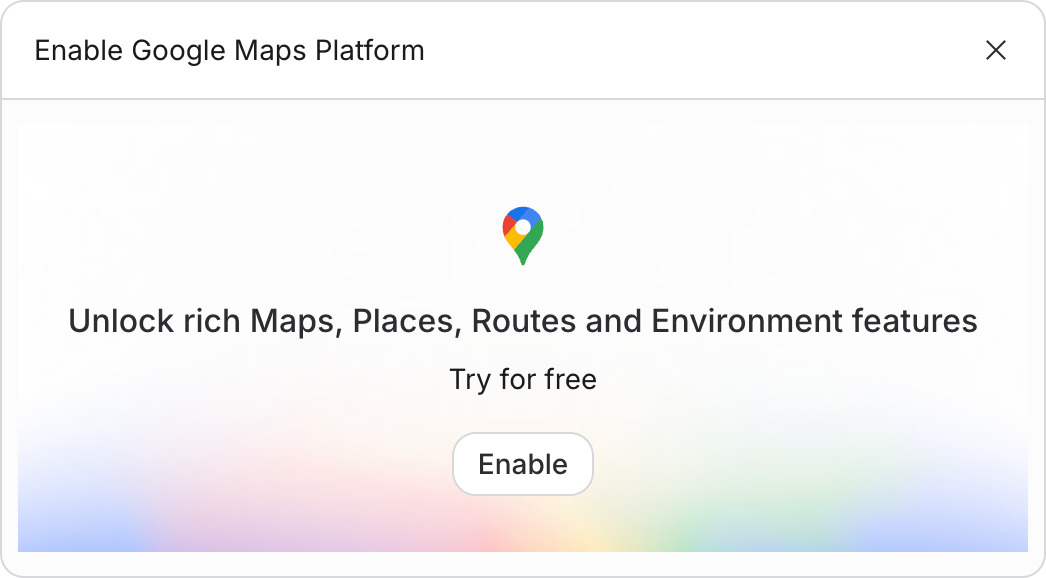
在預覽沙箱中測試應用程式,方法是輸入新位置或選取其中一個預設位置按鈕!
4. 使用 Gemini API 新增在地洞察資料
接著,您將整合 Gemini API,在使用者探索地圖時,生成有關地點的豐富在地洞察資料。
- 在對話視窗中,向 AI 助理傳送下列提示:
Now, let's bring in the AI using the Gemini API.
1.  Once geocoding successfully identifies the City and State (e.g., "Miami, Florida"), trigger a call to the Gemini API (using the gemini-3.8-flash model).
2.  Use the following prompt template for the AI:
   "You are a local tour guide for [City, State]. Give me exactly 3 short, highly engaging, and unusual or surprising fun facts about this place. Keep each fact under 2 sentences. Format the response as a clean HTML unordered list (<ul>) so I can inject it directly."
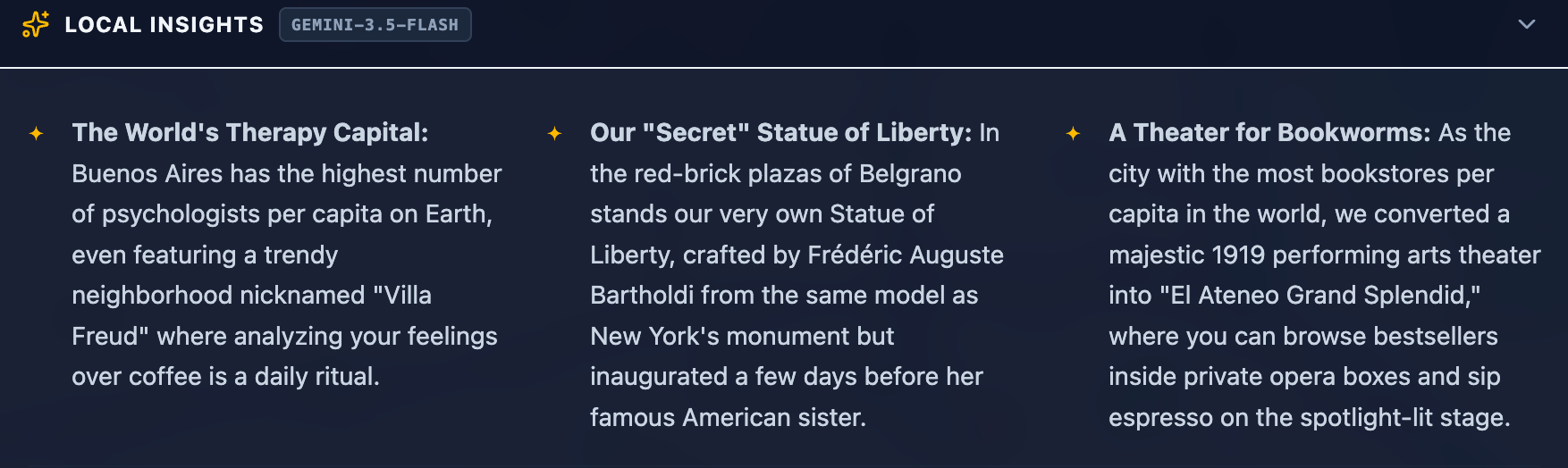
3.  Display these fun facts in a beautiful "Local Insights" banner on the bottom portion of the map screen. Add a subtle loading spinner while the AI is thinking.
4.  Make sure to make this handling robust. If an API request fails, display a user-friendly error notification in the UI.
- 在預覽窗格中確認選取或搜尋地點時,會顯示 Gemini 生成的動態有趣事實。
您應該會看到 AI Studio 更新應用程式,並在畫面底部新增「Local Insights」專區。
5. 建立 AI 生成的問答測驗
現在應用程式可以擷取位置座標和本地化洞察資訊,請結合這些功能,根據所選目的地產生互動式益智測驗。
- 將測驗生成提示傳送給代理:
Now let's build the actual game! We will have Gemini generate a 3-question quiz based on the real places we just got information about.

After the local insights are generated, show the user a button to "Test their local knowledge". Once clicked, offer them 3 options to choose from:
-   Local cuisine
-   Art and culture
-   Local history

Once selected, generate a 3-question quiz based on the category and the place. The quiz should be multiple choice. Once the user submits the quiz show them their score and the correct answer.
- 在預覽視窗中播放生成的測驗,測試狀態管理、答案選取和分數顯示功能。
6. 整合 Maps Grounding Lite
根據預設,Gemini 會使用訓練資料中的知識生成事實和測驗。如要提高準確率及運用即時空間資料,請整合 Maps Grounding Lite。這項服務會將 Gemini 直接連線至 Google 地圖平台的即時資料。
- 在 AI Studio 中傳送下列提示:
Add a toggle to make the quiz more difficult. Call this "Hyperlocal mode". When enabled, use the Google Maps Grounding Lite service with the Gemini API to fetch more local data, making the quiz more difficult.

Add information for the user so they know that Hyperlocal Mode is more difficult and how it works.
- 在預覽視窗中測試「超區域模式」切換鈕,確認測驗生成功能是否正常運作。
LLM 可能會產生特定營業時間、近期開幕或確切地點 ID 的錯覺。地圖基礎 Lite 會根據真實的 Google 地圖地點實體和出處資訊,提供回覆內容的資訊根據,大幅提升問答遊戲問題的事實準確度。
7. 部署至 Cloud Run
原型完全正常運作後,即可直接從 AI Studio 將其部署為 Cloud Run 上的公開無伺服器容器。
- 在 Google AI Studio 的右上角,按一下「發布」按鈕,啟動部署精靈。
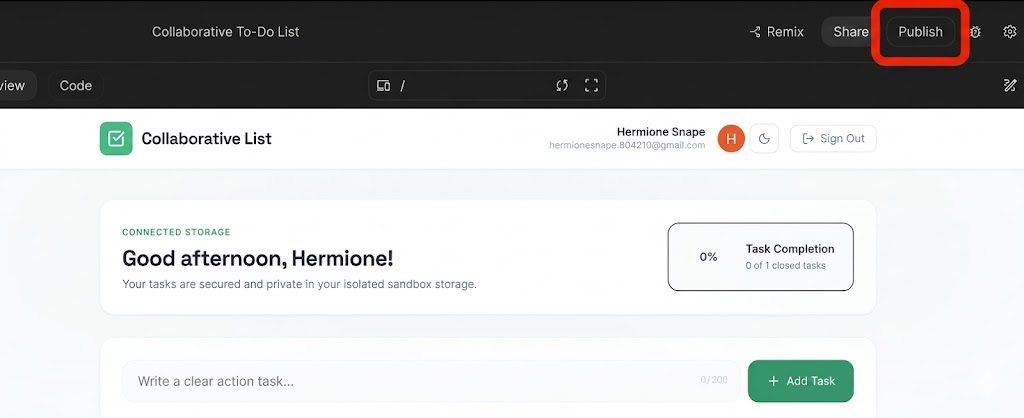
- 按一下「開始使用」,設定 Google Cloud 專案。
- 確認目標 Google Cloud 專案下拉式選單與您預期的部署專案相符。
- AI Studio 會自動為 Cloud Run 執行個體產生專屬服務 ID。
- 按一下「發布應用程式」。
- 容器建構、註冊和服務部署作業會在背景執行。這項程序通常會在 2 到 4 分鐘內完成。
- 部署完成後,請複製產生的「應用程式網址」,並在瀏覽器分頁中前往應用程式的即時連結!
8. 查看安全性與製作最佳做法
將這個應用程式從原型轉移至正式環境時,請牢記以下安全支柱:
1. Google Maps API 金鑰限制
請勿讓正式版 Google Maps API 金鑰不受限制。在 Google Cloud 控制台中:
- API 限制:限制金鑰,使其只能呼叫特定 API (Maps JavaScript API、Geocoding API、Places API)。
- 應用程式限制:使用 HTTP 參照網址 (例如
https://yourgame.com/*) 限制金鑰,避免在第三方網站上未經授權使用。
2. 保護 Gemini API 金鑰
Gemini API 金鑰絕不應在用戶端 JavaScript 中公開。
- 正式版架構:建構輕量後端服務 (例如 Cloud Run 或 Cloud Functions) 做為 Proxy。前端會呼叫後端 (
/api/get-fun-facts),後端則會使用環境變數與 Google AI Studio 安全地通訊 (GEMINI_API_KEY)。
9. 清理資源
如要避免產生預料之外的帳單費用,或清理工作區資源,請按照下列步驟操作:
- 在 Google AI Studio 中,前往「應用程式」頁面。
- 在格狀或清單中找出應用程式。
- 按一下垃圾桶圖示,即可刪除應用程式狀態,並從 Cloud Run 取消發布服務。
- 如果您是使用標準專案部署,並想完全關閉所有資源,請前往 Google Cloud 控制台專案設定,然後刪除基礎專案。
10. 結語
恭喜!您已透過 Google AI Studio 設計、開發及部署 AI 輔助地理空間網頁應用程式。您已成功使用 Google 地圖平台 API,打造以真實世界資料為基礎的互動式遊戲。
前往這個連結,即可領取「完成建構工具學習歷程」徽章!
如要繼續學習,請前往 goo.gle/builders 參加下一個實驗室。