

1. 簡介
在本實驗室中,您將使用 Agent Development Kit (ADK) 建構代理!您將瞭解如何使用 ADK 和各種工具類型,建構軟體錯誤助理代理。您將從基本代理程式開始,逐步新增工具來提升功能,包括函式工具、內建工具、第三方工具和 Model Context Protocol (MCP) 工具。

課程內容
- 如何設定 Python 專案以進行 ADK 開發。
- 如何建立基本 ADK 代理程式。
- 如何導入及使用函式工具。
- 如何整合 Google 搜尋等內建工具。
- 如何在 ADK 中運用 LangChain 等架構的第三方工具。
- 如何使用 MCP 工具與資料庫 (Cloud SQL) 和 API 互動。
2. 總覽
假設您是全球咖啡機公司 QuantumRoast 的專案經理。

您協助團隊成員在如海的工程藍圖、策略突然轉向 (我們現在做抹茶!) 和客戶傳來的工單中航行,從有錯誤的發票系統到 24 小時發出高音調噪音的咖啡機,無所不包。
在平常的日子裡,您會開啟約五十個瀏覽器分頁:內部票證系統、電子郵件、即時通訊、GitHub、Google 搜尋、StackOverflow 等等。你喜歡自己的工作和同事,但有時會感到壓力過大。

如果我們能建構一個小幫手,協助您建立及分類軟體工單,並偵錯問題,是不是很不錯?這項功能是由 AI 代理提供。

Agent Development Kit (ADK)
Agent Development Kit (ADK) 是一個彈性十足的模組化框架,可用於開發及部署 AI 代理。ADK 雖然已針對 Gemini 和 Google 生態系統完成最佳化調整,但不限於特定模型和部署作業,且可與其他架構相容。ADK 的設計宗旨是讓代理開發作業更貼近軟體開發,方便開發人員建立、部署及自動調度管理代理式架構,從簡單的工作到複雜的工作流程,都能輕鬆完成。
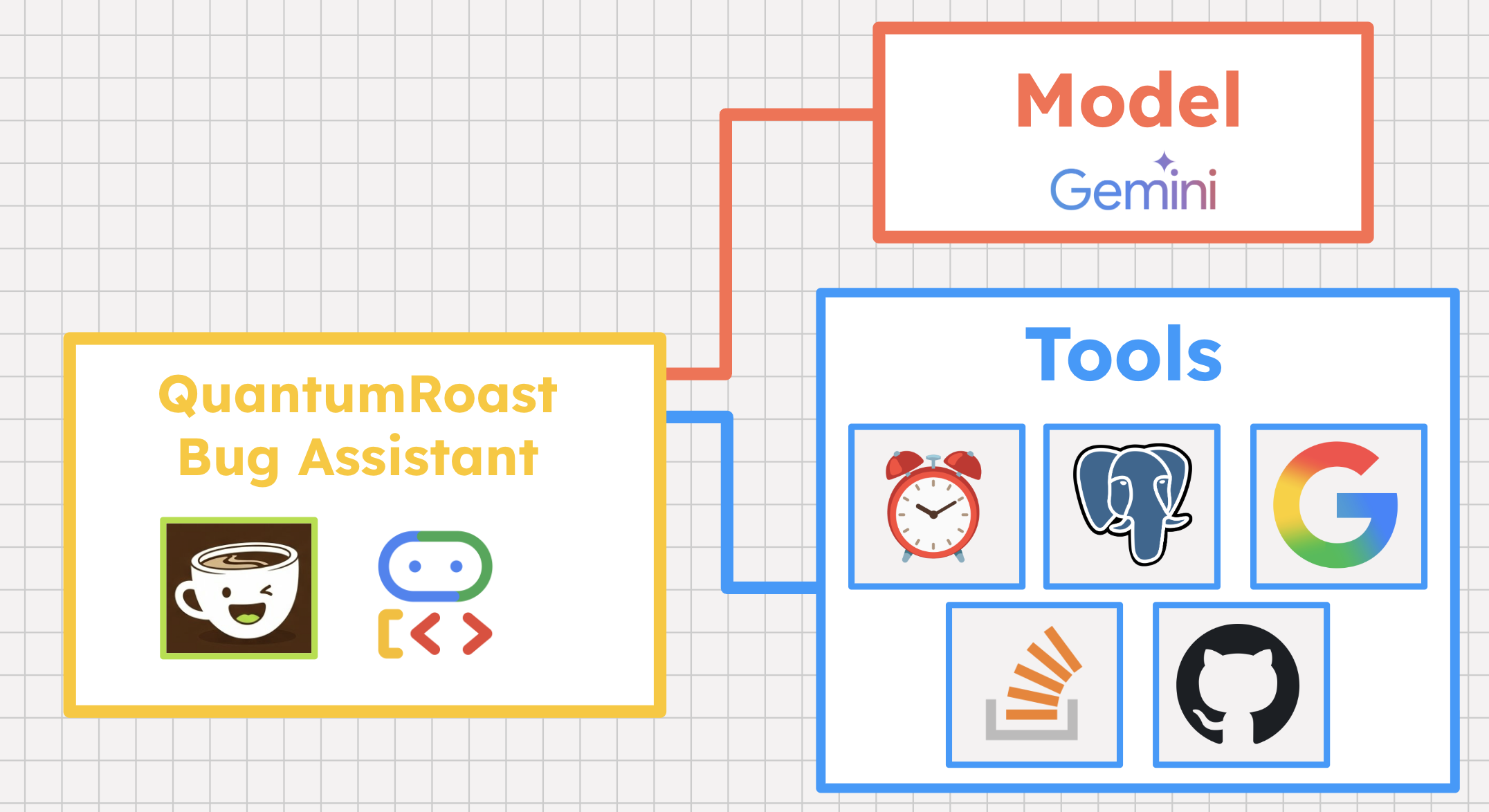
ADK 是我們用來建構 QuantumRoast 軟體錯誤助理的架構。
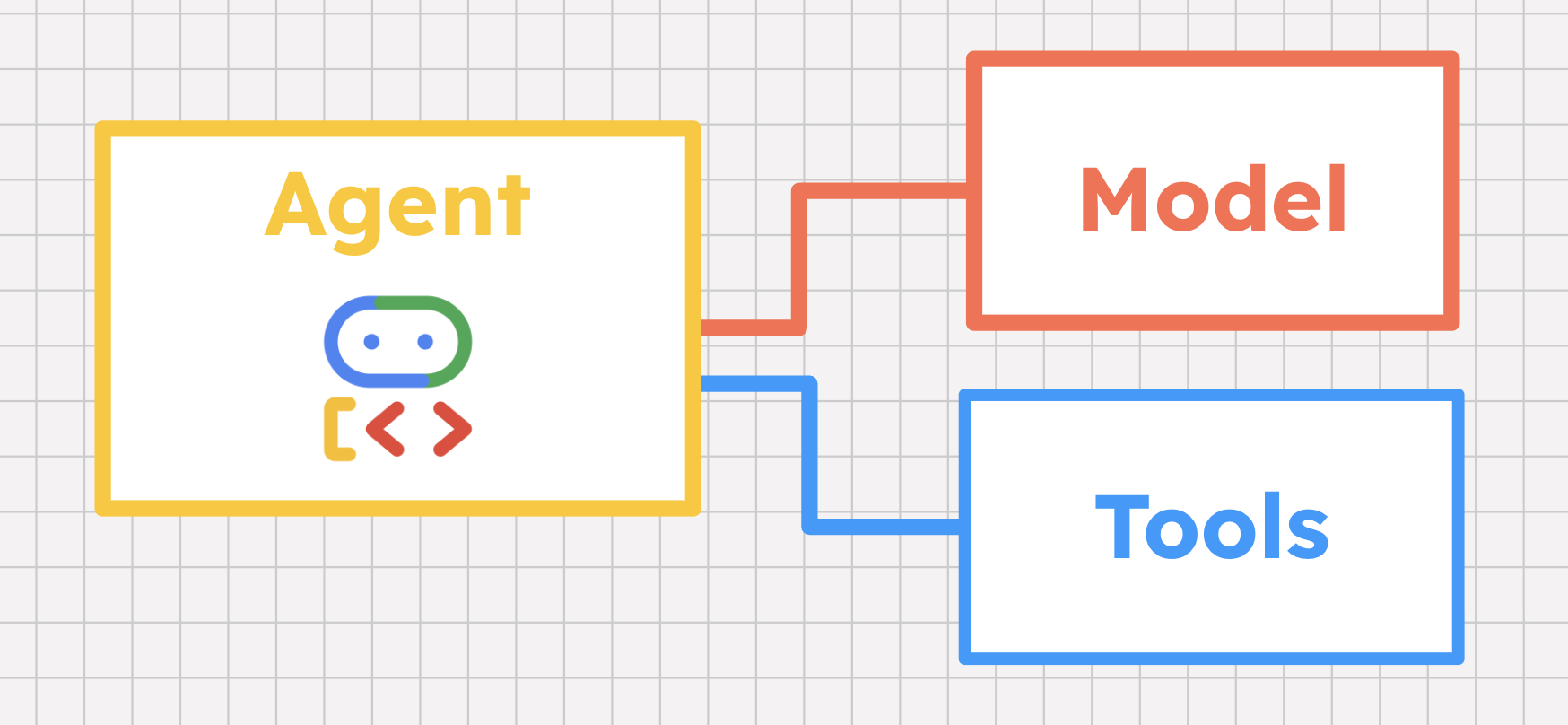
工具 101
AI 代理會使用模型 (而非硬式編碼邏輯) 推論問題的解決方式。但 AI 代理不僅能根據 LLM 推論,還能收集外部資料,然後代表使用者採取行動。AI 代理程式不會告訴你如何解決問題,而是協助你實際解決問題。如何達到這個目標呢?使用工具!
工具是一種功能,可協助 AI 代理與世界互動。工具幾乎可以是任何項目:內嵌函式、代管資料庫、第三方 API,甚至是另一個代理程式。Agent Development Kit (ADK) 等 AI 代理程式架構內建工具支援,支援多種工具類型,我們稍後會介紹。
但代理如何知道何時呼叫特定工具,以及如何呼叫?代理程式的模型在這裡扮演幾個重要角色。
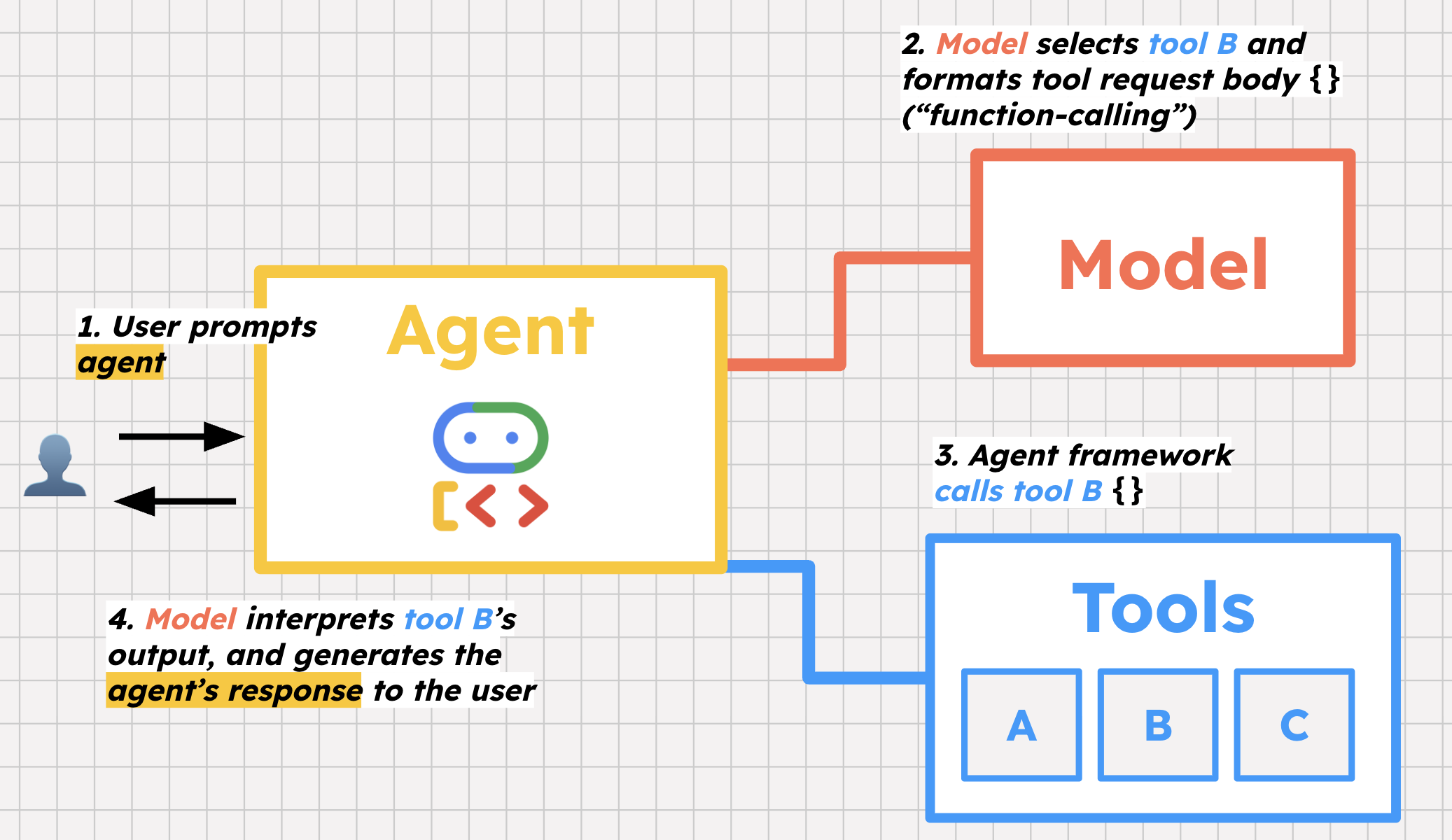
首先是工具選取。我們會提供工具清單給代理,並附上使用說明。使用者提示代理時,代理的模型會判斷要呼叫哪些工具,以及呼叫原因,藉此協助使用者。
第二個重要步驟是函式呼叫。「函式呼叫」這個名稱有點誤導,因為模型實際上並非呼叫工具,而是準備呼叫工具,方法是格式化要求主體,然後框架會使用該主體呼叫工具。
最後,模型會解讀該工具的回覆 (例如資料庫中的未解決錯誤清單),並決定是否採取進一步行動,或將該資訊提供給使用者。
如要實際瞭解上述概念,請使用 ADK Python 建構 QuantumRoast 錯誤助理代理。
3. 事前準備
設定 Google Cloud 專案
- 如果沒有 Google 帳戶,請先建立帳戶。
- 請改用個人帳戶,而非公司或學校帳戶。公司和學校帳戶可能設有限制,導致您無法啟用本實驗室所需的 API。
- 登入 Google Cloud 控制台。
- 在 Cloud 控制台中啟用帳單。
- 完成本實驗室的 Cloud 資源費用應不到 $1 美元。
- 您可以按照本實驗室結尾的步驟刪除資源,以免產生後續費用。
- 新使用者可獲得價值 $300 美元的免費試用期。
- 建立新專案,或選擇重複使用現有專案。
開啟 Cloud Shell 編輯器
- 前往 Cloud Shell 編輯器
- 如果畫面底部未顯示終端機,請開啟終端機:
- 按一下漢堡選單

- 按一下「終端機」。
- 按一下「New Terminal」(新增終端機)
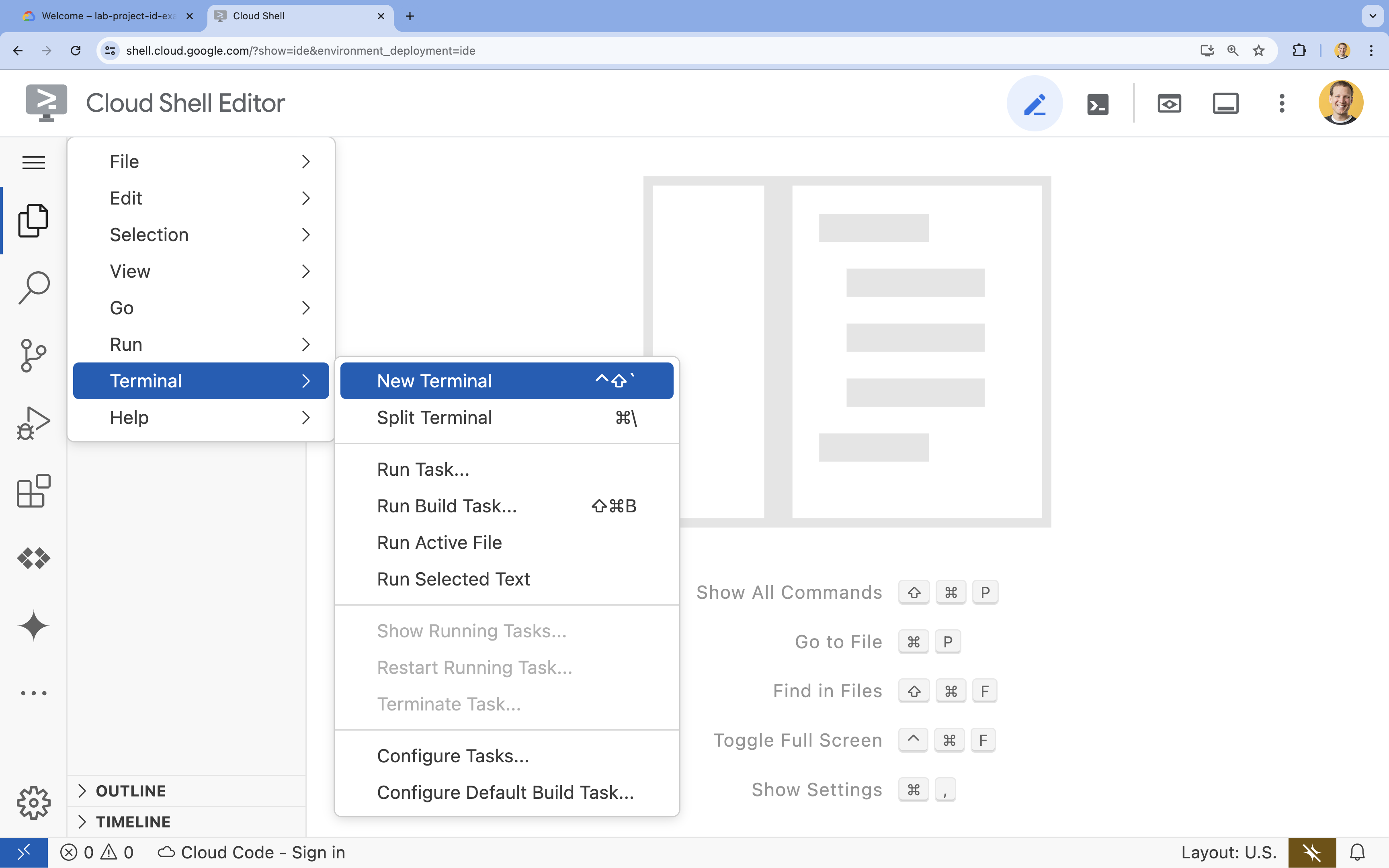
- 按一下漢堡選單
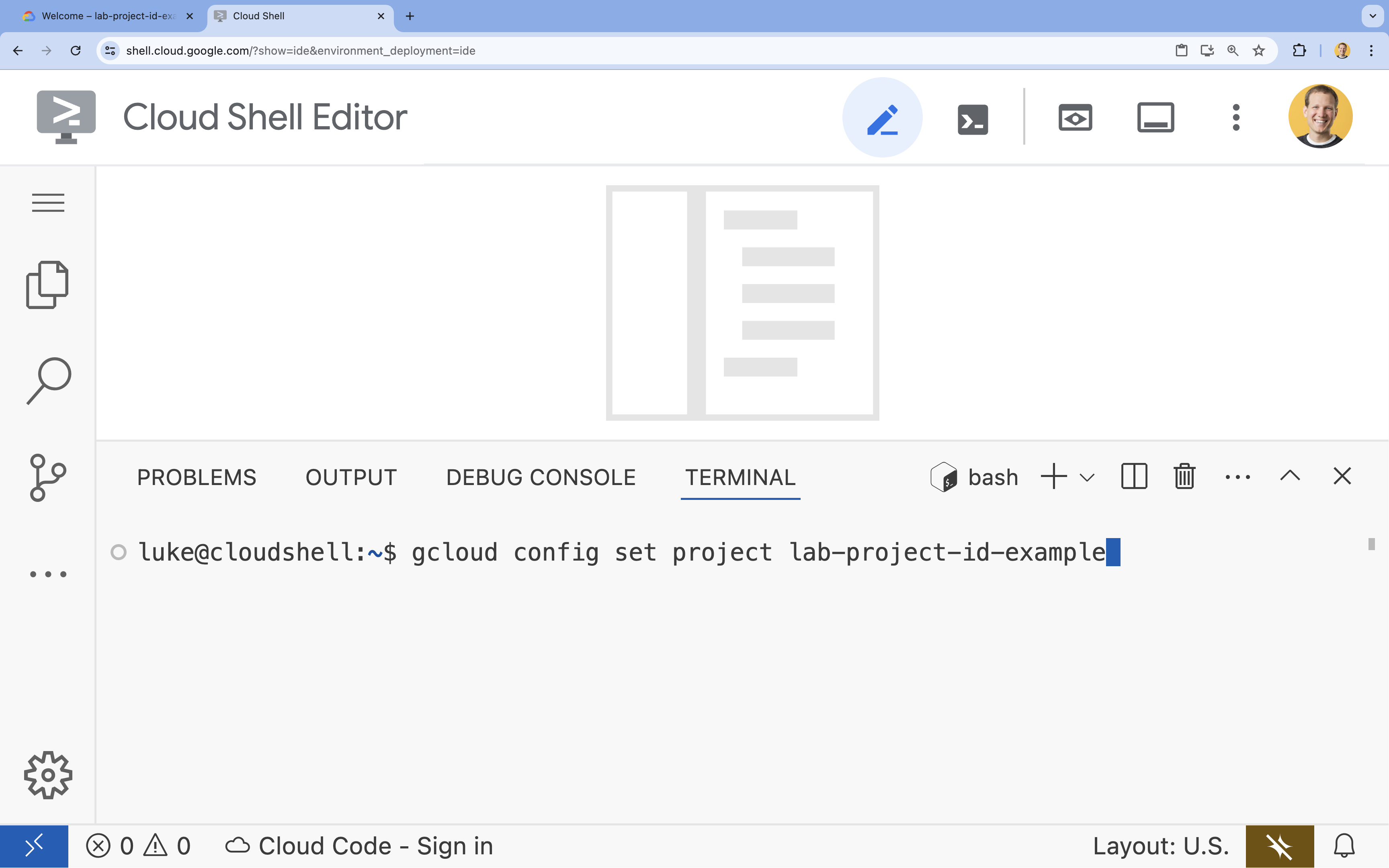
- 在終端機中,使用下列指令設定專案 (請替換
YOUR_PROJECT_ID):- 格式:
gcloud config set project YOUR_PROJECT_ID - 範例:
gcloud config set project lab-project-id-example - 如果忘記專案 ID,請按照下列步驟操作:
- 您可以使用下列指令列出所有專案 ID:
gcloud projects list | awk '/PROJECT_ID/{print $2}'
- 您可以使用下列指令列出所有專案 ID:
- 格式:
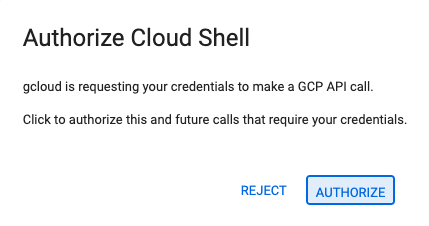
- 如果系統提示您授權,請點選「授權」繼續操作。
- 您應會看到下列訊息:
Updated property [core/project].
WARNING並收到Do you want to continue (Y/N)?提示,表示您可能輸入了錯誤的專案 ID。按下N和Enter,然後再次嘗試執行gcloud config set project指令。 - 在終端機中,設定
PROJECT_ID環境變數,以供後續步驟使用。export PROJECT_ID=$(gcloud config get project)
啟用 API
在終端機中執行下列指令,啟用必要的 Google Cloud API:
gcloud services enable sqladmin.googleapis.com \
   compute.googleapis.com \
   cloudresourcemanager.googleapis.com \
   secretmanager.googleapis.com \
   servicenetworking.googleapis.com \
   aiplatform.googleapis.com \
   run.googleapis.com \
   artifactregistry.googleapis.com \
   cloudbuild.googleapis.com
建立 PostgreSQL 適用的 Cloud SQL 執行個體
QuantumRoast 有一個錯誤支援單資料庫,其中包含所有內部支援單。接下來,請建立 PostgreSQL 適用的 Cloud SQL 執行個體,完成設定。
gcloud sql instances create software-assistant \
   --database-version=POSTGRES_16 \
   --tier=db-custom-1-3840 \
   --region=europe-west4 \
   --edition=ENTERPRISE \
   --enable-google-ml-integration \
   --database-flags cloudsql.enable_google_ml_integration=on \
   --root-password=admin
等待執行個體建立完成 (可能需要幾分鐘)。
建立完成後,您可以在 Cloud 控制台這裡查看執行個體。
建立 Cloud SQL 資料庫
建立 SQL 資料庫 (tickets-db),並授予 Cloud SQL 服務帳戶 Vertex AI 的存取權 (以便建立嵌入,執行相似度搜尋)。
gcloud sql databases create tickets-db --instance=software-assistant

SERVICE_ACCOUNT_EMAIL=$(gcloud sql instances describe software-assistant --format="value(serviceAccountEmailAddress)")
echo $SERVICE_ACCOUNT_EMAIL

gcloud projects add-iam-policy-binding $PROJECT_ID --member="serviceAccount:$SERVICE_ACCOUNT_EMAIL" --role="roles/aiplatform.user"
設定 tickets 表格
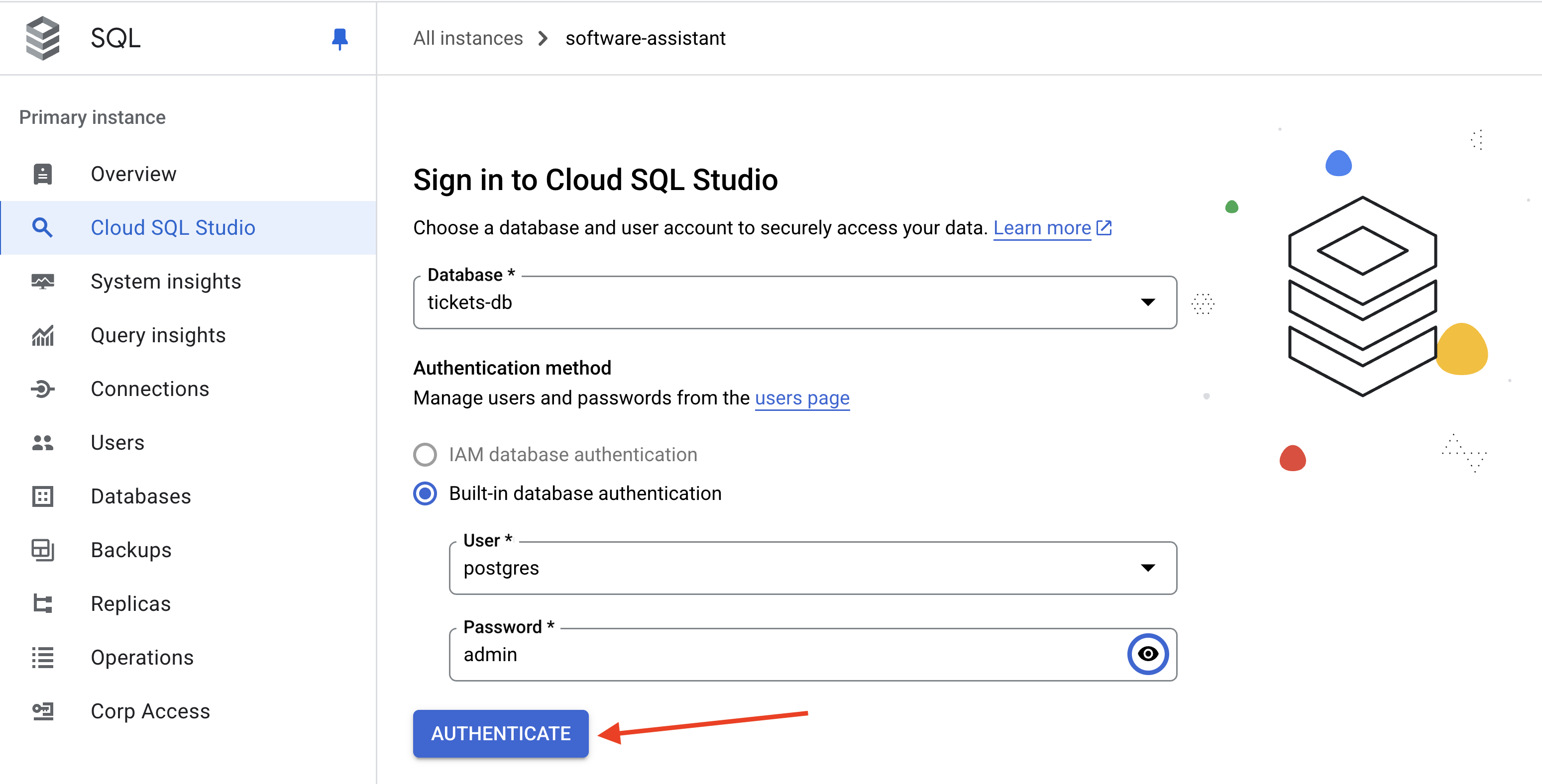
在 Cloud Console (Cloud SQL) 中,開啟 software-assistant 執行個體的 Cloud SQL Studio。
使用 postgres 使用者和 admin 做為密碼,登入 tickets-db 資料庫。
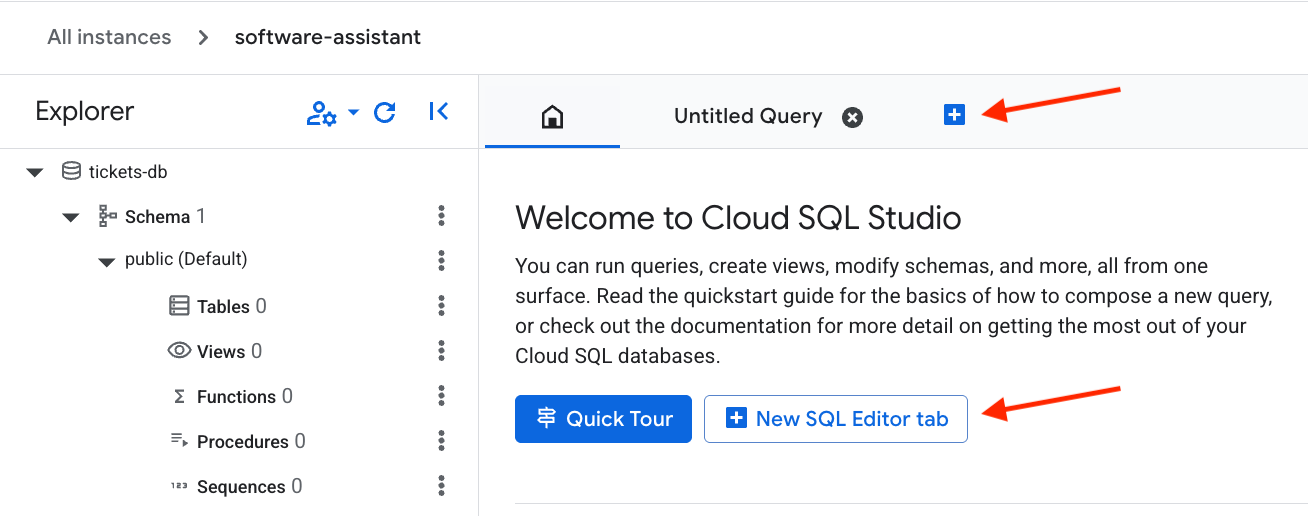
開啟新的 Editor 分頁。
接著,貼上下列 SQL 程式碼,設定資料表並建立向量嵌入。按下 Run 鍵執行指令。
CREATE EXTENSION IF NOT EXISTS google_ml_integration CASCADE;
CREATE EXTENSION IF NOT EXISTS vector CASCADE;
GRANT EXECUTE ON FUNCTION embedding TO postgres;

CREATE TABLE tickets (
    ticket_id SERIAL PRIMARY KEY,             -- PostgreSQL's auto-incrementing integer type (SERIAL is equivalent to INT AUTO_INCREMENT)
    title VARCHAR(255) NOT NULL,              -- A concise summary or title of the bug/issue.
    description TEXT,                         -- A detailed description of the bug.
    assignee VARCHAR(100),                    -- The name or email of the person/team assigned to the ticket.
    priority VARCHAR(50),                     -- The priority level (e.g., 'P0 - Critical', 'P1 - High').
    status VARCHAR(50) DEFAULT 'Open',        -- The current status of the ticket (e.g., 'Open', 'In Progress', 'Resolved'). Default is 'Open'.
    creation_time TIMESTAMP WITH TIME ZONE DEFAULT CURRENT_TIMESTAMP, -- Timestamp when the ticket was first created. 'WITH TIME ZONE' is recommended for clarity and compatibility.
    updated_time TIMESTAMP WITH TIME ZONE DEFAULT CURRENT_TIMESTAMP  -- Timestamp when the ticket was last updated. Will be managed by a trigger.
);
tickets 資料表已建立,請按一下 Clear 清除舊查詢。
現在請插入範例資料,然後再次按下 Run 按鈕。
INSERT INTO tickets (title, description, assignee, priority, status) VALUES
('Login Page Freezes After Multiple Failed Attempts', 'Users are reporting that after 3 failed login attempts, the login page becomes unresponsive and requires a refresh. No specific error message is displayed.', 'samuel.green@example.com', 'P0 - Critical', 'Open');

INSERT INTO tickets (title, description, assignee, priority, status) VALUES
('Dashboard Sales Widget Intermittent Data Loading Failure', 'The "Sales Overview" widget on the main dashboard intermittently shows a loading spinner but no data. Primarily affects Chrome browser users.', 'maria.rodriguez@example.com', 'P1 - High', 'In Progress');

INSERT INTO tickets (title, description, assignee, priority, status) VALUES
('Broken Link in Footer - Privacy Policy', 'The "Privacy Policy" hyperlink located in the website footer leads to a 404 "Page Not Found" error.', 'maria.rodriguez@example.com', 'P3 - Low', 'Resolved');

INSERT INTO tickets (title, description, assignee, priority, status) VALUES
('UI Misalignment on Mobile Landscape View (iOS)', 'On specific iOS devices (e.g., iPhone 14 models), the top navigation bar shifts downwards when the device is viewed in landscape orientation, obscuring content.', 'maria.rodriguez@example.com', 'P2 - Medium', 'In Progress');

INSERT INTO tickets (title, description, assignee, priority, status) VALUES
('Critical XZ Utils Backdoor Detected in Core Dependency (CVE-2024-3094)', 'Urgent: A sophisticated supply chain compromise (CVE-2024-3094) has been identified in XZ Utils versions 5.6.0 and 5.6.1. This malicious code potentially allows unauthorized remote SSH access by modifying liblzma. Immediate investigation and action required for affected Linux/Unix systems and services relying on XZ Utils.', 'frank.white@example.com', 'P0 - Critical', 'Open');

INSERT INTO tickets (title, description, assignee, priority, status) VALUES
('Database Connection Timeouts During Peak Usage', 'The application is experiencing frequent database connection timeouts, particularly during peak hours (10 AM - 12 PM EDT), affecting all users and causing service interruptions.', 'frank.white@example.com', 'P1 - High', 'Open');

INSERT INTO tickets (title, description, assignee, priority, status) VALUES
('Export to PDF Truncates Long Text Fields in Reports', 'When generating PDF exports of reports containing extensive text fields, the text is abruptly cut off at the end of the page instead of wrapping or continuing to the next page.', 'samuel.green@example.com', 'P1 - High', 'Open');

INSERT INTO tickets (title, description, assignee, priority, status) VALUES
('Search Filter "Date Range" Not Applying Correctly', 'The "Date Range" filter on the search results page does not filter records accurately; results outside the specified date range are still displayed.', 'samuel.green@example.com', 'P2 - Medium', 'Resolved');

INSERT INTO tickets (title, description, assignee, priority, status) VALUES
('Typo in Error Message: "Unathorized Access"', 'The error message displayed when a user attempts an unauthorized action reads "Unathorized Access" instead of "Unauthorized Access."', 'maria.rodriguez@example.com', 'P3 - Low', 'Resolved');

INSERT INTO tickets (title, description, assignee, priority, status) VALUES
('Intermittent File Upload Failures for Large Files', 'Users are intermittently reporting that file uploads fail without a clear error message or explanation, especially for files exceeding 10MB in size.', 'frank.white@example.com', 'P1 - High', 'Open');
在 QuantumRoast,我們可能想知道上次更新錯誤/工單的時間。
為此,我們可以建立觸發條件,在每次更新記錄時更新 updated_time 欄位。
點選 Clear,然後貼上下列 SQL 來實作觸發程序。
按下 Run 鍵即可執行。
CREATE OR REPLACE FUNCTION update_updated_time_tickets()
RETURNS TRIGGER AS $$
BEGIN
    NEW.updated_time = NOW();  -- Set the updated_time to the current timestamp
    RETURN NEW;                -- Return the new row
END;
$$ language 'plpgsql';

CREATE TRIGGER update_tickets_updated_time
BEFORE UPDATE ON tickets
FOR EACH ROW                  -- This means the trigger fires for each row affected by the UPDATE statement
EXECUTE PROCEDURE update_updated_time_tickets();
從 description 欄位建立向量嵌入。這樣一來,代理程式就能對資料庫執行相似度搜尋。例如:「是否有與網站首頁相關的未解決問題?」
ALTER TABLE tickets ADD COLUMN embedding vector(768) GENERATED ALWAYS AS (embedding('text-embedding-005',description)) STORED;
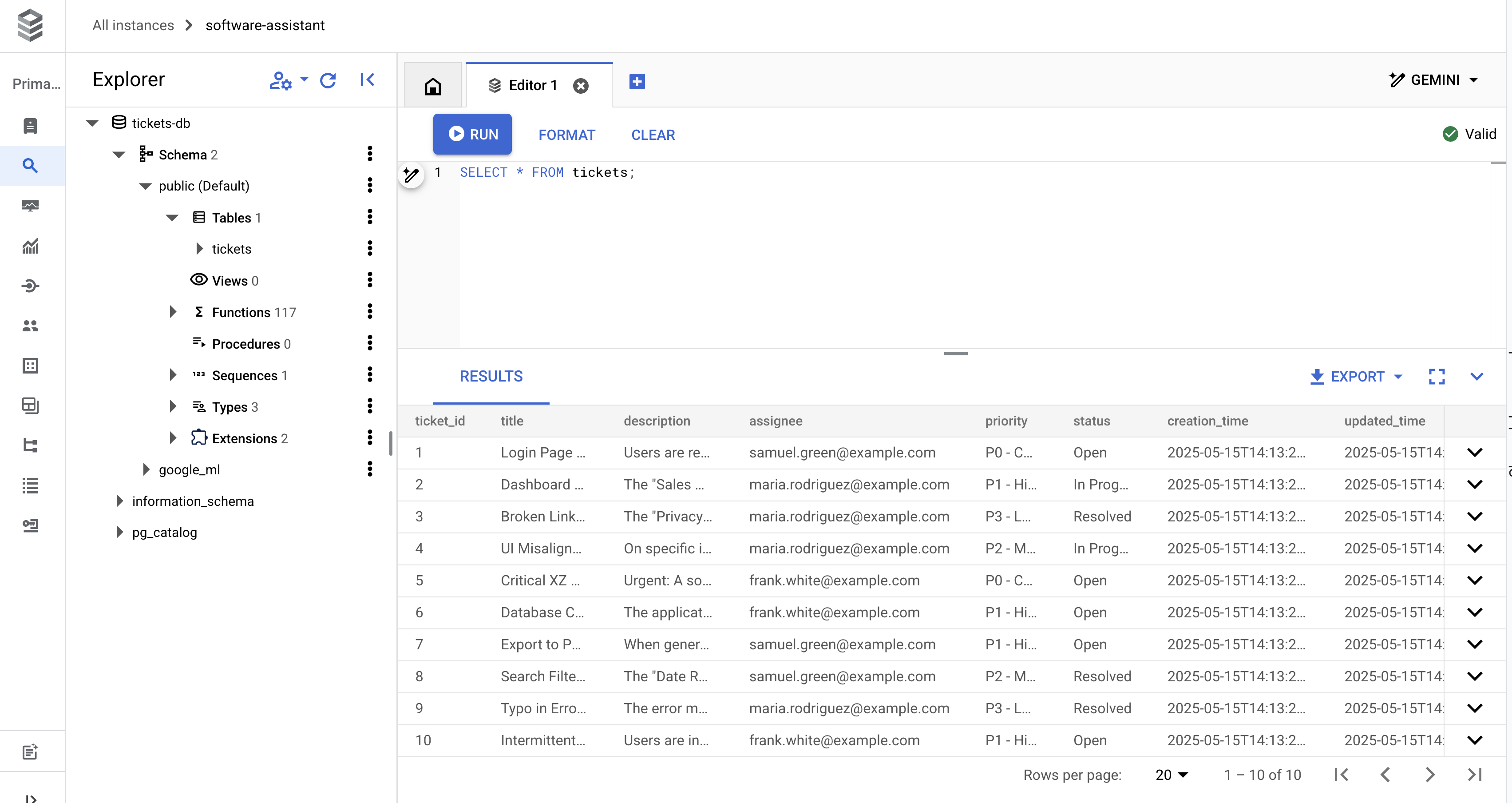
現在可以查詢資料庫,確認是否已準備就緒。
SELECT * FROM tickets;
您應該會看到 10 個傳回的資料列,如下所示:
現在可以進入有趣的部分,也就是程式碼!
4. Python 專案設定
開始建構服務專員之前,請先確認 Python 專案設定正確無誤。我們將在 Cloud Shell 中完成所有操作!
首先,建立 quantum-roast 資料夾,然後 cd 到該資料夾:
mkdir quantum-roast && cd quantum-roast
現在我們有了專案資料夾,接下來要初始化專案,並建立所需檔案。
我們將使用 uv (Python 的極速套件和專案管理員),這項工具已預先安裝在 Cloud Shell 中,可用於管理專案和依附元件。Uv 可協助我們設定部分檔案,以及管理虛擬環境、依附元件等,因此我們不必這麼做!
使用 uv init 初始化新專案:
uv init --description "QuantumRoast Software Bug Assistant with ADK" --bare --python 3.10
執行指令後,專案應該會有 pyproject.toml 檔案。如要驗證,請在 Cloud Shell 終端機中執行 cat pyproject.toml:
cat pyproject.toml
輸出內容應如下所示:
[project]
name = "quantum-roast"
version = "0.1.0"
description = "QuantumRoast Software Bug Assistant with ADK"
requires-python = ">=3.10"
dependencies = []
現在要使用 uv add,將 google-adk (ADK) 新增為專案的依附元件。
uv add google-adk==1.11.0
這會將 google-adk 新增至 pyproject.toml 中的 dependencies 清單。
ADK 需要特定專案結構,才能發揮最佳成效。
quantum-roast/
    software_bug_assistant/
        __init__.py
        agent.py
        .env
建立 software_bug_assistant 資料夾,並在其中建立檔案:
mkdir software_bug_assistant && touch software_bug_assistant/__init__.py \
software_bug_assistant/agent.py \
software_bug_assistant/tools.py \
software_bug_assistant/.env
使用 ls 驗證檔案建立作業:
ls -a software_bug_assistant/
畫面應顯示如下:
__init__.py . .. .env agent.py tools.py
現在要填入 .env 檔案,加入 ADK 正確呼叫 Gemini 模型所需的環境變數。我們將透過 Vertex API 存取 Gemini。
echo "GOOGLE_GENAI_USE_VERTEXAI=TRUE" >> software_bug_assistant/.env \
&& echo "GOOGLE_CLOUD_PROJECT=$PROJECT_ID" >> software_bug_assistant/.env \
&& echo "GOOGLE_CLOUD_LOCATION=europe-west4" >> software_bug_assistant/.env
如要確認 .env 是否已正確填入,請執行下列指令:
cat software_bug_assistant/.env
您應該會看到以下內容,其中 your-project-id 是您的專案 ID:
GOOGLE_GENAI_USE_VERTEXAI=TRUE
GOOGLE_CLOUD_PROJECT=your-project-id
GOOGLE_CLOUD_LOCATION=europe-west4
我們現在已準備好開始建立 ADK 代理。
5. 基礎 ADK 代理
讓我們設定基本 ADK 代理程式,在研討會期間逐一新增工具,打造強大的錯誤助理!
在 Cloud Shell 編輯器中開啟 agent.py:
cloudshell edit software_bug_assistant/agent.py
將下列程式碼貼到 agent.py 中,然後儲存 Ctrl + s 檔案:
from google.adk.agents import Agent

# --- Agent Definition (model, instructions, tools) ---
root_agent = Agent(
    model="gemini-2.5-flash",
    name="software_assistant",
    instruction="""
    You are a skilled expert in triaging and debugging software issues for a
    coffee machine company, QuantumRoast.
    """,
    tools=[],
)
啟動 ADK 的開發 UI (adk web),執行新建立的代理程式。使用 uv run 執行時,系統會自動建立已安裝 ADK 的虛擬環境。
uv run adk web --port 8080 --reload_agents
在控制台中,您應該會看到 ADK 網頁伺服器成功啟動。
INFO:     Started server process [1557]
INFO:     Waiting for application startup.

+-----------------------------------------------------------------------------+
| ADK Web Server started                                                      |
|                                                                             |
| For local testing, access at http://localhost:8080.                         |
+-----------------------------------------------------------------------------+

INFO:     Application startup complete.
INFO:     Uvicorn running on http://127.0.0.1:8080 (Press CTRL+C to quit)
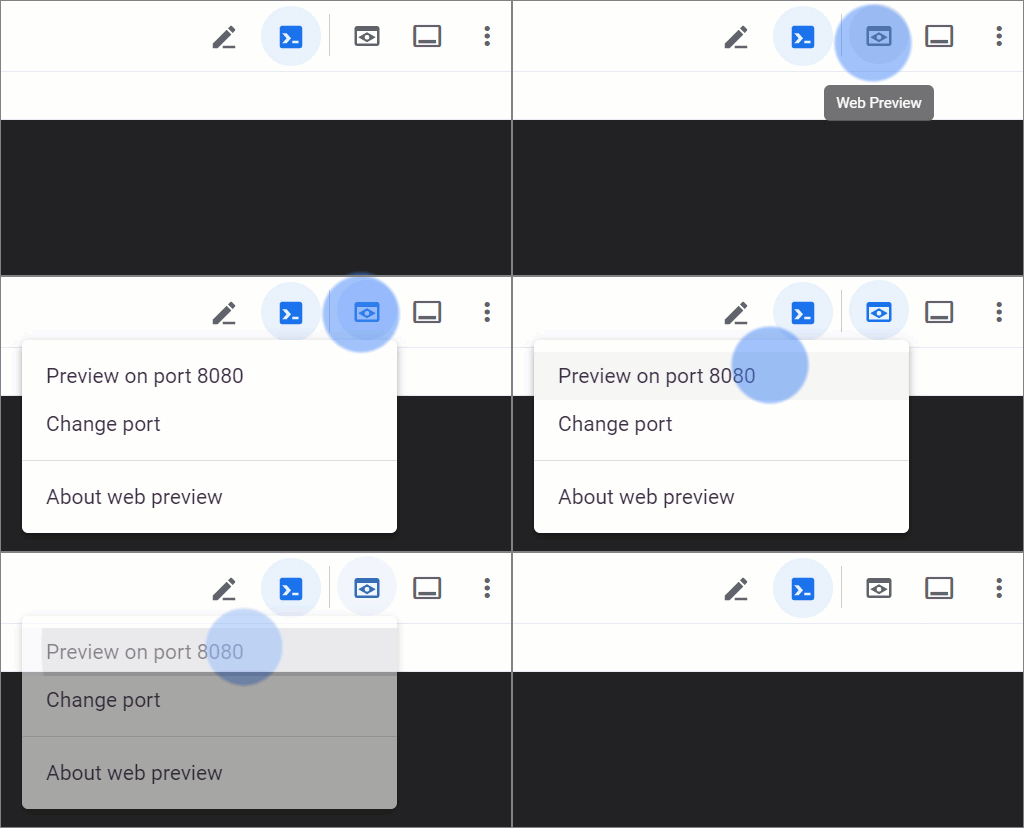
開啟 Cloud Shell 的網頁預覽功能,即可查看 UI。
您應該會看到 ADK 網頁版 UI。
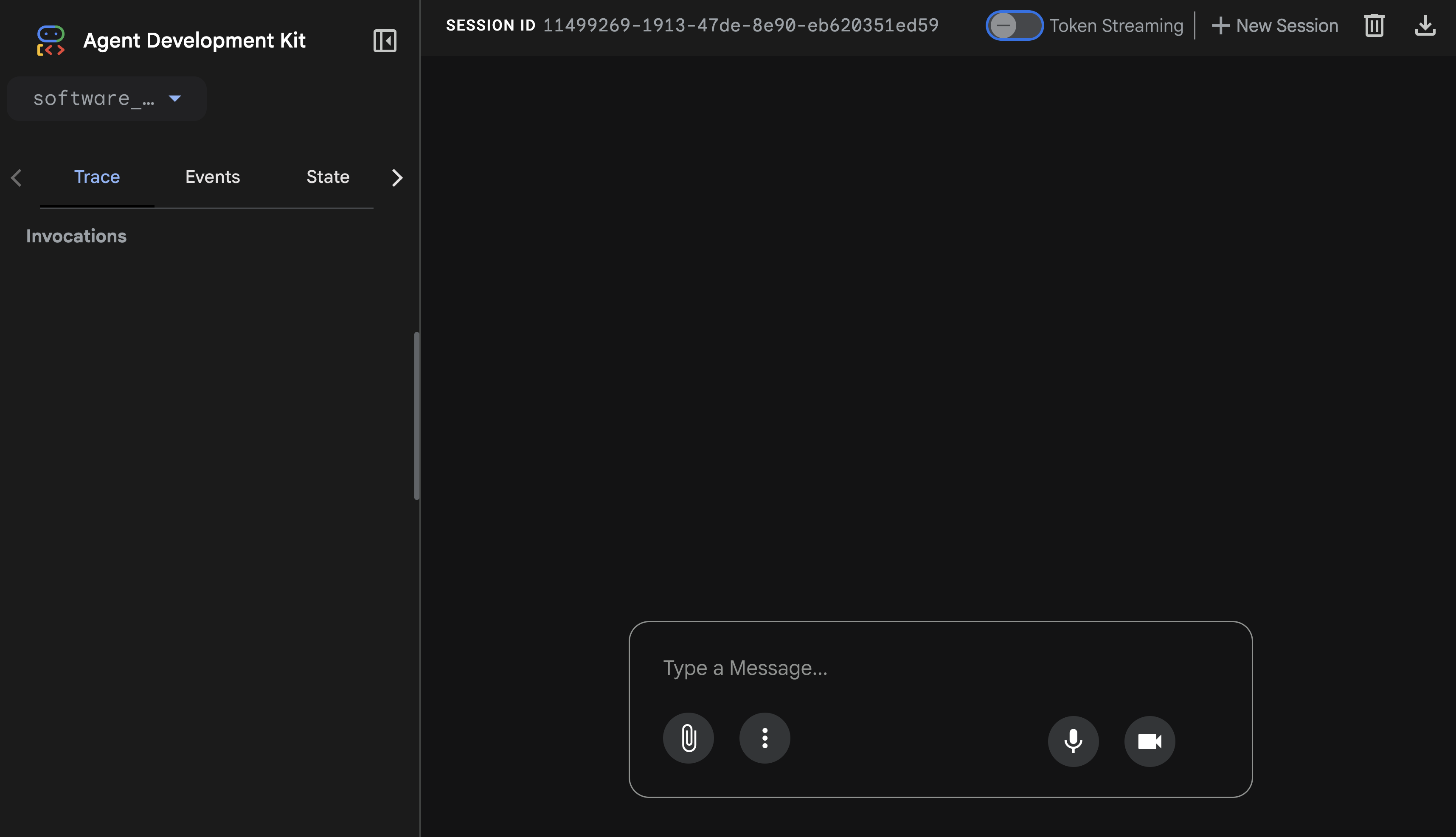
請試著與 ADK 代理交談。
詢問代理 What day is it today?。
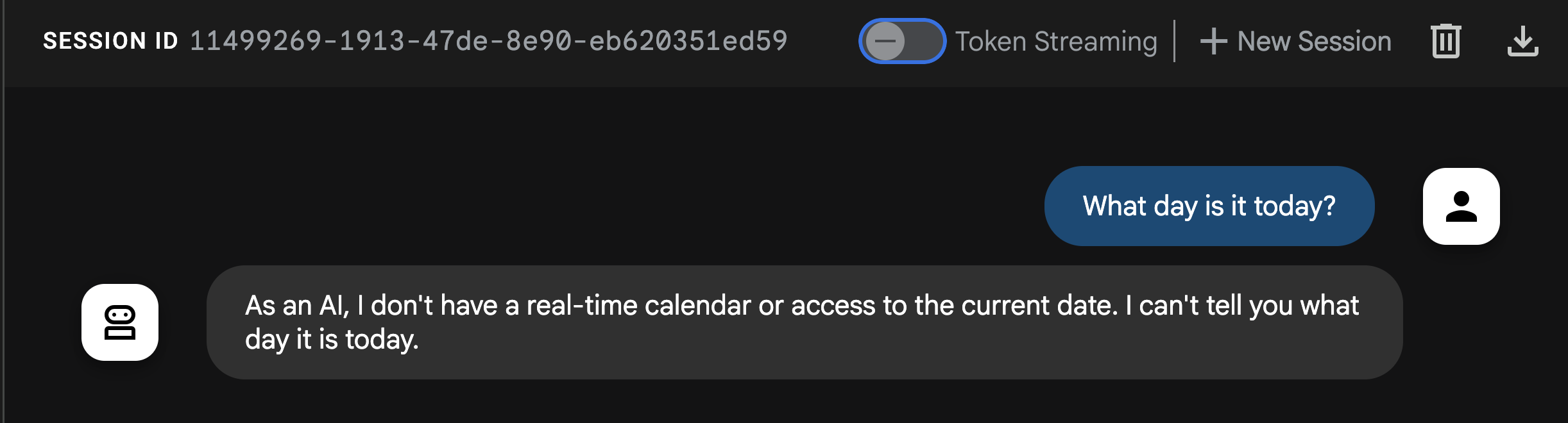
從回覆內容中,您會發現代理無法回答這個基本問題!提醒您,LLM 是獨立系統,訓練資料為過往資料。除非您提供工具,否則他們無法即時掌握近期事件或當天的情況!
現在要實作 ADK 的第一種工具類型:函式工具。
6. 函式工具
第一個也是最簡單的 ADK 工具類型是函式工具。顧名思義,這就是代理程式呼叫的 Python 函式!
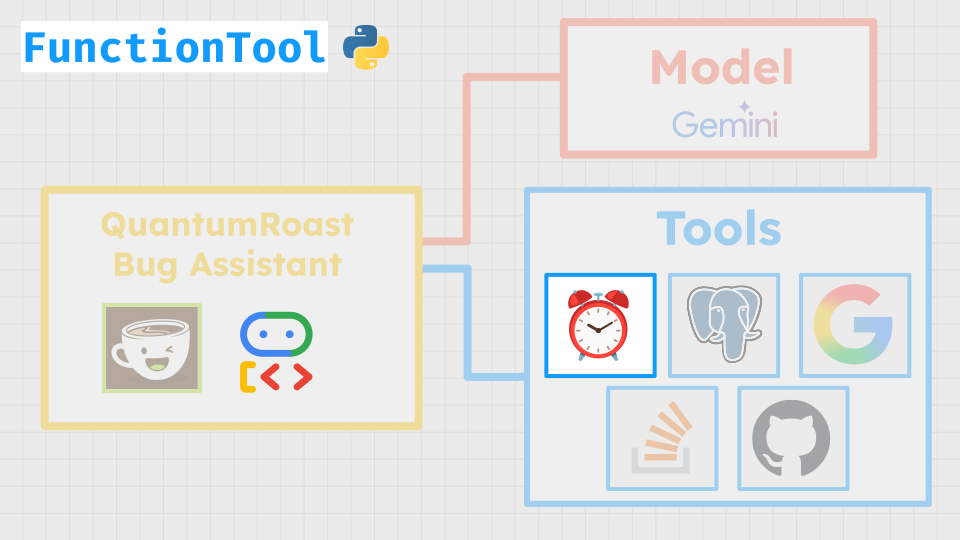
函式工具功能強大,可讓您為代理編寫自訂程式碼,並以工具形式呼叫,例如執行計算、呼叫 API、查詢資料庫。可以是簡單或複雜的函式,完全由您決定。
在 QuantumRoast,我們想定義基本函式來取得當天的日期,以便稍後在本實驗室中處理「顯示上週的錯誤」或「今天星期幾?」等查詢。(我們都會遇到這種情況)。
/software_bug_assistant 資料夾中的 tools.py 檔案會整理我們在本實驗室中建構的所有工具。
按一下 + 圖示,開啟新終端機。
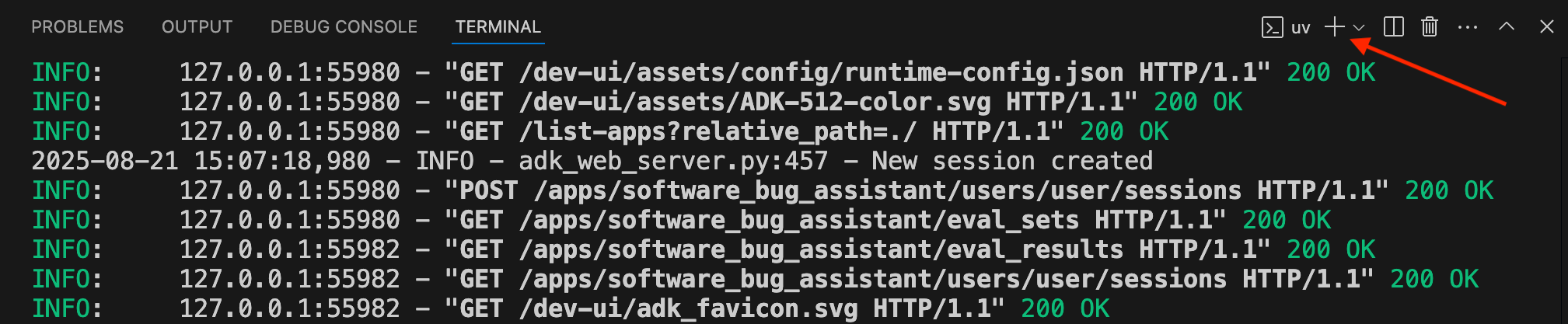
現在,請在新終端機中設定 PROJECT_ID 並開啟 tools.py:
cd quantum-roast
export PROJECT_ID=$(gcloud config get project)
cloudshell edit software_bug_assistant/tools.py
現在請定義 get_current_date 函式,做為函式工具使用。
from datetime import datetime

# ----- Example of a Function tool -----
def get_current_date() -> dict:
    """
    Get the current date in the format YYYY-MM-DD
    """
    return {"current_date": datetime.now().strftime("%Y-%m-%d")}
現在已定義函式!現在可以將其當做工具傳遞給代理程式。
在 Cloud Shell 編輯器中開啟 agent.py:
cloudshell edit software_bug_assistant/agent.py
我們要從 tools.py 匯入 get_current_date 函式,並將該函式傳遞至代理程式的 tools 引數。
更新後的 agent.py 如下所示:
from google.adk.agents import Agent

from .tools import get_current_date

# --- Agent Definition (model, instructions, tools) ---
root_agent = Agent(
    model="gemini-2.5-flash",
    name="software_assistant",
    instruction="""
    You are a skilled expert in triaging and debugging software issues for a
    coffee machine company, QuantumRoast.
    """,
    tools=[get_current_date],
)
現在,如果您返回執行 ADK 網頁介面的「網頁預覽」分頁,然後再次要求 What day is it today?...
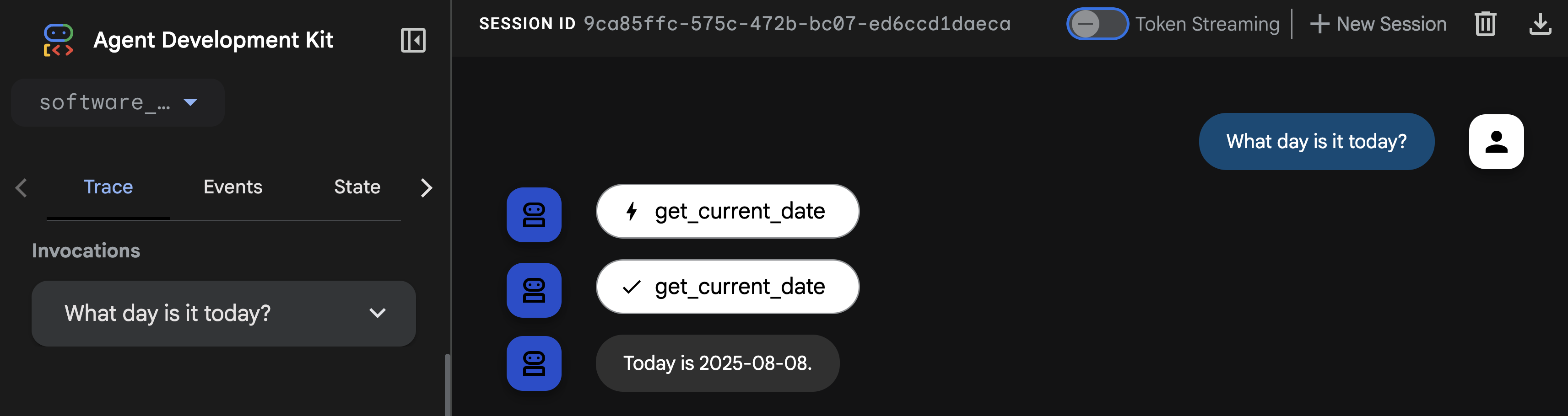
代理程式可以呼叫 get_current_date 函式工具,順利告知日期!🎉
現在來瞭解下一種 ADK 工具類型。
7. 內建工具
另一種 ADK 工具是內建工具。這些工具可搭配 Google 旗艦模型功能使用,例如在模型中執行程式碼。我們可以將 Google 搜尋內建工具附加至錯誤助理代理程式,讓代理程式存取網路搜尋功能,根據相關情境提供資訊。這樣一來,服務專員就能收集更多有關錯誤或已知安全漏洞的最新資訊。
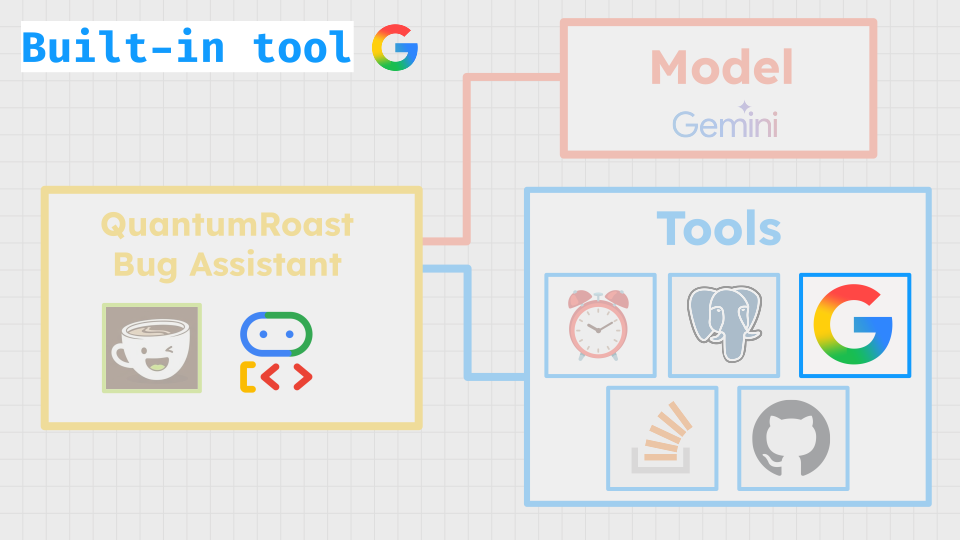
開啟 tools.py 檔案,新增對 Google 搜尋內建工具的支援。
cloudshell edit software_bug_assistant/tools.py
在 tools.py 底部新增下列內容:
# ----- Built-in Tool Imports -----
from google.adk.agents import Agent
from google.adk.tools import google_search
from google.adk.tools.agent_tool import AgentTool

# ----- Example of a Built-in Tool -----
search_agent = Agent(
    model="gemini-2.5-flash",
    name="search_agent",
    description="A specialist in Google Search.",
    instruction="""
    You're a specialist in Google Search.
    """,
    tools=[google_search],
)

search_tool = AgentTool(search_agent)
在這裡,我們實際上是將 Google 搜尋工具包裝在自己的代理程式中,並提供專屬的系統指令,有效運用代理程式做為工具。
現在,我們可以在 agent.py 中匯入 search_tool 並傳遞至根代理程式:
cloudshell edit software_bug_assistant/agent.py
您可以將 agent.py 替換為下列程式碼,以納入 search_tool:
from google.adk.agents import Agent

from .tools import get_current_date, search_tool

# --- Agent Definition (model, instructions, tools) ---
root_agent = Agent(
    model="gemini-2.5-flash",
    name="software_assistant",
    instruction="""
    You are a skilled expert in triaging and debugging software issues for a
    coffee machine company, QuantumRoast.
    """,
    tools=[get_current_date, search_tool],
)
儲存檔案,然後返回開啟 ADK 網路 UI 的分頁。
在 QuantumRoast,我們希望確保網站和軟體受到保護,免於常見安全漏洞與揭露 (CVE) 的威脅,也就是公開的網路安全漏洞。我們可以運用代理程式的全新 Google 搜尋工具,在網路上搜尋最近發現的 CVE。
執行下列查詢:Do a web search for 5 of the most recent CVEs?。
我們的代理應呼叫 search_agent 來搜尋網路。
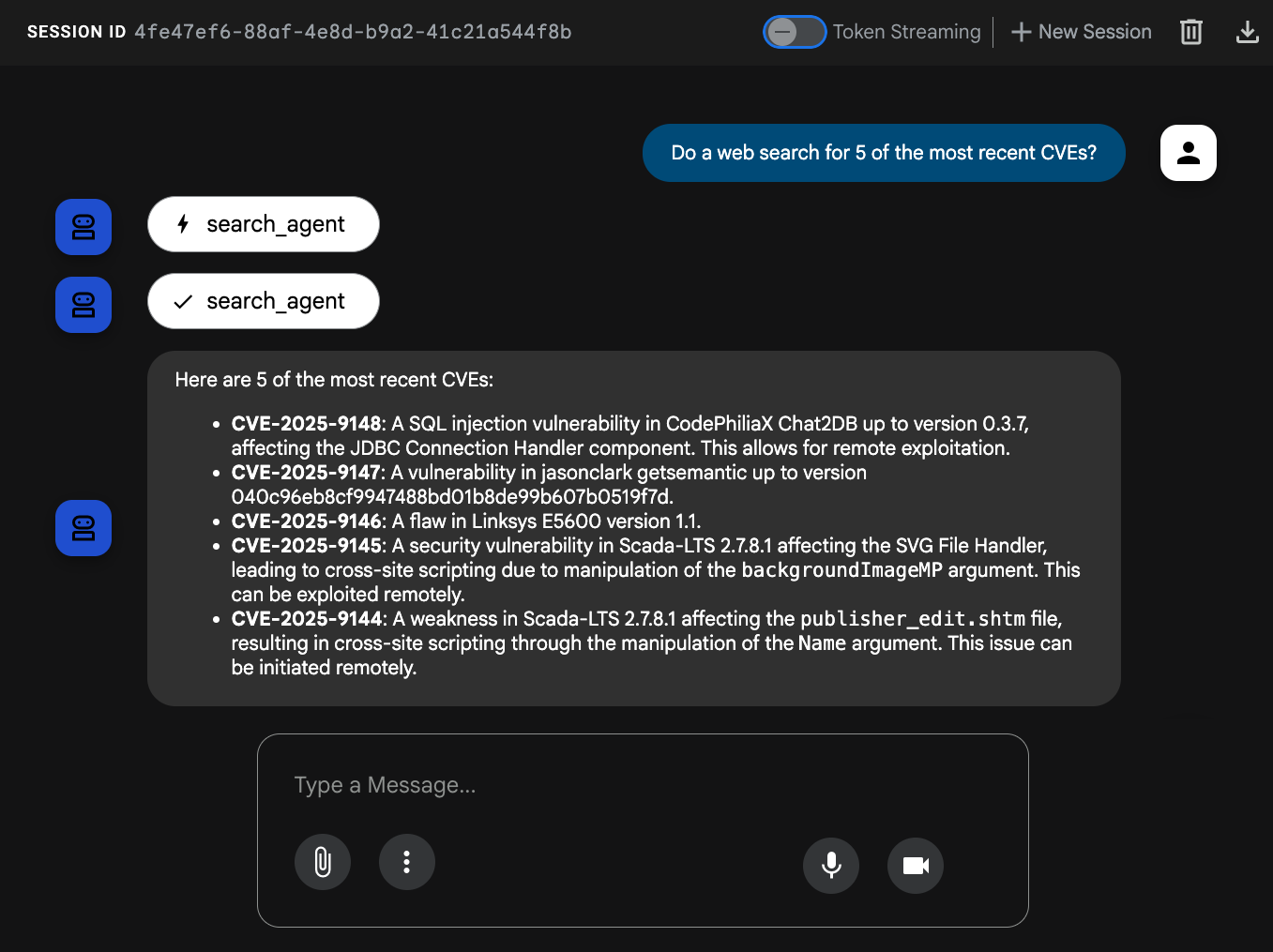
我們的代理現在已成功解鎖,可透過 ADK 的 內建工具使用 Google 搜尋搜尋網路!🎉
接著介紹下一個 ADK 工具類型。
8. 第三方工具
ADK 的設計具備高度擴充性,可完美整合其他第三方 AI 代理框架的工具,例如 CrewAI 和 LangChain。這項互通性至關重要,因為可縮短開發時間,並重複使用現有工具。
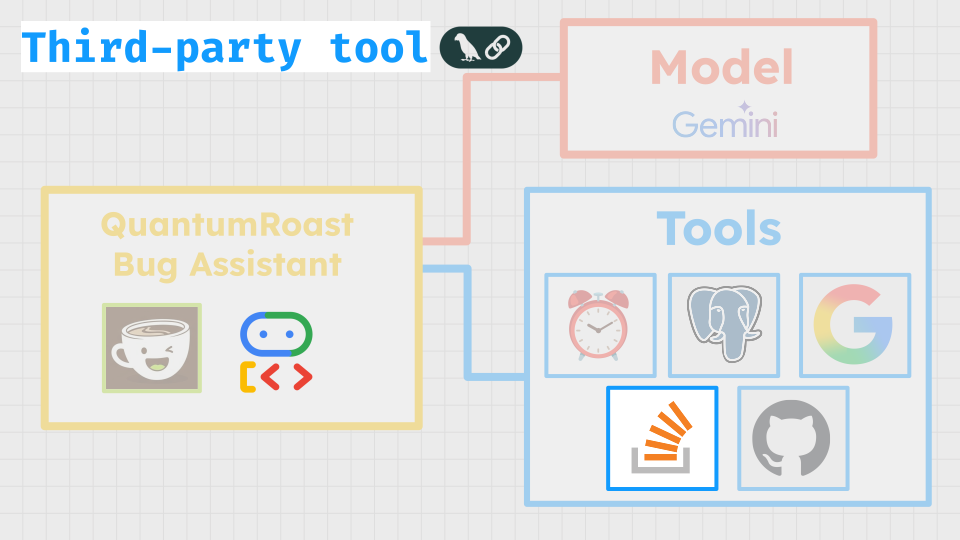
如要將錯誤代理程式插入 StackOverflow 強大的問答資料,我們可以從 LangChain 廣泛的工具程式庫中提取資料,具體來說,就是 StackExchange API Wrapper 工具。ADK 支援 LangChain 等第三方工具,因此只要幾行程式碼,就能將這項工具新增至 ADK 代理程式!
首先,我們必須將 LangChain 和 StackOverflow 的新依附元件 (langchain-community 和 stackapi) 新增至專案:
uv add langchain-community==0.3.27 stackapi==0.3.1
開啟 tools.py 檔案,新增對 LangChain StackExchange 工具的支援。
cloudshell edit software_bug_assistant/tools.py
在 tools.py 底部新增下列內容:
# ----- Example of a Third-Party Tool -----
from google.adk.tools.langchain_tool import LangchainTool
from langchain_community.tools import StackExchangeTool
from langchain_community.utilities import StackExchangeAPIWrapper

stack_exchange_tool = StackExchangeTool(api_wrapper=StackExchangeAPIWrapper())
langchain_tool = LangchainTool(stack_exchange_tool)
現在,我們可以在 agent.py 中匯入 langchain_tool 並傳遞至根代理:
cloudshell edit software_bug_assistant/agent.py
您可以將 agent.py 替換為下列程式碼,以納入 langchain_tool:
from google.adk.agents import Agent

from .tools import get_current_date, langchain_tool, search_tool

# --- Agent Definition (model, instructions, tools) ---
root_agent = Agent(
    model="gemini-2.5-flash",
    name="software_assistant",
    instruction="""
    You are a skilled expert in triaging and debugging software issues for a
    coffee machine company, QuantumRoast.
    """,
    tools=[get_current_date, search_tool, langchain_tool],
)
儲存檔案,然後返回開啟 ADK 網頁 UI 的分頁。
你可以詢問代理程式先前的 CVE,"Are there similar issues on stack exchange?"或詢問新內容,例如 "Our database queries with SQLAlchemy seem to be timing out, is there anything on StackExchange relevant to this?"。
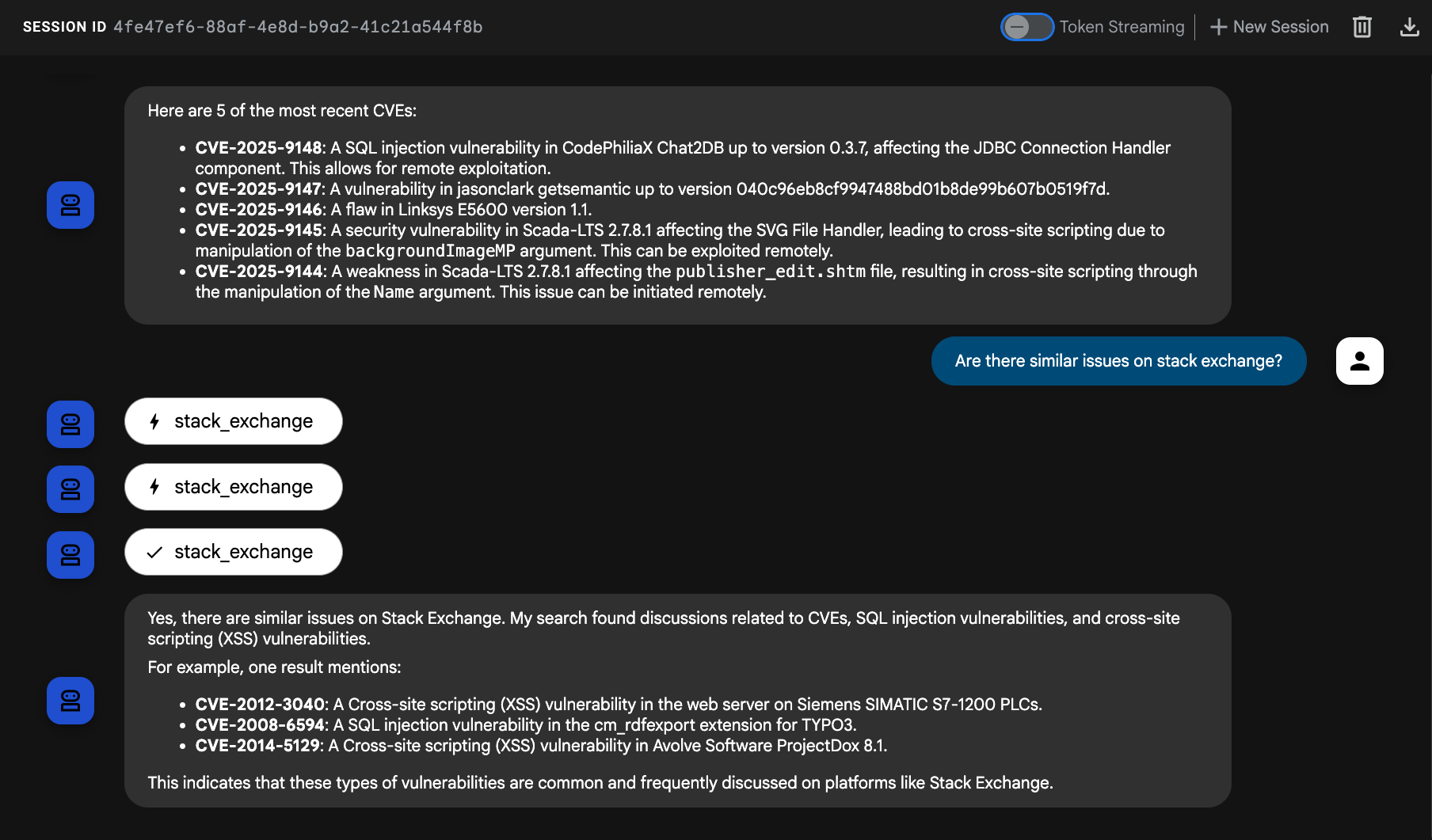
我們的代理現在已成功在 ADK 中運用 LangChain 工具查詢 StackOverflow。🥳
接下來要介紹的 ADK 工具類型是... MCP 工具!
9. MCP 工具 (資料庫)
MCP 是 Model Context Protocol 的縮寫,這是 Anthropic 在 2024 年推出的開放通訊協定,MCP 會在 AI 代理和工具「後端」(API、資料庫) 之間提供抽象層。
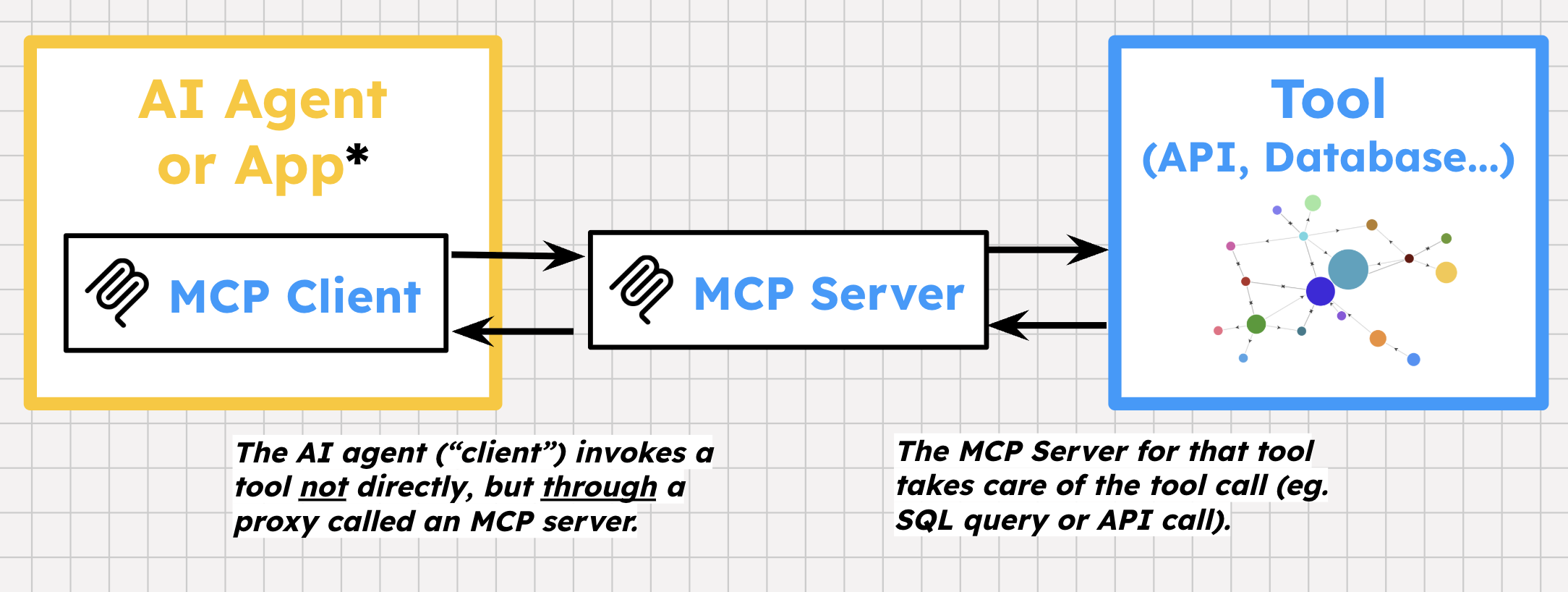
MCP 具有一些獨特的規格。與標準 HTTP 不同,MCP 會在用戶端與伺服器之間建立有狀態的雙向連線。這項服務有自己的工具定義方式,以及工具專屬的錯誤訊息。工具供應商接著可以在 API 上建構 MCP 伺服器,向開發人員和使用者公開一或多個預先建構的工具。接著,代理架構可以在代理應用程式中初始化 MCP 用戶端,以探索及呼叫這些工具。
在 QuantumRoast,我們有一個 PostgreSQL 適用的 Cloud SQL 資料庫,用於內部軟體錯誤。我們想建立 ADK 工具,讓代理程式可以在資料庫中執行特定查詢。
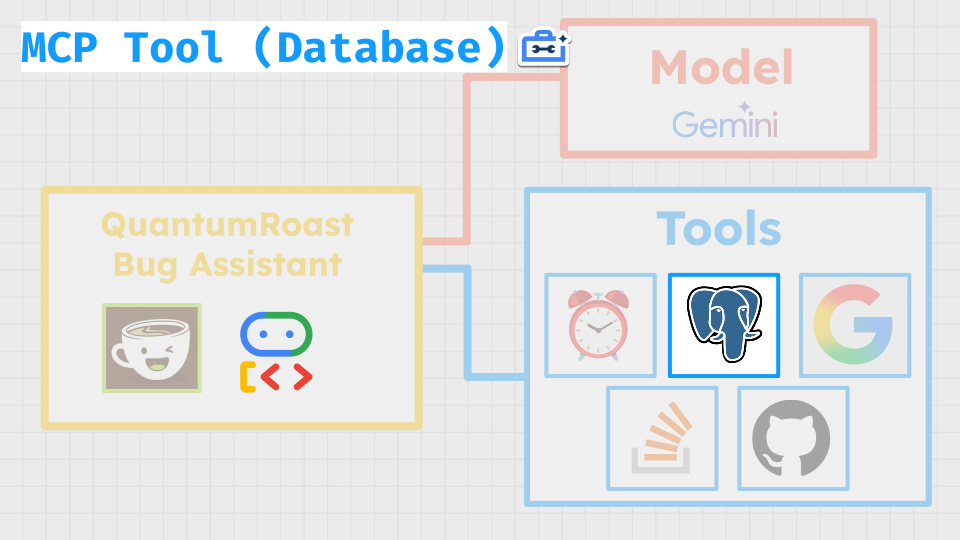
最簡單的方法是使用 MCP Toolbox for Databases,這是資料庫專用的開放原始碼 MCP 伺服器!Toolbox 支援 15 個以上的資料庫,包括 Cloud SQL!
工具箱提供:
- 簡化開發作業:在不到 10 行的程式碼中將工具整合至代理、在多個代理或架構之間重複使用工具,以及更輕鬆地部署新版工具。
- 提升效能:連線集區、驗證等最佳做法。
- 提升安全性:整合驗證機制,確保資料存取安全
- 端對端可觀測性:內建支援 OpenTelemetry,提供立即可用的指標和追蹤功能。
ADK 支援 MCP Toolbox for Database 工具,因此整合速度很快。
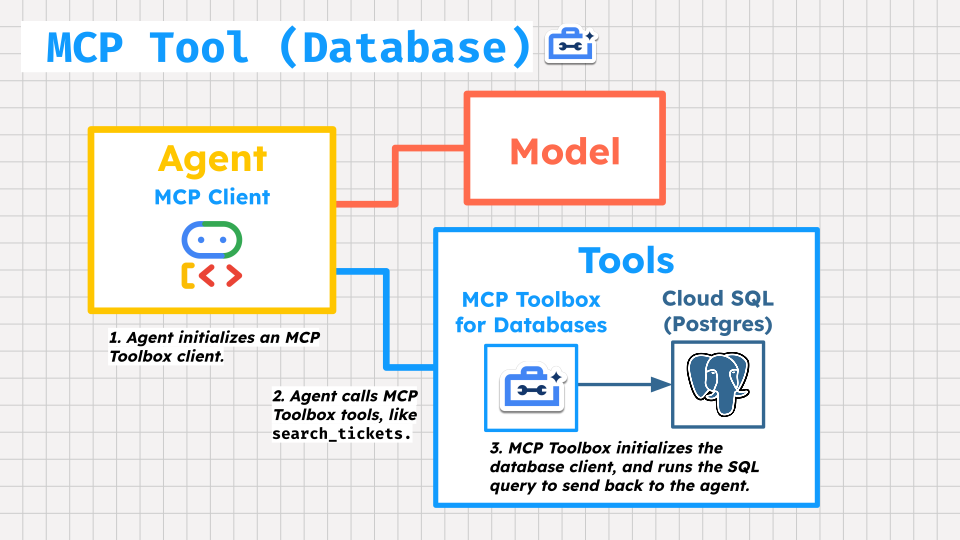
將 MCP Toolbox for Databases 伺服器部署至 Cloud Run
首先,我們會將 MCP Toolbox for Databases 伺服器部署至 Cloud Run,並指向 Cloud SQL 執行個體。
Toolbox 需要 YAML 檔案進行設定,您可以在其中列出資料庫來源和要設定的工具。
建立部署作業的 tools.yaml 檔案。
cloudshell edit tools.yaml
將下列內容貼到 tools.yaml 中:
sources:
  postgresql:
    kind: cloud-sql-postgres
    project: ${PROJECT_ID}
    region: europe-west4
    instance: software-assistant
    database: tickets-db
    user: postgres
    password: admin

tools:
  search-tickets:
    kind: postgres-sql
    source: postgresql
    description: Search for similar tickets based on their descriptions.
    parameters:
      - name: query
        type: string
        description: The query to perform vector search with.
    statement: |
      SELECT ticket_id, title, description, assignee, priority, status, (embedding <=> embedding('text-embedding-005', $1)::vector) as distance
      FROM tickets
      ORDER BY distance ASC
      LIMIT 3;
  get-ticket-by-id:
    kind: postgres-sql
    source: postgresql
    description: Retrieve a ticket's details using its unique ID.
    parameters:
      - name: ticket_id
        type: string
        description: The unique ID of the ticket.
    statement: SELECT * FROM tickets WHERE ticket_id = $1;
  get-tickets-by-assignee:
    kind: postgres-sql
    source: postgresql
    description: Search for tickets based on assignee (email).
    parameters:
      - name: assignee
        type: string
        description: The email of the assignee.
    statement: SELECT * FROM tickets WHERE assignee ILIKE '%' || $1 || '%';
  update-ticket-priority:
    kind: postgres-sql
    source: postgresql
    description: Update the priority of a ticket based on its ID.
    parameters:
      - name: priority
        type: string
        description: The priority of the ticket. Can be one of 'P0 - Critical', 'P1 - High', 'P2 - Medium', or 'P3 - Low'.
      - name: ticket_id
        type: string
        description: The ID of the ticket.
    statement: UPDATE tickets SET priority = $1 WHERE ticket_id = $2;
  update-ticket-status:
    kind: postgres-sql
    source: postgresql
    description: Update the status of a ticket based on its ID.
    parameters:
      - name: status
        type: string
        description: The new status of the ticket (e.g., 'Open', 'In Progress', 'Closed', 'Resolved').
      - name: ticket_id
        type: string
        description: The ID of the ticket.
    statement: UPDATE tickets SET status = $1 WHERE ticket_id = $2;
  get-tickets-by-status:
    kind: postgres-sql
    source: postgresql
    description: Search for tickets based on their current status.
    parameters:
      - name: status
        type: string
        description: The status of the tickets to retrieve (e.g., 'Open', 'In Progress', 'Closed', 'Resolved').
    statement: SELECT * FROM tickets WHERE status ILIKE '%' || $1 || '%';
  get-tickets-by-priority:
    kind: postgres-sql
    source: postgresql
    description: Search for tickets based on their priority.
    parameters:
      - name: priority
        type: string
        description: The priority of the tickets to retrieve (e.g., 'P0 - Critical', 'P1 - High', 'P2 - Medium', 'P3 - Low').
    statement: SELECT * FROM tickets WHERE priority ILIKE '%' || $1 || '%';
  create-new-ticket:
    kind: postgres-sql
    source: postgresql
    description: Create a new software ticket.
    parameters:
      - name: title
        type: string
        description: The title of the new ticket.
      - name: description
        type: string
        description: A detailed description of the bug or issue.
      - name: assignee
        type: string
        description: (Optional) The email of the person to whom the ticket should be assigned.
      - name: priority
        type: string
        description: (Optional) The priority of the ticket. Can be 'P0 - Critical', 'P1 - High', 'P2 - Medium', or 'P3 - Low'. Default is 'P3 - Low'.
      - name: status
        type: string
        description: (Optional) The initial status of the ticket. Default is 'Open'.
    statement: INSERT INTO tickets (title, description, assignee, priority, status) VALUES ($1, $2, $3, COALESCE($4, 'P3 - Low'), COALESCE($5, 'Open')) RETURNING ticket_id;
  get-tickets-by-date-range:
    kind: postgres-sql
    source: postgresql
    description: Retrieve tickets created or updated within a specific date range.
    parameters:
      - name: start_date
        type: string
        description: The start date (inclusive) for the range (e.g., 'YYYY-MM-DD').
      - name: end_date
        type: string
        description: The end date (inclusive) for the range (e.g., 'YYYY-MM-DD').
      - name: date_field
        type: string
        description: The date field to filter by ('creation_time' or 'updated_time').
    statement: SELECT * FROM tickets WHERE CASE WHEN $3 = 'creation_time' THEN creation_time ELSE updated_time END BETWEEN $1::timestamp AND $2::timestamp;

toolsets:
  tickets_toolset:
    - search-tickets
    - get-ticket-by-id
    - get-tickets-by-assignee
    - get-tickets-by-status
    - get-tickets-by-priority
    - get-tickets-by-date-range
    - update-ticket-priority
    - update-ticket-status
    - create-new-ticket
YAML 檔案定義了與 QuantumRoast 票證資料庫相關的 9 項工具。
現在要為 Toolbox Cloud Run 服務設定服務帳戶,授予存取 Cloud SQL 和 Secret Manager 的權限,並為 tools.yaml 檔案建立 Secret Manager 密鑰。
我們將在 Secret Manager 中儲存 tools.yaml 檔案,因為該檔案含有機密的 Cloud SQL 憑證。
gcloud iam service-accounts create toolbox-identity

gcloud projects add-iam-policy-binding $PROJECT_ID \
    --member serviceAccount:toolbox-identity@$PROJECT_ID.iam.gserviceaccount.com \
    --role roles/secretmanager.secretAccessor

gcloud projects add-iam-policy-binding $PROJECT_ID \
    --member serviceAccount:toolbox-identity@$PROJECT_ID.iam.gserviceaccount.com \
    --role roles/cloudsql.client

gcloud secrets create tools --data-file=tools.yaml
現在要將 MCP Toolbox for Databases 部署至 Cloud Run。我們會使用 MCP Toolbox 容器映像檔的最新發布版本。
gcloud run deploy toolbox \
    --image us-central1-docker.pkg.dev/database-toolbox/toolbox/toolbox:latest \
    --service-account toolbox-identity \
    --region europe-west4 \
    --set-secrets "/app/tools.yaml=tools:latest" \
    --set-env-vars="PROJECT_ID=$PROJECT_ID" \
    --args="--tools-file=/app/tools.yaml","--address=0.0.0.0","--port=8080" \
    --labels=dev-tutorial=codelab-toolbox \
    --no-invoker-iam-check
等待部署作業完成...
查詢 Cloud Run 記錄,確認 Toolbox 是否正在執行:
gcloud run services logs read toolbox --region europe-west4 --limit 10
如下所示:
2025-08-20 18:03:55 2025-08-20T18:03:55.465847801Z INFO "Initialized 1 sources."
2025-08-20 18:03:55 2025-08-20T18:03:55.466152914Z INFO "Initialized 0 authServices."
2025-08-20 18:03:55 2025-08-20T18:03:55.466374245Z INFO "Initialized 9 tools."
2025-08-20 18:03:55 2025-08-20T18:03:55.466477938Z INFO "Initialized 2 toolsets."
2025-08-20 18:03:55 2025-08-20T18:03:55.467492303Z INFO "Server ready to serve!"
將 Toolbox 服務的 Cloud Run 網址儲存為環境變數,讓 ADK 代理程式知道該從何處尋找。
export MCP_TOOLBOX_URL=$(gcloud run services describe toolbox --region europe-west4 --format "value(status.url)")
echo MCP_TOOLBOX_URL=$MCP_TOOLBOX_URL >> software_bug_assistant/.env
更新 QuantumRoast 代理程式
其次,我們必須將 MCP Toolbox for Databases SDK (toolbox-core) 的依附元件新增至專案:
uv add toolbox-core==0.5.0
開啟 tools.py 檔案,新增對 MCP Toolbox 工具的支援。
cloudshell edit software_bug_assistant/tools.py
在 tools.py 底部新增下列內容:
# ----- Example MCP Toolbox for Databases tools -----
import os
from toolbox_core import ToolboxSyncClient

TOOLBOX_URL = os.getenv("MCP_TOOLBOX_URL", "http://127.0.0.1:5000")

# Initialize Toolbox client
toolbox = ToolboxSyncClient(TOOLBOX_URL)
# Load all the tools from toolset
toolbox_tools = toolbox.load_toolset("tickets_toolset")
現在,我們可以在 agent.py 中匯入 toolbox_tools 並傳遞至根代理:
cloudshell edit software_bug_assistant/agent.py
您可以將 agent.py 替換為下列程式碼,以納入 toolbox_tools:
from google.adk.agents import Agent

from .tools import get_current_date, langchain_tool, search_tool, toolbox_tools

# --- Agent Definition (model, instructions, tools) ---
root_agent = Agent(
    model="gemini-2.5-flash",
    name="software_assistant",
    instruction="""
    You are a skilled expert in triaging and debugging software issues for a
    coffee machine company, QuantumRoast.
    """,
    tools=[get_current_date, search_tool, langchain_tool, *toolbox_tools],
)
儲存檔案,然後返回開啟 ADK 網頁 UI 的分頁。
現在,您可以詢問儲存在 Cloud SQL 內部票證資料庫中的票證相關問題!
提出下列任一問題:
I am seeing an issue with database timeouts, has anyone else seen a similar issue?How many bugs are assigned to samuel.green@example.com? Show a table.Can you bump the priority of ticket with ID 6 to to P0 - Critical priorityCreate a new ticket(讓代理程式引導你建立錯誤)
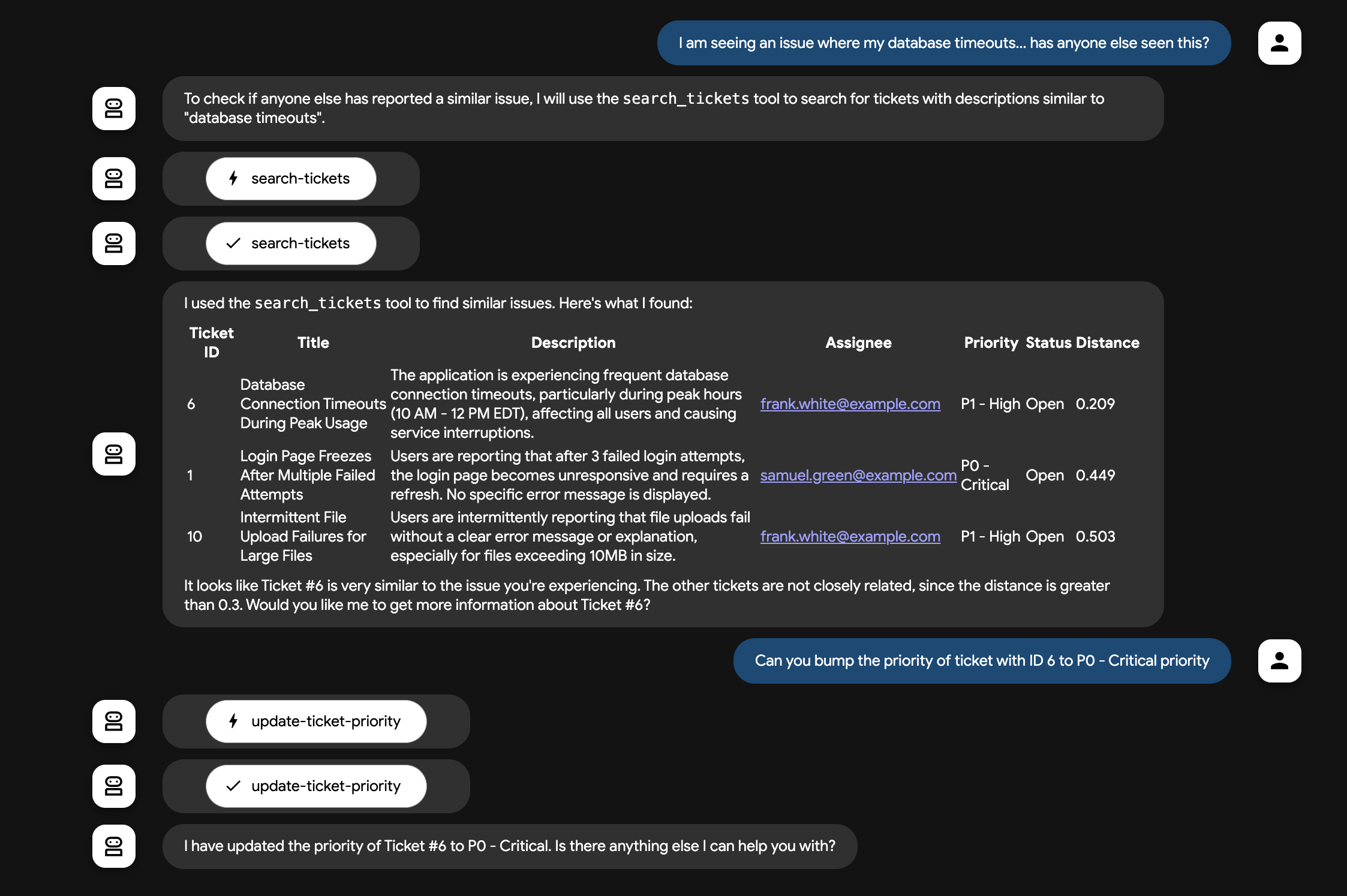
現在,我們的 ADK 代理已透過 MCP Toolbox for Databases 工具成功查詢資料庫!🚀
10. 選用:MCP 工具 (API)
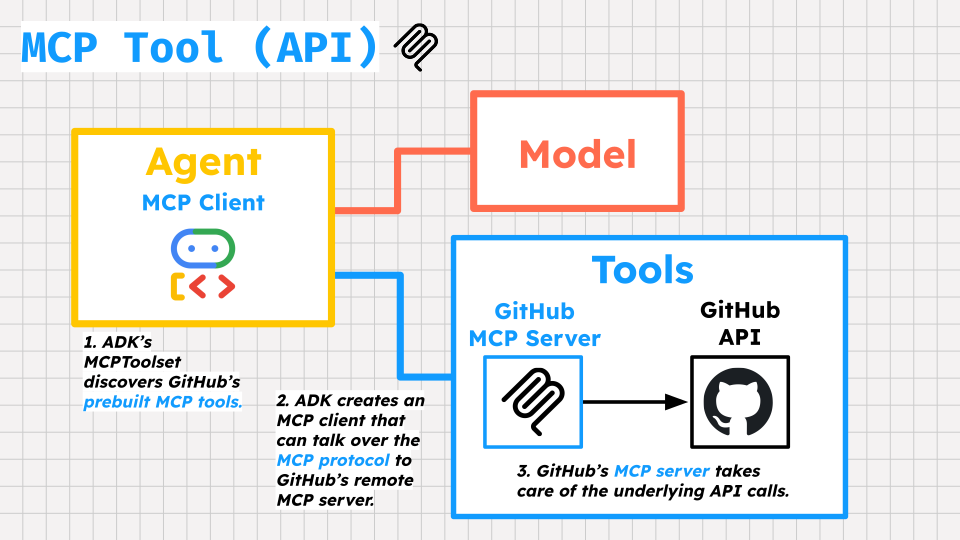
如果 MCP 工具沒有自己的 SDK (例如 MCP Toolbox for Database),該如何將 ADK 代理連結至這類工具?
ADK 透過 MCPToolset 類別支援一般 MCP 工具。MCPToolset 類別是 ADK 的主要機制,用於整合 MCP 伺服器的工具。
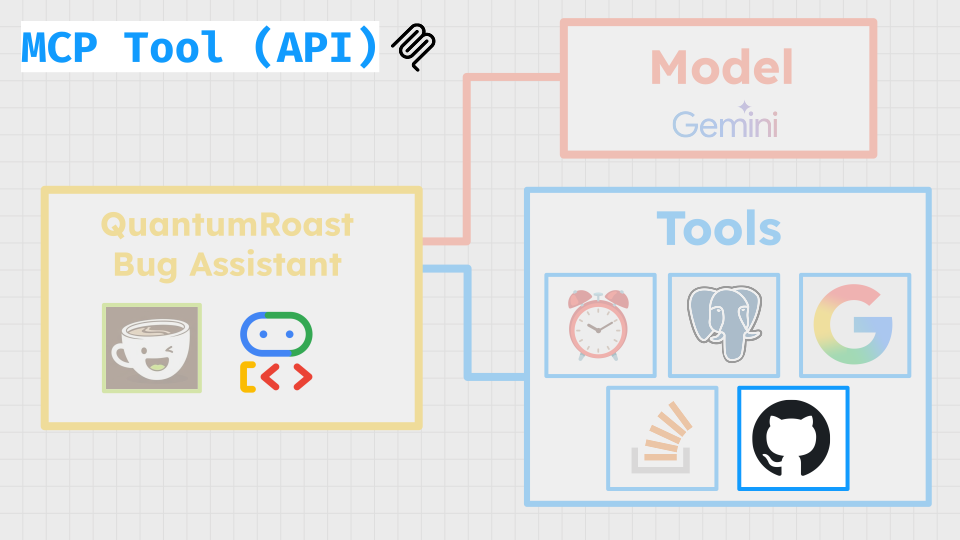
MCPToolset 可用於連線至本機或遠端 MCP 伺服器。在 QuantumRoast,我們希望將代理連線至 GitHub 的遠端 MCP 伺服器,以便輕鬆呼叫 GitHub 的 API。這樣一來,我們的代理程式就能從公開軟體存放區,甚至是我們自己的程式碼集,提取問題相關資訊。GitHub MCP 伺服器會公開 GitHub 功能的不同部分,包括問題和提取要求、通知和程式碼安全性。
GitHub 個人存取權杖 (PAT)
如要向 GitHub MCP 伺服器驗證,您需要 GitHub 個人存取權杖。
如要取得憑證,請按照下列步驟操作:
- 前往 GitHub 開發人員設定。
- 依序點選「Personal access tokens」->「Tokens (classic)」。
- 依序點選「Generate new token」和「Generate new token (classic)」。
- 為權杖命名,名稱請使用描述性文字。
- 設定權杖的到期日。
- 重要事項:為確保安全,請盡可能只授予權杖必要的範圍。如要取得存放區的唯讀存取權,通常只要
repo:status、public_repo和read:user範圍就足夠。除非絕對必要,否則請避免授予完整存放區或管理員權限。 - 按一下「
Generate token」。 - 複製產生的權杖。
在 Cloud Shell 終端機中執行下列指令,設定 GitHub PAT,供代理程式使用。將 YOUR_GITHUB_PAT 替換為產生的 PAT。
export GITHUB_PAT=YOUR_GITHUB_PAT
更新 QuantumRoast 代理程式
對於錯誤助理,我們只會公開部分唯讀 GitHub 工具,讓 QuantumRoast 員工找出與開放原始碼依附元件相關的問題,看看是否有助於找出內部票證系統中錯誤的根本原因。我們會使用 ADK 的 MCPToolset 和 tool_filter 進行設定。tool-filter 只會公開我們需要的 GitHub 工具,不僅能隱藏我們不希望使用者存取的工具 (例如:敏感的存放區動作),還能避免代理程式模型在嘗試選擇合適的作業工具時,因工具過多而難以負荷。
開啟 tools.py 檔案,新增 GitHub 工具的支援功能。
cloudshell edit software_bug_assistant/tools.py
在 tools.py 底部新增下列內容:
# ----- Example MCP Tools with MCPToolset (GitHub) -----
from google.adk.tools.mcp_tool import MCPToolset, StreamableHTTPConnectionParams

mcp_tools = MCPToolset(
    connection_params=StreamableHTTPConnectionParams(
        url="https://api.githubcopilot.com/mcp/",
        headers={
            "Authorization": "Bearer " + os.getenv("GITHUB_PAT"),
        },
    ),
    # Read only tools
    tool_filter=[
        "search_repositories",
        "search_issues",
        "list_issues",
        "get_issue",
        "list_pull_requests",
        "get_pull_request",
    ],
)
請注意,我們也需要為 MCPToolset 定義提供 GitHub 個人存取權杖 (PAT),就像在程式碼中設定標準 API 用戶端時提供驗證權杖一樣。這個 PAT 的範圍僅限於存取公開存放區資料,不包含敏感的使用者或存放區動作。
現在,我們可以在 agent.py 中匯入 mcp_tools 並傳遞至根代理程式:
cloudshell edit software_bug_assistant/agent.py
您可以將 agent.py 替換為下列程式碼,以納入 mcp_tools:
from google.adk.agents import Agent

from .tools import get_current_date, langchain_tool, mcp_tools, search_tool, toolbox_tools

# --- Agent Definition (model, instructions, tools) ---
root_agent = Agent(
    model="gemini-2.5-flash",
    name="software_assistant",
    instruction="""
    You are a skilled expert in triaging and debugging software issues for a
    coffee machine company, QuantumRoast.
    """,
    tools=[get_current_date, search_tool, langchain_tool, *toolbox_tools, mcp_tools],
)
儲存檔案,然後返回開啟 ADK 網頁 UI 的分頁。
現在我們有一組 GitHub MCP 工具,代理程式可以呼叫這些工具。QuantumRoast 的服務依賴 XZ 實用程式 (資料壓縮工具)。我們的內部錯誤票證系統正在追蹤去年的 CVE (安全性漏洞),我們可以使用 StackOverflow 和 Google 搜尋工具,追溯至 XZ Utils GitHub 存放區。接著,我們可以使用 GitHub 的其中一項 MCP 工具 search_issues,判斷該 CVE 的修補時間和方式:
向代理提出下列要求:
Find the official XZ Utils GitHub repositorySearch the repository for issues related to CVE-2024-3094
您應該會看到代理程式呼叫 GitHub 工具。
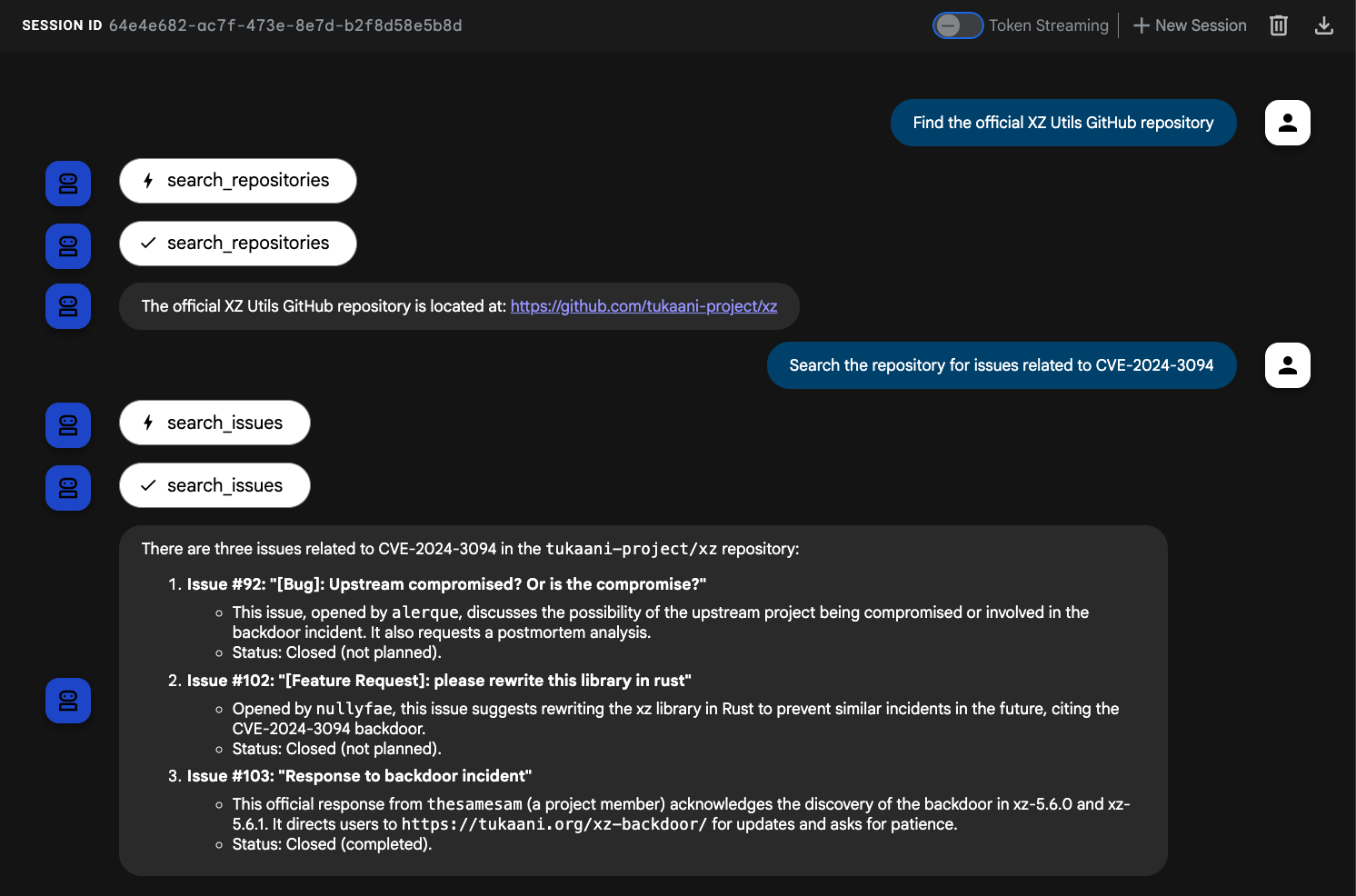
現在 QuantumRoast ADK 代理可以與 GitHub MCP 伺服器工具互動了!🤩
11. 恭喜
恭喜!您已使用 Agent Development Kit (ADK) 成功建構 QuantumRoast 錯誤助理代理,並整合各種工具類型來提升其功能。您從基本代理程式開始,逐步新增函式工具、內建工具、第三方工具和 MCP 工具。
涵蓋內容
- 如何設定 Python 專案以進行 ADK 開發。
- 如何建立基本 ADK 代理程式。
- 如何導入及使用函式工具。
- 如何整合 Google 搜尋等內建工具。
- 如何在 ADK 中運用 LangChain 等架構的第三方工具。
- 如何使用 MCP 工具與資料庫 (Cloud SQL) 和 API 互動。

清除所用資源
您可以刪除雲端專案,以免產生額外費用。
不使用服務時,Cloud Run 不會收費,但您可能仍須支付容器映像檔在 Artifact Registry 的儲存費用。刪除雲端專案後,系統就會停止對專案使用的所有資源收取費用。
如要刪除專案,請按照下列步驟操作:
gcloud projects delete $GOOGLE_CLOUD_PROJECT
您也可以從 Cloud Shell 磁碟刪除不必要的資源。您可以:
- 刪除 Codelab 專案目錄:
rm -rf ~/quantum-roast - 警告!這項操作無法復原,如要刪除 Cloud Shell 中的所有內容來釋出空間,可以刪除整個主目錄。請務必將要保留的內容另存他處。
sudo rm -rf $HOME