

1. บทนำ
Cloud Spanner เป็นบริการฐานข้อมูลเชิงสัมพันธ์ที่มีการจัดการครบวงจรซึ่งปรับขนาดได้ในแนวนอนและกระจายอยู่ทั่วโลก โดยมีธุรกรรม ACID และความหมายของ SQL โดยไม่ลดทอนประสิทธิภาพและความพร้อมใช้งานสูง
ฟีเจอร์เหล่านี้ทำให้ Spanner เหมาะอย่างยิ่งกับสถาปัตยกรรมของเกมที่ต้องการเปิดใช้งานฐานผู้เล่นทั่วโลกหรือกังวลเกี่ยวกับความสอดคล้องของข้อมูล
ในแล็บนี้ คุณจะได้สร้างบริการ Go 2 รายการที่โต้ตอบกับฐานข้อมูล Spanner ระดับภูมิภาคเพื่อให้ผู้เล่นได้รับไอเทมและเงิน (item-service) จากนั้นแสดงไอเทมในตลาดกลางเพื่อให้ผู้เล่นคนอื่นๆ ซื้อ (tradepost-service)
แล็บนี้ขึ้นอยู่กับ Codelab การเริ่มต้นพัฒนาเกมด้วย Cloud Spanner เพื่อสร้างผู้เล่นและเกมโดยใช้ profile-service และ matchmaking-service
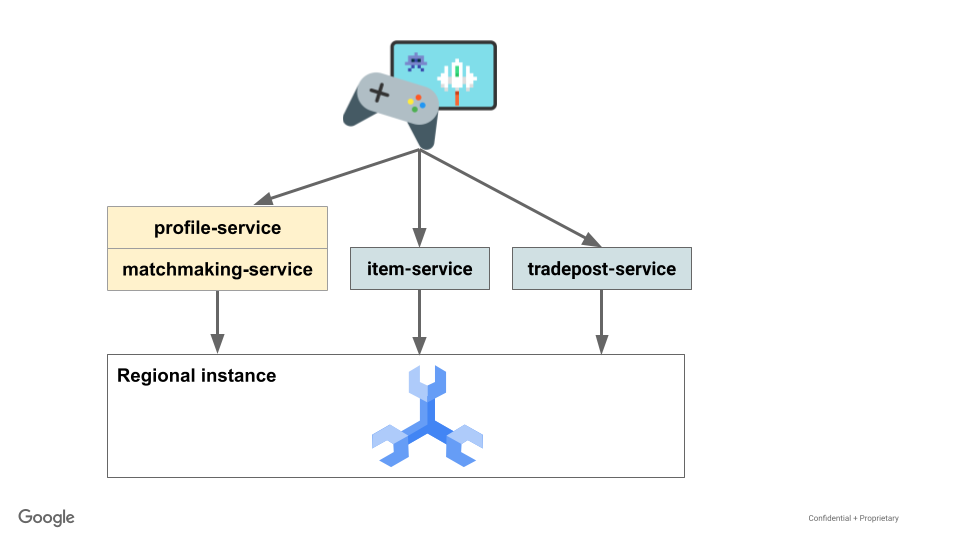
จากนั้นคุณจะสร้างข้อมูลโดยใช้เฟรมเวิร์กการโหลด Python Locust.io เพื่อจำลองผู้เล่นที่ได้รับเงินและไอเทมในระหว่าง "การเล่นเกม" จากนั้นผู้เล่นจะแสดงรายการไอเทมเพื่อขายในตลาดการค้า ซึ่งผู้เล่นคนอื่นๆ ที่มีเงินเพียงพอจะซื้อไอเทมเหล่านั้นได้
นอกจากนี้ คุณยังจะค้นหา Spanner เพื่อดูยอดคงเหลือในบัญชีและจำนวนไอเทมของผู้เล่น รวมถึงสถิติบางอย่างเกี่ยวกับคำสั่งซื้อขายที่เปิดอยู่หรือดำเนินการเสร็จแล้ว
สุดท้าย คุณจะล้างข้อมูลทรัพยากรที่สร้างขึ้นใน Lab นี้
สิ่งที่คุณจะสร้าง
ใน Lab นี้ คุณจะได้ทำสิ่งต่อไปนี้
- นำอินสแตนซ์ Spanner จากการเริ่มต้นพัฒนาเกมด้วย Cloud Spanner มาใช้ซ้ำ
- ติดตั้งใช้งานบริการไอเทมที่เขียนด้วย Go เพื่อจัดการผู้เล่นที่ได้รับไอเทมและเงิน
- ติดตั้งใช้งานบริการ Trading Post ที่เขียนด้วยภาษา Go เพื่อจำลองผู้เล่นที่ลงขายไอเทม และผู้เล่นคนอื่นๆ ที่ซื้อไอเทมเหล่านั้น
สิ่งที่คุณจะได้เรียนรู้
- วิธีใช้ธุรกรรมแบบอ่าน-เขียนเพื่อให้มั่นใจถึงความสอดคล้องสำหรับการเปลี่ยนแปลงข้อมูล
- วิธีใช้ประโยชน์จาก DML และการเปลี่ยนแปลง Spanner เพื่อแก้ไขข้อมูล
สิ่งที่คุณต้องมี
- โปรเจ็กต์ Google Cloud ที่เชื่อมต่อกับบัญชีสำหรับการเรียกเก็บเงิน
- เว็บเบราว์เซอร์ เช่น Chrome หรือ Firefox
- การเริ่มต้นใช้งาน Cloud Spanner สำหรับการพัฒนาเกมที่ทำเสร็จแล้วก่อนหน้านี้ โดยไม่มีขั้นตอนการล้างข้อมูล
2. การตั้งค่าและข้อกำหนด
ทำ Codelab การเริ่มต้นพัฒนาเกมด้วย Cloud Spanner ให้เสร็จสมบูรณ์
ทำ Codelab การเริ่มต้นพัฒนาเกมด้วย Cloud Spanner ให้เสร็จสมบูรณ์ ซึ่งจำเป็นต่อการรับชุดข้อมูลของผู้เล่นและเกม ผู้เล่นและเกมจำเป็นต้องใช้เพื่อรับไอเทมและเงิน ซึ่งจะใช้ในการแสดงไอเทมเพื่อขายและซื้อไอเทมจากตลาดกลาง
กำหนดค่าตัวแปรสภาพแวดล้อมใน Cloud Shell
เปิด Cloud Shell โดยคลิกเปิดใช้งาน Cloud Shell  (การจัดสรรและเชื่อมต่อกับสภาพแวดล้อมควรใช้เวลาเพียงไม่กี่นาทีเนื่องจากคุณเคยดำเนินการนี้มาก่อน)
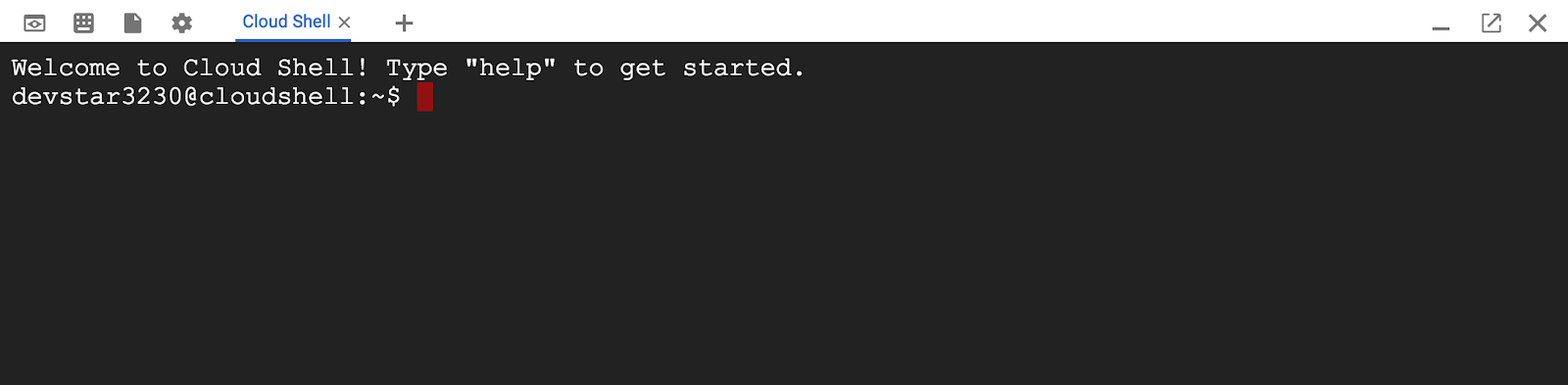
เมื่อเชื่อมต่อกับ Cloud Shell แล้ว คุณควรเห็นว่าคุณได้รับการตรวจสอบสิทธิ์แล้วและระบบได้ตั้งค่าโปรเจ็กต์เป็น PROJECT_ID แล้ว
ตั้งค่าตัวแปรสภาพแวดล้อม SPANNER ใน Cloud Shell
export SPANNER_PROJECT_ID=$GOOGLE_CLOUD_PROJECT
export SPANNER_INSTANCE_ID=cloudspanner-gaming
export SPANNER_DATABASE_ID=sample-game
สร้างสคีมา
ตอนนี้คุณสร้างฐานข้อมูลเรียบร้อยแล้ว ต่อไปก็กำหนดสคีมาในฐานข้อมูล sample-game ได้
แล็บนี้จะสร้างตารางใหม่ 4 ตาราง ได้แก่ game_items, player_items, player_ledger_entries และ trade_orders
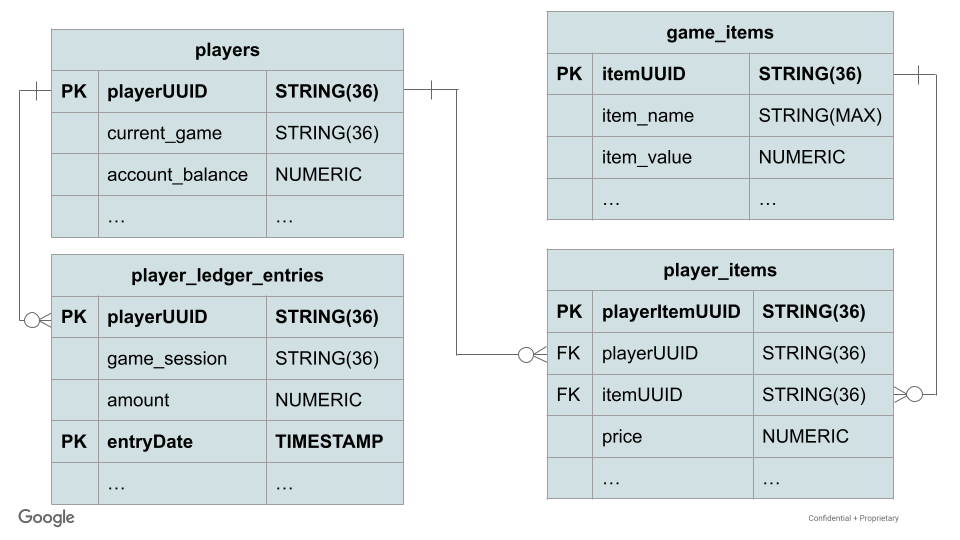
ความสัมพันธ์ของไอเทมในเพลเยอร์
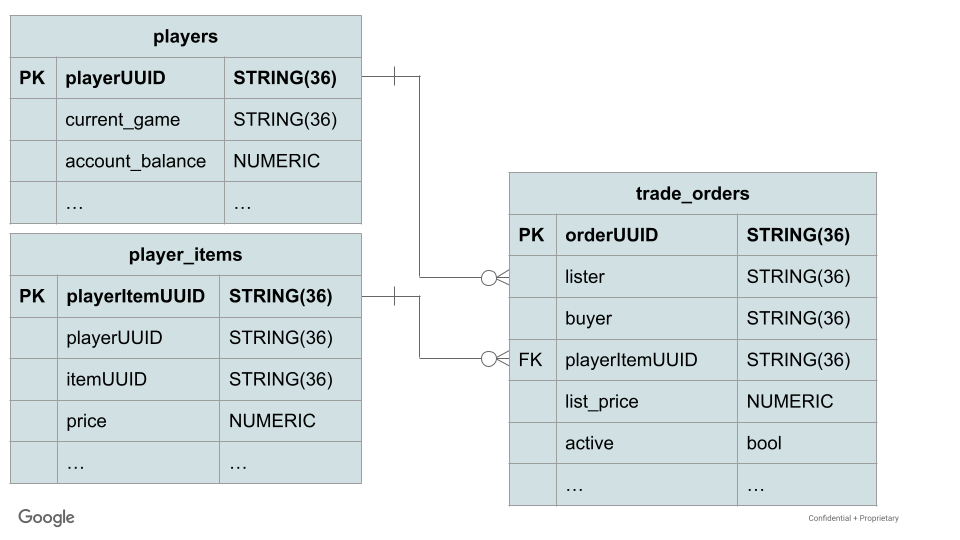
ความสัมพันธ์ของคำสั่งซื้อการค้า
ระบบจะเพิ่มไอเทมเกมในตาราง game_items จากนั้นผู้เล่นจะรับไอเทมได้ player_items ตารางมีคีย์นอกทั้งสำหรับ itemUUID และ playerUUID เพื่อให้มั่นใจว่าผู้เล่นจะได้รับเฉพาะไอเทมที่ถูกต้องเท่านั้น
player_ledger_entries ตารางจะติดตามการเปลี่ยนแปลงด้านการเงินในเงินคงเหลือของบัญชีผู้เล่น ซึ่งอาจเป็นการรับเงินจากของที่ปล้นมา หรือจากการขายไอเทมในตลาดซื้อขาย
และสุดท้าย trade_orders ตารางใช้เพื่อจัดการการโพสต์คำสั่งขาย และเพื่อให้ผู้ซื้อดำเนินการตามคำสั่งซื้อเหล่านั้น
หากต้องการสร้างสคีมา ให้คลิกปุ่ม Write DDL ใน Cloud Console ดังนี้
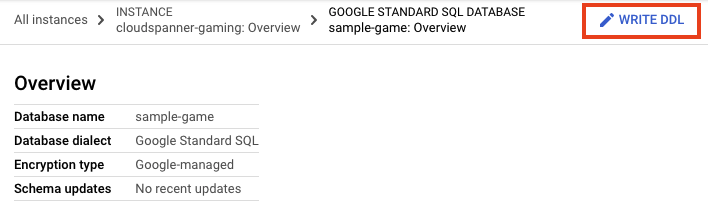
ที่นี่ คุณจะป้อนคำจำกัดความของสคีมาจากไฟล์ schema/trading.sql
CREATE TABLE game_items
(
  itemUUID STRING(36) NOT NULL,
  item_name STRING(MAX) NOT NULL,
  item_value NUMERIC NOT NULL,
  available_time TIMESTAMP NOT NULL,
  duration int64
)PRIMARY KEY (itemUUID);

CREATE TABLE player_items
(
  playerItemUUID STRING(36) NOT NULL,
  playerUUID STRING(36) NOT NULL,
  itemUUID STRING(36) NOT NULL,
  price NUMERIC NOT NULL,
  source STRING(MAX) NOT NULL,
  game_session STRING(36) NOT NULL,
  acquire_time TIMESTAMP NOT NULL DEFAULT (CURRENT_TIMESTAMP()),
  expires_time TIMESTAMP,
  visible BOOL NOT NULL DEFAULT(true),
  FOREIGN KEY (itemUUID) REFERENCES game_items (itemUUID),
  FOREIGN KEY (game_session) REFERENCES games (gameUUID)
) PRIMARY KEY (playerUUID, playerItemUUID),
    INTERLEAVE IN PARENT players ON DELETE CASCADE;

CREATE TABLE player_ledger_entries (
  playerUUID STRING(36) NOT NULL,
  source STRING(MAX) NOT NULL,
  game_session STRING(36) NOT NULL,
  amount NUMERIC NOT NULL,
  entryDate TIMESTAMP NOT NULL OPTIONS (allow_commit_timestamp=true),
  FOREIGN KEY (game_session) REFERENCES games (gameUUID)
) PRIMARY KEY (playerUUID, entryDate DESC),
  INTERLEAVE IN PARENT players ON DELETE CASCADE;

CREATE TABLE trade_orders
(
  orderUUID STRING(36)  NOT NULL,
  lister STRING(36) NOT NULL,
  buyer STRING(36),
  playerItemUUID STRING(36) NOT NULL,
  trade_type STRING(5) NOT NULL,
  list_price NUMERIC NOT NULL,
  created TIMESTAMP NOT NULL DEFAULT (CURRENT_TIMESTAMP()),
  ended TIMESTAMP,
  expires TIMESTAMP NOT NULL DEFAULT (TIMESTAMP_ADD(CURRENT_TIMESTAMP(), interval 24 HOUR)),
  active BOOL NOT NULL DEFAULT (true),
  cancelled BOOL NOT NULL DEFAULT (false),
  filled BOOL NOT NULL DEFAULT (false),
  expired BOOL NOT NULL DEFAULT (false),
  FOREIGN KEY (playerItemUUID) REFERENCES player_items (playerItemUUID)
) PRIMARY KEY (orderUUID);

CREATE INDEX TradeItem ON trade_orders(playerItemUUID, active);
คลิกปุ่ม "Submit" เพื่อแก้ไขสคีมา แล้วรอจนกว่าการอัปเดตสคีมาจะเสร็จสมบูรณ์
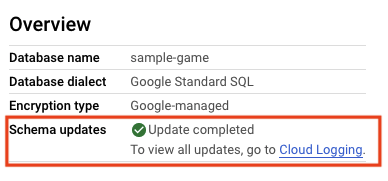
รายการถัดไป
จากนั้นคุณจะติดตั้งใช้งานบริการไอเทม
3. ติดตั้งใช้งานบริการรายการ
ภาพรวมของบริการ
บริการรายการคือ REST API ที่เขียนด้วยภาษา Go ซึ่งใช้ประโยชน์จากเฟรมเวิร์ก Gin ใน API นี้ ผู้เล่นที่เข้าร่วมเกมแบบเปิดจะได้รับเงินและไอเทม
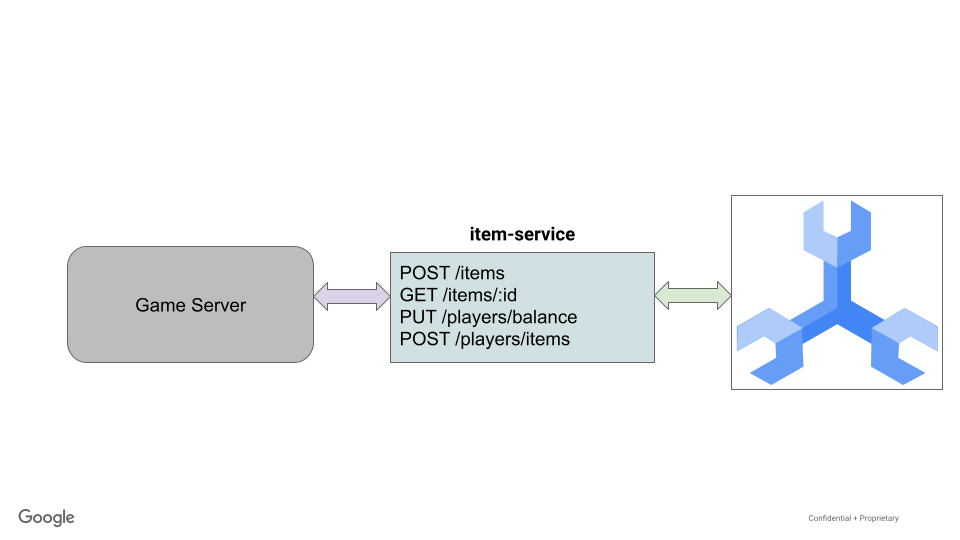
ไฟล์ ./src/golang/item-service/main.go จะกำหนดค่าปลายทางต่อไปนี้เพื่อทำงานกับไอเทมในเกมและผู้เล่นที่ได้รับไอเทมเหล่านั้น นอกจากนี้ ยังมีปลายทางสำหรับผู้เล่นในการรับเงินด้วย
 func main() {
   configuration, _ := config.NewConfig()

   router := gin.Default()
   router.SetTrustedProxies(nil)
   router.Use(setSpannerConnection(configuration))

   router.GET("/items", getItemUUIDs)
   router.POST("/items", createItem)
   router.GET("/items/:id", getItem)
   router.PUT("/players/balance", updatePlayerBalance)
   router.GET("/players", getPlayer)
   router.POST("/players/items", addPlayerItem)

   router.Run(configuration.Server.URL())
}
การกำหนดค่าและการใช้การเชื่อมต่อ Spanner จะได้รับการจัดการเหมือนกับ profile-service และ matchmaking-service จาก Codelab ก่อนหน้าทุกประการ
บริการไอเทมทำงานร่วมกับ GameItem, Player, PlayerLedger และ PlayerItem โดยมีการกำหนดดังนี้
// models/game_items.go
type GameItem struct {
   ItemUUID       string    `json:"itemUUID"`
   Item_name      string    `json:"item_name"`
   Item_value     big.Rat   `json:"item_value"`
   Available_time time.Time `json:"available_time"`
   Duration       int64     `json:"duration"`
}

// models/players.go
type Player struct {
   PlayerUUID      string    `json:"playerUUID" binding:"required,uuid4"`
   Updated         time.Time `json:"updated"`
   Account_balance big.Rat   `json:"account_balance"`
   Current_game    string    `json:"current_game"`
}

type PlayerLedger struct {
   PlayerUUID   string  `json:"playerUUID" binding:"required,uuid4"`
   Amount       big.Rat `json:"amount"`
   Game_session string  `json:"game_session"`
   Source       string  `json:"source"`
}

// models/player_items.go
type PlayerItem struct {
   PlayerItemUUID string           `json:"playerItemUUID" binding:"omitempty,uuid4"`
   PlayerUUID     string           `json:"playerUUID" binding:"required,uuid4"`
   ItemUUID       string           `json:"itemUUID" binding:"required,uuid4"`
   Source         string           `json:"source" binding:"required"`
   Game_session   string           `json:"game_session" binding:"omitempty,uuid4"`
   Price          big.Rat          `json:"price"`
   AcquireTime    time.Time        `json:"acquire_time"`
   ExpiresTime    spanner.NullTime `json:"expires_time"`
   Visible        bool             `json:"visible"`
}
ก่อนอื่น เกมต้องมีไอเทมที่สร้างขึ้น โดยจะเรียกใช้คำขอ POST ไปยังปลายทาง /items นี่คือการแทรก DML ที่เรียบง่ายมากในตาราง game_items
 // main.go
func createItem(c *gin.Context) {
   var item models.GameItem

   if err := c.BindJSON(&item); err != nil {
       c.AbortWithError(http.StatusBadRequest, err)
       return
   }

   ctx, client := getSpannerConnection(c)
   err := item.Create(ctx, client)
   if err != nil {
       c.AbortWithError(http.StatusBadRequest, err)
       return
   }

   c.IndentedJSON(http.StatusCreated, item.ItemUUID)
}

// models/game_items.go
func (i *GameItem) Create(ctx context.Context, client spanner.Client) error {
   // Initialize item values
   i.ItemUUID = generateUUID()

   if i.Available_time.IsZero() {
       i.Available_time = time.Now()
   }

   // insert into spanner
   _, err := client.ReadWriteTransaction(ctx, func(ctx context.Context, txn *spanner.ReadWriteTransaction) error {
       stmt := spanner.Statement{
           SQL: `INSERT game_items (itemUUID, item_name, item_value, available_time, duration)
                 VALUES (@itemUUID, @itemName, @itemValue, @availableTime, @duration)
           `,
           Params: map[string]interface{}{
               "itemUUID":      i.ItemUUID,
               "itemName":      i.Item_name,
               "itemValue":     i.Item_value,
               "availableTime": i.Available_time,
               "duration":      i.Duration,
           },
       }

       _, err := txn.Update(ctx, stmt)
       return err
   })

   if err != nil {
       return err
   }

   // return empty error on success
   return nil
}
หากต้องการซื้อไอเทม ระบบจะเรียกใช้คำขอ POST ไปยังปลายทาง /players/items ตรรกะของปลายทางนี้คือการดึงมูลค่าปัจจุบันของไอเทมในเกมและเซสชันเกมปัจจุบันของผู้เล่น จากนั้นแทรกข้อมูลที่เหมาะสมลงในตาราง player_items ซึ่งระบุแหล่งที่มาและเวลาที่ได้ไอเทม
ซึ่งจะสอดคล้องกับฟังก์ชันต่อไปนี้
 // main.go
func addPlayerItem(c *gin.Context) {
   var playerItem models.PlayerItem

   if err := c.BindJSON(&playerItem); err != nil {
       c.AbortWithError(http.StatusBadRequest, err)
       return
   }

   ctx, client := getSpannerConnection(c)
   err := playerItem.Add(ctx, client)
   if err != nil {
       c.AbortWithError(http.StatusBadRequest, err)
       return
   }

   c.IndentedJSON(http.StatusCreated, playerItem)
}

// models/player_items.go
func (pi *PlayerItem) Add(ctx context.Context, client spanner.Client) error {
   // insert into spanner
   _, err := client.ReadWriteTransaction(ctx, func(ctx context.Context, txn *spanner.ReadWriteTransaction) error {
       // Get item price at time of transaction
       price, err := GetItemPrice(ctx, txn, pi.ItemUUID)
       if err != nil {
           return err
       }

       pi.Price = price

       // Get Game session
       session, err := GetPlayerSession(ctx, txn, pi.PlayerUUID)
       if err != nil {
           return err
       }

       pi.Game_session = session

       pi.PlayerItemUUID = generateUUID()

       // Insert
       cols := []string{"playerItemUUID", "playerUUID", "itemUUID", "price", "source", "game_session"}

       txn.BufferWrite([]*spanner.Mutation{
           spanner.Insert("player_items", cols,
               []interface{}{pi.PlayerItemUUID, pi.PlayerUUID, pi.ItemUUID, pi.Price, pi.Source, pi.Game_session}),
       })

       return nil
   })

   if err != nil {
       return err
   }

   // return empty error on success
   return nil
}
หากต้องการให้ผู้เล่นได้รับเงิน ระบบจะเรียกใช้คำขอ PUT ไปยังปลายทาง /players/updatebalance
ตรรกะของปลายทางนี้คือการอัปเดตยอดคงเหลือของผู้เล่นหลังจากใช้ amount รวมถึงอัปเดตตาราง player_ledger_entries ด้วยบันทึกการได้มา ระบบจะแก้ไข account_balance ของผู้เล่นเพื่อคืนเงินให้ผู้โทร DML ใช้เพื่อแก้ไขทั้งผู้เล่นและ player_ledger_entries
ซึ่งจะสอดคล้องกับฟังก์ชันต่อไปนี้
 // main.go
func updatePlayerBalance(c *gin.Context) {
   var player models.Player
   var ledger models.PlayerLedger

   if err := c.BindJSON(&ledger); err != nil {
       c.AbortWithError(http.StatusBadRequest, err)
       return
   }

   ctx, client := getSpannerConnection(c)
   err := ledger.UpdateBalance(ctx, client, &player)
   if err != nil {
       c.AbortWithError(http.StatusBadRequest, err)
       return
   }

   type PlayerBalance struct {
       PlayerUUID, AccountBalance string
   }

   balance := PlayerBalance{PlayerUUID: player.PlayerUUID, AccountBalance: player.Account_balance.FloatString(2)}
   c.IndentedJSON(http.StatusOK, balance)
}

// models/players.go
func (l *PlayerLedger) UpdateBalance(ctx context.Context, client spanner.Client, p *Player) error {
   // Update balance with new amount
   _, err := client.ReadWriteTransaction(ctx, func(ctx context.Context, txn *spanner.ReadWriteTransaction) error {
       p.PlayerUUID = l.PlayerUUID
       stmt := spanner.Statement{
           SQL: `UPDATE players SET account_balance = (account_balance + @amount) WHERE playerUUID = @playerUUID`,
           Params: map[string]interface{}{
               "amount":     l.Amount,
               "playerUUID": p.PlayerUUID,
           },
       }
       numRows, err := txn.Update(ctx, stmt)

       if err != nil {
           return err
       }

       // No rows modified. That's an error
       if numRows == 0 {
           errorMsg := fmt.Sprintf("Account balance for player '%s' could not be updated", p.PlayerUUID)
           return errors.New(errorMsg)
       }

       // Get player's new balance (read after write)
       stmt = spanner.Statement{
           SQL: `SELECT account_balance, current_game FROM players WHERE playerUUID = @playerUUID`,
           Params: map[string]interface{}{
               "playerUUID": p.PlayerUUID,
           },
       }
       iter := txn.Query(ctx, stmt)
       defer iter.Stop()
       for {
           row, err := iter.Next()
           if err == iterator.Done {
               break
           }
           if err != nil {
               return err
           }
           var accountBalance big.Rat
           var gameSession string

           if err := row.Columns(&accountBalance, &gameSession); err != nil {
               return err
           }
           p.Account_balance = accountBalance
           l.Game_session = gameSession
       }

       stmt = spanner.Statement{
           SQL: `INSERT INTO player_ledger_entries (playerUUID, amount, game_session, source, entryDate)
               VALUES (@playerUUID, @amount, @game, @source, PENDING_COMMIT_TIMESTAMP())`,
           Params: map[string]interface{}{
               "playerUUID": l.PlayerUUID,
               "amount":     l.Amount,
               "game":       l.Game_session,
               "source":     l.Source,
           },
       }
       numRows, err = txn.Update(ctx, stmt)
       if err != nil {
           return err
       }

       return nil
   })

   if err != nil {
       return err
   }

   return nil
}
โดยค่าเริ่มต้น ระบบจะกำหนดค่าบริการโดยใช้ตัวแปรสภาพแวดล้อม ดูส่วนที่เกี่ยวข้องของไฟล์ ./src/golang/item-service/config/config.go
 func NewConfig() (Config, error) {
   *snip*
   // Server defaults
   viper.SetDefault("server.host", "localhost")
   viper.SetDefault("server.port", 8082)

   // Bind environment variable override
   viper.BindEnv("server.host", "SERVICE_HOST")
   viper.BindEnv("server.port", "SERVICE_PORT")
   viper.BindEnv("spanner.project_id", "SPANNER_PROJECT_ID")
   viper.BindEnv("spanner.instance_id", "SPANNER_INSTANCE_ID")
   viper.BindEnv("spanner.database_id", "SPANNER_DATABASE_ID")

   *snip*

   return c, nil
}
คุณจะเห็นว่าลักษณะการทำงานเริ่มต้นคือการเรียกใช้บริการใน localhost:8082
เมื่อมีข้อมูลนี้แล้ว ก็ถึงเวลาเรียกใช้บริการ
เรียกใช้บริการ
การเรียกใช้บริการจะดาวน์โหลดทรัพยากร Dependency และสร้างบริการที่ทำงานบนพอร์ต 8082
cd ~/spanner-gaming-sample/src/golang/item-service
go run . &
เอาต์พุตจากคำสั่ง:
[GIN-debug] [WARNING] Creating an Engine instance with the Logger and Recovery middleware already attached.

[GIN-debug] [WARNING] Running in "debug" mode. Switch to "release" mode in production.
 - using env:   export GIN_MODE=release
 - using code:  gin.SetMode(gin.ReleaseMode)

[GIN-debug] GET    /items                    --> main.getItemUUIDs (4 handlers)
[GIN-debug] POST   /items                    --> main.createItem (4 handlers)
[GIN-debug] GET    /items/:id                --> main.getItem (4 handlers)
[GIN-debug] PUT    /players/balance          --> main.updatePlayerBalance (4 handlers)
[GIN-debug] GET    /players                  --> main.getPlayer (4 handlers)
[GIN-debug] POST   /players/items            --> main.addPlayerItem (4 handlers)
[GIN-debug] Listening and serving HTTP on localhost:8082
ทดสอบบริการโดยออกคำสั่ง curl เพื่อสร้างรายการ ดังนี้
curl http://localhost:8082/items \
    --include \
    --header "Content-Type: application/json" \
    --request "POST" \
    --data '{"item_name": "test_item","item_value": "3.14"}'
เอาต์พุตจากคำสั่ง:
HTTP/1.1 201 Created
Content-Type: application/json; charset=utf-8
Date: <Date>
Content-Length: 38

"aecde380-0a79-48c0-ab5d-0da675d3412c"
จากนั้นคุณต้องการให้ผู้เล่นได้รับไอเทมนี้ หากต้องการดำเนินการนี้ คุณต้องมี ItemUUID และ PlayerUUID ItemUUID คือเอาต์พุตจากคำสั่งก่อนหน้า ในตัวอย่างนี้คือ aecde380-0a79-48c0-ab5d-0da675d3412c
หากต้องการรับ PlayerUUID ให้เรียกใช้ปลายทาง GET /players ดังนี้
curl http://localhost:8082/players
เอาต์พุตจากคำสั่ง:
{
    "playerUUID": "b74cc194-87b0-4a55-a67f-0f0742ef6352",
    "updated": "0001-01-01T00:00:00Z",
    "account_balance": {},
    "current_game": "7b97fa85-5658-4ded-a962-4c09269a0a79"
}
หากต้องการให้ผู้เล่นได้รับไอเทม ให้ส่งคำขอไปยังปลายทาง POST /players/items ดังนี้
curl http://localhost:8082/players/items \
    --include \
    --header "Content-Type: application/json" \
    --request "POST" \
    --data '{"playerUUID": "b74cc194-87b0-4a55-a67f-0f0742ef6352","itemUUID": "109ec745-9906-402b-9d03-ca7153a10312", "source": "loot"}'
เอาต์พุตจากคำสั่ง:
Content-Type: application/json; charset=utf-8
Date: <Date>
Content-Length: 369

{
    "playerItemUUID": "a42b1899-4509-4fce-9958-265d2a2838a0",
    "playerUUID": "b74cc194-87b0-4a55-a67f-0f0742ef6352",
    "itemUUID": "109ec745-9906-402b-9d03-ca7153a10312",
    "source": "loot",
    "game_session": "7b97fa85-5658-4ded-a962-4c09269a0a79",
    "price": {},
    "acquire_time": "0001-01-01T00:00:00Z",
    "expires_time": null,
    "visible": false
}
สรุป
ในขั้นตอนนี้ คุณได้ติดตั้งใช้งานบริการไอเทมที่อนุญาตให้สร้างไอเทมในเกม และผู้เล่นที่ได้รับมอบหมายให้เปิดเกมจะสามารถรับเงินและไอเทมในเกมได้
ขั้นตอนถัดไป
ในขั้นตอนถัดไป คุณจะติดตั้งใช้งานบริการเทรดโพสต์
4. ติดตั้งใช้งานบริการเทรดโพสต์
ภาพรวมของบริการ
บริการ Tradepost เป็น REST API ที่เขียนด้วยภาษา Go ซึ่งใช้ประโยชน์จากเฟรมเวิร์ก Gin ใน API นี้ ระบบจะโพสต์ไอเทมของผู้เล่นเพื่อขาย จากนั้นผู้เล่นเกมจะเห็นการซื้อขายที่เปิดอยู่ และหากมีเงินเพียงพอ ก็จะซื้อไอเทมได้
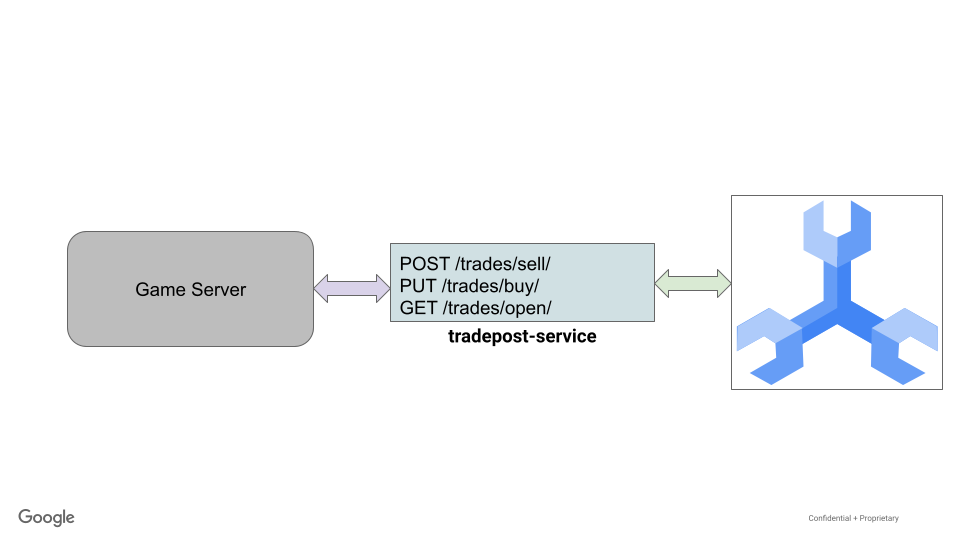
ไฟล์ ./src/golang/tradepost-service/main.go สำหรับบริการ tradepost มีการตั้งค่าและโค้ดคล้ายกับบริการอื่นๆ จึงไม่มีการทำซ้ำที่นี่ บริการนี้แสดงปลายทางหลายรายการดังนี้
 func main() {
   configuration, _ := config.NewConfig()

   router := gin.Default()
   router.SetTrustedProxies(nil)

   router.Use(setSpannerConnection(configuration))

   router.GET("/trades/player_items", getPlayerItem)
   router.POST("/trades/sell", createOrder)
   router.GET("/trades/open", getOpenOrder)
   router.PUT("/trades/buy", purchaseOrder)

   router.Run(configuration.Server.URL())
}
บริการนี้มีโครงสร้าง TradeOrder รวมถึงโครงสร้างที่จำเป็นสำหรับโครงสร้าง GameItem, PlayerItem, Player และ PlayerLedger ดังนี้
 type TradeOrder struct {
   OrderUUID      string           `json:"orderUUID" binding:"omitempty,uuid4"`
   Lister         string           `json:"lister" binding:"omitempty,uuid4"`
   Buyer          string           `json:"buyer" binding:"omitempty,uuid4"`
   PlayerItemUUID string           `json:"playerItemUUID" binding:"omitempty,uuid4"`
   TradeType      string           `json:"trade_type"`
   ListPrice      big.Rat          `json:"list_price" spanner:"list_price"`
   Created        time.Time        `json:"created"`
   Ended          spanner.NullTime `json:"ended"`
   Expires        time.Time        `json:"expires"`
   Active         bool             `json:"active"`
   Cancelled      bool             `json:"cancelled"`
   Filled         bool             `json:"filled"`
   Expired        bool             `json:"expired"`
}

type GameItem struct {
   ItemUUID      string    `json:"itemUUID"`
   ItemName      string    `json:"item_name"`
   ItemValue     big.Rat   `json:"item_value"`
   AvailableTime time.Time `json:"available_time"`
   Duration      int64     `json:"duration"`
}

type PlayerItem struct {
   PlayerItemUUID string           `json:"playerItemUUID" binding:"omitempty,uuid4"`
   PlayerUUID     string           `json:"playerUUID" binding:"required,uuid4"`
   ItemUUID       string           `json:"itemUUID" binding:"required,uuid4"`
   Source         string           `json:"source"`
   GameSession    string           `json:"game_session" binding:"omitempty,uuid4"`
   Price          big.Rat          `json:"price"`
   AcquireTime    time.Time        `json:"acquire_time" spanner:"acquire_time"`
   ExpiresTime    spanner.NullTime `json:"expires_time" spanner:"expires_time"`
   Visible        bool             `json:"visible"`
}

type Player struct {
   PlayerUUID     string    `json:"playerUUID" binding:"required,uuid4"`
   Updated        time.Time `json:"updated"`
   AccountBalance big.Rat   `json:"account_balance" spanner:"account_balance"`
   CurrentGame    string    `json:"current_game" binding:"omitempty,uuid4" spanner:"current_game"`
}

type PlayerLedger struct {
   PlayerUUID  string  `json:"playerUUID" binding:"required,uuid4"`
   Amount      big.Rat `json:"amount"`
   GameSession string  `json:"game_session" spanner:"game_session"`
   Source      string  `json:"source"`
}
หากต้องการสร้างคำสั่งซื้อขาย ให้ส่งคำขอ POST ไปยังปลายทาง API /trades/sell ข้อมูลที่จำเป็นคือ playerItemUUID ของ player_item ที่จะขาย, lister และ list_price
ระบบจะเลือกการเปลี่ยนแปลง Spanner เพื่อสร้างคำสั่งซื้อขายและทำเครื่องหมาย player_item ว่าไม่แสดง การดำเนินการนี้จะป้องกันไม่ให้ผู้ขายโพสต์สินค้าซ้ำเพื่อขาย
 func (o *TradeOrder) Create(ctx context.Context, client spanner.Client) error {
   // insert into spanner
   _, err := client.ReadWriteTransaction(ctx, func(ctx context.Context, txn *spanner.ReadWriteTransaction) error {
       // get the Item to be listed
       pi, err := GetPlayerItem(ctx, txn, o.Lister, o.PlayerItemUUID)
       if err != nil {
           return err
       }

       // Set expires to 1 day by default
       if o.Expires.IsZero() {
           currentTime := time.Now()
           o.Expires = currentTime.Add(time.Hour * 24)
       }

       // Item is not visible or expired, so it can't be listed. That's an error
       if !validateSellOrder(pi) {
           errorMsg := fmt.Sprintf("Item (%s, %s) cannot be listed.", o.Lister, o.PlayerItemUUID)
           return errors.New(errorMsg)
       }

       // Initialize order values
       o.OrderUUID = generateUUID()
       o.Active = true // TODO: Have to set this by default since testing with emulator does not support 'DEFAULT' schema option

       // Insert the order
       var m []*spanner.Mutation
       cols := []string{"orderUUID", "playerItemUUID", "lister", "list_price", "trade_type", "expires", "active"}
       m = append(m, spanner.Insert("trade_orders", cols, []interface{}{o.OrderUUID, o.PlayerItemUUID, o.Lister, o.ListPrice, "sell", o.Expires, o.Active}))

       // Mark the item as invisible
       cols = []string{"playerUUID", "playerItemUUID", "visible"}
       m = append(m, spanner.Update("player_items", cols, []interface{}{o.Lister, o.PlayerItemUUID, false}))

       txn.BufferWrite(m)
       return nil
   })

   if err != nil {
       return err
   }

   // return empty error on success
   return nil
}
ก่อนที่จะสร้างคำสั่งซื้อจริง ระบบจะตรวจสอบ PlayerItem เพื่อให้แน่ใจว่าสามารถแสดงเพื่อขายได้ โดยหลักๆ แล้วหมายความว่า PlayerItem จะแสดงต่อเพลเยอร์ และยังไม่หมดอายุ
 // Validate that the order can be placed: Item is visible and not expired
func validateSellOrder(pi PlayerItem) bool {
   // Item is not visible, can't be listed
   if !pi.Visible {
       return false
   }

   // item is expired. can't be listed
   if !pi.ExpiresTime.IsNull() && pi.ExpiresTime.Time.Before(time.Now()) {
       return false
   }

   // All validation passed. Item can be listed
   return true
}
การซื้อจะทำได้โดยใช้คำขอ PUT ไปยังปลายทาง /trades/buy ข้อมูลที่จำเป็นคือ orderUUID และ buyer ซึ่งเป็น UUID ของผู้เล่นที่ทำการซื้อ
ด้วยความซับซ้อนและจำนวนการเปลี่ยนแปลงนี้ จึงมีการเลือกการกลายพันธุ์อีกครั้งเพื่อซื้อคำสั่ง การดำเนินการต่อไปนี้จะดำเนินการในธุรกรรมแบบอ่าน-เขียนรายการเดียว
- ตรวจสอบว่าสามารถดำเนินการตามคำสั่งซื้อได้เนื่องจากยังไม่มีการดำเนินการตามคำสั่งซื้อก่อนหน้านี้และคำสั่งซื้อยังไม่หมดอายุ
 // Validate that the order can be filled: Order is active and not expired
func validatePurchase(o TradeOrder) bool {
   // Order is not active
   if !o.Active {
       return false
   }

   // order is expired. can't be filled
   if !o.Expires.IsZero() && o.Expires.Before(time.Now()) {
       return false
   }

   // All validation passed. Order can be filled
   return true
}
- ดึงข้อมูลผู้ซื้อและตรวจสอบว่าผู้ซื้อซื้อสินค้าได้ ซึ่งหมายความว่าผู้ซื้อต้องไม่ใช่ผู้ลงประกาศ และมีเงินเพียงพอ
 // Validate that a buyer can buy this item.
func validateBuyer(b Player, o TradeOrder) bool {
   // Lister can't be the same as buyer
   if b.PlayerUUID == o.Lister {
       return false
   }

   // Big.rat returns -1 if Account_balance is less than price
   if b.AccountBalance.Cmp(&o.ListPrice) == -1 {
       return false
   }

   return true
}
- เพิ่ม list_price ของคำสั่งซื้อลงในยอดคงเหลือในบัญชีของผู้ลงรายการ พร้อมกับรายการบัญชีแยกประเภทที่ตรงกัน
 // models/trade_order.go
// Buy an order
func (o *TradeOrder) Buy(ctx context.Context, client spanner.Client) error {
*snip*
// Update seller's account balance
       lister.UpdateBalance(ctx, txn, o.ListPrice)
*snip*
}

// models/players.go
// Update a player's balance, and add an entry into the player ledger
func (p *Player) UpdateBalance(ctx context.Context, txn *spanner.ReadWriteTransaction, newAmount big.Rat) error {
   // This modifies player's AccountBalance, which is used to update the player entry
   p.AccountBalance.Add(&p.AccountBalance, &newAmount)

   txn.BufferWrite([]*spanner.Mutation{
       spanner.Update("players", []string{"playerUUID", "account_balance"}, []interface{}{p.PlayerUUID, p.AccountBalance}),
       spanner.Insert("player_ledger_entries", []string{"playerUUID", "amount", "game_session", "source", "entryDate"},
           []interface{}{p.PlayerUUID, newAmount, p.CurrentGame, "tradepost", spanner.CommitTimestamp}),
   })
   return nil
}
- หักlist_price ของคำสั่งซื้อจากยอดเงินคงเหลือในบัญชีผู้ซื้อ โดยมีรายการบัญชีแยกประเภทที่ตรงกัน
 // Update buyer's account balance
       negAmount := o.ListPrice.Neg(&o.ListPrice)
       buyer.UpdateBalance(ctx, txn, *negAmount)
- ย้าย player_item ไปยังผู้เล่นใหม่โดยการแทรกอินสแตนซ์ใหม่ของไอเทมในเกมพร้อมรายละเอียดเกมและผู้ซื้อลงในตาราง PlayerItems และนำอินสแตนซ์ของไอเทมของผู้ขายออก
// models/player_items.go
// Move an item to a new player, removes the item entry from the old player
func (pi *PlayerItem) MoveItem(ctx context.Context, txn *spanner.ReadWriteTransaction, toPlayer string) error {
   fmt.Printf("Buyer: %s", toPlayer)
   txn.BufferWrite([]*spanner.Mutation{
       spanner.Insert("player_items", []string{"playerItemUUID", "playerUUID", "itemUUID", "price", "source", "game_session"},
           []interface{}{pi.PlayerItemUUID, toPlayer, pi.ItemUUID, pi.Price, pi.Source, pi.GameSession}),
       spanner.Delete("player_items", spanner.Key{pi.PlayerUUID, pi.PlayerItemUUID}),
   })

   return nil
}
- อัปเดตรายการคำสั่งซื้อเพื่อระบุว่ามีการดำเนินการกับสินค้าแล้วและไม่ได้ใช้งานอีกต่อไป
โดยรวมแล้ว ฟังก์ชันซื้อจะมีลักษณะดังนี้
 // Buy an order
func (o *TradeOrder) Buy(ctx context.Context, client spanner.Client) error {
   // Fulfil the order
   _, err := client.ReadWriteTransaction(ctx, func(ctx context.Context, txn *spanner.ReadWriteTransaction) error {
       // Get Order information
       err := o.getOrderDetails(ctx, txn)
       if err != nil {
           return err
       }

       // Validate order can be filled
       if !validatePurchase(*o) {
           errorMsg := fmt.Sprintf("Order (%s) cannot be filled.", o.OrderUUID)
           return errors.New(errorMsg)
       }

       // Validate buyer has the money
       buyer := Player{PlayerUUID: o.Buyer}
       err = buyer.GetBalance(ctx, txn)
       if err != nil {
           return err
       }

       if !validateBuyer(buyer, *o) {
           errorMsg := fmt.Sprintf("Buyer (%s) cannot purchase order (%s).", buyer.PlayerUUID, o.OrderUUID)
           return errors.New(errorMsg)
       }

       // Move money from buyer to seller (which includes ledger entries)
       var m []*spanner.Mutation
       lister := Player{PlayerUUID: o.Lister}
       err = lister.GetBalance(ctx, txn)
       if err != nil {
           return err
       }

       // Update seller's account balance
       lister.UpdateBalance(ctx, txn, o.ListPrice)

       // Update buyer's account balance
       negAmount := o.ListPrice.Neg(&o.ListPrice)
       buyer.UpdateBalance(ctx, txn, *negAmount)

       // Move item from seller to buyer, mark item as visible.
       pi, err := GetPlayerItem(ctx, txn, o.Lister, o.PlayerItemUUID)
       if err != nil {
           return err
       }
       pi.GameSession = buyer.CurrentGame

       // Moves the item from lister (current pi.PlayerUUID) to buyer
       pi.MoveItem(ctx, txn, o.Buyer)

       // Update order information
       cols := []string{"orderUUID", "active", "filled", "buyer", "ended"}
       m = append(m, spanner.Update("trade_orders", cols, []interface{}{o.OrderUUID, false, true, o.Buyer, time.Now()}))

       txn.BufferWrite(m)
       return nil
   })

   if err != nil {
       return err
   }

   // return empty error on success
   return nil
}
โดยค่าเริ่มต้น ระบบจะกำหนดค่าบริการโดยใช้ตัวแปรสภาพแวดล้อม ดูส่วนที่เกี่ยวข้องของไฟล์ ./src/golang/tradepost-service/config/config.go
 func NewConfig() (Config, error) {
   *snip*
   // Server defaults
   viper.SetDefault("server.host", "localhost")
   viper.SetDefault("server.port", 8083)

   // Bind environment variable override
   viper.BindEnv("server.host", "SERVICE_HOST")
   viper.BindEnv("server.port", "SERVICE_PORT")
   viper.BindEnv("spanner.project_id", "SPANNER_PROJECT_ID")
   viper.BindEnv("spanner.instance_id", "SPANNER_INSTANCE_ID")
   viper.BindEnv("spanner.database_id", "SPANNER_DATABASE_ID")

   *snip*

   return c, nil
}
คุณจะเห็นว่าลักษณะการทำงานเริ่มต้นคือการเรียกใช้บริการใน localhost:8083 เพื่อหลีกเลี่ยงการขัดแย้งกับบริการอื่นๆ*.*
เมื่อมีข้อมูลนี้แล้ว ก็ถึงเวลาเรียกใช้บริการเทรดโพสต์
เรียกใช้บริการ
การเรียกใช้บริการจะทำให้บริการทำงานบนพอร์ต 8083 บริการนี้มีทรัพยากร Dependency หลายรายการเหมือนกับบริการไอเทม ดังนั้นระบบจะไม่ดาวน์โหลดทรัพยากร Dependency ใหม่
cd ~/spanner-gaming-sample/src/golang/tradepost-service
go run . &
เอาต์พุตจากคำสั่ง:
[GIN-debug] [WARNING] Creating an Engine instance with the Logger and Recovery middleware already attached.

[GIN-debug] [WARNING] Running in "debug" mode. Switch to "release" mode in production.
 - using env:   export GIN_MODE=release
 - using code:  gin.SetMode(gin.ReleaseMode)

[GIN-debug] GET    /trades/player_items      --> main.getPlayerItem (4 handlers)
[GIN-debug] POST   /trades/sell              --> main.createOrder (4 handlers)
[GIN-debug] GET    /trades/open              --> main.getOpenOrder (4 handlers)
[GIN-debug] PUT    /trades/buy               --> main.purchaseOrder (4 handlers)
[GIN-debug] Listening and serving HTTP on localhost:8083
โพสต์รายการ
ทดสอบบริการโดยส่งคำขอ GET เพื่อเรียก PlayerItem ที่จะขาย
curl http://localhost:8083/trades/player_items
เอาต์พุตจากคำสั่ง:
{
    "PlayerUUID": "b74cc194-87b0-4a55-a67f-0f0742ef6352",
    "PlayerItemUUID": "a42b1899-4509-4fce-9958-265d2a2838a0",
    "Price": "3.14"
}
ตอนนี้มาโพสต์ไอเทมเพื่อขายโดยเรียกใช้ปลายทาง /trades/sell กัน
curl http://localhost:8083/trades/sell \
    --include \
    --header "Content-Type: application/json" \
    --request "POST" \
    --data '{"lister": "<PlayerUUID>","playerItemUUID": "<PlayerItemUUID>", "list_price": "<some price higher than item's price>"}'
เอาต์พุตจากคำสั่ง:
HTTP/1.1 201 Created
Content-Type: application/json; charset=utf-8
Date: <Date>
Content-Length: 38

"282ea691-b956-4c4c-95ff-f461d6415651"
สรุป
ในขั้นตอนนี้ คุณได้ติดตั้งใช้งาน tradepost-service เพื่อจัดการการสร้างคำสั่งขาย นอกจากนี้ บริการนี้ยังจัดการความสามารถในการซื้อคำสั่งซื้อเหล่านั้นด้วย
ขั้นตอนถัดไป
ตอนนี้บริการของคุณพร้อมใช้งานแล้ว ก็ถึงเวลาจำลองการขายและการซื้อของผู้เล่นในตลาดกลางแล้ว
5. เริ่มเทรด
ตอนนี้บริการไอเทมและเทรดโพสต์ทำงานแล้ว คุณจึงสร้างโหลดได้โดยใช้เครื่องมือสร้าง Locust ที่เราให้ไว้
Locust มีอินเทอร์เฟซบนเว็บสําหรับเรียกใช้เครื่องกําเนิด แต่ในแล็บนี้คุณจะใช้บรรทัดคําสั่ง (ตัวเลือก –headless)
สร้างไอเทมในเกม
ก่อนอื่นคุณจะต้องสร้างไอเทม ไฟล์ ./generators/item_generator.py มีงานในการสร้างไอเทมเกมที่มีสตริงแบบสุ่มสำหรับชื่อและค่าราคาแบบสุ่ม
# Generate random items
class ItemLoad(HttpUser):
   def generateItemName(self):
       return ''.join(random.choices(string.ascii_lowercase + string.digits, k=32))

   def generateItemValue(self):
       return str(decimal.Decimal(random.randrange(100, 10000))/100)

   @task
   def createItem(self):
       headers = {"Content-Type": "application/json"}
       data = {"item_name": self.generateItemName(), "item_value": self.generateItemValue()}

       self.client.post("/items", data=json.dumps(data), headers=headers)
คำสั่งต่อไปนี้จะเรียกไฟล์ item_generator.py ซึ่งจะสร้างไอเทมในเกมเป็นเวลา 10 วินาที (t=10s)
cd ~/spanner-gaming-sample
locust -H http://127.0.0.1:8082 -f ./generators/item_generator.py --headless -u=1 -r=1 -t=10s
เอาต์พุตจากคำสั่ง:
*snip*
/INFO/locust.main: --run-time limit reached. Stopping Locust
/INFO/locust.main: Shutting down (exit code 0)
 Name                                                                              # reqs      # fails  |     Avg     Min     Max  Median  |   req/s failures/s
----------------------------------------------------------------------------------------------------------------------------------------------------------------
 POST /items                                                                          606     0(0.00%)  |      16      12     161      15  |   60.61    0.00
----------------------------------------------------------------------------------------------------------------------------------------------------------------
 Aggregated                                                                           606     0(0.00%)  |      16      12     161      15  |   60.61    0.00

Response time percentiles (approximated)
 Type     Name                                                                                  50%    66%    75%    80%    90%    95%    98%    99%  99.9% 99.99%   100% # reqs
--------|--------------------------------------------------------------------------------|---------|------|------|------|------|------|------|------|------|------|------|------|
 POST     /items                                                                                 15     16     16     17     18     19     21     34    160    160    160    606
--------|--------------------------------------------------------------------------------|---------|------|------|------|------|------|------|------|------|------|------|------|
 None     Aggregated                                                                             15     16     16     17     18     19     21     34    160    160    160    606
ผู้เล่นจะได้รับไอเทมและเงิน
จากนั้นให้ผู้เล่นรับไอเทมและเงินเพื่อเข้าร่วมในตลาดกลาง โดยไฟล์ ./generators/game_server.py จะมีงานในการเรียกข้อมูลไอเทมในเกมเพื่อมอบหมายให้ผู้เล่น รวมถึงสกุลเงินแบบสุ่ม
 # Players generate items and money at 5:2 ratio. We don't want to devalue the currency!
class GameLoad(HttpUser):
   def on_start(self):
       self.getItems()

   def getItems(self):
       headers = {"Content-Type": "application/json"}
       r = requests.get(f"{self.host}/items", headers=headers)

       global itemUUIDs
       itemUUIDs = json.loads(r.text)

   def generateAmount(self):
       return str(round(random.uniform(1.01, 49.99), 2))

   @task(2)
   def acquireMoney(self):
       headers = {"Content-Type": "application/json"}

       # Get a random player that's part of a game, and update balance
       with self.client.get("/players", headers=headers, catch_response=True) as response:
           try:
               data = {"playerUUID": response.json()["playerUUID"], "amount": self.generateAmount(), "source": "loot"}
               self.client.put("/players/balance", data=json.dumps(data), headers=headers)
           except json.JSONDecodeError:
               response.failure("Response could not be decoded as JSON")
           except KeyError:
               response.failure("Response did not contain expected key 'playerUUID'")

   @task(5)
   def acquireItem(self):
       headers = {"Content-Type": "application/json"}

       # Get a random player that's part of a game, and add an item
       with self.client.get("/players", headers=headers, catch_response=True) as response:
           try:
               itemUUID = itemUUIDs[random.randint(0, len(itemUUIDs)-1)]
               data = {"playerUUID": response.json()["playerUUID"], "itemUUID": itemUUID, "source": "loot"}
               self.client.post("/players/items", data=json.dumps(data), headers=headers)
           except json.JSONDecodeError:
               response.failure("Response could not be decoded as JSON")
           except KeyError:
               response.failure("Response did not contain expected key 'playerUUID'")
คำสั่งนี้จะช่วยให้ผู้เล่นได้รับไอเทมและเงินเป็นเวลา 60 วินาที
locust -H http://127.0.0.1:8082 -f game_server.py --headless -u=1 -r=1 -t=60s
เอาต์พุตจากคำสั่ง:
*snip*
dev-machine/INFO/locust.main: --run-time limit reached. Stopping Locust
dev-machine/INFO/locust.main: Shutting down (exit code 0)
 Name                                                                              # reqs      # fails  |     Avg     Min     Max  Median  |   req/s failures/s
----------------------------------------------------------------------------------------------------------------------------------------------------------------
 GET /players                                                                         231     0(0.00%)  |      14       9      30      13  |   23.16    0.00
 PUT /players/balance                                                                  53     0(0.00%)  |      33      30      39      34  |    5.31    0.00
 POST /players/items                                                                  178     0(0.00%)  |      26      22      75      26  |   17.85    0.00
----------------------------------------------------------------------------------------------------------------------------------------------------------------
 Aggregated                                                                           462     0(0.00%)  |      21       9      75      23  |   46.32    0.00

Response time percentiles (approximated)
 Type     Name                                                                                  50%    66%    75%    80%    90%    95%    98%    99%  99.9% 99.99%   100% # reqs
--------|--------------------------------------------------------------------------------|---------|------|------|------|------|------|------|------|------|------|------|------|
 GET      /players                                                                               13     16     17     17     19     20     21     23     30     30     30    231
 PUT      /players/balance                                                                       34     34     35     35     36     37     38     40     40     40     40     53
 POST     /players/items                                                                         26     27     27     27     28     29     34     53     76     76     76    178
--------|--------------------------------------------------------------------------------|---------|------|------|------|------|------|------|------|------|------|------|------|
 None     Aggregated                                                                             23     26     27     27     32     34     36     37     76     76     76    462
ผู้เล่นที่ซื้อและขายในตลาดกลาง
เมื่อผู้เล่นมีไอเทมและเงินสำหรับซื้อไอเทมแล้ว ก็จะเริ่มใช้ตลาดกลางได้
ไฟล์เครื่องมือสร้าง ./generators/trading_server.py มีงานในการสร้างคำสั่งขายและดำเนินการตามคำสั่งซื้อเหล่านั้น
 # Players can sell and buy items
class TradeLoad(HttpUser):
   def itemMarkup(self, value):
       f = float(value)
       return str(f*1.5)

   @task
   def sellItem(self):
       headers = {"Content-Type": "application/json"}

       # Get a random item
       with self.client.get("/trades/player_items", headers=headers, catch_response=True) as response:
           try:
               playerUUID = response.json()["PlayerUUID"]
               playerItemUUID = response.json()["PlayerItemUUID"]
               list_price = self.itemMarkup(response.json()["Price"])

  # Currently don't have any items that can be sold, retry
               if playerItemUUID == "":
                   raise RescheduleTask()


               data = {"lister": playerUUID, "playerItemUUID": playerItemUUID, "list_price": list_price}
               self.client.post("/trades/sell", data=json.dumps(data), headers=headers)
           except json.JSONDecodeError:
               response.failure("Response could not be decoded as JSON")
           except KeyError:
               response.failure("Response did not contain expected key 'playerUUID'")

   @task
   def buyItem(self):
       headers = {"Content-Type": "application/json"}

       # Get a random item
       with self.client.get("/trades/open", headers=headers, catch_response=True) as response:
           try:
               orderUUID = response.json()["OrderUUID"]
               buyerUUID = response.json()["BuyerUUID"]

                    # Currently don't have any buyers that can fill the order, retry
               if buyerUUID == "":
                   raise RescheduleTask()

               data = {"orderUUID": orderUUID, "buyer": buyerUUID}
               self.client.put("/trades/buy", data=json.dumps(data), headers=headers)
           except json.JSONDecodeError:
               response.failure("Response could not be decoded as JSON")
           except KeyError:
               response.failure("Response did not contain expected key 'playerUUID'")
คำสั่งนี้จะช่วยให้ผู้เล่นแสดงรายการไอเทมที่ได้รับเพื่อขาย และให้ผู้เล่นคนอื่นๆ ซื้อไอเทมเหล่านั้นได้เป็นเวลา 10 วินาที
locust -H http://127.0.0.1:8083 -f ./generators/trading_server.py --headless -u=1 -r=1 -t=10s
เอาต์พุตจากคำสั่ง:
*snip*
 Name                                                                              # reqs      # fails  |     Avg     Min     Max  Median  |   req/s failures/s
----------------------------------------------------------------------------------------------------------------------------------------------------------------
 PUT /trades/buy                                                                       20    5(25.00%)  |      43      10      78      43  |    2.07    0.52
 GET /trades/open                                                                      20     0(0.00%)  |     358       7     971     350  |    2.07    0.00
 GET /trades/player_items                                                              20     0(0.00%)  |      49      35     113      41  |    2.07    0.00
 POST /trades/sell                                                                     20     0(0.00%)  |      29      21     110      24  |    2.07    0.00
----------------------------------------------------------------------------------------------------------------------------------------------------------------
 Aggregated                                                                            80     5(6.25%)  |     120       7     971      42  |    8.29    0.52

Response time percentiles (approximated)
 Type     Name                                                                                  50%    66%    75%    80%    90%    95%    98%    99%  99.9% 99.99%   100% # reqs
--------|--------------------------------------------------------------------------------|---------|------|------|------|------|------|------|------|------|------|------|------|
 PUT      /trades/buy                                                                            43     45     49     50     71     78     78     78     78     78     78     20
 GET      /trades/open                                                                          360    500    540    550    640    970    970    970    970    970    970     20
 GET      /trades/player_items                                                                   43     55     57     59     72    110    110    110    110    110    110     20
 POST     /trades/sell                                                                           24     25     25     27     50    110    110    110    110    110    110     20
--------|--------------------------------------------------------------------------------|---------|------|------|------|------|------|------|------|------|------|------|------|
 None     Aggregated                                                                             42     50     71    110    440    550    640    970    970    970    970     80
สรุป
ในขั้นตอนนี้ คุณได้จำลองผู้เล่นที่ลงชื่อสมัครเล่นเกม แล้วจึงจำลองให้ผู้เล่นเล่นเกมโดยใช้บริการจับคู่ การจำลองเหล่านี้ใช้ประโยชน์จากเฟรมเวิร์ก Python ของ Locust เพื่อส่งคำขอไปยัง REST API ของบริการของเรา
คุณสามารถแก้ไขเวลาที่ใช้ในการสร้างผู้เล่นและเล่นเกม รวมถึงจำนวนผู้ใช้พร้อมกัน (-u) ได้
ขั้นตอนถัดไป
หลังจากการจำลอง คุณจะต้องตรวจสอบสถิติต่างๆ โดยการค้นหา Spanner
6. เรียกข้อมูลสถิติการค้า
ตอนนี้เราได้จำลองผู้เล่นที่ได้รับเงินและไอเทม แล้วขายไอเทมเหล่านั้นในตลาดกลางแล้ว มาดูสถิติบางอย่างกัน
โดยใช้ Cloud Console เพื่อส่งคำขอค้นหาไปยัง Spanner
การตรวจสอบคำสั่งซื้อขายที่เปิดอยู่เทียบกับคำสั่งซื้อขายที่ดำเนินการแล้ว
เมื่อซื้อ TradeOrder ในตลาดซื้อขาย ระบบจะอัปเดตฟิลด์ข้อมูลเมตา filled
การค้นหานี้จะช่วยให้คุณตรวจสอบได้ว่ามีคำสั่งซื้อที่เปิดอยู่กี่รายการและมีคำสั่งซื้อที่ดำเนินการแล้วกี่รายการ
-- Open vs Filled Orders
SELECT Type, NumTrades FROM
(SELECT "Open Trades" as Type, count(*) as NumTrades FROM trade_orders WHERE active=true
UNION ALL
SELECT "Filled Trades" as Type, count(*) as NumTrades FROM trade_orders WHERE filled=true
)
ผลลัพธ์:
ประเภท | NumTrades |
การซื้อขายที่เปิดอยู่ | 159 |
การซื้อขายที่ดำเนินการแล้ว | 454 |
ตรวจสอบยอดเงินคงเหลือในบัญชีผู้เล่นและจำนวนไอเทม
ผู้เล่นกำลังเล่นเกมหากมีการตั้งค่าคอลัมน์ current_game หากไม่เป็นเช่นนั้น แสดงว่าผู้ใช้ไม่ได้เล่นเกมอยู่ในขณะนี้
หากต้องการดูผู้เล่น 10 อันดับแรกที่กำลังเล่นเกมที่มีไอเทมมากที่สุดในขณะนี้ พร้อมด้วยaccount_balance ของผู้เล่น
ใช้คำค้นหานี้
SELECT playerUUID, account_balance, (SELECT COUNT(*) FROM player_items WHERE playerUUID=p.PlayerUUID) AS numItems, current_game
FROM players AS p
WHERE current_game IS NOT NULL
ORDER BY numItems DESC
LIMIT 10;
ผลลัพธ์:
|
|
|
|
|
|
|
|
|
|
|
|
|
|
|
|
สรุป
ในขั้นตอนนี้ คุณได้ตรวจสอบสถิติต่างๆ ของคำสั่งซื้อของผู้เล่นและคำสั่งซื้อการซื้อขายโดยใช้ Cloud Console เพื่อค้นหา Spanner
ขั้นตอนถัดไป
จากนั้นก็ถึงเวลาทำความสะอาด
7. การล้างข้อมูล
หลังจากสนุกกับการเล่น Spanner แล้ว เราต้องทำความสะอาดสนามเด็กเล่น โชคดีที่ขั้นตอนนี้ทำได้ง่าย เพียงไปที่ส่วน Cloud Spanner ของ Cloud Console แล้วลบอินสแตนซ์ที่เราสร้างขึ้นสำหรับ Codelab นี้
8. ยินดีด้วย
ยินดีด้วย คุณทำให้เกมตัวอย่างใช้งานได้ใน Spanner เรียบร้อยแล้ว
ขั้นตอนต่อไปคืออะไร
ในแล็บนี้ คุณได้ตั้งค่าบริการ 2 อย่างเพื่อจัดการการสร้างไอเทมในเกมและผู้เล่นที่ได้รับไอเทมเพื่อนำไปขายในตลาดกลาง
ตัวอย่างโค้ดเหล่านี้จะช่วยให้คุณเข้าใจมากขึ้นว่าความสอดคล้องของ Cloud Spanner ภายในธุรกรรมทำงานอย่างไรสำหรับทั้ง DML และการเปลี่ยนแปลงของ Spanner
คุณสามารถใช้เครื่องมือสร้างที่ให้ไว้เพื่อสำรวจการปรับขนาด Spanner ได้