
1. Introduction
Many teams rely on valuable, battle-tested applications built on previous versions of Java and Spring. While these apps may be serving current needs well, modernizing them is key to accessing the latest security patches, performance improvements (like virtual threads), and new language features. This task isn't limited to large enterprises; teams of all sizes eventually need to adopt and modernize codebases to keep them secure and efficient. Antigravity, an agent-first application, accelerates this process by providing developers with autonomous AI agents that can reason through unfamiliar code, identify dependencies, and automate tedious refactoring.
At the heart of Antigravity is the Agent Manager, a "Mission Control" dashboard for spawning, monitoring, and interacting with these agents as they perform complex tasks. This codelab focuses on leveraging Agent Manager to orchestrate agents that will modernize the Spring PetClinic monolith from Spring Boot 2.7 (Java 8/11) to Spring Boot 4.0.1 and Java 25, allowing you to spend less time deciphering old logic and more time delivering new features.
What you'll learn
- Explain legacy code with Agent Manager.
- Upgrade Maven build files to Spring Boot 4.0.1.
- Automate
javax.*tojakarta.*namespace migrations. - Refactor repositories to Spring Data JPA patterns.
- Enable modern features like Virtual Threads and Actuator.
- Fix and generate tests with AI.

2. Set up environment
- Access Antigravity: You will complete this codelab using Antigravity, an agent-first application. You will interact primarily with Agent Manager, its integrated mission control for AI agents.
- Antigravity: Download the agent-first application at antigravity.google.
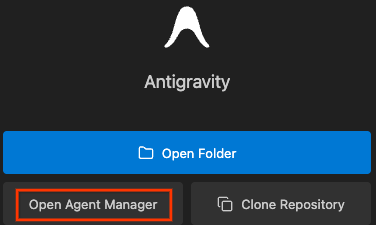
- Open Agent Manager: Launch Antigravity and open Agent Manager, which is the interface you will use to interact with Antigravity's AI agents
- Clone the sample: These commands clone the sample application, change into the new directory, and check out the specific commit that pins the application to Spring Boot 2.7.0, which is the starting point for our modernization:
git clone https://github.com/spring-projects/spring-petclinic.git
cd spring-petclinic
git checkout 1db99dbb58f670ef8e39e9f1edf134b21ce919d6
3. Analyze legacy code
Understanding legacy logic is the first step to a safe migration. Agent Manager can help you understand the codebase and create a roadmap for your modernization effort. Instead of diving into individual files right away, you can ask Agent Manager for a high-level tour of the codebase to help plan a modernization strategy.
For example, you can ask Agent Manager:
Give me a tour of this codebase to help plan a modernization strategy. Keep it high-level for now (no need to investigate the codebase line-by-line yet), and please organize your findings using these categories:

The Layout: Map out the main folders and what they do—specifically where the business rules are kept versus the setup and configuration files.

The Traffic Jams: Spot the files that seem to be the 'center of gravity.' These are the classes or modules that many other parts of the app depend on.

The Islands: Identify parts of the code that are relatively isolated. These are the components that have very few connections to the rest of the system and could be moved or updated first.

The Data Path: Trace the lifecycle of a typical request, showing how it moves from the entry point through the logic layer and down to the database.

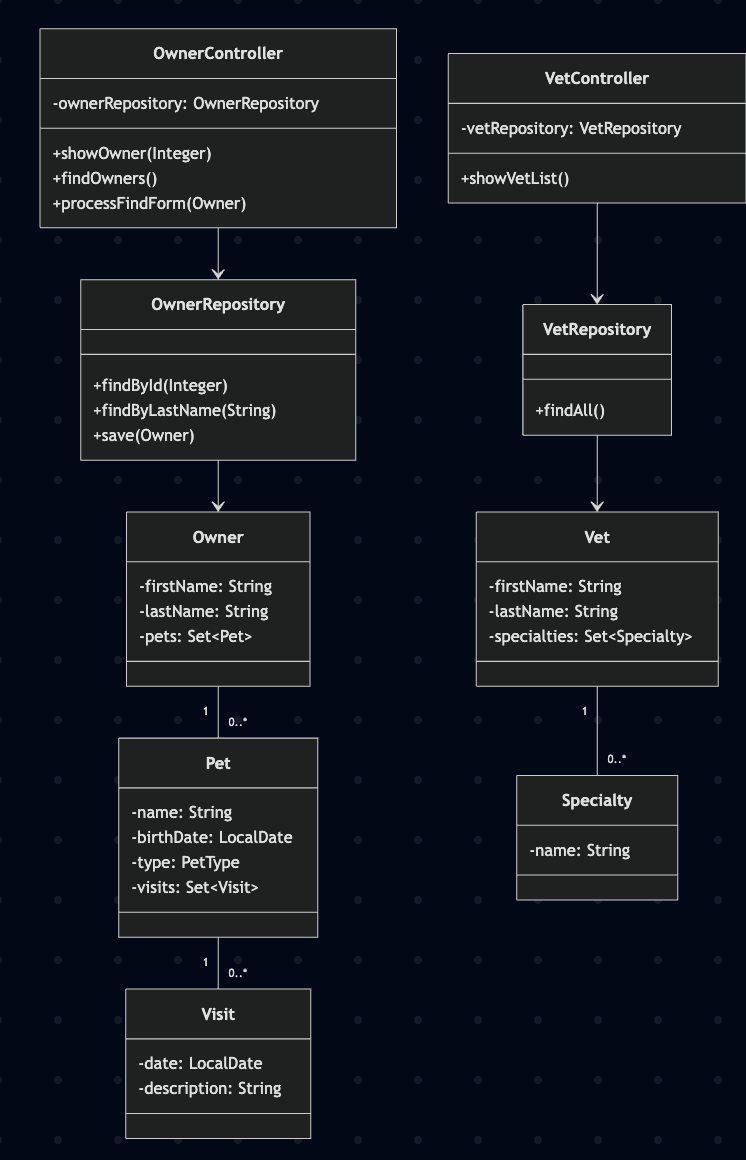
Write the text summary to migration-map.md, and please include a Mermaid.js class diagram at the bottom that visualizes these relationships for those with a viewer installed.
Agent Manager will provide a summary of the codebase structure, identify key components and dependencies, and help you identify good candidates for initial modernization efforts. This strategic overview allows you to make informed decisions about where to start refactoring.
Once you feel that you have a firm grasp on the codebase as it is, you can proceed to the next step to begin the modernization.
4. Upgrade to Spring Boot 4.x
1. Update pom.xml with Agent Manager
Ask Agent Manager to update pom.xml for Spring Boot 4.0.1 (or later) and Java 25, and modernize dependencies:
Help me update pom.xml to Spring Boot 4.0.1 (or later) and Java 25. Replace mysql-connector-java with mysql-connector-j, add jakarta.xml.bind-api, update jacoco-maven-plugin to 0.8.13, update spring-javaformat-maven-plugin to 0.0.41, ensure spring-boot-starter-cache is used instead of javax.cache, and add modular test starters (webmvc-test, data-jpa-test, restclient).
2. Namespace migration
Ask Agent Manager to perform the heavy lifting of package renaming:
Perform a project-wide migration from javax.* to jakarta.* for persistence, validation, and servlet packages. Also, update CacheConfiguration.java to use the Spring Boot 4.0.1 CacheManagerCustomizer interface.
3. Fix formatting and build
Run the formatter and perform a test-skipping build to verify the main source compiles:
mvn spring-javaformat:apply
mvn clean package -Dmaven.test.skip=true
5. Modernize data access
Legacy repositories often use manual @Query annotations for operations that modern Spring Data can handle automatically.
1. Refactor logic (repositories)
- Open
OwnerRepository.java. - Ask Agent Manager:
Refactor OwnerRepository to extend JpaRepository. Remove redundant findById/save/findAll methods and update others to use Spring Data method naming conventions. ensure findById returns Optional<Owner>. - Agent Manager refactors the interfaceBefore:
public interface OwnerRepository extends Repository<Owner, Integer> { @Query("SELECT owner FROM Owner owner left join fetch owner.pets WHERE owner.id =:id") Owner findById(@Param("id") Integer id); @Query("SELECT DISTINCT owner FROM Owner owner left join owner.pets WHERE owner.lastName LIKE :lastName%") Page<Owner> findByLastName(@Param("lastName") String lastName, Pageable pageable); }// Extends JpaRepository to inherit standard CRUD methods (findById, save, etc.) public interface OwnerRepository extends JpaRepository<Owner, Integer> { // Derived query method - no manual @Query needed! Page<Owner> findByLastNameStartingWith(String lastName, Pageable pageable); }
2. Refactor logic (controllers)
If OwnerController.java shows errors, ask Agent Manager:
Fix compiler errors in OwnerController caused by findById returning Optional in modern JpaRepository. Use .orElseThrow() or .orElse(new Owner()) as appropriate.
Before:
Owner owner = this.owners.findById(ownerId);
After:
Owner owner = this.owners.findById(ownerId)
    .orElseThrow(() -> new IllegalArgumentException("Invalid ownerId: " + ownerId));
6. Enable modern Java features
Spring Boot 4 on Java 25 allows for drastic throughput improvements with minimal configuration. To take advantage of these features, you first need to ensure you are running Java 25.
1. Set up Java 25 with SDKMAN
To run the application with Java 25 and use tools like jcmd for diagnostics, you'll need a Java 25 JDK. SDKMAN is a popular tool for managing parallel versions of multiple Software Development Kits, including Java.
- Install SDKMAN: If you don't have SDKMAN installed, run the following in your terminal:
curl -s "https://get.sdkman.io" | bash source "$HOME/.sdkman/bin/sdkman-init.sh" - Install Java 25: Once SDKMAN is installed, install and activate Temurin Java 25:
sdk install java 25-tem
sdk use java 25-tem
2. Configure application
- Open
src/main/resources/application.properties. - Ask Agent Manager:
Expose health and Prometheus endpoints in Actuator, and enable Virtual Threads for request processing. - Apply the suggested properties:
management.endpoints.web.exposure.include=health,prometheus
spring.threads.virtual.enabled=true
Does it actually do anything?
Enabling Virtual Threads replaces expensive OS threads with lightweight, JVM-managed virtual threads for I/O-bound tasks, improving performance and scalability. Let's build and run the app to see them in action.
Verify Virtual Threads are in use
First, ensure you've packaged the app (as done in step 3 of "Upgrade to Spring Boot 4.x"):
mvn clean package -Dmaven.test.skip=true
Next, run the following commands to start the app in the background, get its process ID (PID), send load to it with Apache Benchmark (ab), and check for virtual thread usage with jcmd.
# Start app in background and wait a few seconds for it to initialize
java -jar target/spring-petclinic-*.jar &
echo "Waiting 15s for app to start..."
sleep 15
# Get PID
PID=$(jps -l | grep spring-petclinic | awk '{print $1}')
echo "App running with PID: $PID"
# Start load generator in background to ensure virtual threads are created
echo "Simulating 100 concurrent users in background..."
ab -n 100 -c 100 http://localhost:8080/owners/find > /dev/null 2>&1 &
# Check for virtual threads under load
echo "Checking for virtual threads with jcmd:"
sleep 5 # wait for load to hit server
jcmd $PID Thread.print | grep VirtualThread
# Clean up
echo "Stopping background load generator and app..."
pkill ab
kill $PID
If virtual threads are enabled correctly, jcmd will output thread stack traces that include VirtualThread, confirming the JVM is actively scheduling lightweight threads:
"VirtualThread-unblocker" #53 daemon prio=5
...
This diagnostic confirms that virtual threads are being used to handle requests. Now let's review the performance impact.
Establish baseline
Run Apache Benchmark to simulate 100 concurrent users:
ab -n 5000 -c 100 http://localhost:8080/owners/find
- Output (Comparison):
# Virtual Threads OFF Requests per second: 1047.45 [#/sec] (mean) Time per request: 95.470 [ms] (mean) # Virtual Threads ON Requests per second: 1317.12 [#/sec] (mean) Time per request: 75.923 [ms] (mean) - Expected outcome: +25% throughput and -20% latency by eliminating thread-switching overhead during DB blocking.
Verify impact
Run this: Verify the runtime has loaded the necessary scheduling infrastructure.
jcmd <PID> VM.class_hierarchy | grep VirtualThread
- Output:
java.lang.VirtualThread jdk.management.VirtualThreadSchedulerMXBean - Outcome: Verification that the Java 25 runtime is fully aware and utilizing Project Loom features.
Summary: When to use Virtual Threads?
Scenario | Recommend? | Why |
I/O / DB | Yes | Maximum benefit; threads "yield" while waiting. |
Scalability | Yes | Handles 10k+ concurrent requests on a single node. |
CPU Heavy | No | Stick to platform threads for raw compute. |
7. (Optional) Fix and generate tests
Modernization requires updating tests to match new package names, APIs, and best practices. This is also an opportune time to use Agent Manager to generate new tests and improve overall test coverage.
Fix legacy tests
The src/test folder likely has compilation errors due to package renames (javax to jakarta) and API changes (Optional return types in repositories). Ask Agent Manager to fix these issues across all test files:
Fix compilation errors in src/test. Replace deprecated @MockBean with @MockitoBean. Update test imports for WebMvcTest and DataJpaTest to their new Spring Boot 4 modular tags. Update mocks (like given(owners.findById(...))) to return Optional.of(owner).
This prompt instructs Agent Manager to:
- Migrate test imports to
jakarta.*. - Replace deprecated Spring test annotations with modern equivalents.
- Update mock definitions to align with repository methods now returning
Optional.
Generate new tests to improve coverage
While modernizing, you might discover gaps in test coverage. Agent Manager can help you generate new tests for specific methods or classes, to ensure your modernized application is well-tested.
For example, select a method in OwnerController.java that lacks adequate testing, and ask Agent Manager:
Generate a JUnit 5 test for this method using MockMvc.
Agent Manager will generate a new test method that you can add to OwnerControllerTests.java.
Verify build and run tests
After fixing existing tests and optionally generating new ones, run the full test suite to ensure everything passes:
mvn clean test
Verification checklist
To confirm a successful modernization that will help your team effectively work with the codebase (Java 25 / Spring Boot 4), verify the following:
- Runtime & Build:
pom.xmltargets25 pom.xmlparent isspring-boot-starter-parentversion4.0.1.build.gradletargets Java 25 and Spring Boot 4.0.1.
- Jakarta EE Compliance:
- Search globally for
import javax.. It should return 0 results for persistence, servlet, or validation packages (migrated tojakarta.*).
- Search globally for
- Testing Standards:
- Tests use
@MockitoBeaninstead of the legacy@MockBean. - Test classes import
org.junit.jupiter.api.Test(JUnit 5), notorg.junit.Test(JUnit 4). - Repository mocks return
Optional.of(entity)instead of entities directly.
- Tests use
8. Next Steps
Congratulations on completing this Codelab! You have successfully learned how to use Agent Manager to modernize a legacy Java application.
Feel free to review these other documents and materials for further reading: