
1. Introduction
A 90 minutes workshop on the Discriminative model, TypeSafe AI's System One decision model, and on putting it next to Gemini in a Google ADK workflow. In this workshop there are six steps, built around a fighting game. You will fight the ogre by hand first, then hands the reflexes to the Discriminative model, then watches an ADK workflow win the fight with the Discriminative model deciding every tick and Gemini reading spell cards off the screen to sing spells.
Overview
The Discriminative model (jev-1.13, alias jev-latest) is a hosted model from TypeSafe AI, released September 19, 2026. It does not generate text. You send it state (text, JSON, or a list) and typed questions (Choice, Score, Noul), and it returns typed answers with calibrated probabilities, in roughly 70 to 500 ms, for $0.042 per million input tokens and nothing for output. Its job is the decision in front of, between, and behind the language models: routing, classification, gating, and here, a fighter's reflexes.
A game as the example
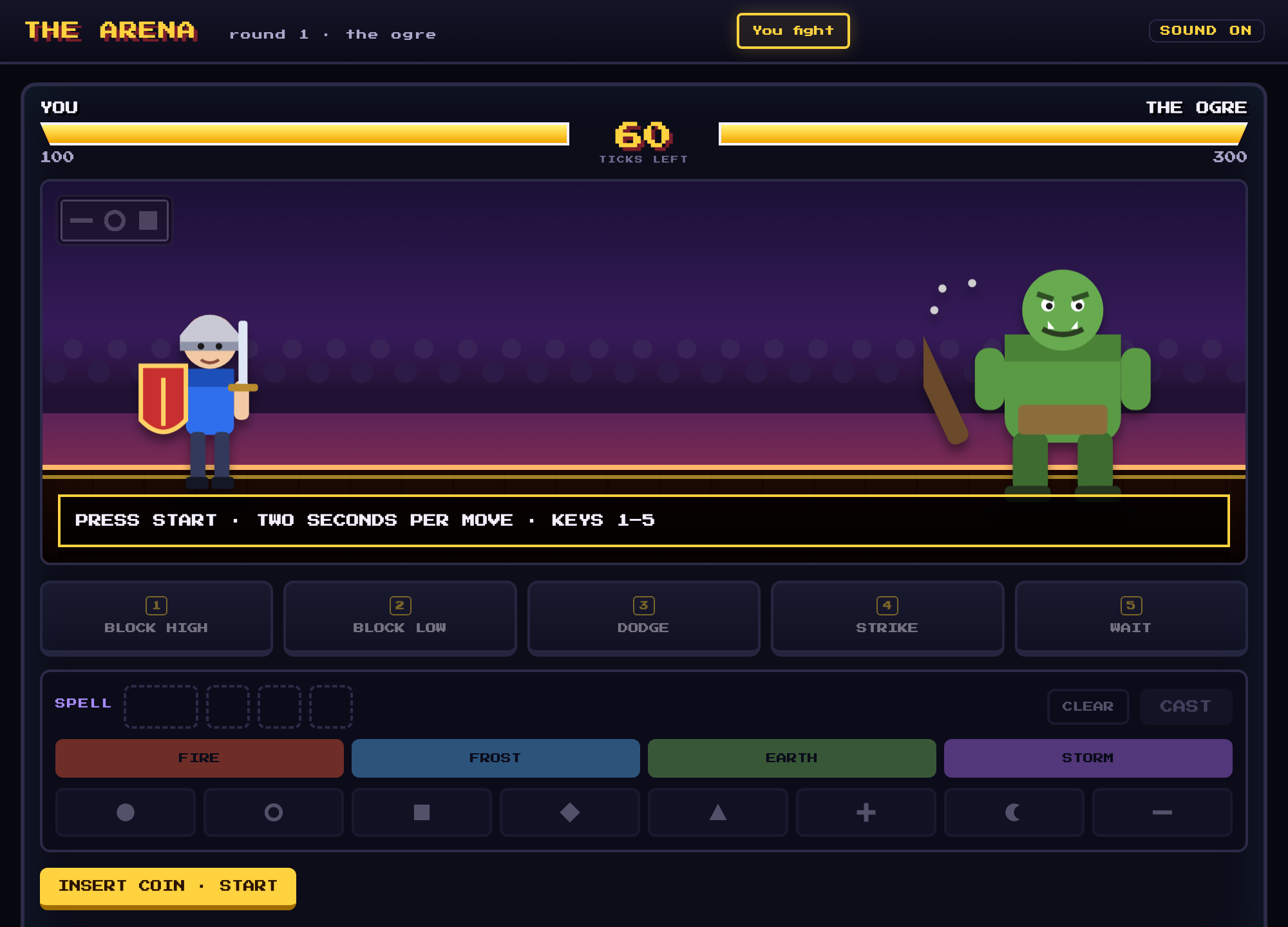
Have you ever played a combat game? You face an opponent and have to react instantly to their moves. One wrong guess and your HP takes the hit. Games also tend to make spells hard to cast. In ours, you have to pick the spell card's color and shapes, in order, before the spell is released. This workshop shows you how to combine both types of model to make your character win.
Each element of the game maps to a real system:
- The opponent's move is an incoming event, like a request or a transaction.
- The response is a bounded decision, made by the discriminative model and checked by code.
- The spell card is unstructured input that needs a language model to read.
- The match is the workflow, running fast and slow work at their own speeds.
The focus is on combining the four components and piecing them together to build a fast and smart system.
What you will learn
- Explain how discriminative (System One) and generative (System Two) models differ, and when to use each.
- Describe how Jev and DiffusionGemma are served, and set one up for the workshop, including DiffusionGemma on a Compute Engine GPU VM.
- Write Choice, Score, and Noul questions, and interpret probabilities and confidence.
- Use thresholds in deterministic code to turn probabilities into actions.
- Build a request with the TypeSafe SDK, then let the model choose every move in a game.
- Build a slow branch, where Gemini reads an image, and a fast branch, where the discriminative model decides in a loop, and run each on its own.
- Join both branches in an ADK graph workflow that shares state on one event loop, so slow work never holds up fast decisions.
Architecture
The workbench sits in cloudshell(or your machine) it will write the to local file system and interact with the arena and also with Gemini and the decision model. ② calls the decision model in "Discriminative model fights"; ③ calls both in "Workflow fights".
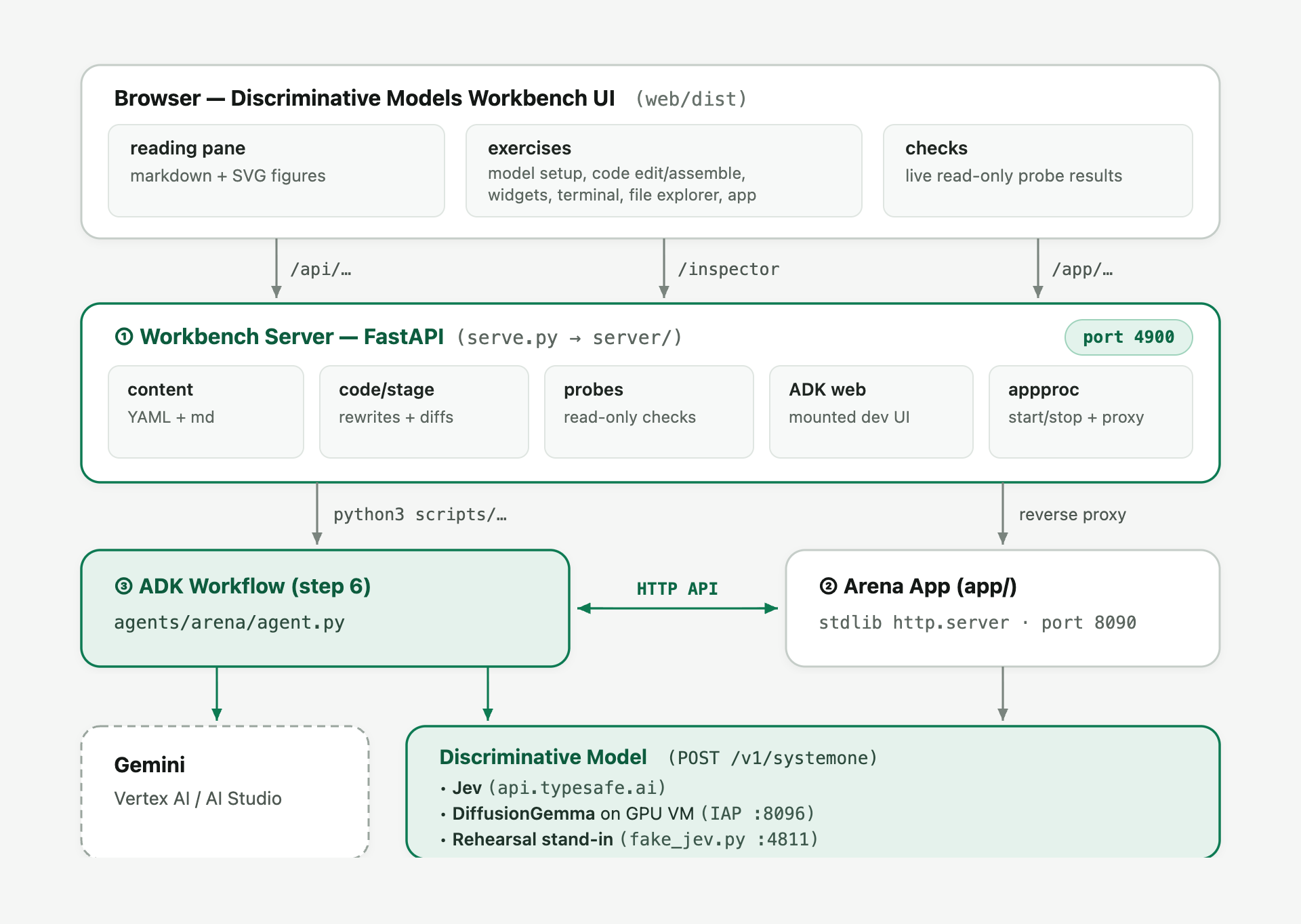
Who calls what. The browser only ever talks to ①. Both models are called from Python on the machine:
Caller | Discriminative model | Gemini |
② arena, "Discriminative model fights" | every tick, | no |
③ workflow | every tick, | no |
③ workflow | no | the spell card image; the tale after the fight |
| yes | no |
One tick, per mode.
- You fight. The page asks ② for a telegraph, shows it with a 2 s timer, and posts the button you press (or the spell you type) back. ② resolves it.
- Discriminative model fights. The page asks ② for a tick; ② draws a telegraph, asks the model three questions in one call, runs
choose(), and returns the answers and the outcome. The page draws the bars. - Workflow fights. Start makes ② launch ③ as a subprocess (log in
runs/arena-workflow.log). ③ drives the fight: it asks ② for each telegraph, calls the model, and posts the decision; Gemini's spell arrives on its own branch whenever it is ready. The page only polls ② and draws. Pause is a flag on ② that ③ checks before each tick.
Where the decision model is hosted. Every call goes through the same typesafe-sdk; only the base URL changes. scripts/jevauth.py names the backend and sets the key and timeout:
Backend |
| Key | Set up by |
TypeSafe, hosted | unset (api.typesafe.ai) |
|
|
DiffusionGemma on your L4 VM |
| none |
|
DiffusionGemma on Cloud Run |
| a Google identity token, fetched per hour |
|
Rehearsal |
| none |
|
The spell card's answer ②: the workflow gets only the PNG, and ② judges the spell it sends back. That is what makes the spell a real test of Gemini's reading, and the spell you build in "You fight" a real test of yours.
2. Setup
Claim your workshop credits
If you were given a Google Cloud credit for this session, claim it first — it takes about a minute and creates the billing account for you.
Open Cloud Shell
Google Cloud Shell is a browser-accessible Linux environment preconfigured with gcloud, Python, Node.js, uv, and git, already authenticated with your Google account.
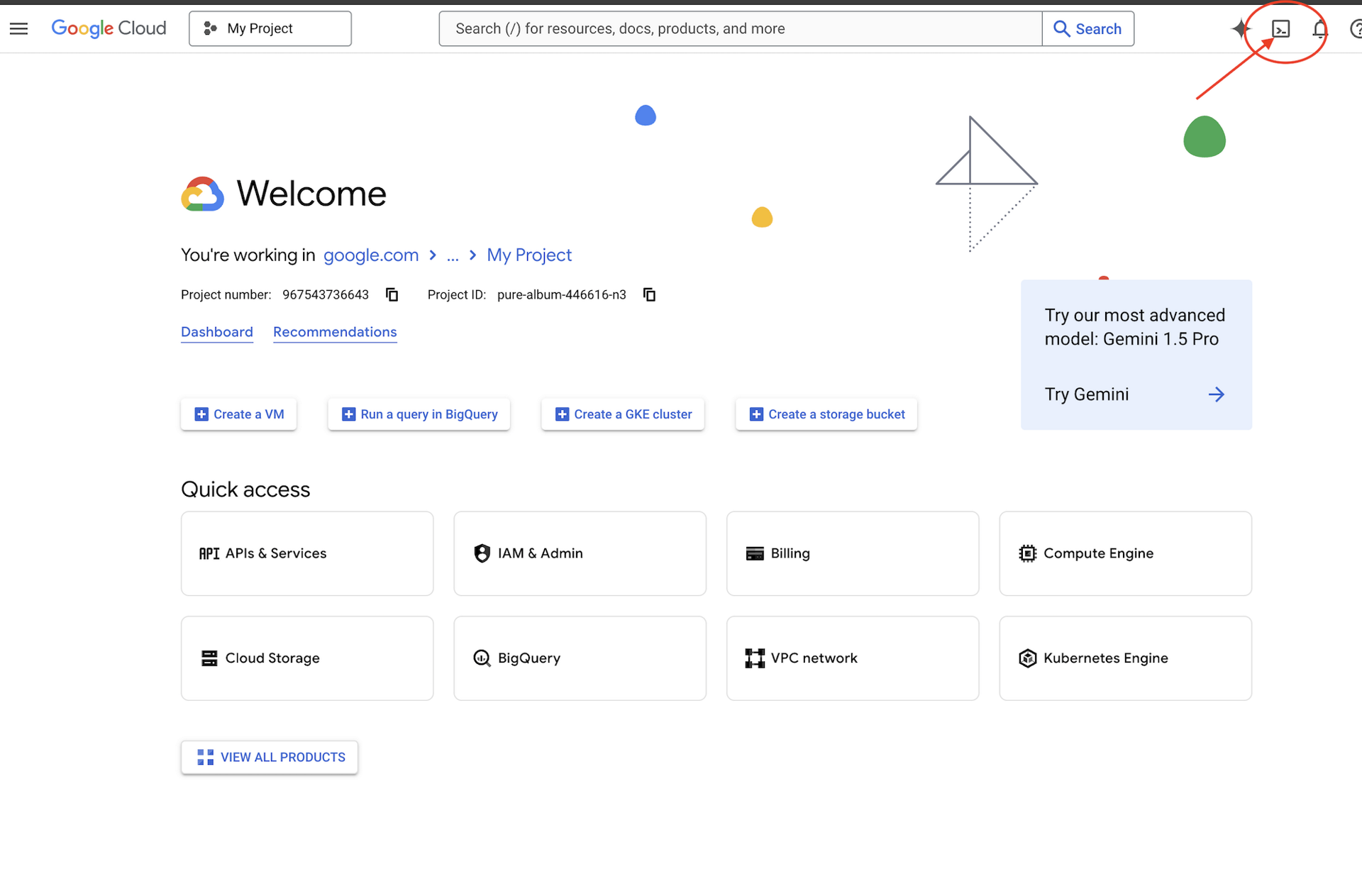
- Open the Google Cloud console.
- Click Activate Cloud Shell (the terminal icon in the top navigation bar) to open a terminal session at the bottom of your browser.
Launch the workbench
In Cloud Shell, or anywhere gcloud is signed in:
git clone https://github.com/gca-americas/discriminative-models-workshop.git
cd discriminative-models-workshop
./setup_project.sh     # a new project with billing, recorded in ~/project_id.txt
./setup_codelab.sh     # everything else, then the workbench on port 4900
setup_project.sh creates a project (discrim-models-XXXX), links billing to it, preferring an event credit account when you have one, and waits until the project can serve. Re-running it reuses the project in ~/project_id.txt. To use a project you already have, put its ID in that file and skip this script.
setup_codelab.sh asks nothing. It installs uv and the Python packages, enables Vertex AI, Compute Engine and IAP, points Gemini at Vertex AI in the project in .env, makes one real Gemini call with a model the project can call, builds the page, starts the workbench in the background and runs scripts/check_setup.py. Re-running it keeps your exercise files; scripts/starter.sh resets them. The decision model is chosen in step 2 of the workbench.
To open the workbench UI in Cloud Shell:
- Click the preview link printed at the end of
./setup_codelab.sh, or click Web Preview in the top-right corner of the Cloud Shell toolbar. - Select Change port, enter 4900, and click Change and Preview.
Gemini runs on Vertex AI in your project, with your own Google credentials: GOOGLE_GENAI_USE_VERTEXAI=1, GOOGLE_CLOUD_PROJECT and GOOGLE_CLOUD_LOCATION=global in .env.
The decision model is chosen on its own, in step 2 of the workbench, or from a terminal with scripts/setup_model.sh:
Choice | Needs | Setup | Cost |
The Discriminative model (TypeSafe, hosted) | a TypeSafe API key | none | per token, fractions of a cent |
DiffusionGemma (Google, open weights) | billing + Compute Engine quota for GPU | ~15 min, automatic | ~$0.71/h while the VM runs |
Rehearsal (no model) | nothing | none | none |
DiffusionGemma on a Compute Engine VM
scripts/setup_gemma.sh checks the GPU quota first, then makes one g2-standard-4 VM (1 × L4 24 GB, 4 vCPU, 16 GB) from Google's Deep Learning image with NVIDIA driver 580. On first boot the VM installs Docker, downloads the weights from Hugging Face (nvidia/diffusiongemma-26B-A4B-it-NVFP4, 17.5 GB, public, no token) and runs djev-run: DiffusionGemma behind the Discriminative model's exact API. The model's port is not open to the internet: the workbench reaches it through an IAP tunnel on localhost:8096, which scripts/start.sh opens.
Pause / resume |
| |
Tunnel |
| |
Remove |
| |
Rehearse the commands |
| |
Repository layout
app/                the arena app, as built so far (see "The app, one stage at a time")
  main.py           the server, the "You fight" mode, and the plugin loader
  engine.py         the rules and the ogre's moves, the one copy
  sigil.py          spell cards: a color and three shapes, judged and drawn (a tiny PNG rasteriser)
  static/           the page: HP bars, the telegraph and timer, the spell card; modes/ holds plugins
  static/sounds/    bgm.mp3 plus optional effects: fight, ogre-attack, block, strike, hurt, charge,
                    cast, fizzle, ready, ko, timeup (.mp3). A missing file is silent. Add them in stages/03-you-fight/.
  reflex.py         step 5: the three questions and choose()
  mode_model.py     step 5: the server side of "Discriminative model fights"
  mode_workflow.py  step 6: the server side of "Workflow fights"
branches/           step 6b's exercises: each branch as a workflow of its own, nothing from the arena
  slow_branch.py    Gemini reads spell_card.png and is checked against spell_card.json
  fast_branch.py    the Discriminative model decides on a list of moves, in a loop
starter/            Reset restores from here
server/             The workbench
3. Summary
Clean up your environment
When you have finished the workshop, complete the following steps to tear down any DiffusionGemma GPU resources, stop the background workbench and rehearsal processes, remove the workshop files from Cloud Shell, and (optionally) delete your workshop Google Cloud project.
- Delete the DiffusionGemma GPU VM and firewall rule (if created): If you provisioned DiffusionGemma on a Compute Engine GPU VM in Step 2, remove the VM, disk, and IAP firewall rule so no ongoing compute or disk storage charges accrue:
cd ~/discriminative-models-workshop ./scripts/teardown_gemma.sh - Stop the workbench and rehearsal processes in Cloud Shell: In your Cloud Shell terminal, stop the background workbench server and any rehearsal stand-in process:
cd ~/discriminative-models-workshop ./scripts/stop.sh ./scripts/rehearsal.sh stop 2>/dev/null || true - Delete the workshop folder from Cloud Shell: Return to your home directory and remove the cloned repository folder and project ID file:
cd ~ rm -rf ~/discriminative-models-workshop ~/project_id.txt - Delete your Google Cloud project: If
./setup_project.shcreated a dedicated workshop project (for example,discrim-models-XXXX), shutting down the project permanently deletes all resources created inside it while leaving your Cloud Billing account intact:- Open the Manage resources page in the Google Cloud console.
- Select your workshop project (for example,
discrim-models-...) from the resource list. - Click Delete in the top toolbar, type your project ID to confirm, and click Shut down.
You have completed this workshop.
Lab summary
- Chose a discriminative model, Jev or DiffusionGemma on a Compute Engine GPU VM, and checked that it answers.
- Played the arena by hand, against the clock, to learn its rules.
- Learned how a discriminative model answers with Choice, Score and Noul questions, probabilities and confidence, and how your code applies thresholds to them.
- Sent your first request, then let the model choose every move in the arena, with
choose()turning its answers into actions. - Built each branch of an ADK workflow on its own, with Gemini reading a spell card image and the model deciding in a loop.
- Joined them in one workflow that shares state, so the fight never waits for Gemini and the spell is cast on an opening.
From conversation to decisions
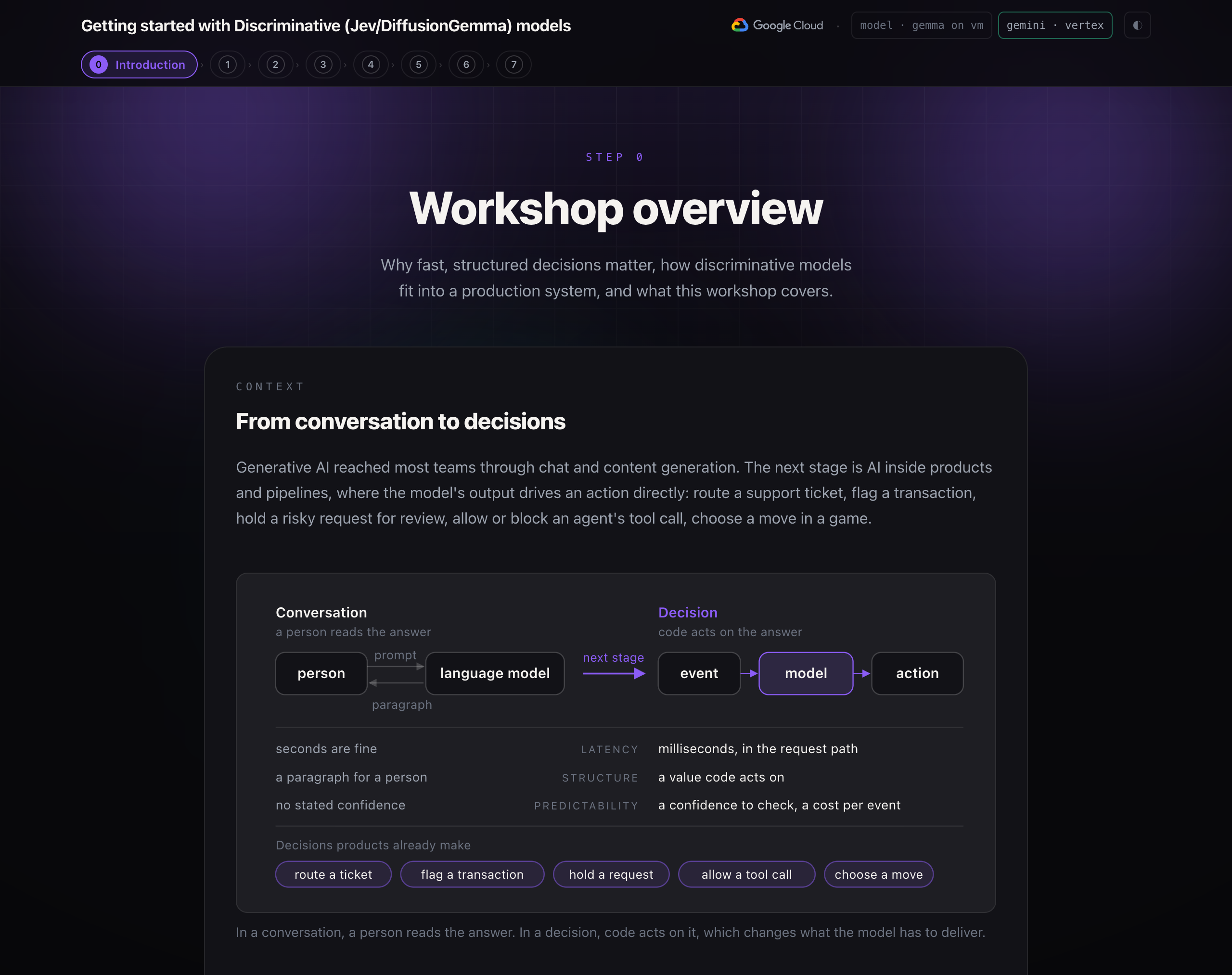
Generative AI reached most teams through chat and content generation. The next stage is AI inside products and pipelines, where the model's output drives an action directly: route a support ticket, flag a transaction, hold a risky request for review, allow or block an agent's tool call, choose a move in a game.
These decisions share three requirements that chat does not have:
- Latency. The answer is often in a user's request path or a real-time loop, so it has to arrive in milliseconds, not seconds.
- Structure. The caller is code, so the answer has to be a value it can act on, not a paragraph it has to parse.
- Predictability. Every decision needs a confidence the code can check, and a cost low enough to ask on every event.
A language model generates text one token at a time. It can be prompted into a yes or no, but it is slow for a real-time loop, its output has to be parsed, and it does not report how sure it is.
Models built for decisions
A discriminative model answers a typed question with a probability for each allowed option, in a single pass. It does not generate text. This workshop provides two options to run:
Model | Provider | Where the model runs in this workshop |
Jev | TypeSafe AI | TypeSafe's hosted service, called with an API key |
DiffusionGemma | Google, open weights | Self-hosted on a GPU VM in your own Google Cloud project |
The models can be swapped based on your needs; the code that connects to them does not need to change.
Combine components
A successful system consists of multiple components:
Component | Role | In this workshop |
Workflow | Orchestrates steps, runs branches in parallel, holds shared state | An ADK graph workflow |
Deterministic code | Rules, thresholds, validation. Instant, free, and auditable | The game rules, |
Discriminative model | Fast, bounded decisions with a confidence score | Choosing a response every tick |
Language model | Perception and generation: images and open-ended text | Gemini reads the spell card image and writes the spell |
Model serving architecture
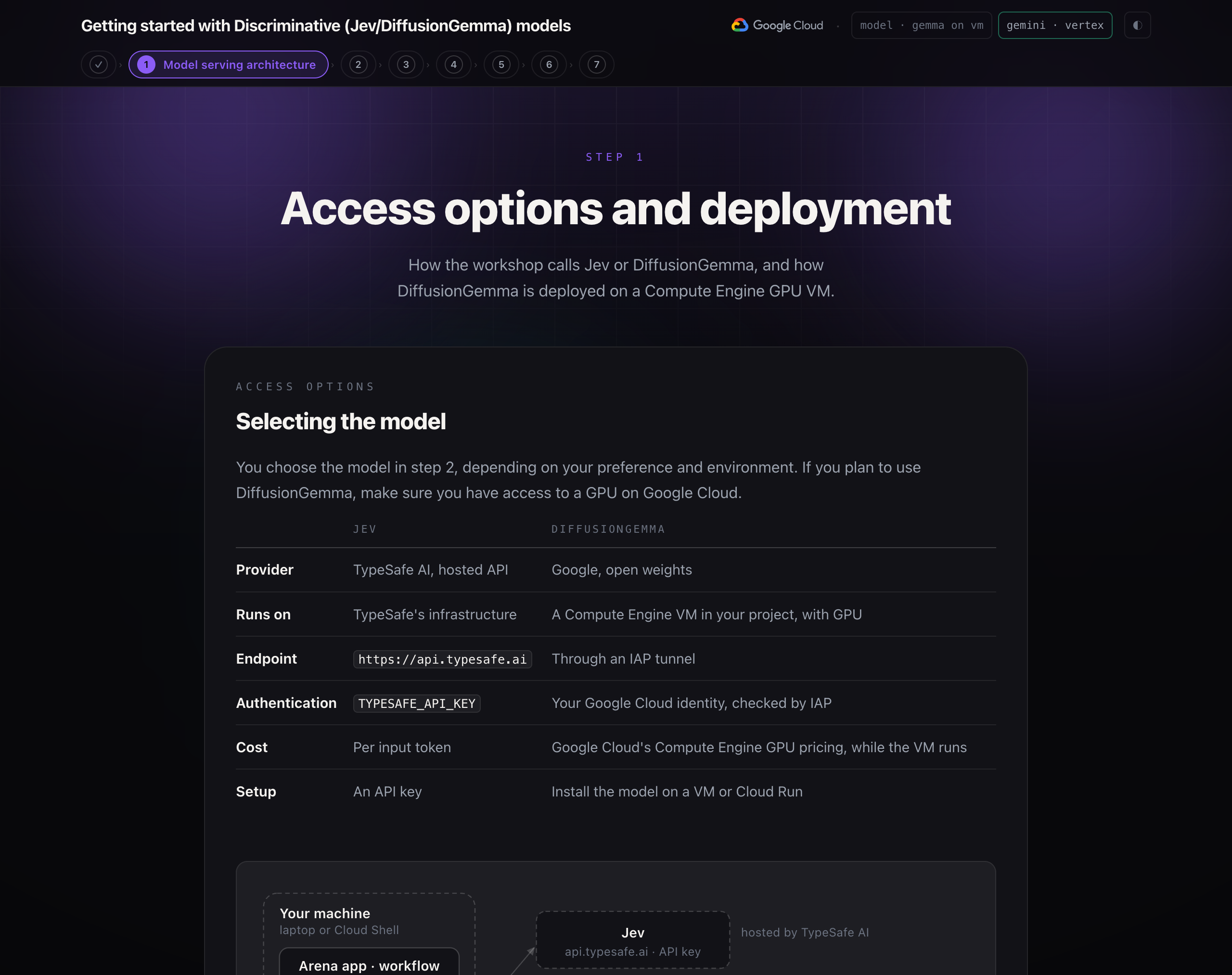
You choose the model in step 2, depending on your preference and environment. If you plan to use DiffusionGemma, make sure you have access to a GPU on Google Cloud.
Jev | DiffusionGemma | |
Provider | TypeSafe AI, hosted API | Google, open weights |
Runs on | TypeSafe's infrastructure | A Compute Engine VM in your project, with GPU |
Endpoint |
| Through an IAP tunnel |
Authentication |
| Your Google Cloud identity, checked by IAP |
Cost | Per input token | Google Cloud's Compute Engine GPU pricing, while the VM runs |
Setup | An API key | Install the model on a VM or Cloud Run |
Data flow
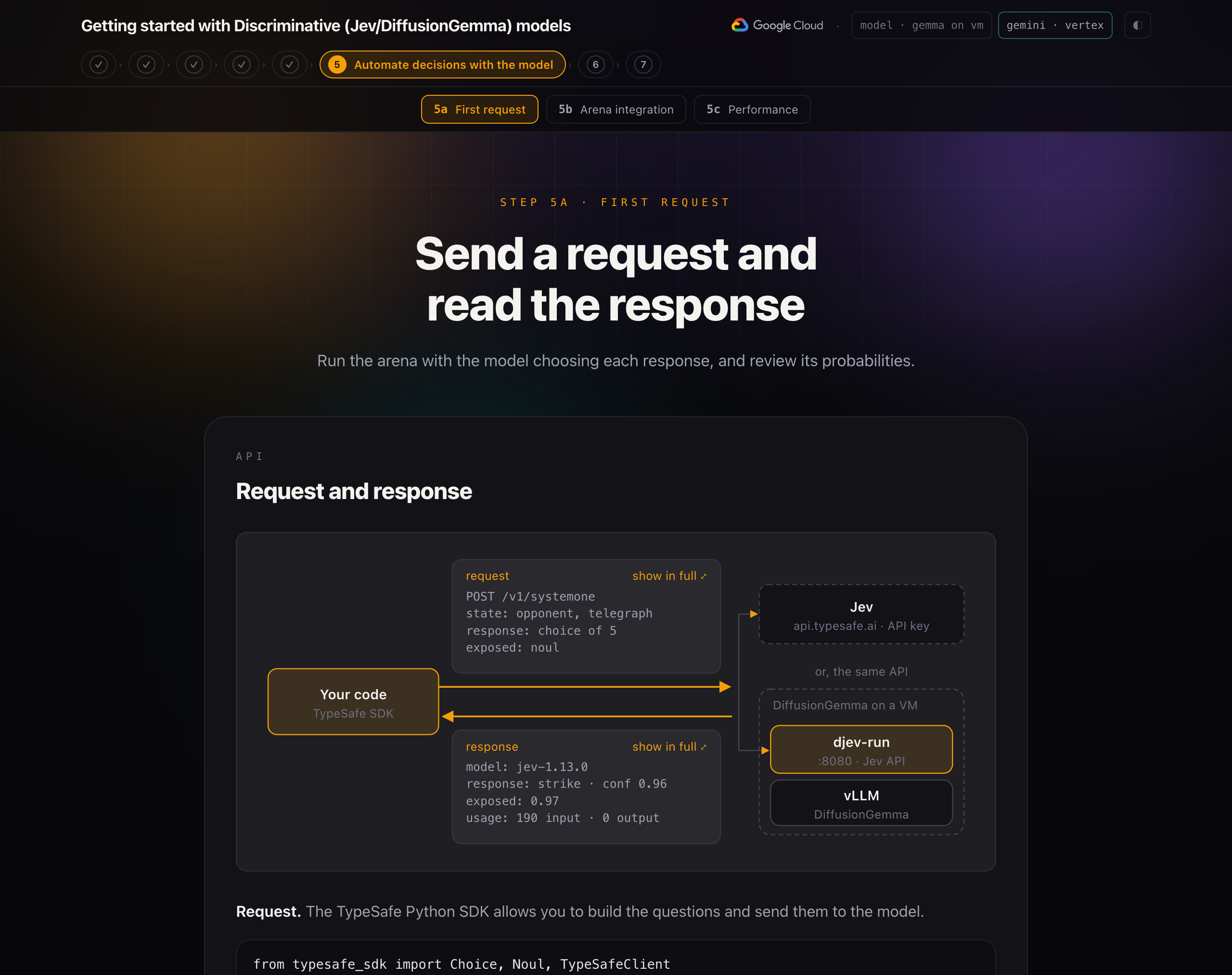
- The arena app or the ADK workflow builds a request: the state (what the opponent did) and three questions.
- The TypeSafe SDK sends it as
POST /v1/systemoneto the configured base URL. - For Jev, the request goes over HTTPS to
api.typesafe.ai, with the API key as a bearer token. - For DiffusionGemma, the request goes to
localhost:8096. A backgroundgcloud compute start-iap-tunnelprocess forwards it through Identity-Aware Proxy, which checks your Google identity, to port 8080 on the VM. - On the VM, djev-run receives the request, runs DiffusionGemma through vLLM on the GPU, and reads the probability of each allowed option.
- Both backends return the same response: an answer per question, with probabilities and a confidence score. The workshop code applies its thresholds and acts.
DiffusionGemma on Compute Engine
scripts/setup_gemma.sh builds this in your project:
- Checks that the region has quota for a GPU.
- Enables the Compute Engine and IAP APIs, and creates the firewall rule
allow-iap-djev. It admits only the IAP address range, on ports 22 and 8080. - Creates the VM
djev-l4: machine typeg2-standard-4(4 vCPUs, 16 GB of memory), a GPU with 24 GB, a 100 GB disk, and the Deep Learning VM image with NVIDIA driver 580. If a zone has no GPU capacity, it tries the next one. - On first boot, the VM's startup script installs Docker and the NVIDIA Container Toolkit, pulls the djev-run container image, downloads the weights from Hugging Face (17.5 GB), and starts the container with GPU access on port 8080. This takes about 15 minutes. Later boots take about 2.
- Writes the connection settings to
.envand opens the tunnel.
Task | Command |
Stop the VM (keeps the disk) |
|
Start it again |
|
Check the tunnel |
|
Delete everything |
|
Set up the model
TypeSafe SDK
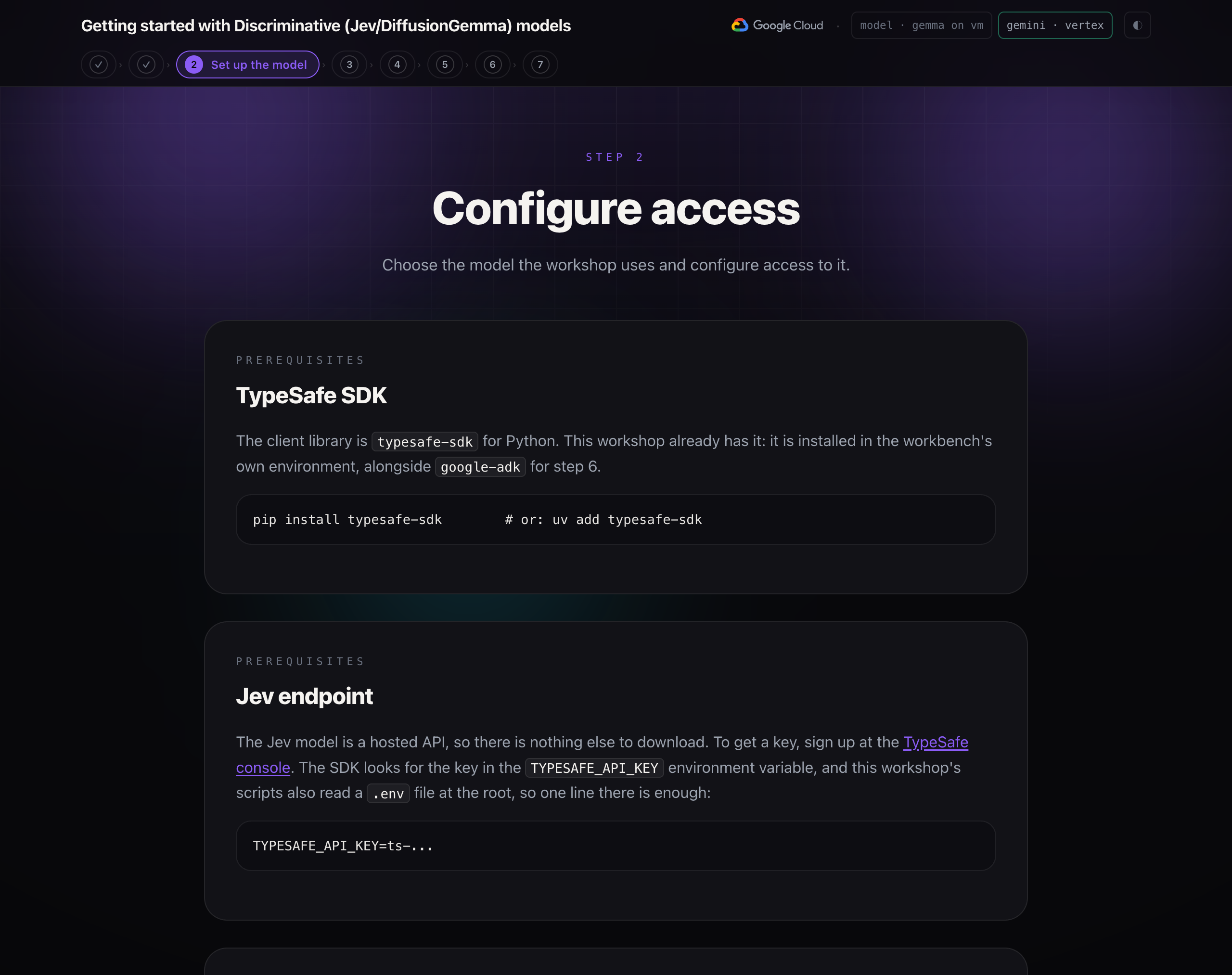
The client library is typesafe-sdk for Python. This workshop already has it: it is installed in the workbench's own environment, alongside google-adk for step 6.
pip install typesafe-sdk # or: uv add typesafe-sdk
Jev endpoint
The Jev model is a hosted API, so there is nothing else to download. To get a key, sign up at the TypeSafe console. The SDK looks for the key in the TYPESAFE_API_KEY environment variable, and this workshop's scripts also read a .env file at the root, so one line there is enough:
TYPESAFE_API_KEY=ts-...
Use DiffusionGemma
djev-run reimplements the Discriminative model's API. It serves the same POST /v1/systemone endpoint, with the same noul, choice and score questions, from DiffusionGemma, Google DeepMind's open diffusion model (26B total parameters, about 4B active, Apache 2.0). Because the wire format is the same, the TypeSafe SDK talks to it unchanged.
If you choose DiffusionGemma in the exercise, it runs on a GPU in a VM in your own Google Cloud project, and the pill at the top right reads gemma on vm. The workbench reaches it through a private IAP tunnel, and the model's port is not open to the internet. Step 1 describes the full architecture.
Why a diffusion model can do this: it fills a whole block of positions at once, with every position seeing the full input, so the probability of each allowed option can be read in a single step. A normal language model produces one token at a time and would have to be sampled repeatedly.
Play the game manually
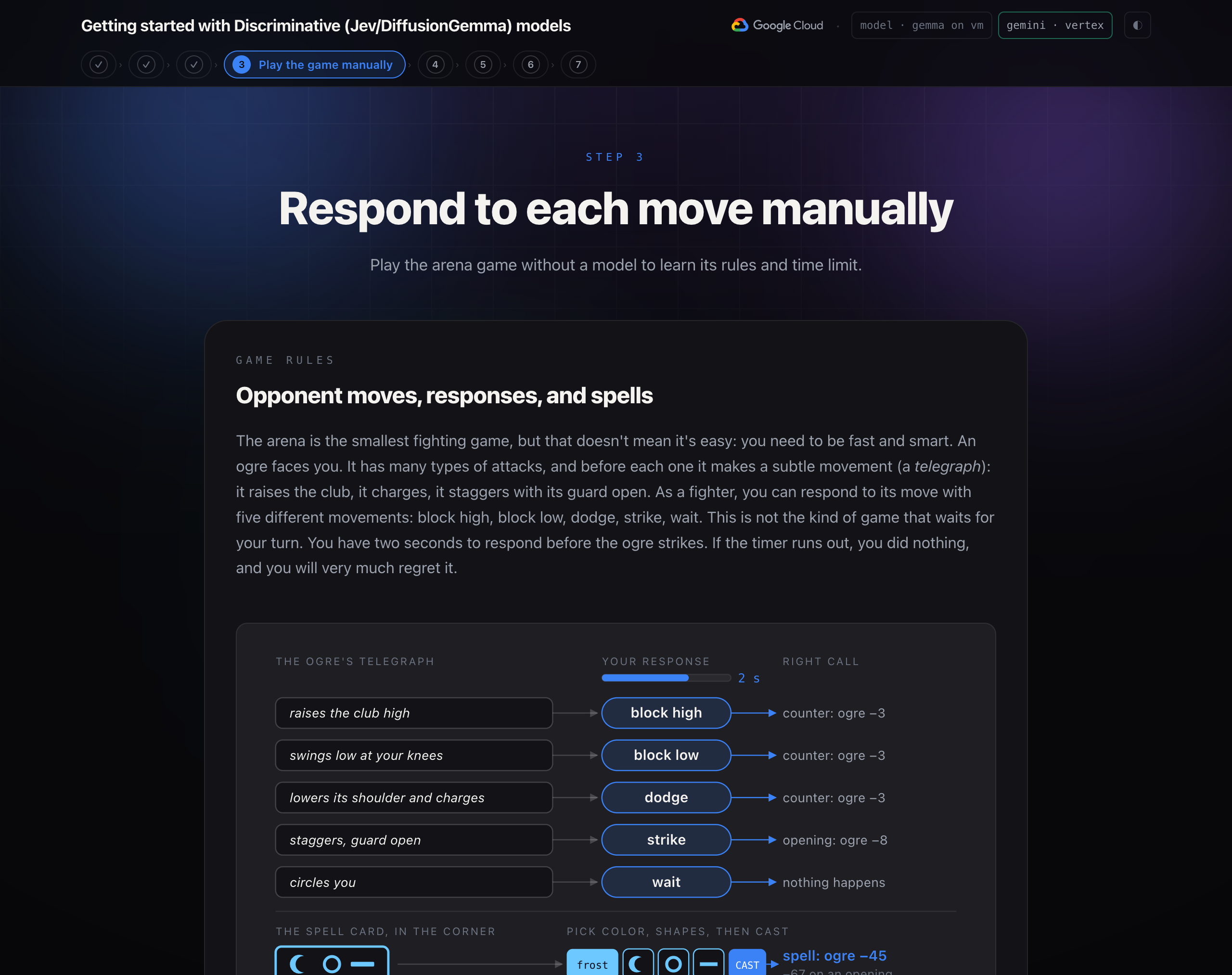
The arena is the smallest fighting game, but that doesn't mean it's easy: you need to be fast and smart. An ogre faces you. It has many types of attacks, and before each one it makes a subtle movement (a telegraph): it raises the club, it charges, it staggers with its guard open. As a fighter, you can respond to its move with five different movements: block high, block low, dodge, strike, wait. This is not the kind of game that waits for your turn. You have two seconds to respond before the ogre strikes. If the timer runs out, you did nothing, and you will very much regret it.
In the top-left corner of the ring there is a spell card: a colored card with three shapes. Only a spell that matches it does real damage. In the game you can cast a spell with the buttons under the fight: pick the card's color, then its shapes from left to right, then press CAST. The clock keeps running while you pick, so you have to build the spell and react to the ogre's attacks at the same time. The keys 1 to 5 still answer each move. A wrong spell fizzles. In step 6, Gemini reads the spell card for you.
Key takeaway: A fight is a stream of small decisions with a deadline on each one. That is what most software automation actually looks like, minus the club.
Discriminative model concepts
Decisions in software
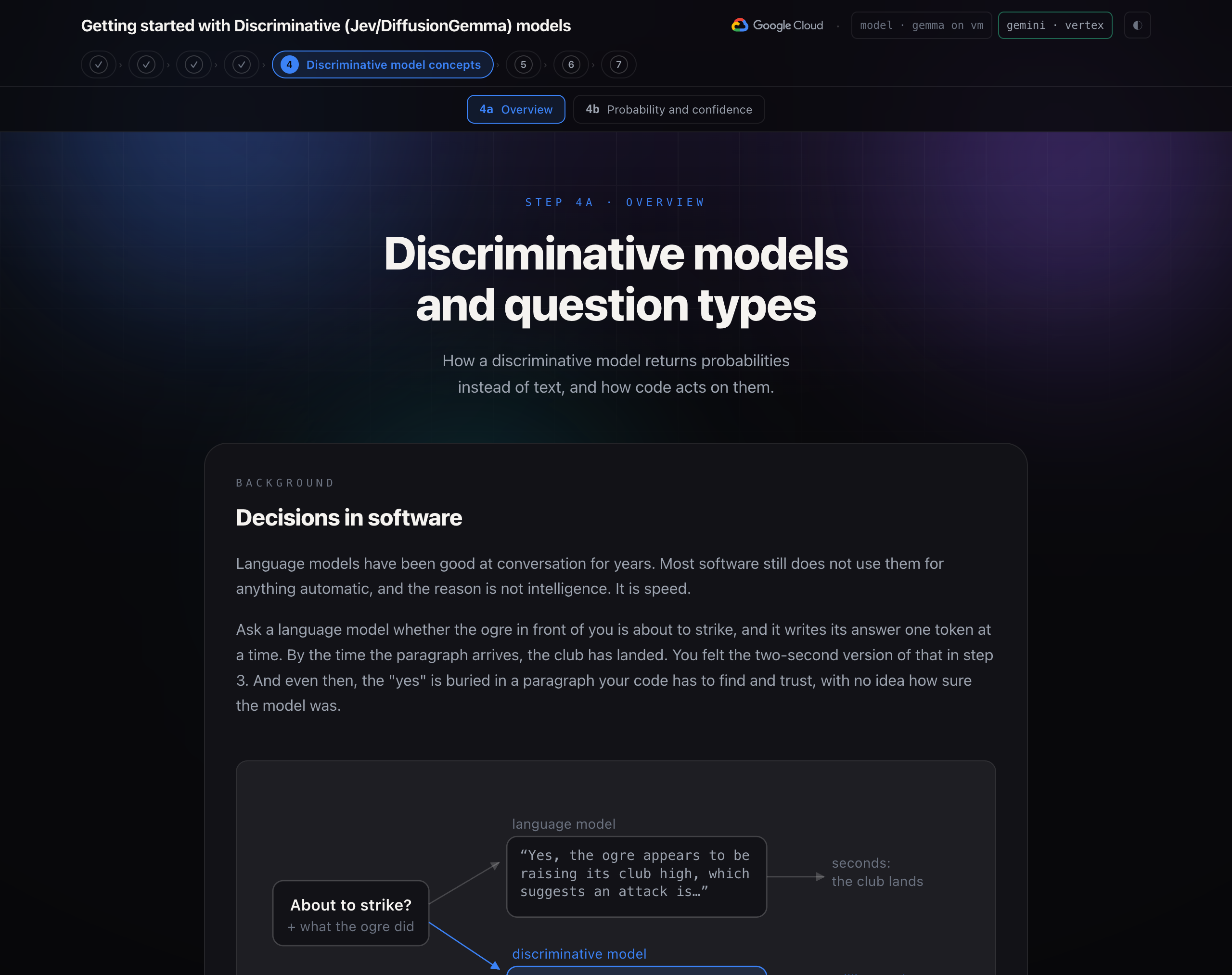
Language models have been good at conversation for years. Most software still does not use them for anything automatic, and the reason is not intelligence. It is speed.
Ask a language model whether the ogre in front of you is about to strike, and it writes its answer one token at a time. By the time the paragraph arrives, the club has landed. You felt the two-second version of that in step 3. And even then, the "yes" is buried in a paragraph your code has to find and trust, with no idea how sure the model was.
The Discriminative model takes the state and your typed questions and answers in one pass, in milliseconds. Each answer comes with a calibrated probability: 0.9 means right nine times out of ten. There is no text to parse and no JSON to coax out of it.
System One and System Two models
The name comes from Daniel Kahneman's Thinking, Fast and Slow. System Two is slow, deliberate reasoning, one step after another. System One is fast, pattern matching.
A language model is a System Two machine. It reasons in tokens, one at a time. The Discriminative model is a System One model: it does not reason out loud, does not generate anything, and answers every question in one pass. That is why it is fast (roughly 70 to 500 milliseconds) and cheap (fractions of a cent per thousand decisions).
Key takeaway: A language model writes. A decision model decides. Most of what software needs from AI is a decision.
Limitations
The Discriminative model will not generate text, write code, hold a conversation, do arithmetic, read an image, or follow a chain of steps.
In the workshop, we'll choose one of the Discriminative models:
- One of the Discriminative models is Jev. It is a hosted API from TypeSafe AI, released in September 2026. The first model is
jev-1.13, reached through the aliasjev-latest. There are no published weights, so it is called, not downloaded. - Jev is not the only way to get a System One model. Google's DiffusionGemma is an open-weights model that writes a whole block of tokens in parallel instead of one at a time, and that same parallel pass can read out probabilities over a fixed set of options. Open-source servers such as djev-run put Jev's exact API in front of it, so everything in this workshop runs against it unchanged.
State and questions: Choice, Score, and Noul
Each call sends state and questions. The state is the text you want judged. It can be a string, a JSON object, or a list. The questions ask what you want to know about that text. Each question has a type: Choice, Score, or Noul. The questions are processed in parallel, which lets it respond fast. You can add multiple questions if needed.
- Choice picks one option from a set you name, up to 255 of them. The answer is the option, a probability for every option, and a confidence. Use it when the options have no order between them: block high, block low, dodge, strike, wait.
- Score rates the state along ordered levels you describe, from two to ten of them. The answer is a position along the scale (a decimal, so 1.4 means "between one and two, closer to one"), the probability of each level, and a confidence. Use it when the answer is a matter of degree: how hard the incoming hit will land.
- Choice and Score both return a probability for each option and a confidence. The difference is the main answer. A Choice returns the most likely option. A Score treats the options as ordered levels and returns their probability-weighted average, which can land between two levels. With none 0.05, light 0.55 and heavy 0.40, a Choice answers "light" and a Score answers 1.35, between light and heavy. The arena uses that value:
choose()treats a danger score of 1.5 or more as a heavy hit.
- Choice and Score both return a probability for each option and a confidence. The difference is the main answer. A Choice returns the most likely option. A Score treats the options as ordered levels and returns their probability-weighted average, which can land between two levels. With none 0.05, light 0.55 and heavy 0.40, a Choice answers "light" and a Score answers 1.35, between light and heavy. The arena uses that value:
- Noul asks a yes/no question and returns the probability that the answer is yes. Near 1 is a strong yes, near 0 a strong no, near 0.5 is "could be either". There is no separate confidence, since the probability is its confidence level.
Write focused questions
The Discriminative model works best when a question asks one specific, well-scoped thing. "What is the situation?" returns a plausible, low-confidence answer. "What is the right response?", "Is the opponent exposed?", and "How hard will this hit?" return three focused answers that your code combines.
Descriptions on options and levels are cheap and they matter. The rules you read in step 3 become the option descriptions: block_high: "Raise the shield. Right against an overhead or a high swing." That is how the Discriminative model learns the rules of the fight, at request time, in one line each. And the options can change with the situation: the arena only offers cast when a spell is ready.
Probabilities and confidence
A Choice answer is not a label. It is a distribution over the labels, and the label is just the tallest bar.
How the model gets the number. It uses the same step a language model uses to pick its next word. A transformer reads the text and, at one position, gives every token in its vocabulary a raw score, called a logit. A higher logit means the token fits that position better. A softmax turns the logits into probabilities that add up to 1. A language model then picks one token, adds it to the text, and repeats. A discriminative model stops after the probabilities.
The blank is a gap in an answer form. The server writes the form itself, such as response: ▢, and leaves one gap per question. The model's only job is to score what belongs in each gap.
- The prompt holds the state and each question, with every allowed answer as a short label:
afor block_high,bfor block_low, and so on. - The server adds the answer form, with one blank per question.
- The model reads the prompt and the form in one pass and gives every token a logit at each blank. The diffusion model sees the whole form at once and scores all the blanks together.
- The server keeps only the logits of the allowed labels and applies a softmax to them, so the allowed answers add up to 1.
- If the read looks unsure, the server reads again from another random start and averages the reads.
Confidence is one number that says how sure the answer is. TypeSafe computes it from how the probability is spread across the options. All of it on one option gives 1, and an even spread gives 0. For three options it is (3 × largest − 1) / 2.
TypeSafe trains Jev for calibrated probabilities. The probability matches how often the answer is right. In a calibrated model, answers given at 0.7 are right about 70% of the time, so a threshold on confidence is a threshold on how often you accept a wrong answer. The DiffusionGemma server in this workshop reports the top probability itself as confidence, averaged over its reads. When the reads disagree, the average spreads out and confidence drops.
Key takeaway: The answer tells you what. The confidence tells you whether to act.
Thresholds
The threshold is how you define the action in the code. The model returns a confidence or a probability. Your code compares it with a number you chose, and the result decides what happens.
A threshold per action. TypeSafe suggests splitting confidence into bands. High confidence acts on its own. Medium confidence acts with a check, such as asking for confirmation or flagging the case for review. Low confidence does not act, and falls back to something safe or to a person.
TRUST = 0.40        # below this, the answer is a guess
AUTO = 0.80         # at or above this, act without a check

def route(answer):
    if answer.confidence >= AUTO:
        return act(answer.choice)          # high: act on its own
    if answer.confidence >= TRUST:
        return confirm(answer.choice)      # medium: act with a check
    return fall_back()                     # low: do something safe
The arena's rules. The arena's thresholds live in choose(), which you run in step 5.
TRUST_CONFIDENCE = 0.40    # below this, the model is guessing between responses
HEAVY_DANGER = 1.5         # a danger score at or above this is a heavy hit
SPEND_ON_OPENING = 0.60    # exposed at or above this, with a spell ready, cast

def choose(answers, spell_ready):
    response = answers["response"]
    exposed = answers["exposed"].noul
    danger = answers["danger"].score

    action = response.choice
    if response.confidence < TRUST_CONFIDENCE and danger >= HEAVY_DANGER:
        action = "dodge"                   # shaky answer, heavy hit coming
    if spell_ready and action == "strike" and exposed >= SPEND_ON_OPENING:
        action = "cast"                    # a clear opening is worth the spell
    return action
Warning: A valid answer is not always a correct one. The Discriminative model cannot return an option you did not offer, so it never hallucinates a move, but it can pick the wrong one, sometimes with high confidence. Test your questions against situations you have already judged before you trust a threshold.
Automate decisions with the model
Request and response
Request. The TypeSafe Python SDK allows you to build the questions and send them to the model.
from typesafe_sdk import Choice, Noul, TypeSafeClient

with TypeSafeClient() as client:
    response = client.system_one(
        state={"opponent": OPPONENT, "telegraph": telegraph},
        questions={
            "response": Choice(instructions="What is the right response?", criteria=RESPONSES),
            "exposed": Noul(instructions="Is the opponent exposed to a counter-attack right now?"),
        },
    )

response.choices["response"].choice     # "strike"
response.nouls["exposed"].noul          # 0.97
One request per tick
Each tick, the app sends the telegraph as state and asks three things in one call:
- Which response is right, from the five (or six, when a spell is ready). A Choice.
- Whether the ogre is exposed to a counter right now. A Noul.
- How hard the incoming hit is, on a three-level rubric. A Score.
def reflex_questions(spell_ready):
    options = dict(RESPONSES)
    if spell_ready:
        options["cast"] = CAST                # only offered when there is a spell
    return {
        "response": Choice(instructions="The opponent has just done this. What is the right response?",
                           criteria=options),
        "exposed": Noul(instructions="Is the opponent exposed to a counter-attack right now?"),
        "danger": Score(instructions="How much damage is about to land if the fighter does nothing?",
                        criteria=["None: this is not an attack.", "A light hit.", "A heavy hit."]),
    }
The choose() function
Remember the thresholds from step 4? choose() compares the model's answers with fixed numbers, and these fixed numbers are the thresholds.
TRUST_CONFIDENCE = 0.40
HEAVY_DANGER = 1.5
SPEND_ON_OPENING = 0.60

def choose(answers, spell_ready):
    action = answers["response"].choice
    if answers["response"].confidence < TRUST_CONFIDENCE and answers["danger"].score >= HEAVY_DANGER:
        action = "dodge"                      # shaky call, heavy hit coming: play it safe
    if spell_ready and action == "strike" and answers["exposed"].noul >= SPEND_ON_OPENING:
        action = "cast"                       # the Discriminative model saw the opening; the code spends the spell
    ...
choose() is ordinary Python reading typed values, with two rules. The Discriminative model provides its probability and analysis, and the code uses the thresholds for the rules. The chosen action is sent to the engine, where it will be used to battle against the ogre.
Key takeaway: Keep the questions and the thresholds in one place. They are the part of a System One integration you will tune most.
Response time, input-based pricing, and decision logic
- Response time per decision. Each tick of the fight in part b came back in about a hundred milliseconds, a few in two or three. That is fast enough for a game loop, a request path, or a check on every message before a person or a language model sees it.
- Input-based pricing. A whole fight, sixty decisions with three questions each, costs well under a tenth of a cent. Output tokens are zero because nothing was generated. The consequence is that you can afford to ask more than you need. The arena asks whether the ogre is exposed on every tick even though only
strikeandcastcare, because asking is nearly free and the answer is useful on the dashboard. TypeSafe calls this speculative fan-out. - Combine confidence and danger. When the Discriminative model's confidence in its response is under 0.40 and the danger score says a heavy hit is coming,
choose()overrides it with a dodge. A dodge is rarely the best answer, but it is rarely the worst. Pick thresholds from the cost of each mistake, not from a round number, and test them against telegraphs you have already judged by hand. TypeSafe's own advice: if a decision keeps misfiring, tighten the question before you move the threshold.
Combine models in an ADK workflow
Limits of per-tick decisions and why correct responses are not enough
The last line of the fight in step 5 says it: the ogre lumbers off, barely scratched. The Discriminative model took no damage and dealt a little on every tick, and 300 hit points is more than a little times sixty. The spell card in the corner of the ring has been there the whole time. Reading it takes a model that can see an image.
The ogre has 300 hit points. A right call counters for 3. A strike into an opening does 8, because the hide is thick. Even a perfect sixty-tick fight leaves the ogre bruised and standing, and the game calls it a draw. That is where step 5 ended: the model defended well and still could not win.
Only a spell does real damage: 45 for a perfect casting, 67 when it lands on an opening.
Assign each task to the right model
The spell card in the corner of the ring is the way to win, and reading it is not a text problem: it is a picture, with a color and three shapes in a row, and the spell has to be sung to match. That takes a model that can look at an image and take a few seconds over it. In a fight, a few seconds is ten ticks.
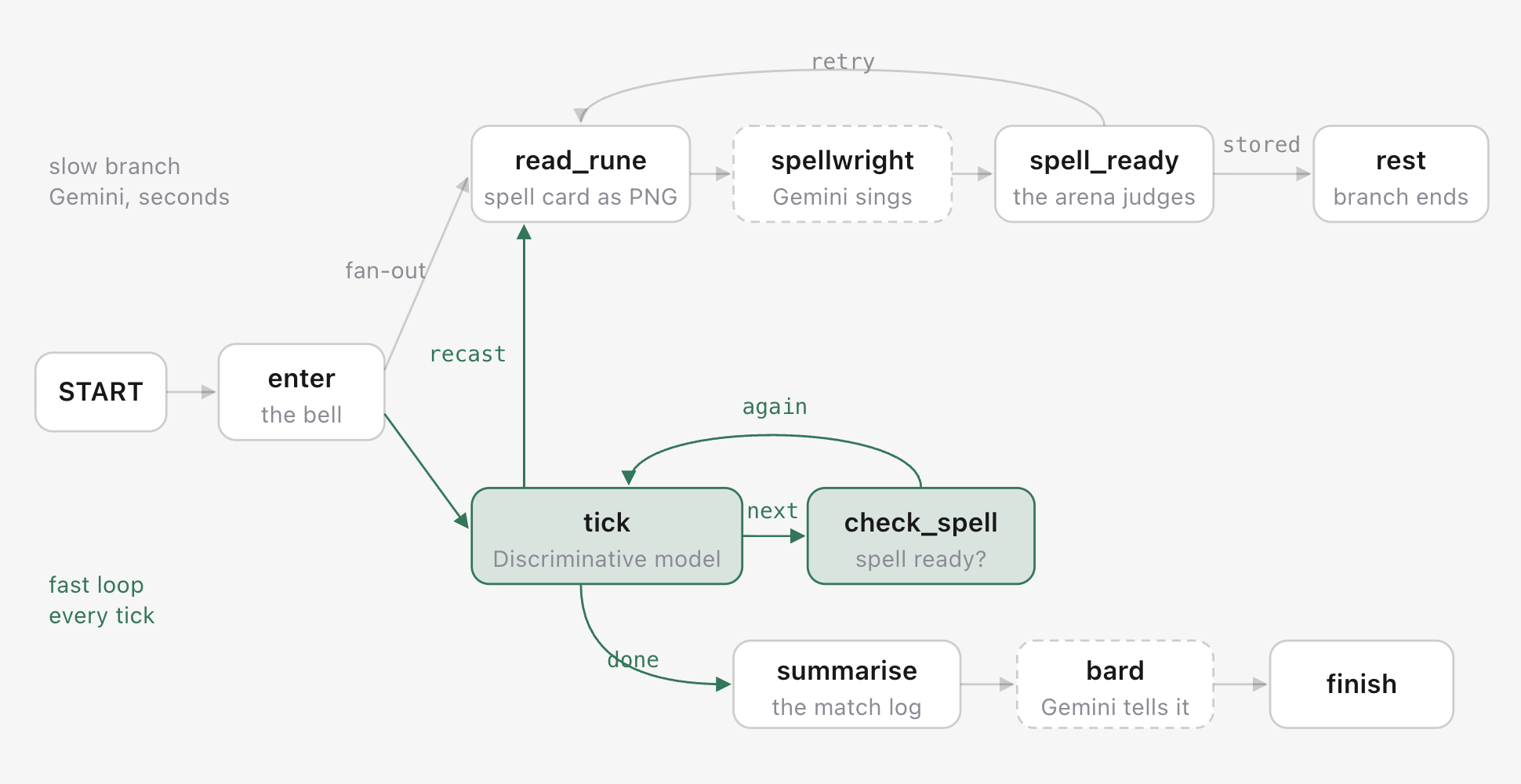
So the workflow uses both, each at its own speed:
- The Discriminative model fights. Every tick, one call, one decision, a hundred milliseconds. The loop never waits for anything slower than itself.
- Gemini reads and sings. On its own branch, started at the bell, it grabs the spell card off the arena's screen as an image, names the color and the shapes, and sings an incantation. The arena judges the song against the spell card's answer, which never leaves the server.
- After every exchange, the fighter checks the slot. A
check_spellnode looks at state. Not ready: it says so, with how long Gemini has been singing, and routes straight back to the next tick. It never waits. Ready:castjoins the options the Discriminative model is offered, andchoose()spends the spell the moment the Discriminative model reports an opening. When the spell is spent, the screen draws a new spell card and the slow thread starts again. A misread song burns the spell card, and the slow thread reads the new one. - Gemini writes a short tale once, at the end.
Parallel branches with different latencies and one event loop
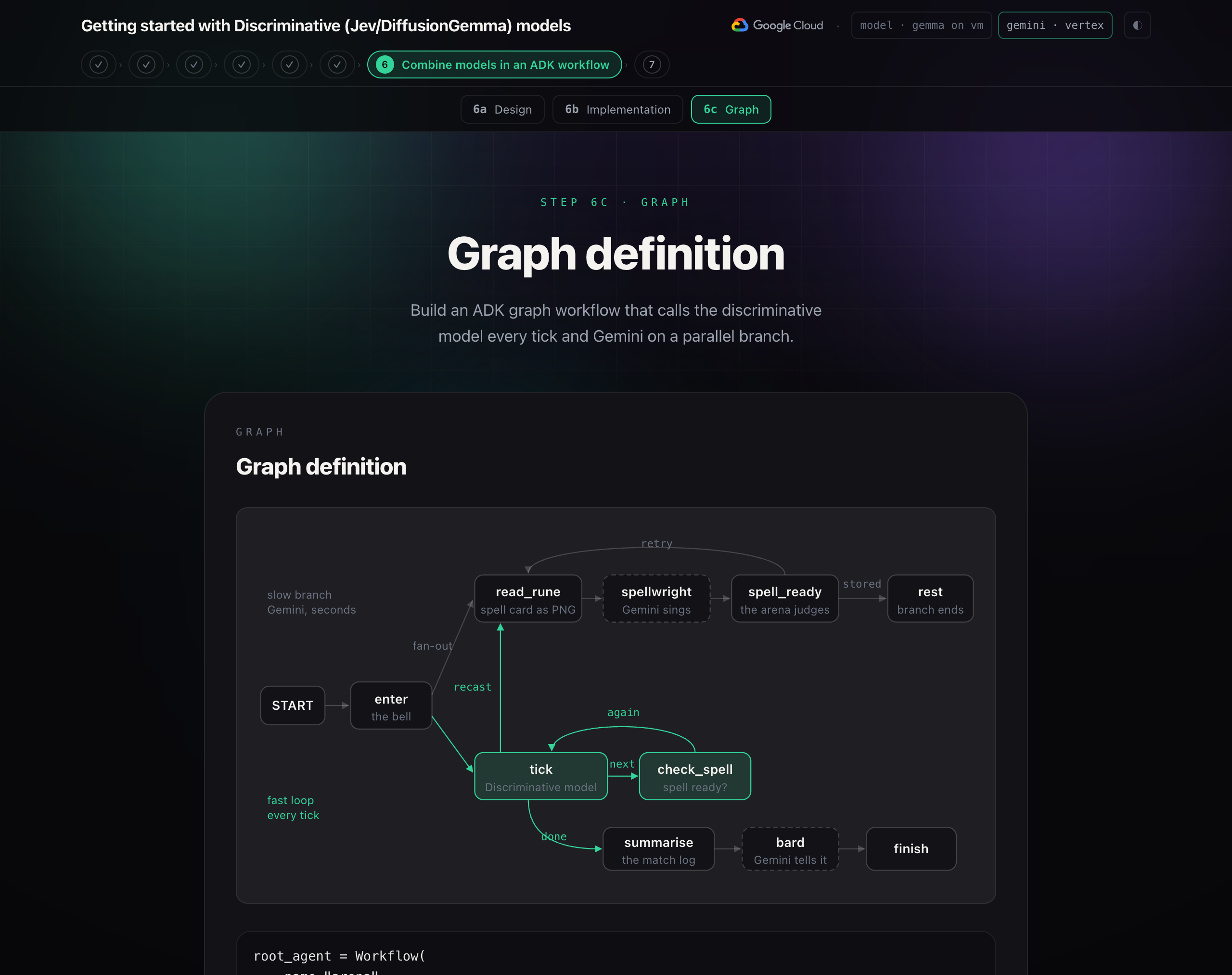
This is an ADK Workflow: a graph of nodes joined by edges. A node is a plain Python function or an LLM agent. An edge from one node to a tuple of nodes is a fan-out: both start, concurrently. A node that returns an Event with a route picks which edge is taken next, and a node that routes to itself is a loop.
Think of it as two threads. Thread 1 is slow: read the spell card, sing, store the spell. Thread 2 is fast: tick, check the slot, tick again. Thread 1 ends in a function that writes the judged spell into session state and returns no output. Thread 2's check_spell reads that state after every exchange. Neither thread calls or waits for the other; they only share state.
Key takeaway: Put the decisions in code and give each model a narrow job at its own pace.
ADK runs both branches as tasks on one event loop, in a single thread. Only one task runs at a time. When a task reaches await, it waits for its answer, and the loop runs the other branch in the meantime. The fast branch waits for the model for about a tenth of a second, and the slow branch waits for Gemini for several seconds, so neither holds up the other.
Slow branch
read_rune() takes the spell card off the screen as an image.
def read_rune(ctx: Context, node_input) -> Event:
    png = _arena(ctx).rune_png()                  # exactly what the screen shows
    return Event(output=types.Content(role="user", parts=[
        types.Part(text="This spell card is on the arena's screen right now. Sing the spell that matches it."),
        types.Part.from_bytes(data=png, mime_type="image/png"),
    ]))
spellwright is Gemini. It reads the image and answers in a fixed shape.
class Sung(BaseModel):
    element: str          # fire, frost, earth, storm
    glyphs: list[str]     # three of: circle, ring, square, diamond, triangle, cross, crescent, bar
    incantation: str

spellwright = LlmAgent(name="spellwright", model="gemini-flash-latest",
                       instruction="You are the spellwright ... read the three shapes left to right ...",
                       output_schema=Sung)
spell_ready() has the arena judge the spell, then stores it or tries again.
def spell_ready(ctx: Context, node_input: dict) -> Event:
    spell = _arena(ctx).sung(dict(node_input))    # the arena judges it against the spell card
    return Event(state={"spell": spell if spell["damage"] > 0 else None},
                 route="retry" if spell["damage"] <= 0 else "stored")
A function node can return a Content with an image part, and the LLM node receives it as its user turn. spell_ready returns an Event with a state delta and no output. The next tick reads the spell from state, and a branch with no output is not a second ending for the graph: ADK requires one terminal output, and that is the fight's.
Note: The judging is code, in the arena, against the spell card's hidden answer. A perfect reading does 45, more into an opening. Two shapes right does 25. A misread fizzles and burns the spell card. Gemini is not asked whether it was right.
Fast branch
tick() plays one exchange, then picks the next edge.
async def tick(ctx: Context, node_input) -> Event:
    arena = _arena(ctx)
    spell = ctx.state.get("spell")                # did the slow branch deliver?
    move = await asyncio.to_thread(arena.telegraph)

    async with AsyncTypeSafeClient() as jev:
        answers = await jev.system_one(
            state={"opponent": engine.OPPONENT["description"], "telegraph": move["telegraph"]},
            questions=reflex.reflex_questions(spell_ready=spell is not None),
        )

    decision = reflex.choose(answers.answers, spell_ready=spell is not None)
    entry = await asyncio.to_thread(arena.respond, decision["action"], decision, ...)
    over = entry["you"] <= 0 or entry["foe"] <= 0 or entry["tick"] >= engine.MAX_TICKS

    routes = []                                   # which arrows in the graph to follow next
    if entry["spell_used"] and not over:
        routes.append("recast")                   # a new spell card is on the screen: read it
    routes.append("done" if over else "next")
    return Event(output="fight", route=routes, state={"tick": ..., "spell": None, ...})
check_spell() looks at the spell slot after every exchange.
def check_spell(ctx: Context, node_input) -> Event:
    spell = ctx.state.get("spell")                # thread 1 writes it; this only reads
    if spell:
        report = {"ready": True}
    else:
        report = {"ready": False, "waited": now - ctx.state["forging_since"]}
    return Event(output="fight", route="again", state={"spell_check": report})
check_spell looks at the slot after every exchange. It never blocks: if the spell is not ready, it reports that and moves on.
Three things carry the design. The Discriminative model call is awaited with the async client, so the loop yields while it waits and the Gemini branch keeps running. The questions are built fresh each tick, so cast appears only when there is something to cast. And route can be a list: ["recast", "next"] takes both edges at once.
The arena itself is behind a small client: the running app over HTTP when there is one, so the page shows the fight; the engine in-process when there is not.
Graph definition
root_agent = Workflow(
    name="arena",
    edges=[
        ("START", enter),
        (enter, (read_rune, tick)),                   # fan-out: slow branch + fast loop
        (read_rune, spellwright, spell_ready),
        (spell_ready, {"retry": read_rune, "stored": rest}),   # misread: read the new spell card; else rest
        (tick, {"next": check_spell, "recast": read_rune, "done": summarise}),
        (check_spell, {"again": tick}),               # not ready? keep fighting
        (summarise, bard, finish),
    ],
)
A tuple as a target is a fan-out. A tuple as an edge is a chain. A dict maps route names to nodes. tick → check_spell → tick is the fast loop. "recast": read_rune starts the slow thread again after a spell is spent, "retry" does the same after a fizzle, and "stored": rest lets the slow thread end quietly, with no output, once the spell is in the slot. ADK requires at least one routed edge in a cycle, so an unconditional loop is rejected before it can run forever.
Note: root_agent is what ADK's tools look for. adk web agents from the root of the workshop opens the dev UI with the arena in it, if you want to see the graph and the events in a browser rather than a terminal.