
1. Introduction
In this codelab, you will deploy the Hackathon Judge application on Google Kubernetes Engine (GKE) and use the Kubernetes-sigs Agent Sandbox to run agentic workloads safely and securely.
The platform is designed to automate the process of reviewing, testing, and grading hackathon projects using LLM agents. Since judging requires evaluating untrusted participant code submissions, a secure execution sandbox is critical to prevent code injection, privilege escalation, or resource abuse.
What you'll do
- Provision the target Google Cloud services and establish target APIs.
- Initialize GKE Autopilot and install the Agent Sandbox CRDs, cluster configurations, and the Sandbox Router.
- Deploy the Sandbox Gateway, Sandbox Claim Template, and a Sandbox WarmPool.
- Deploy the REST Backend API, ADK Judging worker Agent, and React Frontend UI.
- Wire external load-balanced routing and access the platform to run secure, sandboxed judging workflows.
What you'll need
- A web browser such as Chrome.
- A Google Cloud project with billing enabled.
The resources created in this codelab should cost less than $5 in total runtime charges.
2. The Problem: Securely Evaluating Untrusted Code
Hackathons are fast-paced innovation events where participants build and submit projects—often including source code—for evaluation. Manually judging these submissions is time-consuming and resource-intensive. Using AI agents to automate grading is a promising solution, but it introduces a significant security challenge: how do you safely run participant-provided code that could be buggy, malicious, or resource-intensive?
Running untrusted code directly on your infrastructure exposes you to risks like:
- Code Injection: Malicious scripts could try to access or modify sensitive data.
- Privilege Escalation: Code might attempt to gain unauthorized access to other systems or network resources.
- Resource Abuse: Poorly written code or denial-of-service attacks could consume excessive CPU, memory, or network bandwidth, impacting other operations.
To automate hackathon judging with AI, we need a way to execute submitted code in an environment that is completely isolated from the rest of our system and other submissions.
3. The Solution: GKE Agent Sandbox
GKE Agent Sandbox is a feature designed for this exact challenge. It helps manage isolated, stateful, and single-replica workloads on GKE, and is optimized for use cases like AI agent runtimes where untrusted code must be executed securely and efficiently.
Key benefits of Agent Sandbox include:
- Kernel-level isolation: Provides strong, kernel-level isolation for untrusted code using technologies like gVisor, preventing code from accessing the host system or other containers.
- Sub-second provisioning: Offers fast provisioning of sandbox environments (typically <1s), which is critical for on-demand code evaluation.
- Cloud-native extensibility: Leverages the power of Kubernetes and the managed infrastructure of GKE.
By using Agent Sandbox, we can create on-demand, isolated environments for each hackathon submission. The AI judging agent can then instruct Agent Sandbox to run tests, compile code, or perform other evaluation steps within this secure sandbox without risking the integrity of the overall platform. This provides a scalable, secure, and efficient way to automate hackathon grading.
4. Before You Begin
Start Cloud Shell
Click the button below to start Google Cloud Shell, which comes pre-configured with the required developer and cloud command-line utilities.
Enable APIs
Run the following command in Cloud Shell to enable all target Google Cloud APIs required to run the platform:
gcloud services enable \
  container.googleapis.com \
  artifactregistry.googleapis.com \
  cloudbuild.googleapis.com \
  pubsub.googleapis.com \
  aiplatform.googleapis.com \
  cloudresourcemanager.googleapis.com \
  iam.googleapis.com \
  bigquery.googleapis.com \
  bigqueryconnection.googleapis.com
Why we enable these APIs: Google Cloud services are disabled by default to prevent unauthorized access and charges. We enable these specific APIs to activate container orchestration (GKE), secure container storage (Artifact Registry), serverless build packaging (Cloud Build), reliable messaging queues (Pub/Sub), AI model services (Vertex AI), project configuration (Cloud Resource Manager & IAM), serverless data analytics (BigQuery), and database-level AI bindings (BigQuery Connection).
5. Set up Infrastructure
In this step, you will clone the code repository and execute the automated setup script to deploy target cloud architecture and baseline cluster components.
Clone the Repository
Clone the repository containing all the application services, setup scripts, and Kubernetes manifest declarations:
git clone --depth 1 --filter=blob:none --sparse https://github.com/GoogleCloudPlatform/devrel-demos.git
cd devrel-demos
git sparse-checkout set codelabs/ai-toolkit-lab-2/hackathon-judge
cd codelabs/ai-toolkit-lab-2/hackathon-judge
Run Deployment Script
The foundational setup of your cloud resources, database models, and baseline Kubernetes cluster policies is automated by the deploy.sh script.
Run the script:
./deploy.sh
Follow the interactive shell prompts to supply configurations like your active Project ID and Target Region. The script automatically generates a local .env configuration, binds resources, compiles container images, and registers GKE baseline infrastructure.
Here are the target operations performed by the script:
1. Environment Configuration Setup
The script creates a .env configuration file to store GKE, Pub/Sub, BigQuery, and project variable parameters. Sourcing this file dynamically populates all subsequent Kubernetes manifest definitions.
Why we configure this environment file: The .env file centralizes configuration parameters, ensuring that the GKE manifests we apply manually in subsequent steps use identical regional settings, project names, and resources, strictly decoupling environmental configuration from source code.
2. Google Cloud CLI & Target Project Configuration
The script verifies that gcloud, bq, kubectl, and envsubst utilities are installed, checks authentication state, and locks active configuration targets onto your active Google Cloud project.
Why we target the active project: Setting the active target project prevents CLI commands from affecting other projects in your account and performs pre-flight authentication checks, ensuring that setup commands do not fail mid-deployment due to invalid credentials.
3. Enabling Target Google Cloud APIs
The script performs an idempotent check to verify and enable the target Google Cloud service APIs (GKE, Artifact Registry, Cloud Build, Pub/Sub, Vertex AI, BigQuery, and IAM).
Why we enable Google Cloud APIs: Managed cloud services must be activated before their endpoints are reachable or resources can be created. Enabling them at the start prepares the regional GCP API gateway to handle subsequent resource provisioning commands.
4. Provisioning the Artifact Registry Docker Repository
The script provisions a Docker container repository named hackathon-judge-repo in the selected target location.
Why we create an Artifact Registry repository: GKE clusters require secure access to private container registries in the same regional network to pull application images quickly. Artifact Registry provides a secure, private host to catalog, scan, and store Docker container images.
5. Provisioning the GKE Autopilot Cluster
The script provisions a Google Kubernetes Engine (GKE) Autopilot cluster named hackathon-judge-cluster.
Why we deploy a GKE Autopilot cluster: GKE Autopilot manages node provisioning, scaling, health monitoring, and host OS security upgrades automatically. It provides a production-grade container platform to orchestrate our persistent services and dynamically schedules secure worker sandboxes on-demand.
6. Configuring Pub/Sub Topics and Subscriptions
The script provisions the message topics (judging-tasks and judging-results) along with their corresponding worker and API subscriptions.
Why we deploy Pub/Sub topics and subscriptions: Evaluating code submissions is slow and resource-intensive. Using a message-queue architecture decouples the synchronous user-facing API from worker nodes. The API backend pushes jobs to the judging-tasks topic, and worker agents pull tasks as they are available, preventing API blocking and providing automatic retry capabilities.
7. Configuring BigQuery Datasets, Tables, and AI Connections
The script creates the hackathon_judge dataset, applies structural SQL database schemas, loads seed records, and grants required AI and storage roles to the BigQuery ML connection service account.
8. Triggering Container Builds using Cloud Build
The script triggers the cloudbuild.yaml definition to compile our React UI, Go REST server, Python ADK worker, and FastAPI sandbox, packaging them into isolated container images tagged with the active repository Git commit SHA and saving them to Artifact Registry.
9. Registering Agent Sandbox Custom Resource Definitions (CRDs)
The script downloads and registers the latest Kubernetes-sigs Agent Sandbox Custom Resource Definitions (manifest.yaml and extensions.yaml) to extend GKE's core capabilities.
Why we install the Agent Sandbox infrastructure: Standard Kubernetes clusters lack support for allocating protected on-demand sandboxes. Registering Agent Sandbox CRDs extends GKE's control plane, enabling Kubernetes to natively orchestrate secure sandboxed micro-containers using Custom Resources (like SandboxTemplates and SandboxClaims).
10. Configuring Namespaces, Service Accounts, and Workload Identity
The script provisions the hackathon-judge namespace, registers Kubernetes Service Accounts (KSAs), and establishes Workload Identity mappings to grant GKE pods target Google Cloud permissions.
11. Deploying the Sandbox Router
The script applies the k8s/sandbox_router.yaml manifest, initiating the Sandbox Router deployment and service and waiting for them to reach a healthy status.
Why we deploy the Sandbox Router: The Sandbox Router is the central internal control-plane gateway. It exposes a simple API that the ADK judging worker agent calls to claim, access, or release secure sandboxes, managing routing mappings and abstracting cluster-level pod allocation from application logic.
6. Configure Agent Sandbox Gateway, Claims, and WarmPool
In this step, you will manually configure the specialized Sandbox network Gateway, register the Sandbox Claim Template, and deploy the Sandbox WarmPool to enable ultra-low latency sandboxing.
Source Environment Variables
Before applying templates that require environment variables, source the setup-env.sh script to parse and export all necessary variables to your shell:
source ./setup-env.sh
Apply Sandbox Gateway
Deploy the gateway specifically configured for routing sandbox traffic:
kubectl apply -f k8s/sandbox-gateway.yaml
Why we deploy the Sandbox Gateway: The Sandbox Gateway acts as the secure, high-performance ingress controller dedicated solely to sandbox routing. It isolates the sandbox network, providing a secure, local target that allows worker agents to communicate with claimed sandboxes without exposing endpoints externally.
Apply Sandbox Claim Template
Use envsubst to populate the sandbox template definition with your active environment variables, and apply it:
source ./setup-env.sh
envsubst < k8s/sandbox-claim-template.yaml | kubectl apply -f -
Why we deploy the Sandbox Claim Template: The Sandbox Claim Template acts as the blueprint configuration defining the environment. It specifies the container image to run (pre-packaged with developer tools), environment parameters (GCP Project ID), ports, and resource limits (CPU/Memory targets). It configures GKE to run these container instances utilizing gVisor (gvisor runtime), guaranteeing that untrusted participant code runs under an extra layer of kernel virtualization isolation.
Apply Sandbox WarmPool
Apply the Sandbox WarmPool to pre-initialize running sandboxes:
kubectl apply -f k8s/sandbox-warmpool.yaml
Verify that the warm pool standby instances have started successfully:
kubectl get pods -n hackathon-judge -l app=sandbox
Why we deploy the Sandbox WarmPool: Provisioning, scheduling, pulling images, and booting fresh container pods on-demand introduces substantial startup overhead (cold start times of 30+ seconds). The Sandbox WarmPool maintains a standby pool of active, pre-warmed sandbox pods (5 replicas by default). When the worker agent requests an evaluation environment, the Sandbox Router immediately allocates a running pre-warmed pod, cutting start-up delays to sub-second speeds.
7. Deploy Application Components
With the secure sandboxing infrastructure fully active, you will now deploy the central backend API, worker agent, React web interface, and the ingress Gateway mapping.
Deploy Backend
Deploy the orchestrator REST API backend:
source ./setup-env.sh
envsubst < k8s/backend.yaml | kubectl apply -f -
Deploy Agent
Deploy the ADK judging worker agent:
source ./setup-env.sh
envsubst < k8s/agent.yaml | kubectl apply -f -
Deploy Frontend
Deploy the interactive web user interface:
source ./setup-env.sh
envsubst < k8s/frontend.yaml | kubectl apply -f -
Configure external Gateway and Routing
Deploy the main Gateway and ingress HTTP routes mapping external client traffic:
kubectl apply -f k8s/gateway.yaml
Why we deploy the External Ingress Gateway: The external Gateway exposes our services using the Kubernetes Gateway API. It provisions a load-balanced public IP address and maps routes based on path rules—directing API requests under /api/* to the Go Backend, and mapping all other client web traffic (/) to the React Frontend, securing public cluster access.
Verify Rollouts
Block shell execution and wait until all three core service deployments have reached a healthy, ready rollout status:
kubectl rollout status deployment/backend -n hackathon-judge --timeout=300s
kubectl rollout status deployment/agent -n hackathon-judge --timeout=300s
kubectl rollout status deployment/frontend -n hackathon-judge --timeout=300s
8. Verify and Use the Application
Access the UI
Fetch the external public IP address of the newly provisioned main load balancer gateway:
To watch the provisioning status in real time, run the command with the watch flag (-w) and wait until a public IP address is populated in the ADDRESS field:
kubectl get gateway -n hackathon-judge hackathon-judge-gateway -w
When successfully provisioned, you should see output similar to the following:
NAME                      CLASS    ADDRESS          PROGRAMMED   AGE
hackathon-judge-gateway   gke-l7   34.120.120.120   True         3m
Once you see a valid public IP address in the ADDRESS column and the PROGRAMMED status is True, press Ctrl+C to stop the watch.
Why we get the Gateway status: The Gateway API handles public ingress. Checking the Gateway status returns the public, load-balanced external IP address allocated by Google Cloud's external global load balancer to our cluster, which represents the public address of our platform.
Open the allocated public IP address in your browser to load the Hackathon Judge dashboard.
Submit Tasks
- Use the frontend UI to navigate to dashboard, select the hackathon.
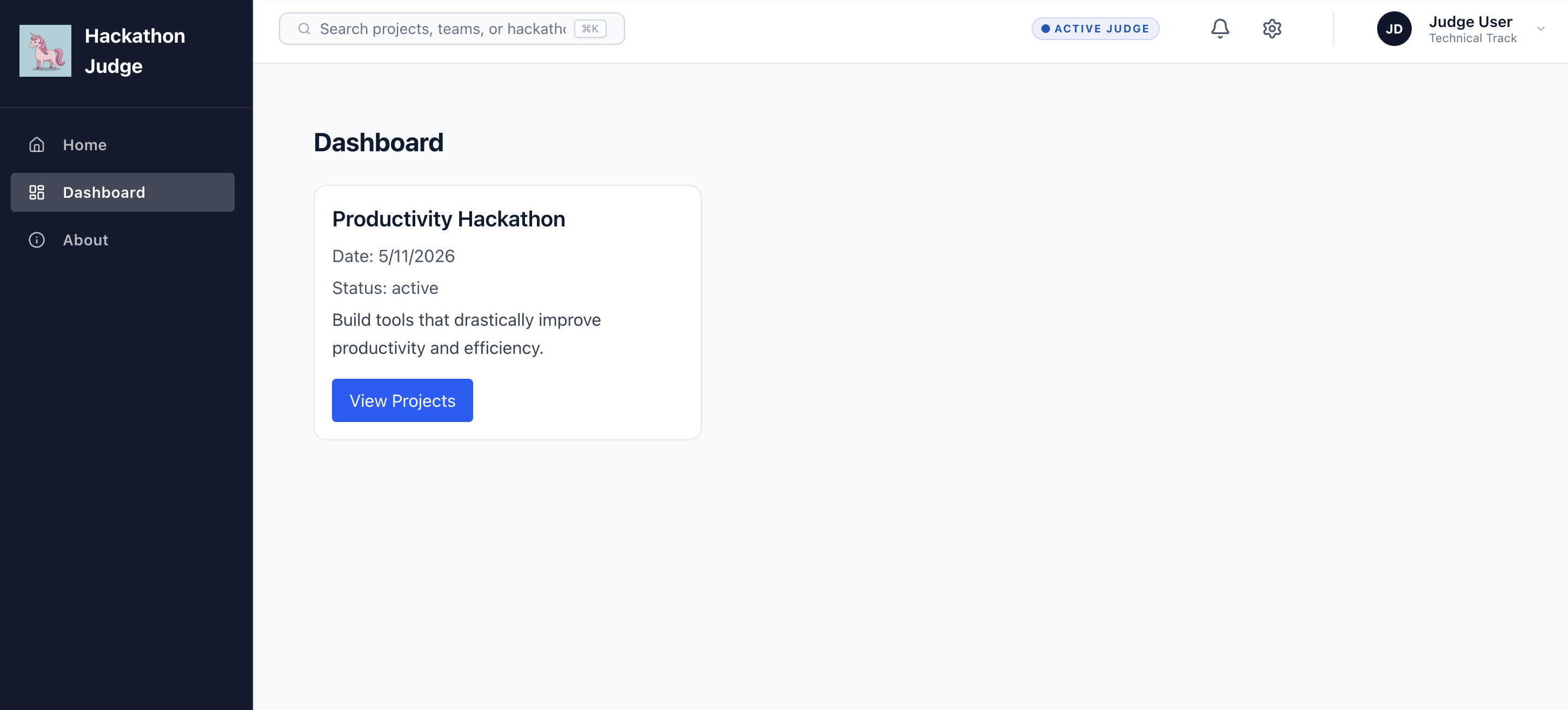
- On any of the project you can click on
Run Agentto start agent judging the whole project against the rubric.
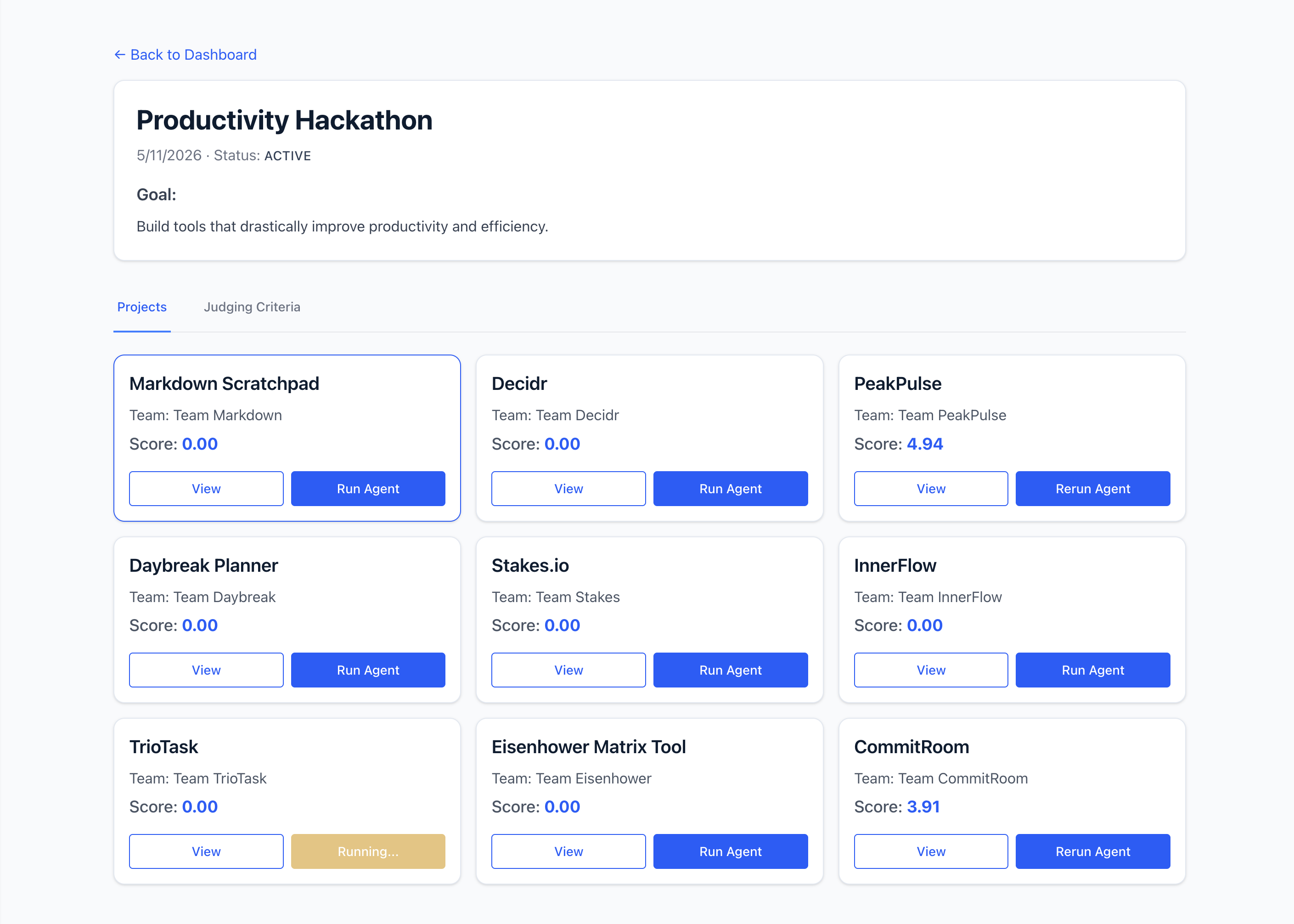
Watch Sandbox Kickoff
Monitor the active pods inside the hackathon-judge namespace to see a sandbox pod dynamically claimed and provisioned for judging execution:
kubectl get pods -n hackathon-judge -w
Check the logs of the worker agent pod to witness the step-by-step ADK judging evaluation logic:
kubectl logs -l app=agent -n hackathon-judge
Why we inspect Agent logs: Inspecting worker agent logs displays the detailed internal steps of the evaluation pipeline in real-time. You can trace the ADK agent fetching the task, requesting a sandbox container, executing compilation targets, analyzing reports with Gemini, and publishing scorecards.
9. (Optional) How this works
Agent Sandbox Architecture
While BigQuery AI functions are incredible for evaluating text-based submissions and README claims, judging an engineering project requires compiling code, installing third-party libraries, and running real test suites.
Running raw user code poses massive security risks, including host compromise, container breakouts, and unauthorized resource access. The GKE Agent Sandbox framework mitigates these risks by orchestrating isolated sandbox workloads using gVisor (runsc) virtualization.
System Interaction Flow
The diagram below maps how the various elements of our event-driven system communicate during a secure sandboxed judging execution:
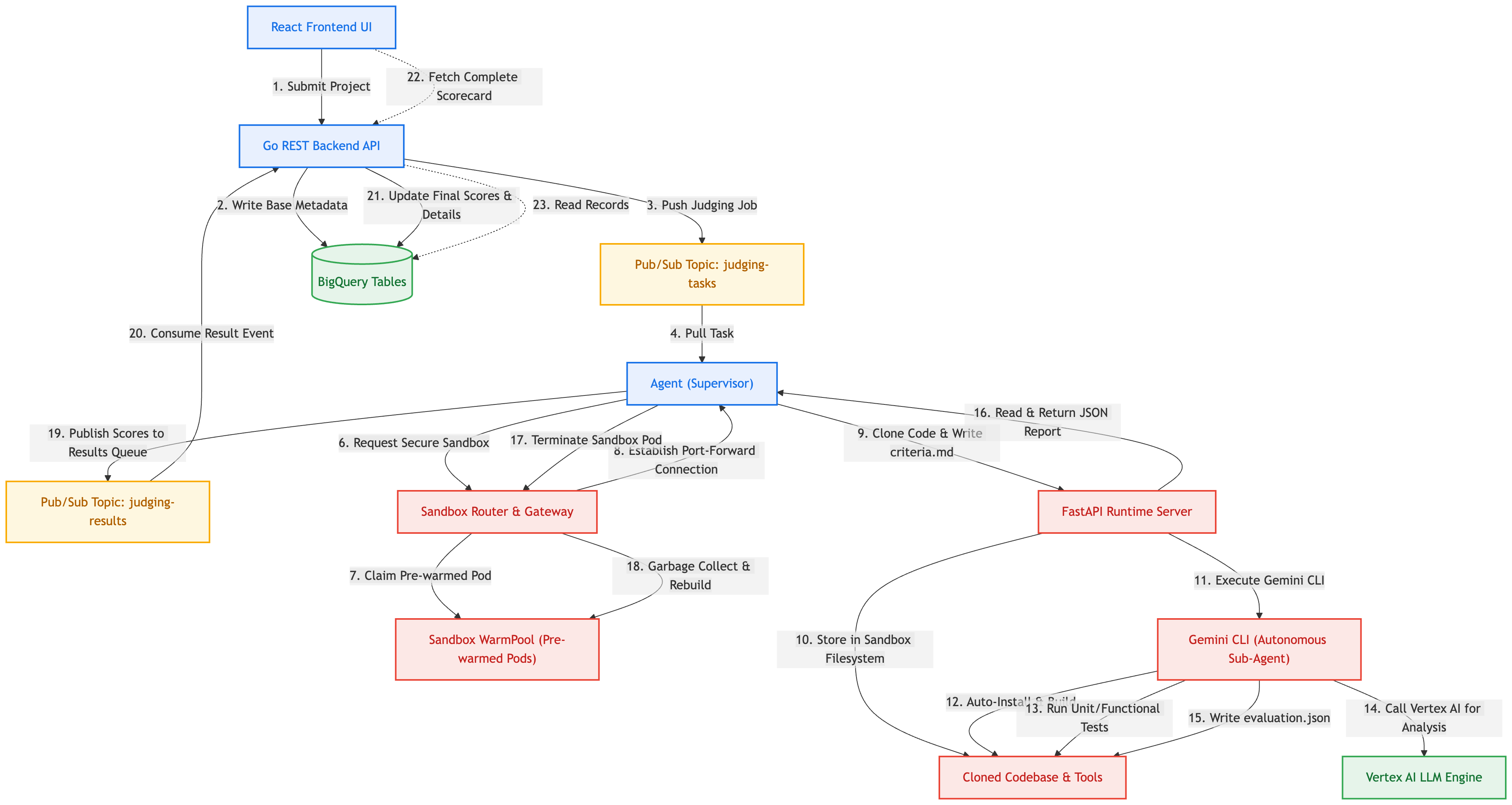
How the Engaged Tools and Components Work Together
- React Frontend UI: Exposes an interactive interface where users configure criteria models, register teams, submit project URLs, and review finalized grading scorecards, including full file discrepancies and engineering comments.
- Go REST Backend API: Manages global API endpoints. It stores project configurations in BigQuery and pushes judging jobs to Pub/Sub to decouple heavy computational execution pipelines.
- Google Pub/Sub: The message-oriented broker that holds task messages safely on-queue, orchestrating communication asynchronously between the API and active worker instances.
- Python ADK Worker (Supervisor Agent): A background worker that pulls tasks from Pub/Sub. It leverages the Google Agent Development Kit (ADK) to start a high-level supervisor agent, which is instructed to orchestrate the evaluation. The supervisor invokes its primary tool,
evaluate_repository, to delegate deep raw command testing. - Sandbox Router & Gateway (GKE Control Plane): An internal control gateway that registers standard Sandbox Custom Resource Definitions (
SandboxClaims,SandboxTemplates). It coordinates GKE networks to allocate and secure pods, returning connection streams back to worker clients. - Sandbox WarmPool: To avoid long GKE container startup times ("cold starts" of 30+ seconds), the WarmPool maintains active standby pods. When a sandbox is claimed, the Router immediately maps it in sub-second times, then schedules recycling upon release.
- gVisor (runsc) Isolation: A user-space virtual kernel that acts as a secure sandboxing boundary. It intercepts system calls from the container space to GKE node kernels, ensuring that dangerous raw commands (like system scripts or package setups) run under absolute virtualization isolation.
- FastAPI Sandbox Runtime: A lightweight Python API server running inside the sandbox container. It exposes secure endpoints (
/execute,/upload,/download) that allow external worker tools to manipulate files and trigger shell tasks. - Gemini CLI (
@google/gemini-cli): An autonomous agent script installed inside the sandbox. When triggered with the developer environment runtime flag (--yolo), it uses a rigorous grading instruction sheet (prompt.md) and criteria definition (criteria.md) to:- Dynamically analyze the codebase hierarchy (using tools like
treeorripgrep). - Automatically install requirements (via commands like
npm install,pip install,go build). - Run real development tests (such as
npm testorpytest) to verify functionality. - Call Vertex AI models (via the container's Workload Identity binding credentials) to evaluate file logic, cross-check claims against the README, detect ghost features, log quality issues, and write a structured scorecard report to
evaluation.json.
- Dynamically analyze the codebase hierarchy (using tools like
- Standard Developer Environments: Bundles node, npm, yarn, pnpm, python, pip, uv, go, gh, git, tree, ripgrep, and playwright in the sandbox container image, giving the autonomous sub-agent a complete test workspace.
10. Clean Up
To avoid ongoing charges to your Google Cloud account, delete the resources created during this codelab.
./destroy.sh
Why we clean up resources: Google Cloud bills on a resource utilization model. Active resources like GKE Autopilot clusters, network load balancers, and persistent disks incur ongoing charges even when they are idle. Running this step deletes the cluster namespace to clear Kubernetes objects, and deletes the GKE Autopilot cluster host itself to immediately terminate all underlying billing charges.
11. Congratulations
Congratulations! You have successfully deployed the Hackathon Judge application with Agent Sandbox on GKE!
You have implemented a secure, modern event-driven AI platform capable of testing and evaluating untrusted codebase submissions under isolated containerized security constraints.
What you've learned
- GKE Infrastructure: How to provision GKE Autopilot and supporting Google Cloud services like Pub/Sub and BigQuery.
- Agent Sandbox Configuration: How to configure Custom Resource Definitions, SandboxTemplates, SandboxClaims, and high-performance Sandbox WarmPools.
- Microservices Deployment: How to configure Workload Identity bindings and deploy a multi-component microservices architecture (Frontend React, REST Go, Worker ADK Agent, and Isolated Sandbox).
- Secure Sandboxing: How to utilize gVisor virtualized containers to run untrusted third-party commands securely on GKE nodes.
Next steps
- Explore the Agent Sandbox documentation.
- Learn more about GKE Autopilot features.
- Check out the Agent Platform Documentation.