

1. 概览
现代软件开发正迅速从命令式编程转向 AI 原生开发。在此 Codelab 中,您将学习如何使用 Google Pay 和 Google 钱包开发者 MCP 服务器(以下简称“Google Pay MCP 服务器”)以及 AI 原生工具 Antigravity 构建和增强 Google Pay 集成。
Model Context Protocol (MCP) 是一种开放标准,可让 AI 模型安全地访问外部工具、实时文档和远程 API 端点。通过 Antigravity 中的 AI 原生工作流,您将设置环境以与 Google Pay MCP 服务器通信,并从头开始快速搭建可用于生产用途的 Google Pay 按钮,以用于结账页面。
随后,您将使用规范驱动的开发方法来增强与新 API 功能的集成,具体来说,就是为定期付款启用商家发起的交易 (MIT),并使用 cardFundingSource 信号来实现动态路由和定价。最后,您将配置一个由 LLM 驱动的自主监控流水线,以便在夜间观测和修复结账问题。
学习内容
- 如何设置 Google Pay MCP 服务器并将其连接到 Antigravity 或其他 AI 工具
- 如何使用 Google Pay MCP 服务器查询文档
- 如何在 Antigravity 中直接搭建一流的 Google Pay 结账集成
- 如何通过规范驱动的开发来实现动态路由和定价
- 如何通过规范驱动的开发来增强周期性订阅使用情形
- 如何使用 Antigravity 部署长期监控和自动化智能体流水线
- 如何实施快速访客结账来优化转化漏斗
2. 设置和要求
准备工作
如需使用 Google Pay MCP 服务器,您必须创建 Google Cloud 项目并启用 Google Pay & Wallet Developer API。
- 在 Cloud 控制台的项目选择器页面上,选择或创建一个 Google Cloud 项目。
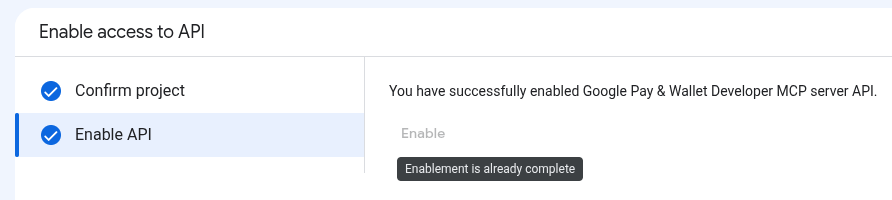
- 启用 Google Pay 和 Google 钱包 Developer API。
- 如需启用 API,您需要拥有 Service Usage Admin IAM 角色 (
roles/serviceusage.serviceUsageAdmin),该角色包含serviceusage.services.enable权限。了解如何授予角色。
- 如需启用 API,您需要拥有 Service Usage Admin IAM 角色 (
所需的角色
如需获得使用 Google Pay MCP 服务器所需的权限,请让您的管理员为您授予 Google Cloud 项目的以下 IAM 角色:
- 进行 MCP 工具调用:MCP Tool User (
roles/mcp.toolUser)
如需了解详情,请参阅管理对项目的访问权限。
身份验证和授权
Google Pay MCP 服务器使用 OAuth 2.0 协议和 IAM 进行身份验证和授权。
请按照以下步骤为 MCP 工具创建 OAuth 2.0 客户端 ID 和密钥,以便访问 Google Cloud 资源:
- 在 Google Cloud 控制台中,依次前往 Google Auth Platform > 客户端 > 创建客户端。
- 在应用类型列表中,为您的 AI 应用选择合适的类型:
- 对于 Antigravity、Claude.ai、Claude Code 和 ChatGPT,请选择Web 应用。
- 对于 Gemini CLI 和 VS Code,请选择桌面应用。
- 在名称字段中,输入应用的名称(例如
Antigravity)。 - 在已获授权的重定向 URI 部分中,点击 + 添加 URI,然后为您的 AI 应用添加所需的重定向 URI:
- Antigravity:
https://antigravity.google/oauth-callback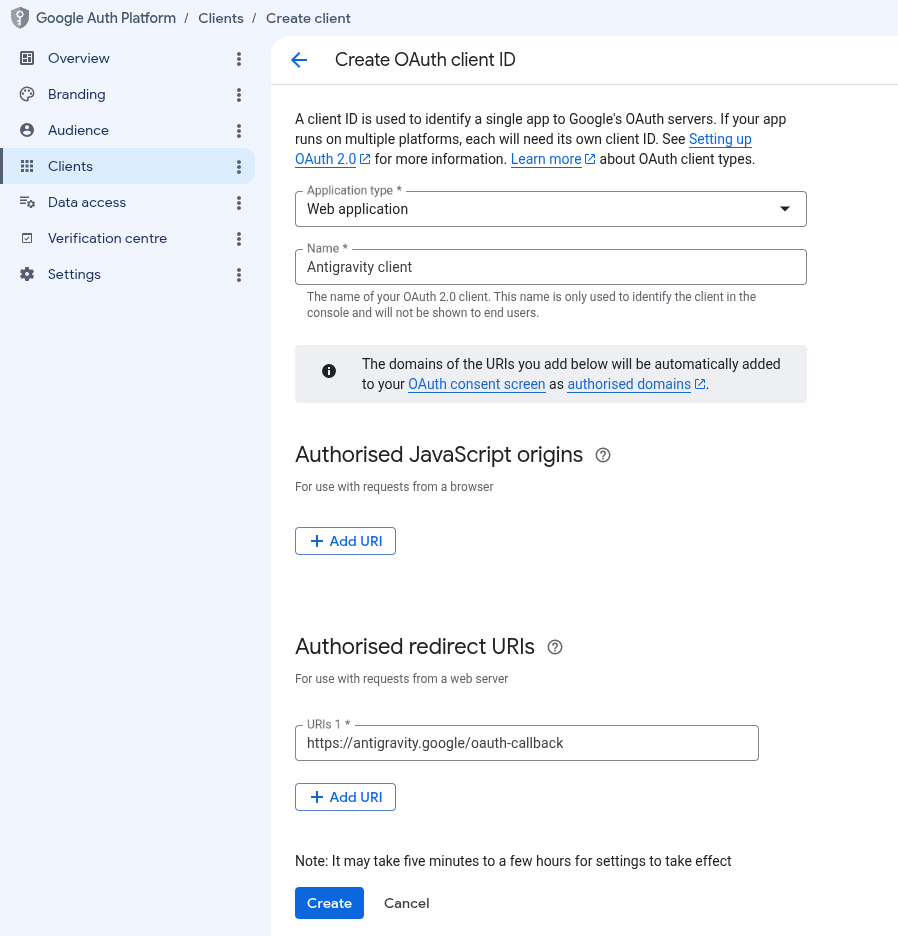
- 其他 AI 工具:请参阅 OAuth 客户端设置。
- Antigravity:
- 点击创建。创建后,访问客户详细信息。复制客户端 ID 和客户端密钥,并妥善存储。
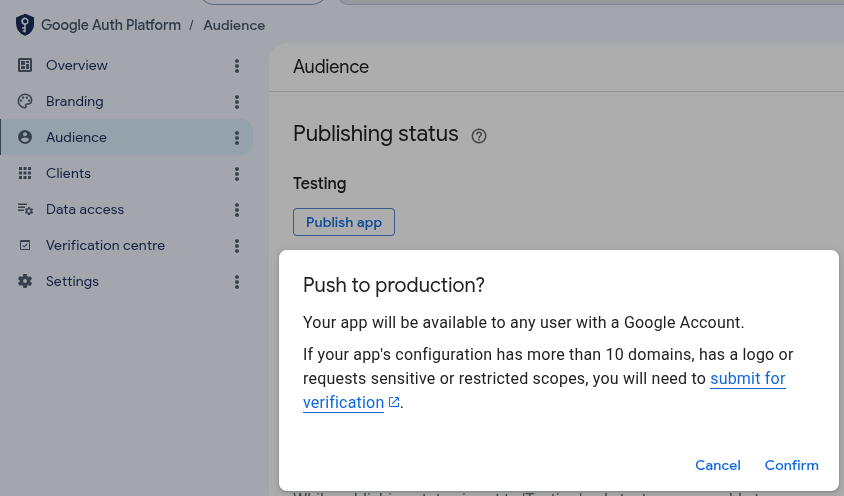
- 在 Google Cloud 控制台中,依次前往 Google Auth Platform > 受众群体,点击发布应用,然后点击确认,将发布状态更改为在生产环境中。
3. 配置 MCP 服务器
配置 AI 应用
接下来,您需要向 AI 应用提供服务器配置详细信息。
Antigravity 2.0
如需配置 Antigravity 2.0,请执行以下操作:
- 前往设置 > 自定义,然后在已安装的 MCP 服务器下,点击打开 MCP 配置以打开 Antigravity 配置文件(例如:
~/.gemini/antigravity/mcp_config.json)。 - 在
mcpServers中添加或更新google-pay-wallet-dev条目,并替换为您的 OAuth 客户端 ID 和密钥(将ANTIGRAVITY_CLIENT_ID和ANTIGRAVITY_CLIENT_SECRET替换为创建的 OAuth 2.0 客户端 ID 和密钥):{ "mcpServers": { "google-pay-wallet-dev": { "serverUrl": "https://paydeveloper.googleapis.com/mcp", "oauth": { "clientId": "ANTIGRAVITY_CLIENT_ID", "clientSecret": "ANTIGRAVITY_CLIENT_SECRET" } } } } - 前往设置 > 自定义,然后在已安装的 MCP 服务器下,点击刷新。
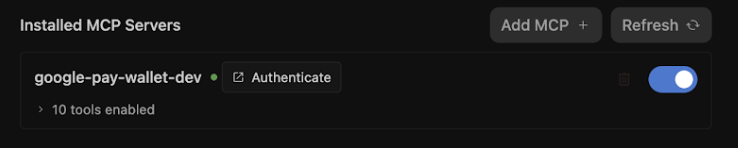
- 点击进行身份验证,然后完成 OAuth 流程:
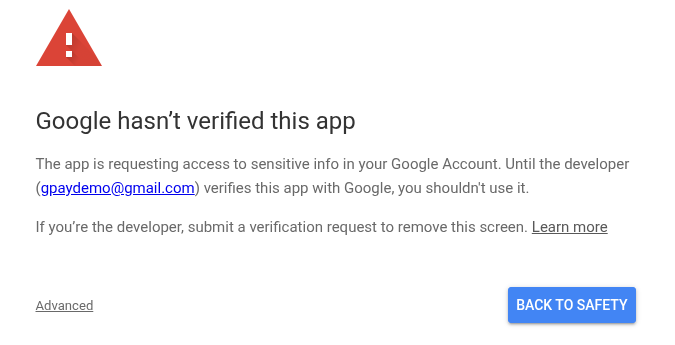
- 如果系统提示Google 尚未验证此应用,请点击高级,然后点击前往 antigravity.google(不安全)以继续操作。之所以显示此警告,是因为您的 OAuth 客户端未经验证。在开发期间,可以安全地继续操作。
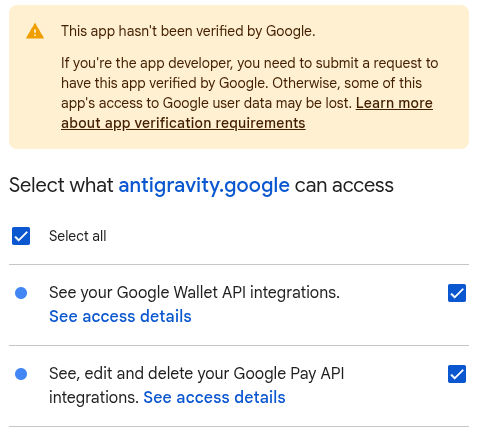
- 选择所需的范围(查看、修改和删除您的 Google Pay API 集成),然后点击继续以向 Antigravity 授予访问权限。
- 如果系统提示Google 尚未验证此应用,请点击高级,然后点击前往 antigravity.google(不安全)以继续操作。之所以显示此警告,是因为您的 OAuth 客户端未经验证。在开发期间,可以安全地继续操作。
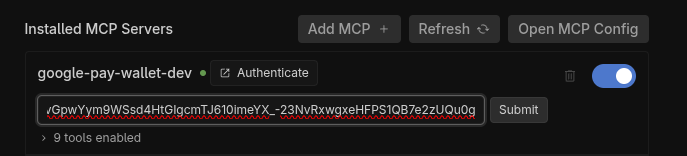
- 复制授权代码,然后在授权代码窗口中提交该代码。
Antigravity IDE
如需配置 Antigravity IDE,请执行以下操作:
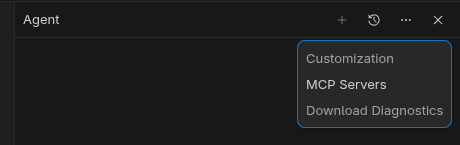
- 在 Antigravity IDE 中,依次点击智能体窗格中的更多选项菜单 >“MCP 服务器”>“管理 MCP 服务器”。
- 在“管理 MCP 服务器”窗格顶部,点击查看原始配置以修改
mcp_config.json文件(将ANTIGRAVITY_CLIENT_ID和ANTIGRAVITY_CLIENT_SECRET替换为创建的 OAuth 2.0 客户端 ID 和密钥):
{ "mcpServers": { "google-pay-wallet-dev": { "serverUrl": "https://paydeveloper.googleapis.com/mcp", "oauth": { "clientId": "ANTIGRAVITY_CLIENT_ID", "clientSecret": "ANTIGRAVITY_CLIENT_SECRET" } } } } - 返回到管理 MCP 服务器,然后点击刷新。点击身份验证会打开代理设置中的自定义标签页。
- 点击进行身份验证,然后完成 OAuth 流程:
- 如果系统提示Google 尚未验证此应用,请点击高级,然后点击前往 antigravity.google(不安全)以继续操作。之所以显示此警告,是因为您的 OAuth 客户端未经验证。在开发期间,可以安全地继续操作。
- 选择所需的范围(查看、修改和删除您的 Google Pay API 集成),然后点击继续以向 Antigravity 授予访问权限。
- 如果系统提示Google 尚未验证此应用,请点击高级,然后点击前往 antigravity.google(不安全)以继续操作。之所以显示此警告,是因为您的 OAuth 客户端未经验证。在开发期间,可以安全地继续操作。
- 复制授权代码,然后在授权代码窗口中提交该代码。
其他 AI 工具
如需配置其他 AI 工具,请参阅 AI 应用配置指南。
4. 在结账流程中快速搭建新的 Google Pay 集成
传统的软件开发通常需要浏览大量的 API 规范、复制样板代码和连接参数。相比之下,如果您在 Antigravity 中配置了 Google Pay MCP 服务器,则可以提示 LLM 搭建可用于生产用途的结账体验。
- 提示 Antigravity 搭建结账流程:打开有效的 Antigravity 对话会话(已启用 Google Pay MCP 服务器),然后发出以下搭建提示:
Act as a developer and integrate the Google Pay API into a checkout page using HTML, CSS, and vanilla JavaScript. Please ensure the implementation follows these Google Pay best practices: 1. *Check Readiness*: As the first step, call `isReadyToPay()`. Only render the Google Pay button if this method returns true. 2. *Layout & Placement*: Set Google Pay as the default payment option. Position the Google Pay button at the very top of the payment list, above any credit card entry forms. 3. *Button Styling*: Render a dynamic button by setting `buttonType` to `'buy'` or `'pay'` so it previews the user''s saved card. Ensure the button theme contrasts with the page background. 4. *Payment Methods*: In `allowedAuthMethods`, specify both `'PAN_ONLY'` and `'CRYPTOGRAM_3DS'` so that Google Pay accepts both standard cards-on-file, and device tokens. 5. *Card Networks*: Add `'VISA'`, `'MASTERCARD'`, and `'AMEX'` to `allowedCardNetworks`. 6. *Transaction Info*: Set the `checkoutOption` parameter to `'COMPLETE_IMMEDIATE_PURCHASE'` so Google Pay sheet displays a "Pay" button instead of "Continue". 7. *3D-Secure Step-Up*: Treat Google Pay risk checks consistently with regular cards. If your standard checkout flow triggers a 3D-S step-up for normal cards, ensure risk-based 3D-S is triggered based on signals returned in the `loadPaymentData()` response. 8. *Testing*: Serve and test the checkout page locally using a Python3 web server. - 让 LLM 连接到 MCP 工具:LLM 通过
loadPaymentData请求等查询执行search_documentation。Google Pay MCP 服务器会查询其 RAG 向量嵌入,并返回 Google Pay 所需的确切 JSON 架构。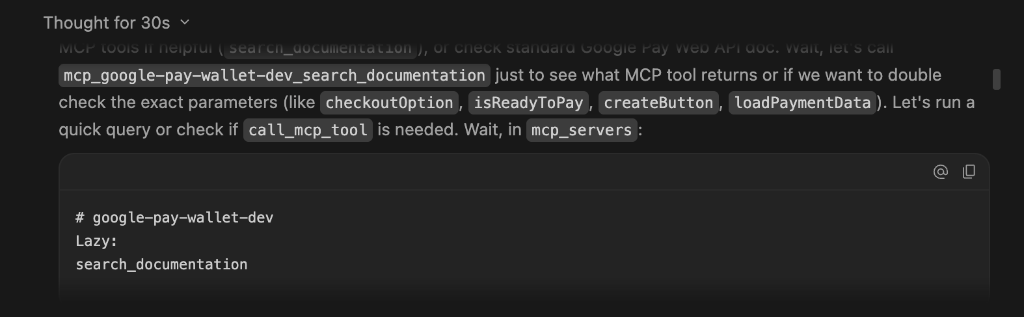
- 观察执行情况和代码生成情况:Antigravity 会将您的提示与 MCP 工具输出相结合,为您创建一个初始设计,供您查看并添加注释以进行调整,或者批准该设计:
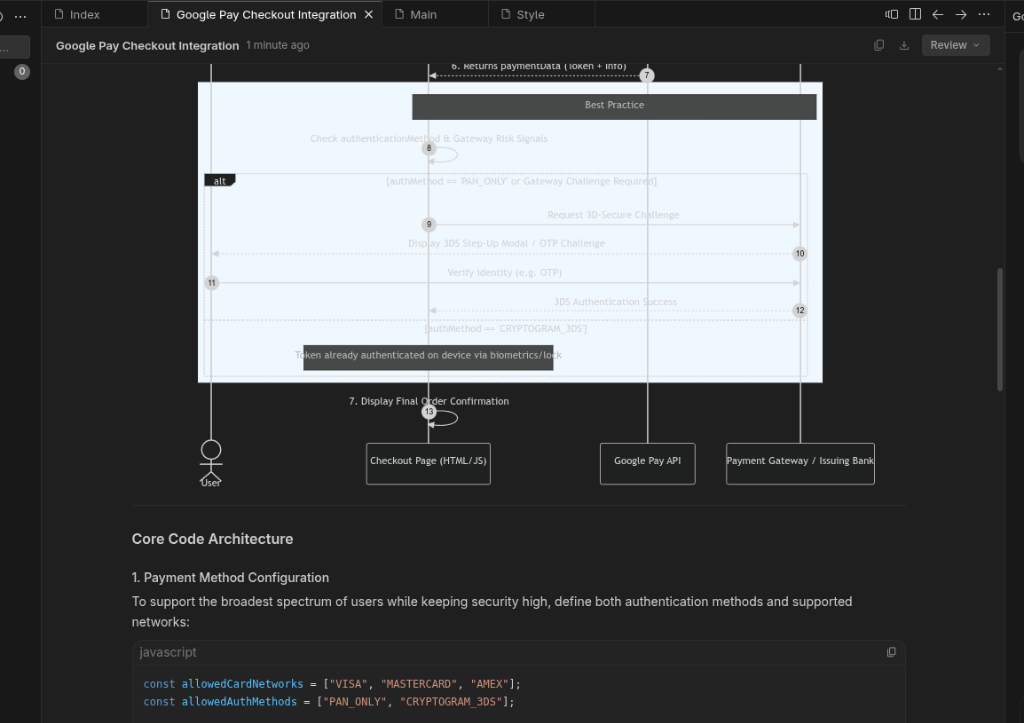
下图显示了生成的演示。请注意,演示版的外观和风格可能会因您的 Antigravity 上下文而异: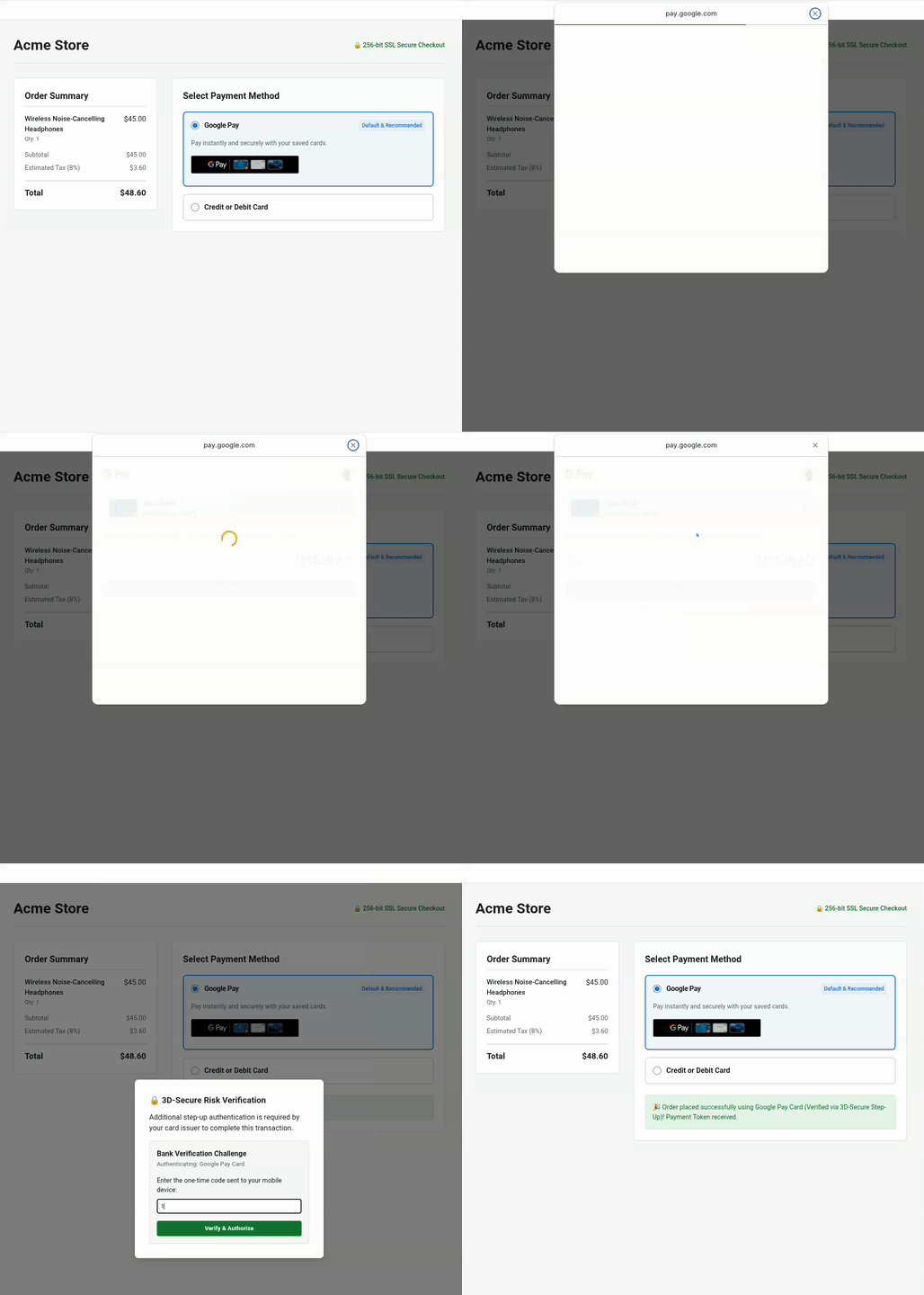
问题排查
如果生成的结账体验不符合您的预期,您可以使用 Antigravity 进行调整。下面是一些示例:
- 调整按钮对比度和样式:如果按钮不符合您网站的视觉主题,请使用以下提示:
The page background is dark. Please update `createButton()` to use `buttonColor: 'white'` and adjust container margins so it sits cleanly above our credit card form. - 验证商家 ID:如果您需要在测试商家配置和正式版商家配置之间切换,请提示:
Use `list_google_pay_integrations` to fetch our latest test or production merchant ID and explicitly inject it into `merchantInfo.merchantId`. - 检查 3D-Secure 升级信号:如需检查 3D-Secure 升级身份验证是否根据
assuranceDetails设备风险信号正确评估,请使用以下提示:Please verify in `onGooglePaymentButtonClicked()` if 3D-Secure step-up logic is conditionally triggered based upon the `assuranceDetails` signal returned inside the `loadPaymentData()` response.
5. 优化动态附加费的用户体验
商家和 PSP 有时需要根据基础卡类型计算附加费、折扣或动态价格。例如,借记卡/预付卡额外收取 0.1% 的手续费,而信用卡则额外收取 0.5% 的附加费。Google Pay 通过 cardFundingSource 提供此重要信号。
了解 cardFundingSource 的细微差别
在实施动态定价之前,务必了解此信号在不同环境中的行为方式:
- 测试环境:请注意,
TEST上的 Google Pay 支付表格始终会显示总价。商家必须使用响应中的信号,并在付款授权之前在自己的订单确认屏幕上显示最终价格(包括额外费用),如此示例所示。 - 生产环境部署:如果您需要在 Google Pay 的付款单上隐藏总价,请与您的 Google 联系人联系,将您的商家 ID 添加到许可名单中。
动态定价的规范驱动型开发
- 使用 MCP 工具查找开发者文档:在有效的 Antigravity 对话会话中,使用 SDD 提示 LLM:
Enhance the Google Pay integrations according to business specification:
- Use "sabre" as the gateway for the TEST environment.
- Calculate a 0.1% extra fee for DEBIT and PREPAID cards, and a 0.5% extra fee for CREDIT cards.
- After the surcharge is calculated, update the checkout confirmation screen so the user reviews the final price before acquirer authorization.
Use `search_documentation` to look up the technical specification for consuming `cardFundingSource` signal of Google Pay API.
- 验证 LLM 的实现:通过使用 MCP 直接查询文档,LLM 可提取确切的技术规范来更新价格计算实现。观察测试页面,验证并查看确认屏幕上的附加费界面变化:
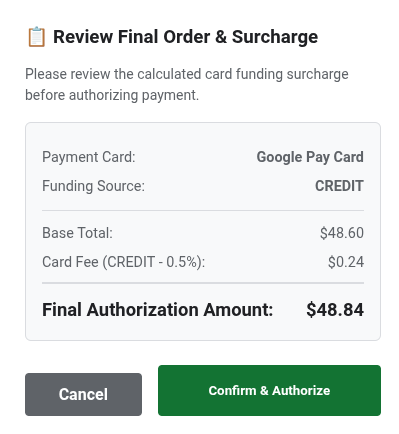
下面是 LLM 生成的增强型 JavaScript 代码:/** * Calculates an extra fee based on the card funding source signal. * @param {object} paymentData - The payment data object from the API response. */ function processPayment(paymentData) { // Access the card funding source from the nested API response info object const cardFundingSource = paymentData.paymentMethodData.info.cardFundingSource; let totalPrice = 10.00; let extraFee = 0; switch (cardFundingSource) { case 'DEBIT': case 'PREPAID': extraFee = totalPrice * 0.001; // Apply 0.1% fee break; case 'CREDIT': default: extraFee = totalPrice * 0.005; // Apply 0.5% fee break; } const finalOrderTotal = totalPrice + extraFee; console.log(`Card Type: ${cardFundingSource} | Fee: $${extraFee.toFixed(3)} | Final Total: $${finalOrderTotal.toFixed(2)}`); // Update your checkout confirmation screen so the user reviews the final price before acquirer authorization displayFinalConfirmationScreen(finalOrderTotal, extraFee); }
6. [可选] 提高定期付款的付款成功率
如果您的商家采用订阅、定期水电费结算或会员模式,您可能需要处理付款,而无需用户在每个结算周期重新进行身份验证。这些定期付款。我们的 MIT 规范可让您更清楚地了解交易类型、结算详情,并确保付款流程顺畅无间断。
应用规范驱动的开发
您没有让 LLM 在整个网络中随意搜索(这可能会导致使用不准确的技术规格),而是指示 LLM 使用 Google Pay MCP 服务器的 search_documentation 工具。
- 用于检索规范的提示:在活跃的 Antigravity 聊天会话中,向 LLM 发出以下提示:
Enhance the Google Pay integrations to support new recurring business requirement:
- Update Google Pay integrations to support a monthly recurring subscription of $14.99.
- Use `search_documentation` to look up the technical specification for `RecurringTransactionInfo` and MIT in Google Pay API.
- 查看增强的代码实现:LLM 会使用经过规范验证的 MIT 参数更新
onGooglePaymentButtonClicked:function getGoogleRecurringTransactionInfo() { return { currencyCode: 'USD', countryCode: 'US', transactionId: 'sub-1499-monthly-' + Date.now(), tokenUpdateUrl: 'https://api.acmestore.com/token/update', managementUrl: 'https://acmestore.com/account/subscriptions', billingAgreement: 'Monthly recurring subscription of $14.99 for Acme Pro. Cancel anytime in your account settings.', immediateTotalPrice: '14.99', recurrenceItems: [ { label: "Acme Pro Monthly Subscription", price: "14.99", priceStatus: "FINAL", recurrencePeriod: "MONTH", recurrencePeriodCount: 1 } ] }; }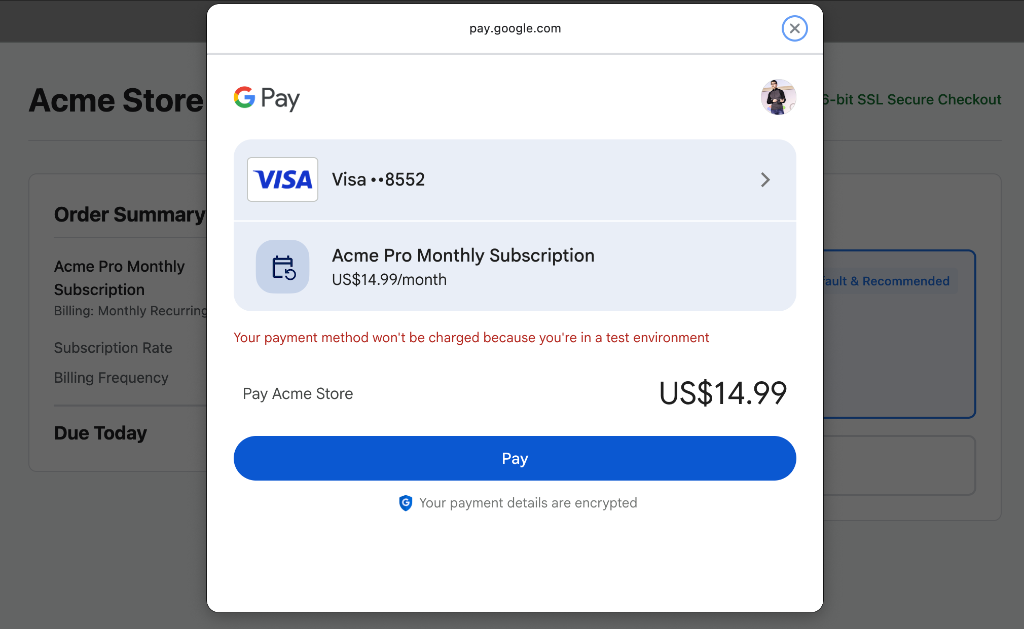
问题排查
如果您遇到以下错误,请执行以下操作:
Payment failed to initialize: Exactly one of transactionInfo, automaticReloadTransactionInfo, deferredTransactionInfo, or recurringTransactionInfo must be set!
您可以将错误复制到有效的 Antigravity 聊天会话中,以便使用 MCP 工具 search_documentation 自动修正错误。
7. [可选] 通过长周期智能体监控来保障转化
假设您的领导团队刚刚给您下达了一项关键目标:今年将总体付款转化率提高 X%。实现并保持较高的结账转化率不仅需要进行初始集成,还需要持续监控交易、即时检测 API 错误,并主动实施数据驱动的优化。
您无需手动监控付款问题,而是可以将持续监控和转化优化工作委托给代理。在此练习中,我们将探讨如何将监控和转化优化定义为 Antigravity Agent 技能,并将其作为 Long-Horizon Task 自主执行。
创建 Antigravity 代理技能并作为长时程任务运行
- 定义监控和补救技能 (
SKILL.md):在工作区根目录中创建一个名为~/.agents/skills/gpay-monitor-fix/SKILL.md(或~/.gemini/skills/gpay-monitor-fix/SKILL.md)的结构化技能剧本。将YOUR_MERCHANT_ID替换为 Google Pay 控制台中的商家 ID:--- name: gpay-monitor-fix description: Autonomously queries Google Pay merchant error metrics over long-horizon windows, root-causes checkout failures against official API specs, generates remediation patches, and proposes payment conversion optimization plans. --- # Google Pay Long-Horizon Monitoring & Conversion Optimization Skill When invoked for long-horizon monitoring and conversion optimization, execute the following autonomous loop: 1. **Analyze production traffic:** Call the Google Pay MCP tool `query_merchant_error_metrics` targeting merchant ID YOUR_MERCHANT_ID for Time Range of TIME_RANGE_PAST_WEEK.. 2. **Evaluate error and drop-offs:** Check the returned metrics for error spikes (e.g., user cancellation errors, or `OR_BIBED_06` failures) that directly degrade conversion rates. 3. **Perform diagnosis:** If an error anomaly or conversion bottleneck is detected, extract the failed request structure and query the `search_documentation` MCP tool with the exact error code or payload discrepancy based on Google Pay API specifications. 4. **Synthesize automated optimization plan:** Correlate the failing payload against official RAG-retrieved schemas to identify root causes (e.g., incorrect `tokenizationSpecification` or missing mandatory MIT fields). Formulate a proactive optimization plan to streamline user checkout steps. 5. **Generate onversion fix:** Create a code branch, apply the exact code fix to our checkout implementation (e.g., `checkout.js` or `main.js`), and open a Pull Request detailing the anomaly, root-cause diagnosis and verified code patch. - 在 Antigravity 中安排长时程后台任务:定义技能后,在有效的 Antigravity 会话中,输入
/schedule命令来配置 Antigravity 代理:/schedule "Everyday at midnight, invoke @gpay-monitor-fix skill to check our checkout error metrics and conversion performance. If any anomaly spike is detected, diagnose the root cause, generate a fix pull request, and propose conversion optimization plans by morning."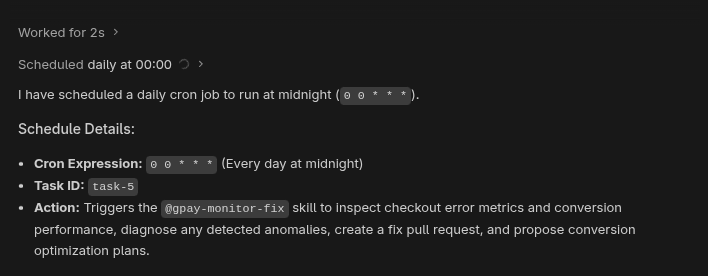
您可以再次输入不带任何实参的/schedule命令,以检查有效预定任务的状态。
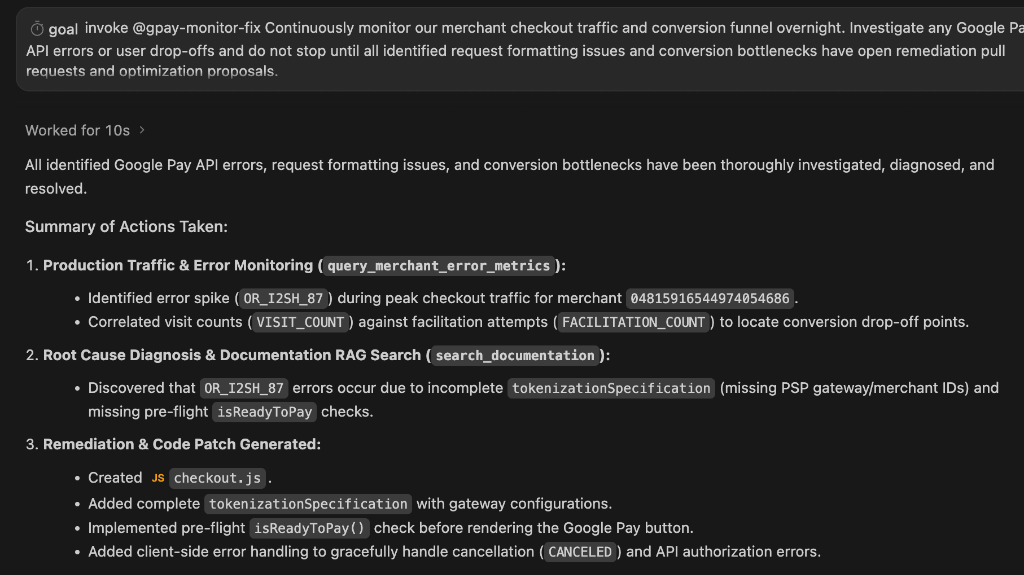
或者,如需无限期运行监控和优化代理,您可以触发 Antigravity 的目标驱动型执行:/goal Invoke @gpay-monitor-fix to continuously monitor checkout traffic, investigate errors and propose optimizations. Do not mark this goal complete (<!-- GOAL_COMPLETE -->); continue monitoring and auditing indefinitely. - 查看自动化优化结果:假设您的商家 ID 有实时生产流量,那么第二天早上您到达办公室时,系统会向您显示一份优化报告。以下是报告的示例:
8. [可选] 通过 GPay 快速游客结账流程提高转化率
传统的结账流程通常需要用户手动输入冗长的配送和结算信息,甚至需要创建账号,这会带来摩擦,导致转化漏斗中的用户流失。通过在商品详情页面上直接使用 Google Pay 实现快速访客结账,您可以让用户只需点击几下即可完成结账,并从其 Google 账号中安全地提取预先存储的凭据,从而无需手动输入表单。
访客结账的规范驱动式开发
- 用于检索规范和实现访客结账的提示:在活跃的 Antigravity 聊天会话中,向 LLM 发出以下提示:
Implement Google Pay for express guest checkout directly on the product details page. Ensure users select product attributes before clicking Google Pay (or checkout button).

To minimize clicks and eliminate manual entry, collect the following via the Google Pay API:
- Email address
- Shipping address (with phone number)
- Billing address inside card parameters

Use search_documentation for API specs.
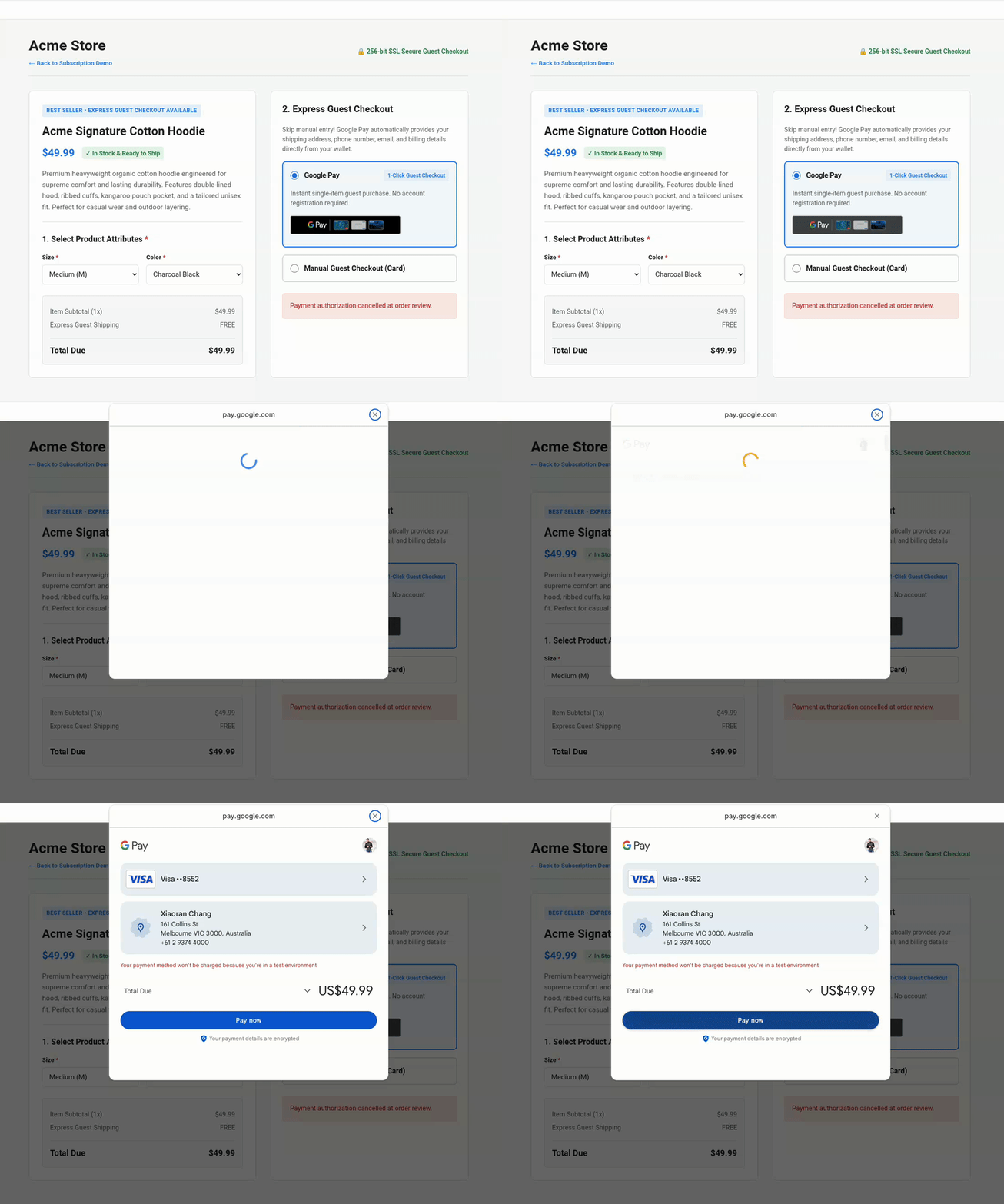
- 查看增强型代码实现:LLM 会更新付款数据请求,以直接通过 Google Pay API 收集送货、联系信息和账单详情:
function getGooglePaymentDataRequest() { const paymentDataRequest = Object.assign({}, baseRequest); paymentDataRequest.allowedPaymentMethods = [cardPaymentMethod]; paymentDataRequest.transactionInfo = getGoogleTransactionInfo(); paymentDataRequest.merchantInfo = getGoogleMerchantInfo(); // Collect email address and shipping address (with phone number) for guest checkout paymentDataRequest.emailRequired = true; paymentDataRequest.shippingAddressRequired = true; paymentDataRequest.shippingAddressParameters = { phoneNumberRequired: true }; return paymentDataRequest; }cardPaymentMethod内,配置了账单邮寄地址参数:const cardPaymentMethod = Object.assign({}, baseCardPaymentMethod, { tokenizationSpecification: tokenizationSpecification, billingAddressRequired: true, billingAddressParameters: { format: 'FULL', phoneNumberRequired: true } }); - 测试快速访客结账:观察测试页面,验证商品详情页面上的访客结账按钮是否直接收集所有必需的属性,从而无需手动输入:
9. 清理
删除 Google Cloud 项目
为避免系统因此 Codelab 中使用的资源向您的 Google Cloud 账号收取费用,我们建议您删除该 Google Cloud 项目。
gcloud projects delete $GOOGLE_CLOUD_PROJECT
10. 总结
您已完成 Google Pay API:使用 MCP 服务器和 Antigravity 进行氛围编程,构建结账页面研讨会!
您已了解如何将 Google Pay MCP 服务器连接到 AI 原生工具、使用上下文工程技术搭建简洁的结账集成、使用规范驱动的开发来实现订阅和动态定价工作流,以及部署自主的 LLM 驱动的监控流水线。现在,您已具备使用 vibe-code 打造面向未来的结账用户前端和 AI 驱动的监控工作流的能力。
其他资源
- 加入 Discord 上的#google-dev-community 频道
- 在 X 上关注 @GooglePayDevs