
1. Introduction
In this codelab, you will build a Graph Retrieval-Augmented Generation (GraphRAG) solution to detect Anti-Money Laundering (AML) and financial fraud. You will use Vertex AI, Vector Search, and the native Graph capabilities of BigQuery, coordinated via LangChain. By the end of this lab, you will see how a Large Language Model (LLM) can identify illicit fund routing by synthesizing semantic audit logs and complex transactional networks.
GraphRAG Architecture Flow
+------------------+     1. Vector Search      +---------------------+
| User Prompt /    | ------------------------> | BigQuery ML         |
| Investigation    |                           | (AccountAudits)     |
+------------------+                           +---------------------+
         |                                                |
         |                                                | 2. Seed Entity ID
         v                                                v
+------------------+     3. GQL Traversal      +---------------------+
| LangChain        | <------------------------ | BigQuery Property   |
| Graph Retriever  |                           | Graph (FinGraph)    |
+------------------+                           +---------------------+
         |
         | 4. Synthesized Context
         v
+------------------+
| Gemini 2.5 Flash | ---> Detailed Fraud Report
+------------------+
What you'll do
- Phase 1: Dataset & Property Graph Setup: Create relational financial tables and construct a native BigQuery
PROPERTY GRAPH. - Phase 2: Semantic Vector Embedding Generation: Generate text embeddings directly in SQL for audit logs using
AI.GENERATE_EMBEDDING(text-embedding-005). - Phase 3: Custom LangChain GraphRAG Retriever: Build a custom Python retriever combining vector similarity (
COSINE_DISTANCE) and ISO GQL path traversals. - Phase 4: LLM Fraud Reasoning & Trail Visualization: Execute a Gemini reasoning chain to expose illicit money laundering loops and visualize path trails in BigQuery Studio.
What you'll need
- A web browser such as Chrome.
- A Google Cloud project with billing enabled.
This codelab is designed for developers, data engineers, and AI practitioners of all levels, including beginners.
Estimated Duration: 35 minutes
Estimated Cost: Less than $2.00 USD (uses pay-as-you-go Vertex AI and BigQuery query processing).
2. Before you begin
Create a Google Cloud Project
- In the Google Cloud Console, select or create a Google Cloud project.
- Make sure that billing is enabled for your Cloud project.
Start Cloud Shell
- Click Activate Cloud Shell at the top of the Google Cloud console.
- Verify authentication:
gcloud auth list
- Configure environment variables in Cloud Shell:
export GCP_PROJECT=$(gcloud config get-value project)
export REGION="us-central1"
export BQ_DATASET="fingraph_rag"
gcloud config set project $GCP_PROJECT
Enable APIs
Run this command to enable all the required APIs:
gcloud services enable \
 bigquery.googleapis.com \
 aiplatform.googleapis.com \
 bigqueryreservation.googleapis.com
Create BigQuery Reservation & Assignment
To run GQL queries, you must have a reservation that uses the Enterprise or Enterprise Plus edition, create an Enterprise Edition reservation with autoscaling in Cloud Shell:
# 1. Create a BigQuery Enterprise reservation with 0 baseline slots and 100 max autoscaling slots
bq mk --reservation \
  --project_id=${GCP_PROJECT} \
  --location=US \
  --edition=ENTERPRISE \
  --slots=0 \
  --autoscale_max_slots=100 \
  --ignore_idle_slots=true \
  graphrag-bigquery-reservation

# 2. Assign your Cloud project to the newly created reservation for query execution
bq mk --reservation_assignment \
  --project_id=${GCP_PROJECT} \
  --location=US \
  --reservation_id=graphrag-bigquery-reservation \
  --job_type=QUERY \
  --assignee_type=PROJECT \
  --assignee_id=${GCP_PROJECT}
3. Setup and Initialization
In this step, we'll set up a Python environment, install the required libraries, and initialize the BigQuery and Vertex AI clients. You can run these commands in Cloud Shell or a Jupyter notebook environment.
- Create and activate a Python virtual environment:
python3 -m venv venv
source venv/bin/activate
- Install the required Python packages:
pip install langchain-google-vertexai langchain-core google-cloud-bigquery vertexai
- Create a Python file
graphrag_aml.pyand add the initialization code. Replace
import vertexai
from google.cloud import bigquery

# Configuration
GCP_PROJECT_ID = "<YOUR_PROJECT_ID>"
REGION = "us-central1"
BQ_DATASET_ID = "fingraph_rag"
MODEL_NAME = "gemini-2.5-flash"

# Initialize clients
bq_client = bigquery.Client(project=GCP_PROJECT_ID)
vertexai.init(project=GCP_PROJECT_ID, location=REGION)
4. Create Tables and Schema
Next, we define the schema for our Financial Graph by creating a BigQuery dataset and standard tables.
- Create the BigQuery dataset:
bq mk --location=US --dataset fingraph_rag
- Create the tables. You can run this in the BigQuery Studio UI or via Cloud Shell. Here is the SQL:
CREATE TABLE IF NOT EXISTS `fingraph_rag.Account` (id INT64, create_time TIMESTAMP, is_blocked BOOL, type STRING);
CREATE TABLE IF NOT EXISTS `fingraph_rag.Loan` (id INT64, loan_amount FLOAT64, balance FLOAT64, create_time TIMESTAMP, interest_rate FLOAT64);
CREATE TABLE IF NOT EXISTS `fingraph_rag.Person` (id INT64, name STRING);
CREATE TABLE IF NOT EXISTS `fingraph_rag.AccountRepayLoan` (id INT64, loan_id INT64, amount FLOAT64, create_time TIMESTAMP);
CREATE TABLE IF NOT EXISTS `fingraph_rag.AccountTransferAccount` (id INT64, to_id INT64, amount FLOAT64, create_time TIMESTAMP);
CREATE TABLE IF NOT EXISTS `fingraph_rag.PersonOwnAccount` (id INT64, account_id INT64, create_time TIMESTAMP);
CREATE TABLE IF NOT EXISTS `fingraph_rag.AccountAudits` (id INT64, audit_timestamp TIMESTAMP, audit_details STRING, embedding ARRAY<FLOAT64>);
5. Insert the Dataset
We will now insert the entities and their relationships to form our money trail. This dataset represents the suspicious activities between Doe (suspected shell company owner), Jacoby (intermediary), Menville (target failing KYC), and Smith (innocent bystander).
Run the following SQL to populate the tables:
INSERT INTO `fingraph_rag.Account` VALUES
  (10,'2020-01-10 06:22:20.222',false,'brokerage account'),
  (20,'2020-01-27 17:55:09.206',false,'checking account'),
  (30,'2020-02-15 09:12:33.111',false,'savings account'),
  (40,'2019-11-05 14:33:10.000',false,'business account');

INSERT INTO `fingraph_rag.Loan` VALUES
  (100,2022278.5,123359.0,'2020-03-18 16:42:57.719',0.064),
  (200,50000.0,45000.0,'2020-03-23 19:03:05.567',0.097),
  (300, 15000.0, 10000.0, '2020-05-10 10:00:00.000', 0.05);

INSERT INTO `fingraph_rag.Person` VALUES
  (1,'Jacoby'), (2,'Menville'), (3,'Smith'), (4,'Doe');

INSERT INTO `fingraph_rag.AccountTransferAccount` VALUES
  (40,10,25000.0,'2020-08-01 10:00:00.000'),
  (10,20,24000.0,'2020-08-29 15:28:58.647'),
  (30,20,150.0,'2020-09-01 12:00:00.000');

INSERT INTO `fingraph_rag.AccountRepayLoan` VALUES
  (10,100,56809.8,'2020-12-12 07:25:02.597'),
  (20,200,20000.0,'2021-01-18 01:40:25.317');

INSERT INTO `fingraph_rag.PersonOwnAccount` VALUES
  (1,10,'2020-01-10 06:22:20.222'), (2,20,'2020-01-27 17:55:09.206'),
  (3,30,'2020-02-15 09:12:33.111'), (4,40,'2019-11-05 14:33:10.000');

INSERT INTO `fingraph_rag.AccountAudits` (id, audit_timestamp, audit_details) VALUES
  (10, '2020-05-14 06:57:02', 'Account 10 (Jacoby) flagged by AML system for suspicious high-volume transfers from offshore business accounts.'),
  (20, '2021-03-09 02:51:45', 'Account 20 (Menville) failed KYC verification. Linked source of funds is unverified and customer is unresponsive.'),
  (40, '2020-07-20 09:00:00', 'Account 40 (Doe) under investigation as a suspected shell company involved in illicit activities.');
Verify Ingested Records
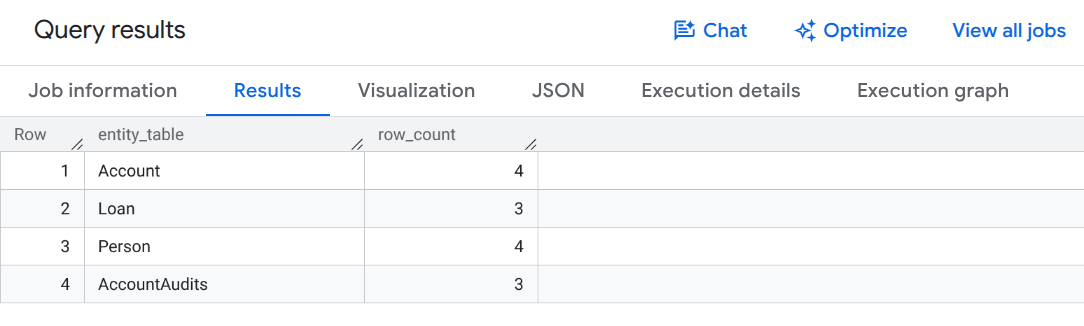
Run this query to verify record counts across your financial tables:
SELECT 'Account' AS entity_table, COUNT(*) AS row_count FROM `fingraph_rag.Account`
UNION ALL SELECT 'Loan', COUNT(*) FROM `fingraph_rag.Loan`
UNION ALL SELECT 'Person', COUNT(*) FROM `fingraph_rag.Person`
UNION ALL SELECT 'AccountAudits', COUNT(*) FROM `fingraph_rag.AccountAudits`;
You should see query output confirming row insertion similar to this:
6. Create BigQuery Property Graph
With our relational data in place, we define the FinGraph using BigQuery's native Graph DDL. This creates a semantic layer over existing relational tables without copying or duplicating data.
ISO GQL Syntax Primer
BigQuery Property Graphs use standard ISO Graph Query Language (GQL) patterns:
(node:Label)defines entity nodes (e.g.Account,Person,Loan).-[edge:LABEL]->defines directed relationships (e.g.Transfers,Repays,Owns).
Run the following SQL statement to create the property graph:
CREATE OR REPLACE PROPERTY GRAPH `fingraph_rag.FinGraph`
 NODE TABLES (
   `fingraph_rag.Account` KEY (id) LABEL Account PROPERTIES (id, type, is_blocked),
   `fingraph_rag.Loan` KEY (id) LABEL Loan PROPERTIES (id, loan_amount, balance),
   `fingraph_rag.Person` KEY (id) LABEL Person PROPERTIES (id, name)
 )
 EDGE TABLES(
   `fingraph_rag.AccountRepayLoan`
     KEY (id, loan_id, create_time)
     SOURCE KEY (id) REFERENCES `fingraph_rag.Account` (id)
     DESTINATION KEY (loan_id) REFERENCES `fingraph_rag.Loan` (id)
     LABEL Repays PROPERTIES (amount, create_time),
   `fingraph_rag.AccountTransferAccount`
     KEY (id, to_id, create_time)
     SOURCE KEY (id) REFERENCES `fingraph_rag.Account` (id)
     DESTINATION KEY (to_id) REFERENCES `fingraph_rag.Account` (id)
     LABEL Transfers PROPERTIES (amount, create_time),
   `fingraph_rag.PersonOwnAccount`
     KEY (id, account_id)
     SOURCE KEY (id) REFERENCES `fingraph_rag.Person` (id)
     DESTINATION KEY (account_id) REFERENCES `fingraph_rag.Account` (id)
     LABEL Owns PROPERTIES (create_time)
 );
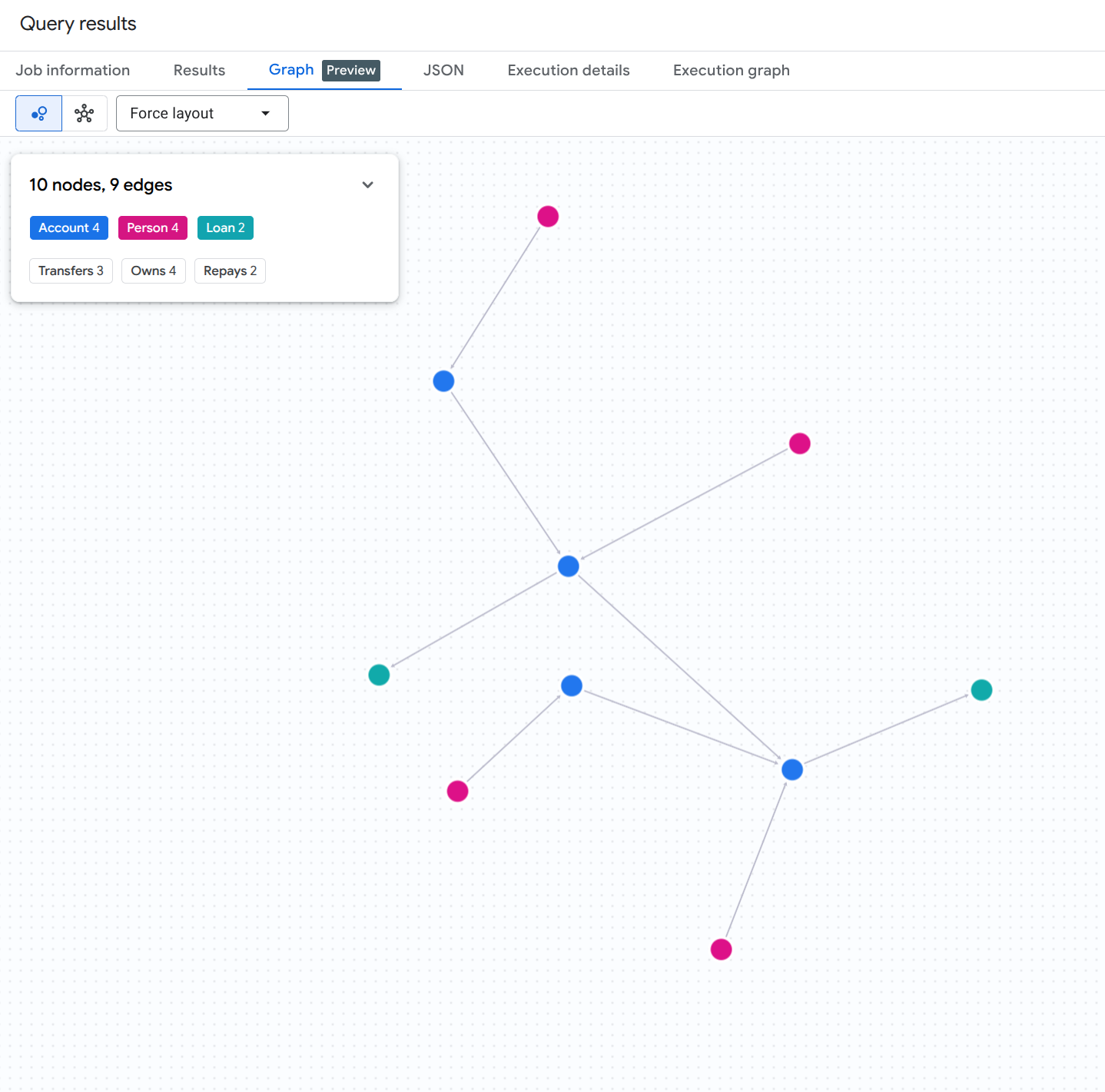
To visualize the entire graph of accounts, persons, and loans, run the following SQL query in BigQuery Studio:
GRAPH `fingraph_rag.FinGraph`
MATCH (src)-[e]->(dst)
RETURN TO_JSON([
  TO_JSON(src),
  TO_JSON(e),
  TO_JSON(dst)
  ]) AS result;
You should see a graph visualization result similar to this:
7. Generate Embeddings for Audit Logs
To enable the vector search part of our RAG pipeline, we generate text embeddings for the unstructured audit logs directly within BigQuery using the AI.GENERATE_EMBEDDING Table-Valued Function (TVF).
Create BigQuery Remote Connection & Grant IAM Permissions
BigQuery ML requires a CLOUD_RESOURCE connection to communicate securely with Vertex AI embedding endpoints. Run the following bash commands in Cloud Shell to create the connection, discover its auto-generated service account, and grant the Vertex AI User (roles/aiplatform.user) role:
# 1. Set environment variables
export PROJECT_ID=$(gcloud config get-value project)
export LOCATION="us"
export CONNECTION_ID="vertex_ai_conn"

# 2. Create the BigQuery Cloud Resource Connection
bq mk --connection \
    --location=${LOCATION} \
    --project_id=${PROJECT_ID} \
    --connection_type=CLOUD_RESOURCE \
    ${CONNECTION_ID}

# 3. Retrieve the auto-generated Service Account ID associated with the connection
SA_ID=$(bq show --format=json --location=${LOCATION} --connection ${CONNECTION_ID} | jq -r '.cloudResource.serviceAccountId')
echo "Connection Service Account: ${SA_ID}"

# 4. Grant Vertex AI User (roles/aiplatform.user) permission to the Service Account
gcloud projects add-iam-policy-binding ${PROJECT_ID} \
    --member="serviceAccount:${SA_ID}" \
    --role="roles/aiplatform.user" \
    --condition=None
Create Remote Embedding Model
Next, define a BigQuery ML remote model that links to Vertex AI's text-embedding-005 model via your newly authorized connection:
CREATE OR REPLACE MODEL `fingraph_rag.embedding_model`
  REMOTE WITH CONNECTION `us.vertex_ai_conn`
  OPTIONS(ENDPOINT = 'text-embedding-005');
Generate Embeddings
Now, generate embeddings for the AccountAudits table by calling AI.GENERATE_EMBEDDING in the FROM clause of an UPDATE statement:
UPDATE `fingraph_rag.AccountAudits` target
SET embedding = source.embedding
FROM AI.GENERATE_EMBEDDING(
  MODEL `fingraph_rag.embedding_model`,
  (SELECT id, audit_details AS content FROM `fingraph_rag.AccountAudits` WHERE ARRAY_LENGTH(embedding) = 0)
) source
WHERE target.id = source.id;
Verify Generated Vector Dimensions
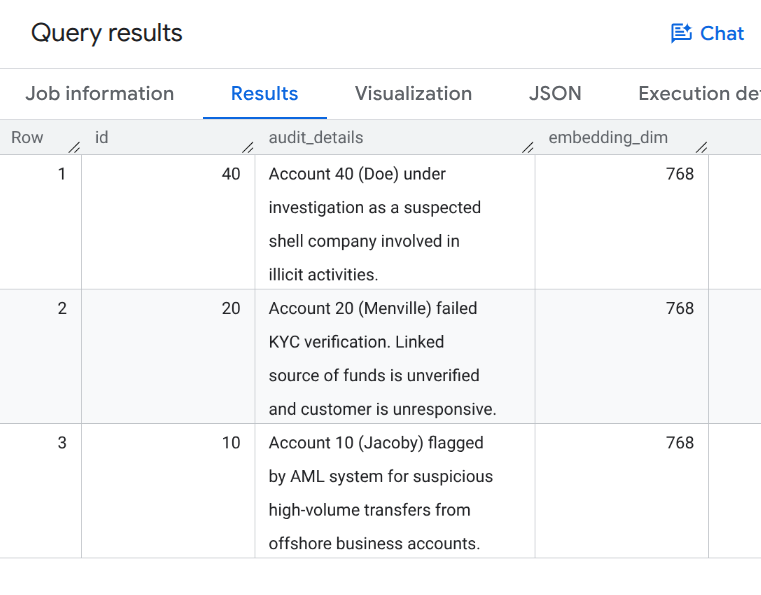
Run the following query to verify that vector embeddings were populated:
SELECT id, audit_details, ARRAY_LENGTH(embedding) AS embedding_dim
FROM `fingraph_rag.AccountAudits`;
You should see query output showing 768-dimensional vector embeddings similar to this:
8. Define the GraphRAG Retriever
We will now create a custom LangChain retriever in our Python environment. This retriever combines semantic Vector Search (to find relevant starting points) with native Graph MATCH queries (to traverse relationships).
Add the following code to your Python script graphrag_aml.py:
from langchain_core.documents import Document
from langchain_core.retrievers import BaseRetriever
from typing import List

class FinGraphRetriever(BaseRetriever):
    project: str
    dataset: str

    def _get_relevant_documents(self, query: str) -> List[Document]:
        # 1. Vector Search
        vector_query = f"""
            SELECT id, audit_details
            FROM `{self.dataset}.AccountAudits`
            ORDER BY COSINE_DISTANCE(
                embedding,
                (
                    SELECT embedding
                    FROM AI.GENERATE_EMBEDDING(
                        MODEL `{self.dataset}.embedding_model`,
                        (SELECT @query AS content)
                    )
                )
            )
            LIMIT 1
        """
        res = bq_client.query(vector_query, job_config=bigquery.QueryJobConfig(
            query_parameters=[bigquery.ScalarQueryParameter("query", "STRING", query)]
        )).result()

        start_id = None
        audit_text = ""
        for row in res:
            start_id = row.id
            audit_text = row.audit_details

        if not start_id: return []

        # 2. Native Graph Traversal
        graph_query = f"""
            GRAPH `{self.dataset}.FinGraph`
            MATCH
              (sender_person:Person)-[:Owns]->(sender_acc:Account)
              -[tx:Transfers]->
              (a:Account)
              -[repays:Repays]->(l:Loan),
              (owner:Person)-[:Owns]->(a)
            WHERE a.id = @id
            RETURN
              owner.name as owner_name,
              a.type as account_type,
              sender_person.name as sender_name,
              tx.amount as transfer_amount,
              repays.amount as repayment_amount,
              l.id as loan_id
        """
        graph_res = bq_client.query(graph_query, job_config=bigquery.QueryJobConfig(
            query_parameters=[bigquery.ScalarQueryParameter("id", "INT64", start_id)]
        )).result()

        context_docs = [Document(page_content=f"Primary Audit Log (Target Account): {audit_text}")]
        sender_names = []
        for row in graph_res:
            sender_names.append(row['sender_name'])
            doc_str = (f"Account Owner: {row['owner_name']} (Account Type: {row['account_type']}). "
                       f"Received transfer of ${row['transfer_amount']} from {row['sender_name']}. "
                       f"Made loan repayment of ${row['repayment_amount']} to Loan {row['loan_id']}.")
            context_docs.append(Document(page_content=doc_str))

        if sender_names:
            names_list = "','".join(sender_names)
            sender_audit_query = f"""
                SELECT p.name, au.audit_details
                FROM `{self.dataset}.AccountAudits` au
                JOIN `{self.dataset}.Account` a ON au.id = a.id
                JOIN `{self.dataset}.PersonOwnAccount` poa ON a.id = poa.account_id
                JOIN `{self.dataset}.Person` p ON poa.id = p.id
                WHERE p.name IN ('{names_list}')
            """
            sender_audits = bq_client.query(sender_audit_query).result()
            for row in sender_audits:
                context_docs.append(Document(page_content=f"Audit Log for Sender {row['name']}: {row['audit_details']}"))

        return context_docs
9. Run the Fraud Investigation
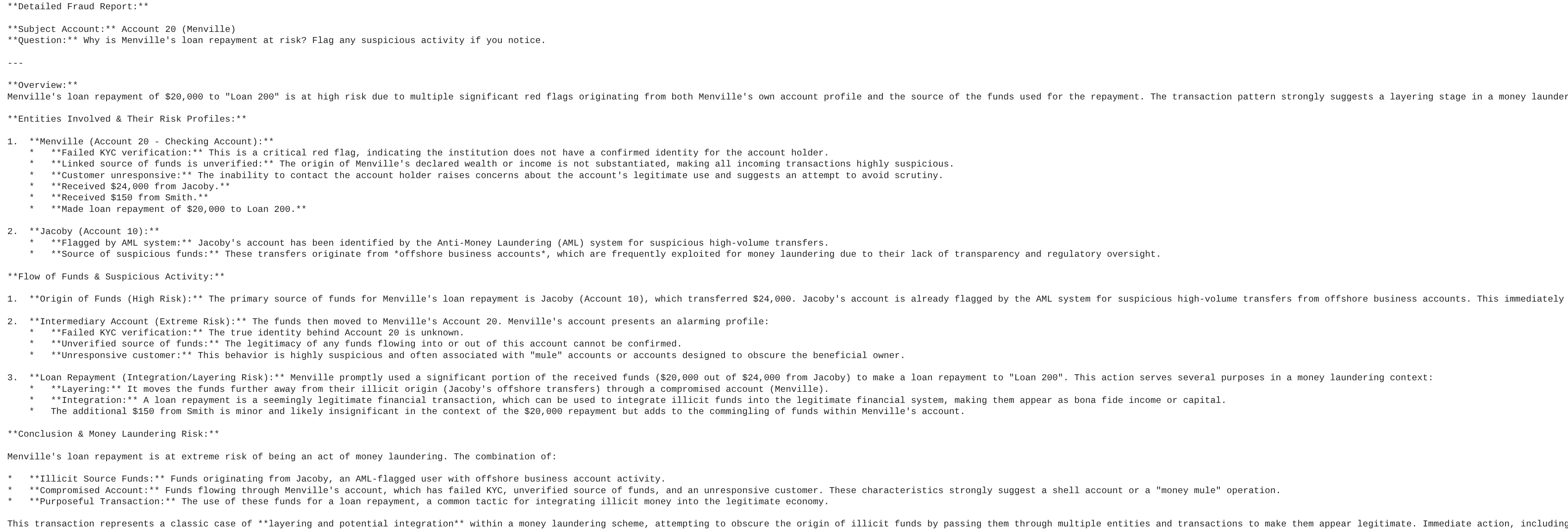
Finally, we run the GraphRAG pipeline to generate a detailed fraud report. The LLM will use the context retrieved by our custom graph retriever to answer the prompt.
Add the following code to your script graphrag_aml.py and run it using python graphrag_aml.py:
from langchain_google_vertexai import ChatVertexAI
from langchain_core.prompts import ChatPromptTemplate
from langchain_core.output_parsers import StrOutputParser

# Initialize the LLM and the Retriever
llm = ChatVertexAI(model_name=MODEL_NAME)
retriever = FinGraphRetriever(project=GCP_PROJECT_ID, dataset=BQ_DATASET_ID)

# Define the Prompt
prompt = ChatPromptTemplate.from_template("""
You are a Lead Fraud Analyst. Use the following audit logs and graph transaction history to answer the question.
Your goal is to connect the dots between the entities and explain the flow of funds.
If you see transfers from flagged users or shell companies, highlight the money laundering risk.

Context: {context}

Question: {question}

Detailed Fraud Report:
""")

# Create the LangChain
chain = (
    {"context": retriever , "question": lambda x: x}
    | prompt
    | llm
    | StrOutputParser()
)

# Execute the chain
question = "Why is Menville's loan repayment at risk? Flag any suspicious activity if you notice."
print(chain.invoke(question))
Complete graphrag_aml.py Script
For reference, your complete graphrag_aml.py script should look like this:
import vertexai
from google.cloud import bigquery
from langchain_core.documents import Document
from langchain_core.retrievers import BaseRetriever
from typing import List
from langchain_google_vertexai import ChatVertexAI
from langchain_core.prompts import ChatPromptTemplate
from langchain_core.output_parsers import StrOutputParser

# Configuration
GCP_PROJECT_ID = "<YOUR_PROJECT_ID>"
REGION = "us-central1"
BQ_DATASET_ID = "fingraph_rag"
MODEL_NAME = "gemini-2.5-flash"

# Initialize clients
bq_client = bigquery.Client(project=GCP_PROJECT_ID)
vertexai.init(project=GCP_PROJECT_ID, location=REGION)

class FinGraphRetriever(BaseRetriever):
    project: str
    dataset: str

    def _get_relevant_documents(self, query: str) -> List[Document]:
        # 1. Vector Search using Cosine Distance
        vector_query = f"""
            SELECT id, audit_details
            FROM `{self.dataset}.AccountAudits`
            ORDER BY COSINE_DISTANCE(
                embedding,
                (
                    SELECT embedding
                    FROM AI.GENERATE_EMBEDDING(
                        MODEL `{self.dataset}.embedding_model`,
                        (SELECT @query AS content)
                    )
                )
            )
            LIMIT 1
        """
        res = bq_client.query(vector_query, job_config=bigquery.QueryJobConfig(
            query_parameters=[bigquery.ScalarQueryParameter("query", "STRING", query)]
        )).result()

        start_id = None
        audit_text = ""
        for row in res:
            start_id = row.id
            audit_text = row.audit_details

        if not start_id: return []

        # 2. Native Graph Traversal (GQL MATCH)
        graph_query = f"""
            GRAPH `{self.dataset}.FinGraph`
            MATCH
              (sender_person:Person)-[:Owns]->(sender_acc:Account)
              -[tx:Transfers]->
              (a:Account)
              -[repays:Repays]->(l:Loan),
              (owner:Person)-[:Owns]->(a)
            WHERE a.id = @id
            RETURN
              owner.name as owner_name,
              a.type as account_type,
              sender_person.name as sender_name,
              tx.amount as transfer_amount,
              repays.amount as repayment_amount,
              l.id as loan_id
        """
        graph_res = bq_client.query(graph_query, job_config=bigquery.QueryJobConfig(
            query_parameters=[bigquery.ScalarQueryParameter("id", "INT64", start_id)]
        )).result()

        context_docs = [Document(page_content=f"Primary Audit Log (Target Account): {audit_text}")]
        sender_names = []
        for row in graph_res:
            sender_names.append(row['sender_name'])
            doc_str = (f"Account Owner: {row['owner_name']} (Account Type: {row['account_type']}). "
                       f"Received transfer of ${row['transfer_amount']} from {row['sender_name']}. "
                       f"Made loan repayment of ${row['repayment_amount']} to Loan {row['loan_id']}.")
            context_docs.append(Document(page_content=doc_str))

        if sender_names:
            names_list = "','".join(sender_names)
            sender_audit_query = f"""
                SELECT p.name, au.audit_details
                FROM `{self.dataset}.AccountAudits` au
                JOIN `{self.dataset}.Account` a ON au.id = a.id
                JOIN `{self.dataset}.PersonOwnAccount` poa ON a.id = poa.account_id
                JOIN `{self.dataset}.Person` p ON poa.id = p.id
                WHERE p.name IN ('{names_list}')
            """
            sender_audits = bq_client.query(sender_audit_query).result()
            for row in sender_audits:
                context_docs.append(Document(page_content=f"Audit Log for Sender {row['name']}: {row['audit_details']}"))

        return context_docs

# Initialize LLM & Retriever
llm = ChatVertexAI(model_name=MODEL_NAME)
retriever = FinGraphRetriever(project=GCP_PROJECT_ID, dataset=BQ_DATASET_ID)

prompt = ChatPromptTemplate.from_template("""
You are a Lead Fraud Analyst. Use the following audit logs and graph transaction history to answer the question.
Your goal is to connect the dots between the entities and explain the flow of funds.
If you see transfers from flagged users or shell companies, highlight the money laundering risk.

Context: {context}

Question: {question}

Detailed Fraud Report:
""")

chain = (
    {"context": retriever, "question": lambda x: x}
    | prompt
    | llm
    | StrOutputParser()
)

question = "Why is Menville's loan repayment at risk? Flag any suspicious activity if you notice."
print(chain.invoke(question))
You should see output similar to this sample LLM analysis report:
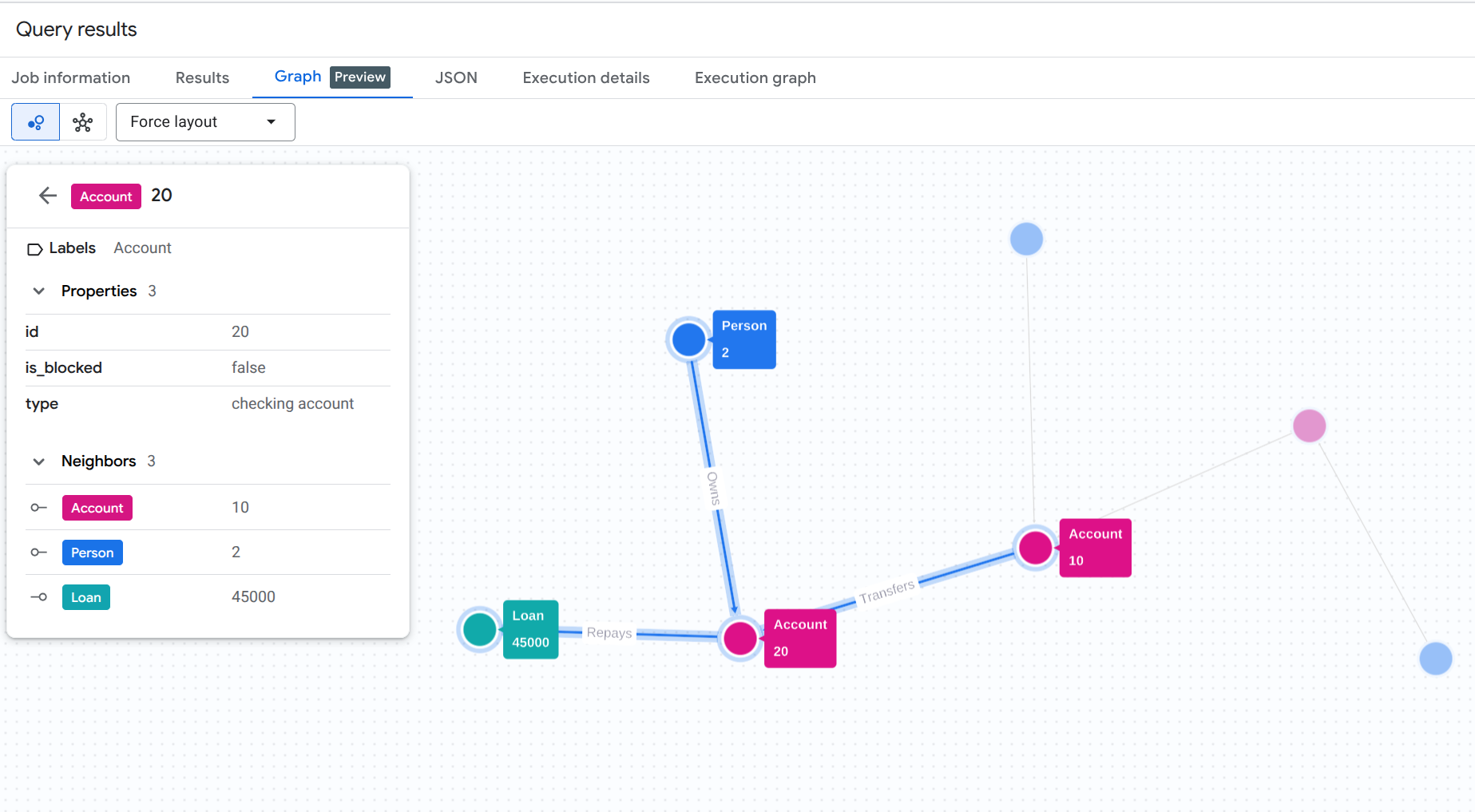
10. Visualize the Money Laundering Trail
To visually understand the money laundering trail we just discovered programmatically, you can run a graph visualization query in the BigQuery Studio console.
Run this query in BigQuery Studio. (Make sure you enable the Graph visualization feature or click the Graph tab if available).
GRAPH `fingraph_rag.FinGraph`
 MATCH
   (p_shell:Person)-[o1:Owns]->(acc_shell:Account)-[t1:Transfers]->(acc_fraud:Account)-[t2:Transfers]->(acc_target:Account)-[r:Repays]->(l:Loan),
   (p_fraud:Person)-[o2:Owns]->(acc_fraud),
   (p_target:Person)-[o3:Owns]->(acc_target)
 WHERE p_target.name = 'Menville' AND p_fraud.name = 'Jacoby' AND p_shell.name = 'Doe'
 RETURN TO_JSON([
  TO_JSON(p_shell), TO_JSON(o1), TO_JSON(acc_shell),
  TO_JSON(t1), TO_JSON(acc_fraud), TO_JSON(p_fraud), TO_JSON(o2),
  TO_JSON(t2), TO_JSON(acc_target), TO_JSON(p_target), TO_JSON(o3),
  TO_JSON(r), TO_JSON(l)
]) AS result;
This GQL query traces the entire path from the suspicious shell company owner (Doe) through the intermediary (Jacoby) to the final target (Menville) and the Loan repayment.
You should see a graph visualization result similar to this:
11. Clean up
To avoid ongoing charges to your Google Cloud account, delete the resources created during this codelab.
Delete the BigQuery dataset and the Cloud Resource Connection:
# Delete the BigQuery dataset
bq rm -r -f $PROJECT_ID:fingraph_rag

# Delete the BigQuery Cloud Resource Connection
bq rm --connection --location=us vertex_ai_conn
Verify the resources were deleted:
bq ls --project_id $PROJECT_ID
bq ls --connection --location=us
12. Congratulations
Congratulations! You've successfully built a RAG application and analyzed its behavior. You demonstrated how to use BigQuery's native Graph and Vector Search capabilities to perform GraphRAG, detecting an anti-money laundering scheme with zero ETL.
What you've learned
- How to build a Property Graph in BigQuery on top of standard tables
- How to generate and store Vector Embeddings using BigQuery ML
- How to combine BigQuery Graph traversals and Vector Search into a LangChain Retriever
- How LLMs can synthesize semantic audit logs with graph topology to reduce false positives
Next steps
- Explore BigQuery Property Graphs Overview
- Try out more BigQuery Graph Query Language (GQL) patterns.