

1. Introducción
En este codelab, compilarás una solución de generación mejorada por recuperación de gráficos (GraphRAG) para detectar el lavado de dinero (LDD) y el fraude financiero. Usarás Vertex AI, Vector Search y las capacidades nativas de grafos de BigQuery, coordinadas a través de LangChain. Al final de este lab, verás cómo un modelo de lenguaje grande (LLM) puede identificar el enrutamiento de fondos ilícitos a través de la síntesis de registros de auditoría semánticos y redes transaccionales complejas.
Flujo de arquitectura de GraphRAG
+------------------+     1. Vector Search      +---------------------+
| User Prompt /    | ------------------------> | BigQuery ML         |
| Investigation    |                           | (AccountAudits)     |
+------------------+                           +---------------------+
         |                                                |
         |                                                | 2. Seed Entity ID
         v                                                v
+------------------+     3. GQL Traversal      +---------------------+
| LangChain        | <------------------------ | BigQuery Property   |
| Graph Retriever  |                           | Graph (FinGraph)    |
+------------------+                           +---------------------+
         |
         | 4. Synthesized Context
         v
+------------------+
| Gemini 2.5 Flash | ---> Detailed Fraud Report
+------------------+
Actividades
- Fase 1: Configuración del conjunto de datos y del gráfico de propiedades: Crea tablas financieras relacionales y construye un
PROPERTY GRAPHnativo de BigQuery. - Fase 2: Generación de embeddings de vectores semánticos: Genera embeddings de texto directamente en SQL para los registros de auditoría con
AI.GENERATE_EMBEDDING(text-embedding-005). - Fase 3: Recuperador GraphRAG personalizado de LangChain: Compila un recuperador personalizado de Python que combine la similitud de vectores (
COSINE_DISTANCE) y los recorridos de ruta de acceso de GQL ISO. - Fase 4: Visualización de la pista y el razonamiento sobre fraude del LLM: Ejecuta una cadena de razonamiento de Gemini para exponer los bucles ilícitos de lavado de dinero y visualizar los rastros de rutas en BigQuery Studio.
Requisitos
- Un navegador web, como Chrome
- Un proyecto de Google Cloud con facturación habilitada.
Este codelab está diseñado para desarrolladores, ingenieros de datos y profesionales de la IA de todos los niveles, incluidos los principiantes.
Duración estimada: 35 minutos
Costo estimado: Menos de USD 2.00 (usa el procesamiento de consultas de BigQuery y Vertex AI de pago por uso).
2. Antes de comenzar
Crea un proyecto de Google Cloud
- En la consola de Google Cloud, selecciona o crea un proyecto de Google Cloud.
- Asegúrate de que la facturación esté habilitada para tu proyecto de Cloud.
Inicie Cloud Shell
- Haz clic en Activar Cloud Shell en la parte superior de la consola de Google Cloud.
- Verifica la autenticación:
gcloud auth list
- Configura las variables de entorno en Cloud Shell:
export GCP_PROJECT=$(gcloud config get-value project)
export REGION="us-central1"
export BQ_DATASET="fingraph_rag"
gcloud config set project $GCP_PROJECT
Habilita las APIs
Ejecuta este comando para habilitar todas las APIs requeridas:
gcloud services enable \
 bigquery.googleapis.com \
 aiplatform.googleapis.com \
 bigqueryreservation.googleapis.com
Crea una reserva y una asignación de BigQuery
Para ejecutar consultas en GQL, debes tener una reserva que use la edición Enterprise o Enterprise Plus. Crea una reserva de la edición Enterprise con ajuste de escala automático en Cloud Shell:
# 1. Create a BigQuery Enterprise reservation with 0 baseline slots and 100 max autoscaling slots
bq mk --reservation \
  --project_id=${GCP_PROJECT} \
  --location=US \
  --edition=ENTERPRISE \
  --slots=0 \
  --autoscale_max_slots=100 \
  --ignore_idle_slots=true \
  graphrag-bigquery-reservation

# 2. Assign your Cloud project to the newly created reservation for query execution
bq mk --reservation_assignment \
  --project_id=${GCP_PROJECT} \
  --location=US \
  --reservation_id=graphrag-bigquery-reservation \
  --job_type=QUERY \
  --assignee_type=PROJECT \
  --assignee_id=${GCP_PROJECT}
3. Configuración e inicialización
En este paso, configuraremos un entorno de Python, instalaremos las bibliotecas requeridas y, luego, inicializaremos los clientes de BigQuery y Vertex AI. Puedes ejecutar estos comandos en Cloud Shell o en un entorno de notebook de Jupyter.
- Crea y activa un entorno virtual de Python:
python3 -m venv venv
source venv/bin/activate
- Instale los paquetes de Python necesarios:
pip install langchain-google-vertexai langchain-core google-cloud-bigquery vertexai
- Crea un archivo de Python
graphrag_aml.pyy agrega el código de inicialización. Reemplaza
import vertexai
from google.cloud import bigquery

# Configuration
GCP_PROJECT_ID = "<YOUR_PROJECT_ID>"
REGION = "us-central1"
BQ_DATASET_ID = "fingraph_rag"
MODEL_NAME = "gemini-2.5-flash"

# Initialize clients
bq_client = bigquery.Client(project=GCP_PROJECT_ID)
vertexai.init(project=GCP_PROJECT_ID, location=REGION)
4. Crea tablas y esquemas
A continuación, definimos el esquema de nuestro gráfico financiero creando un conjunto de datos y tablas estándar de BigQuery.
- Crea el conjunto de datos de BigQuery:
bq mk --location=US --dataset fingraph_rag
- Crea las tablas. Puedes ejecutar este comando en la IU de BigQuery Studio o a través de Cloud Shell. Aquí tienes el código SQL:
CREATE TABLE IF NOT EXISTS `fingraph_rag.Account` (id INT64, create_time TIMESTAMP, is_blocked BOOL, type STRING);
CREATE TABLE IF NOT EXISTS `fingraph_rag.Loan` (id INT64, loan_amount FLOAT64, balance FLOAT64, create_time TIMESTAMP, interest_rate FLOAT64);
CREATE TABLE IF NOT EXISTS `fingraph_rag.Person` (id INT64, name STRING);
CREATE TABLE IF NOT EXISTS `fingraph_rag.AccountRepayLoan` (id INT64, loan_id INT64, amount FLOAT64, create_time TIMESTAMP);
CREATE TABLE IF NOT EXISTS `fingraph_rag.AccountTransferAccount` (id INT64, to_id INT64, amount FLOAT64, create_time TIMESTAMP);
CREATE TABLE IF NOT EXISTS `fingraph_rag.PersonOwnAccount` (id INT64, account_id INT64, create_time TIMESTAMP);
CREATE TABLE IF NOT EXISTS `fingraph_rag.AccountAudits` (id INT64, audit_timestamp TIMESTAMP, audit_details STRING, embedding ARRAY<FLOAT64>);
5. Inserta el conjunto de datos
Ahora insertaremos las entidades y sus relaciones para formar nuestro rastro de dinero. Este conjunto de datos representa las actividades sospechosas entre Doe (propietario sospechoso de una empresa fantasma), Jacoby (intermediario), Menville (objetivo que no supera la verificación KYC) y Smith (transeúnte inocente).
Ejecuta el siguiente SQL para completar las tablas:
INSERT INTO `fingraph_rag.Account` VALUES
  (10,'2020-01-10 06:22:20.222',false,'brokerage account'),
  (20,'2020-01-27 17:55:09.206',false,'checking account'),
  (30,'2020-02-15 09:12:33.111',false,'savings account'),
  (40,'2019-11-05 14:33:10.000',false,'business account');

INSERT INTO `fingraph_rag.Loan` VALUES
  (100,2022278.5,123359.0,'2020-03-18 16:42:57.719',0.064),
  (200,50000.0,45000.0,'2020-03-23 19:03:05.567',0.097),
  (300, 15000.0, 10000.0, '2020-05-10 10:00:00.000', 0.05);

INSERT INTO `fingraph_rag.Person` VALUES
  (1,'Jacoby'), (2,'Menville'), (3,'Smith'), (4,'Doe');

INSERT INTO `fingraph_rag.AccountTransferAccount` VALUES
  (40,10,25000.0,'2020-08-01 10:00:00.000'),
  (10,20,24000.0,'2020-08-29 15:28:58.647'),
  (30,20,150.0,'2020-09-01 12:00:00.000');

INSERT INTO `fingraph_rag.AccountRepayLoan` VALUES
  (10,100,56809.8,'2020-12-12 07:25:02.597'),
  (20,200,20000.0,'2021-01-18 01:40:25.317');

INSERT INTO `fingraph_rag.PersonOwnAccount` VALUES
  (1,10,'2020-01-10 06:22:20.222'), (2,20,'2020-01-27 17:55:09.206'),
  (3,30,'2020-02-15 09:12:33.111'), (4,40,'2019-11-05 14:33:10.000');

INSERT INTO `fingraph_rag.AccountAudits` (id, audit_timestamp, audit_details) VALUES
  (10, '2020-05-14 06:57:02', 'Account 10 (Jacoby) flagged by AML system for suspicious high-volume transfers from offshore business accounts.'),
  (20, '2021-03-09 02:51:45', 'Account 20 (Menville) failed KYC verification. Linked source of funds is unverified and customer is unresponsive.'),
  (40, '2020-07-20 09:00:00', 'Account 40 (Doe) under investigation as a suspected shell company involved in illicit activities.');
Verifica los registros transferidos
Ejecuta esta consulta para verificar los recuentos de registros en tus tablas financieras:
SELECT 'Account' AS entity_table, COUNT(*) AS row_count FROM `fingraph_rag.Account`
UNION ALL SELECT 'Loan', COUNT(*) FROM `fingraph_rag.Loan`
UNION ALL SELECT 'Person', COUNT(*) FROM `fingraph_rag.Person`
UNION ALL SELECT 'AccountAudits', COUNT(*) FROM `fingraph_rag.AccountAudits`;
Deberías ver un resultado de la consulta que confirme la inserción de la fila, similar al siguiente:

6. Crea un gráfico de propiedad de BigQuery
Con nuestros datos relacionales en su lugar, definimos el FinGraph con el DDL de gráficos nativo de BigQuery. Esto crea una capa semántica sobre las tablas relacionales existentes sin copiar ni duplicar datos.
Guía básica de la sintaxis de GQL de ISO
Los gráficos de propiedades de BigQuery usan patrones estándar del lenguaje ISO Graph Query Language (GQL):
(node:Label)define nodos de entidades (p.ej.,Account,Person,Loan).-[edge:LABEL]->define relaciones dirigidas (p.ej.,Transfers,Repays,Owns).
Ejecuta la siguiente sentencia de SQL para crear el gráfico de propiedades:
CREATE OR REPLACE PROPERTY GRAPH `fingraph_rag.FinGraph`
 NODE TABLES (
   `fingraph_rag.Account` KEY (id) LABEL Account PROPERTIES (id, type, is_blocked),
   `fingraph_rag.Loan` KEY (id) LABEL Loan PROPERTIES (id, loan_amount, balance),
   `fingraph_rag.Person` KEY (id) LABEL Person PROPERTIES (id, name)
 )
 EDGE TABLES(
   `fingraph_rag.AccountRepayLoan`
     KEY (id, loan_id, create_time)
     SOURCE KEY (id) REFERENCES `fingraph_rag.Account` (id)
     DESTINATION KEY (loan_id) REFERENCES `fingraph_rag.Loan` (id)
     LABEL Repays PROPERTIES (amount, create_time),
   `fingraph_rag.AccountTransferAccount`
     KEY (id, to_id, create_time)
     SOURCE KEY (id) REFERENCES `fingraph_rag.Account` (id)
     DESTINATION KEY (to_id) REFERENCES `fingraph_rag.Account` (id)
     LABEL Transfers PROPERTIES (amount, create_time),
   `fingraph_rag.PersonOwnAccount`
     KEY (id, account_id)
     SOURCE KEY (id) REFERENCES `fingraph_rag.Person` (id)
     DESTINATION KEY (account_id) REFERENCES `fingraph_rag.Account` (id)
     LABEL Owns PROPERTIES (create_time)
 );
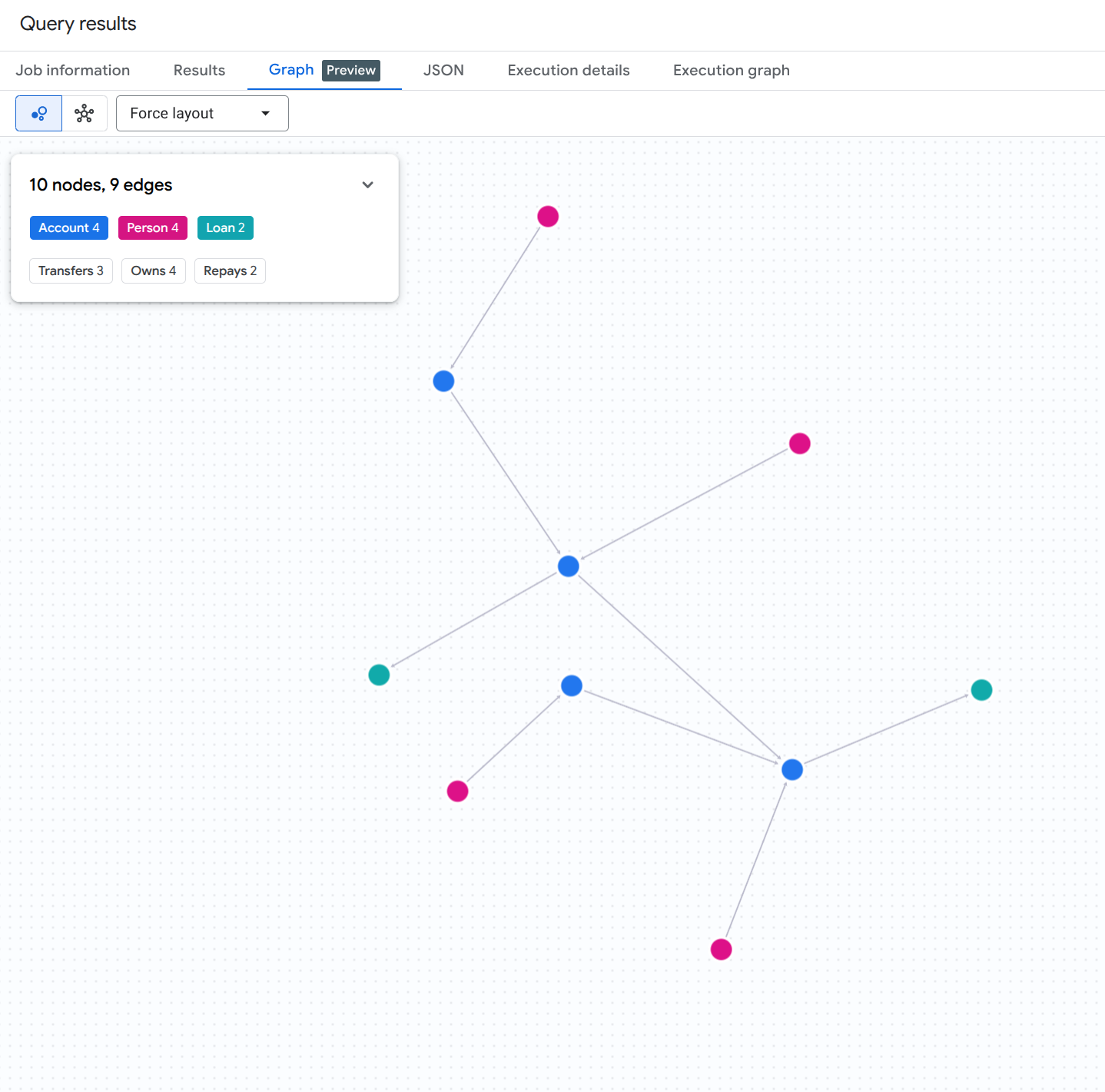
Para visualizar el gráfico completo de cuentas, personas y préstamos, ejecuta la siguiente consulta en SQL en BigQuery Studio:
GRAPH `fingraph_rag.FinGraph`
MATCH (src)-[e]->(dst)
RETURN TO_JSON([
  TO_JSON(src),
  TO_JSON(e),
  TO_JSON(dst)
  ]) AS result;
Deberías ver un resultado de visualización de gráfico similar a este:
7. Genera embeddings para los registros de auditoría
Para habilitar la parte de búsqueda vectorial de nuestra canalización de RAG, generamos incorporaciones de texto para los registros de auditoría no estructurados directamente en BigQuery con la función con valor de tabla (TVF) AI.GENERATE_EMBEDDING.
Crea una conexión remota de BigQuery y otorga permisos de IAM
BigQuery ML requiere una conexión CLOUD_RESOURCE para comunicarse de forma segura con los extremos de incorporación de Vertex AI. Ejecuta los siguientes comandos de bash en Cloud Shell para crear la conexión, descubrir su cuenta de servicio generada automáticamente y otorgar el rol de usuario de Vertex AI (roles/aiplatform.user):
# 1. Set environment variables
export PROJECT_ID=$(gcloud config get-value project)
export LOCATION="us"
export CONNECTION_ID="vertex_ai_conn"

# 2. Create the BigQuery Cloud Resource Connection
bq mk --connection \
    --location=${LOCATION} \
    --project_id=${PROJECT_ID} \
    --connection_type=CLOUD_RESOURCE \
    ${CONNECTION_ID}

# 3. Retrieve the auto-generated Service Account ID associated with the connection
SA_ID=$(bq show --format=json --location=${LOCATION} --connection ${CONNECTION_ID} | jq -r '.cloudResource.serviceAccountId')
echo "Connection Service Account: ${SA_ID}"

# 4. Grant Vertex AI User (roles/aiplatform.user) permission to the Service Account
gcloud projects add-iam-policy-binding ${PROJECT_ID} \
    --member="serviceAccount:${SA_ID}" \
    --role="roles/aiplatform.user" \
    --condition=None
Crea un modelo de embedding remoto
A continuación, define un modelo remoto de BigQuery ML que se vincule al modelo text-embedding-005 de Vertex AI a través de la conexión que acabas de autorizar:
CREATE OR REPLACE MODEL `fingraph_rag.embedding_model`
  REMOTE WITH CONNECTION `us.vertex_ai_conn`
  OPTIONS(ENDPOINT = 'text-embedding-005');
Genera embeddings
Ahora, genera embeddings para la tabla AccountAudits llamando a AI.GENERATE_EMBEDDING en la cláusula FROM de una declaración UPDATE:
UPDATE `fingraph_rag.AccountAudits` target
SET embedding = source.embedding
FROM AI.GENERATE_EMBEDDING(
  MODEL `fingraph_rag.embedding_model`,
  (SELECT id, audit_details AS content FROM `fingraph_rag.AccountAudits` WHERE ARRAY_LENGTH(embedding) = 0)
) source
WHERE target.id = source.id;
Verifica las dimensiones del vector generado
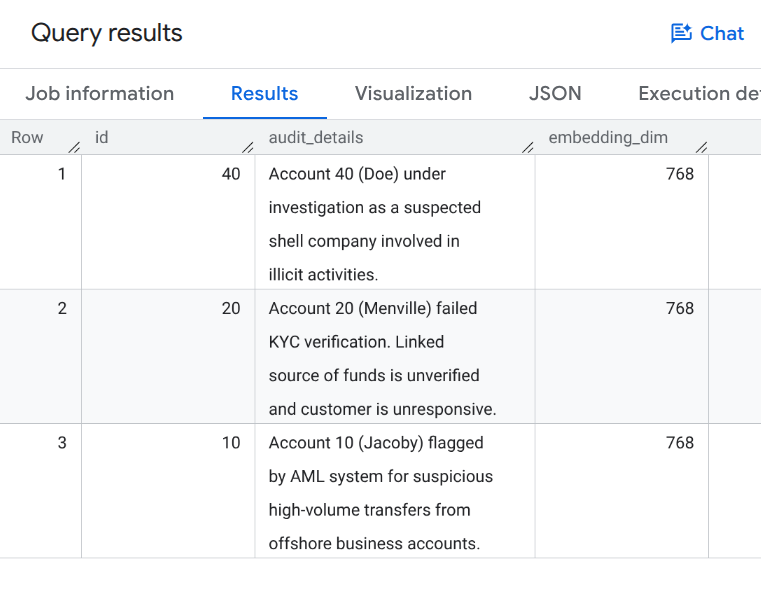
Ejecuta la siguiente consulta para verificar que se hayan propagado los embeddings de vectores:
SELECT id, audit_details, ARRAY_LENGTH(embedding) AS embedding_dim
FROM `fingraph_rag.AccountAudits`;
Deberías ver un resultado de la consulta que muestre incorporaciones de vectores de 768 dimensiones similares a las siguientes:
8. Define el recuperador de GraphRAG
Ahora crearemos un recuperador de LangChain personalizado en nuestro entorno de Python. Este recuperador combina la Búsqueda de vectores semántica (para encontrar puntos de partida relevantes) con las consultas nativas de Graph MATCH (para recorrer las relaciones).
Agrega el siguiente código a tu secuencia de comandos de Python graphrag_aml.py:
from langchain_core.documents import Document
from langchain_core.retrievers import BaseRetriever
from typing import List

class FinGraphRetriever(BaseRetriever):
    project: str
    dataset: str

    def _get_relevant_documents(self, query: str) -> List[Document]:
        # 1. Vector Search
        vector_query = f"""
            SELECT id, audit_details
            FROM `{self.dataset}.AccountAudits`
            ORDER BY COSINE_DISTANCE(
                embedding,
                (
                    SELECT embedding
                    FROM AI.GENERATE_EMBEDDING(
                        MODEL `{self.dataset}.embedding_model`,
                        (SELECT @query AS content)
                    )
                )
            )
            LIMIT 1
        """
        res = bq_client.query(vector_query, job_config=bigquery.QueryJobConfig(
            query_parameters=[bigquery.ScalarQueryParameter("query", "STRING", query)]
        )).result()

        start_id = None
        audit_text = ""
        for row in res:
            start_id = row.id
            audit_text = row.audit_details

        if not start_id: return []

        # 2. Native Graph Traversal
        graph_query = f"""
            GRAPH `{self.dataset}.FinGraph`
            MATCH
              (sender_person:Person)-[:Owns]->(sender_acc:Account)
              -[tx:Transfers]->
              (a:Account)
              -[repays:Repays]->(l:Loan),
              (owner:Person)-[:Owns]->(a)
            WHERE a.id = @id
            RETURN
              owner.name as owner_name,
              a.type as account_type,
              sender_person.name as sender_name,
              tx.amount as transfer_amount,
              repays.amount as repayment_amount,
              l.id as loan_id
        """
        graph_res = bq_client.query(graph_query, job_config=bigquery.QueryJobConfig(
            query_parameters=[bigquery.ScalarQueryParameter("id", "INT64", start_id)]
        )).result()

        context_docs = [Document(page_content=f"Primary Audit Log (Target Account): {audit_text}")]
        sender_names = []
        for row in graph_res:
            sender_names.append(row['sender_name'])
            doc_str = (f"Account Owner: {row['owner_name']} (Account Type: {row['account_type']}). "
                       f"Received transfer of ${row['transfer_amount']} from {row['sender_name']}. "
                       f"Made loan repayment of ${row['repayment_amount']} to Loan {row['loan_id']}.")
            context_docs.append(Document(page_content=doc_str))

        if sender_names:
            names_list = "','".join(sender_names)
            sender_audit_query = f"""
                SELECT p.name, au.audit_details
                FROM `{self.dataset}.AccountAudits` au
                JOIN `{self.dataset}.Account` a ON au.id = a.id
                JOIN `{self.dataset}.PersonOwnAccount` poa ON a.id = poa.account_id
                JOIN `{self.dataset}.Person` p ON poa.id = p.id
                WHERE p.name IN ('{names_list}')
            """
            sender_audits = bq_client.query(sender_audit_query).result()
            for row in sender_audits:
                context_docs.append(Document(page_content=f"Audit Log for Sender {row['name']}: {row['audit_details']}"))

        return context_docs
9. Ejecuta la investigación de fraude
Por último, ejecutamos la canalización de GraphRAG para generar un informe de fraude detallado. El LLM usará el contexto recuperado por nuestro recuperador de gráficos personalizado para responder la instrucción.
Agrega el siguiente código a tu secuencia de comandos graphrag_aml.py y ejecútalo con python graphrag_aml.py:
from langchain_google_vertexai import ChatVertexAI
from langchain_core.prompts import ChatPromptTemplate
from langchain_core.output_parsers import StrOutputParser

# Initialize the LLM and the Retriever
llm = ChatVertexAI(model_name=MODEL_NAME)
retriever = FinGraphRetriever(project=GCP_PROJECT_ID, dataset=BQ_DATASET_ID)

# Define the Prompt
prompt = ChatPromptTemplate.from_template("""
You are a Lead Fraud Analyst. Use the following audit logs and graph transaction history to answer the question.
Your goal is to connect the dots between the entities and explain the flow of funds.
If you see transfers from flagged users or shell companies, highlight the money laundering risk.

Context: {context}

Question: {question}

Detailed Fraud Report:
""")

# Create the LangChain
chain = (
    {"context": retriever , "question": lambda x: x}
    | prompt
    | llm
    | StrOutputParser()
)

# Execute the chain
question = "Why is Menville's loan repayment at risk? Flag any suspicious activity if you notice."
print(chain.invoke(question))
Secuencia de comandos graphrag_aml.py completa
Como referencia, tu secuencia de comandos graphrag_aml.py completa debería verse de la siguiente manera:
import vertexai
from google.cloud import bigquery
from langchain_core.documents import Document
from langchain_core.retrievers import BaseRetriever
from typing import List
from langchain_google_vertexai import ChatVertexAI
from langchain_core.prompts import ChatPromptTemplate
from langchain_core.output_parsers import StrOutputParser

# Configuration
GCP_PROJECT_ID = "<YOUR_PROJECT_ID>"
REGION = "us-central1"
BQ_DATASET_ID = "fingraph_rag"
MODEL_NAME = "gemini-2.5-flash"

# Initialize clients
bq_client = bigquery.Client(project=GCP_PROJECT_ID)
vertexai.init(project=GCP_PROJECT_ID, location=REGION)

class FinGraphRetriever(BaseRetriever):
    project: str
    dataset: str

    def _get_relevant_documents(self, query: str) -> List[Document]:
        # 1. Vector Search using Cosine Distance
        vector_query = f"""
            SELECT id, audit_details
            FROM `{self.dataset}.AccountAudits`
            ORDER BY COSINE_DISTANCE(
                embedding,
                (
                    SELECT embedding
                    FROM AI.GENERATE_EMBEDDING(
                        MODEL `{self.dataset}.embedding_model`,
                        (SELECT @query AS content)
                    )
                )
            )
            LIMIT 1
        """
        res = bq_client.query(vector_query, job_config=bigquery.QueryJobConfig(
            query_parameters=[bigquery.ScalarQueryParameter("query", "STRING", query)]
        )).result()

        start_id = None
        audit_text = ""
        for row in res:
            start_id = row.id
            audit_text = row.audit_details

        if not start_id: return []

        # 2. Native Graph Traversal (GQL MATCH)
        graph_query = f"""
            GRAPH `{self.dataset}.FinGraph`
            MATCH
              (sender_person:Person)-[:Owns]->(sender_acc:Account)
              -[tx:Transfers]->
              (a:Account)
              -[repays:Repays]->(l:Loan),
              (owner:Person)-[:Owns]->(a)
            WHERE a.id = @id
            RETURN
              owner.name as owner_name,
              a.type as account_type,
              sender_person.name as sender_name,
              tx.amount as transfer_amount,
              repays.amount as repayment_amount,
              l.id as loan_id
        """
        graph_res = bq_client.query(graph_query, job_config=bigquery.QueryJobConfig(
            query_parameters=[bigquery.ScalarQueryParameter("id", "INT64", start_id)]
        )).result()

        context_docs = [Document(page_content=f"Primary Audit Log (Target Account): {audit_text}")]
        sender_names = []
        for row in graph_res:
            sender_names.append(row['sender_name'])
            doc_str = (f"Account Owner: {row['owner_name']} (Account Type: {row['account_type']}). "
                       f"Received transfer of ${row['transfer_amount']} from {row['sender_name']}. "
                       f"Made loan repayment of ${row['repayment_amount']} to Loan {row['loan_id']}.")
            context_docs.append(Document(page_content=doc_str))

        if sender_names:
            names_list = "','".join(sender_names)
            sender_audit_query = f"""
                SELECT p.name, au.audit_details
                FROM `{self.dataset}.AccountAudits` au
                JOIN `{self.dataset}.Account` a ON au.id = a.id
                JOIN `{self.dataset}.PersonOwnAccount` poa ON a.id = poa.account_id
                JOIN `{self.dataset}.Person` p ON poa.id = p.id
                WHERE p.name IN ('{names_list}')
            """
            sender_audits = bq_client.query(sender_audit_query).result()
            for row in sender_audits:
                context_docs.append(Document(page_content=f"Audit Log for Sender {row['name']}: {row['audit_details']}"))

        return context_docs

# Initialize LLM & Retriever
llm = ChatVertexAI(model_name=MODEL_NAME)
retriever = FinGraphRetriever(project=GCP_PROJECT_ID, dataset=BQ_DATASET_ID)

prompt = ChatPromptTemplate.from_template("""
You are a Lead Fraud Analyst. Use the following audit logs and graph transaction history to answer the question.
Your goal is to connect the dots between the entities and explain the flow of funds.
If you see transfers from flagged users or shell companies, highlight the money laundering risk.

Context: {context}

Question: {question}

Detailed Fraud Report:
""")

chain = (
    {"context": retriever, "question": lambda x: x}
    | prompt
    | llm
    | StrOutputParser()
)

question = "Why is Menville's loan repayment at risk? Flag any suspicious activity if you notice."
print(chain.invoke(question))
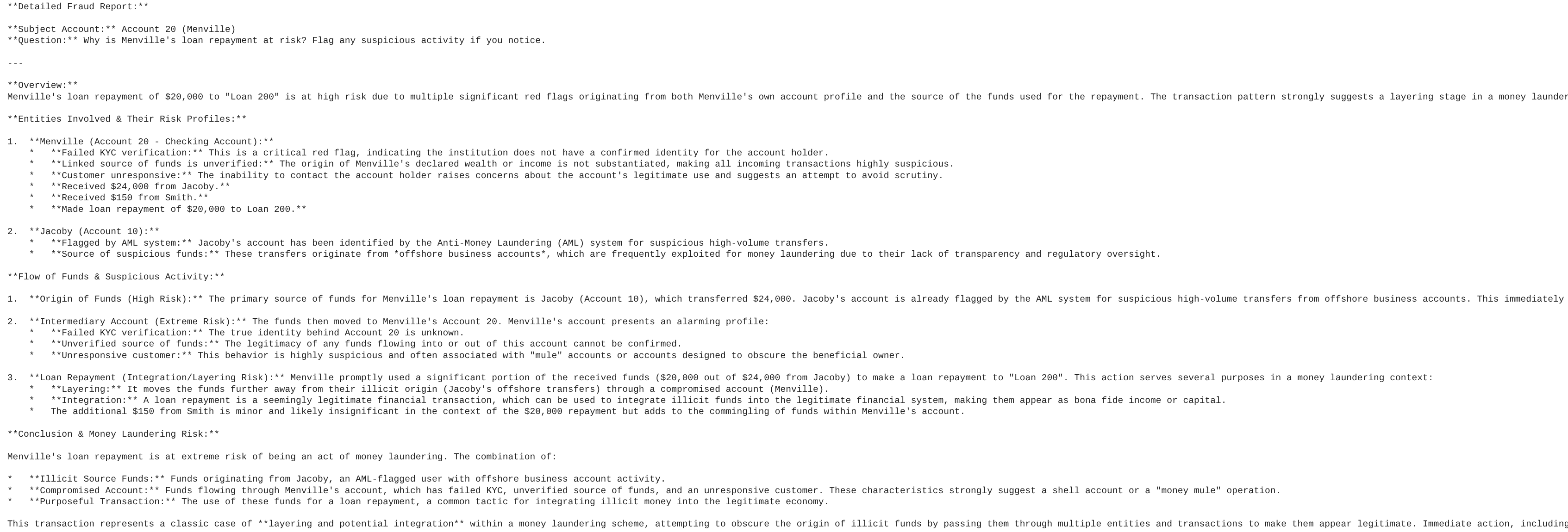
Deberías ver un resultado similar a este informe de análisis de LLM de muestra:
10. Visualiza el rastro del lavado de dinero
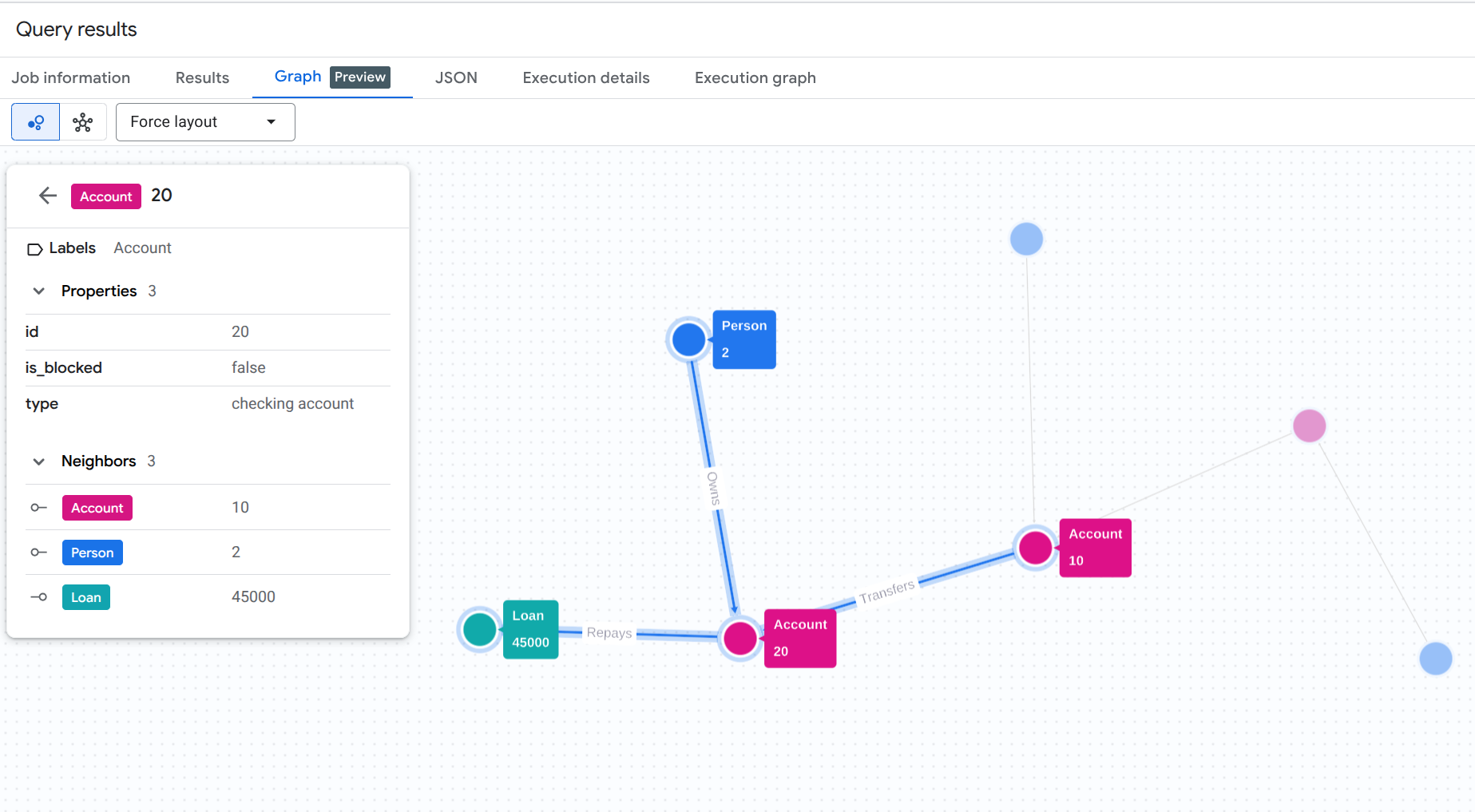
Para comprender visualmente el rastro de lavado de dinero que acabamos de descubrir de forma programática, puedes ejecutar una consulta de visualización de gráficos en la consola de BigQuery Studio.
Ejecuta esta consulta en BigQuery Studio. (Asegúrate de habilitar la función de visualización de gráficos o haz clic en la pestaña Gráfico si está disponible).
GRAPH `fingraph_rag.FinGraph`
 MATCH
   (p_shell:Person)-[o1:Owns]->(acc_shell:Account)-[t1:Transfers]->(acc_fraud:Account)-[t2:Transfers]->(acc_target:Account)-[r:Repays]->(l:Loan),
   (p_fraud:Person)-[o2:Owns]->(acc_fraud),
   (p_target:Person)-[o3:Owns]->(acc_target)
 WHERE p_target.name = 'Menville' AND p_fraud.name = 'Jacoby' AND p_shell.name = 'Doe'
 RETURN TO_JSON([
  TO_JSON(p_shell), TO_JSON(o1), TO_JSON(acc_shell),
  TO_JSON(t1), TO_JSON(acc_fraud), TO_JSON(p_fraud), TO_JSON(o2),
  TO_JSON(t2), TO_JSON(acc_target), TO_JSON(p_target), TO_JSON(o3),
  TO_JSON(r), TO_JSON(l)
]) AS result;
Esta consulta de GQL rastrea toda la ruta desde el propietario sospechoso de la empresa fantasma (Doe) a través del intermediario (Jacoby) hasta el objetivo final (Menville) y el pago del préstamo.
Deberías ver un resultado de visualización de gráfico similar a este:
11. Limpia
Para evitar que se apliquen cargos a tu cuenta de Google Cloud, borra los recursos que creaste durante este codelab.
Borra el conjunto de datos de BigQuery y la conexión a recursos de Cloud:
# Delete the BigQuery dataset
bq rm -r -f $PROJECT_ID:fingraph_rag

# Delete the BigQuery Cloud Resource Connection
bq rm --connection --location=us vertex_ai_conn
Verifica que se hayan borrado los recursos:
bq ls --project_id $PROJECT_ID
bq ls --connection --location=us
12. ¡Felicitaciones!
¡Felicitaciones! Creaste correctamente una aplicación de RAG y analizaste su comportamiento. Demostraste cómo usar las capacidades nativas de Graph y Vector Search de BigQuery para realizar GraphRAG, y detectaste un esquema de lavado de dinero sin ETL.
Qué aprendiste
- Cómo compilar un gráfico de propiedad en BigQuery sobre tablas estándar
- Cómo generar y almacenar incorporaciones vectoriales con BigQuery ML
- Cómo combinar el recorrido de grafos de BigQuery y la búsqueda de vectores en un recuperador de LangChain
- Cómo los LLM pueden sintetizar registros de auditoría semánticos con topología de grafos para reducir los falsos positivos
Próximos pasos
- Explora la Descripción general de los gráficos de propiedades de BigQuery
- Prueba más patrones de Graph Query Language (GQL) de BigQuery Graph.