

1. Introdução
Neste codelab, você vai criar uma solução de geração aumentada por recuperação de gráficos (GraphRAG) para detectar lavagem de dinheiro (AML) e fraudes financeiras. Você vai usar a Vertex AI, a Pesquisa Vetorial e os recursos nativos de gráfico do BigQuery, coordenados pelo LangChain. Ao final deste laboratório, você vai entender como um modelo de linguagem grande (LLM) pode identificar o roteamento de fundos ilícitos sintetizando registros de auditoria semântica e redes transacionais complexas.
Fluxo da arquitetura do GraphRAG
+------------------+     1. Vector Search      +---------------------+
| User Prompt /    | ------------------------> | BigQuery ML         |
| Investigation    |                           | (AccountAudits)     |
+------------------+                           +---------------------+
         |                                                |
         |                                                | 2. Seed Entity ID
         v                                                v
+------------------+     3. GQL Traversal      +---------------------+
| LangChain        | <------------------------ | BigQuery Property   |
| Graph Retriever  |                           | Graph (FinGraph)    |
+------------------+                           +---------------------+
         |
         | 4. Synthesized Context
         v
+------------------+
| Gemini 2.5 Flash | ---> Detailed Fraud Report
+------------------+
Atividades deste laboratório
- Fase 1: configuração do conjunto de dados e do gráfico de propriedades: crie tabelas financeiras relacionais e construa um
PROPERTY GRAPHnativo do BigQuery. - Fase 2: geração de embeddings de vetor semântico: gere embeddings de texto diretamente no SQL para registros de auditoria usando
AI.GENERATE_EMBEDDING(text-embedding-005). - Fase 3: recuperador personalizado do GraphRAG do LangChain: crie um recuperador personalizado em Python que combina similaridade de vetor (
COSINE_DISTANCE) e travessias de caminho ISO GQL. - Fase 4: raciocínio de fraude de LLM e visualização de trilhas: execute uma cadeia de raciocínio do Gemini para expor loops ilícitos de lavagem de dinheiro e visualizar trilhas de caminho no BigQuery Studio.
O que é necessário
- Um navegador da Web, como o Chrome.
- Ter um projeto do Google Cloud com o faturamento ativado.
Este codelab foi criado para desenvolvedores, engenheiros de dados e profissionais de IA de todos os níveis, inclusive iniciantes.
Duração estimada: 35 minutos
Custo estimado: menos de US $2,00 (usa o processamento de consultas do BigQuery e da Vertex AI com pagamento por uso).
2. Antes de começar
Criar um projeto do Google Cloud
- No Console do Google Cloud, selecione ou crie um projeto na nuvem do Google Cloud.
- Verifique se o faturamento está ativado para seu projeto do Cloud.
Iniciar o Cloud Shell
- Clique em Ativar o Cloud Shell na parte de cima do console do Google Cloud.
- Verifique a autenticação:
gcloud auth list
- Configure as variáveis de ambiente no Cloud Shell:
export GCP_PROJECT=$(gcloud config get-value project)
export REGION="us-central1"
export BQ_DATASET="fingraph_rag"
gcloud config set project $GCP_PROJECT
Ativar APIs
Execute este comando para ativar todas as APIs necessárias:
gcloud services enable \
 bigquery.googleapis.com \
 aiplatform.googleapis.com
3. Configuração e inicialização
Nesta etapa, vamos configurar um ambiente Python, instalar as bibliotecas necessárias e inicializar os clientes do BigQuery e da Vertex AI. É possível executar esses comandos no Cloud Shell ou em um ambiente de notebook do Jupyter.
- Crie e ative um ambiente virtual Python:
python3 -m venv venv
source venv/bin/activate
- Instale os pacotes Python necessários:
pip install langchain-google-vertexai langchain-core google-cloud-bigquery vertexai
- Crie um arquivo Python
graphrag_aml.pye adicione o código de inicialização. Substitua
import vertexai
from google.cloud import bigquery

# Configuration
GCP_PROJECT_ID = "<YOUR_PROJECT_ID>"
REGION = "us-central1"
BQ_DATASET_ID = "fingraph_rag"
MODEL_NAME = "gemini-2.5-flash"

# Initialize clients
bq_client = bigquery.Client(project=GCP_PROJECT_ID)
vertexai.init(project=GCP_PROJECT_ID, location=REGION)
4. Criar tabelas e esquemas
Em seguida, definimos o esquema do nosso gráfico financeiro criando um conjunto de dados do BigQuery e tabelas padrão.
- Crie o conjunto de dados do BigQuery:
bq mk --location=US --dataset fingraph_rag
- Crie as tabelas. É possível executar isso na interface do BigQuery Studio ou pelo Cloud Shell. Este é o SQL:
CREATE TABLE IF NOT EXISTS `fingraph_rag.Account` (id INT64, create_time TIMESTAMP, is_blocked BOOL, type STRING);
CREATE TABLE IF NOT EXISTS `fingraph_rag.Loan` (id INT64, loan_amount FLOAT64, balance FLOAT64, create_time TIMESTAMP, interest_rate FLOAT64);
CREATE TABLE IF NOT EXISTS `fingraph_rag.Person` (id INT64, name STRING);
CREATE TABLE IF NOT EXISTS `fingraph_rag.AccountRepayLoan` (id INT64, loan_id INT64, amount FLOAT64, create_time TIMESTAMP);
CREATE TABLE IF NOT EXISTS `fingraph_rag.AccountTransferAccount` (id INT64, to_id INT64, amount FLOAT64, create_time TIMESTAMP);
CREATE TABLE IF NOT EXISTS `fingraph_rag.PersonOwnAccount` (id INT64, account_id INT64, create_time TIMESTAMP);
CREATE TABLE IF NOT EXISTS `fingraph_rag.AccountAudits` (id INT64, audit_timestamp TIMESTAMP, audit_details STRING, embedding ARRAY<FLOAT64>);
5. Inserir o conjunto de dados
Agora vamos inserir as entidades e as relações entre elas para formar nossa trilha de dinheiro. Esse conjunto de dados representa as atividades suspeitas entre Doe (suspeito de ser proprietário de uma empresa de fachada), Jacoby (intermediário), Menville (alvo que não passou no KYC) e Smith (espectador inocente).
Execute o seguinte SQL para preencher as tabelas:
INSERT INTO `fingraph_rag.Account` VALUES
  (10,'2020-01-10 06:22:20.222',false,'brokerage account'),
  (20,'2020-01-27 17:55:09.206',false,'checking account'),
  (30,'2020-02-15 09:12:33.111',false,'savings account'),
  (40,'2019-11-05 14:33:10.000',false,'business account');

INSERT INTO `fingraph_rag.Loan` VALUES
  (100,2022278.5,123359.0,'2020-03-18 16:42:57.719',0.064),
  (200,50000.0,45000.0,'2020-03-23 19:03:05.567',0.097),
  (300, 15000.0, 10000.0, '2020-05-10 10:00:00.000', 0.05);

INSERT INTO `fingraph_rag.Person` VALUES
  (1,'Jacoby'), (2,'Menville'), (3,'Smith'), (4,'Doe');

INSERT INTO `fingraph_rag.AccountTransferAccount` VALUES
  (40,10,25000.0,'2020-08-01 10:00:00.000'),
  (10,20,24000.0,'2020-08-29 15:28:58.647'),
  (30,20,150.0,'2020-09-01 12:00:00.000');

INSERT INTO `fingraph_rag.AccountRepayLoan` VALUES
  (10,100,56809.8,'2020-12-12 07:25:02.597'),
  (20,200,20000.0,'2021-01-18 01:40:25.317');

INSERT INTO `fingraph_rag.PersonOwnAccount` VALUES
  (1,10,'2020-01-10 06:22:20.222'), (2,20,'2020-01-27 17:55:09.206'),
  (3,30,'2020-02-15 09:12:33.111'), (4,40,'2019-11-05 14:33:10.000');

INSERT INTO `fingraph_rag.AccountAudits` (id, audit_timestamp, audit_details) VALUES
  (10, '2020-05-14 06:57:02', 'Account 10 (Jacoby) flagged by AML system for suspicious high-volume transfers from offshore business accounts.'),
  (20, '2021-03-09 02:51:45', 'Account 20 (Menville) failed KYC verification. Linked source of funds is unverified and customer is unresponsive.'),
  (40, '2020-07-20 09:00:00', 'Account 40 (Doe) under investigation as a suspected shell company involved in illicit activities.');
Verificar registros ingeridos
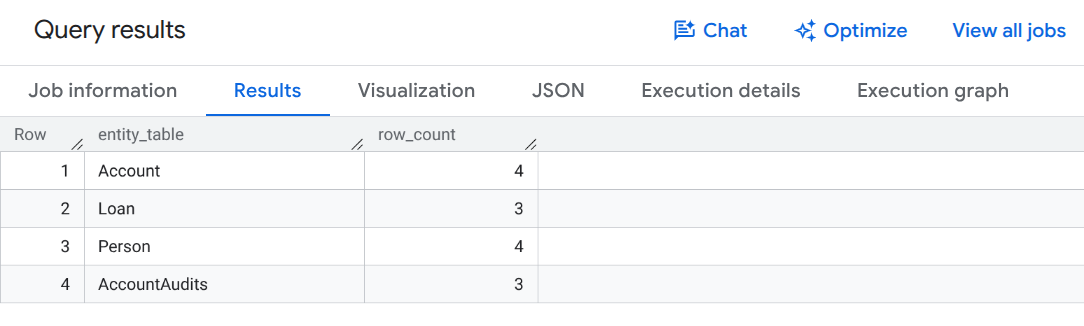
Execute esta consulta para verificar as contagens de registros nas tabelas financeiras:
SELECT 'Account' AS entity_table, COUNT(*) AS row_count FROM `fingraph_rag.Account`
UNION ALL SELECT 'Loan', COUNT(*) FROM `fingraph_rag.Loan`
UNION ALL SELECT 'Person', COUNT(*) FROM `fingraph_rag.Person`
UNION ALL SELECT 'AccountAudits', COUNT(*) FROM `fingraph_rag.AccountAudits`;
Você vai receber uma saída de consulta confirmando a inserção de linhas, semelhante a esta:
6. Criar um grafo de propriedades do BigQuery
Com os dados relacionais prontos, definimos o FinGraph usando a DDL de gráfico nativa do BigQuery. Isso cria uma camada semântica sobre as tabelas relacionais atuais sem copiar ou duplicar dados.
Introdução à sintaxe ISO GQL
Os gráficos de propriedades do BigQuery usam padrões ISO padrão da Graph Query Language (GQL):
(node:Label)define nós de entidade (por exemplo,Account,Person,Loan).-[edge:LABEL]->define relações direcionadas (por exemplo,Transfers,Repays,Owns).
Execute a seguinte instrução SQL para criar o gráfico de propriedades:
CREATE OR REPLACE PROPERTY GRAPH `fingraph_rag.FinGraph`
 NODE TABLES (
   `fingraph_rag.Account` KEY (id) LABEL Account PROPERTIES (id, type, is_blocked),
   `fingraph_rag.Loan` KEY (id) LABEL Loan PROPERTIES (id, loan_amount, balance),
   `fingraph_rag.Person` KEY (id) LABEL Person PROPERTIES (id, name)
 )
 EDGE TABLES(
   `fingraph_rag.AccountRepayLoan`
     KEY (id, loan_id, create_time)
     SOURCE KEY (id) REFERENCES `fingraph_rag.Account` (id)
     DESTINATION KEY (loan_id) REFERENCES `fingraph_rag.Loan` (id)
     LABEL Repays PROPERTIES (amount, create_time),
   `fingraph_rag.AccountTransferAccount`
     KEY (id, to_id, create_time)
     SOURCE KEY (id) REFERENCES `fingraph_rag.Account` (id)
     DESTINATION KEY (to_id) REFERENCES `fingraph_rag.Account` (id)
     LABEL Transfers PROPERTIES (amount, create_time),
   `fingraph_rag.PersonOwnAccount`
     KEY (id, account_id)
     SOURCE KEY (id) REFERENCES `fingraph_rag.Person` (id)
     DESTINATION KEY (account_id) REFERENCES `fingraph_rag.Account` (id)
     LABEL Owns PROPERTIES (create_time)
 );
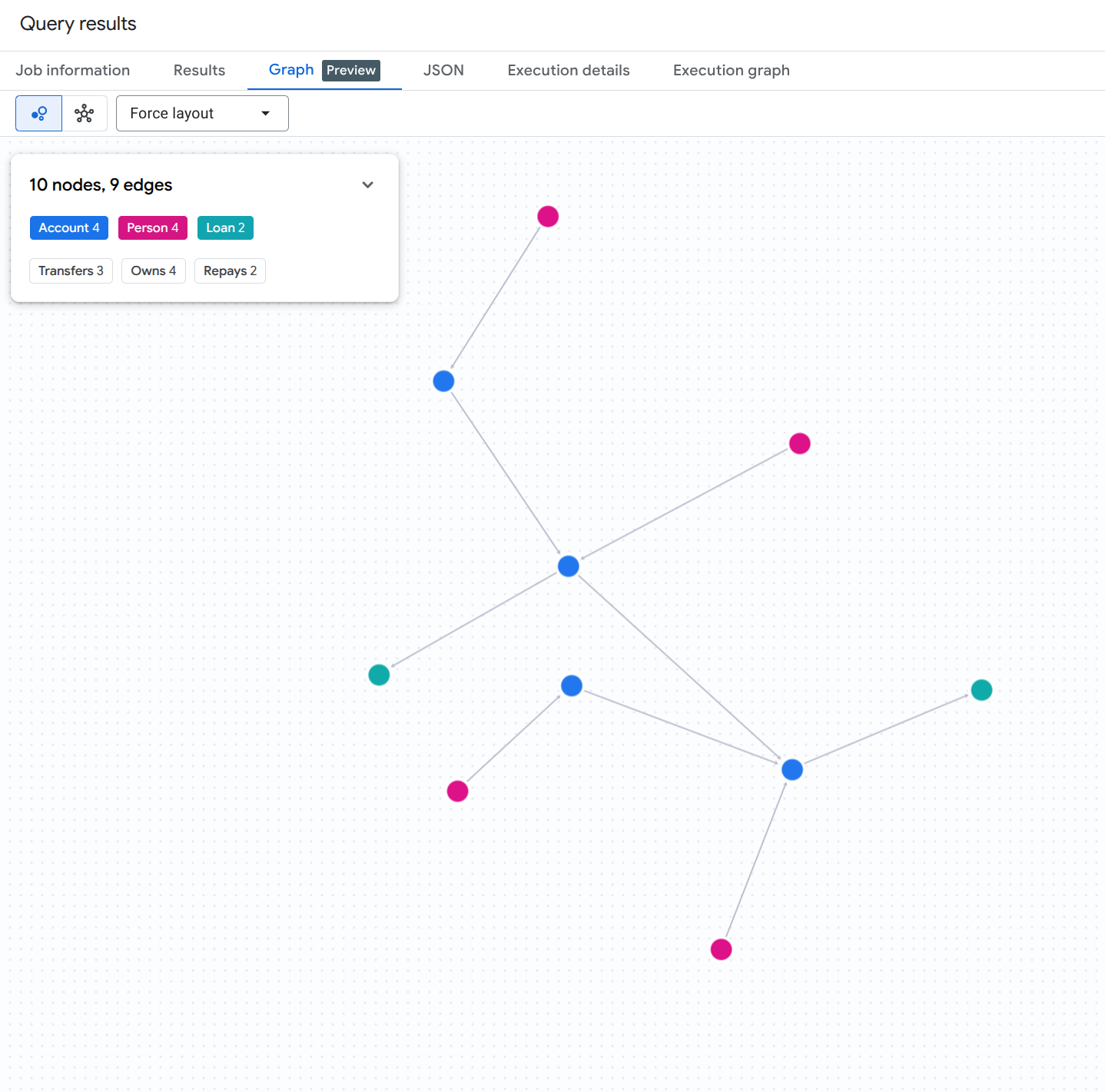
Para visualizar o gráfico completo de contas, pessoas e empréstimos, execute a seguinte consulta SQL no BigQuery Studio:
GRAPH `fingraph_rag.FinGraph`
MATCH (src)-[e]->(dst)
RETURN TO_JSON([
  TO_JSON(src),
  TO_JSON(e),
  TO_JSON(dst)
  ]) AS result;
Você vai encontrar um resultado de visualização de gráfico semelhante a este:
7. Gerar embeddings para registros de auditoria
Para ativar a parte de busca vetorial do pipeline de RAG, geramos embeddings de texto para os registros de auditoria não estruturados diretamente no BigQuery usando a função com valor de tabela (TVF) AI.GENERATE_EMBEDDING.
Criar uma conexão remota do BigQuery e conceder permissões do IAM
O BigQuery ML requer uma conexão CLOUD_RESOURCE para se comunicar de forma segura com os endpoints de embedding da Vertex AI. Execute os seguintes comandos bash no Cloud Shell para criar a conexão, descobrir a conta de serviço gerada automaticamente e conceder o papel de Usuário da Vertex AI (roles/aiplatform.user):
# 1. Set environment variables
export PROJECT_ID=$(gcloud config get-value project)
export LOCATION="us"
export CONNECTION_ID="vertex_ai_conn"

# 2. Create the BigQuery Cloud Resource Connection
bq mk --connection \
    --location=${LOCATION} \
    --project_id=${PROJECT_ID} \
    --connection_type=CLOUD_RESOURCE \
    ${CONNECTION_ID}

# 3. Retrieve the auto-generated Service Account ID associated with the connection
SA_ID=$(bq show --format=json --location=${LOCATION} --connection ${CONNECTION_ID} | jq -r '.cloudResource.serviceAccountId')
echo "Connection Service Account: ${SA_ID}"

# 4. Grant Vertex AI User (roles/aiplatform.user) permission to the Service Account
gcloud projects add-iam-policy-binding ${PROJECT_ID} \
    --member="serviceAccount:${SA_ID}" \
    --role="roles/aiplatform.user" \
    --condition=None
Criar modelo de embedding remoto
Em seguida, defina um modelo remoto do BigQuery ML que se vincule ao modelo text-embedding-005 da Vertex AI usando a conexão que você acabou de autorizar:
CREATE OR REPLACE MODEL `fingraph_rag.embedding_model`
  REMOTE WITH CONNECTION `us.vertex_ai_conn`
  OPTIONS(ENDPOINT = 'text-embedding-005');
Gerar embeddings
Agora, gere embeddings para a tabela AccountAudits chamando AI.GENERATE_EMBEDDING na cláusula FROM de uma instrução UPDATE:
UPDATE `fingraph_rag.AccountAudits` target
SET embedding = source.embedding
FROM AI.GENERATE_EMBEDDING(
  MODEL `fingraph_rag.embedding_model`,
  (SELECT id, audit_details AS content FROM `fingraph_rag.AccountAudits` WHERE ARRAY_LENGTH(embedding) = 0)
) source
WHERE target.id = source.id;
Verificar as dimensões do vetor gerado
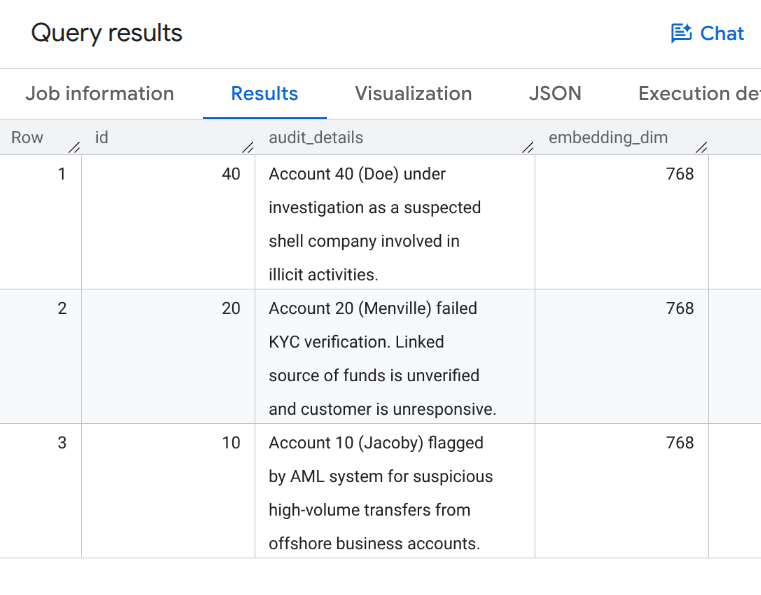
Execute a consulta a seguir para verificar se os embeddings de vetor foram preenchidos:
SELECT id, audit_details, ARRAY_LENGTH(embedding) AS embedding_dim
FROM `fingraph_rag.AccountAudits`;
Você vai ver uma saída de consulta mostrando embeddings de vetor de 768 dimensões semelhantes a esta:
8. Definir o recuperador do GraphRAG
Agora vamos criar um recuperador personalizado do LangChain no nosso ambiente Python. Esse recuperador combina a Pesquisa Vetorial semântica (para encontrar pontos de partida relevantes) com consultas nativas de MATCH de gráfico (para percorrer relacionamentos).
Adicione o seguinte código ao script Python graphrag_aml.py:
from langchain_core.documents import Document
from langchain_core.retrievers import BaseRetriever
from typing import List

class FinGraphRetriever(BaseRetriever):
    project: str
    dataset: str

    def _get_relevant_documents(self, query: str) -> List[Document]:
        # 1. Vector Search
        vector_query = f"""
            SELECT id, audit_details
            FROM `{self.dataset}.AccountAudits`
            ORDER BY COSINE_DISTANCE(
                embedding,
                (
                    SELECT embedding
                    FROM AI.GENERATE_EMBEDDING(
                        MODEL `{self.dataset}.embedding_model`,
                        (SELECT @query AS content)
                    )
                )
            )
            LIMIT 1
        """
        res = bq_client.query(vector_query, job_config=bigquery.QueryJobConfig(
            query_parameters=[bigquery.ScalarQueryParameter("query", "STRING", query)]
        )).result()

        start_id = None
        audit_text = ""
        for row in res:
            start_id = row.id
            audit_text = row.audit_details

        if not start_id: return []

        # 2. Native Graph Traversal
        graph_query = f"""
            GRAPH `{self.dataset}.FinGraph`
            MATCH
              (sender_person:Person)-[:Owns]->(sender_acc:Account)
              -[tx:Transfers]->
              (a:Account)
              -[repays:Repays]->(l:Loan),
              (owner:Person)-[:Owns]->(a)
            WHERE a.id = @id
            RETURN
              owner.name as owner_name,
              a.type as account_type,
              sender_person.name as sender_name,
              tx.amount as transfer_amount,
              repays.amount as repayment_amount,
              l.id as loan_id
        """
        graph_res = bq_client.query(graph_query, job_config=bigquery.QueryJobConfig(
            query_parameters=[bigquery.ScalarQueryParameter("id", "INT64", start_id)]
        )).result()

        context_docs = [Document(page_content=f"Primary Audit Log (Target Account): {audit_text}")]
        sender_names = []
        for row in graph_res:
            sender_names.append(row['sender_name'])
            doc_str = (f"Account Owner: {row['owner_name']} (Account Type: {row['account_type']}). "
                       f"Received transfer of ${row['transfer_amount']} from {row['sender_name']}. "
                       f"Made loan repayment of ${row['repayment_amount']} to Loan {row['loan_id']}.")
            context_docs.append(Document(page_content=doc_str))

        if sender_names:
            names_list = "','".join(sender_names)
            sender_audit_query = f"""
                SELECT p.name, au.audit_details
                FROM `{self.dataset}.AccountAudits` au
                JOIN `{self.dataset}.Account` a ON au.id = a.id
                JOIN `{self.dataset}.PersonOwnAccount` poa ON a.id = poa.account_id
                JOIN `{self.dataset}.Person` p ON poa.id = p.id
                WHERE p.name IN ('{names_list}')
            """
            sender_audits = bq_client.query(sender_audit_query).result()
            for row in sender_audits:
                context_docs.append(Document(page_content=f"Audit Log for Sender {row['name']}: {row['audit_details']}"))

        return context_docs
9. Executar a investigação de fraude
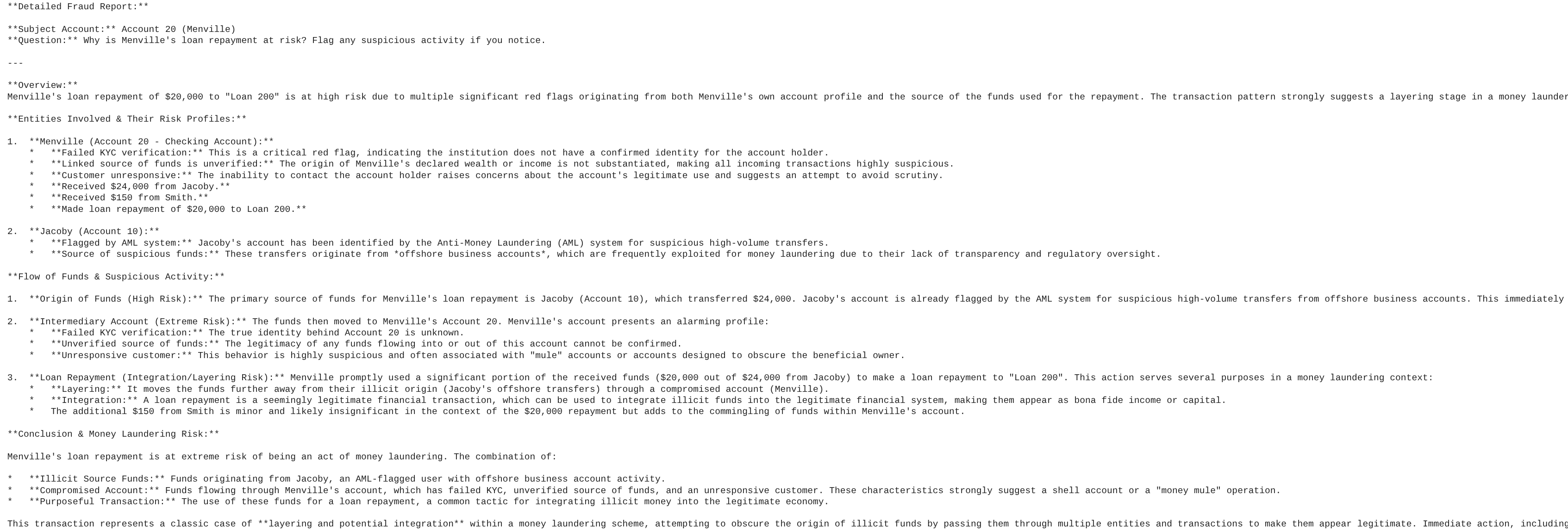
Por fim, executamos o pipeline do GraphRAG para gerar um relatório detalhado de fraudes. O LLM vai usar o contexto recuperado pelo nosso recuperador de gráficos personalizado para responder ao comando.
Adicione o código abaixo ao script graphrag_aml.py e execute-o usando python graphrag_aml.py:
from langchain_google_vertexai import ChatVertexAI
from langchain_core.prompts import ChatPromptTemplate
from langchain_core.output_parsers import StrOutputParser

# Initialize the LLM and the Retriever
llm = ChatVertexAI(model_name=MODEL_NAME)
retriever = FinGraphRetriever(project=GCP_PROJECT_ID, dataset=BQ_DATASET_ID)

# Define the Prompt
prompt = ChatPromptTemplate.from_template("""
You are a Lead Fraud Analyst. Use the following audit logs and graph transaction history to answer the question.
Your goal is to connect the dots between the entities and explain the flow of funds.
If you see transfers from flagged users or shell companies, highlight the money laundering risk.

Context: {context}

Question: {question}

Detailed Fraud Report:
""")

# Create the LangChain
chain = (
    {"context": retriever , "question": lambda x: x}
    | prompt
    | llm
    | StrOutputParser()
)

# Execute the chain
question = "Why is Menville's loan repayment at risk? Flag any suspicious activity if you notice."
print(chain.invoke(question))
Script de graphrag_aml.py concluído
Para referência, o script graphrag_aml.py completo vai ficar assim:
import vertexai
from google.cloud import bigquery
from langchain_core.documents import Document
from langchain_core.retrievers import BaseRetriever
from typing import List
from langchain_google_vertexai import ChatVertexAI
from langchain_core.prompts import ChatPromptTemplate
from langchain_core.output_parsers import StrOutputParser

# Configuration
GCP_PROJECT_ID = "<YOUR_PROJECT_ID>"
REGION = "us-central1"
BQ_DATASET_ID = "fingraph_rag"
MODEL_NAME = "gemini-2.5-flash"

# Initialize clients
bq_client = bigquery.Client(project=GCP_PROJECT_ID)
vertexai.init(project=GCP_PROJECT_ID, location=REGION)

class FinGraphRetriever(BaseRetriever):
    project: str
    dataset: str

    def _get_relevant_documents(self, query: str) -> List[Document]:
        # 1. Vector Search using Cosine Distance
        vector_query = f"""
            SELECT id, audit_details
            FROM `{self.dataset}.AccountAudits`
            ORDER BY COSINE_DISTANCE(
                embedding,
                (
                    SELECT embedding
                    FROM AI.GENERATE_EMBEDDING(
                        MODEL `{self.dataset}.embedding_model`,
                        (SELECT @query AS content)
                    )
                )
            )
            LIMIT 1
        """
        res = bq_client.query(vector_query, job_config=bigquery.QueryJobConfig(
            query_parameters=[bigquery.ScalarQueryParameter("query", "STRING", query)]
        )).result()

        start_id = None
        audit_text = ""
        for row in res:
            start_id = row.id
            audit_text = row.audit_details

        if not start_id: return []

        # 2. Native Graph Traversal (GQL MATCH)
        graph_query = f"""
            GRAPH `{self.dataset}.FinGraph`
            MATCH
              (sender_person:Person)-[:Owns]->(sender_acc:Account)
              -[tx:Transfers]->
              (a:Account)
              -[repays:Repays]->(l:Loan),
              (owner:Person)-[:Owns]->(a)
            WHERE a.id = @id
            RETURN
              owner.name as owner_name,
              a.type as account_type,
              sender_person.name as sender_name,
              tx.amount as transfer_amount,
              repays.amount as repayment_amount,
              l.id as loan_id
        """
        graph_res = bq_client.query(graph_query, job_config=bigquery.QueryJobConfig(
            query_parameters=[bigquery.ScalarQueryParameter("id", "INT64", start_id)]
        )).result()

        context_docs = [Document(page_content=f"Primary Audit Log (Target Account): {audit_text}")]
        sender_names = []
        for row in graph_res:
            sender_names.append(row['sender_name'])
            doc_str = (f"Account Owner: {row['owner_name']} (Account Type: {row['account_type']}). "
                       f"Received transfer of ${row['transfer_amount']} from {row['sender_name']}. "
                       f"Made loan repayment of ${row['repayment_amount']} to Loan {row['loan_id']}.")
            context_docs.append(Document(page_content=doc_str))

        if sender_names:
            names_list = "','".join(sender_names)
            sender_audit_query = f"""
                SELECT p.name, au.audit_details
                FROM `{self.dataset}.AccountAudits` au
                JOIN `{self.dataset}.Account` a ON au.id = a.id
                JOIN `{self.dataset}.PersonOwnAccount` poa ON a.id = poa.account_id
                JOIN `{self.dataset}.Person` p ON poa.id = p.id
                WHERE p.name IN ('{names_list}')
            """
            sender_audits = bq_client.query(sender_audit_query).result()
            for row in sender_audits:
                context_docs.append(Document(page_content=f"Audit Log for Sender {row['name']}: {row['audit_details']}"))

        return context_docs

# Initialize LLM & Retriever
llm = ChatVertexAI(model_name=MODEL_NAME)
retriever = FinGraphRetriever(project=GCP_PROJECT_ID, dataset=BQ_DATASET_ID)

prompt = ChatPromptTemplate.from_template("""
You are a Lead Fraud Analyst. Use the following audit logs and graph transaction history to answer the question.
Your goal is to connect the dots between the entities and explain the flow of funds.
If you see transfers from flagged users or shell companies, highlight the money laundering risk.

Context: {context}

Question: {question}

Detailed Fraud Report:
""")

chain = (
    {"context": retriever, "question": lambda x: x}
    | prompt
    | llm
    | StrOutputParser()
)

question = "Why is Menville's loan repayment at risk? Flag any suspicious activity if you notice."
print(chain.invoke(question))
Você verá uma saída semelhante a este exemplo de relatório de análise de LLM:
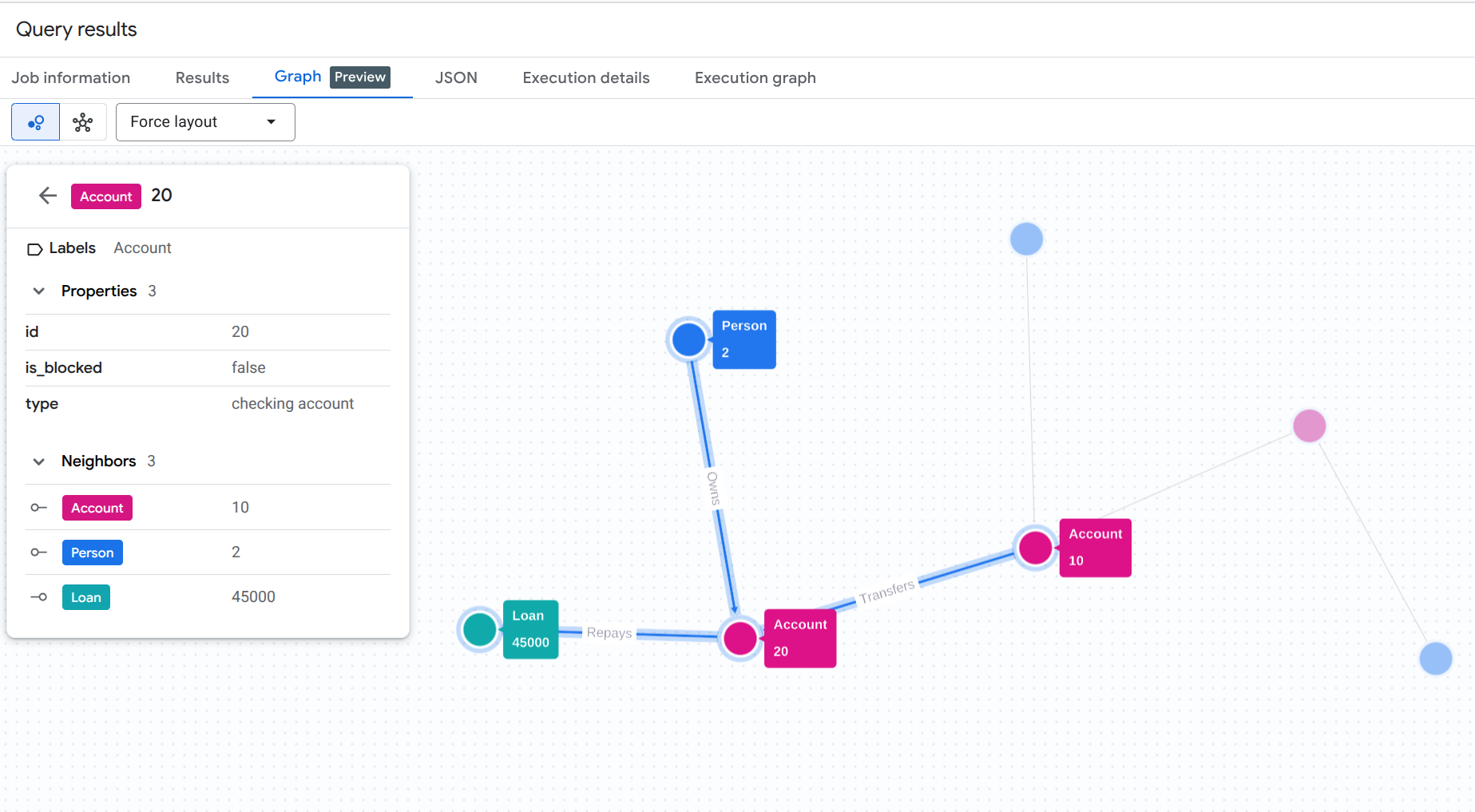
10. Visualizar o rastro de lavagem de dinheiro
Para entender visualmente o rastro de lavagem de dinheiro que acabamos de descobrir de forma programática, execute uma consulta de visualização de gráfico no console do BigQuery Studio.
Execute essa consulta no BigQuery Studio. Ative o recurso de visualização de gráfico ou clique na guia "Gráfico", se disponível.
GRAPH `fingraph_rag.FinGraph`
 MATCH
   (p_shell:Person)-[o1:Owns]->(acc_shell:Account)-[t1:Transfers]->(acc_fraud:Account)-[t2:Transfers]->(acc_target:Account)-[r:Repays]->(l:Loan),
   (p_fraud:Person)-[o2:Owns]->(acc_fraud),
   (p_target:Person)-[o3:Owns]->(acc_target)
 WHERE p_target.name = 'Menville' AND p_fraud.name = 'Jacoby' AND p_shell.name = 'Doe'
 RETURN TO_JSON([
  TO_JSON(p_shell), TO_JSON(o1), TO_JSON(acc_shell),
  TO_JSON(t1), TO_JSON(acc_fraud), TO_JSON(p_fraud), TO_JSON(o2),
  TO_JSON(t2), TO_JSON(acc_target), TO_JSON(p_target), TO_JSON(o3),
  TO_JSON(r), TO_JSON(l)
]) AS result;
Essa consulta GQL rastreia todo o caminho do proprietário suspeito da empresa de fachada (Doe) até o intermediário (Jacoby), o destino final (Menville) e o pagamento do empréstimo.
Você vai encontrar um resultado de visualização de gráfico semelhante a este:
11. Limpar
Para evitar cobranças contínuas na sua conta do Google Cloud, exclua os recursos criados durante este codelab.
Exclua o conjunto de dados do BigQuery e a conexão a recursos do Cloud:
# Delete the BigQuery dataset
bq rm -r -f $PROJECT_ID:fingraph_rag

# Delete the BigQuery Cloud Resource Connection
bq rm --connection --location=us vertex_ai_conn
Verifique se os recursos foram excluídos:
bq ls --project_id $PROJECT_ID
bq ls --connection --location=us
12. Parabéns
Parabéns! Você criou um aplicativo de RAG e analisou o comportamento dele. Você demonstrou como usar os recursos nativos de pesquisa vetorial e de gráfico do BigQuery para realizar o GraphRAG, detectando um esquema de combate à lavagem de dinheiro com zero ETL.
O que você aprendeu
- Como criar um gráfico de propriedades no BigQuery com base em tabelas padrão
- Como gerar e armazenar embeddings de vetor usando o BigQuery ML
- Como combinar travessias do BigQuery Graph e a Pesquisa Vetorial em um recuperador do LangChain
- Como os LLMs podem sintetizar registros de auditoria semântica com topologia de gráfico para reduzir falsos positivos
Próximas etapas
- Confira a Visão geral dos grafos de propriedades do BigQuery.
- Teste mais padrões da Graph Query Language (GQL) do BigQuery.