

1. Introdução
Neste codelab, você vai criar uma solução de geração aumentada por recuperação de gráficos (GraphRAG) para detectar lavagem de dinheiro (LD) e fraude financeira. Você vai usar a Vertex AI, a pesquisa vetorial e os recursos nativos de gráficos do BigQuery, coordenados pela LangChain. Ao final deste laboratório, você vai entender como um modelo de linguagem grande (LLM) pode identificar o roteamento de fundos ilícitos sintetizando registros de auditoria semântica e redes transacionais complexas.
Fluxo da arquitetura do GraphRAG
+------------------+     1. Vector Search      +---------------------+
| User Prompt /    | ------------------------> | BigQuery ML         |
| Investigation    |                           | (AccountAudits)     |
+------------------+                           +---------------------+
         |                                                |
         |                                                | 2. Seed Entity ID
         v                                                v
+------------------+     3. GQL Traversal      +---------------------+
| LangChain        | <------------------------ | BigQuery Property   |
| Graph Retriever  |                           | Graph (FinGraph)    |
+------------------+                           +---------------------+
         |
         | 4. Synthesized Context
         v
+------------------+
| Gemini 2.5 Flash | ---> Detailed Fraud Report
+------------------+
Atividades deste laboratório
- Fase 1: configuração do conjunto de dados e do gráfico de propriedades: crie tabelas financeiras relacionais e construa um
PROPERTY GRAPHnativo do BigQuery. - Fase 2: geração de embeddings de vetor semântico: gere embeddings de texto diretamente em SQL para registros de auditoria usando
AI.GENERATE_EMBEDDING(text-embedding-005). - Fase 3: criador de consultas GraphRAG LangChain personalizado: crie um criador de consultas Python personalizado combinando similaridade de vetor (
COSINE_DISTANCE) e travessias de caminho GQL ISO. - Fase 4: raciocínio de fraude com LLM e visualização de rastros: execute uma cadeia de raciocínio do Gemini para expor loops ilícitos de lavagem de dinheiro e visualize rastros de caminhos no BigQuery Studio.
O que é necessário
- Um navegador da Web, como o Chrome.
- Ter um projeto do Google Cloud com o faturamento ativado.
Este codelab foi criado para desenvolvedores, engenheiros de dados e profissionais de IA de todos os níveis, inclusive iniciantes.
Duração estimada:35 minutos
Custo estimado:menos de US $2,00 (usa o processamento de consultas do BigQuery e da Vertex AI com pagamento por uso).
2. Antes de começar
Criar um projeto do Google Cloud
- No Console do Google Cloud, selecione ou crie um projeto na nuvem do Google Cloud.
- Verifique se o faturamento está ativado para seu projeto do Cloud.
Iniciar o Cloud Shell
- Clique em Ativar o Cloud Shell na parte de cima do console do Google Cloud.
- Verifique a autenticação:
gcloud auth list
- Configure variáveis de ambiente no Cloud Shell:
export GCP_PROJECT=$(gcloud config get-value project)
export REGION="us-central1"
export BQ_DATASET="fingraph_rag"
gcloud config set project $GCP_PROJECT
Ativar APIs
Execute este comando para ativar todas as APIs necessárias:
gcloud services enable \
 bigquery.googleapis.com \
 aiplatform.googleapis.com \
 bigqueryreservation.googleapis.com
Criar reserva e atribuição do BigQuery
Para executar consultas GQL, é preciso ter uma reserva que use a edição Enterprise ou Enterprise Plus. Crie uma reserva da edição Enterprise com escalonamento automático no Cloud Shell:
# 1. Create a BigQuery Enterprise reservation with 0 baseline slots and 100 max autoscaling slots
bq mk --reservation \
  --project_id=${GCP_PROJECT} \
  --location=US \
  --edition=ENTERPRISE \
  --slots=0 \
  --autoscale_max_slots=100 \
  --ignore_idle_slots=true \
  graphrag-bigquery-reservation

# 2. Assign your Cloud project to the newly created reservation for query execution
bq mk --reservation_assignment \
  --project_id=${GCP_PROJECT} \
  --location=US \
  --reservation_id=graphrag-bigquery-reservation \
  --job_type=QUERY \
  --assignee_type=PROJECT \
  --assignee_id=${GCP_PROJECT}
3. Configuração e inicialização
Nesta etapa, vamos configurar um ambiente Python, instalar as bibliotecas necessárias e inicializar os clientes do BigQuery e da Vertex AI. É possível executar esses comandos no Cloud Shell ou em um ambiente de notebook Jupyter.
- Crie e ative um ambiente virtual Python:
python3 -m venv venv
source venv/bin/activate
- Instale os pacotes Python necessários:
pip install langchain-google-vertexai langchain-core google-cloud-bigquery vertexai
- Crie um arquivo Python
graphrag_aml.pye adicione o código de inicialização. Substitua
import vertexai
from google.cloud import bigquery

# Configuration
GCP_PROJECT_ID = "<YOUR_PROJECT_ID>"
REGION = "us-central1"
BQ_DATASET_ID = "fingraph_rag"
MODEL_NAME = "gemini-2.5-flash"

# Initialize clients
bq_client = bigquery.Client(project=GCP_PROJECT_ID)
vertexai.init(project=GCP_PROJECT_ID, location=REGION)
4. Criar tabelas e esquema
Em seguida, definimos o esquema do nosso gráfico financeiro criando um conjunto de dados e tabelas padrão do BigQuery.
- Crie o conjunto de dados do BigQuery:
bq mk --location=US --dataset fingraph_rag
- Crie as tabelas. Você pode executar isso na interface do BigQuery Studio ou no Cloud Shell. Este é o SQL:
CREATE TABLE IF NOT EXISTS `fingraph_rag.Account` (id INT64, create_time TIMESTAMP, is_blocked BOOL, type STRING);
CREATE TABLE IF NOT EXISTS `fingraph_rag.Loan` (id INT64, loan_amount FLOAT64, balance FLOAT64, create_time TIMESTAMP, interest_rate FLOAT64);
CREATE TABLE IF NOT EXISTS `fingraph_rag.Person` (id INT64, name STRING);
CREATE TABLE IF NOT EXISTS `fingraph_rag.AccountRepayLoan` (id INT64, loan_id INT64, amount FLOAT64, create_time TIMESTAMP);
CREATE TABLE IF NOT EXISTS `fingraph_rag.AccountTransferAccount` (id INT64, to_id INT64, amount FLOAT64, create_time TIMESTAMP);
CREATE TABLE IF NOT EXISTS `fingraph_rag.PersonOwnAccount` (id INT64, account_id INT64, create_time TIMESTAMP);
CREATE TABLE IF NOT EXISTS `fingraph_rag.AccountAudits` (id INT64, audit_timestamp TIMESTAMP, audit_details STRING, embedding ARRAY<FLOAT64>);
5. Inserir o conjunto de dados
Agora vamos inserir as entidades e as relações delas para formar nosso rastro de dinheiro. Este conjunto de dados representa as atividades suspeitas entre Doe (proprietário suspeito de uma empresa fantasma), Jacoby (intermediário), Menville (alvo com falha no KYC) e Smith (pessoa inocente).
Execute o seguinte SQL para preencher as tabelas:
INSERT INTO `fingraph_rag.Account` VALUES
  (10,'2020-01-10 06:22:20.222',false,'brokerage account'),
  (20,'2020-01-27 17:55:09.206',false,'checking account'),
  (30,'2020-02-15 09:12:33.111',false,'savings account'),
  (40,'2019-11-05 14:33:10.000',false,'business account');

INSERT INTO `fingraph_rag.Loan` VALUES
  (100,2022278.5,123359.0,'2020-03-18 16:42:57.719',0.064),
  (200,50000.0,45000.0,'2020-03-23 19:03:05.567',0.097),
  (300, 15000.0, 10000.0, '2020-05-10 10:00:00.000', 0.05);

INSERT INTO `fingraph_rag.Person` VALUES
  (1,'Jacoby'), (2,'Menville'), (3,'Smith'), (4,'Doe');

INSERT INTO `fingraph_rag.AccountTransferAccount` VALUES
  (40,10,25000.0,'2020-08-01 10:00:00.000'),
  (10,20,24000.0,'2020-08-29 15:28:58.647'),
  (30,20,150.0,'2020-09-01 12:00:00.000');

INSERT INTO `fingraph_rag.AccountRepayLoan` VALUES
  (10,100,56809.8,'2020-12-12 07:25:02.597'),
  (20,200,20000.0,'2021-01-18 01:40:25.317');

INSERT INTO `fingraph_rag.PersonOwnAccount` VALUES
  (1,10,'2020-01-10 06:22:20.222'), (2,20,'2020-01-27 17:55:09.206'),
  (3,30,'2020-02-15 09:12:33.111'), (4,40,'2019-11-05 14:33:10.000');

INSERT INTO `fingraph_rag.AccountAudits` (id, audit_timestamp, audit_details) VALUES
  (10, '2020-05-14 06:57:02', 'Account 10 (Jacoby) flagged by AML system for suspicious high-volume transfers from offshore business accounts.'),
  (20, '2021-03-09 02:51:45', 'Account 20 (Menville) failed KYC verification. Linked source of funds is unverified and customer is unresponsive.'),
  (40, '2020-07-20 09:00:00', 'Account 40 (Doe) under investigation as a suspected shell company involved in illicit activities.');
Verificar registros ingeridos
Execute esta consulta para verificar as contagens de registros nas suas tabelas financeiras:
SELECT 'Account' AS entity_table, COUNT(*) AS row_count FROM `fingraph_rag.Account`
UNION ALL SELECT 'Loan', COUNT(*) FROM `fingraph_rag.Loan`
UNION ALL SELECT 'Person', COUNT(*) FROM `fingraph_rag.Person`
UNION ALL SELECT 'AccountAudits', COUNT(*) FROM `fingraph_rag.AccountAudits`;
Você vai ver uma saída de consulta confirmando a inserção da linha, semelhante a esta:

6. Criar um gráfico de propriedades do BigQuery
Com os dados relacionais no lugar, definimos o FinGraph usando a DDL de gráfico nativa do BigQuery. Isso cria uma camada semântica sobre as tabelas relacionais atuais sem copiar ou duplicar dados.
Introdução à sintaxe GQL ISO
Os gráficos de propriedades do BigQuery usam padrões da linguagem de consulta de gráficos (GQL) ISO padrão:
(node:Label)define nós de entidade (por exemplo,Account,Person,Loan).-[edge:LABEL]->define relacionamentos direcionados (por exemplo,Transfers,Repays,Owns).
Execute a seguinte instrução SQL para criar o gráfico de propriedades:
CREATE OR REPLACE PROPERTY GRAPH `fingraph_rag.FinGraph`
 NODE TABLES (
   `fingraph_rag.Account` KEY (id) LABEL Account PROPERTIES (id, type, is_blocked),
   `fingraph_rag.Loan` KEY (id) LABEL Loan PROPERTIES (id, loan_amount, balance),
   `fingraph_rag.Person` KEY (id) LABEL Person PROPERTIES (id, name)
 )
 EDGE TABLES(
   `fingraph_rag.AccountRepayLoan`
     KEY (id, loan_id, create_time)
     SOURCE KEY (id) REFERENCES `fingraph_rag.Account` (id)
     DESTINATION KEY (loan_id) REFERENCES `fingraph_rag.Loan` (id)
     LABEL Repays PROPERTIES (amount, create_time),
   `fingraph_rag.AccountTransferAccount`
     KEY (id, to_id, create_time)
     SOURCE KEY (id) REFERENCES `fingraph_rag.Account` (id)
     DESTINATION KEY (to_id) REFERENCES `fingraph_rag.Account` (id)
     LABEL Transfers PROPERTIES (amount, create_time),
   `fingraph_rag.PersonOwnAccount`
     KEY (id, account_id)
     SOURCE KEY (id) REFERENCES `fingraph_rag.Person` (id)
     DESTINATION KEY (account_id) REFERENCES `fingraph_rag.Account` (id)
     LABEL Owns PROPERTIES (create_time)
 );
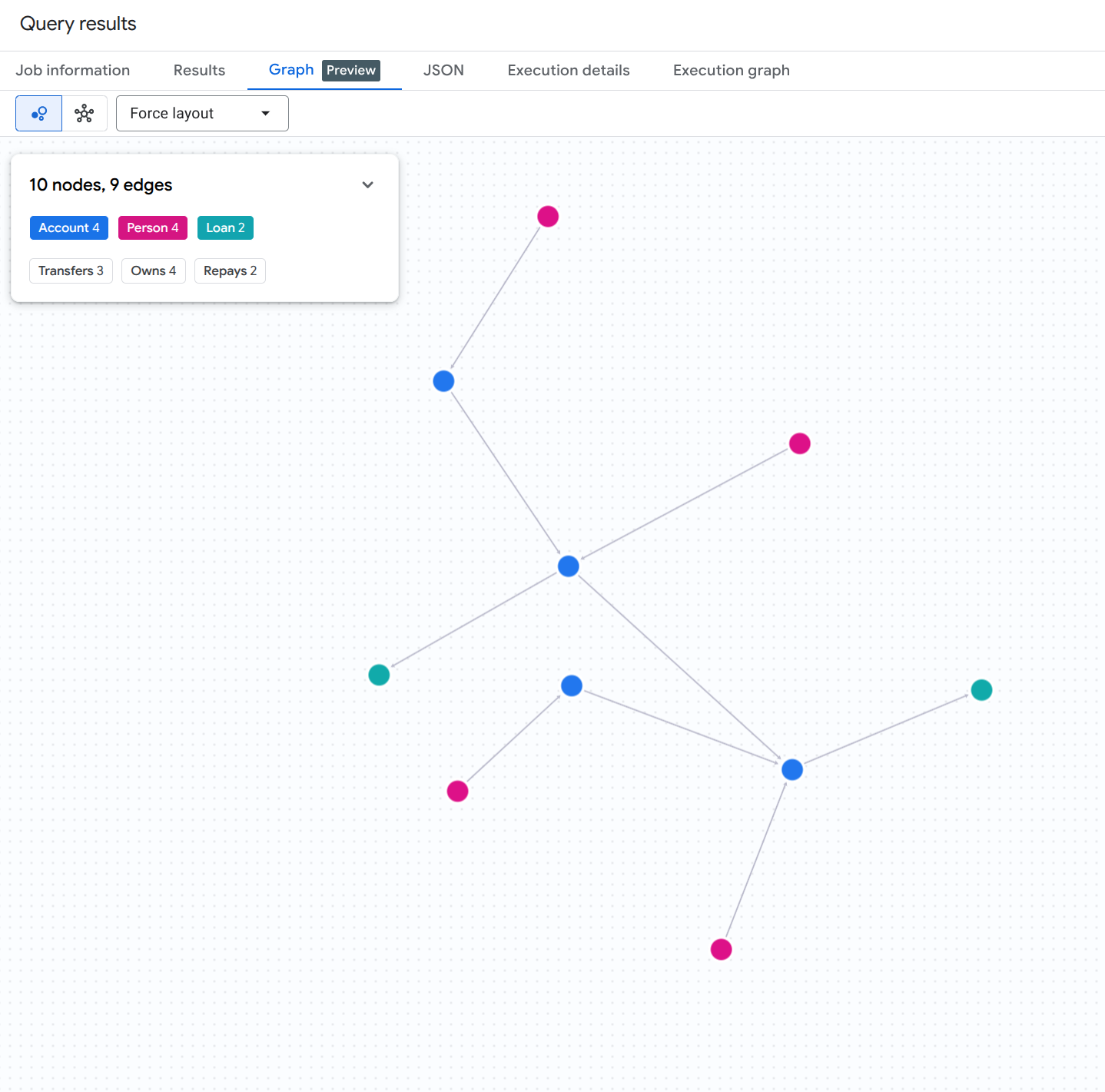
Para visualizar todo o gráfico de contas, pessoas e empréstimos, execute a seguinte consulta SQL no BigQuery Studio:
GRAPH `fingraph_rag.FinGraph`
MATCH (src)-[e]->(dst)
RETURN TO_JSON([
  TO_JSON(src),
  TO_JSON(e),
  TO_JSON(dst)
  ]) AS result;
Você vai ver um resultado de visualização de gráfico semelhante a este:
7. Gerar embeddings para registros de auditoria
Para ativar a parte de pesquisa vetorial do nosso pipeline de RAG, geramos embeddings de texto para os registros de auditoria não estruturados diretamente no BigQuery usando a função com valor de tabela (TVF) AI.GENERATE_EMBEDDING.
Criar uma conexão remota do BigQuery e conceder permissões do IAM
O BigQuery ML exige uma conexão CLOUD_RESOURCE para se comunicar com segurança com os endpoints de incorporação da Vertex AI. Execute os seguintes comandos bash no Cloud Shell para criar a conexão, descobrir a conta de serviço gerada automaticamente e conceder o papel de Usuário da Vertex AI (roles/aiplatform.user):
# 1. Set environment variables
export PROJECT_ID=$(gcloud config get-value project)
export LOCATION="us"
export CONNECTION_ID="vertex_ai_conn"

# 2. Create the BigQuery Cloud Resource Connection
bq mk --connection \
    --location=${LOCATION} \
    --project_id=${PROJECT_ID} \
    --connection_type=CLOUD_RESOURCE \
    ${CONNECTION_ID}

# 3. Retrieve the auto-generated Service Account ID associated with the connection
SA_ID=$(bq show --format=json --location=${LOCATION} --connection ${CONNECTION_ID} | jq -r '.cloudResource.serviceAccountId')
echo "Connection Service Account: ${SA_ID}"

# 4. Grant Vertex AI User (roles/aiplatform.user) permission to the Service Account
gcloud projects add-iam-policy-binding ${PROJECT_ID} \
    --member="serviceAccount:${SA_ID}" \
    --role="roles/aiplatform.user" \
    --condition=None
Criar modelo de embedding remoto
Em seguida, defina um modelo remoto do BigQuery ML que se vincule ao modelo text-embedding-005 da Vertex AI usando a conexão recém-autorizada:
CREATE OR REPLACE MODEL `fingraph_rag.embedding_model`
  REMOTE WITH CONNECTION `us.vertex_ai_conn`
  OPTIONS(ENDPOINT = 'text-embedding-005');
Gerar embeddings
Agora, gere embeddings para a tabela AccountAudits chamando AI.GENERATE_EMBEDDING na cláusula FROM de uma instrução UPDATE:
UPDATE `fingraph_rag.AccountAudits` target
SET embedding = source.embedding
FROM AI.GENERATE_EMBEDDING(
  MODEL `fingraph_rag.embedding_model`,
  (SELECT id, audit_details AS content FROM `fingraph_rag.AccountAudits` WHERE ARRAY_LENGTH(embedding) = 0)
) source
WHERE target.id = source.id;
Verificar as dimensões do vetor gerado
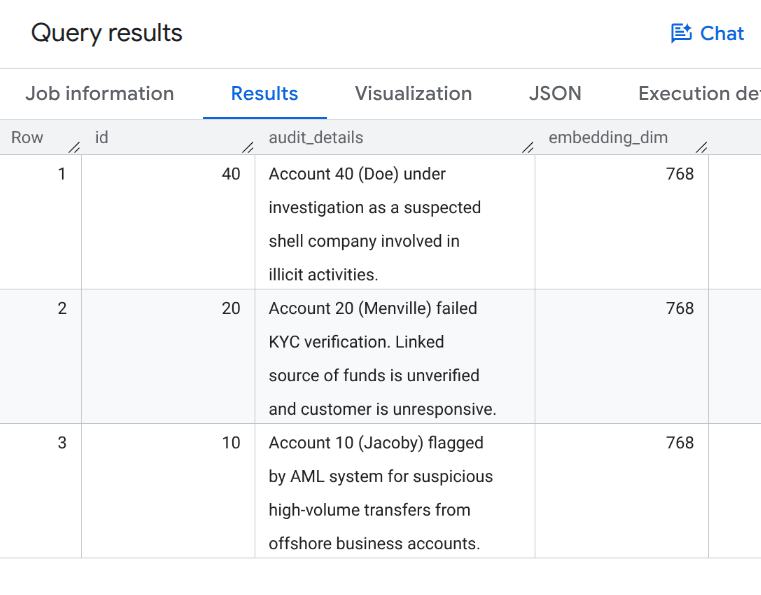
Execute a consulta a seguir para verificar se as embeddings de vetores foram preenchidas:
SELECT id, audit_details, ARRAY_LENGTH(embedding) AS embedding_dim
FROM `fingraph_rag.AccountAudits`;
Você vai ver uma saída de consulta mostrando incorporações vetoriais de 768 dimensões semelhantes a esta:
8. Definir o extrator do GraphRAG
Agora vamos criar um extrator do LangChain personalizado no nosso ambiente Python. Esse extrator combina a pesquisa vetorial semântica (para encontrar pontos de partida relevantes) com consultas MATCH de gráfico nativas (para percorrer relacionamentos).
Adicione o seguinte código ao script Python graphrag_aml.py:
from langchain_core.documents import Document
from langchain_core.retrievers import BaseRetriever
from typing import List

class FinGraphRetriever(BaseRetriever):
    project: str
    dataset: str

    def _get_relevant_documents(self, query: str) -> List[Document]:
        # 1. Vector Search
        vector_query = f"""
            SELECT id, audit_details
            FROM `{self.dataset}.AccountAudits`
            ORDER BY COSINE_DISTANCE(
                embedding,
                (
                    SELECT embedding
                    FROM AI.GENERATE_EMBEDDING(
                        MODEL `{self.dataset}.embedding_model`,
                        (SELECT @query AS content)
                    )
                )
            )
            LIMIT 1
        """
        res = bq_client.query(vector_query, job_config=bigquery.QueryJobConfig(
            query_parameters=[bigquery.ScalarQueryParameter("query", "STRING", query)]
        )).result()

        start_id = None
        audit_text = ""
        for row in res:
            start_id = row.id
            audit_text = row.audit_details

        if not start_id: return []

        # 2. Native Graph Traversal
        graph_query = f"""
            GRAPH `{self.dataset}.FinGraph`
            MATCH
              (sender_person:Person)-[:Owns]->(sender_acc:Account)
              -[tx:Transfers]->
              (a:Account)
              -[repays:Repays]->(l:Loan),
              (owner:Person)-[:Owns]->(a)
            WHERE a.id = @id
            RETURN
              owner.name as owner_name,
              a.type as account_type,
              sender_person.name as sender_name,
              tx.amount as transfer_amount,
              repays.amount as repayment_amount,
              l.id as loan_id
        """
        graph_res = bq_client.query(graph_query, job_config=bigquery.QueryJobConfig(
            query_parameters=[bigquery.ScalarQueryParameter("id", "INT64", start_id)]
        )).result()

        context_docs = [Document(page_content=f"Primary Audit Log (Target Account): {audit_text}")]
        sender_names = []
        for row in graph_res:
            sender_names.append(row['sender_name'])
            doc_str = (f"Account Owner: {row['owner_name']} (Account Type: {row['account_type']}). "
                       f"Received transfer of ${row['transfer_amount']} from {row['sender_name']}. "
                       f"Made loan repayment of ${row['repayment_amount']} to Loan {row['loan_id']}.")
            context_docs.append(Document(page_content=doc_str))

        if sender_names:
            names_list = "','".join(sender_names)
            sender_audit_query = f"""
                SELECT p.name, au.audit_details
                FROM `{self.dataset}.AccountAudits` au
                JOIN `{self.dataset}.Account` a ON au.id = a.id
                JOIN `{self.dataset}.PersonOwnAccount` poa ON a.id = poa.account_id
                JOIN `{self.dataset}.Person` p ON poa.id = p.id
                WHERE p.name IN ('{names_list}')
            """
            sender_audits = bq_client.query(sender_audit_query).result()
            for row in sender_audits:
                context_docs.append(Document(page_content=f"Audit Log for Sender {row['name']}: {row['audit_details']}"))

        return context_docs
9. Executar a investigação de fraude
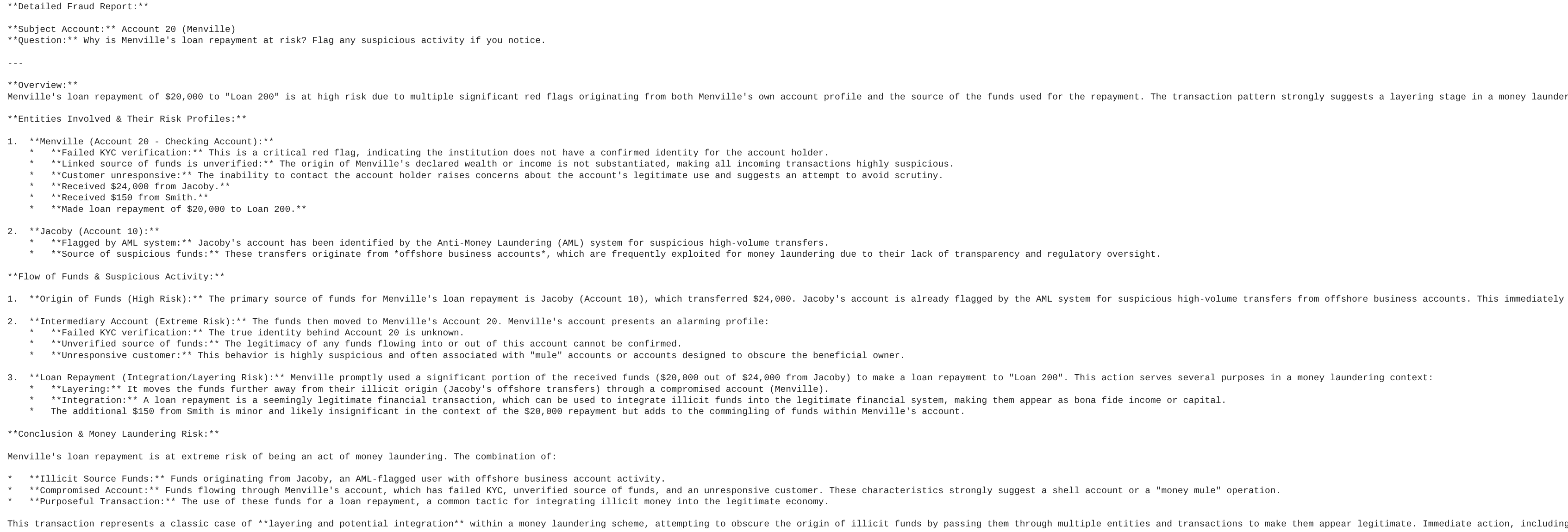
Por fim, executamos o pipeline GraphRAG para gerar um relatório detalhado de fraude. O LLM vai usar o contexto recuperado pelo nosso extrator de gráficos personalizado para responder ao comando.
Adicione o seguinte código ao script graphrag_aml.py e execute-o usando python graphrag_aml.py:
from langchain_google_vertexai import ChatVertexAI
from langchain_core.prompts import ChatPromptTemplate
from langchain_core.output_parsers import StrOutputParser

# Initialize the LLM and the Retriever
llm = ChatVertexAI(model_name=MODEL_NAME)
retriever = FinGraphRetriever(project=GCP_PROJECT_ID, dataset=BQ_DATASET_ID)

# Define the Prompt
prompt = ChatPromptTemplate.from_template("""
You are a Lead Fraud Analyst. Use the following audit logs and graph transaction history to answer the question.
Your goal is to connect the dots between the entities and explain the flow of funds.
If you see transfers from flagged users or shell companies, highlight the money laundering risk.

Context: {context}

Question: {question}

Detailed Fraud Report:
""")

# Create the LangChain
chain = (
    {"context": retriever , "question": lambda x: x}
    | prompt
    | llm
    | StrOutputParser()
)

# Execute the chain
question = "Why is Menville's loan repayment at risk? Flag any suspicious activity if you notice."
print(chain.invoke(question))
Script graphrag_aml.py completo
Para referência, o script graphrag_aml.py completo vai ficar assim:
import vertexai
from google.cloud import bigquery
from langchain_core.documents import Document
from langchain_core.retrievers import BaseRetriever
from typing import List
from langchain_google_vertexai import ChatVertexAI
from langchain_core.prompts import ChatPromptTemplate
from langchain_core.output_parsers import StrOutputParser

# Configuration
GCP_PROJECT_ID = "<YOUR_PROJECT_ID>"
REGION = "us-central1"
BQ_DATASET_ID = "fingraph_rag"
MODEL_NAME = "gemini-2.5-flash"

# Initialize clients
bq_client = bigquery.Client(project=GCP_PROJECT_ID)
vertexai.init(project=GCP_PROJECT_ID, location=REGION)

class FinGraphRetriever(BaseRetriever):
    project: str
    dataset: str

    def _get_relevant_documents(self, query: str) -> List[Document]:
        # 1. Vector Search using Cosine Distance
        vector_query = f"""
            SELECT id, audit_details
            FROM `{self.dataset}.AccountAudits`
            ORDER BY COSINE_DISTANCE(
                embedding,
                (
                    SELECT embedding
                    FROM AI.GENERATE_EMBEDDING(
                        MODEL `{self.dataset}.embedding_model`,
                        (SELECT @query AS content)
                    )
                )
            )
            LIMIT 1
        """
        res = bq_client.query(vector_query, job_config=bigquery.QueryJobConfig(
            query_parameters=[bigquery.ScalarQueryParameter("query", "STRING", query)]
        )).result()

        start_id = None
        audit_text = ""
        for row in res:
            start_id = row.id
            audit_text = row.audit_details

        if not start_id: return []

        # 2. Native Graph Traversal (GQL MATCH)
        graph_query = f"""
            GRAPH `{self.dataset}.FinGraph`
            MATCH
              (sender_person:Person)-[:Owns]->(sender_acc:Account)
              -[tx:Transfers]->
              (a:Account)
              -[repays:Repays]->(l:Loan),
              (owner:Person)-[:Owns]->(a)
            WHERE a.id = @id
            RETURN
              owner.name as owner_name,
              a.type as account_type,
              sender_person.name as sender_name,
              tx.amount as transfer_amount,
              repays.amount as repayment_amount,
              l.id as loan_id
        """
        graph_res = bq_client.query(graph_query, job_config=bigquery.QueryJobConfig(
            query_parameters=[bigquery.ScalarQueryParameter("id", "INT64", start_id)]
        )).result()

        context_docs = [Document(page_content=f"Primary Audit Log (Target Account): {audit_text}")]
        sender_names = []
        for row in graph_res:
            sender_names.append(row['sender_name'])
            doc_str = (f"Account Owner: {row['owner_name']} (Account Type: {row['account_type']}). "
                       f"Received transfer of ${row['transfer_amount']} from {row['sender_name']}. "
                       f"Made loan repayment of ${row['repayment_amount']} to Loan {row['loan_id']}.")
            context_docs.append(Document(page_content=doc_str))

        if sender_names:
            names_list = "','".join(sender_names)
            sender_audit_query = f"""
                SELECT p.name, au.audit_details
                FROM `{self.dataset}.AccountAudits` au
                JOIN `{self.dataset}.Account` a ON au.id = a.id
                JOIN `{self.dataset}.PersonOwnAccount` poa ON a.id = poa.account_id
                JOIN `{self.dataset}.Person` p ON poa.id = p.id
                WHERE p.name IN ('{names_list}')
            """
            sender_audits = bq_client.query(sender_audit_query).result()
            for row in sender_audits:
                context_docs.append(Document(page_content=f"Audit Log for Sender {row['name']}: {row['audit_details']}"))

        return context_docs

# Initialize LLM & Retriever
llm = ChatVertexAI(model_name=MODEL_NAME)
retriever = FinGraphRetriever(project=GCP_PROJECT_ID, dataset=BQ_DATASET_ID)

prompt = ChatPromptTemplate.from_template("""
You are a Lead Fraud Analyst. Use the following audit logs and graph transaction history to answer the question.
Your goal is to connect the dots between the entities and explain the flow of funds.
If you see transfers from flagged users or shell companies, highlight the money laundering risk.

Context: {context}

Question: {question}

Detailed Fraud Report:
""")

chain = (
    {"context": retriever, "question": lambda x: x}
    | prompt
    | llm
    | StrOutputParser()
)

question = "Why is Menville's loan repayment at risk? Flag any suspicious activity if you notice."
print(chain.invoke(question))
Você vai ver uma saída semelhante a este exemplo de relatório de análise de LLM:
10. Visualizar o rastro de lavagem de dinheiro
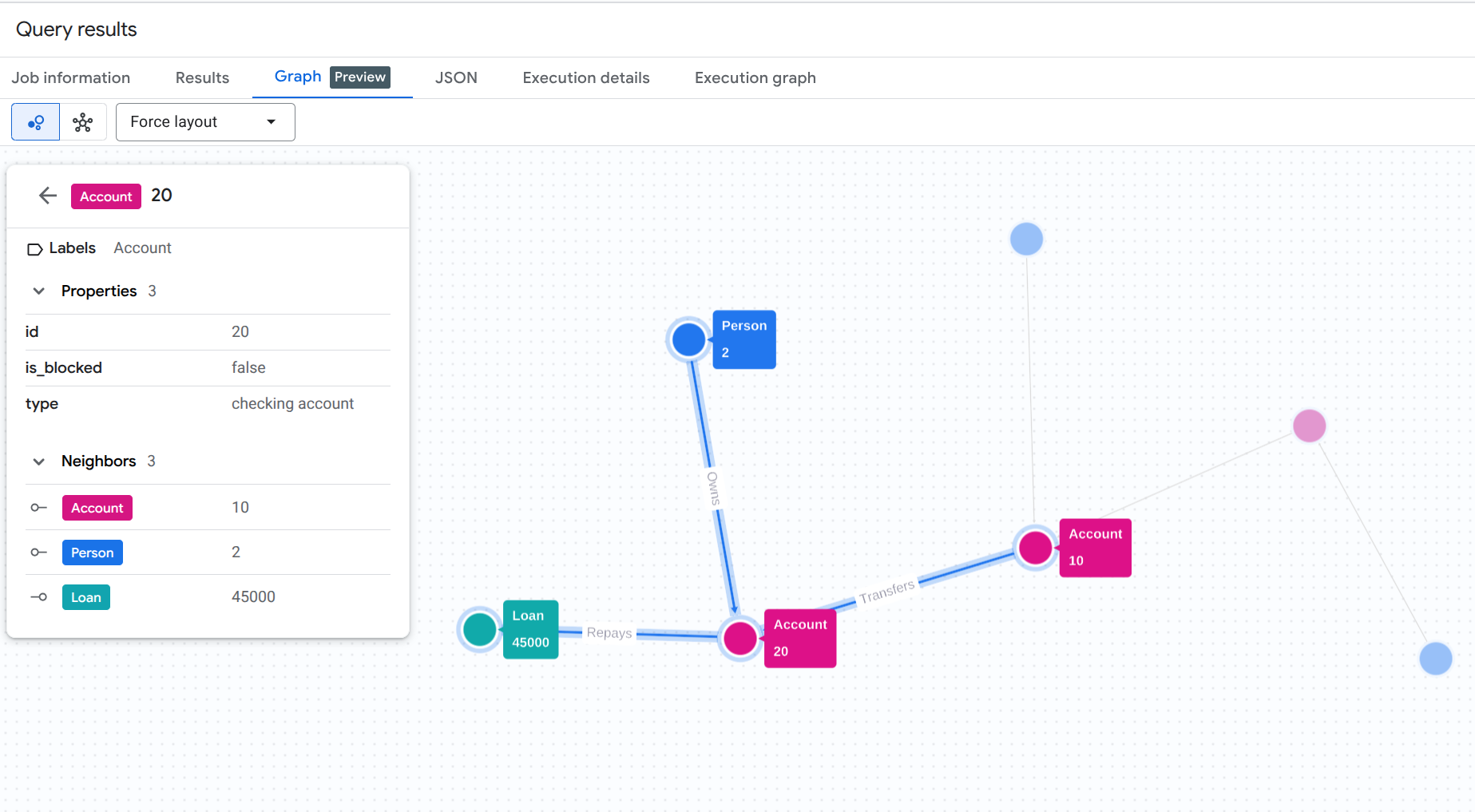
Para entender visualmente o rastro de lavagem de dinheiro que acabamos de descobrir de forma programática, execute uma consulta de visualização de gráfico no console do BigQuery Studio.
Execute essa consulta no BigQuery Studio. Ative o recurso de visualização de gráfico ou clique na guia "Gráfico", se disponível.
GRAPH `fingraph_rag.FinGraph`
 MATCH
   (p_shell:Person)-[o1:Owns]->(acc_shell:Account)-[t1:Transfers]->(acc_fraud:Account)-[t2:Transfers]->(acc_target:Account)-[r:Repays]->(l:Loan),
   (p_fraud:Person)-[o2:Owns]->(acc_fraud),
   (p_target:Person)-[o3:Owns]->(acc_target)
 WHERE p_target.name = 'Menville' AND p_fraud.name = 'Jacoby' AND p_shell.name = 'Doe'
 RETURN TO_JSON([
  TO_JSON(p_shell), TO_JSON(o1), TO_JSON(acc_shell),
  TO_JSON(t1), TO_JSON(acc_fraud), TO_JSON(p_fraud), TO_JSON(o2),
  TO_JSON(t2), TO_JSON(acc_target), TO_JSON(p_target), TO_JSON(o3),
  TO_JSON(r), TO_JSON(l)
]) AS result;
Essa consulta GQL rastreia todo o caminho do proprietário suspeito da empresa fantasma (Doe) pelo intermediário (Jacoby) até o destino final (Menville) e o pagamento do empréstimo.
Você vai ver um resultado de visualização de gráfico semelhante a este:
11. Limpar
Para evitar cobranças contínuas na sua conta do Google Cloud, exclua os recursos criados durante este codelab.
Exclua o conjunto de dados do BigQuery e a conexão a recursos do Cloud:
# Delete the BigQuery dataset
bq rm -r -f $PROJECT_ID:fingraph_rag

# Delete the BigQuery Cloud Resource Connection
bq rm --connection --location=us vertex_ai_conn
Verifique se os recursos foram excluídos:
bq ls --project_id $PROJECT_ID
bq ls --connection --location=us
12. Parabéns
Parabéns! Você criou um aplicativo RAG e analisou o comportamento dele. Você demonstrou como usar os recursos nativos de pesquisa vetorial e de gráficos do BigQuery para realizar o GraphRAG, detectando um esquema de lavagem de dinheiro sem ETL.
O que você aprendeu
- Como criar um gráfico de propriedades no BigQuery com base em tabelas padrão
- Como gerar e armazenar embeddings de vetores usando o BigQuery ML
- Como combinar travessias de gráficos do BigQuery e pesquisa vetorial em um extrator do LangChain
- Como os LLMs podem sintetizar registros de auditoria semântica com topologia de grafo para reduzir falsos positivos
Próximas etapas
- Conheça a visão geral dos grafos de propriedades do BigQuery
- Teste mais padrões da Graph Query Language (GQL) do BigQuery.