
1. Introduction
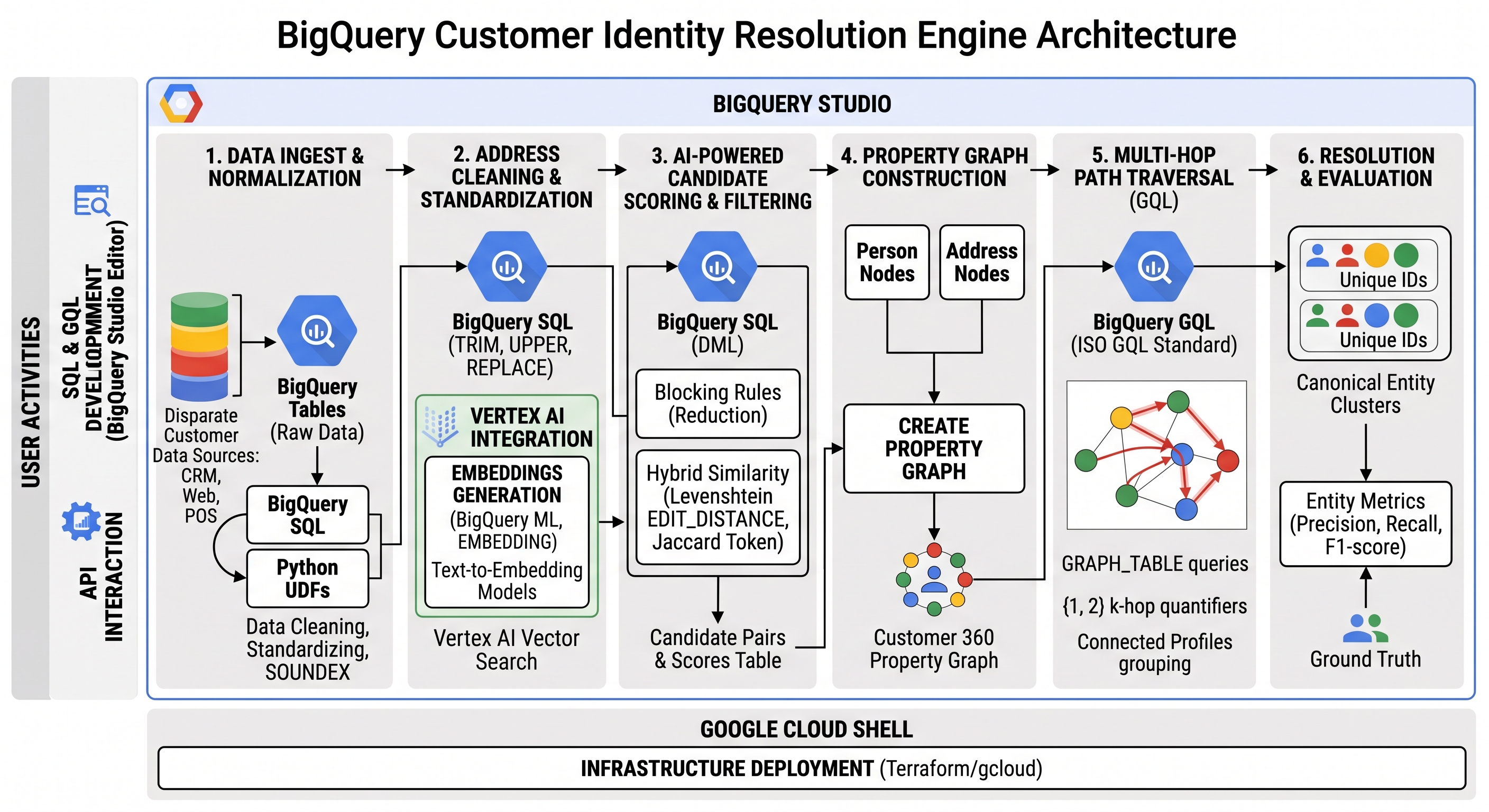
In this codelab, you will build a modular, end-to-end Customer Identity Resolution (Entity Matching) engine directly inside Google Cloud BigQuery. You will combine Google Cloud Shell for infrastructure deployment with the BigQuery Studio SQL Editor for data cleaning, candidate scoring, property graph construction, and ISO GQL (Graph Query Language) path traversals.
Identity resolution is a foundational capability for enterprise Customer 360, fraud detection, and multi-system data consolidation. Because there are many valid approaches to identity resolution depending on data maturity and business needs, all steps in this codelab are modular and optional. The pipeline is designed to showcase a variety of common, production-grade industry techniques—including Remote UDF address normalization, Soundex phonetic blocking, semantic vector search (AI.EMBED), hybrid feature scoring, and GQL property graph clustering—so you can selectively adopt the patterns that fit your architecture.
Matching methods and scoring thresholds should be tuned based on your organization's appetite for deterministic vs. probabilistic matching, which is dictated by the target use case. For example, strict compliance, billing, or financial operations typically favor high-precision deterministic rules (such as exact SSN or Tax ID matches) to prevent false linkage, whereas marketing personalization, analytics, and recommendation engines often lean into probabilistic fuzzy matching and semantic vector similarity to maximize recall and uncover subtle connections.
What you'll do
- Ingest FEBRL3 Benchmark Dataset: Load synthetic customer records and ground truth match pairs into BigQuery.
- Deploy Address Validation Remote UDF: Deploy a Python Cloud Function and register a BigQuery Remote Function to normalize street addresses.
- Preprocess Profile Data & Phonetic Encodings: Execute SQL data cleaning, invoke the address UDF, and compute
SOUNDEXphonetic keys and Levenshtein edit distances:- Soundex Phonetic Encoding: A phonetic algorithm for indexing names by sound as pronounced in English. It converts names into a 4-character code (an initial letter followed by three digits) representing consonant sound groups (e.g., both
"John"and"Jon"map toJ500, while"Smith"and"Smyth"map toS530), providing phonetic matching signals for feature scoring and real-time incremental delta blocking. - Levenshtein Distance (
EDIT_DISTANCE): A string metric measuring the minimum number of single-character edits (insertions, deletions, or substitutions) required to change one string into another, enabling precise fuzzy name and address matching.
- Soundex Phonetic Encoding: A phonetic algorithm for indexing names by sound as pronounced in English. It converts names into a 4-character code (an initial letter followed by three digits) representing consonant sound groups (e.g., both
- Generate Semantic Profile Embeddings & Vector Search: Generate text embeddings directly in SQL using
AI.EMBED(text-embedding-005) and find top-K nearest neighbors usingVECTOR_SEARCHto serve as a sub-linear candidate generation layer. - Candidate Pair Scoring & Hybrid Edge Feature Fusion: Leverage vector search candidate pairs to eliminate O(N²) cross-join complexity, compute multi-feature weighted similarity scores (SSN, Levenshtein edit distance, DOB, address Jaccard), and fuse edges into a unified candidate table.
- Property Graph Construction & ISO GQL Path Traversals: Construct a BigQuery
PROPERTY GRAPH, run ISO GQL{1, 2}path queries (GRAPH_TABLE) to resolve connected customer clusters, compute individual evaluation metrics, and perform soft household clustering using Adamic-Adar graph weighting. - Incremental Resolution & Persistent Stability: Process daily batch intakes with incremental delta matching.
- Clustering Consolidation & Cluster Stability (1-ε Overlap): Enforce persistent cluster stability across pipeline runs using a (1-ε) overlap threshold guarantee.
What you'll need
- A web browser such as Chrome.
- A Google Cloud project with billing enabled.
This codelab is designed for data engineers, database developers, and AI/ML practitioners of all levels, including beginners.
Estimated Duration: 45 minutes
Estimated Cost: Less than $2.00 USD (uses pay-as-you-go Cloud Functions and BigQuery query processing).
2. Before you begin
Create a Google Cloud Project
- In the Google Cloud Console, on the project selector page, select or create a Google Cloud project.
- Make sure that billing is enabled for your Cloud project. Learn how to check if billing is enabled on a project.
Start Cloud Shell
Cloud Shell is a command-line environment running in Google Cloud that comes preloaded with necessary tools.
- Click Activate Cloud Shell at the top of the Google Cloud console.
- Verify your authentication:
gcloud auth list
- Configure environment variables in Cloud Shell:
export GCP_PROJECT=$(gcloud config get-value project)
export REGION="us-central1"
export DATASET_ID="identity_resolution"
Enable Required APIs
Run the following command in Cloud Shell using your user account to enable all required Google Cloud services:
gcloud services enable \
  addressvalidation.googleapis.com \
  cloudbuild.googleapis.com \
  cloudfunctions.googleapis.com \
  cloudresourcemanager.googleapis.com \
  artifactregistry.googleapis.com \
  aiplatform.googleapis.com \
  run.googleapis.com \
  bigqueryconnection.googleapis.com \
  bigqueryreservation.googleapis.com \
  bigquery.googleapis.com
Setup Service Account & Impersonation (Recommended)
To ensure seamless API execution and Application Default Credentials (ADC) access, create a dedicated lab Service Account and enable gcloud impersonation:
# 1. Create a Service Account for the lab (if it does not already exist)
gcloud iam service-accounts create identity-res-sa \
  --display-name="Identity Resolution Service Account" 2>/dev/null || true

# Wait 5 seconds for IAM propagation
sleep 5

# Extract Project Number for default build and compute service accounts
export PROJECT_NUMBER=$(gcloud projects describe ${GCP_PROJECT} --format="value(projectNumber)")

# 2. Grant specific required least-privilege roles to the lab Service Account
for role in roles/bigquery.admin \
            roles/bigquery.resourceAdmin \
            roles/run.admin \
            roles/cloudfunctions.admin \
            roles/resourcemanager.projectIamAdmin \
            roles/cloudbuild.builds.editor \
            roles/cloudbuild.builds.builder \
            roles/artifactregistry.repoAdmin \
            roles/artifactregistry.writer \
            roles/storage.admin \
            roles/logging.logWriter \
            roles/iam.serviceAccountUser \
            roles/aiplatform.user; do
  gcloud projects add-iam-policy-binding ${GCP_PROJECT} \
    --member="serviceAccount:identity-res-sa@${GCP_PROJECT}.iam.gserviceaccount.com" \
    --role="${role}" --quiet
done

# 3. Grant required build & storage permissions to default Compute Engine & Cloud Build service accounts (required for 2nd-gen Cloud Functions container builds)
for role in roles/cloudbuild.builds.builder \
            roles/logging.logWriter \
            roles/artifactregistry.writer \
            roles/storage.objectAdmin; do
  gcloud projects add-iam-policy-binding ${GCP_PROJECT} \
    --member="serviceAccount:${PROJECT_NUMBER}-compute@developer.gserviceaccount.com" \
    --role="${role}" --quiet || true
  gcloud projects add-iam-policy-binding ${GCP_PROJECT} \
    --member="serviceAccount:${PROJECT_NUMBER}@cloudbuild.gserviceaccount.com" \
    --role="${role}" --quiet || true
done

# 4. Grant Service Account Token Creator role to your user account
export SA_EMAIL="identity-res-sa@${GCP_PROJECT}.iam.gserviceaccount.com"

gcloud iam service-accounts add-iam-policy-binding \
  "${SA_EMAIL}" \
  --member="user:$(gcloud config get-value account)" \
  --role="roles/iam.serviceAccountTokenCreator" --quiet

# 5. Enable Service Account impersonation for gcloud
gcloud config set auth/impersonate_service_account "${SA_EMAIL}"

# 6. Wait for IAM role assignments and impersonation caches to propagate
echo "Waiting 90 seconds for IAM policies and impersonation caches to propagate..."
sleep 90
Create BigQuery Dataset
Create the BigQuery dataset to store your customer nodes, edges, graph models, and evaluation views:
bq mk --location=US --dataset ${GCP_PROJECT}:${DATASET_ID}
You should see output similar to:
Dataset 'your-project-id:identity_resolution' successfully created.
Create BigQuery Reservation & Assignment
To run GQL queries, you must have a reservation that uses the Enterprise or Enterprise Plus edition, create an Enterprise Edition reservation with autoscaling in Cloud Shell:
# 1. Create a BigQuery Enterprise reservation with 0 baseline slots and 100 max autoscaling slots
bq mk --reservation \
  --project_id=${GCP_PROJECT} \
  --location=US \
  --edition=ENTERPRISE \
  --slots=0 \
  --autoscale_max_slots=100 \
  --ignore_idle_slots=true \
  identity-res-reservation

# 2. Assign your Cloud project to the newly created reservation for query execution
bq mk --reservation_assignment \
  --project_id=${GCP_PROJECT} \
  --location=US \
  --reservation_id=identity-res-reservation \
  --job_type=QUERY \
  --assignee_type=PROJECT \
  --assignee_id=${GCP_PROJECT}
3. Ingest FEBRL3 Customer Node Dataset
Before deploying the address validation remote function and performing identity resolution, you will load the synthetic FEBRL3 entity resolution benchmark dataset (which contains 5,000 customer records with multi-duplicate clusters of up to 5 duplicates per customer) using Python's recordlinkage library and write the raw customer nodes (customer_nodes) and ground truth match links (ground_truth_links) to BigQuery using BigQuery DataFrames (bigframes).
Run the following commands in Cloud Shell to install dependencies and execute the ingestion script:
# 1. Install recordlinkage dataset library & bigframes (if outside Cloud Shell, activate your virtual environment first)
pip install recordlinkage bigframes --quiet

# 2. Write and execute the FEBRL3 dataset ingestion script
cat << 'EOF' > ingest_febrl.py
import os
import pandas as pd
import bigframes.pandas as bpd
from recordlinkage.datasets import load_febrl3

GCP_PROJECT = os.environ.get("GCP_PROJECT", "your-project-id")
DATASET_ID = "identity_resolution"

table_raw_id = f"{GCP_PROJECT}.{DATASET_ID}.customer_nodes"
table_gt_id = f"{GCP_PROJECT}.{DATASET_ID}.ground_truth_links"

print("Loading FEBRL3 benchmark dataset...")
df_nodes, true_links = load_febrl3(return_links=True)
df_nodes = df_nodes.reset_index()
df_nodes['dataset_source'] = 'febrl3'

for col in df_nodes.columns:
    if df_nodes[col].dtype == 'object':
        df_nodes[col] = df_nodes[col].fillna('')

print("Ingesting raw customer nodes into BigQuery via BigQuery DataFrames...")
bf_nodes = bpd.read_pandas(df_nodes)
bf_nodes.to_gbq(table_raw_id, if_exists="replace")

print("Ingesting ground truth links into BigQuery via BigQuery DataFrames...")
df_gt = pd.DataFrame(list(true_links), columns=["source_id", "target_id"])
bf_gt = bpd.read_pandas(df_gt)
bf_gt.to_gbq(table_gt_id, if_exists="replace")

print(f"Raw customer nodes ingested into `{table_raw_id}` ({len(df_nodes):,} rows).")
print(f"Ground truth links ingested into `{table_gt_id}` ({len(df_gt):,} pairs).")
EOF

python3 ingest_febrl.py
In the Google Cloud Console, navigate to BigQuery Studio, open a new SQL query tab (+), and run the query below to inspect the ingested customer nodes table:
SELECT rec_id, given_name, surname, street_number, address_1, address_2, suburb, postcode, state, date_of_birth, soc_sec_id, dataset_source
FROM `identity_resolution.customer_nodes`
LIMIT 5;
You should see output similar to:
rec_id | given_name | surname | street_number | address_1 | address_2 | suburb | postcode | state | date_of_birth | soc_sec_id | dataset_source |
|
|
|
|
|
|
|
|
|
|
|
|
|
|
|
|
|
|
|
|
|
|
| |
|
|
|
|
|
|
|
|
|
|
| |
|
|
|
|
|
|
|
|
|
| ||
|
|
|
|
|
|
|
|
|
|
|
|
Notice how the benchmark dataset introduces realistic dirty data across duplicate clusters:
- Phonetic & spelling variations:
brentvs.brnt/bernt,woodvs.woode/wod, andcliftonvs.cliffton. - Address abbreviations & typos:
girdlestone circuitvs.girdelstone circut/girdlestone cir/girdlestone crt, and house number11vs. OCR error15. - Character transpositions & missing values: Date of birth transpositions (
19340706vs.19340760), missing states ( ), and missing Social Security IDs ( ).
In the upcoming steps, you will use SOUNDEX phonetic encodings, address normalization UDFs, Levenshtein edit distance, and AI.EMBED vector search to bridge these discrepancies and accurately link duplicate profiles.
4. Deploy Address Validation Remote Function UDF
Address normalization standardizes street names, suburban boundaries, and postal codes before performing matching. The Google Maps Address Validation API is a service that accepts an address, identifies address components, and validates them. In this step, you will deploy a Python Cloud Function in Cloud Shell that exposes an address validation and normalization UDF to BigQuery.
Write Cloud Function Source Files
Run the following command in Cloud Shell to create the Cloud Function source directory and write main.py and requirements.txt:
mkdir -p cloud_function_address_validation && cd cloud_function_address_validation

cat << 'EOF' > main.py
import os
import json
import logging
import requests
from functools import lru_cache
from concurrent.futures import ThreadPoolExecutor

import functions_framework
import google.auth
from google.auth.transport.requests import AuthorizedSession
from requests.adapters import HTTPAdapter
from urllib3.util import Retry

ADDRESS_VALIDATION_URL = "https://addressvalidation.googleapis.com/v1:validateAddress"
ENABLE_ADDRESS_VALIDATION_API = os.environ.get("ENABLE_ADDRESS_VALIDATION_API", "false").lower() == "true"

# ==========================================
# GLOBAL INITIALIZATION (Runs once per Cold Start)
# ==========================================

credentials, _ = google.auth.default(scopes=["https://www.googleapis.com/auth/cloud-platform"])
session = AuthorizedSession(credentials)

retries = Retry(
    total=4,
    backoff_factor=0.5,
    status_forcelist=[429, 500, 502, 503, 504],
    allowed_methods=["POST"]
)
adapter = HTTPAdapter(max_retries=retries, pool_connections=100, pool_maxsize=100)
session.mount("https://", adapter)

executor = ThreadPoolExecutor(max_workers=50)


@lru_cache(maxsize=10000)
def call_validation_api(address_text: str) -> str:
    payload = {
        "address": {
            "regionCode": "AU",
            "addressLines": [address_text]
        }
    }

    response = session.post(ADDRESS_VALIDATION_URL, json=payload, timeout=10)
    response.raise_for_status()

    res_data = response.json()
    result = res_data.get('result', {})
    address_obj = result.get('address', {})
    verdict = result.get('verdict', {})

    formatted = address_obj.get('formattedAddress', address_text).lower()
    has_unconfirmed = verdict.get('hasUnconfirmedComponents', True)
    address_complete = verdict.get('addressComplete', False)
    granularity = verdict.get('validationGranularity', 'UNCONFIRMED')
    actions = verdict.get('possibleNextActions', [])
    next_action = str(actions[0]) if actions else "NONE"

    is_valid = bool(address_complete and not has_unconfirmed)

    return {
        "formatted_address": formatted,
        "address_is_valid": is_valid,
        "validation_granularity": granularity,
        "possible_next_action": next_action
    }


def process_single_call(call):
    call = call or []
    padded = (call + [""] * 6)[:6]

    cleaned_parts = [str(p).strip() if p is not None else "" for p in padded]
    street_num, addr_1, addr_2, suburb, state, postcode = cleaned_parts

    address_parts = [p for p in cleaned_parts if p]
    address_text = " ".join(address_parts)

    if not address_text:
        return {
            "formatted_address": "",
            "address_is_valid": False,
            "validation_granularity": "EMPTY",
            "possible_next_action": "NONE"
        }

    if not ENABLE_ADDRESS_VALIDATION_API:
        normalized = (
            address_text.lower()
            .replace("street", "st")
            .replace("road", "rd")
            .replace("place", "pl")
            .replace("avenue", "ave")
            .replace("circuit", "cct")
        )
        return {
            "formatted_address": normalized,
            "address_is_valid": bool(len(address_parts) >= 3),
            "validation_granularity": "PREMISE" if postcode and suburb else "SUBURB",
            "possible_next_action": "NONE"
        }

    try:
        return call_validation_api(address_text)
    except Exception as e:
        logging.error(f"Address Validation API Error for '{address_text}': {str(e)}")
        return {
            "formatted_address": address_text.lower(),
            "address_is_valid": False,
            "validation_granularity": "UNCONFIRMED",
            "possible_next_action": "NONE"
        }


@functions_framework.http
def validate_address_udf(request):
    request_json = request.get_json(silent=True) or {}
    calls = request_json.get('calls', [])

    if not calls:
        return {'replies': []}

    try:
        # executor.map inherently preserves array input order (Strictly required by BigQuery)
        replies = list(executor.map(process_single_call, calls))
        return {'replies': replies}
    except Exception as e:
        logging.error(f"Batch execution failed: {e}")
        return {'errorMessage': str(e)}, 400
EOF

cat << 'EOF' > requirements.txt
functions-framework==3.*
requests==2.*
google-auth==2.*
urllib3==2.*
EOF
Deploy Cloud Function & Configure IAM Permissions
Execute these commands in Cloud Shell to deploy the 2nd-gen Cloud Function and configure a BigQuery Cloud Resource Connection:
# 1. Deploy 2nd-Gen Cloud Function
gcloud functions deploy validate_address_udf \
  --gen2 \
  --runtime=python311 \
  --region=${REGION} \
  --source=. \
  --entry-point=validate_address_udf \
  --trigger-http \
  --no-allow-unauthenticated \
  --memory=512Mi \
  --cpu=1 \
  --concurrency=80 \
  --quiet

# 2. Extract Function Endpoint URI
export FUNCTION_URL=$(gcloud functions describe validate_address_udf --region=${REGION} --gen2 --format="value(serviceConfig.uri)")

# 3. Create BigQuery Cloud Resource Connection
bq mk --connection --location=US --project_id=${GCP_PROJECT} --connection_type=CLOUD_RESOURCE address_val_conn || true

# 4. Extract Connection Service Account Email
export BQ_SA_EMAIL=$(bq show --format=prettyjson --connection US.address_val_conn | grep -o '"serviceAccountId": "[^"]*"' | cut -d'"' -f4)

# 5. Bind Cloud Run Invoker and Vertex AI User IAM Roles to BigQuery Connection Service Account
gcloud run services add-iam-policy-binding validate-address-udf \
  --region=${REGION} \
  --member="serviceAccount:${BQ_SA_EMAIL}" \
  --role="roles/run.invoker" --quiet

gcloud projects add-iam-policy-binding ${GCP_PROJECT} \
  --member="serviceAccount:${BQ_SA_EMAIL}" \
  --role="roles/aiplatform.user" --quiet

# 6. Wait for connection IAM policy propagation
echo "Waiting 60 seconds for BigQuery connection IAM policy to propagate..."
sleep 60
You should see output indicating that the Cloud Function deployment completed and IAM bindings were applied successfully.
Register Remote Address Normalization Function
You will now register the BigQuery Remote Function DDL (validate_address_udf) that connects BigQuery table rows to your deployed Cloud Function endpoint (${FUNCTION_URL}).
Run the following command in Cloud Shell to retrieve your deployed Cloud Function URL and register the Remote Function automatically:
# 1. Retrieve deployed Cloud Function URL
export FUNCTION_URL=$(gcloud functions describe validate_address_udf --region=${REGION:-us-central1} --gen2 --format="value(serviceConfig.uri)")

# 2. Register Remote Function DDL in BigQuery
bq query --use_legacy_sql=false \
"CREATE OR REPLACE FUNCTION \`${GCP_PROJECT}.${DATASET_ID}.validate_address_udf\`(
  street_number STRING,
  address_1 STRING,
  address_2 STRING,
  suburb STRING,
  state STRING,
  postcode STRING
) RETURNS JSON
REMOTE WITH CONNECTION \`us.address_val_conn\`
OPTIONS (
  endpoint = '${FUNCTION_URL}',
  max_batching_rows = 100
);"
5. Preprocess Profile Data & Phonetic Encodings
In this step, you will execute a BigQuery SQL preprocessing query over your ingested customer_nodes table.
Execute Data Cleaning & Phonetic Feature Query
In BigQuery Studio SQL Editor, run the query below to create customer_nodes_cleaned. This query:
- Calls
validate_address_udfto obtain normalized addresses and validation verdicts. - Generates
SOUNDEXphonetic encodings forgiven_nameandsurnameto handle spelling variations. - Constructs a structured
profile_textfield.
CREATE OR REPLACE TABLE `identity_resolution.customer_nodes_cleaned` AS
WITH raw_data AS (
  SELECT
    rec_id, dataset_source,
    TRIM(LOWER(given_name)) AS given_name_clean,
    TRIM(LOWER(surname)) AS surname_clean,
    `identity_resolution.validate_address_udf`(street_number, address_1, address_2, suburb, state, postcode) AS addr_json,
    TRIM(suburb) AS suburb, TRIM(state) AS state, TRIM(postcode) AS postcode,
    TRIM(date_of_birth) AS date_of_birth, TRIM(soc_sec_id) AS soc_sec_id
  FROM `identity_resolution.customer_nodes`
)
SELECT
  rec_id, dataset_source,
  given_name_clean AS given_name,
  SOUNDEX(given_name_clean) AS given_name_soundex,
  surname_clean AS surname,
  SOUNDEX(surname_clean) AS surname_soundex,
  CONCAT(given_name_clean, ' ', surname_clean) AS full_name,
  STRING(addr_json.formatted_address) AS formatted_address,
  BOOL(addr_json.address_is_valid) AS address_is_valid,
  STRING(addr_json.validation_granularity) AS validation_granularity,
  STRING(addr_json.possible_next_action) AS possible_next_action,
  suburb, state, postcode, date_of_birth, soc_sec_id,
  CONCAT('Name: ', CONCAT(given_name_clean, ' ', surname_clean), '; Address: ', STRING(addr_json.formatted_address), '; DOB: ', date_of_birth, '; SSN: ', soc_sec_id) AS profile_text
FROM raw_data;
Query the cleaned nodes table:
SELECT rec_id, given_name, given_name_soundex, surname, surname_soundex, formatted_address
FROM `identity_resolution.customer_nodes_cleaned`
LIMIT 5;
You should see output similar to:
rec_id | given_name | given_name_soundex | surname | surname_soundex | formatted_address |
|
|
|
|
|
|
|
|
|
|
|
|
|
|
|
|
|
|
6. Generate Semantic Profile Embeddings & Vector Search
In addition to address normalization, Soundex phonetic keys, and Levenshtein edit distance, BigQuery supports built-in generative AI embedding functions via AI.EMBED.
Using AI.EMBED, BigQuery generates text embeddings directly in SQL using foundation models (like text-embedding-005):
Generate Profile Embeddings & Execute Top-K Vector Search
Run the queries below in BigQuery Studio SQL Editor:
-- 1. Generate Customer Profile Embeddings using AI.EMBED (offloaded to Vertex AI)
CREATE OR REPLACE TABLE `identity_resolution.customer_embeddings` AS
SELECT
  rec_id,
  dataset_source,
  profile_text,
  AI.EMBED(profile_text, connection_id => 'us.address_val_conn', endpoint => 'text-embedding-005').result AS text_embedding
FROM `identity_resolution.customer_nodes_cleaned`;

-- 2. Execute VECTOR_SEARCH for Top-K Nearest Neighbors Candidate Generation
CREATE OR REPLACE TABLE `identity_resolution.vector_candidate_edges` AS
SELECT DISTINCT
  LEAST(query.rec_id, base.rec_id) AS source_id,
  GREATEST(query.rec_id, base.rec_id) AS target_id,
  distance AS vector_distance
FROM VECTOR_SEARCH(
  TABLE `identity_resolution.customer_embeddings`,
  'text_embedding',
  TABLE `identity_resolution.customer_embeddings`,
  top_k => 10,
  distance_type => 'COSINE'
)
WHERE query.rec_id != base.rec_id AND distance <= 0.25;
7. Candidate Pair Scoring & Hybrid Edge Feature Fusion
Evaluating all possible customer record pairs (O(N²) quadratic growth) becomes computationally prohibitive as dataset scale grows. In relational database engines like BigQuery, attempting to implement rule-based blocking using complex OR join conditions across multiple columns (such as joining on a.soc_sec_id = b.soc_sec_id OR a.given_name_soundex = b.given_name_soundex OR ...) prevents the query optimizer from using scalable hash joins or sort-merge joins on a single equi-join key. Instead, the engine falls back to an O(N²) cross join and filters each pair, which fails at scale.
In this step, you will take candidate pairs generated by our vector search table (vector_candidate_edges) and join them against customer_nodes_cleaned via fast, indexed equi-joins (ON c.source_id = a.rec_id and ON c.target_id = b.rec_id). Then, you will compute a weighted match score combining:
- SSN Match Score (weight:
0.30) - Surname Edit Similarity using Levenshtein distance
EDIT_DISTANCE(weight:0.20) - Given Name Edit Similarity (weight:
0.20) - DOB Match Score (weight:
0.15) - Address Token Jaccard Similarity (weight:
0.15) overSPLIT(LOWER(formatted_address), ' ')
Compute Candidate Edges & Weighted Similarity Scores
Run the following query in BigQuery Studio SQL Editor to populate matched_edges:
CREATE OR REPLACE TABLE `identity_resolution.matched_edges` AS
WITH candidate_pairs AS (
  SELECT
    c.source_id, c.target_id,
    a.given_name AS a_given_name, b.given_name AS b_given_name,
    a.surname AS a_surname, b.surname AS b_surname,
    a.given_name_soundex AS a_gn_snd, b.given_name_soundex AS b_gn_snd,
    a.surname_soundex AS a_sn_snd, b.surname_soundex AS b_sn_snd,
    a.date_of_birth AS a_dob, b.date_of_birth AS b_dob,
    a.soc_sec_id AS a_ssn, b.soc_sec_id AS b_ssn,
    SPLIT(LOWER(a.formatted_address), ' ') AS a_tokens,
    SPLIT(LOWER(b.formatted_address), ' ') AS b_tokens
  FROM `identity_resolution.vector_candidate_edges` c
  JOIN `identity_resolution.customer_nodes_cleaned` a ON c.source_id = a.rec_id
  JOIN `identity_resolution.customer_nodes_cleaned` b ON c.target_id = b.rec_id
),
scored_pairs AS (
  SELECT
    source_id, target_id,
    CASE WHEN a_ssn = b_ssn AND a_ssn != '' THEN 1.0 ELSE 0.0 END AS ssn_match,
    CASE WHEN a_dob = b_dob THEN 1.0 ELSE 0.0 END AS dob_match,
    CASE WHEN a_gn_snd = b_gn_snd THEN 1.0 ELSE 0.0 END AS given_name_soundex_match,
    CASE WHEN a_sn_snd = b_sn_snd THEN 1.0 ELSE 0.0 END AS surname_soundex_match,
    GREATEST(
      (1.0 - (EDIT_DISTANCE(a_given_name, b_given_name) / GREATEST(LENGTH(a_given_name), LENGTH(b_given_name), 1))),
      (1.0 - (EDIT_DISTANCE(a_given_name, b_surname) / GREATEST(LENGTH(a_given_name), LENGTH(b_surname), 1)))
    ) AS given_name_edit_sim,
    GREATEST(
      (1.0 - (EDIT_DISTANCE(a_surname, b_surname) / GREATEST(LENGTH(a_surname), LENGTH(b_surname), 1))),
      (1.0 - (EDIT_DISTANCE(a_surname, b_given_name) / GREATEST(LENGTH(a_surname), LENGTH(b_given_name), 1)))
    ) AS surname_edit_sim,
    (
      (SELECT COUNT(DISTINCT t) FROM UNNEST(a_tokens) t JOIN UNNEST(b_tokens) t2 ON t = t2)
      /
      GREATEST(1.0, (SELECT COUNT(DISTINCT t) FROM UNNEST(ARRAY_CONCAT(a_tokens, b_tokens)) t))
    ) AS address_jaccard_sim
  FROM candidate_pairs
)
SELECT
  source_id, target_id,
  ROUND((0.30 * ssn_match) + (0.20 * surname_edit_sim) + (0.20 * given_name_edit_sim) + (0.15 * dob_match) + (0.15 * address_jaccard_sim), 4) AS match_score
FROM scored_pairs
WHERE ((0.30 * ssn_match) + (0.20 * surname_edit_sim) + (0.20 * given_name_edit_sim) + (0.15 * dob_match) + (0.15 * address_jaccard_sim)) >= 0.55;
Inspect the candidate edge matches:
SELECT source_id, target_id, match_score
FROM `identity_resolution.matched_edges`
ORDER BY match_score DESC;
You should see output similar to:
source_id | target_id | match_score |
|
|
|
|
|
|
|
|
|
Fuse Rule-Based and Vector Search Edges into Unified Table
Combine candidate edges from rule-based fuzzy matching and semantic vector search into a single, deduplicated final_matched_edges table:
CREATE OR REPLACE TABLE `identity_resolution.final_matched_edges` AS
SELECT
  source_id,
  target_id,
  MAX(edge_weight) AS edge_weight,
  IF(COUNT(DISTINCT edge_type) > 1, 'HYBRID', MAX(edge_type)) AS edge_type
FROM (
  SELECT source_id, target_id, match_score AS edge_weight, 'RULE_BASED' AS edge_type
  FROM `identity_resolution.matched_edges`
  UNION ALL
  SELECT source_id, target_id, ROUND(1.0 - vector_distance, 4) AS edge_weight, 'VECTOR_SEARCH' AS edge_type
  FROM `identity_resolution.vector_candidate_edges`
  WHERE vector_distance <= 0.08
)
GROUP BY source_id, target_id;
8. Property Graph Construction & ISO GQL Path Traversals
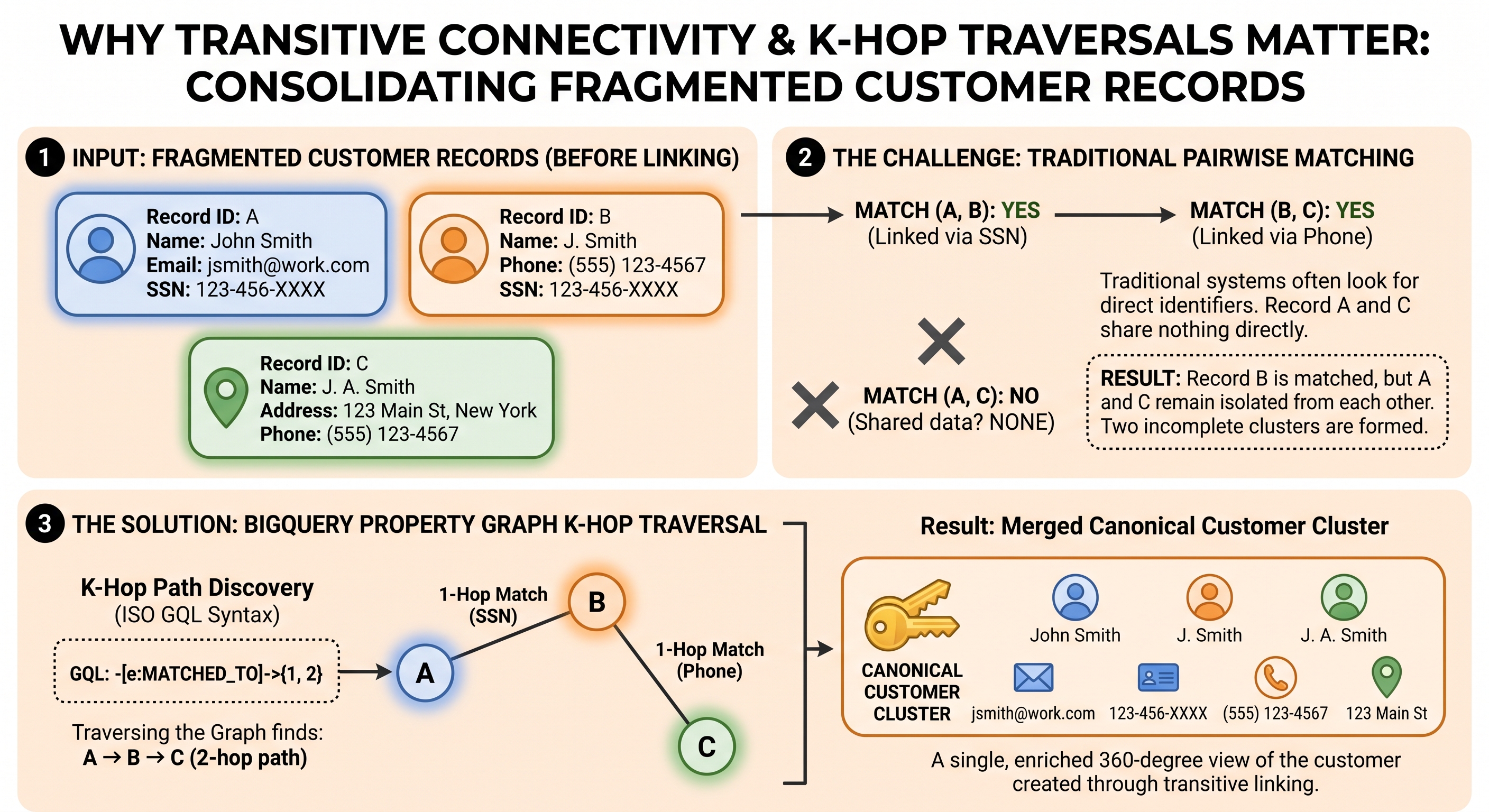
BigQuery supports ISO GQL (Graph Query Language) natively via Property Graphs. A Property Graph creates a logical graph view over relational BigQuery tables without data duplication.
In this step, you will build a property graph customer_identity_graph using your unified candidate edge table (final_matched_edges) and query graph connections across customer profiles using {1, 2} k-hop path traversal.
Create BigQuery Property Graph DDL
Execute the following DDL statement in BigQuery Studio SQL Editor:
CREATE OR REPLACE PROPERTY GRAPH `identity_resolution.customer_identity_graph`
NODE TABLES (
  `identity_resolution.customer_nodes_cleaned` AS `Customer`
  KEY (rec_id)
)
EDGE TABLES (
  `identity_resolution.final_matched_edges`
  KEY (source_id, target_id)
  SOURCE KEY (source_id) REFERENCES `Customer`(rec_id)
  DESTINATION KEY (target_id) REFERENCES `Customer`(rec_id)
  LABEL MATCHED_TO
);
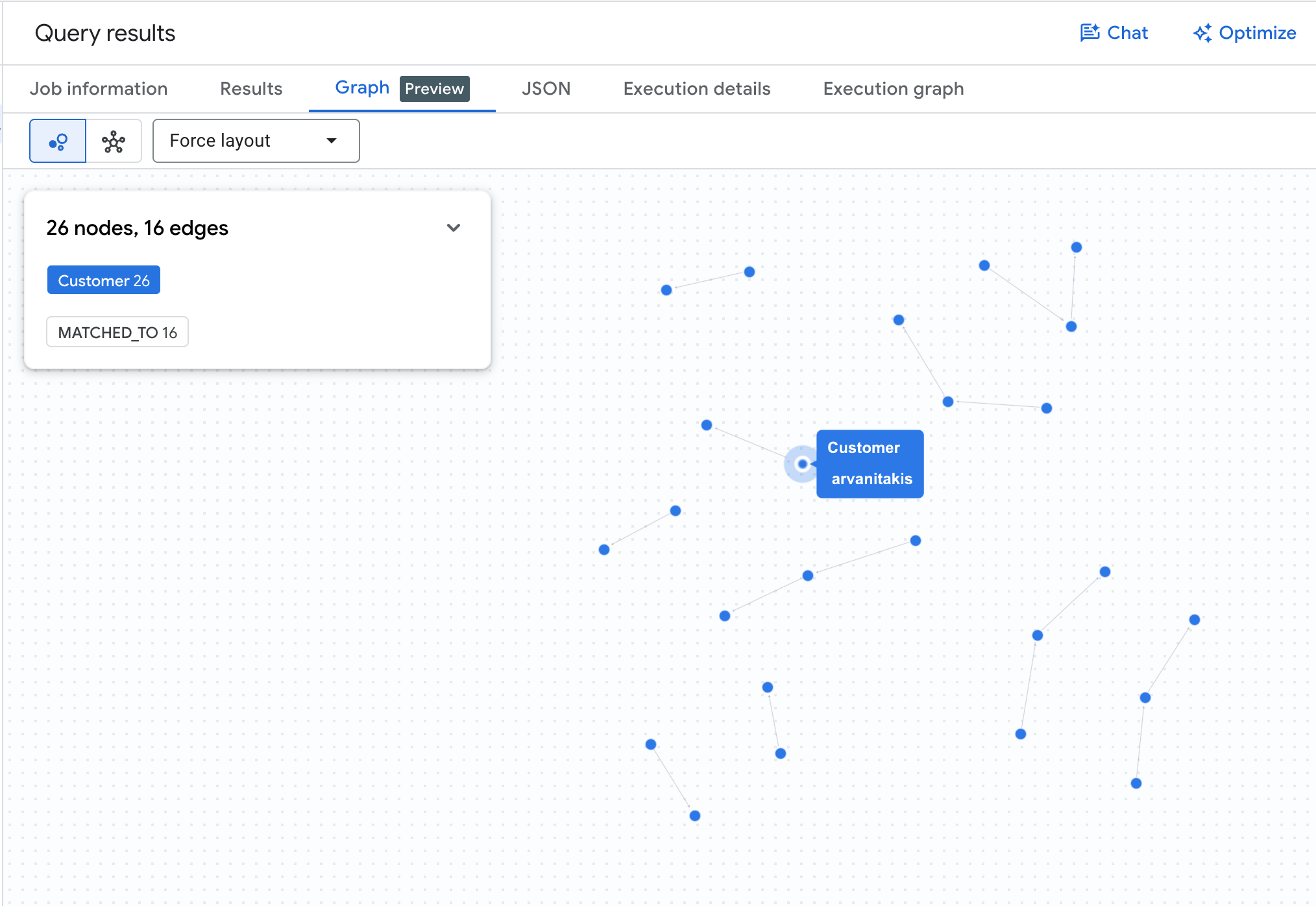
Visualize K-Hop Graph Clusters
Run the query below to visualize matching customer clusters across 1 to 2 relationship hops:
GRAPH `identity_resolution.customer_identity_graph`
MATCH p = (c1:Customer)-[e:MATCHED_TO]->{1, 2}(c2:Customer)
RETURN TO_JSON(p) AS graph_cluster_path
LIMIT 10;
Resolve Canonical Customer Clusters
Execute the following query to resolve entity clusters into resolved_customers:
CREATE OR REPLACE TABLE `identity_resolution.resolved_customers` AS
WITH graph_paths AS (
  SELECT
    source_node_id, target_node_id
  FROM GRAPH_TABLE(
    `identity_resolution.customer_identity_graph`
    MATCH (c1:Customer)-[e:MATCHED_TO]->{1, 2}(c2:Customer)
    COLUMNS (c1.rec_id AS source_node_id, c2.rec_id AS target_node_id)
  )
),
all_connections AS (
  SELECT source_node_id AS node_id, target_node_id AS connected_id FROM graph_paths
  UNION DISTINCT
  SELECT target_node_id AS node_id, source_node_id AS connected_id FROM graph_paths
  UNION DISTINCT
  SELECT rec_id AS node_id, rec_id AS connected_id FROM `identity_resolution.customer_nodes_cleaned`
),
clusters AS (
  SELECT
    node_id,
    MIN(connected_id) AS canonical_customer_id
  FROM all_connections
  GROUP BY node_id
)
SELECT
  canonical_customer_id,
  ARRAY_AGG(node_id) AS customer_records,
  COUNT(node_id) AS record_count
FROM clusters
GROUP BY canonical_customer_id;
Query the resolved clusters table:
SELECT canonical_customer_id, record_count, customer_records
FROM `identity_resolution.resolved_customers`
ORDER BY record_count DESC;
You should see output similar to:
canonical_customer_id | record_count | customer_records |
|
|
|
|
|
|
|
|
|
Create Evaluation Metrics View
aside Cluster-Level Evaluation vs. Direct Edges:
The evaluation metrics below evaluate the accuracy of the resolved customer entities (resolved_customers) by generating all intra-cluster record pairs and comparing them against the individual-level ground truth (ground_truth_links). Evaluating at the cluster level captures the full benefit of ISO GQL graph path resolution (transitive multi-hop linkages), yielding an accurate reflection of end-to-end entity resolution quality.
To compute Precision, Recall, and F1-score against the ground_truth_links table, run:
CREATE OR REPLACE VIEW `identity_resolution.evaluation_metrics` AS
WITH predictions AS (
  -- Generate all pairwise record combinations within each resolved canonical customer cluster
  SELECT
    r1 AS source_id,
    r2 AS target_id
  FROM `identity_resolution.resolved_customers`,
  UNNEST(customer_records) AS r1,
  UNNEST(customer_records) AS r2
  WHERE r1 < r2
),
ground_truth AS (
  SELECT
    LEAST(source_id, target_id) AS source_id,
    GREATEST(source_id, target_id) AS target_id
  FROM `identity_resolution.ground_truth_links`
),
stats AS (
  SELECT
    COUNT(g.source_id) AS total_ground_truth,
    COUNT(p.source_id) AS total_predictions,
    COUNTIF(p.source_id IS NOT NULL AND g.source_id IS NOT NULL) AS true_positives,
    COUNTIF(p.source_id IS NOT NULL AND g.source_id IS NULL) AS false_positives,
    COUNTIF(p.source_id IS NULL AND g.source_id IS NOT NULL) AS false_negatives
  FROM ground_truth g
  FULL OUTER JOIN predictions p ON g.source_id = p.source_id AND g.target_id = p.target_id
)
SELECT
  total_ground_truth, total_predictions, true_positives, false_positives, false_negatives,
  ROUND(true_positives / NULLIF(true_positives + false_positives, 0), 4) AS precision,
  ROUND(true_positives / NULLIF(true_positives + false_negatives, 0), 4) AS recall,
  ROUND(2 * true_positives / NULLIF((2 * true_positives) + false_positives + false_negatives, 0), 4) AS f1_score
FROM stats;
Query the evaluation metrics view:
SELECT * FROM `identity_resolution.evaluation_metrics`;
You should see output similar to:
total_ground_truth | total_predictions | true_positives | false_positives | false_negatives | precision | recall | f1_score |
|
|
|
|
|
|
|
|
Resolve Household Clusters via Adamic-Adar Graph Weighting
While individual identity resolution resolves records belonging to the same person, enterprise Customer 360 architectures often require a higher-level Household Entity grouping co-resident individuals sharing an address.
Because synthetic benchmarks (like FEBRL3) evaluate individual-level ground truth, household resolution is performed as an downstream step. In the absence of timestamped relocation history, individuals linked to multiple addresses could cause over-merging or cluster fragmentation. To resolve this, we use Adamic-Adar Graph Weighting to construct soft household memberships.
Run the query below in BigQuery Studio SQL Editor to populate household_clusters using Adamic-Adar graph weighting:
CREATE OR REPLACE TABLE `identity_resolution.household_clusters` AS
WITH customer_addresses AS (
  SELECT DISTINCT
    r.canonical_customer_id,
    c.formatted_address
  FROM `identity_resolution.resolved_customers` r,
  UNNEST(r.customer_records) AS rec_id
  JOIN `identity_resolution.customer_nodes_cleaned` c ON rec_id = c.rec_id
  WHERE c.formatted_address IS NOT NULL AND c.formatted_address != ''
),
-- Adamic-Adar Exclusivity Weighting: 1.0 / LN(GREATEST(degree, 2))
address_degrees AS (
  SELECT
    formatted_address,
    COUNT(DISTINCT canonical_customer_id) AS address_degree,
    1.0 / LN(GREATEST(COUNT(DISTINCT canonical_customer_id), 2)) AS address_exclusivity_weight
  FROM customer_addresses
  GROUP BY formatted_address
),
customer_household_affinity AS (
  SELECT
    ca.canonical_customer_id,
    ca.formatted_address AS household_address,
    ad.address_degree,
    ad.address_exclusivity_weight AS raw_household_affinity
  FROM customer_addresses ca
  JOIN address_degrees ad ON ca.formatted_address = ad.formatted_address
),
ranked_households AS (
  SELECT
    canonical_customer_id,
    household_address,
    address_degree AS total_residents,
    ROUND(
      COALESCE(SAFE_DIVIDE(raw_household_affinity, SUM(raw_household_affinity) OVER(PARTITION BY canonical_customer_id)), 1.0),
      4
    ) AS household_membership_weight,
    ROW_NUMBER() OVER(PARTITION BY canonical_customer_id ORDER BY raw_household_affinity DESC) AS household_rank
  FROM customer_household_affinity
)
SELECT
  CONCAT('hh-', ABS(FARM_FINGERPRINT(household_address))) AS canonical_household_id,
  canonical_customer_id,
  household_address,
  total_residents,
  household_membership_weight,
  household_rank
FROM ranked_households;
Query the resolved household clusters table:
SELECT canonical_household_id, canonical_customer_id, household_address, total_residents, household_membership_weight, household_rank
FROM `identity_resolution.household_clusters`
ORDER BY total_residents DESC;
Visualize End-to-End Identity Hierarchy via GQL
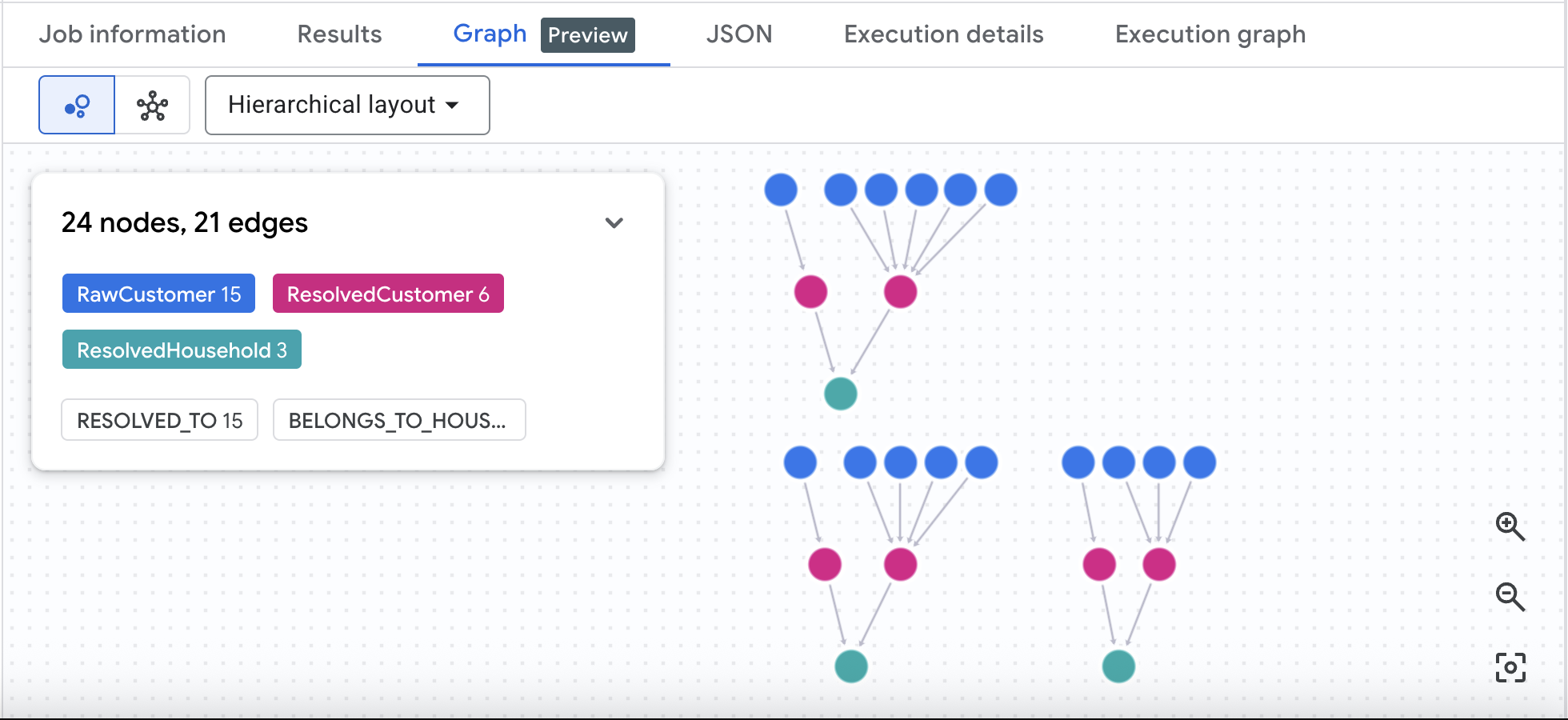
To visually trace the complete 3-tier identity hierarchy—connecting un-clustered Raw Customers to resolved Customer Entities, and onwards to resolved Household Entities—first create the supporting node and edge tables and update the property graph DDL:
-- 1. Create Household Node Table
CREATE OR REPLACE TABLE `identity_resolution.household_nodes` AS
SELECT DISTINCT
  canonical_household_id,
  household_address,
  total_residents
FROM `identity_resolution.household_clusters`;

-- 2. Create Unresolved Record to Resolved Entity Edge Table
CREATE OR REPLACE TABLE `identity_resolution.customer_entity_edges` AS
SELECT DISTINCT
  rec_id,
  canonical_customer_id
FROM `identity_resolution.resolved_customers`,
UNNEST(customer_records) AS rec_id;

-- 3. Create Primary Household Edge Table (Highest Weighted Household Rank = 1)
CREATE OR REPLACE TABLE `identity_resolution.primary_household_edges` AS
SELECT
  canonical_customer_id,
  canonical_household_id,
  household_membership_weight,
  household_rank
FROM `identity_resolution.household_clusters`
WHERE household_rank = 1;

-- 4. Update Unified Property Graph DDL
CREATE OR REPLACE PROPERTY GRAPH `identity_resolution.customer_identity_graph`
NODE TABLES (
  `identity_resolution.customer_nodes_cleaned` AS `RawCustomer`
    KEY (rec_id),
  `identity_resolution.resolved_customers` AS `ResolvedCustomer`
    KEY (canonical_customer_id),
  `identity_resolution.household_nodes` AS `ResolvedHousehold`
    KEY (canonical_household_id)
)
EDGE TABLES (
  `identity_resolution.final_matched_edges`
    KEY (source_id, target_id)
    SOURCE KEY (source_id) REFERENCES `RawCustomer`(rec_id)
    DESTINATION KEY (target_id) REFERENCES `RawCustomer`(rec_id)
    LABEL MATCHED_TO,
  `identity_resolution.customer_entity_edges`
    KEY (rec_id, canonical_customer_id)
    SOURCE KEY (rec_id) REFERENCES `RawCustomer`(rec_id)
    DESTINATION KEY (canonical_customer_id) REFERENCES `ResolvedCustomer`(canonical_customer_id)
    LABEL RESOLVED_TO,
  `identity_resolution.primary_household_edges`
    KEY (canonical_customer_id, canonical_household_id)
    SOURCE KEY (canonical_customer_id) REFERENCES `ResolvedCustomer`(canonical_customer_id)
    DESTINATION KEY (canonical_household_id) REFERENCES `ResolvedHousehold`(canonical_household_id)
    LABEL BELONGS_TO_HOUSEHOLD
);
Execute the 3-tier GQL query below in BigQuery Studio to visualize the multi-resident household hierarchy:
GRAPH `identity_resolution.customer_identity_graph`
MATCH p = (raw:RawCustomer)-[e1:RESOLVED_TO]->(c:ResolvedCustomer)-[e2:BELONGS_TO_HOUSEHOLD]->(h:ResolvedHousehold)
WHERE h.total_residents > 1
RETURN TO_JSON(p) AS multi_resident_household_hierarchy_path
LIMIT 20;
Running this GQL query in BigQuery Studio renders a 3-tier interactive graph visualization canvas showing raw customer profile records (RawCustomer) resolved to individual canonical entities (ResolvedCustomer), which are linked to shared multi-resident household entities (ResolvedHousehold).
9. Incremental Resolution & Persistent Stability
In real-world enterprise applications, new customer records arrive continuously via daily or real-time batch intakes. Rather than re-running full graph resolution over the entire historical dataset, an Incremental Delta Matching Engine compares new incoming records against existing resolved baseline clusters (resolved_customers).
To achieve this efficiently, the engine uses Vector Search (VECTOR_SEARCH) as dynamic clustering. By treating each incoming record as a query point, VECTOR_SEARCH retrieves the set of top-K nearest neighbors from the historical baseline embedding index. If an incoming record matches an existing customer profile above the similarity threshold, it dynamically merges into that cluster and inherits the baseline canonical_customer_id (MATCHED_TO_EXISTING_CLUSTER). If no baseline nearest neighbor is found above the threshold, a new entity UUID is created (NEW_CUSTOMER_ENTITY).
Ingest Sample Incremental Batch Intake Records
Paste and execute the following DDL in BigQuery Studio SQL Editor to create incremental_daily_intake:
CREATE OR REPLACE TABLE `identity_resolution.incremental_daily_intake` AS
SELECT * FROM UNNEST([
  STRUCT(
    'rec-9999-new-1' AS rec_id, 'erin' AS given_name, 'donaldson' AS surname,
    'E650' AS given_name_soundex, 'D543' AS surname_soundex,
    '19810427' AS date_of_birth, '2955815' AS soc_sec_id,
    '13 hawkesbury crescent aralee lewiston 7018' AS formatted_address, '7018' AS postcode
  ),
  STRUCT(
    'rec-9999-new-2' AS rec_id, 'hollie' AS given_name, 'lillie-hinrichs' AS surname,
    'H400' AS given_name_soundex, 'L446' AS surname_soundex,
    '19251130' AS date_of_birth, '4920253' AS soc_sec_id,
    '27 hemmings crescent kilvinton village banyo 4030' AS formatted_address, '4030' AS postcode
  ),
  STRUCT(
    'rec-9999-new-3' AS rec_id, 'sarah' AS given_name, 'ryan' AS surname,
    'S600' AS given_name_soundex, 'R500' AS surname_soundex,
    '20010101' AS date_of_birth, '999999999' AS soc_sec_id,
    '500 market st melbourne vic 3000' AS formatted_address, '3000' AS postcode
  ),
  STRUCT(
    'rec-9999-new-4' AS rec_id, 'zzyzx' AS given_name, 'qx-vonderland' AS surname,
    'Z220' AS given_name_soundex, 'Q215' AS surname_soundex,
    '19991231' AS date_of_birth, '999887766' AS soc_sec_id,
    '9999 zulu orbit station moon-base alpha 9999' AS formatted_address, '9999' AS postcode
  )
]);
Execute Incremental Delta Match Query
Run the following query in BigQuery SQL Editor to perform delta matching against your resolved baseline dataset:
CREATE OR REPLACE TABLE `identity_resolution.incremental_resolved_customers` AS
WITH historical_resolved_base AS (
  SELECT c.rec_id, c.given_name, c.surname, c.given_name_soundex, c.surname_soundex, c.date_of_birth, c.soc_sec_id, c.formatted_address, c.postcode, r.canonical_customer_id
  FROM `identity_resolution.customer_nodes_cleaned` c
  JOIN (
    SELECT canonical_customer_id, node_id
    FROM `identity_resolution.resolved_customers`, UNNEST(customer_records) AS node_id
  ) r ON c.rec_id = r.node_id
),
incremental_intake AS (
  SELECT
    rec_id AS new_rec_id, given_name, surname, given_name_soundex, surname_soundex, date_of_birth, soc_sec_id, formatted_address, postcode,
    CONCAT('Name: ', CONCAT(given_name, ' ', surname), '; Address: ', formatted_address, '; DOB: ', date_of_birth, '; SSN: ', soc_sec_id) AS profile_text
  FROM `identity_resolution.incremental_daily_intake`
),
rule_delta_matches AS (
  SELECT
    i.new_rec_id,
    h.canonical_customer_id AS matched_canonical_id,
    h.rec_id AS matched_baseline_rec_id,
    (
      0.30 * (CASE WHEN i.soc_sec_id = h.soc_sec_id AND i.soc_sec_id != '' THEN 1.0 ELSE 0.0 END) +
      0.20 * (1.0 - (EDIT_DISTANCE(i.surname, h.surname) / GREATEST(LENGTH(i.surname), LENGTH(h.surname), 1))) +
      0.20 * (1.0 - (EDIT_DISTANCE(i.given_name, h.given_name) / GREATEST(LENGTH(i.given_name), LENGTH(h.given_name), 1))) +
      0.15 * (CASE WHEN i.date_of_birth = h.date_of_birth THEN 1.0 ELSE 0.0 END) +
      0.15 * (1.0 - (EDIT_DISTANCE(i.formatted_address, h.formatted_address) / GREATEST(LENGTH(i.formatted_address), LENGTH(h.formatted_address), 1)))
    ) AS match_score
  FROM incremental_intake i
  JOIN historical_resolved_base h
    ON (i.soc_sec_id = h.soc_sec_id AND i.soc_sec_id != '')
    OR (i.date_of_birth = h.date_of_birth AND i.given_name_soundex = h.given_name_soundex)
),
vector_intake_embeddings AS (
  SELECT new_rec_id, AI.EMBED(profile_text, connection_id => 'us.address_val_conn', endpoint => 'text-embedding-005').result AS text_embedding
  FROM incremental_intake
),
vector_delta_matches AS (
  SELECT
    v.query.new_rec_id,
    h.canonical_customer_id AS matched_canonical_id,
    h.rec_id AS matched_baseline_rec_id,
    ROUND(1.0 - v.distance, 4) AS match_score
  FROM VECTOR_SEARCH(
    TABLE `identity_resolution.customer_embeddings`,
    'text_embedding',
    TABLE vector_intake_embeddings,
    top_k => 3,
    distance_type => 'COSINE'
  ) v
  JOIN historical_resolved_base h ON v.base.rec_id = h.rec_id
  WHERE v.distance <= 0.20
),
combined_delta AS (
  SELECT
    new_rec_id, matched_canonical_id, matched_baseline_rec_id, match_score,
    'RULE_BASED' AS match_strategy
  FROM rule_delta_matches WHERE match_score >= 0.55

  UNION ALL

  SELECT
    new_rec_id, matched_canonical_id, matched_baseline_rec_id, match_score,
    'VECTOR_SEARCH' AS match_strategy
  FROM vector_delta_matches
),
aggregated_delta AS (
  SELECT
    new_rec_id,
    matched_canonical_id,
    ARRAY_AGG(matched_baseline_rec_id ORDER BY match_score DESC LIMIT 1)[OFFSET(0)] AS matched_baseline_rec_id,
    MAX(match_score) AS match_score,
    CASE
      WHEN COUNT(DISTINCT match_strategy) > 1 THEN 'BOTH'
      ELSE MAX(match_strategy)
    END AS match_strategy
  FROM combined_delta
  GROUP BY new_rec_id, matched_canonical_id
),
best_matches AS (
  SELECT
    new_rec_id,
    matched_canonical_id,
    matched_baseline_rec_id,
    match_score,
    match_strategy,
    ROW_NUMBER() OVER(PARTITION BY new_rec_id ORDER BY match_score DESC) AS rank
  FROM aggregated_delta
)
SELECT
  i.new_rec_id AS record_id,
  i.given_name, i.surname,
  COALESCE(b.matched_canonical_id, GENERATE_UUID()) AS persistent_canonical_customer_id,
  h.canonical_household_id AS assigned_household_id,
  CASE WHEN b.matched_canonical_id IS NOT NULL THEN 'MATCHED_TO_EXISTING_CLUSTER' ELSE 'NEW_CUSTOMER_ENTITY' END AS assignment_type,
  b.matched_baseline_rec_id,
  b.match_score,
  COALESCE(b.match_strategy, 'NONE') AS match_strategy
FROM incremental_intake i
LEFT JOIN best_matches b ON i.new_rec_id = b.new_rec_id AND b.rank = 1
LEFT JOIN `identity_resolution.primary_household_edges` h ON b.matched_canonical_id = h.canonical_customer_id;
Query the incremental resolution results:
SELECT record_id, persistent_canonical_customer_id, assigned_household_id, assignment_type, match_score, match_strategy
FROM `identity_resolution.incremental_resolved_customers`;
You should see output similar to:
record_id | persistent_canonical_customer_id | assigned_household_id | assignment_type | match_score | match_strategy |
|
|
|
|
|
|
|
|
|
|
|
|
|
|
|
|
|
|
|
|
|
|
|
|
10. Clustering Consolidation & Cluster Stability (1-ε Overlap)
In production enterprise systems, teams typically recluster the entire graph on a recurring basis (e.g. weekly or monthly) to incorporate new edges and data sources. As new relationships form, full graph re-clustering can cause cluster identifiers to shift or flip arbitrarily across pipeline executions.
To maintain persistent customer IDs for downstream CRM, CDP, and billing systems, Cluster Stability evaluates node overlap between current Run (t) clusters and previous Run (t-1) clusters using a (1 - ε) overlap threshold (where ε = 0.30, requiring a minimum 70% node overlap).
If a newly computed cluster in Run (t) shares at least 70% of its member records with a cluster from Run (t-1), it inherits the historical persistent customer ID (STABLE_EVOLUTION). Brand new clusters receive newly generated UUIDs (NEW_CLUSTER_CREATED).
Execute Cluster Overlap & Stability Query
Run the following query in BigQuery Studio SQL Editor to populate stable_resolved_customers:
CREATE OR REPLACE TABLE `identity_resolution.stable_resolved_customers` AS
WITH previous_run_clusters AS (
  SELECT
    canonical_customer_id AS previous_persistent_id,
    node_id,
    COUNT(*) OVER (PARTITION BY canonical_customer_id) AS previous_cluster_size
  FROM `identity_resolution.resolved_customers`, UNNEST(customer_records) AS node_id
),
current_run_clusters AS (
  SELECT
    new_cluster_id,
    node_id,
    COUNT(*) OVER (PARTITION BY new_cluster_id) AS current_cluster_size
  FROM (
    SELECT
      canonical_customer_id AS new_cluster_id,
      node_id
    FROM `identity_resolution.resolved_customers`, UNNEST(customer_records) AS node_id
    UNION ALL
    SELECT
      persistent_canonical_customer_id AS new_cluster_id,
      record_id AS node_id
    FROM `identity_resolution.incremental_resolved_customers`
  )
),
cluster_intersections AS (
  SELECT
    c.new_cluster_id,
    p.previous_persistent_id,
    c.current_cluster_size,
    p.previous_cluster_size,
    COUNT(c.node_id) AS shared_node_count,
    COUNT(c.node_id) / GREATEST(p.previous_cluster_size, 1) AS overlap_fraction
  FROM current_run_clusters c
  JOIN previous_run_clusters p ON c.node_id = p.node_id
  GROUP BY c.new_cluster_id, p.previous_persistent_id, c.current_cluster_size, p.previous_cluster_size
),
best_matching_previous_cluster AS (
  SELECT
    new_cluster_id,
    previous_persistent_id,
    shared_node_count,
    overlap_fraction,
    ROW_NUMBER() OVER (PARTITION BY new_cluster_id ORDER BY overlap_fraction DESC) AS rank
  FROM cluster_intersections
  WHERE overlap_fraction >= 0.70
)
SELECT
  c.new_cluster_id AS raw_cluster_id,
  COALESCE(b.previous_persistent_id, GENERATE_UUID()) AS persistent_canonical_customer_id,
  ARRAY_AGG(c.node_id) AS customer_records,
  COUNT(c.node_id) AS record_count,
  COALESCE(MAX(b.shared_node_count), 0) AS shared_node_count,
  COALESCE(MAX(b.overlap_fraction), 0.0) AS overlap_fraction,
  CASE
    WHEN b.previous_persistent_id IS NOT NULL THEN 'STABLE_EVOLUTION'
    ELSE 'NEW_CLUSTER_CREATED'
  END AS cluster_status
FROM current_run_clusters c
LEFT JOIN best_matching_previous_cluster b
  ON c.new_cluster_id = b.new_cluster_id AND b.rank = 1
GROUP BY c.new_cluster_id, b.previous_persistent_id;
View Filtered Preview for Incremental Records
Execute this query to verify cluster stability status for your daily intake records:
SELECT
  s.persistent_canonical_customer_id,
  node_id AS record_id,
  h.canonical_household_id AS assigned_household_id,
  s.cluster_status
FROM `identity_resolution.stable_resolved_customers` s, UNNEST(s.customer_records) AS node_id
LEFT JOIN `identity_resolution.primary_household_edges` h
  ON s.persistent_canonical_customer_id = h.canonical_customer_id
WHERE node_id IN ('rec-9999-new-1', 'rec-9999-new-2', 'rec-9999-new-3', 'rec-9999-new-4')
ORDER BY record_id;
You should see output similar to:
persistent_canonical_customer_id | record_id | assigned_household_id | cluster_status |
|
|
|
|
|
|
|
|
|
|
|
|
|
|
|
|
11. Clean up
To avoid ongoing charges to your Google Cloud account, clean up the deployed resources and BigQuery dataset.
In Cloud Shell, run:
# 1. Delete BigQuery Dataset
bq rm -r -f -d ${GCP_PROJECT}:${DATASET_ID}

# 2. Delete Cloud Function (2nd-Gen)
gcloud functions delete validate_address_udf --region=${REGION} --gen2 --quiet

# 3. Delete BigQuery Cloud Connection
bq rm -f --connection US.address_val_conn
If you created a dedicated Google Cloud project for this lab, you can delete the project:
gcloud projects delete ${GCP_PROJECT}
12. Congratulations
Congratulations! You have successfully built an end-to-end Customer Identity Resolution engine inside Google Cloud BigQuery using BigQuery Property Graph, ISO GQL queries, hybrid similarity matching, incremental delta matching, and persistent cluster stability guarantees.
What you've learned
- How to deploy a 2nd-gen Cloud Function and expose it as a BigQuery Remote Function.
- How to preprocess customer demographics using
SOUNDEXphonetic encodings and address validation. - How to execute candidate blocking and compute hybrid similarity scores using Levenshtein distance (
EDIT_DISTANCE) and token Jaccard similarity. - How to construct a BigQuery Property Graph (
CREATE PROPERTY GRAPH) over node and edge tables. - How to query graph paths using ISO GQL (
GRAPH_TABLE) with{1, 2}k-hop quantifiers. - How to resolve canonical customer clusters and evaluate model performance against ground truth metrics.
- How to execute incremental delta matching for daily batch intakes without full dataset reprocessing.
- How to apply a (1 - ε) overlap threshold guarantee to maintain persistent cluster stability across pipeline runs.
Next steps
- Explore BigQuery Property Graph documentation.
- Try using BigQuery Vector Search and Vertex AI text embeddings for semantic candidate generation.
- Read about BigQuery Remote Functions for scalable external API integrations.