
1. Overview
This lab introduces you to ClusterNetworkPolicy on Google Kubernetes Engine (GKE). ClusterNetworkPolicy applied for various use cases and can be applied Cluster wide and enforced at the Admin and baseline tiers. In this example we will demonstrate control with an LLM deployment (Gemma) on GKE with TPUs, vLLM and validation.
You will work with the following technologies:
- Google Kubernetes Engine (GKE) — The foundational container orchestration platform for hosting private, scalable workloads.
- ClusterNetworkPolicy (CNP) — Cluster-scoped multi-tier network policies enabling SecOps guardrails across Admin, NetworkPolicy, and Baseline tiers.
- vLLM TPU Inference Engine — High-throughput inference serving the lightweight Gemma 4 model (google/gemma-4-E2B-it) on Google TPUs with OpenAI-compatible REST endpoints.
Roles and Personas
The Network Policy API is structured around specific organizational personas:
- Cluster Administrator use (
ClusterNetworkPolicy): Enforces security guardrails across the clusters at Admin and baseline tiers. - Namespace Administrator use (
NetworkPolicy): Manages tenant-level boundaries and isolation within specific namespaces. - Application Developer use (
NetworkPolicy): Defines fine-grained rules for application-specific microservices.
To configure this environment, you will deploy a custom private VPC, Cloud NAT, and a private GKE cluster with a dedicated TPU node pool.
To secure your cluster, you will author multi-tier ClusterNetworkPolicy resources alongside standard NetworkPolicy objects to enforce strict network guardrails. You will then deploy an AI workload that uses vLLM,Google Cloud TPUs to serve the Gemma 4 model.
Finally, you will establish a working baseline, apply the security policies, and configure NetworkLogging using Cloud Logging and live Hubble eBPF observability streams to audit those policy decisions and verify packet drops. All configurations will use a combination of Terraform, gcloud, and kubectl.
In this lab you will learn how to perform the following task:
- Provision private networking, a GKE cluster, and Cloud TPU v5e accelerators using Terraform.
- Configure GKE NetworkLogging to record connection telemetry.
- Deploy Gemma 4 E2B on TPU using the official vllm/vllm-tpu container image.
- Establish a working baseline proving end-to-end connectivity before applying restrictions.
- Apply a
Baseline-tierClusterNetworkPolicy to default-deny unauthorized cross-namespace traffic. - Apply a developer-managed NetworkPolicy to delegate access to authorized clients.
- Apply an
Admin-tierClusterNetworkPolicy to enforce global egress guardrails that override developer settings. - Verify live packet drops and passes using (Hubble eBPF streams and Cloud Logging).
In this lab, you're going to be creating the following pattern.
Figure1. 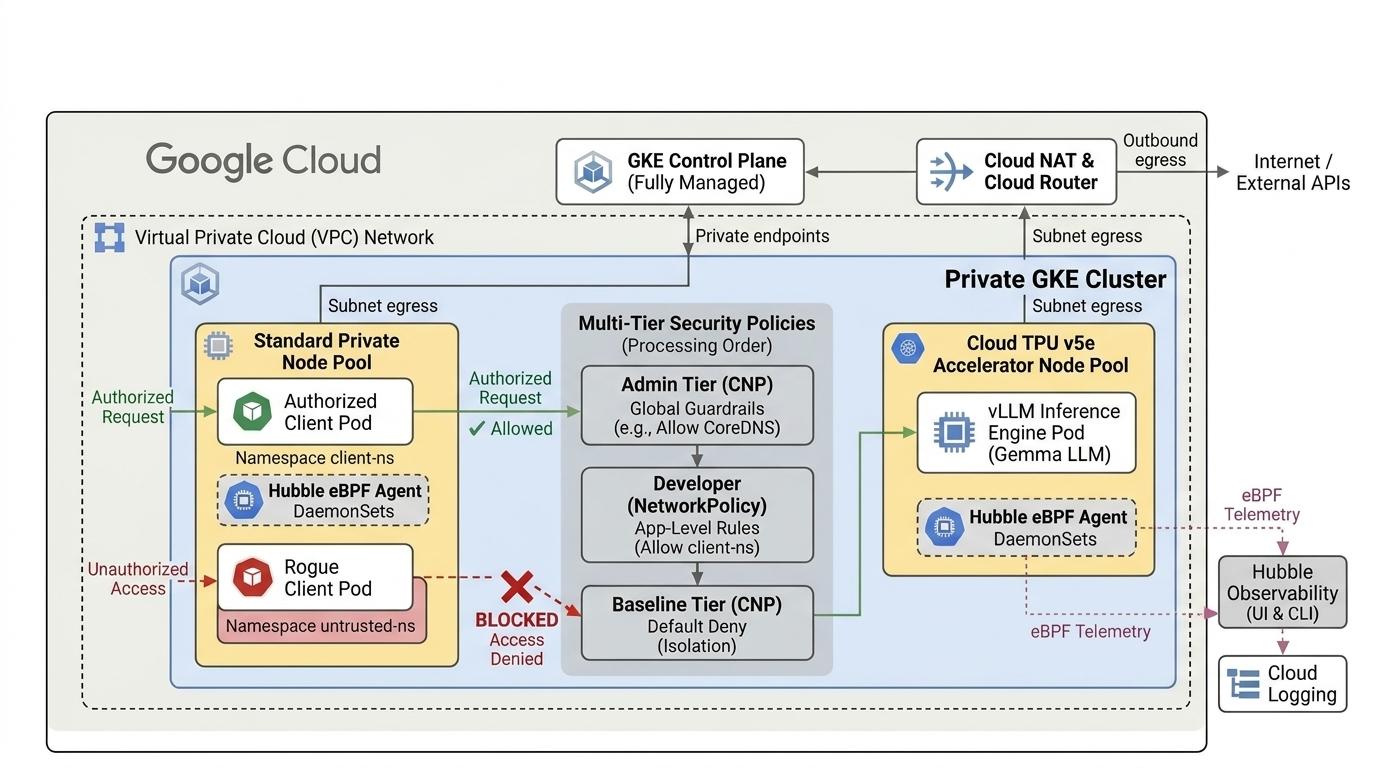
2. Google Cloud services setup
Self-paced environment setup
- Sign-in to the Google Cloud Console and create a new project or reuse an existing one. If you don't already have a Gmail or Google Workspace account, you must create one.

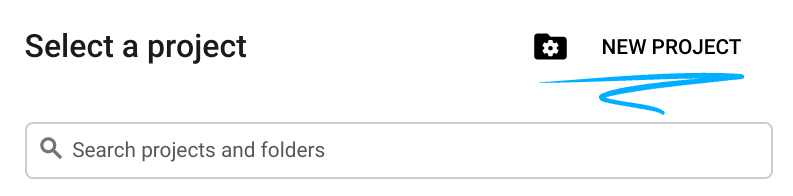
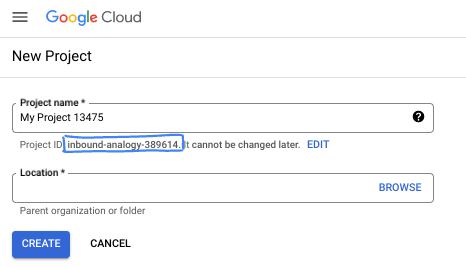
- The Project name is the display name for this project's participants. It is a character string not used by Google APIs. You can always update it.
- The Project ID is unique across all Google Cloud projects and is immutable (cannot be changed after it has been set). The Cloud Console auto-generates a unique string; usually you don't care what it is. In most codelabs, you'll need to reference your Project ID (typically identified as
PROJECT_ID). If you don't like the generated ID, you might generate another random one. Alternatively, you can try your own, and see if it's available. It can't be changed after this step and remains for the duration of the project. - For your information, there is a third value, a Project Number, which some APIs use. Learn more about all three of these values in the documentation.
- Next, you'll need to enable billing in the Cloud Console to use Cloud resources/APIs. Running through this codelab won't cost much, if anything at all. To shut down resources to avoid incurring billing beyond this tutorial, you can delete the resources you created or delete the project. New Google Cloud users are eligible for the $300 USD Free Trial program.
Start Cloud Shell
While Google Cloud can be operated remotely from your laptop, in this codelab you will be using Google Cloud Shell, a command line environment running in the Cloud.
From the Google Cloud Console, click the Cloud Shell icon on the top right toolbar:
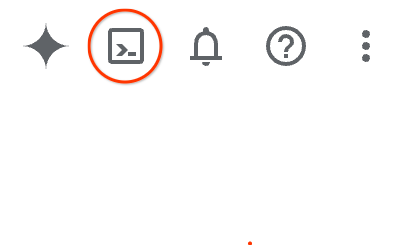
It should only take a few moments to provision and connect to the environment. When it is finished, you should see something like this:

This virtual machine is loaded with all the development tools you'll need. It offers a persistent 5GB home directory, and runs on Google Cloud, greatly enhancing network performance and authentication. All of your work in this codelab can be done within a browser. You do not need to install anything.
3. Setup environment with Terraform
To complete this lab,
- You need access to the TPU v5e quota in your selected region and zone. e.g. (
us-central1-a, us-west4-a, us-south1-a, us-west1-c, europe-west4-b). You should follow the TPU plan doc and enable TPU quota to get access. - This is a small deployment requiring 4 TPU v5e chips (
ct5lp-hightpu-4t),which will form a 2x2 slice in a single zone.
To use Hugging Face
- Hugging Face Token: An Access Token is needed to download the Gemma model weights.
- Accept any agreement for use as required.
We will create a custom VPC with firewall rules, a subnet and then an autopilot cluster. Open the cloud console and select the project you will be using.
- Open Cloud Shell located at the top of your console on the right, ensure you see the correct project id in Cloud Shell, confirm any prompts to allow access.

- Create a directory called
gke-cnp-lab,move to the directory.
mkdir -p gke-cnp-lab && cd gke-cnp-lab
- Now create some variables. p.s. edit the REGION, ZONE to reflect the actual location where you have access to the TPU resources. The default used in the lab region
us-west4and zoneus-west4-a
export PROJECT_ID=$(gcloud config get-value project)
export REGION="us-west4"
export ZONE="us-west4-a"
export NETWORK="cnp-demo-vpc"
export SUBNET="cnp-main-subnet"
export CLUSTER_NAME="cnp-demo-cluster"
- Save your configuration variables to a helper script in the gke-cnp-lab directory. If your Cloud Shell session disconnects or resets, you can quickly restore your active variables by running
source ./env.sh
cat << EOF > env.sh
export PROJECT_ID="${PROJECT_ID}"
export REGION="${REGION}"
export ZONE="${ZONE}"
export NETWORK="${NETWORK}"
export SUBNET="${SUBNET}"
export CLUSTER_NAME="${CLUSTER_NAME}"

echo -e "\n=== Validating Environment Configuration ==="
echo "Project ID   : \${PROJECT_ID}"
echo "Region       : \${REGION}"
echo "Zone         : \${ZONE}"
echo "Network Name : \${NETWORK}"
echo "Subnet Name  : \${SUBNET}"
echo "Cluster Name : \${CLUSTER_NAME}"

if [[ -z "\${PROJECT_ID}" || -z "\${REGION}" || -z "\${ZONE}" || -z "\${NETWORK}" || -z "\${SUBNET}" || -z "\${CLUSTER_NAME}" ]]; then
  echo -e "\n[ERROR] One or more environment variables are missing! Check your configuration."
else
  echo -e "\n[SUCCESS] Environment variables successfully populated and validated."
fi
EOF

chmod +x env.sh
source ./env.sh
- Now add some configuration files. These will create the following terraform.tfvars , variables.tf, main.tf file in the gke-cnp-lab directory.
cat << EOF > terraform.tfvars
project_id   = "${PROJECT_ID}"
region       = "${REGION}"
zone         = "${ZONE}"
network_name = "${NETWORK}"
subnet_name  = "${SUBNET}"
cluster_name = "${CLUSTER_NAME}"
EOF

cat << 'EOF' > variables.tf
variable "project_id" {
  type        = string
  description = "Google Cloud Project ID"
}

variable "region" {
  type        = string
  description = "Target GCP region"
}

variable "zone" {
  type        = string
  description = "Target GCP zone"
}

variable "network_name" {
  type        = string
  description = "VPC network name"
}

variable "subnet_name" {
  type        = string
  description = "Subnetwork name"
}

variable "cluster_name" {
  type        = string
  description = "GKE cluster name"
}
EOF

cat << 'EOF' > main.tf
terraform {
  required_version = ">= 1.5.0"
  required_providers {
    google = {
      source  = "hashicorp/google"
      version = "~> 7.32.0"
    }
    google-beta = {
      source  = "hashicorp/google-beta"
      version = "~> 7.32.0"
    }
  }
}

provider "google" {
  project = var.project_id
  region  = var.region
}

provider "google-beta" {
  project = var.project_id
  region  = var.region
}

# 1. Custom Private VPC Network
resource "google_compute_network" "vpc" {
  name                    = var.network_name
  auto_create_subnetworks = false
  mtu                     = 8896
}

# 2. Private Subnet with Secondary IP Ranges for Pods & Services
resource "google_compute_subnetwork" "subnet" {
  name                     = var.subnet_name
  ip_cidr_range            = "10.10.0.0/20"
  region                   = var.region
  network                  = google_compute_network.vpc.id
  private_ip_google_access = true

  secondary_ip_range {
    range_name    = "gke-pods"
    ip_cidr_range = "10.20.0.0/16"
  }
  secondary_ip_range {
    range_name    = "gke-services"
    ip_cidr_range = "10.30.0.0/20"
  }
}

# 3. Cloud Router & Cloud NAT for Secure Outbound Egress
resource "google_compute_router" "router" {
  name    = "${var.network_name}-router"
  network = google_compute_network.vpc.id
  region  = var.region
}

resource "google_compute_router_nat" "nat" {
  name                               = "${var.network_name}-nat"
  router                             = google_compute_router.router.name
  region                             = var.region
  nat_ip_allocate_option             = "AUTO_ONLY"
  source_subnetwork_ip_ranges_to_nat = "ALL_SUBNETWORKS_ALL_IP_RANGES"
}

# 4. Internal Firewall Rules
resource "google_compute_firewall" "allow_internal" {
  name      = "${var.network_name}-allow-internal"
  network   = google_compute_network.vpc.id
  direction = "INGRESS"
  priority  = 1000
  allow {
    protocol = "all"
  }
  source_ranges = ["10.10.0.0/20", "10.20.0.0/16", "10.30.0.0/20"]
}

# 5. Private GKE Cluster with Observability and Dataplane V2
resource "google_container_cluster" "primary" {
  name               = var.cluster_name
  location           = var.region
  node_locations     = [var.zone]
  network            = google_compute_network.vpc.id
  subnetwork         = google_compute_subnetwork.subnet.id
  initial_node_count = 1

  datapath_provider = "ADVANCED_DATAPATH"

  # FIX: Observability config must be nested inside monitoring_config
  monitoring_config {
    advanced_datapath_observability_config {
      enable_metrics = true
      enable_relay   = true
    }
  }

  release_channel {
    channel = "RAPID"
  }

  ip_allocation_policy {
    cluster_secondary_range_name  = "gke-pods"
    services_secondary_range_name = "gke-services"
  }

  private_cluster_config {
    enable_private_nodes    = true
    enable_private_endpoint = false
    master_ipv4_cidr_block  = "172.16.0.0/28"
  }

  node_config {
    machine_type = "e2-standard-4"
    oauth_scopes = ["https://www.googleapis.com/auth/cloud-platform"]
  }

  deletion_protection = false
}

# 6. Dedicated Cloud TPU v5e Node Pool (ct5lp-hightpu-4t / 2x2 Topology)
resource "google_container_node_pool" "tpu_pool" {
  provider       = google-beta
  name           = "tpu-v5e-pool"
  location       = var.region
  node_locations = [var.zone]
  cluster        = google_container_cluster.primary.name
  node_count     = 1

  node_config {
    machine_type = "ct5lp-hightpu-4t"
    oauth_scopes = ["https://www.googleapis.com/auth/cloud-platform"]

    labels = {
      "cloud.google.com/gke-tpu-accelerator" = "tpu-v5-lite-podslice"
      "cloud.google.com/gke-tpu-topology"    = "2x2"
    }

    taint {
      key    = "google.com/tpu"
      value  = "present"
      effect = "NO_SCHEDULE"
    }
  }
}
EOF
- Make sure you are in the gke-cnp-lab directory and run the following commands
terraform initInitializes the working directory. This is the first step and it downloads the providers required for the given configuration.terraform plan -outgenerates an execution plan, showing what actions Terraform will take to deploy your infrastructure. The-outallows you to save the execution plan to a named binary. You can see what will happen without making any changes.terraform applyruns the updates.
terraform init
terraform plan -out cnpgke
- Apply the execution plan. Because you are applying the saved execution plan, it will execute immediately without prompting for confirmation (This may take between 6 -10 mins)
terraform apply cnpgke
- Verify your infrastructure deployment:
gcloud container clusters get-credentials ${CLUSTER_NAME} --region ${REGION} --project=${PROJECT_ID}
echo -e "\n=== Verifying Cluster Nodes ==="
kubectl get nodes -L cloud.google.com/gke-tpu-accelerator,cloud.google.com/gke-tpu-topology

4. Configure Network Logging
Before deploying workloads and policies, configure GKE Network Logging to record connection telemetry and audit policy decisions in Cloud Logging.
- In the
gke-cnp-labdirectory, create the NetworkLogging configuration manifest
cat << 'EOF' > 00-network-logging.yaml
apiVersion: networking.gke.io/v1alpha1
kind: NetworkLogging
metadata:
  name: default
spec:
  cluster:
    allow:
      delegate: false
      log: true
    deny:
      delegate: false
      log: true
EOF
- Apply configuration to the cluster
kubectl apply -f 00-network-logging.yaml
kubectl get networklogging default
Note: You may see a warning stating that the resource is missing the kubectl.kubernetes.io/last-applied-configuration annotation. This is completely normal and expected! GKE pre-creates a default NetworkLogging object when the cluster spins up, and kubectl apply is simply taking over management of it to apply your new rules.
5. Deploy Gemma 4 Workload and Client Probes
You will create isolated namespaces to test multi-tier policy evaluations:
gemma-llm: Houses the core Gemma 4 inference workload (tier: ai-core).client-ns: Houses the authorized RAG chat client (tier: app-frontend).untrusted-tenant: Houses an unauthorized probe container (tier: untrusted).
- In the
gke-cnp-lab directory,create the01-namespaces-clients.yamlmanifest containing the namespaces and test client pods:
cat << 'EOF' > 01-namespaces-clients.yaml
apiVersion: v1
kind: Namespace
metadata:
  name: gemma-llm
  labels:
    tier: ai-core
---
apiVersion: v1
kind: Namespace
metadata:
  name: client-ns
  labels:
    tier: app-frontend
---
apiVersion: v1
kind: Namespace
metadata:
  name: untrusted-tenant
  labels:
    tier: untrusted
---
# Authorized Client Pod
apiVersion: apps/v1
kind: Deployment
metadata:
  name: rag-agent-client
  namespace: client-ns
  labels:
    app: rag-agent
spec:
  replicas: 1
  selector:
    matchLabels:
      app: rag-agent
  template:
    metadata:
      labels:
        app: rag-agent
    spec:
      containers:
        - name: client
          image: curlimages/curl:latest
          command: ["/bin/sh", "-c", "sleep 86400"]
---
# Rogue / Untrusted Probe Pod
apiVersion: apps/v1
kind: Deployment
metadata:
  name: rogue-client
  namespace: untrusted-tenant
  labels:
    app: rogue-app
spec:
  replicas: 1
  selector:
    matchLabels:
      app: rogue-app
  template:
    metadata:
      labels:
        app: rogue-app
    spec:
      containers:
        - name: probe
          image: curlimages/curl:latest
          command: ["/bin/sh", "-c", "sleep 86400"]
EOF
- Apply the namespaces and client deployments:
kubectl apply -f 01-namespaces-clients.yaml
kubectl get namespaces gemma-llm client-ns untrusted-tenant --show-labels
Deploy Workload vLLM and Gemma
Create your Hugging Face secret. Replace YOUR_ACTUAL_HUGGING_FACE_TOKEN with your token:
export HF_TOKEN="YOUR_ACTUAL_HUGGING_FACE_TOKEN"
echo $HF_TOKEN
kubectl create secret generic hf-secret -n gemma-llm --from-literal=hf_token=${HF_TOKEN}
- Create the Gemma 4 inference workload manifest targeting Cloud TPU v5e using vllm-tpu:
cat << 'EOF' > 02-gemma4-tpu-vllm.yaml
apiVersion: apps/v1
kind: Deployment
metadata:
  name: gemma-serving
  namespace: gemma-llm
  labels:
    app: gemma-service
spec:
  replicas: 1
  selector:
    matchLabels:
      app: gemma-service
  template:
    metadata:
      labels:
        app: gemma-service
        ai.gke.io/model: gemma4
        ai.gke.io/inference-server: vllm-tpu
    spec:
      tolerations:
        - key: "google.com/tpu"
          operator: "Exists"
          effect: "NoSchedule"
      nodeSelector:
        cloud.google.com/gke-tpu-accelerator: tpu-v5-lite-podslice
        cloud.google.com/gke-tpu-topology: 2x2
      containers:
        - name: vllm-inference
          image: vllm/vllm-tpu:latest
          command: ["python3", "-m", "vllm.entrypoints.openai.api_server"]
          args:
            - "--model=google/gemma-4-E2B-it"
            - "--tensor-parallel-size=4"
            - "--host=0.0.0.0"
            - "--port=8000"
            - "--max-model-len=4096"
            - "--max-num-batched-tokens=4096"
          env:
            - name: HF_TOKEN
              valueFrom:
                secretKeyRef:
                  name: hf-secret
                  key: hf_token
            - name: HUGGING_FACE_HUB_TOKEN
              valueFrom:
                secretKeyRef:
                  name: hf-secret
                  key: hf_token
          volumeMounts:
            - mountPath: /dev/shm
              name: dshm
          ports:
            - name: http-inference
              containerPort: 8000
          resources:
            requests:
              google.com/tpu: "4"
              memory: "32Gi"
              cpu: "8"
            limits:
              google.com/tpu: "4"
              memory: "32Gi"
              cpu: "8"
          startupProbe:
            httpGet:
              path: /health
              port: 8000
            failureThreshold: 120
            periodSeconds: 10
          readinessProbe:
            httpGet:
              path: /health
              port: 8000
            periodSeconds: 5
      volumes:
        - name: dshm
          emptyDir:
            medium: Memory
---
apiVersion: v1
kind: Service
metadata:
  name: gemma-service
  namespace: gemma-llm
spec:
  type: ClusterIP
  selector:
    app: gemma-service
  ports:
    - name: http
      protocol: TCP
      port: 8000
      targetPort: 8000
EOF
- Create the deployment.
kubectl apply -f 02-gemma4-tpu-vllm.yaml
- To monitor the completion status, run the following script below. The pods will wait until the node is provisioned before it can proceed, this may take 13+ minutes.
echo "       __|__"
echo "  --@--(_|_)--@--"
echo ""
echo "Waiting for Gemma 4 TPU Pod to initialize and become Ready..."

# 1. Wait for the pod to be scheduled and reach the Running state
kubectl wait -n gemma-llm --for=condition=Ready pod -l app=gemma-service --timeout=600s

echo ""
echo "✅ Pod is Running! Streaming vLLM engine initialization logs..."

# 2. Stream logs until Uvicorn/vLLM is ready to serve
kubectl logs -n gemma-llm -l app=gemma-service -c vllm-inference -f | sed -u '/Application startup complete/q'

echo ""
echo "🚀 Gemma 4 on TPU v5e is ready for inference!"
6. Understanding Policy Evaluation and Default State
Before applying network policies, understand how GKE ClusterNetworkPolicy and standard Kubernetes NetworkPolicy interact across different evaluation tiers.
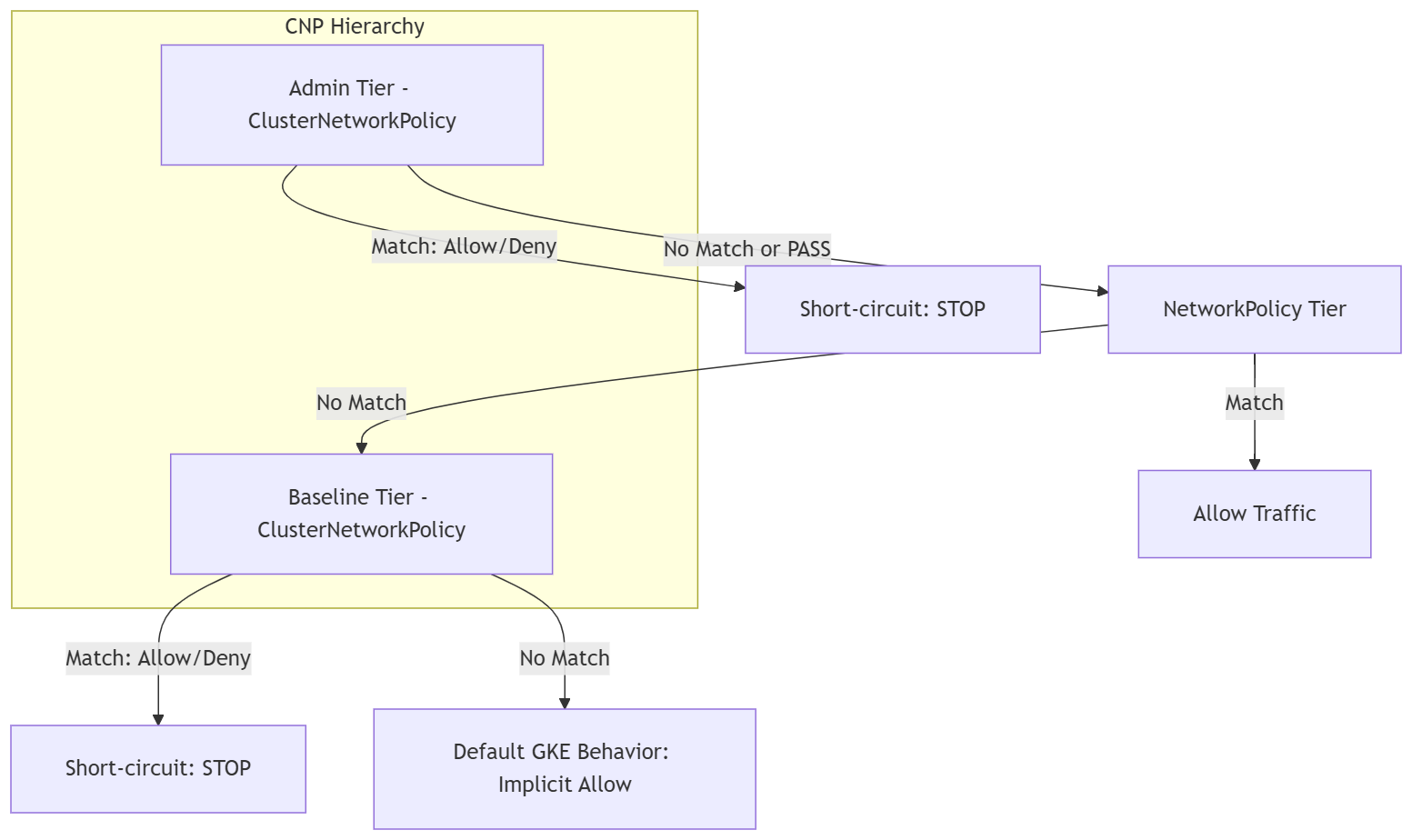
Traffic in GKE is evaluated through a, multi-tier precedence model:
Admin Tier ⟶ NetworkPolicy Tier ⟶ Baseline Tier ⟶ Default GKE Behavior
Our test flow
===================================================
           4-STAGE POLICY EVALUATION FLOW
===================================================

[Stage 1: Default State]
 ├── Pre-Policy State: Default Kubernetes allow-all
 ├── Ingress: client-ns  ──▶ Gemma 4: ALLOWED (200 OK)
 ├── Ingress: untrusted  ──▶ Gemma 4: ALLOWED (200 OK)
 ├── Egress:  All Pods   ──▶ Metadata: ALLOWED (Exposed)
 └── Security Posture: ⚠️ Overly permissive
      │
      ▼
[Stage 2: Baseline Lockdown]
 ├── Policy: ClusterNetworkPolicy (tier: Baseline)
 ├── Rule: Default-deny all cross-namespace ingress
 ├── Ingress: client-ns  ──▶ Gemma 4: DROPPED (Timeout)
 ├── Ingress: untrusted  ──▶ Gemma 4: DROPPED (Timeout)
 └── Security Posture: 🛑 Zero-trust baseline active
      │
      ▼
[Stage 3: Developer Delegation]
 ├── Policy: NetworkPolicy (tier: NetworkPolicy)
 ├── Rule: App team allows ingress from client-ns
 ├── Ingress: client-ns  ──▶ Gemma 4: ALLOWED (200 OK)
 ├── Ingress: untrusted  ──▶ Gemma 4: DROPPED (Timeout)
 └── Security Posture: 🔀 App isolation achieved
      │
      ▼
[Stage 4: Admin Guardrail]
 ├── Policy: ClusterNetworkPolicy (tier: Admin)
 ├── Rule: Cluster-wide metadata drop (169.254.169.254)
 ├── Egress:  All Pods   ──▶ Metadata: DROPPED (Timeout)
 ├── Dev NetPol bypass attempt:   OVERRIDDEN (Blocked)
 └── Security Posture: 🔒 Enforced guardrail
===================================================
Establish the Baseline Foundation (Pre-Policy Test)
Verify that the Gemma 4 model is healthy and serving inference requests. In standard Kubernetes without policies, all cross-namespace traffic is implicitly permitted.
- Test inference from the authorized client in
client-ns:
kubectl exec -n client-ns deploy/rag-agent-client -- curl --connect-timeout 3 -s -X POST \
  http://gemma-service.gemma-llm.svc.cluster.local:8000/v1/chat/completions \
  -H "Content-Type: application/json" \
  -d '{
    "model": "google/gemma-4-E2B-it",
    "messages": [{"role": "user", "content": "Explain zero trust in one short sentence."}],
    "max_tokens": 40
  }' | jq -r '.choices[0].message.content'
- Test inference from the unauthorized rogue client in
untrusted-tenant:
kubectl exec -n untrusted-tenant deploy/rogue-client -- curl --connect-timeout 3 -s -X POST \
  http://gemma-service.gemma-llm.svc.cluster.local:8000/v1/chat/completions \
  -H "Content-Type: application/json" \
  -d '{
    "model": "google/gemma-4-E2B-it",
    "messages": [{"role": "user", "content": "Explain zero trust in one short sentence."}],
    "max_tokens": 40
  }' | jq -r '.choices[0].message.content'
- Test whether pods across all three namespaces can reach the metadata server (169.254.169.254):
echo -e "\n[1/3] Testing Metadata access from Gemma serving pod (gemma-llm)..."
kubectl exec -n gemma-llm deploy/gemma-serving -- curl --connect-timeout 3 -s -w "\nHTTP Code: %{http_code}\n" -H "Metadata-Flavor: Google" \
  http://169.254.169.254/computeMetadata/v1/instance/zone || echo "🛑 RESULT: Connection Timed Out (Blocked)"

echo -e "\n[2/3] Testing Metadata access from authorized client (client-ns)..."
kubectl exec -n client-ns deploy/rag-agent-client -- curl --connect-timeout 3 -s -w "\nHTTP Code: %{http_code}\n" -H "Metadata-Flavor: Google" \
  http://169.254.169.254/computeMetadata/v1/instance/zone || echo "🛑 RESULT: Connection Timed Out (Blocked)"

echo -e "\n[3/3] Testing Metadata access from rogue client (untrusted-tenant)..."
kubectl exec -n untrusted-tenant deploy/rogue-client -- curl --connect-timeout 3 -s -w "\nHTTP Code: %{http_code}\n" -H "Metadata-Flavor: Google" \
  http://169.254.169.254/computeMetadata/v1/instance/zone || echo "🛑 RESULT: Connection Timed Out (Blocked)"
7. Evaluation testing Baseline and Network Policy Tier
In this step, acting as the Cluster Administrator, you will apply a Baseline-tier ClusterNetworkPolicy to establish a cluster-wide fallback default-deny posture. Any cross-namespace communication not explicitly permitted by a higher tier will be dropped.
Establish Zero-Trust Posture (Baseline Tier)
- Create the
03-baseline-deny.yamlBaseline-tier policy manifest:
cat << 'EOF' > 03-baseline-deny.yaml
apiVersion: policy.networking.k8s.io/v1alpha2
kind: ClusterNetworkPolicy
metadata:
  name: baseline-default-deny
spec:
  tier: Baseline
  priority: 1000
  subject:
    namespaces: {}
  ingress:
    # 1. Allow CoreDNS Ingress cluster-wide so DNS resolution never breaks
    - name: allow-dns-ingress
      action: Accept
      from:
        - namespaces: {}
      protocols:
        - udp:
            destinationPort:
              number: 53
        - tcp:
            destinationPort:
              number: 53
    # 2. Default Deny all other cross-namespace ingress
    - name: baseline-deny-cross-ns
      action: Deny
      from:
        - namespaces: {}
EOF
- Apply the Baseline tier policy:
kubectl apply -f 03-baseline-deny.yaml
- Test client connectivity from
client-ns.
kubectl exec -n client-ns deploy/rag-agent-client -- curl --connect-timeout 3 -s -X POST \
  http://gemma-service.gemma-llm.svc.cluster.local:8000/v1/chat/completions \
  -H "Content-Type: application/json" \
  -d '{
    "model": "google/gemma-4-E2B-it",
    "messages": [{"role": "user", "content": "Explain zero trust in one short sentence."}],
    "max_tokens": 40
  }' | jq -r '.choices[0].message.content'
- Test inference from the unauthorized rogue client in untrusted-tenant:
kubectl exec -n untrusted-tenant deploy/rogue-client -- curl --connect-timeout 3 -s -X POST \
  http://gemma-service.gemma-llm.svc.cluster.local:8000/v1/chat/completions \
  -H "Content-Type: application/json" \
  -d '{
    "model": "google/gemma-4-E2B-it",
    "messages": [{"role": "user", "content": "Explain zero trust in one short sentence."}],
    "max_tokens": 40
  }' | jq -r '.choices[0].message.content'
Delegate Access to Developers (NetworkPolicy Tier)
The gemma-llm application team will now apply a standard namespace-scoped NetworkPolicy to grant authorized traffic from client-ns.
- Create the developer
04-app-networkpolicy.yamlNetworkPolicy manifest:
cat << 'EOF' > 04-app-networkpolicy.yaml
apiVersion: networking.k8s.io/v1
kind: NetworkPolicy
metadata:
  name: allow-rag-client
  namespace: gemma-llm
spec:
  podSelector:
    matchLabels:
      app: gemma-service
  policyTypes:
    - Ingress
  ingress:
    # Explicitly permit ingress only from pods matching app: rag-agent in client-ns
    - from:
        - namespaceSelector:
            matchLabels:
              kubernetes.io/metadata.name: client-ns
          podSelector:
            matchLabels:
              app: rag-agent
      ports:
        - protocol: TCP
          port: 8000
EOF
- Apply the policy:
kubectl apply -f 04-app-networkpolicy.yaml
- Test client connectivity from
client-ns
kubectl exec -n client-ns deploy/rag-agent-client -- curl --connect-timeout 3 -s -X POST \
  http://gemma-service.gemma-llm.svc.cluster.local:8000/v1/chat/completions \
  -H "Content-Type: application/json" \
  -d '{
    "model": "google/gemma-4-E2B-it",
    "messages": [{"role": "user", "content": "Explain zero trust in one short sentence."}],
    "max_tokens": 40
  }' | jq -r '.choices[0].message.content'
- Test connectivity from the rogue client in
untrusted-tenant:
kubectl exec -n untrusted-tenant deploy/rogue-client -- curl --connect-timeout 3 -s -X POST \
  http://gemma-service.gemma-llm.svc.cluster.local:8000/v1/chat/completions \
  -H "Content-Type: application/json" \
  -d '{
    "model": "google/gemma-4-E2B-it",
    "messages": [{"role": "user", "content": "Explain zero trust in one short sentence."}],
    "max_tokens": 40
  }' | jq -r '.choices[0].message.content'
8. Evaluation enforce Global Guardrails (Admin tier)
Acting as the Cluster Administrator, you will now enforce an Admin-tier ClusterNetworkPolicy at the very top of GKE's evaluation order. This tier is evaluated first, any matching rule takes immediate precedence over all other tiers. If there is no match, the packet is passed down to be evaluated by the lower tiers (NetworkPolicy and Baseline).
In this step, you will apply a policy that:
- Cluster-wide Egress Guardrail: Blocks all pods in every namespace from reaching the Google Cloud Metadata Server (
169.254.169.254/32). - DNS Support: Allows all DNS traffic on port 53 so pods can resolve hostnames (accounting for GKE's local DNS caches).
- Ingress and Egress Delegation: Passes all other traffic decisions down using the Pass action so standard developer network policies and baseline default-deny rules can make the final decisions.
- Create the
05-admin-guardrails.yamlAdmin-tier policy manifest targeting all namespaces
cat << 'EOF' > 05-admin-guardrails.yaml
apiVersion: policy.networking.k8s.io/v1alpha2
kind: ClusterNetworkPolicy
metadata:
  name: admin-global-guardrails
spec:
  tier: Admin
  priority: 10
  subject:
    namespaces: {}
  ingress:
    - name: delegate-all-ingress
      action: Pass
      from:
        - namespaces: {}
  egress:
    - name: allow-all-dns
      action: Accept
      to:
        - networks:
            - 0.0.0.0/0
      protocols:
        - udp:
            destinationPort:
              number: 53
        - tcp:
            destinationPort:
              number: 53
    - name: block-metadata-server-global
      action: Deny
      to:
        - networks:
            - 169.254.169.254/32
    - name: delegate-other-egress
      action: Pass
      to:
        - namespaces: {}
EOF
- Apply the Admin tier policy:
kubectl apply -f 05-admin-guardrails.yaml
- Test metadata exfiltration across all three namespaces:
echo -e "\n[1/3] Testing Metadata access from Gemma serving pod (gemma-llm)..."
kubectl exec -n gemma-llm deploy/gemma-serving -- curl --connect-timeout 3 -s -w "\nHTTP Code: %{http_code}\n" -H "Metadata-Flavor: Google" \
  http://169.254.169.254/computeMetadata/v1/instance/zone || echo "🛑 RESULT: Connection Timed Out (Blocked)"

echo -e "\n[2/3] Testing Metadata access from authorized client (client-ns)..."
kubectl exec -n client-ns deploy/rag-agent-client -- curl --connect-timeout 3 -s -w "\nHTTP Code: %{http_code}\n" -H "Metadata-Flavor: Google" \
  http://169.254.169.254/computeMetadata/v1/instance/zone || echo "🛑 RESULT: Connection Timed Out (Blocked)"

echo -e "\n[3/3] Testing Metadata access from rogue client (untrusted-tenant)..."
kubectl exec -n untrusted-tenant deploy/rogue-client -- curl --connect-timeout 3 -s -w "\nHTTP Code: %{http_code}\n" -H "Metadata-Flavor: Google" \
  http://169.254.169.254/computeMetadata/v1/instance/zone || echo "🛑 RESULT: Connection Timed Out (Blocked)"
- Test client connectivity from
client-ns
kubectl exec -n client-ns deploy/rag-agent-client -- curl --connect-timeout 3 -s -X POST \
  http://gemma-service.gemma-llm.svc.cluster.local:8000/v1/chat/completions \
  -H "Content-Type: application/json" \
  -d '{
    "model": "google/gemma-4-E2B-it",
    "messages": [{"role": "user", "content": "Explain zero trust in one short sentence."}],
    "max_tokens": 40
  }' | jq -r '.choices[0].message.content'
- Simulate a developer bypass attempt by applying an allow-all egress NetworkPolicy inside gemma-llm:
cat << 'EOF' > 06-bypass-attempt.yaml
apiVersion: networking.k8s.io/v1
kind: NetworkPolicy
metadata:
  name: dev-allow-all-egress
  namespace: gemma-llm
spec:
  podSelector: {}
  policyTypes:
    - Egress
  egress:
    - {}
EOF

kubectl apply -f 06-bypass-attempt.yaml
- Test whether the developer bypass can unblock metadata access:
kubectl exec -n gemma-llm deploy/gemma-serving -- curl --connect-timeout 3 -s -w "\nHTTP Code: %{http_code}\n" -H "Metadata-Flavor: Google" \
  http://169.254.169.254/computeMetadata/v1/instance/zone || echo "🛑 RESULT: Connection Timed Out (Admin Guardrail Overrode Developer Policy)"
9. Interactive Verification with Hubble and Cloud Logging
To observe real-time policy enforcement and audit packet decisions across your cluster, you will use a Dual-Pane Cloud Shell session combining kernel-level eBPF packet tracing with automated test execution.
- Click the "+" icon in your Cloud Shell menu to open a second terminal tab.
- In this new tab, run the following commands to create the alias and start observing live traffic for the
gemma-llmnamespace:
# Create an alias to execute Hubble natively inside the relay pod
alias hubble="kubectl exec -it -n gke-managed-dpv2-observability deploy/hubble-relay -c hubble-cli -- hubble"

# Observe real-time traffic to and from the Gemma namespace
hubble observe --follow --namespace gemma-llm
- Switch back to your first Cloud Shell tab and ensure you are in the
gke-cnp-labdirectory
cd ~/gke-cnp-lab
- Run the following block to create and execute the automated verification script. This script runs the required traffic tests and queries Cloud Logging using GKE's exact root-level metadata schema to display the exact Dataplane V2 rules that evaluated the requests:
cat << 'EOF' > verify-suite.sh
#!/usr/bin/env bash
set -e

echo "========================================================"
echo " 🧪 RUNNING MULTI-TIER POLICY VERIFICATION SUITE"
echo "========================================================"

# Test 1: Ingress Authorized Client -> Gemma (Allowed by NetworkPolicy)
echo -e "\n[1/5] Testing Authorized Client -> Gemma Serving..."
if kubectl exec -n client-ns deploy/rag-agent-client -- \
  curl -s --connect-timeout 3 \
  http://gemma-service.gemma-llm.svc.cluster.local:8000/v1/chat/completions > /dev/null; then
  echo "  ✅ RESULT: FORWARDED (Allowed by Developer Network Policy)"
else
  echo "  🛑 RESULT: FAILED"
fi

# Test 2: Ingress Rogue Client -> Gemma (Blocked by Baseline Tier)
echo -e "\n[2/5] Testing Unauthorized Rogue Tenant -> Gemma Serving..."
if kubectl exec -n untrusted-tenant deploy/rogue-client -- \
  curl -s --connect-timeout 3 \
  http://gemma-service.gemma-llm.svc.cluster.local:8000/v1/chat/completions > /dev/null; then
  echo "  ⚠️ RESULT: UNEXPECTED ALLOW"
else
  echo "  🛑 RESULT: DROPPED (Blocked by Baseline Tier)"
fi

# Test 3: Egress Gemma -> GCP Metadata Server (Blocked by Admin Tier)
echo -e "\n[3/5] Testing Metadata access from Gemma serving pod (gemma-llm)..."
kubectl exec -n gemma-llm deploy/gemma-serving -- \
  curl --connect-timeout 3 -s -w "\nHTTP Code: %{http_code}\n" -H "Metadata-Flavor: Google" \
  http://169.254.169.254/computeMetadata/v1/instance/zone || echo "  🛑 RESULT: Connection Timed Out (Blocked)"

# Test 4: Egress Authorized Client -> GCP Metadata Server (Blocked by Admin Tier)
echo -e "\n[4/5] Testing Metadata access from authorized client (client-ns)..."
kubectl exec -n client-ns deploy/rag-agent-client -- \
  curl --connect-timeout 3 -s -w "\nHTTP Code: %{http_code}\n" -H "Metadata-Flavor: Google" \
  http://169.254.169.254/computeMetadata/v1/instance/zone || echo "  🛑 RESULT: Connection Timed Out (Blocked)"

# Test 5: Egress Rogue Client -> GCP Metadata Server (Blocked by Admin Tier)
echo -e "\n[5/5] Testing Metadata access from rogue client (untrusted-tenant)..."
kubectl exec -n untrusted-tenant deploy/rogue-client -- \
  curl --connect-timeout 3 -s -w "\nHTTP Code: %{http_code}\n" -H "Metadata-Flavor: Google" \
  http://169.254.169.254/computeMetadata/v1/instance/zone || echo "  🛑 RESULT: Connection Timed Out (Blocked)"

echo -e "\n========================================================"
echo " 📋 FETCHING AUDIT TRAIL FROM CLOUD LOGGING"
echo "========================================================"
echo "Waiting 12 seconds for telemetry ingestion..."
sleep 12

echo -e "\n🔍 1. Validating Baseline Tier (Rogue Client Block):"
gcloud logging read '
  resource.type="k8s_node"
  logName=~"logs/policy-action"
  jsonPayload.disposition="deny"
  jsonPayload.src.namespace="untrusted-tenant"
  jsonPayload.dest.namespace="gemma-llm"
' --limit=1 --format="table(
    timestamp.date('%H:%M:%S', tz=LOCAL):label=TIME,
    jsonPayload.src.namespace:label=SRC_NS,
    jsonPayload.dest.namespace:label=DEST_NS,
    jsonPayload.policies[0].name:label=BLOCKED_BY_POLICY
)"

echo -e "\n🔍 2. Validating Admin Tier (Metadata Block across all namespaces):"
gcloud logging read '
  resource.type="k8s_node"
  logName=~"logs/policy-action"
  jsonPayload.disposition="deny"
  jsonPayload.connection.dest_ip="169.254.169.254"
' --limit=3 --format="table(
    timestamp.date('%H:%M:%S', tz=LOCAL):label=TIME,
    jsonPayload.src.namespace:label=SRC_NS,
    jsonPayload.connection.dest_ip:label=DEST_IP,
    jsonPayload.policies[0].name:label=BLOCKED_BY_POLICY
)"
EOF

chmod +x verify-suite.sh
./verify-suite.sh
- While the script executes in your first tab, watch the Hubble output in your second tab.
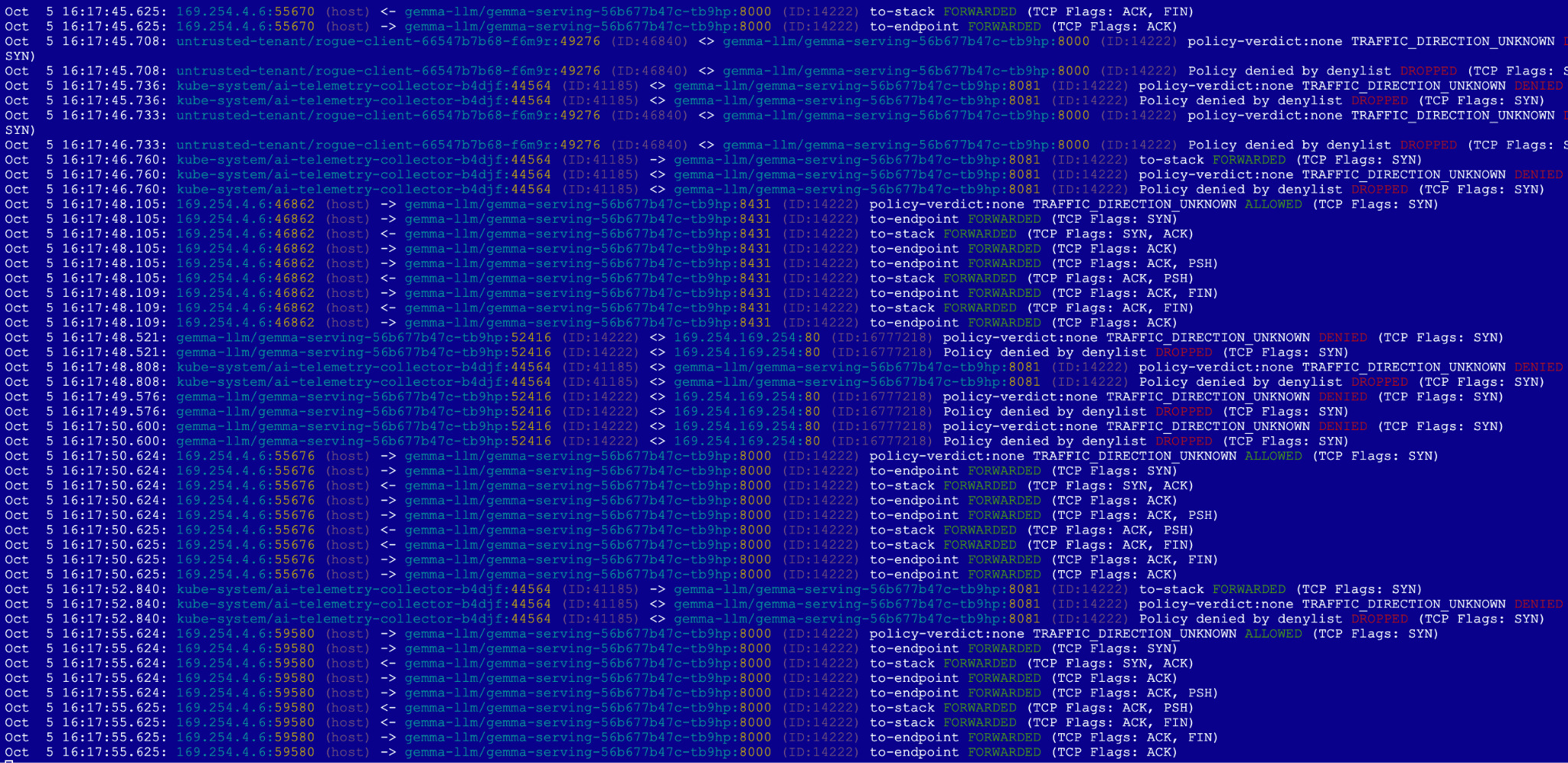
In Hubble (Tab 2): You will see the authorized HTTP requests being FORWARDED in green. For the blocked traffic, you will see red (DROPPED) events. The Rogue Tenant: Connection is passed down by the Admin Tier and blocked at the Baseline Tier. The Metadata Query: Its request to reach cloud credentials is blocked immediately at the Admin Tier.
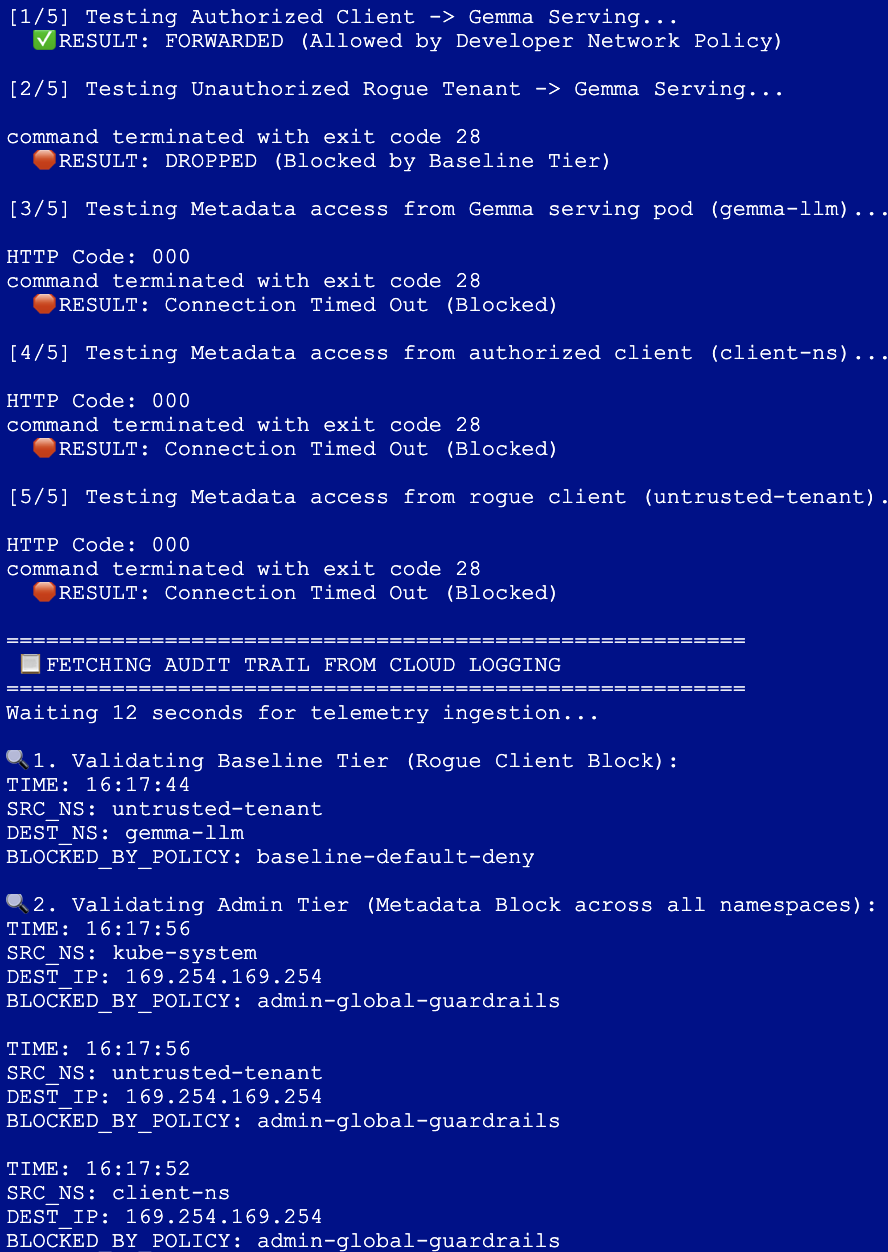
In Cloud Logging (Tab 1): The script finishes by pulling the exact audit records sent to Google Cloud Logging. This explicitly proves which Tier (Admin or Baseline) and which Policy was responsible for stopping the unauthorized traffic, formatted with localized, timezone-aware timestamps.
10. Clean up
- Close the second tab
- Switch back to your first Cloud Shell tab.
- Delete the deployed Kubernetes manifests, namespaces, and secrets in order:
cd ~/gke-cnp-lab

# Delete policy and verification scripts
rm -f verify-suite.sh
kubectl delete -f 05-admin-guardrails.yaml --ignore-not-found
kubectl delete -f 04-app-networkpolicy.yaml --ignore-not-found
kubectl delete -f 03-baseline-deny.yaml --ignore-not-found
kubectl delete -f 00-network-logging.yaml --ignore-not-found

# Delete workload deployments, secrets, and namespaces
kubectl delete -f 02-gemma4-tpu-vllm.yaml --ignore-not-found
kubectl delete secret hf-secret -n gemma-llm --ignore-not-found
kubectl delete -f 01-namespaces-clients.yaml --ignore-not-found
- Clean up the infrastructure by the following command, type
yesto confirm
terraform destroy --auto-approve
- Verify that all resources are cleanly terminated in your active project:
gcloud container clusters list --region=us-west4
gcloud compute networks list
- Delete the
gke-cnp-labdirectory and contents:
cd
rm -r gke-cnp-lab
11. Congratulations
You have successfully completed the Secure AI Inference Workloads with GKE ClusterNetworkPolicy Codelab!
By completing this hands-on lab, you have designed and validated a robust, multi-tier defense-in-depth network architecture for serving sensitive private LLM workloads on Google Kubernetes Engine.
What You Have Accomplished:
- Infrastructure as Code: Provisioned a highly secure private Standard GKE Cluster, a private regional subnet, and dedicated Cloud TPU v5e hardware dynamically using Terraform.
- Telemetry and Observability: Configured Dataplane V2 Network Logging alongside kernel-level eBPF Hubble tracing to achieve deep runtime packet visibility.
- Hierarchical Security Posture: Ex a clear separation of operational duties across three distinct evaluation tiers:
- Admin Tier: Enforced cluster-wide, non-bypassable egress guardrails blocking lateral metadata credential access (169.254.169.254).
- NetworkPolicy Tier: Delegated namespace-scoped ingress boundaries to application developers to authorize production client connections safely.
- Baseline Tier: Built a cluster-wide fallback safety net that default-denied unauthorized tenant traffic.
- Real-time Auditing: Run a complete verification test suite, watched real-time packet drops at the Linux kernel level, and queried structured policy-action audits directly in Google Cloud Logging
Next steps / Learn more
You can read more about GKE networking
- Deep-dive into Configuring GKE ClusterNetworkPolicy