

1. 개요
이 실습에서는 Google Kubernetes Engine (GKE)의 ClusterNetworkPolicy를 소개합니다. ClusterNetworkPolicy는 다양한 사용 사례에 적용되며 클러스터 전체에 적용되고 관리자 및 기준 등급에서 시행될 수 있습니다. 이 예시에서는 TPU, vLLM, 검증을 사용하여 GKE에서 LLM 배포 (Gemma)를 제어하는 방법을 보여줍니다.
다음 기술을 사용합니다.
- Google Kubernetes Engine (GKE) — 확장 가능한 비공개 워크로드를 호스팅하기 위한 기본 컨테이너 조정 플랫폼입니다.
- ClusterNetworkPolicy (CNP) — 관리자, NetworkPolicy, 기준 등급 전반에서 SecOps 가드레일을 사용 설정하는 클러스터 범위의 다중 등급 네트워크 정책입니다.
- vLLM TPU 추론 엔진 — OpenAI 호환 REST 엔드포인트를 사용하여 Google TPU 에서 경량 Gemma 4 모델 (google/gemma-4-E2B-it)을 제공하는 높은 처리량의 추론입니다.
역할 및 캐릭터
Network Policy API는 특정 조직 페르소나를 중심으로 구성됩니다.
- 클러스터 관리자 사용 (
ClusterNetworkPolicy): 관리자 및 기본 등급의 클러스터 전반에 보안 가드레일을 적용합니다. - 네임스페이스 관리자 사용 (
NetworkPolicy): 특정 네임스페이스 내에서 테넌트 수준 경계 및 격리를 관리합니다. - 애플리케이션 개발자 사용 (
NetworkPolicy): 애플리케이션별 마이크로서비스에 대한 세분화된 규칙을 정의합니다.
이 환경을 구성하기 위해 커스텀 비공개 VPC, Cloud NAT, 전용 TPU 노드 풀이 있는 비공개 GKE 클러스터를 배포합니다.
클러스터를 보호하기 위해 표준 NetworkPolicy 객체와 함께 다중 계층 ClusterNetworkPolicy 리소스를 작성하여 엄격한 네트워크 가드레일을 적용합니다. 그런 다음 vLLM,Google Cloud TPU를 사용하여 Gemma 4 모델을 제공하는 AI 워크로드를 배포합니다.
마지막으로 작업 기준을 설정하고, 보안 정책을 적용하고, Cloud Logging과 실시간 Hubble eBPF 모니터링 가능성 스트림을 사용하여 NetworkLogging을 구성하여 정책 결정을 감사하고 패킷 드롭을 확인합니다. 모든 구성은 Terraform, gcloud, kubectl.의 조합을 사용합니다.
이 실습에서는 다음 작업을 수행하는 방법을 알아봅니다.
- Terraform을 사용하여 비공개 네트워킹, GKE 클러스터, Cloud TPU v5e 가속기를 프로비저닝합니다.
- 연결 원격 분석을 기록하도록 GKE NetworkLogging을 구성합니다.
- 공식 vllm/vllm-tpu 컨테이너 이미지를 사용하여 TPU에 Gemma 4 E2B를 배포합니다.
- 제한사항을 적용하기 전에 엔드 투 엔드 연결을 증명하는 작업 기준을 설정합니다.
Baseline-tierClusterNetworkPolicy를 적용하여 승인되지 않은 교차 네임스페이스 트래픽을 기본적으로 거부합니다.- 개발자가 관리하는 NetworkPolicy를 적용하여 승인된 클라이언트에 액세스 권한을 위임합니다.
Admin-tierClusterNetworkPolicy를 적용하여 개발자 설정을 재정의하는 전역 이그레스 가드레일을 적용합니다.- Hubble eBPF 스트림과 Cloud Logging을 사용하여 실시간 패킷 삭제 및 전달을 확인합니다.
이 실습에서는 다음과 같은 패턴을 만들 것입니다.
그림 1. 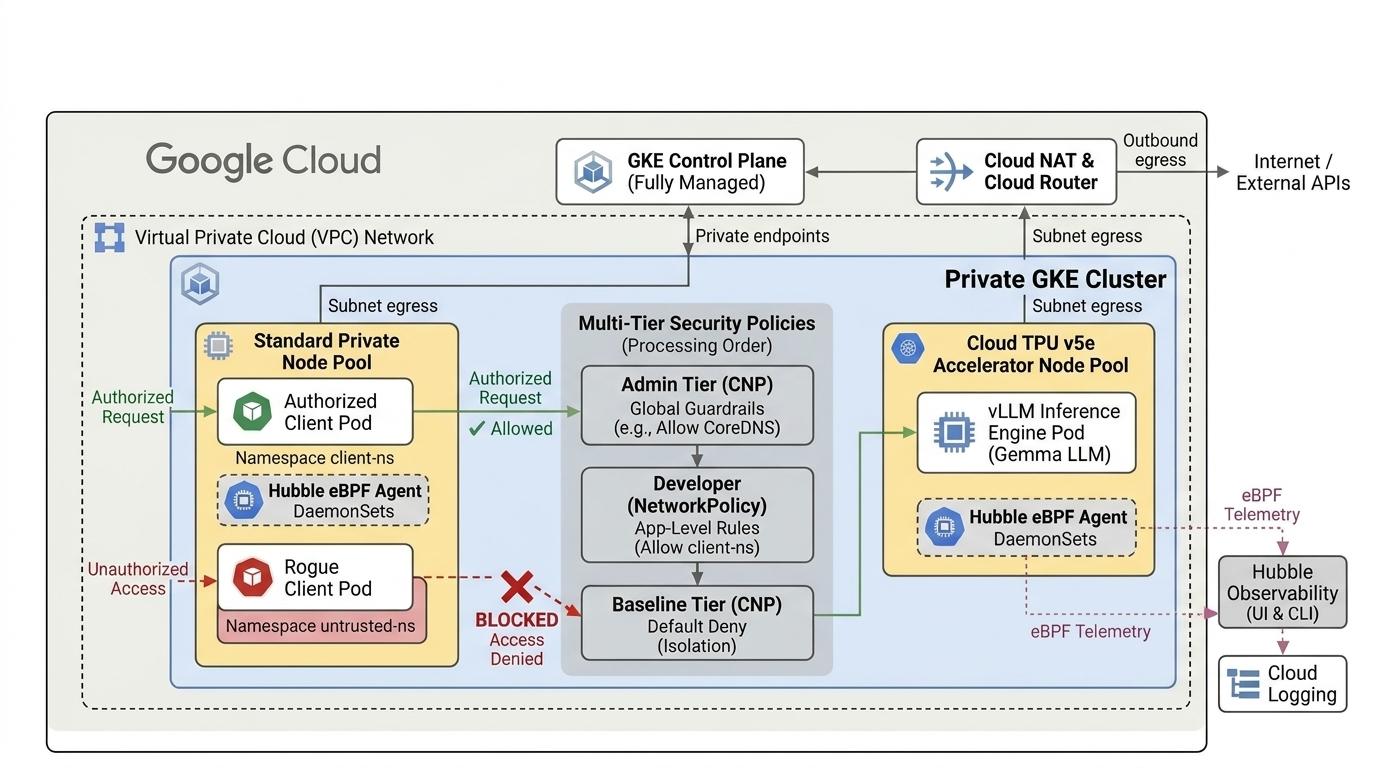
2. Google Cloud 서비스 설정
자습형 환경 설정
- Google Cloud 콘솔에 로그인하여 새 프로젝트를 만들거나 기존 프로젝트를 재사용합니다. 아직 Gmail이나 Google Workspace 계정이 없는 경우 계정을 만들어야 합니다.

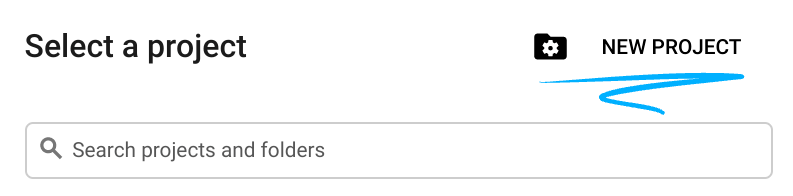
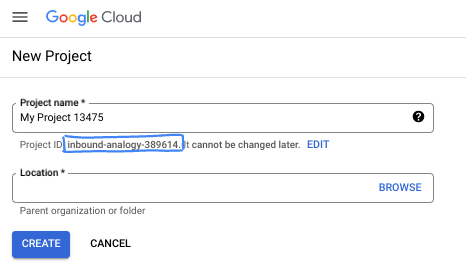
- 프로젝트 이름은 이 프로젝트 참가자의 표시 이름입니다. 이는 Google API에서 사용하지 않는 문자열이며 언제든지 업데이트할 수 있습니다.
- 프로젝트 ID는 모든 Google Cloud 프로젝트에서 고유하며, 변경할 수 없습니다(설정된 후에는 변경할 수 없음). Cloud 콘솔은 고유한 문자열을 자동으로 생성합니다. 일반적으로는 신경 쓰지 않아도 됩니다. 대부분의 Codelab에서는 프로젝트 ID (일반적으로
PROJECT_ID로 식별됨)를 참조해야 합니다. 생성된 ID가 마음에 들지 않으면 다른 임의 ID를 생성할 수 있습니다. 또는 직접 시도해 보고 사용 가능한지 확인할 수도 있습니다. 이 단계 이후에는 변경할 수 없으며 프로젝트 기간 동안 유지됩니다. - 참고로 세 번째 값은 일부 API에서 사용하는 프로젝트 번호입니다. 이 세 가지 값에 대한 자세한 내용은 문서를 참고하세요.
- 다음으로 Cloud 리소스/API를 사용하려면 Cloud 콘솔에서 결제를 사용 설정해야 합니다. 이 Codelab 실행에는 많은 비용이 들지 않습니다. 이 튜토리얼이 끝난 후에 요금이 청구되지 않도록 리소스를 종료하려면 만든 리소스 또는 프로젝트를 삭제하면 됩니다. Google Cloud 신규 사용자는 300달러(USD) 상당의 무료 체험판 프로그램에 참여할 수 있습니다.
Cloud Shell 시작
Google Cloud를 노트북에서 원격으로 실행할 수 있지만, 이 Codelab에서는 Cloud에서 실행되는 명령줄 환경인 Google Cloud Shell을 사용합니다.
Google Cloud 콘솔의 오른쪽 상단 툴바에 있는 Cloud Shell 아이콘을 클릭합니다.
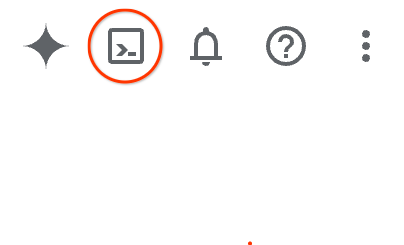
환경을 프로비저닝하고 연결하는 데 몇 분 정도 소요됩니다. 완료되면 다음과 같이 표시됩니다.

가상 머신에는 필요한 개발 도구가 모두 들어있습니다. 영구적인 5GB 홈 디렉터리를 제공하고 Google Cloud에서 실행되므로 네트워크 성능과 인증이 크게 개선됩니다. 이 Codelab의 모든 작업은 브라우저 내에서 수행할 수 있습니다. 아무것도 설치할 필요가 없습니다.
3. Terraform으로 환경 설정
이 실습을 완료하려면
- 선택한 리전 및 영역(예:
us-central1-a, us-west4-a, us-south1-a, us-west1-c, europe-west4-b)의 TPU v5e 할당량에 액세스해야 합니다. TPU 계획 문서를 따르고 TPU 할당량을 사용 설정하여 액세스해야 합니다. - 이는 단일 영역에서 2x2 슬라이스를 형성하는 4개의 TPU v5e 칩 (
ct5lp-hightpu-4t),)이 필요한 소규모 배포입니다.
Hugging Face 사용
방화벽 규칙, 서브넷, Autopilot 클러스터가 있는 커스텀 VPC를 만듭니다. Cloud 콘솔을 열고 사용할 프로젝트를 선택합니다.
- 콘솔 오른쪽 상단에 있는 Cloud Shell을 열고 Cloud Shell에 올바른 프로젝트 ID가 표시되는지 확인한 후 액세스를 허용하라는 메시지가 표시되면 확인합니다.

gke-cnp-lab,라는 디렉터리를 만들고 해당 디렉터리로 이동합니다.
mkdir -p gke-cnp-lab && cd gke-cnp-lab
- 이제 변수를 만듭니다. p.s. TPU 리소스에 액세스할 수 있는 실제 위치를 반영하도록 REGION, ZONE을 수정합니다. 실습 리전
us-west4및 영역us-west4-a에서 사용되는 기본값
export PROJECT_ID=$(gcloud config get-value project)
export REGION="us-west4"
export ZONE="us-west4-a"
export NETWORK="cnp-demo-vpc"
export SUBNET="cnp-main-subnet"
export CLUSTER_NAME="cnp-demo-cluster"
- 구성 변수를 gke-cnp-lab 디렉터리의 도우미 스크립트에 저장합니다. Cloud Shell 세션이 연결 해제되거나 재설정되면
source ./env.sh를 실행하여 활성 변수를 빠르게 복원할 수 있습니다.
cat << EOF > env.sh
export PROJECT_ID="${PROJECT_ID}"
export REGION="${REGION}"
export ZONE="${ZONE}"
export NETWORK="${NETWORK}"
export SUBNET="${SUBNET}"
export CLUSTER_NAME="${CLUSTER_NAME}"

echo -e "\n=== Validating Environment Configuration ==="
echo "Project ID   : \${PROJECT_ID}"
echo "Region       : \${REGION}"
echo "Zone         : \${ZONE}"
echo "Network Name : \${NETWORK}"
echo "Subnet Name  : \${SUBNET}"
echo "Cluster Name : \${CLUSTER_NAME}"

if [[ -z "\${PROJECT_ID}" || -z "\${REGION}" || -z "\${ZONE}" || -z "\${NETWORK}" || -z "\${SUBNET}" || -z "\${CLUSTER_NAME}" ]]; then
  echo -e "\n[ERROR] One or more environment variables are missing! Check your configuration."
else
  echo -e "\n[SUCCESS] Environment variables successfully populated and validated."
fi
EOF

chmod +x env.sh
source ./env.sh
- 이제 구성 파일을 추가합니다. 이렇게 하면 gke-cnp-lab 디렉터리에 terraform.tfvars , variables.tf, main.tf 파일이 생성됩니다.
cat << EOF > terraform.tfvars
project_id   = "${PROJECT_ID}"
region       = "${REGION}"
zone         = "${ZONE}"
network_name = "${NETWORK}"
subnet_name  = "${SUBNET}"
cluster_name = "${CLUSTER_NAME}"
EOF

cat << 'EOF' > variables.tf
variable "project_id" {
  type        = string
  description = "Google Cloud Project ID"
}

variable "region" {
  type        = string
  description = "Target GCP region"
}

variable "zone" {
  type        = string
  description = "Target GCP zone"
}

variable "network_name" {
  type        = string
  description = "VPC network name"
}

variable "subnet_name" {
  type        = string
  description = "Subnetwork name"
}

variable "cluster_name" {
  type        = string
  description = "GKE cluster name"
}
EOF

cat << 'EOF' > main.tf
terraform {
  required_version = ">= 1.5.0"
  required_providers {
    google = {
      source  = "hashicorp/google"
      version = "~> 7.32.0"
    }
    google-beta = {
      source  = "hashicorp/google-beta"
      version = "~> 7.32.0"
    }
  }
}

provider "google" {
  project = var.project_id
  region  = var.region
}

provider "google-beta" {
  project = var.project_id
  region  = var.region
}

# 1. Custom Private VPC Network
resource "google_compute_network" "vpc" {
  name                    = var.network_name
  auto_create_subnetworks = false
  mtu                     = 8896
}

# 2. Private Subnet with Secondary IP Ranges for Pods & Services
resource "google_compute_subnetwork" "subnet" {
  name                     = var.subnet_name
  ip_cidr_range            = "10.10.0.0/20"
  region                   = var.region
  network                  = google_compute_network.vpc.id
  private_ip_google_access = true

  secondary_ip_range {
    range_name    = "gke-pods"
    ip_cidr_range = "10.20.0.0/16"
  }
  secondary_ip_range {
    range_name    = "gke-services"
    ip_cidr_range = "10.30.0.0/20"
  }
}

# 3. Cloud Router & Cloud NAT for Secure Outbound Egress
resource "google_compute_router" "router" {
  name    = "${var.network_name}-router"
  network = google_compute_network.vpc.id
  region  = var.region
}

resource "google_compute_router_nat" "nat" {
  name                               = "${var.network_name}-nat"
  router                             = google_compute_router.router.name
  region                             = var.region
  nat_ip_allocate_option             = "AUTO_ONLY"
  source_subnetwork_ip_ranges_to_nat = "ALL_SUBNETWORKS_ALL_IP_RANGES"
}

# 4. Internal Firewall Rules
resource "google_compute_firewall" "allow_internal" {
  name      = "${var.network_name}-allow-internal"
  network   = google_compute_network.vpc.id
  direction = "INGRESS"
  priority  = 1000
  allow {
    protocol = "all"
  }
  source_ranges = ["10.10.0.0/20", "10.20.0.0/16", "10.30.0.0/20"]
}

# 5. Private GKE Cluster with Observability and Dataplane V2
resource "google_container_cluster" "primary" {
  name               = var.cluster_name
  location           = var.region
  node_locations     = [var.zone]
  network            = google_compute_network.vpc.id
  subnetwork         = google_compute_subnetwork.subnet.id
  initial_node_count = 1

  datapath_provider = "ADVANCED_DATAPATH"

  # FIX: Observability config must be nested inside monitoring_config
  monitoring_config {
    advanced_datapath_observability_config {
      enable_metrics = true
      enable_relay   = true
    }
  }

  release_channel {
    channel = "RAPID"
  }

  ip_allocation_policy {
    cluster_secondary_range_name  = "gke-pods"
    services_secondary_range_name = "gke-services"
  }

  private_cluster_config {
    enable_private_nodes    = true
    enable_private_endpoint = false
    master_ipv4_cidr_block  = "172.16.0.0/28"
  }

  node_config {
    machine_type = "e2-standard-4"
    oauth_scopes = ["https://www.googleapis.com/auth/cloud-platform"]
  }

  deletion_protection = false
}

# 6. Dedicated Cloud TPU v5e Node Pool (ct5lp-hightpu-4t / 2x2 Topology)
resource "google_container_node_pool" "tpu_pool" {
  provider       = google-beta
  name           = "tpu-v5e-pool"
  location       = var.region
  node_locations = [var.zone]
  cluster        = google_container_cluster.primary.name
  node_count     = 1

  node_config {
    machine_type = "ct5lp-hightpu-4t"
    oauth_scopes = ["https://www.googleapis.com/auth/cloud-platform"]

    labels = {
      "cloud.google.com/gke-tpu-accelerator" = "tpu-v5-lite-podslice"
      "cloud.google.com/gke-tpu-topology"    = "2x2"
    }

    taint {
      key    = "google.com/tpu"
      value  = "present"
      effect = "NO_SCHEDULE"
    }
  }
}
EOF
- gke-cnp-lab 디렉터리에 있는지 확인하고 다음 명령어를 실행합니다.
terraform init작업 디렉터리를 초기화합니다. 이 단계는 첫 번째 단계로, 지정된 구성에 필요한 제공업체를 다운로드합니다.terraform plan -out는 실행 계획을 생성하여 Terraform이 인프라를 배포하기 위해 수행할 작업을 보여줍니다.-out를 사용하면 실행 계획을 이름이 지정된 바이너리에 저장할 수 있습니다. 변경하지 않고도 어떤 일이 일어날지 확인할 수 있습니다.terraform apply는 업데이트를 실행합니다.
terraform init
terraform plan -out cnpgke
- 실행 계획을 적용합니다. 저장된 실행 계획을 적용하므로 확인 메시지가 표시되지 않고 즉시 실행됩니다.(6~10분 정도 소요될 수 있음)
terraform apply cnpgke
- 인프라 배포를 확인합니다.
gcloud container clusters get-credentials ${CLUSTER_NAME} --region ${REGION} --project=${PROJECT_ID}
echo -e "\n=== Verifying Cluster Nodes ==="
kubectl get nodes -L cloud.google.com/gke-tpu-accelerator,cloud.google.com/gke-tpu-topology

4. 네트워크 로그 구성
워크로드와 정책을 배포하기 전에 GKE 네트워크 로깅을 구성하여 Cloud Logging에서 연결 원격 분석 및 감사 정책 결정을 기록합니다.
gke-cnp-lab디렉터리에서 NetworkLogging 구성 매니페스트를 만듭니다.
cat << 'EOF' > 00-network-logging.yaml
apiVersion: networking.gke.io/v1alpha1
kind: NetworkLogging
metadata:
  name: default
spec:
  cluster:
    allow:
      delegate: false
      log: true
    deny:
      delegate: false
      log: true
EOF
- 클러스터에 구성 적용
kubectl apply -f 00-network-logging.yaml
kubectl get networklogging default
참고: 리소스에 kubectl.kubernetes.io/last-applied-configuration annotation.가 누락되었다는 경고가 표시될 수 있습니다. 이는 완전히 정상적이며 예상되는 현상입니다. GKE는 클러스터가 가동될 때 기본 NetworkLogging 객체를 미리 만들고, kubectl apply는 새 규칙을 적용하기 위해 해당 객체의 관리를 인계받습니다.
5. Gemma 4 워크로드 및 클라이언트 프로브 배포
다중 등급 정책 평가를 테스트하기 위해 격리된 네임스페이스를 만듭니다.
gemma-llm: 핵심 Gemma 4 추론 워크로드 (tier: ai-core)를 호스팅합니다.client-ns: 승인된 RAG 채팅 클라이언트 (tier: app-frontend)를 호스팅합니다.untrusted-tenant: 승인되지 않은 프로브 컨테이너 (tier: untrusted)를 호스팅합니다.
gke-cnp-lab directory,에서 네임스페이스와 테스트 클라이언트 포드가 포함된01-namespaces-clients.yaml매니페스트를 만듭니다.
cat << 'EOF' > 01-namespaces-clients.yaml
apiVersion: v1
kind: Namespace
metadata:
  name: gemma-llm
  labels:
    tier: ai-core
---
apiVersion: v1
kind: Namespace
metadata:
  name: client-ns
  labels:
    tier: app-frontend
---
apiVersion: v1
kind: Namespace
metadata:
  name: untrusted-tenant
  labels:
    tier: untrusted
---
# Authorized Client Pod
apiVersion: apps/v1
kind: Deployment
metadata:
  name: rag-agent-client
  namespace: client-ns
  labels:
    app: rag-agent
spec:
  replicas: 1
  selector:
    matchLabels:
      app: rag-agent
  template:
    metadata:
      labels:
        app: rag-agent
    spec:
      containers:
        - name: client
          image: curlimages/curl:latest
          command: ["/bin/sh", "-c", "sleep 86400"]
---
# Rogue / Untrusted Probe Pod
apiVersion: apps/v1
kind: Deployment
metadata:
  name: rogue-client
  namespace: untrusted-tenant
  labels:
    app: rogue-app
spec:
  replicas: 1
  selector:
    matchLabels:
      app: rogue-app
  template:
    metadata:
      labels:
        app: rogue-app
    spec:
      containers:
        - name: probe
          image: curlimages/curl:latest
          command: ["/bin/sh", "-c", "sleep 86400"]
EOF
- 네임스페이스 및 클라이언트 배포를 적용합니다.
kubectl apply -f 01-namespaces-clients.yaml
kubectl get namespaces gemma-llm client-ns untrusted-tenant --show-labels
워크로드 vLLM 및 Gemma 배포
Hugging Face 보안 비밀을 만듭니다. YOUR_ACTUAL_HUGGING_FACE_TOKEN을 토큰으로 바꿉니다.
export HF_TOKEN="YOUR_ACTUAL_HUGGING_FACE_TOKEN"
echo $HF_TOKEN
kubectl create secret generic hf-secret -n gemma-llm --from-literal=hf_token=${HF_TOKEN}
- vllm-tpu를 사용하여 Cloud TPU v5e를 타겟팅하는 Gemma 4 추론 워크로드 매니페스트를 만듭니다.
cat << 'EOF' > 02-gemma4-tpu-vllm.yaml
apiVersion: apps/v1
kind: Deployment
metadata:
  name: gemma-serving
  namespace: gemma-llm
  labels:
    app: gemma-service
spec:
  replicas: 1
  selector:
    matchLabels:
      app: gemma-service
  template:
    metadata:
      labels:
        app: gemma-service
        ai.gke.io/model: gemma4
        ai.gke.io/inference-server: vllm-tpu
    spec:
      tolerations:
        - key: "google.com/tpu"
          operator: "Exists"
          effect: "NoSchedule"
      nodeSelector:
        cloud.google.com/gke-tpu-accelerator: tpu-v5-lite-podslice
        cloud.google.com/gke-tpu-topology: 2x2
      containers:
        - name: vllm-inference
          image: vllm/vllm-tpu:latest
          command: ["python3", "-m", "vllm.entrypoints.openai.api_server"]
          args:
            - "--model=google/gemma-4-E2B-it"
            - "--tensor-parallel-size=4"
            - "--host=0.0.0.0"
            - "--port=8000"
            - "--max-model-len=4096"
            - "--max-num-batched-tokens=4096"
          env:
            - name: HF_TOKEN
              valueFrom:
                secretKeyRef:
                  name: hf-secret
                  key: hf_token
            - name: HUGGING_FACE_HUB_TOKEN
              valueFrom:
                secretKeyRef:
                  name: hf-secret
                  key: hf_token
          volumeMounts:
            - mountPath: /dev/shm
              name: dshm
          ports:
            - name: http-inference
              containerPort: 8000
          resources:
            requests:
              google.com/tpu: "4"
              memory: "32Gi"
              cpu: "8"
            limits:
              google.com/tpu: "4"
              memory: "32Gi"
              cpu: "8"
          startupProbe:
            httpGet:
              path: /health
              port: 8000
            failureThreshold: 120
            periodSeconds: 10
          readinessProbe:
            httpGet:
              path: /health
              port: 8000
            periodSeconds: 5
      volumes:
        - name: dshm
          emptyDir:
            medium: Memory
---
apiVersion: v1
kind: Service
metadata:
  name: gemma-service
  namespace: gemma-llm
spec:
  type: ClusterIP
  selector:
    app: gemma-service
  ports:
    - name: http
      protocol: TCP
      port: 8000
      targetPort: 8000
EOF
- 배포를 만듭니다.
kubectl apply -f 02-gemma4-tpu-vllm.yaml
- 완료 상태를 모니터링하려면 아래 스크립트를 실행합니다. 포드는 노드가 프로비저닝될 때까지 기다린 후 진행할 수 있으며, 이 작업은 13분 이상 걸릴 수 있습니다.
echo "       __|__"
echo "  --@--(_|_)--@--"
echo ""
echo "Waiting for Gemma 4 TPU Pod to initialize and become Ready..."

# 1. Wait for the pod to be scheduled and reach the Running state
kubectl wait -n gemma-llm --for=condition=Ready pod -l app=gemma-service --timeout=600s

echo ""
echo "✅ Pod is Running! Streaming vLLM engine initialization logs..."

# 2. Stream logs until Uvicorn/vLLM is ready to serve
kubectl logs -n gemma-llm -l app=gemma-service -c vllm-inference -f | sed -u '/Application startup complete/q'

echo ""
echo "🚀 Gemma 4 on TPU v5e is ready for inference!"
6. 정책 평가 및 기본 상태 이해
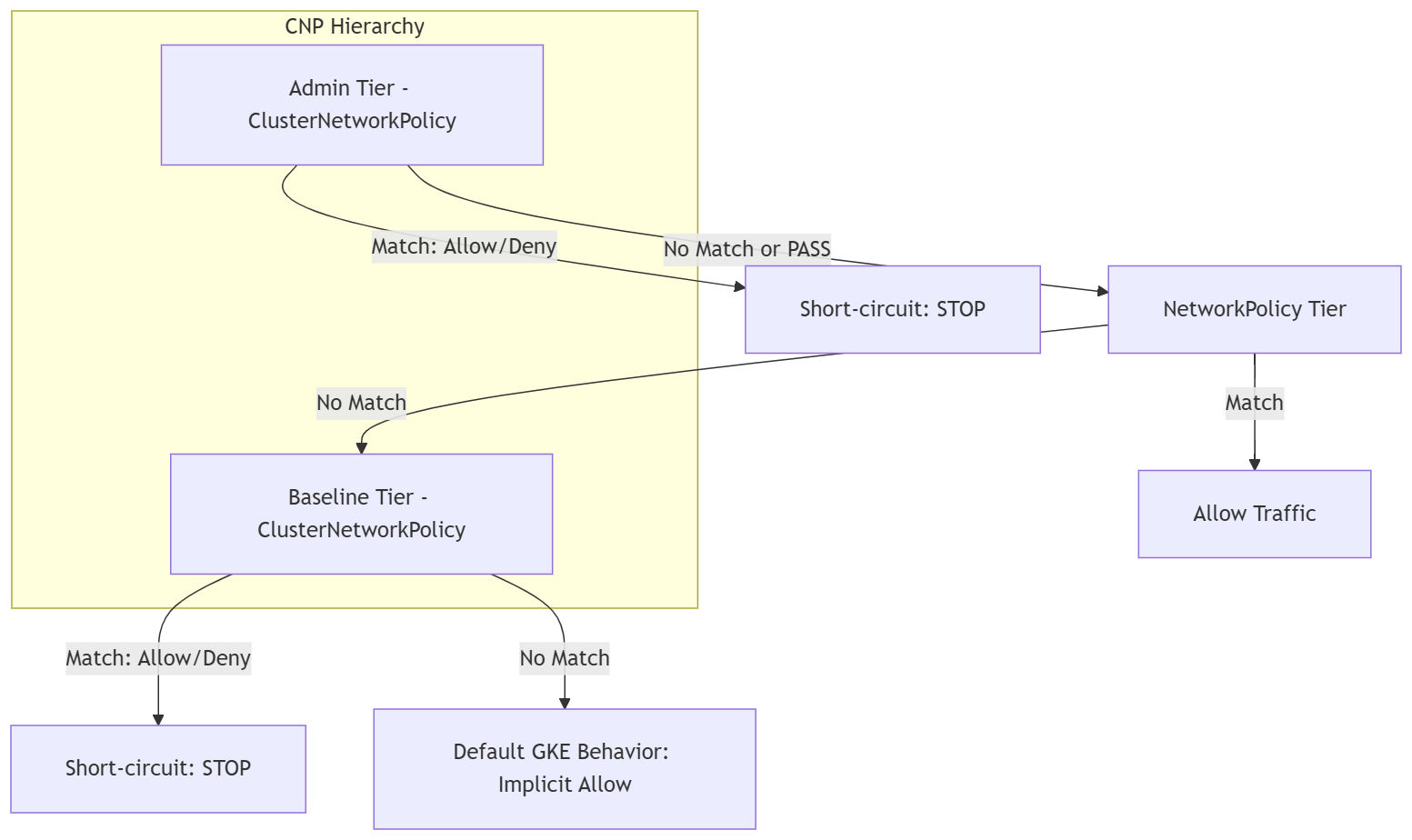
네트워크 정책을 적용하기 전에 GKE ClusterNetworkPolicy와 표준 Kubernetes NetworkPolicy가 다양한 평가 등급에서 상호작용하는 방식을 이해해야 합니다.
GKE의 트래픽은 다중 계층 우선순위 모델을 통해 평가됩니다.
Admin Tier ⟶ NetworkPolicy Tier ⟶ Baseline Tier ⟶ Default GKE Behavior
테스트 흐름
===================================================
           4-STAGE POLICY EVALUATION FLOW
===================================================

[Stage 1: Default State]
 ├── Pre-Policy State: Default Kubernetes allow-all
 ├── Ingress: client-ns  ──▶ Gemma 4: ALLOWED (200 OK)
 ├── Ingress: untrusted  ──▶ Gemma 4: ALLOWED (200 OK)
 ├── Egress:  All Pods   ──▶ Metadata: ALLOWED (Exposed)
 └── Security Posture: ⚠️ Overly permissive
      │
      ▼
[Stage 2: Baseline Lockdown]
 ├── Policy: ClusterNetworkPolicy (tier: Baseline)
 ├── Rule: Default-deny all cross-namespace ingress
 ├── Ingress: client-ns  ──▶ Gemma 4: DROPPED (Timeout)
 ├── Ingress: untrusted  ──▶ Gemma 4: DROPPED (Timeout)
 └── Security Posture: 🛑 Zero-trust baseline active
      │
      ▼
[Stage 3: Developer Delegation]
 ├── Policy: NetworkPolicy (tier: NetworkPolicy)
 ├── Rule: App team allows ingress from client-ns
 ├── Ingress: client-ns  ──▶ Gemma 4: ALLOWED (200 OK)
 ├── Ingress: untrusted  ──▶ Gemma 4: DROPPED (Timeout)
 └── Security Posture: 🔀 App isolation achieved
      │
      ▼
[Stage 4: Admin Guardrail]
 ├── Policy: ClusterNetworkPolicy (tier: Admin)
 ├── Rule: Cluster-wide metadata drop (169.254.169.254)
 ├── Egress:  All Pods   ──▶ Metadata: DROPPED (Timeout)
 ├── Dev NetPol bypass attempt:   OVERRIDDEN (Blocked)
 └── Security Posture: 🔒 Enforced guardrail
===================================================
기준 설정 (정책 테스트 전)
Gemma 4 모델이 정상 상태이고 추론 요청을 처리하는지 확인합니다. 정책이 없는 표준 Kubernetes에서는 모든 교차 네임스페이스 트래픽이 암시적으로 허용됩니다.
client-ns의 승인된 클라이언트에서 추론을 테스트합니다.
kubectl exec -n client-ns deploy/rag-agent-client -- curl --connect-timeout 3 -s -X POST \
  http://gemma-service.gemma-llm.svc.cluster.local:8000/v1/chat/completions \
  -H "Content-Type: application/json" \
  -d '{
    "model": "google/gemma-4-E2B-it",
    "messages": [{"role": "user", "content": "Explain zero trust in one short sentence."}],
    "max_tokens": 40
  }' | jq -r '.choices[0].message.content'
untrusted-tenant의 승인되지 않은 불량 클라이언트에서 추론을 테스트합니다.
kubectl exec -n untrusted-tenant deploy/rogue-client -- curl --connect-timeout 3 -s -X POST \
  http://gemma-service.gemma-llm.svc.cluster.local:8000/v1/chat/completions \
  -H "Content-Type: application/json" \
  -d '{
    "model": "google/gemma-4-E2B-it",
    "messages": [{"role": "user", "content": "Explain zero trust in one short sentence."}],
    "max_tokens": 40
  }' | jq -r '.choices[0].message.content'
- 세 네임스페이스의 포드가 메타데이터 서버 (169.254.169.254)에 연결할 수 있는지 테스트합니다.
echo -e "\n[1/3] Testing Metadata access from Gemma serving pod (gemma-llm)..."
kubectl exec -n gemma-llm deploy/gemma-serving -- curl --connect-timeout 3 -s -w "\nHTTP Code: %{http_code}\n" -H "Metadata-Flavor: Google" \
  http://169.254.169.254/computeMetadata/v1/instance/zone || echo "🛑 RESULT: Connection Timed Out (Blocked)"

echo -e "\n[2/3] Testing Metadata access from authorized client (client-ns)..."
kubectl exec -n client-ns deploy/rag-agent-client -- curl --connect-timeout 3 -s -w "\nHTTP Code: %{http_code}\n" -H "Metadata-Flavor: Google" \
  http://169.254.169.254/computeMetadata/v1/instance/zone || echo "🛑 RESULT: Connection Timed Out (Blocked)"

echo -e "\n[3/3] Testing Metadata access from rogue client (untrusted-tenant)..."
kubectl exec -n untrusted-tenant deploy/rogue-client -- curl --connect-timeout 3 -s -w "\nHTTP Code: %{http_code}\n" -H "Metadata-Flavor: Google" \
  http://169.254.169.254/computeMetadata/v1/instance/zone || echo "🛑 RESULT: Connection Timed Out (Blocked)"
7. 평가 테스트 기준 및 네트워크 정책 등급
이 단계에서는 클러스터 관리자로서 기준 등급 ClusterNetworkPolicy을 적용하여 클러스터 전체의 대체 기본 거부 상태를 설정합니다. 상위 등급에서 명시적으로 허용하지 않는 네임스페이스 간 통신은 모두 삭제됩니다.
제로 트러스트 상태 설정 (기준 등급)
03-baseline-deny.yaml기준 등급 정책 매니페스트를 만듭니다.
cat << 'EOF' > 03-baseline-deny.yaml
apiVersion: policy.networking.k8s.io/v1alpha2
kind: ClusterNetworkPolicy
metadata:
  name: baseline-default-deny
spec:
  tier: Baseline
  priority: 1000
  subject:
    namespaces: {}
  ingress:
    # 1. Allow CoreDNS Ingress cluster-wide so DNS resolution never breaks
    - name: allow-dns-ingress
      action: Accept
      from:
        - namespaces: {}
      protocols:
        - udp:
            destinationPort:
              number: 53
        - tcp:
            destinationPort:
              number: 53
    # 2. Default Deny all other cross-namespace ingress
    - name: baseline-deny-cross-ns
      action: Deny
      from:
        - namespaces: {}
EOF
- 기준 등급 정책을 적용합니다.
kubectl apply -f 03-baseline-deny.yaml
client-ns.에서 클라이언트 연결 테스트
kubectl exec -n client-ns deploy/rag-agent-client -- curl --connect-timeout 3 -s -X POST \
  http://gemma-service.gemma-llm.svc.cluster.local:8000/v1/chat/completions \
  -H "Content-Type: application/json" \
  -d '{
    "model": "google/gemma-4-E2B-it",
    "messages": [{"role": "user", "content": "Explain zero trust in one short sentence."}],
    "max_tokens": 40
  }' | jq -r '.choices[0].message.content'
- untrusted-tenant의 승인되지 않은 불량 클라이언트에서 추론을 테스트합니다.
kubectl exec -n untrusted-tenant deploy/rogue-client -- curl --connect-timeout 3 -s -X POST \
  http://gemma-service.gemma-llm.svc.cluster.local:8000/v1/chat/completions \
  -H "Content-Type: application/json" \
  -d '{
    "model": "google/gemma-4-E2B-it",
    "messages": [{"role": "user", "content": "Explain zero trust in one short sentence."}],
    "max_tokens": 40
  }' | jq -r '.choices[0].message.content'
개발자에게 액세스 권한 위임 (NetworkPolicy 등급)
이제 gemma-llm 애플리케이션팀은 표준 네임스페이스 범위 NetworkPolicy를 적용하여 client-ns에서 승인된 트래픽을 허용합니다.
- 개발자
04-app-networkpolicy.yamlNetworkPolicy 매니페스트를 만듭니다.
cat << 'EOF' > 04-app-networkpolicy.yaml
apiVersion: networking.k8s.io/v1
kind: NetworkPolicy
metadata:
  name: allow-rag-client
  namespace: gemma-llm
spec:
  podSelector:
    matchLabels:
      app: gemma-service
  policyTypes:
    - Ingress
  ingress:
    # Explicitly permit ingress only from pods matching app: rag-agent in client-ns
    - from:
        - namespaceSelector:
            matchLabels:
              kubernetes.io/metadata.name: client-ns
          podSelector:
            matchLabels:
              app: rag-agent
      ports:
        - protocol: TCP
          port: 8000
EOF
- 정책을 적용합니다.
kubectl apply -f 04-app-networkpolicy.yaml
client-ns에서 클라이언트 연결 테스트
kubectl exec -n client-ns deploy/rag-agent-client -- curl --connect-timeout 3 -s -X POST \
  http://gemma-service.gemma-llm.svc.cluster.local:8000/v1/chat/completions \
  -H "Content-Type: application/json" \
  -d '{
    "model": "google/gemma-4-E2B-it",
    "messages": [{"role": "user", "content": "Explain zero trust in one short sentence."}],
    "max_tokens": 40
  }' | jq -r '.choices[0].message.content'
untrusted-tenant의 불량 클라이언트에서 연결을 테스트합니다.
kubectl exec -n untrusted-tenant deploy/rogue-client -- curl --connect-timeout 3 -s -X POST \
  http://gemma-service.gemma-llm.svc.cluster.local:8000/v1/chat/completions \
  -H "Content-Type: application/json" \
  -d '{
    "model": "google/gemma-4-E2B-it",
    "messages": [{"role": "user", "content": "Explain zero trust in one short sentence."}],
    "max_tokens": 40
  }' | jq -r '.choices[0].message.content'
8. 평가에서 전역 가드레일 시행 (관리자 등급)
이제 클러스터 관리자로서 GKE 평가 순서의 맨 위에 관리자 등급 ClusterNetworkPolicy을 적용합니다. 이 등급이 먼저 평가되며, 일치하는 규칙은 다른 모든 등급보다 즉시 우선 적용됩니다. 일치하는 항목이 없으면 패킷이 하위 등급 (NetworkPolicy 및 기준)에서 평가되도록 전달됩니다.
이 단계에서는 다음을 수행하는 정책을 적용합니다.
- 클러스터 전체 이그레스 가드레일: 모든 네임스페이스의 모든 포드가 Google Cloud 메타데이터 서버 (
169.254.169.254/32)에 도달하지 못하도록 차단합니다. - DNS 지원: 포드에서 호스트 이름을 확인할 수 있도록 포트 53에서 모든 DNS 트래픽을 허용합니다 (GKE의 로컬 DNS 캐시 고려).
- 인그레스 및 이그레스 위임: Pass 작업을 사용하여 다른 모든 트래픽 결정을 전달하므로 표준 개발자 네트워크 정책과 기준 기본 거부 규칙이 최종 결정을 내릴 수 있습니다.
- 모든 네임스페이스를 타겟팅하는
05-admin-guardrails.yaml관리자 등급 정책 매니페스트 만들기
cat << 'EOF' > 05-admin-guardrails.yaml
apiVersion: policy.networking.k8s.io/v1alpha2
kind: ClusterNetworkPolicy
metadata:
  name: admin-global-guardrails
spec:
  tier: Admin
  priority: 10
  subject:
    namespaces: {}
  ingress:
    - name: delegate-all-ingress
      action: Pass
      from:
        - namespaces: {}
  egress:
    - name: allow-all-dns
      action: Accept
      to:
        - networks:
            - 0.0.0.0/0
      protocols:
        - udp:
            destinationPort:
              number: 53
        - tcp:
            destinationPort:
              number: 53
    - name: block-metadata-server-global
      action: Deny
      to:
        - networks:
            - 169.254.169.254/32
    - name: delegate-other-egress
      action: Pass
      to:
        - namespaces: {}
EOF
- 관리자 등급 정책을 적용합니다.
kubectl apply -f 05-admin-guardrails.yaml
- 세 네임스페이스 모두에서 메타데이터 무단 반출을 테스트합니다.
echo -e "\n[1/3] Testing Metadata access from Gemma serving pod (gemma-llm)..."
kubectl exec -n gemma-llm deploy/gemma-serving -- curl --connect-timeout 3 -s -w "\nHTTP Code: %{http_code}\n" -H "Metadata-Flavor: Google" \
  http://169.254.169.254/computeMetadata/v1/instance/zone || echo "🛑 RESULT: Connection Timed Out (Blocked)"

echo -e "\n[2/3] Testing Metadata access from authorized client (client-ns)..."
kubectl exec -n client-ns deploy/rag-agent-client -- curl --connect-timeout 3 -s -w "\nHTTP Code: %{http_code}\n" -H "Metadata-Flavor: Google" \
  http://169.254.169.254/computeMetadata/v1/instance/zone || echo "🛑 RESULT: Connection Timed Out (Blocked)"

echo -e "\n[3/3] Testing Metadata access from rogue client (untrusted-tenant)..."
kubectl exec -n untrusted-tenant deploy/rogue-client -- curl --connect-timeout 3 -s -w "\nHTTP Code: %{http_code}\n" -H "Metadata-Flavor: Google" \
  http://169.254.169.254/computeMetadata/v1/instance/zone || echo "🛑 RESULT: Connection Timed Out (Blocked)"
client-ns에서 클라이언트 연결 테스트
kubectl exec -n client-ns deploy/rag-agent-client -- curl --connect-timeout 3 -s -X POST \
  http://gemma-service.gemma-llm.svc.cluster.local:8000/v1/chat/completions \
  -H "Content-Type: application/json" \
  -d '{
    "model": "google/gemma-4-E2B-it",
    "messages": [{"role": "user", "content": "Explain zero trust in one short sentence."}],
    "max_tokens": 40
  }' | jq -r '.choices[0].message.content'
- gemma-llm 내에 모든 이그레스 허용 NetworkPolicy를 적용하여 개발자 우회 시도를 시뮬레이션합니다.
cat << 'EOF' > 06-bypass-attempt.yaml
apiVersion: networking.k8s.io/v1
kind: NetworkPolicy
metadata:
  name: dev-allow-all-egress
  namespace: gemma-llm
spec:
  podSelector: {}
  policyTypes:
    - Egress
  egress:
    - {}
EOF

kubectl apply -f 06-bypass-attempt.yaml
- 개발자 우회로 메타데이터 액세스를 차단 해제할 수 있는지 테스트합니다.
kubectl exec -n gemma-llm deploy/gemma-serving -- curl --connect-timeout 3 -s -w "\nHTTP Code: %{http_code}\n" -H "Metadata-Flavor: Google" \
  http://169.254.169.254/computeMetadata/v1/instance/zone || echo "🛑 RESULT: Connection Timed Out (Admin Guardrail Overrode Developer Policy)"
9. Hubble 및 Cloud Logging을 사용한 대화형 확인
클러스터 전반에서 실시간 정책 시행 및 감사 패킷 결정을 관찰하기 위해 커널 수준 eBPF 패킷 추적과 자동화된 테스트 실행을 결합한 이중 창 Cloud Shell 세션을 사용합니다.
- Cloud Shell 메뉴에서 '+' 아이콘을 클릭하여 두 번째 터미널 탭을 엽니다.
- 이 새 탭에서 다음 명령어를 실행하여 별칭을 만들고
gemma-llm네임스페이스의 실시간 트래픽을 관찰합니다.
# Create an alias to execute Hubble natively inside the relay pod
alias hubble="kubectl exec -it -n gke-managed-dpv2-observability deploy/hubble-relay -c hubble-cli -- hubble"

# Observe real-time traffic to and from the Gemma namespace
hubble observe --follow --namespace gemma-llm
- 첫 번째 Cloud Shell 탭으로 다시 전환하고
gke-cnp-lab디렉터리에 있는지 확인합니다.
cd ~/gke-cnp-lab
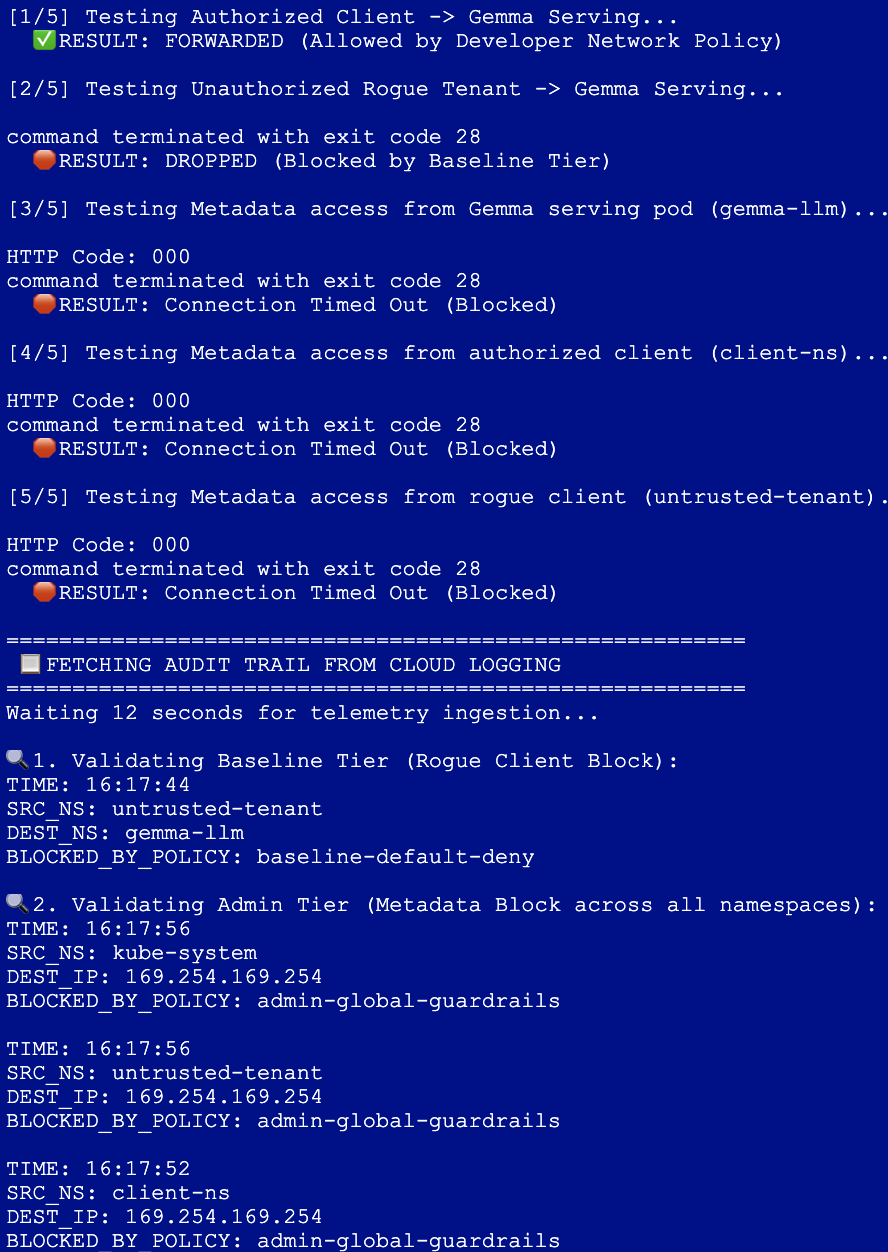
- 다음 블록을 실행하여 자동 검증 스크립트를 만들고 실행합니다. 이 스크립트는 필요한 트래픽 테스트를 실행하고 GKE의 정확한 루트 수준 메타데이터 스키마를 사용하여 Cloud Logging을 쿼리하여 요청을 평가한 정확한 Dataplane V2 규칙을 표시합니다.
cat << 'EOF' > verify-suite.sh
#!/usr/bin/env bash
set -e

echo "========================================================"
echo " 🧪 RUNNING MULTI-TIER POLICY VERIFICATION SUITE"
echo "========================================================"

# Test 1: Ingress Authorized Client -> Gemma (Allowed by NetworkPolicy)
echo -e "\n[1/5] Testing Authorized Client -> Gemma Serving..."
if kubectl exec -n client-ns deploy/rag-agent-client -- \
  curl -s --connect-timeout 3 \
  http://gemma-service.gemma-llm.svc.cluster.local:8000/v1/chat/completions > /dev/null; then
  echo "  ✅ RESULT: FORWARDED (Allowed by Developer Network Policy)"
else
  echo "  🛑 RESULT: FAILED"
fi

# Test 2: Ingress Rogue Client -> Gemma (Blocked by Baseline Tier)
echo -e "\n[2/5] Testing Unauthorized Rogue Tenant -> Gemma Serving..."
if kubectl exec -n untrusted-tenant deploy/rogue-client -- \
  curl -s --connect-timeout 3 \
  http://gemma-service.gemma-llm.svc.cluster.local:8000/v1/chat/completions > /dev/null; then
  echo "  ⚠️ RESULT: UNEXPECTED ALLOW"
else
  echo "  🛑 RESULT: DROPPED (Blocked by Baseline Tier)"
fi

# Test 3: Egress Gemma -> GCP Metadata Server (Blocked by Admin Tier)
echo -e "\n[3/5] Testing Metadata access from Gemma serving pod (gemma-llm)..."
kubectl exec -n gemma-llm deploy/gemma-serving -- \
  curl --connect-timeout 3 -s -w "\nHTTP Code: %{http_code}\n" -H "Metadata-Flavor: Google" \
  http://169.254.169.254/computeMetadata/v1/instance/zone || echo "  🛑 RESULT: Connection Timed Out (Blocked)"

# Test 4: Egress Authorized Client -> GCP Metadata Server (Blocked by Admin Tier)
echo -e "\n[4/5] Testing Metadata access from authorized client (client-ns)..."
kubectl exec -n client-ns deploy/rag-agent-client -- \
  curl --connect-timeout 3 -s -w "\nHTTP Code: %{http_code}\n" -H "Metadata-Flavor: Google" \
  http://169.254.169.254/computeMetadata/v1/instance/zone || echo "  🛑 RESULT: Connection Timed Out (Blocked)"

# Test 5: Egress Rogue Client -> GCP Metadata Server (Blocked by Admin Tier)
echo -e "\n[5/5] Testing Metadata access from rogue client (untrusted-tenant)..."
kubectl exec -n untrusted-tenant deploy/rogue-client -- \
  curl --connect-timeout 3 -s -w "\nHTTP Code: %{http_code}\n" -H "Metadata-Flavor: Google" \
  http://169.254.169.254/computeMetadata/v1/instance/zone || echo "  🛑 RESULT: Connection Timed Out (Blocked)"

echo -e "\n========================================================"
echo " 📋 FETCHING AUDIT TRAIL FROM CLOUD LOGGING"
echo "========================================================"
echo "Waiting 12 seconds for telemetry ingestion..."
sleep 12

echo -e "\n🔍 1. Validating Baseline Tier (Rogue Client Block):"
gcloud logging read '
  resource.type="k8s_node"
  logName=~"logs/policy-action"
  jsonPayload.disposition="deny"
  jsonPayload.src.namespace="untrusted-tenant"
  jsonPayload.dest.namespace="gemma-llm"
' --limit=1 --format="table(
    timestamp.date('%H:%M:%S', tz=LOCAL):label=TIME,
    jsonPayload.src.namespace:label=SRC_NS,
    jsonPayload.dest.namespace:label=DEST_NS,
    jsonPayload.policies[0].name:label=BLOCKED_BY_POLICY
)"

echo -e "\n🔍 2. Validating Admin Tier (Metadata Block across all namespaces):"
gcloud logging read '
  resource.type="k8s_node"
  logName=~"logs/policy-action"
  jsonPayload.disposition="deny"
  jsonPayload.connection.dest_ip="169.254.169.254"
' --limit=3 --format="table(
    timestamp.date('%H:%M:%S', tz=LOCAL):label=TIME,
    jsonPayload.src.namespace:label=SRC_NS,
    jsonPayload.connection.dest_ip:label=DEST_IP,
    jsonPayload.policies[0].name:label=BLOCKED_BY_POLICY
)"
EOF

chmod +x verify-suite.sh
./verify-suite.sh
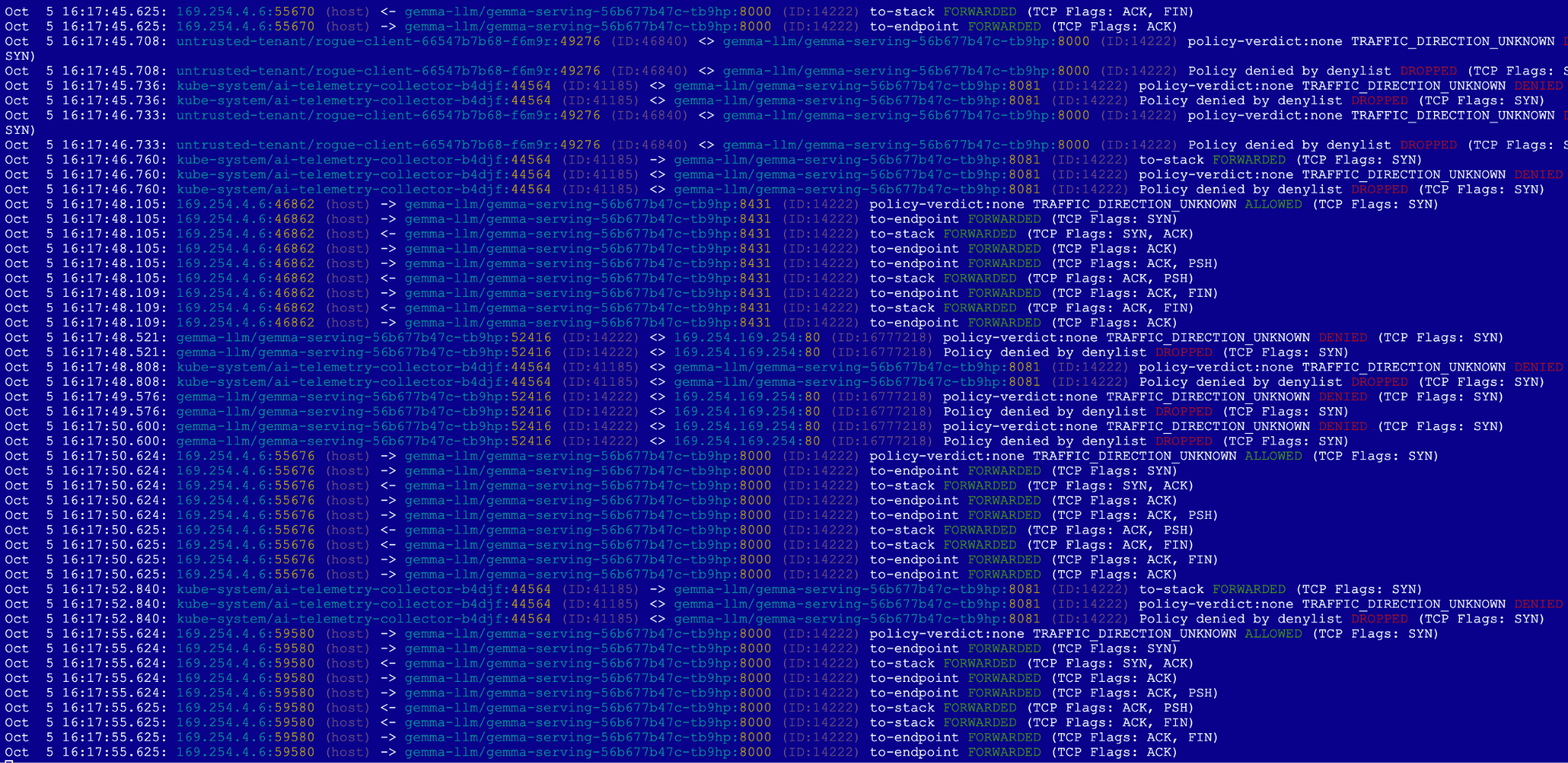
- 첫 번째 탭에서 스크립트가 실행되는 동안 두 번째 탭에서 Hubble 출력을 확인합니다.
Hubble (탭 2): 승인된 HTTP 요청이 녹색으로 전달되는 것을 확인할 수 있습니다. 차단된 트래픽의 경우 빨간색 (DROPPED) 이벤트가 표시됩니다. 불량 테넌트: 연결이 관리자 등급에서 전달되고 기준 등급에서 차단됩니다. 메타데이터 쿼리: 클라우드 사용자 인증 정보에 도달하려는 요청이 관리 등급에서 즉시 차단됩니다.
Cloud Logging (탭 1): 스크립트는 Google Cloud Logging으로 전송된 정확한 감사 레코드를 가져오는 것으로 끝납니다. 이는 승인되지 않은 트래픽을 차단한 등급 (관리자 또는 기준)과 정책을 명시적으로 증명하며, 현지화되고 시간대를 반영한 타임스탬프로 형식이 지정됩니다.
10. 삭제
- 두 번째 탭 닫기
- 첫 번째 Cloud Shell 탭으로 다시 전환합니다.
- 배포된 Kubernetes 매니페스트, 네임스페이스, 보안 비밀을 순서대로 삭제합니다.
cd ~/gke-cnp-lab

# Delete policy and verification scripts
rm -f verify-suite.sh
kubectl delete -f 05-admin-guardrails.yaml --ignore-not-found
kubectl delete -f 04-app-networkpolicy.yaml --ignore-not-found
kubectl delete -f 03-baseline-deny.yaml --ignore-not-found
kubectl delete -f 00-network-logging.yaml --ignore-not-found

# Delete workload deployments, secrets, and namespaces
kubectl delete -f 02-gemma4-tpu-vllm.yaml --ignore-not-found
kubectl delete secret hf-secret -n gemma-llm --ignore-not-found
kubectl delete -f 01-namespaces-clients.yaml --ignore-not-found
- 다음 명령어로 인프라를 정리하고
yes를 입력하여 확인합니다.
terraform destroy --auto-approve
- 활성 프로젝트에서 모든 리소스가 완전히 종료되었는지 확인합니다.
gcloud container clusters list --region=us-west4
gcloud compute networks list
gke-cnp-lab디렉터리와 콘텐츠를 삭제합니다.
cd
rm -r gke-cnp-lab
11. 축하합니다
GKE ClusterNetworkPolicy를 사용한 AI 추론 워크로드 보호 Codelab을 완료했습니다.
이 실습을 완료하여 Google Kubernetes Engine에서 민감한 비공개 LLM 워크로드를 서빙하기 위한 강력한 다중 계층 심층 방어 네트워크 아키텍처를 설계하고 검증했습니다.
학습 내용:
- 코드형 인프라: Terraform을 사용하여 보안이 강화된 비공개 Standard GKE 클러스터, 비공개 리전 서브넷, 전용 Cloud TPU v5e 하드웨어를 동적으로 프로비저닝했습니다.
- 원격 분석 및 모니터링 가능성: 커널 수준 eBPF Hubble 트레이싱과 함께 Dataplane V2 네트워크 로그를 구성하여 심층적인 런타임 패킷 가시성을 확보했습니다.
- 계층적 보안 상황: 세 가지 평가 등급에 따른 운영 업무의 명확한 분리
- 관리 등급: 클러스터 전체에 적용되며 우회할 수 없는 이그레스 가드레일로, 측면 메타데이터 사용자 인증 정보 액세스 (169.254.169.254)를 차단합니다.
- NetworkPolicy 등급: 네임스페이스 범위의 인그레스 경계를 애플리케이션 개발자에게 위임하여 프로덕션 클라이언트 연결을 안전하게 승인합니다.
- 기본 등급: 승인되지 않은 테넌트 트래픽을 기본적으로 거부하는 클러스터 전체 대체 안전망을 구축했습니다.
- 실시간 감사: 전체 검증 테스트 모음을 실행하고, Linux 커널 수준에서 실시간 패킷 드롭을 모니터링하고, Google Cloud Logging에서 직접 구조화된 정책 작업 감사를 쿼리합니다.
다음 단계/더 학습하기
GKE 네트워킹에 대해 자세히 알아보기