
1. 1. Before you begin
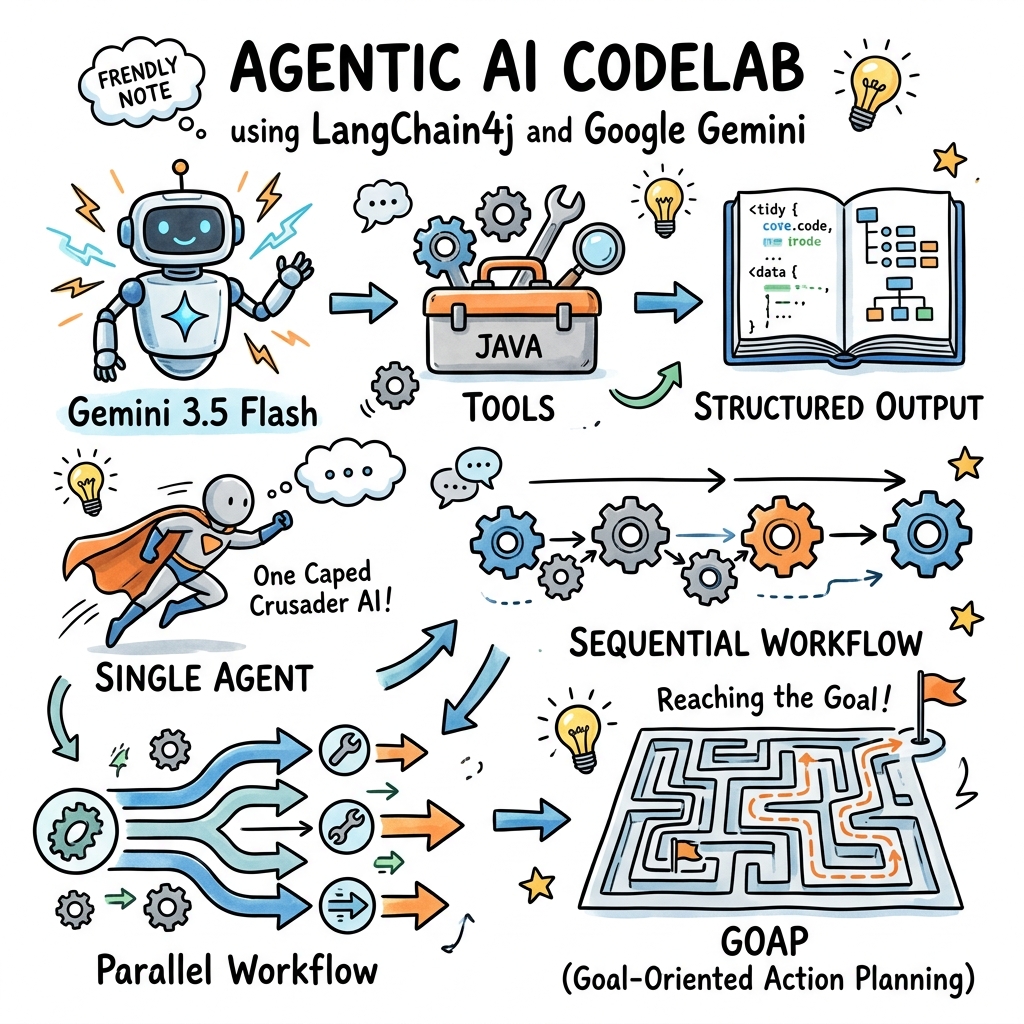
Welcome! In this codelab, you will learn how to build agentic AI applications in Java using the popular LangChain4j framework and its new Google GenAI module.
Agentic AI refers to systems where LLMs are not just responding to prompts, but are equipped with tools, memory, and planning capabilities to autonomously accomplish complex, multi-step goals.
You will start with simple configurations, progress to building agents with local tools and structured outputs, and finally explore advanced multi-agent orchestration patterns, culminating in a Goal-Oriented Action Planning (GOAP) agentic system.
What you'll do
- Configure the new
GoogleGenAiChatModelto connect to Gemini. - Enable request/response logging for easy debugging.
- Give Gemini access to local Java code using Tools.
- Enforce Structured Output format (POJOs) from Gemini.
- Define and build single-purpose Agents with
@Agentannotation. - Orchestrate Sequential and Parallel multi-agent workflows.
- Build a Goal-Oriented Action Planning (GOAP) system that dynamically plans agent execution.
What you'll need
- Java Development Kit (JDK) 17 or higher.
- Maven 3.5+ installed.
- A Gemini API Key from Google AI Studio.
2. 2. Set up: Project & API Key
To get started, we need to create a new Maven project and configure our Gemini API key.
Create the Maven Project
Create a new directory for your project and initialize it with a pom.xml file.
Add the following dependencies to your pom.xml. Note that we are using the latest version 1.16.1-beta26 of the LangChain4j Google GenAI and Agentic modules:
<project xmlns="http://maven.apache.org/POM/4.0.0"
         xmlns:xsi="http://www.w3.org/2001/XMLSchema-instance"
         xsi:schemaLocation="http://maven.apache.org/POM/4.0.0 http://maven.apache.org/xsd/maven-4.0.0.xsd">
    <modelVersion>4.0.0</modelVersion>

    <groupId>com.example</groupId>
    <artifactId>gemini-agents-demo</artifactId>
    <version>1.0-SNAPSHOT</version>

    <properties>
        <maven.compiler.source>17</maven.compiler.source>
        <maven.compiler.target>17</maven.compiler.target>
        <langchain4j.version>1.16.1-beta26</langchain4j.version>
    </properties>

    <dependencies>
        <!-- LangChain4j Google GenAI Integration -->
        <dependency>
            <groupId>dev.langchain4j</groupId>
            <artifactId>langchain4j-google-genai</artifactId>
            <version>${langchain4j.version}</version>
        </dependency>

        <!-- LangChain4j Agentic Framework Core -->
        <dependency>
            <groupId>dev.langchain4j</groupId>
            <artifactId>langchain4j-agentic</artifactId>
            <version>${langchain4j.version}</version>
        </dependency>

        <!-- LangChain4j Agentic Patterns (needed for GOAP) -->
        <dependency>
            <groupId>dev.langchain4j</groupId>
            <artifactId>langchain4j-agentic-patterns</artifactId>
            <version>${langchain4j.version}</version>
        </dependency>

        <!-- SLF4J Logger for logging requests/responses -->
        <dependency>
            <groupId>org.slf4j</groupId>
            <artifactId>slf4j-simple</artifactId>
            <version>2.0.12</version>
        </dependency>
    </dependencies>
</project>
Get a Gemini API Key
- Go to Google AI Studio.
- Click on Get API Key.
- Create a new key (or select an existing one).
- Set it as an environment variable in your terminal:
export GEMINI_API_KEY="your-api-key-here"
3. 3. Configure the Gemini Chat Model
Now, let's create a simple "Hello World" application that instantiates the GoogleGenAiChatModel and sends a test prompt.
The new GoogleGenAiChatModel uses the unified Google GenAI SDK, which offers unified access to Gemini models.
Create a class named HelloWorld.java in src/main/java/com/example/HelloWorld.java:
package com.example;

import dev.langchain4j.model.chat.ChatModel;
import dev.langchain4j.model.google.genai.GoogleGenAiChatModel;

public class HelloWorld {
    public static void main(String[] args) {
        // 1. Configure the Gemini model
        ChatModel model = GoogleGenAiChatModel.builder()
                .apiKey(System.getenv("GEMINI_API_KEY"))
                .modelName("gemini-3.5-flash")
                // Enable logging for both requests and responses
                .logRequestsAndResponses(true)
                .build();

        // 2. Invoke the model
        String response = model.chat("Hello Gemini! Explain 'Agentic AI' in one sentence.");

        // 3. Print response
        System.out.println("\n--- Gemini Response ---");
        System.out.println(response);
    }
}
Run this class. Because logRequestsAndResponses(true) is enabled, you will see verbose SLF4J logs detailing the exact request payload sent to Google's API, and the raw JSON response received, followed by the printed output:
--- Gemini Response ---
**Agentic AI** refers to autonomous artificial intelligence systems that can proactively plan, make decisions, use tools, and execute multi-step tasks to achieve specific goals with minimal human supervision.
4. 4. Define Local Java Tools
LLMs are powerful, but they are limited by their training data. We can extend their capabilities by providing them with Tools (also known as function calling).
In LangChain4j, tools are simple Java classes where methods are annotated with @Tool.
Let's write a simple tool that calculates the number of days between two dates. Create DateTools.java in src/main/java/com/example/DateTools.java:
package com.example;

import dev.langchain4j.agent.tool.P;
import dev.langchain4j.agent.tool.Tool;
import java.time.LocalDate;
import java.time.temporal.ChronoUnit;

public class DateTools {

    @Tool("Calculates the number of days between two dates")
    public long daysBetween(
            @P("The start date in ISO format (YYYY-MM-DD)") String startDate,
            @P("The end date in ISO format (YYYY-MM-DD)") String endDate) {
        LocalDate start = LocalDate.parse(startDate);
        LocalDate end = LocalDate.parse(endDate);
        return ChronoUnit.DAYS.between(start, end);
    }
}
To use this tool, we will define an AI Service. In the LangChain4j Agentic framework, we can build it using AgenticServices.agentBuilder().
Create ToolDemo.java in src/main/java/com/example/ToolDemo.java:
package com.example;

import dev.langchain4j.agentic.Agent;
import dev.langchain4j.agentic.AgenticServices;
import dev.langchain4j.model.chat.ChatModel;
import dev.langchain4j.model.google.genai.GoogleGenAiChatModel;
import dev.langchain4j.service.V;

public class ToolDemo {

    public interface DateAssistant {
        @Agent
        String ask(@V("prompt") String prompt);
    }

    public static void main(String[] args) {
        ChatModel model = GoogleGenAiChatModel.builder()
                .apiKey(System.getenv("GEMINI_API_KEY"))
                .modelName("gemini-3.5-flash")
                .build();

        // Build the assistant and register our DateTools
        DateAssistant assistant = AiServices.builder(DateAssistant.class)
                .chatModel(model)
                .tools(new DateTools())
                .build();

        String response = assistant.ask("How many days are there between 2026-01-01 and 2026-06-30?");
        System.out.println("Response: " + response);
    }
}
When you run this code, Gemini will analyze the prompt, realize it needs to call daysBetween, generate a tool call request, LangChain4j will execute your local Java method, send the result back to Gemini, and Gemini will format the final natural language response.
You should see an output similar to:
Response: There are 180 days between 2026-01-01 and 2026-06-30.
5. 5. Define Structured Output
Often, you want the LLM to return data in a specific structured format (e.g. JSON matching a schema) rather than plain text.
LangChain4j handles this automatically when you specify a POJO or a Java record as the return type of your agent or service method.
Let's define a Java record representing a book extraction:
Create Book.java in src/main/java/com/example/Book.java:
package com.example;

public record Book(String title, String author, int publicationYear) {}
Now create an agent interface that returns Book. Create StructuredOutputDemo.java in src/main/java/com/example/StructuredOutputDemo.java:
package com.example;

import dev.langchain4j.agentic.Agent;
import dev.langchain4j.agentic.AgenticServices;
import dev.langchain4j.model.chat.ChatModel;
import dev.langchain4j.model.google.genai.GoogleGenAiChatModel;
import dev.langchain4j.service.UserMessage;
import dev.langchain4j.service.V;

public class StructuredOutputDemo {

    public interface BookExtractor {
        @UserMessage("Extract book details from: {{text}}")
        Book extract(@V("text") String text);
    }

    public static void main(String[] args) {
        ChatModel model = GoogleGenAiChatModel.builder()
                .apiKey(System.getenv("GEMINI_API_KEY"))
                .modelName("gemini-3.5-flash")
                .build();

        BookExtractor extractor = AiServices.builder(BookExtractor.class)
                .chatModel(model)
                .build();

        String text = "I just finished reading 'Project Hail Mary' by Andy Weir, published in 2021. It was amazing!";
        Book book = extractor.extract(text);

        System.out.println("Extracted POJO: " + book);
    }
}
Gemini 3.5 Flash supports strict JSON Schema output. LangChain4j generates the JSON schema from your Book record, instructs Gemini to populate it, and deserializes the JSON response back into a Book record.
You should see an output similar to:
Extracted POJO: Book[title=Project Hail Mary, author=Andy Weir, publicationYear=2021]
6. 6. Create your First Agent
In the langchain4j-agentic framework, an Agent is defined using the @Agent annotation on the method of the interface. This annotation provides a name/description that can be used by orchestration systems (like planners).
Let's create a simple agent that takes a topic and drafts a very short story about it.
Create CreativeWriter.java in src/main/java/com/example/CreativeWriter.java:
package com.example;

import dev.langchain4j.agentic.Agent;
import dev.langchain4j.service.SystemMessage;
import dev.langchain4j.service.UserMessage;
import dev.langchain4j.service.V;

public interface CreativeWriter {

    @SystemMessage("You are a creative writer. Generate a draft of a story no more than 3 sentences long.")
    @UserMessage("Write a story about {{topic}}.")
    @Agent(description = "Generates a story based on the given topic", outputKey = "story")
    String writeStory(@V("topic") String topic);
}
Let's test this agent individually. Create AgentDemo.java in src/main/java/com/example/AgentDemo.java:
package com.example;

import dev.langchain4j.agentic.AgenticServices;
import dev.langchain4j.model.chat.ChatModel;
import dev.langchain4j.model.google.genai.GoogleGenAiChatModel;

public class AgentDemo {
    public static void main(String[] args) {
        ChatModel model = GoogleGenAiChatModel.builder()
                .apiKey(System.getenv("GEMINI_API_KEY"))
                .modelName("gemini-3.5-flash")
                .build();

        CreativeWriter writer = AgenticServices.agentBuilder(CreativeWriter.class)
                .chatModel(model)
                .build();

        String story = writer.writeStory("a lonely robot on Mars");
        System.out.println("Generated Story:\n" + story);
    }
}
You should see an output similar to:
Generated Story:
For eighty years, the rusty little rover trundled across the crimson dunes, diligently collecting soil samples for a home world that had long since gone dark. Each evening, it pointed its high-gain antenna toward the fading blue speck of Earth and beamed its lonely coordinates into the silent cosmos. Receiving only static in return, the robot tucked its camera arm close against the freezing Martian wind and sang a quiet lullaby to the empty stars.
By adding @Agent annotation, this class is now prepared to participate in more complex workflows, such as sequential chaining.
7. 7. Orchestrate Multi-Agent Workflows: Sequential
A common agentic pattern is Sequential Workflow, where agents execute in a predefined order. The output of one agent is passed as the input of the next.
Let's define a second agent, StyleEditor, which will edit the story written by CreativeWriter to fit a specific style (e.g. comedic, dramatic).
Create StyleEditor.java in src/main/java/com/example/StyleEditor.java:
package com.example;

import dev.langchain4j.agentic.Agent;
import dev.langchain4j.service.SystemMessage;
import dev.langchain4j.service.UserMessage;
import dev.langchain4j.service.V;

public interface StyleEditor {

    @SystemMessage("You are a professional editor. Analyze and rewrite the story to align with the style requested.")
    @UserMessage("Rewrite this story: '{{story}}' into a {{style}} style.")
    @Agent(description = "Edits a story to fit a specific style", outputKey = "edited_story")
    String editStory(@V("story") String story, @V("style") String style);
}
Now, let's connect CreativeWriter and StyleEditor sequentially using AgenticServices.sequenceBuilder().
We'll use an UntypedAgent representing the sequence, which allows us to pass inputs and collect outputs via a shared map.
Create SequentialWorkflowDemo.java in src/main/java/com/example/SequentialWorkflowDemo.java:
package com.example;

import dev.langchain4j.agentic.AgenticServices;
import dev.langchain4j.agentic.UntypedAgent;
import dev.langchain4j.model.chat.ChatModel;
import dev.langchain4j.model.google.genai.GoogleGenAiChatModel;
import java.util.Map;

public class SequentialWorkflowDemo {
    public static void main(String[] args) {
        ChatModel model = GoogleGenAiChatModel.builder()
                .apiKey(System.getenv("GEMINI_API_KEY"))
                .modelName("gemini-3.5-flash")
                .build();

        // 1. Build the sub-agents
        CreativeWriter writer = AgenticServices.agentBuilder(CreativeWriter.class)
                .chatModel(model)
                .outputKey("story") // Output goes into AgenticScope as "story"
                .build();

        StyleEditor editor = AgenticServices.agentBuilder(StyleEditor.class)
                .chatModel(model)
                .outputKey("edited_story") // Output goes into AgenticScope as "edited_story"
                .build();

        // 2. Build the sequence
        UntypedAgent workflow = AgenticServices.sequenceBuilder()
                .subAgents(writer, editor)
                .outputKey("edited_story") // Final output of workflow
                .build();

        // 3. Run the workflow with inputs
        Map<String, Object> inputs = Map.of(
                "topic", "a cat learning to fly",
                "style", "Shakespearean"
        );

        String result = (String) workflow.invoke(inputs);
        System.out.println("Final Edited Story:\n" + result);
    }
}
You should see an output similar to:
Final Edited Story:
For years had Barnaby with envy watched
The soaring sparrows with a green-eyed spite,
Convinced that heavy gravity was but
An idle law he deigned to tolerate.
But lo! Upon the rare and azure moon,
He scaled the summit of the ancient oak,
Closed fast his eyes, and leapt with blind belief.
While the dread squirrel shrieked in sheer dismay,
No downward plunge befell the daring beast;
For summer's zephyr bore his belly up,
And through the vault of night's celestial sphere,
He rowed his velvet paws among the stars.
Introducing the AgenticScope
During execution, LangChain4j manages an AgenticScope.
- The input map
{"topic": "...", "style": "..."}is written to the scope. CreativeWriterexecutes. It requirestopic, which it reads from the scope. It outputsstory, which is saved back to the scope.StyleEditorexecutes. It requiresstory(produced by the writer) andstyle(from initial inputs). It outputsedited_storyto the scope.- The workflow completes and returns the value of
edited_story.
8. 8. Orchestrate Multi-Agent Workflows: Parallel
In some scenarios, sub-agents can work independently on the same input, and their tasks can be executed in parallel.
For example, let's create a travel advisor that asks a movie expert and a dining expert for recommendations for a city, and then combines them.
Create MovieExpert.java in src/main/java/com/example/MovieExpert.java:
package com.example;

import dev.langchain4j.agentic.Agent;
import dev.langchain4j.service.UserMessage;
import dev.langchain4j.service.V;
import java.util.List;

public interface MovieExpert {
    @UserMessage("Suggest 2 movies filmed in {{city}}.")
    @Agent(description = "Suggests movies filmed in a city")
    List<String> findMovies(@V("city") String city);
}
Create DiningExpert.java in src/main/java/com/example/DiningExpert.java:
package com.example;

import dev.langchain4j.agentic.Agent;
import dev.langchain4j.service.UserMessage;
import dev.langchain4j.service.V;
import java.util.List;

public interface DiningExpert {
    @UserMessage("Suggest 2 local dishes to try in {{city}}.")
    @Agent(description = "Suggests local dishes to try in a city")
    List<String> findDishes(@V("city") String city);
}
Now, let's build the parallel agentic system. We will define an interface for our top-level coordinator: TravelAdvisorAgent.
Create TravelAdvisorAgent.java in src/main/java/com/example/TravelAdvisorAgent.java:
package com.example;

import dev.langchain4j.agentic.Agent;
import dev.langchain4j.service.V;
import java.util.Map;

public interface TravelAdvisorAgent {
    @Agent
    Map<String, Object> planTrip(@V("city") String city);
}
Create ParallelWorkflowDemo.java in src/main/java/com/example/ParallelWorkflowDemo.java to tie it together:
package com.example;

import dev.langchain4j.agentic.AgenticServices;
import dev.langchain4j.model.chat.ChatModel;
import dev.langchain4j.model.google.genai.GoogleGenAiChatModel;
import java.util.List;
import java.util.Map;

public class ParallelWorkflowDemo {
    public static void main(String[] args) {
        ChatModel model = GoogleGenAiChatModel.builder()
                .apiKey(System.getenv("GEMINI_API_KEY"))
                .modelName("gemini-3.5-flash")
                .build();

        // 1. Build independent agents
        MovieExpert movieExpert = AgenticServices.agentBuilder(MovieExpert.class)
                .chatModel(model)
                .outputKey("movies")
                .build();

        DiningExpert diningExpert = AgenticServices.agentBuilder(DiningExpert.class)
                .chatModel(model)
                .outputKey("dishes")
                .build();

        // 2. Build the Parallel agent
        TravelAdvisorAgent travelAdvisor = AgenticServices.parallelBuilder(TravelAdvisorAgent.class)
                .subAgents(movieExpert, diningExpert)
                .output(scope -> {
                    // Combine the independent outputs in the AgenticScope
                    List<String> movies = scope.readState("movies", List.of());
                    List<String> dishes = scope.readState("dishes", List.of());
                    return Map.of("movies", movies, "dishes", dishes);
                })
                .build();

        // 3. Invoke
        Map<String, Object> plan = travelAdvisor.planTrip("Tokyo");
        System.out.println("Tokyo Trip Plan:\n" + plan);
    }
}
You should see an output similar to:
Tokyo Trip Plan:
{movies=[Lost in Translation, Tokyo Story], dishes=[Monjayaki, Edomae-zushi]}
In this parallel workflow, `movieExpert` and `diningExpert` execute concurrently. The `output(...)` configuration defines how to gather their respective results from the `AgenticScope` and merge them into the final result.

## 9. Build Goal-Oriented Agents (GOAP)
Duration: 07:00

Sequential and Parallel workflows are structured and predictable, but rigid. What if we want the system to figure out the path to the goal autonomously, but in a **deterministic, algorithmic way** rather than trusting an LLM to loop (like ReAct)?

This is where **Goal-Oriented Action Planning (GOAP)** shines.

By looking at the declared inputs and outputs of each agent, the `GoalOrientedPlanner` builds a dependency graph. When you invoke the system with a goal, it calculates the shortest path from the current state (available variables) to that goal.

Let's build a Horoscope & News combined writer. It requires 4 agents:
1. `PersonExtractor`: extracts person details from prompt.
2. `SignExtractor`: extracts zodiac sign from prompt.
3. `HoroscopeGenerator`: generates horoscope given person and sign.
4. `AmusingWriter`: writes a funny story combining a horoscope and a news story.

We will also define a `StoryFinder` that uses a mock search tool.

### 1. Define Model Classes
Create `Person.java` in `src/main/java/com/example/Person.java`:
```java
package com.example;

public record Person(String name) {
    @Override public String toString() { return name; }
}
Create Sign.java in src/main/java/com/example/Sign.java:
package com.example;

public record Sign(String signName) {
    @Override public String toString() { return signName; }
}
2. Define the Sub-Agents
Create HoroscopeGenerator.java in src/main/java/com/example/HoroscopeGenerator.java:
package com.example;

import dev.langchain4j.agentic.Agent;
import dev.langchain4j.service.UserMessage;
import dev.langchain4j.service.V;

public interface HoroscopeGenerator {
    @UserMessage("Generate a funny horoscope for {{person}} who is a {{sign}}.")
    @Agent(description = "Generates horoscopes based on name and zodiac sign")
    String horoscope(@V("person") Person person, @V("sign") Sign sign);
}
Create PersonExtractor.java in src/main/java/com/example/PersonExtractor.java:
package com.example;

import dev.langchain4j.agentic.Agent;
import dev.langchain4j.service.UserMessage;
import dev.langchain4j.service.V;

public interface PersonExtractor {
    @UserMessage("Extract the person name from: {{prompt}}")
    @Agent(description = "Extracts a person from user's prompt")
    Person extractPerson(@V("prompt") String prompt);
}
Create SignExtractor.java in src/main/java/com/example/SignExtractor.java:
package com.example;

import dev.langchain4j.agentic.Agent;
import dev.langchain4j.service.UserMessage;
import dev.langchain4j.service.V;

public interface SignExtractor {
    @UserMessage("Extract the zodiac sign from: {{prompt}}")
    @Agent(description = "Extracts a zodiac sign from user's prompt")
    Sign extractSign(@V("prompt") String prompt);
}
Create AmusingWriter.java in src/main/java/com/example/AmusingWriter.java:
package com.example;

import dev.langchain4j.agentic.Agent;
import dev.langchain4j.service.UserMessage;
import dev.langchain4j.service.V;

public interface AmusingWriter {
    @UserMessage("Create an amusing writeup for {{person}} based on their horoscope: {{horoscope}} and current news story: {{story}}.")
    @Agent(description = "Create an amusing writeup combining horoscope and news")
    String write(@V("person") Person person, @V("horoscope") String horoscope, @V("story") String story);
}
3. Define the Tool for Story Finding
We'll create a simple search tool class that returns a mock story. Create MockSearchTool.java in src/main/java/com/example/MockSearchTool.java:
package com.example;

import dev.langchain4j.agent.tool.P;
import dev.langchain4j.agent.tool.Tool;

public class MockSearchTool {
    @Tool("Searches the web for news stories related to a zodiac sign")
    public String searchNews(@P("The zodiac sign") String sign) {
        return "Breaking news: A massive cheese festival was announced for " + sign + " natives today!";
    }
}
Create StoryFinder.java in src/main/java/com/example/StoryFinder.java agent that uses this tool:
package com.example;

import dev.langchain4j.agentic.Agent;
import dev.langchain4j.service.UserMessage;
import dev.langchain4j.service.V;

public interface StoryFinder {
    @UserMessage("Find a funny story for zodiac sign {{sign}} using search tool.")
    @Agent(description = "Finds a news story on the internet about a zodiac sign")
    String findStory(@V("sign") Sign sign);
}
4. Build and Run the GOAP Agentic System
Create GoapDemo.java in src/main/java/com/example/GoapDemo.java:
package com.example;

import dev.langchain4j.agentic.AgenticServices;
import dev.langchain4j.agentic.UntypedAgent;
import dev.langchain4j.agentic.patterns.goap.GoalOrientedPlanner;
import dev.langchain4j.model.chat.ChatModel;
import dev.langchain4j.model.google.genai.GoogleGenAiChatModel;
import java.util.Map;

public class GoapDemo {
    public static void main(String[] args) {
        ChatModel model = GoogleGenAiChatModel.builder()
                .apiKey(System.getenv("GEMINI_API_KEY"))
                .modelName("gemini-3.5-flash")
                .build();

        // Instantiate sub-agents with output keys matching the inputs of other agents
        HoroscopeGenerator horoscopeGen = AgenticServices.agentBuilder(HoroscopeGenerator.class)
                .chatModel(model).outputKey("horoscope").build();

        PersonExtractor personExt = AgenticServices.agentBuilder(PersonExtractor.class)
                .chatModel(model).outputKey("person").build();

        SignExtractor signExt = AgenticServices.agentBuilder(SignExtractor.class)
                .chatModel(model).outputKey("sign").build();

        StoryFinder storyFinder = AgenticServices.agentBuilder(StoryFinder.class)
                .chatModel(model).tools(new MockSearchTool()).outputKey("story").build();

        AmusingWriter writer = AgenticServices.agentBuilder(AmusingWriter.class)
                .chatModel(model).outputKey("writeup").build();

        // Build the GOAP Planner agentic system
        UntypedAgent horoscopeNewsAgent = AgenticServices.plannerBuilder()
                .subAgents(horoscopeGen, personExt, signExt, storyFinder, writer)
                .outputKey("writeup") // The Goal we want to achieve
                .planner(GoalOrientedPlanner::new) // Register the GOAP Planner
                .build();

        // Input provides only "prompt"
        Map<String, Object> inputs = Map.of(
                "prompt", "My name is Alice and my zodiac sign is Leo"
        );

        System.out.println("Invoking GOAP Agentic System...");
        String result = (String) horoscopeNewsAgent.invoke(inputs);

        System.out.println("\n--- Final Writeup ---");
        System.out.println(result);
    }
}
How GOAP Solved it:
When invoked:
- The system detects the initial state contains only
prompt. - The desired goal is
writeup. - It builds a dependency graph and calculates the path:
prompt->PersonExtractor->personprompt->SignExtractor->signperson+sign->HoroscopeGenerator->horoscopesign->StoryFinder->storyperson+horoscope+story->AmusingWriter->writeup
- The calculated execution order is:
[PersonExtractor, SignExtractor, HoroscopeGenerator, StoryFinder, AmusingWriter]. - It executes each sub-agent in order and returns the final result.
You should see an output showing the execution path and the final writeup, similar to:
Invoking GOAP Agentic System...
[com.example.GoapDemo.main()] INFO dev.langchain4j.agentic.patterns.goap.GoalOrientedSearchGraph - Agents path sequence: [extractPerson, extractSign, findStory, horoscope, write]

--- Final Writeup ---
**The Cosmic Registry's Weekly Forecast & Special Event Guide for: Alice, the Leo Lioness**

Alice, the universe looked at your astrological chart this week and frankly, it's asking for your autograph. Your main-character energy is currently so potent that secondary characters are practically fading into the background.

But the biggest cosmic news of the week? The universe has finally recognized your royal status with the announcement of a **Massive Cheese Festival**...
9. 10. Clean up
To clean up resources:
- Make sure to delete any API keys from Google AI Studio if you are no longer using them.
- Unset the environment variable in your terminal:
unset GEMINI_API_KEY
10. 11. Congratulations
Congratulations! You have successfully built a series of Agentic AI applications using LangChain4j and the new Google GenAI module.
To take your skills further, we encourage you to look at the official LangChain4j Google GenAI module documentation and learn more about creating agents with LangChain4j.
What you learned
- How to configure
GoogleGenAiChatModel. - How to use local Java tools and request/response logging.
- How to output structured POJO data.
- How to build single-purpose agents with
@Agent. - How to orchestrate sequential, parallel, and Goal-Oriented Action Planning (GOAP) agentic workflows.