

1. 1. ก่อนเริ่มต้น
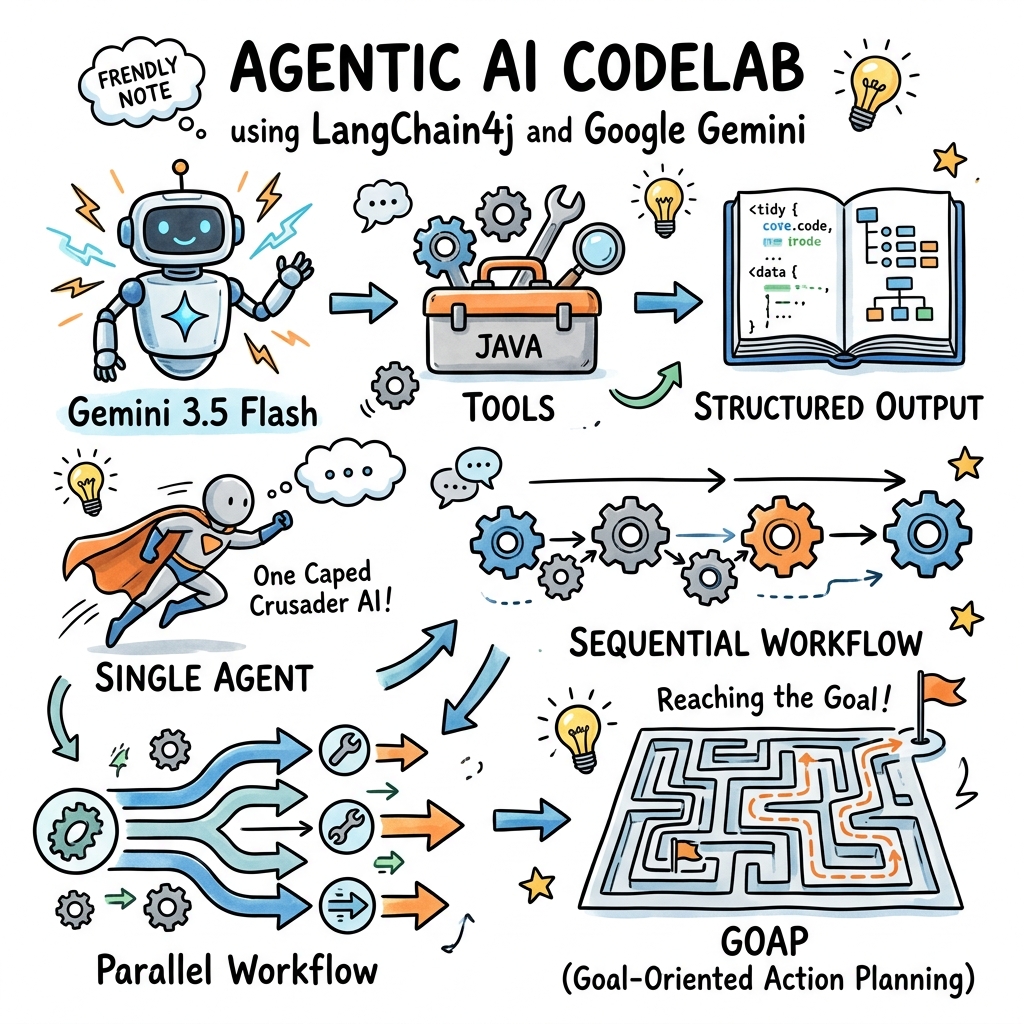
ยินดีต้อนรับ ใน Codelab นี้ คุณจะได้เรียนรู้วิธีสร้างแอปพลิเคชัน AI แบบ Agent ใน Java โดยใช้เฟรมเวิร์ก LangChain4j ที่ได้รับความนิยมและโมดูล Google GenAI ใหม่
Agentic AI หมายถึงระบบที่ LLM ไม่ได้ตอบกลับพรอมต์เท่านั้น แต่ยังมาพร้อมเครื่องมือ หน่วยความจำ และความสามารถในการวางแผนเพื่อบรรลุเป้าหมายที่ซับซ้อนแบบหลายขั้นตอนได้โดยอัตโนมัติ
คุณจะเริ่มต้นด้วยการกำหนดค่าอย่างง่าย จากนั้นจึงสร้าง Agent ด้วยเครื่องมือในเครื่องและเอาต์พุตที่มีโครงสร้าง และสุดท้ายคือสำรวจรูปแบบการจัดการเป็นกลุ่มแบบหลาย Agent ขั้นสูง ซึ่งจะนำไปสู่ระบบที่ทำงานแบบเป็น Agent การวางแผนการดำเนินการที่มุ่งเน้นเป้าหมาย (GOAP)
สิ่งที่คุณต้องทำ
- กำหนดค่า
GoogleGenAiChatModelใหม่เพื่อเชื่อมต่อกับ Gemini - เปิดใช้การบันทึกคำขอ/การตอบกลับเพื่อการแก้ไขข้อบกพร่องที่ง่ายดาย
- ให้สิทธิ์ Gemini เข้าถึงโค้ด Java ในเครื่องโดยใช้เครื่องมือ
- บังคับใช้รูปแบบเอาต์พุตที่มีโครงสร้าง (POJO) จาก Gemini
- กำหนดและสร้าง Agent แบบอเนกประสงค์ด้วยคำอธิบายประกอบ
@Agent - จัดการเวิร์กโฟลว์แบบหลายเอเจนต์ตามลำดับและแบบขนาน
- สร้างระบบการวางแผนการดำเนินการที่มุ่งเน้นเป้าหมาย (GOAP) ที่วางแผนการดำเนินการของเอเจนต์แบบไดนามิก
สิ่งที่คุณต้องมี
- Java Development Kit (JDK) 17 ขึ้นไป
- ติดตั้ง Maven 3.5 ขึ้นไป
- คีย์ Gemini API จาก Google AI Studio
2. 2. ตั้งค่า: โปรเจ็กต์และคีย์ API
ในการเริ่มต้นใช้งาน เราต้องสร้างโปรเจ็กต์ Maven ใหม่และกำหนดค่าคีย์ Gemini API
สร้างโปรเจ็กต์ Maven
สร้างไดเรกทอรีใหม่สำหรับโปรเจ็กต์และเริ่มต้นด้วยไฟล์ pom.xml
เพิ่มทรัพยากร Dependency ต่อไปนี้ลงใน pom.xml โปรดทราบว่าเราใช้โมดูล LangChain4j Google GenAI และ Agentic เวอร์ชันล่าสุด 1.16.1-beta26
<project xmlns="http://maven.apache.org/POM/4.0.0"
         xmlns:xsi="http://www.w3.org/2001/XMLSchema-instance"
         xsi:schemaLocation="http://maven.apache.org/POM/4.0.0 http://maven.apache.org/xsd/maven-4.0.0.xsd">
    <modelVersion>4.0.0</modelVersion>

    <groupId>com.example</groupId>
    <artifactId>gemini-agents-demo</artifactId>
    <version>1.0-SNAPSHOT</version>

    <properties>
        <maven.compiler.source>17</maven.compiler.source>
        <maven.compiler.target>17</maven.compiler.target>
        <langchain4j.version>1.16.1-beta26</langchain4j.version>
    </properties>

    <dependencies>
        <!-- LangChain4j Google GenAI Integration -->
        <dependency>
            <groupId>dev.langchain4j</groupId>
            <artifactId>langchain4j-google-genai</artifactId>
            <version>${langchain4j.version}</version>
        </dependency>

        <!-- LangChain4j Agentic Framework Core -->
        <dependency>
            <groupId>dev.langchain4j</groupId>
            <artifactId>langchain4j-agentic</artifactId>
            <version>${langchain4j.version}</version>
        </dependency>

        <!-- LangChain4j Agentic Patterns (needed for GOAP) -->
        <dependency>
            <groupId>dev.langchain4j</groupId>
            <artifactId>langchain4j-agentic-patterns</artifactId>
            <version>${langchain4j.version}</version>
        </dependency>

        <!-- SLF4J Logger for logging requests/responses -->
        <dependency>
            <groupId>org.slf4j</groupId>
            <artifactId>slf4j-simple</artifactId>
            <version>2.0.12</version>
        </dependency>
    </dependencies>
</project>
รับคีย์ Gemini API
- ไปที่ Google AI Studio
- คลิกรับคีย์ API
- สร้างคีย์ใหม่ (หรือเลือกคีย์ที่มีอยู่)
- ตั้งค่าเป็นตัวแปรสภาพแวดล้อมในเทอร์มินัลโดยทำดังนี้
export GEMINI_API_KEY="your-api-key-here"
3. 3. กำหนดค่าโมเดล Gemini Chat
ตอนนี้เรามาสร้างแอปพลิเคชัน "Hello World" แบบง่ายๆ ที่สร้างอินสแตนซ์ของ GoogleGenAiChatModel และส่งพรอมต์ทดสอบกัน
GoogleGenAiChatModel ใหม่ใช้ Google GenAI SDK แบบรวม ซึ่งให้สิทธิ์เข้าถึงโมเดล Gemini แบบรวม
สร้างชั้นเรียนชื่อ HelloWorld.java ใน src/main/java/com/example/HelloWorld.java โดยทำดังนี้
package com.example;

import dev.langchain4j.model.chat.ChatModel;
import dev.langchain4j.model.google.genai.GoogleGenAiChatModel;

public class HelloWorld {
    public static void main(String[] args) {
        // 1. Configure the Gemini model
        ChatModel model = GoogleGenAiChatModel.builder()
                .apiKey(System.getenv("GEMINI_API_KEY"))
                .modelName("gemini-3.5-flash")
                // Enable logging for both requests and responses
                .logRequestsAndResponses(true)
                .build();

        // 2. Invoke the model
        String response = model.chat("Hello Gemini! Explain 'Agentic AI' in one sentence.");

        // 3. Print response
        System.out.println("\n--- Gemini Response ---");
        System.out.println(response);
    }
}
เรียกใช้คลาสนี้ เนื่องจากเปิดใช้ logRequestsAndResponses(true) คุณจะเห็นบันทึก SLF4J แบบละเอียดที่แสดงรายละเอียดเพย์โหลดคำขอที่แน่นอนซึ่งส่งไปยัง API ของ Google และการตอบกลับ JSON แบบดิบที่ได้รับ ตามด้วยเอาต์พุตที่พิมพ์
--- Gemini Response ---
**Agentic AI** refers to autonomous artificial intelligence systems that can proactively plan, make decisions, use tools, and execute multi-step tasks to achieve specific goals with minimal human supervision.
4. 4. กำหนดเครื่องมือ Java ในเครื่อง
LLM มีประสิทธิภาพ แต่ก็มีข้อจำกัดจากข้อมูลฝึกฝน เราสามารถขยายความสามารถของโมเดลได้โดยการมอบเครื่องมือ (หรือที่เรียกว่าการเรียกใช้ฟังก์ชัน) ให้
ใน LangChain4j เครื่องมือคือคลาส Java แบบง่ายๆ ที่มีการใส่คำอธิบายประกอบเมธอดด้วย @Tool
มาเขียนเครื่องมืออย่างง่ายที่คำนวณจำนวนวันระหว่างวันที่ 2 วันกัน สร้าง DateTools.java ใน src/main/java/com/example/DateTools.java
package com.example;

import dev.langchain4j.agent.tool.P;
import dev.langchain4j.agent.tool.Tool;
import java.time.LocalDate;
import java.time.temporal.ChronoUnit;

public class DateTools {

    @Tool("Calculates the number of days between two dates")
    public long daysBetween(
            @P("The start date in ISO format (YYYY-MM-DD)") String startDate,
            @P("The end date in ISO format (YYYY-MM-DD)") String endDate) {
        LocalDate start = LocalDate.parse(startDate);
        LocalDate end = LocalDate.parse(endDate);
        return ChronoUnit.DAYS.between(start, end);
    }
}
หากต้องการใช้เครื่องมือนี้ เราจะกำหนดบริการ AI ในเฟรมเวิร์ก Agentic ของ LangChain4j เราสามารถสร้างได้โดยใช้ AgenticServices.agentBuilder()
สร้าง ToolDemo.java ใน src/main/java/com/example/ToolDemo.java
package com.example;

import dev.langchain4j.agentic.Agent;
import dev.langchain4j.agentic.AgenticServices;
import dev.langchain4j.model.chat.ChatModel;
import dev.langchain4j.model.google.genai.GoogleGenAiChatModel;
import dev.langchain4j.service.V;

public class ToolDemo {

    public interface DateAssistant {
        @Agent
        String ask(@V("prompt") String prompt);
    }

    public static void main(String[] args) {
        ChatModel model = GoogleGenAiChatModel.builder()
                .apiKey(System.getenv("GEMINI_API_KEY"))
                .modelName("gemini-3.5-flash")
                .build();

        // Build the assistant and register our DateTools
        DateAssistant assistant = AiServices.builder(DateAssistant.class)
                .chatModel(model)
                .tools(new DateTools())
                .build();

        String response = assistant.ask("How many days are there between 2026-01-01 and 2026-06-30?");
        System.out.println("Response: " + response);
    }
}
เมื่อคุณเรียกใช้โค้ดนี้ Gemini จะวิเคราะห์พรอมต์ ตระหนักว่าต้องเรียกใช้ daysBetween สร้างคำขอเรียกใช้เครื่องมือ LangChain4j จะเรียกใช้เมธอด Java ในเครื่อง ส่งผลลัพธ์กลับไปให้ Gemini และ Gemini จะจัดรูปแบบคำตอบภาษาธรรมชาติสุดท้าย
คุณควรเห็นเอาต์พุตที่คล้ายกับตัวอย่างต่อไปนี้
Response: There are 180 days between 2026-01-01 and 2026-06-30.
5. 5. กำหนดเอาต์พุตที่มีโครงสร้าง
บ่อยครั้งที่คุณต้องการให้ LLM แสดงข้อมูลในรูปแบบที่มีโครงสร้างที่เฉพาะเจาะจง (เช่น JSON ที่ตรงกับสคีมา) แทนที่จะเป็นข้อความธรรมดา
LangChain4j จะจัดการเรื่องนี้โดยอัตโนมัติเมื่อคุณระบุ POJO หรือ Java record เป็นประเภทการแสดงผลของเมธอดเอเจนต์หรือบริการ
มากำหนด Java record ที่แสดงการแยกหนังสือกัน
สร้าง Book.java ใน src/main/java/com/example/Book.java
package com.example;

public record Book(String title, String author, int publicationYear) {}
ตอนนี้ให้สร้างอินเทอร์เฟซของเอเจนต์ที่แสดงผล Book สร้าง StructuredOutputDemo.java ใน src/main/java/com/example/StructuredOutputDemo.java
package com.example;

import dev.langchain4j.agentic.Agent;
import dev.langchain4j.agentic.AgenticServices;
import dev.langchain4j.model.chat.ChatModel;
import dev.langchain4j.model.google.genai.GoogleGenAiChatModel;
import dev.langchain4j.service.UserMessage;
import dev.langchain4j.service.V;

public class StructuredOutputDemo {

    public interface BookExtractor {
        @UserMessage("Extract book details from: {{text}}")
        Book extract(@V("text") String text);
    }

    public static void main(String[] args) {
        ChatModel model = GoogleGenAiChatModel.builder()
                .apiKey(System.getenv("GEMINI_API_KEY"))
                .modelName("gemini-3.5-flash")
                .build();

        BookExtractor extractor = AiServices.builder(BookExtractor.class)
                .chatModel(model)
                .build();

        String text = "I just finished reading 'Project Hail Mary' by Andy Weir, published in 2021. It was amazing!";
        Book book = extractor.extract(text);

        System.out.println("Extracted POJO: " + book);
    }
}
Gemini 3.5 Flash รองรับเอาต์พุตสคีมา JSON ที่เข้มงวด LangChain4j จะสร้างสคีมา JSON จากเรคคอร์ด Book สั่งให้ Gemini ป้อนข้อมูล และยกเลิกการซีเรียลไลซ์การตอบกลับ JSON กลับเป็นเรคคอร์ด Book
คุณควรเห็นเอาต์พุตที่คล้ายกับตัวอย่างต่อไปนี้
Extracted POJO: Book[title=Project Hail Mary, author=Andy Weir, publicationYear=2021]
6. 6. สร้าง Agent รายการแรก
ในlangchain4j-agenticเฟรมเวิร์ก Agent จะกำหนดโดยใช้คำอธิบายประกอบ @Agent ในเมธอดของอินเทอร์เฟซ คำอธิบายประกอบนี้จะระบุชื่อ/คำอธิบายที่ระบบการจัดการเป็นกลุ่ม (เช่น Planner) สามารถใช้ได้
มาสร้างเอเจนต์ง่ายๆ ที่รับหัวข้อและร่างเรื่องสั้นๆ เกี่ยวกับหัวข้อนั้นกัน
สร้าง CreativeWriter.java ใน src/main/java/com/example/CreativeWriter.java
package com.example;

import dev.langchain4j.agentic.Agent;
import dev.langchain4j.service.SystemMessage;
import dev.langchain4j.service.UserMessage;
import dev.langchain4j.service.V;

public interface CreativeWriter {

    @SystemMessage("You are a creative writer. Generate a draft of a story no more than 3 sentences long.")
    @UserMessage("Write a story about {{topic}}.")
    @Agent(description = "Generates a story based on the given topic", outputKey = "story")
    String writeStory(@V("topic") String topic);
}
มาทดสอบ Agent นี้ทีละตัวกัน สร้าง AgentDemo.java ใน src/main/java/com/example/AgentDemo.java
package com.example;

import dev.langchain4j.agentic.AgenticServices;
import dev.langchain4j.model.chat.ChatModel;
import dev.langchain4j.model.google.genai.GoogleGenAiChatModel;

public class AgentDemo {
    public static void main(String[] args) {
        ChatModel model = GoogleGenAiChatModel.builder()
                .apiKey(System.getenv("GEMINI_API_KEY"))
                .modelName("gemini-3.5-flash")
                .build();

        CreativeWriter writer = AgenticServices.agentBuilder(CreativeWriter.class)
                .chatModel(model)
                .build();

        String story = writer.writeStory("a lonely robot on Mars");
        System.out.println("Generated Story:\n" + story);
    }
}
คุณควรเห็นเอาต์พุตที่คล้ายกับตัวอย่างต่อไปนี้
Generated Story:
For eighty years, the rusty little rover trundled across the crimson dunes, diligently collecting soil samples for a home world that had long since gone dark. Each evening, it pointed its high-gain antenna toward the fading blue speck of Earth and beamed its lonely coordinates into the silent cosmos. Receiving only static in return, the robot tucked its camera arm close against the freezing Martian wind and sang a quiet lullaby to the empty stars.
การเพิ่ม@Agentคำอธิบายประกอบทำให้คลาสนี้พร้อมที่จะเข้าร่วมเวิร์กโฟลว์ที่ซับซ้อนมากขึ้น เช่น การเชื่อมโยงแบบลำดับ
7. 7. จัดการเวิร์กโฟลว์แบบหลายเอเจนต์: แบบลำดับ
รูปแบบการทำงานของ Agent ที่พบบ่อยคือเวิร์กโฟลว์แบบลำดับ ซึ่ง Agent จะดำเนินการตามลำดับที่กำหนดไว้ล่วงหน้า ระบบจะส่งเอาต์พุตของเอเจนต์หนึ่งเป็นอินพุตของเอเจนต์ถัดไป
มากำหนด Agent ตัวที่ 2 ซึ่งก็คือ StyleEditor ที่จะแก้ไขเรื่องราวที่ CreativeWriter เขียนให้เข้ากับสไตล์ที่เฉพาะเจาะจง (เช่น ตลก ดราม่า)
สร้าง StyleEditor.java ใน src/main/java/com/example/StyleEditor.java
package com.example;

import dev.langchain4j.agentic.Agent;
import dev.langchain4j.service.SystemMessage;
import dev.langchain4j.service.UserMessage;
import dev.langchain4j.service.V;

public interface StyleEditor {

    @SystemMessage("You are a professional editor. Analyze and rewrite the story to align with the style requested.")
    @UserMessage("Rewrite this story: '{{story}}' into a {{style}} style.")
    @Agent(description = "Edits a story to fit a specific style", outputKey = "edited_story")
    String editStory(@V("story") String story, @V("style") String style);
}
ตอนนี้มาเชื่อมต่อ CreativeWriter และ StyleEditor ตามลำดับโดยใช้ AgenticServices.sequenceBuilder() กัน
เราจะใช้ UntypedAgent เพื่อแสดงลำดับ ซึ่งช่วยให้เราส่งอินพุตและรวบรวมเอาต์พุตผ่านแผนที่ที่แชร์ได้
สร้าง SequentialWorkflowDemo.java ใน src/main/java/com/example/SequentialWorkflowDemo.java
package com.example;

import dev.langchain4j.agentic.AgenticServices;
import dev.langchain4j.agentic.UntypedAgent;
import dev.langchain4j.model.chat.ChatModel;
import dev.langchain4j.model.google.genai.GoogleGenAiChatModel;
import java.util.Map;

public class SequentialWorkflowDemo {
    public static void main(String[] args) {
        ChatModel model = GoogleGenAiChatModel.builder()
                .apiKey(System.getenv("GEMINI_API_KEY"))
                .modelName("gemini-3.5-flash")
                .build();

        // 1. Build the sub-agents
        CreativeWriter writer = AgenticServices.agentBuilder(CreativeWriter.class)
                .chatModel(model)
                .outputKey("story") // Output goes into AgenticScope as "story"
                .build();

        StyleEditor editor = AgenticServices.agentBuilder(StyleEditor.class)
                .chatModel(model)
                .outputKey("edited_story") // Output goes into AgenticScope as "edited_story"
                .build();

        // 2. Build the sequence
        UntypedAgent workflow = AgenticServices.sequenceBuilder()
                .subAgents(writer, editor)
                .outputKey("edited_story") // Final output of workflow
                .build();

        // 3. Run the workflow with inputs
        Map<String, Object> inputs = Map.of(
                "topic", "a cat learning to fly",
                "style", "Shakespearean"
        );

        String result = (String) workflow.invoke(inputs);
        System.out.println("Final Edited Story:\n" + result);
    }
}
คุณควรเห็นเอาต์พุตที่คล้ายกับตัวอย่างต่อไปนี้
Final Edited Story:
For years had Barnaby with envy watched
The soaring sparrows with a green-eyed spite,
Convinced that heavy gravity was but
An idle law he deigned to tolerate.
But lo! Upon the rare and azure moon,
He scaled the summit of the ancient oak,
Closed fast his eyes, and leapt with blind belief.
While the dread squirrel shrieked in sheer dismay,
No downward plunge befell the daring beast;
For summer's zephyr bore his belly up,
And through the vault of night's celestial sphere,
He rowed his velvet paws among the stars.
ขอแนะนำ AgenticScope
ในระหว่างการดำเนินการ LangChain4j จะจัดการ AgenticScope
- ระบบจะเขียนแผนที่อินพุต
{"topic": "...", "style": "..."}ลงในขอบเขต CreativeWriterดำเนินการ โดยต้องใช้topicซึ่งอ่านจากขอบเขต โดยจะแสดงผลstoryซึ่งจะบันทึกลงในขอบเขตอีกครั้งStyleEditorดำเนินการ โดยต้องมีstory(ที่นักเขียนสร้างขึ้น) และstyle(จากข้อมูลเริ่มต้น) โดยจะแสดงedited_storyในขอบเขต- เวิร์กโฟลว์จะเสร็จสมบูรณ์และแสดงผลค่าของ
edited_story
8. 8. จัดการเวิร์กโฟลว์แบบหลายเอเจนต์: แบบขนาน
ในบางสถานการณ์ เอเจนต์ย่อยสามารถทำงานกับอินพุตเดียวกันได้โดยอิสระ และสามารถดำเนินการกับงานของเอเจนต์ย่อยแบบคู่ขนานได้
ตัวอย่างเช่น ลองสร้างที่ปรึกษาด้านการเดินทางที่ขอคำแนะนำจากผู้เชี่ยวชาญด้านภาพยนตร์และผู้เชี่ยวชาญด้านอาหารสำหรับเมืองหนึ่ง แล้วนำคำแนะนำเหล่านั้นมารวมกัน
สร้าง MovieExpert.java ใน src/main/java/com/example/MovieExpert.java
package com.example;

import dev.langchain4j.agentic.Agent;
import dev.langchain4j.service.UserMessage;
import dev.langchain4j.service.V;
import java.util.List;

public interface MovieExpert {
    @UserMessage("Suggest 2 movies filmed in {{city}}.")
    @Agent(description = "Suggests movies filmed in a city")
    List<String> findMovies(@V("city") String city);
}
สร้าง DiningExpert.java ใน src/main/java/com/example/DiningExpert.java
package com.example;

import dev.langchain4j.agentic.Agent;
import dev.langchain4j.service.UserMessage;
import dev.langchain4j.service.V;
import java.util.List;

public interface DiningExpert {
    @UserMessage("Suggest 2 local dishes to try in {{city}}.")
    @Agent(description = "Suggests local dishes to try in a city")
    List<String> findDishes(@V("city") String city);
}
ตอนนี้มาสร้างระบบเอเจนต์แบบคู่ขนานกัน เราจะกำหนดอินเทอร์เฟซสำหรับโคออร์ดิเนเตอร์ระดับบนสุด: TravelAdvisorAgent
สร้าง TravelAdvisorAgent.java ใน src/main/java/com/example/TravelAdvisorAgent.java
package com.example;

import dev.langchain4j.agentic.Agent;
import dev.langchain4j.service.V;
import java.util.Map;

public interface TravelAdvisorAgent {
    @Agent
    Map<String, Object> planTrip(@V("city") String city);
}
สร้าง ParallelWorkflowDemo.java ใน src/main/java/com/example/ParallelWorkflowDemo.java เพื่อเชื่อมโยงเข้าด้วยกัน
package com.example;

import dev.langchain4j.agentic.AgenticServices;
import dev.langchain4j.model.chat.ChatModel;
import dev.langchain4j.model.google.genai.GoogleGenAiChatModel;
import java.util.List;
import java.util.Map;

public class ParallelWorkflowDemo {
    public static void main(String[] args) {
        ChatModel model = GoogleGenAiChatModel.builder()
                .apiKey(System.getenv("GEMINI_API_KEY"))
                .modelName("gemini-3.5-flash")
                .build();

        // 1. Build independent agents
        MovieExpert movieExpert = AgenticServices.agentBuilder(MovieExpert.class)
                .chatModel(model)
                .outputKey("movies")
                .build();

        DiningExpert diningExpert = AgenticServices.agentBuilder(DiningExpert.class)
                .chatModel(model)
                .outputKey("dishes")
                .build();

        // 2. Build the Parallel agent
        TravelAdvisorAgent travelAdvisor = AgenticServices.parallelBuilder(TravelAdvisorAgent.class)
                .subAgents(movieExpert, diningExpert)
                .output(scope -> {
                    // Combine the independent outputs in the AgenticScope
                    List<String> movies = scope.readState("movies", List.of());
                    List<String> dishes = scope.readState("dishes", List.of());
                    return Map.of("movies", movies, "dishes", dishes);
                })
                .build();

        // 3. Invoke
        Map<String, Object> plan = travelAdvisor.planTrip("Tokyo");
        System.out.println("Tokyo Trip Plan:\n" + plan);
    }
}
คุณควรเห็นเอาต์พุตที่คล้ายกับตัวอย่างต่อไปนี้
Tokyo Trip Plan:
{movies=[Lost in Translation, Tokyo Story], dishes=[Monjayaki, Edomae-zushi]}
In this parallel workflow, `movieExpert` and `diningExpert` execute concurrently. The `output(...)` configuration defines how to gather their respective results from the `AgenticScope` and merge them into the final result.

## 9. Build Goal-Oriented Agents (GOAP)
Duration: 07:00

Sequential and Parallel workflows are structured and predictable, but rigid. What if we want the system to figure out the path to the goal autonomously, but in a **deterministic, algorithmic way** rather than trusting an LLM to loop (like ReAct)?

This is where **Goal-Oriented Action Planning (GOAP)** shines.

By looking at the declared inputs and outputs of each agent, the `GoalOrientedPlanner` builds a dependency graph. When you invoke the system with a goal, it calculates the shortest path from the current state (available variables) to that goal.

Let's build a Horoscope & News combined writer. It requires 4 agents:
1. `PersonExtractor`: extracts person details from prompt.
2. `SignExtractor`: extracts zodiac sign from prompt.
3. `HoroscopeGenerator`: generates horoscope given person and sign.
4. `AmusingWriter`: writes a funny story combining a horoscope and a news story.

We will also define a `StoryFinder` that uses a mock search tool.

### 1. Define Model Classes
Create `Person.java` in `src/main/java/com/example/Person.java`:
```java
package com.example;

public record Person(String name) {
    @Override public String toString() { return name; }
}
สร้าง Sign.java ใน src/main/java/com/example/Sign.java
package com.example;

public record Sign(String signName) {
    @Override public String toString() { return signName; }
}
2. กำหนด Agent ย่อย
สร้าง HoroscopeGenerator.java ใน src/main/java/com/example/HoroscopeGenerator.java
package com.example;

import dev.langchain4j.agentic.Agent;
import dev.langchain4j.service.UserMessage;
import dev.langchain4j.service.V;

public interface HoroscopeGenerator {
    @UserMessage("Generate a funny horoscope for {{person}} who is a {{sign}}.")
    @Agent(description = "Generates horoscopes based on name and zodiac sign")
    String horoscope(@V("person") Person person, @V("sign") Sign sign);
}
สร้าง PersonExtractor.java ใน src/main/java/com/example/PersonExtractor.java
package com.example;

import dev.langchain4j.agentic.Agent;
import dev.langchain4j.service.UserMessage;
import dev.langchain4j.service.V;

public interface PersonExtractor {
    @UserMessage("Extract the person name from: {{prompt}}")
    @Agent(description = "Extracts a person from user's prompt")
    Person extractPerson(@V("prompt") String prompt);
}
สร้าง SignExtractor.java ใน src/main/java/com/example/SignExtractor.java
package com.example;

import dev.langchain4j.agentic.Agent;
import dev.langchain4j.service.UserMessage;
import dev.langchain4j.service.V;

public interface SignExtractor {
    @UserMessage("Extract the zodiac sign from: {{prompt}}")
    @Agent(description = "Extracts a zodiac sign from user's prompt")
    Sign extractSign(@V("prompt") String prompt);
}
สร้าง AmusingWriter.java ใน src/main/java/com/example/AmusingWriter.java
package com.example;

import dev.langchain4j.agentic.Agent;
import dev.langchain4j.service.UserMessage;
import dev.langchain4j.service.V;

public interface AmusingWriter {
    @UserMessage("Create an amusing writeup for {{person}} based on their horoscope: {{horoscope}} and current news story: {{story}}.")
    @Agent(description = "Create an amusing writeup combining horoscope and news")
    String write(@V("person") Person person, @V("horoscope") String horoscope, @V("story") String story);
}
3. กำหนดเครื่องมือสำหรับการค้นหาเรื่องราว
เราจะสร้างคลาสเครื่องมือค้นหาแบบง่ายที่แสดงเรื่องราวจำลอง สร้าง MockSearchTool.java ใน src/main/java/com/example/MockSearchTool.java ดังนี้
package com.example;

import dev.langchain4j.agent.tool.P;
import dev.langchain4j.agent.tool.Tool;

public class MockSearchTool {
    @Tool("Searches the web for news stories related to a zodiac sign")
    public String searchNews(@P("The zodiac sign") String sign) {
        return "Breaking news: A massive cheese festival was announced for " + sign + " natives today!";
    }
}
สร้าง StoryFinder.java ใน Agent src/main/java/com/example/StoryFinder.java ที่ใช้เครื่องมือนี้
package com.example;

import dev.langchain4j.agentic.Agent;
import dev.langchain4j.service.UserMessage;
import dev.langchain4j.service.V;

public interface StoryFinder {
    @UserMessage("Find a funny story for zodiac sign {{sign}} using search tool.")
    @Agent(description = "Finds a news story on the internet about a zodiac sign")
    String findStory(@V("sign") Sign sign);
}
4. สร้างและเรียกใช้ระบบการทำงานเป็นตัวแทน GOAP
สร้าง GoapDemo.java ใน src/main/java/com/example/GoapDemo.java
package com.example;

import dev.langchain4j.agentic.AgenticServices;
import dev.langchain4j.agentic.UntypedAgent;
import dev.langchain4j.agentic.patterns.goap.GoalOrientedPlanner;
import dev.langchain4j.model.chat.ChatModel;
import dev.langchain4j.model.google.genai.GoogleGenAiChatModel;
import java.util.Map;

public class GoapDemo {
    public static void main(String[] args) {
        ChatModel model = GoogleGenAiChatModel.builder()
                .apiKey(System.getenv("GEMINI_API_KEY"))
                .modelName("gemini-3.5-flash")
                .build();

        // Instantiate sub-agents with output keys matching the inputs of other agents
        HoroscopeGenerator horoscopeGen = AgenticServices.agentBuilder(HoroscopeGenerator.class)
                .chatModel(model).outputKey("horoscope").build();

        PersonExtractor personExt = AgenticServices.agentBuilder(PersonExtractor.class)
                .chatModel(model).outputKey("person").build();

        SignExtractor signExt = AgenticServices.agentBuilder(SignExtractor.class)
                .chatModel(model).outputKey("sign").build();

        StoryFinder storyFinder = AgenticServices.agentBuilder(StoryFinder.class)
                .chatModel(model).tools(new MockSearchTool()).outputKey("story").build();

        AmusingWriter writer = AgenticServices.agentBuilder(AmusingWriter.class)
                .chatModel(model).outputKey("writeup").build();

        // Build the GOAP Planner agentic system
        UntypedAgent horoscopeNewsAgent = AgenticServices.plannerBuilder()
                .subAgents(horoscopeGen, personExt, signExt, storyFinder, writer)
                .outputKey("writeup") // The Goal we want to achieve
                .planner(GoalOrientedPlanner::new) // Register the GOAP Planner
                .build();

        // Input provides only "prompt"
        Map<String, Object> inputs = Map.of(
                "prompt", "My name is Alice and my zodiac sign is Leo"
        );

        System.out.println("Invoking GOAP Agentic System...");
        String result = (String) horoscopeNewsAgent.invoke(inputs);

        System.out.println("\n--- Final Writeup ---");
        System.out.println(result);
    }
}
วิธีที่ GOAP แก้ปัญหา
เมื่อเรียกใช้
- ระบบตรวจพบว่าสถานะเริ่มต้นมีเฉพาะ
prompt - เป้าหมายที่ต้องการคือ
writeup - โดยจะสร้างกราฟการขึ้นต่อกันและคำนวณเส้นทาง
prompt->PersonExtractor->personprompt->SignExtractor->signperson+sign->HoroscopeGenerator->horoscopesign->StoryFinder->storyperson+horoscope+story->AmusingWriter->writeup
- ลำดับการดำเนินการที่คำนวณแล้วคือ
[PersonExtractor, SignExtractor, HoroscopeGenerator, StoryFinder, AmusingWriter] - โดยจะเรียกใช้ Agent ย่อย แต่ละตัวตามลำดับและแสดงผลลัพธ์สุดท้าย
คุณควรเห็นเอาต์พุตที่แสดงเส้นทางการดำเนินการและข้อความสุดท้าย ซึ่งคล้ายกับตัวอย่างต่อไปนี้
Invoking GOAP Agentic System...
[com.example.GoapDemo.main()] INFO dev.langchain4j.agentic.patterns.goap.GoalOrientedSearchGraph - Agents path sequence: [extractPerson, extractSign, findStory, horoscope, write]

--- Final Writeup ---
**The Cosmic Registry's Weekly Forecast & Special Event Guide for: Alice, the Leo Lioness**

Alice, the universe looked at your astrological chart this week and frankly, it's asking for your autograph. Your main-character energy is currently so potent that secondary characters are practically fading into the background.

But the biggest cosmic news of the week? The universe has finally recognized your royal status with the announcement of a **Massive Cheese Festival**...
9. 10. ล้างข้อมูล
วิธีล้างข้อมูลทรัพยากร
- โปรดลบคีย์ API ออกจาก Google AI Studio หากคุณไม่ได้ใช้คีย์ดังกล่าวแล้ว
- ยกเลิกการตั้งค่าตัวแปรสภาพแวดล้อมในเทอร์มินัลโดยทำดังนี้
unset GEMINI_API_KEY
10. 11. ขอแสดงความยินดี
ยินดีด้วย คุณสร้างแอปพลิเคชัน Agentic AI หลายรายการโดยใช้ LangChain4j และโมดูล GenAI ใหม่ของ Google ได้สำเร็จแล้ว
หากต้องการพัฒนาทักษะให้ดียิ่งขึ้น เราขอแนะนำให้คุณดูเอกสารประกอบของโมดูล GenAI ของ Google ใน LangChain4j อย่างเป็นทางการ และดูข้อมูลเพิ่มเติมเกี่ยวกับการสร้างเอเจนต์ด้วย LangChain4j
สิ่งที่คุณได้เรียนรู้
- วิธีกำหนดค่า
GoogleGenAiChatModel - วิธีใช้เครื่องมือ Java ในเครื่องและการบันทึกคำขอ/การตอบกลับ
- วิธีแสดงผลข้อมูล POJO ที่มีโครงสร้าง
- วิธีสร้าง Agent แบบอเนกประสงค์ด้วย
@Agent - วิธีกำหนดเวิร์กโฟลว์แบบเป็น Agent ตามลำดับ แบบขนาน และแบบการวางแผนการดำเนินการที่มุ่งเน้นเป้าหมาย (GOAP)