
1. Introduction

This codelab is about long-running agents — agents whose work does not fit inside one chat turn. A presale queue is 14,000 people long and moves for forty minutes; your turn comes at 3am. A chat assistant cannot wait that long, cannot act on its own, forgets what you said last week, dies with its process, and spends whatever a string in its code says. Six chapters remove those six reasons not to leave an agent alone at night.
Everything runs on the Agent Development Kit (ADK) 2: a Runner behind an endpoint with a clock calling it, a BaseMemoryService you can read in a text editor, EventsCompactionConfig, LongRunningFunctionTool with ResumabilityConfig, a before_tool_callback, a Workflow whose nodes return RequestInput, and the same interrupt aimed at a person.
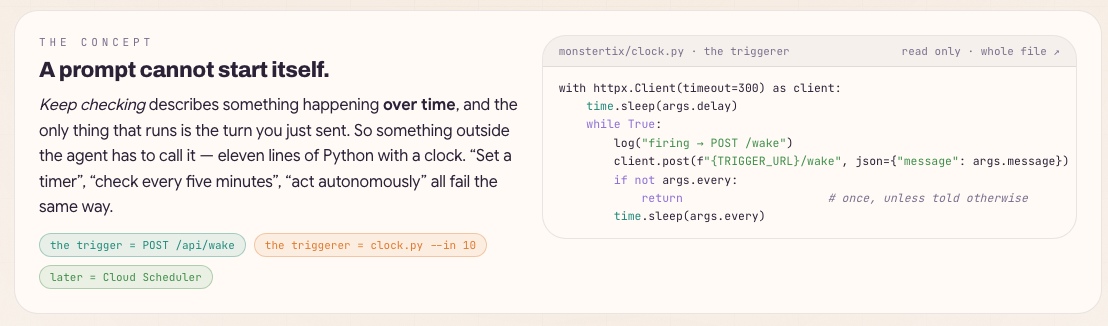
A prompt cannot start itself. Something outside the agent has to call it.
What you will learn
- Trigger and triggerer — why
instruction=is read only when a message arrives, what an endpoint with aRunnerbehind it is, and why the clock that calls it has never heard of an agent - Four places a fact can live —
temp:, session state,user:, a memory file — and which one survives deleting the database - Compaction — what
EventsCompactionConfig(compaction_interval=3, overlap_size=1)writes into the session, and why anything you cannot afford to lose belongs in state, not in the conversation - A long-running tool and a resumable run — a handle to unfinished work, what actually survives a kill (the session store, not a resumed invocation), and why
join_queueis long-running whilecheck_queueis not before_tool_callback— re-read the world in the instant before spending; a returned dict short-circuits the tool- A
Workflow— functions for rules, agents for judgement, one node that parks the run withRequestInput, andrerun_on_resumeso a wake-up walks the graph but does not redo it - A human in the loop — the same interrupt aimed at a person: a stable
interrupt_id, the answer inctx.resume_inputs, the sentence stored verbatim in session state, andsomeone_is_there()as a fact about the request, not the process
What you will build
A running app in your browser, MonsterTix: a mock venue with a presale queue, a page with the agent behind it, and a clock. Each chapter turns on one thing — a line in agent.py, a swap of the root, a button that fires the clock or kills the process — and the page shows you what changed: the queue position, the tickets at the venue, the order, and the receipt that proves it. The agent package is Christina Lin's, from the MonsterTix workshop; the page is new.
The app is also the exercise. RUN IT hands you one card at a time; a chapter lights only when something real proves it — the page reads your files and the receipts of what ran (lab.db, the venue, the job log), never a checklist.
The six chapters
the term | the question it answers | what changes | |
I | trigger & triggerer | you told it to buy the moment the presale opens — why did nothing happen? | nothing; a clock calls |
II | context lifetime & compaction | it asked you which show at 3am — you said so last week; where did that go? | one line: |
III | long-running tools & resumability | the queue is 14,203 long and your laptop will sleep — what survives? | one line: |
IV | stale data & tool callbacks | it came back holding a seat map that sold out twelve minutes in — why did it buy anyway? | one line: |
V | workflow & interrupts | at 3am, who decides the order of things? | one line: |
VI | human in the loop | it can buy on its own now — who said how much? | one line: |
VII | receipts & deployment | what did it do while you slept? | the breakfast message, and the laptop → cloud diff |
How to use this codelab. It is concept-first: each chapter explains the idea, then shows the code as it reads once the change is in and walks through it. It never asks you to edit a file here — the editing happens in the app, which ships each chapter's line commented out, hands it to you, and shows you the failure first. Read the chapter, then let the page take you through it and watch the number move.
Where this sits
The venue, the handler, the clock, the seed and the agent package come verbatim from the MonsterTix workshop (Christina Lin's two-hour long-running-agents codelab); only the agent file was restructured so that each chapter's change is one line. The one-page interactive format comes from Agent Valley. The arena is scenery; every mechanism under it is the ordinary one you would use for anything that has to wait, survive a restart, or spend money on someone's behalf.
2. 🧰 Setup
- What — an account that can pay, a project, the lab installed, the model proven to answer, your own mock venue on Cloud Run, and the workbench running on one port.
- Why — one port: the workbench on 4800 frames the ADK web UI, the venue panel and the MonsterTix page, so nothing in this lab needs a second Web Preview. The venue is deployed to Cloud Run so every student has their own world to break.
- How — clone, one script, one check.
setup.shends by making one real model call and deploying the venue, so a broken project fails here rather than in chapter I.
Everything in this lab runs in Cloud Shell — gcloud, Python, Node and git are already installed there, and Gemini is reached through Vertex AI using your own credentials. There is no API key anywhere in this lab, and nothing to install on your laptop. A laptop with the Google Cloud SDK, Python 3.11+ and Node 20+ works the same way.
There is one thing this lab cannot hand you: a Google Cloud project with billing on it. Step 1 gets you an account that can pay for it; step 4 turns that account into a project. Do them in that order — every step after 4 reads the project that step 4 settles on.
1 · Get an account with billing (~1 min)
Sign in with a Google account that has billing enabled. Any such account works. If yours does not, start a free trial; it gives you a billing account, which is all step 4 needs.
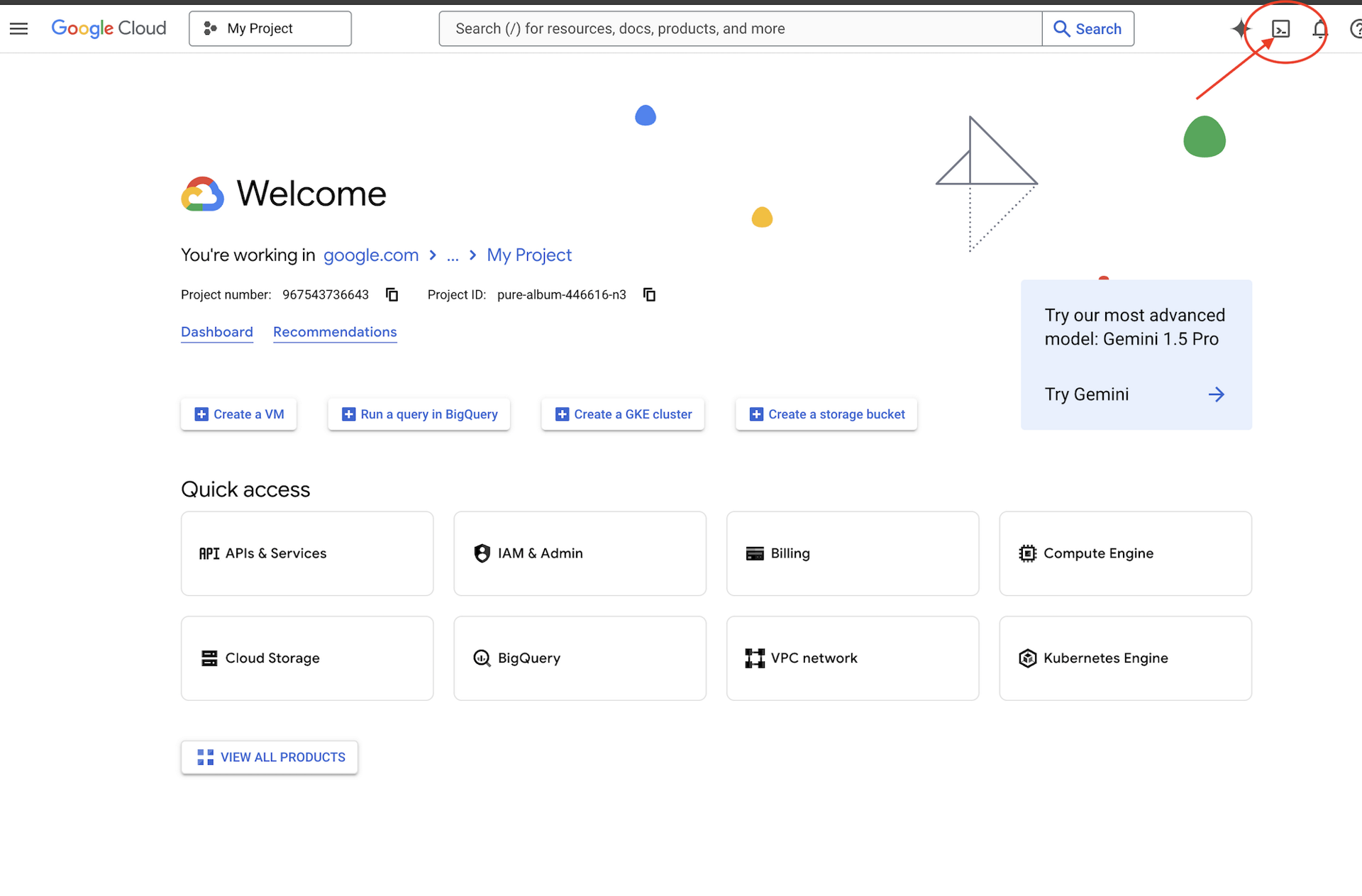
2 · Open Cloud Shell (~2 min)
👉🖥 Click Activate Cloud Shell at the top of the Google Cloud console — it is the terminal-shaped icon in the header.
👉🖥 Click Open Editor (the open-folder-with-a-pencil icon). This brings up the Cloud Shell Editor with a file explorer on the left — that is where you go whenever you want to read a whole file.
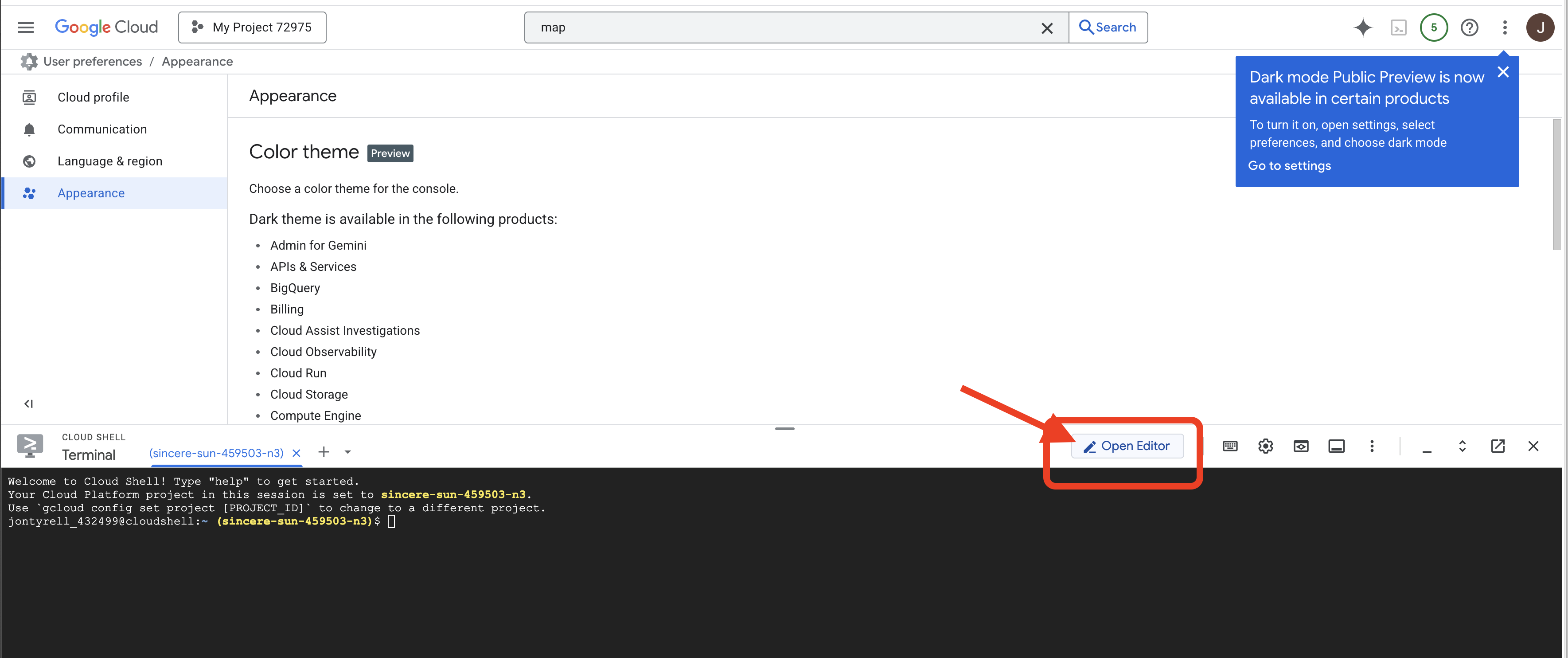
👉🖥 If you are prompted to authorize at any point today, click Authorize to continue.
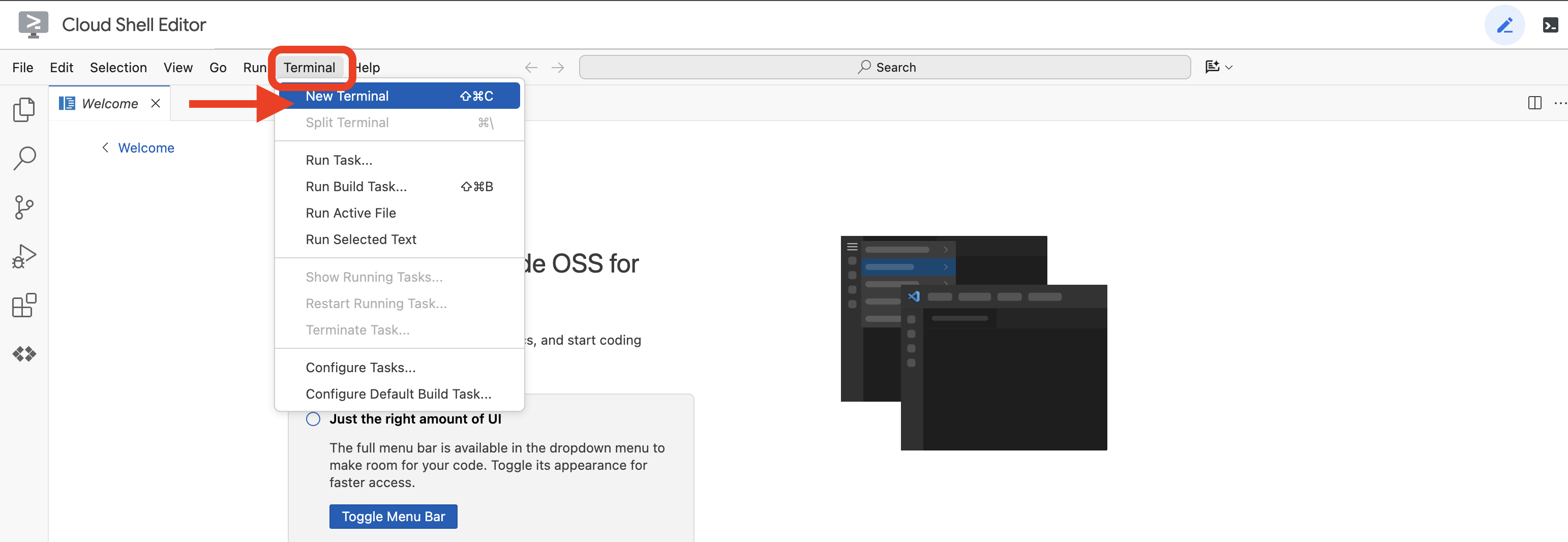
👉🖥 Open a terminal inside the editor — that is tab 1, and every 👉💻 step runs there. Tab 2 is the workbench itself, and you open it in step 7. If the terminal is not already along the bottom of the screen, open it with View → Terminal:
👉💻 Check which account you are signed in as — it should be the one from step 1:
gcloud auth list
3 · Get the lab (~1 min)
👉💻 Clone the repo:
cd ~
git clone https://github.com/cuppibla/monstertix
cd monstertix
4 · Run setup (~4 min)
👉💻 One script does the whole of the pre-work — project, billing, APIs, environment, a model call, the seeded session, your venue on Cloud Run, and the workbench:
cd ~/monstertix
./setup.sh
If it has no project to go on it asks once:
  No Google Cloud project found for this workshop.
  Press Enter and one gets created for you (long-running-... , with a
  billing account attached), or type the id of one you already have.

  Project id [create a new one]:
Press Enter to let it create one, or type the id of a project you already own. Either way the project id is written to ~/project_id.txt and to .env, so nothing after this asks you to type it. Then it prints a line per step:
→ venv       creating with uv
→ created .env

→ account    you@example.com
→ billing    already enabled on long-running-k3m9x2q7wd
→ project    long-running-k3m9x2q7wd  (created just now — rm ~/project_id.txt to start over)
→ location   global  (where the model is served)
→ region     us-central1  (from .env — everything deployable goes here)
→ auth       ok
→ apis       enabling 10 of 10 (this can take a minute)
→ apis       enabled
→ model      gemini-2.5-flash responds  (Vertex AI · long-running-k3m9x2q7wd · global)
→ seed       session 'two-days-ago' ready (13 events, 2 days old)
→ cloudsql   creating workshop-sessions in the background (~10 min)
             log: ~/.cloudsql-create.log — Chapter 6 needs it, nothing before does
→ venue      deploying to Cloud Run (1-2 min)...
→ venue      deployed  https://venue-you-838415465624.us-central1.run.app

✓ setup complete.

  your venue:  https://venue-you-838415465624.us-central1.run.app/panel
               keep this tab open all day. It is where you press the buttons,
               and where you check whether the agent actually did what it said.

  check it:    ./verify.sh
  chapter 6:   Cloud SQL is still building in the background (~/.cloudsql-create.log);
               ./setup-cloud-state.sh collects it, and nothing before Chapter 6 needs it.

→ installing the page's packages
→ building the page
→ workbench started (log: runs/workbench.log)

  ✓ the workbench answers on :4800

  Open it: Web Preview (top right) → Change port → 4800
long-running-k3m9x2q7wd is your project ID — yours will have different letters. What happens in there:
venv | creates | |
project | takes | |
auth | runs | |
apis | enables the ten the course uses ( | |
model | one real call to | |
seed | builds the | |
cloudsql | starts a Postgres instance in the background — it takes eight to twelve minutes, nothing before the cloud chapter needs it, and nobody should watch it | |
venue | deploys your own mock ticket seller to Cloud Run with | |
workbench | builds the page once ( | |
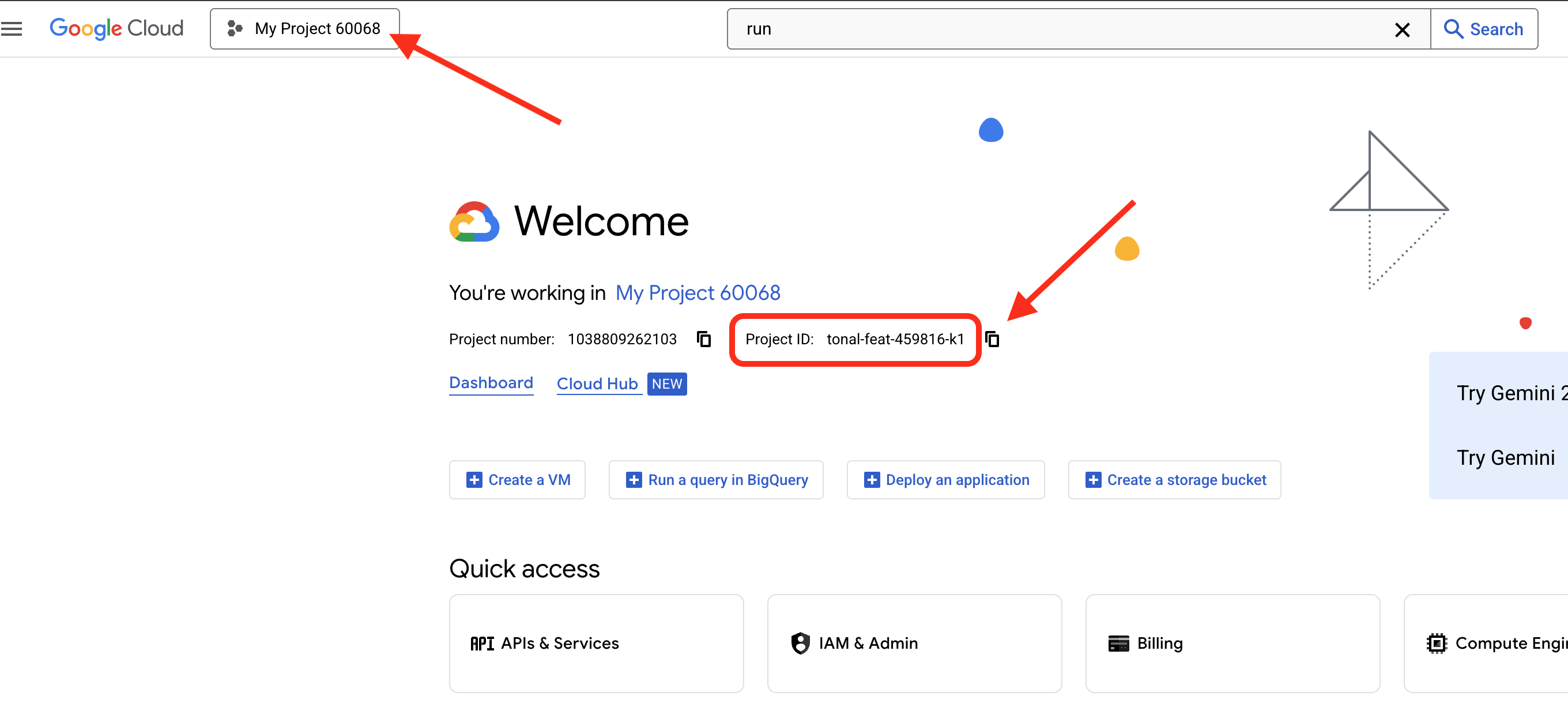
👉🖥 The same project is now in the console — its ID sits in the Project info card on the Dashboard:
5 · Read the checks (~1 min)
👉💻 Every row is a real probe of the rig, not a guess:
cd ~/monstertix
./verify.sh
  Checking the rig

  ✓ virtualenv                         .venv
  ✓ adk installed                      adk, version 2.9.2
  ✓ adk 2 apis                         App + ResumabilityConfig
  ✓ workflow graphs                    Workflow + node
  ✓ async sqlite drivers               sqlalchemy + aiosqlite + greenlet
  ✓ project                            long-running-k3m9x2q7wd
  ✓ vertex ai                          no API keys anywhere
  ✓ credentials (ADC)                  you@example.com
  ✓ model call                         gemini-2.5-flash · answered: OK
  ✓ seeded session                     two-days-ago · 13 events
  ✓ memory file                        ./memory/userx.md · 10 lines of memory
  ✓ solutions                          6 chapters, each with concert/ + monstertix/
  ✓ agent/concert                      loaded — ./use-solution.sh to change chapter
  ✓ region                             us-central1  (services)
  ✓ venue                              https://venue-you-838415465624.us-central1.run.app
  ✓ workbench page                     web/dist/index.html built
  ✓ workbench                          on :4800 — Web Preview → Change port → 4800
  ✓ disk                               1210 MB free in /home/you

  Ready. Cloud SQL is still building in the background and nothing
  before Chapter 6 needs it.
model call is the one that matters here: it means a real call went through on your project. A red row says what fixes it; run ./verify.sh again after.
6 · Load the first chapter (~1 min)
👉💻 Each chapter of the lab is a complete, runnable version of the agent. Load the first one once from the terminal, so you have seen what the workbench's Load step button does:
cd ~/monstertix
./use-solution.sh 1
→ loaded  Chapter 1 · Meet MonsterTix  (concert/ + monstertix/)
→ memory  seed/memory/default.md → memory/userx.md
→ session sessions.db rebuilt, with 'two-days-ago' back in it
→ files   artifacts/ emptied
It copies that chapter's agent package into agent/concert/, puts the memory file, the session store and the artifacts back to their starting state, and never touches your venue (the venue panel has its own RESET THE VENUE). From here on the workbench does this for you at the top of each chapter.
7 · Open the workbench (~1 min)
setup.sh already started it. If it is not running — after Cloud Shell idled out, or after a git pull — start it again:
👉💻
cd ~/monstertix
./workbench.sh
One process, port 4800. It waits until the port actually answers before it prints the link:
→ workbench started (log: runs/workbench.log)

  ✓ the workbench answers on :4800

  Open it: Web Preview (top right) → Change port → 4800
           (4800 is not in the quick list; type it. This one port frames
            the ADK web UI, the venue panel and MonsterTix.)
  A tab that says 'Unable to forward your request to a backend' was opened
  before this line was printed — reload it.
It runs in the background (nohup), so closing the terminal tab does not stop it. ./workbench.sh stop stops it and every process it started; ./workbench.sh restart rebuilds the page if it changed.
👉🖥 After you see ✓ the workbench answers on :4800, open it in a new tab — call it tab 2. In Cloud Shell: Web Preview → Change port → 4800.
👉🖥 You land on Chapter 1 · Meet MonsterTix, with your live venue panel on the left: the tour, the queue, the inventory, the orders. The chapters are the tabs across the top; each section has the reading, a file explorer that marks what the chapter changed, a numbered Your turn, and Watch checks that tick on their own when the venue, the session store or the logs prove you did it. The apps a section uses — the ADK web UI, the venue panel, the MonsterTix page — are framed under its card, with their process switches, Restart, kill -9 and logs at the card's top right.
3. I · The clock — trigger & triggerer
You tell the agent, as you would tell a person: grab us two tickets the moment the presale opens, keep checking. It agrees — or, with this model, politely explains that it cannot keep checking. Either way, a minute later nothing has happened. Not one call. The presale opened and nobody was there.
The concept — a prompt cannot start itself
Read the plan again. The moment it opens. Keep checking. Every one of those describes something happening over time — and the only thing that runs is the turn you just sent. instruction= is a string handed to the model when a message arrives. Nothing reads it between messages.
The source workshop makes the point by letting you rewrite the instruction five ways — set a timer for 10:00, check every five minutes, act autonomously without waiting for input, wake yourself up after every reply — and watching every one of them fail the same way. An instruction cannot invoke the function it is written inside.
Being awake takes two halves, and neither is a prompt:
- the trigger — an endpoint with a
Runnerbehind it. Here that isPOST /api/wake, which runs the same handler the page's chat box runs. - the triggerer — something with a clock that calls the endpoint. Here it is eleven lines of Python; in production it is Cloud Scheduler.
The model never runs your code, either. When you see ⚡ search_events in a trace, the model asked for that call; ADK ran the function and handed the result back. That is why the clock can reach the agent through an ordinary HTTP endpoint: a run is a request.
The code — read only
The triggerer, monstertix/clock.py. Look at what it imports: httpx, time, argparse. No ADK. It has never heard of an agent, a Runner or a session — it knows a URL and a clock:
with httpx.Client(timeout=300) as client:
    time.sleep(args.delay)
    while True:
        log("firing → POST /wake")
        client.post(f"{TRIGGER_URL}/wake", json={"message": args.message})
        if not args.every:
            return                     # once, unless told otherwise
        time.sleep(args.every)
The trigger, monstertix/handlers.py — the function both doors of this lab call. It takes the services as arguments and builds nothing itself, which is the whole reason the same handler can later sit behind a Cloud Run route:
async def wake(runner, session_service, app_name: str, user_id: str,
               message: str, session_id: str | None = None, log=print) -> dict:
    session_id = session_id or f"wake-{uuid.uuid4().hex[:8]}"
    if not await session_service.get_session(app_name=app_name, user_id=user_id, session_id=session_id):
        await session_service.create_session(app_name=app_name, user_id=user_id, session_id=session_id)

    # Is the run parked on a question? Then this message is the ANSWER to it,
    # not a new request. (That matters from chapter V on.)
    pending = await pending_interrupt(session_service, app_name, user_id, session_id)
    new_message = (types.Content(role="user", parts=[create_request_input_response(pending, {"result": message})])
                   if pending else types.Content(role="user", parts=[types.Part(text=message)]))

    said: list[str] = []
    async for event in runner.run_async(user_id=user_id, session_id=session_id, new_message=new_message):
        for part in (event.content.parts if event.content else []) or []:
            if getattr(part, "text", None):
                said.append(part.text.strip())
    return {"session_id": session_id, "said": said, "awaiting_input": ...}
The page has two doors into it. POST /api/say is the chat box — a person is there. POST /api/wake is what the clock posts to — nobody is. Same handler, same Runner, same lab.db; the only difference is a flag per request that chapter VI will make use of.
Try it
👉🖥 In MonsterTix: chapter I. RUN IT has three cards. 1 · say the plan says Grab us two tickets the moment the presale opens. Keep checking. on the stage — a reply comes back, and then nothing, for a whole minute. Watch calls stay at 0. Then 2 · 🐓 wake it at 3am: the clock job fires once, ten seconds later, with your hands off the keyboard, and POSTs The presale just opened. Get us tickets to the Amsterdam show. to /api/wake.
The stage shows the run as it happens: one call, search_events, and a reply into the dark — There are two shows in Amsterdam ... Which one would you like? Nobody is there to answer. (One run in three buys the Tuesday instead. Both are the failure chapter II fixes.)
👉🖥 3 · in adk web opens the drawer — adk web, mounted in the same process, reading the same lab.db. The wake-... session is in the list, and you did not type it.
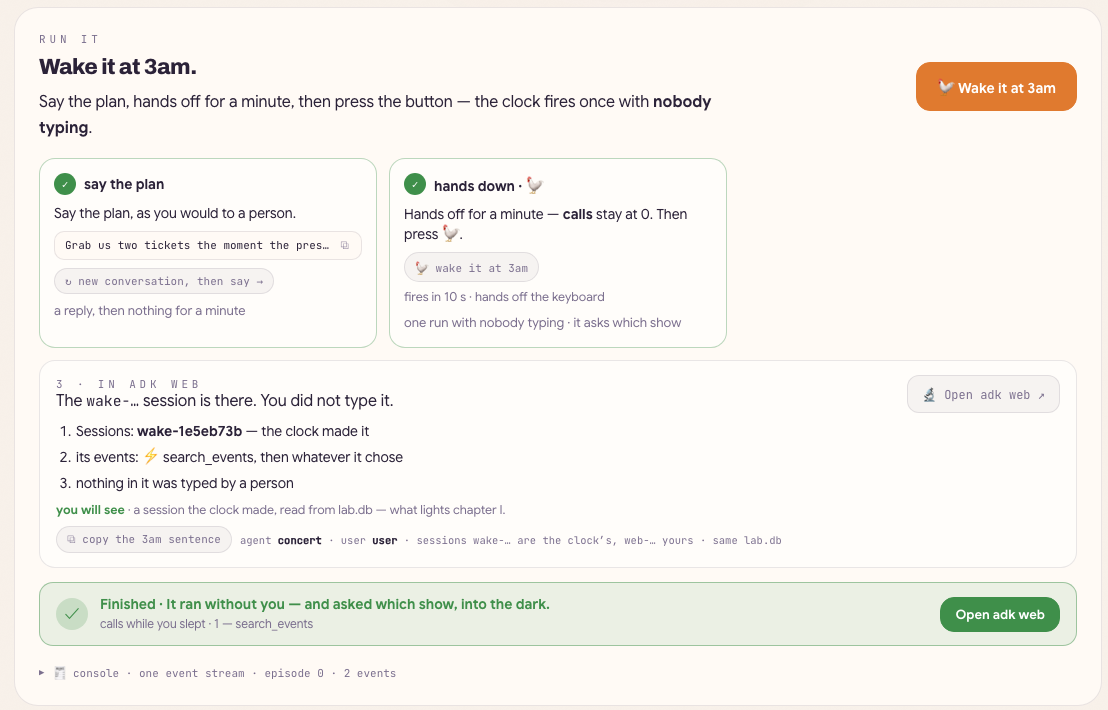
The number: calls while you slept — 1. Who typed — nobody.
The receipt: a wake-... session the clock created, with at least one tool call in it. VERIFY reads it from lab.db and the job log; the chapter lights.
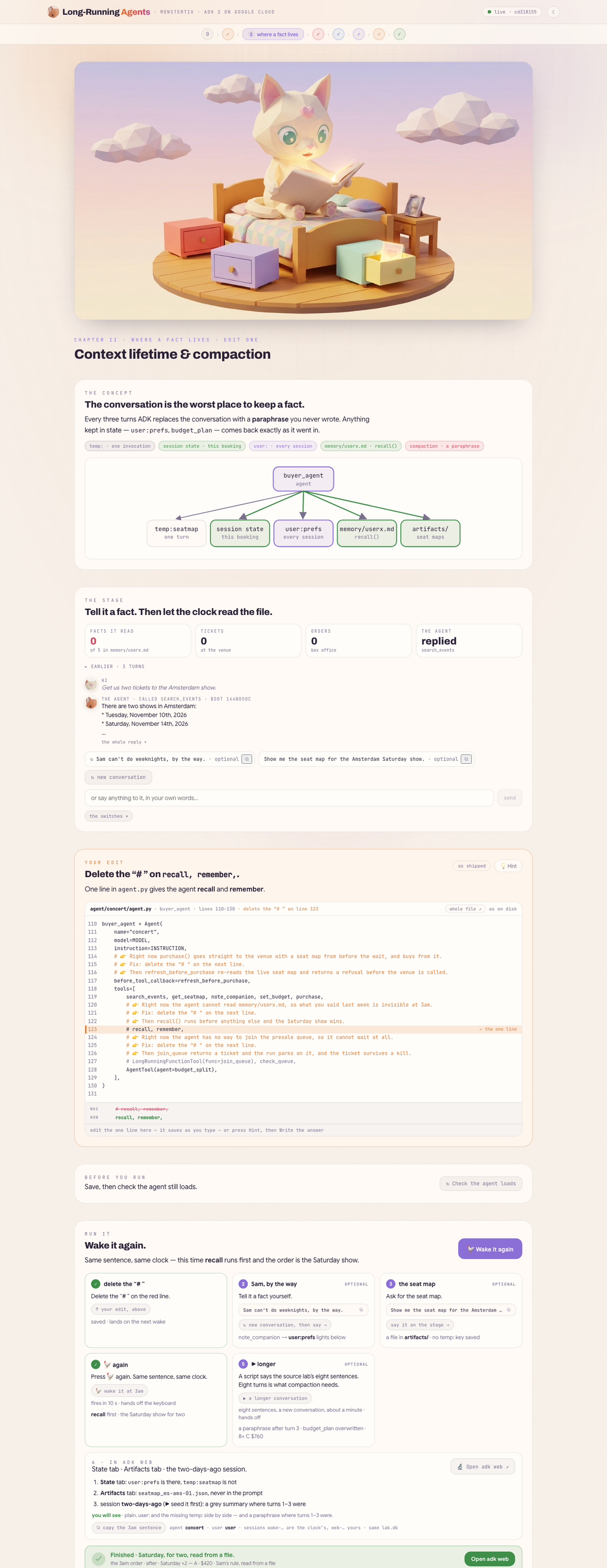
4. II · Where a fact lives — context lifetime & compaction
At 3am it asked which show, into the dark. Sam can't do weeknights — you said so last week, and the agent has been told three times which section you hate. Where did that go?
The concept — four places, four lifetimes
A fact can live in four places, and each lasts a different time:
where | lives | example in this lab |
| one invocation; stripped before the write to disk |
|
session state | this conversation |
|
| every session this person has |
|
a memory file | survives deleting the database |
|
ADK gives you an interface for the last one, BaseMemoryService, with two methods: add_session_to_memory(session) takes a conversation in, search_memory(app_name=, user_id=, query=) hands memories back. It ships three implementations — in-memory, Vertex AI RAG, Memory Bank — and the lab writes a fourth, MarkdownMemoryService, whose storage is a text file you can open. Memory Bank implements exactly the same two methods with a managed service behind them; once you have written one, none of them are mysterious.
The conversation itself is the worst place to keep a fact. The App carries EventsCompactionConfig(compaction_interval=3, overlap_size=1): after every three turns ADK summarises the older turns with a model call and appends the summary as one more event row under actions.compaction — the model is then handed that paraphrase instead of what anybody said. Anything kept in state is untouched by it: user:prefs and budget_plan come back exactly as they went in.
The code, as it reads once the line is in
agent/concert/agent.py — the page ships it with recall, remember, commented out:
buyer_agent = Agent(
    name="concert",
    model=MODEL,
    instruction=INSTRUCTION,
    tools=[
        search_events, get_seatmap, note_companion, set_budget, purchase,
        recall, remember,
        AgentTool(agent=budget_split),
    ],
)
recall is a thin tool over the service (agent/concert/memory.py):
async def recall() -> dict:
    """Read everything learned about this person from previous bookings.
    Call this before recommending a show."""
    response = await memory_service.search_memory(app_name="concert", user_id=MEMORY_USER, query="")
    if not response.memories:
        return {"memory": "", "note": "nothing remembered yet"}
    entry = response.memories[0]
    return {"memory": entry.content.parts[0].text, "source": entry.custom_metadata.get("source")}
Two things worth seeing. The service belongs on the Runner — the page's runner is built with memory_service=memory.memory_service — but adk web builds its services from URIs before it imports any agent code, so the tool calls the service directly; the wiring is a workaround, the service is the real thing. And MEMORY_USER is a fixed name, not the session's user id: adk web hard-codes userId=user, your own server uses something else, and one fixed file name is what lets a single memory file serve both.
The shipped instruction is a numbered procedure — 1 · recall() is ALWAYS your first call when it is one of your tools — because a politer wording (before recommending anything, call recall()) never produced a recall call on the 3am sentence: 0 of 6 runs. With the procedure, 5 of 5.
Try it
👉🖥 In MonsterTix: chapter II. 1 · delete the "# " — YOUR EDIT shows buyer_agent with the red line; delete the two characters yourself or press delete the "# " for me. The line under the editor says saved · lands on the next wake. Nothing restarts.
Two cards are optional and worth the minute. 2 · Sam, by the way opens a new conversation and says Sam can't do weeknights, by the way. — the agent calls note_companion, and under VERIFY the where it lives chips light user:prefs with written by note_companion in your conversation. 3 · the seat map asks for the Amsterdam Saturday seat map: get_seatmap saves the full map as an artifact (seatmap_ms-ams-01.json, never in the prompt) and a summary in temp:seatmap — and the chip reports 0 temp: keys in lab.db now: the session service strips temp: from the event before the write.
👉🖥 4 · 🐓 again. Same sentence, same clock. This time ⚡ recall is the first call, then search_events, get_seatmap, purchase — and the order is the Saturday show for two. Sam's rule, read from a file.
👉🖥 5 · ▶ a longer conversation (optional) lets a script say the source workshop's eight sentences into a fresh conversation, one after another: hello · what's on in Amsterdam? · Sam is coming with us, and he can't do weeknights · there are 4 of us and I can spend about $200 a head. What fits? · what if 10 people come and I can only do $120 each? · Book us something. · Amsterdam Saturday, section C, 8 people · yes. Eight turns is what compaction needs. Watch the stage; then read VERIFY's tiles: a compaction event after turn 3 and again after turn 6; budget_plan set by the arithmetic sub-agent on turn 4 and overwritten on turn 5 (an output_key keeps the latest answer, nothing is appended); and the order — 8× C · $760 for the Saturday, booked the moment you named show, section and count.
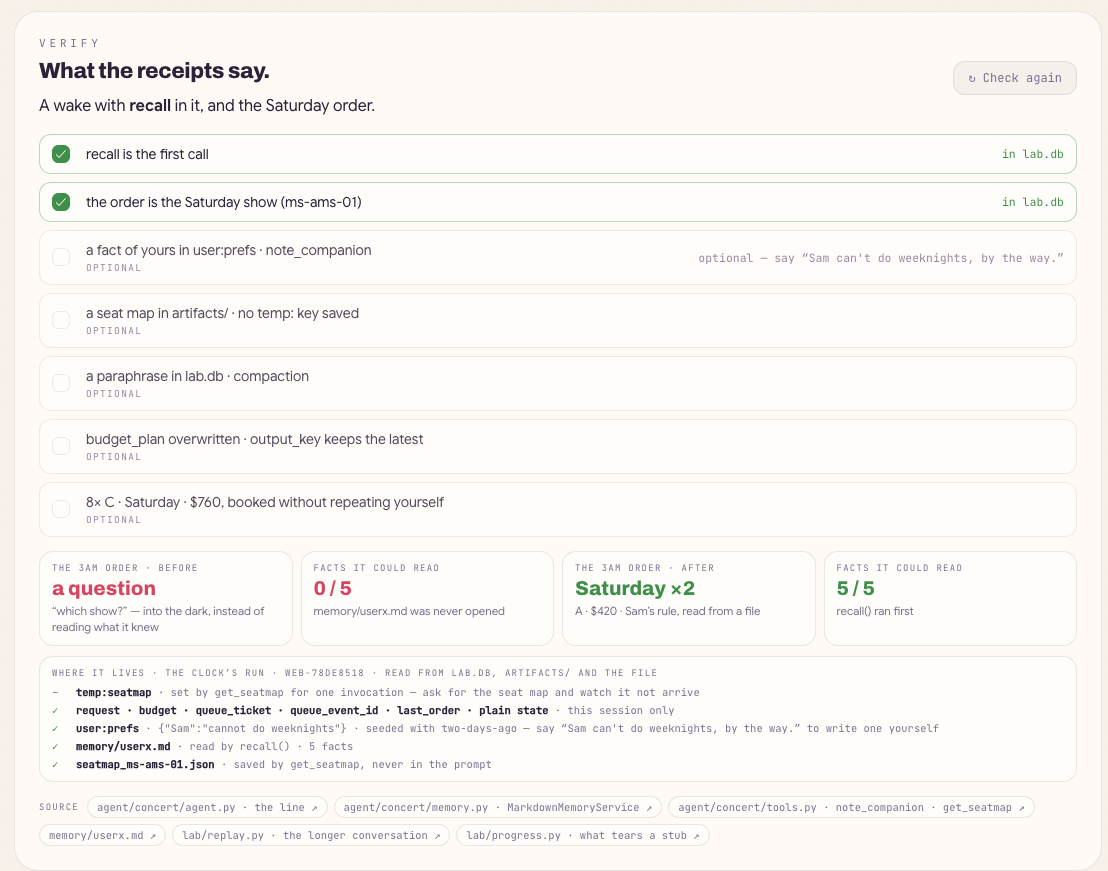
👉🖥 6 · in adk web. The State tab shows user:prefs; temp:seatmap is absent. The Artifacts tab holds the seat map. Switch the session dropdown to two-days-ago (seeded from the panel's ▶ seed button): a grey summary block sits where turns 1–3 used to be. Nothing you did put it there.
The number: facts it read — 5 / 5. The order — Saturday ×2.
The receipt: a wake whose events include recall, and whose order is the Saturday show (ms-ams-01).
5. III · The kill — long-running tools & resumability
The queue is 14,203 long. It moves for forty minutes. Your laptop will sleep before it reaches the front, and when the process is gone, so is everything in memory. What survives?
The concept — a handle, and what actually survives
join_queue returns in milliseconds. It is still long-running, because the work is not finished when the call returns: you are queued, not at the front; forty minutes of it are still ahead. That is exactly what LongRunningFunctionTool models — the tool returns a handle, the work carries on somewhere else, and the run is allowed to stop after it. ResumabilityConfig on the App is what lets a run stop.
check_queue also returns in milliseconds, and it is not long-running: you asked a question, you got a complete answer, there is nothing pending to park on. Wrap it as long-running and the run would park every time the agent asked where it was — including when the answer is you are at the front, buy now. You would have built an agent that suspends itself at the exact moment it should act.
What survives the kill is the session store. The ticket went to lab.db the moment join_queue returned (tool_context.state["queue_ticket"]), and so did the call and its response. When a new process opens the same session, the model is handed the conversation it had before, ticket included, and calls check_queue instead of joining again.
The code, as it reads once the line is in
    tools=[
        search_events, get_seatmap, note_companion, set_budget, purchase,
        recall, remember,
        LongRunningFunctionTool(func=join_queue), check_queue,
        AgentTool(agent=budget_split),
    ],
agent/concert/tools.py — the handle:
def join_queue(event_id: str, tool_context: ToolContext) -> dict:
    """Join the on-sale waiting room for a show. Returns immediately with a
    queue position. Do not poll in a loop — call check_queue when somebody
    asks, and not otherwise."""
    result = venue.post("/queue/join", {"event_id": event_id})
    tool_context.state["queue_ticket"] = result["ticket"]
    tool_context.state["queue_event_id"] = event_id
    return {"status": "waiting", "ticket": result["ticket"], "position": result["position"],
            "note": "You are queued. Stop here; check again when asked."}


def check_queue(tool_context: ToolContext, ticket: str = "") -> dict:
    """Check whether a queue ticket has reached the front."""
    ticket = ticket or tool_context.state.get("queue_ticket", "")
    return venue.get(f"/queue/{ticket}")
And on the App, already there since chapter I:
app = App(
    name="concert",
    root_agent=root_agent,
    events_compaction_config=EventsCompactionConfig(compaction_interval=3, overlap_size=1,
                                                    summarizer=LlmEventSummarizer(llm=Gemini(model=MODEL))),
    resumability_config=ResumabilityConfig(is_resumable=True),
)
Try it
👉🖥 In MonsterTix: chapter III. 1 · delete the "# " on the queue line. 2 · ask opens a new conversation and says The presale just opened. Get us tickets to the Amsterdam show. — recall, search_events, join_queue: Your position is 14,203. The stage's in line reads #14,203, ticket reads 1.
👉🖥 3 · 💀 kill the process. The lights go out: POST /api/kill exits the server with code 3. lab.sh's loop starts a new one a second later, reading lab.db from disk; a toast names the new boot id.
👉🖥 4 · ask again, in the same conversation: Where am I in line? One check_queue call, the same ticket, a lower number — #14,173 — and no second join_queue. The venue still holds one ticket.
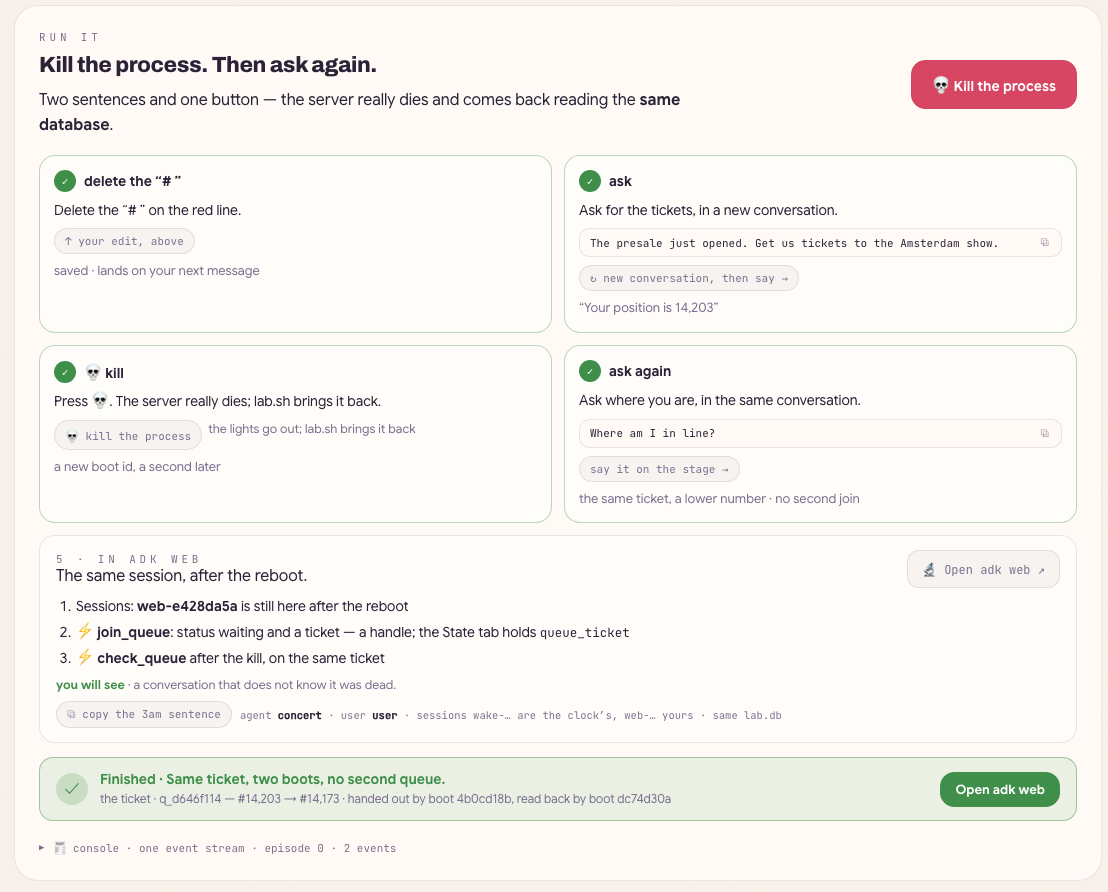
👉🖥 5 · in adk web. The session is still there after the reboot — adk web reads the same lab.db. The ⚡ join_queue event's response is status: waiting and a ticket: a handle, not a result. The next ⚡ is check_queue, after the kill, on the same ticket.
The number: one ticket, two boots, #14,203 → #14,173.
The receipt: one queue_ticket, handed out by join_queue under one boot id and read back by check_queue under another, in one session — and exactly one ticket at the venue.
6. IV · Old news — stale data & tool callbacks
It came back from the wait holding a seat map: A 400 · B 900 · C 1200. Those seats sold twelve minutes in. Why did it buy anyway?
The concept — an old fact does not ask, it acts
An agent that is missing a fact asks. An agent holding an old fact just acts — nothing is missing from its context, the wrong thing is present. The seat map it read while waiting is still in the conversation, in the model's own words. Its temp:seatmap copy died with that turn, which does not help.
A before_tool_callback runs in the instant before a tool — here, before purchase. It re-reads live inventory, and returning a dict short-circuits the tool: the model receives that dict as the tool's response, and the venue is never called. Returning None lets the purchase through.
As shipped, the venue itself says no, with a 409 sold_out — after the purchase reached it. With the fence, fence.py answers first: reason: stale_plan, actually_available: 0. Same refusal, different author, and the difference is whether an order can slip through on a venue that is slower to say no.
The code, as it reads once the line is in
buyer_agent = Agent(
    name="concert",
    model=MODEL,
    instruction=INSTRUCTION,
    before_tool_callback=refresh_before_purchase,
    tools=[...],
)
agent/concert/fence.py:
def refresh_before_purchase(tool: BaseTool, args: dict[str, Any], tool_context: ToolContext) -> dict | None:
    """Re-check live inventory before any purchase goes through. Returning a
    dict short-circuits the tool, so the agent never reaches the venue with a
    stale plan."""
    if tool.name != "purchase":
        return None
    event_id, section, seats = args.get("event_id"), args.get("section", "A"), int(args.get("seats", 2))
    live = venue.get(f"/events/{event_id}/seatmap")
    current = next((s for s in live["sections"] if s["section"] == section), None)
    snapshot = tool_context.state.get("temp:seatmap") or {}
    believed = next((s for s in snapshot.get("sections", []) if s["section"] == section), None)

    if current["available"] < seats:
        return {"error": True, "reason": "stale_plan",
                "message": f"Section {section} has {current['available']} seats left, {seats} requested. Re-read the seat map and pick again.",
                "believed_available": believed.get("available") if believed else None,
                "actually_available": current["available"]}
    if believed and believed["price"] != current["price"]:
        return {"error": True, "reason": "price_moved", "message": "...Confirm before buying."}
    tool_context.state["temp:verified_price"] = current["price"]
    return None
believed_available is None on this page: the stale fact lived in the conversation, not in temp: — temp: had already died with the turn that read the map. The fence re-reads the world regardless.
Try it
👉🖥 In MonsterTix: chapter IV. 1 · delete the "# " on before_tool_callback=. 2 · ask for the tickets in a new conversation — it joins the queue. 3 · the seats: How much are the seats, and what's still available? — a seat map, read into the conversation. 4 · sell · skip: sell the good seats sells section A out for both Amsterdam shows; skip the wait moves every ticket to the front. The conversation still says 400.
👉🖥 5 · buy A: Buy the two section A seats. fence.py answers first — reason stale_plan · actually 0 — and the venue was never called; the stage's section A readout says 0 left, the agent tells you what changed. 6 · then C: Then section C, two seats. A fresh plan passes the fence: 2× C · $190.
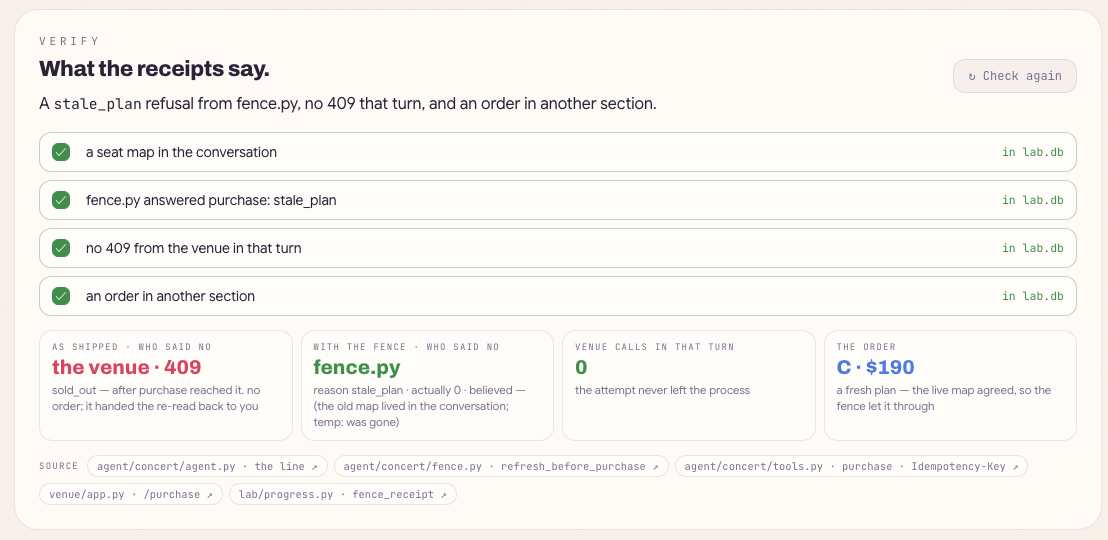
👉🖥 7 · in adk web. The ⚡ purchase event for section A carries a response written by fence.py, not the venue; the next ⚡ purchase (section C) carries the venue's order id.
The number: venue calls in the refused turn — 0.
The receipt: a stale_plan refusal from fence.py, no 409 from the venue in that turn, and an order in another section.
7. V · The graph — workflow & interrupts
At 3am, who decides the order of things? The model — nearly every time. Say go to the agent as a conversation and watch: recall → search_events, then a question back; say it again and it is recall → search_events → join_queue, a ticket taken on the word go. Two runs, two orders of things.
The concept — functions for rules, agents for judgement, one node that waits
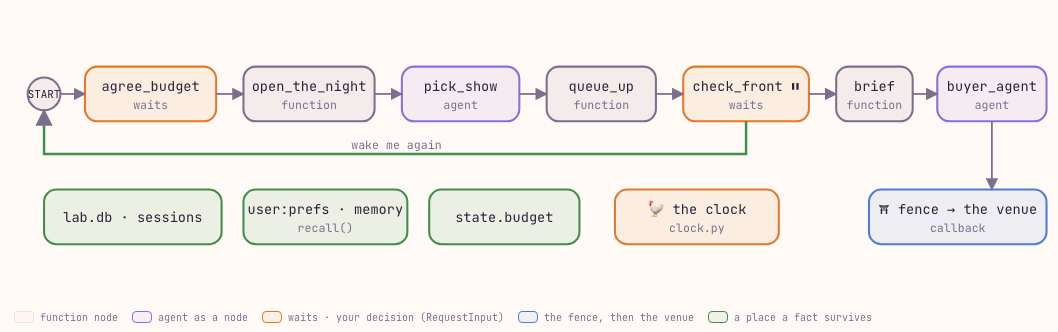
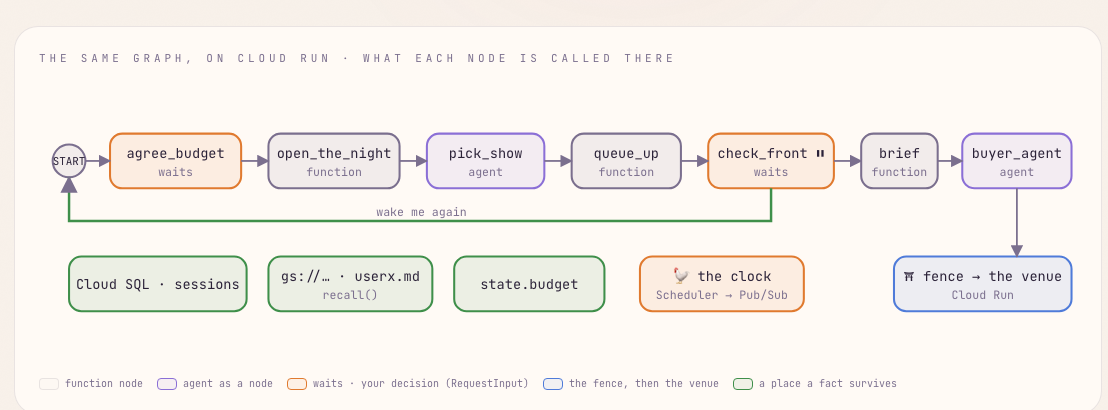
Some steps have no judgement in them: take exactly one queue ticket, ask whether it is your turn, write the brief for the buyer. A Workflow makes those function nodes — the same every night — and keeps agent nodes only where a decision lives: pick_show (which show, which section, with the memory file in hand) and your agent, last, when it is time to buy with a seat map that may have moved.
The wait is a node that returns RequestInput. That is ADK's interrupt: the graph stops where it stands, the invocation is written to the session store, and nothing loops, sleeps or holds a connection open. The process can die. Waking it up re-enters the graph from START — and rerun_on_resume=False on pick_show and queue_up is why a wake-up does not pick a second show or take a second ticket: those nodes are walked, not run. check_front is rerun_on_resume=True, because every wake-up must ask the venue again.
One more rule: an agent node cannot be first. An agent responds to its input, and straight after START with no user message there is nothing to respond to — the run hangs with no error and no timeout. That is why the graph opens with open_the_night, a three-line function whose only job is to say the sentence a person would have said.
The code, as it reads once the line is in
agent/concert/agent.py — the page ships root_agent = buyer_agent:
root_agent = nightly
agent/concert/nightly.py — the graph:
NIGHT = [open_the_night, pick_show, queue_up, check_front, brief, buyer_agent]

nightly = Workflow(
    name="concert_nightly",
    description="The unattended presale run: judgement, rules, judgement.",
    edges=[(START, *NIGHT)],
)
The node that waits:
@node(rerun_on_resume=True)
def check_front(node_input):
    """Are we at the front yet? If not, stop the run and wait to be woken."""
    status = venue.get(f"/queue/{node_input['ticket']}")
    if status.get("error"):                                   # the ticket can cease to exist
        return Event(output={**node_input, "ticket": "", "lost": True})
    if not status.get("ready"):
        print(f"  [check_front] #{status.get('position', 0):,} — not yet. Pausing.")
        return RequestInput(message=f"Still in the queue at #{status.get('position', 0):,}. "
                                    "Wake me again and I will check.")
    print("  [check_front] at the front")
    return Event(output=node_input)
Compare that with the obvious version — while not ready: time.sleep(1) — which keeps a process alive for forty minutes to achieve nothing, dies with the terminal, and cannot be resumed. The interrupt costs nothing, lives in the session store, and survives the machine going away.
The clock's door grows one rule on this page. A wake-up with no session named checks whether the stage's conversation is parked on an adk_request_input; if it is, the clock's sentence becomes the answer to that interrupt and resumes the parked run — it does not open a new session and take a second ticket. That is handlers.pending_interrupt, the vendored handler's own test, applied before the run.
Try it
👉🖥 In MonsterTix: chapter V. 1 · go, as shipped. Say go to the conversation and watch which tools the model picks — it chose that order. 2 · swap the line: buyer_agent → nightly. 3 · go again, in a new conversation: open_the_night → pick_show → queue_up → check_front run in that order and park — [check_front] #14,203 — not yet. Pausing. One ticket at the venue.
👉🖥 4 · 🐓. The clock's sentence answers the pause. Only check_front runs — no model call, 0.0 s — the number is lower (#14,142), and the venue still holds one ticket. 5 · skip, 🐓: skip the wait, then 🐓 once more. [check_front] at the front → brief → your agent, last: get_seatmap → purchase, 2× A · $420, inside the $250 a seat that nightly.py names as the default budget — without asking, and without re-joining the queue.
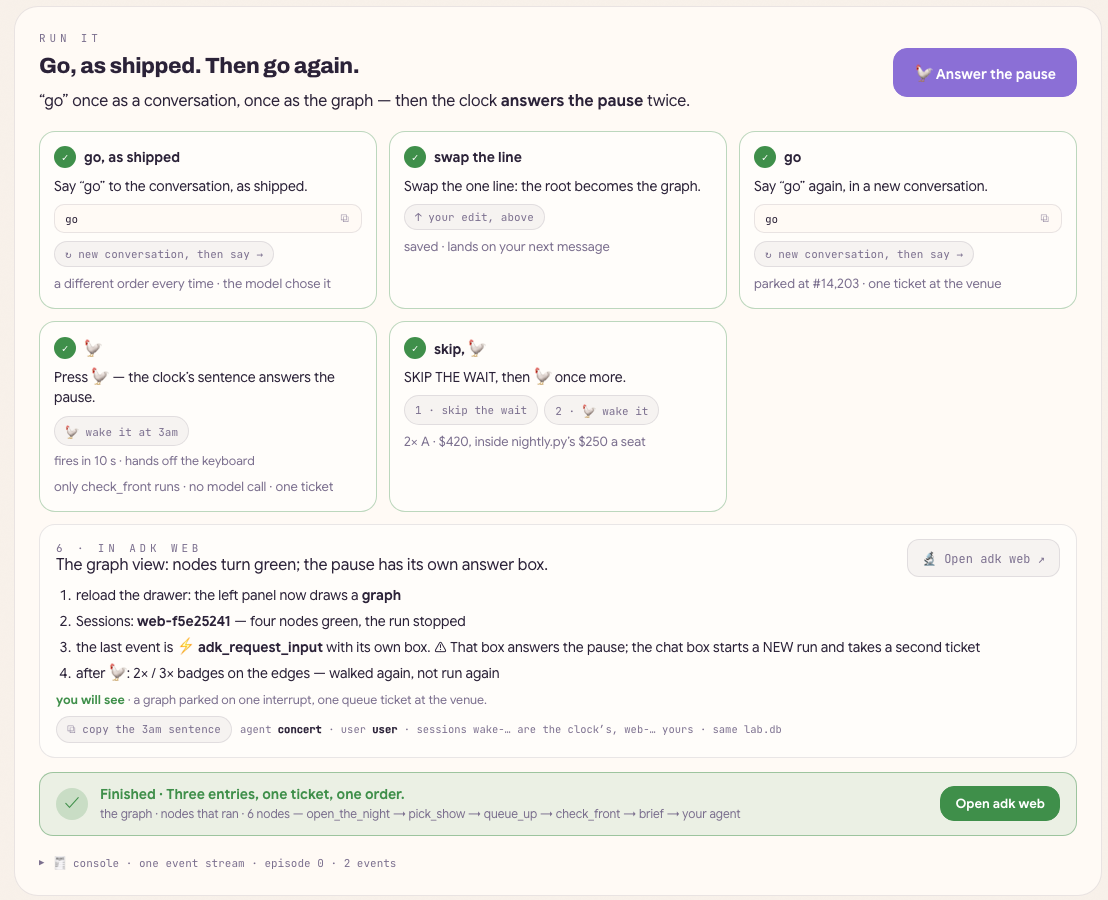
👉🖥 6 · in adk web. Reload the drawer: the left panel now draws a graph. The run's last event is ⚡ adk_request_input, with an Enter your response... box of its own. After 🐓 the edges into pick_show, queue_up and check_front carry a 2× badge — walked again, not run again.
The number: three entries into the graph, one ticket, one order.
The receipt: a run of the graph parked on an adk_request_input, two clock wake-ups that answered it, one ticket at the venue at every park, one order.
8. VI · The budget — human in the loop
It can buy on its own now. Who said how much? Chapter V spent up to $250 per seat — a string in nightly.py that nobody agreed to.
The concept — the same interrupt, aimed at a person
The RequestInput that waited for a venue can wait for a person. agree_budget is a node that returns one aimed at you, reads your answer back, and stores the sentence — not a schema — in session state. Three things make it work, and you need all three:
@node(rerun_on_resume=True)— the node runs again each time the graph is woken, instead of being skipped as already done.- a stable
interrupt_id—budget:ask, thenbudget:confirm— not the random one you get by default. It is the key you look the answer up by, so it has to be the same string on the run that asks and the run that reads. ctx.resume_inputs[interrupt_id]— where the answer actually arrives. ADK iterates a node rather than sending into it, so no value comes back through theRequestInputitself.
Session state, not user:, is a decision made on purpose: a budget is agreed for one booking, not forever. Two-fifty if they're the good ones was about that band, that night. A new session starts with none and has to agree one.
And someone_is_there() is a fact about the request, not the process. The deployed service handles both kinds — a browser, where somebody is plainly waiting, and a scheduler's push, where nobody is — and one environment variable set at boot cannot tell them apart. So the default is unattended, and a request that knows a person is driving says so for the duration of that request only: a ContextVar, scoped to one asyncio task, which in FastAPI is exactly one request. /api/say marks it; /api/wake does not.
The code, as it reads once the line is in
NIGHT = [open_the_night, pick_show, queue_up, check_front, brief, buyer_agent]
NIGHT.insert(0, agree_budget)
ASK_BUDGET = "budget:ask"
CONFIRM_BUDGET = "budget:confirm"

@node(rerun_on_resume=True)
def agree_budget(node_input, ctx: Context):
    answers = getattr(ctx, "resume_inputs", None) or {}
    ctx.state["request"] = what_they_asked_for(ctx)        # everything this person typed, joined

    if budget.load(ctx.state):                               # agreed on an earlier wake-up: use it
        return Event(output=budget.load(ctx.state))

    if not budget.someone_is_there():                        # nobody to ask: never stop here
        print(f"  [agree_budget] unattended. Using: {DEFAULT_BUDGET}")
        return Event(output=DEFAULT_BUDGET)

    said = str(answers.get(ASK_BUDGET) or "").strip()
    if not said:
        return RequestInput(interrupt_id=ASK_BUDGET,
                            message="Before I book anything: what are you willing to spend? Say it however you like ...")

    reply = str(answers.get(CONFIRM_BUDGET) or "").strip()
    if not reply:
        return RequestInput(interrupt_id=CONFIRM_BUDGET, message=f"So: {said}. Have I got that right?")

    if not reply.lower().lstrip().startswith(("yes", "yep", "correct", "that's right", "confirmed", "right")):
        said = reply                                         # a correction is the agreement
    ctx.state["budget"] = said
    return Event(output=said)
agent/concert/budget.py:
_attended = contextvars.ContextVar("attended", default=None)

def mark_attended(value: bool = True) -> None:
    """Say a person is on the other end of THIS request."""
    _attended.set(value)

def someone_is_there() -> bool:
    marked = _attended.get()
    if marked is not None:
        return marked
    return not _UNATTENDED_BY_DEFAULT
Read the order of the checks in agree_budget once more: the budget in state is checked before someone_is_there(). On the stage's session the 3am wake-up re-runs the node, finds your sentence, and lets the night run — nobody is asked because the answer is already there, not because nobody is there. someone_is_there() only decides when nothing is agreed: a fresh, unattended session takes the standing budget instead of stopping on a question nobody will answer.
Try it
👉🖥 In MonsterTix: chapter VI. 1 · delete the "# " on NIGHT.insert(0, agree_budget). 2 · ask, in a new conversation: Get us two tickets to the Amsterdam show. The run stops before any tool runs — [agree_budget] nothing agreed yet. Asking. — Before I book anything: what are you willing to spend?
👉🖥 3 · answer the way people answer, in the same box: About a 100 for the cheap seats. 250 if they're the good ones. It reads your sentence back: So: About a 100 for the cheap seats. 250 if they're the good ones. Have I got that right? 4 · yes: Yes, that's right. — [agree_budget] agreed: ..., then open → pick_show → queue_up → check_front run off one yes and park at #14,203. The State tab holds budget, your sentence verbatim, no prefix — and request, everything you typed, joined.
👉🖥 5 · skip, 🐓. Nobody is there, and it does not ask again: the wake-up answers check_front, emits no budget: interrupt, and buys inside your sentence — $210 a seat against 250 if they're the good ones (another run chose $95 a seat, section C; the model's judgement, not a parsed number).
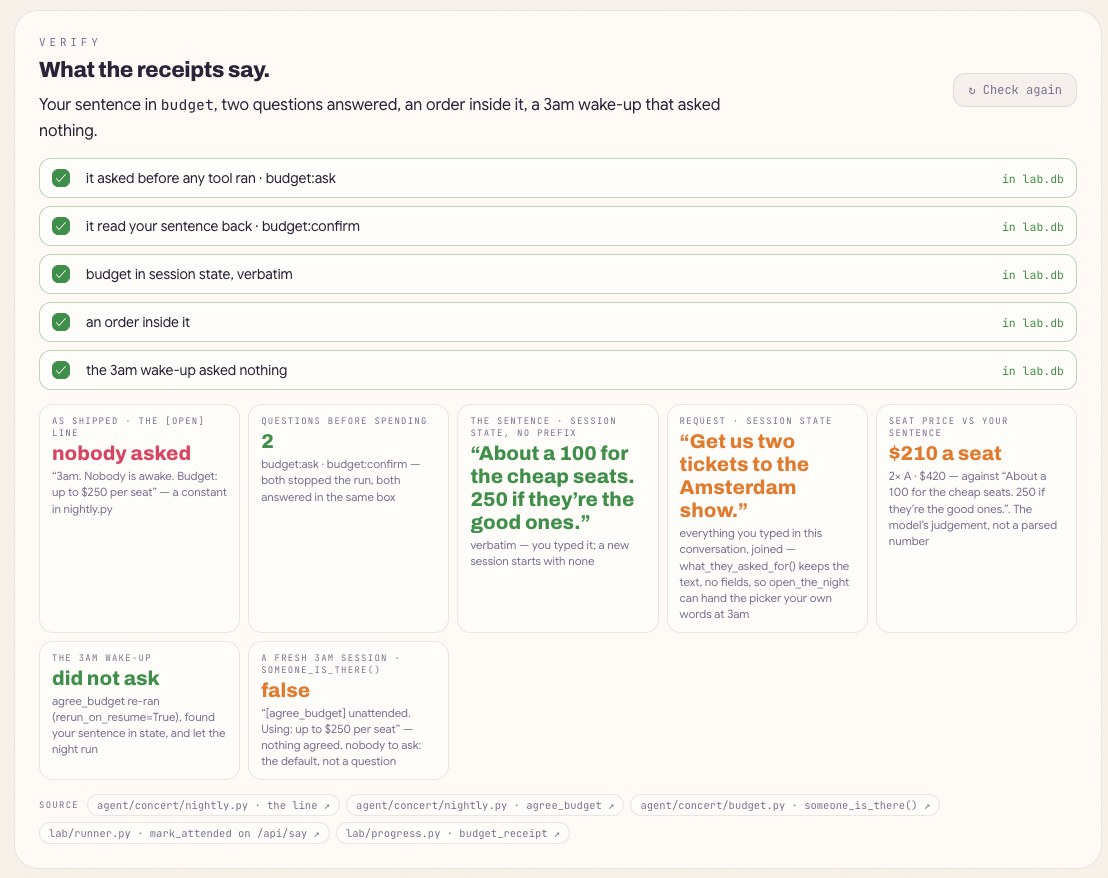
VERIFY has one more tile, a fresh 3am session · someone_is_there() · false: press 🐓 while nothing is parked and the clock opens a fresh session, and the same node prints [agree_budget] unattended. Using: up to $250 per seat — the ContextVar is false inside the Runner on the clock's request and true on the stage's.
👉🖥 6 · in adk web. The first event of your session is ⚡ adk_request_input with id budget:ask, before any tool; the next is budget:confirm. Press New Session and ask again: the graph stops on budget:ask once more — the budget died with the conversation it was agreed in.
The number: questions before spending — 2. Seat price — inside your sentence.
The receipt: budget in session state equal to a sentence you typed, budget:ask and budget:confirm answered, an order inside it, and a clock wake-up in that session that asked nothing.
9. VII · Breakfast — receipts & deployment
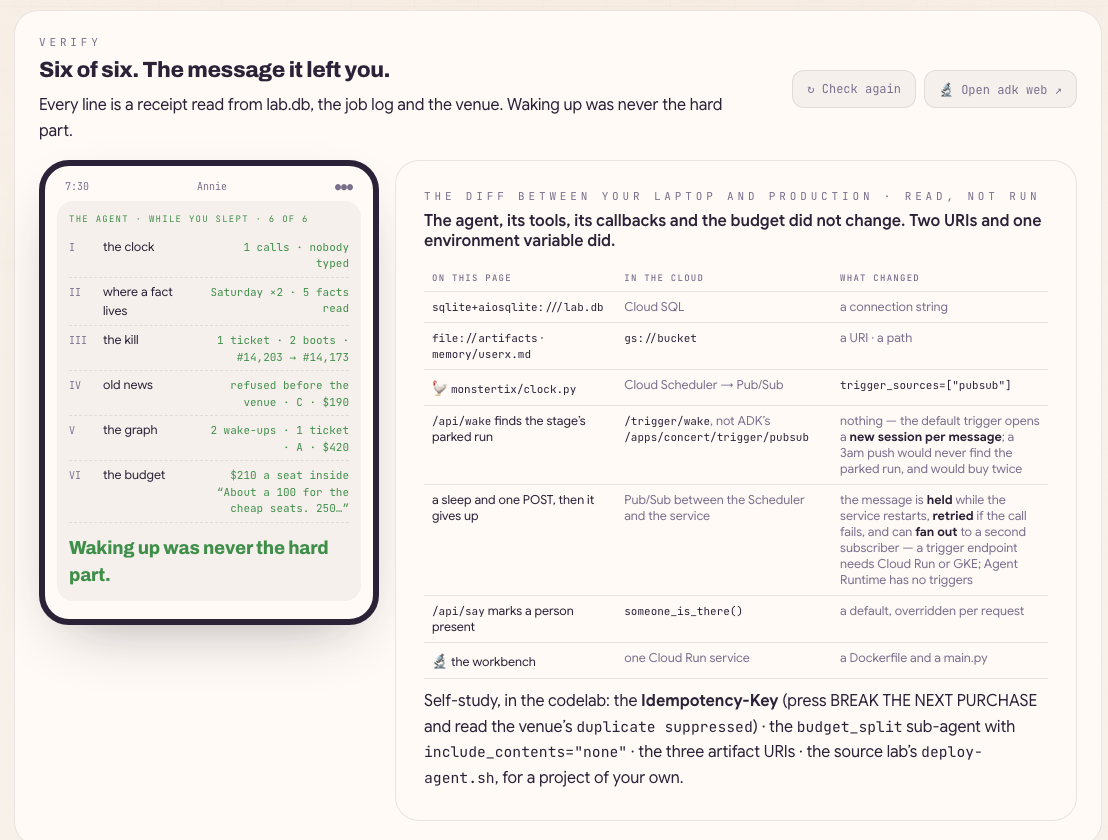
👉🖥 Chapter VII. The phone at 7:30: while you slept, six lines, your own numbers — 1 calls · nobody typed, Saturday ×2 · 5 facts read, 1 ticket · 2 boots · #14,203 → #14,173, refused before the venue · C · $190, 2 wake-ups · 1 ticket · A · $420, $210 a seat inside "About a 100 for the cheap seats. 250...". Every line is a receipt read from lab.db, the job log and the venue; an unlit chapter shows a dash.
part of the night | what it replaced | what it buys you |
a trigger and a triggerer | keep checking in a prompt | a run that starts without anyone typing |
a memory file through | the conversation as the only memory | a fact that survives deleting the database, and a paraphrase it is immune to |
| a | a handle in the session store; one ticket across two boots |
| trusting a seat map from before the wait | a refusal written by your code, before the venue |
a | the model deciding the order every night | rules as function nodes, judgement as agent nodes, a pause that costs nothing |
the same interrupt aimed at a person |
| a limit in your own words, living exactly as long as the conversation |
The diff between your laptop and production — read, not run
The agent, its tools, its callbacks and the budget did not change. Two URIs and one environment variable did:
on this page | in the cloud | what changed |
| Cloud SQL | a connection string ( |
|
| a URI · a path ( |
🐓 | Cloud Scheduler → Pub/Sub |
|
|
| nothing — the default trigger opens a new session per message; a 3am push would never find the parked run, and would buy twice |
a sleep and one POST, then it gives up | Pub/Sub between the Scheduler and the service | the message is held while the service restarts, retried if the call fails, and can fan out to a second subscriber — a trigger endpoint needs Cloud Run or GKE; Agent Runtime has no triggers |
|
| a default, overridden per request |
🔬 the workbench | one Cloud Run service | a Dockerfile and a |
Take home, in order:
- A prompt cannot start itself. Being awake is a trigger and a triggerer, and the triggerer has never heard of an agent.
- Store anything you cannot afford to lose somewhere other than the conversation — a summary keeps the general shape and loses the details.
- A long-running tool returns a handle; the session store does the surviving. Only what is in state outlives the process.
- An old fact does not ask, it acts. Re-read the world in the instant before spending, and let a returned dict stop the tool.
- Functions for rules, agents for judgement,
RequestInputto wait,rerun_on_resume=Falseso a wake-up walks but does not redo. - Store the sentence, not a schema; use a stable interrupt id; and make "is anybody there?" a fact about the request.
Anything that can stop and ask a person needs a way to know whether a person is there — per request, not per process. A clock can answer a clock; only a person can answer a question.
Self-study
budget_split— an agent, not a function, withinclude_contents="none"(it sees the request and nothing else) andoutput_key="budget_plan". Readagent.py's description of it, then the one line this lab added to its instruction: ADK appends an agent's own description to its system prompt, and Call this for ANY question... made gemini-2.5-flash call a tool that does not exist. Ask what else a description can do from the inside.- The
Idempotency-Key— press break the next purchase, buy, and read the venue'sduplicate suppressed. Then readpurchaseintools.pyand say what the key is derived from, and why the session id is part of it. - The three artifact URIs —
memory://·file://·gs://— are one flag onadk web; the memory service is not, which is whyrecallcalls it directly. Where would--memory_service_urihave to be registered to change that? - Leaving the laptop — the source workshop's
deploy-agent.sh,setup-cloud-state.shanddestroy-*.shdeploy this sameconcert/package to Cloud Run with Cloud SQL, a bucket, a Pub/Sub topic and a Scheduler job; with the Google Cloud MCP server connected, the five resources are one request. Cloud SQL and the bucket keep billing until destroyed. It needs a project with billing, which is why it is a read here and not a chapter. - The venue's switches —
1× → 60×makes the queue drain in forty seconds instead of forty minutes. Run chapter V again at 60× and count how many wake-ups it takes to reach the front without skip the wait.