
1. Introduction
This codelab teaches you to use the Google Play Billing Library (PBL) to manage subscription plan changes. You will discover how various replacement modes impact pricing and user entitlements while learning how to process backend Real-time Developer Notifications (RTDNs).
Audience
Designed for Android app developers, this codelab provides guidance on implementing sophisticated subscription management features. The guidance helps you to offer users a seamless experience to upgrade, downgrade, or transition between different subscription plans.
What you'll learn...
- How to create Subscriptions in Play Developer Console.
- How to choose the correct
ReplacementMode(e.g.,WITH_TIME_PRORATIONversusDEFERRED) to match your app's upgrade and downgrade policies. - How to configure
BillingFlowParamswithinlaunchBillingFlowto trigger the Google Play purchase flow for a plan replacement. - How to use Real-time Developer Notifications (RTDN) and
purchases.subscriptionsv2API to safely revoke old access and grant new access on your backend
What you'll need
- Access to the Google Play Console with a developer account. If you don't have a developer account, you need to create an account.
- The sample app for this codelab which you can download from GitHub.
- Android Studio
2. Build the sample app
This codelab uses a sample Android app to show you how to implement subscription replacements in PBL. The sample app is designed to be a fully functional android app that has the complete source code which shows the following aspects:
- Integration the app with PBL
- Implement subscription replacements
If you are already familiar with subscription replacements and PBL, you can download the sample app and play with it.
The following demo video shows how the sample app will look and behave after it's deployed and run.
Prerequisites
Before you build and deploy the sample app, do the following:
- Create a Google Play Console developer account. If you already have a developer account, skip this step.
- Create a new app in the Play Console with monetization features enabled. Alternatively, you can use an existing app in the Play Console. If monetization features are not enabled for your app, follow these steps to set it up.
- Install Android Studio.
Build
To build the sample app as required to follow the codelab:
- Download the sample app from GitHub.
- Update the
applicationIdwithin the sample app'sbuild.gradleto reflect the Application Id of your app in Play Developer Console. - Build the sample app.
Note: This successfully builds the app for local testing. However, running the app doesn't fetch products and prices because the required subscriptions have not yet been created in Play Developer Console. The next section will cover creating subscriptions in the Developer Console.
3. Create subscriptions in Play Console
The Google Play subscriptions system provides flexibility in how you create, manage, and sell subscriptions. In the Play Console, you can configure subscriptions with multiple base plans, each containing multiple offers. Subscription offers can have various pricing models and eligibility options. For this codelab, you will create three subscriptions: Premium Plan, Basic Plan, and Lite Plan, simulating a typical subscription offering at various price points. Each of these will have a single monthly recurring base plan.
Create a new subscription
To create a new subscription
- Open the Play Console and go to the Subscriptions page (Monetize with Play > Products > Subscriptions)
- Click Create subscription.
- Enter your subscription details:
- ProductID : Enter a unique product ID. Enter
premium_plan. - Name : Enter a short name for the subscription. Example:
Premium Plan.
- ProductID : Enter a unique product ID. Enter
- Click Create.
Create the Base plan
- Open the Play Console and go to the Subscriptions page (Monetize with Play > Products > Subscriptions)
- Next to the subscription you want to create a base plan in, click the right arrow to view the subscription details.
- Click Add base plan.
- Enter a base plan ID. Example
monthly-auto-renewing. - Choose the type as Auto-renewing.
- For the Auto-renewing base plan set the following:
- Billing period: Monthly.
- Grace period: 7 days.
- Billing plan and offer changes: Charge at billing date.
- Resubscribe: Allow.
- In the Price and availability section, click Set Prices to set the price of the base plan.
- Select all countries and regions and then click Set price.
- Set price as $10 for this base plan and the click Update.
- Once the price for the base plan is set, on the bottom-right click Save and then Activate.
Create subscriptions for the sample app
For the purpose of this codelab, create two additional subscriptions with the following configuration:
- Basic Plan
- Product Id: basic_plan
- Name: Basic Plan
- Base Plan Id: monthly-auto-renewing
- Price: $5
- Lite Plan
- Product Id: lite_plan
- Name: Lite Plan
- Base Plan Id: monthly-auto-renewing
- Price: $3
The sample app is configured to use these product IDs and base plan IDs. You can create different subscriptions with different configuration, in which case, you will have to modify the sample app to use the product ID that you have created.
Subscription creation video
The following video shows the steps previously described to create Subscription in Play Developer Console.
4. Subscription Replacements
Developers integrating with PBL can provide their existing subscribers with various options to change their subscription plan to better meet their needs:
- If you sell multiple subscription tiers, such as basic and premium subscriptions, you can allow users to switch tiers by purchasing a different subscription's base plan or offer.
- You can allow users to change their current billing period, such as switching from a monthly to an annual plan.
- You can also allow users to switch between auto-renewing and prepaid plans.
When users decide to upgrade, downgrade, or change their subscription, you specify a replacement mode that determines how the prorated value of the current billing period is applied, and when the entitlement change occurs for the users.
Play Billing Library provides several ReplacementMode options to control this behavior.
Available replacement modes
WITH_TIME_PRORATION: The subscription item is upgraded or downgraded immediately. Any time remaining is adjusted based on the price difference, and credited toward the new subscription by updating the next billing date. This is the default behavior.CHARGE_PRORATED_PRICE: The subscription item is upgraded immediately, and the billing cycle remains the same. The price difference for the remaining period is then charged to the user.CHARGE_FULL_PRICE: The subscription item is upgraded or downgraded immediately, and the user is charged full price for this new entitlement immediately. The remaining value from the previous subscription is either carried over for the same entitlement, or prorated for time when switching to a different entitlement.WITHOUT_PRORATION: The subscription item is upgraded or downgraded immediately, and the new price is charged when the subscription renews. The billing cycle remains the same.DEFERRED: The subscription item is upgraded or downgraded only when the subscription renews.
5. WITH_TIME_PRORATION
In this replacement mode, the subscription item is upgraded or downgraded immediately. Any time remaining, is adjusted based on the price difference, and credited to the new subscription by pushing forward the next billing date. This is the default behavior.
Example scenario
A user switches from a Basic plan ($4.99 per month) to a Premium plan ($9.99 per month) on April 15 which is halfway through their monthly billing cycle.
In this scenario:
- The user gets access to the Premium plan immediately.
- Google Play automatically calculates the proration period. Suppose, if Play calculates that the remaining 15 days of the Basic plan are worth 7 days of Premium plan, the next billing date is advanced to April 21.
- No immediate payment is required from the user.
Code snippet
// ProductDetails for the plan to be switched to
ProductDetails productDetails = ...;
// The specific offer token for the toBeSwitched plan's base plan
String offerToken = "...";
// The purchase token of the user's current subscription
String oldPurchaseToken = "...";
// The productId for the user's current subscription
String oldProductId = "...";
// The replacementMode to replace the user's subscription
int replacementMode = SubscriptionProductReplacementParams.ReplacementMode.WITH_TIME_PRORATION;

SubscriptionProductReplacementParams subscriptionProductReplacementParams =
    SubscriptionProductReplacementParams.newBuilder()
        .setOldProductId(oldProductId)
        .setReplacementMode(replacementMode)
        .build();

ProductDetailsParams productDetailsParams =
    ProductDetailsParams.newBuilder()
        .setProductDetails(productDetails)
        .setSubscriptionProductReplacementParams(subscriptionProductReplacementParams)
        .setOfferToken(offerToken)
        .build();

List<ProductDetailsParams> productDetailsParamsList = ImmutableList.of(productDetailsParams);

BillingFlowParams billingFlowParams =
    BillingFlowParams.newBuilder()
        .setProductDetailsParamsList(productDetailsParamsList)
        .setSubscriptionUpdateParams(
            SubscriptionUpdateParams.newBuilder().setOldPurchaseToken(oldPurchaseToken).build())
        .build();

billingClient.launchBillingFlow(activity, billingFlowParams);
Upgrade with WITH_TIME_PRORATION
To simulate this scenario:
- In the
MainActivityof the sample app, update thereplacementModein the code snippet toSubscriptionProductReplacementParams.ReplacementMode.WITH_TIME_PRORATION. - Rebuild and launch the application.
- Cancel existing subscriptions (if any) from the Google Play Store and it expire.
- Purchase the Basic plan.
- Switch to the Premium plan.
The user's entitlement is upgraded to the Premium plan immediately. The amount to be paid immediately by the user is $0.00. The remaining value of the Basic plan is prorated into time for the Premium plan, which bring the next renewal date forward. The user will be charged the renewal amount of $9.99 at the newly adjusted billing date.
Downgrade with WITH_TIME_PRORATION
To simulate this scenario:
- In the
MainActivityof the sample app, update thereplacementModein the code snippet toSubscriptionProductReplacementParams.ReplacementMode.WITH_TIME_PRORATION. - Rebuild and launch the application.
- Cancel existing subscriptions (if any) from the Google Play Store and it expire.
- Purchase the Basic plan.
- Switch to the Lite plan.
The user's entitlement is downgraded to the Lite plan immediately. The amount to be paid immediately is $0.00. The remaining value of the Basic plan is prorated into time for the Lite plan, which extends the next renewal date significantly. The user will be charged the renewal amount of $2.99 at the newly adjusted billing date.
Conclusion
In this section, you learned how WITH_TIME_PRORATION modifies user entitlements without immediate charges by adjusting the time until the next renewal based on the price difference. It is an effective default strategy to upgrade or downgrade users.
6. CHARGE_PRORATED_PRICE
In this replacement mode, the subscription item is upgraded immediately, and the billing cycle remains the same. The price difference for the remaining period is then charged to the user.
Note: This option is available only for a subscription item upgrade, where the price per unit of time increases.
Example scenario
A user on the Basic plan ($4.99 per month) decides to upgrade to the Premium plan ($9.99 per month) on April 20 with about 10 days remaining in their monthly billing cycle.
In this scenario:
- The user gets access to the Premium plan immediately.
- The user is immediately charged the prorated difference for the remaining 10 days of the current billing cycle. This amounts to approximately $2.99, representing 10 days' worth of the Premium plan.
- The billing date for the user doesn't change.
Code snippet
// ProductDetails for the plan to be switched to
ProductDetails productDetails = ...;
// The specific offer token for the toBeSwitched plan's base plan
String offerToken = "...";
// The purchase token of the user's current subscription
String oldPurchaseToken = "...";
// The productId for the user's current subscription
String oldProductId = "...";
// The replacementMode to replace the user's subscription
int replacementMode = SubscriptionProductReplacementParams.ReplacementMode.CHARGE_PRORATED_PRICE;

SubscriptionProductReplacementParams subscriptionProductReplacementParams =
    SubscriptionProductReplacementParams.newBuilder()
        .setOldProductId(oldProductId)
        .setReplacementMode(replacementMode)
        .build();

ProductDetailsParams productDetailsParams =
    ProductDetailsParams.newBuilder()
        .setProductDetails(productDetails)
        .setSubscriptionProductReplacementParams(subscriptionProductReplacementParams)
        .setOfferToken(offerToken)
        .build();

List<ProductDetailsParams> productDetailsParamsList = ImmutableList.of(productDetailsParams);

BillingFlowParams billingFlowParams =
    BillingFlowParams.newBuilder()
        .setProductDetailsParamsList(productDetailsParamsList)
        .setSubscriptionUpdateParams(
            SubscriptionUpdateParams.newBuilder().setOldPurchaseToken(oldPurchaseToken).build())
        .build();

billingClient.launchBillingFlow(activity, billingFlowParams);
Upgrade with CHARGE_PRORATED_PRICE
To simulate this scenario:
- In the
MainActivityof the sample app, update thereplacementModein the code snippet toSubscriptionProductReplacementParams.ReplacementMode.CHARGE_PRORATED_PRICE. - Rebuild and launch the application.
- Cancel existing subscriptions (if any) from the Google Play Store and it expire.
- Purchase the Basic plan.
- Switch to the Premium plan.
The user is upgraded to the Premium plan immediately, keeping the original renewal date. The amount to be paid immediately is the prorated difference between the Premium and Basic plan prices for the remaining days of the current cycle. At the renewal date, the user will be charged the full Premium renewal amount of $9.99.
Downgrade with CHARGE_PRORATED_PRICE
To simulate this scenario:
- In the
MainActivityof the sample app, update thereplacementModein the code snippet toSubscriptionProductReplacementParams.ReplacementMode.CHARGE_PRORATED_PRICE. - Rebuild and launch the application.
- Cancel existing subscriptions (if any) from the Google Play Store and it expire.
- Purchase the Basic plan.
- Switch to the Lite plan.
This replacement mode results in an error during a downgrade because it is only available for subscription item upgrades where the price per unit of time increases. The billing flow will fail and display an error to the user stating that the proration mode is not supported for downgrades.
Conclusion
This section explained how CHARGE_PRORATED_PRICE allows for immediate upgrades by charging users the exact price difference for the remaining billing period while leaving the billing cycle intact. This is useful when the the users wants to upgrade to a more expensive tier, without changing their billing date.
7. CHARGE_FULL_PRICE
In this replacement mode, the subscription item is upgraded or downgraded immediately, and the user is charged full price for the new entitlement immediately. The remaining value from the previous subscription is either carried over for the same entitlement, or prorated for time when switching to a different entitlement.
Example scenario
A user is on the Basic plan ($4.99 per month starting at April 1). On April 20, the user wishes to switch to the Premium plan ($9.99 per month).
In this scenario:
- The user is immediately charged the full price of the Premium plan ($9.99).
- The remaining value from the Basic plan (e.g., 10 days worth) is converted into equivalent time for the Premium plan. In this example, 10 days of Basic is equivalent to 5 days of Premium.
- The user's next renewal date is adjusted to include this prorated time. So, the renewal date becomes May 25 (April 20 + 1 month + 5 days).
- Subsequent renewals will occur monthly starting from May 25.
Code snippet
// ProductDetails for the plan to be switched to
ProductDetails productDetails = ...;
// The specific offer token for the toBeSwitched plan's base plan
String offerToken = "...";
// The purchase token of the user's current subscription
String oldPurchaseToken = "...";
// The productId for the user's current subscription
String oldProductId = "...";
// The replacementMode to replace the user's subscription
int replacementMode = SubscriptionProductReplacementParams.ReplacementMode.CHARGE_FULL_PRICE;

SubscriptionProductReplacementParams subscriptionProductReplacementParams =
    SubscriptionProductReplacementParams.newBuilder()
        .setOldProductId(oldProductId)
        .setReplacementMode(replacementMode)
        .build();

ProductDetailsParams productDetailsParams =
    ProductDetailsParams.newBuilder()
        .setProductDetails(productDetails)
        .setSubscriptionProductReplacementParams(subscriptionProductReplacementParams)
        .setOfferToken(offerToken)
        .build();

List<ProductDetailsParams> productDetailsParamsList = ImmutableList.of(productDetailsParams);

BillingFlowParams billingFlowParams =
    BillingFlowParams.newBuilder()
        .setProductDetailsParamsList(productDetailsParamsList)
        .setSubscriptionUpdateParams(
            SubscriptionUpdateParams.newBuilder().setOldPurchaseToken(oldPurchaseToken).build())
        .build();

billingClient.launchBillingFlow(activity, billingFlowParams);
Upgrade with CHARGE_FULL_PRICE
To simulate this scenario:
- In the
MainActivityof the sample app, update thereplacementModein the code snippet toSubscriptionProductReplacementParams.ReplacementMode.CHARGE_FULL_PRICE. - Rebuild and launch the application.
- Cancel existing subscriptions (if any) from the Google Play Store and it expire.
- Purchase the Basic plan.
- Switch to the Premium plan.
The user is upgraded to the Premium plan immediately. The amount to be paid immediately is the full price of Premium Plan - $9.99. Any remaining value from the Basic plan is converted to time on the new Premium plan, slightly extending the first renewal date. Afterwards, the renewal amount will be $9.99 per cycle.
Downgrade with CHARGE_FULL_PRICE
To simulate this scenario:
- In the
MainActivityof the sample app, update thereplacementModein the code snippet toSubscriptionProductReplacementParams.ReplacementMode.CHARGE_FULL_PRICE. - Rebuild and launch the application.
- Cancel existing subscriptions (if any) from the Google Play Store and it expire.
- Purchase the Basic plan.
- Switch to the Lite plan.
The user is downgraded to the Lite plan immediately, and a new billing cycle is started. The amount to be paid immediately is the full target price of $2.99. The unused portion of the Basic plan is prorated into time for the new Lite plan, extending the first renewal date. After which, the renewal amount will be $2.99 per cycle.
Conclusion
In this section, we covered how CHARGE_FULL_PRICE charges the user fully out-of-pocket on the day of the switch, starting a new billing cycle immediately. Any left-over balance from the prior plan applies linearly to the next renewal date.
8. WITHOUT_PRORATION
In this replacement mode, the subscription item is upgraded or downgraded immediately, and the new price is charged when the subscription renews.
Example scenario
A user is on the Basic plan ($4.99 per month starting at April 1). On April 20, the user wishes to switch to the Premium plan ($9.99 per month).
In this scenario:
- The user gets access to the Premium plan immediately.
- The user doesn't have to pay the higher $9.99 price until the next subscription renewal date (May 1).
Code snippet
// ProductDetails for the plan to be switched to
ProductDetails productDetails = ...;
// The specific offer token for the toBeSwitched plan's base plan
String offerToken = "...";
// The purchase token of the user's current subscription
String oldPurchaseToken = "...";
// The productId for the user's current subscription
String oldProductId = "...";
// The replacementMode to replace the user's subscription
int replacementMode = SubscriptionProductReplacementParams.ReplacementMode.WITHOUT_PRORATION;

SubscriptionProductReplacementParams subscriptionProductReplacementParams =
    SubscriptionProductReplacementParams.newBuilder()
        .setOldProductId(oldProductId)
        .setReplacementMode(replacementMode)
        .build();

ProductDetailsParams productDetailsParams =
    ProductDetailsParams.newBuilder()
        .setProductDetails(productDetails)
        .setSubscriptionProductReplacementParams(subscriptionProductReplacementParams)
        .setOfferToken(offerToken)
        .build();

List<ProductDetailsParams> productDetailsParamsList = ImmutableList.of(productDetailsParams);

BillingFlowParams billingFlowParams =
    BillingFlowParams.newBuilder()
        .setProductDetailsParamsList(productDetailsParamsList)
        .setSubscriptionUpdateParams(
            SubscriptionUpdateParams.newBuilder().setOldPurchaseToken(oldPurchaseToken).build())
        .build();

billingClient.launchBillingFlow(activity, billingFlowParams);
Upgrade with WITHOUT_PRORATION
To simulate this scenario:
- In the
MainActivityof the sample app, update thereplacementModein the code snippet toSubscriptionProductReplacementParams.ReplacementMode.WITHOUT_PRORATION. - Rebuild and launch the application.
- Cancel existing subscriptions (if any) from the Google Play Store and it expire.
- Purchase the Basic plan.
- Switch to the Premium plan.
The user is upgraded to the Premium plan immediately while preserving their existing renewal date. The amount to be paid immediately is $0.00. The user has access to the Premium plan for the remaining time in the given cycle, before switching to the new renewal amount of $9.99 on the next billing date.
Downgrade with WITHOUT_PRORATION
To simulate this scenario:
- In the
MainActivityof the sample app, update thereplacementModein the code snippet toSubscriptionProductReplacementParams.ReplacementMode.WITHOUT_PRORATION. - Rebuild and launch the application.
- Cancel existing subscriptions (if any) from the Google Play Store and it expire.
- Purchase the Basic plan.
- Switch to the Lite plan.
The user is downgraded to the Lite plan immediately, losing the Basic features they paid for. The amount to be paid immediately is $0.00. The billing cycle continues unmodified, and the user will pay the new, lower rate of $2.99 on their next scheduled renewal.
Conclusion
This section demonstrated how WITHOUT_PRORATION immediately swaps the user's entitlements without a checkout charge while leaving the billing cycle untouched.
9. DEFERRED
In this replacement mode, the subscription item is upgraded or downgraded only when the subscription renews, but the new purchase is issued immediately. The existing item is set to non-renewable and expires at the end of the current billing cycle, whereas the newly requested entitlement begins right after.
Example scenario
A user is on the Basic plan ($4.99 per month starting at April 1). On April 20, the user wishes to switch to the Premium plan ($9.99 per month).
In this scenario:
- No immediate charge is incurred by the user.
- The user continues to receive Basic features until the end of the current billing cycle (April 30).
- The subscription plan automatically upgrades to Premium on the next renewal date (May 1).
Code snippet
// ProductDetails for the plan to be switched to
ProductDetails productDetails = ...;
// The specific offer token for the toBeSwitched plan's base plan
String offerToken = "...";
// The purchase token of the user's current subscription
String oldPurchaseToken = "...";
// The productId for the user's current subscription
String oldProductId = "...";
// The replacementMode to replace the user's subscription
int replacementMode = SubscriptionProductReplacementParams.ReplacementMode.DEFERRED;

SubscriptionProductReplacementParams subscriptionProductReplacementParams =
    SubscriptionProductReplacementParams.newBuilder()
        .setOldProductId(oldProductId)
        .setReplacementMode(replacementMode)
        .build();

ProductDetailsParams productDetailsParams =
    ProductDetailsParams.newBuilder()
        .setProductDetails(productDetails)
        .setSubscriptionProductReplacementParams(subscriptionProductReplacementParams)
        .setOfferToken(offerToken)
        .build();

List<ProductDetailsParams> productDetailsParamsList = ImmutableList.of(productDetailsParams);

BillingFlowParams billingFlowParams =
    BillingFlowParams.newBuilder()
        .setProductDetailsParamsList(productDetailsParamsList)
        .setSubscriptionUpdateParams(
            SubscriptionUpdateParams.newBuilder().setOldPurchaseToken(oldPurchaseToken).build())
        .build();

billingClient.launchBillingFlow(activity, billingFlowParams);
Upgrade with DEFERRED
To simulate this scenario:
- In the
MainActivityof the sample app, update thereplacementModein the code snippet toSubscriptionProductReplacementParams.ReplacementMode.DEFERRED. - Rebuild and launch the application.
- Cancel existing subscriptions (if any) from the Google Play Store and it expire.
- Purchase the Basic plan.
- Switch to the Premium plan.
The user will remain on the Basic plan until the end of their current billing cycle. The amount to be paid immediately is $0.00. At the renewal date, their entitlement upgrades to the Premium plan and they will be charged the new renewal amount of $9.99.
Downgrade with DEFERRED
To simulate this scenario:
- In the
MainActivityof the sample app, update thereplacementModein the code snippet toSubscriptionProductReplacementParams.ReplacementMode.DEFERRED. - Rebuild and launch the application.
- Cancel existing subscriptions (if any) from the Google Play Store and it expire.
- Purchase the Basic plan.
- Switch to the Lite plan.
The user will remain on the Basic plan until the end of their current billing cycle. The amount to be paid immediately is $0.00. At the renewal date, their entitlement upgrades to the Lite plan and they will be charged the new renewal amount of $2.99.
Conclusion
This section explained how the DEFERRED replacement mode postpones an upgrade or downgrade until the end of an active user's paid time. This makes it particularly ideal for downgrades to prevent losing features already purchased.
10. Backend and Client-side Processing
After a user triggers a successful subscription replacement ensure both your app and backend correctly handle the change to avoid issues like service interruptions or double-billing.
Example Scenario
- The user has a Basic monthly plan (product_id
basic_planand purchase_tokenbasic_purchase_token_123). - The user switches to a Premium plan using an immediate replacement mode (one of
WITHOUT_PRORATION,WITH_TIME_PRORATION,CHARGE_PRORATED_PRICE,CHARGE_FULL_PRICE) - Once the subscription switch is successful, Google treats it as a NEW subscription and create a new, different purchase token for the Premium Plan (product_id
premium_planand purchase_tokenpremium_purchase_token_123).
Client-side processing
onPurchasesUpdated
When the replacement purchase completes, PurchasesUpdatedListener is triggered. Even though this was a switch, Google Play treats the Premium plan as a brand new purchase.
The app will receive a Purchase object containing premium_purchase_token_123 purchase token and product_id premium_plan. You must treat this exactly like a new subscriber: verify the token and prepare to grant access
@Override
public void onPurchasesUpdated(BillingResult billingResult, List<Purchase> purchases) {
    if (billingResult.getResponseCode() == BillingResponseCode.OK && purchases != null) {
        for (Purchase purchase : purchases) {
            // purchase.getPurchaseToken() = premium_purchase_token_123
            // purchase.getProducts() will contain premium_plan
            // Verify the purchase and grant entitlement
            handleNewPurchase(purchase);
        }
    }
}
queryPurchasesAsync
queryPurchasesAsync returns only active subscriptions purchased from your app. You should rely on this method to determine which entitlement to show the user. For immediate replacements, queryPurchasesAsync() will stop returning the old BASIC purchase token and will now return only the new PREMIUM purchase token.
Whenever your app resumes or a purchase completes, call this method. If the Premium token is present, immediately grant Premium features and remove Basic features.
Backend processing (RTDN)
When a replacement occurs, Google Play sends a Real-time Developer Notification (RTDN) to your configured pub/sub topic.
- In the case of immediate replacement, Google sends a
SUBSCRIPTION_PURCHASEDRTDN with the new purchase token.Sample RTDN Payload{ "version":"1.0", "packageName":"com.google.play.billing.samples.subscriptions", "eventTimeMillis":"...", "subscriptionNotification": { "version":"1.0", "notificationType":4, // SUBSCRIPTION_PURCHASED "purchaseToken":"premium_purchase_token_123" //purchase token for the new subscription } } - When your server receives the new purchase token from the RTDN, call the
purchases.subscriptionsV2API with the new purchase token to fetch the purchase details. The API response contains alinkedPurchaseTokenfield which is used to determine if the purchase token refers to a new subscription purchase or a subscription replacement. - In the case of a subscription replacement,
linkedPurchaseTokenrefers to the purchase token of the old subscription. In this scenario it would bebasic_purchase_token_123.SampleGET purchases.subscriptionsV2responsecurl \ 'https://androidpublisher.googleapis.com/androidpublisher/v3/applications/<application_id>/purchases/subscriptionsv2/tokens/premium_purchase_token_123' \ --header 'Authorization: Bearer [YOUR_ACCESS_TOKEN]' \ --header 'Accept: application/json' { "kind": "androidpublisher#subscriptionPurchaseV2", "startTime": "...", "subscriptionState": "SUBSCRIPTION_STATE_ACTIVE", "latestOrderId": "GPA.<order_id>", "linkedPurchaseToken": "basic_purchase_token_123", // The purchase token of the subscription that was replaced (Basic Plan in this case) "acknowledgementState": "ACKNOWLEDGEMENT_STATE_ACKNOWLEDGED", "lineItems": [ { "productId": "premium_plan", // productID of the new subscription (Premium Plan in this case) "expiryTime": "....", "autoRenewingPlan": {...}, "offerDetails": { "basePlanId": "monthly-auto-renewing" // base plan ID of the new subscription }, "itemReplacement": { // Details about the subscription replacement "productId": "subscription_basic", // productID of the old subscription (Basic Plan in this case) "replacementMode": "CHARGE_PRORATED_PRICE", // Replacement strategy used for this subscription change "basePlanId": "monthly-auto-renewing" // base plan ID of the old subscription }, "offerPhase": {...} } ], "etag": "<etag_value>" } - You must acknowledge the new Premium purchase. This can be done either within your app or on your backend. Failure to acknowledge the purchase within 3 days will result in a refund and revocation of the entitlement. For more details on processing and acknowledging purchases, refer the developer documentation.
Conclusion
This section covered the steps for handling immediate subscription replacements on both the client and your backend. You learned that Google Play treats the new plan as a brand new purchase, issuing a new purchase token. On the client, you must process this new purchase using the PurchasesUpdatedListener and update entitlements based on the response from queryPurchasesAsync. On the backend, you should listen for SUBSCRIPTION_PURCHASED RTDNs for the new token, use the purchases.subscriptionsv2 API to identify the linkedPurchaseToken of the old subscription, and promptly revoke access associated with the old token while granting the new entitlement. Remember to always acknowledge the new purchase.
11. Process DEFERRED Replacements
Unlike immediate replacement modes, ReplacementMode.DEFERRED defers the subscription change and entitlement update until the end of the current billing cycle. Handling deferred replacements requires specific logic to ensure users receive the correct entitlement at the appropriate time.
Example Scenario
- The user has a Basic monthly plan (product_id
basic_planand purchase_tokenbasic_purchase_token_123) that renews on April 15. - On April 1, the user decides to switch to a Premium plan using
ReplacementMode.DEFERRED. - Google creates a NEW purchase token for the Premium plan (product_id
premium_planand purchase_tokenpremium_purchase_123) immediately but the amount to be charged from the user and the entitlement are scheduled for April 15.
Process deferred replacement
1. Right after the purchase flow succeeds (app)
PurchasesUpdatedListeneris invoked after the purchase flow completes. The app will receive aPurchaseobject containing the new purchase tokenpremium_purchase_token_123, however the product_id would still refer to the oldbasic_planas the user has entitlement only to the Basic plan. You must treat this exactly like a new purchase and acknowledge the token.@Override public void onPurchasesUpdated(BillingResult billingResult, List<Purchase> purchases) { if (billingResult.getResponseCode() == BillingResponseCode.OK && purchases != null) { for (Purchase purchase : purchases) { // purchase.getPurchaseToken() = premium_purchase_token_123 // purchase.getProducts() will contain basic_plan // Verify and acknowledge the purchase handleNewPurchase(purchase); } } }queryPurchasesAsyncreturns purchase with the new purchase token (premium_purchase_token_123) right away, and the original entitlement (basic_plan) associated with it. You can rely on this to continue granting entitlement of Basic plan to the user.
2. Right after the purchase flow succeeds (backend)
- SUBSCRIPTION_PURCHASED RTDN is sent immediately after the purchase flow for the new purchase token (
premium_purchase_token_123).Sample RTDN Payload{ "version":"1.0", "packageName":"com.google.play.billing.samples.subscriptions", "eventTimeMillis":"...", "subscriptionNotification": { "version":"1.0", "notificationType":4, // SUBSCRIPTION_PURCHASED "purchaseToken":"premium_purchase_token_123" //purchase token for the new subscription } } - Call the
GET purchases.subscriptionsv2with the new purchase token to fetch the purchase details. The response contains 2 line items.- One representing the old subscription (basic plan) and has an
expiryTimein the future. The old subscription won't be renewed and has adeferredItemReplacementcontaining the new subscription (premium plan). This indicates a pending replacement of the old entitlement upon its expiration. - One representing the newly purchased subscription. It has no value set for 'expiryTime'
{ "kind": "androidpublisher#subscriptionPurchaseV2", "startTime": "2026-05-07T15:50:11.383Z", "subscriptionState": "SUBSCRIPTION_STATE_ACTIVE", "latestOrderId": "GPA.<order_id>", "linkedPurchaseToken": "basic_purchase_token_123", "acknowledgementState": "ACKNOWLEDGEMENT_STATE_ACKNOWLEDGED", "lineItems": [ { "productId": "premium_plan", // Premium Plan has no expiry time "autoRenewingPlan": {...}, "offerDetails": {...}, "itemReplacement": {. // Subscription replacement details "productId": "basic_plan", "replacementMode": "DEFERRED", "basePlanId": "monthly-auto-renewing" }, "offerPhase": {} }, { "productId": "basic_plan", // Subscription to be replaced "expiryTime": "2026-05-07T15:54:34.768Z", // Expiry time in the future "autoRenewingPlan": {}, "offerDetails": {...}, "deferredItemReplacement": { // identifier indicating this subscription will be replaced upon renewal "productId": "subscription_premium" }, "latestSuccessfulOrderId": "GPA.<order_id>", "itemReplacement": {...}, } ], "etag": "<etag>" } - One representing the old subscription (basic plan) and has an
- You must acknowledge the new purchase token. This can be done either within your app or on your backend. For more details on processing and acknowledging purchases, refer the developer documentation.
- SUBSCRIPTION_EXPIRED RTDN is sent for the old purchase token (
basic_purchase_token_123).Sample RTDN Payload{ "version":"1.0", "packageName":"com.google.play.billing.samples.subscriptions", "eventTimeMillis":"...", "subscriptionNotification": { "version":"1.0", "notificationType":13, // SUBSCRIPTION_EXPIRED "purchaseToken":"basic_purchase_token_123" //purchase token for the old subscription } } - When calling the
GET purchases.subscriptionsv2API with the old purchase token, it appears as expired (SUBSCRIPTION_STATE_EXPIRED). The entitlement for the old plan is transferred to the new purchase for the remaining time.
3. On replacement date - first renewal after the purchase flow (app)
queryPurchasesAsyncreturns purchase with the new purchase token (premium_purchase_token_123), and the new subscription associated with it (premium_plan).- The new purchase should have been processed already when the purchase flow succeeded, you don't have to take any special action apart from making sure access to the right subscription is granted to the user.
4. On replacement date - first renewal after the purchase flow (backend)
- With
ReplacementMode.DEFERRED, first renewals follow the standard behavior of any other renewal that is processingSUBSCRIPTION_RENEWEDRTDNs. You don't need to have any special logic for replacements when this happens. - Call the
GET purchases.subscriptionsv2with the new purchase token to fetch the purchase details. The response contains 2 line items.- One representing the old subscription (basic plan) and has an
expiryTimein the past. The old subscription will no longer have a value set for thedeferredItemReplacementfield. - One representing the new subscription with an
expiryTimein the future and theautoRenewEnabledfield set totrue.
{ "kind": "androidpublisher#subscriptionPurchaseV2", "subscriptionState": "SUBSCRIPTION_STATE_ACTIVE", "latestOrderId": "GPA.<order_id>..0", "linkedPurchaseToken": "basic_purchase_token_123", // purchase token of the old subscription "acknowledgementState": "ACKNOWLEDGEMENT_STATE_ACKNOWLEDGED", "lineItems": [ { "productId": "premium_plan", // New subscription "expiryTime": "2026-05-07T16:00:09.437Z", // Expiry time set in the future "autoRenewingPlan": { "autoRenewEnabled": true, // Auto Renewing Flag set to True "recurringPrice": {...} }, "offerDetails": {...}, "latestSuccessfulOrderId": "GPA.<order_id>..0", "itemReplacement": {. // Details of the subscription replacement "productId": "basic_plan", "replacementMode": "DEFERRED", "basePlanId": "monthly-auto-renewing" }, "offerPhase": {...} }, { "productId": "basic_plan", // Old subscription, Does not contains the deferredItemReplacement field "expiryTime": "2026-05-07T15:54:34.768Z", // Expiry time set in the past "autoRenewingPlan": {}, "offerDetails": {...}, "latestSuccessfulOrderId": "GPA.<order_id>..0", "itemReplacement": {...}, } ], "etag": "<etag>" } - One representing the old subscription (basic plan) and has an
Conclusion
This section detailed the unique handling required for ReplacementMode.DEFERRED. You learned that unlike immediate modes, the entitlement change only occurs at the end of the current billing cycle. This section covered the necessary steps for both your app and backend to correctly process the initial purchase, acknowledge the new token, and manage the entitlement switch when the old subscription expires and the new one becomes active.
12. Subscription Replacement Playground
The Replacement Playground feature in the sample app lets you test subscription upgrades and downgrades for the subscription products configured in your Google Play Console account. This section describes how to use the Replacement Playground feature.
Setup
To use the Replacement Playground feature, make sure of the following:
- The
packageIdin yourbuild.gradlefile matches the application configured in your Google Play Console. - Your test user account is enrolled as a license tester in the Google Play console. To learn more about license testing, see Test your app's billing implementation.
Subscription Replacement Playground
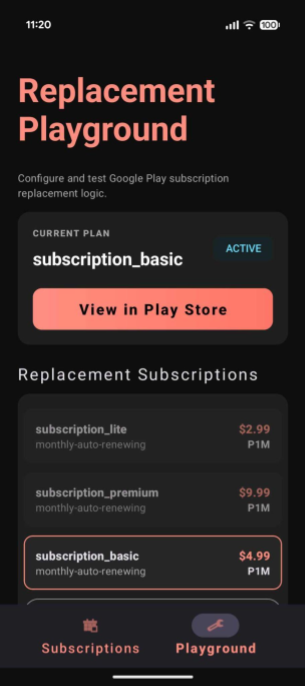
The sample app includes a Replacement Playground tab, which lets you simulate subscription changes. You can query subscriptions defined in your Play Console and test switching between them using various replacement modes. This playground helps you understand how different modes affect billing cycles and entitlements for your subscriptions, so you can determine which options best fit your business needs.
To simulate replacements using the playground, follow these steps:
- Navigate to the Playground tab.
- If you have an active subscription: It will be highlighted. This is the subscription that will be replaced.
- If you don't have an active subscription: You need to purchase one first.
- The Playground lists Basic, Premium, and Lite plans created for this codelab by default.
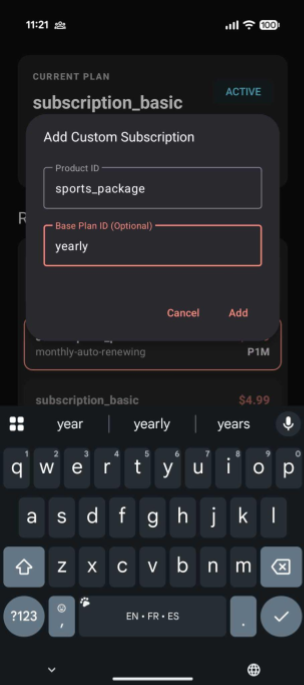
- To test with other plans configured in your Play Developer Console, click Add Custom Plan, search by
productIdandbasePlanId. - Purchase the selected subscription.
- The user's newly purchased active subscription should now be displayed.
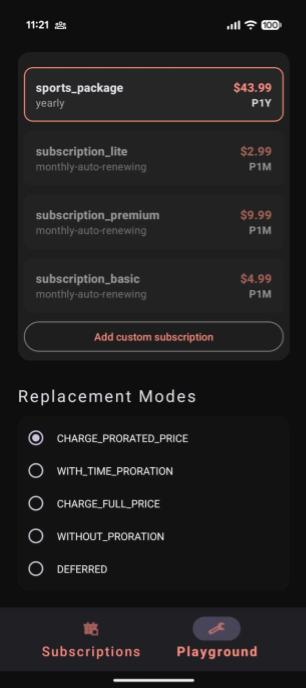
- Select the target subscription the user wants to switch to.
- Select a Replacement Mode for the transition.
- Click the Test Replacement button to simulate the subscription replacement.
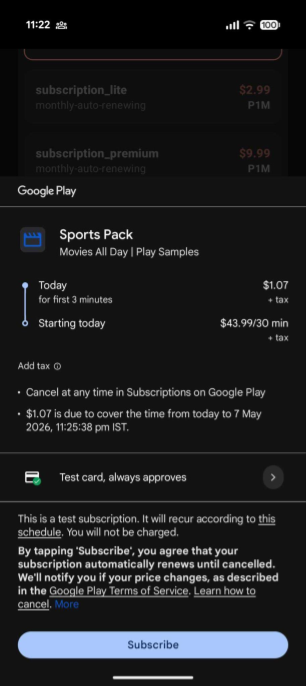
- You should see the Google Play billing bottom sheet with the calculated details of the subscription replacement (such as immediate charges and billing cycle adjustments).
- Complete the transaction.
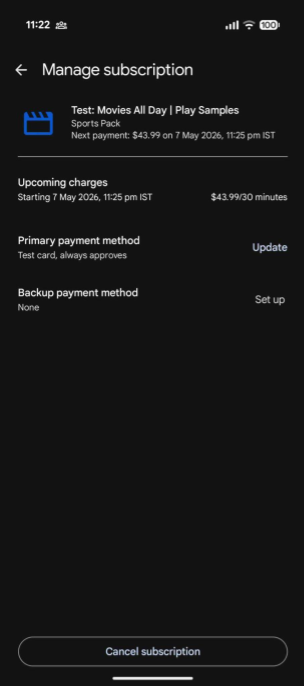
- Go to the Manage Subscriptions page within the Play Store app to view the active subscription changes along with the detail on the updated renewal dates and prices.
13. Next steps
- Learn how to maximize your play billing integration.
- Remember to follow the best practices for verifying and processing purchases on your secure backend once users start buying these products.
Reference docs
14. Congratulations
Congratulations! You've successfully implemented subscription replacements with various proration modes and configured backend handling for plan transitions.
What you've learned
- How to configure
SubscriptionProductReplacementParamswith specific replacement modes. - The difference between immediate upgrades and deferred downgrades.
- How to retire old subscription tokens using the
linkedPurchaseTokenusing RTDNs.
Survey
Your feedback on this codelab is highly valued. Consider taking a few minutes to complete our survey.