

1. 簡介
總覽
在本實驗室中,您將超越簡單的聊天機器人,建構分散式多代理系統。
雖然單一 LLM 就能回答問題,但現實世界往往複雜得多,需要專業角色。您不會要求後端工程師設計 UI,也不會要求設計師最佳化資料庫查詢。同樣地,我們可以建立專門處理單一工作的 AI 代理,並協調這些代理,解決複雜問題。
您將建構課程建立系統,內含:
- 研究代理:使用
google_search尋找最新資訊。 - 審查代理:審查研究的品質和完整性。
- 內容建構代理:將研究結果轉為結構完整的課程。
- 自動化調度管理工具代理:管理工作流程和這些專家之間的通訊。
必要條件
- 具備 Python 基礎知識。
- 熟悉 Google Cloud 控制台。
學習內容
- 定義可搜尋網路的工具使用代理 (
researcher)。 - 使用 Pydantic 為
judge實作結構化輸出。 - 使用 Agent-to-Agent (A2A) 通訊協定連線至遠端代理。
- 建構
LoopAgent,在研究人員和評審之間建立意見回饋循環。 - 使用 ADK 在本機執行分散式系統。
- 將多代理系統部署至 Google Cloud Run。
架構與自動化調度管理原則
撰寫程式碼前,請先瞭解這些代理程式如何搭配運作。我們要建立課程建立管道。
系統設計
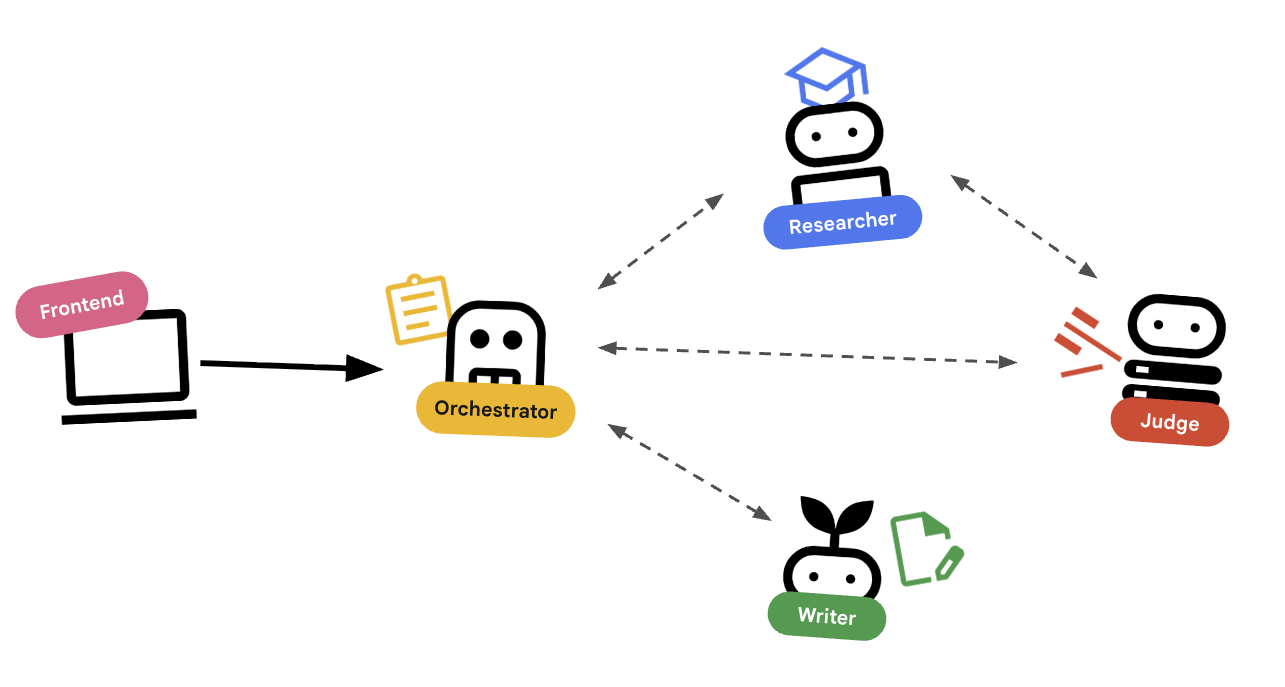
使用 Agent 自動調度管理
標準代理程式 (例如研究人員) 則可正常運作。自動調度管理工具代理 (例如 LoopAgent 或 SequentialAgent) 會管理其他代理。他們沒有自己的工具,他們的「工具」是委派。
LoopAgent:這項作業在程式碼中就像while迴圈。系統會反覆執行一系列代理,直到符合條件 (或達到最高疊代次數) 為止。我們將此資訊用於研究迴圈:- 研究人員尋找資訊。
- 評審會提出批評。
- 如果「Judge」顯示「Fail」,「EscalationChecker」 會讓迴圈繼續。
- 如果「Judge」說「Pass」,「EscalationChecker」就會中斷迴圈。
SequentialAgent:這項操作與標準指令碼執行作業類似。依序執行代理。我們將此用於高階管道:- 首先,請執行研究迴圈 (直到完成並取得良好資料為止)。
- 然後執行「內容建立工具」 (撰寫課程)。
結合這些技術,我們打造出強大的系統,可在生成最終輸出內容前自我修正。
2. 設定
環境設定
- 開啟 Cloud Shell:點選 Google Cloud 控制台右上方的「啟用 Cloud Shell」圖示。
取得範例程式碼
- 將範例存放區複製到主目錄:
cd ~ git clone --depth 1 --filter=blob:none --sparse https://github.com/GoogleCloudPlatform/devrel-demos.git temp-repo && cd temp-repo && git sparse-checkout set agents/build-with-ai/production-ready-ai/prai-roadshow-lab-1-starter && cd .. && mv temp-repo/agents/build-with-ai/production-ready-ai/prai-roadshow-lab-1-starter . && rm -rf temp-repo cd prai-roadshow-lab-1-starter - 啟用 API:執行下列指令,啟用必要的 Google Cloud 服務:
gcloud services enable \ run.googleapis.com \ artifactregistry.googleapis.com \ cloudbuild.googleapis.com \ aiplatform.googleapis.com \ compute.googleapis.com - 在編輯器中開啟這個資料夾。
安裝依附元件
我們使用 uv 快速管理依附元件。
- 安裝專案依附元件:
# Ensure you have uv installed: pip install uv uv sync - 設定環境變數。
- 提示:您可以在 Cloud 控制台資訊主頁中找到專案 ID,也可以執行
gcloud config get-value project找出專案 ID。
.env檔案來儲存這些變數,方便您在工作階段中斷時重新載入。cat <<EOF > .env export GOOGLE_CLOUD_PROJECT=$(gcloud config get-value project) export GOOGLE_CLOUD_LOCATION=global export GOOGLE_GENAI_USE_VERTEXAI=true EOF - 提示:您可以在 Cloud 控制台資訊主頁中找到專案 ID,也可以執行
- 取得環境變數:
source .envsource .env來還原這些分頁。
3. 🕵️ 研究人員代理
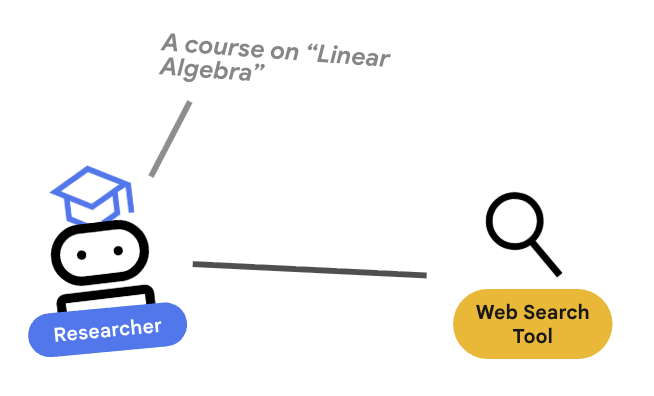
研究人員是專家,這項工具的唯一用途是尋找資訊。這需要存取 Google 搜尋工具。
為何要將研究人員分開?
深入探討:為什麼不讓一個代理程式處理所有工作?
專注的小型代理程式更容易評估和偵錯。如果研究結果不佳,請根據研究人員的提示詞進行疊代。如果課程格式不佳,請在內容建立工具中進行疊代。在單體式「全能」提示中,修正一件事通常會導致另一件事出錯。
- 如果您在 Cloud Shell 中工作,請執行下列指令開啟 Cloud Shell 編輯器:
cloudshell workspace . - 開啟
agents/researcher/agent.py。 - 您會看到含有 TODO 的骨架。
- 新增下列程式碼,定義
researcher代理程式:# ... existing imports ... # Define the Researcher Agent researcher = Agent( name="researcher", model=MODEL, description="Gathers information on a topic using Google Search.", instruction=""" You are an expert researcher. Your goal is to find comprehensive and accurate information on the user's topic. Summarize your findings clearly. If you receive feedback that your research is insufficient, use the feedback to refine your next search. DO NOT output any function calls. Provide your research directly as text. """, ) root_agent = researcher
重要概念:工具使用
使用 Gemini 3 時,系統會自動提供 Google 搜尋工具。如果您使用其他模型 (例如 Gemini 2.5),則需要將 tools=[google_search] 做為額外參數傳遞至 Agent() 建構函式。ADK 會處理向 LLM 描述這項工具的複雜性。模型判斷需要資訊時,會產生結構化工具呼叫,ADK 則會執行 Python 函式 google_search,並將結果回饋給模型。
4. ⚖️ 法官代理
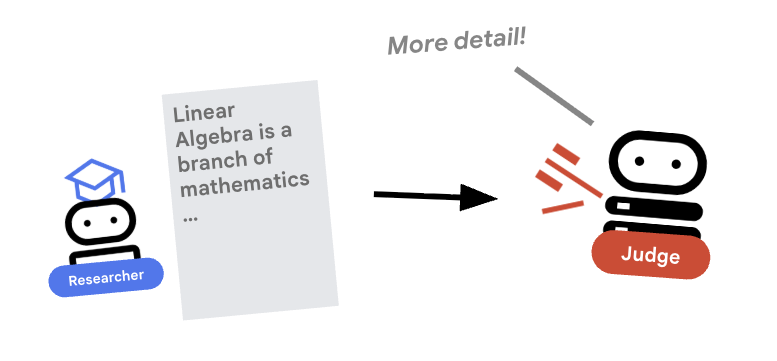
研究人員會努力工作,但 LLM 可能會偷懶。我們需要法官審查這項作業。審查員會接受研究結果,並傳回結構化的「通過/未通過」評估結果。
結構化輸出內容
深入瞭解:如要自動執行工作流程,我們需要可預測的輸出內容。如果評論內容冗長,就難以透過程式輔助方式剖析。強制執行 JSON 結構定義 (使用 Pydantic) 後,我們就能確保 Judge 會傳回布林值 pass 或 fail,供程式碼可靠地採取行動。
- 開啟
agents/judge/agent.py。 - 定義
JudgeFeedback結構定義和judge代理程式。# 1. Define the Schema class JudgeFeedback(BaseModel): """Structured feedback from the Judge agent.""" status: Literal["pass", "fail"] = Field( description="Whether the research is sufficient ('pass') or needs more work ('fail')." ) feedback: str = Field( description="Detailed feedback on what is missing. If 'pass', a brief confirmation." ) # 2. Define the Agent judge = Agent( name="judge", model=MODEL, description="Evaluates research findings for completeness and accuracy.", instruction=""" You are a strict editor. Evaluate the 'research_findings' against the user's original request. If the findings are missing key info, return status='fail'. If they are comprehensive, return status='pass'. """, output_schema=JudgeFeedback, # Disallow delegation because it should only output the schema disallow_transfer_to_parent=True, disallow_transfer_to_peers=True, ) root_agent = judge
重要概念:限制代理程式行為
我們設定了 disallow_transfer_to_parent=True 和 disallow_transfer_to_peers=True。這會強制 Judge 只傳回結構化 JudgeFeedback。無法決定是否要與使用者「即時通訊」,或委派給其他服務專員。因此成為邏輯流程中的確定性元件。
5. 🧪 獨立測試
連結前,我們可以先驗證每個代理程式是否正常運作。ADK 可讓您個別執行代理程式。
重要概念:互動式執行階段
adk run 會啟動輕量型環境,您就是「使用者」。這樣一來,您就能獨立測試代理程式的指令和工具使用情形。如果代理程式在這裡失敗 (例如無法使用 Google 搜尋),在協調流程中一定會失敗。
- 以互動方式執行 Researcher。請注意,我們指向特定代理程式目錄:
# This runs the researcher agent in interactive mode uv run adk run agents/researcher - 在對話提示中輸入:
Find the population of Tokyo in 2020export GOOGLE_CLOUD_PROJECT=$(gcloud config get-value project) export GOOGLE_CLOUD_LOCATION=global export GOOGLE_GENAI_USE_VERTEXAI=true - 結束對話 (Ctrl+C)。
- 以互動方式執行 Judge:
uv run adk run agents/judge - 在對話提示中模擬輸入:
Topic: Tokyo. Findings: Tokyo is a city.status='fail'。
6. ✍️ 內容建構代理
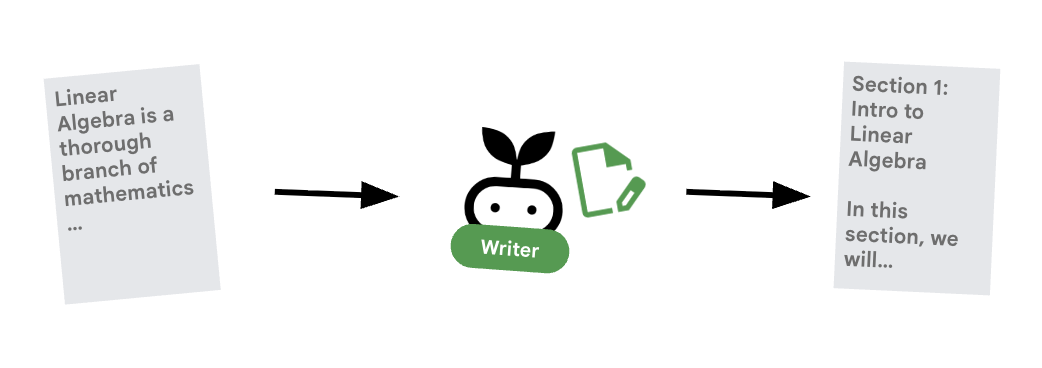
內容產生器是廣告素材撰寫者,此代理負責將核准的研究結果轉為課程。
- 開啟
agents/content_builder/agent.py。 - 定義
content_builder代理程式。content_builder = Agent( name="content_builder", model=MODEL, description="Transforms research findings into a structured course.", instruction=""" You are an expert course creator. Take the approved 'research_findings' and transform them into a well-structured, engaging course module. **Formatting Rules:** 1. Start with a main title using a single `#` (H1). 2. Use `##` (H2) for main section headings. 3. Use bullet points and clear paragraphs. 4. Maintain a professional but engaging tone. Ensure the content directly addresses the user's original request. """, ) root_agent = content_builder
重要概念:脈絡傳播
你可能會想:「內容產生器怎麼知道研究人員找到的內容?」在 ADK 中,管道中的代理會共用 session.state。稍後,我們會在 Orchestrator 中設定 Researcher 和 Judge,將輸出內容儲存至這個共用狀態。內容產生器提示可有效存取這項記錄。
7. 🎻 Orchestrator
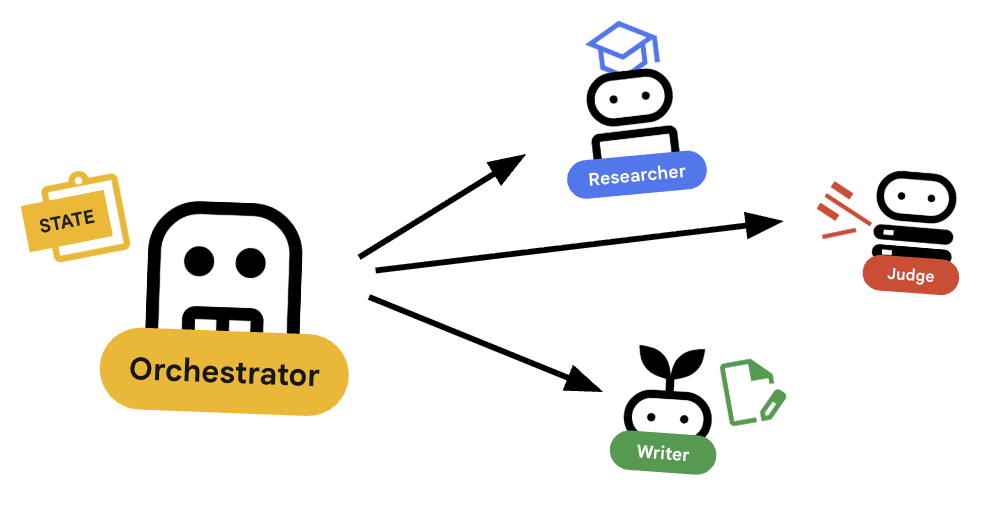
Orchestrator 是多代理團隊的管理員,與執行特定工作的專家代理 (研究人員、評估人員、內容建立者) 不同,自動調度管理工具的工作是協調工作流程,確保資訊在這些代理之間正確流動。
🌐 架構:Agent2Agent (A2A)
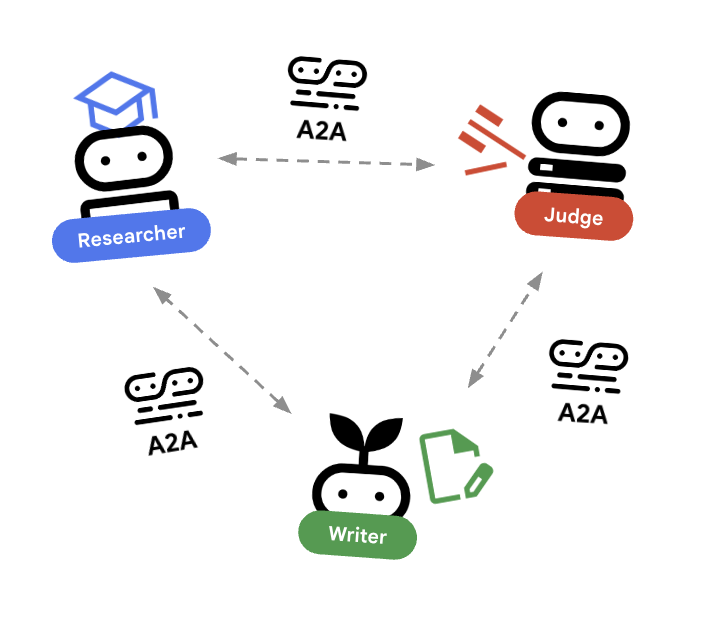
在本實驗室中,我們將建構分散式系統。我們不會在單一 Python 程序中執行所有代理程式,而是將其部署為獨立的微服務。這樣一來,每個代理程式就能獨立擴充及失敗,不會導致整個系統當機。
為此,我們使用 Agent-to-Agent (A2A) 通訊協定。
A2A 通訊協定
深入瞭解:在生產系統中,代理程式會在不同伺服器 (甚至是不同雲端) 上執行。A2A 通訊協定可讓代理透過 HTTP 互相探索及通訊,RemoteA2aAgent 是這個通訊協定的 ADK 用戶端。
- 開啟
agents/orchestrator/agent.py。 - 找出註解
# TODO: Define connections to remote agents或遠端代理程式定義的區段。 - 新增下列程式碼來定義連線。請務必將這項定義放在匯入項目「之後」,以及任何其他代理程式定義「之前」。
# ... existing code ...

# Connect to the Researcher (Localhost port 8001)
researcher_url = os.environ.get("RESEARCHER_AGENT_CARD_URL", "http://localhost:8001/a2a/agent/.well-known/agent-card.json")
researcher = RemoteA2aAgent(
    name="researcher",
    agent_card=researcher_url,
    description="Gathers information using Google Search.",
    # IMPORTANT: Save the output to state for the Judge to see
    after_agent_callback=create_save_output_callback("research_findings"),
    # IMPORTANT: Use authenticated client for communication
    httpx_client=create_authenticated_client(researcher_url)
)

# Connect to the Judge (Localhost port 8002)
judge_url = os.environ.get("JUDGE_AGENT_CARD_URL", "http://localhost:8002/a2a/agent/.well-known/agent-card.json")
judge = RemoteA2aAgent(
    name="judge",
    agent_card=judge_url,
    description="Evaluates research.",
    after_agent_callback=create_save_output_callback("judge_feedback"),
    httpx_client=create_authenticated_client(judge_url)
)

# Content Builder (Localhost port 8003)
content_builder_url = os.environ.get("CONTENT_BUILDER_AGENT_CARD_URL", "http://localhost:8003/a2a/agent/.well-known/agent-card.json")
content_builder = RemoteA2aAgent(
    name="content_builder",
    agent_card=content_builder_url,
    description="Builds the course.",
    httpx_client=create_authenticated_client(content_builder_url)
)
8. 🛑 提報檢查工具
迴圈需要停止的方式。如果法官說「通過」,我們希望立即結束迴圈,並移至內容產生器。
使用 BaseAgent 的自訂邏輯
深入瞭解:並非所有代理都會使用大型語言模型。有時您需要簡單的 Python 邏輯。BaseAgent 可讓您定義只執行程式碼的代理。在本例中,我們會檢查工作階段狀態,並使用 EventActions(escalate=True) 發出信號,讓 LoopAgent 停止。
- 還是在
agents/orchestrator/agent.py中。 - 找出
EscalationCheckerTODO 預留位置。 - 取代為下列實作項目:
class EscalationChecker(BaseAgent):
    """Checks the judge's feedback and escalates (breaks the loop) if it passed."""

    async def _run_async_impl(
        self, ctx: InvocationContext
    ) -> AsyncGenerator[Event, None]:
        # Retrieve the feedback saved by the Judge
        feedback = ctx.session.state.get("judge_feedback")
        print(f"[EscalationChecker] Feedback: {feedback}")

        # Check for 'pass' status
        is_pass = False
        if isinstance(feedback, dict) and feedback.get("status") == "pass":
            is_pass = True
        # Handle string fallback if JSON parsing failed
        elif isinstance(feedback, str) and '"status": "pass"' in feedback:
            is_pass = True

        if is_pass:
            # 'escalate=True' tells the parent LoopAgent to stop looping
            yield Event(author=self.name, actions=EventActions(escalate=True))
        else:
            # Continue the loop
            yield Event(author=self.name)

escalation_checker = EscalationChecker(name="escalation_checker")
重要概念:透過事件控制流程
代理程式不僅會透過文字通訊,還會透過事件通訊。代理程式會透過 escalate=True 產生事件,將訊號傳送至父項 (即 LoopAgent)。LoopAgent 經過程式設計,可擷取這個訊號並終止迴圈。
9. 🔁 研究迴圈
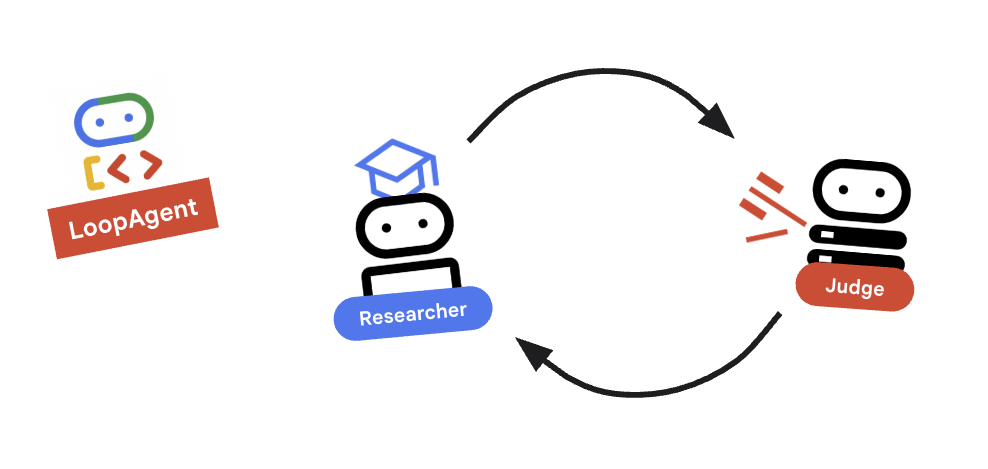
我們需要回饋循環:研究 -> 判斷 -> (失敗) -> 研究 -> ...
- 還是在
agents/orchestrator/agent.py中。 - 新增
research_loop定義。將這個項目放在EscalationChecker類別和escalation_checker例項之後。research_loop = LoopAgent( name="research_loop", description="Iteratively researches and judges until quality standards are met.", sub_agents=[researcher, judge, escalation_checker], max_iterations=3, )
重要概念:LoopAgent
LoopAgent 會依序循環播放 sub_agents。
researcher:尋找資料。judge:評估資料。escalation_checker:決定是否要yield Event(escalate=True)。如果發生escalate=True,迴圈會提早中斷。否則,系統會從研究人員開始重新啟動 (最多max_iterations)。
10. 🔗 最終管道
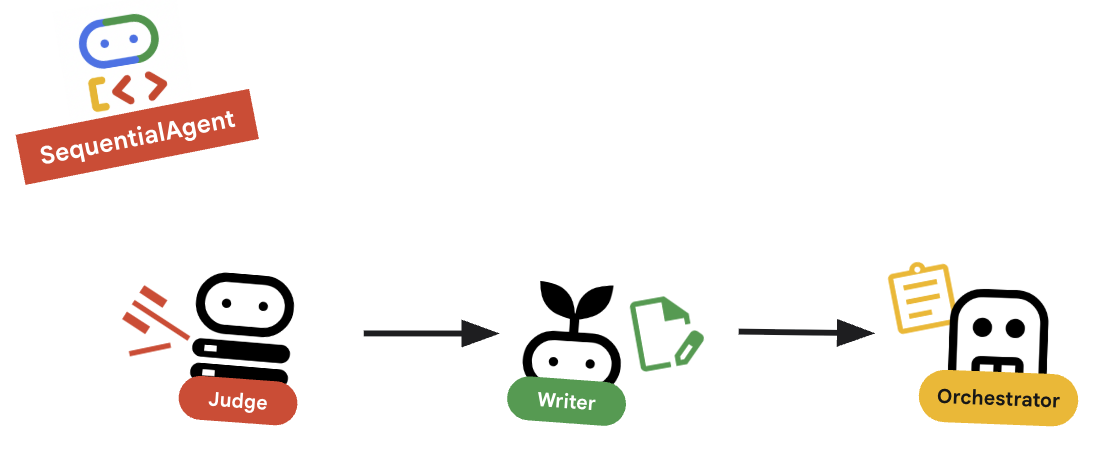
最後,將所有內容縫合在一起。
- 還是在
agents/orchestrator/agent.py中。 - 在檔案底部定義
root_agent。請務必取代現有的root_agent = None預留位置。root_agent = SequentialAgent( name="course_creation_pipeline", description="A pipeline that researches a topic and then builds a course from it.", sub_agents=[research_loop, content_builder], )
重要概念:階層式組合
請注意,research_loop 本身就是代理 (LoopAgent),我們會將其視為 SequentialAgent 中的任何其他子代理。這種可組合性可讓您透過巢狀簡單模式 (序列中的迴圈、路由器中的序列等),建構複雜的邏輯。
11. 💻 在本機執行
執行所有項目之前,我們先來看看 ADK 如何在本機模擬分散式環境。
深入探討:本機開發的運作方式
在微服務架構中,每個代理程式都會以自己的伺服器執行。部署時,您會有 4 種不同的 Cloud Run 服務。如果您必須開啟 4 個終端機分頁並執行 4 個指令,在本機模擬這項作業可能會很麻煩。
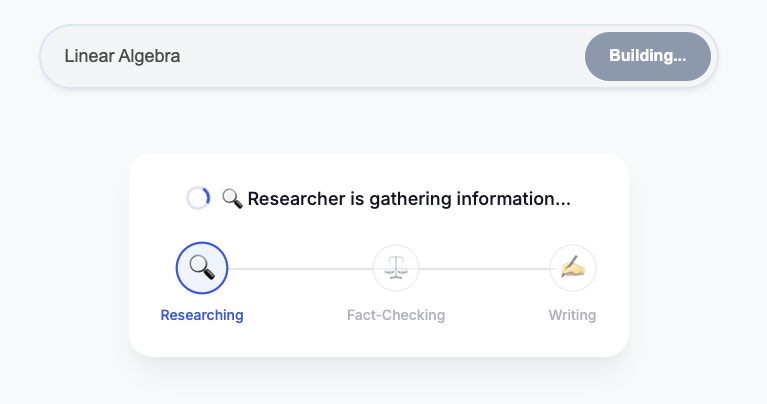
這項指令碼會啟動研究代理 (通訊埠 8001)、審查代理 (8002) 和內容建構代理 (8003) 的 uvicorn 程序。這個指令碼會設定 RESEARCHER_AGENT_CARD_URL 等環境變數,並將這些變數傳遞至自動調度管理代理 (通訊埠 8004)。稍後在雲端設定時,我們也會採用這種方式!
- 執行自動化調度管理指令碼:
perl -pi -e 's/us-central1/global/g' run_local.sh ./run_local.sh - 測試:
- 如果使用 Cloud Shell:按一下「網頁預覽」按鈕 (終端機右上角) ->「透過以下通訊埠預覽:8080」->「變更通訊埠」為
8000。 - 在本機執行:在瀏覽器中開啟
http://localhost:8000。 - 提示:「製作咖啡歷史相關課程。」
- 觀察:自動調度管理工具會呼叫研究代理。輸出內容會傳送給審查代理。如果法官判定失敗,迴圈就會繼續!
- 「內部伺服器錯誤」/ 驗證錯誤:如果看到驗證錯誤 (例如與
google-auth相關),請確認您已在本機執行gcloud auth application-default login。在 Cloud Shell 中,確認GOOGLE_CLOUD_PROJECT環境變數設定正確無誤。 - 終端機錯誤:如果指令在新終端機視窗中失敗,請記得重新匯出環境變數 (
GOOGLE_CLOUD_PROJECT等)。
- 如果使用 Cloud Shell:按一下「網頁預覽」按鈕 (終端機右上角) ->「透過以下通訊埠預覽:8080」->「變更通訊埠」為
- 獨立測試代理:即使完整系統正在執行,您也可以直接指定代理的連接埠,測試特定代理。這項功能有助於偵錯特定元件,而不必觸發整個鏈結。注意:這些是 API 端點,而非網頁。您無法透過瀏覽器存取這些檔案。請改用
curl驗證是否正在執行 (例如擷取代理商卡片)。- 僅限研究人員 (通訊埠 8001):
- 查看狀態 (並找出
url端點):curl http://localhost:8001/a2a/agent/.well-known/agent-card.json - 傳送查詢 (使用 A2A JSON-RPC 通訊協定):
curl -X POST http://localhost:8001/a2a/agent \
  -H "Content-Type: application/json" \
  -d '{
    "jsonrpc": "2.0",
    "method": "message/send",
    "id": 1,
    "params": {
      "message": {
        "message_id": "test-1",
        "role": "user",
        "parts": [
          {
            "text": "What is the capital of France?",
            "kind": "text"
          }
        ]
      }
    }
  }'
- 查看狀態 (並找出
- 僅限法官 (通訊埠 8002):
- 查看狀態:
curl http://localhost:8002/a2a/agent/.well-known/agent-card.json - 傳送查詢:
curl -X POST http://localhost:8002/a2a/agent \
  -H "Content-Type: application/json" \
  -d '{
    "jsonrpc": "2.0",
    "method": "message/send",
    "id": 1,
    "params": {
      "message": {
        "message_id": "test-2",
        "role": "user",
        "parts": [
          {
            "text": "Topic: Tokyo. Findings: Tokyo is the capital of Japan.",
            "kind": "text"
          }
        ]
      }
    }
  }'
- 查看狀態:
- 僅限內容建立工具 (通訊埠 8003):
curl http://localhost:8003/a2a/agent/.well-known/agent-card.json - 自動化調度管理系統 (通訊埠 8004):
curl http://localhost:8004/a2a/agent/.well-known/agent-card.json
- 僅限研究人員 (通訊埠 8001):
12. 🚀 部署至 Cloud Run
最終驗證會在雲端執行。我們會將每個代理程式部署為個別服務。
瞭解部署設定
將代理程式部署至 Cloud Run 時,我們會傳遞多個環境變數,以設定代理程式的行為和連線:
GOOGLE_CLOUD_PROJECT:確保代理程式使用正確的 Google Cloud 雲端專案進行記錄和 Vertex AI 呼叫。GOOGLE_GENAI_USE_VERTEXAI:告知代理程式架構 (ADK) 使用 Vertex AI 進行模型推論,而非直接呼叫 Gemini API。GOOGLE_CLOUD_LOCATION:告知代理架構 (ADK) 要使用哪個端點。[AGENT]_AGENT_CARD_URL:這對 Orchestrator 至關重要。當中定義 Orchestrator 應從何處尋找遠端代理程式。將此值設為已部署的 Cloud Run 網址 (具體來說是代理程式資訊卡路徑),即可讓 Orchestrator 透過網際網路探索 Researcher、Judge 和 Content Builder,並與這些代理程式通訊。
- 部署子代理程式 (平行):為節省時間,我們將同時部署 Researcher、Judge 和 Content Builder。開啟三個新的終端機分頁。在每個新分頁中,執行下列指令來設定環境:
cd ~/prai-roadshow-lab-1-starter source .envgcloud run deploy researcher \ --source agents/researcher/ \ --region us-west1 \ --allow-unauthenticated \ --labels dev-tutorial=prod-ready-1 \ --set-env-vars GOOGLE_CLOUD_PROJECT=$GOOGLE_CLOUD_PROJECT \ --set-env-vars GOOGLE_CLOUD_LOCATION=$GOOGLE_CLOUD_LOCATION \ --set-env-vars GOOGLE_GENAI_USE_VERTEXAI="true"gcloud run deploy judge \ --source agents/judge/ \ --region us-west1 \ --allow-unauthenticated \ --labels dev-tutorial=prod-ready-1 \ --set-env-vars GOOGLE_CLOUD_PROJECT=$GOOGLE_CLOUD_PROJECT \ --set-env-vars GOOGLE_CLOUD_LOCATION=$GOOGLE_CLOUD_LOCATION \ --set-env-vars GOOGLE_GENAI_USE_VERTEXAI="true"gcloud run deploy content-builder \ --source agents/content_builder/ \ --region us-west1 \ --allow-unauthenticated \ --labels dev-tutorial=prod-ready-1 \ --set-env-vars GOOGLE_CLOUD_PROJECT=$GOOGLE_CLOUD_PROJECT \ --set-env-vars GOOGLE_CLOUD_LOCATION=$GOOGLE_CLOUD_LOCATION \ --set-env-vars GOOGLE_GENAI_USE_VERTEXAI="true" - 擷取網址:完成所有三項部署作業後,請返回原始終端機 (您將在其中部署 Orchestrator)。執行下列指令來擷取服務網址:
RESEARCHER_URL=$(gcloud run services describe researcher --region us-west1 --format='value(status.url)') JUDGE_URL=$(gcloud run services describe judge --region us-west1 --format='value(status.url)') CONTENT_BUILDER_URL=$(gcloud run services describe content-builder --region us-west1 --format='value(status.url)') echo "Researcher: $RESEARCHER_URL" echo "Judge: $JUDGE_URL" echo "Content Builder: $CONTENT_BUILDER_URL" - 部署 Orchestrator:使用擷取的環境變數設定 Orchestrator。
gcloud run deploy orchestrator \ --source agents/orchestrator/ \ --region us-west1 \ --allow-unauthenticated \ --labels dev-tutorial=prod-ready-1 \ --set-env-vars RESEARCHER_AGENT_CARD_URL=$RESEARCHER_URL/a2a/agent/.well-known/agent-card.json \ --set-env-vars JUDGE_AGENT_CARD_URL=$JUDGE_URL/a2a/agent/.well-known/agent-card.json \ --set-env-vars CONTENT_BUILDER_AGENT_CARD_URL=$CONTENT_BUILDER_URL/a2a/agent/.well-known/agent-card.json \ --set-env-vars GOOGLE_CLOUD_PROJECT=$GOOGLE_CLOUD_PROJECT \ --set-env-vars GOOGLE_CLOUD_LOCATION=$GOOGLE_CLOUD_LOCATION \ --set-env-vars GOOGLE_GENAI_USE_VERTEXAI="true"ORCHESTRATOR_URL=$(gcloud run services describe orchestrator --region us-west1 --format='value(status.url)') echo $ORCHESTRATOR_URL - 部署前端:
gcloud run deploy course-creator \ --source app \ --region us-west1 \ --allow-unauthenticated \ --labels dev-tutorial=prod-ready-1 \ --set-env-vars AGENT_SERVER_URL=$ORCHESTRATOR_URL \ --set-env-vars GOOGLE_CLOUD_PROJECT=$GOOGLE_CLOUD_PROJECT - 測試遠端部署:開啟已部署 Orchestrator 的網址。現在完全在雲端執行,利用 Google 的無伺服器基礎架構擴展代理程式!提示:您可以在 Cloud Run 介面中找到所有微服務及其網址
13. 摘要
恭喜!您已成功建構及部署可用於正式環境的分散式多代理系統。
我們達成的目標
- 將複雜工作拆解成多個步驟:我們沒有使用一個大型提示,而是將工作拆解成多個專門角色 (研究人員、評估人員、內容建立者)。
- 實施品質控管:我們使用
LoopAgent和結構化Judge,確保只有高品質資訊能進入最後階段。 - 專為正式環境打造:我們使用 Agent-to-Agent (A2A) 通訊協定和 Cloud Run,建立的系統可讓每個代理程式成為獨立的可擴充微服務。相較於在單一 Python 指令碼中執行所有項目,這種做法更為穩健。
- 自動化調度管理:我們使用
SequentialAgent和LoopAgent定義明確的控制流程模式。
後續步驟
現在您已具備基礎知識,可以擴充這個系統:
- 新增更多工具:授予 Researcher 內部文件或 API 的存取權。
- 改善評估步驟:加入更具體的條件,甚至是「人工介入」步驟。
- 更換模型:為不同代理程式使用不同模型 (例如,為「法官」使用速度較快的模型,為「內容撰寫者」使用效能較強的模型)。
您現在可以使用 Google Cloud 建構複雜且可靠的代理工作流程!