
1. Introduction
Overview
Retrieval Augmented Generation (RAG) enhances Large Language Model (LLM) responses by grounding them in external knowledge. However, building a production-ready RAG system requires more than just a simple vector search. You must optimize how data is ingested, how relevant results are ranked, and how user queries are processed.
In this comprehensive lab, you will build a robust RAG application using Cloud SQL for PostgreSQL (extended with pgvector) and Vertex AI. You will progress through three advanced techniques:
- Chunking Strategies: You will observe how different methods of splitting text (Character, Recursive, Token) impact retrieval quality.
- Reranking: You will implement the Vertex AI Reranker to refine search results and address the "lost in the middle" problem.
- Query Transformation: You will use Gemini to optimize user queries via techniques like HyDE (Hypothetical Document Embeddings) and Step-back Prompting.
What you'll do
- Set up a Cloud SQL for PostgreSQL instance with
pgvector. - Build a data ingestion pipeline that chunks text using multiple strategies and stores embeddings in Cloud SQL.
- Perform semantic searches and compare the quality of results from different chunking methods.
- Integrate a Reranker to reorder retrieved documents based on relevance.
- Implement LLM-powered query transformations to improve retrieval for ambiguous or complex questions.
What you'll learn
- How to use LangChain with Vertex AI and Cloud SQL.
- The impact of Character, Recursive, and Token text splitters.
- How to implement Vector Search in PostgreSQL.
- How to use ContextualCompressionRetriever for reranking.
- How to implement HyDE and Step-back Prompting.
2. Project setup
Google Account
If you don't already have a personal Google Account, you must create a Google Account.
Use a personal account instead of a work or school account.
Sign-in to the Google Cloud Console
Sign-in to the Google Cloud Console using a personal Google account.
Enable Billing
Redeem Google Cloud credits (optional)
To run this workshop, you need a billing account with some credit. Use the credits from the banner at the top of this codelab to get started. If you are already connected to a billing account, you can skip this step.
Set up a personal billing account
If you set up billing using Google Cloud credits, you can skip this step.
To set up a personal billing account, go here to enable billing in the Cloud Console.
Some Notes:
- Completing this lab should cost less than $1 USD in Cloud resources.
- You can follow the steps at the end of this lab to delete resources to avoid further charges.
- New users are eligible for the $300 USD Free Trial.
Create a project (optional)
If you do not have a current project you'd like to use for this lab, create a new project here.
3. Open Cloud Shell Editor
- Click this link to navigate directly to Cloud Shell Editor
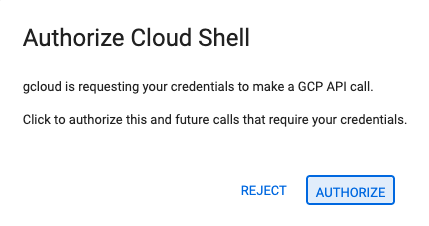
- If prompted to authorize at any point today, click Authorize to continue.
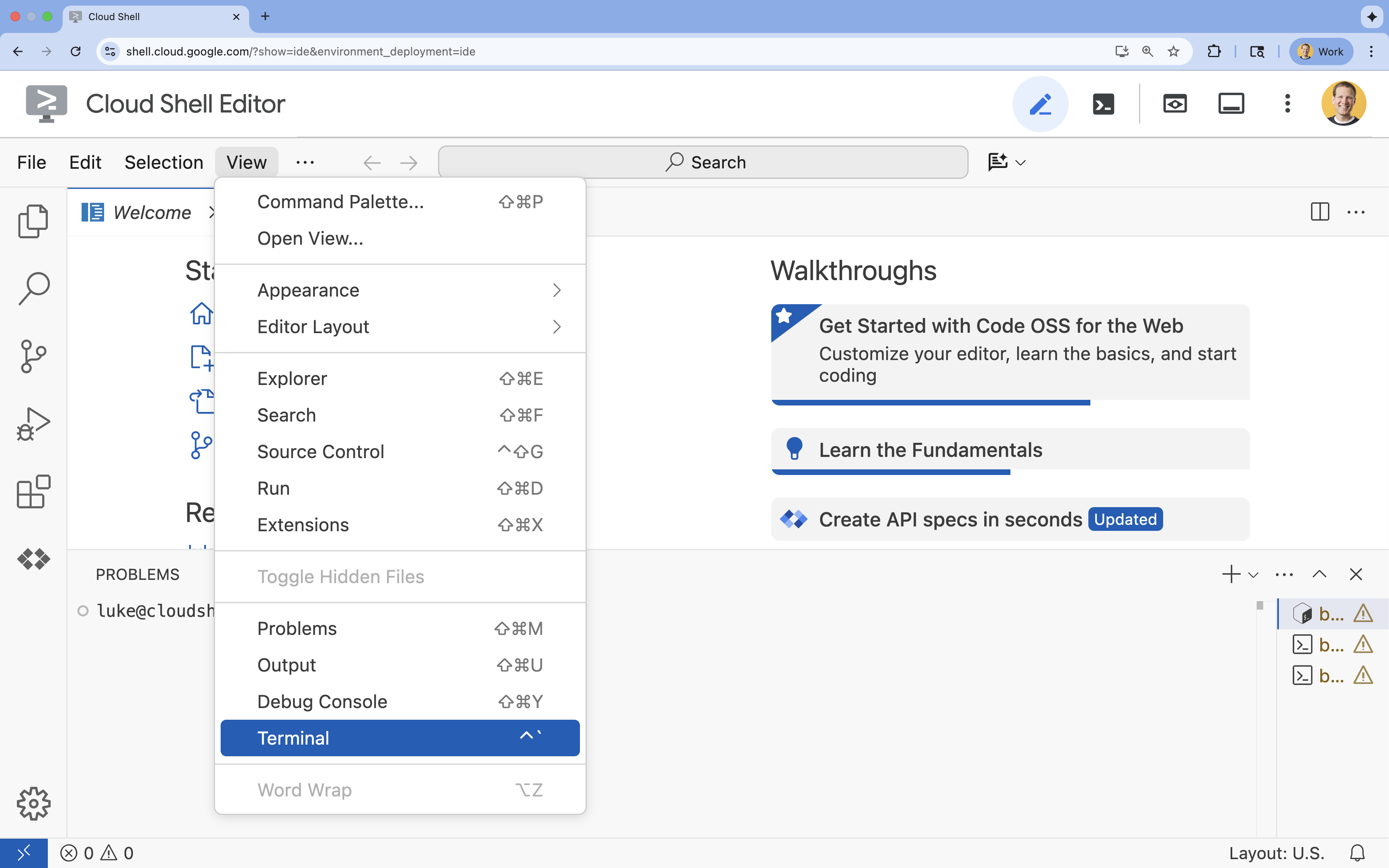
- If the terminal doesn't appear at the bottom of the screen, open it:
- Click View
- Click Terminal
- In the terminal, set your project with this command:
gcloud config set project [PROJECT_ID]- Example:
gcloud config set project lab-project-id-example - If you can't remember your project ID, you can list all your project IDs with:
gcloud projects list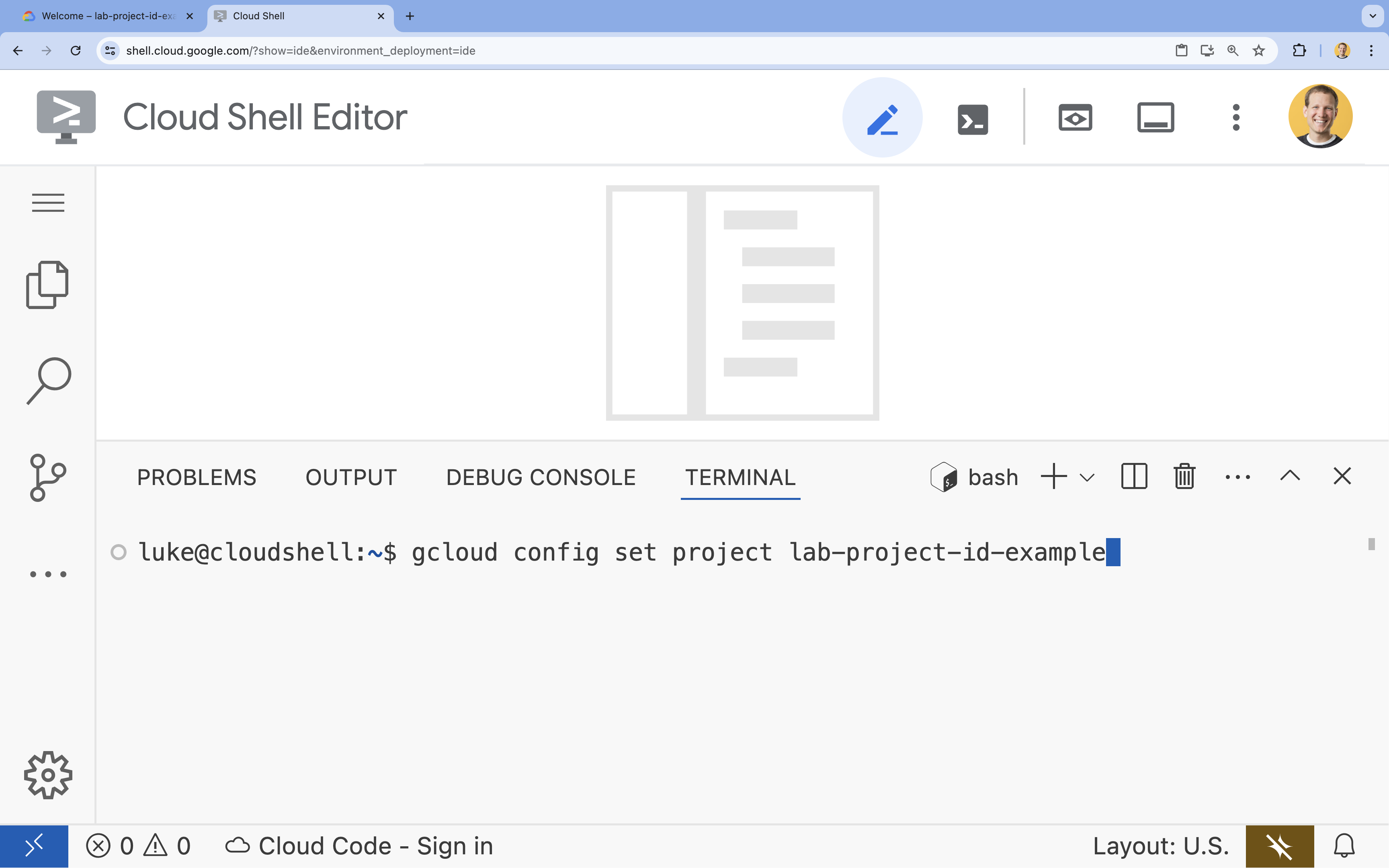
- Example:
- You should see this message:
Updated property [core/project].
4. Enable APIs
To build this solution, you need to enable several Google Cloud APIs for Vertex AI, Cloud SQL, and the Reranking service.
- In the terminal, enable the APIs:
gcloud services enable \
  aiplatform.googleapis.com \
  sqladmin.googleapis.com \
  cloudresourcemanager.googleapis.com \
  serviceusage.googleapis.com \
  discoveryengine.googleapis.com
Introducing the APIs
- Vertex AI API (
aiplatform.googleapis.com): Enables the use of Gemini for generation and Vertex AI Embeddings for vectorizing text. - Cloud SQL Admin API (
sqladmin.googleapis.com): Allows you to manage Cloud SQL instances programmatically. - Discovery Engine API (
discoveryengine.googleapis.com): Powers the Vertex AI Reranker capabilities. - Service Usage API (
serviceusage.googleapis.com): Required to check and manage service quotas.
5. Create a virtual environment & install dependencies
Before starting any Python project, it's good practice to create a virtual environment. This isolates the project's dependencies, preventing conflicts with other projects or the system's global Python packages.
- Create a folder named
rag-labsand change into it. Run the following code in the terminal:mkdir rag-labs && cd rag-labs - Create and activate a virtual environment:
uv venv --python 3.12 source .venv/bin/activate - Create a
requirements.txtfile with the necessary dependencies. Run the following code in the terminal:cloudshell edit requirements.txt - Paste the following optimized dependencies into
requirements.txt. These versions are pinned to avoid conflicts and speed up installation.# Core LangChain & AI langchain-community==0.3.31 langchain-google-vertexai==2.1.2 langchain-google-community[vertexaisearch]==2.0.10 # Google Cloud google-cloud-storage==2.19.0 google-cloud-aiplatform[langchain]==1.130.0 # Database cloud-sql-python-connector[pg8000]==1.19.0 sqlalchemy==2.0.45 pgvector==0.4.2 # Utilities tiktoken==0.12.0 python-dotenv==1.2.1 requests==2.32.5 - Install the dependencies:
uv pip install -r requirements.txt
6. Set up Cloud SQL for PostgreSQL
In this task, you will provision a Cloud SQL for PostgreSQL instance, create a database, and prepare it for vector search.
Define Cloud SQL Configuration
- Create a
.envfile to store your configuration. Run the following code in the terminal:cloudshell edit .env - Paste the following configuration into
.env.# Project Config PROJECT_ID="[YOUR_PROJECT_ID]" REGION="us-central1" # Database Config SQL_INSTANCE_NAME="rag-pg-instance-1" SQL_DATABASE_NAME="rag_harry_potter_db" SQL_USER="rag_user" SQL_PASSWORD="StrongPassword123!" # RAG Config PGVECTOR_COLLECTION_NAME="rag_harry_potter" RANKING_LOCATION_ID="global" # Connection Name (Auto-generated in scripts usually, but useful to have) DB_INSTANCE_CONNECTION_NAME="${PROJECT_ID}:${REGION}:${SQL_INSTANCE_NAME}" - Replace
[YOUR_PROJECT_ID]with your actual Google Cloud Project ID. (e.g.PROJECT_ID = "google-cloud-labs")
If you can't remember your project ID, run the following command in your terminal. It will show you a list of all your projects and their IDs.gcloud projects list - Load the variables into your shell session:
source .env
Create the Instance and Database
- Create a Cloud SQL for PostgreSQL instance. This command creates a small instance suitable for this lab.
gcloud sql instances create ${SQL_INSTANCE_NAME} \ --database-version=POSTGRES_15 \ --tier=db-g1-small \ --region=${REGION} \ --project=${PROJECT_ID} - Once the instance is ready, create the database:
gcloud sql databases create ${SQL_DATABASE_NAME} \ --instance=${SQL_INSTANCE_NAME} \ --project=${PROJECT_ID} - Create the database user:
gcloud sql users create ${SQL_USER} \
  --instance=${SQL_INSTANCE_NAME} \
  --password=${SQL_PASSWORD} \
  --project=${PROJECT_ID}
Enable the pgvector extension
The pgvector extension allows PostgreSQL to store and search vector embeddings. You must explicitly enable it on your database.
- Create a script named
enable_pgvector.py. Run the following code in the terminal:cloudshell edit enable_pgvector.py - Paste the following code into
enable_pgvector.py. This script connects to your database and runsCREATE EXTENSION IF NOT EXISTS vector;.import os import sqlalchemy from google.cloud.sql.connector import Connector, IPTypes import logging from dotenv import load_dotenv load_dotenv() logging.basicConfig(level=logging.INFO) # Config project_id = os.getenv("PROJECT_ID") region = os.getenv("REGION") instance_name = os.getenv("SQL_INSTANCE_NAME") db_user = os.getenv("SQL_USER") db_pass = os.getenv("SQL_PASSWORD") db_name = os.getenv("SQL_DATABASE_NAME") instance_connection_name = f"{project_id}:{region}:{instance_name}" def getconn(): with Connector() as connector: conn = connector.connect( instance_connection_name, "pg8000", user=db_user, password=db_pass, db=db_name, ip_type=IPTypes.PUBLIC, ) return conn def enable_pgvector(): pool = sqlalchemy.create_engine( "postgresql+pg8000://", creator=getconn, ) with pool.connect() as db_conn: # Check if extension exists result = db_conn.execute(sqlalchemy.text("SELECT extname FROM pg_extension WHERE extname = 'vector';")).fetchone() if result: logging.info("pgvector extension is already enabled.") else: logging.info("Enabling pgvector extension...") db_conn.execute(sqlalchemy.text("CREATE EXTENSION IF NOT EXISTS vector;")) db_conn.commit() logging.info("pgvector extension enabled successfully.") if __name__ == "__main__": enable_pgvector() - Run the script:
python enable_pgvector.py
7. Part 1: Chunking Strategies
The first step in any RAG pipeline is transforming documents into a format that the LLM can understand: chunks.
LLMs have a context window limit (the amount of text they can process at once). Furthermore, retrieving a 50-page document to answer a specific question dilutes the information. We split documents into smaller "chunks" to isolate relevant information.
However, how you split the text matters immensely:
- Character Splitter: Splits strictly by character count. This is fast but risky; it can cut words or sentences in half, destroying semantic meaning.
- Recursive Splitter: Attempts to split by paragraph first, then sentence, then word. It tries to keep semantic units together.
- Token Splitter: Splits based on the LLM's own vocabulary (tokens). This ensures chunks fit perfectly into context windows but can be computationally more expensive to generate.
In this section, you will ingest the same data using all three strategies to compare them.
Create the Ingestion Script
You will use a script that downloads a Harry Potter dataset, splits it using Character, Recursive, and Token strategies, and uploads the embeddings to three separate tables in Cloud SQL.
- Create the file
ingest_data.py:cloudshell edit ingest_data.py - Paste the following fixed code into
ingest_data.py. This version correctly parses the JSON structure of the dataset.import os import json import logging import requests from typing import List, Dict, Any from dotenv import load_dotenv from google.cloud.sql.connector import Connector, IPTypes from langchain_google_vertexai import VertexAIEmbeddings from langchain_community.vectorstores import PGVector from langchain.text_splitter import CharacterTextSplitter, RecursiveCharacterTextSplitter, TokenTextSplitter from langchain.docstore.document import Document load_dotenv() logging.basicConfig(level=logging.INFO) # Configuration PROJECT_ID = os.getenv("PROJECT_ID") REGION = os.getenv("REGION") DB_USER = os.getenv("SQL_USER") DB_PASS = os.getenv("SQL_PASSWORD") DB_NAME = os.getenv("SQL_DATABASE_NAME") INSTANCE_CONNECTION_NAME = f"{PROJECT_ID}:{REGION}:{os.getenv('SQL_INSTANCE_NAME')}" BASE_COLLECTION_NAME = os.getenv("PGVECTOR_COLLECTION_NAME") BOOKS_JSON_URL = "https://storage.googleapis.com/github-repo/generative-ai/gemini/reasoning-engine/sample_data/harry_potter_books.json" CHUNK_SIZE = 500 CHUNK_OVERLAP = 50 MAX_DOCS_TO_PROCESS = 10 # Database Connector def getconn(): with Connector() as connector: return connector.connect( INSTANCE_CONNECTION_NAME, "pg8000", user=DB_USER, password=DB_PASS, db=DB_NAME, ip_type=IPTypes.PUBLIC, ) def download_data(): logging.info(f"Downloading data from {BOOKS_JSON_URL}...") response = requests.get(BOOKS_JSON_URL) return response.json() def prepare_chunks(json_data, strategy): documents = [] # Iterate through the downloaded data for entry in json_data[:MAX_DOCS_TO_PROCESS]: # --- JSON PARSING LOGIC --- # The data structure nests content inside 'kwargs' -> 'page_content' if "kwargs" in entry and "page_content" in entry["kwargs"]: content = entry["kwargs"]["page_content"] # Extract metadata if available, ensuring it's a dict metadata = entry["kwargs"].get("metadata", {}) if not isinstance(metadata, dict): metadata = {"source": "unknown"} # Add the strategy to metadata for tracking metadata["strategy"] = strategy else: continue if not content: continue # Choose the splitter based on the strategy if strategy == "character": splitter = CharacterTextSplitter(chunk_size=CHUNK_SIZE, chunk_overlap=CHUNK_OVERLAP, separator="\n") elif strategy == "token": splitter = TokenTextSplitter(chunk_size=CHUNK_SIZE, chunk_overlap=CHUNK_OVERLAP) else: # default to recursive splitter = RecursiveCharacterTextSplitter(chunk_size=CHUNK_SIZE, chunk_overlap=CHUNK_OVERLAP) # Split the content into chunks chunks = splitter.split_text(content) # Create Document objects for each chunk for chunk in chunks: documents.append(Document(page_content=chunk, metadata=metadata)) return documents def main(): logging.info("Initializing Embeddings...") embeddings = VertexAIEmbeddings(model_name="gemini-embedding-001", project=PROJECT_ID, location=REGION) data = download_data() strategies = ["character", "recursive", "token"] # Connection string for PGVector (uses the getconn helper) pg_conn_str = f"postgresql+pg8000://{DB_USER}:{DB_PASS}@placeholder/{DB_NAME}" for strategy in strategies: collection_name = f"{BASE_COLLECTION_NAME}_{strategy}" logging.info(f"--- Processing strategy: {strategy.upper()} ---") logging.info(f"Target Collection: {collection_name}") # Prepare documents with the specific strategy docs = prepare_chunks(data, strategy) if not docs: logging.warning(f"No documents generated for strategy {strategy}. Check data source.") continue logging.info(f"Generated {len(docs)} chunks. Uploading to Cloud SQL...") # Initialize the Vector Store store = PGVector( collection_name=collection_name, embedding_function=embeddings, connection_string=pg_conn_str, engine_args={"creator": getconn}, pre_delete_collection=True # Clears old data for this collection before adding new ) # Batch add documents store.add_documents(docs) logging.info(f"Successfully finished {strategy}.\n") if __name__ == "__main__": main() - Run the ingestion script. This will populate your database with three different tables (collections).
python ingest_data.py
Compare Chunking Results
Now that the data is loaded, let's run a query against all three collections to see how the chunking strategy affects the results.
- Create
query_chunking.py:cloudshell edit query_chunking.py - Paste the following code into
query_chunking.py:import os import logging from dotenv import load_dotenv from google.cloud.sql.connector import Connector, IPTypes from langchain_google_vertexai import VertexAIEmbeddings from langchain_community.vectorstores import PGVector load_dotenv() logging.basicConfig(level=logging.ERROR) # Only show errors to keep output clean # Config PROJECT_ID = os.getenv("PROJECT_ID") REGION = os.getenv("REGION") DB_USER = os.getenv("SQL_USER") DB_PASS = os.getenv("SQL_PASSWORD") DB_NAME = os.getenv("SQL_DATABASE_NAME") INSTANCE_CONNECTION_NAME = f"{PROJECT_ID}:{REGION}:{os.getenv('SQL_INSTANCE_NAME')}" BASE_COLLECTION_NAME = os.getenv("PGVECTOR_COLLECTION_NAME") def getconn(): with Connector() as connector: return connector.connect( INSTANCE_CONNECTION_NAME, "pg8000", user=DB_USER, password=DB_PASS, db=DB_NAME, ip_type=IPTypes.PUBLIC, ) def main(): embeddings = VertexAIEmbeddings(model_name="gemini-embedding-001", project=PROJECT_ID, location=REGION) pg_conn_str = f"postgresql+pg8000://{DB_USER}:{DB_PASS}@placeholder/{DB_NAME}" query = "Tell me about the Dursleys and their relationship with Harry Potter" print(f"\nQUERY: {query}\n" + "="*50) strategies = ["character", "recursive", "token"] for strategy in strategies: collection = f"{BASE_COLLECTION_NAME}_{strategy}" print(f"\nSTRATEGY: {strategy.upper()}") store = PGVector( collection_name=collection, embedding_function=embeddings, connection_string=pg_conn_str, engine_args={"creator": getconn} ) results = store.similarity_search_with_score(query, k=2) for i, (doc, score) in enumerate(results): print(f" Result {i+1} (Score: {score:.4f}): {doc.page_content[:150].replace(chr(10), ' ')}...") if __name__ == "__main__": main() - Run the query script:
python query_chunking.py
Observe the output.
Notice how the Character split might cut off sentences mid-thought, while Recursive tries to respect paragraph boundaries. Token splitting ensures the chunks fit perfectly into LLM context windows but might ignore semantic structure.
8. Part 2: Reranking
Vector search (retrieval) is incredibly fast because it relies on compressed mathematical representations (embeddings). It casts a wide net to ensure Recall (finding all potentially relevant items), but it often suffers from low Precision (the ranking of those items might be imperfect).
Often, relevant documents get "Lost in the Middle" of the results list. An LLM paying attention to the top 5 results might miss the crucial answer sitting at position #7.
Reranking solves this by adding a second stage.
- Retriever: Fetches a larger set (e.g., top 25) using fast vector search.
- Reranker: Uses a specialized model (like a Cross-Encoder) to examine the full text of the query and documents pairs. It is slower but much more accurate. It re-scores the top 25 and returns the absolute best 3.
In this task, you will search the recursive collection created in Part 1, but this time you will apply the Vertex AI Reranker to refine the results.
- Create
query_reranking.py:cloudshell edit query_reranking.py - Paste the following code. Note how it explicitly targets the
_recursivecollection and usesContextualCompressionRetriever.import os import logging from dotenv import load_dotenv from google.cloud.sql.connector import Connector, IPTypes from langchain_google_vertexai import VertexAIEmbeddings from langchain_community.vectorstores import PGVector # Reranking Imports from langchain.retrievers import ContextualCompressionRetriever from langchain_google_community.vertex_rank import VertexAIRank load_dotenv() logging.basicConfig(level=logging.ERROR) PROJECT_ID = os.getenv("PROJECT_ID") REGION = os.getenv("REGION") DB_USER = os.getenv("SQL_USER") DB_PASS = os.getenv("SQL_PASSWORD") DB_NAME = os.getenv("SQL_DATABASE_NAME") INSTANCE_CONNECTION_NAME = f"{PROJECT_ID}:{REGION}:{os.getenv('SQL_INSTANCE_NAME')}" # IMPORTANT: Target the recursive collection created in ingest_data.py COLLECTION_NAME = f"{os.getenv('PGVECTOR_COLLECTION_NAME')}_recursive" RANKING_LOCATION = os.getenv("RANKING_LOCATION_ID") def getconn(): with Connector() as connector: return connector.connect( INSTANCE_CONNECTION_NAME, "pg8000", user=DB_USER, password=DB_PASS, db=DB_NAME, ip_type=IPTypes.PUBLIC, ) def main(): embeddings = VertexAIEmbeddings(model_name="gemini-embedding-001", project=PROJECT_ID, location=REGION) pg_conn_str = f"postgresql+pg8000://{DB_USER}:{DB_PASS}@placeholder/{DB_NAME}" print(f"Connecting to collection: {COLLECTION_NAME}") store = PGVector( collection_name=COLLECTION_NAME, embedding_function=embeddings, connection_string=pg_conn_str, engine_args={"creator": getconn} ) query = "What are the Horcruxes?" print(f"QUERY: {query}\n") # 1. Base Retriever (Vector Search) - Fetch top 10 base_retriever = store.as_retriever(search_kwargs={"k": 10}) # 2. Reranker - Select top 3 from the 10 reranker = VertexAIRank( project_id=PROJECT_ID, location_id=RANKING_LOCATION, ranking_config="default_ranking_config", title_field="source", top_n=3 ) compression_retriever = ContextualCompressionRetriever( base_compressor=reranker, base_retriever=base_retriever ) # Execute try: reranked_docs = compression_retriever.invoke(query) if not reranked_docs: print("No documents returned. Check if the collection exists and is populated.") print(f"--- Top 3 Reranked Results ---") for i, doc in enumerate(reranked_docs): print(f"Result {i+1} (Score: {doc.metadata.get('relevance_score', 'N/A')}):") print(f" {doc.page_content[:200]}...\n") except Exception as e: print(f"Error during reranking: {e}") if __name__ == "__main__": main() - Run the reranking query:
python query_reranking.py
Observe
You might notice higher relevance scores or a different ordering compared to a raw vector search. This ensures the LLM receives the most precise context possible.
9. Part 3: Query Transformation
Often, the biggest bottleneck in RAG is the user. User queries are often ambiguous, incomplete, or poorly phrased. If the query embedding doesn't mathematically align with the document embedding, retrieval fails.
Query Transformation uses an LLM to rewrite or expand the query before it ever hits the database. You will implement two techniques:
- HyDE (Hypothetical Document Embeddings): The vector similarity between a question and an answer is often lower than the similarity between an answer and a hypothetical answer. HyDE asks the LLM to hallucinate a perfect answer, embeds that, and searches for documents that look like the hallucination.
- Step-back Prompting: If a user asks a specific detailed question, the system might miss the broader context. Step-back prompting asks the LLM to generate a higher-level, abstract question ("What is the history of this family?") to retrieve foundational information alongside the specific details.
- Create
query_transformation.py:cloudshell edit query_transformation.py - Paste the following code:
import os import logging from dotenv import load_dotenv from google.cloud.sql.connector import Connector, IPTypes from langchain_google_vertexai import VertexAIEmbeddings, VertexAI from langchain_community.vectorstores import PGVector from langchain_core.prompts import PromptTemplate load_dotenv() logging.basicConfig(level=logging.ERROR) PROJECT_ID = os.getenv("PROJECT_ID") REGION = os.getenv("REGION") DB_USER = os.getenv("SQL_USER") DB_PASS = os.getenv("SQL_PASSWORD") DB_NAME = os.getenv("SQL_DATABASE_NAME") INSTANCE_CONNECTION_NAME = f"{PROJECT_ID}:{REGION}:{os.getenv('SQL_INSTANCE_NAME')}" COLLECTION_NAME = f"{os.getenv('PGVECTOR_COLLECTION_NAME')}_recursive" def getconn(): with Connector() as connector: return connector.connect( INSTANCE_CONNECTION_NAME, "pg8000", user=DB_USER, password=DB_PASS, db=DB_NAME, ip_type=IPTypes.PUBLIC, ) def generate_hyde_doc(query, llm): prompt = PromptTemplate( input_variables=["question"], template="Write a concise, hypothetical answer to the question. Question: {question} Answer:" ) chain = prompt | llm return chain.invoke({"question": query}) def generate_step_back(query, llm): prompt = PromptTemplate( input_variables=["question"], template="Write a more general, abstract question that concepts in this question. Original: {question} Step-back:" ) chain = prompt | llm return chain.invoke({"question": query}) def main(): embeddings = VertexAIEmbeddings(model_name="gemini-embedding-001", project=PROJECT_ID, location=REGION) llm = VertexAI(model_name="gemini-3.5-flash", project=PROJECT_ID, location=REGION, temperature=0.5) pg_conn_str = f"postgresql+pg8000://{DB_USER}:{DB_PASS}@placeholder/{DB_NAME}" store = PGVector( collection_name=COLLECTION_NAME, embedding_function=embeddings, connection_string=pg_conn_str, engine_args={"creator": getconn} ) retriever = store.as_retriever(search_kwargs={"k": 2}) original_query = "Tell me about the Dursleys." print(f"ORIGINAL QUERY: {original_query}\n" + "-"*30) # 1. HyDE hyde_doc = generate_hyde_doc(original_query, llm) print(f"HyDE Generated Doc: {hyde_doc.strip()[:100]}...") hyde_results = retriever.invoke(hyde_doc) print(f"HyDE Retrieval: {hyde_results[0].page_content[:100]}...\n") # 2. Step-back step_back_q = generate_step_back(original_query, llm) print(f"Step-back Query: {step_back_q.strip()}") step_results = retriever.invoke(step_back_q) print(f"Step-back Retrieval: {step_results[0].page_content[:100]}...") if __name__ == "__main__": main() - Run the transformation script:
python query_transformation.py
Observe the output.
Notice how the Step-back query might retrieve broader context about the Dursley family history, while HyDE focuses on the specific details generated in the hypothetical answer.
10. Part 4: End-to-End Generation
We have chopped our data, refined our search, and polished the user's query. Now, we finally put the "G" in RAG: Generation.
Up until this point, we have only been finding information. To build a true AI assistant, we need to feed those high-quality, reranked documents into an LLM (Gemini) to synthesize a natural language answer.
In a production pipeline, this involves a specific flow:
- Retrieve: Get a broad set of candidates (e.g., Top 10) using fast vector search.
- Rerank: Filter down to the absolute best (e.g., Top 3) using the Vertex AI Reranker.
- Context Construction: Stitch the content of those top 3 documents into a single string.
- Grounded Prompting: Insert that context string into a strict prompt template that forces the LLM to use only that information.
Create the Generation Script
We will use gemini-3.5-flash for the generation step. This model is ideal for RAG because it has a long context window and low latency, allowing it to process multiple retrieved documents quickly.
- Create
end_to_end_rag.py:
cloudshell edit end_to_end_rag.py
- Paste the following code. Pay attention to the
templatevariable—this is where we strictly instruct the model to avoid "hallucinations" (making things up) by binding it to the provided context.
import os
import logging
from dotenv import load_dotenv
from google.cloud.sql.connector import Connector, IPTypes
from langchain_google_vertexai import VertexAIEmbeddings, VertexAI
from langchain_community.vectorstores import PGVector
from langchain.retrievers import ContextualCompressionRetriever
from langchain_google_community.vertex_rank import VertexAIRank
from langchain.prompts import PromptTemplate
from langchain.chains import LLMChain

load_dotenv()
logging.basicConfig(level=logging.ERROR)

PROJECT_ID = os.getenv("PROJECT_ID")
REGION = os.getenv("REGION")
# We use the recursive collection as it generally provides the best context boundaries
COLLECTION_NAME = f"{os.getenv('PGVECTOR_COLLECTION_NAME')}_recursive"

def getconn():
    instance_conn = f"{PROJECT_ID}:{REGION}:{os.getenv('SQL_INSTANCE_NAME')}"
    with Connector() as connector:
        return connector.connect(
            instance_conn, "pg8000",
            user=os.getenv("SQL_USER"), password=os.getenv("SQL_PASSWORD"),
            db=os.getenv("SQL_DATABASE_NAME"), ip_type=IPTypes.PUBLIC
        )

def main():
    print("--- Initializing Production RAG Pipeline ---")

    # 1. Setup Embeddings (Gemini Embedding 001)
    # We use this to vectorize the user's query to match our database.
    embeddings = VertexAIEmbeddings(model_name="gemini-embedding-001", project=PROJECT_ID, location=REGION)

    # 2. Connect to Vector Store
    pg_conn_str = f"postgresql+pg8000://{os.getenv('SQL_USER')}:{os.getenv('SQL_PASSWORD')}@placeholder/{os.getenv('SQL_DATABASE_NAME')}"
    store = PGVector(
        collection_name=COLLECTION_NAME,
        embedding_function=embeddings,
        connection_string=pg_conn_str,
        engine_args={"creator": getconn}
    )

    # 3. Setup The 'Filter Funnel' (Retriever + Reranker)
    # Step A: Fast retrieval of top 10 similar documents
    base_retriever = store.as_retriever(search_kwargs={"k": 10})

    # Step B: Precise reranking to find the top 3 most relevant
    reranker = VertexAIRank(
        project_id=PROJECT_ID,
        location_id="global",
        ranking_config="default_ranking_config",
        title_field="source",
        top_n=3
    )

    # Combine A and B into a single retrieval object
    compression_retriever = ContextualCompressionRetriever(
        base_compressor=reranker,
        base_retriever=base_retriever
    )

    # 4. Setup LLM (Gemini 3.5 Flash)
    # We use a low temperature (0.1) to reduce creativity and increase factual adherence.
    llm = VertexAI(model_name="gemini-3.5-flash", project=PROJECT_ID, location=REGION, temperature=0.1)

    # --- Execution Loop ---
    user_query = "Who is Harry Potter?"
    print(f"\nUser Query: {user_query}")
    print("Retrieving and Reranking documents...")

    # Retrieve the most relevant documents
    top_docs = compression_retriever.invoke(user_query)

    if not top_docs:
        print("No relevant documents found.")
        return

    # Build the Context String
    # We stitch the documents together, labeling them as Source 1, Source 2, etc.
    context_str = "\n\n".join([f"Source {i+1}: {d.page_content}" for i, d in enumerate(top_docs)])

    print(f"Found {len(top_docs)} relevant context chunks.")

    # 5. The Grounded Prompt
    template = """You are a helpful assistant. Answer the question strictly based on the provided context.
    If the answer is not in the context, say "I don't know."

    Context:
    {context}

    Question:
    {question}

    Answer:
    """

    prompt = PromptTemplate(template=template, input_variables=["context", "question"])

    # Create the chain: Prompt -> LLM
    chain = prompt | llm

    print("Generating Answer via Gemini 3.5 Flash...")
    final_answer = chain.invoke({"context": context_str, "question": user_query})

    print(f"\nFINAL ANSWER:\n{final_answer}")

if __name__ == "__main__":
    main()
- Run the final application:
python end_to_end_rag.py
Understanding the Output
When you run this script, observe the difference between the raw retrieved chunks (which you saw in previous steps) and the final answer. The LLM acts as a synthesizer—it reads the fragmented "chunks" of text provided by the Reranker and smooths them into a coherent, human-readable sentence.
By chaining these components, you move from a stochastic "guess" to a deterministic, grounded workflow. The Retriever casts the net, the Reranker selects the best catch, and the Generator cooks the meal.
11. Conclusion
Congratulations! You have successfully built an advanced RAG pipeline that goes far beyond basic vector search.
Recap
- You configured Cloud SQL with pgvector for scalable vector storage.
- You compared Chunking Strategies to understand how data preparation affects retrieval.
- You implemented Reranking with Vertex AI to improve the precision of your results.
- You utilized Query Transformations (HyDE, Step-back) to align user intent with your data.
Learn More
- RAG Reference Architectures: Explore a list of RAG-related reference architecture guides.
From Prototype to Production
This lab is part of the Production-Ready AI with Google Cloud Learning Path.
- Explore the full curriculum to bridge the gap from prototype to production.
- Share your progress with the hashtag #ProductionReadyAI.