

1. はじめに
このラボでは、Google Gemini モデルで教師ありファインチューニングのワークフロー全体を実行し、記事の要約という特定のタスクに適応させる方法を学びます。大規模言語モデルは強力ですが、汎用的な性質があるため、ファインチューニングによって特定のユースケースでさらに効果を発揮できます。高品質の例を含むデータセットでモデルをトレーニングすることで、ターゲット タスクの整合性、品質、効率を向上させることができます。
軽量で費用対効果の高いモデルである Gemini 2.5 Flash を使用し、Vertex AI を使用してファインチューニングを行います。
アーキテクチャの概要
作成する内容は次のとおりです。
- Cloud Shell: 開発環境。
- Cloud Storage: トレーニング データと検証データを JSONL 形式で保存します。
- Vertex AI Training: ファインチューニング ジョブを管理します。
- Vertex AI エンドポイント: ファインチューニングされたモデルをホストします。
学習内容
- 教師ありファインチューニング用の高品質なデータセットを準備します。
- Vertex AI SDK for Python を使用して、ファインチューニング ジョブを構成して起動する。
- 自動指標(ROUGE スコア)を使用してモデルを評価します。
- ベースモデルとファインチューニングされたモデルを比較して、改善を定量化します。
2. プロジェクトの設定
Google アカウント
個人の Google アカウントをお持ちでない場合は、Google アカウントを作成する必要があります。
仕事用または学校用アカウントではなく、個人アカウントを使用します。
Google Cloud コンソールにログインする
個人の Google アカウントを使用して Google Cloud コンソールにログインします。
課金を有効にする
Google Cloud クレジットを利用する(省略可)
このワークショップを実施するには、クレジットが設定された請求先アカウントが必要です。この Codelab の上部にあるバナーのクレジットを使用して、開始します。請求先アカウントにすでに接続している場合は、この手順をスキップできます。
プロジェクトの作成(省略可)
このラボで使用する現在のプロジェクトがない場合は、こちらで新しいプロジェクトを作成します。
3. Cloud Shell エディタを開く
- このリンクをクリックすると、Cloud Shell エディタに直接移動します。
- 本日、承認を求めるメッセージがどこかの時点で表示された場合は、[承認] をクリックして続行します。

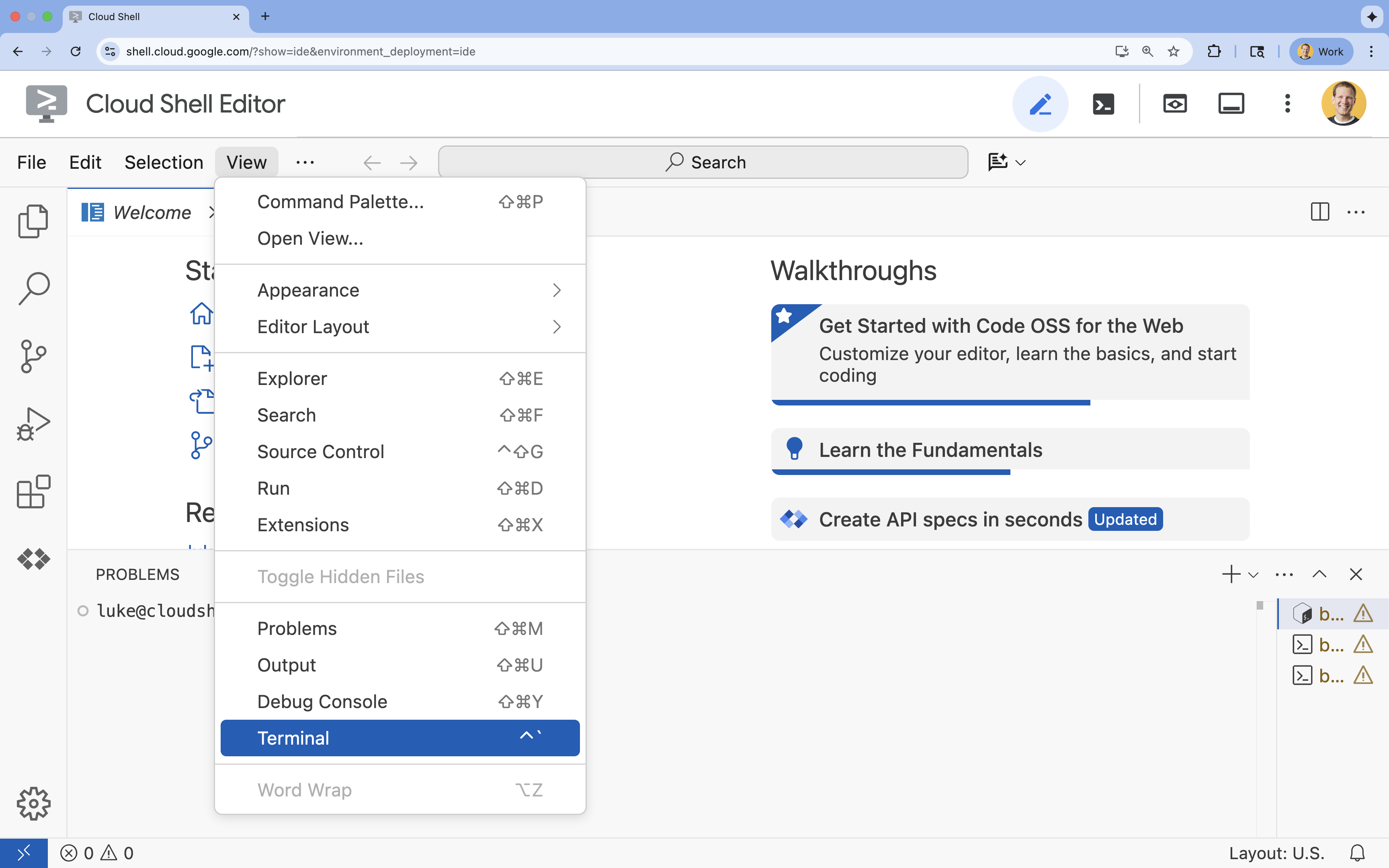
- ターミナルが画面の下部に表示されない場合は、ターミナルを開きます。
- [表示] をクリックします。
- [ターミナル] をクリックします。
- ターミナルで、次のコマンドを使用してプロジェクトを設定します。
gcloud config set project [PROJECT_ID]- 例:
gcloud config set project lab-project-id-example - プロジェクト ID がわからない場合は、次のコマンドでプロジェクト ID をすべて一覧表示できます。
gcloud projects list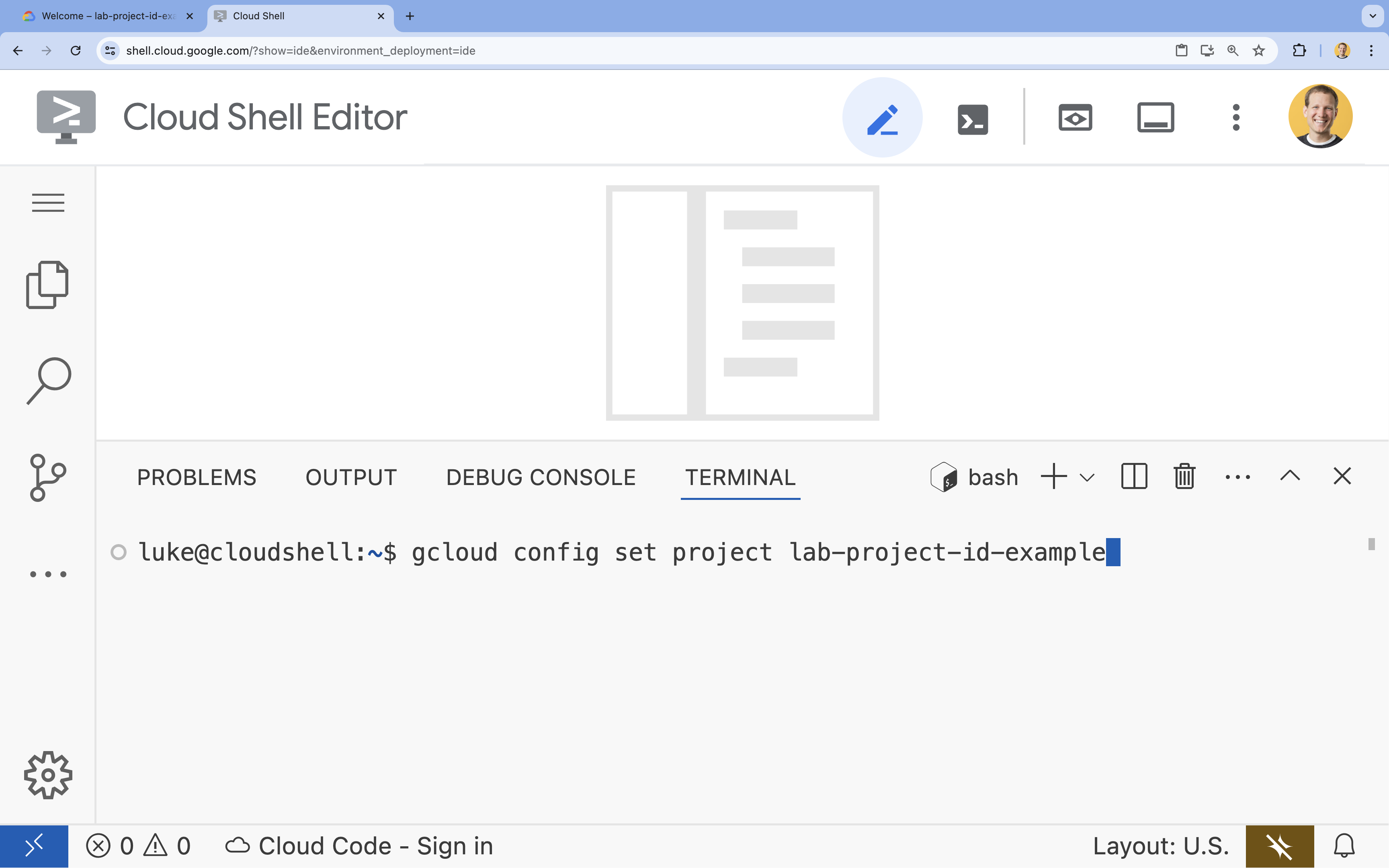
- 例:
- 次のようなメッセージが表示されます。
Updated property [core/project].
4. API を有効にする
Vertex AI やその他のサービスを使用するには、Google Cloud プロジェクトで必要な API を有効にする必要があります。
- ターミナルで API を有効にします。
- Vertex AI API(
aiplatform.googleapis.com): モデルのファインチューニングとサービングに Vertex AI を使用できるようにします。 - Cloud Storage API(
storage.googleapis.com): データセットとモデル アーティファクトの保存を有効にします。
gcloud services enable aiplatform.googleapis.com \ storage.googleapis.com - Vertex AI API(
5. プロジェクト環境を設定する
作業ディレクトリを作成する
- ターミナルで、プロジェクトのディレクトリを作成して移動します。
mkdir gemini-finetuning
cd gemini-finetuning
環境変数を設定する
- ターミナルで、プロジェクトの環境変数を定義します。セッションが切断された場合に簡単に再読み込みできるように、これらの変数を保存する
env.shファイルを作成します。cat <<EOF > env.sh export PROJECT_ID=\$(gcloud config get-value project) export REGION="us-central1" export BUCKET_NAME="\${PROJECT_ID}-gemini-tuning" EOF source env.sh
Cloud Storage バケットを作成する
- ターミナルで、データセットとモデル アーティファクトを格納するバケットを作成します。
gcloud storage buckets create gs://$BUCKET_NAME --project=$PROJECT_ID --location=$REGION
仮想環境を設定する
uvを使用して Python 環境を管理します。ターミナルで、次のコマンドを実行します。uv venv .venv source .venv/bin/activate- ターミナルで、必要な Python パッケージをインストールします。
uv pip install google-cloud-aiplatform rouge-score matplotlib pandas tqdm
6. トレーニング データを準備する
質の高いデータは、ファインチューニングを成功させるための基盤となります。WikiLingua データセットを使用し、Gemini が必要とする特定の JSONL 形式に変換して、ストレージ バケットにアップロードします。
- ターミナルで、
prepare_data.pyという名前のファイルを作成します。cloudshell edit prepare_data.py - 次のコードを
prepare_data.pyに貼り付けます。import json import os import pandas as pd from google.cloud import storage import subprocess # Configuration BUCKET_NAME = os.environ["BUCKET_NAME"] PROJECT_ID = os.environ["PROJECT_ID"] def download_data(): print("Downloading WikiLingua dataset...") # Using gsutil to copy from public bucket subprocess.run(["gsutil", "cp", "gs://github-repo/generative-ai/gemini/tuning/summarization/wikilingua/*", "."], check=True) def convert_to_gemini_format(input_file, output_file, max_samples=1000): print(f"Converting {input_file} to Gemini format (first {max_samples} samples)...") converted_data = [] with open(input_file, 'r') as f: for i, line in enumerate(f): if i >= max_samples: break obj = json.loads(line) messages = obj.get("messages", []) # Convert messages to Gemini 2.5 format # Input: {"messages": [{"role": "user", "content": "..."}, {"role": "model", "content": "..."}]} # Output: {"contents": [{"role": "user", "parts": [{"text": "..."}]}, {"role": "model", "parts": [{"text": "..."}]}]} contents = [] for msg in messages: role = msg["role"] content = msg["content"] contents.append({ "role": role, "parts": [{"text": content}] }) converted_data.append({"contents": contents}) with open(output_file, 'w') as f: for item in converted_data: f.write(json.dumps(item) + "\n") print(f"Saved {len(converted_data)} examples to {output_file}") def upload_to_gcs(local_file, destination_blob_name): print(f"Uploading {local_file} to gs://{BUCKET_NAME}/{destination_blob_name}...") storage_client = storage.Client(project=PROJECT_ID) bucket = storage_client.bucket(BUCKET_NAME) blob = bucket.blob(destination_blob_name) blob.upload_from_filename(local_file) print("Upload complete.") def main(): download_data() # Process Training Data convert_to_gemini_format("sft_train_samples.jsonl", "train_gemini.jsonl") upload_to_gcs("train_gemini.jsonl", "datasets/train/train_gemini.jsonl") # Process Validation Data convert_to_gemini_format("sft_val_samples.jsonl", "val_gemini.jsonl") upload_to_gcs("val_gemini.jsonl", "datasets/val/val_gemini.jsonl") print("Data preparation complete!") if __name__ == "__main__": main() - ターミナルで、データ準備スクリプトを実行します。
python prepare_data.py
7. ベースライン パフォーマンスを確立する
ファインチューニングを行う前に、ベンチマークが必要です。ROUGE スコアを使用して、要約タスクでのベース gemini-2.5-flash モデルのパフォーマンスを測定します。
- ターミナルで、
evaluate.pyという名前のファイルを作成します。cloudshell edit evaluate.py - 次のコードを
evaluate.pyに貼り付けます。import argparse import json import os import pandas as pd from google.cloud import aiplatform import vertexai from vertexai.generative_models import GenerativeModel, GenerationConfig, HarmCategory, HarmBlockThreshold from rouge_score import rouge_scorer from tqdm import tqdm import matplotlib.pyplot as plt import time # Configuration PROJECT_ID = os.environ["PROJECT_ID"] REGION = os.environ["REGION"] aiplatform.init(project=PROJECT_ID, location=REGION) def evaluate(model_name, test_file, max_samples=50, output_json="results.json"): print(f"Evaluating model: {model_name}") # Load Test Data test_df = pd.read_csv(test_file) test_df = test_df.head(max_samples) model = GenerativeModel(model_name) safety_settings = { HarmCategory.HARM_CATEGORY_HARASSMENT: HarmBlockThreshold.BLOCK_ONLY_HIGH, HarmCategory.HARM_CATEGORY_HATE_SPEECH: HarmBlockThreshold.BLOCK_ONLY_HIGH, HarmCategory.HARM_CATEGORY_SEXUALLY_EXPLICIT: HarmBlockThreshold.BLOCK_ONLY_HIGH, HarmCategory.HARM_CATEGORY_DANGEROUS_CONTENT: HarmBlockThreshold.BLOCK_ONLY_HIGH, } generation_config = GenerationConfig( temperature=0.1, max_output_tokens=1024, ) scorer = rouge_scorer.RougeScorer(['rouge1', 'rouge2', 'rougeL'], use_stemmer=True) results = [] for index, row in tqdm(test_df.iterrows(), total=len(test_df)): input_text = row['input_text'] reference_summary = row['output_text'] try: response = model.generate_content( input_text, generation_config=generation_config, safety_settings=safety_settings ) generated_summary = response.text scores = scorer.score(reference_summary, generated_summary) results.append({ "generated": generated_summary, "reference": reference_summary, "rouge1": scores['rouge1'].fmeasure, "rouge2": scores['rouge2'].fmeasure, "rougeL": scores['rougeL'].fmeasure }) except Exception as e: print(f"Error processing example {index}: {e}") # Sleep briefly to avoid quota issues if hitting limits time.sleep(1) # Save results with open(output_json, 'w') as f: json.dump(results, f, indent=2) return pd.DataFrame(results) def plot_results(df, title, filename): os.makedirs("plots", exist_ok=True) metrics = ['rouge1', 'rouge2', 'rougeL'] fig, axes = plt.subplots(1, 3, figsize=(15, 5)) for i, metric in enumerate(metrics): axes[i].hist(df[metric], bins=10, alpha=0.7, color='skyblue', edgecolor='black') axes[i].set_title(f'{metric} Distribution') axes[i].set_xlabel('Score') axes[i].set_ylabel('Count') plt.suptitle(title) plt.tight_layout() plt.savefig(f"plots/{filename}") print(f"Plot saved to plots/{filename}") def compare_results(baseline_file, tuned_file): with open(baseline_file, 'r') as f: baseline_data = pd.DataFrame(json.load(f)) with open(tuned_file, 'r') as f: tuned_data = pd.DataFrame(json.load(f)) print("\n--- Comparison ---") metrics = ['rouge1', 'rouge2', 'rougeL'] for metric in metrics: base_mean = baseline_data[metric].mean() tuned_mean = tuned_data[metric].mean() diff = tuned_mean - base_mean print(f"{metric}: Base={base_mean:.4f}, Tuned={tuned_mean:.4f}, Diff={diff:+.4f}") # Comparative Plot os.makedirs("plots", exist_ok=True) comparison_df = pd.DataFrame({ 'Metric': metrics, 'Baseline': [baseline_data[m].mean() for m in metrics], 'Tuned': [tuned_data[m].mean() for m in metrics] }) comparison_df.plot(x='Metric', y=['Baseline', 'Tuned'], kind='bar', figsize=(10, 6)) plt.title('Baseline vs Tuned Model Performance') plt.ylabel('Average Score') plt.xticks(rotation=0) plt.tight_layout() plt.savefig("plots/comparison.png") print("Comparison plot saved to plots/comparison.png") def main(): parser = argparse.ArgumentParser() parser.add_argument("--model", type=str, default="gemini-2.5-flash", help="Model resource name") parser.add_argument("--baseline", type=str, help="Path to baseline results json for comparison") parser.add_argument("--output", type=str, default="results.json", help="Output file for results") args = parser.parse_args() # Ensure test data exists (it was downloaded in prepare_data step) if not os.path.exists("sft_test_samples.csv"): # Fallback download if needed subprocess.run(["gsutil", "cp", "gs://github-repo/generative-ai/gemini/tuning/summarization/wikilingua/sft_test_samples.csv", "."], check=True) df = evaluate(args.model, "sft_test_samples.csv", output_json=args.output) print("\n--- Results Summary ---") print(df.describe()) plot_filename = "baseline_dist.png" if not args.baseline else "tuned_dist.png" plot_results(df, f"ROUGE Scores - {args.model}", plot_filename) if args.baseline: compare_results(args.baseline, args.output) if __name__ == "__main__": main() - ターミナルで、ベースライン評価を実行します。
python evaluate.py --model "gemini-2.5-flash" --output "baseline.json"baseline.jsonファイルとplots/baseline_dist.pngのプロットが生成されます。
8. ファインチューニングを構成して起動する
次に、Vertex AI でマネージド ファインチューニング ジョブを起動します。
- ターミナルで、
tune.pyという名前のファイルを作成します。cloudshell edit tune.py - 次のコードを
tune.pyに貼り付けます。import os import time from google.cloud import aiplatform import vertexai from vertexai.preview.tuning import sft # Configuration PROJECT_ID = os.environ["PROJECT_ID"] REGION = os.environ["REGION"] BUCKET_NAME = os.environ["BUCKET_NAME"] aiplatform.init(project=PROJECT_ID, location=REGION) def train(): print("Launching fine-tuning job...") sft_tuning_job = sft.train( source_model="gemini-2.5-flash", # Using specific version for stability train_dataset=f"gs://{BUCKET_NAME}/datasets/train/train_gemini.jsonl", validation_dataset=f"gs://{BUCKET_NAME}/datasets/val/val_gemini.jsonl", epochs=1, # Keep it short for the lab adapter_size=4, learning_rate_multiplier=1.0, tuned_model_display_name="gemini-2.5-flash-wikilingua", ) print(f"Job started: {sft_tuning_job.resource_name}") print("Waiting for job to complete... (this may take ~45 minutes)") # Wait for the job to complete while not sft_tuning_job.has_ended: time.sleep(60) sft_tuning_job.refresh() print(f"Status: {sft_tuning_job.state.name}") print("Job completed!") print(f"Tuned Model Endpoint: {sft_tuning_job.tuned_model_endpoint_name}") return sft_tuning_job.tuned_model_endpoint_name if __name__ == "__main__": train() - ターミナルで、ファインチューニング スクリプトを実行します。
python tune.py
9. トレーニング コードについて
ジョブの実行中に、tune.py スクリプトを詳しく見て、ファインチューニングの仕組みを理解しましょう。
マネージド教師ありファインチューニング
このスクリプトは、vertexai.tuning.sft.train メソッドを使用してマネージド チューニング ジョブを送信します。これにより、インフラストラクチャのプロビジョニング、トレーニングの分散、チェックポイントの管理の複雑さが解消されます。
sft_tuning_job = sft.train(
    source_model="gemini-2.5-flash",
    train_dataset=f"gs://{BUCKET_NAME}/datasets/train/train_gemini.jsonl",
    # ...
)
LoRA 構成
オープンソース フレームワークのように LoraConfig を手動で定義する代わりに、Vertex AI では、これをいくつかのキー パラメータに簡素化します。
adapter_size: このパラメータ(スクリプトでは4に設定)は、LoRA アダプタのランクを制御します。サイズが大きいほど、モデルはより複雑な適応を学習できますが、トレーニング可能なパラメータの数が増えます。epochs: このラボでは、トレーニング時間を短く(約 20 分)するために、これを1に設定します。本番環境のシナリオでは、過学習に注意しながら、モデルがデータからより深く学習できるようにこの値を増やすことができます。
モデルの選択
source_model="gemini-2.5-flash" を明示的に指定します。Vertex AI はさまざまなバージョンの Gemini をサポートしています。特定のバージョンを固定すると、パイプラインの安定性と再現性が確保されます。
10. モデルを比較する
ファインチューニング ジョブが完了したら、新しいモデルのパフォーマンスをベースラインと比較できます。
- チューニング済みモデルのエンドポイントを取得します。これは
tune.pyスクリプトの最後に印刷されました。projects/.../locations/.../endpoints/...のようになります。 - 評価スクリプトを再度実行します。今回は、比較用にチューニング済みモデルとベースライン結果を渡します。
# Replace [YOUR_TUNED_MODEL_ENDPOINT] with the actual endpoint name export TUNED_MODEL="projects/[YOUR_PROJECT_ID]/locations/[YOUR_REGION]/endpoints/[YOUR_ENDPOINT_ID]" python evaluate.py --model "$TUNED_MODEL" --baseline "baseline.json" --output "tuned.json" - 結果を確認します。スクリプトは ROUGE スコアの比較を出力し、改善を示す
plots/comparison.pngグラフを生成します。プロットを表示するには、Cloud Shell エディタでplotsフォルダを開きます。
11. クリーンアップ
課金されないようにするには、作成したリソースを削除します。
- ターミナルで、Cloud Storage バケットとチューニング済みモデルを削除します。
gcloud storage rm -r gs://$BUCKET_NAME
# Note: You can delete the model endpoint from the Vertex AI Console
12. 完了
Vertex AI で Gemini 2.5 Flash のファインチューニングが完了しました。
内容のまとめ
このラボの内容:
- Gemini ファインチューニング用に JSONL 形式のデータセットを準備しました。
- ベース Gemini 2.5 Flash モデルを使用してベースラインを確立しました。
- Vertex AI で教師ありファインチューニング ジョブを起動しました。
- ファインチューニングされたモデルをベースラインと比較して評価しました。
次のステップ
このラボは、「Google Cloud でのプロダクション レディな AI」学習プログラムの一部です。
プロトタイプから本番環境への移行に役立つコンテンツについては、カリキュラム全体をご覧ください。
ハッシュタグ #ProductionReadyAI を使用して、進捗状況を共有しましょう。