

1. 简介
在此实验中,您将学习如何对 Google Gemini 模型执行完整的监督式微调工作流,以使其适应特定任务:文章总结。虽然大语言模型功能强大,但其通用性意味着,通过微调,它们在特定应用场景中可以发挥出更出色的效果。通过使用高质量的示例数据集训练模型,您可以提高模型在目标任务中的一致性、质量和效率。
您将使用轻量级且经济实惠的模型 Gemini 2.5 Flash,并使用 Vertex AI 执行微调。
架构概览
我们将构建以下内容:
- Cloud Shell:您的开发环境。
- Cloud Storage:以 JSONL 格式存储训练/验证数据。
- Vertex AI Training:管理微调作业。
- Vertex AI 端点:用于托管微调后的模型。
学习内容
- 准备高质量的数据集以进行监督式微调。
- 使用 Vertex AI SDK for Python 配置并启动微调作业。
- 使用自动化指标(ROUGE 得分)评估模型。
- 比较基础模型和微调模型,以量化改进效果。
2. 项目设置
Google 账号
如果您还没有个人 Google 账号,则必须先创建一个 Google 账号。
请改用个人账号,而不是工作账号或学校账号。
登录 Google Cloud 控制台
使用个人 Google 账号登录 Google Cloud 控制台。
启用结算功能
兑换 Google Cloud 赠金(可选)
如需参加此研讨会,您需要拥有一个有一定信用额度的结算账号。使用本 Codelab 顶部横幅中的积分开始学习。如果您已关联结算账号,则可以跳过此步骤。
创建项目(可选)
如果您没有当前项目可用于此实验,请在此处创建一个新项目。
3. 打开 Cloud Shell Editor
- 点击此链接可直接前往 Cloud Shell Editor
- 如果系统在今天任何时间提示您进行授权,请点击授权继续。

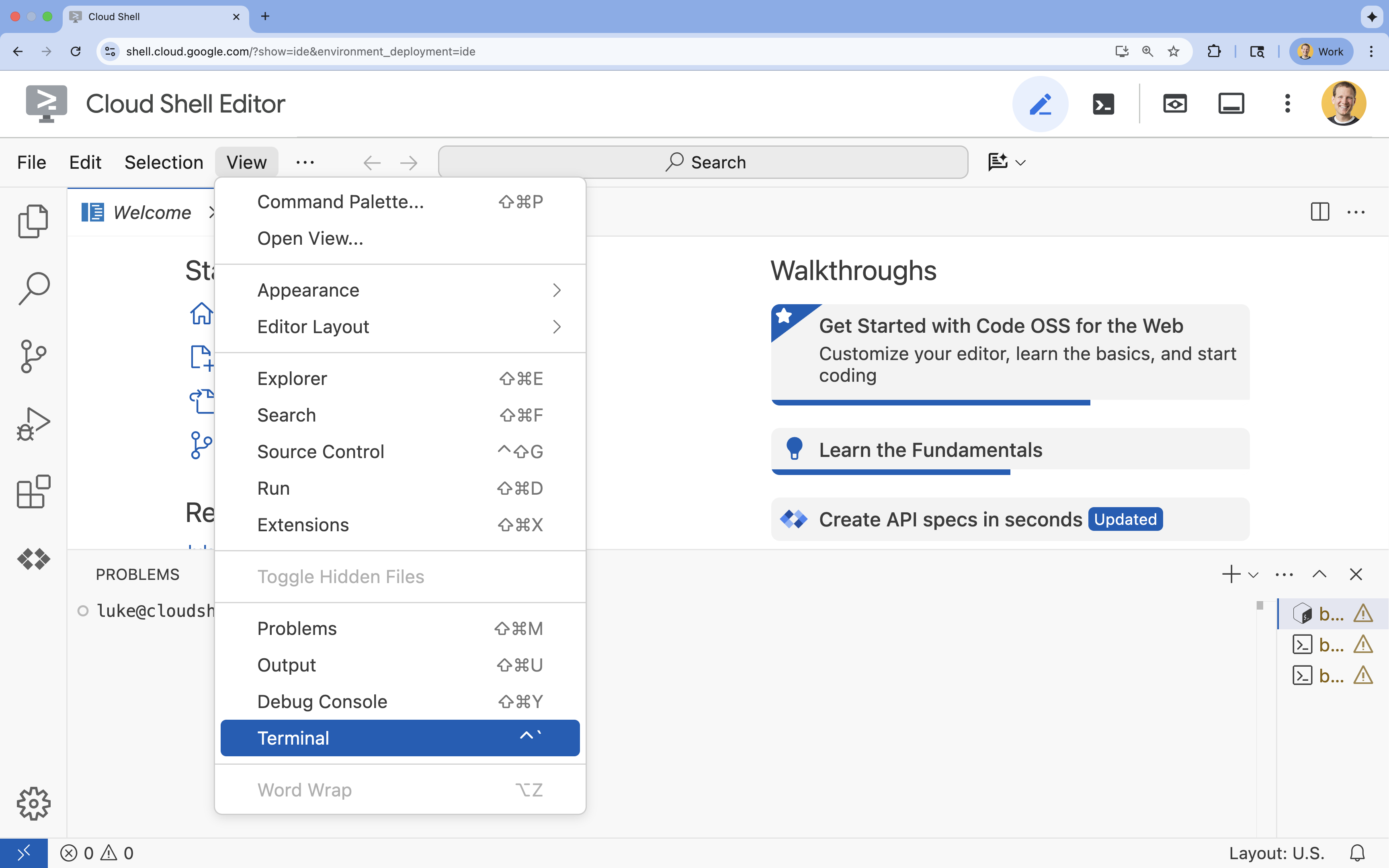
- 如果终端未显示在屏幕底部,请打开它:
- 点击查看
- 点击终端
- 在终端中,使用以下命令设置项目:
gcloud config set project [PROJECT_ID]- 示例:
gcloud config set project lab-project-id-example - 如果您不记得自己的项目 ID,可以使用以下命令列出所有项目 ID:
gcloud projects list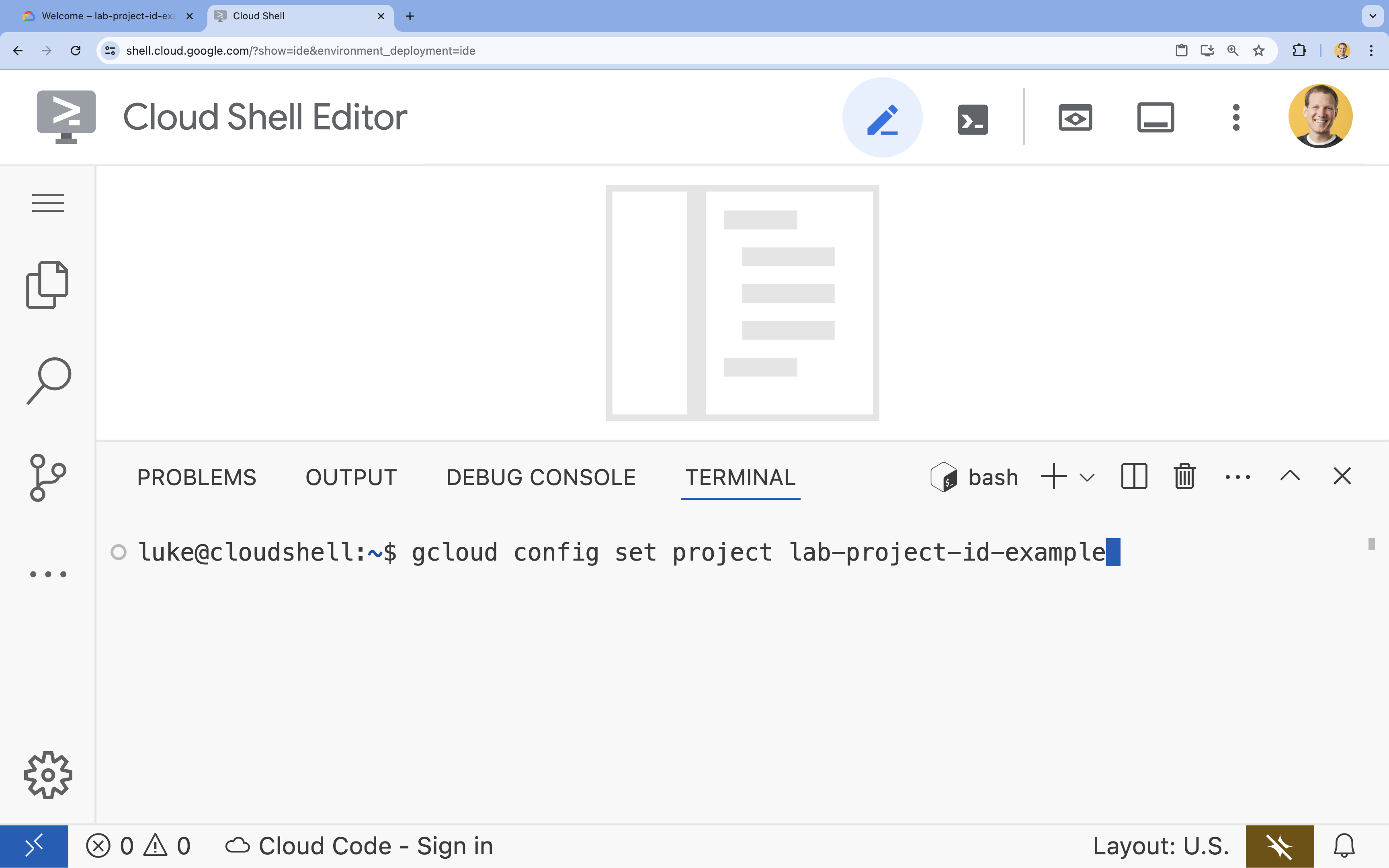
- 示例:
- 您应会看到以下消息:
Updated property [core/project].
4. 启用 API
如需使用 Vertex AI 和其他服务,您需要在 Google Cloud 项目中启用必要的 API。
- 在终端中,启用以下 API:
- Vertex AI API (
aiplatform.googleapis.com):启用后,即可使用 Vertex AI 来微调和提供模型。 - Cloud Storage API (
storage.googleapis.com):用于存储数据集和模型制品。
gcloud services enable aiplatform.googleapis.com \ storage.googleapis.com - Vertex AI API (
5. 设置项目环境
创建工作目录
- 在终端中,为您的项目创建一个目录,然后导航到该目录。
mkdir gemini-finetuning
cd gemini-finetuning
设置环境变量
- 在终端中,为您的项目定义环境变量。我们将创建一个
env.sh文件来存储这些变量,以便在会话断开连接时轻松重新加载它们。cat <<EOF > env.sh export PROJECT_ID=\$(gcloud config get-value project) export REGION="us-central1" export BUCKET_NAME="\${PROJECT_ID}-gemini-tuning" EOF source env.sh
创建 Cloud Storage 存储桶
- 在终端中,创建一个存储分区来存储数据集和模型制品。
gcloud storage buckets create gs://$BUCKET_NAME --project=$PROJECT_ID --location=$REGION
设置虚拟环境
- 我们将使用
uv来管理 Python 环境。在终端中,运行以下命令:uv venv .venv source .venv/bin/activate - 在终端中,安装必需的 Python 软件包。
uv pip install google-cloud-aiplatform rouge-score matplotlib pandas tqdm
6. 准备训练数据
优质数据是成功微调的基础。您将使用 WikiLingua 数据集,将其转换为 Gemini 所需的特定 JSONL 格式,然后将其上传到您的存储分区。
- 在终端中,创建一个名为
prepare_data.py的文件。cloudshell edit prepare_data.py - 将以下代码粘贴到
prepare_data.py中。import json import os import pandas as pd from google.cloud import storage import subprocess # Configuration BUCKET_NAME = os.environ["BUCKET_NAME"] PROJECT_ID = os.environ["PROJECT_ID"] def download_data(): print("Downloading WikiLingua dataset...") # Using gsutil to copy from public bucket subprocess.run(["gsutil", "cp", "gs://github-repo/generative-ai/gemini/tuning/summarization/wikilingua/*", "."], check=True) def convert_to_gemini_format(input_file, output_file, max_samples=1000): print(f"Converting {input_file} to Gemini format (first {max_samples} samples)...") converted_data = [] with open(input_file, 'r') as f: for i, line in enumerate(f): if i >= max_samples: break obj = json.loads(line) messages = obj.get("messages", []) # Convert messages to Gemini 2.5 format # Input: {"messages": [{"role": "user", "content": "..."}, {"role": "model", "content": "..."}]} # Output: {"contents": [{"role": "user", "parts": [{"text": "..."}]}, {"role": "model", "parts": [{"text": "..."}]}]} contents = [] for msg in messages: role = msg["role"] content = msg["content"] contents.append({ "role": role, "parts": [{"text": content}] }) converted_data.append({"contents": contents}) with open(output_file, 'w') as f: for item in converted_data: f.write(json.dumps(item) + "\n") print(f"Saved {len(converted_data)} examples to {output_file}") def upload_to_gcs(local_file, destination_blob_name): print(f"Uploading {local_file} to gs://{BUCKET_NAME}/{destination_blob_name}...") storage_client = storage.Client(project=PROJECT_ID) bucket = storage_client.bucket(BUCKET_NAME) blob = bucket.blob(destination_blob_name) blob.upload_from_filename(local_file) print("Upload complete.") def main(): download_data() # Process Training Data convert_to_gemini_format("sft_train_samples.jsonl", "train_gemini.jsonl") upload_to_gcs("train_gemini.jsonl", "datasets/train/train_gemini.jsonl") # Process Validation Data convert_to_gemini_format("sft_val_samples.jsonl", "val_gemini.jsonl") upload_to_gcs("val_gemini.jsonl", "datasets/val/val_gemini.jsonl") print("Data preparation complete!") if __name__ == "__main__": main() - 在终端中,运行数据准备脚本。
python prepare_data.py
7. 建立基准效果
在进行微调之前,您需要一个基准。您将使用 ROUGE 得分来衡量基础 gemini-2.5-flash 模型在摘要任务中的表现。
- 在终端中,创建一个名为
evaluate.py的文件。cloudshell edit evaluate.py - 将以下代码粘贴到
evaluate.py中。import argparse import json import os import pandas as pd from google.cloud import aiplatform import vertexai from vertexai.generative_models import GenerativeModel, GenerationConfig, HarmCategory, HarmBlockThreshold from rouge_score import rouge_scorer from tqdm import tqdm import matplotlib.pyplot as plt import time # Configuration PROJECT_ID = os.environ["PROJECT_ID"] REGION = os.environ["REGION"] aiplatform.init(project=PROJECT_ID, location=REGION) def evaluate(model_name, test_file, max_samples=50, output_json="results.json"): print(f"Evaluating model: {model_name}") # Load Test Data test_df = pd.read_csv(test_file) test_df = test_df.head(max_samples) model = GenerativeModel(model_name) safety_settings = { HarmCategory.HARM_CATEGORY_HARASSMENT: HarmBlockThreshold.BLOCK_ONLY_HIGH, HarmCategory.HARM_CATEGORY_HATE_SPEECH: HarmBlockThreshold.BLOCK_ONLY_HIGH, HarmCategory.HARM_CATEGORY_SEXUALLY_EXPLICIT: HarmBlockThreshold.BLOCK_ONLY_HIGH, HarmCategory.HARM_CATEGORY_DANGEROUS_CONTENT: HarmBlockThreshold.BLOCK_ONLY_HIGH, } generation_config = GenerationConfig( temperature=0.1, max_output_tokens=1024, ) scorer = rouge_scorer.RougeScorer(['rouge1', 'rouge2', 'rougeL'], use_stemmer=True) results = [] for index, row in tqdm(test_df.iterrows(), total=len(test_df)): input_text = row['input_text'] reference_summary = row['output_text'] try: response = model.generate_content( input_text, generation_config=generation_config, safety_settings=safety_settings ) generated_summary = response.text scores = scorer.score(reference_summary, generated_summary) results.append({ "generated": generated_summary, "reference": reference_summary, "rouge1": scores['rouge1'].fmeasure, "rouge2": scores['rouge2'].fmeasure, "rougeL": scores['rougeL'].fmeasure }) except Exception as e: print(f"Error processing example {index}: {e}") # Sleep briefly to avoid quota issues if hitting limits time.sleep(1) # Save results with open(output_json, 'w') as f: json.dump(results, f, indent=2) return pd.DataFrame(results) def plot_results(df, title, filename): os.makedirs("plots", exist_ok=True) metrics = ['rouge1', 'rouge2', 'rougeL'] fig, axes = plt.subplots(1, 3, figsize=(15, 5)) for i, metric in enumerate(metrics): axes[i].hist(df[metric], bins=10, alpha=0.7, color='skyblue', edgecolor='black') axes[i].set_title(f'{metric} Distribution') axes[i].set_xlabel('Score') axes[i].set_ylabel('Count') plt.suptitle(title) plt.tight_layout() plt.savefig(f"plots/{filename}") print(f"Plot saved to plots/{filename}") def compare_results(baseline_file, tuned_file): with open(baseline_file, 'r') as f: baseline_data = pd.DataFrame(json.load(f)) with open(tuned_file, 'r') as f: tuned_data = pd.DataFrame(json.load(f)) print("\n--- Comparison ---") metrics = ['rouge1', 'rouge2', 'rougeL'] for metric in metrics: base_mean = baseline_data[metric].mean() tuned_mean = tuned_data[metric].mean() diff = tuned_mean - base_mean print(f"{metric}: Base={base_mean:.4f}, Tuned={tuned_mean:.4f}, Diff={diff:+.4f}") # Comparative Plot os.makedirs("plots", exist_ok=True) comparison_df = pd.DataFrame({ 'Metric': metrics, 'Baseline': [baseline_data[m].mean() for m in metrics], 'Tuned': [tuned_data[m].mean() for m in metrics] }) comparison_df.plot(x='Metric', y=['Baseline', 'Tuned'], kind='bar', figsize=(10, 6)) plt.title('Baseline vs Tuned Model Performance') plt.ylabel('Average Score') plt.xticks(rotation=0) plt.tight_layout() plt.savefig("plots/comparison.png") print("Comparison plot saved to plots/comparison.png") def main(): parser = argparse.ArgumentParser() parser.add_argument("--model", type=str, default="gemini-2.5-flash", help="Model resource name") parser.add_argument("--baseline", type=str, help="Path to baseline results json for comparison") parser.add_argument("--output", type=str, default="results.json", help="Output file for results") args = parser.parse_args() # Ensure test data exists (it was downloaded in prepare_data step) if not os.path.exists("sft_test_samples.csv"): # Fallback download if needed subprocess.run(["gsutil", "cp", "gs://github-repo/generative-ai/gemini/tuning/summarization/wikilingua/sft_test_samples.csv", "."], check=True) df = evaluate(args.model, "sft_test_samples.csv", output_json=args.output) print("\n--- Results Summary ---") print(df.describe()) plot_filename = "baseline_dist.png" if not args.baseline else "tuned_dist.png" plot_results(df, f"ROUGE Scores - {args.model}", plot_filename) if args.baseline: compare_results(args.baseline, args.output) if __name__ == "__main__": main() - 在终端中,运行基准评估。
python evaluate.py --model "gemini-2.5-flash" --output "baseline.json"plots/baseline_dist.png中生成一个baseline.json文件和一个图表。
8. 配置并启动微调
现在,您将在 Vertex AI 上启动一项受管理的微调作业。
- 在终端中,创建一个名为
tune.py的文件。cloudshell edit tune.py - 将以下代码粘贴到
tune.py中。import os import time from google.cloud import aiplatform import vertexai from vertexai.preview.tuning import sft # Configuration PROJECT_ID = os.environ["PROJECT_ID"] REGION = os.environ["REGION"] BUCKET_NAME = os.environ["BUCKET_NAME"] aiplatform.init(project=PROJECT_ID, location=REGION) def train(): print("Launching fine-tuning job...") sft_tuning_job = sft.train( source_model="gemini-2.5-flash", # Using specific version for stability train_dataset=f"gs://{BUCKET_NAME}/datasets/train/train_gemini.jsonl", validation_dataset=f"gs://{BUCKET_NAME}/datasets/val/val_gemini.jsonl", epochs=1, # Keep it short for the lab adapter_size=4, learning_rate_multiplier=1.0, tuned_model_display_name="gemini-2.5-flash-wikilingua", ) print(f"Job started: {sft_tuning_job.resource_name}") print("Waiting for job to complete... (this may take ~45 minutes)") # Wait for the job to complete while not sft_tuning_job.has_ended: time.sleep(60) sft_tuning_job.refresh() print(f"Status: {sft_tuning_job.state.name}") print("Job completed!") print(f"Tuned Model Endpoint: {sft_tuning_job.tuned_model_endpoint_name}") return sft_tuning_job.tuned_model_endpoint_name if __name__ == "__main__": train() - 在终端中,运行微调脚本。
python tune.py
9. 了解训练代码
在作业运行期间,我们来详细了解一下 tune.py 脚本,以便了解微调的工作原理。
代管式监督式微调
该脚本使用 vertexai.tuning.sft.train 方法提交受管理的调优作业。这样可以隐藏配置基础设施、分发训练和管理检查点的复杂性。
sft_tuning_job = sft.train(
    source_model="gemini-2.5-flash",
    train_dataset=f"gs://{BUCKET_NAME}/datasets/train/train_gemini.jsonl",
    # ...
)
LoRA 配置
与您在开源框架中手动定义 LoraConfig 不同,Vertex AI 将此简化为几个关键参数:
adapter_size:此形参(在我们的脚本中设置为4)用于控制 LoRA 适配器的秩。尺寸越大,模型可以学习的复杂自适应就越多,但可训练的参数也会增加。epochs:在本实验中,我们将此值设置为1,以缩短训练时间(约 20 分钟)。在生产场景中,您可以增加此值,以便模型从数据中更深入地学习,但应注意避免过拟合。
模型选择
我们明确指定了 source_model="gemini-2.5-flash"。Vertex AI 支持各种版本的 Gemini,固定特定版本可确保流水线保持稳定且可重现。
10. 比较模型
微调作业完成后,您可以将新模型的性能与基准进行比较。
- 获取调优后模型的端点。它是在
tune.py脚本结束时打印的。其格式应为projects/.../locations/.../endpoints/...。 - 再次运行评估脚本,这次传递经过调优的模型和基准结果以进行比较。
# Replace [YOUR_TUNED_MODEL_ENDPOINT] with the actual endpoint name export TUNED_MODEL="projects/[YOUR_PROJECT_ID]/locations/[YOUR_REGION]/endpoints/[YOUR_ENDPOINT_ID]" python evaluate.py --model "$TUNED_MODEL" --baseline "baseline.json" --output "tuned.json" - 查看结果。该脚本将输出 ROUGE 得分比较结果,并生成一个显示改进情况的
plots/comparison.png图表。您可以在 Cloud Shell 编辑器中打开plots文件夹来查看这些图表。
11. 清理
为避免产生费用,请删除您创建的资源。
- 在终端中,删除 Cloud Storage 存储分区和已调优的模型。
gcloud storage rm -r gs://$BUCKET_NAME
# Note: You can delete the model endpoint from the Vertex AI Console
12. 恭喜!
您已成功在 Vertex AI 上对 Gemini 2.5 Flash 进行微调!
回顾
您此实验中,您将执行以下操作:
- 准备了 JSONL 格式的数据集,用于 Gemini 微调。
- 使用基础 Gemini 2.5 Flash 模型建立基准。
- 在 Vertex AI 上启动了监督式微调作业。
- 评估了微调模型并将其与基准模型进行了比较。
后续步骤
本实验是利用 Google Cloud 构建可用于生产用途的 AI 学习路线的组成部分。
使用 #ProductionReadyAI 标签分享您的进度。