1. 總覽
本程式碼研究室說明如何使用參數效率調整 (PET) 建立自訂文字分類器。PET 方法只會更新少量參數,因此訓練相對容易且快速,不必微調整個模型。模型也能更輕鬆地透過相對較少的訓練資料學習新行為。如要瞭解詳細方法,請參閱「Towards Agile Text Classifiers for Everyone」,這篇文章說明如何將這些技術應用於各種安全工作,並僅使用數百個訓練範例,就能達到最先進的效能。
本程式碼研究室使用 LoRA PET 方法和較小的 Gemma 模型 (gemma_instruct_2b_en),因為這樣可以更快且更有效率地執行。這個 Colab 涵蓋的步驟包括:擷取資料、為 LLM 設定資料格式、訓練 LoRA 權重,然後評估結果。本程式碼研究室會使用 ETHOS 資料集進行訓練,這個資料集是公開資料集,用於偵測仇恨言論,內容來自 YouTube 和 Reddit 留言。僅使用 200 個樣本 (資料集 1/4) 進行訓練時,模型可達到 F1:0.80 和 ROC-AUC:0.78,略高於排行榜目前回報的 SOTA (撰寫本文時為 2024 年 2 月 15 日)。如果使用全部 800 個範例進行訓練,F1 分數可達 83.74,ROC-AUC 分數則為 88.17。一般來說,模型越大 (例如 gemma_instruct_7b_en) 效能越好,但訓練和執行成本也越高。
觸發內容警告:本程式碼研究室會開發用於偵測仇恨言論的安全分類器,因此範例和結果評估中會出現一些令人反感的語言。
2. 安裝和設定
在本程式碼研究室中,您需要最新版本的 keras (3)、keras-nlp (0.8.0) 和 Kaggle 帳戶,才能下載基礎模型。
!pip install -q -U keras-nlp
!pip install -q -U keras
如要登入 Kaggle,您可以將 kaggle.json 憑證檔案儲存在 ~/.kaggle/kaggle.json,或在 Colab 環境中執行下列指令:
import kagglehub

kagglehub.login()
本程式碼研究室使用 Tensorflow 做為 Keras 後端進行測試,但您可以使用 Tensorflow、Pytorch 或 JAX:
import os

os.environ["KERAS_BACKEND"] = "tensorflow"
3. 載入 ETHOS 資料集
在本節中,您將載入用於訓練分類器的資料集,並預先處理成訓練和測試集。您將使用熱門研究資料集 ETHOS,這項資料集是為了偵測社群媒體中的仇恨言論而收集。如要進一步瞭解資料集的收集方式,請參閱 ETHOS:線上仇恨言論偵測資料集論文。
import pandas as pd

gh_root = 'https://raw.githubusercontent.com'
gh_repo = 'intelligence-csd-auth-gr/Ethos-Hate-Speech-Dataset'
gh_path = 'master/ethos/ethos_data/Ethos_Dataset_Binary.csv'
data_url = f'{gh_root}/{gh_repo}/{gh_path}'

df = pd.read_csv(data_url, delimiter=';')
df['hateful'] = (df['isHate'] >= df['isHate'].median()).astype(int)

# Shuffle the dataset.
df = df.sample(frac=1, random_state=32)

# Split into train and test.
df_train, df_test = df[:800],  df[800:]

# Display a sample of the data.
df.head(5)[['hateful', 'comment']]
您會看到類似以下內容:
標籤 | 則留言 | |
0 |
|
|
1 |
|
|
2 |
|
|
3 |
|
|
4 |
|
|
4. 下載並例項化模型
如說明文件所述,您可以輕鬆使用 Gemma 模型。使用 Keras 時,您需要執行下列操作:
import keras
import keras_nlp

# For reproducibility purposes.
keras.utils.set_random_seed(1234)

# Download the model from Kaggle using Keras.
model = keras_nlp.models.GemmaCausalLM.from_preset('gemma_instruct_2b_en')

# Set the sequence length to a small enough value to fit in memory in Colab.
model.preprocessor.sequence_length = 128
您可以生成一些文字,測試模型是否正常運作:
model.generate('Question: what is the capital of France? ', max_length=32)
5. 文字預先處理和分隔符號權杖
為協助模型更瞭解我們的意圖,您可以預先處理文字並使用分隔符號權杖。這樣一來,模型就比較不會生成不符合預期格式的文字。舉例來說,您可以撰寫類似這樣的提示,嘗試向模型要求情緒分類:
Classify the following text into one of the following classes:[Positive,Negative]

Text: you look very nice today
Classification:
在這種情況下,模型可能會輸出您要的內容,也可能不會。舉例來說,如果文字包含換行符號字元,可能會對模型效能造成負面影響。更穩健的做法是使用分隔符號權杖。提示詞會變成:
Classify the following text into one of the following classes:[Positive,Negative]
<separator>
Text: you look very nice today
<separator>
Prediction:
這可以使用預先處理文字的函式進行抽象化:
def preprocess_text(
    text: str,
    labels: list[str],
    instructions: str,
    separator: str,
) -> str:
  prompt = f'{instructions}:[{",".join(labels)}]'
  return separator.join([prompt, f'Text:{text}', 'Prediction:'])
現在,如果使用與先前相同的提示和文字執行函式,應該會得到相同的輸出內容:
text = 'you look very nice today'

prompt = preprocess_text(
    text=text,
    labels=['Positive', 'Negative'],
    instructions='Classify the following text into one of the following classes',
    separator='\n<separator>\n',
)

print(prompt)
這應該會輸出:
Classify the following text into one of the following classes:[Positive,Negative]
<separator>
Text:well, looks like its time to have another child
<separator>
Prediction:
6. 輸出後處理
模型輸出內容是具有各種機率的權杖。一般來說,如要生成文字,您會從最有可能的幾個權杖中選取,並建構句子、段落,甚至是完整的文件。不過,就分類而言,真正重要的是模型認為 Positive 比 Negative 更可能發生,反之亦然。
根據您先前例項化的模型,以下說明如何將模型輸出內容處理為下一個符記是 Positive 或 Negative 的獨立機率:
import numpy as np


def compute_output_probability(
    model: keras_nlp.models.GemmaCausalLM,
    prompt: str,
    target_classes: list[str],
) -> dict[str, float]:
  # Shorthands.
  preprocessor = model.preprocessor
  tokenizer = preprocessor.tokenizer

  # NOTE: If a token is not found, it will be considered same as "<unk>".
  token_unk = tokenizer.token_to_id('<unk>')

  # Identify the token indices, which is the same as the ID for this tokenizer.
  token_ids = [tokenizer.token_to_id(word) for word in target_classes]

  # Throw an error if one of the classes maps to a token outside the vocabulary.
  if any(token_id == token_unk for token_id in token_ids):
    raise ValueError('One of the target classes is not in the vocabulary.')

  # Preprocess the prompt in a single batch. This is done one sample at a time
  # for illustration purposes, but it would be more efficient to batch prompts.
  preprocessed = model.preprocessor.generate_preprocess([prompt])

  # Identify output token offset.
  padding_mask = preprocessed["padding_mask"]
  token_offset = keras.ops.sum(padding_mask) - 1

  # Score outputs, extract only the next token's logits.
  vocab_logits = model.score(
      token_ids=preprocessed["token_ids"],
      padding_mask=padding_mask,
  )[0][token_offset]

  # Compute the relative probability of each of the requested tokens.
  token_logits = [vocab_logits[ix] for ix in token_ids]
  logits_tensor = keras.ops.convert_to_tensor(token_logits)
  probabilities = keras.activations.softmax(logits_tensor)

  return dict(zip(target_classes, probabilities.numpy()))
您可以執行該函式,並使用先前建立的提示進行測試:
compute_output_probability(
    model=model,
    prompt=prompt,
    target_classes=['Positive', 'Negative'],
)
這會輸出類似以下的內容:
{'Positive': 0.99994016, 'Negative': 5.984089e-05}
7. 將所有內容包裝為分類器
為方便使用,您可以將剛才建立的所有函式包裝成單一 sklearn 類型的分類器,並使用 predict() 和 predict_score() 等簡單易用的熟悉函式。
import dataclasses


@dataclasses.dataclass(frozen=True)
class AgileClassifier:
  """Agile classifier to be wrapped around a LLM."""

  # The classes whose probability will be predicted.
  labels: tuple[str, ...]

  # Provide default instructions and control tokens, can be overridden by user.
  instructions: str = 'Classify the following text into one of the following classes'
  separator_token: str = '<separator>'
  end_of_text_token: str = '<eos>'

  def encode_for_prediction(self, x_text: str) -> str:
    return preprocess_text(
        text=x_text,
        labels=self.labels,
        instructions=self.instructions,
        separator=self.separator_token,
    )

  def encode_for_training(self, x_text: str, y: int) -> str:
    return ''.join([
        self.encode_for_prediction(x_text),
        self.labels[y],
        self.end_of_text_token,
    ])

  def predict_score(
      self,
      model: keras_nlp.models.GemmaCausalLM,
      x_text: str,
  ) -> list[float]:
    prompt = self.encode_for_prediction(x_text)
    token_probabilities = compute_output_probability(
        model=model,
        prompt=prompt,
        target_classes=self.labels,
    )
    return [token_probabilities[token] for token in self.labels]

  def predict(
      self,
      model: keras_nlp.models.GemmaCausalLM,
      x_eval: str,
  ) -> int:
    return np.argmax(self.predict_score(model, x_eval))


agile_classifier = AgileClassifier(labels=('Positive', 'Negative'))
8. 模型微調
LoRA 是「低秩適應」的縮寫。這項微調技術可有效微調大型語言模型。如要瞭解詳情,請參閱 LoRA:大型語言模型的低秩調整論文。
Gemma 的 Keras 實作提供 enable_lora() 方法,可用於微調:
# Enable LoRA for the model and set the LoRA rank to 4.
model.backbone.enable_lora(rank=4)
啟用 LoRA 後,即可開始微調程序。在 Colab 上,每個訓練週期的時間大約是 5 分鐘:
import tensorflow as tf

# Create dataset with preprocessed text + labels.
map_fn = lambda xy: agile_classifier.encode_for_training(*xy)
x_train = list(map(map_fn, df_train[['comment', 'hateful']].values))
ds_train = tf.data.Dataset.from_tensor_slices(x_train).batch(2)

# Compile the model using the Adam optimizer and appropriate loss function.
model.compile(
    loss=keras.losses.SparseCategoricalCrossentropy(from_logits=True),
    optimizer=keras.optimizers.Adam(learning_rate=0.0005),
    weighted_metrics=[keras.metrics.SparseCategoricalAccuracy()],
)

# Begin training.
model.fit(ds_train, epochs=4)
訓練次數越多,準確度就越高,直到發生過度擬合為止。
9. 檢查結果
您現在可以檢查剛才訓練的敏捷分類器輸出內容。這段程式碼會輸出指定文字的預測類別分數:
text = 'you look really nice today'
scores = agile_classifier.predict_score(model, text)
dict(zip(agile_classifier.labels, scores))
{'Positive': 0.99899644, 'Negative': 0.0010035498}
10. 模型評估
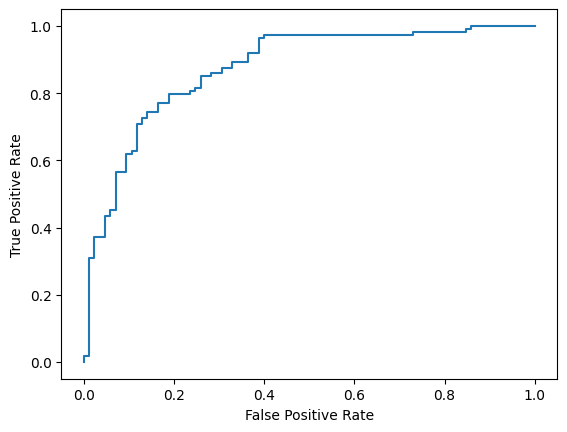
最後,您會使用 F1 分數和 AUC-ROC 這兩項常見指標,評估模型的效能。F1 分數會評估特定分類門檻下的精確度和召回率調和平均數,藉此掌握偽陰性和偽陽性錯誤。另一方面,AUC-ROC 會擷取各種門檻的真陽率和偽陽率之間的取捨,並計算這條曲線下的面積。
from sklearn.metrics import f1_score, roc_auc_score

y_true = df_test['hateful'].values
# Compute the scores (aka probabilities) for each of the labels.
y_score = [agile_classifier.predict_score(model, x) for x in df_test['comment']]
# The label with highest score is considered the predicted class.
y_pred = np.argmax(y_score, axis=1)
# Extract the probability of a comment being considered hateful.
y_prob = [x[agile_classifier.labels.index('Negative')] for x in y_score]

# Compute F1 and AUC-ROC scores.
print(f'F1: {f1_score(y_true, y_pred):.2f}')
print(f'AUC-ROC: {roc_auc_score(y_true, y_prob):.2f}')
F1: 0.84
AUC-ROC: = 0.88
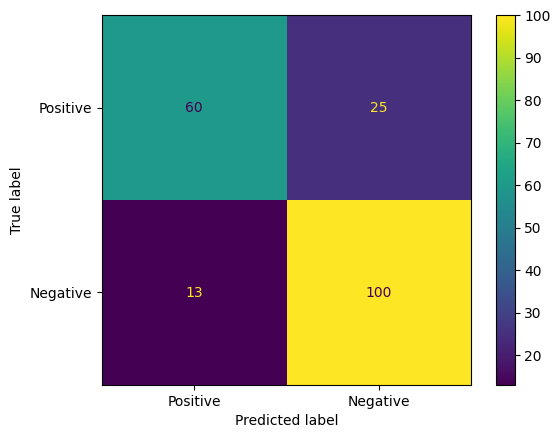
混淆矩陣是評估模型預測結果的另一種有趣方式。混淆矩陣會以視覺化方式呈現不同種類的預測錯誤。
from sklearn.metrics import confusion_matrix, ConfusionMatrixDisplay

cm = confusion_matrix(y_true, y_pred)
ConfusionMatrixDisplay(
    confusion_matrix=cm,
    display_labels=agile_classifier.labels,
).plot()
最後,您也可以查看 ROC 曲線,瞭解使用不同評分門檻時可能發生的預測錯誤。
from sklearn.metrics import RocCurveDisplay, roc_curve

fpr, tpr, _ = roc_curve(y_true, y_prob, pos_label=1)
RocCurveDisplay(fpr=fpr, tpr=tpr).plot()