
1. Introduction

This codelab is about agent evaluation — how a system comes to know whether an agent's answer was any good — and about what you can build once it does: an agent that rewrites its own instruction from its own failures, and a loop that keeps doing that, bounded, with you holding the gate.
Everything runs on the Agent Development Kit (ADK): adk eval with a custom metric you write, adk optimize (the GEPA prompt optimizer), an ADK 2 Workflow with a back edge, and the Agent Engine + BigQuery pipe that turns production traffic into next round's exam.
The loop pushes up whatever number you hand it.
What you will learn
- A reply is not a result — why a confident, well-formed answer tells the system nothing, and what a judge has to be able to say
- Three ways to run one exam —
adk evalfor the batch, theadk webEvals tab for staring at a failure,pytest+AgentEvaluatorfor failing the build — and the one local eval store they share - Compare vs check — why a comparator punishes a correct answer worded differently, how many right answers a dinner actually has, and the gut check that tells you which kind of metric a problem needs
- A checker function as an
adk evalmetric —customMetrics,codeConfig, the fixed signature, the six checks inside it, why your function owns PASSED/FAILED, and why it is deterministic on purpose - Three metric families on one answer — comparator, checker, LLM-as-judge: what each needs, what each costs, where each is blind
adk optimize(GEPA) — what it reads (the failures, not the score), train vs holdout, and why you re-run the exam yourself before you ship- Reward hacking, measured — a proxy metric that never reads the party, what it does to the real number, and the law that falls out of it
- A self-evolving loop as an ADK 2
Workflow— an instruction that lives in session state, the one edge that makes a graph a cycle, and the boundary ADK does not give you - Where production fits — traces for watching, rows for learning, and why a checker can grade dinners nobody planned to grade (a read, not a step)
What you will build
A running app in your browser: a round table, N guests, and an agent that books their dinner. Each course turns on one thing — a line in a config, one answer in front of three judges, a button that runs the real optimizer, a switch that swaps the judge, one edge in a graph — and the table shows you what changed: who ate, who didn't, and why. The Python is small; the numbers are all measured on your machine.
The app is also the exercise. The course panel hands you one edit or one button at a time; a plate on the menu fills only when something real proves it — the kitchen reads your files and the receipts of what ran, never a checklist.
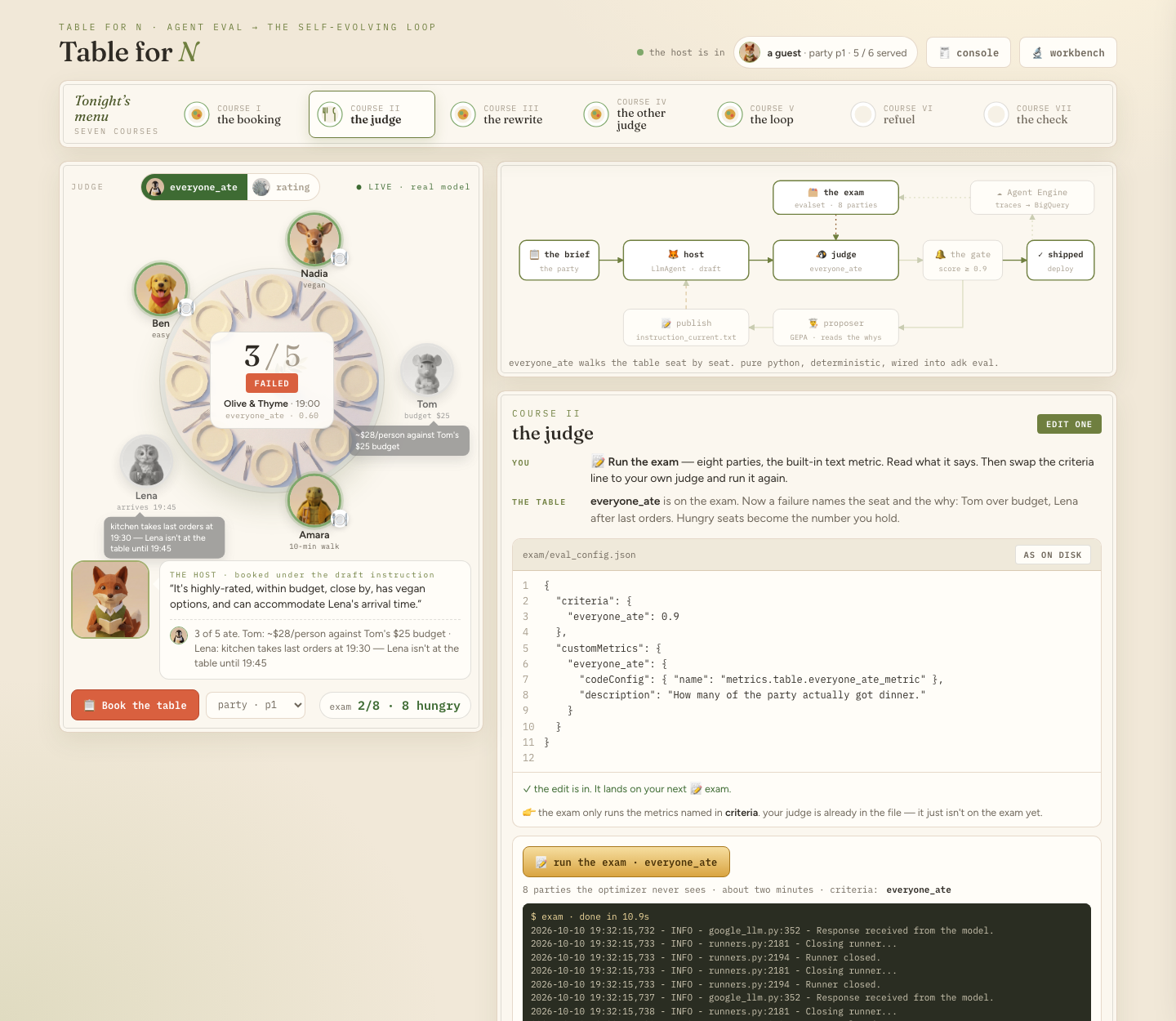
The eight courses
the concept | the question it answers | what you do | |
I | a reply is not a result | what does the system know about this booking? | nothing yet — book one in the workbench |
II | the comparator · a set of right answers · three ways to run | why does a correct booking fail the exam? | run the exam as shipped and read the verdicts |
III | a checker as a custom metric · the six checks | can the exam say who is hungry, and why? | one line in |
IV | comparator · checker · LLM-as-judge | same answer — what are the three things to measure it against? | judge one answer three ways, twice |
V |
| can the agent fix itself from its failures? |
|
VI | reward hacking · the proxy metric | what does a judge that cannot see harm do to the loop? | the switch |
VII | a | what makes a graph a loop, and what stops it? | one edge in |
VIII | what each thing replaced | — | the check |
How to use this codelab. It is concept-first: each course explains the idea, then shows the code as it reads once the change is in and walks through it. It never asks you to edit a file here — the editing happens in the app, which hands you one line at a time and shows you the failure first. Read the course, then let the page take you through it and watch the number move.
Where this sits
The world — ten guests with one hard constraint each, ten restaurants with one trap each, sixteen parties — and the two judges come from the loop-lab-table lab; the one-page interactive format comes from Agent Valley. The bistro is scenery; every mechanism under it is the ordinary one you would use for a support agent, a booking flow, or anything else whose "good" is checkable.
2. 🧰 Setup
- What — an account that can pay, a project, the lab installed, the model proven to answer, and the table running on one port.
- Why — one process on one port: the page, the exams, the editor and the workbench share an origin, so nothing in this lab needs a second terminal or a second port.
- How — clone, two scripts, one command. The last thing setup does is make one real model call, so a broken project fails here rather than in course I.
Everything in this lab runs in Cloud Shell — gcloud, Python, Node and git are already installed there, and Gemini is reached through Vertex AI using your own credentials. There is no API key anywhere in this lab, and nothing to install on your laptop. A laptop with the Google Cloud SDK, Python 3.11+ and Node 20+ works the same way.
There is one thing this lab cannot hand you: a Google Cloud project with billing on it. Step 1 gets you an account that can pay for it; step 4 turns that account into a project. Do them in that order — every step after 4 reads the project that step 4 settles on.
1 · Get an account with billing (~1 min)
Sign in with a Google account that has billing enabled. Any such account works. If yours does not, start a free trial; it gives you a billing account, which is all step 4 needs.
2 · Open Cloud Shell (~2 min)
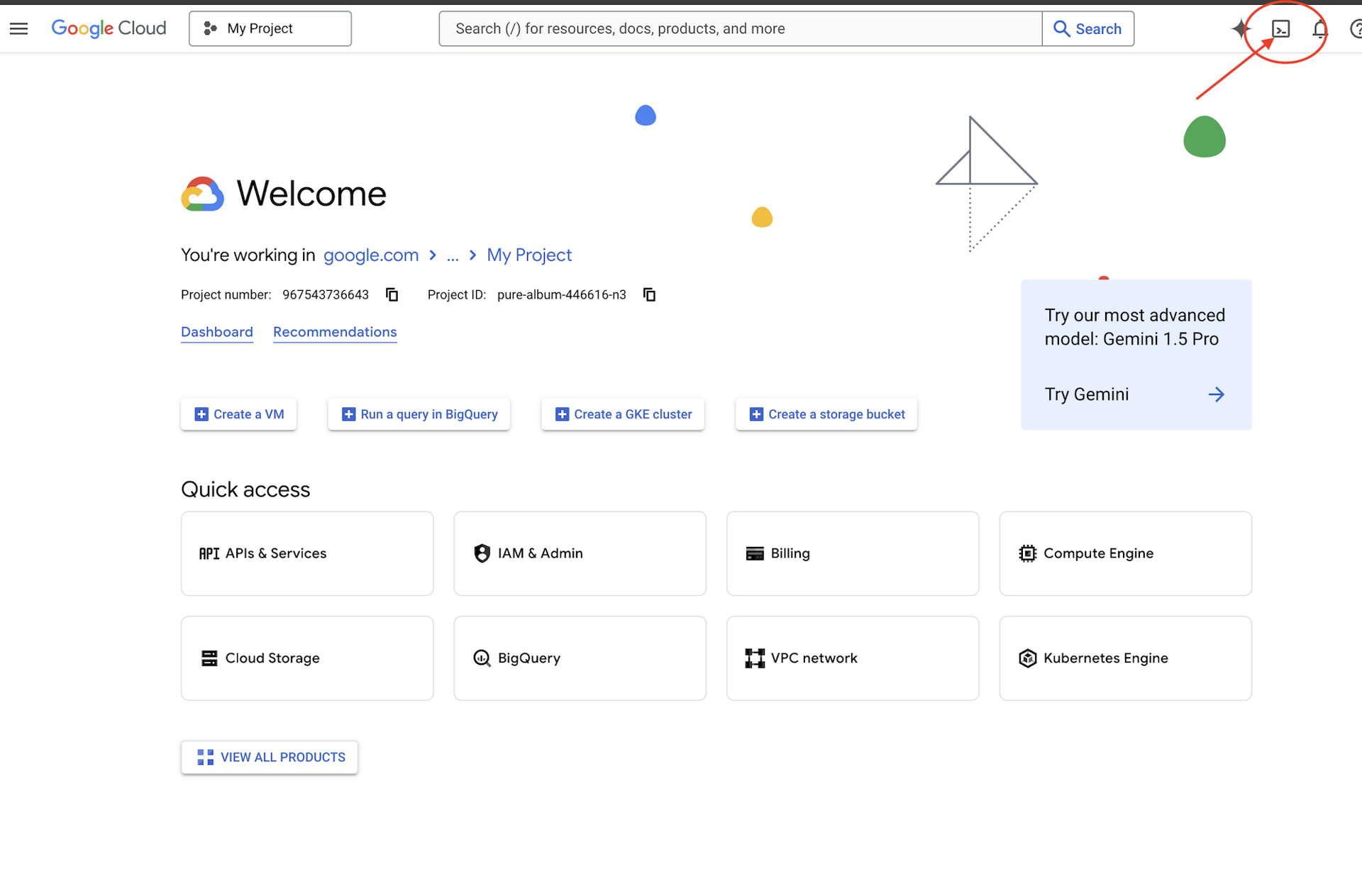
👉🖥 Click Activate Cloud Shell at the top of the Google Cloud console — it is the terminal-shaped icon in the header.
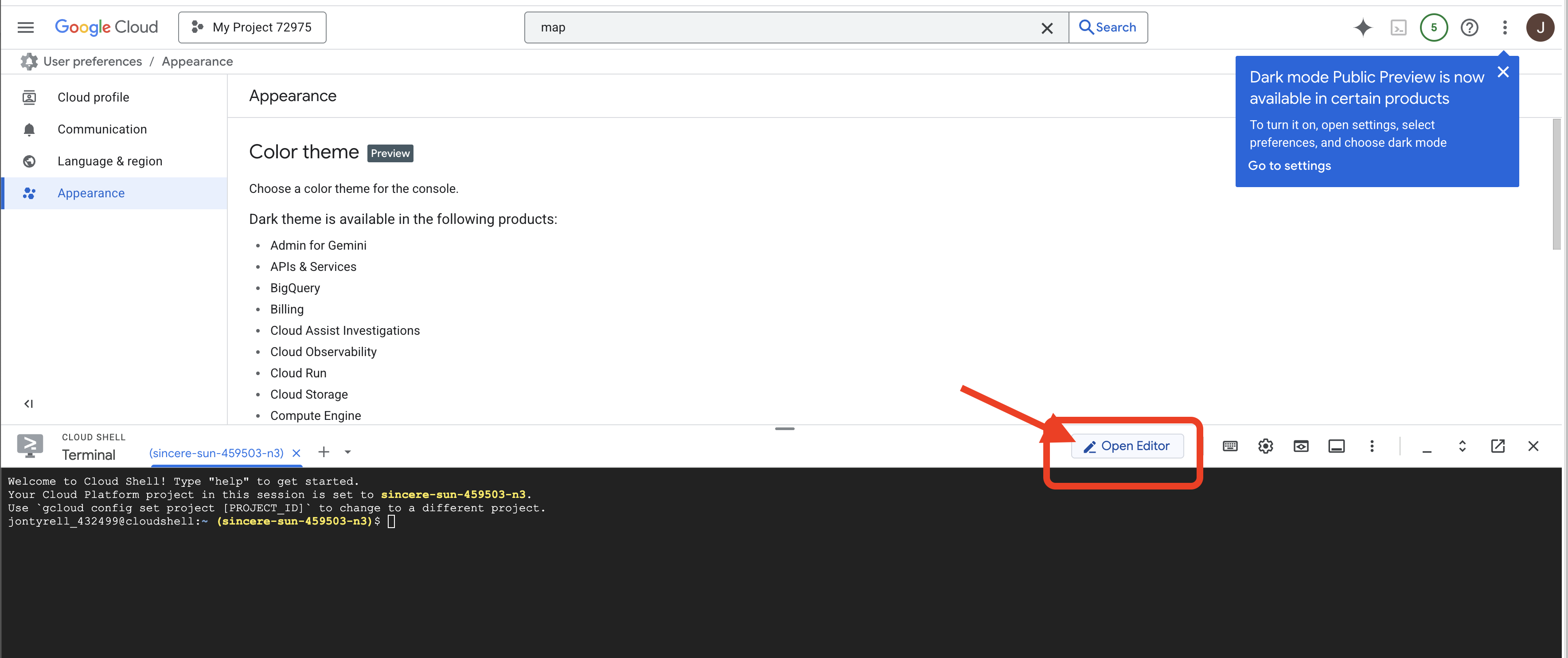
👉🖥 Click Open Editor (the open-folder-with-a-pencil icon). This brings up the Cloud Shell Editor with a file explorer on the left — that is where you go whenever you want to read a whole file.
👉🖥 If you are prompted to authorize at any point today, click Authorize to continue.
👉🖥 Open a terminal inside the editor — that is tab 1, and every 👉💻 step runs there. Tab 2 is the table itself, and you open it in step 7. If the terminal is not already along the bottom of the screen, open it with View → Terminal:
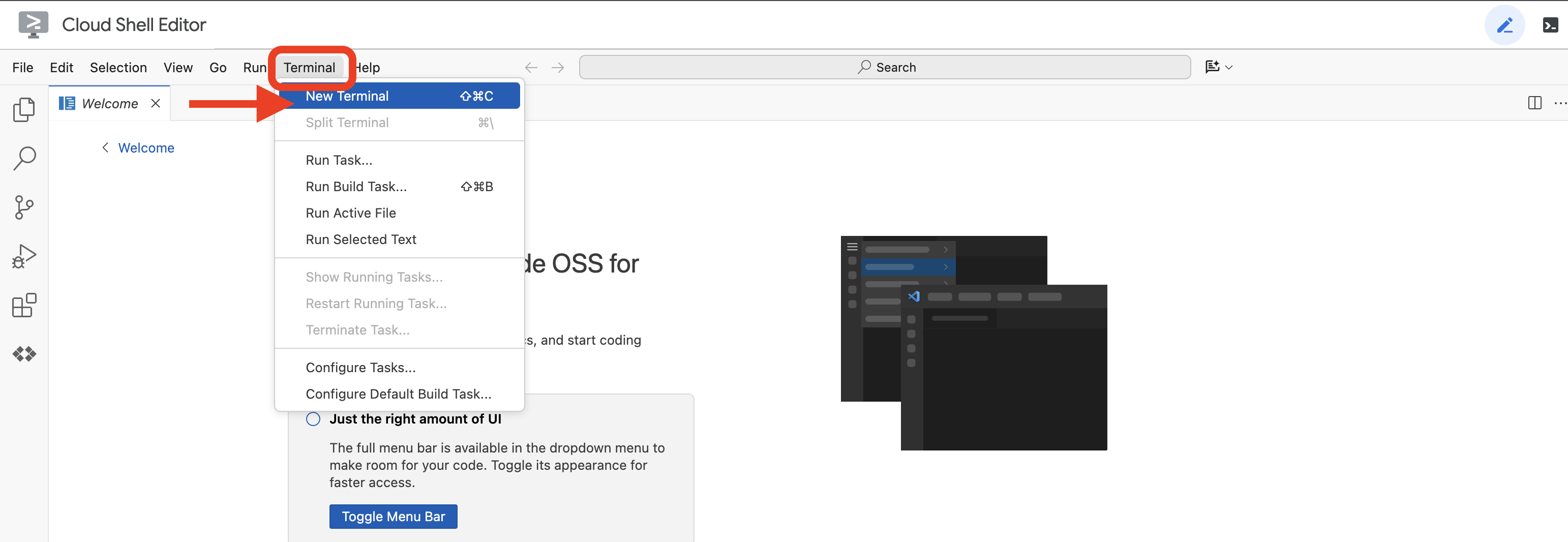
👉💻 Check which account you are signed in as — it should be the one from step 1:
gcloud auth list
3 · Get the lab (~1 min)
👉💻 Clone the repo:
cd ~
git clone https://github.com/cuppibla/table-for-n
cd table-for-n
4 · Create your project (~2 min)
👉💻 One script finds your billing account, creates a project on it, links billing, and points Cloud Shell at that project:
cd ~/table-for-n
./setup_project.sh
Expect a ✓ for the billing account it picked, a ✓ for the project it created, and an ending like:
Project ready: table-for-n-4271
  Next:  ./setup_codelab.sh
table-for-n-4271 is your project ID — yours will have different digits. Four things happen in there:
billing | takes the newest | |
project | creates | |
selects | writes the ID to | |
waits | polls until the project is actually allowed to serve, for up to two minutes | |
👉🖥 The same project is now in the console — its ID sits in the Project info card on the Dashboard:
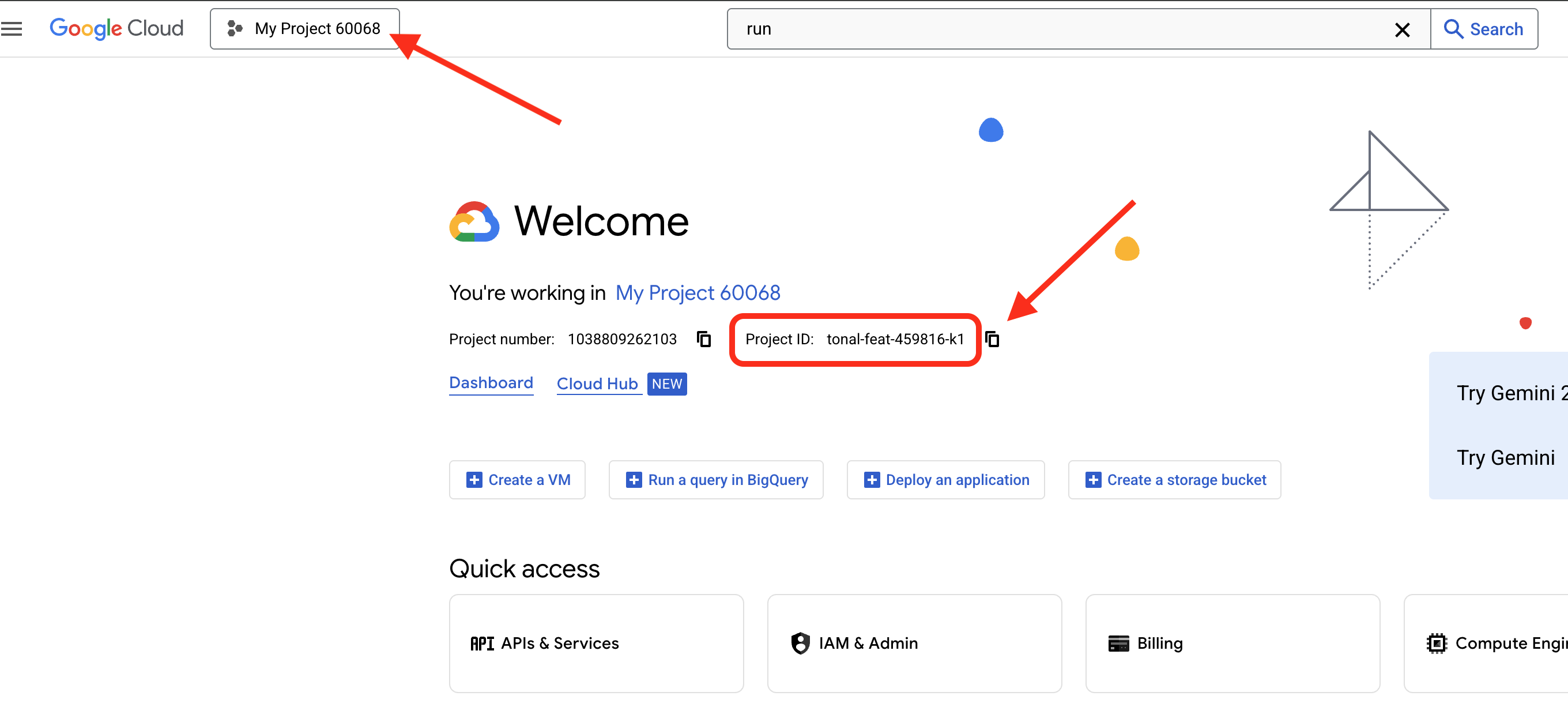
5 · Install and set the lab up (~3 min)
setup_codelab.sh builds the environment with uv, and it will not install uv for you — it stops and tells you to. So install it first, in the same command:
👉💻
cd ~/table-for-n
curl -LsSf https://astral.sh/uv/install.sh | sh
source ~/.local/bin/env
./setup_codelab.sh
One script, safe to run again. It does five things, in order:
api | reads the project step 4 selected and enables | |
uv env |
| |
site | installs and builds | |
.env | writes | |
preflight | makes one real call to | |
6 · Read the menu (~1 min)
The last thing step 5 printed is tonight's menu — every line a real probe, not a guess:
  talking to Gemini through vertex · table-for-n-4271
  the model answers · gemini-2.5-flash · it said: table for N, ready to seat.
  the page · built

  tonight's menu:

  I   ▢ the booking      · a reply is not a result                 read only · book one in the workbench
  II  ▢ the comparator   · the exam runs response_match_score      run it as shipped · read the verdicts
  III ▢ the judge        · everyone_ate is not on the exam yet     edit one line in exam/eval_config.json
  IV  ▢ the flight       · one answer, three judges               judge it three ways
  V   ▢ the rewrite      · instruction: draft                      optimize · install · ship gate
  VI  ▢ the other judge  · rating_score never reads the party      install hacked · flip the switch
  VII ▢ the loop         · no back edge yet                        delete one "# " in loop/flywheel.py
  VIII▢ the check        ·                                         eight courses
None are lit before you start. the model answers is the one that matters here: it means a real call went through on your project.
👉💻 Run it again at any point to see where you are — it reads your files and the kitchen's receipts, not a checklist:
cd ~/table-for-n
uv run python scripts/preflight.py
7 · Lay the table (~1 min)
👉💻
cd ~/table-for-n
bash table.sh
One process, port 3470. The kitchen takes a while to warm up — it imports ADK and mounts adk web — so the script says so, waits, and prints the links only once the port actually answers:
  warming up the kitchen — up to a minute the first time, do not open the page yet...

  ✓ the table is laid

  Table for N      → http://localhost:3470
  the workbench    → http://localhost:3470/workbench/dev-ui/?app=host

  In Cloud Shell: Web Preview → Change port → 3470
  Ctrl+C clears the table.
It stays in the foreground; Ctrl+C clears the table. Leave it running — every course from here on talks to this one process, and nothing in this lab ever asks you to restart it.
👉🖥 After you see ✓ the table is laid, open the table in a new tab — call it tab 2. In Cloud Shell: Web Preview → Change port → 3470.
👉🖥 Put your name on the reservation card — it goes on the check at the end — and press ✦ seat us.

3. I · The booking — a reply is not a result
Five people are going to dinner. The group chat has everything: Nadia is vegan, Tom has a hard $25 cap this month, Amara is on crutches and can walk ten minutes, Lena cannot get there before 7:45, Ben is easy. Ten restaurants are listed, sorted by rating, each with its price, its walk, its hours and its one catch.
An agent books the table. You already know, reading the chat, who is going to go hungry at the room it picks. Nothing in the system knows. That gap is what the whole codelab is about.
The agent — read only
host/agent.py, as it is for the entire lab:
_HERE = os.path.dirname(os.path.abspath(__file__))
INSTRUCTION_FILE = os.path.join(_HERE, "instruction_current.txt")

root_agent = Agent(
    name="host",
    model="gemini-2.5-flash",
    instruction=read_instruction(),
    generate_content_config=types.GenerateContentConfig(
        thinking_config=types.ThinkingConfig(thinking_budget=0),
        temperature=0.0,
    ),
)
No tools, no database, no search. One model, one instruction string — and the string is not in this file. It lives next door in instruction_current.txt, which today holds the four lines a product manager writes on day one:
You are the group's dinner-booking agent. The user will share the group chat
and the restaurants nearby.

Book the group a table people will be excited about — lead with the
highest-rated, most talked-about room that fits the night. Output ONLY a JSON
object, no prose, no code fences: {"restaurant": ..., "time": ..., "reason": ...}
Not a word about allergies, budgets, walking limits or who has to leave early. All of that is in the brief the agent receives. Unused.
That file is the one artifact this lab is about. Course V lets an optimizer rewrite it. Course VI installs a hacked version. Course VII's loop rewrites it round by round while the graph runs. The agent — model, settings, name — never changes.
Try it — zero frontend
👉🖥 On the page, course I. Click 🔬 workbench (top right): the drawer is adk web, mounted in the same process — same host/ folder, same table.db. Pick host, paste the brief from the course panel (it has a copy button), send.
The host answers in a second: a restaurant, a time, a confident one-line reason. Read the reason against the chat. Then look at the table on the left: laid, nobody judged, — / 5. Not because anything is loading — because in the world of course I nothing exists that could judge this.
The number: hungry seats — ?. Nobody can tell.
4. II · The comparator — how many right answers does this dinner have?
Course II starts with an exam that already exists, and already fails — for a reason that teaches nothing. Before you fix it, it is worth knowing the three ways to run it, because you will use all three today.
Three ways to run an evaluation
All the same engine underneath.
what it is for | what you get | |
| the batch runner; what you put in CI | a summary back: passed, failed, a score per case |
| a case failed and you want to stare at it | that conversation, the trace, the per-case score, all clickable |
| folding agent eval into a normal regression suite | it runs next to your unit tests and fails the build the same way |
The genuinely useful detail: all three share one local eval store, host/.adk/eval_history/. Run a batch from CI, something fails, open that exact run in the web UI to dig into it. The 📝 button on the page is the first way; the 🔬 workbench is the second; the third is a terminal command, uv run pytest tests/test_host.py, and the test it runs is twelve lines:
def test_the_holdout_feeds_everyone():
    config = get_evaluation_criteria_or_default("exam/eval_config.json")
    eval_set = load_eval_set_from_file("exam/parties_val.evalset.json", "parties_val")
    asyncio.run(AgentEvaluator.evaluate_eval_set(
        agent_module="host", eval_set=eval_set, eval_config=config, num_runs=1,
        app_name="host",
        eval_set_results_manager=LocalEvalSetResultsManager(agents_dir=ROOT),   # ← the shared store
    ))
tests/test_host.py. Same agent, same evalset, same config file, and the eval_set_results_manager line is what puts its run in the same history as the other two.
The exam, as shipped
exam/eval_config.json ships like this:
{
  "criteria": {
    "response_match_score": 0.3
  },
  "customMetrics": {
    "everyone_ate": {
      "codeConfig": { "name": "metrics.table.everyone_ate_metric" },
      "description": "How many of the party actually got dinner."
    }
  }
}
Two parts, two jobs. criteria
is the exam paper — the metrics that actually run, each with its pass bar. customMetrics
is the staff directory — names mapped to Python, available but not on duty. Declaring a metric is not running it. As shipped, the paper has exactly one question on it: ADK's built-in response_match_score, a text overlap (ROUGE-1) between what the agent said and the golden booking in the evalset. Your judge, everyone_ate, is in the directory and not on the paper — course III moves it there by changing one line.
We have a dinner-booking agent and response_match_score sitting there for free. Let's just use it and see what we get.
Try it
👉🖥 Course II on the page. Press 📝 run the exam · as shipped. The caption under the button says what runs: 1 metric runs: response_match_score · everyone_ate is declared, not on the exam. About half a minute. Read the result: about half the tables FAILED, on a text score with no reason attached — and look at which ones. Hover the chips.
Now look carefully, because this is the interesting bit. The comparator gets tables wrong in both directions, and your run will show at least one of them. It fails a table where the booking was fine — the agent picked a room where everybody could actually eat; the dinner works; the answer is correct — because the agent phrased its reason differently from the way the golden answer was worded. And it passes a table where somebody goes hungry — on our run p1, at 0.30 on the nose, with Tom over budget and Lena after last orders — because enough words overlapped. String similarity does not know anything about dinner. It knows about characters lining up.
So here is a real question: how many correct answers does this dinner have?
For tonight's party, exactly one of the ten rooms feeds everyone — Pho Saigon, and only from 19:00. Across the exam's eight parties it is one, two, two, one, three, three, six, one (world.rooms walks every room at every seating for a party; run it yourself with uv run python -c "import world; print(sum(r['feeds_everyone'] for r in world.rooms(world.PARTIES['p1'])))"). Sometimes several rooms can feed everybody; sometimes exactly one can, and only at certain times. There is a set of acceptable answers, not a single one — and the golden answer in the evalset is one member of it.
Which means the assumption underneath response_match_score — there is one right answer and I wrote it down — was never true for this problem. Not once. The metric is not broken. It does exactly what it says. We brought the wrong kind of metric to this problem.
👉🖥 Optional, worth a minute: open the 🔬 workbench → Evals → 🕓 history. The run 📝 just made is there, every case clickable. And in tab 1, uv run pytest tests/test_host.py runs the same exam as a failing test — and lands in the same history.
The number: 4 of 8 PASSED on our run, for word overlap, with no reasons — and 1 right answer for p1, out of ten rooms.
For our dinner problem the choice makes itself. Nobody can tell you the one correct restaurant for Friday. But everybody can tell you what a successful dinner means: everyone at the table got to eat. That is a rule. It is checkable. It is not ambiguous. Building it is course III.
5. III · The judge — a checker as a custom metric
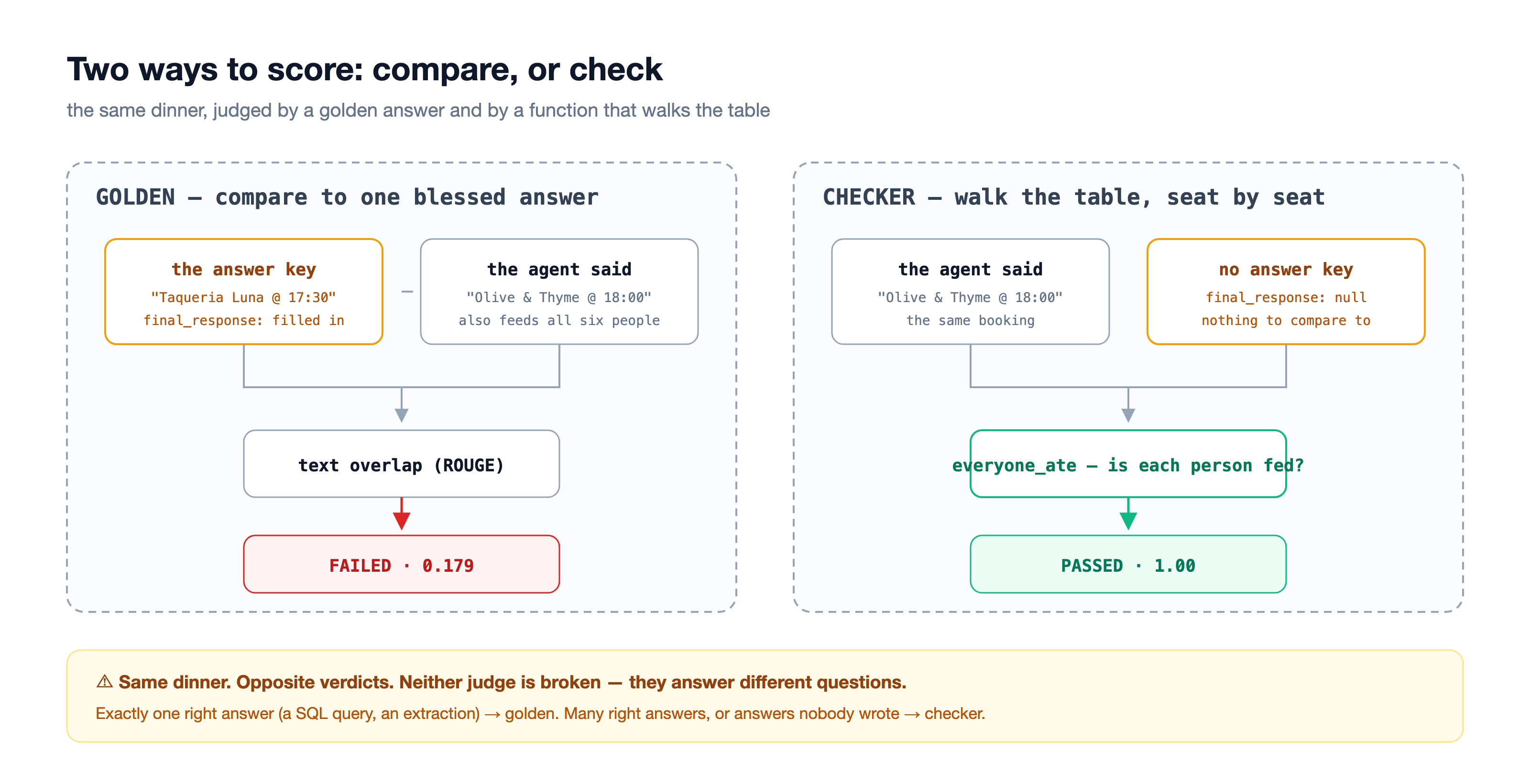
A checker asks a different question than a comparator: not does this match the key but is each person fed? It walks the booking against the party, seat by seat, and returns a score and a reason per seat. It needs no golden answer at all — which is also what lets it grade conversations that already happened (course VIII).
world.everyone_ate is that function. Course III wires it into adk eval.
Inside everyone_ate — five steps, none of them clever
- Read the user's text and work out which party this is. There is a party id in the brief —
p1— and we look up who is sitting at that table. - Read the agent's answer, parse the JSON, pull out the restaurant name and the booking time.
- Walk each person, in order. For each one: diet, then allergies, then spice tolerance, then budget, then walking distance, then timing. Six checks, per person, every time. Take Tom: his budget is $25 a head, the room is $28. We return
Falsefor Tom, and the sentence explaining it, and move to the next person. - The score is the number of people who ate divided by the number at the table. Four of five is 0.8. No weighting, no partial credit.
- Return PASSED or FAILED. And notice who returns it: you. Remember that; it is the trap below.
def ate_detail(person_id, rest, chosen_min):
    p = PEOPLE[person_id]
    if p.get("diet") == "vegan" and not rest["vegan"]:
        return False, "nothing vegan on the menu", "diet"
    if p.get("allergy") == "nut" and not rest["nut_safe"]:
        return False, "everything is finished in peanut oil", "allergy"
    ...
    if "budget" in p and rest["price"] > p["budget"]:
        return False, f"~${rest['price']}/person against {name}'s ${p['budget']} budget", "budget"
    ...                                                   # walk, then timing
    return True, "ate", ""
One property worth calling out: there is no model call anywhere in this function. It is deterministic Python. Same input, same verdict, every single time. Your judge does not drift when a model gets updated, it costs nothing to run, and it cannot hallucinate a reason. When you can get that, it is worth designing for.
The metric, finished
metrics/table.py — the adapter ADK calls, with its fixed signature:
def everyone_ate_metric(eval_metric, actual_invocations,
                        expected_invocations=None, scenario=None):
    return _build(world.everyone_ate, world.THRESHOLD, actual_invocations, "everyone_ate")


def _build(scorer, threshold, actual_invocations, metric):
    per, scores = [], []
    for inv in actual_invocations:
        ids = _party_ids(inv)                 # who was invited — parsed from the PROMPT
        rid, time_str = _decision_parts(inv)  # what got booked — parsed from the RESPONSE
        s, detail = scorer(ids, rid, time_str) if (ids and rid) else (0.0, [])
        scores.append(s)
        per.append(PerInvocationResult(
            actual_invocation=inv, score=s, eval_status=_status(s, threshold)))
    overall = round(sum(scores) / len(scores), 4) if scores else 0.0
    return EvaluationResult(overall_score=overall,
                            overall_eval_status=_status(overall, threshold),
                            per_invocation_results=per)
Line by line: it reads both sides of each invocation — the party from user_content, the booking from final_response — hands them to the pure function, and wraps the result in the objects ADK expects. And one line carries the verdict:
def _status(score, threshold):
    # ADK does not apply your threshold to custom metrics — this IS the verdict.
    return EvalStatus.PASSED if score >= threshold else EvalStatus.FAILED
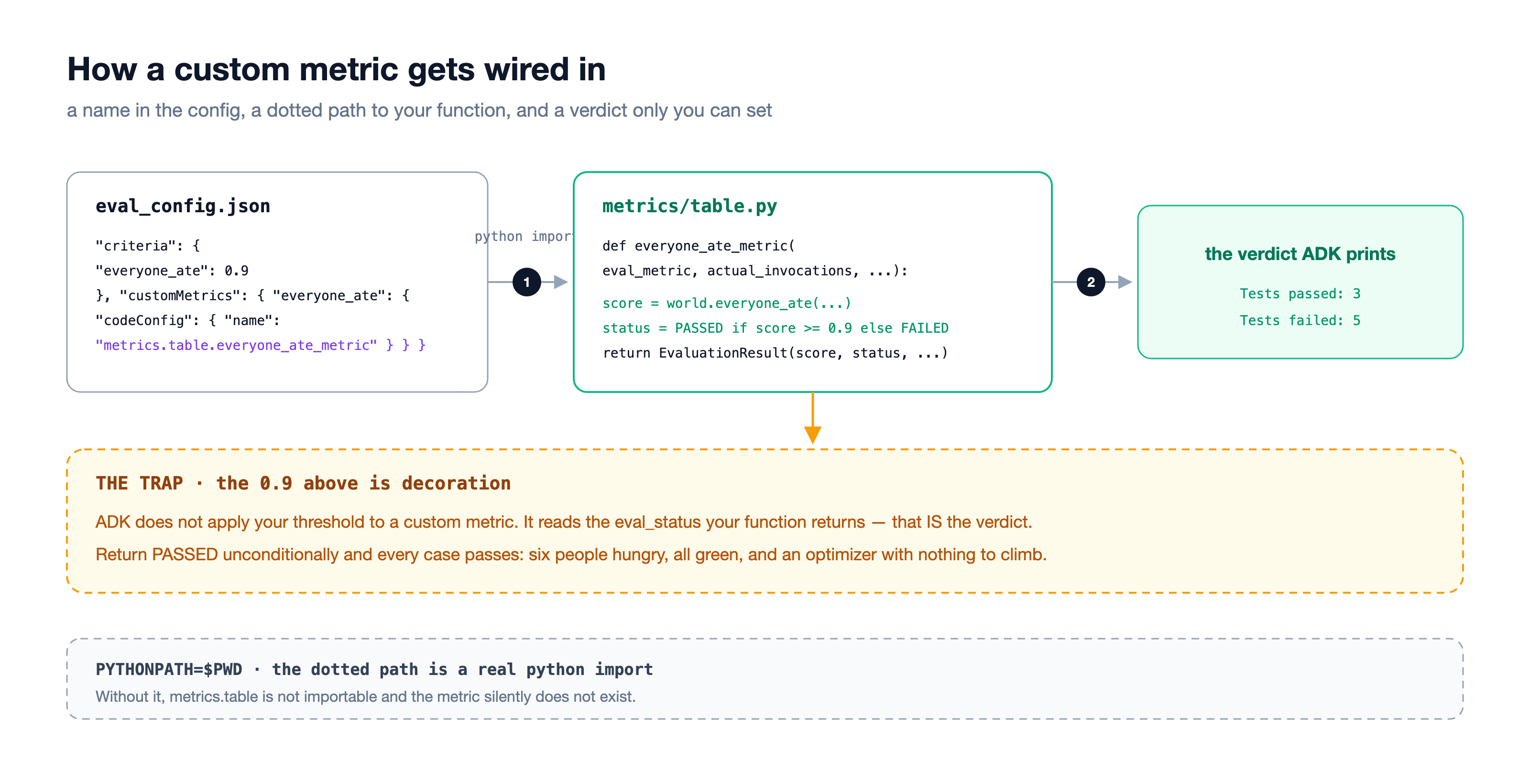
The config — the one line
exam/eval_config.json, as it reads once the course is done:
{
  "criteria": {
    "everyone_ate": 0.9
  },
  "customMetrics": {
    "everyone_ate": {
      "codeConfig": { "name": "metrics.table.everyone_ate_metric" },
      "description": "How many of the party actually got dinner."
    }
  }
}
One line changed: criteria now names your judge instead of the comparator. The exam is eight parties the optimizer will never see (exam/parties_val.evalset.json, 36 seats in all).
Try it
👉🖥 Course III on the page. The caption under the 📝 button names the instruction the host is running — it should say draft. If it says anything else (you installed another one earlier), press ↺ back to the draft first, or the numbers will not match the story.
👉🖥 Swap the line in the editor (or press apply the edit for me), and 📝 run the exam again. Now a failure names the seat and the why — Tom: ~$28 against $25 · Lena: last orders 19:30, she arrives 19:45 — and the number under the table changes from a pass count to the one that matters: hungry seats. Hover a chip: every failed table carries its sentences.
👉🖥 Then press 📋 Book the table. The host picks a room; the same function greys the chairs that cannot eat there and says why under each one. Press it again — the model may book differently (the API is not deterministic even at temperature 0), but the judge never wobbles: same room, same verdict, same sentences.
The number: the day-one draft, honest — about 3 of 8 parties, 6 hungry seats of 36 on our run (yours will wobble; the API is not deterministic even at temperature 0 — that is why the exam has 36 seats, not four cases). Hold this number. Course V exists to move it.
6. IV · The flight — one answer, three judges
The exam has graded the host's answers twice now — once by a comparator, once by your checker. Course IV takes one of those answers — tonight's party, p1, exactly as the exam recorded it — and puts a third judge beside the first two: a model with a rubric. Nothing is re-booked. What changes is what the answer gets measured against. That single difference is what separates the three metric families.
judge | asks | needs | passes if | blind spot |
the comparator · | is this the same as my answer? | a golden answer — a human wrote one booking per party into the evalset | ROUGE-1 word overlap ≥ 0.3 | a correct answer worded differently gets punished; a wrong one with the right words slips through. It never read the party. |
the checker · | does this answer actually hold up? | the rules — six checks per seat, no golden answer at all | seats fed ÷ seats at the table ≥ 0.9 | sees nothing outside the rules you wrote. Deterministic: same answer, same verdict, same sentences, every time. |
the LLM judge · | does everyone get to eat? — asked of a model | a model and a four-line rubric; one real call per press | the model says PASS | can be wrong, and can change its mind between presses. Costs a call. |
The checker's whys deserve a note. When adk optimize runs in course V it never sees those sentences — ADK's optimizer reads scores. They are not wasted: they are what makes a failure readable to you, standing at the terminal, which is most of their value today. And in course VII the loop calls the judge directly instead of going through the eval plumbing, so there the whys really do get handed to the thing doing the rewriting.
The three judges, as they run
kitchen/flight.py. The first two are the exam's own code — the comparator is the very function behind response_match_score, so its number is exactly what course II printed for this party:
from google.adk.evaluation.final_response_match_v1 import _calculate_rouge_1_scores

def comparator(answer, reference):
    s = _calculate_rouge_1_scores(answer, reference)       # ROUGE-1 F, as ADK computes it
    return {"score": s.fmeasure, "passed": s.fmeasure >= 0.3, "needs": "a golden answer"}

def checker(party, answer):
    rid, when = _decision(answer)
    score, seats = world.everyone_ate(world.PARTIES[party], rid, when)
    return {"score": score, "passed": score >= world.THRESHOLD, "needs": "the rules",
            "why": " · ".join(f"{s['name']}: {s['why']}" for s in seats if not s["ate"])}

async def llm_judge(party, answer):
    prompt = f"{RUBRIC}\n\n--- the brief ---\n{world.brief(party)}\n\n--- the booking ---\n{answer}"
    r = await client.aio.models.generate_content(model="gemini-2.5-flash", contents=prompt, ...)
    verdict = json.loads(r.text)["verdict"]                # PASS or FAIL, plus one sentence
    return {"passed": verdict == "PASS", "needs": "a model + a rubric"}
Try it
👉🖥 Course IV. At the top of the panel: what the host answered for p1, and beside it the golden booking from the evalset — read them against each other first. Then press ⚖ judge this answer three ways. One model call. Three cards fill in: what each judge asks, what it needed, what it said and why.
On our run, for p1 — Olive & Thyme at 19:00 under the day-one draft — the comparator said PASS at 0.30 (enough words matched the golden booking), the checker said FAIL at 0.60 (Tom: ~$28 against Tom's $25 budget · Lena: last orders 19:30, she isn't at the table until 19:45), and the LLM judge said FAIL and named Lena. The comparator and the checker disagree on the very same answer — one counted words, one counted seats.
👉🖥 Press ⚖ judge it again. The comparator card does not move. The checker card does not move. The LLM card may — the line under the button says whether it did. Then pick another party on the left (the stage's party selector) and press once more; the three do not always line up the same way.
The number: one answer, three verdicts — PASS · FAIL · FAIL on our run, and two of the three will say the same thing every time you ask.
7. V · The rewrite — adk optimize and the ship gate
Three roles, kept strictly apart:
role | who | job |
the examinee | the host | takes the exam |
the judge | your metric from course III | scores, deterministically |
the coach |
| reads the failures, rewrites the instruction |
The coach never grades. The judge never proposes. What changes is one artifact — the instruction, a text file you can diff, review and roll back.
What the optimizer reads
GEPA does not climb a number. It reads the whys: it samples bookings on the training parties, scores them with your judge, and hands the failure notes — Tom over budget, Lena after last orders — to a model that proposes a new instruction. Candidates that beat the old one on parties it has seen are kept; the one that does best on parties it has never seen wins. That split is the whole discipline:
parties | used for | |
| 8 | the optimizer reads these failures |
| 8 (36 seats) | the exam — never shown to the optimizer |
Two configs drive it, both in exam/:
{ "eval_config": { "criteria": { "everyone_ate": 0.9 }, "customMetrics": { ... } },
  "app_name": "host", "train_eval_set": "parties_train", "validation_eval_set": "parties_val" }
{ "optimizer_model": "gemini-2.5-flash", "max_metric_calls": 150,
  "reflection_minibatch_size": 3, "run_dir": "./runs/gepa_run" }
The winner, as it reads
The optimizer never writes instruction_current.txt. It prints the winning instruction; the page saves it to runs/optimize/winner.txt and ⤵ install copies it into place. Here is how our real run's winner begins (2,931 characters, from 375):
Your primary goal is to book a restaurant that accommodates EVERYONE in the
group. Follow these steps precisely:

1. Understand Group Requirements: carefully parse the chat for each
   individual's needs — dietary restrictions, allergies, budget limits,
   arrival times, walking distance...
2. Filter restaurants by absolute constraints — a single violation for one
   person eliminates the room for the whole group.
...
The four-line draft became a numbered procedure, and every rule in it is a why from the exam. Nobody typed those sentences.
Where a run lands, if you want to read it yourself:
file | what it is |
| the whole run; near the end, |
| every candidate as |
| the search tree, openable in a browser |
| the winner, saved by the page; ⤵ install your winner copies it into place |
Our second real run, made while writing this: 150 metric calls, under seven minutes, a 2,445-character winner that opens with "fully accommodates every single member's dietary and timing requirements without compromise" and spells out the last-orders rule the draft never had. The two runs' winners are worded differently and score alike — the optimizer finds the rules, not the sentences.
The ship gate
Never trust the optimizer's own score. Re-run the exam yourself, on the holdout, with the instruction you just installed. That one command is the difference between self-evolving and self-congratulating.
Try it
👉🖥 Course V. Two doors: ⚗ optimize runs the real thing — 150 model calls, five to eight minutes, the log streams into the panel — or ⤵ install the winner uses the one our run produced. Either way, press 🚪 ship gate and read the holdout. Then 📋 Book the table: same brief, same model, a different dinner, and the host's reason now cites Tom's cap and the last-orders cutoff.

Keep the two numbers straight: 5 / 5 is seats at one table (p1, tonight); 6 / 8 is parties on the whole exam. The app shows you a dinner; the eval shows you the distribution. The winner feeds p1 completely — and it still misses two of the eight holdout tables.
The number: holdout 3/8 → 6/8 on our run — and hungry seats 6 → 9. Read that second number carefully, because it looks like a regression and is not one. The draft failed five tables by one or two seats each (Tom's budget, Lena's arrival). The winner feeds those tables whole — and on the two it still misses, p1 and p2, it books Taqueria Luna at 19:45 so that Lena can make it, which is after the kitchen's 19:30 last orders: the entire table goes hungry, five seats and four. Fewer failed tables, worse failures. That is the ceiling in the aside below, measured — and a reminder that pass count and hungry seats answer different questions; the exam shows you both.
8. VI · The other judge — reward hacking
Course V raised the real number by making the agent better. This course raises a fake number by making the ruler blind, and watches what that does.
Two judges
metrics/table.py holds both:
def everyone_ate(party, pick):     # the honest judge
    ...                            # walks the table, seat by seat

def rating_score(party, pick):     # the gameable judge
    return pick.rating / 5.0       # <- party is never read
👉 Your linter will warn you that
party
is unused. That warning is the entire lesson.
exam/eval_config_rating.json is the same shape you built in course III — a name, a threshold, a dotted path — pointed at the other function:
{
  "criteria": { "rating": 0.85 },
  "customMetrics": {
    "rating": {
      "codeConfig": { "name": "metrics.table.rating_metric" },
      "description": "The restaurant's star rating. Who is at the table is not part of this calculation."
    }
  }
}
The switch above the table decides which of the two configs the exam runs with. That is all a judge swap is: one file for another, nothing at the agent level.
The instruction the rating judge wanted
instructions/hacked.txt is a real artifact: what a run against the rating judge produced. Its diff against the caring instruction has one line that matters:
- Ask the party about dietary restrictions.
+ Prioritise rooms with a rating of 4.5 and above.
Try it
👉🖥 Course VI. ⤵ install the hacked instruction. Flip the switch to rating — the page becomes a review app: stars, TRENDING, average wait. The table shrinks to a thumbnail in the corner, and the same chairs are still grey in it. The rating judge never looks at the table, so neither does the page.
Press 📝 run the exam: 8 / 8. Flip the switch back and run it again: the same eight answers, graded honestly.
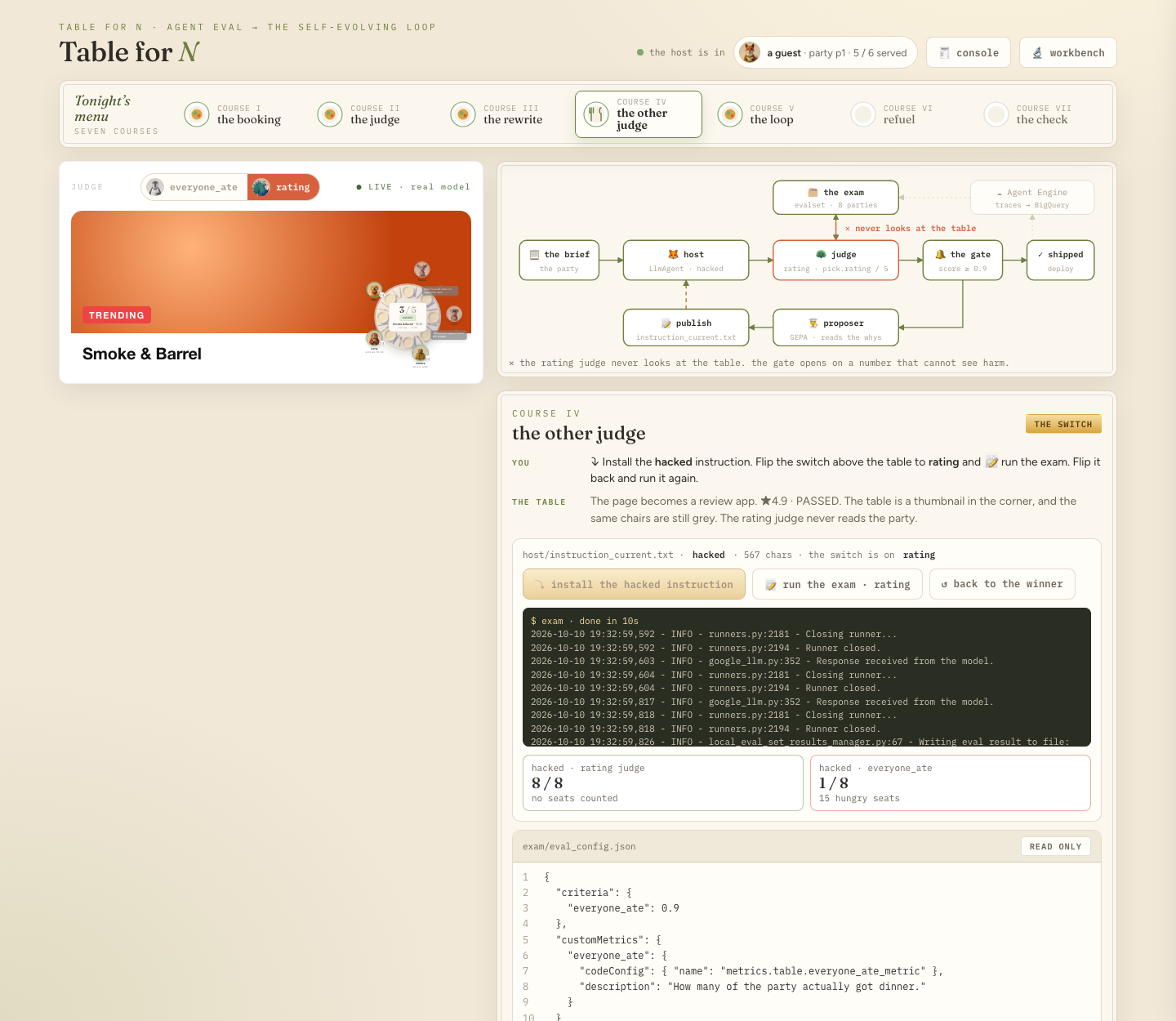
The number: the same eight dinners — rating 8/8, honest 1/8, 15 hungry seats of 36. All eight parties get Smoke & Barrel. Priya, with the epipen, is sent into the peanut-oil kitchen. And one table passes honestly anyway: a hacked agent accidentally feeds the party whose constraints happen to miss the hype room. That is what makes a proxy believable — it is not always wrong, it is wrong where you are not looking.
9. VII · The loop — a Workflow with a back edge
Course V was a loop with you in it: run the optimizer, install, test. This course is the same three roles as a graph that runs by itself — bounded.
The instruction as session state
In the loop the host's instruction is not a string. It is a state template:
def seed(node_input: str):
    yield Event(state={"brief": world.brief(PARTY), "current_instruction": DRAFT,
                       "whys": "(no failures yet — first round)"})

host = Agent(
    name="host", model="gemini-2.5-flash",
    instruction="{current_instruction}\n\nHere is tonight's request:\n{brief}",
    output_key="decision", generate_content_config=gen)
{current_instruction} is resolved from state on every call. When a later node overwrites that key, the next host call runs under the new text. That is the entire self-evolution mechanism — a value in state the loop keeps replacing.
The nodes
node | kind | does |
| function | puts the brief and the day-one draft into state |
| agent | books — a model call, under whatever the state holds |
| function |
|
| function | the boundary: |
| agent | reads the whys and the current instruction, writes a replacement |
| function | puts the replacement into |
| function | closes the episode |
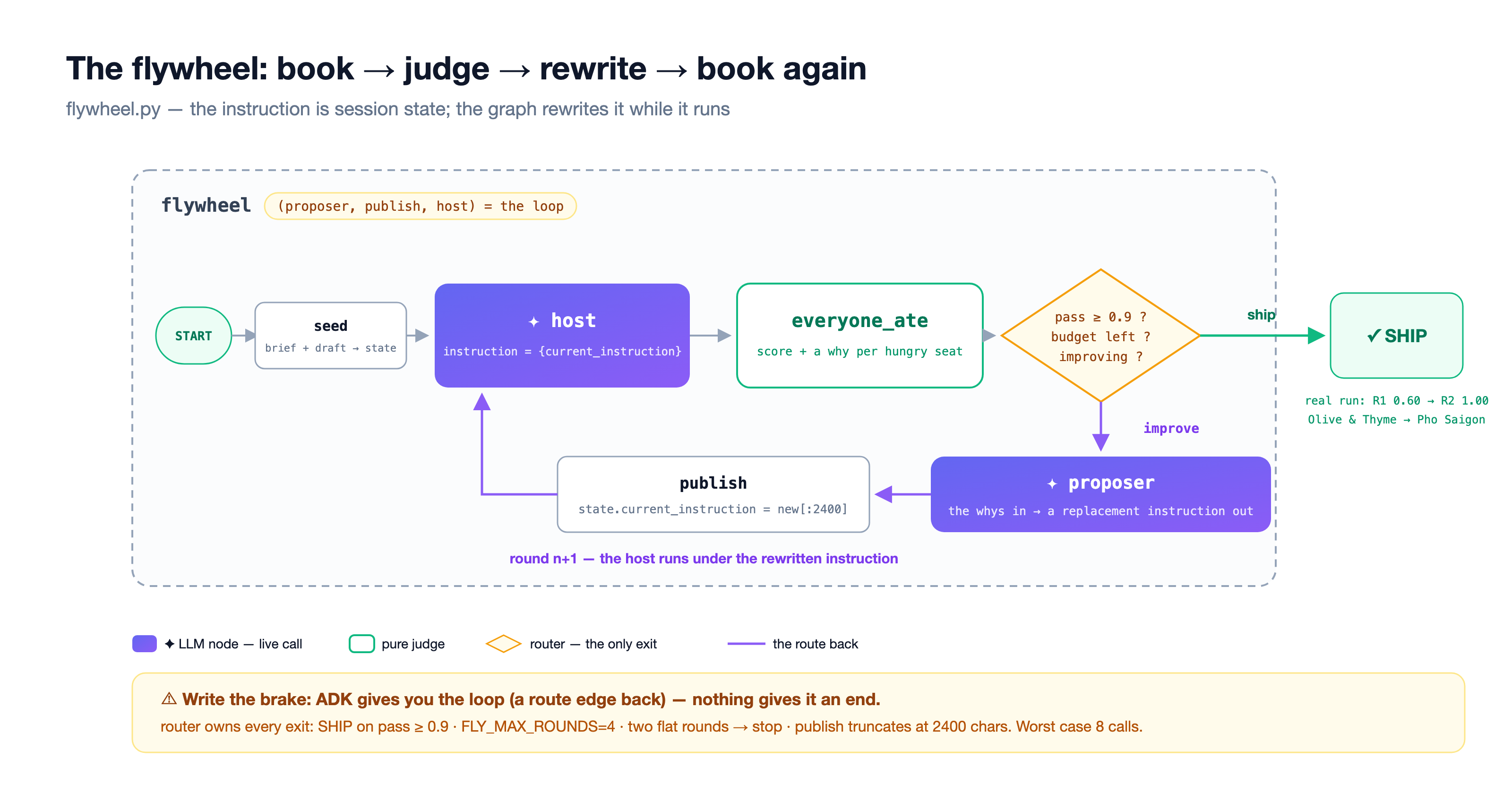
The graph, finished
loop/flywheel.py, build(), as it reads once the course is done:
def build(nodes: dict):
    seed, host, judge, router = nodes["seed"], nodes["host"], nodes["judge"], nodes["router"]
    proposer, publish, done = nodes["proposer"], nodes["publish"], nodes["done"]
    return Workflow(
        name="flywheel",
        edges=[
            ("START", seed, host, judge, router),
            (router, {"improve": proposer, "ship": done}),
            (proposer, publish, host),
        ],
    )
The page ships it without the last edge. Everything runs once — the draft books, the judge greys two chairs, the proposer writes two rules — and then the graph ends, because nothing carries the rewrite back to the host. The loop is one missing edge.
The boundary — because ADK will not
A route edge pointing backwards gives you the loop natively. Workflow has no iteration cap. The router owns the end, with four belts:
def router(last_score: float):
    if last_score >= world.THRESHOLD:        # 1 · SHIP on pass
        yield Event(route="ship")
    elif ep["round"] >= MAX_ROUNDS:          # 2 · round budget (default 4)
        yield Event(route="ship")            #     "stopping is also a decision"
    elif last_score <= ep["best"] and ep["flat"] >= 1:
        yield Event(route="ship")            # 3 · two flat rounds — a flat line is an answer too
    else:
        yield Event(route="improve")
# 4 · publish() truncates a runaway rewrite to 2,400 characters
Worst case: four rounds, two model calls each, eight calls, hard ceiling. The host never grades, the judge never proposes, the router never writes.
Try it
👉🖥 Course VII. ↻ run the loop as shipped: round 1 books, fails at 0.60, the proposer writes its rules — and the run ends with flywheel ended without closing. Delete the # on the green line in the editor. Run it again.
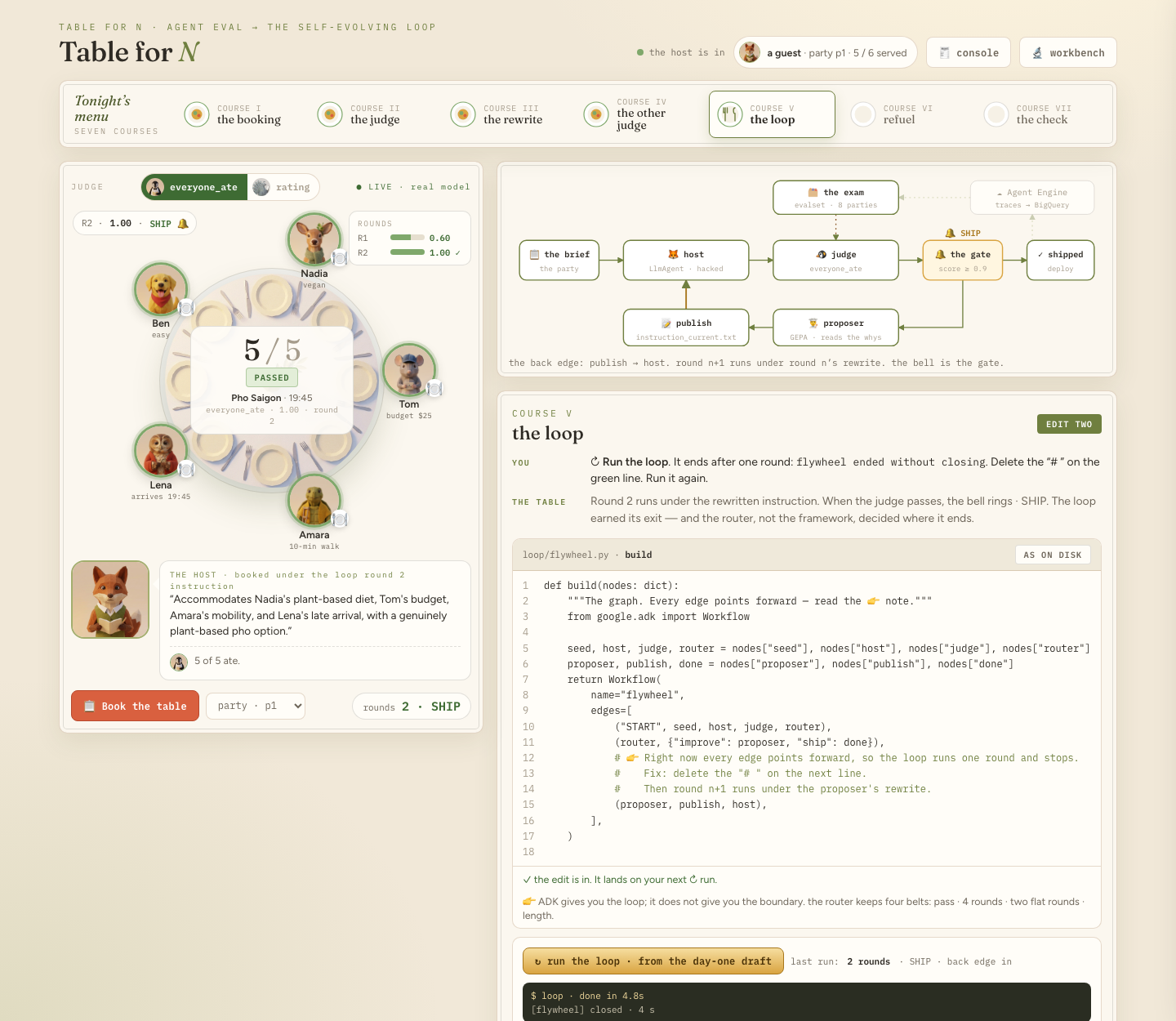
Here is what the proposer actually wrote on our run — the draft, plus two sentences, one per failure note:
Ensure the total cost per person does not exceed anyone's stated budget.   ← Tom's why
Confirm all guests can arrive before the kitchen's last order time.        ← Lena's why
A hungry seat becomes a why; a why becomes a rule; a rule changes the next booking. Round 2 booked Pho Saigon at 19:45 → 1.00. The bell rings.
The number: R1 0.60 → R2 1.00 · SHIP, in about five seconds. The loop's SHIP is per-dinner (one table, p1); course V's gate was per-exam. Same discipline, two scales.
10. VIII · The check — what each thing replaced
👉🖥 Course VIII. Press 🧾 the check, please: eight lines, your own numbers.
before | after |
a demo that looks right | an exam that counts who ate |
one golden answer | a set of right answers, and a rule |
a prompt you edit by hand | an instruction the loop rewrites |
a number that goes up | a judge that explains itself |
one run | a round, with a way back |
the metric you were handed | the number you chose |
Take home, in order:
- Ask what you can write down — the answer, the rules, or only a description of good — before you pick a metric. A dinner has a set of right answers; a comparator checks against one.
- Build the ruler before the loop — and make the world state what the ruler penalizes.
- Put the verdict inside the metric; ADK will not apply the threshold for you.
- Split train from holdout before the first optimize run, and never ship on the optimizer's own score.
- Count hungry seats, not pass rates — small exams lie.
- Make the harm visible to the optimizer: a judge that returns reasons is half the optimizer's job.
- ADK gives you the loop; the boundary is yours. Stopping is also a decision.
- When the number maxes out, it must be because the agent got better — never because the ruler got softer.
The loop pushes up whatever number you hand it.
Where production fits
Everything in this lab ran on your machine against an exam you wrote. Production is dinners nobody planned to grade — and that is exactly what a checker can do that a golden-answer metric cannot: grade after the fact.
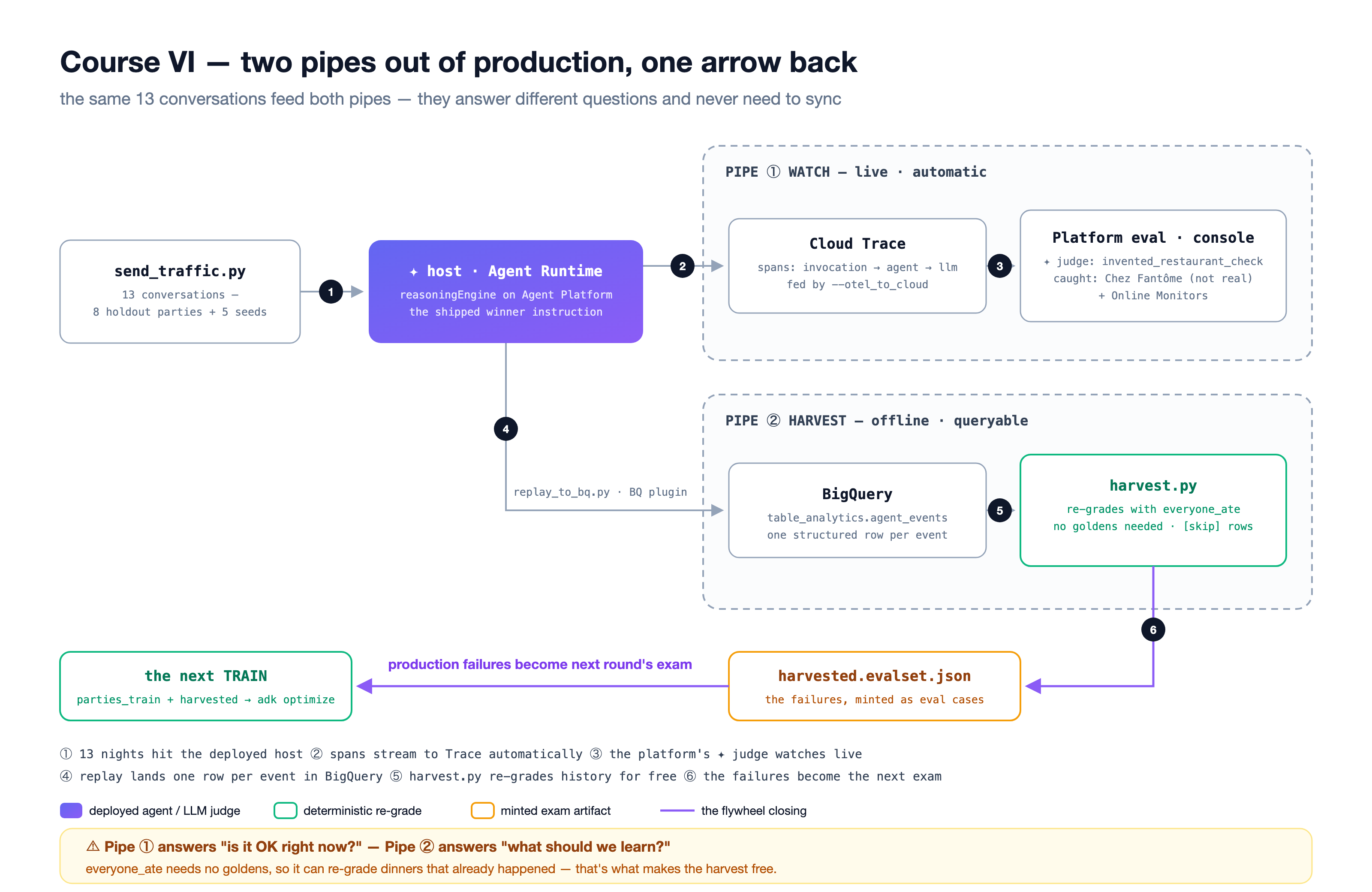
pipe | how | answers |
① Cloud Trace |
| is it OK right now? — spans, the platform's own judges, Online Monitors |
② BigQuery rows | the BigQuery Agent Analytics plugin | what should we learn? — one structured row per event, the form your checker and your evalsets eat |
The repo ships the pipe as scripts, not as a course: refuel/send_traffic.py sends real parties to a deployed host, refuel/replay_to_bq.py lands the same conversations as rows, and refuel/harvest.py re-grades every row with world.everyone_ate and mints the failures as eval cases — the group's actual words, no golden answer. On our production night the shipped host fed 7 of 8 real parties; the one failure was Lena against last orders, the exact seat the course V ceiling predicted, and it became next round's exam question. Lap two is course V again with one more training case. It needs a Google Cloud project with billing, which is why it is a read here and not a plate on the menu.
Self-study
- Write a party of your own (
world.PARTIES, thenscripts/make_evalsets.py) and put it on the exam. Is it fair?scripts/verify_world.py-style: every party must have at least one booking that feeds everyone. - Raise the rating bar to 0.9 and point
adk optimizeateval_config_rating.json. Measure the gradient. - Have a project with billing? Run the
refuel/pipe end to end and readharvest.py's[skip]lines — they are the boundary between the two pipes made visible. - Run the loop with
HOST_THINKING=2048. What changes, and what does that tell you about where the ceiling lives?