1. Introduction

This codelab guides you through building next-generation agentic systems using workflows and graphs in the Agent Development Kit (ADK). You will implement common architectural patterns, orchestrate human-in-the-loop (HITL) interactions, and handle long-running asynchronous execution. You will also integrate enterprise knowledge bases and persistent memory to customize and evolve agent behavior. Finally, you will connect these capabilities to drive an automated video generation pipeline.
The scenario
You run a digital channel on VibeTube with an active audience and an expanding backlog of creative ideas. Producing each video requires continuous execution across multiple stages: researching trending formats, synthesizing viewer feedback, developing scripts, checking policy compliance, and generating video clips. Generative models can draft individual assets, but delivering consistent releases requires an orchestrated agent architecture.
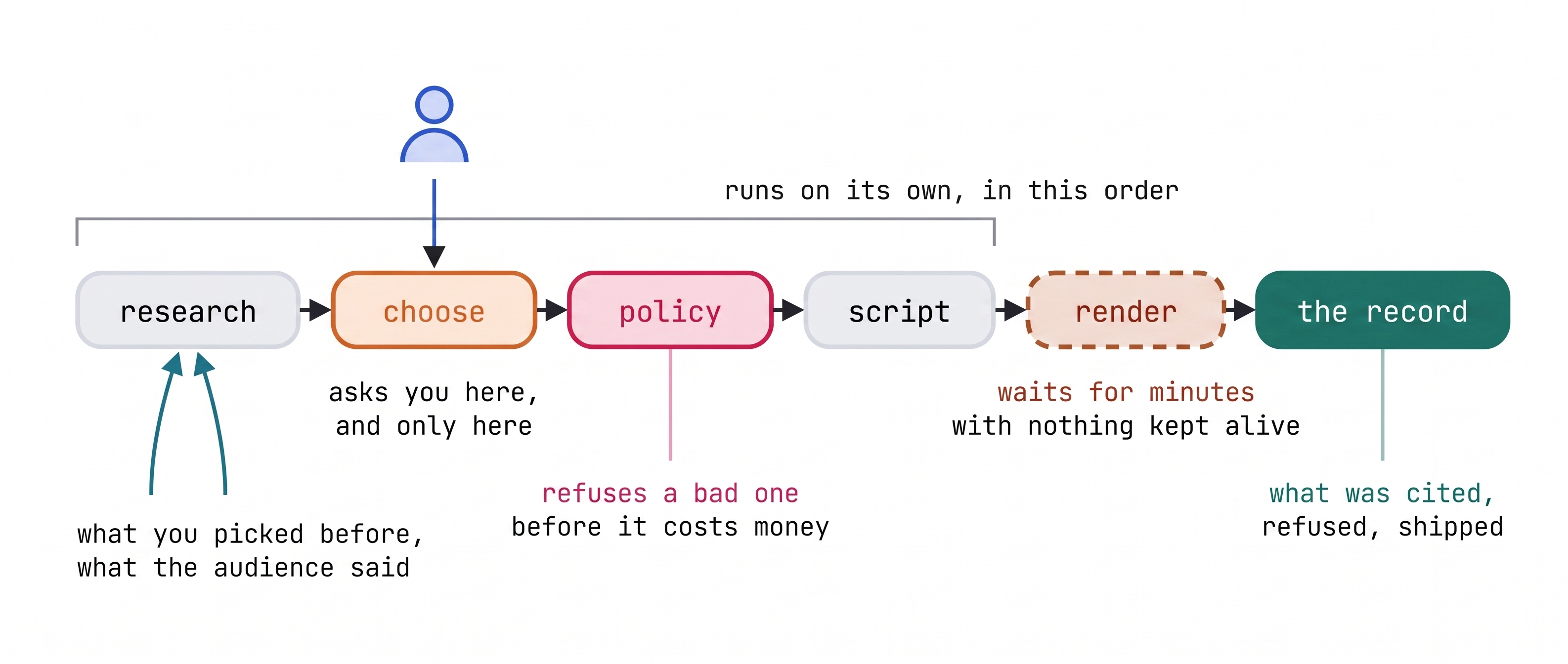
To automate this lifecycle, you will build VibeStudio. This agentic pipeline executes routine research in parallel, presents curated options for human-in-the-loop sign-off, applies automated policy gates before generating video, and preserves context across production runs.
What you learn
- Graph engineering foundations: Multi-step agent architectures require explicit control flow and structured execution paths. You build an ADK
Workflowusing edge tuples, theSTARTentry point,JoinNodefor parallel fan-out aggregation, and deterministic router nodes to steer execution based on state. - Agent modes and lifecycle callbacks: Specialized tasks require distinct operational behaviors and deterministic guardrails. You configure ADK
Agentinstances usingchat,single_turn, and tool-enabledtaskmodes as workflow nodes, applying interceptors withbefore_model_callbackandafter_agent_callback. - Human-in-the-loop orchestration: Production pipelines pause for human judgment at critical creative checkpoints. You implement
RequestInputto suspend workflow execution, enforce structured response schemas, and resume execution without keeping idle runtime processes alive. - Hierarchical agent memory: Production systems separate ephemeral execution state from durable context. You manage short-term session state using
Event(state=...)and parameter binding, and connect GEAP Memory Bank to extract, consolidate, and persist creator preferences across runs. - Grounding with enterprise knowledge bases: Autonomous agents require dynamic domain context and audience sentiment. You connect a GEAP RAG Engine corpus as a dedicated retrieval node within the parallel fan-out to semantically ground agent outputs.
- Long-running workflows and deployment: Multimodal video rendering operates asynchronously over extended durations. You implement
LongRunningFunctionToolwith pending call receipts to suspend and resume the workflow by call ID, and deploy the finished pipeline using the ADKRunneron Cloud Run.
How this codelab is organized
This codelab serves as your conceptual and architectural reference. Each section explains the ADK constructs implemented in the corresponding workbench step, provides reference code, and establishes core design principles. Review each section before completing the corresponding exercise in the workbench.
Hands-on work takes place in the VibeStudio Workbench, a companion web interface featuring an interactive code editor, runtime verifiers, and an embedded ADK inspector. Step numbering in the workbench aligns directly with this codelab to keep your progress synchronized. Foundational graph edits persist across steps, with the workbench automatically verifying prerequisites as you advance.
Upon completing the workbench exercises, you will assemble an end-to-end agentic pipeline and deploy a running VibeStudio application to Cloud Run to generate video content.
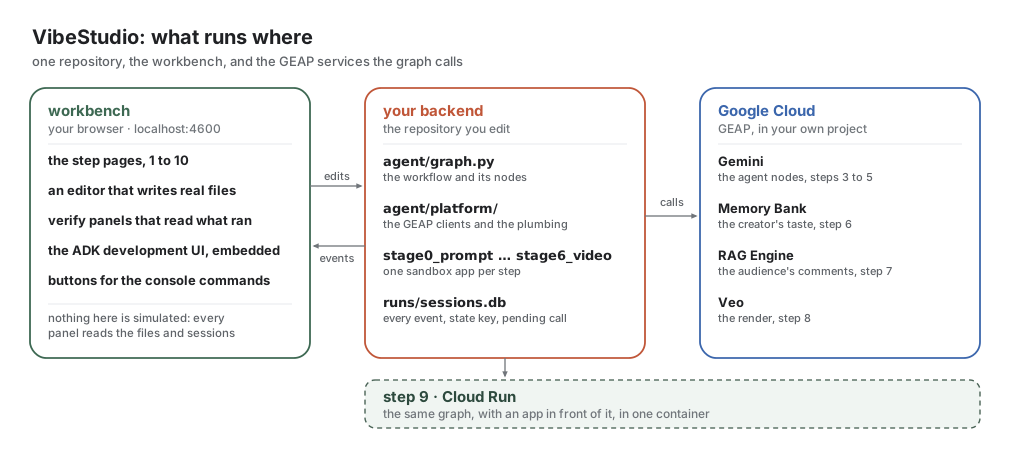
The environment consists of three primary components: the VibeStudio Workbench (the local web interface for code editing and runtime verification), your backend (the ADK Workflow and stage sandboxes in agent/), and Google Cloud (Gemini models, GEAP Memory Bank, RAG Engine, and Veo video generation).
2. Setup
Claim your workshop credits
If you are attending an instructor-led lab, the instructor will distribute credits for your Google Cloud project. Follow the instructor's instructions to redeem your credits and ensure billing is active on your account before continuing.
Open Cloud Shell
Cloud Shell is a browser-based development environment with gcloud, Python, and git preinstalled.
To launch Cloud Shell:
- Navigate to the Google Cloud console.
- In the top navigation header, click Activate Cloud Shell (the terminal window icon).
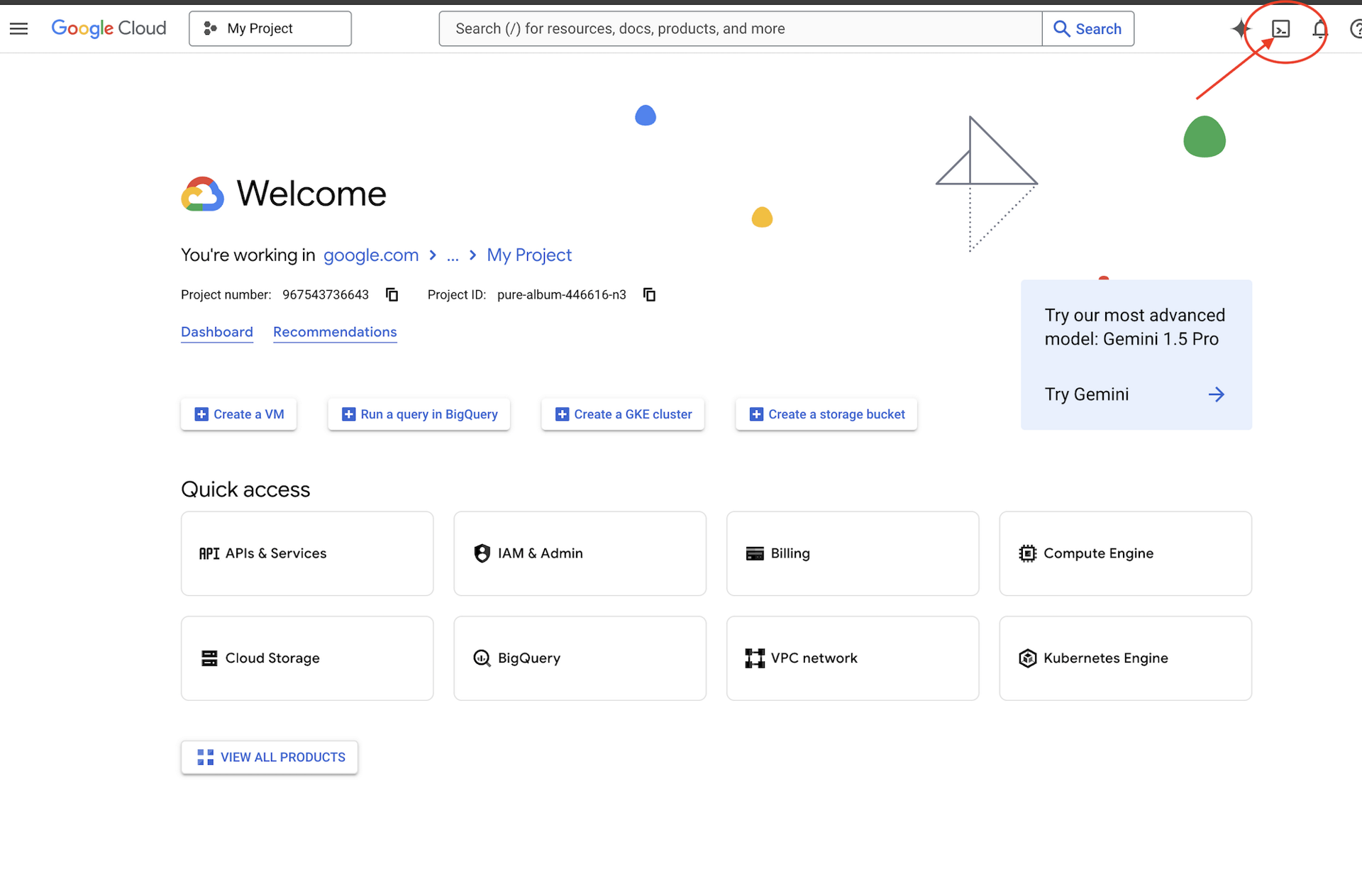
A terminal session opens at the bottom of the browser window.
Clone and initialize the repository
Run the following commands in the Cloud Shell terminal to clone the project:
git clone https://github.com/gca-americas/vibetube-studio
cd ~/vibetube-studio
Configuration prompts
During setup, you will be prompted for the following details:
- Google Cloud project ID: When prompted by
setup_project.sh, press Enter to create a fresh project automatically. If you prefer to use an existing project (such as a pre-assigned project), enter your project ID and ensure the spelling is correct with billing active. - Event code: Enter the room code provided by your instructor. If you did not receive one, check with a teaching assistant or a neighbor. If you are completing this lab at home, press Enter to accept the default
sandboxroom. - Channel display name: Enter your name or preferred channel handle when prompted by
setup_codelab.sh, or press Enter to accept the default generated from your Google account.
Run the two setup scripts in order:
./setup_project.sh
./setup_codelab.sh
setup_project.sh: Creates or reuses a Google Cloud project with active billing, saves the project ID to~/project_id.txt, and configures the activegcloudcontext.setup_codelab.sh: Installsuvand Python dependencies into.venv, enables required Google Cloud APIs, configures your channel settings in.env, verifies model access with Gemini, provisions Memory Bank and RAG resources, builds the workbench interface, and starts the VibeStudio Workbench.
The script runs the preflight check and starts the VibeStudio Workbench in the background. Its last lines display the link to open.
7 · Preflight
  ✓ python 3.12
  ✓ auth path A: Vertex via ADC (STUDIO_VERTEX=1)
  ✓ Google Cloud ADC (project <your-project>)
  ✓ stage0_prompt loads
  ...
  ✓ stage6_video loads (13 edges)
  ✓ aiplatform.googleapis.com enabled (Gemini, Veo, Memory Bank, RAG Engine)
  ✓ vectorsearch.googleapis.com enabled (the vector store a RAG corpus is built on)
  ✓ Memory Bank connected
  ✓ RAG corpus connected
  ✓ VibeStudio Workbench running on port 4600

PREFLIGHT GREEN

Setup finished. The VibeStudio Workbench is already running.

  Open this and start at step 1
      https://4600-<your cloud shell host>/step/story

  It runs in the background. You do not need to start anything else.
      log      runs/lab.log
      stop     kill $(cat runs/lab.pid)
      start    scripts/start.sh
Click that link. The same address is available under Web Preview → Change port → 4600.
To re-check the environment at any point, run python scripts/preflight.py. To restart the workbench, run scripts/restart.sh. To set up again, run ./setup_codelab.sh; it preserves your configuration and progress.
With it open, read step 1, The story, for the scenario, and step 2, What you build, for the shape of the finished graph. Neither has an exercise. Then return here for step 3.
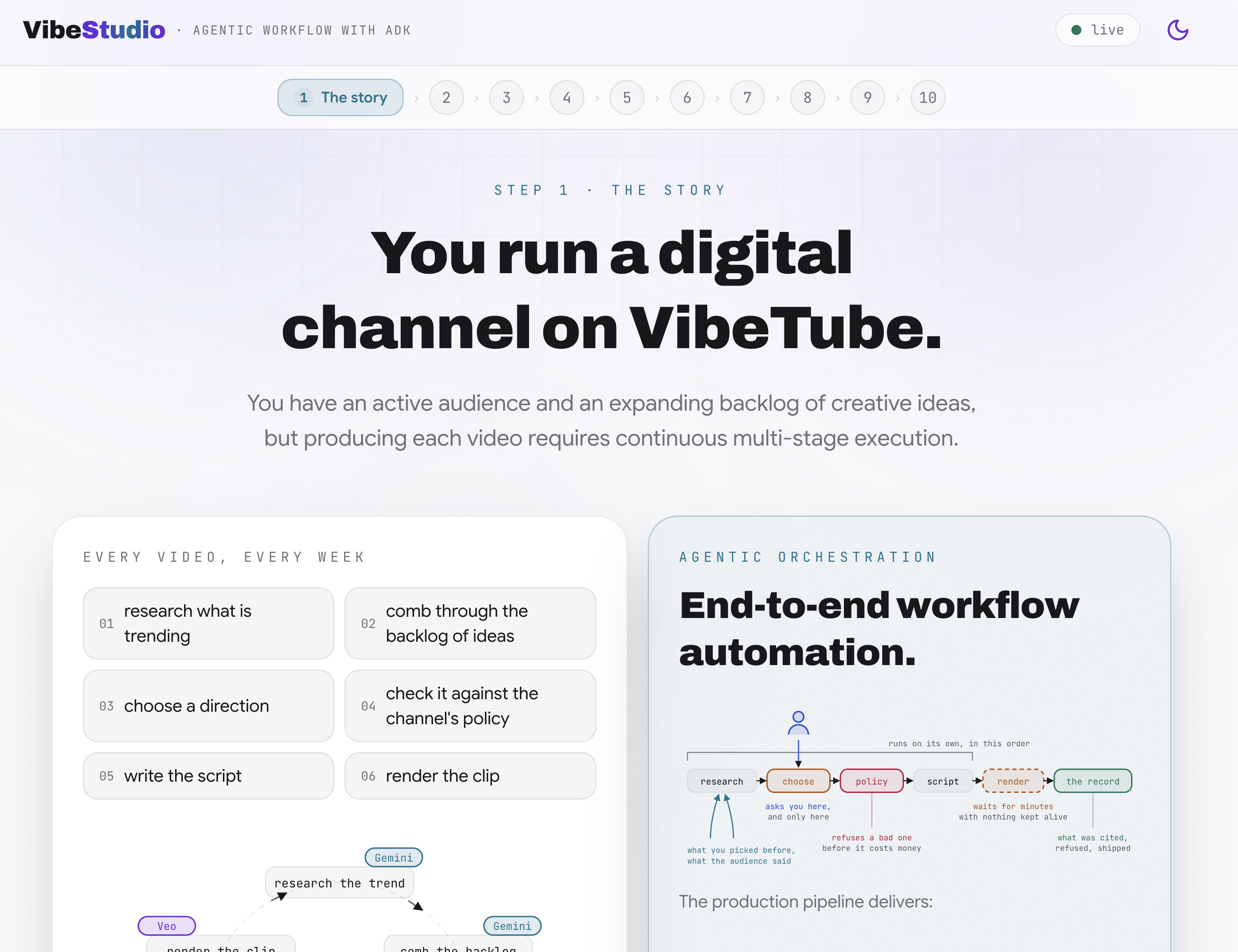
Every hands-on part of the VibeStudio Workbench ends with a verification panel that reads the real artifacts: the file on disk and the sessions written by runs.
Repository layout
The repository is structured into the core workflow logic, step-by-step sandboxes, the workbench environment, and the production application:
vibe-studio-lab/
├── agent/                  # Core ADK workflow, graph definition, and platform services
│   ├── graph.py            # Workflow graph definition, node functions, and routers
│   ├── desk.py             # Video render desk using LongRunningFunctionTool
│   ├── schemas.py          # Pydantic schemas for directions, gates, and scripts
│   ├── trends.py           # Trend generation and sampling utilities
│   ├── backlog.txt         # Creator video ideas backlog
│   ├── comments.md         # Audience comments for RAG Engine corpus seeding
│   ├── policy_words.txt    # Blocked subject words for deterministic policy checks
│   └── platform/           # Google Cloud service clients (Memory Bank, RAG, Veo)
│       ├── config.py       # Environment variables, locations, and model configurations
│       ├── memory.py       # GEAP Memory Bank callbacks and context injection
│       ├── rag.py          # GEAP RAG Engine corpus creation and semantic retrieval
│       └── videogen.py     # Veo video generation and operation polling
├── stage0_prompt/          # Step sandboxes: isolated agent.py files runnable in adk web
│   └── ...                 # stage1_fanout through stage6_video for incremental steps
├── server/ & web/          # VibeStudio Workbench (FastAPI backend and React frontend)
├── vibestudio/             # Complete production application deployed to Cloud Run
│   ├── server/             # FastAPI production server and event runner
│   ├── web/                # End-user React web application
agent/: Contains the core workflow graph. You will edit files in this directory to implement parallel fan-out nodes, deterministic policy routing, memory callbacks, and video generation tools.agent/platform/: Interfaces with Google Cloud services, including Gemini models, GEAP Memory Bank, GEAP RAG Engine, and Veo video synthesis.stage0_prompt/throughstage6_video/: Self-contained sandbox environments. Each folder exports a standaloneroot_agentso you can run and inspect each step in isolation via the embedded ADK development interface.server/andweb/: The VibeStudio Workbench application running locally on port 4600. It hosts the step documentation, in-page code editor, runtime evidence verifiers, and graph visualization.vibestudio/: The complete production application packaged and deployed to Cloud Run in the final step. It contains its own standalone copy of the completed workflow graph.
3. Monolithic agent
Before constructing a multi-node workflow graph, you establish an architectural baseline with a single agent in stage0_prompt/agent.py. This agent relies on a monolithic system prompt describing the production pipeline in prose, supported by two Python function tools.
Evaluating this baseline demonstrates the operational boundaries of prompt-driven coordination and establishes why production systems require graph orchestration.
ADK agent architecture (3A)
In the VibeStudio Workbench, navigate to Step 3 · Monolithic agent and open ADK agent architecture (3A). This view presents the core architectural layers of an ADK agent (LlmAgent):
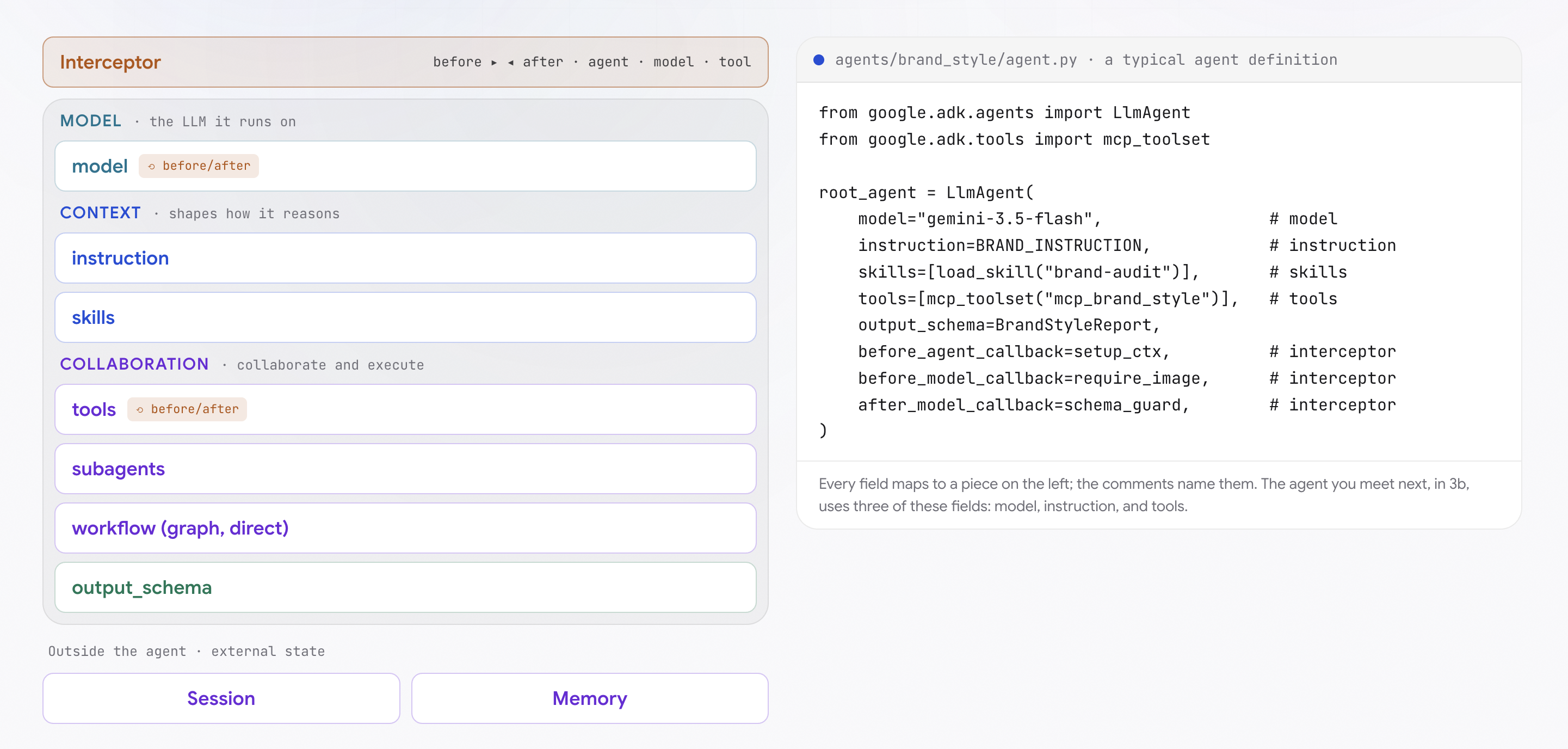
from google.adk.agents import LlmAgent
from google.adk.tools import mcp_toolset

root_agent = LlmAgent(
    model="gemini-3.5-flash",                 # model
    instruction=BRAND_INSTRUCTION,            # instruction
    skills=[load_skill("brand-audit")],       # skills
    tools=[mcp_toolset("mcp_brand_style")],   # tools
    output_schema=BrandStyleReport,           # structured output
    before_agent_callback=setup_ctx,          # interceptor
    before_model_callback=require_image,      # interceptor
    after_model_callback=schema_guard,        # interceptor
)
The interactive diagram groups agent components into five operational domains:
- Reasoning layer (Model): The core language model (such as Gemini 3 Flash) executing cognitive tasks, prompt reasoning, and tool selection. Everything else in the architecture either informs or constrains this model.
- Context layer (Instruction and Skills): Directives that shape model reasoning.
instructionestablishes the permanent system prompt, persona, and operational rules.skillsprovide versioned, procedural guidance (SKILL.md) for repeatable workflows. - Collaboration and action layer (Tools, Subagents, Workflow, Output Schema): Interfaces enabling the agent to act on external systems and emit typed data.
toolsprovide callable Python functions or Model Context Protocol (MCP) endpoints.subagentsexecute subordinate delegated tasks.workflowcoordinates multi-agent graphs.output_schemaapplies Pydantic models to guarantee downstream consumers receive validated JSON instead of unstructured text. - Interceptor layer (Lifecycle Callbacks): Deterministic guardrails executing custom code before and after agent execution (
before_agent/after_agent), individual model turns (before_model/after_model), and tool calls (before_tool/after_tool). Interceptors enforce policy rules without relying on model compliance. - External state (Session and Memory): Stateful persistence separated from agent logic.
Sessionpreserves transient working memory and the event trace for the current execution thread.Memorymaintains durable cross-session facts and preferences using managed services such as GEAP Memory Bank.
The monolithic agent in this step implements only three of these primitives: model, instruction, and tools. Subsequent steps introduce graph workflows, structured schemas, interceptors, and persistent memory services.
Monolithic agent specification (3B)
In the workbench, advance to Monolithic agent specification (3B). Open stage0_prompt/agent.py to examine the baseline agent definition:
- Single prompt instruction: The system prompt condenses five distinct production tasks into continuous prose: discovering platform trends, reviewing backlog ideas, proposing creative concepts, enforcing prohibited subject policies, and drafting shot lists.
- Underlying data sources: The agent references two sources defined beside the graph:
agent/trends.py: Samples ten active format and style trends from a pool of 250 with dynamic heat scores.agent/backlog.txt: Reads the creator's raw concept notes line by line.
Tools in Agent (3C)
In the workbench, advance to Tools in Agent (3C).
What is a tool to an agent?
A language model is inherently a closed-world reasoning engine: it operates solely on pre-trained weights and the tokens present in its immediate context window. It cannot natively query a database, access real-time APIs, or execute code.
A Tool bridges this boundary. It grants the model external agency, allowing it to retrieve ground-truth information and execute deterministic actions in external systems.
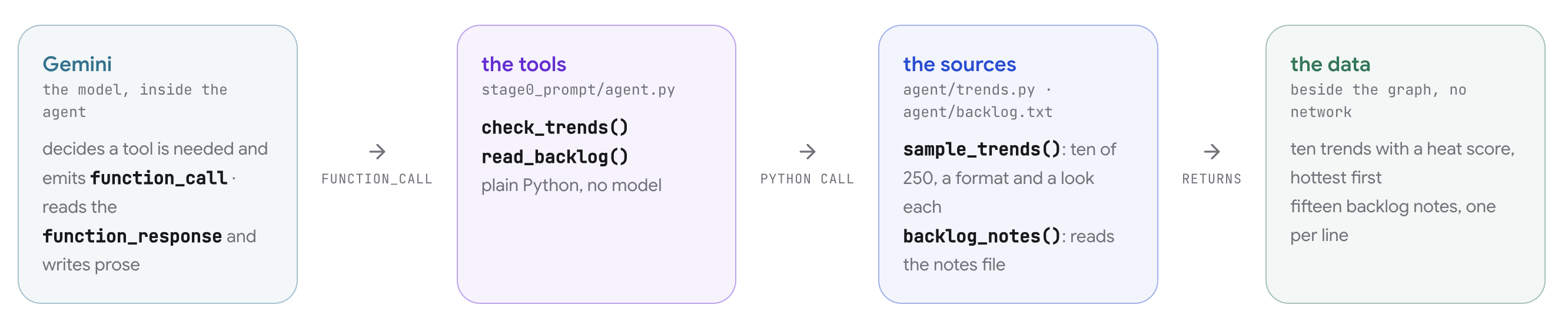
Tool calling follows an explicit five-stage protocol between the model and the ADK runtime:
- Schema declaration: The developer provides Python functions to the agent. ADK inspects each function's name, type annotations, and docstrings to generate an OpenAPI-compatible JSON schema declaration describing its parameters and purpose.
- Model reasoning: During inference, the model evaluates whether the user's prompt requires external data. If needed, the model emits a structured
function_callevent containing the target function name and argument dictionary matching the schema. - Runtime execution: The model itself does not execute code. The ADK runtime intercepts the
function_call, executes the actual local Python function using the provided arguments, and captures the return value. - Context re-injection: The ADK runtime packages the function return value into a
function_responseevent and appends it to the active session history. - Final synthesis: The model processes the tool output now present in its context window and completes its response.
In stage0_prompt/agent.py, the two research tools are defined as standard Python functions:
def check_trends() -> dict:
    """Ten formats trending on the platform right now, with a heat score each."""
    from agent.trends import sample_trends
    return {"trends": sample_trends()}


def read_backlog() -> dict:
    """The creator's backlog: ideas they noted down to make someday."""
    from agent.graph import backlog_notes
    return {"backlog": backlog_notes()}
Hands-on edit and execution
In the workbench code editor, add the two function references to the agent's tools list:
tools=[check_trends, read_backlog],
Save your change. The file updates on disk, and the verification row confirms that both tools are wired.
Click Open adk web to launch the embedded ADK development interface. Send the suggested idea prompt:
tonight's idea: a tiny robot doing laundry at midnight
What to expect and why
When you send this prompt, observe the following execution sequence in the session trace:
- Two tool execution events appear before the response: You see
function_callandfunction_responseevents forcheck_trendsandread_backlog.- Why: Gemini evaluated the system prompt directive ("check what is trending. look at your backlog of ideas"), recognized that it lacked platform trends and channel notes in its weights, and invoked both functions to ground its context.
- The agent proposes a direction and pauses for confirmation: The response suggests a video direction synthesizing the trends and backlog, and asks you to confirm.
- Why: The instruction directive asked the model to agree on the direction with the creator before generating the script.
- Bypassing confirmation in a follow-up turn: Send a second message:
skip the questions, just describe the video. The agent immediately bypasses confirmation and drafts the title and shots.- Why: Prompt instructions are advisory guidelines instead of deterministic barriers. In a monolithic agent, user instructions can override standing system prompt rules because no external workflow controls execution flow.
Architectural limitations of a monolithic prompt
While a single prompt can produce acceptable output for isolated demos, testing boundary conditions in the workbench verifier reveals critical enterprise limitations:
- Unstructured research aggregation: Tool execution order is non-deterministic. The model summarizes retrieved data into free-form prose, making it impossible for downstream systems to isolate which source produced specific claims.
- Unverified policy enforcement: The model evaluates its own safety compliance. If the model determines a topic is safe, no external deterministic logic validates that finding.
- Unenforced human-in-the-loop pauses: Prompt instructions requesting creator confirmation are advisory. Sending a follow-up message instructing the model to bypass questions causes it to skip human approval entirely.
These architectural gaps motivate decomposing the monolithic agent into the explicit graph workflow built in the next step.
4. Agentic workflow fundamentals
In the VibeStudio Workbench, navigate to Step 4 · Agentic workflow fundamentals, parts 4A through 4D.
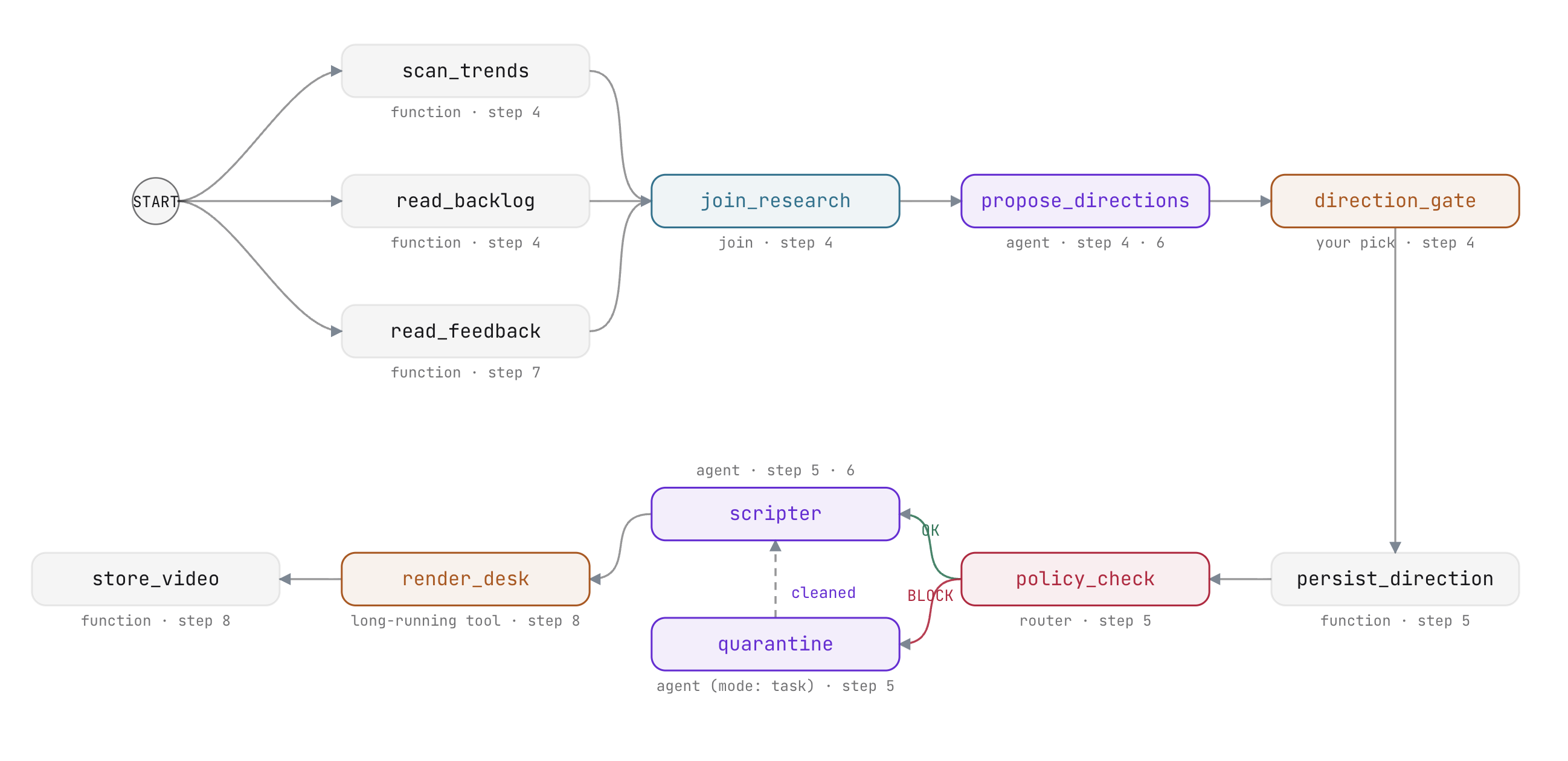
This step transitions from a single-agent baseline to deterministic graph orchestration using ADK Workflow. You will build a parallel research fan-out, synchronize branches with a join node, generate schema-validated creative candidates, and introduce a deterministic human-in-the-loop approval gate.
Graph architecture and execution chains (4A)
In the workbench, open Graph architecture and execution chains (4A).
An ADK Workflow structures agent execution as a directed graph defined by an edge list:
- Chains: Sequential tuples define linear node execution (
(node_a, node_b, node_c)). - Parallel branches: Independent chains sharing an origin node execute concurrently.
- Synchronization: Chains converging on a
JoinNodewait until all incoming branches report before releasing. - Deterministic control: Execution flow is governed by declared code structures instead of being inferred from prompt text.
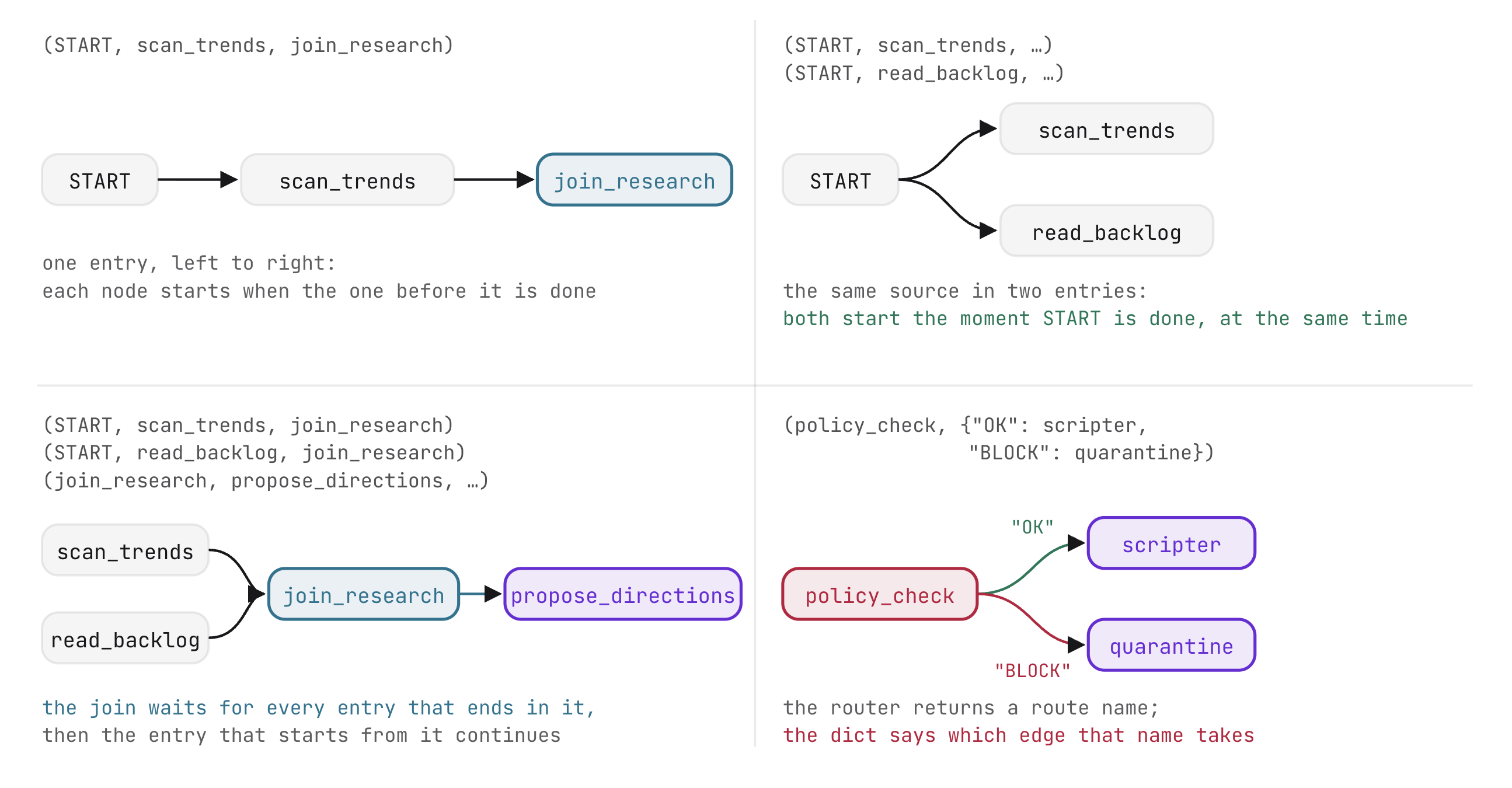
Node archetypes in ADK
ADK workflows compose several specialized node types. Each archetype performs a specific operational role in the graph, separating deterministic code execution from generative model reasoning:
Node Archetype | Implementation | Role in Pipeline |
Function node | Python function returning an | Executes deterministic logic, data retrieval, and state mutations. |
Join node | Built-in | Synchronizes concurrent branches into an aggregated dictionary. |
Agent node |
| Evaluates instructions against upstream input and emits validated data. |
Router node | Function returning an | Evaluates conditional logic to select downstream execution branches. |
Human input node | Function yielding | Suspends execution state until an external user response arrives. |
root_agent = Workflow(
    name="stage1_fanout",
    description="2 real readers -> join -> one research dict",
    edges=[...])
In this configuration, root_agent is an instance of Workflow instead of a standalone Agent. ADK treats workflows as first-class agents, allowing an entire graph to be loaded, served, and inspected as a unified application. The name registers the application in ADK Web, while the edges list defines its execution topology.
Parallel research fan-out (4B)
In the workbench, advance to Parallel research fan-out (4B). Open stage1_fanout/agent.py.
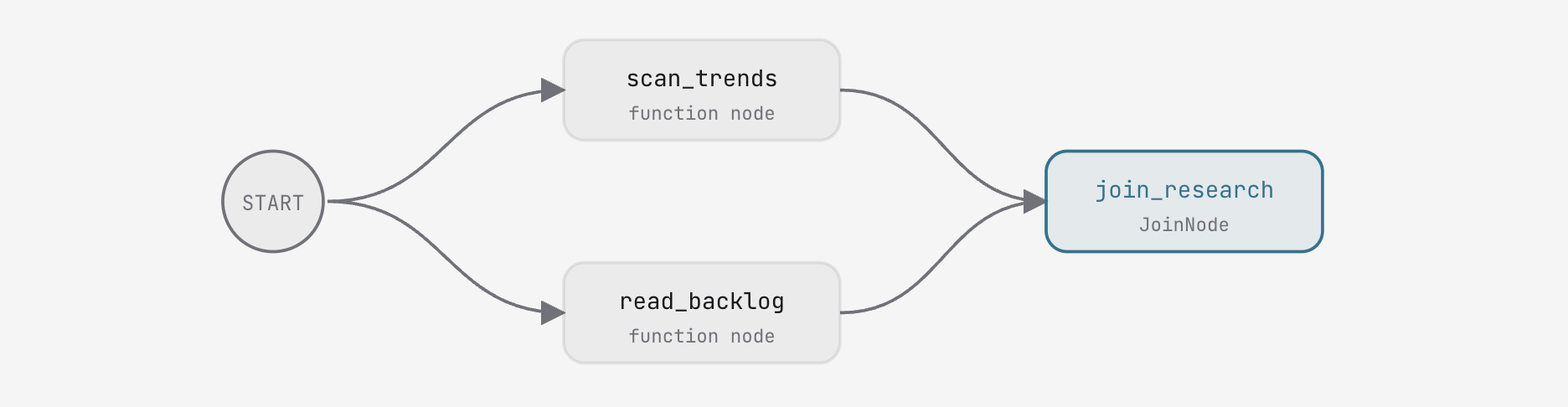
Function nodes and synchronization barriers
The research phase uses two function nodes imported from agent/graph.py:
scan_trends: ReturnsEvent(output={"trends": [...]})containing ten scored platform trends.read_backlog: ReturnsEvent(output={"backlog": [...], "idea": "..."})containing fifteen channel backlog ideas alongside the initial run prompt.
Each function accepts node_input (the previous node's output) and returns an Event.
A JoinNode serves as a synchronization barrier: it pauses until every inbound chain delivers an event, then aggregates all branch results into a dictionary keyed by node name ({"scan_trends": {...}, "read_backlog": {...}}).
Hands-on edit: defining the join and parallel edges
In stage1_fanout/agent.py, instantiate the JoinNode and wire the two parallel chains starting from START:
join_research = JoinNode(name="join_research")
    edges=[(START, scan_trends, join_research),
           (START, read_backlog, join_research)])
Save your changes. The workbench verifier confirms that the join and edges are wired. Run the stage using Run Stage 1 or through the embedded ADK Web interface.
What to expect and why
- Concurrent reader execution: In the execution graph,
scan_trendsandread_backlogexecute simultaneously.- Why: Both chains originate at
START. The ADK engine schedules independent branches concurrently.
- Why: Both chains originate at
- Aggregated dictionary output: The workflow completes at
join_research, outputting a dictionary with entries for both readers.- Why:
JoinNodeensures complete data capture before allowing subsequent nodes to execute.
- Why:
Agent nodes (4C)
In the workbench, advance to Agent nodes (4C). Open stage2_direction/agent.py.
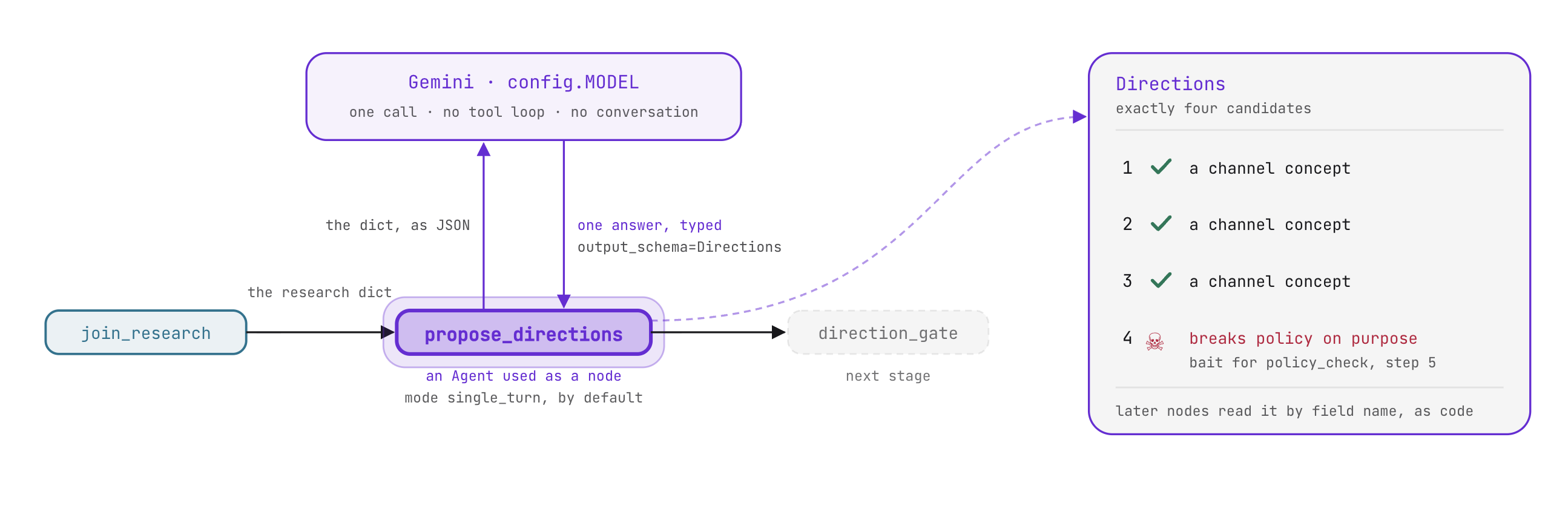
Operating modes and structured schemas
When embedded within a Workflow, an Agent runs in single_turn mode by default:
- It receives the previous node's output as its context input.
- It executes a single inference call without conversational back-and-forth.
- It outputs structured data to the next node.
By assigning output_schema=Directions, the agent enforces Pydantic validation on model output. The downstream graph receives typed objects instead of unstructured prose:
class Direction(BaseModel):
    title: str           # <=60 chars, filmable, characterful
    angle: str           # the twist, one line
    hook: str = ""       # 2-4 words, the video's sticker line
    evidence: list[Evidence]


class Directions(BaseModel):
    candidates: list[Direction]   # exactly 4
PROPOSE_INSTRUCTION directs the model to propose four candidates citing evidence from both the trends and the backlog. Candidates 1 through 3 offer viable channel concepts. Candidate 4 intentionally introduces a policy-violating concept to test the safety gate in the next step.
Hands-on edit: defining the agent node and chaining the join
In stage2_direction/agent.py, configure propose_directions and extend the workflow edges:
propose_directions = Agent(
    name="propose_directions",
    model=config.MODEL,
    instruction=PROPOSE_INSTRUCTION,
    output_schema=Directions)
    edges=[(START, scan_trends, join_research),
           (START, read_backlog, join_research),
           (join_research, propose_directions, direction_gate)])
What to expect and why
- Direct dictionary consumption:
propose_directionsconsumes the JSON payload emitted byjoin_researchwithout manual formatting. - Typed candidate output: The agent emits a validated
Directionsobject containing four discrete candidates. Downstream nodes read fields by attribute name (candidate.title) without string parsing.
Human-in-the-loop (4D)
In the workbench, advance to Human-in-the-loop (4D). Open agent/graph.py.
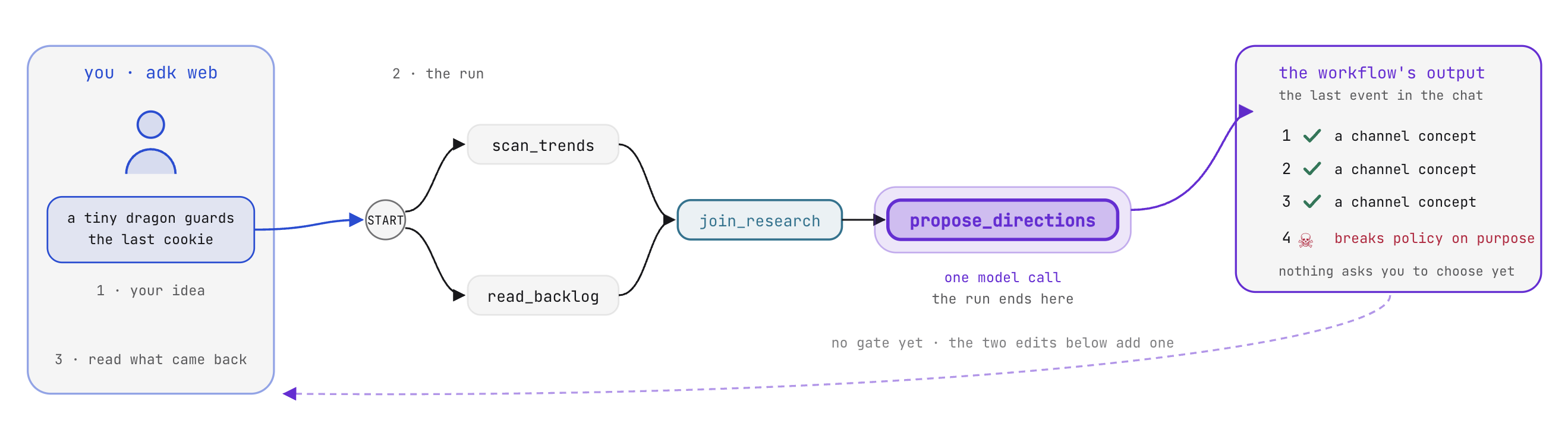
Prompt instructions versus deterministic suspension
Production workflows that incur financial cost or publish content require human oversight at critical decision points. In a single prompt, confirmation requests are advisory instructions that a user can easily prompt the model to bypass. In an ADK workflow, human approval is enforced by the execution engine: the graph halts at a designated node and cannot advance until it receives external, schema-validated input:
- Yielding
RequestInputsuspends workflow execution immediately. - ADK records an open interrupt call in the session store and issues a unique
interrupt_id. - The execution process halts without consuming tokens or server threads.
- Graph execution resumes only when a valid
function_responsematching the schema and interrupt ID is submitted.
Hands-on edit: suspending execution with RequestInput
In agent/graph.py, implement the suspension call inside direction_gate:
    yield RequestInput(
        message="Pick tonight's direction: 1, 2, 3 or 4.",
        response_schema={
            "type": "object",
            "properties": {
                "pick": {"type": "string", "enum": ["1", "2", "3", "4"]}}},
        payload={"candidates": cands})
RequestInput configures three attributes:
message: The review prompt presented to the user.response_schema: A JSON schema that the frontend renders as an input form, validated by ADK upon submission.payload: Metadata bundled with the request (the four candidates), enabling client interfaces to render review cards without querying session state.
What to expect and why
- The workflow halts at direction_gate: In ADK Web or the workbench interface, the run pauses and displays an interactive candidate selection form.
- Why: The engine encountered a yielded
RequestInputand persisted execution state toruns/sessions.db.
- Why: The engine encountered a yielded
- Resumption requires structured input: Sending arbitrary chat text does not advance the graph. Selecting an option (1, 2, 3, or 4) submits a typed
function_responsethat satisfiesresponse_schemaand resumes execution.
5. State and Router
In the VibeStudio Workbench, navigate to Step 5 · State and Router, parts (5A) through (5C).
You will persist user selections into session state, enforce channel safety policies using deterministic router nodes, and assemble an iterative task agent to automatically remediate policy violations before generating video scripts.
Workflow State (5A)
In the workbench, navigate to Workflow State (5A).
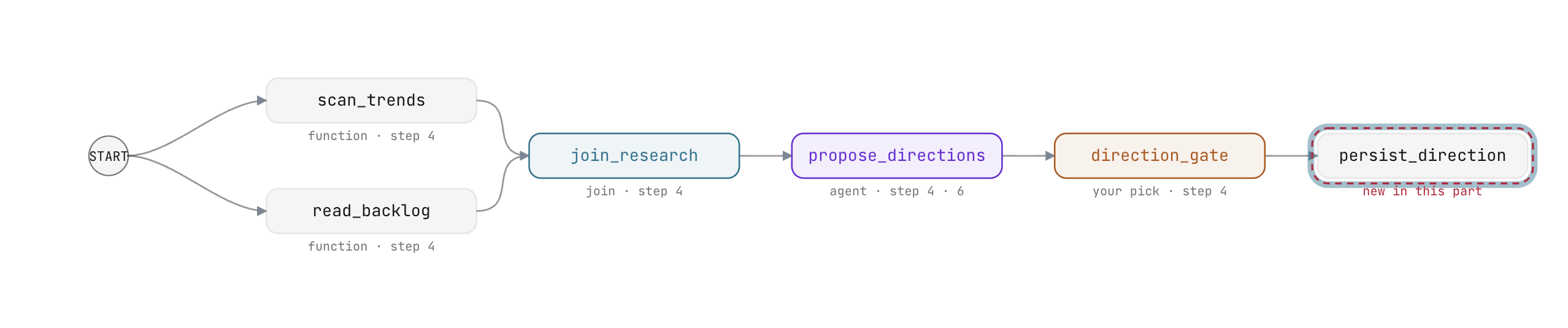
Session state vs node output
In an ADK workflow, data moves across the graph through two distinct mechanisms:
- Node output (
Event(output=...)): Data directed strictly to immediate downstream consumers defined in the edge list. - Session state (
Event(state=...)): A shared key-value dictionary accessible by any subsequent node in the execution lifecycle.
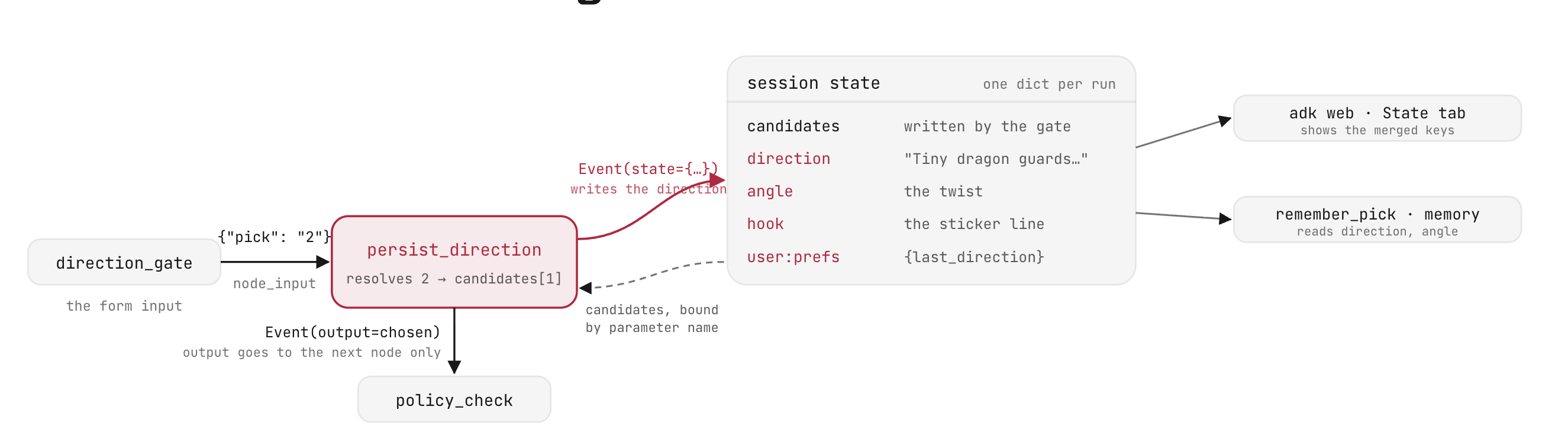
When a user selects a candidate at direction_gate, the selection arrives as a numeric index ({"pick": "2"}). Downstream nodes need the complete direction object: title, narrative angle, and hook line. Instead of passing verbose metadata through every intermediate node payload, persist_direction writes the resolved candidate to shared session state.
Nodes do not need to pass the entire session state dictionary. When a node yields Event(state=...), it supplies only the new or updated key-value pairs. ADK automatically merges these updates into the session store:
    yield Event(state={"direction": chosen["title"], "angle": chosen.get("angle", ""),
                       "hook": hook, "user:prefs": {"last_direction": chosen["title"]}})
Yielding this Event hands control to the Workflow runtime, which persists the new values to the session journal in runs/sessions.db.
Parameter binding
ADK function nodes read session state automatically through parameter inspection. If a function signature declares a parameter name matching an existing state key, ADK extracts that key from state and passes it directly:
def persist_direction(node_input, candidates: list = []):
    ni = node_input if isinstance(node_input, dict) else {}
    raw = ni.get("pick")
    pick = str(raw).strip() if raw is not None else ""
    if candidates:
        i = int(pick) - 1 if pick.isdigit() else 0
        chosen = candidates[max(0, min(len(candidates) - 1, i))]
    else:
        chosen = {"title": "untitled", "angle": "", "evidence": []}
    hook = chosen.get("hook") or " ".join(chosen["title"].split()[:4])
Here, candidates was written to session state by direction_gate. ADK binds it directly into persist_direction(node_input, candidates: list = []) without requiring explicit dictionary lookups.
Keys prefixed with user: persist across sessions in user-level storage, allowing subsequent workflow runs to access creator preferences.
Hands-on edit: persisting state and wiring the node
- In
agent/graph.py, insidepersist_direction, replace theTODO: PERSIST_STATEline with the state event yield:
    yield Event(state={"direction": chosen["title"], "angle": chosen.get("angle", ""),
                       "hook": hook, "user:prefs": {"last_direction": chosen["title"]}})
- In
stage3_router/agent.py, appendpersist_directionto the third chain in theedgeslist:
           (join_research, propose_directions, direction_gate,
            persist_direction)
Save your files. In the workbench, verify that state write in place and persist_direction in the chain both show green checkmarks.
The router node (5B)
In the workbench, navigate to The router node (5B).
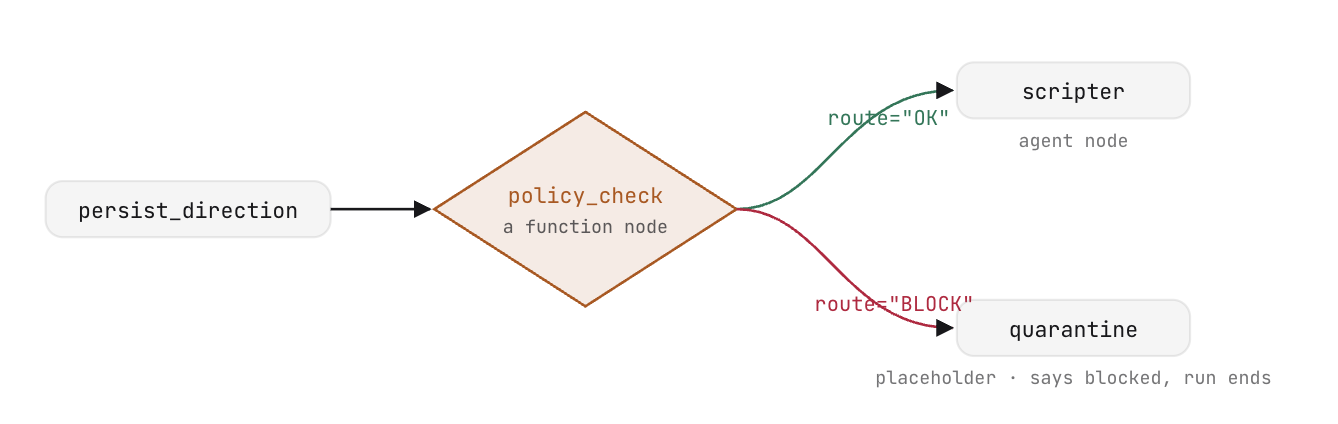
Deterministic policy routing
A router is a specialized function node that evaluates upstream output and directs execution along conditional graph branches. Unlike generative agents, a router executes deterministic logic without making LLM calls.
A router returns an Event specifying a route tag:
def length_check(node_input):
    too_long = len(node_input.get("title", "")) > 60
    return Event(output=node_input, route="TRIM" if too_long else "PASS")
In the workflow definition, an edge target defined as a dictionary maps route names to destination nodes:
(length_check, {"TRIM": shorten, "PASS": scripter}),
The workflow router policy_check reads prohibited phrases from agent/policy_words.txt and performs whole-word matching against the chosen direction's title and angle:
return Event(output=node_input, route="BLOCK" if bad else "OK")
Storing policy as data instead of hardcoded instructions enables updates without modifying the workflow graph: updating the text file immediately applies to subsequent runs. Because evaluation is deterministic regex matching, it executes in milliseconds at zero token cost before generative scripting begins.
Destinations: Scripter and Quarantine
The router directs traffic to one of two downstream nodes:
scripter: Asingle_turnagent node that converts the approved direction into a structured production script adhering to theScriptPydantic schema:
scripter = Agent(
    name="scripter",
    model=config.MODEL,
    instruction=SCRIPT_INSTRUCTION,
    output_schema=Script)
quarantine: Initially a placeholder function that halts flagged directions, replaced in the next part by an autonomous remediation agent.
Hands-on edit: routing the policy check
- In
agent/graph.py, insidepolicy_check, complete the return statement:
return Event(output=node_input, route="BLOCK" if bad else "OK")
- In
stage3_router/agent.py, updateedgesto routepolicy_checkand rejoin the quarantine branch intoscripter:
           (join_research, propose_directions, direction_gate,
            persist_direction, policy_check),
           (policy_check, {"OK": scripter, "BLOCK": quarantine}),
           (quarantine, scripter)])
Save your files. In the workbench, verify that the router edge mappings are verified.
Agent modes and the task node (5C)
In the workbench, navigate to Agent modes and the task node (5C).
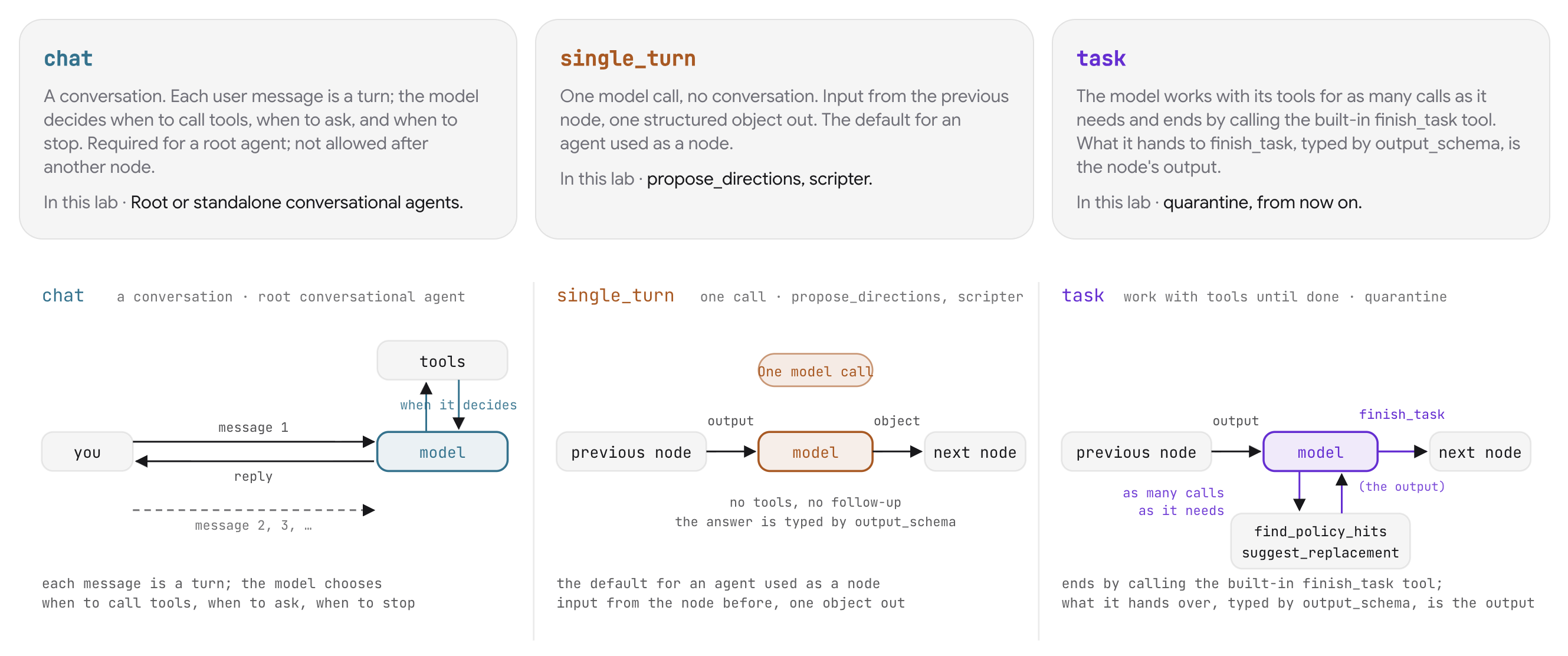
Agent execution modes
ADK Agent instances support three execution modes tailored to specific pipeline requirements:
Mode | Execution Lifecycle | Role in Pipeline |
| Multi-turn conversational loop. The model determines when to invoke tools, solicit input, or end the turn. | Root agents facing an interactive human user. |
| Single model inference call. Accepts previous node input and emits a structured schema object. | Sequential graph transformations ( |
| Autonomous loop with tool execution. The agent iterates until calling the built-in | Multi-step remediation and inspection ( |
Autonomous policy remediation
Rewriting a flagged direction requires task mode because the number of remediation iterations is variable. The agent receives the flagged direction, invokes find_policy_hits to detect violations, requests approved alternatives via suggest_replacement, rewrites the direction, and verifies cleanliness before proceeding.
Both tools are defined in agent/cleanup_tools.py with typed signatures and docstrings:
def find_policy_hits(text: str) -> dict:
    """Which refused words appear in `text`. Matches whole words and phrases
    from agent/policy_words.txt, case-insensitive.

    Returns {"hits": [...], "clean": bool}. clean is true when hits is empty.
    """


def suggest_replacement(word: str) -> dict:
    """The channel's approved stand-in for a refused word, read from
    agent/policy_replacements.txt.

    Returns {"word", "replacement", "listed"}. When the word has no entry,
    listed is false and replacement is a hint to pick a gentle synonym.
    """
Hands-on edit: assembling the quarantine task agent
In stage3_router/agent.py, replace the placeholder quarantine function with the task agent definition:
quarantine = Agent(
    name="quarantine",
    model=config.MODEL,
    instruction=QUARANTINE_INSTRUCTION,
    mode="task",
    tools=[find_policy_hits, suggest_replacement],
    output_schema=CleanedDirection,
)
Task mode equips the agent with tools and terminates execution by calling finish_task. When mode="task" is configured, ADK automatically provides finish_task and derives its parameters from output_schema, ensuring the node yields a typed CleanedDirection object matching the scripter node's input schema.
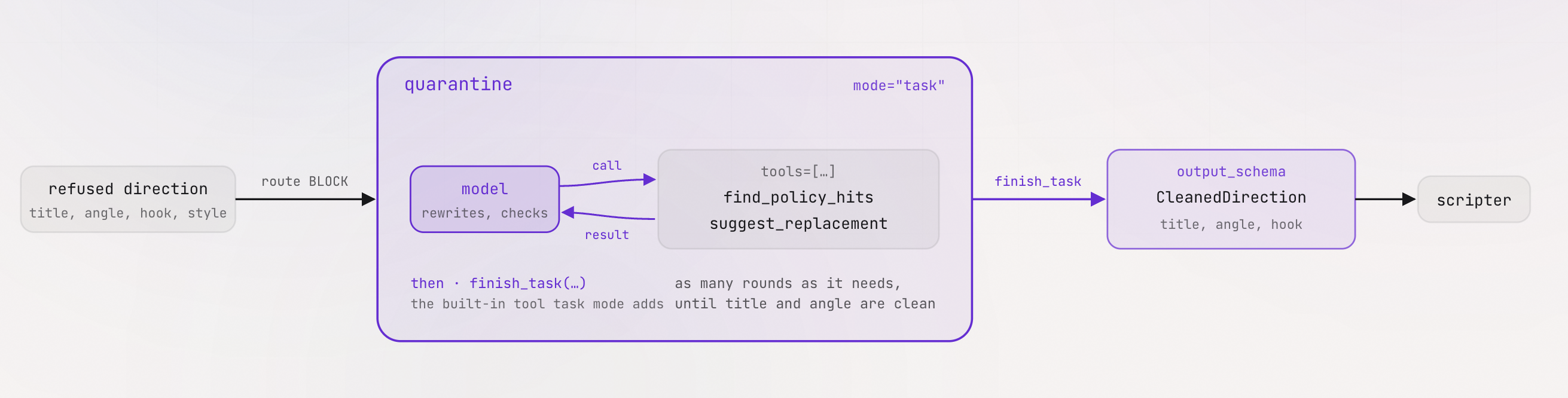
What to expect and why
Test both execution paths in ADK Web or VibeStudio Workbench:
- Approved route (Candidate 1, 2, or 3):
- Selecting an approved candidate routes from
policy_checkdirectly toscripter(route="OK"). - The scripter generates a 3-shot production script adhering to the
Scriptschema.
- Selecting an approved candidate routes from
- Quarantine remediation route (Candidate 4):
- Candidate 4 contains flagged vocabulary ("clickbait", "viral hack").
policy_checkroutes toquarantine(route="BLOCK").- In the session trace, observe
quarantinecallingfind_policy_hits, callingsuggest_replacementfor each violation, rewriting the title, and callingfinish_task. - Execution rejoins
scripter, producing a script from the sanitized direction.
6. Memory Bank
In the VibeStudio Workbench, navigate to Step 6 · Memory Bank, parts (6A) and (6B).
The workflow currently operates without memory across sessions. Each execution begins from scratch, unaware of what the creator selected previously or which genres they prefer. In this step, you connect Vertex AI Agent Engine Memory Bank to store and retrieve creator preferences across runs.
Crucially, memory is integrated through agent lifecycle callbacks instead of pipeline nodes. Because memory extraction and retrieval serve individual agents instead of intermediate data stages, attaching callbacks preserves a clean, decoupled graph topology.
Memory Bank (6A)
In the workbench, navigate to Memory Bank (6A).
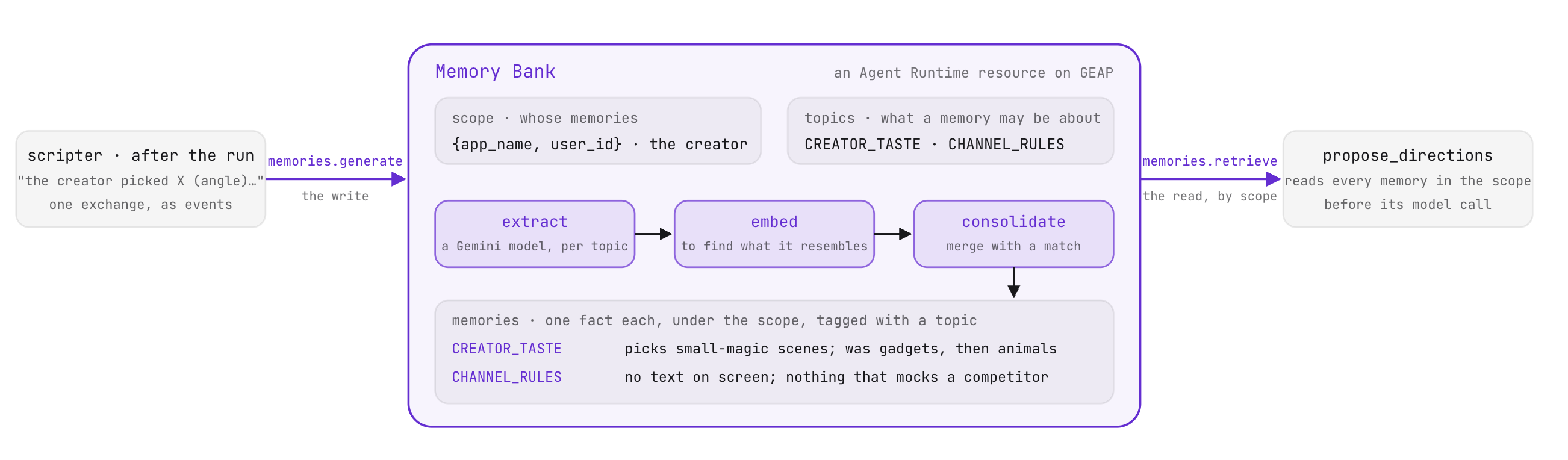
Managed user-level memory
Memory Bank is a managed service for long-term user memory. It organizes facts about a person under a defined scope, here identified by the application name and user ID:
SCOPE = {"app_name": config.APP, "user_id": config.USER}
TOPICS = {
    "CREATOR_TASTE": "Which video directions this creator picks and passes on, "
                     "and how that preference changes over time.",
    "CHANNEL_RULES": "Standing instructions the creator states for every video "
                     "(style, subjects to avoid, format rules).",
}
Custom memory topics define the boundaries of what the bank records:
- Topic extraction: When new conversation text is submitted via
memories.generate, the service applies an extraction model against each topic description. Text that does not match a topic produces no memories. - Consolidation and deduplication: The service converts newly extracted facts into embeddings and compares them with existing memories in the scope. When an observation aligns with an existing memory, the service updates that memory. When it represents novel information, the service creates a new entry. This consolidation process ensures multiple sessions about a topic merge into a coherent summary instead of producing redundant entries.
- Retrieval: Calling
memories.retrievewith the user scope returns stored facts, ordered oldest first.
Both operations are implemented in agent/platform/memory.py. The provisioned bank resource name is cached locally in runs/memorybank.json.
Setting up the Memory Bank
Use the workbench controls or run the CLI commands in your terminal:
- Connect and provision the bank:
python -m agent.platform.bankCREATOR_TASTEandCHANNEL_RULEStopics. - Seed historical sessions:
python -m agent.platform.bank load - Inspect consolidated facts:
python -m agent.platform.bank list
Callbacks (6B)
In the workbench, navigate to Callbacks (6B). Open stage4_memory/agent.py.
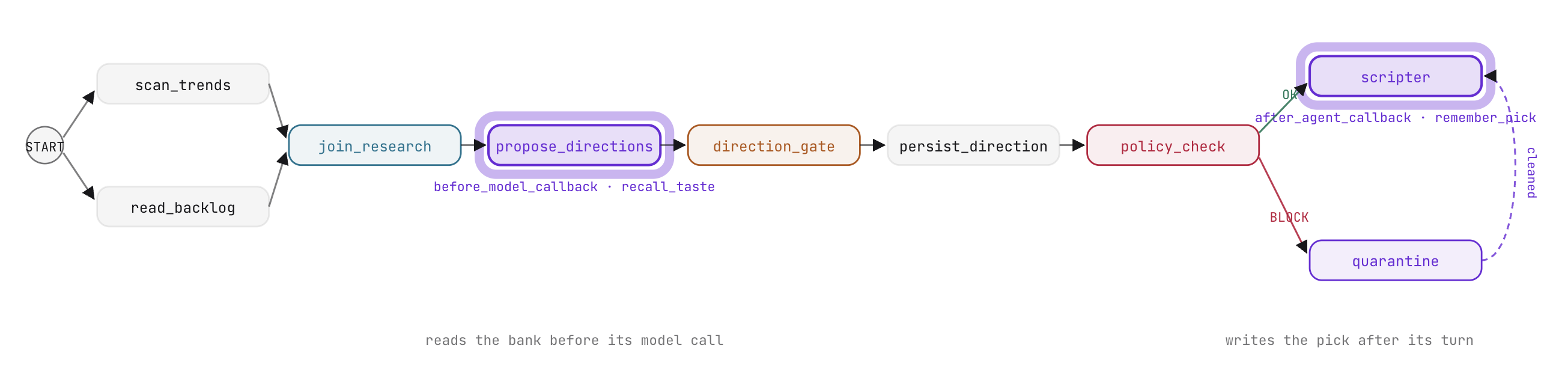
ADK agent lifecycle callbacks
A callback is a function passed as an argument to an Agent. ADK invokes callbacks at predefined lifecycle moments, passing the active context. Returning None continues normal execution; returning a replacement object overrides or intercepts the operation.
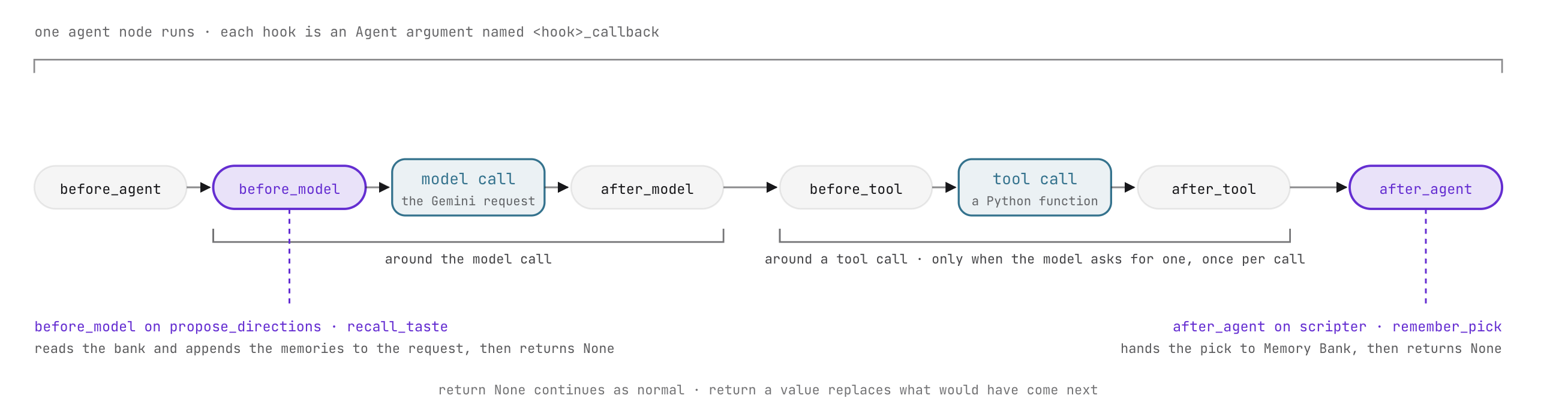
ADK provides three pairs of callbacks:
Callback Pair | Invocation Point | Parameters Received | Return Value Behavior |
| Surrounding the entire agent turn |
| Returning |
| Surrounding each LLM inference call |
| Returning |
| Surrounding each tool execution | Tool definition, arguments, result | Returning a dict overrides the tool output; |
Callbacks provide a clean location for context injection, guardrails, telemetry, and cache lookups without introducing extraneous nodes into the workflow graph.
Hands-on edit: wiring recall and remember callbacks
- In
stage4_memory/agent.py, updatepropose_directionsto attachbefore_model_callback=recall_taste:
    output_schema=Directions,
    before_model_callback=recall_taste)
recall_taste executes immediately before Gemini generates candidate directions. It fetches the creator's history from Memory Bank, formats the memories oldest first, and appends them to the outgoing LlmRequest. The prompt directs the model to lean candidates 1 to 3 toward the creator's current taste while treating channel rules as strict constraints.
- In
stage4_memory/agent.py, updatescripterto attachafter_agent_callback=remember_pick:
    output_schema=Script,
    after_agent_callback=remember_pick)
remember_pick runs after scripter completes its turn. It reads the chosen direction from session state, synthesizes a concise statement summarizing the creator's decision, and calls memories.generate to update the Memory Bank.
What to expect and why
Test the callback-augmented workflow in the workbench or ADK Web:
- Execute a run with an empty prompt:
- In the session trace, inspect the
LlmRequestforpropose_directions. Notice the appended memory context detailing the creator's preference for fantasy themes and concise pacing. - Observe the proposed directions: candidates 1 to 3 align with the creator's historical preferences even when trends emphasize other topics.
- In the session trace, inspect the
- Select a candidate at
direction_gate. - After
scriptercompletes, review the Memory Bank records:python -m agent.platform.bank list
7. RAG Engine
In the VibeStudio Workbench, navigate to Step 7 · RAG Engine, parts (7A) and (7B).
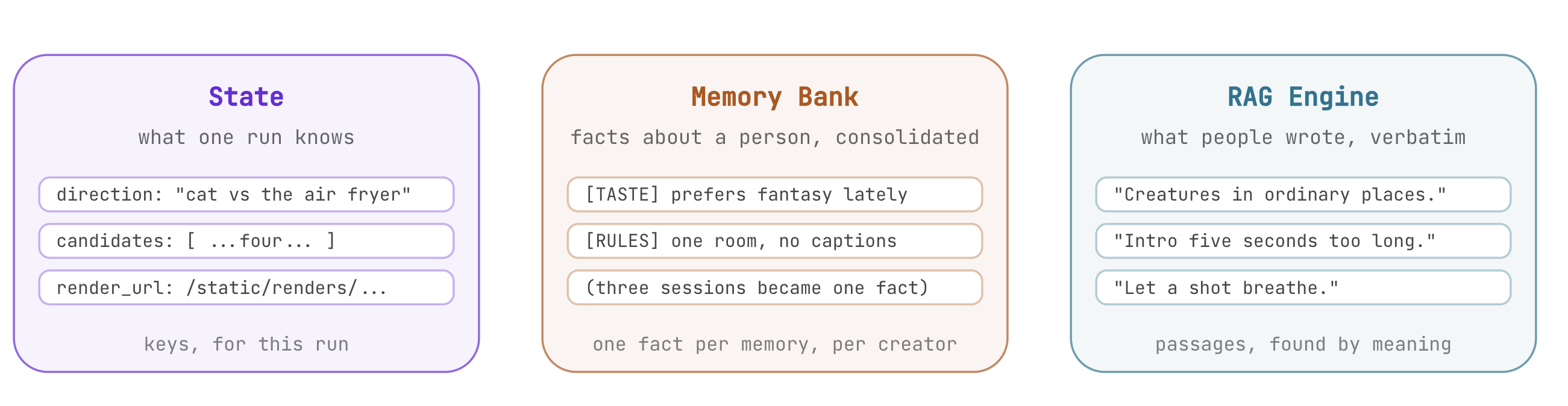
Published videos accumulate ongoing viewer feedback. Thirty representative comments are collected in agent/comments.md, capturing viewer praises, critique of sponsored pacing, and audio preferences. In this step, you index these comments using Vertex AI RAG Engine and connect semantic retrieval into the research fan-out.
Retrieval over documents (7A)
In the workbench, navigate to RAG Engine (7A).
Memory Bank vs RAG Engine
Both tools ground workflows in external data, but they serve distinct architectural purposes:
Dimension | Memory Bank | RAG Engine |
Primary Use Case | Long-term user preferences and operational rules | Semantic retrieval over large document collections |
Scope | Scoped to individual user IDs and application names | Scoped to shared corpus resources across all users |
Data Processing | Real-time extraction, embedding, and semantic consolidation | Document chunking, vector embedding, and nearest-neighbor search |
Graph Integration | Agent lifecycle callbacks ( | Dedicated function node in research fan-out ( |
Document chunking and embeddings
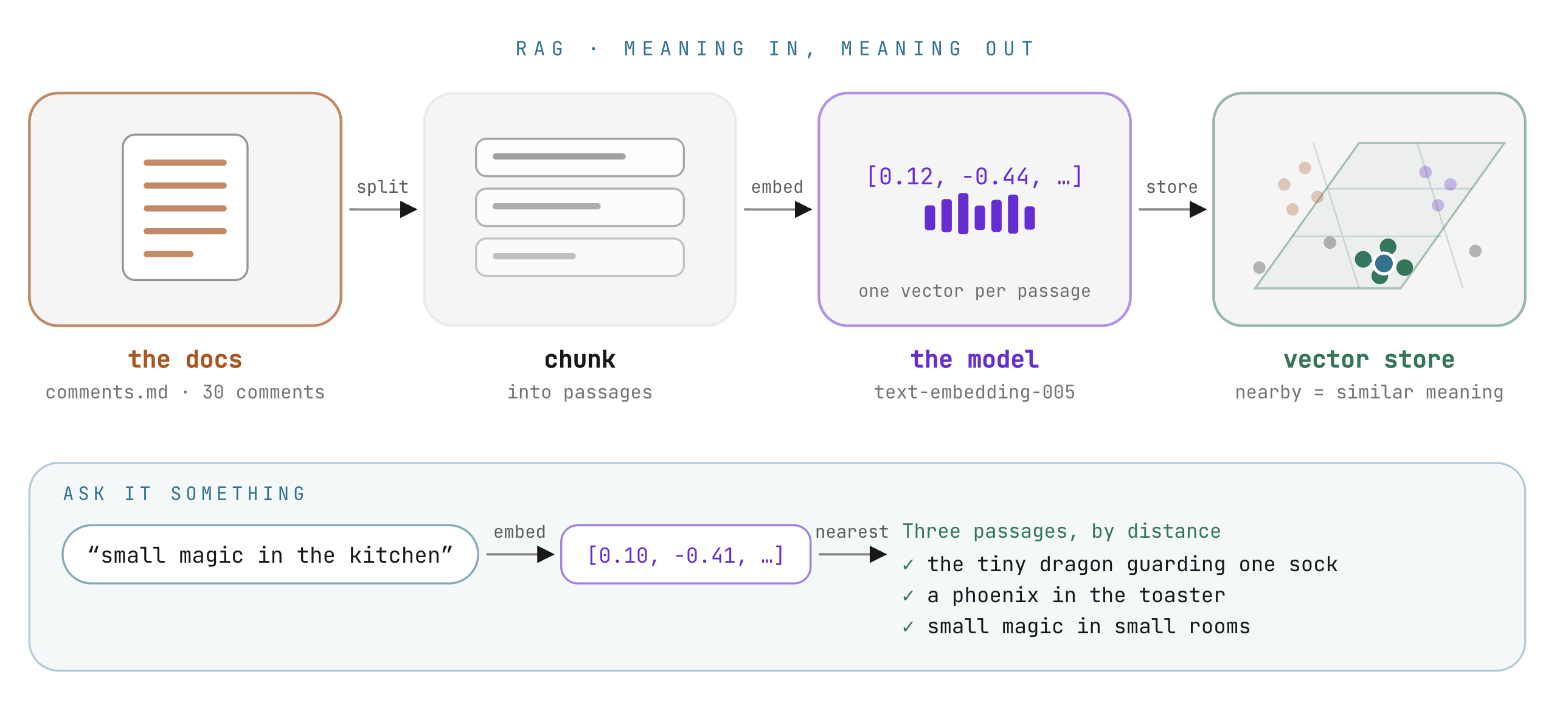
RAG Engine indexes documents by dividing text into semantic passages and storing their vectors in a managed database:
corpus = rag.create_corpus(
    display_name="vibestudio-feedback",
    description="Vibe Studio: what the audience wrote under the channel's past videos.",
    backend_config=rag.RagVectorDbConfig(
        rag_embedding_model_config=rag.RagEmbeddingModelConfig(
            vertex_prediction_endpoint=rag.VertexPredictionEndpoint(
                publisher_model="publishers/google/models/text-embedding-005"))))

rag.upload_file(
    corpus_name=corpus.name, path="agent/comments.md", display_name="comments.md",
    transformation_config=rag.TransformationConfig(
        chunking_config=rag.ChunkingConfig(chunk_size=120, chunk_overlap=20)))
- Chunk size: Configured to 120 tokens with 20 tokens of overlap. This captures two to three comments per passage, ensuring each vector represents a cohesive sentiment without diluting meaning across unrelated feedback.
- Embedding model:
text-embedding-005converts text into high-dimensional vectors. When a query is submitted, the model converts the query into a vector and finds nearest matches based on semantic distance. A comment about a tiny dragon guarding socks matches a prompt about magical creatures without requiring exact keyword overlap.
Setting up the RAG corpus
Initialize the corpus using the workbench buttons or terminal commands:
- Create the corpus:
python -m agent.platform.ragruns/ragcorpus.json. - Upload and index comments: Uploads
agent/comments.mdwith chunking configuration and waits for indexing to complete. - Query the corpus: Test similarity retrieval with queries that do not share exact words with the comments (for example, query "small magical creatures" to retrieve comments about dragons).
The retrieval node (7B)
In the workbench, navigate to The third reader (7B). Open stage5_rag/agent.py.
Retrieval as a graph node
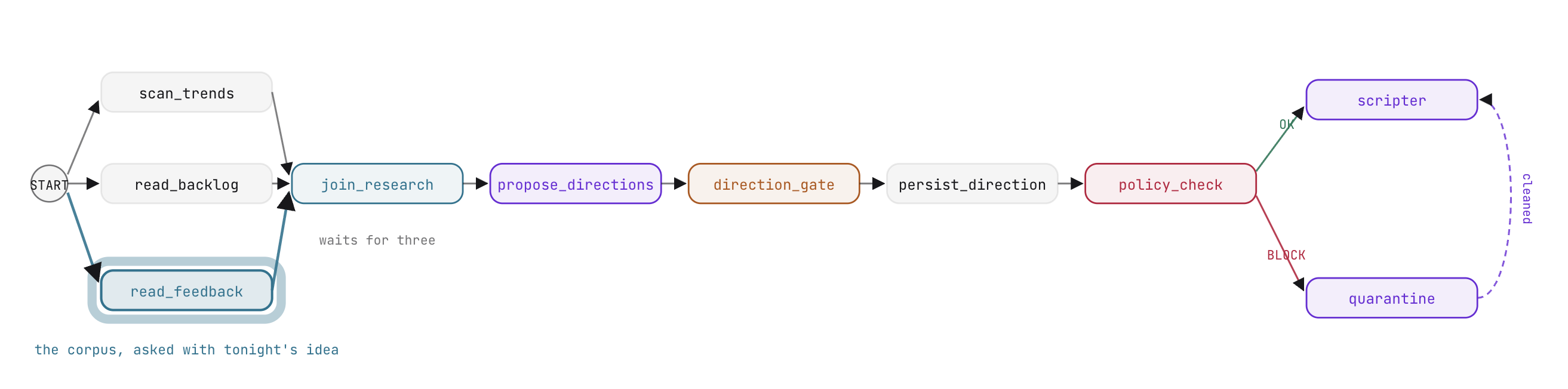
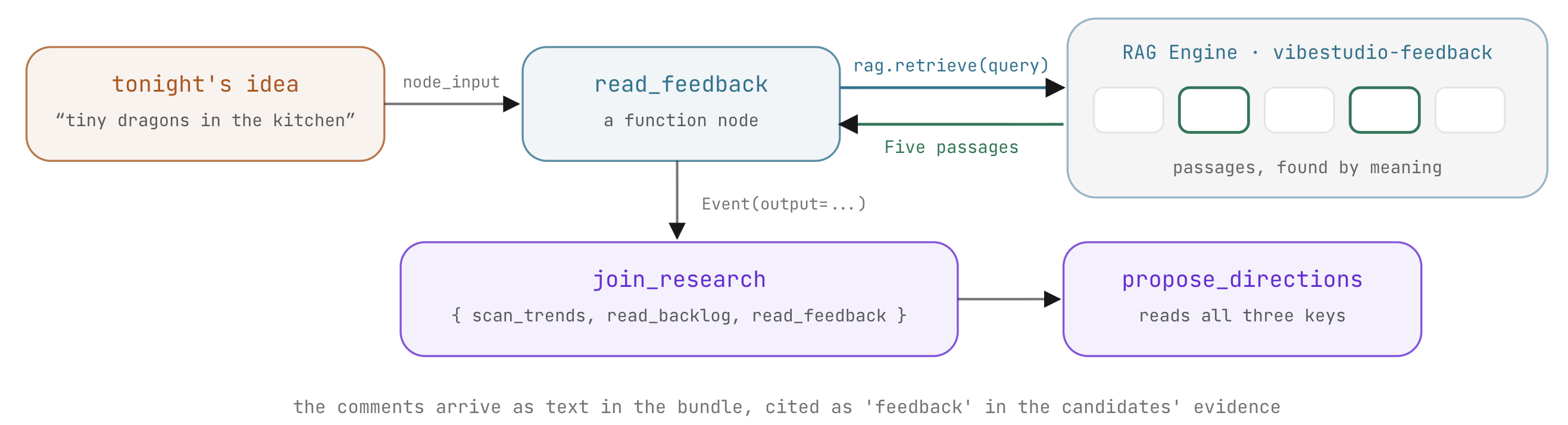
Audience feedback represents research data shared across the workflow. Unlike personal creator memory, viewer sentiment feeds directly into join_research alongside trends and backlog data. It is therefore implemented as a function node:
def read_feedback(node_input):
    """The third reader (step 7): what the audience wrote under past videos,
    the passages nearest to tonight's idea. Retrieval, not a model call."""
    from .platform import rag
    idea = idea_text(node_input)
    query = idea or "what viewers liked and what they complained about"
    try:
        hits = rag.retrieve(query)
    except Exception as e:
        print(f"  [rag] feedback unavailable ({str(e)[:80]})")
        return Event(output={"query": query, "feedback": [],
                             "note": "no corpus connected - run: python -m agent.platform.rag"})
    return Event(output={"query": query, "feedback": [h["text"] for h in hits]})
read_feedback extracts the user's initial idea and executes a vector query against the RAG Engine corpus. It emits the retrieved comments in an Event(output=...) payload.
Hands-on edit: wiring the third reader into the fan-out
In stage5_rag/agent.py, update edges to add read_feedback as a third parallel branch entering join_research:
           (START, read_backlog, join_research),
           (START, read_feedback, join_research),
Because join_research is a JoinNode, it synchronizes all incoming branches, waiting until scan_trends, read_backlog, and read_feedback have all emitted events before passing the aggregated bundle downstream.
What to expect and why
Run the workflow in the workbench:
- Submit an idea prompt (such as "a miniature dragon guarding a kitchen counter").
- In the execution trace, verify that all three reader nodes execute concurrently.
- Observe
join_research: its output dictionary now containstrends,backlog, andfeedback. - Inspect the generated candidates from
propose_directions: the model incorporates viewer comments into its proposals and references audience sentiment in the evidence fields. - Notice that RAG retrieval is deterministic (identical queries return identical comment passages), whereas the generative proposal node produces creative variations.
8. Asynchronous video generation with Veo
In the VibeStudio Workbench, navigate to Step 8 · The video, parts (8A) and (8B).
Generating high-definition video with Google Veo requires several minutes per render. Blocking graph execution during this period wastes compute resources, locks thread pools, and exposes the run to HTTP connection dropouts. In this step, you make video rendering asynchronous using ADK's LongRunningFunctionTool.
Long-running tools (8A)
In the workbench, navigate to A long-running tool (8A). Open stage6_video/agent.py and agent/deliver.py.
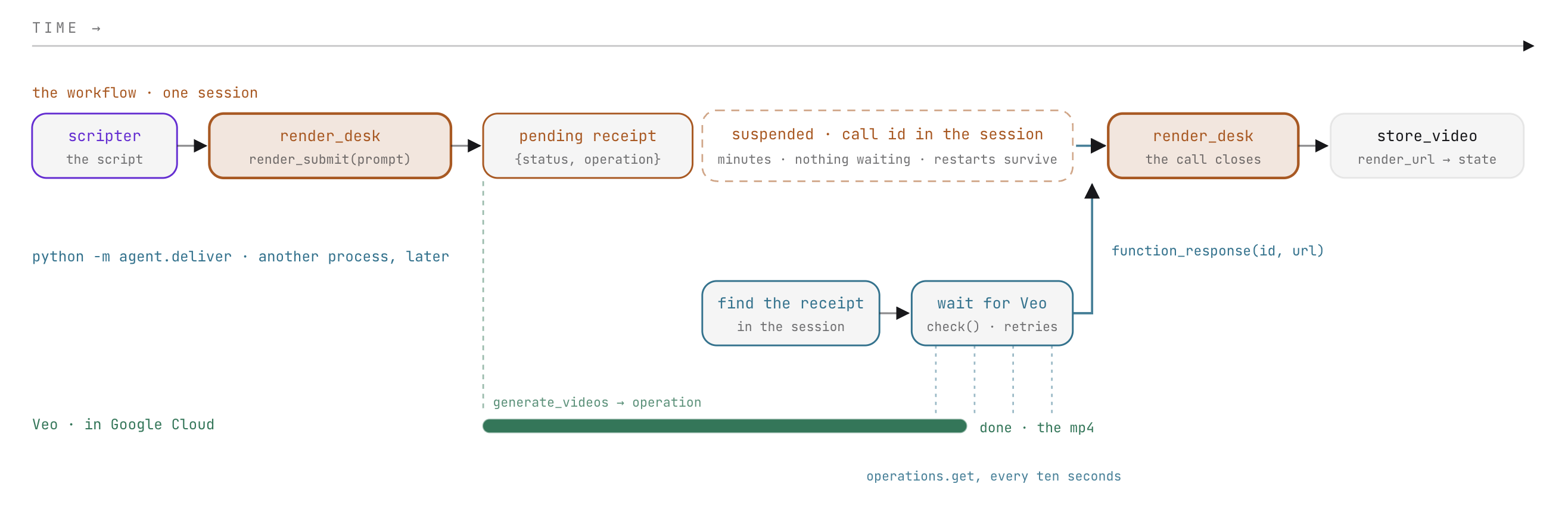
Synchronous tools vs long-running tools
Standard ADK function tools execute synchronously inside an agent turn: the model calls the tool, awaits the return payload, and incorporates the result into the ongoing turn.
Video rendering cannot complete within a single turn. Instead, render_submit initiates the generation job and immediately returns an operational receipt with status "pending":
def render_submit(prompt: str) -> dict:
    """Submit one Veo render of `prompt`. Returns at once with a pending
    receipt; the clip is delivered later, to this call, by id."""
    receipt = videogen.start(f"{prompt} {videogen.NO_TEXT}")
    return {"status": "pending", "operation": receipt["operation"], "prompt": receipt["prompt"]}
When wrapped with LongRunningFunctionTool, ADK intercepts the "pending" status. The agent's turn concludes, the workflow suspends at the node, and the pending call metadata (including call ID and receipt) is recorded in runs/sessions.db. The execution process exits cleanly without maintaining active network connections or worker threads.
Hands-on edit: wrapping the render tool
In stage6_video/agent.py, update render_desk to wrap render_submit in LongRunningFunctionTool:
tools=[LongRunningFunctionTool(render_submit)])
Resuming by call ID
The universal resumption pattern
ADK applies an identical mechanism to suspend and resume workflows for both humans and external tools:
Suspension Trigger | Initiating Construct | Stored Suspension State | Resumption Event |
Human Decision |
| Open input prompt in session store |
|
Long-Running Tool |
| Open tool call in session store |
|
In both scenarios, the workflow halts completely and resumes only when an event bearing a matching FunctionResponse arrives from an external source: a user interface, a webhook, or a background worker.
Hands-on edit: completing the delivery response
In agent/deliver.py, construct the resumption FunctionResponse part:
    part = Part(function_response=FunctionResponse(
        id=row["call_id"], name=row["name"], response=response))
The delivery daemon polls Veo until the video file is generated, then dispatches this FunctionResponse to the session. ADK matches the call ID and resumes the workflow directly at the next node. Completed nodes do not re-execute, and the agent does not take another generative turn.
Setting STUDIO_REAL_VIDEO=0 in .env enables mock rendering: start returns an immediate test receipt, and check simulates completion in five seconds without making billable Veo API calls.
Pipeline integration (8B)
In the workbench, navigate to render_desk in the graph (8B). Open stage6_video/agent.py.
The terminal node in the pipeline is store_video. It reads the completed render information from runs/state.json (where the delivery process recorded it) and commits the video URL and generation status to shared session state.
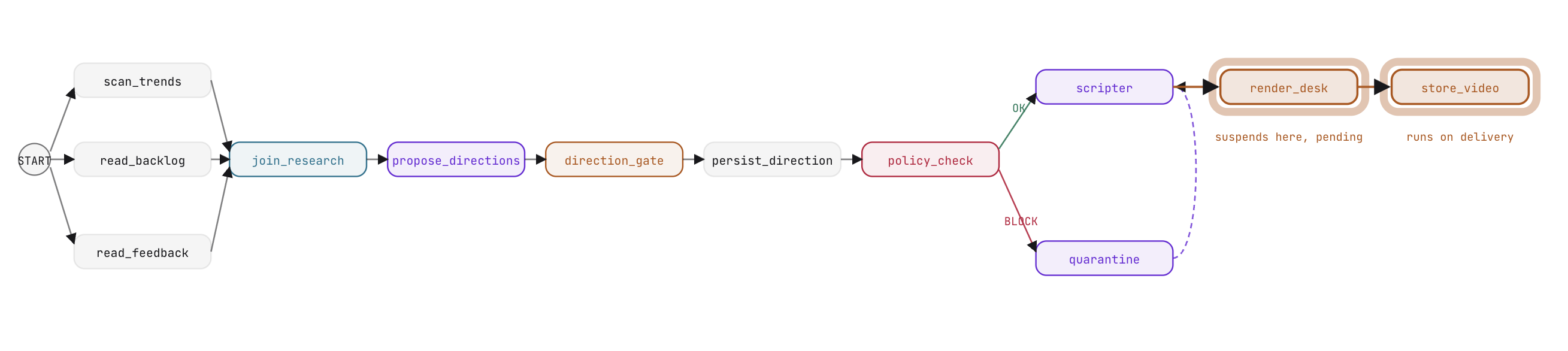
Hands-on edit: wiring the complete video pipeline
In stage6_video/agent.py, update edges to append render_desk and store_video:
           (quarantine, scripter),
           (scripter, render_desk, store_video)])
What to expect and why
Test the asynchronous generation flow in the workbench:
- Execute the workflow through candidate selection and script generation.
- At
render_desk, observe the agent invokerender_submit. - The workflow immediately suspends. In the workbench or ADK Web, observe the pending status: the session holds the open call ID, and no background processes are consuming resources.
- Run the delivery daemon using the workbench console or in your terminal:
python -m agent.deliver - In ADK Web, refresh the session: execution resumes at
store_video, commits the video URL to session state, and completes the workflow.
9. Deploy to Cloud Run
In the VibeStudio Workbench, navigate to Step 9 · Deploy.
You have developed and verified each component of the pipeline across dedicated sandboxes. In this step, you assemble the complete production pipeline and deploy it to Google Cloud Run.
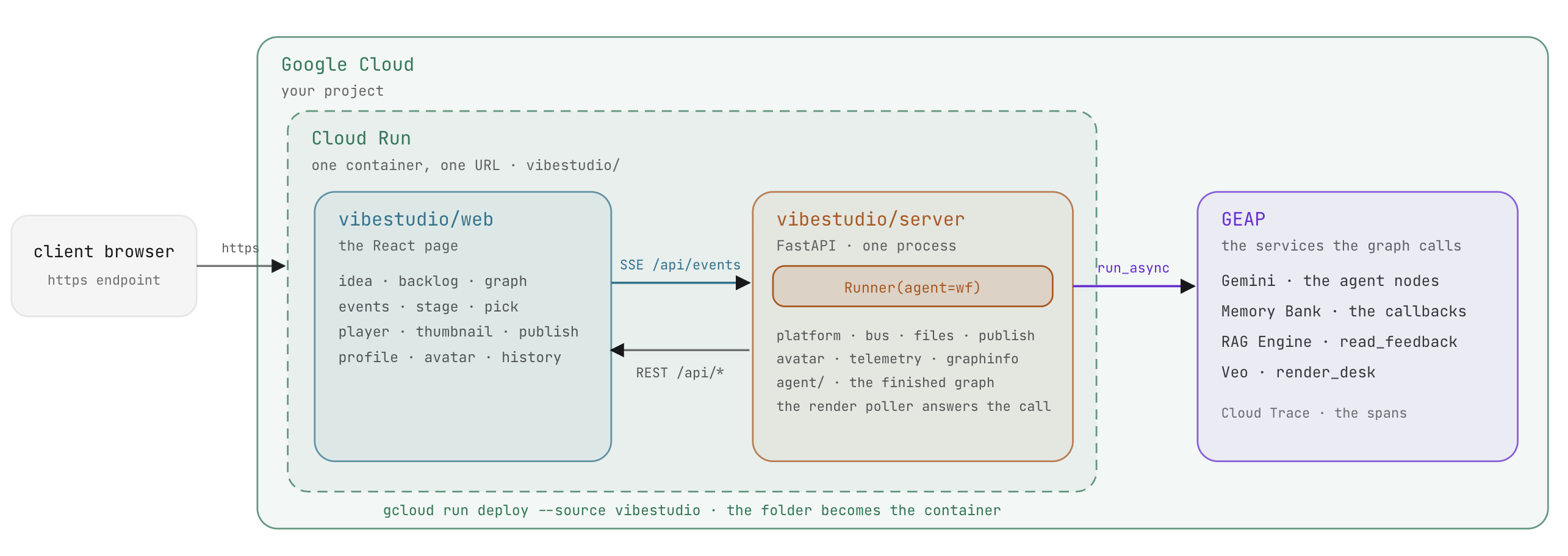
The ADK Runner
In development, adk web orchestrated the graph. In production, the application hosts the workflow using ADK's Runner class:
self._svc = DatabaseSessionService(db_url=config.DB_URL)
self._runner = Runner(app_name=config.APP, agent=wf, session_service=self._svc)

async for ev in self._runner.run_async(user_id=config.USER, session_id=run_id, new_message=message):
    self._absorb(ev)    # fold the ADK event into the run state, publish one app event

# the gate's answer and the render's delivery are the same call, with a function_response part
part = Part(function_response=FunctionResponse(id=call_id, name=name, response=response))
run_async: Drives workflow execution, yielding events sequentially as nodes execute and persisting updates to the session service.- Unified resumption: Both user decisions at
direction_gateand completed video deliveries from Veo resume execution through identicalFunctionResponseobjects submitted torun_async.
The production application architecture
The production application in vibestudio/ integrates the complete pipeline:
vibestudio/
  server/
    main.py                 FastAPI: application server, REST routes, static assets
    api.py                  REST API endpoints: run, pick, publish, backlog, profile, history
    runner.py               Runner orchestration over the workflow, background render poller
    platform/               Event bus (SSE stream), file storage, publishing, telemetry
    agent/                  Production agent package, verified by checks/verify_app.py
      graph.py              The complete workflow graph and node definitions
      desk.py               render_desk and render_submit wrapped with LongRunningFunctionTool
      schemas.py            Pydantic schemas: Directions, CleanedDirection, Script
      cleanup_tools.py      Deterministic policy tools: find_policy_hits, suggest_replacement
      platform/             Memory Bank, RAG Engine, and Veo integrations
  web/                      Production React user interface
  Dockerfile · deploy.py · run.sh
- Single event stream: The FastAPI backend publishes events across a single Server-Sent Events (SSE) stream. The React frontend visualizes graph progression in real time and handles late connections without losing state.
- Decoupled execution: The application manages the event loop. The workflow graph focuses entirely on execution logic, unaware of the frontend interface.
The complete workflow edge list in agent/graph.py combines every architectural pattern built throughout this codelab:
        (START, scan_trends, join_research),
        (START, read_backlog, join_research),
        (START, read_feedback, join_research),
        (join_research, propose_directions, direction_gate,
         persist_direction, policy_check),
        (policy_check, {"OK": scripter, "BLOCK": quarantine}),
        (quarantine, scripter),
        (scripter, render_desk, store_video),
Deploying to Cloud Run
Google Cloud Run provides serverless hosting with automatic scaling, request routing, and integrated container builds:
gcloud run deploy vibestudio --source vibestudio \
  --project $GOOGLE_CLOUD_PROJECT --region us-central1 \
  --labels dev-tutorial-codelab=vibetube --allow-unauthenticated \
  --memory 2Gi --cpu 2 --timeout 3600 --concurrency 40 \
  --max-instances 1 --min-instances 1 --session-affinity \
  --set-env-vars GOOGLE_CLOUD_PROJECT=...,STUDIO_VERTEX=1,STUDIO_MEMORY_BANK=...,STUDIO_RAG_CORPUS=...,VIBETUBE_URL=...,VIBETUBE_EVENT=...,VIBETUBE_NAME=...,VIBETUBE_PROJECT=...
- Container build:
gcloud run deploy --sourcepackages thevibestudio/directory, builds the container image using Cloud Build, and deploys the service in a single operation. - Session affinity: Directs requests from the same user to the same container instance, preserving local session state across iterative steps.
- Observability: Cloud Trace integration records distributed spans for every node, LLM call, and tool execution, accessible in the Google Cloud Console under Trace Explorer.
Click the Deploy button in the workbench to execute the deployment script. When the build completes, the terminal displays the live service URL.
10. Summary
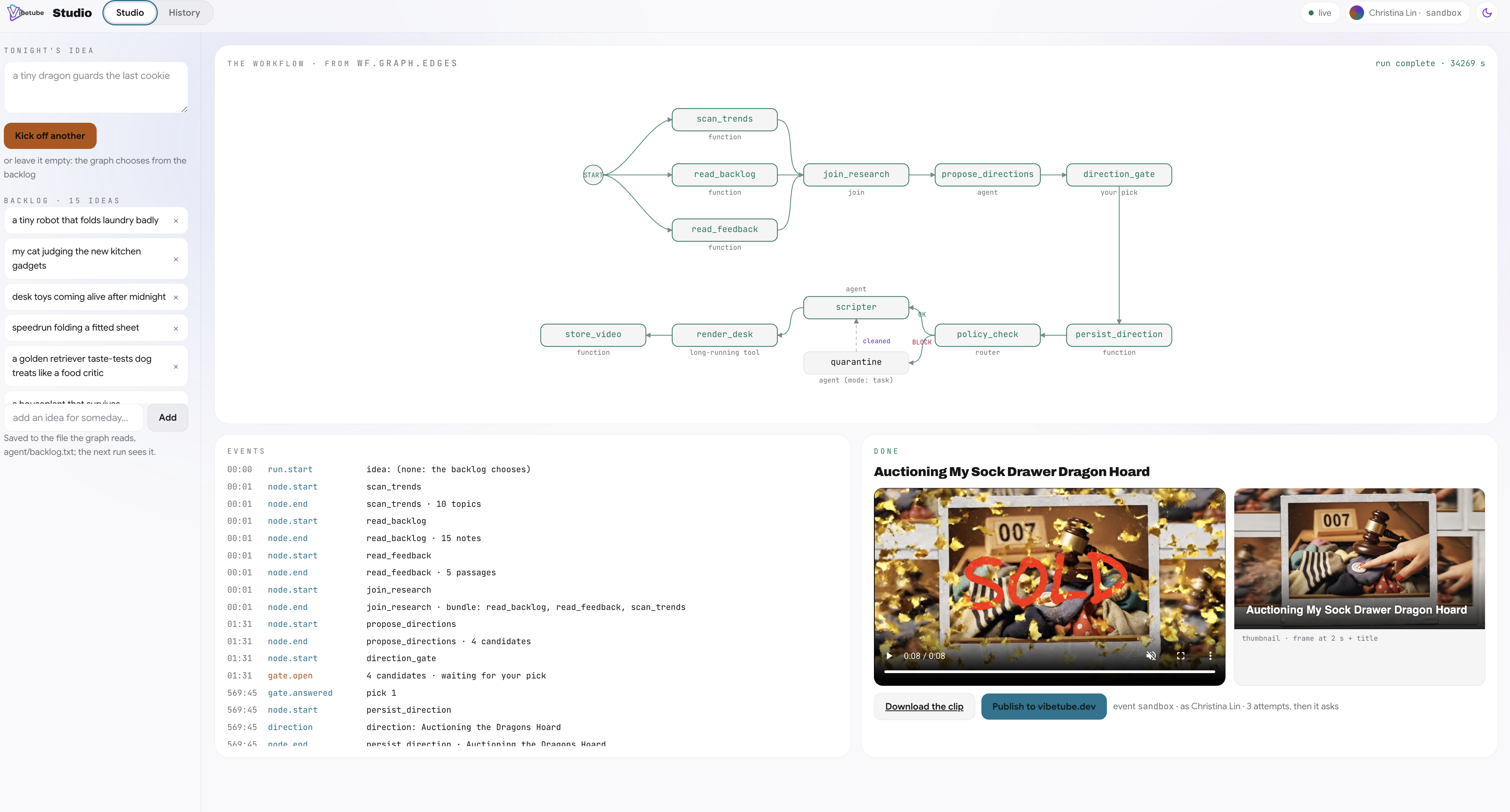
In the VibeStudio Workbench, navigate to Step 10 · Summary to review the completed architecture.
Step | Architecture & Concepts | Implementation Pattern |
A single prompt | Single prompt, function tools, sequential chat loop |
|
Agentic workflow fundamentals | Graph workflow, parallel research, schema outputs, human gate |
|
State and Router | Shared session state, parameter binding, deterministic routing, task agent |
|
Memory Bank | User-level long-term memory, semantic consolidation, lifecycle hooks |
|
RAG Engine | Document retrieval over audience comments, semantic embeddings |
|
Asynchronous video generation with Veo | Long-running tools, pending receipts, external delivery daemon |
|
Deploy to Cloud Run | Programmatic orchestration, Server-Sent Events, serverless container |
|
Core architectural principles
- Suspend instead of waiting: Workflows pause cleanly for human input (
RequestInput) or long-running operations (LongRunningFunctionTool). Processes do not wait idle on threads or network sockets. - Universal resumption: Every suspension resumes through an identical mechanism: a single
function_responsecarrying the call ID of the suspended node. - Decoupled state management: Nodes share data through named session state keys and parameter binding instead of verbose, tightly coupled intermediate payloads.
- Deterministic routing before generative cost: Rule-based routers and regex filters evaluate policy at zero token cost before generative models run.
- Separation of concerns: Context specific to an individual agent belongs in lifecycle callbacks, while shared data dependencies belong