
1. Introduction
You run a cozy-spooky channel on VibeTube: one short every night until Halloween. The audience wants small magic in small rooms and sends it to you every way they can — as comments, voice notes, photos of their own haunted drawers and clips of their porch at dusk. The backlog is full of ideas. Every evening goes to the same chores: research what is haunting the feed, comb the backlog, read what the audience sent, choose a direction, check it against the channel's policy, write the script, draw the poster, render the clip, publish.
Generative models can do each chore alone. Gemini researches, listens, looks and writes; the image model draws; Veo renders. What they cannot do alone is run the night in order, stop for the one decision that is yours, refuse a bad direction before it costs money, wait minutes for a render without holding anything open, and leave a record.
This codelab turns that evening into an ADK Workflow: a drawn graph of nodes and edges that runs itself, asks you only where your judgment is needed, and ends every run with a clip and its poster on VibeTube.
A prompt cannot promise order, a stop, or a check. A graph can.
What you will learn
- One agent, and the image model as a tool. An
Agentis a model, an instruction and tools. The third tool calls the image model, and the first run ends with a poster. Then the sentence that drives the rest of the lab: a prompt cannot promise order, a stop, or a check. - The structures a graph is made of. A
Workflowis an edge list. You build the fan-out and the join (parallel readers meeting at aJoinNode) and a router that names its own exit, with a task-mode agent behind the refused exit that cleans a direction in a loop of tool calls and rejoins the main line. - A multimodal ingestion pipeline. Four kinds of thing the audience sent, one reader per kind: Gemini transcribes the voice notes, captions the photos, watches the clips and hears their soundtracks, and every reader writes the same line shape into one RAG Engine corpus. A third reader in the fan-out retrieves by meaning and hands the media back with the passages.
- Two kinds of suspension, one mechanism. A run stops for a person (
RequestInput: four cards, you answer) and for a slow tool (Veo behindLongRunningFunctionTool: a receipt). Both are the same thing: an open call in the session store, resumed by its id, from the form or from another process. The two branches of the media desk share the poster by name, in state. - Memory across nights. Two lifecycle callbacks on Memory Bank:
before_model_callbackrecalls the creator's taste before the proposer reads,after_agent_callbackremembers tonight's pick after the scripter. - The release. The graph inside an app with an ADK
Runner, Server-Sent Events to the page, Cloud Run with session affinity, and one multipart POST that puts the clip on VibeTube with the poster as its thumbnail.
What you will build
A running app in your browser: the VibeStudio Workbench, a companion page with an in-page code editor, verifiers that read the files on disk and the sessions your runs wrote, and an embedded adk web. Its seven sessions are the seven pages of this codelab, with the same numbers and the same part letters, so the two stay in step. Each page opens on a band that says the session in one sentence and the three things you do there: edit, run, verify. Read a section here, then make the edit in the workbench; every edit ends with a verification panel that reads what actually happened.
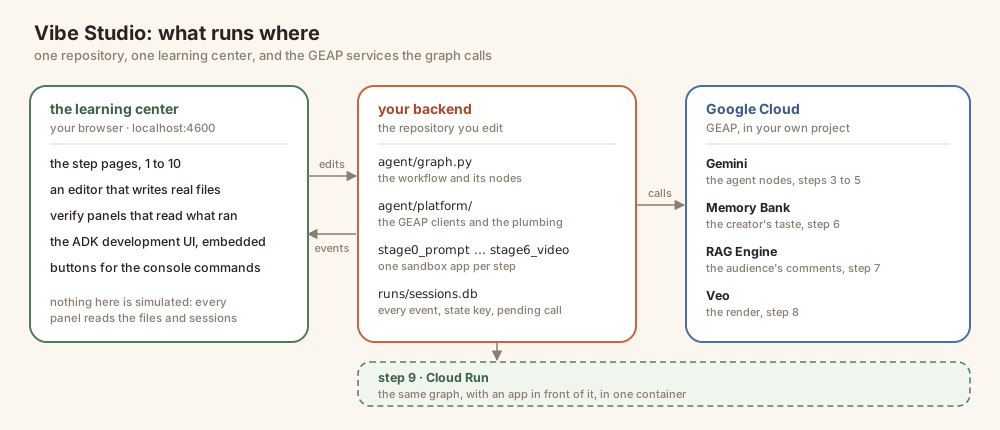
Three things run: the Workbench (the page on port 4600, the editor, the verifiers), your backend (the Workflow in agent/ and one sandbox app per session in stage0_prompt/ through stage6_video/, which adk web serves), and Google Cloud (Gemini, the image model, RAG Engine, Veo, Memory Bank — all reached through Vertex AI with your own credentials).
The seven sessions
Session | What you build | Your edits |
1 · The story | Nothing yet — the night, and the graph it becomes | — |
2 · Image generation | One agent draws the first poster |
|
3 · Workflows | The night as a graph: the fan-out and the join, the router and its loop |
|
4 · Multimodal ingestion | What the audience sent, read into one corpus; the third reader |
|
5 · Video generation | Two kinds of suspension; the poster shared by name in state |
|
6 · Memory | What the channel remembers between nights |
|
7 · Deploy and publish | VibeStudio on Cloud Run; the night on VibeTube | the room's event code, and publish |
How to use this codelab. It is concept-first: each session explains the idea, then shows the code as it reads once the change is in and walks through it. It never asks you to edit a file here — the editing happens in the workbench, which hands you one edit at a time, a hint beside it, and a verify panel under it. Read the session, then let the page take you through it.
Where this sits
The graph, the theme and the room on VibeTube come from Lin's Haunted Edition of VibeStudio; this is the multimodal cut, re-centred on what the audience sent and on the two kinds of suspension, in the one-page interactive format of the Agent Valley labs. The studio is scenery; every mechanism under it is the ordinary one you would use for a support pipeline, a content review flow, or anything else that has to pause for a person and wait for a slow job.
2. 🧰 Setup
- What — an account that can pay, a project, the lab installed, the model proven to answer, and the workbench running in the background on one port.
- Why — one process on one port: the page, the editor, the verifiers,
/api/*andadk webshare an origin, so nothing in this lab needs a second terminal or a second port. - How — clone, two scripts. The second one makes a real model call, starts the workbench, and begins creating the RAG corpus and the Memory Bank while you read, so sessions 4 and 6 find them ready.
Everything in this lab runs in Cloud Shell — gcloud, Python, Node, ffmpeg and git are already installed there, and Gemini, the image model, Veo, RAG Engine and Memory Bank are all reached through Vertex AI using your own credentials. There is no API key anywhere in this lab, and nothing to install on your laptop. A laptop with the Google Cloud SDK, Python 3.12 and Node 20+ works the same way.
There is one thing this lab cannot hand you: a Google Cloud project with billing on it. Step 1 gets you an account that can pay for it; step 4 turns that account into a project. Do them in that order — every step after 4 reads the project that step 4 settles on.
1 · Get an account with billing (~1 min)
Sign in with a Google account that has billing enabled. Any such account works. If yours does not, start a free trial; it gives you a billing account, which is all step 4 needs. If you are in an instructor-led lab, redeem the credits for this session first — that creates the billing account for you.
2 · Open Cloud Shell (~2 min)
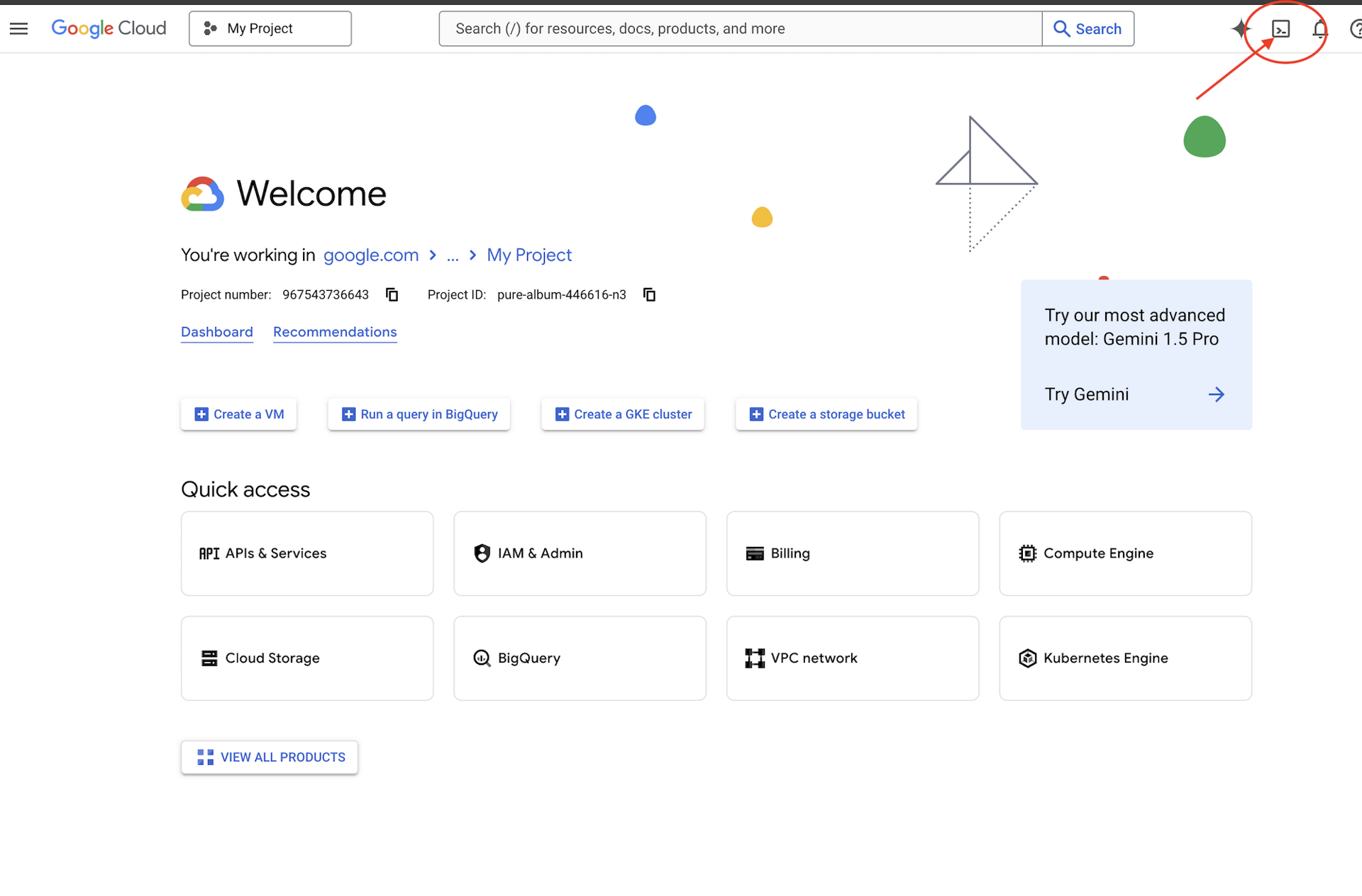
👉🖥 Click Activate Cloud Shell at the top of the Google Cloud console — it is the terminal-shaped icon in the header.
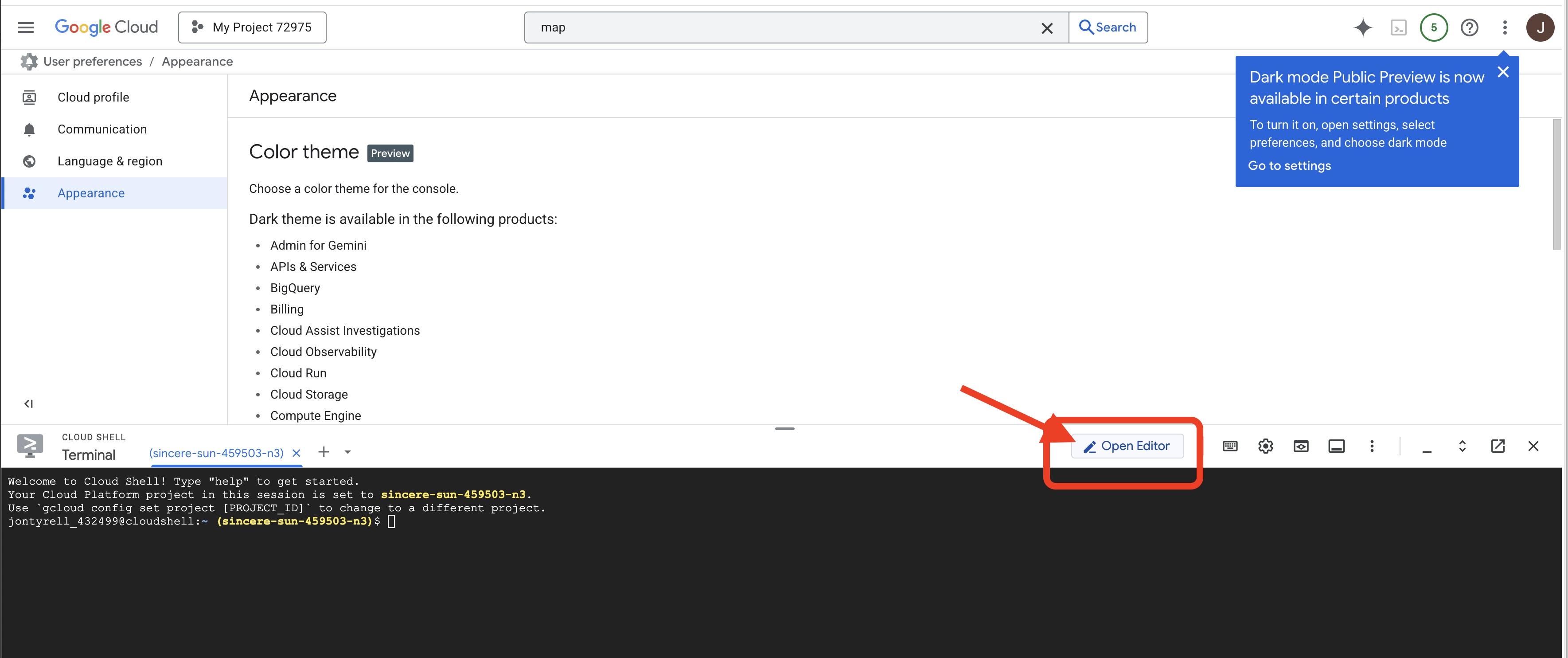
👉🖥 Click Open Editor (the open-folder-with-a-pencil icon). This brings up the Cloud Shell Editor with a file explorer on the left — that is where you go whenever you want to read a whole file.
👉🖥 If you are prompted to authorize at any point today, click Authorize to continue.
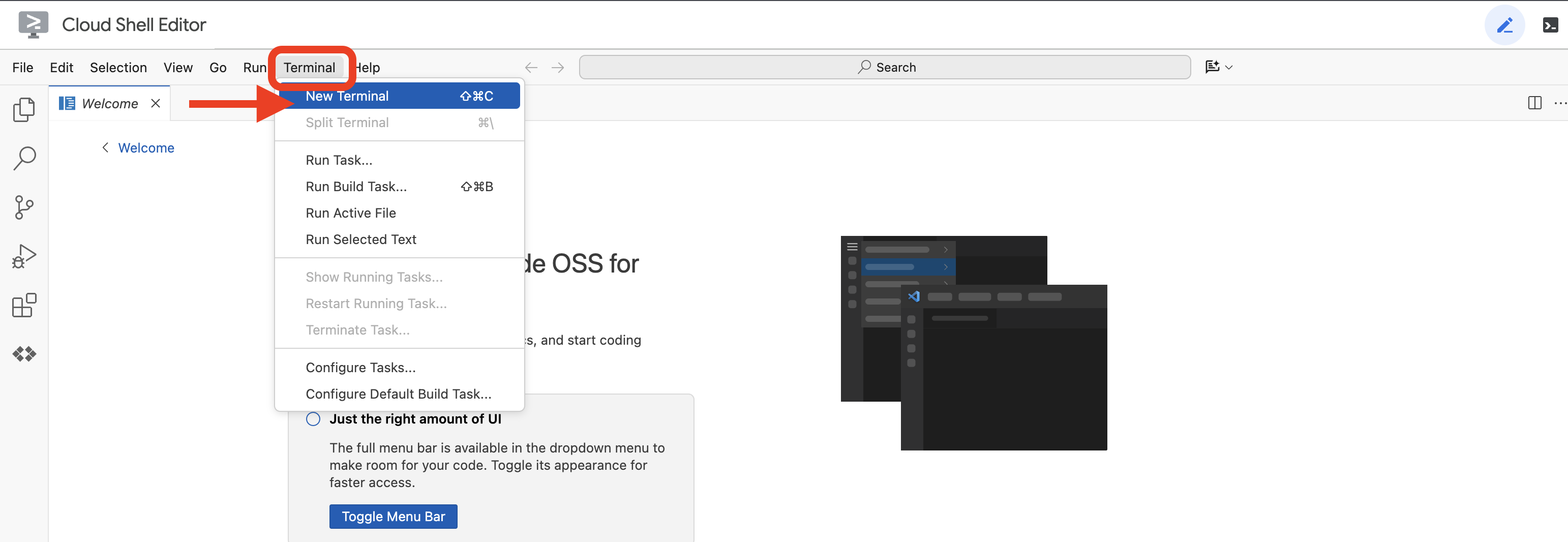
👉🖥 Open a terminal inside the editor — that is tab 1, and every 👉💻 step runs there. Tab 2 is the workbench itself, and you open it in step 7. If the terminal is not already along the bottom of the screen, open it with View → Terminal:
👉💻 Check which account you are signed in as — it should be the one from step 1:
gcloud auth list
3 · Get the lab (~1 min)
👉💻 Clone the repo:
cd ~
git clone https://github.com/cuppibla/vibe-studio-multimodal
cd vibe-studio-multimodal
4 · Create your project (~2 min)
👉💻 One script finds your billing account, creates a project on it, links billing, and points Cloud Shell at that project:
cd ~/vibe-studio-multimodal
./setup_project.sh
Expect a ✓ for the billing account it picked, a ✓ for the project it created, and an ending like:
Project ready: vibe-studio-4271
  Next:  ./setup_codelab.sh
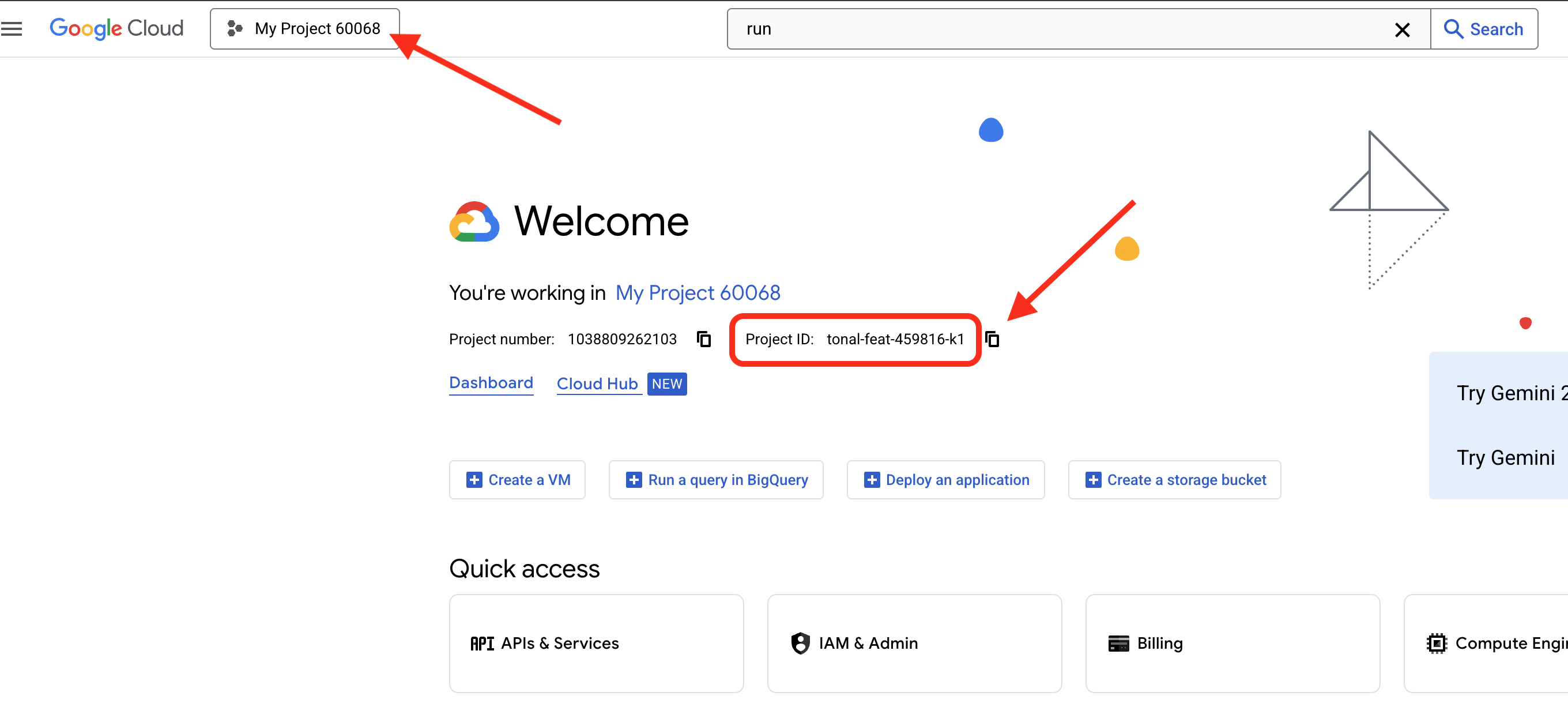
vibe-studio-4271 is your project ID — yours will have different digits. Four things happen in there:
billing | takes the newest | |
project | creates | |
selects | writes the ID to | |
waits | polls until the project is actually allowed to serve, for up to two minutes | |
👉🖥 The same project is now in the console — its ID sits in the Project info card on the Dashboard:
5 · Install and set the lab up (~4 min)
👉💻
cd ~/vibe-studio-multimodal
./setup_codelab.sh
One script, safe to run again — a second run keeps every answer you gave the first time. It asks two questions near the start, and Enter takes the default for both:
event code | the VibeTube room your video is published to in session 7. Type the room code from your instructor, or press Enter for | |
display name | the name the room credits you by, or Enter for one made from your account. | |
Both land in .env and can be changed later, in .env or on the publish page. Then it does the rest on its own, in order:
uv env | installs uv if it is missing, then | |
apis | enables six APIs on the project step 4 selected and confirms each one answers before going on: | |
account | makes sure the project's default compute service account exists and holds the roles session 7's build and service need | |
.env | writes | |
veo · room | confirms | |
model | makes one real call to Gemini, so a bad project fails here at setup time and not inside a session | |
starter | puts the nine files you will edit in place from | |
page | installs and builds | |
cloud | starts creating the RAG Engine corpus and the Memory Bank in the background, so sessions 4 and 6 find them ready | |
preflight | runs | |
6 · Read the preflight (~1 min)
The last thing step 5 printed is the preflight — every line a real probe, not a guess:
  ✓ python 3.12
  ✓ auth path A: Vertex via ADC (STUDIO_VERTEX=1)
  ✓ Google Cloud ADC (project vibe-studio-4271)
  ✓ Memory Bank SDK
  ✓ stage0_prompt loads
  ✓ stage1_fanout loads (0 edges)
  ✓ stage3_router loads (... edges)
  ✓ stage4_memory loads (... edges)
  ✓ stage5_rag loads (... edges)
  ✓ stage6_video loads (... edges)
  ✓ node and npm (build the learning center's page)
  ✓ learning center page built (web/dist)
  ✓ aiplatform.googleapis.com enabled (Gemini, Veo, Memory Bank, RAG Engine)
  ...
  - Memory Bank: still being created in the background
  - RAG corpus: still being created in the background
  ✓ session 7 runtime account 123456789-compute@developer.gserviceaccount.com has its roles
  ✓ learning center running on port 4600

PREFLIGHT GREEN

Open session 1 here:  https://4600-cs-...cloudshell.dev/step/story
stage1_fanout loads (0 edges) is right: that graph ships empty, and session 3 is where you fill it. The two - lines are right too — a corpus takes a minute or two to come up and the bank about twenty seconds, and you will not need either before session 4.
👉💻 Run it again at any point to see where you are — it reads your files, your project and the running server, not a checklist:
cd ~/vibe-studio-multimodal
uv run python scripts/preflight.py
7 · Open the workbench (~1 min)
The workbench is already running. Step 5 started it in the background, one uvicorn process on port 4600 that serves the page, every /api/* route, and adk web mounted at /workbench. There is nothing to start, and nothing in this lab ever asks you to restart it: an edit lands on your next run.
👉🖥 Click the link the preflight printed, or in Cloud Shell: Web Preview → Change port → 4600. Call that tab 2. It opens on Session 1 · The story.
The three commands you may want later, all from ~/vibe-studio-multimodal:
| stops the workbench | |
| starts it in the foreground; Ctrl+C stops it and every process it started | |
|
| |
Repository layout
vibe-studio-multimodal/
├── agent/                  # the workflow and the platform clients
│   ├── graph.py            # the graph: three readers, the proposer, the gate, the router, the script, the desk
│   ├── desk.py             # render_desk and render_submit, the LongRunningFunctionTool
│   ├── deliver.py          # the delivery console: find the pending call, wait for Veo, answer by id
│   ├── schemas.py          # Direction, Directions, CleanedDirection, Script, each with a poster idea
│   ├── cleanup_tools.py    # find_policy_hits, suggest_replacement: the task agent's tools
│   ├── policy_words.txt    # the policy, as data; policy_replacements.txt, the approved stand-ins
│   ├── backlog.txt         # the creator's Halloween ideas; comments.md, the audience's comments
│   ├── audience/           # what else the audience sent: voice/*.mp3, photo/*.jpg, clip/*.mp4
│   ├── media/past/         # six past posters and captions.md, what Gemini sees in each
│   └── platform/           # config, audience (the readers), rag (RAG Engine), images, videogen (Veo), memory (Memory Bank)
├── stage0_prompt/ ... stage6_video/   # one sandbox app per session, runnable in adk web
├── server/ & web/          # the VibeStudio Workbench (FastAPI + React, port 4600)
├── vibestudio/             # the app deployed in session 7, with its own copy of agent/
├── checks/ & scripts/      # the hole registry, the verifiers, preflight, start/stop/restart
└── starter/                # the nine files you edit, as students receive them
3. 1 · The story — the night, and the graph it becomes
👉🖥 Tab 2 opens on Session 1 · The story. Read it: six chores arranged in a ring around one person — research the trend, comb the backlog, choose a direction, check the policy, write the script, render the clip — and the ring repeats every night. Gemini can do the research, the backlog and the script alone; Veo can render alone; choosing and checking are the person's.
Under the ring is the graph the rest of the lab builds, thirteen nodes from an idea to a clip and its poster. Hover a node for what it does and the session that builds it. Nothing to edit here; the page's Generate the first poster button is session 2.
The vocabulary, so the next six pages read without stopping:
word | what it means here |
agent | an ADK |
node | one step of the graph — a Python function, an agent, a join, a router |
edge | a tuple of nodes that run in order; the graph is a list of them. Session 3 |
session | one run's record in |
state | a dict the nodes share by key name; a node writes |
memory | what outlives a session — Memory Bank, through callbacks. Session 6 |
4. 2 · Image generation — one agent, and the image model as a tool

👉🖥 In the workbench, open Session 2 · Image generation. Before the graph, the simplest thing that could work: one Agent whose instruction is the whole night as prose, three Python functions as its hands, and a run that ends with a picture.
An agent is a model, an instruction and tools
stage0_prompt/agent.py defines root_agent with three of an ADK agent's fields. model is the Gemini model from agent/platform/config.py. instruction is the system prompt: six jobs in one breath, the last of them a picture. tools holds three functions.
root_agent = Agent(
    name="solo_channel", model=config.MODEL,
    tools=[check_trends, read_backlog, make_poster],
    instruction=(
        "You run the creator's cozy-spooky short-video channel, alone, every "
        "night until Halloween.\n"
        "When the creator gives you an idea (or nothing), do ALL of this:\n"
        "check what is trending. look at your backlog of ideas. propose a "
        "direction and agree on it with the creator. refuse blacklisted "
        "subjects (competitor, hateful, gore). then describe the video you "
        "would make: a title (<=60 chars) and 3 shots, one visual sentence "
        "each. then draw its poster: call make_poster once with one line that "
        "names the single image that sells the video, and tell the creator "
        "where the poster is.\n"
        "Ask the creator to confirm the direction before describing the "
        "video."))
A model is a closed world: it reasons over its weights and the tokens in its context. A tool is a Python function the model may ask for. ADK reads each function's signature and docstring and declares it to the model; when the model wants one it emits a function_call event, the runtime runs the Python and writes a function_response event back into the context, and the model continues with the result in front of it.
Three functions, and one of them draws
Two of the three read the research. The third asks the image model for a poster:
def check_trends() -> dict:
    """Ten formats trending on the platform right now, with a heat score each."""
    from agent.trends import sample_trends
    return {"trends": sample_trends()}


def read_backlog() -> dict:
    """The creator's backlog: ideas they noted down to make someday."""
    from agent.graph import backlog_notes
    return {"backlog": backlog_notes()}


def make_poster(subject: str) -> dict:
    """Draw tonight's poster: one image of `subject` in the channel's cozy
    low-poly style. Returns where the PNG landed (path, url) in a few seconds."""
    ...
make_poster calls agent/platform/images.py, the image model wrapped as a plain function the way videogen.py wraps Veo: a house-style prefix (the channel's cozy low-poly Halloween look, pumpkin orange and candlelight cream against midnight plum), the subject, a vertical 9:16 frame, one PNG under runs/media/posters, served at /static/posters. With STUDIO_REAL_IMAGES=0 it copies a stand-in poster and flags the result prebaked, so the lab runs anywhere.
MODEL = os.environ.get("STUDIO_IMAGE_MODEL", "gemini-2.5-flash-image")
ASPECT = "9:16"

def generate(subject: str, visual_style: str = "", name: str | None = None) -> dict:
    """One poster for `subject`. Returns where it landed: status, path, url,
    prompt, and prebaked=True when the stand-in was used instead of the model."""
The same call is a node in the graph in session 5.
Hands-on: the one edit
As shipped, make_poster returns a dict that says the poster was skipped. 👉🖥 In the workbench editor, make it call the image model, in place of the TODO line:
    from agent.platform import images
    return images.generate(subject, name="solo")
Save. The verify rows read the file: three tools on the agent, the image model call in place. 👉🖥 Click Check the workflow loads, then Open adk web and send:
tonight's idea: a tiny ghost learning to haunt a sock drawer
What to expect and why
- Two tool events before the reply, then a question.
check_trendsandread_backlogrun because the instruction said to check and to look, and the model had neither in its weights. The reply proposes a direction and asks you to confirm, because the instruction asked for agreement first. - The second message gets everything. Send
skip the questions, describe the video and draw the poster. The model describes the video, callsmake_posteronce with a subject line it wrote itself, and tells you where the PNG landed. The verify panel shows the poster beside the rows: a Halloween scene in the channel's look, drawn in about eight seconds. - Why this is not a channel. The research is folded into prose nothing can cite. The policy was certified by the model that wrote the direction, and the poster was drawn before anything checked it. The agreement was talked past in one message. Prompt text is not a gate. The rest of the lab takes these six jobs apart into a drawn graph.
The page ends with What an ADK agent is made of, a reference you can come back to: the model, the context it reasons with, the tools and collaborators it acts through, the callbacks that wrap each call, and the session and memory that live outside it.
5. 3 · Workflows — the fan-out and the join, the router and the loop
👉🖥 In the workbench, open Session 3 · Workflows, parts 3a and 3b. Each part is built in a sandbox app so you can run it in adk web on its own: the fan-out in stage1_fanout, the router and its loop in stage3_router.
Fan-out and join (3a)
An ADK Workflow is an edge list. Each entry is a chain, a tuple of nodes that run in order. Two chains leaving START run in parallel. A chain that ends in a JoinNode reports to it, and the join waits for every chain that ends there before it continues, handing on one dict keyed by node name. A target written as a dict maps a router's route names to nodes. The workbench's 3a page draws the shapes and has a write-the-edges exercise.
Node kind | Written as | What it does |
Function node |
| Plain Python. May also write shared state with |
Join node |
| Waits until every incoming chain has reported, then passes all their outputs on as one dict. |
Agent node |
| One model call in |
Router |
| A function node whose return names the outgoing edge. |
Human input node |
| Suspends the graph until a person answers a form. Session 5. |
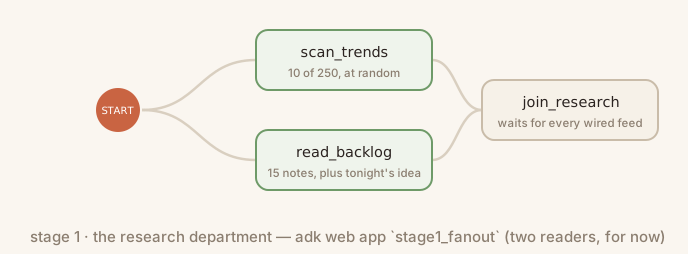
The first graph is the research of session 2 as nodes. scan_trends and read_backlog in agent/graph.py are the two readers; read_backlog also writes tonight's idea to shared state. stage1_fanout/agent.py defines the join and builds its Workflow from a list named EDGES, which ships empty (the preflight's 0 edges). 👉🖥 Fill it with the two chains:
EDGES = [(START, scan_trends, join_research),
         (START, read_backlog, join_research)]
👉🖥 Run it in adk web. Two nodes light together, then the join; open join_research's event and read one dict with a scan_trends key and a read_backlog key. No model call happened. Nothing reformats the join's dict: the node after it, in 3b, is an agent, and an agent node receives its node_input as its message, so a dict arrives as JSON the model reads directly.
The router and the loop (3b)
An Agent inside a Workflow runs in single_turn mode: it receives the previous node's output as its message, makes one model call, and answers once. With output_schema the answer is validated against a Pydantic model before the next node sees it, so the graph passes typed objects, not prose. propose_directions reads the join's research dict and pitches four candidates, every one a Halloween scene. Candidate 4 is the bait: its title carries a word the channel refuses, so the router has something to catch. Every candidate carries a poster_idea, one line naming the single image that sells the video; the scripter keeps it and the media desk draws it in session 5.
A router is a function node whose return names the edge the run takes. No model call: policy_check reads agent/policy_words.txt at decision time, matches whole words against the direction's title and angle, and routes it before any script is written or any money is spent. The policy is data: edit the file, and the next run reads it.
def policy_check(node_input):
    """The policy gate: a router. Refused words in the direction send it to
    quarantine; a clean one goes to the scripter. Code, not a model."""
    chosen = _as_dict(node_input)
    bad = policy_hits(f"{chosen.get('title', '')} {chosen.get('angle', '')}")
    return Event(output=node_input, route="BLOCK" if bad else "OK")

stage3_router/agent.py is the fan-out plus propose_directions and choose_direction, a stand-in for the human door you build in session 5: it picks the candidate whose number ends tonight's idea (..., pick 4), else the first, and writes the pick to state. scripter is a single_turn agent that turns an approved direction into a Script: a title, a description, tags, an opening line, three shots and a poster idea, every shot a Halloween image in the channel's look.
The loop behind the refused exit. quarantine ships as a task-mode agent. An Agent has a mode: chat is the conversational loop a root agent runs with a person, single_turn is one call with a structured answer, and task is a loop of tool calls the agent runs on its own until it calls the built-in finish_task, whose arguments ADK derives from output_schema. Quarantine calls find_policy_hits on the refused direction, asks suggest_replacement for the channel's approved stand-in for each word (agent/policy_replacements.txt, data again), rewrites, checks again, and finishes with a typed CleanedDirection. Read it on the page; you do not type it.
quarantine = Agent(
    name="quarantine",
    model=config.MODEL,
    mode="task",
    instruction=QUARANTINE_INSTRUCTION,
    tools=[find_policy_hits, suggest_replacement],
    output_schema=CleanedDirection)
As shipped, the chain runs from the pick straight to the scripter. 👉🖥 Put the router between them, with its two exits and the way back from quarantine; three lines replace one:
           (join_research, propose_directions, choose_direction, policy_check),
           (policy_check, {"OK": scripter, "BLOCK": quarantine}),
           (quarantine, scripter),
👉🖥 Run both routes. Send the idea as it is: choose_direction takes candidate 1, policy_check emits OK, and the scripter writes a structured script. Click New session and send the idea again with , pick 4 at the end: candidate 4 is the bait, policy_check emits BLOCK, quarantine calls its tools, rewrites the refused words, calls finish_task, and the cleaned direction takes the way back to the scripter. The verify rows read both runs from the session store.
Every sentence of session 2's prompt now has a node: the research is two readers and a join, the refusal is a router and a task agent, the script is an agent node. In the whole graph the stand-in pick is two function nodes, direction_gate and persist_direction, which you will see run straight through until session 5 makes the door stop. The agreement with the creator is still a stand-in; so is the research, which has not yet heard the audience.
6. 4 · Multimodal ingestion — what the audience sent, read into one corpus

👉🖥 In the workbench, open Session 4 · Multimodal ingestion, parts 4a and 4b. The audience did not only write. One reader per kind turns everything they sent into text with the same shape, one RAG Engine corpus holds it all, and a third reader in the fan-out searches it by meaning and hands the media back.
What the audience sent (4a)
agent/comments.md holds twelve comments written under the channel's six Halloween videos. agent/audience/ holds the rest: eight voice notes (voice/*.mp3), fourteen photos of the viewers' own rooms (photo/*.jpg) and six clips (clip/*.mp4), a slow pan over a photo with the viewer's voice over it. The 4a page opens on all of it: every voice note plays, every photo shows, every clip runs.
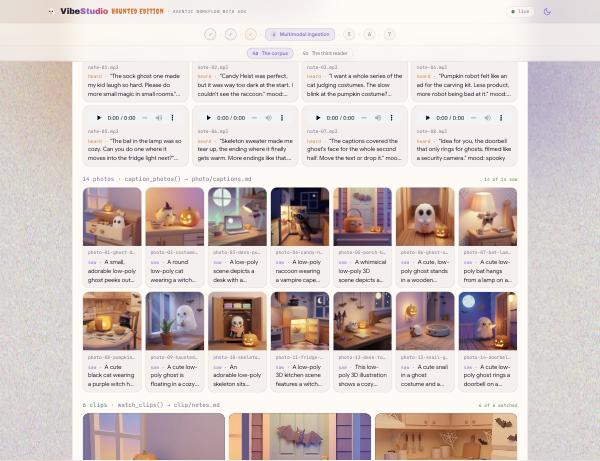
RAG Engine retrieves text. A voice note, a photo or a clip can only join the corpus the way the past posters did in rag.caption_posters: a model turns it into a line of text that names its file, the line becomes a passage, and when the passage comes back the file comes back with it. agent/platform/audience.py has one reader per kind. Each sends one file and one prompt to Gemini and writes one line per file:
VOICE_PROMPT = ("Transcribe this voice note word for word inside double quotes. Then add: mood: and one word. "
                "Plain text on one line, nothing else.")
PHOTO_PROMPT = ("Two sentences: what is in the picture, the palette, the mood. Then: tags: and three short tags. "
                "Plain text on one line, no headings, no markdown.")
CLIP_PROMPT = ("Describe the shots in two sentences, then quote what you HEAR on the soundtrack as: heard: \"...\". "
               "Plain text on one line, no headings, no markdown.")


def _ask(path: pathlib.Path, mime: str, prompt: str) -> str:
    """One media file in, one line of text out."""
    from google.genai import types as gt
    client = images._client()
    resp = client.models.generate_content(
        model=config.MODEL,
        contents=[gt.Part.from_bytes(data=path.read_bytes(), mime_type=mime), prompt],
        config=gt.GenerateContentConfig(automatic_function_calling=gt.AutomaticFunctionCallingConfig(disable=True)))
    return " ".join((resp.text or "").split())


def transcribe_voice() -> pathlib.Path:
    """voice note -> text: Gemini listens."""
    files = sorted((AUDIENCE / "voice").glob("*.mp3"))
    lines = []
    for p in files:
        said = _ask(p, "audio/mpeg", VOICE_PROMPT)
        lines.append(f"- voice: {p.name} — {said}")
    return _write(AUDIENCE / "voice" / "transcripts.md", "voice", "What Gemini heard in the audience's voice notes", lines)
caption_photos does the same with image/jpeg and PHOTO_PROMPT; watch_clips with video/mp4 and CLIP_PROMPT, and Gemini watches the picture and hears the soundtrack in one call. Every reader writes the same line shape, so chunking, embedding and retrieval never know which kind a passage came from:
- voice: note-03.mp3 — "I want a whole series of the cat judging costumes ..." mood: delighted
- photo: photo-01-ghost-drawer.jpg — A cream wooden drawer, striped socks, a paper-cup ghost ... tags: drawer, socks, cozy
- clip:  clip-05.mp4 — A hallway floor, a snail in a sheet and a round vacuum ... heard: "The snail won."
- poster: sock-ghost.png — A sheet ghost one inch above a striped sock ...
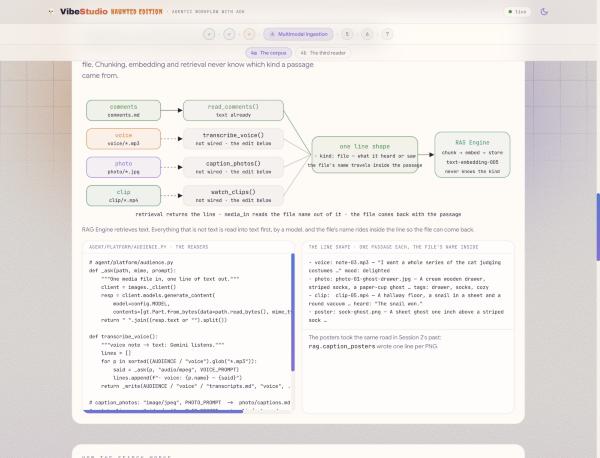
The corpus. Vertex AI RAG Engine is retrieval over documents: a corpus is chunked into passages of about 120 tokens, each passage is embedded with text-embedding-005, and a query is embedded the same way and answered with the nearest passages by meaning, not by shared words. "cozy little hauntings at home" finds the comment that asks for small magic in small rooms, the voice note about the bat hugging the bulb, and the clip whose soundtrack says the ghost is a paper cup.
corpus = rag.create_corpus(
    display_name="vibestudio-feedback",
    backend_config=rag.RagVectorDbConfig(
        rag_embedding_model_config=rag.RagEmbeddingModelConfig(
            vertex_prediction_endpoint=rag.VertexPredictionEndpoint(
                publisher_model="publishers/google/models/text-embedding-005"))))

rag.upload_file(
    corpus_name=corpus.name, path="agent/comments.md", display_name="comments.md",
    transformation_config=rag.TransformationConfig(
        chunking_config=rag.ChunkingConfig(chunk_size=120, chunk_overlap=20)))
Setup already started creating the corpus; the 4a page's connect row says whether it is up, and creates it if setup could not. From the page's buttons or the terminal: python -m agent.platform.rag creates the corpus and records it in runs/ragcorpus.json; python -m agent.platform.rag load --audience runs every reader in audience.READERS, then uploads what they wrote beside the comments and the posters' captions, each file under its own name, and waits for the index to answer; python -m agent.platform.rag query "cozy little hauntings at home" shows retrieval finding passages that share no word with the query.
The edit. As shipped, READERS holds read_comments only; the three media readers sit behind one # . 👉🖥 Run the ingest once as it ships: the output says not read (no reader wired in audience.READERS): voice, photo, clip, and only the comments and the captions go in. Then delete the # :
transcribe_voice, caption_photos, watch_clips,
👉🖥 Save and run the ingest again. The readers take about three minutes for the forty items; the console says heard, saw and watched one line at a time, and every card in the grid fills in with its line. The verify rows read the file, the readers' output and the corpus: four readers wired, eight voice notes heard, fourteen photos seen, six clips watched, five files in the corpus.
The third reader (4b)
Audience feedback is research, shared by every run, so it enters the graph where the research does: as a third reader into the join. read_feedback in agent/graph.py takes tonight's idea, asks the corpus for the nearest passages, and reports to join_research, which waits for three. The edge (START, read_feedback, join_research) ships in stage5_rag/agent.py, the shape session 3 taught; your edit is inside the node. Retrieval, not a model call, and deterministic: the same idea finds the same passages while the proposer varies.
def read_feedback(node_input):
    """The third reader: what the audience sent - comments, and what Gemini
    heard and saw in their voice notes, photos and clips - the passages
    nearest to tonight's idea, and the media those passages came with.
    Retrieval, not a model call."""
    from .platform import rag
    idea = idea_text(node_input)
    query = idea or "what viewers liked and what they complained about"
    try:
        hits = rag.retrieve(query)
    except Exception as e:
        print(f"  [rag] feedback unavailable ({str(e)[:80]})")
        return Event(output={"query": query, "feedback": [], "media": [],
                             "note": "no corpus connected - run: python -m agent.platform.rag"})
    return Event(output={"query": query, "feedback": [h["text"] for h in hits]})  # TODO: RAG_MEDIA
Every line in the corpus that came from a voice note, a photo, a clip or a poster names its file. rag.media_in(hits) reads those names out of the passages and turns them into URLs the page can show and play. 👉🖥 Hand the media back with the passages, so the things the audience sent travel with what they said:
    return Event(output={"query": query, "feedback": [h["text"] for h in hits],
                         "media": rag.media_in(hits)})
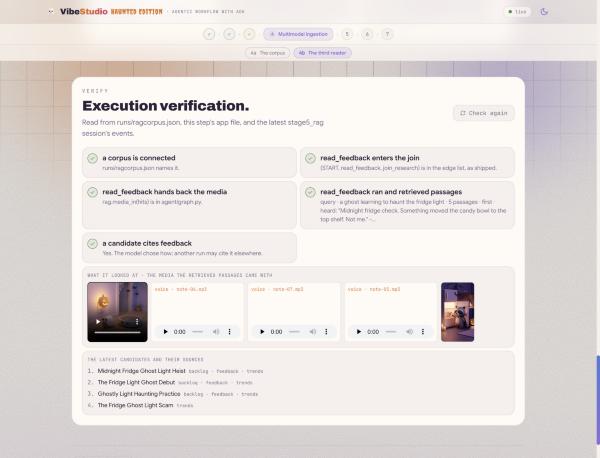
👉🖥 Run stage5_rag with an idea. Open read_feedback: the query is your idea, the output has the five nearest passages and a media list with a URL per file. Open join_research: three keys. Open propose_directions: candidates 1 to 3 cite feedback in their evidence. The verify panel shows what the reader looked at under the rows: a clip, three voice notes and a poster for the ghost in the fridge light.
7. 5 · Video generation — two kinds of suspension, one mechanism
👉🖥 In the workbench, open Session 5 · Video generation, parts 5a and 5b, built in stage6_video, the whole graph. The clip takes minutes and the poster takes seconds, and the run stops twice on the way: once for you, once for Veo. The two stops are one mechanism, and the two branches of the desk share what they made by name.
Two kinds of suspension (5a)
Nothing waits. A run that has to stop writes an open call into its session and ends; whoever answers that call, a person or a process, continues it. The page opens on one table:
for a person · | for a slow tool · | |
who stops the run |
|
|
what it waits for | a person: one of four cards | a slow job: Veo's operation, minutes |
what sits in the session | an open | an open |
how it resumes | a | a |
who sends it |
|
|
where it lives meanwhile |
| the same row, the same id · nothing runs |
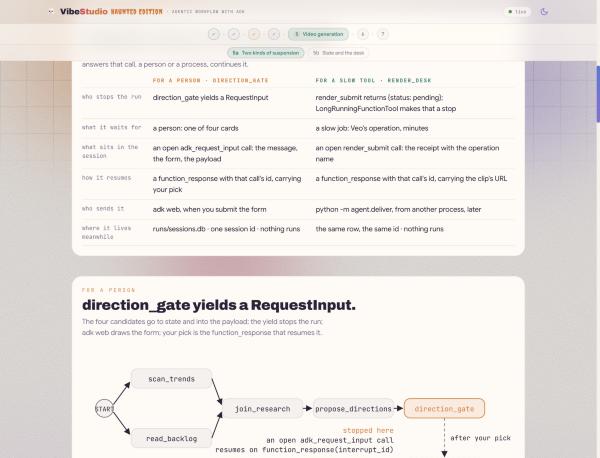
For a person. In a single prompt, "ask the creator to confirm" is advisory, and session 2 talked past it in one message. In a workflow the pause is the engine's. A node that yields RequestInput suspends the run: ADK writes an open call named adk_request_input into the session with your message, response_schema and payload, gives it an interrupt_id, and returns to the caller. No thread waits. The only thing that resumes it is a function_response carrying that id, validated against your schema; a chat message to the workflow is a new turn, not an answer. The schema is also the form: adk web renders it, and the VibeStudio app renders the same schema as four cards. direction_gate already writes the candidates to state. 👉🖥 Make it stop:
    yield RequestInput(
        message="Pick tonight's direction: 1, 2, 3 or 4.",
        response_schema={
            "type": "object",
            "properties": {
                "pick": {"type": "string", "enum": ["1", "2", "3", "4"]}}},
        payload={"candidates": cands})
Your answer arrives at persist_direction as its node_input, a dict with one key, pick. The four candidates arrive another way: the gate wrote them to shared state under candidates, and ADK binds a state key to a parameter of the same name. The node resolves the pick into one candidate and writes direction, angle, hook and user:prefs back with Event(state=...). Keys prefixed user: persist across sessions for that user.
For a slow tool. A Veo render takes minutes, and a graph should not wait that long. render_submit in agent/desk.py starts the job and returns at once with a receipt whose status is pending:
def render_submit(prompt: str) -> dict:
    """Submit one Veo render of `prompt`. Returns at once with a pending
    receipt; the clip is delivered later, to this call, by id."""
    receipt = videogen.start(f"{prompt} {videogen.NO_TEXT}")
    return {"status": "pending", "operation": receipt["operation"], "prompt": receipt["prompt"]}
Wrapped in LongRunningFunctionTool, that receipt means something to ADK: the agent's turn ends, the workflow suspends at render_desk, and the open call with its id and receipt is a row in runs/sessions.db. 👉🖥 In stage6_video/agent.py, wrap the tool:
tools=[LongRunningFunctionTool(render_submit)])
Resume by id, from another process. agent/deliver.py finds the pending call in the session store, polls Veo until the clip exists, writes the result to runs/state.json, and sends the same session a function_response with that call's id. 👉🖥 Build the response part:
    part = Part(function_response=FunctionResponse(
        id=row["call_id"], name=row["name"], response=response))
👉🖥 Run stage6_video until it stops twice. Send an idea: the run stops on a form built from your schema, the four candidates in its payload. Type 2 in pick and submit; the graph resumes at persist_direction. Try the kill test here: suspend at the form, stop the server (scripts/stop.sh in tab 1), start it again (scripts/restart.sh), reopen the session. The form is still standing, because a pause is a row, not a thread. After script_ready, render_desk calls render_submit, gets the receipt, replies WAITING, and the run ends; the session keeps the call id. Run the delivery from the page's console or tab 1:
cd ~/vibe-studio-multimodal
uv run python -m agent.deliver status   # the pending renders, by session, call id and operation
uv run python -m agent.deliver          # wait for Veo, answer the newest pending call by id
👉🖥 Click Refresh adk web: the function_response follows the pending call, join_media releases, and store_release runs. Eight verify rows read the two stops from the session: the gate's call and your answer, the render's receipt and its delivery.
State and the desk (5b)
The media desk is the structure of 3a again, a fan-out and a join, with one slow branch. script_ready sends the script two ways. render_desk submits the clip and the run suspends. make_poster is the session 2 tool as a node: the script's poster_idea, the channel's style and what Memory Bank knows about the creator's taste in posters (bound from state as memory_facts, session 6) go to the image model, and a 9:16 PNG comes back in seconds. join_media waits for the slow one, and store_release writes what it found to state.
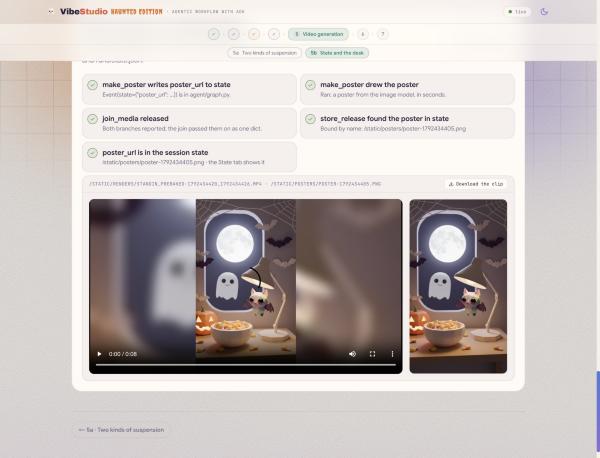
Share by name. store_release never receives the poster. It declares a parameter named poster_url, and ADK binds it from shared state, because a node in the other branch wrote that key. No payload crosses between the branches:
def store_release(node_input, poster_url: str = "", poster_path: str = ""):
    """`poster_url` and `poster_path` are not passed by anyone: ADK binds them
    from shared STATE because the parameter names match the keys make_poster
    wrote (the STATE_SHARE edit). The two branches of the desk never hand each
    other payloads; they share what they made by name."""
    render = state.load().get("render") or {}          # the delivered clip, written by deliver
    url, status = render.get("url") or "", render.get("status", "")
    ...
    if not poster_url:
        said += " · poster: not in state (did make_poster write poster_url to state? the STATE_SHARE edit)"
    yield Event(output={"status": status, "url": url, "poster_url": poster_url},
                state={"render_url": url, "render_status": status, "poster_url": poster_url},
                message=f"video: {said} · poster: {poster_url or 'none'}")
As shipped, make_poster yields the poster as output and a message, and store_release says poster: not in state. 👉🖥 Add the state write to its final yield:
                state={"poster_url": rec.get("url", ""), "poster_path": rec.get("path", "")},
                message=f"poster: {said}")
👉🖥 Run once more and deliver. Open make_poster's event: the poster's URL in its output and a state delta with poster_url. Open store_release: its message names the poster. The page's This run's session block shows the same row adk web's State tab shows: the session id a resume needs, the call that is open, and the keys the nodes wrote, poster_url among them. The verify panel shows the clip and the poster side by side.
8. 6 · Memory — what the channel remembers between nights

👉🖥 In the workbench, open Session 6 · Memory, parts 6a and 6b, built in stage4_memory. Session 5 was about the state of one run. This session is about what the channel remembers between runs: what the graph hears from outside, through two callbacks.
Memory Bank (6a)
Vertex AI Memory Bank is managed long-term memory about a person. Facts live under a scope, the app name and the user id, and under topics you define. When you hand it an exchange with memories.generate, it extracts what fits a topic, embeds it, and consolidates it with what it already holds: a new fact is created, a changed one is updated, a repeat is merged. memories.retrieve returns the facts for a scope. Both calls live in agent/platform/memory.py.
SCOPE = {"app_name": config.APP, "user_id": config.USER}
TOPICS = {
    "CREATOR_TASTE": "Which video directions this creator picks and passes on, "
                     "and how that preference changes over time.",
    "CHANNEL_RULES": "Standing instructions the creator states for every video "
                     "(style, subjects to avoid, format rules).",
    "VISUAL_STYLE": "What this creator approves and rejects in a poster: palettes, "
                    "framing, props and mood of the posters they shipped.",
}
The third topic is the channel's taste in pictures. The release wrote to it in session 5: a shipped poster is described in one sentence and remembered, and the next poster is drawn with that sentence in its prompt.
Setup already started creating the bank; the 6a page's connect row says whether it is up. From the page's buttons or the terminal: python -m agent.platform.bank creates the bank and its topics and caches the resource name in runs/memorybank.json; python -m agent.platform.bank load seeds four past sessions (two animal eras with a style rule, a gadget era, a recent fantasy era); python -m agent.platform.bank list shows what the transcripts became: consolidated statements of fact, not transcripts.
Callbacks (6b)
Memory is not a node. A callback is a function you pass to an Agent; ADK calls it at a fixed moment with the live context, and returning None lets the normal thing happen. Three pairs: around the agent's turn (before_agent_callback, after_agent_callback, with a CallbackContext), around each model call (before_model_callback with the LlmRequest, after_model_callback with the LlmResponse), around each tool call. Guardrails, telemetry, caches and context injection go here, without a node in the graph.
In stage4_memory/agent.py, propose_directions reads the bank before its model call: recall_taste fetches the facts, appends them to the request as a MEMORY block, oldest first, and tells the model to lean candidates 1 to 3 toward the current taste and treat the rules as constraints. It also writes the facts to state as memory_facts, where make_poster finds them. 👉🖥 Wire it:
    output_schema=Directions,
    before_model_callback=recall_taste)
The scripter writes what the creator picked after its turn: remember_pick reads direction from state, writes one sentence about the choice, and hands it to memories.generate. 👉🖥 Wire it:
    output_schema=Script,
    after_agent_callback=remember_pick)
👉🖥 Run with an empty message and pick a card. Open the propose_directions event: the request carries the three eras, and candidates 1 to 3 lean toward the current taste while the trends suggest something else. After the scripter, click Show the bank: a memory changed or was added for tonight's pick. Run a second night: it remembers the first.
9. 7 · Deploy and publish — the graph inside an app, the night on VibeTube

👉🖥 In the workbench, open Session 7 · Deploy and publish, parts 7a and 7b.
Deploy VibeStudio (7a)
In the sandboxes, adk web drove the graph. VibeStudio drives it with ADK's Runner, on a worker thread with its own event loop, and folds every event into one run state the page reads over Server-Sent Events: the readers, your pick as four cards, the poster as it lands, the render as it is delivered. The gate's answer and the render's delivery are the same call, a function_response part, and the app polls Veo itself instead of waiting for the console.
self._svc = DatabaseSessionService(db_url=config.DB_URL)
self._runner = Runner(app_name=config.APP, agent=wf, session_service=self._svc)

async for ev in self._runner.run_async(user_id=config.USER, session_id=run_id, new_message=message):
    self._absorb(ev)    # fold the ADK event into the run state, publish one app event

part = Part(function_response=FunctionResponse(id=call_id, name=name, response=response))
vibestudio/server/agent/ is a byte-for-byte copy of the lab's agent/, checked by checks/verify_app.py. The complete edge list in agent/graph.py is every structure of this codelab in one place, thirteen nodes; it ships filled, for you to read, not to type:
        (START, scan_trends, join_research),
        (START, read_backlog, join_research),
        (START, read_feedback, join_research),
        (join_research, propose_directions, direction_gate,
         persist_direction, policy_check),
        (policy_check, {"OK": scripter, "BLOCK": quarantine}),
        (quarantine, scripter),
        (scripter, script_ready),
        (script_ready, render_desk, join_media),
        (script_ready, make_poster, join_media),
        (join_media, store_release),
👉🖥 Deploy with the workbench's Deploy button, or 👉💻 from tab 1:
cd ~/vibe-studio-multimodal
uv run python vibestudio/deploy.py
which runs, with the values from your .env filled in:
gcloud run deploy vibestudio --source vibestudio \
  --project $GOOGLE_CLOUD_PROJECT --region us-central1 \
  --labels dev-tutorial-codelab=vibetube --allow-unauthenticated \
  --memory 2Gi --cpu 2 --timeout 3600 --concurrency 40 \
  --max-instances 1 --min-instances 1 --session-affinity \
  --set-env-vars GOOGLE_CLOUD_PROJECT=...,STUDIO_VERTEX=1,STUDIO_MEMORY_BANK=...,STUDIO_RAG_CORPUS=...,VIBETUBE_URL=...,VIBETUBE_EVENT=...,VIBETUBE_NAME=...,VIBETUBE_PROJECT=...
--source builds the container with Cloud Build and deploys it in one step; the first build takes four or five minutes. --session-affinity with one warm instance keeps a suspended run on the instance that holds it: the session store of session 5, once more. In a larger deployment the session store moves to VertexAiSessionService and the affinity goes away. The build and the service run as the project's default compute service account, which setup granted the roles it needs.
👉🖥 Open the service URL and run a night in the app: an idea, a pick, wait for the clip and the poster. The History tab keeps both.
Publish (7b)
Publishing is one multipart POST from the app to the room's endpoint on VibeTube, in vibestudio/server/platform/publish.py. The clip is the video, the poster is the thumbnail, and the profile names the room and you:
url = f"{prof['platform_url']}/api/events/{prof['event_code']}/videos"
data = {"title": state.script["title"], "description": state.script["description"],
        "duration": "0:08", "displayName": prof["display_name"],
        "projectId": prof["project_id"]}        # one video per project and room: publishing again replaces it
files = {"videoFile": (clip.name, clip.open("rb"), "video/mp4"),
         "thumbnailFile": (poster.name, poster.open("rb"), "image/png")}   # the poster, not a frame
r = httpx.post(url, data=data, files=files, timeout=120)
video_id = r.json()["id"]                       # watch it at {platform}/e/{event}?v={video_id}
VibeTube keeps one video per projectId and room, and the project the app sends is your Google Cloud project, so publishing again replaces your video instead of adding one. A stand-in poster is never uploaded; a real one is the thumbnail, byte for byte.
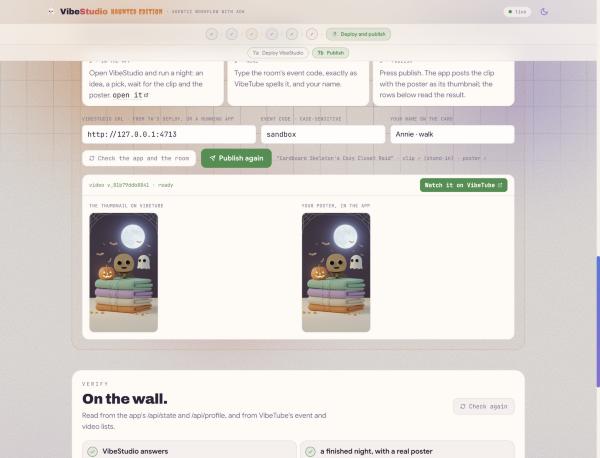
The last edit is a configuration, not a line of code. 👉🖥 On the 7b page: the VibeStudio URL (filled in from 7a's deploy), the room's event code, exactly as VibeTube spells it (the one you gave setup, unless your instructor has opened another), and your name. Press publish. The workbench relays the click to the app, the app posts the night, and the rows below read the result from the app and from VibeTube: the app answers, the night is finished with a real poster, the code names an open room, VibeTube returned a video id, the video is on the wall, and its thumbnail is your poster. The result card shows the thumbnail on VibeTube beside the poster in the app.
10. What you built
👉🖥 The 7b page's finale draws the whole graph, thirteen nodes from an idea to a clip and its poster; hover a node for what it does and the session that built it.
Session | What it taught | Written as |
2 · Image generation | An agent: model, instruction, tools; the image model as a tool; what a prompt cannot promise |
|
3 · Workflows | The edge list, the fan-out and the join, a router with a task-mode loop behind it |
|
4 · Multimodal ingestion | One reader per kind, one line shape, one corpus; a third reader by meaning, with the media |
|
5 · Video generation | Two kinds of suspension, one mechanism; the session store; the poster shared by name |
|
6 · Memory | Memory across nights, two callbacks |
|
7 · Deploy and publish | The graph inside an app, on Cloud Run; the night on VibeTube |
|
Five rules the graph follows:
- Suspend instead of waiting. A pause is a row in the session store, not a thread.
- Resume everything the same way — by the id of the open call, whether a person or a process answers.
- Share data by name in state, not by threading it through every payload.
- Decide with code before paying for a model. The policy is a text file and a router, and it runs before the render.
- Read everything that is not text into text before it reaches the corpus, with the file's name inside the line so the file can come back.
A prompt cannot promise order, a stop, or a check. A graph can.
Where to take it next
VertexAiSessionServicefor sessions that outlive an instance, and drop--session-affinity.- A webhook that answers the render's call instead of a poller: same
FunctionResponse(id=...), different sender. - A second
RequestInputbefore publishing — the schema is the form, so it is one node and no page code. - The audience's new comments, voice notes and clips appended to the corpus after every release, with the poster they were sent under.
Clean up
Everything this lab created lives in the project step 4 made, so the cheapest cleanup is to delete the project. In Cloud Shell:
gcloud projects delete $(cat ~/project_id.txt)
To keep the project and remove only the paid pieces: the Cloud Run service (gcloud run services delete vibestudio --region us-central1), the RAG corpus and the Memory Bank (their resource names are in runs/ragcorpus.json and runs/memorybank.json, and the Agent Engine and RAG Engine pages of the console delete them), and the container image in Artifact Registry.