

1. ภาพรวม
โหนด Confidential GKE (CGKE) ช่วยให้มั่นใจได้ว่าข้อมูลในภาระงานจะได้รับการเข้ารหัสขณะใช้งาน การเปิดเผยอุปกรณ์ vTPM ต่อภาระงาน CGKE จะช่วยให้ภาระงานใช้ฟีเจอร์ vTPM ได้ ใน Codelab นี้ คุณจะได้เรียนรู้ฟีเจอร์ของ vTPM รวมถึงวิธีใช้ประโยชน์จากการรับรองฮาร์ดแวร์ Intel TDX และ AMD SEV-SNP โดยใช้ cc-device-plugin
- การรับรองระยะไกล vTPM ช่วยให้บุคคลที่สามที่อยู่ระยะไกลยืนยันได้ว่าโหนด CGKE ที่โฮสต์ภาระงานทำงานใน Confidential VM (CVM)
- การให้สิทธิ์ vTPM และการปิดผนึก vTPM
- การรับรองฮาร์ดแวร์โดยใช้อุปกรณ์เสมือน Intel TDX และ AMD SEV-SNP ที่เปิดเผย
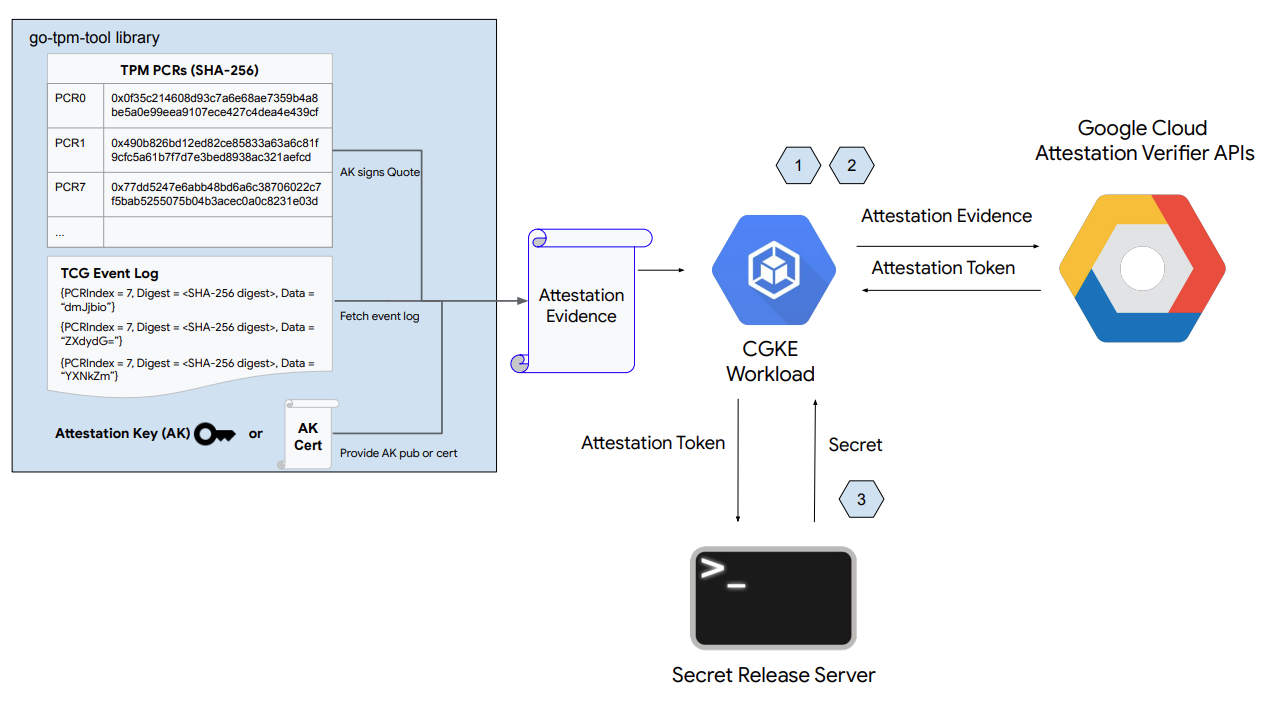
ดังที่แสดงในรูปด้านบน ส่วนแรกของ Codelab นี้มีขั้นตอนต่อไปนี้
- ตั้งค่าโหนด CGKE และเปิดเผยอุปกรณ์ vTPM ให้กับเวิร์กโหลดที่เลือก
- ติดตั้งใช้งานภาระงานและรับรองโหนด CGKE ที่โฮสต์ภาระงานจากระยะไกล
- ติดตั้งใช้งานภาระงานเพื่อดึงข้อมูลการรับรองฮาร์ดแวร์โดยตรงจากอุปกรณ์ TDX หรือ SEV-SNP
- การตั้งค่าเว็บเซิร์ฟเวอร์การเผยแพร่ข้อมูลลับ
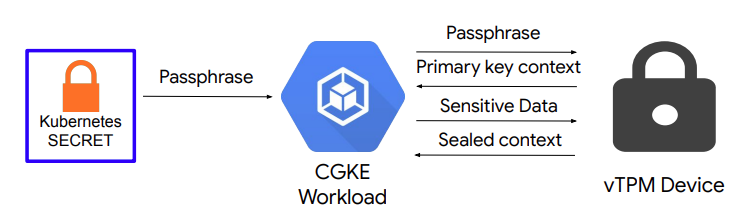
ดังที่แสดงในรูปด้านบน ส่วนที่ 2 ของ Codelab นี้ประกอบด้วย
- การตั้งค่าการให้สิทธิ์ vTPM และการปิดผนึก vTPM ในโหนด CGKE
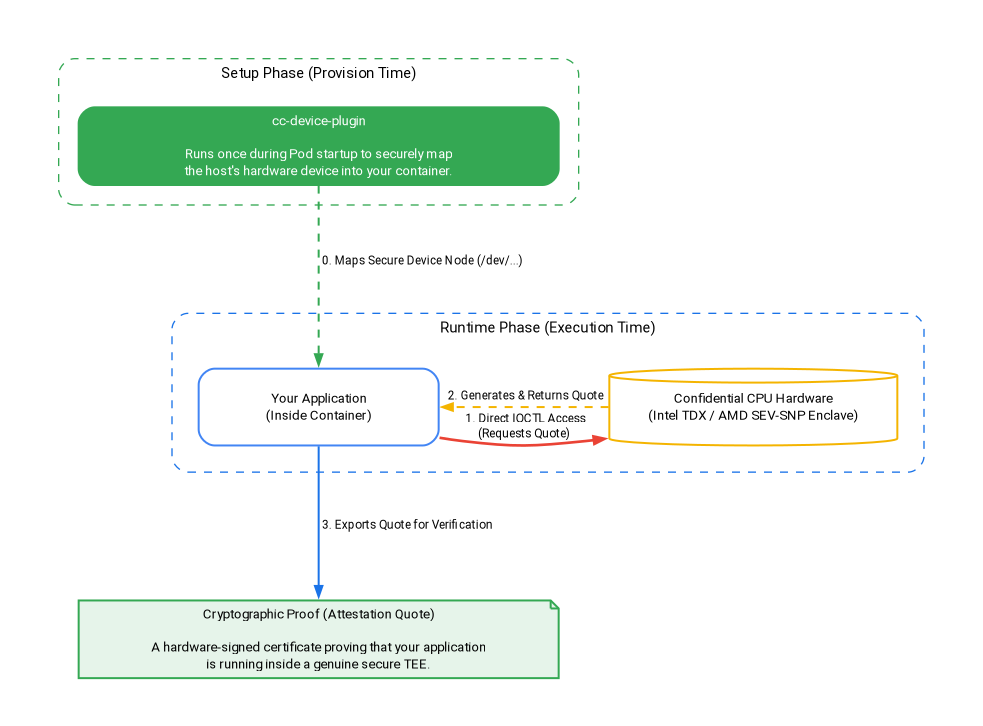
ดังที่แสดงในรูปด้านบน ส่วนที่ 3 ของ Codelab นี้ประกอบด้วย
- วิธีที่
cc-device-pluginแมปอุปกรณ์ฮาร์ดแวร์อย่างปลอดภัยในระหว่างขั้นตอนการตั้งค่า - การติดตั้งใช้งานเวิร์กโหลดเพื่อดึงข้อมูลใบเสนอราคาการรับรองฮาร์ดแวร์โดยตรงจากอุปกรณ์ TDX หรือ SEV-SNP ในช่วงรันไทม์โดยไม่มีค่าใช้จ่ายเพิ่มเติม
สิ่งที่คุณจะได้เรียนรู้
- วิธีเปิดเผยอุปกรณ์ vTPM ต่อภาระงาน CGKE
- วิธีรับรองระยะไกลผ่าน Confidential Computing API (บริการเครื่องมือตรวจสอบการรับรอง) ในภาระงาน CGKE
- วิธีกำหนดค่าการให้สิทธิ์ vTPM และทำการปิดผนึก vTPM
- วิธีเข้าถึงอุปกรณ์ SEV-SNP และ TDX ในภาระงาน CGKE โดยใช้
cc-device-plugin - วิธีดึงข้อมูลใบเสนอราคาการรับรองฮาร์ดแวร์โดยใช้ go-tdx-guest และ go-sev-guest
สิ่งที่คุณต้องมี
- โปรเจ็กต์ Google Cloud Platform
- เบราว์เซอร์ เช่น Chrome หรือ Firefox
- ความรู้พื้นฐานเกี่ยวกับ Google Compute Engine (codelab), Confidential VM, Confidential GKE Node และ Artifact Registry
- สำหรับ Intel TDX หรือ AMD SEV-SNP: GKE เวอร์ชันขั้นต่ำคือ v1.33.5-gke.1697000+ หรือ v1.34.1-gke.2909000+ และตระกูลเครื่องที่เหมาะสม (c3 สำหรับ TDX, n2d สำหรับ SNP)
2. การตั้งค่าและข้อกำหนด
หากต้องการเปิดใช้ API ที่จำเป็น ให้เรียกใช้คำสั่งต่อไปนี้ในคอนโซลระบบคลาวด์หรือสภาพแวดล้อมในการพัฒนาซอฟต์แวร์ในเครื่อง
gcloud auth login

gcloud services enable \
    cloudapis.googleapis.com \
    cloudshell.googleapis.com \
    container.googleapis.com \
    artifactregistry.googleapis.com \
    confidentialcomputing.googleapis.com \
    iamcredentials.googleapis.com \
    compute.googleapis.com
3. การตั้งค่า Control Plane ของ CGKE ที่แชร์
ในขั้นตอนนี้ คุณจะตั้งค่าระนาบควบคุม GKE ที่แชร์และที่เก็บ Docker ของ Artifact Registry
1). ตั้งค่าตัวแปรสภาพแวดล้อมและสร้างคลัสเตอร์ GKE ที่แชร์
แทนที่ your-project-id ด้วยรหัสโปรเจ็กต์ แทนที่ us-central1-c ด้วยโซนที่ต้องการ (ดูภูมิภาคและโซน)
export PROJECT_ID="your-project-id"
export ZONE="us-central1-c"
export CLUSTER_NAME="cgke-attestation-codelab"

gcloud config set project ${PROJECT_ID}

gcloud container clusters create ${CLUSTER_NAME} \
    --zone=${ZONE} \
    --num-nodes=1 \
    --machine-type=e2-medium \
    --workload-pool=${PROJECT_ID}.svc.id.goog \
    --workload-metadata=GKE_METADATA

gcloud container clusters get-credentials ${CLUSTER_NAME} --zone=${ZONE}
2). สร้างที่เก็บ Docker ของ Artifact Registry เพื่อจัดเก็บอิมเมจคอนเทนเนอร์ของภาระงาน
gcloud artifacts repositories create codelab-repo \
    --repository-format=docker \
    --location=us
เลือกเส้นทางของคุณ
ตอนนี้ระนาบควบคุม GKE ที่แชร์และที่เก็บ Artifact Registry พร้อมใช้งานแล้ว เลือกเส้นทางของคุณ
- ตัวเลือกที่ 1: การรับรองระยะไกลและการปิดผนึก vTPM (AMD SEV) — ไปที่การตั้งค่าโหนด CGKE และการเปิดเผยอุปกรณ์ vTPM โดยตรง
- ตัวเลือกที่ 2: การรับรองฮาร์ดแวร์ (Intel TDX และ AMD SEV-SNP) — ไปที่การติดตั้งใช้งานเวิร์กโหลดเพื่อทำการรับรองฮาร์ดแวร์โดยตรง (หากต้องการสำรวจทุกอย่าง เพียงทำตามตัวเลือกที่ 1 ให้เสร็จสมบูรณ์ แล้วทำตามตัวเลือกที่ 2 ต่อไปตามลำดับ)
4. การตั้งค่าโหนด CGKE และการเปิดเผยอุปกรณ์ vTPM ต่อภาระงานที่เลือก
ในขั้นตอนนี้ คุณจะสร้าง Node Pool ของ vTPM ใน CGKE และใช้ปลั๊กอินอุปกรณ์เพื่อเปิดเผยอุปกรณ์ vTPM ของ CVM ให้กับเวิร์กโหลด ไปที่ Cloud Console หรือสภาพแวดล้อมในการพัฒนาซอฟต์แวร์ในเครื่องเพื่อเรียกใช้คำสั่ง
1). เพิ่ม Node Pool ของ AMD SEV
gcloud container node-pools create sev-pool \
    --cluster=${CLUSTER_NAME} \
    --zone=${ZONE} \
    --machine-type=n2d-standard-2 \
    --num-nodes=1 \
    --enable-confidential-nodes \
    --confidential-node-type=sev
2). ลบ Node Pool เริ่มต้น (ไม่บังคับ แต่แนะนำเพื่อประหยัดค่าใช้จ่าย/ลดสัญญาณรบกวน)
gcloud container node-pools delete default-pool \
    --cluster=${CLUSTER_NAME} \
    --zone=${ZONE} \
    --quiet
3). เริ่มปลั๊กอินอุปกรณ์เพื่อให้คลัสเตอร์ CGKE แสดงอุปกรณ์ vTPM ต่อภาระงาน เราใช้ปลั๊กอินอุปกรณ์ Kubernetes เพื่อสร้างทรัพยากรใหม่ (google.com/cc) ภาระงานใดๆ ที่เชื่อมโยงกับทรัพยากรใหม่จะดูอุปกรณ์ในโหนด Worker ได้
gcloud container clusters get-credentials ${CLUSTER_NAME} --zone ${ZONE} --project ${PROJECT_ID}

kubectl apply -f https://raw.githubusercontent.com/google/cc-device-plugin/main/manifests/cc-device-plugin.yaml
คำสั่งต่อไปนี้ช่วยให้คุณดู cc-device-plugin ที่ติดตั้งใช้งานได้
kubectl get pods -A | grep "cc-device-plugin"
หมายเหตุ: ในกรณีของคลัสเตอร์ GKE แบบโหมดผสม (มีทั้งโหนด Worker ของ GKE ที่เป็นข้อมูลลับและไม่ใช่ข้อมูลลับ) ขอแนะนำให้ผู้ปฏิบัติงานติดตั้งใช้งาน cc-device-plugin เฉพาะในโหนด Worker ของ GKE ที่เป็นข้อมูลลับ
(ไม่บังคับ) ใช้การตรวจสอบ Prometheus ของพ็อด CGKE การเปิดการตรวจสอบจะช่วยให้คุณดูสถานะปลั๊กอินของอุปกรณ์ได้
kubectl apply -f https://raw.githubusercontent.com/google/cc-device-plugin/main/manifests/cc-device-plugin-pod-monitoring.yaml
ไปที่ https://console.cloud.google.com/monitoring/metrics-explorer แล้วค้นหาเมตริก cc-device-plugin หรือใช้ PROMQL เช่น คําสั่ง PROMQL ต่อไปนี้แสดงวินาที CPU สําหรับกระบวนการ cc-device-plugin แต่ละรายการ
rate(process_cpu_seconds_total[${__interval}])
5. การติดตั้งใช้งานภาระงานและการดำเนินการรับรองระยะไกลในภาระงาน (vTPM)
ในขั้นตอนนี้ คุณจะสร้างและทำให้ใช้งานได้ภาระงานในคลัสเตอร์ CGKE ที่สร้างขึ้นในขั้นตอนก่อนหน้า และทำการรับรองระยะไกล vTPM เพื่อดึงโทเค็นการรับรอง (โทเค็น OIDC) ในโหนด Worker
1). สร้างอิมเมจคอนเทนเนอร์ของแอปพลิเคชันและพุชไปยัง Artifact Registry อิมเมจคอนเทนเนอร์แอปพลิเคชันมีเครื่องมือ go-tpm ซึ่งรวบรวมหลักฐานการรับรองและส่งไปยังบริการ Attestation Verifier เพื่อขอโทเค็นการรับรอง (โทเค็น OIDC) ได้
- สร้าง
Dockerfileสำหรับอิมเมจคอนเทนเนอร์ของแอปพลิเคชัน
cat << 'EOF' > Dockerfile
FROM golang:1.26.4 as builder
WORKDIR /
RUN git clone https://github.com/google/go-tpm-tools.git
WORKDIR /go-tpm-tools/cmd/gotpm
RUN CGO_ENABLED=0 GOOS=linux go build -o /gotpm

FROM debian:trixie
WORKDIR /
RUN apt-get update -y
RUN DEBIAN_FRONTEND=noninteractive apt-get install -y ca-certificates curl
RUN rm -rf /etc/apt/sources.list.d
COPY --from=builder /gotpm /gotpm
CMD ["tail", "-f", "/dev/null"]
EOF
- พุชอิมเมจคอนเทนเนอร์ของแอปพลิเคชันไปยัง Artifact Registry
docker build -t us-docker.pkg.dev/${PROJECT_ID}/codelab-repo/go-tpm:latest .
docker push us-docker.pkg.dev/${PROJECT_ID}/codelab-repo/go-tpm:latest
2). ตั้งค่าบัญชีบริการ Kubernetes เพื่อรับช่วงสิทธิ์ของบัญชีบริการ GCP ในทรัพยากร GCP
- สร้างบัญชีบริการ Kubernetes
codelab-ksa
kubectl create serviceaccount codelab-ksa \
    --namespace default
- สร้างบทบาท
Confidential_Computing_Workload_Userและให้สิทธิ์บทบาทในการเข้าถึง API ของ Confidential Computing
gcloud iam roles create Confidential_Computing_Workload_User --project=${PROJECT_ID} \
    --title="CGKE Workload User" --description="Grants the ability to generate an attestation token in a GKE workload." \
    --permissions="confidentialcomputing.challenges.create,confidentialcomputing.challenges.verify,confidentialcomputing.locations.get,confidentialcomputing.locations.list" --stage=GA
- สร้างบัญชีบริการ GCP
codelab-csaและเชื่อมโยงกับบทบาทConfidential_Computing_Workload_Userเพื่อให้codelab-csaมีสิทธิ์เข้าถึง API Confidential Computing
gcloud iam service-accounts create codelab-csa \
    --project=${PROJECT_ID}

gcloud projects add-iam-policy-binding ${PROJECT_ID} \
    --member "serviceAccount:codelab-csa@${PROJECT_ID}.iam.gserviceaccount.com" \
    --role "projects/${PROJECT_ID}/roles/Confidential_Computing_Workload_User"

gcloud iam service-accounts add-iam-policy-binding codelab-csa@${PROJECT_ID}.iam.gserviceaccount.com \
    --role roles/iam.workloadIdentityUser \
    --member "serviceAccount:${PROJECT_ID}.svc.id.goog[default/codelab-ksa]"
- เชื่อมโยงบัญชีบริการ Kubernetes
codelab-ksaกับบัญชีบริการ GCPcodelab-csaเพื่อให้codelab-ksaมีสิทธิ์เข้าถึง API Confidential Computing
kubectl annotate serviceaccount codelab-ksa \
    --namespace default \
    iam.gke.io/gcp-service-account=codelab-csa@${PROJECT_ID}.iam.gserviceaccount.com
3). สร้าง YAML การทําให้แอปพลิเคชันใช้งานได้สําหรับแอปพลิเคชันเดโม กำหนดบัญชีบริการ Kubernetes codelab-ksa ให้กับภาระงานที่เลือก
cat << EOF > deploy.yaml
apiVersion: v1
kind: Pod
metadata:
  name: go-tpm-demo
  labels:
    app.kubernetes.io/name: go-tpm-demo
spec:
  serviceAccountName: codelab-ksa
  nodeSelector:
    iam.gke.io/gke-metadata-server-enabled: "true"
    cloud.google.com/machine-family: "n2d"
    cloud.google.com/gke-confidential-nodes-instance-type: "SEV"
  containers:
  - name: go-tpm
    image: us-docker.pkg.dev/${PROJECT_ID}/codelab-repo/go-tpm:latest
    resources:
      limits:
        google.com/cc: 1
EOF
4). ใช้การติดตั้งใช้งานกับคลัสเตอร์ CGKE
kubectl apply -f deploy.yaml
5). เชื่อมต่อกับเวิร์กโหลดและเปิดใช้การรับรองระยะไกลเพื่อดึงโทเค็นการรับรอง (โทเค็น OIDC)
kubectl exec -it go-tpm-demo -- /bin/bash
./gotpm token --event-log=/run/cc-device-plugin/binary_bios_measurements > attestation_token
6). พิมพ์โทเค็นลงในหน้าจอเพื่อให้คุณคัดลอกได้
cat attestation_token
คุณถอดรหัสโทเค็นการรับรองใน jwt.io เพื่อดูการอ้างสิทธิ์ได้
6. การตั้งค่าเว็บเซิร์ฟเวอร์การเผยแพร่ข้อมูลลับ
ในขั้นตอนนี้ คุณจะออกจากเซสชัน SSH ก่อนหน้าและตั้งค่า VM อีกเครื่อง คุณตั้งค่าเว็บเซิร์ฟเวอร์การเผยแพร่ข้อมูลลับใน VM นี้ เว็บเซิร์ฟเวอร์จะตรวจสอบ Attestation Token ที่ได้รับและการอ้างสิทธิ์ หากการตรวจสอบสำเร็จ ระบบจะส่งต่อข้อมูลลับไปยังผู้ขอ
1). ไปที่ Cloud Console หรือสภาพแวดล้อมในการพัฒนาซอฟต์แวร์ในเครื่อง สร้างเครื่องเสมือน
gcloud config set project ${PROJECT_ID}

gcloud compute instances create cgke-attestation-codelab-web-server \
    --machine-type=n2d-standard-2 \
    --zone=${ZONE} \
    --image-family=ubuntu-2204-lts \
    --image-project=ubuntu-os-cloud
2). SSH ไปยัง VM ใหม่
gcloud compute ssh --zone ${ZONE} cgke-attestation-codelab-web-server
3). ตั้งค่าสภาพแวดล้อม Go
wget https://go.dev/dl/go1.26.4.linux-amd64.tar.gz
sudo tar -C /usr/local -xzf go1.26.4.linux-amd64.tar.gz
export PATH=$PATH:/usr/local/go/bin
4). สร้างไฟล์ 2 ไฟล์ต่อไปนี้เพื่อจัดเก็บซอร์สโค้ดของเว็บเซิร์ฟเวอร์ที่เผยแพร่ข้อมูลลับ
สร้าง main.go:
cat << 'EOF' > main.go
package main

import (
	"fmt"
	"net/http"
	"strings"
	"time"
	"log"

	"github.com/golang-jwt/jwt/v4"
)

const (
	theSecret = "This is the super secret information!"
)

func homePage(w http.ResponseWriter, r *http.Request) {
	tokenString := r.Header.Get("Authorization")
	if tokenString != "" {
		tokenString, err := extractToken(tokenString)
		if err != nil {
			http.Error(w, err.Error(), http.StatusUnauthorized)
		}

		tokenBytes := []byte(tokenString)
		// A method to return a public key from the well-known endpoint
		keyFunc := getRSAPublicKeyFromJWKsFile

		token, err := decodeAndValidateToken(tokenBytes, keyFunc)
		if err != nil {
			http.Error(w, "Invalid JWT Token", http.StatusUnauthorized)
		}

		if ok, err := isValid(token.Claims.(jwt.MapClaims)); ok {
			fmt.Fprintln(w, theSecret)
		} else {
			if err != nil {
				http.Error(w, "Error validating JWT claims: "+err.Error(), http.StatusUnauthorized)
			} else {
				http.Error(w, "Invalid JWT token Claims", http.StatusUnauthorized)
			}
		}
	} else {
		http.Error(w, "Authorization token required", http.StatusUnauthorized)
	}
}

func extractToken(tokenString string) (string, error) {
	if strings.HasPrefix(tokenString, "Bearer ") {
		return strings.TrimPrefix(tokenString, "Bearer "), nil
	}
	return "", fmt.Errorf("invalid token format")
}

func isValid(claims jwt.MapClaims) (bool, error) {
	// 1. Evaluating Standard Claims:
	subject, ok := claims["sub"].(string)
	if !ok {
		return false, fmt.Errorf("missing or invalid 'sub' claim")
	}
	fmt.Println("Subject:", subject)

	issuedAt, ok := claims["iat"].(float64)
	if !ok {
		return false, fmt.Errorf("missing or invalid 'iat' claim")
	}
	fmt.Println("Issued At:", time.Unix(int64(issuedAt), 0))

	// 2. Evaluating Remote Attestation Claims:
	hwModel, ok := claims["hwmodel"].(string)
	// Support attestation of both AMD SEV and Intel TDX
	if !ok || (hwModel != "GCP_AMD_SEV" && hwModel != "GCP_INTEL_TDX") {
		return false, fmt.Errorf("missing or invalid 'hwModel': %v", hwModel)
	}
	fmt.Println("hwmodel:", hwModel)

	swName, ok := claims["swname"].(string)
	if !ok || swName != "GCE" {
		return false, fmt.Errorf("missing or invalid 'swName'")
	}
	fmt.Println("swname:", swName)

	return true, nil
}


func main() {
	http.HandleFunc("/", homePage)
	fmt.Println("Server listening on :8080")
	err := http.ListenAndServe(":8080", nil)
	if err != nil {
		log.Fatalf("Server failed to start: %v", err)
	}
}
EOF
สร้าง helper.go:
cat << 'EOF' > helper.go
package main

import (
	"crypto/rsa"
	"encoding/base64"
	"encoding/json"
	"errors"
	"fmt"
	"io"
	"math/big"
	"net/http"

	"github.com/golang-jwt/jwt/v4"
)

const (
	socketPath     = "/run/container_launcher/teeserver.sock"
	expectedIssuer = "https://confidentialcomputing.googleapis.com"
	wellKnownPath  = "/.well-known/openid-configuration"
)

type jwksFile struct {
	Keys []jwk `json:"keys"`
}

type jwk struct {
	N   string `json:"n"`   // "nMMTBwJ7H6Id8zUCZd-L7uoNyz9b7lvoyse9izD9l2rtOhWLWbiG-7pKeYJyHeEpilHP4KdQMfUo8JCwhd-OMW0be_XtEu3jXEFjuq2YnPSPFk326eTfENtUc6qJohyMnfKkcOcY_kTE11jM81-fsqtBKjO_KiSkcmAO4wJJb8pHOjue3JCP09ZANL1uN4TuxbM2ibcyf25ODt3WQn54SRQTV0wn098Y5VDU-dzyeKYBNfL14iP0LiXBRfHd4YtEaGV9SBUuVhXdhx1eF0efztCNNz0GSLS2AEPLQduVuFoUImP4s51YdO9TPeeQ3hI8aGpOdC0syxmZ7LsL0rHE1Q",
	E   string `json:"e"`   // "AQAB" or 65537 as an int
	Kid string `json:"kid"` // "1f12fa916c3a0ef585894b4b420ad17dc9d6cdf5",

	// Unused fields:
	// Alg string `json:"alg"` // "RS256",
	// Kty string `json:"kty"` // "RSA",
	// Use string `json:"use"` // "sig",
}

type wellKnown struct {
	JwksURI string `json:"jwks_uri"` // "https://www.googleapis.com/service_accounts/v1/metadata/jwk/signer@confidentialspace-sign.iam.gserviceaccount.com"

	// Unused fields:
	// Iss                                   string `json:"issuer"`                                // "https://confidentialcomputing.googleapis.com"
	// Subject_types_supported               string `json:"subject_types_supported"`               // [ "public" ]
	// Response_types_supported              string `json:"response_types_supported"`              // [ "id_token" ]
	// Claims_supported                      string `json:"claims_supported"`                      // [ "sub", "aud", "exp", "iat", "iss", "jti", "nbf", "dbgstat", "eat_nonce", "google_service_accounts", "hwmodel", "oemid", "secboot", "submods", "swname", "swversion" ]
	// Id_token_signing_alg_values_supported string `json:"id_token_signing_alg_values_supported"` // [ "RS256" ]
	// Scopes_supported                      string `json:"scopes_supported"`                      // [ "openid" ]
}

func getWellKnownFile() (wellKnown, error) {
	httpClient := http.Client{}
	resp, err := httpClient.Get(expectedIssuer + wellKnownPath)
	if err != nil {
		return wellKnown{}, fmt.Errorf("failed to get raw .well-known response: %w", err)
	}

	wellKnownJSON, err := io.ReadAll(resp.Body)
	if err != nil {
		return wellKnown{}, fmt.Errorf("failed to read .well-known response: %w", err)
	}

	wk := wellKnown{}
	json.Unmarshal(wellKnownJSON, &wk)
	return wk, nil
}

func getJWKFile() (jwksFile, error) {
	wk, err := getWellKnownFile()
	if err != nil {
		return jwksFile{}, fmt.Errorf("failed to get .well-known json: %w", err)
	}

	// Get JWK URI from .wellknown
	uri := wk.JwksURI
	fmt.Printf("jwks URI: %v\n", uri)

	httpClient := http.Client{}
	resp, err := httpClient.Get(uri)
	if err != nil {
		return jwksFile{}, fmt.Errorf("failed to get raw JWK response: %w", err)
	}

	jwkbytes, err := io.ReadAll(resp.Body)
	if err != nil {
		return jwksFile{}, fmt.Errorf("failed to read JWK body: %w", err)
	}

	file := jwksFile{}
	err = json.Unmarshal(jwkbytes, &file)
	if err != nil {
		return jwksFile{}, fmt.Errorf("failed to unmarshall JWK content: %w", err)
	}

	return file, nil
}

// N and E are 'base64urlUInt' encoded: https://www.rfc-editor.org/rfc/rfc7518#section-6.3
func base64urlUIntDecode(s string) (*big.Int, error) {
	b, err := base64.RawURLEncoding.DecodeString(s)
	if err != nil {
		return nil, err
	}
	z := new(big.Int)
	z.SetBytes(b)
	return z, nil
}

func getRSAPublicKeyFromJWKsFile(t *jwt.Token) (any, error) {
	keysfile, err := getJWKFile()
	if err != nil {
		return nil, fmt.Errorf("failed to fetch the JWK file: %w", err)
	}

	// Multiple keys are present in this endpoint to allow for key rotation.
	// This method finds the key that was used for signing to pass to the validator.
	kid := t.Header["kid"]
	for _, key := range keysfile.Keys {
		if key.Kid != kid {
			continue // Select the key used for signing
		}

		n, err := base64urlUIntDecode(key.N)
		if err != nil {
			return nil, fmt.Errorf("failed to decode key.N %w", err)
		}
		e, err := base64urlUIntDecode(key.E)
		if err != nil {
			return nil, fmt.Errorf("failed to decode key.E %w", err)
		}

		// The parser expects an rsa.PublicKey: https://github.com/golang-jwt/jwt/blob/main/rsa.go#L53
		// or an array of keys. We chose to show passing a single key in this example as its possible
		// not all validators accept multiple keys for validation.
		return &rsa.PublicKey{
			N: n,
			E: int(e.Int64()),
		}, nil
	}

	return nil, fmt.Errorf("failed to find key with kid '%v' from well-known endpoint", kid)
}

func decodeAndValidateToken(tokenBytes []byte, keyFunc func(t *jwt.Token) (any, error)) (*jwt.Token, error) {
	var err error
	fmt.Println("Unmarshalling token and checking its validity...")
	token, err := jwt.NewParser().Parse(string(tokenBytes), keyFunc)

	fmt.Printf("Token valid: %v\n", token.Valid)
	if token.Valid {
		return token, nil
	}
	if ve, ok := err.(*jwt.ValidationError); ok {
		if ve.Errors&jwt.ValidationErrorMalformed != 0 {
			return nil, fmt.Errorf("token format invalid. Please contact the Confidential Space team for assistance")
		}
		if ve.Errors&(jwt.ValidationErrorNotValidYet) != 0 {
			// If device time is not synchronized with the Attestation Service you may need to account for that here.
			return nil, errors.New("token is not active yet")
		}
		if ve.Errors&(jwt.ValidationErrorExpired) != 0 {
			return nil, fmt.Errorf("token is expired")
		}
		return nil, fmt.Errorf("unknown validation error: %v", err)
	}

	return nil, fmt.Errorf("couldn't handle this token or couldn't read a validation error: %v", err)
}
EOF
5). เรียกใช้คำสั่งต่อไปนี้เพื่อสร้างและเรียกใช้เว็บเซิร์ฟเวอร์ ซึ่งจะเริ่มเว็บเซิร์ฟเวอร์การเผยแพร่ลับที่พอร์ต :8080
go mod init google.com/codelab
go mod tidy
go get github.com/golang-jwt/jwt/v4
go build
./codelab
การแก้ปัญหา: คุณอาจเห็นคำเตือนต่อไปนี้ซึ่งไม่จำเป็นต้องสนใจเมื่อเรียกใช้ go mod tidy
go: finding module for package github.com/golang-jwt/jwt/v4
go: downloading github.com/golang-jwt/jwt v3.2.2+incompatible
go: downloading github.com/golang-jwt/jwt/v4 v4.5.0
go: found github.com/golang-jwt/jwt/v4 in github.com/golang-jwt/jwt/v4 v4.5.0
go: google.com/codelab/go/pkg/mod/github.com/golang-jwt/jwt@v3.2.2+incompatible: import path "google.com/codelab/go/pkg/mod/github.com/golang-jwt/jwt@v3.2.2+incompatible" should not have @version
go: google.com/codelab/go/pkg/mod/github.com/golang-jwt/jwt@v3.2.2+incompatible/cmd/jwt: import path "google.com/codelab/go/pkg/mod/github.com/golang-jwt/jwt@v3.2.2+incompatible/cmd/jwt" should not have @version
go: google.com/codelab/go/pkg/mod/github.com/golang-jwt/jwt@v3.2.2+incompatible/request: import path "google.com/codelab/go/pkg/mod/github.com/golang-jwt/jwt@v3.2.2+incompatible/request" should not have @version
go: google.com/codelab/go/pkg/mod/github.com/golang-jwt/jwt@v3.2.2+incompatible/test: import path "google.com/codelab/go/pkg/mod/github.com/golang-jwt/jwt@v3.2.2+incompatible/test" should not have @version
6) เริ่มแท็บคอนโซลระบบคลาวด์หรือเซสชันสภาพแวดล้อมในการพัฒนาซอฟต์แวร์ในเครื่องอีกแท็บ แล้วเรียกใช้คำสั่งต่อไปนี้ ซึ่งจะช่วยให้คุณได้รับ cgke-attestation-codelab-web-server-internal-ip
gcloud compute instances describe cgke-attestation-codelab-web-server \
    --format='get(networkInterfaces[0].networkIP)' \
    --zone=${ZONE}
7) เชื่อมต่อกับเวิร์กโหลด CGKE และเปิดใช้การรับรองระยะไกลเพื่อดึงโทเค็นการรับรอง (โทเค็น OIDC) จากนั้นฝังเนื้อหาของ attestation-token และ cgke-attestation-codelab-web-server-internal-ip ในคำสั่งต่อไปนี้ ซึ่งจะดึงข้อมูลลับที่เว็บเซิร์ฟเวอร์เผยแพร่ข้อมูลลับเก็บไว้
kubectl exec -it go-tpm-demo -- /bin/bash
./gotpm token --event-log=/run/cc-device-plugin/binary_bios_measurements > attestation_token
curl http://<cgke-attestation-codelab-web-server-internal-ip>:8080 -H "Authorization: Bearer $(cat ./attestation_token)"
แทนที่ค่าต่อไปนี้
cgke-attestation-codelab-web-server-internal-ipคือ IP ภายในของอินสแตนซ์ VMcgke-attestation-codelab-web-server
7. การปิดผนึก vTPM ในโหนด CGKE
ในขั้นตอนนี้ คุณจะตั้งค่าการให้สิทธิ์เจ้าของ vTPM ในโหนด CGKE และติดตั้งใช้งานภาระงานด้วยรหัสผ่านของเจ้าของ vTPM หลังจากนั้น ให้สร้างคีย์หลัก vTPM เพื่อปิดผนึกและยกเลิกการปิดผนึกข้อมูลในภาระงานด้วยความสามารถในการปิดผนึก vTPM
1). ตั้งค่าการให้สิทธิ์เจ้าของ vTPM ในโหนด CGKE
- สร้างอิมเมจคอนเทนเนอร์ของงานแบบครั้งเดียว งานแบบครั้งเดียวจะตั้งรหัสผ่านเจ้าของสำหรับ vTPM ทั้งหมด ต่อไปนี้คือ
Dockerfileในการสร้างอิมเมจคอนเทนเนอร์
cat << 'EOF' > Dockerfile
FROM debian:latest

RUN echo 'debconf debconf/frontend select Noninteractive' | debconf-set-selections
RUN apt-get update

RUN apt -y install \
  autoconf-archive \
  libcmocka0 \
  libcmocka-dev \
  net-tools \
  build-essential \
  git \
  pkg-config \
  gcc \
  g++ \
  m4 \
  libtool \
  automake \
  libgcrypt20-dev \
  libssl-dev \
  uthash-dev \
  autoconf \
  uuid-dev \
  libcurl4-openssl-dev \
  libjson-c-dev

RUN mkdir /src

WORKDIR /src
RUN git clone https://github.com/tpm2-software/tpm2-tss
WORKDIR /src/tpm2-tss
RUN ./bootstrap
RUN ./configure --prefix=/usr/local
RUN make all install

WORKDIR /src
RUN git clone https://github.com/tpm2-software/tpm2-tools
WORKDIR /src/tpm2-tools
RUN apt-get -y install libcurl4 libcurl4-openssl-dev pandoc man-db
RUN ./bootstrap
RUN ./configure --prefix=/usr/local
RUN make all install

RUN apt-get -y install vim

ENTRYPOINT ["/bin/bash"]
EOF
- สร้างและพุชอิมเมจคอนเทนเนอร์ของงานแบบครั้งเดียวไปยัง Artifact Registry
docker build -t us-docker.pkg.dev/${PROJECT_ID}/codelab-repo/tpm-tools:latest .
docker push us-docker.pkg.dev/${PROJECT_ID}/codelab-repo/tpm-tools:latest
- เรียกใช้งานแบบครั้งเดียวผ่านงาน Kubernetes (คำเตือน: งานนี้จะล้าง vTPM ใน CVM แต่ละรายการ หาก CVM ใช้ vTPM เพื่อเข้ารหัสดิสก์ งานนี้จะทำให้ CVM ใช้งานไม่ได้หลังจากรีบูต คุณตรวจสอบได้ว่าดิสก์มี FSTYPE
crypto_LUKSหรือไม่ (ด้วยคำสั่งlsblk -f)
cat << EOF > tpm-tools-task.yaml
apiVersion: batch/v1
kind: Job
metadata:
  name: tpm-tools-task
spec:
  template:
    spec:
      nodeSelector:
        cloud.google.com/machine-family: "n2d"
        cloud.google.com/gke-confidential-nodes-instance-type: "SEV"
      containers:
      - name: tpm-tools
        image: us-docker.pkg.dev/${PROJECT_ID}/codelab-repo/tpm-tools:latest
        command: ["/bin/sh", "-c"]
        args: ["tpm2_clear; tpm2_changeauth -c owner this_is_passphrase"]
        resources:
          limits:
            google.com/cc: 1
      restartPolicy: Never
EOF
เคล็ดลับ: หากต้องการเรียกใช้งาน tpm-tools-task อีกครั้ง โปรดลบงานที่มีอยู่ก่อน
kubectl delete job tpm-tools-task
- เปิดตัวงานแบบครั้งเดียว งานนี้จะตั้งค่ารหัสผ่านของเจ้าของ vTPM ในโหนด Worker ทั้งหมด
kubectl apply -f tpm-tools-task.yaml
2). สร้าง Secret ของ Kubernetes เพื่อเก็บพาสเฟรสของเจ้าของ vTPM
kubectl create secret generic tpm-secret --from-literal=passphrase='this_is_passphrase'
3). สร้างคอนเทนเนอร์แอปพลิเคชันสาธิตและส่งพาสเฟรสไปยังคอนเทนเนอร์ คอนเทนเนอร์แอปพลิเคชันเดโมมี tpm2-tools สำหรับโต้ตอบกับ vTPM
- สร้างไฟล์ YAML การทำให้ใช้งานได้สำหรับคอนเทนเนอร์แอปพลิเคชันสาธิต
cat << EOF > deploy_demo.yaml
apiVersion: v1
kind: Pod
metadata:
  name: tpm-tools-demo
  labels:
    app.kubernetes.io/name: tpm-tools-demo
spec:
  nodeSelector:
    cloud.google.com/machine-family: "n2d"
    cloud.google.com/gke-confidential-nodes-instance-type: "SEV"
  containers:
  - name: tpm-tools
    image: us-docker.pkg.dev/${PROJECT_ID}/codelab-repo/tpm-tools:latest
    command: ["tail", "-f", "/dev/null"]
    resources:
      limits:
        google.com/cc: 1
    volumeMounts:
      - name: secret-volume
        mountPath: "/etc/tpmsecret"
        readOnly: true
  volumes:
    - name: secret-volume
      secret:
        secretName: tpm-secret
EOF
- ทำให้แอปพลิเคชันสาธิตใช้งานได้
kubectl apply -f deploy_demo.yaml
4). ทำการผนึก vTPM ในคอนเทนเนอร์แอปพลิเคชันเดโม
- เชื่อมต่อกับคอนเทนเนอร์แอปพลิเคชันเดโมและตั้งค่าคีย์หลักด้วยรหัสผ่าน
kubectl exec -it tpm-tools-demo -- /bin/bash
tpm2_createprimary -C o -c primary.ctx -P $(cat /etc/tpmsecret/passphrase)
tpm2_createprimary จะโต้ตอบกับ vTPM เพื่อสร้างออบเจ็กต์หลักตามลำดับชั้นและเทมเพลตที่ระบุ
- -C o: ระบุว่าระบบจะสร้างคีย์หลักภายใต้ลำดับชั้นของเจ้าของ TPM
- -c
primary.ctx: บันทึกบริบท (แฮนเดิลและข้อมูลที่เชื่อมโยง) ของออบเจ็กต์หลักที่สร้างขึ้นไปยังไฟล์primary.ctxบริบทนี้มีความสำคัญต่อการดำเนินการในภายหลัง
เวิร์กโหลดไม่สามารถใช้พาสเฟรสของเจ้าของที่ไม่ถูกต้องเพื่อสร้างคีย์หลักได้
tpm2_createprimary -C o -P wrong_passphrase
คำสั่งจะแสดงข้อผิดพลาดต่อไปนี้
WARNING:esys:src/tss2-esys/api/Esys_CreatePrimary.c:401:Esys_CreatePrimary_Finish() Received TPM Error
ERROR:esys:src/tss2-esys/api/Esys_CreatePrimary.c:135:Esys_CreatePrimary() Esys Finish ErrorCode (0x000009a2)
ERROR: Esys_CreatePrimary(0x9A2) - tpm:session(1):authorization failure without DA implications
ERROR: Unable to run tpm2_createprimary
- จากนั้นจะใช้คีย์หลักที่สร้างขึ้นเพื่อซีลและยกเลิกการซีลข้อมูลได้
echo "This is my secret message" > secret.txt
tpm2_create -C primary.ctx -u sealed.pub -r sealed.priv -i secret.txt
tpm2_load -C primary.ctx -u sealed.pub -r sealed.priv -c sealed.ctx
tpm2_unseal -c sealed.ctx -o unsealed.txt
cat unsealed.txt
tpm2_create จะโต้ตอบกับ vTPM เพื่อสร้างออบเจ็กต์การเข้ารหัสที่ต้องการ
- -C
primary.ctx: ใช้บริบทของคีย์หลักที่เราสร้างไว้ก่อนหน้านี้ - -u
sealed.pub: จัดเก็บส่วนสาธารณะของคีย์การปิดผนึก (จำเป็นสำหรับการเปิดผนึก) ในsealed.pub - -r
sealed.priv: จัดเก็บส่วนตัวของคีย์การปิดผนึกในsealed.priv - -i
secret.txt: ไฟล์ที่มีข้อมูลลับที่จะปิดผนึก
tpm2_load: โหลดคีย์การปิดผนึกลงใน TPM โดยใช้ส่วนสาธารณะและส่วนตัว (sealed.pub, sealed.priv) และบันทึกบริบทไว้ใน sealed.ctx
tpm2_unseal: ถอดรหัส (ยกเลิกการซีล) ข้อมูลที่เข้ารหัส (ซีล) ไว้ก่อนหน้านี้โดยใช้ออบเจ็กต์การซีล vTPM
cat unsealed.txt: แสดงข้อความลับที่ไม่ได้ปิดผนึกเพื่อยืนยันว่ากระบวนการเสร็จสมบูรณ์แล้ว
โปรดทราบว่าไฟล์ primary.ctx และ sealed.priv จะใช้ได้ในอุปกรณ์ vTPM เครื่องเดียวเท่านั้น และทุกคนที่มีสิทธิ์เข้าถึงอุปกรณ์ vTPM และไฟล์เหล่านี้จะเข้าถึงข้อมูลที่ปิดผนึกได้ คุณสามารถใช้นโยบายเกี่ยวกับค่า PCR เพื่อปิดผนึกข้อมูลได้ แต่จะไม่อยู่ในขอบเขตของ Codelab นี้
8. การติดตั้งใช้งานภาระงานเพื่อดำเนินการรับรองฮาร์ดแวร์: Intel TDX และ AMD SEV-SNP
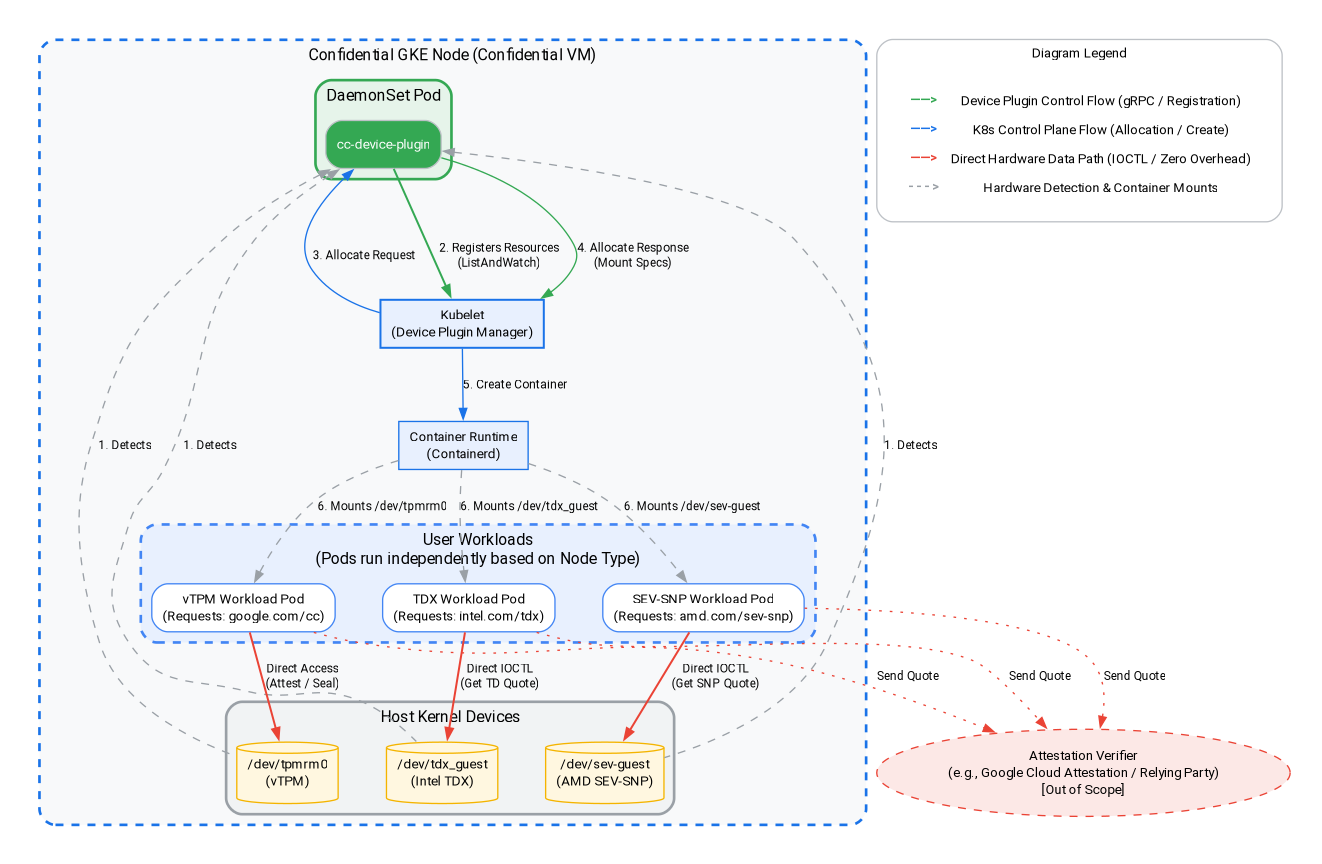
ในขั้นตอนนี้ คุณจะสร้างภาระงานที่อิงตาม Intel TDX หรือ AMD SEV-SNP และทำการรับรองระดับฮาร์ดแวร์ในโหนด GKE แบบเป็นความลับ ดังที่แสดงในแผนภาพสถาปัตยกรรมด้านบน เราจะใช้ปลั๊กอินอุปกรณ์ของแขกรับเชิญเพื่อดึงข้อมูลการรับรองสำหรับสถาปัตยกรรม Intel TDX และ AMD SEV-SNP ไปที่ Cloud Console หรือสภาพแวดล้อมในการพัฒนาซอฟต์แวร์ในเครื่องเพื่อเรียกใช้คำสั่ง
เลือกสถาปัตยกรรม Confidential Computing ที่ต้องการทดสอบ ไม่ว่าจะเป็น Intel TDX หรือ AMD SEV-SNP
1). เพิ่ม Node Pool ของ Intel TDX
gcloud container node-pools create tdx-pool \
    --cluster=${CLUSTER_NAME} \
    --zone=${ZONE} \
    --machine-type=c3-standard-4 \
    --num-nodes=1 \
    --enable-confidential-nodes \
    --confidential-node-type=tdx
2). เพิ่ม Node Pool ของ AMD SEV-SNP
gcloud container node-pools create snp-pool \
    --cluster=${CLUSTER_NAME} \
    --zone=${ZONE} \
    --machine-type=n2d-standard-2 \
    --num-nodes=1 \
    --enable-confidential-nodes \
    --confidential-node-type=sev_snp \
    --min-cpu-platform="AMD Milan"
3). ลบ Node Pool เริ่มต้น (ไม่บังคับ แต่แนะนำเพื่อประหยัดค่าใช้จ่าย/ลดสัญญาณรบกวน)
gcloud container node-pools delete default-pool \
    --cluster=${CLUSTER_NAME} \
    --zone=${ZONE} \
    --quiet
(หมายเหตุ: หากคุณทำส่วน vTPM เสร็จแล้วก่อนหน้านี้ ระบบจะลบพูลนี้แล้ว และคุณสามารถข้ามข้อผิดพลาด "ไม่พบ" ที่นี่ได้อย่างปลอดภัย)
4). เริ่มปลั๊กอินอุปกรณ์เพื่อให้คลัสเตอร์ CGKE แสดงอุปกรณ์แขกที่ใช้การรับรองฮาร์ดแวร์ต่อภาระงาน เราใช้ปลั๊กอินอุปกรณ์ Kubernetes เพื่อสร้างทรัพยากรใหม่ (intel.com/tdx และ amd.com/sev-snp) ภาระงานที่เชื่อมโยงกับทรัพยากรเหล่านี้จะเข้าถึงอุปกรณ์ของผู้เข้าพักในโหนด Worker ได้
gcloud container clusters get-credentials ${CLUSTER_NAME} --zone ${ZONE} --project ${PROJECT_ID}

kubectl apply -f https://raw.githubusercontent.com/google/cc-device-plugin/main/manifests/cc-device-plugin.yaml
คำสั่งต่อไปนี้ช่วยให้คุณดู cc-device-plugin ที่ติดตั้งใช้งานได้
kubectl get pods -A | grep "cc-device-plugin"
หมายเหตุ: ในกรณีของคลัสเตอร์ GKE แบบผสม (มีทั้งโหนด Worker ของ GKE ที่เป็นข้อมูลลับและไม่ใช่ข้อมูลลับ) ขอแนะนำให้ผู้ปฏิบัติงานติดตั้งใช้งาน cc-device-plugin เฉพาะในโหนด Worker ของ GKE ที่เป็นข้อมูลลับ
9. การรับรองฮาร์ดแวร์: Intel TDX และ AMD SEV-SNP
ในส่วนนี้ คุณจะได้เรียนรู้วิธีดำเนินการรับรองระดับฮาร์ดแวร์ภายในโหนด GKE ที่เป็นความลับโดยการดึงข้อมูลใบเสนอราคาการรับรองสำหรับสถาปัตยกรรม Intel TDX และ AMD SEV-SNP โดยใช้ปลั๊กอินอุปกรณ์ของผู้เข้าพัก
1). สร้างแอปพลิเคชัน Go เพื่อดึงข้อมูลใบเสนอราคาการรับรองฮาร์ดแวร์จากอุปกรณ์ของผู้เข้าร่วมที่เกี่ยวข้อง
cat << 'EOF' > main.go
package main

import (
	"crypto/rand"
	"log"
	"os"
	"strconv"
	"time"
	"unsafe"

	sevclient "github.com/google/go-sev-guest/client"
	"golang.org/x/sys/unix"
)

// TDX Linux ABI Definitions
const (
	iocTdxGetReport = 0xc4405401
)

type tdxReportReq struct {
	ReportData [64]byte
	TdReport   [1024]byte
}

func main() {
	ccType := os.Getenv("CC_TYPE") // Expected "tdx" or "snp"

	iterationsStr := os.Getenv("ITERATIONS")
	iterations := 100
	if val, err := strconv.Atoi(iterationsStr); err == nil && val > 0 {
		iterations = val
	}

	successCount := 0
	failureCount := 0
	startTime := time.Now()

	log.Printf("Starting Attestation test for CC_TYPE: %s (iterations: %d)", ccType, iterations)

	if ccType == "tdx" {
		devicePath := "/dev/tdx_guest"
		file, err := os.OpenFile(devicePath, os.O_RDWR|os.O_SYNC, 0)
		if err != nil {
			log.Fatalf("FATAL: Failed to open %s: %v", devicePath, err)
		}
		defer file.Close()

		for i := 1; i <= iterations; i++ {
			var reportData [64]byte
			rand.Read(reportData[:])
			req := tdxReportReq{ReportData: reportData}

			_, _, errno := unix.Syscall(unix.SYS_IOCTL, file.Fd(), uintptr(iocTdxGetReport), uintptr(unsafe.Pointer(&req)))
			if errno != 0 || (req.TdReport[0] == 0 && req.TdReport[10] == 0) {
				failureCount++
			} else {
				successCount++
			}
		}
	} else if ccType == "snp" {
		device, err := sevclient.OpenDevice()
		if err != nil {
			log.Fatalf("FATAL: Failed to open SEV-SNP device: %v", err)
		}
		defer device.Close()

		for i := 1; i <= iterations; i++ {
			var reportData [64]byte
			rand.Read(reportData[:])
			report, err := sevclient.GetRawReport(device, reportData)
			if err != nil || len(report) == 0 {
				failureCount++
			} else {
				successCount++
			}
		}
	}

	elapsed := time.Since(startTime)
	log.Printf("=== Test Completed ===")
	log.Printf("Total Iterations: %d", iterations)
	log.Printf("Success: %d, Failures: %d", successCount, failureCount)
	log.Printf("Total Time: %s", elapsed)
}
EOF
2). สร้าง Dockerfile สำหรับเครื่องมือทดสอบการรับรองฮาร์ดแวร์
cat << 'EOF' > Dockerfile
FROM golang:1.26.4 AS builder
WORKDIR /app
COPY main.go .
RUN go mod init cc-attestation
RUN go mod tidy
RUN CGO_ENABLED=0 GOOS=linux go build -o /cc-attestation-check main.go

FROM ubuntu:22.04
COPY --from=builder /cc-attestation-check /usr/local/bin/
CMD ["/usr/local/bin/cc-attestation-check"]
EOF
3). สร้างและพุชอิมเมจไปยัง Artifact Registry โดยทำดังนี้
docker build -t us-docker.pkg.dev/${PROJECT_ID}/codelab-repo/cc-attestation-check:latest .
docker push us-docker.pkg.dev/${PROJECT_ID}/codelab-repo/cc-attestation-check:latest
4). สร้าง YAML การทําให้แอปพลิเคชันใช้งานได้สําหรับทั้งเวิร์กโหลด Intel TDX และ AMD SEV-SNP เพื่อแสดงอุปกรณ์ฮาร์ดแวร์
- สำหรับภาระงาน Intel TDX ให้สร้าง YAML การทำให้ใช้งานได้ต่อไปนี้
cat << EOF > deploy-tdx.yaml
apiVersion: v1
kind: Pod
metadata:
  name: tdx-attestation-pod
spec:
  restartPolicy: Never
  containers:
  - name: tdx-container
    image: us-docker.pkg.dev/${PROJECT_ID}/codelab-repo/cc-attestation-check:latest
    env:
    - name: CC_TYPE
      value: "tdx"
    - name: ITERATIONS
      value: "1000"
    resources:
      limits:
        intel.com/tdx: 1
  nodeSelector:
    cloud.google.com/gke-confidential-nodes-instance-type: "TDX"
    cloud.google.com/machine-family: "c3"
EOF
- สำหรับเวิร์กโหลด AMD SEV-SNP ให้สร้าง YAML การทำให้ใช้งานได้ต่อไปนี้
cat << EOF > deploy-snp.yaml
apiVersion: v1
kind: Pod
metadata:
  name: snp-attestation-pod
spec:
  restartPolicy: Never
  containers:
  - name: snp-container
    image: us-docker.pkg.dev/${PROJECT_ID}/codelab-repo/cc-attestation-check:latest
    env:
    - name: CC_TYPE
      value: "snp"
    - name: ITERATIONS
      value: "100"
    resources:
      limits:
        amd.com/sev-snp: 1
  nodeSelector:
    cloud.google.com/gke-confidential-nodes-instance-type: "SEV_SNP"
    cloud.google.com/machine-family: "n2d"
EOF
5). ใช้การติดตั้งใช้งานกับคลัสเตอร์ CGKE
kubectl apply -f deploy-tdx.yaml
kubectl apply -f deploy-snp.yaml
6) รอให้พ็อดเสร็จสมบูรณ์และยืนยันบันทึกการรับรองฮาร์ดแวร์
ก่อนอื่น ให้ตรวจสอบสถานะของพ็อดเพื่อให้แน่ใจว่ามีการตั้งเวลาและเรียกใช้พ็อดเรียบร้อยแล้ว (รอจนกว่าสถานะจะแสดงเป็น "เสร็จสมบูรณ์" หรือ "กำลังทำงาน")
kubectl get pods -w
เมื่อพ็อดพร้อมแล้ว ให้ตรวจสอบบันทึกเพื่อยืนยันว่าดึงข้อมูลใบเสนอราคาการรับรองฮาร์ดแวร์ได้สำเร็จ
# View the TDX attestation logs
kubectl logs tdx-attestation-pod

# View the SEV-SNP attestation logs
kubectl logs snp-attestation-pod
(คุณจะเห็นเวลาในการดำเนินการทั้งหมด การวนซ้ำทั้งหมด และจำนวนที่สำเร็จ/ไม่สำเร็จที่บันทึกไว้)
10. ล้างข้อมูล
คุณควรลบทรัพยากรที่สร้างขึ้นใน Codelab นี้เพื่อหลีกเลี่ยงการเรียกเก็บเงินอย่างต่อเนื่องในบัญชี Google Cloud
เรียกใช้คำสั่งต่อไปนี้ใน Cloud Shell หรือสภาพแวดล้อมในการพัฒนาซอฟต์แวร์ในเครื่อง
1). ตั้งค่าตัวแปรสภาพแวดล้อม
export PROJECT_ID="your-project-id"
export ZONE="us-central1-c"
export CLUSTER_NAME="cgke-attestation-codelab"

gcloud config set project ${PROJECT_ID}
2). ลบทรัพยากร GKE
gcloud container clusters delete ${CLUSTER_NAME} \
    --zone=${ZONE} \
    --quiet
3). ลบ Artifact Registry
gcloud artifacts repositories delete codelab-repo \
    --location=us \
    --quiet
4). ลบ VM ของเว็บเซิร์ฟเวอร์
gcloud compute instances delete cgke-attestation-codelab-web-server \
    --zone=${ZONE}
5). ลบทรัพยากร IAM
# Delete the GCP service account
gcloud iam service-accounts delete codelab-csa@${PROJECT_ID}.iam.gserviceaccount.com \
    --quiet

# Delete the custom IAM role
gcloud iam roles delete Confidential_Computing_Workload_User \
    --project=${PROJECT_ID} \
    --quiet
11. ขั้นตอนถัดไป
ดูข้อมูลเพิ่มเติมเกี่ยวกับโหนด GKE ที่เป็นความลับ