

1. 簡介
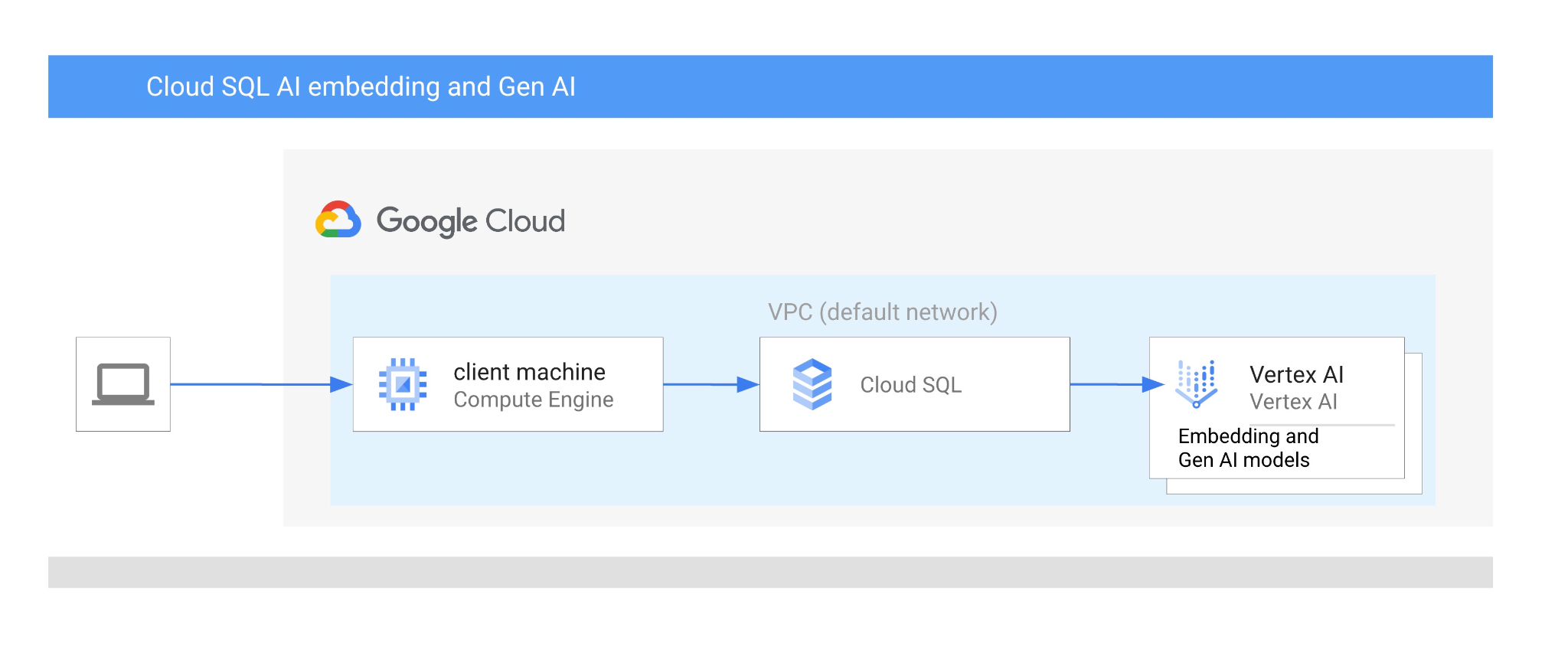
在本程式碼研究室中,您將瞭解如何結合向量搜尋與 Vertex AI 嵌入功能,使用 MySQL 適用的 Cloud SQL Vertex AI 整合功能。
必要條件
- 對 Google Cloud 和控制台有基本瞭解
- 指令列介面和 Cloud Shell 的基本技能
課程內容
- 如何部署 PostgreSQL 適用的 Cloud SQL 執行個體
- 如何建立資料庫及啟用 Cloud SQL AI 整合
- 如何將資料載入資料庫
- 如何使用 Cloud SQL Studio
- 如何在 Cloud SQL 中使用 Vertex AI 嵌入模型
- 如何使用 Vertex AI Studio
- 如何使用 Vertex AI 生成模型充實結果
- 如何使用向量索引提升效能
軟硬體需求
- Google Cloud 帳戶和 Google Cloud 專案
- 支援 Google Cloud 控制台和 Cloud Shell 的網路瀏覽器,例如 Chrome
2. 設定和需求條件
專案設定
- 登入 Google Cloud 控制台。如果沒有 Gmail 或 Google Workspace 帳戶,請先建立帳戶。
請改用個人帳戶,而非公司或學校帳戶。
- 建立新專案或重複使用現有專案。如要在 Google Cloud 控制台中建立新專案,請在標題中按一下「選取專案」按鈕,開啟彈出式視窗。

在「選取專案」視窗中,按下「新專案」按鈕,開啟新專案的對話方塊。

在對話方塊中輸入偏好的專案名稱,然後選擇位置。
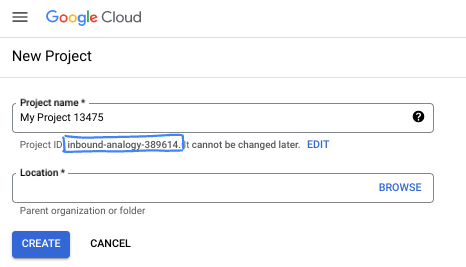
- 「專案名稱」是這個專案參與者的顯示名稱。Google API 不會使用專案名稱,且專案名稱隨時可以變更。
- 專案 ID 在所有 Google Cloud 專案中不得重複,且設定後即無法變更。Google Cloud 控制台會自動產生專屬 ID,但您可以自訂 ID。如果不喜歡系統產生的 ID,可以產生另一個隨機 ID,或提供自己的 ID 來檢查是否可用。在大多數程式碼研究室中,您需要參照專案 ID,通常會以 PROJECT_ID 預留位置識別。
- 請注意,部分 API 會使用第三個值,也就是「專案編號」。如要進一步瞭解這三種值,請參閱說明文件。
啟用計費功能
如要啟用計費功能,有兩種方法。你可以使用個人帳單帳戶,也可以按照下列步驟兌換抵免額。
兌換 $5 美元的 Google Cloud 抵免額 (選用)
如要參加這個研討會,您需要有具備部分抵免額的帳單帳戶。如果您打算使用自己的帳單,可以略過這個步驟。
- 按一下這個連結,然後登入個人 Google 帳戶。
- 您將看見類似下方的內容:
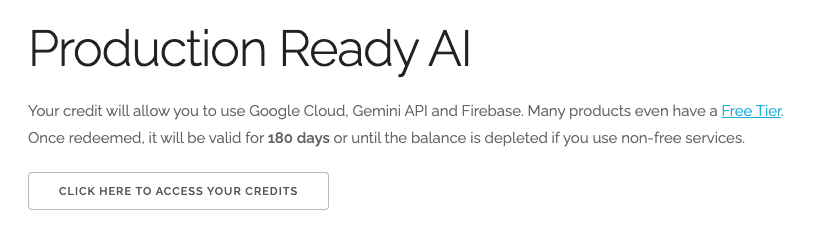
- 按一下「按這裡存取抵免額」按鈕。系統會將您帶往設定帳單資料的頁面。如果系統顯示免費試用註冊畫面,請按一下「取消」,然後繼續連結帳單資訊。
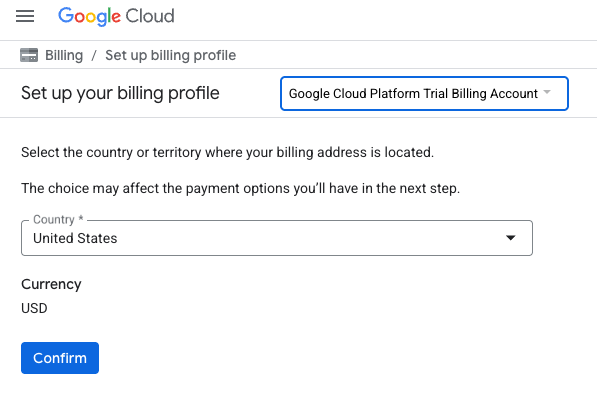
- 按一下「確認」,您現在已連結至 Google Cloud Platform 試用帳單帳戶。
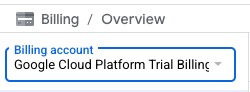
設定個人帳單帳戶
如果使用 Google Cloud 抵免額設定計費,則可略過此步驟。
如要設定個人帳單帳戶,請前往這裡在 Cloud 控制台中啟用帳單功能。
注意事項:
- 完成本實驗室的雲端資源費用應低於 $3 美元。
- 您可以按照本實驗室結尾的步驟刪除資源,避免產生額外費用。
- 新使用者可享有價值 $300 美元的免費試用期。
啟動 Cloud Shell
雖然可以從筆電遠端操作 Google Cloud,但在本程式碼研究室中,您將使用 Google Cloud Shell,這是 Cloud 中執行的指令列環境。
在 Google Cloud 控制台中,點選右上工具列的 Cloud Shell 圖示:

你也可以依序按下 G 鍵和 S 鍵。如果您位於 Google Cloud 控制台中,或使用這個連結,這個序列會啟用 Cloud Shell。
佈建並連線至環境的作業需要一些時間才能完成。完成後,您應該會看到如下的內容:

這部虛擬機器搭載各種您需要的開發工具,提供永久的 5 GB 主目錄,而且在 Google Cloud 中運作,可大幅提升網路效能和驗證。您可以在瀏覽器中完成本程式碼研究室的所有作業。您不需要安裝任何軟體。
3. 事前準備
啟用 API
如要使用 Cloud SQL、Compute Engine、網路服務和 Vertex AI,您需要在 Google Cloud 專案中啟用各自的 API。
在 Cloud Shell 終端機中,確認專案 ID 已設定完畢:
gcloud config set project [YOUR-PROJECT-ID]
設定環境變數 PROJECT_ID:
PROJECT_ID=$(gcloud config get-value project)
啟用所有必要服務:
gcloud services enable sqladmin.googleapis.com \
                       compute.googleapis.com \
                       cloudresourcemanager.googleapis.com \
                       servicenetworking.googleapis.com \
                       aiplatform.googleapis.com
預期的輸出內容:
student@cloudshell:~ (test-project-001-402417)$ gcloud config set project test-project-001-402417
Updated property [core/project].
student@cloudshell:~ (test-project-001-402417)$ PROJECT_ID=$(gcloud config get-value project)
Your active configuration is: [cloudshell-14650]
student@cloudshell:~ (test-project-001-402417)$
student@cloudshell:~ (test-project-001-402417)$ gcloud services enable sqladmin.googleapis.com \
                       compute.googleapis.com \
                       cloudresourcemanager.googleapis.com \
                       servicenetworking.googleapis.com \
                       aiplatform.googleapis.com
Operation "operations/acat.p2-4470404856-1f44ebd8-894e-4356-bea7-b84165a57442" finished successfully.
API 簡介
- Cloud SQL Admin API (
sqladmin.googleapis.com) 可讓您以程式輔助方式建立、設定及管理 Cloud SQL 執行個體。這項服務提供 Google 全代管關聯式資料庫服務 (支援 MySQL、PostgreSQL 和 SQL Server) 的控制平面,可處理佈建、備份、高可用性和擴充等工作。 - Compute Engine API (
compute.googleapis.com) 可讓您建立及管理虛擬機器 (VM)、永久磁碟和網路設定。這個服務提供執行工作負載所需的基礎架構即服務 (IaaS) 基礎,並代管許多代管服務的基礎架構。 - Cloud Resource Manager API (
cloudresourcemanager.googleapis.com) 可讓您以程式輔助方式管理 Google Cloud 專案的中繼資料和設定。您可以藉此整理資源、處理 Identity and Access Management (IAM) 政策,以及驗證專案階層中的權限。 - Service Networking API (
servicenetworking.googleapis.com) 可讓您自動設定虛擬私有雲 (VPC) 網路與 Google 代管服務之間的私人連線。您必須建立服務 (例如 AlloyDB) 的私人 IP 存取權,才能與其他資源安全通訊。 - Vertex AI API (
aiplatform.googleapis.com) 可讓應用程式建構、部署及擴充機器學習模型。這個平台提供統一的介面,方便您使用所有 Google Cloud AI 服務,包括存取生成式 AI 模型 (如 Gemini) 和訓練自訂模型。
4. 建立 Cloud SQL 執行個體
建立 Cloud SQL 執行個體,並整合資料庫與 Vertex AI。
建立資料庫密碼
定義預設資料庫使用者的密碼。您可以自行定義密碼,也可以使用隨機函式產生密碼:
export CLOUDSQL_PASSWORD=`openssl rand -hex 12`
記下系統生成的密碼值:
echo $CLOUDSQL_PASSWORD
建立 MySQL 適用的 Cloud SQL 執行個體
建立執行個體時,可以啟用 cloudsql_vector 標記。目前 MySQL 8.0 R20241208.01_00 以上版本支援向量
在 Cloud Shell 工作階段中執行下列指令:
gcloud sql instances create my-cloudsql-instance \
--database-version=MYSQL_8_4 \
--tier=db-custom-2-8192 \
--region=us-central1 \
--enable-google-ml-integration \
--edition=ENTERPRISE \
--root-password=$CLOUDSQL_PASSWORD
我們可以從 Cloud Shell 執行下列指令,驗證連線:
gcloud sql connect my-cloudsql-instance --user=root
執行指令,並在系統準備連線時,在提示中輸入密碼。
預期的輸出內容:
$gcloud sql connect my-cloudsql-instance --user=root
Allowlisting your IP for incoming connection for 5 minutes...done.
Connecting to database with SQL user [root].Enter password:
Welcome to the MySQL monitor.  Commands end with ; or \g.
Your MySQL connection id is 71
Server version: 8.4.4-google (Google)

Copyright (c) 2000, 2025, Oracle and/or its affiliates.

Oracle is a registered trademark of Oracle Corporation and/or its
affiliates. Other names may be trademarks of their respective
owners.

Type 'help;' or '\h' for help. Type '\c' to clear the current input statement.

mysql>
使用 Ctrl + D 鍵盤快速鍵或執行 exit 指令,暫時結束 mysql 工作階段
exit
啟用 Vertex AI 整合功能
將必要權限授予內部 Cloud SQL 服務帳戶,以便使用 Vertex AI 整合功能。
找出 Cloud SQL 內部服務帳戶電子郵件地址,並匯出為變數。
SERVICE_ACCOUNT_EMAIL=$(gcloud sql instances describe my-cloudsql-instance --format="value(serviceAccountEmailAddress)")
echo $SERVICE_ACCOUNT_EMAIL
將存取權授予 Cloud SQL 服務帳戶的 Vertex AI:
gcloud projects add-iam-policy-binding $PROJECT_ID \
  --member="serviceAccount:$SERVICE_ACCOUNT_EMAIL" \
  --role="roles/aiplatform.user"
如要進一步瞭解如何建立及設定執行個體,請參閱 這篇文章。
5. 準備資料庫
現在我們需要建立資料庫並啟用向量支援功能。
建立資料庫
建立名為 quickstart_db 的資料庫。如要建立資料庫,您可以使用指令列資料庫用戶端 (例如 MySQL 適用的 mysql)、SDK 或 Cloud SQL Studio。我們將使用 SDK (gcloud) 建立資料庫。
在 Cloud Shell 中執行指令,建立資料庫
gcloud sql databases create quickstart_db --instance=my-cloudsql-instance
6. 載入資料
現在我們需要在資料庫中建立物件並載入資料。我們將使用虛構的 Cymbal 商店資料。資料提供 SQL (適用於結構定義) 和 CSV 格式 (適用於資料)。
Cloud Shell 是我們連線至資料庫、建立所有物件及載入資料的主要環境。
首先,我們需要將 Cloud Shell 公開 IP 新增至 Cloud SQL 執行個體的授權網路清單。在 Cloud Shell 中執行下列指令:
gcloud sql instances patch my-cloudsql-instance --authorized-networks=$(curl ifconfig.me)
如果工作階段遺失、重設,或您使用其他工具,請再次匯出 CLOUDSQL_PASSWORD 變數:
export CLOUDSQL_PASSWORD=...your password defined for the instance...
現在我們可以在資料庫中建立所有必要物件。為此,我們將搭配使用 MySQL mysql 公用程式和 curl 公用程式,從公開來源取得資料。
在 Cloud Shell 中執行下列指令:
export INSTANCE_IP=$(gcloud sql instances describe my-cloudsql-instance --format="value(ipAddresses.ipAddress)")
curl -LJ https://raw.githubusercontent.com/GoogleCloudPlatform/devrel-demos/main/infrastructure/cymbal-store-embeddings/cymbal_mysql_schema.sql | mysql --host=$INSTANCE_IP --user=root --password=$CLOUDSQL_PASSWORD quickstart_db
我們在上一個指令中做了什麼?我們已連線至資料庫,並執行下載的 SQL 程式碼,建立資料表、索引和序列。
下一個步驟是載入 cymbal_products 資料。我們使用相同的 curl 和 mysql 公用程式。
curl -LJ https://raw.githubusercontent.com/GoogleCloudPlatform/devrel-demos/main/infrastructure/cymbal-store-embeddings/cymbal_products.csv | mysql --enable-local-infile --host=$INSTANCE_IP --user=root --password=$CLOUDSQL_PASSWORD quickstart_db -e "LOAD DATA LOCAL INFILE '/dev/stdin' INTO TABLE cymbal_products FIELDS TERMINATED BY ',' OPTIONALLY ENCLOSED BY '\"' LINES TERMINATED BY '\n' IGNORE 1 LINES;"
接著繼續使用 cymbal_stores。
curl -LJ https://raw.githubusercontent.com/GoogleCloudPlatform/devrel-demos/main/infrastructure/cymbal-store-embeddings/cymbal_stores.csv | mysql --enable-local-infile --host=$INSTANCE_IP --user=root --password=$CLOUDSQL_PASSWORD quickstart_db -e "LOAD DATA LOCAL INFILE '/dev/stdin' INTO TABLE cymbal_stores FIELDS TERMINATED BY ',' OPTIONALLY ENCLOSED BY '\"' LINES TERMINATED BY '\n' IGNORE 1 LINES;"
並完成 cymbal_inventory,其中包含每間商店的各項產品數量。
curl -LJ https://raw.githubusercontent.com/GoogleCloudPlatform/devrel-demos/main/infrastructure/cymbal-store-embeddings/cymbal_inventory.csv | mysql --enable-local-infile --host=$INSTANCE_IP --user=root --password=$CLOUDSQL_PASSWORD quickstart_db -e "LOAD DATA LOCAL INFILE '/dev/stdin' INTO TABLE cymbal_inventory FIELDS TERMINATED BY ',' OPTIONALLY ENCLOSED BY '\"' LINES TERMINATED BY '\n' IGNORE 1 LINES;"
如果您有自己的範例資料,且 CSV 檔案與 Cloud Console 提供的 Cloud SQL 匯入工具有相容性,則可使用這些檔案,不必採用本文介紹的方法。
7. 建立嵌入
接下來,請使用 Google Vertex AI 的 textembedding-005 模型,為產品說明建立嵌入,並將這些嵌入儲存在 cymbal_products 資料表的新欄中。
如要儲存向量資料,我們需要在 Cloud SQL 執行個體中啟用向量功能。在 Cloud Shell 中執行下列指令:
gcloud sql instances patch my-cloudsql-instance \
--database-flags=cloudsql_vector=on
連線至資料庫:
mysql --host=$INSTANCE_IP --user=root --password=$CLOUDSQL_PASSWORD quickstart_db
並使用嵌入函式,在 cymbal_products 資料表中建立新的 embedding 資料欄。這個新資料欄會根據「product_description」product_description資料欄中的文字,保存向量嵌入。
ALTER TABLE cymbal_products ADD COLUMN embedding vector(768) using varbinary;
UPDATE cymbal_products SET embedding = mysql.ml_embedding('text-embedding-005', product_description);
為 2000 列產生向量嵌入通常需要不到 5 分鐘,但有時可能稍長,而且通常會更快完成。
8. 執行相似度搜尋
現在,我們可以根據說明計算出的向量值,以及使用相同嵌入模型為要求生成的向量值,執行相似度搜尋。
您可以透過相同的指令列介面執行 SQL 查詢,也可以使用 Cloud SQL Studio。建議在 Cloud SQL Studio 中管理任何多列和複雜查詢。
建立使用者
我們需要可使用 Cloud SQL Studio 的新使用者。我們將建立內建類型的學生使用者,並使用與超級使用者相同的密碼。
在 Cloud Shell 中執行下列指令:
gcloud sql users create student --instance=my-cloudsql-instance --password=$CLOUDSQL_PASSWORD --host=%
啟動 Cloud SQL Studio
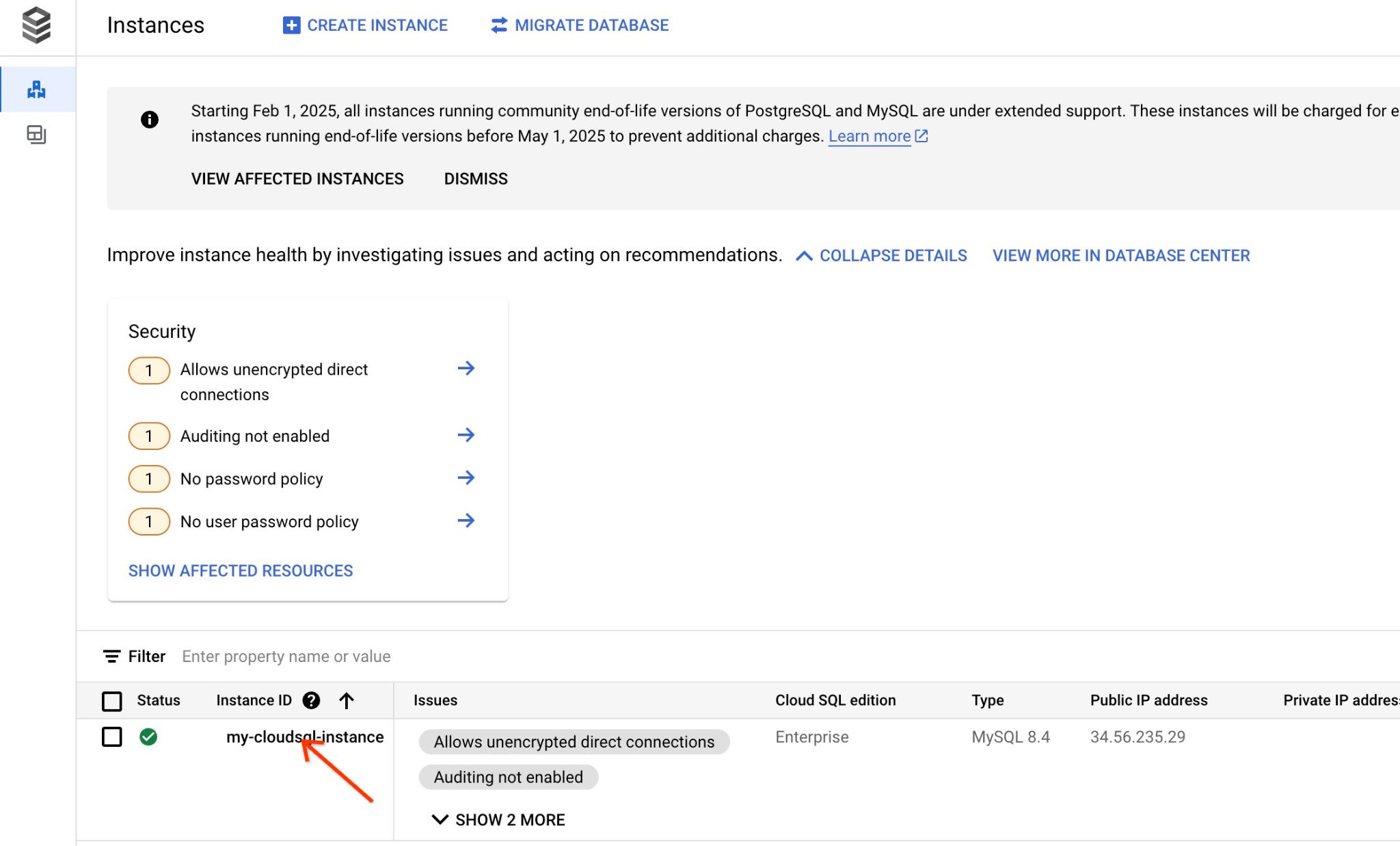
在控制台中,按一下我們稍早建立的 Cloud SQL 執行個體。
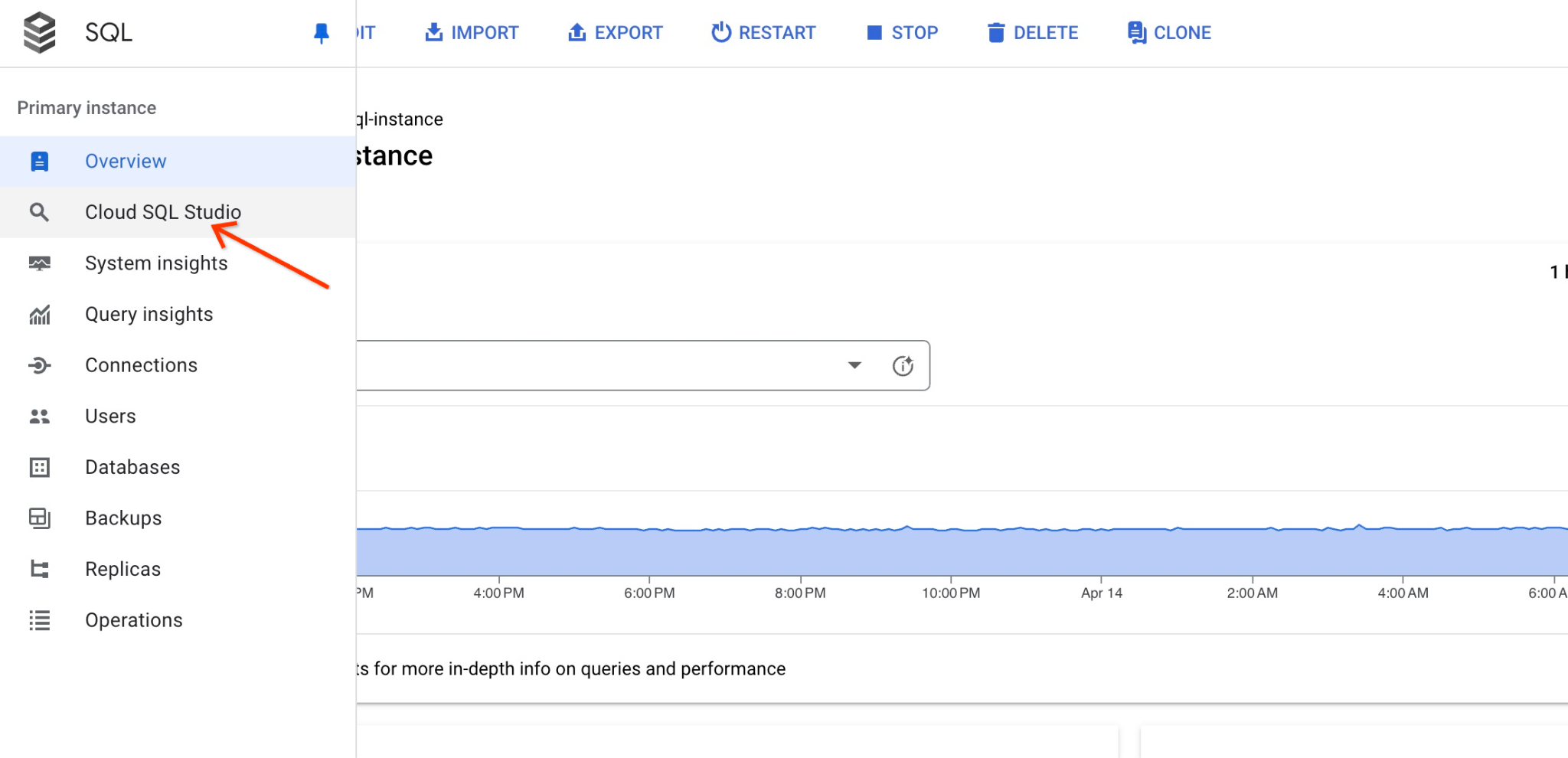
在右側面板開啟後,我們可以看到 Cloud SQL Studio。請點按分頁標籤。
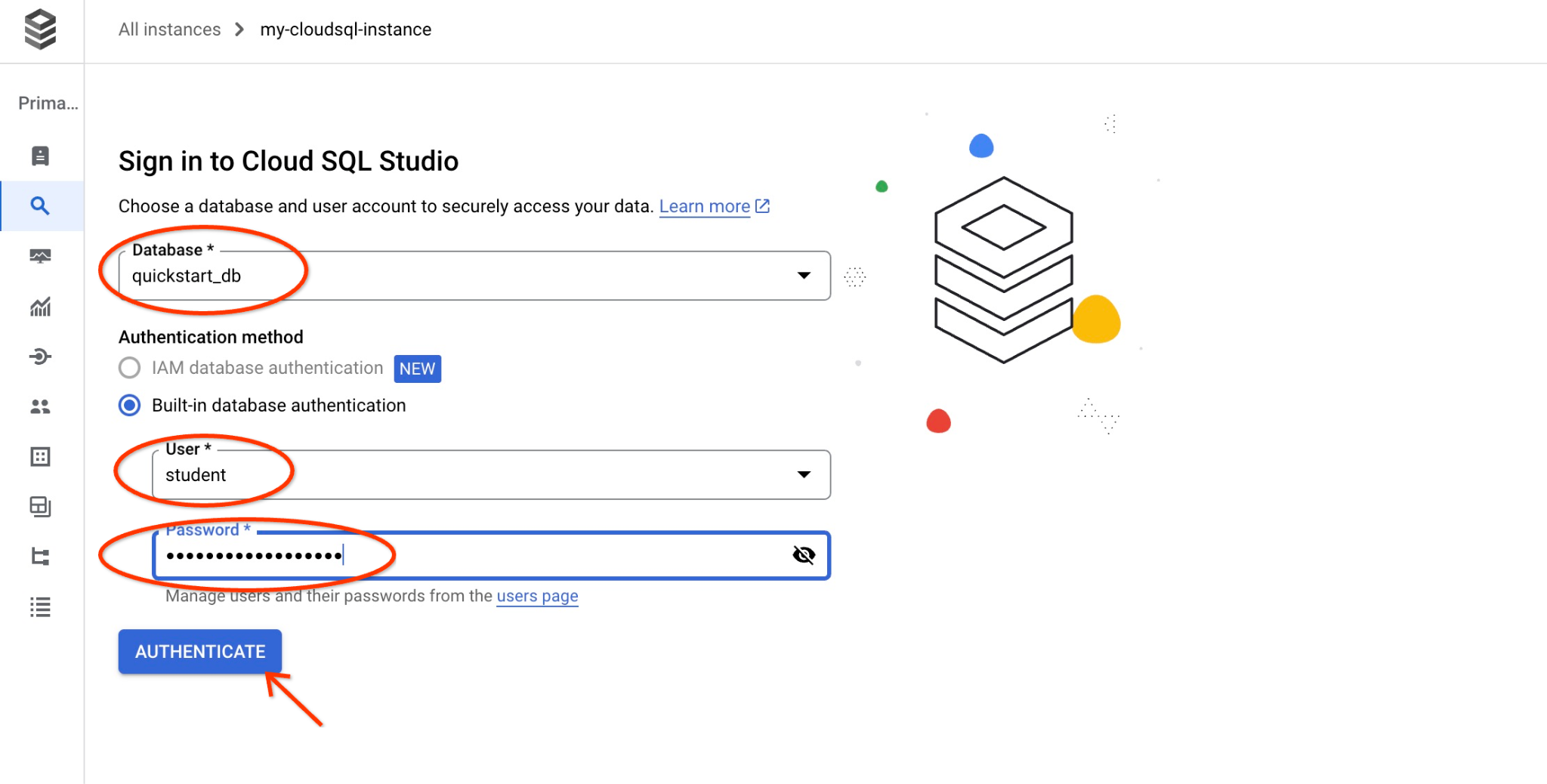
系統會開啟對話方塊,供您提供資料庫名稱和憑證:
- 資料庫:quickstart_db
- 使用者:student
- 密碼:您為使用者記下的密碼
然後按一下「驗證」按鈕。
系統會開啟下一個視窗,請點選右側的「編輯器」分頁標籤,開啟 SQL 編輯器。
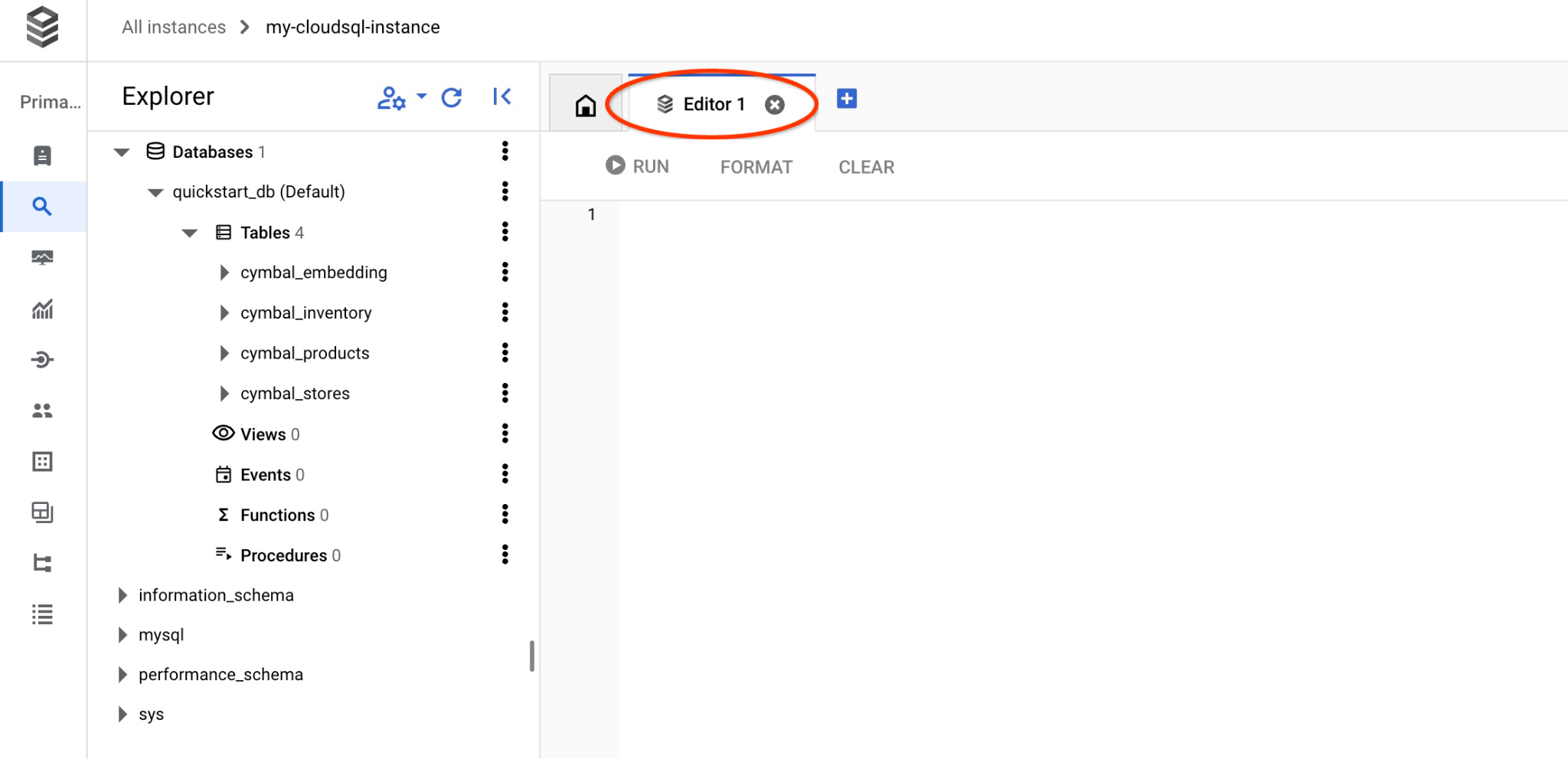
現在可以執行查詢了。
執行查詢
執行查詢,取得與客戶要求最相關的可用產品清單。我們要傳遞給 Vertex AI 以取得向量值的請求類似於「這裡適合種植哪種果樹?」。
使用 cosine_distance 執行 KNN (精確) 向量搜尋的查詢
以下是您可以執行的查詢,使用 cosine_distance 函式選擇最符合要求的前 5 個項目:
SELECT mysql.ML_EMBEDDING('text-embedding-005','What kind of fruit trees grow well here?') into @query_vector;
SELECT
        cp.product_name,
        left(cp.product_description,80) as description,
        cp.sale_price,
        cs.zip_code,
        cosine_distance(cp.embedding ,@query_vector) as distance
FROM
        cymbal_products cp
JOIN cymbal_inventory ci on
        ci.uniq_id=cp.uniq_id
JOIN cymbal_stores cs on
        cs.store_id=ci.store_id
        AND ci.inventory>0
        AND cs.store_id = 1583
ORDER BY
        distance ASC
LIMIT 5;
將查詢複製並貼到 Cloud SQL Studio 編輯器,然後按下「RUN」按鈕,或將查詢貼到連線至 quickstart_db 資料庫的指令列工作階段。
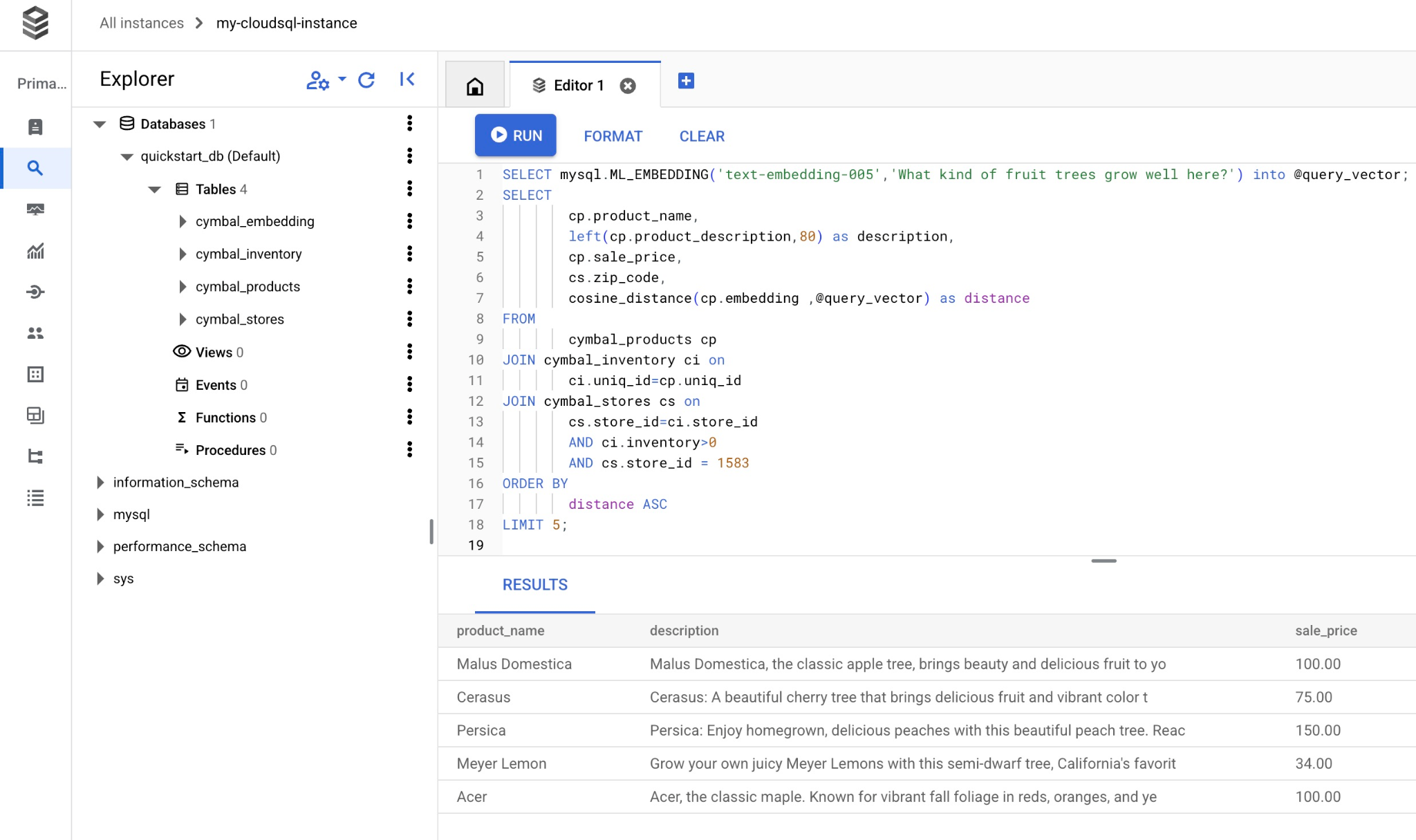
以下是符合查詢的產品清單。
+-----------------+----------------------------------------------------------------------------------+------------+----------+---------------------+
| product_name    | description                                                                      | sale_price | zip_code | distance            |
+-----------------+----------------------------------------------------------------------------------+------------+----------+---------------------+
| Malus Domestica | Malus Domestica, the classic apple tree, brings beauty and delicious fruit to yo |     100.00 |    93230 | 0.37740096545831603 |
| Cerasus         | Cerasus: A beautiful cherry tree that brings delicious fruit and vibrant color t |      75.00 |    93230 |   0.405704177142419 |
| Persica         | Persica: Enjoy homegrown, delicious peaches with this beautiful peach tree. Reac |     150.00 |    93230 | 0.41031799106722877 |
| Meyer Lemon     | Grow your own juicy Meyer Lemons with this semi-dwarf tree, California's favorit |      34.00 |    93230 | 0.42823360959352186 |
| Acer            | Acer, the classic maple. Known for vibrant fall foliage in reds, oranges, and ye |     100.00 |    93230 | 0.42953897057301615 |
+-----------------+----------------------------------------------------------------------------------+------------+----------+---------------------+
5 rows in set (0.13 sec)
使用 cosine_distance 函式執行查詢耗時 0.13 秒。
使用 approx_distance 執行 KNN (精確) 向量搜尋的查詢
現在,我們使用 approx_distance 函式執行 KNN 搜尋,但查詢內容相同。如果我們沒有嵌入的 ANN 索引,系統會在幕後自動還原為精確搜尋:
SELECT mysql.ML_EMBEDDING('text-embedding-005','What kind of fruit trees grow well here?') into @query_vector;
SELECT
        cp.product_name,
        left(cp.product_description,80) as description,
        cp.sale_price,
        cs.zip_code,
        approx_distance(cp.embedding ,@query_vector, 'distance_measure=cosine') as distance
FROM
        cymbal_products cp
JOIN cymbal_inventory ci on
        ci.uniq_id=cp.uniq_id
JOIN cymbal_stores cs on
        cs.store_id=ci.store_id
        AND ci.inventory>0
        AND cs.store_id = 1583
ORDER BY
        distance ASC
LIMIT 5;
以下是查詢傳回的產品清單。
+-----------------+----------------------------------------------------------------------------------+------------+----------+---------------------+
| product_name    | description                                                                      | sale_price | zip_code | distance            |
+-----------------+----------------------------------------------------------------------------------+------------+----------+---------------------+
| Malus Domestica | Malus Domestica, the classic apple tree, brings beauty and delicious fruit to yo |     100.00 |    93230 | 0.37740096545831603 |
| Cerasus         | Cerasus: A beautiful cherry tree that brings delicious fruit and vibrant color t |      75.00 |    93230 |   0.405704177142419 |
| Persica         | Persica: Enjoy homegrown, delicious peaches with this beautiful peach tree. Reac |     150.00 |    93230 | 0.41031799106722877 |
| Meyer Lemon     | Grow your own juicy Meyer Lemons with this semi-dwarf tree, California's favorit |      34.00 |    93230 | 0.42823360959352186 |
| Acer            | Acer, the classic maple. Known for vibrant fall foliage in reds, oranges, and ye |     100.00 |    93230 | 0.42953897057301615 |
+-----------------+----------------------------------------------------------------------------------+------------+----------+---------------------+
5 rows in set, 1 warning (0.12 sec)
查詢執行時間僅 0.12 秒。我們得到與 cosine_distance 函式相同的結果。
9. 使用檢索到的資料提升 LLM 回覆品質
我們可以運用執行的查詢結果,改善用戶端應用程式的生成式 AI 大型語言模型回覆,並使用提供的查詢結果做為提示的一部分,準備有意義的輸出內容給 Vertex AI 生成式基礎語言模型。
為此,我們需要使用向量搜尋結果生成 JSON,然後將生成的 JSON 新增至 Vertex AI 中 LLM 模型的提示,以建立有意義的輸出內容。首先,我們會生成 JSON,然後在 Vertex AI Studio 中測試,最後將其併入 SQL 陳述式,以便在應用程式中使用。
以 JSON 格式產生輸出內容
修改查詢,以 JSON 格式產生輸出內容,並只傳回一個資料列,以便傳遞至 Vertex AI
以下是使用 ANN 搜尋的查詢範例:
SELECT mysql.ML_EMBEDDING('text-embedding-005','What kind of fruit trees grow well here?') into @query_vector;
WITH trees as (
SELECT
        cp.product_name,
        left(cp.product_description,80) as description,
        cp.sale_price,
        cs.zip_code,
        cp.uniq_id as product_id
FROM
        cymbal_products cp
JOIN cymbal_inventory ci on
        ci.uniq_id=cp.uniq_id
JOIN cymbal_stores cs on
        cs.store_id=ci.store_id
        AND ci.inventory>0
        AND cs.store_id = 1583
ORDER BY
        (approx_distance(cp.embedding ,@query_vector, 'distance_measure=cosine')) ASC
LIMIT 1)
SELECT json_arrayagg(json_object('product_name',product_name,'description',description,'sale_price',sale_price,'zip_code',zip_code,'product_id',product_id)) FROM trees;
以下是預期的 JSON 輸出內容:
[{"zip_code": 93230, "product_id": "23e41a71d63d8bbc9bdfa1d118cfddc5", "sale_price": 100.00, "description": "Malus Domestica, the classic apple tree, brings beauty and delicious fruit to yo", "product_name": "Malus Domestica"}]
在 Vertex AI Studio 中執行提示
我們可以將產生的 JSON 做為提示的一部分,提供給 Vertex AI Studio 中的生成式 AI 文字模型
在 Cloud 控制台中開啟 Vertex AI Studio 提示。
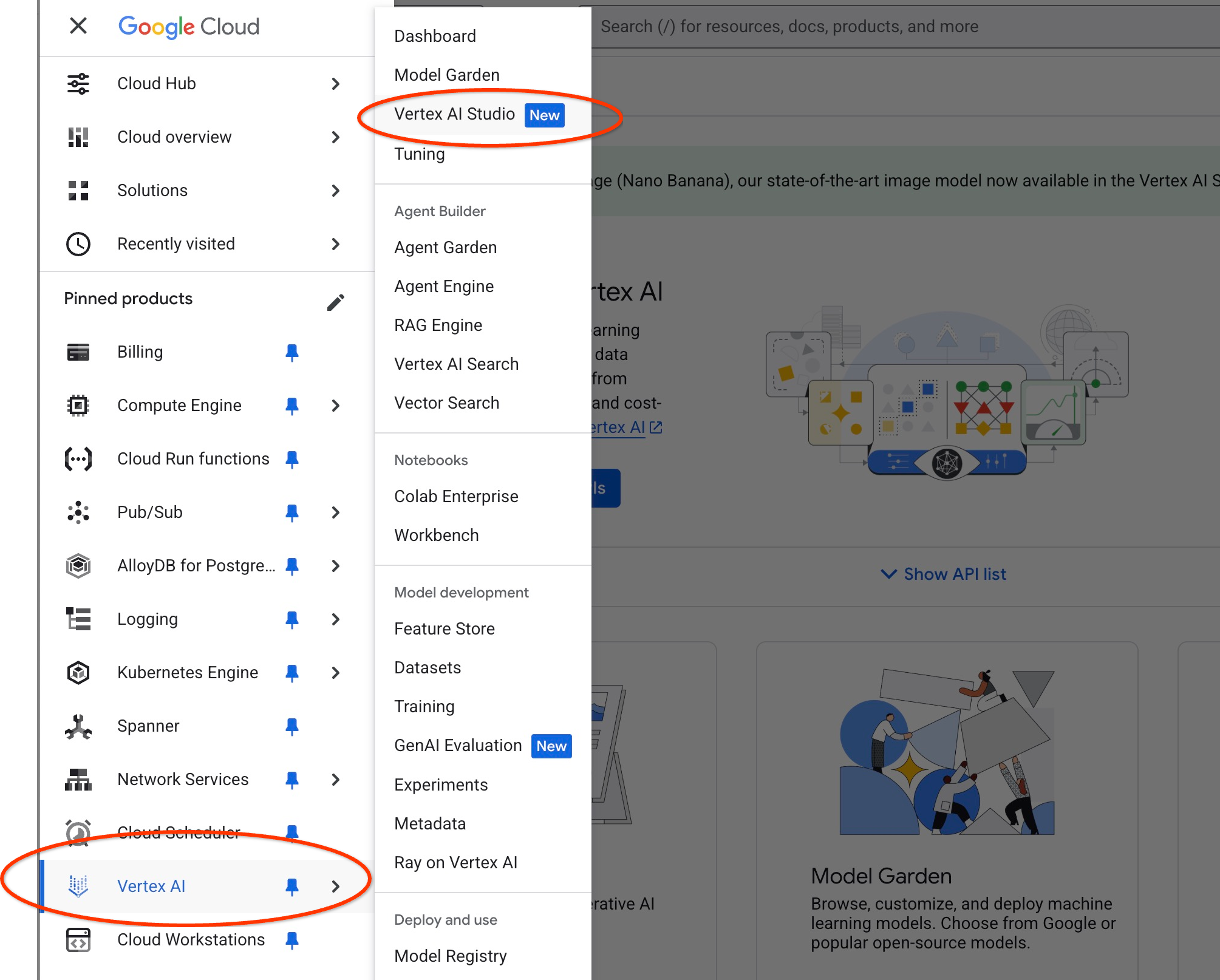
系統可能會要求您啟用其他 API,但您可以忽略這項要求。我們不需要任何其他 API 即可完成實驗室。
在 Studio 中輸入提示。
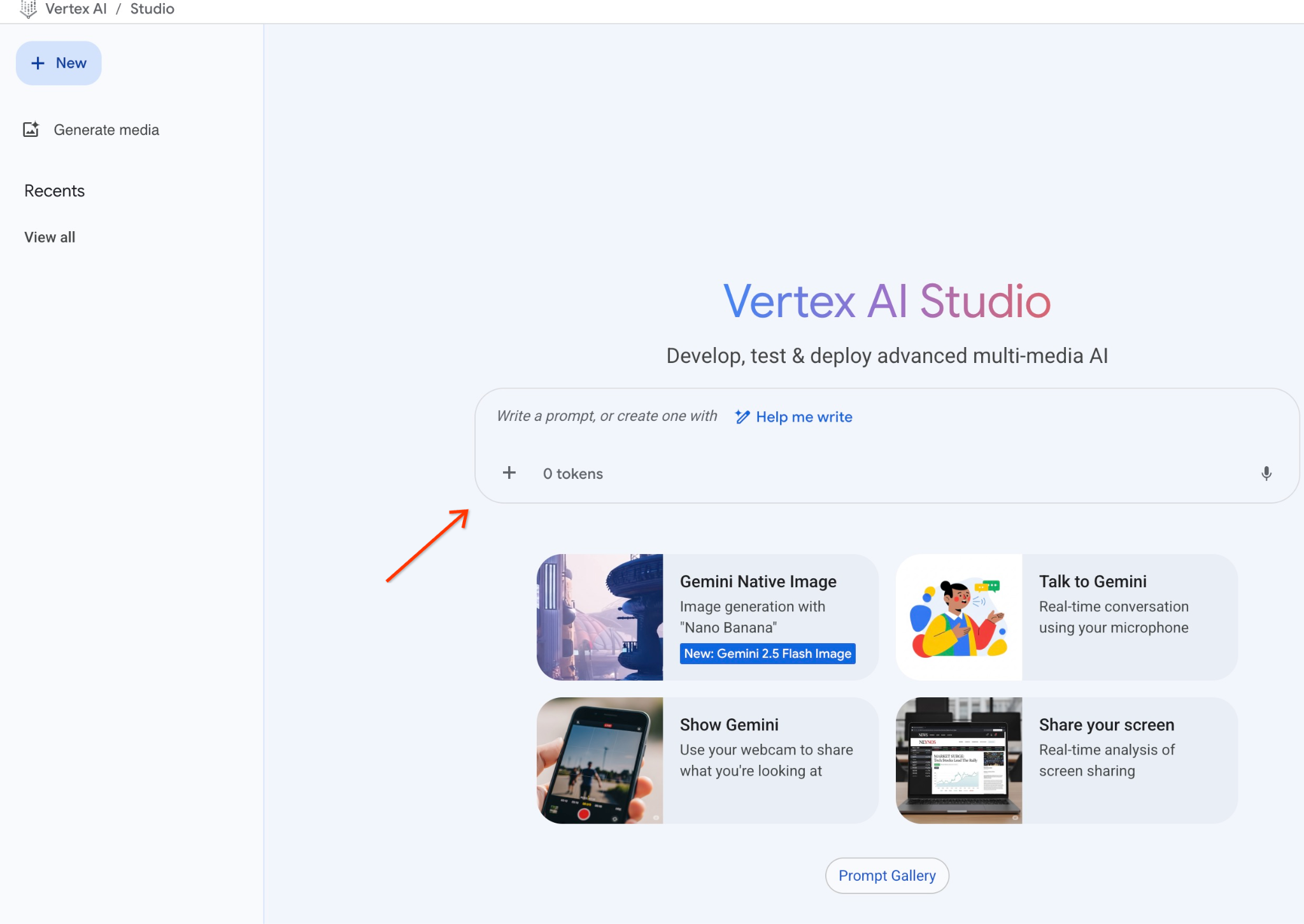
我們將使用以下提示:
You are a friendly advisor helping to find a product based on the customer's needs.
Based on the client request we have loaded a list of products closely related to search.
The list in JSON format with list of values like {"product_name":"name","description":"some description","sale_price":10,"zip_code": 10234, "produt_id": "02056727942aeb714dc9a2313654e1b0"}
Here is the list of products:
[place your JSON here]
The customer asked "What tree is growing the best here?"
You should give information about the product, price and some supplemental information.
Do not ask any additional questions and assume location based on the zip code provided in the list of products.
以下是將 JSON 預留位置替換為查詢回應後的樣子:
You are a friendly advisor helping to find a product based on the customer's needs.
Based on the client request we have loaded a list of products closely related to search.
The list in JSON format with list of values like {"product_name":"name","description":"some description","sale_price":10,"zip_code": 10234, "produt_id": "02056727942aeb714dc9a2313654e1b0"}
Here is the list of products:
{"zip_code": 93230, "product_id": "23e41a71d63d8bbc9bdfa1d118cfddc5", "sale_price": 100.00, "description": "Malus Domestica, the classic apple tree, brings beauty and delicious fruit to yo", "product_name": "Malus Domestica"}
The customer asked "What tree is growing the best here?"
You should give information about the product, price and some supplemental information.
Do not ask any additional questions and assume location based on the zip code provided in the list of products.
以下是使用 gemini-2.5-flash 模型,以 JSON 值執行提示的結果:
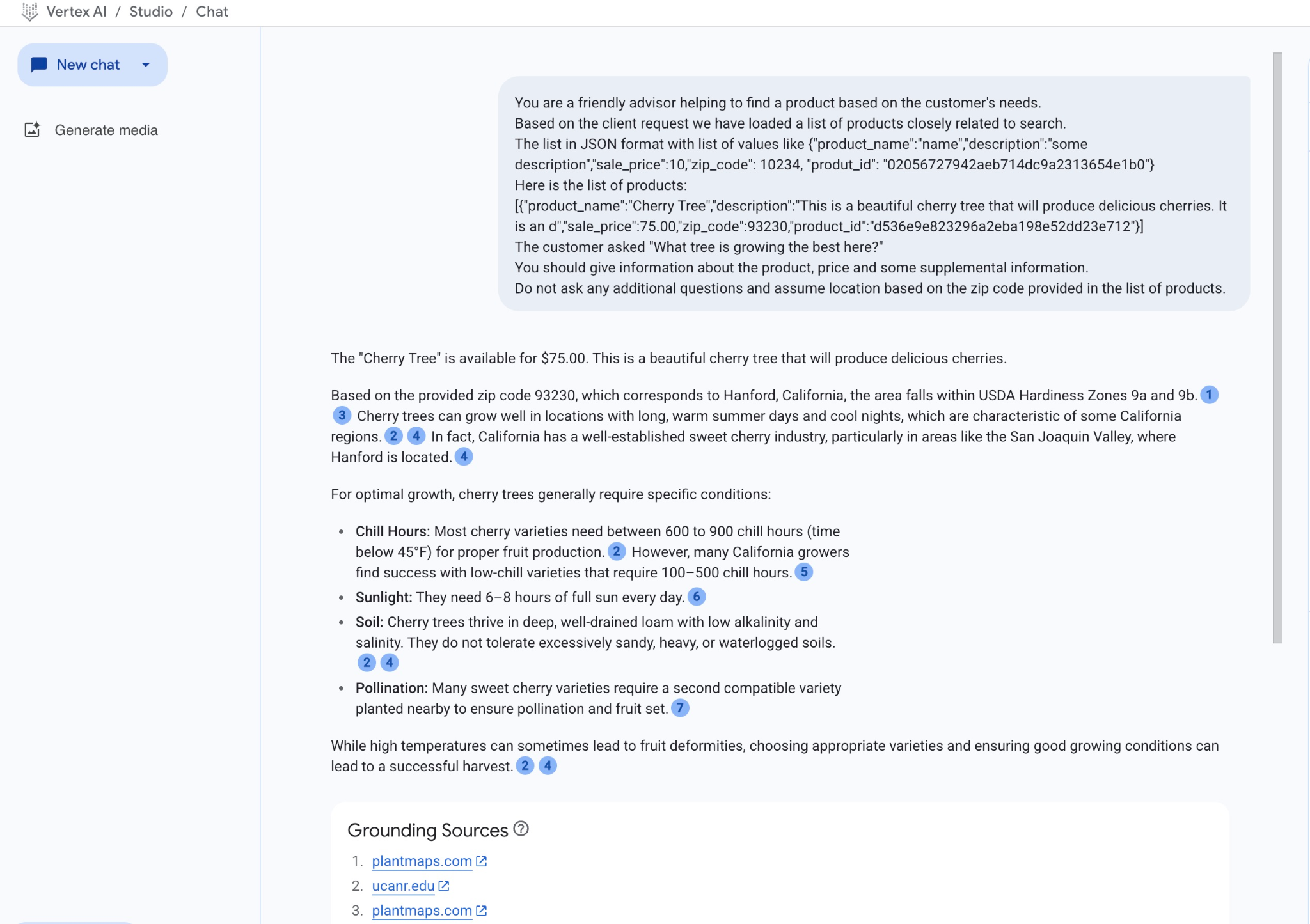
在本範例中,模型根據語意搜尋結果和上述郵遞區號中可用的最佳相符產品,提供解答。
在 SQL 中執行提示
我們也可以搭配使用 Cloud SQL AI 整合功能和 Vertex AI,直接在資料庫中使用 SQL,從生成模型取得類似的回覆。
現在,我們可以在子查詢中使用產生的 JSON 結果,透過 SQL 將其做為提示的一部分,提供給生成式 AI 文字模型。
在資料庫的 mysql 或 Cloud SQL Studio 工作階段中執行查詢
SELECT mysql.ML_EMBEDDING('text-embedding-005','What kind of fruit trees grow well here?') into @query_vector;
WITH trees AS (
SELECT
        cp.product_name,
        cp.product_description AS description,
        cp.sale_price,
        cs.zip_code,
        cp.uniq_id AS product_id
FROM
        cymbal_products cp
JOIN cymbal_inventory ci ON
        ci.uniq_id = cp.uniq_id
JOIN cymbal_stores cs ON
        cs.store_id = ci.store_id
        AND ci.inventory>0
        AND cs.store_id = 1583
ORDER BY
         (approx_distance(cp.embedding ,@query_vector, 'distance_measure=cosine')) ASC
LIMIT 1),
prompt AS (
SELECT
       CONCAT( 'You are a friendly advisor helping to find a product based on the customer''s needs.
Based on the client request we have loaded a list of products closely related to search.
The list in JSON format with list of values like {"product_name":"name","product_description":"some description","sale_price":10}
Here is the list of products:', json_arrayagg(json_object('product_name',trees.product_name,'description',trees.description,'sale_price',trees.sale_price,'zip_code',trees.zip_code,'product_id',trees.product_id)) , 'The customer asked "What kind of fruit trees grow well here?"
You should give information about the product, price and some supplemental information') AS prompt_text
FROM
        trees),
response AS (
SELECT
       mysql.ML_PREDICT_ROW('publishers/google/models/gemini-2.0-flash-001:generateContent',
        json_object('contents',
        json_object('role',
        'user',
        'parts',
        json_array(
        json_object('text',
        prompt_text))))) AS resp
FROM
        prompt)
SELECT
JSON_EXTRACT(resp, '$.candidates[0].content.parts[0].text')
FROM
        response;
以下是輸出內容範例。輸出內容可能因模型版本和參數而異:
"Okay, I see you're looking for fruit trees that grow well in your area. Based on the available product, the **Malus Domestica** (Apple Tree) is a great option to consider!\n\n* **Product:** Malus Domestica (Apple Tree)\n* **Description:** This classic apple tree grows to about 30 feet tall and provides beautiful seasonal color with green leaves in summer and fiery colors in the fall. It's known for its strength and provides good shade. Most importantly, it produces delicious apples!\n* **Price:** \\$100.00\n* **Growing Zones:** This particular apple tree is well-suited for USDA zones 4-8. Since your zip code is 93230, you are likely in USDA zone 9a or 9b. While this specific tree is rated for zones 4-8, with proper care and variety selection, apple trees can still thrive in slightly warmer climates. You may need to provide extra care during heat waves.\n\n**Recommendation:** I would recommend investigating varieties of Malus Domestica suited to slightly warmer climates or contacting a local nursery/arborist to verify if it is a good fit for your local climate conditions.\n"
輸出內容會以 Markdown 格式提供。
10. 建立最近鄰項索引
我們的資料集相對較小,回覆時間主要取決於與 AI 模型的互動。但如果向量數量達到數百萬,向量搜尋可能會佔用大量回應時間,並對系統造成高負載。為改善這點,我們可以在向量上建立索引。
建立 ScaNN 索引
我們將在測試中使用 ScANN 索引類型。
如要為嵌入資料欄建立索引,我們需要定義嵌入資料欄的距離測量方式。如要詳細瞭解參數,請參閱說明文件。
CREATE VECTOR INDEX cymbal_products_embedding_idx ON cymbal_products(embedding) USING SCANN DISTANCE_MEASURE=COSINE;
比較回覆
現在可以再次執行向量搜尋查詢,並查看結果
SELECT mysql.ML_EMBEDDING('text-embedding-005','What kind of fruit trees grow well here?') into @query_vector;
SELECT
        cp.product_name,
        left(cp.product_description,80) as description,
        cp.sale_price,
        cs.zip_code,
        approx_distance(cp.embedding ,@query_vector, 'distance_measure=cosine') as distance
FROM
        cymbal_products cp
JOIN cymbal_inventory ci on
        ci.uniq_id=cp.uniq_id
JOIN cymbal_stores cs on
        cs.store_id=ci.store_id
        AND ci.inventory>0
        AND cs.store_id = 1583
ORDER BY
        distance ASC
LIMIT 5;
預期輸出內容:
+-----------------+----------------------------------------------------------------------------------+------------+----------+---------------------+
| product_name    | description                                                                      | sale_price | zip_code | distance            |
+-----------------+----------------------------------------------------------------------------------+------------+----------+---------------------+
| Malus Domestica | Malus Domestica, the classic apple tree, brings beauty and delicious fruit to yo |     100.00 |    93230 | 0.37740096545831603 |
| Cerasus         | Cerasus: A beautiful cherry tree that brings delicious fruit and vibrant color t |      75.00 |    93230 |   0.405704177142419 |
| Persica         | Persica: Enjoy homegrown, delicious peaches with this beautiful peach tree. Reac |     150.00 |    93230 | 0.41031799106722877 |
| Meyer Lemon     | Grow your own juicy Meyer Lemons with this semi-dwarf tree, California's favorit |      34.00 |    93230 | 0.42823360959352186 |
| Acer            | Acer, the classic maple. Known for vibrant fall foliage in reds, oranges, and ye |     100.00 |    93230 | 0.42953897057301615 |
+-----------------+----------------------------------------------------------------------------------+------------+----------+---------------------+
5 rows in set (0.08 sec)
我們可以發現執行時間只略有不同,但對於這麼小的資料集來說,這是預料中的事。對於含有數百萬個向量的大型資料集,這項差異應該會更加明顯。
我們可以使用 EXPLAIN 指令查看執行計畫:
SELECT mysql.ML_EMBEDDING('text-embedding-005','What kind of fruit trees grow well here?') into @query_vector;
EXPLAIN ANALYZE SELECT
        cp.product_name,
        left(cp.product_description,80) as description,
        cp.sale_price,
        cs.zip_code,
        approx_distance(cp.embedding ,@query_vector, 'distance_measure=cosine') as distance
FROM
        cymbal_products cp
JOIN cymbal_inventory ci on
        ci.uniq_id=cp.uniq_id
JOIN cymbal_stores cs on
        cs.store_id=ci.store_id
        AND ci.inventory>0
        AND cs.store_id = 1583
ORDER BY
        distance ASC
LIMIT 5;
執行計畫 (摘錄):
...
-> Nested loop inner join  (cost=443 rows=5) (actual time=1.14..1.18 rows=5 loops=1)
                                -> Vector index scan on cp  (cost=441 rows=5) (actual time=1.1..1.1 rows=5 loops=1)
                                -> Single-row index lookup on cp using PRIMARY (uniq_id=cp.uniq_id)  (cost=0.25 rows=1) (actual time=0.0152..0.0152 rows=1 loops=5)

...
我們可以看到,該查詢在 cp (cymbal_products 資料表的別名) 上使用了向量索引掃描。
您可以試用自己的資料或測試不同的搜尋查詢,瞭解 MySQL 的語意搜尋功能。
11. 清除環境
刪除 Cloud SQL 執行個體
完成實驗室後,請終止 Cloud SQL 執行個體
如果連線中斷,且所有先前的設定都遺失,請在 Cloud Shell 中定義專案和環境變數:
export INSTANCE_NAME=my-cloudsql-instance
export PROJECT_ID=$(gcloud config get-value project)
刪除執行個體:
gcloud sql instances delete $INSTANCE_NAME --project=$PROJECT_ID
預期的控制台輸出內容:
student@cloudshell:~$ gcloud sql instances delete $INSTANCE_NAME --project=$PROJECT_ID
All of the instance data will be lost when the instance is deleted.

Do you want to continue (Y/n)?  y

Deleting Cloud SQL instance...done.
Deleted [https://sandbox.googleapis.com/v1beta4/projects/test-project-001-402417/instances/my-cloudsql-instance].
12. 恭喜
恭喜您完成本程式碼研究室。
Google Cloud 學習路徑
這個實驗室是「打造可用於正式環境的 AI」Google Cloud 學習路徑的一部分。
- 探索完整課程,瞭解如何從設計原型到投入正式環境。
- 使用主題標記
#ProductionReadyAI分享你的進度。
涵蓋內容
- 如何部署 PostgreSQL 適用的 Cloud SQL 執行個體
- 如何建立資料庫及啟用 Cloud SQL AI 整合
- 如何將資料載入資料庫
- 如何使用 Cloud SQL Studio
- 如何在 Cloud SQL 中使用 Vertex AI 嵌入模型
- 如何使用 Vertex AI Studio
- 如何使用 Vertex AI 生成模型充實結果
- 如何使用向量索引提升效能
13. 問卷調查
輸出: