

1. 简介
在此 Codelab 中,您将学习如何通过将向量搜索与 Vertex AI 嵌入相结合来使用 Cloud SQL for PostgreSQL AI 集成。
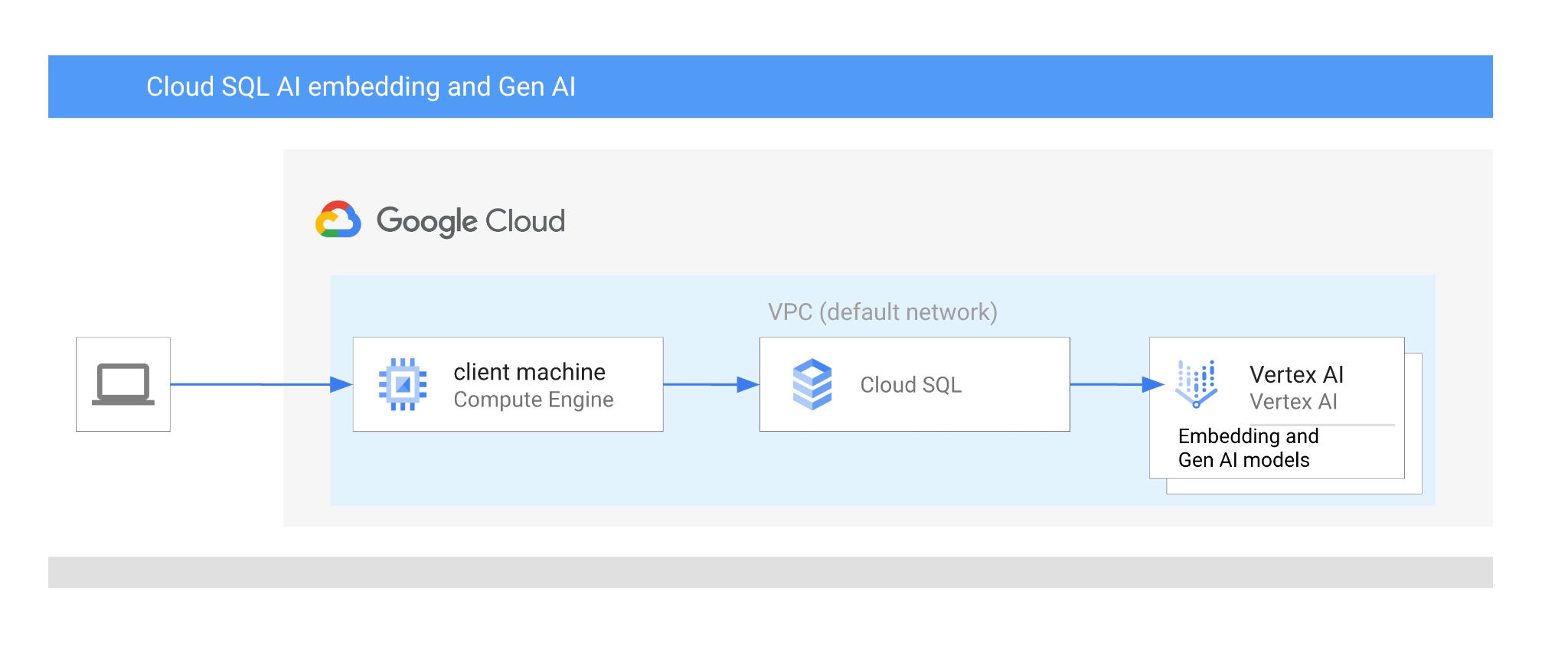
前提条件
- 对 Google Cloud 控制台有基本的了解
- 具备命令行界面和 Cloud Shell 方面的基本技能
学习内容
- 如何部署 Cloud SQL for PostgreSQL 实例
- 如何创建数据库并启用 Cloud SQL AI 集成
- 如何将数据加载到数据库中
- 如何使用 Cloud SQL Studio
- 如何在 Cloud SQL 中使用 Vertex AI 嵌入模型
- 如何使用 Vertex AI Studio
- 如何使用 Vertex AI 生成式模型丰富结果
- 如何使用向量索引提升性能
所需条件
- Google Cloud 账号和 Google Cloud 项目
- 支持 Google Cloud 控制台和 Cloud Shell 的网络浏览器,例如 Chrome
2. 设置和要求
项目设置
- 登录 Google Cloud 控制台。如果您还没有 Gmail 或 Google Workspace 账号,则必须创建一个。
请改用个人账号,而非工作账号或学校账号。
- 创建新项目或重复使用现有项目。如需在 Google Cloud 控制台中创建新项目,请在标题中点击“选择项目”按钮,系统随即会打开一个弹出式窗口。

在“选择项目”窗口中,按“新建项目”按钮,系统随即会打开一个用于创建新项目的对话框。

在对话框中,输入您偏好的项目名称,然后选择位置。
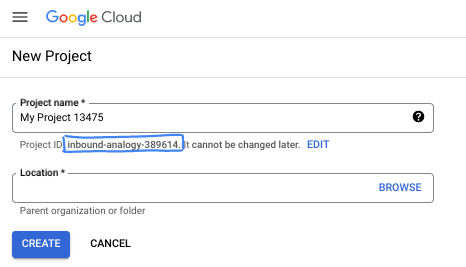
- 项目名称是此项目参与者的显示名称。Google API 不会使用项目名称,并且您可以随时更改项目名称。
- 项目 ID 在所有 Google Cloud 项目中是唯一的,并且是不可变的(一经设置便无法更改)。Google Cloud 控制台会自动生成一个唯一 ID,但您可以自定义该 ID。如果您不喜欢生成的 ID,可以生成另一个随机 ID,也可以提供自己的 ID 来检查其可用性。在大多数 Codelab 中,您都需要引用项目 ID,该 ID 通常用占位符 PROJECT_ID 标识。
- 此外,还有第三个值,即部分 API 使用的项目编号,供您参考。如需详细了解所有这三个值,请参阅文档。
启用结算功能
您可以通过以下两种方式启用结算功能。您可以使用个人结算账号,也可以按照以下步骤兑换积分。
兑换 5 美元的 Google Cloud 赠金(可选)
如需参加此研讨会,您需要拥有一个有一定信用额度的结算账号。如果您打算使用自己的结算方式,则可以跳过此步骤。
- 点击此链接,然后使用个人 Google 账号登录。
- 您会看到类似如下的内容:
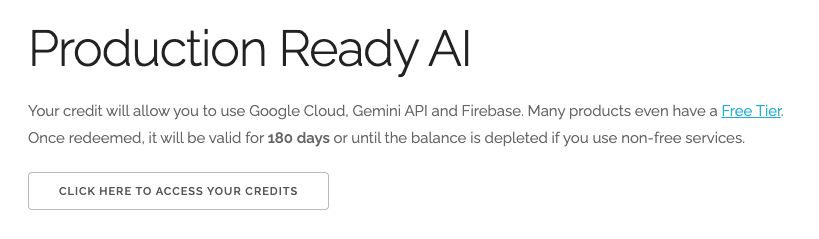
- 点击点击此处访问您的积分按钮。然后,您会进入一个页面,可以在其中设置结算资料。如果您看到免费试用订阅界面,请点击“取消”,然后继续关联结算信息。

- 点击“确认”,系统会显示“您现已关联到 Google Cloud Platform 试用结算账号”。

设置个人结算账号
如果您使用 Google Cloud 抵用金设置了结算,则可以跳过此步骤。
如需设置个人结算账号,请点击此处在 Cloud 控制台中启用结算功能。
注意事项:
- 完成本实验的 Cloud 资源费用应低于 3 美元。
- 您可以按照本实验结束时的步骤删除资源,以避免产生更多费用。
- 新用户符合参与 $300 USD 免费试用计划的条件。
启动 Cloud Shell
虽然可以通过笔记本电脑对 Google Cloud 进行远程操作,但在此 Codelab 中,您将使用 Google Cloud Shell,这是一个在云端运行的命令行环境。
在 Google Cloud 控制台 中,点击右上角工具栏中的 Cloud Shell 图标:

或者,您也可以先按 G,再按 S。如果您位于 Google Cloud 控制台中,或者使用此链接,此序列将激活 Cloud Shell。
预配和连接到环境应该只需要片刻时间。完成后,您应该会看到如下内容:

这个虚拟机已加载了您需要的所有开发工具。它提供了一个持久的 5 GB 主目录,并且在 Google Cloud 中运行,大大增强了网络性能和身份验证功能。您在此 Codelab 中的所有工作都可以在浏览器中完成。您无需安装任何程序。
3. 准备工作
启用 API
输出:
如需使用 Cloud SQL、Compute Engine、网络服务和 Vertex AI,您需要在 Google Cloud 项目中启用它们各自的 API。
在 Cloud Shell 终端中,确保项目 ID 已设置:
gcloud config set project [YOUR-PROJECT-ID]
设置环境变量 PROJECT_ID:
PROJECT_ID=$(gcloud config get-value project)
启用所有必要的服务:
gcloud services enable sqladmin.googleapis.com \
                       compute.googleapis.com \
                       cloudresourcemanager.googleapis.com \
                       servicenetworking.googleapis.com \
                       aiplatform.googleapis.com
预期输出
student@cloudshell:~ (test-project-001-402417)$ gcloud config set project test-project-001-402417
Updated property [core/project].
student@cloudshell:~ (test-project-001-402417)$ PROJECT_ID=$(gcloud config get-value project)
Your active configuration is: [cloudshell-14650]
student@cloudshell:~ (test-project-001-402417)$
student@cloudshell:~ (test-project-001-402417)$ gcloud services enable sqladmin.googleapis.com \
                       compute.googleapis.com \
                       cloudresourcemanager.googleapis.com \
                       servicenetworking.googleapis.com \
                       aiplatform.googleapis.com
Operation "operations/acat.p2-4470404856-1f44ebd8-894e-4356-bea7-b84165a57442" finished successfully.
API 简介
- Cloud SQL Admin API (
sqladmin.googleapis.com) 可让您以编程方式创建、配置和管理 Cloud SQL 实例。它为 Google 的全托管式关系型数据库服务(支持 MySQL、PostgreSQL 和 SQL Server)提供控制平面,负责处理预配、备份、高可用性和扩缩等任务。 - 借助 Compute Engine API (
compute.googleapis.com),您可以创建和管理虚拟机 (VM)、永久性磁盘和网络设置。它提供运行工作负载所需的核心基础设施即服务 (IaaS) 基础,并为许多托管服务托管底层基础架构。 - 借助 Cloud Resource Manager API (
cloudresourcemanager.googleapis.com),您可以以编程方式管理 Google Cloud 项目的元数据和配置。借助它,您可以整理资源、处理 Identity and Access Management (IAM) 政策,以及验证项目层次结构中的权限。 - 借助 Service Networking API (
servicenetworking.googleapis.com),您可以自动设置虚拟私有云 (VPC) 网络与 Google 的受管服务之间的专用连接。具体而言,需要为 AlloyDB 等服务建立专用 IP 访问通道,以便它们能够与其他资源安全地通信。 - Vertex AI API (
aiplatform.googleapis.com) 可让您的应用构建、部署和扩缩机器学习模型。它为所有 Google Cloud AI 服务提供统一的界面,包括访问生成式 AI 模型(例如 Gemini)和自定义模型训练。
4. 创建 Cloud SQL 实例
创建 Cloud SQL 实例,并启用数据库与 Vertex AI 的集成。
创建数据库密码
为默认数据库用户定义密码。您可以自行定义密码,也可以使用随机函数生成密码:
export CLOUDSQL_PASSWORD=`openssl rand -hex 12`
请注意生成的密码值:
echo $CLOUDSQL_PASSWORD
创建 Cloud SQL for PostgreSQL 实例
您可以通过多种方式创建 Cloud SQL 实例,例如使用 Google Cloud 控制台、Terraform 等自动化工具或 Google Cloud SDK。在本实验中,我们将主要使用 Google Cloud SDK gcloud 工具。您可以参阅文档,了解如何使用其他工具创建实例。
在 Cloud Shell 会话中,执行以下命令:
gcloud sql instances create my-cloudsql-instance \
--database-version=POSTGRES_17 \
--tier=db-custom-1-3840 \
--region=us-central1 \
--edition=ENTERPRISE \
--enable-google-ml-integration \
--database-flags cloudsql.enable_google_ml_integration=on
创建实例后,我们需要为实例中的默认用户设置密码,并验证是否可以使用该密码进行连接。
gcloud sql users set-password postgres \
    --instance=my-cloudsql-instance \
    --password=$CLOUDSQL_PASSWORD
按框中所示运行“gcloud sql connect”命令,并在系统提示连接时输入密码。
gcloud sql connect my-cloudsql-instance --user=postgres
使用键盘快捷键 ctrl+d 或执行 exit 命令暂时退出 psql 会话
exit
启用“Vertex AI 集成”
向内部 Cloud SQL 服务账号授予必要的权限,以便能够使用 Vertex AI 集成。
查找 Cloud SQL 内部服务账号电子邮件地址,并将其导出为变量。
SERVICE_ACCOUNT_EMAIL=$(gcloud sql instances describe my-cloudsql-instance --format="value(serviceAccountEmailAddress)")
echo $SERVICE_ACCOUNT_EMAIL
向 Cloud SQL 服务账号授予对 Vertex AI 的访问权限:
PROJECT_ID=$(gcloud config get-value project)
gcloud projects add-iam-policy-binding $PROJECT_ID \
  --member="serviceAccount:$SERVICE_ACCOUNT_EMAIL" \
  --role="roles/aiplatform.user"
如需详细了解实例创建和配置,请点击此处参阅 Cloud SQL 文档。
5. 准备数据库
现在,我们需要创建一个数据库并启用向量支持。
创建数据库
创建一个名为 quickstart_db 的数据库。为此,我们可以使用不同的选项,例如 PostgreSQL 的 psql 等命令行数据库客户端、SDK 或 Cloud SQL Studio。我们将使用 SDK (gcloud) 创建数据库并连接到实例。
在 Cloud Shell 中执行命令以创建数据库
gcloud sql databases create quickstart_db --instance=my-cloudsql-instance
启用扩展程序
为了能够使用 Vertex AI 和向量,我们需要在创建的数据库中启用两个扩展程序。
在 Cloud Shell 中执行命令以连接到已创建的数据库(您需要提供密码)
gcloud sql connect my-cloudsql-instance --database quickstart_db --user=postgres
然后,成功连接后,在 SQL 会话中运行两个命令:
CREATE EXTENSION IF NOT EXISTS google_ml_integration CASCADE;
CREATE EXTENSION IF NOT EXISTS vector CASCADE;
退出 SQL 会话:
exit;
6. 加载数据
现在,我们需要在数据库中创建对象并加载数据。我们将使用虚构的 Cymbal 商店数据。数据以 CSV 格式存储在公共 Google Storage 存储分区中。
首先,我们需要在数据库中创建所有必需的对象。为此,我们将使用您已经熟悉的 gcloud sql connect 和 gcloud storage 命令来下载架构对象并将其导入到我们的数据库中。
在 Cloud Shell 中执行以下命令,并提供我们在创建实例时记下的密码:
gcloud storage cat gs://cloud-training/gcc/gcc-tech-004/cymbal_demo_schema.sql |gcloud sql connect my-cloudsql-instance --database quickstart_db --user=postgres
我们在上一个命令中具体做了什么?我们连接到数据库并执行了下载的 SQL 代码,该代码创建了表、索引和序列。
下一步是加载数据,为此我们需要从 Google Cloud Storage 下载 CSV 文件。
gcloud storage cp gs://cloud-training/gcc/gcc-tech-004/cymbal_products.csv .
gcloud storage cp gs://cloud-training/gcc/gcc-tech-004/cymbal_inventory.csv .
gcloud storage cp gs://cloud-training/gcc/gcc-tech-004/cymbal_stores.csv .
然后,我们需要连接到数据库。
gcloud sql connect my-cloudsql-instance --database quickstart_db --user=postgres
并从 CSV 文件导入数据。
\copy cymbal_products from 'cymbal_products.csv' csv header
\copy cymbal_inventory from 'cymbal_inventory.csv' csv header
\copy cymbal_stores from 'cymbal_stores.csv' csv header
如果您有自己的数据,并且您的 CSV 文件与 Cloud 控制台中提供的 Cloud SQL 导入工具兼容,则可以使用该工具,而不是命令行方法。
7. 创建嵌入
下一步是使用 Google Vertex AI 中的 textembedding-004 模型为产品说明构建嵌入,并将它们存储为向量数据。
连接到数据库(如果您已退出或之前的会话已断开连接):
gcloud sql connect my-cloudsql-instance --database quickstart_db --user=postgres
然后,使用嵌入函数在 cymbal_products 表中创建一个虚拟列 embedding。该命令会创建一个虚拟列“embedding”,用于存储根据“product_description”列生成的嵌入向量。此外,它还会为表中的所有现有行创建嵌入。模型定义为嵌入函数的第一个参数,源数据定义为第二个参数。
ALTER TABLE cymbal_products ADD COLUMN embedding vector(768) GENERATED ALWAYS AS (embedding('text-embedding-005',product_description)) STORED;
这可能需要一些时间,但对于 900-1000 行数据,不应超过 5 分钟,通常会快得多。
当我们向表中插入新行或更新任何现有行的 product_description 时,系统会根据 product_description 再次重新生成“embedding”列的虚拟列数据。
8. 运行相似度搜索
现在,我们可以使用相似度搜索功能来运行搜索,该功能基于为说明计算的向量值以及我们为请求获取的向量值。
您可以使用 gcloud sql connect 从同一命令行界面执行 SQL 查询,也可以从 Cloud SQL Studio 执行。任何多行复杂查询最好在 Cloud SQL Studio 中进行管理。
启动 Cloud SQL Studio
在控制台中,点击我们之前创建的 Cloud SQL 实例。
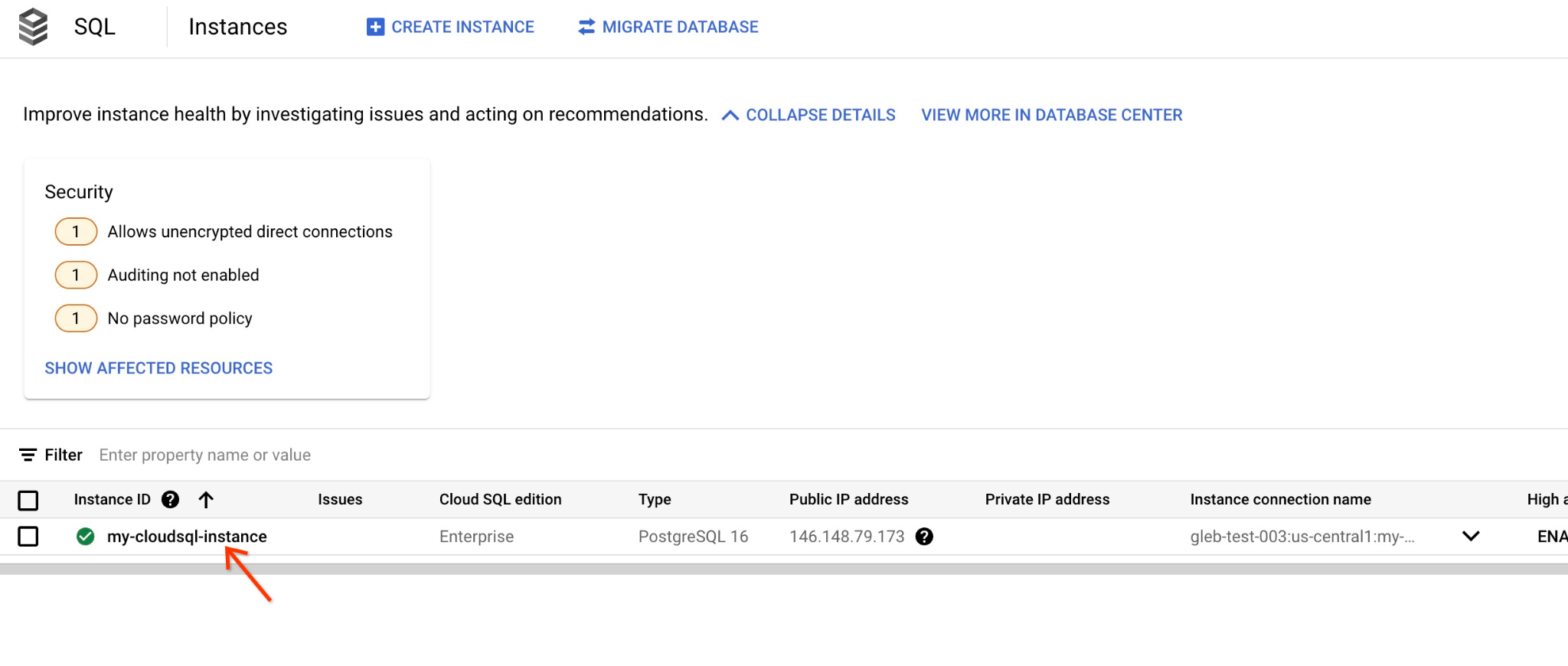
当右侧面板打开时,我们可以看到 Cloud SQL Studio。点击此标签页。

系统会打开一个对话框,供您提供数据库名称和凭据:
- 数据库:quickstart_db
- 用户:postgres
- 密码:您记下的主数据库用户的密码
然后点击“AUTHENTICATE”按钮。
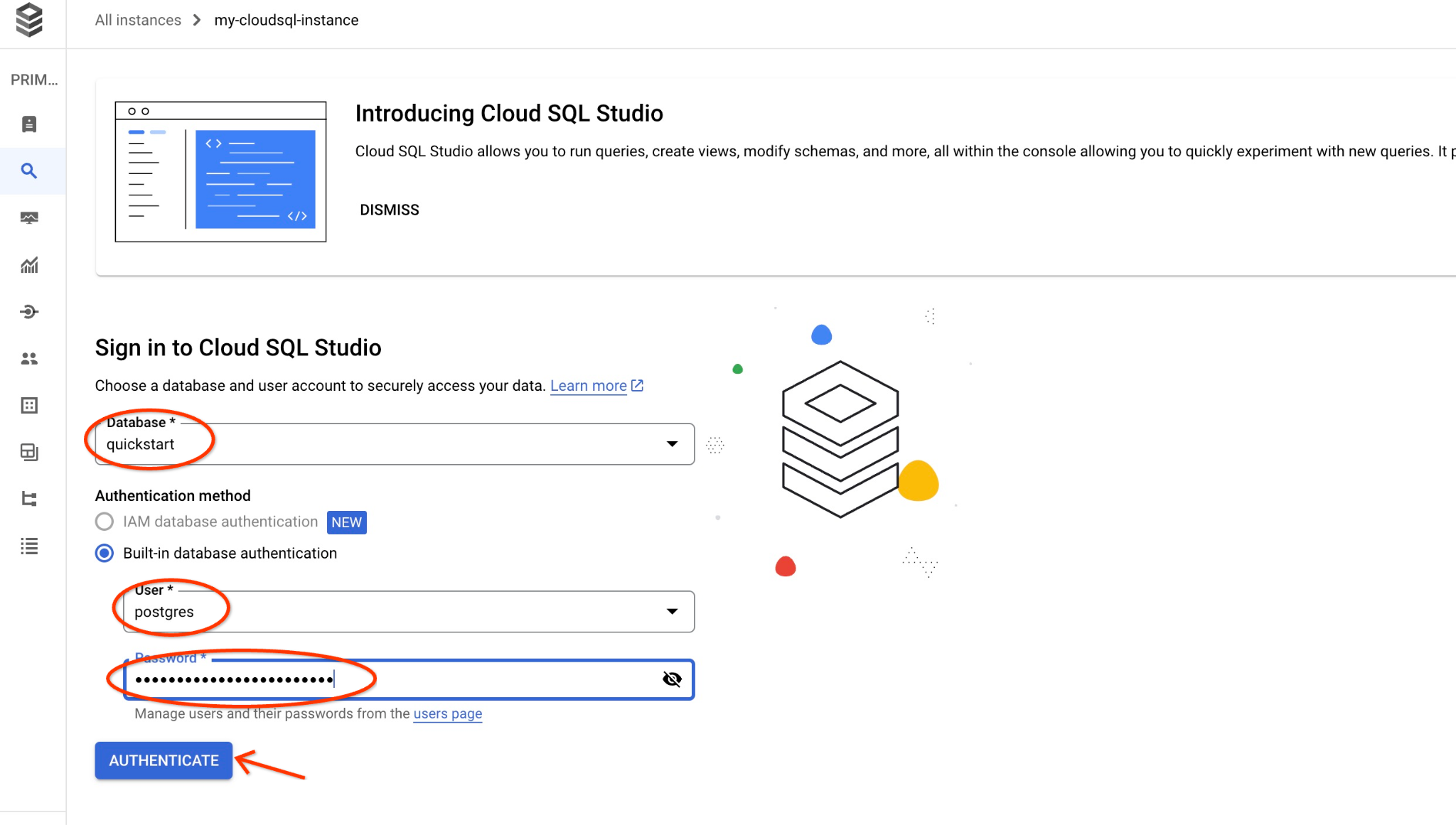
系统随即会打开下一个窗口,您可以在其中点击右侧的“编辑器”标签页以打开 SQL 编辑器。
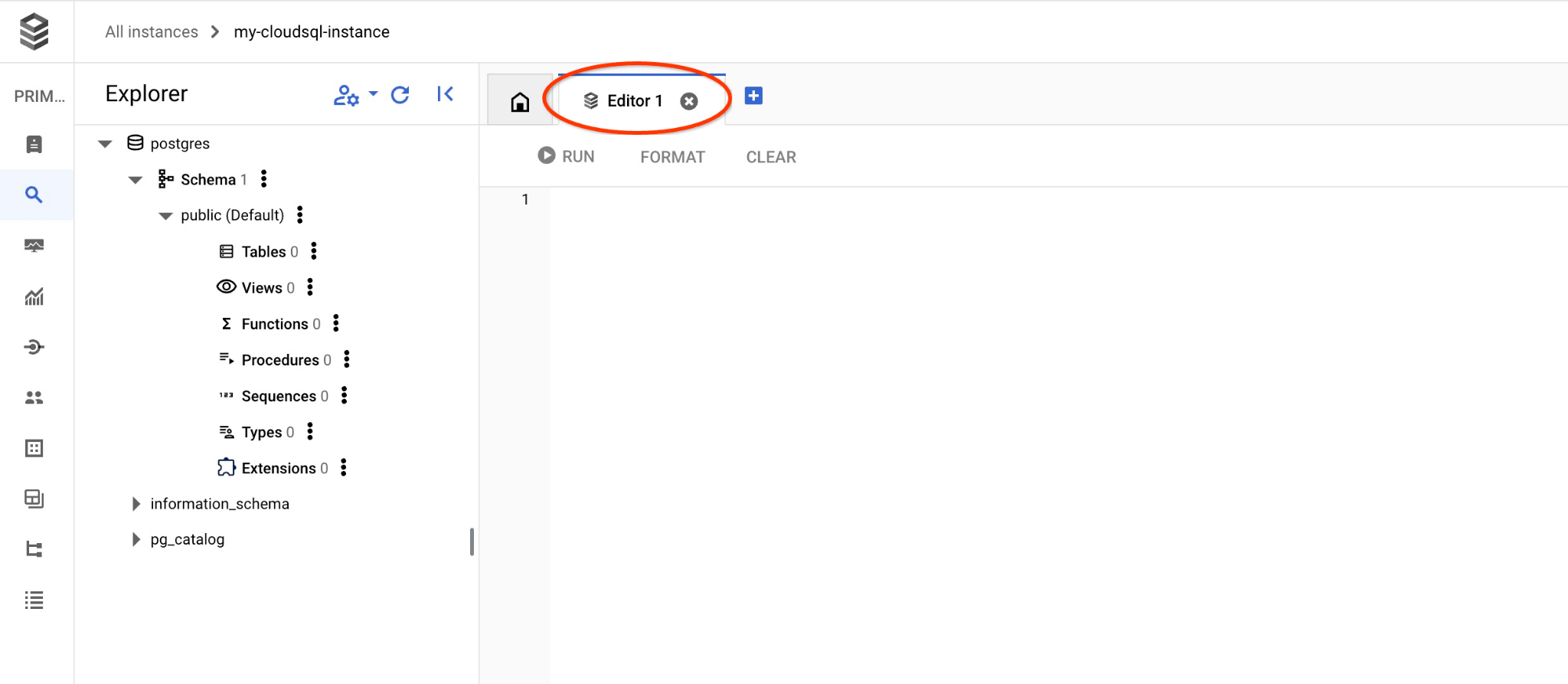
现在,我们已准备好运行查询。
运行查询
运行查询,获取与客户请求最相关的可用产品列表。我们将传递给 Vertex AI 以获取向量值的请求听起来像“这里适合种植哪种果树?”
您可以运行以下查询,选择最适合我们要求的前 10 个商品:
SELECT
        cp.product_name,
        left(cp.product_description,80) as description,
        cp.sale_price,
        cs.zip_code,
        (cp.embedding <=> embedding('text-embedding-005','What kind of fruit trees grow well here?')::vector) as distance
FROM
        cymbal_products cp
JOIN cymbal_inventory ci on
        ci.uniq_id=cp.uniq_id
JOIN cymbal_stores cs on
        cs.store_id=ci.store_id
        AND ci.inventory>0
        AND cs.store_id = 1583
ORDER BY
        distance ASC
LIMIT 10;
将查询复制并粘贴到 Cloud SQL Studio 编辑器中,然后按“运行”按钮,或者将其粘贴到连接到 quickstart_db 数据库的命令行会话中。
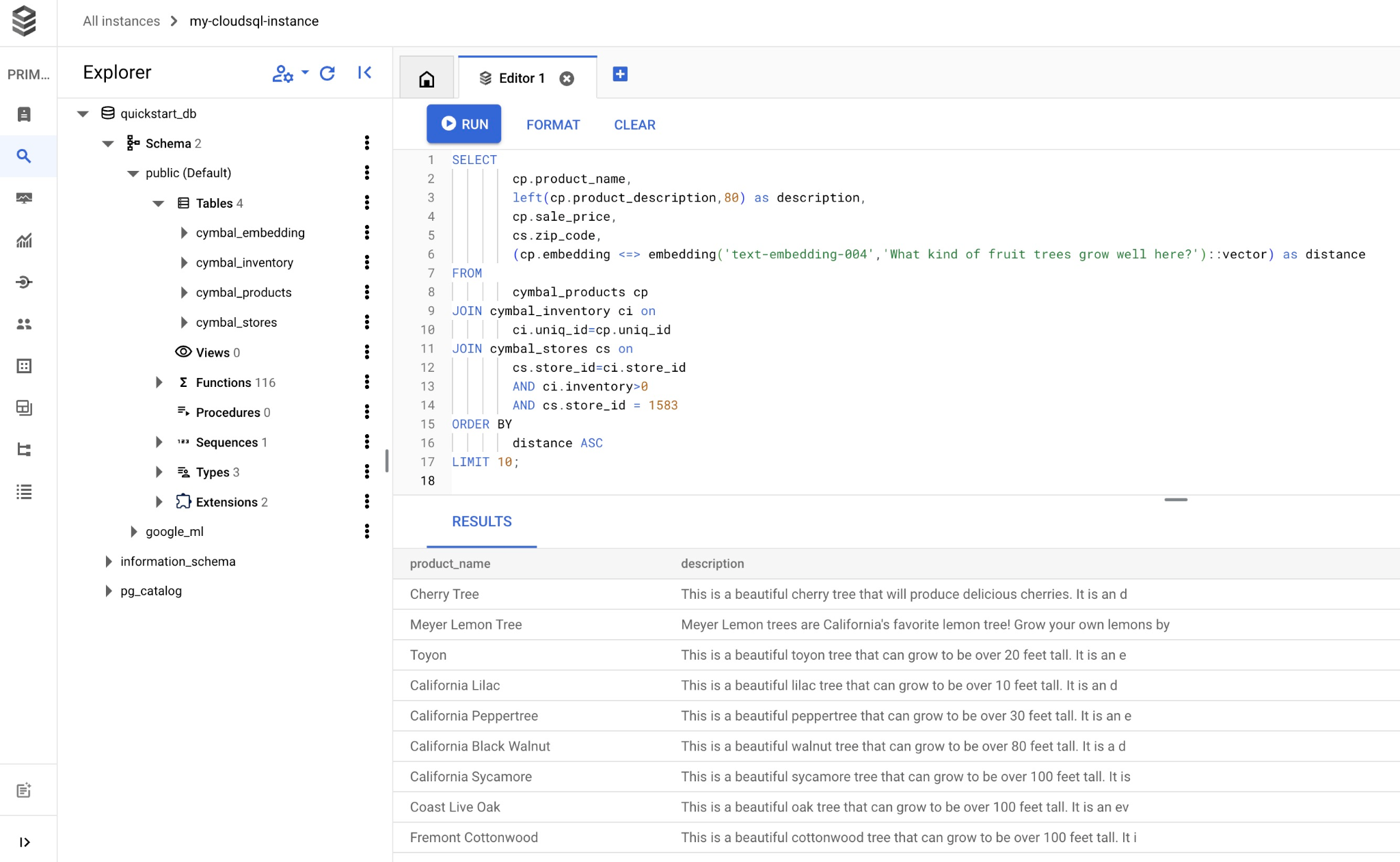
以下是根据查询选择的商品列表。
product_name       |                                   description                                    | sale_price | zip_code |      distance
-------------------------+----------------------------------------------------------------------------------+------------+----------+---------------------
 Cherry Tree             | This is a beautiful cherry tree that will produce delicious cherries. It is an d |      75.00 |    93230 | 0.43922018972266397
 Meyer Lemon Tree        | Meyer Lemon trees are California's favorite lemon tree! Grow your own lemons by  |         34 |    93230 |  0.4685112926118228
 Toyon                   | This is a beautiful toyon tree that can grow to be over 20 feet tall. It is an e |      10.00 |    93230 |  0.4835677149651668
 California Lilac        | This is a beautiful lilac tree that can grow to be over 10 feet tall. It is an d |       5.00 |    93230 |  0.4947204525907498
 California Peppertree   | This is a beautiful peppertree that can grow to be over 30 feet tall. It is an e |      25.00 |    93230 |  0.5054166905547247
 California Black Walnut | This is a beautiful walnut tree that can grow to be over 80 feet tall. It is a d |     100.00 |    93230 |  0.5084219510932597
 California Sycamore     | This is a beautiful sycamore tree that can grow to be over 100 feet tall. It is  |     300.00 |    93230 |  0.5140519790508755
 Coast Live Oak          | This is a beautiful oak tree that can grow to be over 100 feet tall. It is an ev |     500.00 |    93230 |  0.5143126438081371
 Fremont Cottonwood      | This is a beautiful cottonwood tree that can grow to be over 100 feet tall. It i |     200.00 |    93230 |  0.5174774727252058
 Madrone                 | This is a beautiful madrona tree that can grow to be over 80 feet tall. It is an |      50.00 |    93230 |  0.5227400803389093
(10 rows)
9. 使用检索到的数据改进 LLM 回答
我们可以使用已执行查询的结果来改进生成式 AI LLM 对客户端应用的回答,并使用提供的查询结果作为提示的一部分,为 Vertex AI 生成式基础语言模型准备有意义的输出。
为此,我们需要生成一个包含向量搜索结果的 JSON,然后将生成的 JSON 添加到 Vertex AI 中 LLM 模型的提示中,以创建有意义的输出。在第一步中,我们生成 JSON,然后在 Vertex AI Studio 中对其进行测试,最后一步是将 JSON 合并到可在应用中使用的 SQL 语句中。
以 JSON 格式生成输出
修改查询以生成 JSON 格式的输出,并仅返回一行以传递给 Vertex AI
Cloud SQL for PostgreSQL
以下是查询示例:
WITH trees as (
SELECT
        cp.product_name,
        left(cp.product_description,80) as description,
        cp.sale_price,
        cs.zip_code,
        cp.uniq_id as product_id
FROM
        cymbal_products cp
JOIN cymbal_inventory ci on
        ci.uniq_id=cp.uniq_id
JOIN cymbal_stores cs on
        cs.store_id=ci.store_id
        AND ci.inventory>0
        AND cs.store_id = 1583
ORDER BY
        (cp.embedding <=> embedding('text-embedding-005','What kind of fruit trees grow well here?')::vector) ASC
LIMIT 1)
SELECT json_agg(trees) FROM trees;
以下是输出中预期的 JSON:
[{"product_name":"Cherry Tree","description":"This is a beautiful cherry tree that will produce delicious cherries. It is an d","sale_price":75.00,"zip_code":93230,"product_id":"d536e9e823296a2eba198e52dd23e712"}]
在 Vertex AI Studio 中运行提示
我们可以使用生成的 JSON,将其作为提示的一部分提供给 Vertex AI Studio 中的生成式 AI 文本模型
在云控制台中打开 Vertex AI Studio。
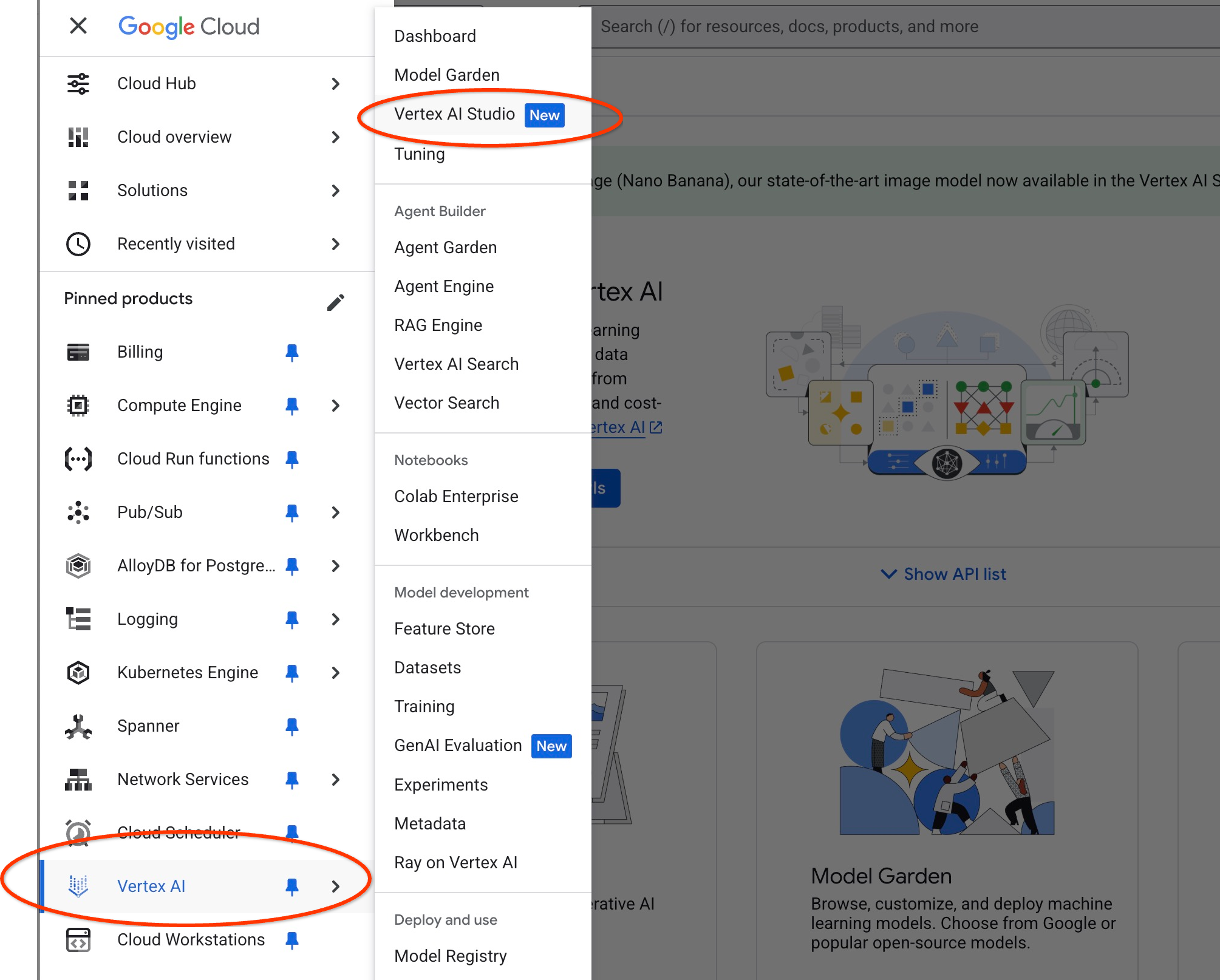
它可能会要求您启用其他 API,但您可以忽略该请求。我们不需要任何额外的 API 即可完成实验。
在 Studio 中输入提示。
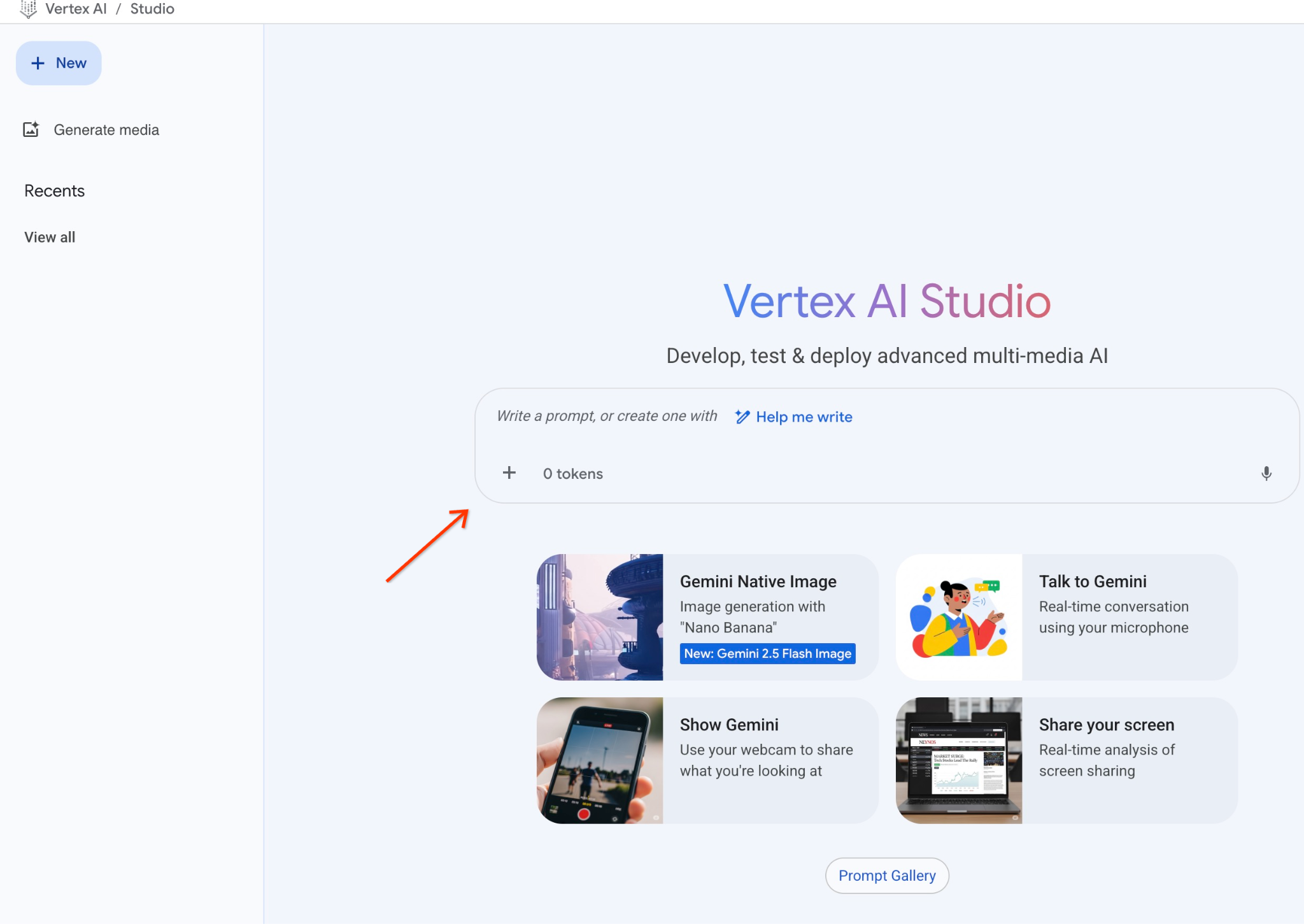
我们将使用以下提示:
You are a friendly advisor helping to find a product based on the customer's needs.
Based on the client request we have loaded a list of products closely related to search.
The list in JSON format with list of values like {"product_name":"name","description":"some description","sale_price":10,"zip_code": 10234, "produt_id": "02056727942aeb714dc9a2313654e1b0"}
Here is the list of products:
[place your JSON here]
The customer asked "What tree is growing the best here?"
You should give information about the product, price and some supplemental information.
Do not ask any additional questions and assume location based on the zip code provided in the list of products.
以下是我们将 JSON 占位符替换为查询响应后的样子:
You are a friendly advisor helping to find a product based on the customer's needs.
Based on the client request we have loaded a list of products closely related to search.
The list in JSON format with list of values like {"product_name":"name","description":"some description","sale_price":10,"zip_code": 10234, "produt_id": "02056727942aeb714dc9a2313654e1b0"}
Here is the list of products:
[{"product_name":"Cherry Tree","description":"This is a beautiful cherry tree that will produce delicious cherries. It is an d","sale_price":75.00,"zip_code":93230,"product_id":"d536e9e823296a2eba198e52dd23e712"}]
The customer asked "What tree is growing the best here?"
You should give information about the product, price and some supplemental information.
Do not ask any additional questions and assume location based on the zip code provided in the list of products.
以下是我们使用 JSON 值运行提示后的结果:
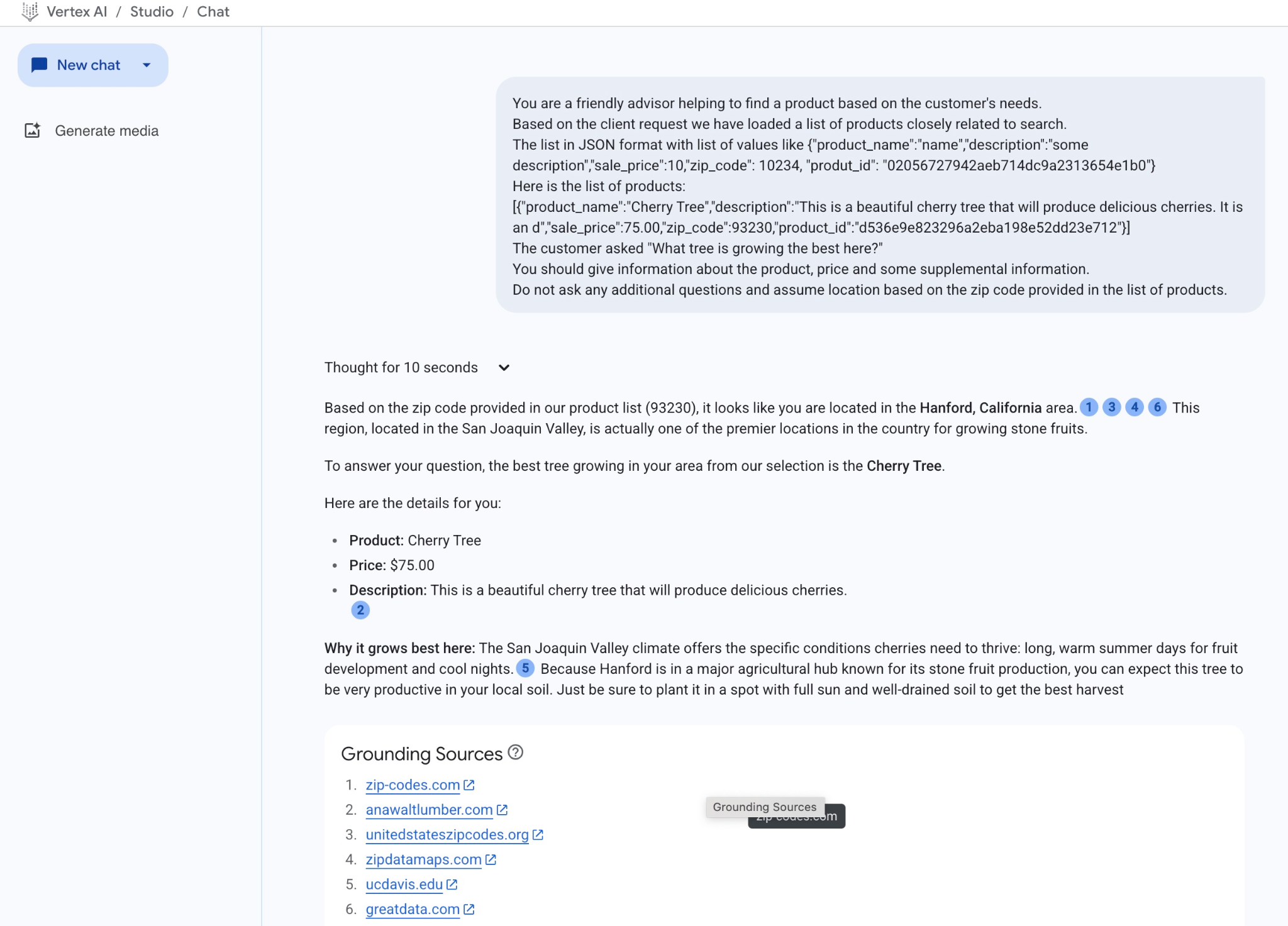
在此示例中,我们从模型获得的回答如下。请注意,由于模型和参数会随时间推移而发生变化,因此您的回答可能有所不同:
“根据我们的商品目录中提供的邮政编码 (93230),您似乎位于加利福尼亚州汉福德地区。1346 这个地区位于圣华金谷,实际上是美国种植核果的首要地区之一。
根据您的提问,我们选择的树种中,最适合您所在地区种植的是樱桃树。
以下是详细信息:
产品:Cherry Tree
价格:75.00 美元
说明:这是一棵美丽的樱桃树,会结出美味的樱桃。2
为何在此处生长得最好:圣华金谷的气候为樱桃的生长提供了所需的特定条件:漫长而温暖的夏季有利于果实发育,凉爽的夜晚则有利于果实成熟。5 Hanford 位于以核果生产而闻名的主要农业中心,因此您可以期待这种树在当地土壤中结出丰硕的果实。只需确保将其种植在阳光充足且排水良好的土壤中,即可获得丰收。”
在 PSQL 中运行提示
我们还可以将 Cloud SQL AI 集成与 Vertex AI 搭配使用,直接在数据库中使用 SQL 从生成式模型获取类似回答。不过,如需使用 gemini-2.0-flash-exp 模型,我们需要先注册该模型。
在 Cloud SQL for PostgreSQL 中运行
将扩展程序升级到 1.4.2 版或更高版本(如果当前版本较低)。使用 gcloud sql connect 连接到 quickstart_db 数据库(如前所示),或使用 Cloud SQL Studio 连接到该数据库,然后执行以下命令:
SELECT extversion from pg_extension where extname='google_ml_integration';
如果返回的值小于 1.4.3,则执行:
ALTER EXTENSION google_ml_integration UPDATE TO '1.4.3';
然后,我们需要将 google_ml_integration.enable_model_support 数据库标志设置为“on”。如需验证当前设置,请执行以下操作。
show google_ml_integration.enable_model_support;
psql 会话的预期输出为“on”:
quickstart_db => show google_ml_integration.enable_model_support;
 google_ml_integration.enable_model_support
--------------------------------------------
 on
(1 row)
如果显示“关闭”,则需要更新数据库标志。为此,您可以使用 Web 控制台界面,也可以运行以下 gcloud 命令。
gcloud sql instances patch my-cloudsql-instance \
--database-flags google_ml_integration.enable_model_support=on,cloudsql.enable_google_ml_integration=on
该命令大约需要 1-3 分钟才能在后台执行完毕。然后,您可以在 psql 会话中或使用 Cloud SQL Studio 连接到 quickstart_db 数据库来验证新标志。
show google_ml_integration.enable_model_support;
psql 会话的预期输出为“on”:
quickstart_db => show google_ml_integration.enable_model_support;
 google_ml_integration.enable_model_support
--------------------------------------------
 on
(1 row)
然后,我们需要注册两个模型。第一个是已使用的 text-embedding-005 模型。由于我们已启用模型注册功能,因此需要注册该模型。
如需在 psql 或 Cloud SQL Studio 中注册模型运行,请使用以下代码:
CALL
  google_ml.create_model(
    model_id => 'text-embedding-005',
    model_provider => 'google',
    model_qualified_name => 'text-embedding-005',
    model_type => 'text_embedding',
    model_auth_type => 'cloudsql_service_agent_iam',
    model_in_transform_fn => 'google_ml.vertexai_text_embedding_input_transform',
    model_out_transform_fn => 'google_ml.vertexai_text_embedding_output_transform');
我们需要注册的下一个模型是 gemini-2.0-flash-001,它将用于生成用户友好的输出。
CALL
  google_ml.create_model(
    model_id => 'gemini-2.5-flash',
    model_request_url => 'https://us-central1-aiplatform.googleapis.com/v1/projects/$PROJECT_ID/locations/us-central1/publishers/google/models/gemini-2.5-flash:streamGenerateContent',
    model_provider => 'google',
    model_auth_type => 'cloudsql_service_agent_iam');
您始终可以通过从 google_ml.model_info_view 中选择信息来验证已注册的模型列表。
select model_id,model_type from google_ml.model_info_view;
以下是输出示例
quickstart_db=> select model_id,model_type from google_ml.model_info_view;
               model_id               |   model_type
--------------------------------------+----------------
 textembedding-gecko                  | text_embedding
 textembedding-gecko@001              | text_embedding
 gemini-1.5-pro:streamGenerateContent | generic
 gemini-1.5-pro:generateContent       | generic
 gemini-1.0-pro:generateContent       | generic
 text-embedding-005                   | text_embedding
 gemini-2.5-flash                     | generic
现在,我们可以使用子查询 JSON 中生成的代码,通过 SQL 将其作为提示的一部分提供给生成式 AI 文本模型。
在 psql 或 Cloud SQL Studio 会话中,针对数据库运行查询
WITH trees AS (
SELECT
        cp.product_name,
        cp.product_description AS description,
        cp.sale_price,
        cs.zip_code,
        cp.uniq_id AS product_id
FROM
        cymbal_products cp
JOIN cymbal_inventory ci ON
        ci.uniq_id = cp.uniq_id
JOIN cymbal_stores cs ON
        cs.store_id = ci.store_id
        AND ci.inventory>0
        AND cs.store_id = 1583
ORDER BY
        (cp.embedding <=> google_ml.embedding('text-embedding-005',
        'What kind of fruit trees grow well here?')::vector) ASC
LIMIT 1),
prompt AS (
SELECT
        'You are a friendly advisor helping to find a product based on the customer''s needs.
Based on the client request we have loaded a list of products closely related to search.
The list in JSON format with list of values like {"product_name":"name","product_description":"some description","sale_price":10}
Here is the list of products:' || json_agg(trees) || 'The customer asked "What kind of fruit trees grow well here?"
You should give information about the product, price and some supplemental information' AS prompt_text
FROM
        trees),
response AS (
SELECT
        json_array_elements(google_ml.predict_row( model_id =>'gemini-2.5-flash',
        request_body => json_build_object('contents',
        json_build_object('role',
        'user',
        'parts',
        json_build_object('text',
        prompt_text)))))->'candidates'->0->'content'->'parts'->0->'text' AS resp
FROM
        prompt)
SELECT
        string_agg(resp::text,
        ' ')
FROM
        response;
以下是预期输出。您的输出结果可能会因模型版本和参数而异:
"That's a great question! It sounds like you're looking to add some delicious fruit to your garden.\n\nBased on the products we have that are closely related to your search, I can tell you about a fantastic option:\n\n**Cherry Tree**" "\n* **Description:** This beautiful deciduous tree will produce delicious cherries. It grows to be about 15 feet tall, with dark green leaves in summer that turn a beautiful red in the fall. Cherry trees are known for their beauty, shade, and privacy. They prefer a cool, moist climate and sandy soil." "\n* **Price:** $75.00\n* **Grows well in:** USDA Zones 4-9.\n\nTo confirm if this Cherry Tree will thrive in your specific location, you might want to check which USDA Hardiness Zone your area falls into. If you're in zones 4-9, this" " could be a wonderful addition to your yard!"
10. 创建最近邻索引
我们的数据集非常小,响应时间主要取决于与 AI 模型的互动。但如果您有数百万个向量,向量搜索可能会占用我们响应时间的一大部分,并给系统带来高负载。为了改进这一点,我们可以基于向量构建索引。
创建 HNSW 索引
我们将尝试使用 HNSW 索引类型进行测试。HNSW 是 Hierarchical Navigable Small World 的缩写,表示多层图索引。
为了为嵌入列构建索引,我们需要定义嵌入列、距离函数以及可选参数(例如 m 或 ef_constructions)。您可以在该文档中详细了解这些参数。
CREATE INDEX cymbal_products_embeddings_hnsw ON cymbal_products
  USING hnsw (embedding vector_cosine_ops)
  WITH (m = 16, ef_construction = 64);
预期输出:
quickstart_db=> CREATE INDEX cymbal_products_embeddings_hnsw ON cymbal_products
  USING hnsw (embedding vector_cosine_ops)
  WITH (m = 16, ef_construction = 64);
CREATE INDEX
quickstart_db=>
比较回答
现在,我们可以在 EXPLAIN 模式下运行向量搜索查询,并验证是否使用了索引。
EXPLAIN (analyze)
WITH trees as (
SELECT
        cp.product_name,
        left(cp.product_description,80) as description,
        cp.sale_price,
        cs.zip_code,
        cp.uniq_id as product_id
FROM
        cymbal_products cp
JOIN cymbal_inventory ci on
        ci.uniq_id=cp.uniq_id
JOIN cymbal_stores cs on
        cs.store_id=ci.store_id
        AND ci.inventory>0
        AND cs.store_id = 1583
ORDER BY
        (cp.embedding <=> embedding('text-embedding-005','What kind of fruit trees grow well here?')::vector) ASC
LIMIT 1)
SELECT json_agg(trees) FROM trees;
预期输出:
 Aggregate  (cost=779.12..779.13 rows=1 width=32) (actual time=1.066..1.069 rows=1 loops=1)
   ->  Subquery Scan on trees  (cost=769.05..779.12 rows=1 width=142) (actual time=1.038..1.041 rows=1 loops=1)
         ->  Limit  (cost=769.05..779.11 rows=1 width=158) (actual time=1.022..1.024 rows=1 loops=1)
               ->  Nested Loop  (cost=769.05..9339.69 rows=852 width=158) (actual time=1.020..1.021 rows=1 loops=1)
                     ->  Nested Loop  (cost=768.77..9316.48 rows=852 width=945) (actual time=0.858..0.859 rows=1 loops=1)
                           ->  Index Scan using cymbal_products_embeddings_hnsw on cymbal_products cp  (cost=768.34..2572.47 rows=941 width=941) (actual time=0.532..0.539 rows=3 loops=1)
                                 Order By: (embedding <=> '[0.008864171,0.03693164,-0.024245683,...
<redacted>
...,0.017593635,-0.040275685,-0.03914233,-0.018452475,0.00826032,-0.07372604
]'::vector)
                           ->  Index Scan using product_inventory_pkey on cymbal_inventory ci  (cost=0.42..7.17 rows=1 width=37) (actual time=0.104..0.104 rows=0 loops=3)
                                 Index Cond: ((store_id = 1583) AND (uniq_id = (cp.uniq_id)::text))
                                 Filter: (inventory > 0)
                                 Rows Removed by Filter: 1
                     ->  Materialize  (cost=0.28..8.31 rows=1 width=8) (actual time=0.133..0.134 rows=1 loops=1)
                           ->  Index Scan using product_stores_pkey on cymbal_stores cs  (cost=0.28..8.30 rows=1 width=8) (actual time=0.129..0.129 rows=1 loops=1)
                                 Index Cond: (store_id = 1583)
 Planning Time: 112.398 ms
 Execution Time: 1.221 ms
从输出中,我们可以清楚地看到查询使用的是“Index Scan using cymbal_products_embeddings_hnsw”。
如果我们运行不带 explain 的查询:
WITH trees as (
SELECT
        cp.product_name,
        left(cp.product_description,80) as description,
        cp.sale_price,
        cs.zip_code,
        cp.uniq_id as product_id
FROM
        cymbal_products cp
JOIN cymbal_inventory ci on
        ci.uniq_id=cp.uniq_id
JOIN cymbal_stores cs on
        cs.store_id=ci.store_id
        AND ci.inventory>0
        AND cs.store_id = 1583
ORDER BY
        (cp.embedding <=> embedding('text-embedding-005','What kind of fruit trees grow well here?')::vector) ASC
LIMIT 1)
SELECT json_agg(trees) FROM trees;
预期输出(输出可能会因模型和索引而异):
[{"product_name":"Cherry Tree","description":"This is a beautiful cherry tree that will produce delicious cherries. It is an d","sale_price":75.00,"zip_code":93230,"product_id":"d536e9e823296a2eba198e52dd23e712"}]
我们可以看到,结果相同,并且返回了与未编制索引的搜索结果中排名第一的樱桃树相同的樱桃树。根据参数和索引类型,结果可能会略有不同,并返回不同的树顶部记录。在测试期间,编入索引的查询返回结果的时间为 131.301 毫秒,而未编入索引的查询返回结果的时间为 167.631 毫秒,但我们处理的是非常小的数据集,如果数据集更大,差异会更明显。
您可以在文档中尝试适用于向量的不同索引,以及更多与 Langchain 集成的实验和示例。
11. 清理环境
删除 Cloud SQL 实例
完成实验后销毁 Cloud SQL 实例
如果您已断开连接且之前的所有设置都已丢失,请在 Cloud Shell 中定义项目和环境变量:
export INSTANCE_NAME=my-cloudsql-instance
export PROJECT_ID=$(gcloud config get-value project)
删除实例:
gcloud sql instances delete $INSTANCE_NAME --project=$PROJECT_ID
预期的控制台输出:
student@cloudshell:~$ gcloud sql instances delete $INSTANCE_NAME --project=$PROJECT_ID
All of the instance data will be lost when the instance is deleted.

Do you want to continue (Y/n)?  y

Deleting Cloud SQL instance...done.
Deleted [https://sandbox.googleapis.com/v1beta4/projects/test-project-001-402417/instances/my-cloudsql-instance].
12. 恭喜
恭喜您完成此 Codelab。
本实验是“可用于生产用途的 AI 与 Google Cloud”学习路线的组成部分。
- 探索完整课程,弥合从原型设计到生产的差距。
- 使用 #
#ProductionReadyAI分享您的进度。
所学内容
- 如何部署 Cloud SQL for PostgreSQL 实例
- 如何创建数据库并启用 Cloud SQL AI 集成
- 如何将数据加载到数据库中
- 如何使用 Cloud SQL Studio
- 如何在 Cloud SQL 中使用 Vertex AI 嵌入模型
- 如何使用 Vertex AI Studio
- 如何使用 Vertex AI 生成式模型丰富结果
- 如何使用向量索引提升性能
尝试使用 ScaNN 索引(而非 HNSW)完成类似的 AlloyDB Codelab
13. 调查问卷
输出如下: