

1. Введение
Сегодня утро понедельника, и финансовый директор только что отправил вам сообщение. Средняя стоимость заказа в этом месяце снизилась на 7%, но общая выручка осталась на прежнем уровне. Что-то не сходится, и совет директоров хочет получить ответы к пятнице.
Ваша компания, Cymbal Pets, является одним из крупнейших онлайн-ритейлеров товаров для животных в США. Необходимые вам данные разбросаны по трем сервисам Google Cloud: история продаж и заказов в BigQuery , записи о клиентах и товарах в Cloud SQL и маркетинговые файлы в Cloud Storage . Обычно для проведения подобного межсервисного исследования требуется переключение между консолями, написание шаблонного кода для подключения и ручное объединение результатов.
В этом практическом задании вы будете использовать Google Cloud Data Agent Kit (DAK) в среде разработки Antigravity IDE для исследования аномалии с помощью естественного языка. Вы описываете, что ищете, а ИИ-агент обрабатывает соединения, SQL-запросы и межсервисные объединения BigQuery, Cloud SQL и Cloud Storage. После того, как вы разберетесь с проблемой, вы попросите агента создать конвейер dbt для практического применения ваших результатов, отладить реальную ошибку моделирования данных и предоставить финансовому директору рекомендацию, подкрепленную прогнозом.
Что вы будете делать
- С помощью каталога знаний вы можете находить данные в BigQuery , Cloud SQL и Cloud Storage .
- Исследуйте аномалию , запрашивая данные из нескольких сервисов в рамках одного диалога с помощью инструментов MCP.
- Создайте конвейер dbt для подготовки и объединения данных между сервисами с использованием моделей подготовки и автоматизированных тестов.
- Устранение проблемы моделирования данных : агент самостоятельно диагностирует и исправляет ошибку в механизме разветвления данных.
- Прогнозируйте будущие тенденции и предоставляйте рекомендации на основе данных с помощью
AI.FORECASTот BigQuery.
Что вам понадобится
- Веб-браузер, например Chrome.
- Антигравитация IDE
- Проект Google Cloud с включенной оплатой и доступом к консоли Google Cloud (для практических занятий рекомендуется использовать новый, выделенный проект).
- Базовые знания SQL и Google Cloud Console.
Данный практический семинар предназначен для специалистов среднего уровня по работе с данными (инженеров-аналитиков, аналитиков данных, специалистов по обработке данных).
Стоимость ресурсов, созданных в этом практическом задании, должна быть менее 5 долларов. Обязательно следуйте инструкциям по очистке в конце задания, чтобы удалить выделенные ресурсы.
2. Прежде чем начать
В этом разделе вы запустите скрипт настройки, который подготовит всю вашу тестовую среду: набор данных BigQuery с данными о заказах, экземпляр Cloud SQL Postgres с данными о клиентах и продуктах, а также хранилище Cloud Storage с записями рекламных кампаний. Выполнение скрипта занимает около 8-10 минут, при этом узким местом является подготовка Cloud SQL.
Выберите или создайте проект
Выберите существующий проект или создайте новый проект в консоли Google Cloud.
Подтвердите выставление счетов.
Убедитесь, что для вашего проекта Google Cloud включена функция выставления счетов. Подробнее о том, как это сделать, вы можете узнать, следуя этому руководству .
Запустить Cloud Shell
Для запуска скрипта настройки вы будете использовать Google Cloud Shell.
- Откройте консоль Google Cloud и нажмите «Активировать Cloud Shell» в верхней части окна.

- После подключения укажите идентификатор проекта и подтвердите свою среду:
gcloud config set project <<YOUR_PROJECT_ID>>
export PROJECT_ID=$(gcloud config get-value project)
Вы должны увидеть сообщение, похожее на следующее:
Your active configuration is: [cloudshell-####]
Updated property [core/project]
Клонируйте репозиторий
Клонируйте репозиторий codelab в свою среду Cloud Shell:
cd ~/
git clone --filter=blob:none --no-checkout https://github.com/GoogleCloudPlatform/devrel-demos.git
cd ~/devrel-demos
git sparse-checkout init --cone
git sparse-checkout set codelabs/agentic-data-labs
git checkout main
cd codelabs/agentic-data-labs/
Запустите скрипт установки.
Скрипт настройки автоматически подготавливает всю лабораторную среду, чтобы вы могли сразу же приступить к исследованию:
cd ~/devrel-demos/codelabs/agentic-data-labs/scripts
chmod +x setup.sh setup_sql.sh
./setup.sh
После завершения процесса вы увидите сводку по вашей текущей среде:
╔══════════════════════════════════════════════════════╗
║   Base Setup complete!                               ║
╚══════════════════════════════════════════════════════╝

Your core BigQuery and GCS assets are ready.
Cloud SQL is currently provisioning in the background and will be fully ready by Step 4.

  BigQuery:   YOUR_PROJECT_ID.cymbal_pets
              ├── orders
              └── order_items

  GCS:        gs://YOUR_PROJECT_ID-cymbal-pets-raw
              └── promo_events.json
Пока вы продолжаете выполнение следующих шагов лабораторной работы, база данных создается и заполняется в фоновом режиме. Вы можете в любое время отслеживать этот процесс в отдельной панели терминала, используя:
tail -f /tmp/cloudsql_setup.log
Обратите внимание на архитектуру данных: исторические записи о продажах (заказы и позиции заказов) хранятся в BigQuery, а оперативные данные приложений (клиенты, профили домашних животных и товары) — в Cloud SQL. Такое разделение отражает реальные организации, где аналитические хранилища и оперативные базы данных содержат разные элементы общей картины.
Краткое содержание раздела: Вы запустили скрипт настройки для инициализации вашей тестовой среды и запустили фоновое выделение ресурсов базы данных.
3. Настройте IDE и Data Agent Kit.
Откройте Antigravity IDE
Не нужно ждать завершения работы Cloud SQL! Просто откройте Antigravity IDE и подключите её к своему проекту в Google Cloud.
- Если вы еще этого не сделали, скачайте и установите Antigravity IDE со страницы загрузки Google Antigravity .
- Запустите настольное приложение Antigravity IDE .
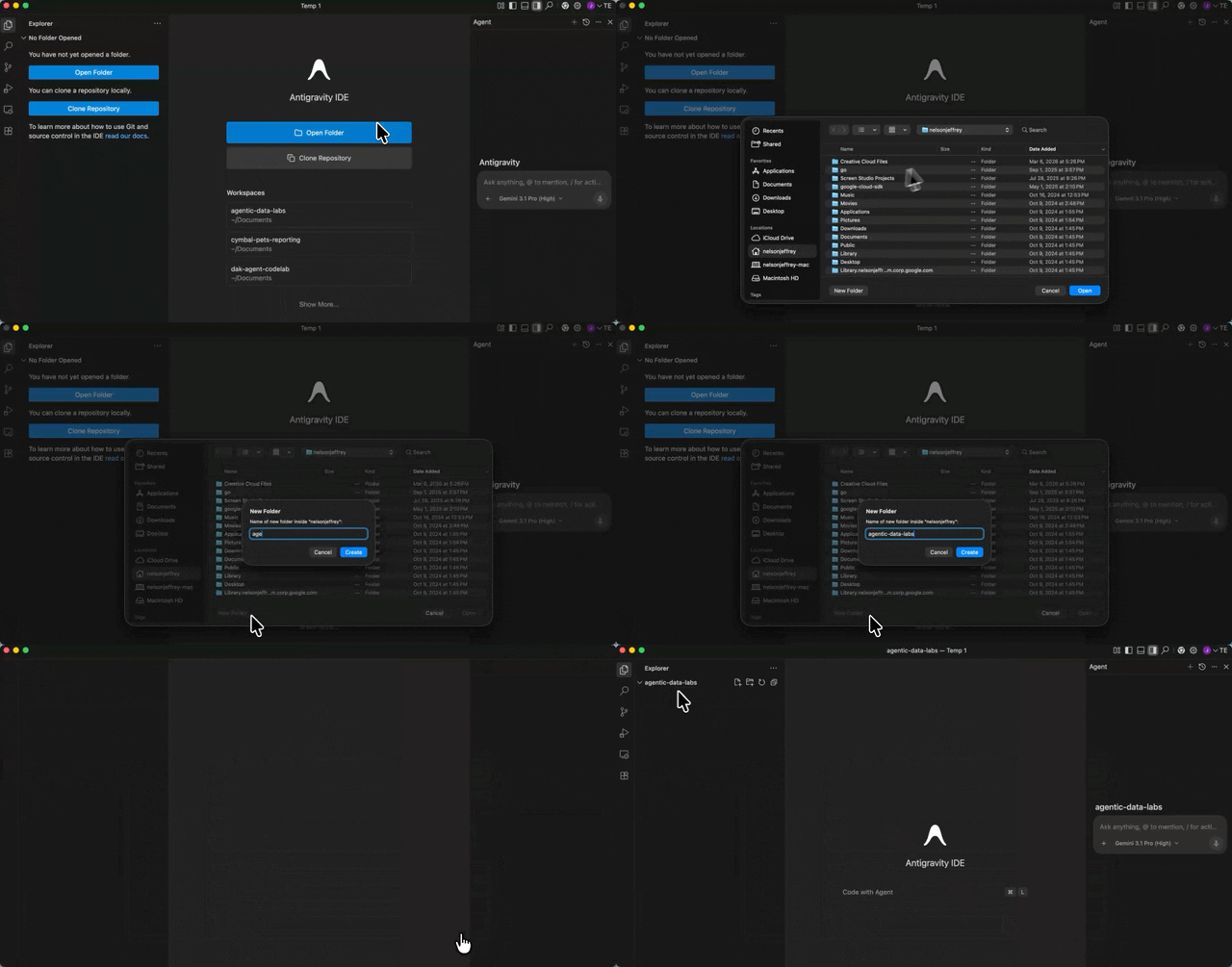
- Создайте на локальном компьютере новую пустую папку (например, с именем
agentic-data-labs) и откройте её в IDE, выбрав «Открыть папку» . Она будет служить вашей локальной рабочей областью для этого практического задания.
Установите расширение Data Agent Kit.
Расширение Google Cloud Data Agent Kit добавляет браузер каталога данных, навыки агента и серверы MCP для BigQuery, Cloud SQL и Cloud Storage, позволяя запрашивать и проверять эти сервисы прямо из редактора.
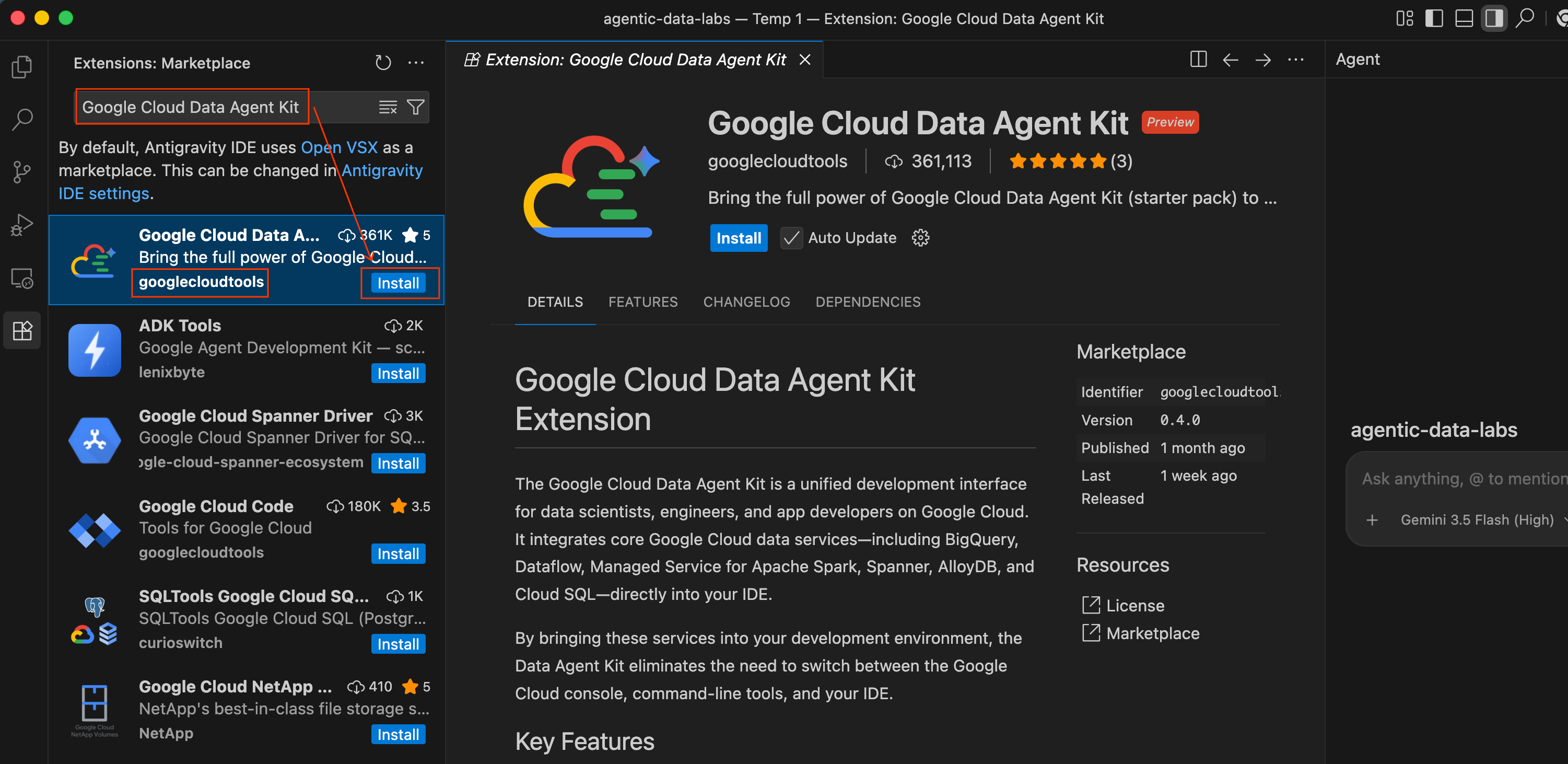
- В среде разработки Antigravity IDE щелкните значок «Расширения» на панели активности в левой части экрана (он выглядит как четыре квадрата).
- В строке поиска в верхней части панели расширений введите
Google Cloud Data Agent Kit. - Найдите первый результат с названием Google Cloud Data Agent Kit (опубликовано
googlecloudtools). - Нажмите кнопку «Установить» .
- Возможно, появится запрос: «Доверяете ли вы издателю 'googlecloudtools' и его расширениям?» Нажмите «Доверять издателям и устанавливать» , чтобы продолжить.
После установки в левой части панели активности среды разработки Antigravity IDE появится новый значок Google Cloud Data Agent Kit .
Аутентифицируйте и настройте расширение.
После установки подключите расширение к своему проекту в Google Cloud.
- Автоматически должна открыться страница регистрации под названием «Добро пожаловать в Google Cloud Data Agent Kit». Если вы не вошли в свою учетную запись Cloud, следуйте инструкциям, чтобы разрешить доступ.
- В разделе «Сводка конфигурации» найдите поле «Проект». Щелкните раскрывающийся список и выберите свой проект Google Cloud. Установите регион как
us-central1. Затем выберите «Настроить серверы MCP» .

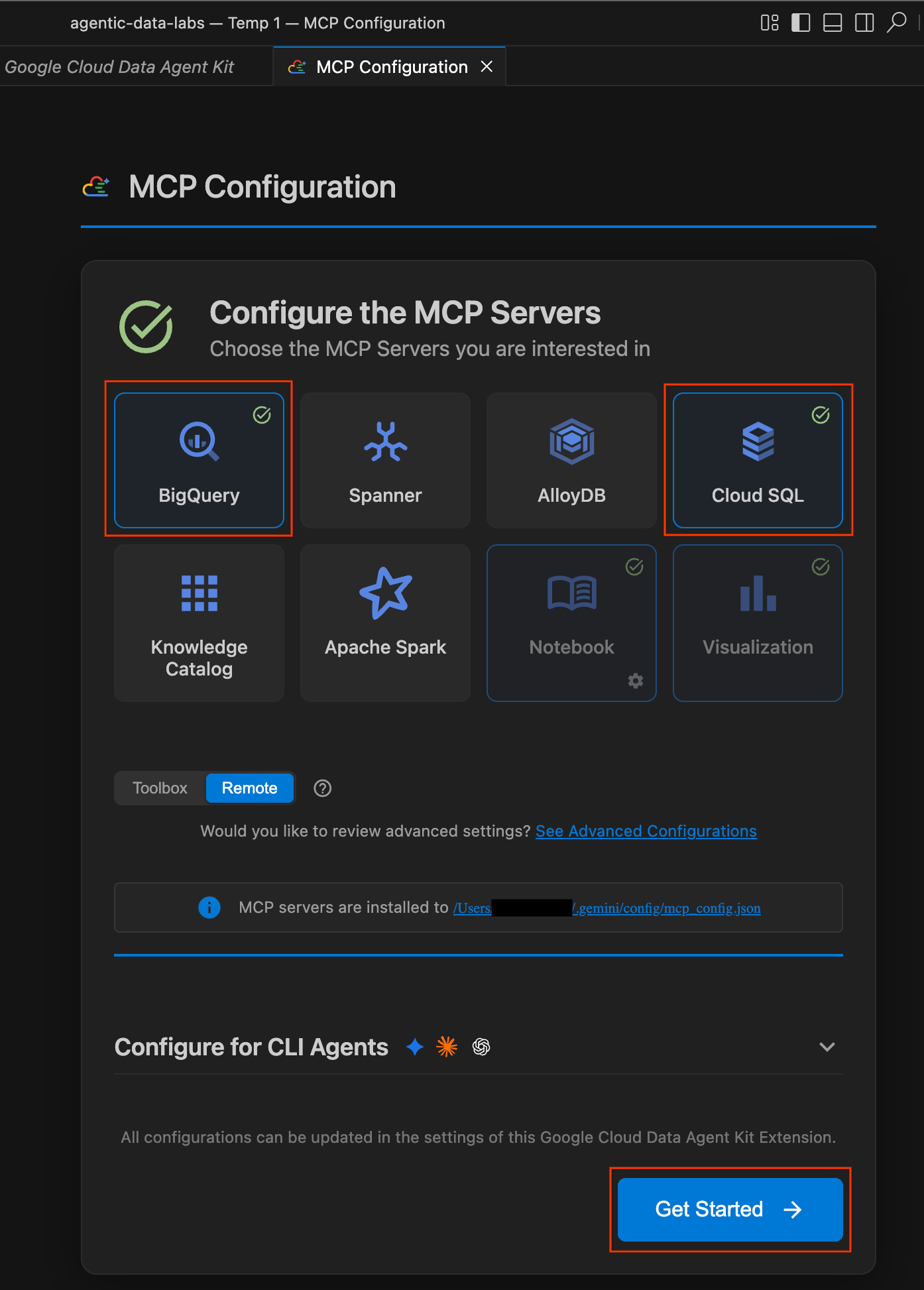
- В панели «Конфигурация MCP» включите BigQuery и Cloud SQL . Затем нажмите «Начать» .
Изучите параметры конфигурации.
После завершения настройки вы попадете на страницу "Начало работы с Google Cloud Data Agent Kit".
- В разделе «Настройка и конфигурация» нажмите «Начать ».
- Это откроет панель настройки Data Agent Kit . Изучите вкладки:
- Проект и регион: Проверьте выбранный идентификатор проекта и убедитесь, что необходимые API (API облачного хранилища, API BigQuery, API каталога и API администрирования Cloud SQL) включены.
- BigQuery: Настройте местоположение по умолчанию для ваших запросов BigQuery. Используйте регион
us-central1. - Настройка серверов MCP: Просмотрите список включенных серверов MCP (BigQuery, Notebooks, Cloud SQL и т. д.), которые позволяют агентам ИИ безопасно взаимодействовать с вашими данными.
- Навыки: Изучите встроенные навыки , которые предоставляют агентам специализированные возможности для решения сложных задач обработки данных.

Краткое содержание раздела: Вы открыли Antigravity IDE, подключили его к своему проекту в Google Cloud и настроили удаленные серверы MCP Data Agent Kit.
4. Изучите свои данные
Давайте разберемся в ситуации. Вот что происходит: финансовый директор говорит, что средняя стоимость заказа в прошлом месяце снизилась на 7%, но общая выручка осталась на прежнем уровне. Прежде чем просить агента провести расследование, вам следует сначала понять, с какими данными вы работаете.
В этом разделе вы вручную изучите панель Data Agent Kit, чтобы получить общее представление о её работе. Понимание ваших данных до начала запросов к ним — это критически важный первый шаг в любом исследовании.
Изучите таблицы BigQuery
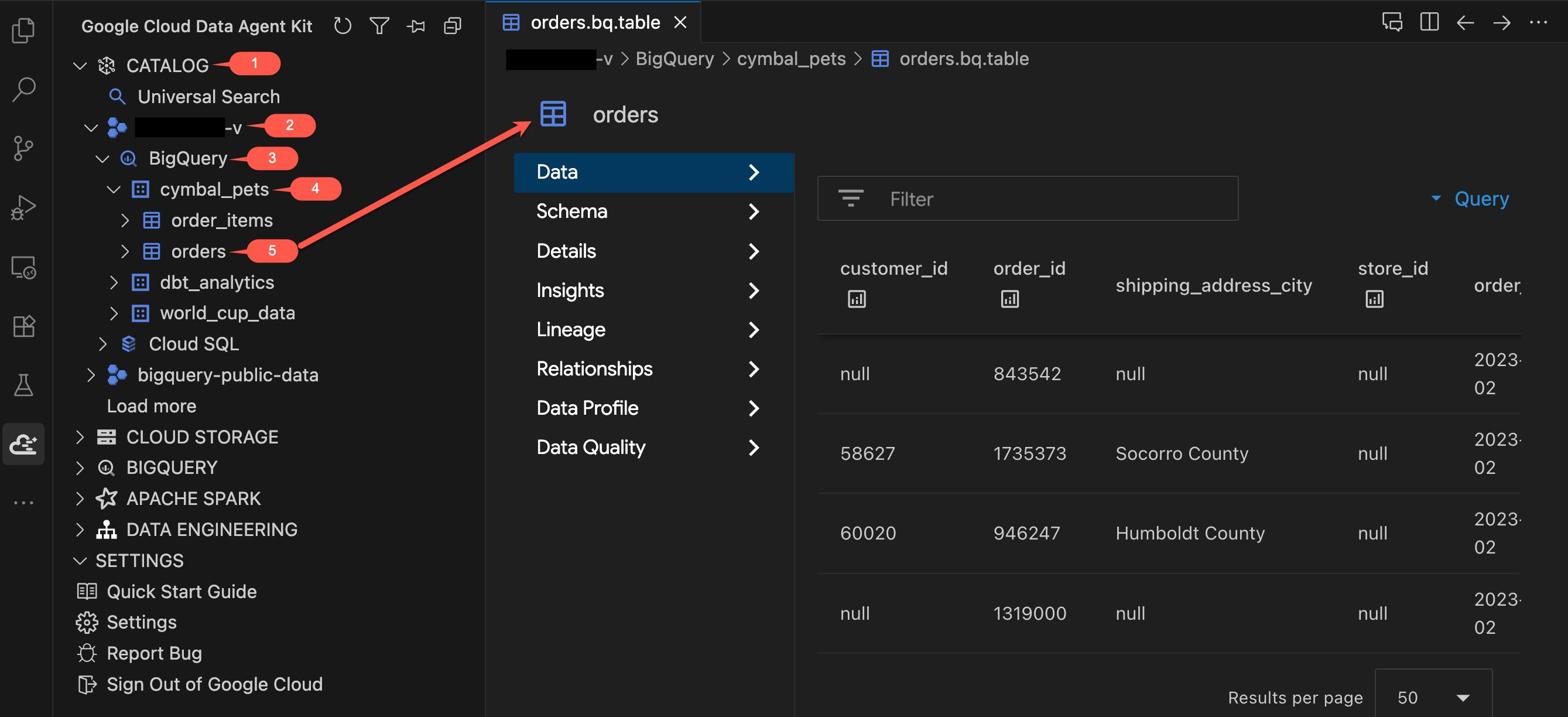
- В панели Data Agent Kit, в разделе CATALOG , разверните свой проект → BigQuery →
cymbal_pets. - Щёлкните по таблице
orders. Откроется новая вкладка с подробным описанием таблицы. - Изучите вкладки в левой части окна просмотра таблиц:
- Данные : Предварительный просмотр строк. Прокрутите набор данных и изучите столбцы.
- Схема : Проверьте названия и типы столбцов. Обратите внимание на такие поля, как
order_typeиpromo_code, которые станут важными позже. - Другие вкладки (Подробности, Аналитика, Профиль данных и т. д.) : Доступ к метаданным, истории происхождения данных и сведениям о качестве, которые вы обычно находите в консоли Google Cloud, — и все это, не выходя из редактора.
- Теперь щелкните по таблице
order_itemsи просмотрите ее схему. Обратите внимание на поляquantityиprice.
Изучите таблицы Cloud SQL.
Скрипт установки также разместил данные о клиентах, питомцах и товарах в базе данных PostgreSQL в Cloud SQL.
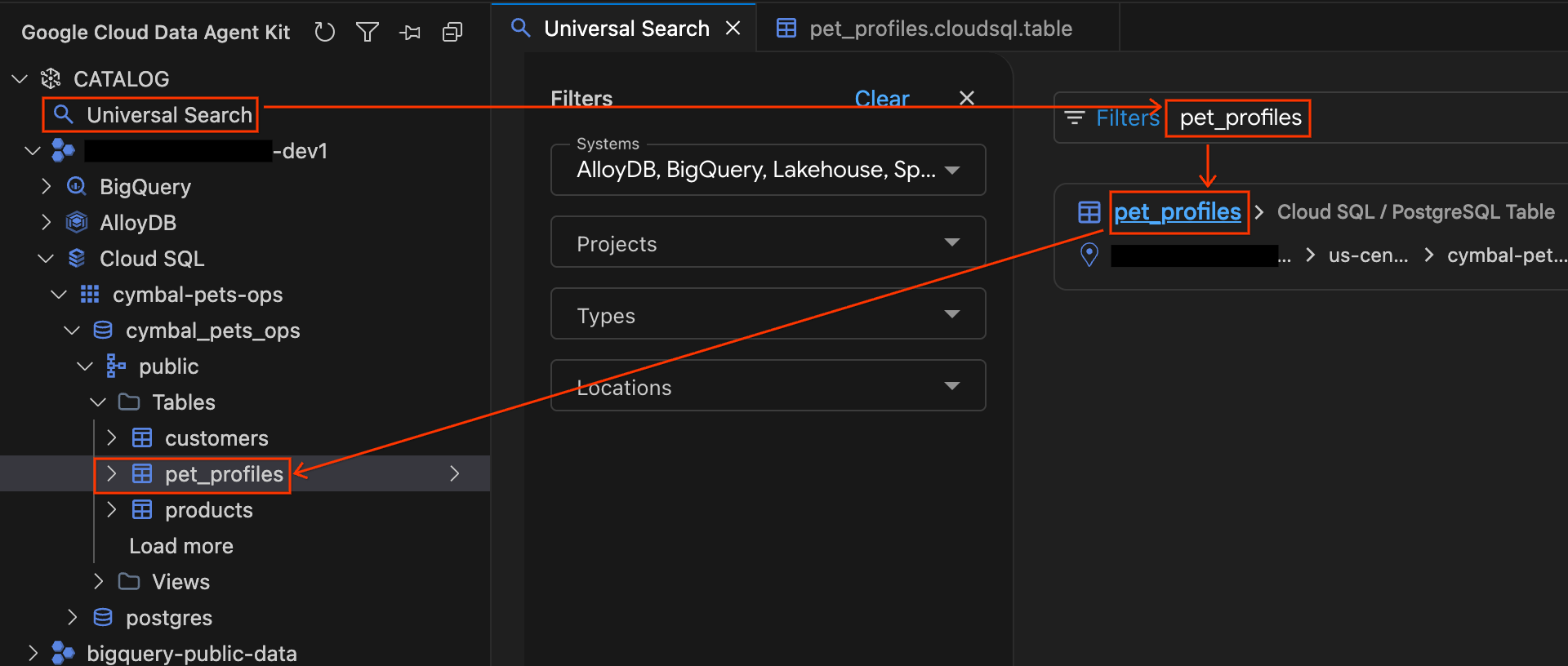
- В панели Data Agent Kit в разделе CATALOG нажмите на Universal Search .
- В поле поиска введите
pet_profilesи нажмите Enter . - В результатах поиска щелкните по результату «Таблица PostgreSQL для
pet_profiles» (в экземпляре Cloud SQL вашего проекта). Обратите внимание, что боковая панель автоматически развернется, показывая вам точное местоположение таблицы в дереве базы данных. Теперь щелкните по таблицеcustomers, расположенной прямо над ней в дереве, чтобы открыть ее подробную информацию и изучить вкладки «Схема» и «Подробности» .
Изучите файлы облачного хранилища.
Наконец, данные о маркетинговых и рекламных кампаниях сохраняются в облачном хранилище в виде необработанных JSON-файлов.
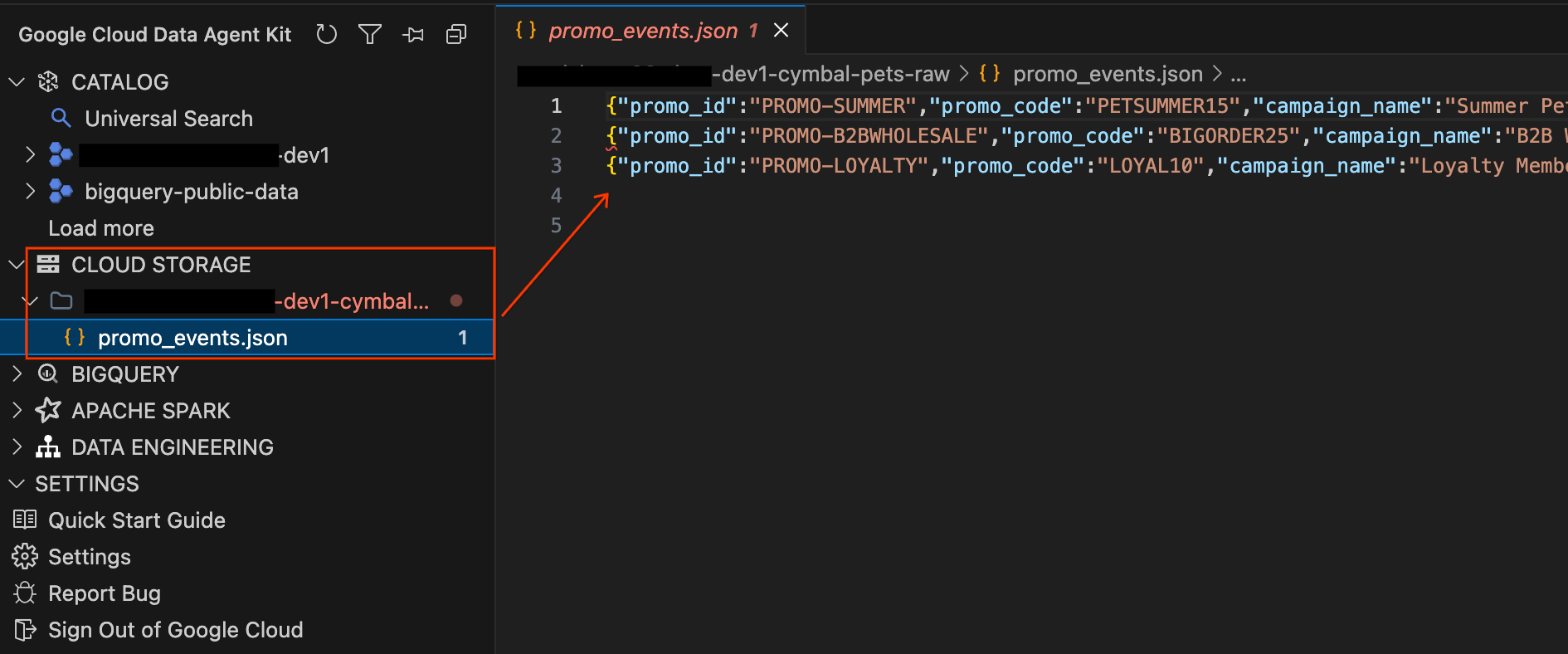
- В левой панели Data Agent Kit разверните раздел CLOUD STORAGE . Найдите необработанный сегмент вашего проекта (
YOUR_PROJECT_ID-cymbal-pets-raw). - Щелкните файл
promo_events.jsonвнутри хранилища. Откроется новая вкладка редактора, позволяющая просматривать исходное JSON-содержимое маркетинговых кампаний непосредственно в IDE.
Подведите итоги
Вот что вам теперь известно об этих данных:
Услуга | Таблицы | Что там? |
BigQuery | | Примерно 1,9 млн заказов, примерно 4,3 млн позиций, период 2023-2025 гг. |
Облачный SQL | | Примерно 92 тыс. клиентов, примерно 7,6 тыс. профилей домашних животных, 206 товаров. |
Облачное хранилище | | записи рекламных кампаний |
Данные распределены по трем сервисам. В традиционном рабочем процессе вам пришлось бы устанавливать соединения, писать код интеграции и вручную объединять результаты. На следующем шаге вы позволите агенту ИИ выполнить все это в рамках одного диалога.
Краткое содержание раздела: Вы использовали панель Data Agent Kit для ручного изучения архитектуры данных в BigQuery, Cloud SQL и Cloud Storage. Теперь вы знаете, где находятся данные и какие поля доступны, поэтому вы готовы начать исследование.
5. Следуйте за цифрами.
Теперь начинается расследование. Вы воспользуетесь панелью чата, чтобы попросить агента ИИ получить данные о средней стоимости заказа (AOV) из BigQuery. AOV — это бизнес-показатель, отражающий среднюю сумму, потраченную на один заказ. Агент выполнит запрос от вашего имени с помощью MCP Tools, и вы сможете увидеть каждый выполненный им SQL-запрос.
Отслеживайте тренд средней стоимости заказа.
- В панели чата в правой части IDE введите следующую команду и нажмите Enter :
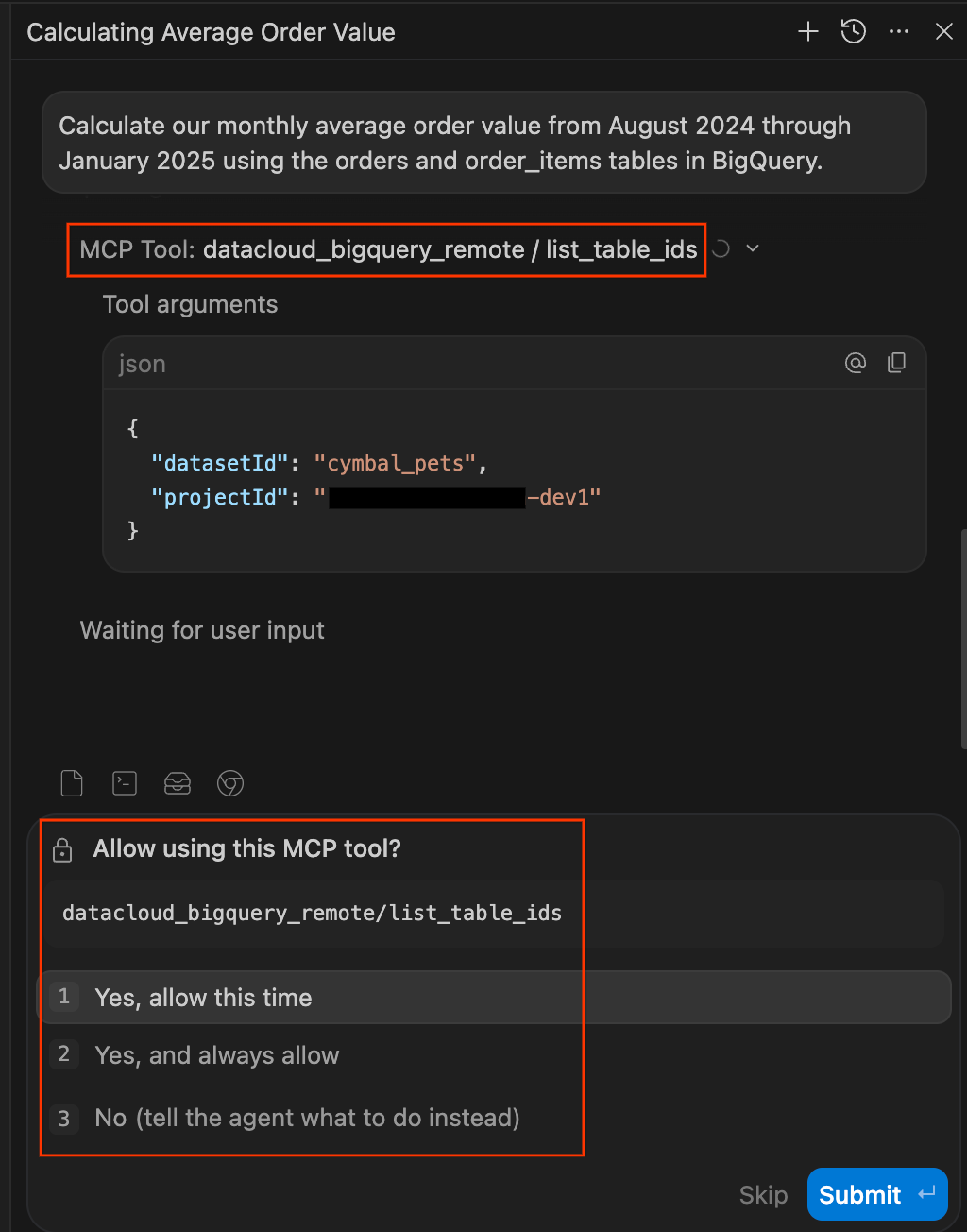
Calculate our monthly average order value from August 2024 through January 2025 using the orders and order_items tables in BigQuery. - Подтвердите права доступа к данным. Следует проявлять осторожность в отношении запросов к вашим базам данных, выполняемых агентами искусственного интеллекта. Data Agent Kit позволяет вам контролировать ситуацию, запрашивая явное разрешение перед доступом к данным. При появлении запроса вы можете выбрать:
- Учитывайте следующее время: подтверждает однократное использование (идеально подходит для аудита запросов с высоким риском).
- Всегда разрешать: Одобряет дальнейшее использование данного инструмента в течение сессии.
- Нет: Полностью блокирует действие.
Для максимально комфортной работы в лаборатории выберите «Да» и «Всегда разрешать» . Примечание: разрешения предоставляются для каждого инструмента отдельно. Вскоре вы, вероятно, увидите еще несколько запросов, поскольку агент будет использовать новые инструменты (например, list_table_ids или execute_sql_readonly ). Вы также можете «всегда разрешать» их.
- Наблюдайте за работой оператора. Панель чата одновременно служит журналом прозрачности всех действий оператора. Вместо черного ящика оператор показывает вам свои рассуждения и действия в режиме реального времени.
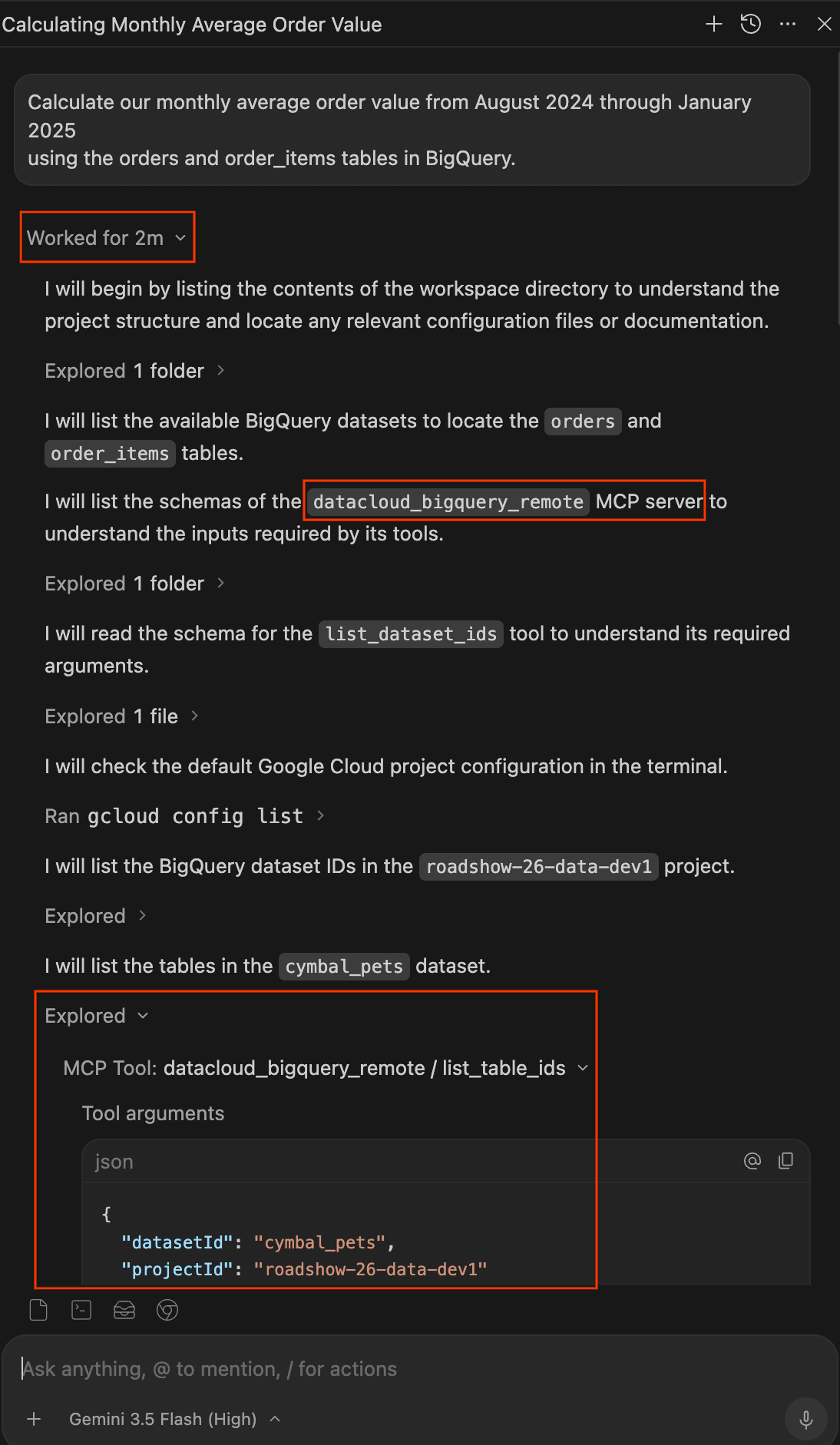
- После завершения работы агента нажмите на выпадающее меню « Работа выполнена в течение Xm» под вашим запросом, чтобы развернуть полный журнал работы. Здесь вы можете точно узнать, как агент получил ваш ответ:
- Исследовано: Разверните эти элементы, чтобы увидеть, как агент читает файлы, просматривает папки или вызывает инструменты MCP (например,
datacloud_bigquery_remote / list_table_idsиexecute_sql_readonly). Вы можете просмотреть точные JSON-аргументы, переданные инструментам, и выполненный SQL-запрос. - Ran: Разверните эти элементы, чтобы увидеть все команды терминала, выполненные агентом, например,
gcloud config list.
- Исследовано: Разверните эти элементы, чтобы увидеть, как агент читает файлы, просматривает папки или вызывает инструменты MCP (например,
- Просмотрите результаты. Агент должен вернуть таблицу ежемесячных значений среднего чека. Посмотрите на цифры сами: в предыдущие месяцы он колебался около ~110 долларов, а в январе опустился примерно до ~103 долларов. Именно на эту аномалию указал финансовый директор.
Детализация по каналам
Общий средний чек снизился, но откуда это взялось? Давайте разберемся.
- В панели чата введите:
January looks lower than the prior months. Break down January's AOV by order_type to see what's going on? - Агент выполняет еще один запрос BigQuery, на этот раз группируя по
order_type. Внимательно изучите результаты. Вы должны увидеть нечто поразительное: средний чек онлайн и офлайн остается стабильным на уровне около 110 долларов. Но появился новый канал, B2B-оптовая торговля , со значительно более низким средним чеком (около 75 долларов). Этот новый канал снижает средний чек. - Агент может по собственной инициативе предложить провести исследование B2B-клиентов. Если этого не произойдет, ничего страшного. Вы сделаете это на следующем этапе.
Краткое содержание раздела: Вы сами заметили снижение среднего чека в январе, используя нейтральные данные, а затем, проанализировав данные по типу заказа, определили, что B2B-Wholesale является новым каналом, снижающим усредненный показатель. Теперь вам нужно выяснить, кто эти B2B-клиенты.
6. Пересечение границы зоны обслуживания.
Вы определили B2B-Wholesale как аномальный канал в BigQuery, но данные о клиентах хранятся в Cloud SQL. С помощью Data Agent Kit вы можете продолжить этот процесс, и он обработает границу между сервисами.
Изучите клиентов B2B.
- В панели чата введите:
Who are these B2B customers? Their profiles should be in our Cloud SQL database. Check for: - Who they are - When they signed up - Whether they're new or existing customers - Внимательно следите за панелью чата. На этот раз должно появиться другое окно инструмента MCP . Теперь агент запрашивает данные из Cloud SQL вместо BigQuery. Агент подключается к экземпляру Cloud SQL Postgres
cymbal-pets-opsи выполняет запрос к таблицеcustomers. Нажмите « Показать подробности» , чтобы увидеть SQL-запрос. - Проанализируйте результаты. В ходе анализа должно быть выявлено несколько ключевых моментов:
- У всех B2B-клиентов
customer_type = 'Business' - Все они зарегистрировались в течение последних 30 дней (январь 2025 года).
- Значения
last_nameпредставляют собой названия компаний, такие как "Pet Supply Co", "Animal Care LLC" и "Happy Paws Inc". - Их около 100 человек, и до этого месяца такой группы не существовало.
- У всех B2B-клиентов
Введите промокод
- Агент может самостоятельно заметить, что многие B2B-заказы в BigQuery имеют значение
promo_codeBIGORDER25. Если он сам сообщит об этом наблюдении, отлично. Расследование, естественно, продвигается. Если же агент не упомянет промокод, напомните ему об этом:I noticed a promo_code field on the orders table in BigQuery. Check what promo codes appear on the B2B-Wholesale orders? - Агент снова отправляет запрос в BigQuery и обнаруживает, что примерно 92% заказов B2B-оптовой торговли имеют
promo_code = 'BIGORDER25'. Практически вся активность в сфере B2B связана с одной рекламной кампанией. Затем агент может поискать данные о рекламных акциях в другом месте системы (в облачном хранилище).
Краткое содержание раздела: Агент запросил данные в Cloud SQL и обнаружил, что все B2B-клиенты — это новые компании, зарегистрировавшиеся в январе 2025 года. В сочетании с данными BigQuery, показавшими, что примерно 92% их заказов имеют promo_code = 'BIGORDER25' , след теперь указывает на рекламную кампанию. Пора найти источник.
7. Найдите недостающую деталь.
Две услуги уже недоступны, осталась одна. Вы знаете, что произошло (заказы B2B снижают средний чек) и кто в этом виноват (новые бизнес-клиенты за последние 30 дней). Теперь вам нужно выяснить причину , и ответ кроется в облачном хранилище.
Проверьте хранилище GCS.
- В панели чата введите:
Good catch on the promo code. We might have promotional campaign data in our GCS bucket. Can you check what's there? - У агента нет предварительно настроенного инструмента MCP для облачного хранилища, поэтому он автоматически переключается на использование своего терминального инструмента для выполнения команд
gcloud storage. Он запросит разрешение на выполнение таких команд, какgcloud storage ls. Разрешите эти команды, затем разверните журнал Ran в панели чата, чтобы увидеть точные команды CLI, которые он использовал для чтения и анализа файлаpromo_events.json. - Агент должен выявить в файле три рекламные кампании:
Вот в чем причина. ПромокодКампания
Промо-код
Скидка
Цель
Даты
Летняя распродажа товаров для домашних животных
PETSUMMER15Скидка 15%
Все
Июнь 2024 г.
Оптовая торговля B2B
BIGORDER25Скидка 25%
B2B
Январь 2025 г.
Праздничный бонус для участников программы лояльности
LOYAL10скидка 10%
Участники программы лояльности
Декабрь 2024 г.
BIGORDER25привязан к акции под названием B2B Wholesale Push : скидка 25% для B2B-клиентов при минимальном заказе 50 единиц.
Соберите всё воедино
- Попросите агента обобщить всю найденную информацию:
Put it all together. What happened to our average order value? - Агент предоставляет четкий, структурированный синтез, связывающий все три источника данных. Он должен объяснять что-то вроде:
- Падение среднего чека реально, но это не означает снижение объемов существующего бизнеса. Средний чек как в онлайн, так и в офлайн-магазинах остается стабильным на уровне около 110 долларов.
- В январе 2025 года появился новый канал оптовой торговли B2B , насчитывающий около 25 000 заказов со значительно более низким средним чеком (примерно 75-100 долларов).
- Клиентами B2B являются 100 новых бизнес-аккаунтов , которые зарегистрировались в течение последних 30 дней (Cloud SQL).
- Данная акция проводится в рамках рекламной кампании («B2B Wholesale Push»), предлагающей скидку 25% на оптовые заказы с минимальным объемом 50 единиц (облачное хранилище).
- Выручка остаётся на прежнем уровне, поскольку большой объём заказов B2B компенсирует снижение цен. Однако маржа на единицу продукции значительно снижена (примерно на 65%) из-за 25% оптовой скидки, что серьёзно угрожает общей прибыльности с учётом затрат на доставку и операционных расходов.
Краткое содержание раздела: Вы обнаружили причину в облачном хранилище: рекламная кампания B2B, предлагавшая скидку 25% на оптовые заказы. Агент обобщил результаты анализа всех трех сервисов в четкое изложение проблемы. Этап расследования завершен. Далее вы примените полученные результаты на практике.
8. Создайте конвейер
Вы раскрыли дело. Теперь финансовый директор хочет, чтобы этот анализ обновлялся автоматически. В этом разделе вы попросите агента создать проект dbt , который подготовит данные из BigQuery и создаст таблицу фактов для текущего анализа AOV.
Здесь агент переходит из роли следователя в роль инженера . Вы увидите, как он создает структуру целого проекта DBT и запускает весь конвейер обработки данных, и все это из одной командной строки.
Создание каркаса для проекта dbt
- В панели чата введите следующую подсказку. Она намеренно ориентирована на достижение цели, а не на пошаговое выполнение. Вы сообщаете агенту, чего хотите, а не как это создать:
I want to productionize our AOV analysis so it updates automatically. Build a dbt project that: 1. Creates staging models for the BigQuery tables (orders and order_items) and a mart called fct_order_analysis that calculates AOV by channel and month 2. Add a uniqueness test on order_id and run dbt build - Обратите внимание на самокоррекцию: если вы развернете журнал "Работано для Ns" , вы можете увидеть, как агент проверяет наличие
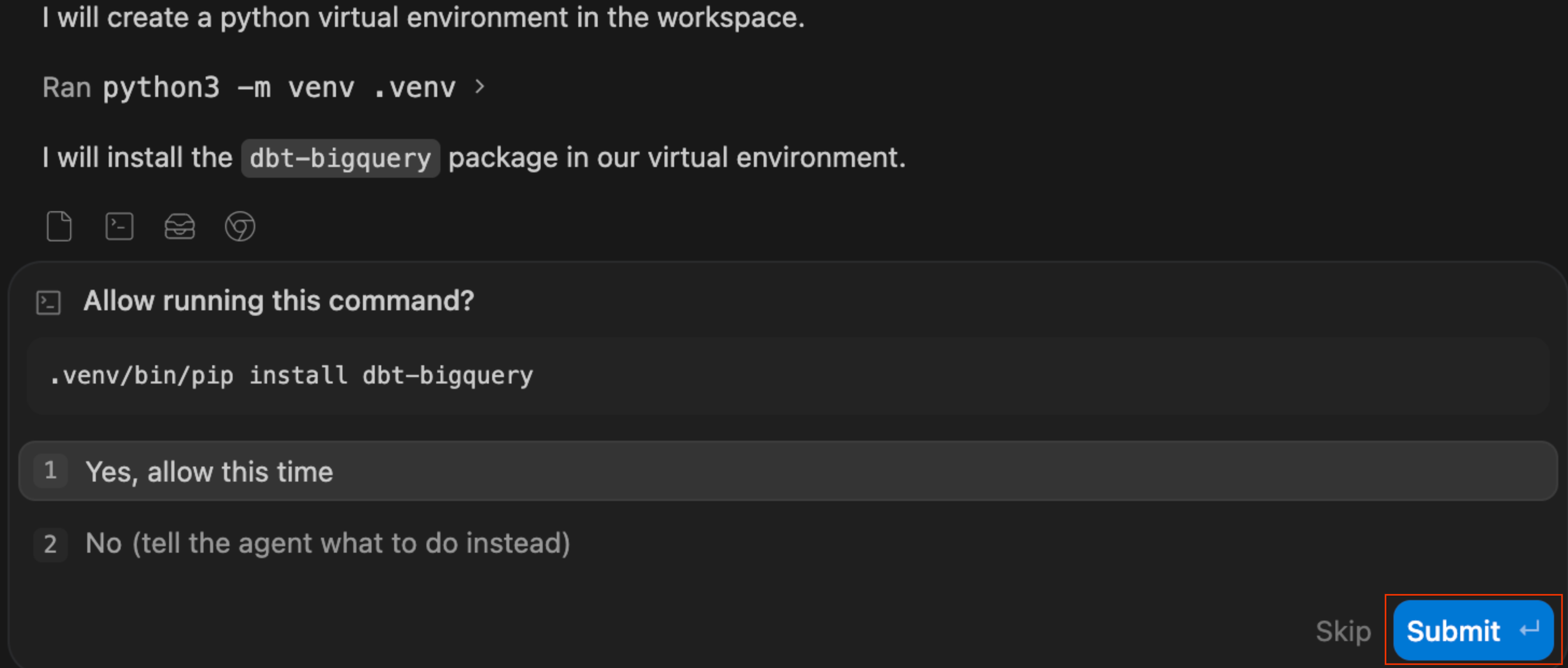
dbtи, обнаружив его отсутствие, автоматически выполняет команды для создания виртуальной среды Python (.venv). Он сам настраивает среду!
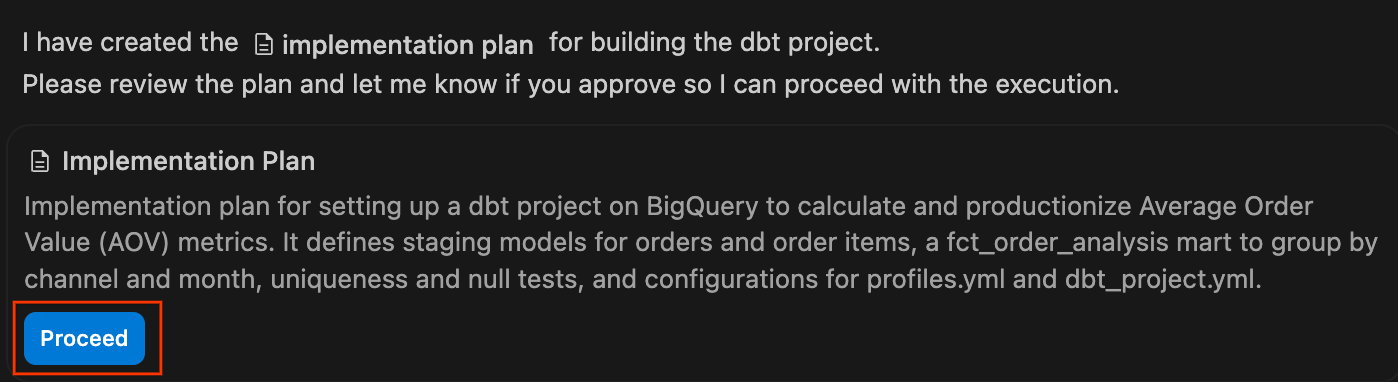
- Ознакомьтесь с планом реализации: агент сгенерирует формальный план реализации. Вы можете просмотреть предлагаемые файлы и архитектуру, добавить комментарии при необходимости и нажать «Продолжить» , чтобы агент выполнил план.
- Следите за панелью чата, пока агент выполняет свой план, записывая необходимые файлы
.sqlи конфигурации YAML. После завершения и успешной компиляции проекта будет представлено краткое описание изменений. Нажмите «Принять все» , чтобы добавить эти файлы в свою рабочую область.
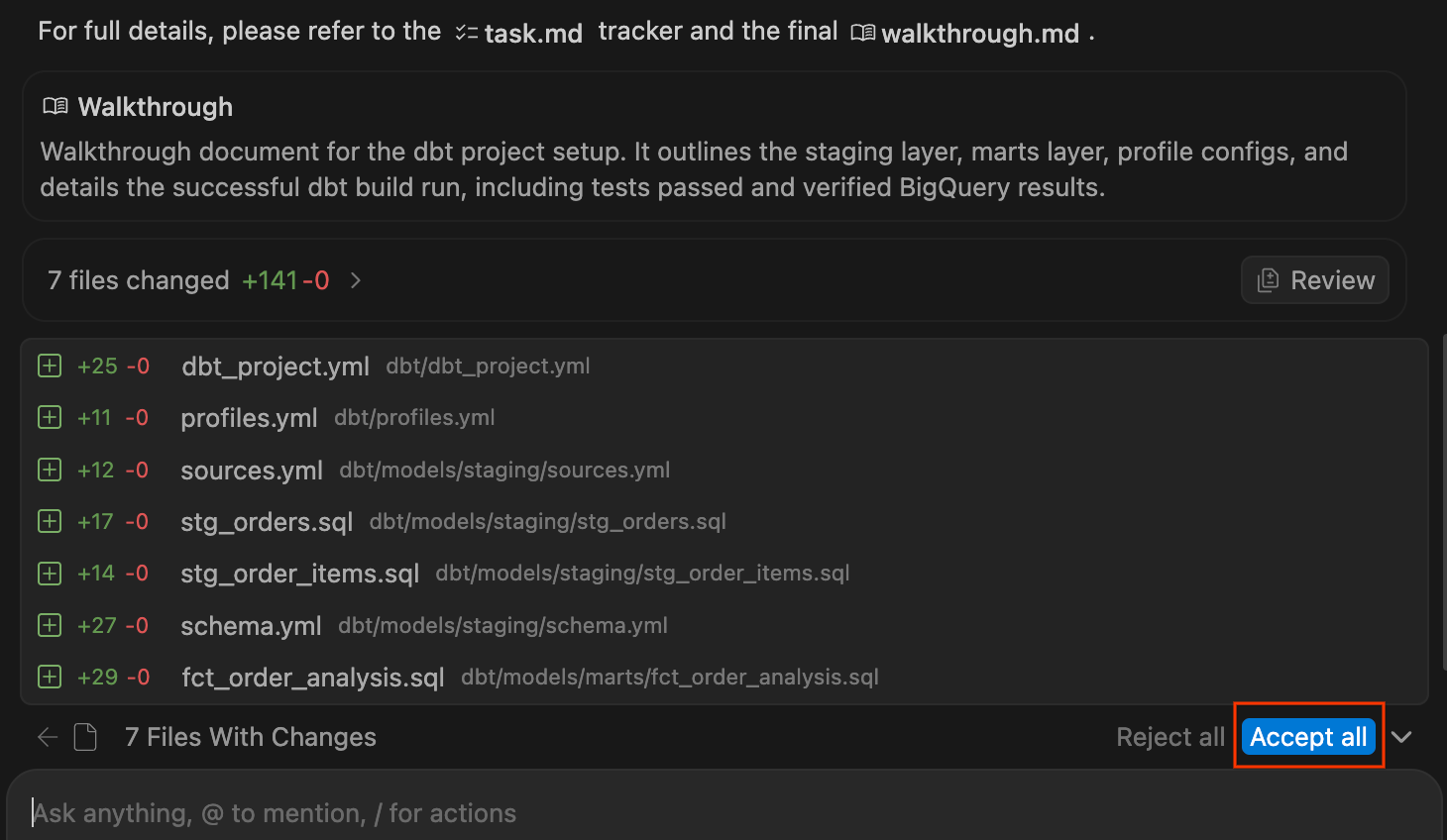
- Изучите созданный проект dbt в окне проводника слева. Вы должны увидеть структуру, похожую на следующую:
dbt/
├── models/
│   ├── marts/
│   │   └── fct_order_analysis.sql
│   └── staging/
│       ├── schema.yml
│       ├── sources.yml
│       ├── stg_order_items.sql
│       └── stg_orders.sql
├── dbt_project.yml
└── profiles.yml

- Щелкните файлы модели
.sql, чтобы просмотреть SQL-код, сгенерированный агентом. Обратите внимание на то, как он обрабатывает:- Модели для подготовки : чистые, переименованные столбцы со ссылками на источники.
- Модель «умного магазина» : логика объединения и расчет AOV по каналам.
- Обработка заказов без регистрации : Вы можете заметить
COALESCE(customer_type, 'Guest')или ослабленные ограничения на значения NULL. Это моделирует розничные покупки, совершенные без учетной записи, и сохраняет действительный доход от заказа вместо удаления неполных записей.
- Проверьте панель чата (или перейдите к сгенерированному артефакту пошагового руководства ), чтобы убедиться, что агент подтвердил создание всех моделей и прохождение всех тестов. Результаты AOV из хранилища должны подтвердить то, что вы обнаружили во время расследования:
- Online: ~$110
- Offline: ~$110
- B2B-Wholesale: ~$75 to $77
Краткое содержание раздела: Агент создал проект dbt на основе одной целенаправленной задачи: сгенерировал модели для промежуточного хранения и хранилища данных, успешно выполнил dbt build и подтвердил аномалию AOV. Далее вы предложите агенту сложную задачу, чтобы посмотреть, как он справится со сложными задачами.
9. При сбоях тестов агент выполняет отладку.
Конвейер обработки данных работает, но использует только данные BigQuery. Команда разработчиков хочет обогатить анализ данными о профилях клиентов и их питомцев из Cloud SQL, чтобы рекомендовать продукты, исходя из диетических потребностей. Это означает, что агенту необходимо преодолеть барьер Cloud SQL и обработать неочевидную ошибку моделирования данных — классическое «расширение» в многомерном моделировании.
В зависимости от используемой модели и её возможностей анализа, агент обработает этот запрос одним из двух способов: проактивно избегая ошибки (Вариант А) или самовосстанавливаясь после сбоя теста (Вариант Б). Давайте посмотрим, какой путь выберет ваш агент!
Инициировать запрос
- В панели чата введите:
Enrich fct_order_analysis with customer data and pet profile data from our Cloud SQL database. Include customer type and each customer's pets and dietary needs so we can recommend products. Keep the uniqueness test on order_id and run dbt build. - Наблюдайте за работой агента. Он обнаружит таблицы Cloud SQL, определит, как связать данные с BigQuery (с помощью федеративного запроса или материализованного копирования), создаст новые промежуточные модели и изменит
fct_order_analysis.sql.
Вариант А: Проактивный агент (предотвращение ошибок)
Если вы используете сложную модель логического мышления, агент может обнаружить сдвиг зерна до написания какого-либо кода . Поскольку у клиента может быть несколько питомцев, прямое соединение дублирует заказы и не проходит проверку уникальности, запрошенную вами для order_id .
- Обратите внимание на проактивную агрегацию : в пояснении в панели чата или в пошаговом руководстве агент может отметить, что он предварительно агрегировал данные о питомцах перед их объединением, чтобы предотвратить «классическое разветвление». Обычно это делается путем объединения нескольких питомцев для каждого клиента с помощью функции агрегации (например,
ARRAY_AGG()илиSTRING_AGG()). - Проверьте результаты :
dbt buildвыполняется успешно с первой попытки, поскольку агент заблаговременно защитил детализацию таблицы фактов. Вы можете убедиться в этом, проверив сгенерированный артефакт Walkthrough, который часто показывает успешный результат теста вместе с результатами запроса.
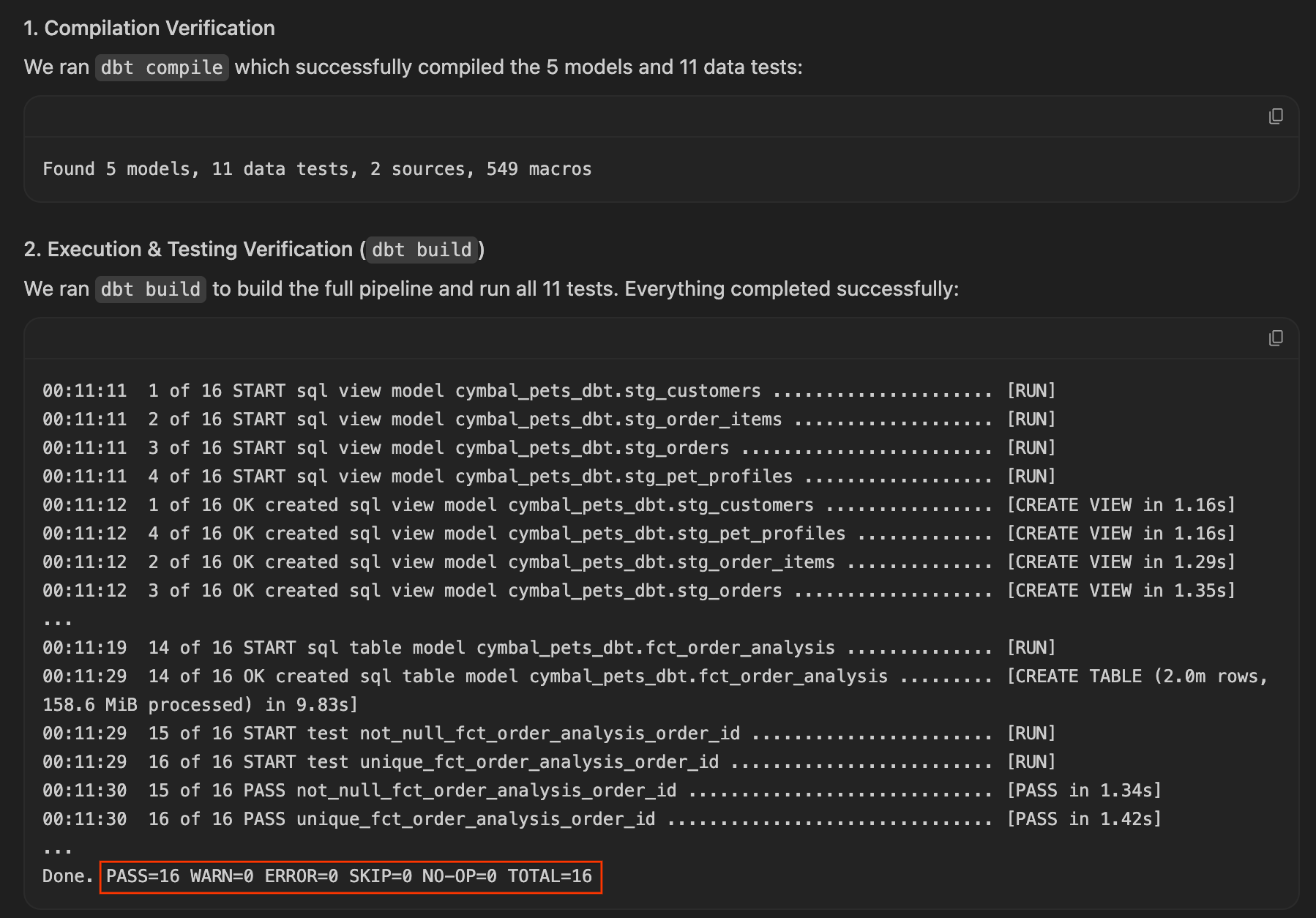
Агент избежал ошибки. Просмотрите сгенерированный SQL-код в файле fct_order_analysis.sql , чтобы увидеть, как он структурировал агрегацию, а затем перейдите к следующему разделу: «Выдать ответ» .
Вариант B: Самовосстанавливающийся агент (отладка и диагностика)
Если модель сначала выполнит наивное прямое левое соединение, сам SQL-запрос будет выполнен успешно, но автоматизированный набор dbt test обнаружит сдвиг зернистости!
- Обратите внимание на сбой теста : вы увидите сообщение о сбое в журналах хода выполнения в панели чата.
Completed with 1 error

Failure in test unique_fct_order_analysis_order_id
Got 287 results, configured to fail if != 0
order_idвыявила дублирующиеся записи, поскольку клиенты с несколькими питомцами распределили заказы веером. - Позвольте агенту провести диагностику и самовосстановление : Поскольку тест не пройден, попросите агента выполнить отладку. В панели чата введите:
The uniqueness test failed. Can you figure out why and fix it? - Следите за диагностикой : агент запросит данные, обнаружит связь «один ко многим» в
pet_profiles, объяснит, что прямое соединение изменяет детализацию с одной строки на заказ на одну строку на заказ на питомца , и перепишет модель для предварительной агрегации профилей питомцев:-- Pre-aggregating pets per customer to resolve fan-out LEFT JOIN ( SELECT customer_id, COUNT(*) AS num_pets, STRING_AGG(DISTINCT pet_type, ', ') AS pet_types, STRING_AGG(DISTINCT dietary_needs, ', ') AS dietary_needs FROM pet_profiles GROUP BY customer_id ) pet_agg ON c.customer_id = pet_agg.customer_id - Проверка исправления : агент снова запускает
dbt build, и на этот раз все модели материализуются, и все тесты проходят успешно!
Краткое содержание раздела: Независимо от того, удалось ли вашему агенту предотвратить ошибку или успешно устранить ее самостоятельно после сбоя теста, вы видели, как система преодолевает барьер Cloud SQL, интегрирует данные профилей клиентов и питомцев и сохраняет одну строку на каждый заказ в таблице фактов. Конвейер завершен и протестирован!
10. Дайте ответ.
Сегодня четверг. Неделя началась с обеспокоенного финансового директора и разрозненных данных по трем облачным сервисам. Теперь у вас есть первопричина и производственный конвейер. Пришло время предоставить ответ, а также перспективную рекомендацию, подкрепленную количественным прогнозом.
Напишите краткое изложение для руководителей.
- В панели чата введите:
Write an executive summary covering: - Main findings and the quantitative margin impact - Project AOV for the subsequent quarter if the B2B program continues at its current trajectory - A data-driven recommendation - Наблюдайте за работой агента.
- Проанализируйте резюме агента. Типичный и хорошо структурированный ответ должен включать в себя следующее:
- Основной вывод : в январе средний чек снизился исключительно из-за нового канала B2B-оптовой торговли. Онлайн и офлайн продажи остаются стабильными на уровне около 110 долларов.
- Первопричина : Акция "B2B Wholesale Push" (скидка 25% на оптовые заказы) привлекла 100 новых клиентов, что привело к оформлению примерно 25 000 заказов.
- Влияние на маржу : Оптовые заказы снизили среднюю прибыль на единицу продукции примерно на 65% (с ~7,50 до ~2,60 долларов).
- Выручка : Общая выручка остается неизменной, поскольку высокий объем продаж B2B компенсирует снижение цен.
Прогнозирование среднего чека с помощью AI.FORECAST
- Агент также должен составить прогноз на будущее. Найдите вызов инструмента MCP, в котором агент выполняет запрос
AI.FORECASTк BigQuery. Этот запрос использует встроенную базовую модель TimesFM для прогнозирования среднего чека на 90 дней вперед на основе исторических тенденций. Запрос должен прогнозировать средний чек на 90 дней вперед в двух сценариях: продолжение кампании (структурно заниженный средний чек) против завершения кампании (восстановление до ~110 долларов).
- Проанализируйте стратегические рекомендации агента. Рекомендации должны охватывать следующие аспекты:
- Реструктуризация скидок : Введение минимальных или максимальных оптовых скидок для защиты маржи на уровне отдельных единиц продукции.
- Ужесточить минимальные объемы заказа : предотвратить злоупотребление розничными покупателями оптовыми ценами.
- Раздельная отчетность : отслеживайте показатели розничной торговли и B2B независимо друг от друга, чтобы избежать искажения данных о результатах розничной торговли.
Полная история
То, что началось в понедельник как экстренная тревога из-за падения средней стоимости заказа на 7%, имеет четкое решение для финансового директора:
- Состояние розничной торговли : Основные каналы розничной торговли остаются здоровыми и стабильными на исходном уровне.
- Приток оптовых продаж : Снижение среднего чека полностью обусловлено новым каналом оптовой торговли B2B и кампанией
BIGORDER25. - Влияние на маржу : 25-процентная оптовая скидка значительно снизила маржу на единицу продукции, поставив под угрозу прибыльность, несмотря на стагнацию выручки.
- Стратегический прогноз : Согласно прогнозу
AI.FORECAST, реструктуризация оптовых сегментов рынка восстановит средний чек.
You deliver a data-backed recommendation to establish wholesale margin floors and separate retail/B2B reporting.
Section Recap: You asked the agent to write an executive summary with margin analysis, generate an AI.FORECAST projection, and deliver a data-driven recommendation. The investigation is complete.
11. Clean up
To avoid incurring ongoing charges to your Google Cloud account, delete the resources created in this codelab by running the teardown script.
- Return to Google Cloud Shell (where you ran the setup script) and run the teardown script:
cd ~/devrel-demos/codelabs/agentic-data-labs/scripts
chmod +x teardown.sh
./teardown.sh
- The script will display all the resources it plans to delete and ask for confirmation before proceeding:
- Cloud SQL instance (
cymbal-pets-ops): All tables - BigQuery datasets (
cymbal_pets,dbt_marts): All tables and models - Cloud Storage bucket (
gs://YOUR_PROJECT_ID-cymbal-pets-raw) - BigQuery connection (
cymbal-pets-cloudsql)
- Cloud SQL instance (
- Type
yto confirm. The teardown takes about 2-3 minutes.
[INFO]  Deleting BigQuery dataset cymbal_pets...
[ OK ]  BigQuery dataset cymbal_pets deleted.
[INFO]  Deleting BigQuery dataset dbt_marts...
[ OK ]  BigQuery dataset dbt_marts deleted.
[INFO]  Deleting GCS bucket gs://YOUR_PROJECT_ID-cymbal-pets-raw...
[ OK ]  GCS bucket deleted.
[INFO]  Deleting BigQuery connection cymbal-pets-cloudsql...
[ OK ]  BQ connection deleted.
[INFO]  Deleting Cloud SQL instance cymbal-pets-ops...
[ OK ]  Cloud SQL instance deleted.
12. Congratulations!
You've successfully completed The Cymbal Pets Investigation ! You went from a vague CFO question to a fully operationalized, forecast-backed recommendation, using an AI agent that works across your entire Google Cloud data estate.
What you accomplished
- 🔍 Explored across services : Discovered and previewed assets in BigQuery , Cloud SQL , and Cloud Storage using the Data Agent Kit 's Knowledge Catalog .
- 🕵️♂️ Investigated with AI : Queried multiple services in a single chat pane conversation using MCP Tools to trace the AOV anomaly to a bulk B2B promotional campaign.
- 🔧 Built a production pipeline : Scaffolded a complete dbt project to clean, join, and test order and customer data.
- 🐛 Debugged a fan-out bug : Observed the agent automatically diagnose a granularity issue and refactor the dbt SQL model to pre-aggregate customer pet profiles.
- 📈 Forecasted and recommended : Used BigQuery's built-in
AI.FORECASTto model AOV trends and delivered a data-driven recommendation to the CFO.
Ключевые понятия
Концепция | What you learned |
Secure, auditable connections that let the AI agent query services like BigQuery, Cloud SQL, Spanner, and other databases on your behalf, with every call visible in the Chat pane | |
Навыки агента | Pre-built instruction sets (like |
Cross-service investigation | The agent queries multiple Google Cloud services in a single conversation, with no connection setup and no context-switching between consoles |
Goal-oriented prompting | Telling the agent what you want ("build a dbt project that calculates AOV by channel") rather than how , and letting it choose the implementation approach |
The extension that binds everything together, from MCP Tools and Agent Skills to data discovery, giving you access to your entire Google Cloud data estate from within your IDE of choice |
Следующие шаги
- Read the Data Agent Kit documentation to learn more about its capabilities
- Learn about BigQuery ML and AI functions including
AI.FORECAST,AI.GENERATE, andAI.EMBED - Try building your own cross-service investigation with the Antigravity IDE on your own data
1. Введение
It's Monday morning and the CFO just pinged you. Average order value is down 7% this month, but total revenue is flat. Something doesn't add up, and the board wants answers by Friday.
Your company, Cymbal Pets, is one of the largest online pet supply retailers in the US. The data you need is scattered across three Google Cloud services: sales and order history in BigQuery , customer and product records in Cloud SQL , and marketing files in Cloud Storage . Normally, pulling together a cross-service investigation like this means switching between consoles, writing connection boilerplate, and stitching results together manually.
In this codelab, you'll use the Google Cloud Data Agent Kit (DAK) in the Antigravity IDE to investigate the anomaly using natural language. You describe what you're looking for, and the AI agent handles the connections, SQL, and cross-service joins across BigQuery, Cloud SQL, and Cloud Storage. Once you've cracked the case, you'll ask the agent to build a dbt pipeline to operationalize your findings, debug a real data modeling bug, and deliver a forecast-backed recommendation to the CFO.
Что вы будете делать
- Discover data assets across BigQuery , Cloud SQL , and Cloud Storage using the Knowledge Catalog
- Investigate an anomaly by querying multiple services in a single conversation using MCP Tools
- Build a dbt pipeline to stage and join cross-service data with staging models and automated tests
- Debug a data modeling issue as the agent self-diagnoses and refactors a fan-out bug
- Forecast future trends and deliver a data-driven recommendation using BigQuery's
AI.FORECAST
Что вам понадобится
- A web browser such as Chrome
- Антигравитация IDE
- A Google Cloud project with billing enabled and access to the Google Cloud Console (we recommend using a new, dedicated project for hands-on labs)
- Basic familiarity with SQL and Google Cloud Console
This codelab is for intermediate data practitioners (analytics engineers, data analysts, data scientists).
The resources created in this codelab should cost less than $5. Be sure to follow the Clean Up instructions at the end of the lab to delete provisioned resources.
2. Прежде чем начать
In this section, you'll run a setup script that provisions your entire lab environment: a BigQuery dataset with order data, a Cloud SQL Postgres instance with customer and product data, and a Cloud Storage bucket with promotional campaign records. The script takes about 8-10 minutes to complete, with Cloud SQL provisioning as the bottleneck.
Выберите или создайте проект
Choose an existing project or create a new project in the Google Cloud Console.
Подтвердите выставление счетов.
Убедитесь, что для вашего проекта Google Cloud включена функция выставления счетов. Подробнее о том, как это сделать, вы можете узнать, следуя этому руководству .
Запустить Cloud Shell
You will use Google Cloud Shell to run the setup script.
- Open the Google Cloud Console and click Activate Cloud Shell at the top of the window.
- Once connected, set your project ID and confirm your environment:
gcloud config set project <<YOUR_PROJECT_ID>>
export PROJECT_ID=$(gcloud config get-value project)
You should see a message similar to:
Your active configuration is: [cloudshell-####]
Updated property [core/project]
Клонируйте репозиторий
Clone the codelab repository to your Cloud Shell environment:
cd ~/
git clone --filter=blob:none --no-checkout https://github.com/GoogleCloudPlatform/devrel-demos.git
cd ~/devrel-demos
git sparse-checkout init --cone
git sparse-checkout set codelabs/agentic-data-labs
git checkout main
cd codelabs/agentic-data-labs/
Run the setup script
The setup script prepares your entire lab environment automatically so you can jump straight into the investigation:
cd ~/devrel-demos/codelabs/agentic-data-labs/scripts
chmod +x setup.sh setup_sql.sh
./setup.sh
When it finishes, you'll see a summary of your foreground environment:
╔══════════════════════════════════════════════════════╗
║   Base Setup complete!                               ║
╚══════════════════════════════════════════════════════╝

Your core BigQuery and GCS assets are ready.
Cloud SQL is currently provisioning in the background and will be fully ready by Step 4.

  BigQuery:   YOUR_PROJECT_ID.cymbal_pets
              ├── orders
              └── order_items

  GCS:        gs://YOUR_PROJECT_ID-cymbal-pets-raw
              └── promo_events.json
While you continue with the next steps of the lab, the database is being provisioned and seeded in the background. You can monitor its progress at any time in a separate terminal panel using:
tail -f /tmp/cloudsql_setup.log
Notice the data architecture: historical sales records (orders and order items) live in BigQuery, while operational application data (customers, pet profiles, and products) lives in Cloud SQL. This split mirrors real-world organizations where analytical warehouses and operational databases hold different pieces of the puzzle.
Section Recap: You ran the setup script to bootstrap your lab environment and kicked off background database provisioning.
3. Set up the IDE and Data Agent Kit
Open the Antigravity IDE
You don't need to wait for Cloud SQL to finish! Go ahead and open the Antigravity IDE and connect it to your Google Cloud project.
- If you haven't already, download and install the Antigravity IDE from the Google Antigravity download page .
- Launch the Antigravity IDE desktop application.
- Create a new, empty folder on your local machine (eg named
agentic-data-labs), and open it in the IDE by choosing Open Folder . This will act as your local workspace for the codelab.
Install the Data Agent Kit extension
The Google Cloud Data Agent Kit extension adds a data catalog browser, agent skills, and MCP servers for BigQuery, Cloud SQL, and Cloud Storage, so you can query and inspect those services from the editor.
- In the Antigravity IDE, click the Extensions icon in the Activity Bar on the far left side of the screen (it looks like four squares).
- In the search bar at the top of the Extensions pane, type
Google Cloud Data Agent Kit. - Locate the first result named Google Cloud Data Agent Kit (published by
googlecloudtools). - Click the Install button.
- A prompt may appear asking, "Do you trust publisher 'googlecloudtools' and their extensions?" Click Trust Publishers & Install to proceed.
Once installed, you'll see a new Google Cloud Data Agent Kit icon appear in the Activity Bar on the far left of the Antigravity IDE.
Authenticate and configure the extension
After installation, connect the extension to your Google Cloud project.
- An onboarding page titled "Welcome to Google Cloud Data Agent Kit" should automatically open. If you aren't signed into your Cloud account, follow any prompts to allow access.
- In the Configuration Summary section, locate the project field. Click the dropdown and select your Google Cloud project. Set your region as
us-central1. Then select Configure MCP Servers .
- Under the MCP Configuration pane, click to enable BigQuery and Cloud SQL . Then click Get Started .
Explore configuration options
Once setup is complete, you'll land on the "Get started with Google Cloud Data Agent Kit" page.
- Under "Setup & Configuration," click Get Started .
- This opens the Data Agent Kit Configuration panel. Explore the tabs:
- Project and Region: Verify your selected Project ID and check that the required APIs (Cloud Storage API, BigQuery API, Catalog API, and Cloud SQL Admin API) are enabled.
- BigQuery: Configure the default location for your BigQuery queries. Use the region
us-central1. - Configure MCP Servers: View the enabled MCP servers (BigQuery, Notebooks, Cloud SQL, etc.) that allow AI agents to securely interact with your data.
- Skills: Explore pre-built skills that provide agents with specialized capabilities for complex data tasks.
Section Recap: You opened the Antigravity IDE, connected it to your Google Cloud project, and configured the Data Agent Kit remote MCP servers.
4. Discover your data
Time to set the scene. Here's the situation: the CFO says average order value dropped 7% last month, but total revenue is flat. Before you start asking the agent to investigate, you should first understand what data you're working with.
In this section, you'll manually explore the Data Agent Kit panel to get a lay of the land. Understanding your data before you start querying it is a critical first step in any investigation.
Explore BigQuery tables
- In the Data Agent Kit panel, under CATALOG , expand your project → BigQuery →
cymbal_pets. - Click on the
orderstable. A new tab opens showing the table's details. - Explore the tabs along the left side of the table viewer:
- Data : Preview actual rows. Scroll through the dataset and examine the columns.
- Schema : Review the column names and types. Notice fields like
order_typeandpromo_codewhich will become important later. - Other tabs (Details, Insights, Data Profile, etc.) : Access metadata, data lineage, and quality details that you would normally find in the Google Cloud console, all without leaving your editor.
- Now click on the
order_itemstable and review its schema. Notice thequantityandpricefields.
Explore Cloud SQL tables
The setup script also placed customer, pet, and product data in a PostgreSQL database in Cloud SQL.
- In the Data Agent Kit panel, click on Universal Search under the CATALOG section.
- In the search box, type
pet_profilesand press Enter . - In the search results, click on the PostgreSQL Table result for
pet_profiles(under your project's Cloud SQL instance). Notice that the sidebar accordion automatically expands, showing you exactly where the table lives in the database tree. Now click on thecustomerstable located right above it in the tree to open its details, and explore the Schema and Details tabs.
Explore Cloud Storage files
Finally, marketing and promotional campaign records are stored as raw JSON files in Cloud Storage.
- In the Data Agent Kit panel on the left, expand the CLOUD STORAGE section. Locate your project's raw bucket (
YOUR_PROJECT_ID-cymbal-pets-raw). - Click the
promo_events.jsonfile inside the bucket. A new editor tab opens, allowing you to view the raw JSON content of the marketing campaigns directly inside the IDE.
Take stock
Here's what you now know about the data:
Услуга | Таблицы | What's there |
BigQuery | | ~1.9M orders, ~4.3M line items, date range 2023-2025 |
Облачный SQL | | ~92K customers, ~7.6K pet profiles, 206 products |
Облачное хранилище | | Promotional campaign records |
The data is spread across three services. In a traditional workflow, you'd need to set up connections, write integration code, and manually join results. In the next step, you'll let the AI agent handle all of that through a single conversation.
Section Recap: You used the Data Agent Kit panel to manually explore the data architecture across BigQuery, Cloud SQL, and Cloud Storage. You now know where the data lives and what fields are available, so you're ready to start the investigation.
5. Follow the numbers
Now the investigation begins. You'll use the Chat pane to ask the AI agent to pull Average Order Value (AOV) data from BigQuery. AOV is a business metric representing the average dollar amount spent per order. The agent will query on your behalf using MCP Tools, and you'll be able to see every SQL query it runs.
Pull the average order value trend
- In the Chat pane on the right side of the IDE, type the following prompt and press Enter :
Calculate our monthly average order value from August 2024 through January 2025 using the orders and order_items tables in BigQuery. - Approve data access permissions. It's healthy to be cautious about AI agents running queries on your databases. The Data Agent Kit keeps you in control by pausing to ask for explicit permission before accessing data. When prompted, you can choose:
- Allow this time: Approves a single use (ideal for auditing high-risk queries).
- Always allow: Approves ongoing use of this specific tool for the session.
- No: Blocks the action completely.
For the smoothest lab experience, select Yes, and always allow . Note: Permissions are granted on a per-tool basis. You will likely see a few more prompts shortly as the agent uses new tools (like list_table_ids or execute_sql_readonly ). Feel free to "always allow" these as well.
- Watch the agent work. The Chat pane doubles as a transparency log for everything the agent does. Instead of a black box, the agent shows you its reasoning and actions in real time.
- Once the agent finishes, click the Worked for Xm dropdown below your prompt to expand the full work log. Here you can inspect exactly how it got your answer:
- Explored: Expand these items to see the agent reading files, browsing folders, or calling MCP tools (like
datacloud_bigquery_remote / list_table_idsandexecute_sql_readonly). You can view the exact JSON arguments passed to the tools and the SQL executed. - Ran: Expand these items to see any terminal commands the agent executed, such as
gcloud config list.
- Explored: Expand these items to see the agent reading files, browsing folders, or calling MCP tools (like
- Review the results. The agent should return a table of monthly AOV values. Look at the numbers yourself: prior months hover around ~$110, then January dips to around ~$103. That's the anomaly the CFO flagged.
Drill down by channel
The overall AOV dropped, but where is the drop coming from? Let's find out.
- In the Chat pane, type:
January looks lower than the prior months. Break down January's AOV by order_type to see what's going on? - The agent runs another BigQuery query, this time grouping by
order_type. Review the results carefully. You should see something striking: Online and Offline AOV remain stable at ~$110. But there's a new channel, B2B-Wholesale , with a much lower AOV (around ~$75). This new channel is dragging down the blended average. - The agent may proactively suggest investigating the B2B customers. If it doesn't, that's fine. You'll do that in the next step.
Section Recap: You spotted the January AOV dip yourself from a neutral data pull, then drilled in by order_type to identify B2B-Wholesale as the new channel pulling down the blended average. Now you need to find out who these B2B customers are.
6. Cross the service boundary
You've identified B2B-Wholesale as the anomalous channel in BigQuery, but the customer data lives in Cloud SQL. With the Data Agent Kit, you can keep the same conversation going and it handles the service boundary.
Investigate the B2B customers
- In the Chat pane , type:
Who are these B2B customers? Their profiles should be in our Cloud SQL database. Check for: - Who they are - When they signed up - Whether they're new or existing customers - Watch the Chat pane carefully. You should see a different MCP Tool appear this time. The agent is now querying Cloud SQL instead of BigQuery. The agent connects to the
cymbal-pets-opsCloud SQL Postgres instance and runs a query against thecustomerstable. Click Show Details to see the SQL. - Review the results. The agent should surface several key findings:
- All B2B customers have
customer_type = 'Business' - They all signed up within the last 30 days (January 2025)
- Their
last_namevalues are business names like "Pet Supply Co," "Animal Care LLC," and "Happy Paws Inc" - There are about 100 of them, a cohort that didn't exist before this month
- All B2B customers have
Connect the promo code
- The agent may notice on its own that many B2B orders in BigQuery carry a
promo_codevalue ofBIGORDER25. If it volunteers this observation, great. The investigation is naturally progressing.If the agent doesn't mention the promo code, nudge it:I noticed a promo_code field on the orders table in BigQuery. Check what promo codes appear on the B2B-Wholesale orders? - The agent queries BigQuery again and finds that approximately 92% of B2B-Wholesale orders have
promo_code = 'BIGORDER25'. Nearly all B2B activity is tied to a single promotional campaign.The agent may next look for promotional data elsewhere in the environment. (It's in Cloud Storage.)
Section Recap: The agent queried Cloud SQL to reveal that B2B customers are all new businesses that signed up in January 2025. Combined with the BigQuery finding that ~92% of their orders carry promo_code = 'BIGORDER25' , the trail now points toward a promotional campaign. Time to find the source.
7. Find the missing piece
Two services down, one to go. You know what happened (B2B orders are dragging down AOV) and who is doing it (new Business customers from the last 30 days). Now you need to find why , and the answer is in Cloud Storage.
Check the GCS bucket
- In the Chat pane , type:
Good catch on the promo code. We might have promotional campaign data in our GCS bucket. Can you check what's there? - The agent doesn't have a pre-configured MCP tool for Cloud Storage, so it automatically pivots to using its terminal tool to run
gcloud storagecommands. It will ask for permission to run commands likegcloud storage ls. Allow these commands, then expand the Ran log in the Chat pane to see the exact CLI commands it used to read and parse thepromo_events.jsonfile. - The agent should identify three promotional campaigns in the file:
That's the cause. TheКампания
Промо-код
Скидка
Цель
Даты
Summer Pet Care Sale
PETSUMMER15Скидка 15%
Все
Июнь 2024 г.
B2B Wholesale Push
BIGORDER25Скидка 25%
B2B
Январь 2025 г.
Loyalty Member Holiday Bonus
LOYAL10скидка 10%
Loyalty Members
Декабрь 2024 г.
BIGORDER25promo code maps to a campaign called B2B Wholesale Push : 25% off for B2B customers with a minimum order quantity of 50 units.
Соберите всё воедино
- Ask the agent to synthesize everything it's found:
Put it all together. What happened to our average order value? - The agent delivers a clear, structured synthesis connecting all three data sources. It should explain something like:
- The AOV drop is real, but it's not a decline in existing business. Online and Offline AOV remain stable at ~$110.
- A new B2B-Wholesale channel appeared in January 2025 , with ~25,000 orders at a much lower AOV (~$75-100).
- The B2B customers are 100 new business accounts that all signed up within the last 30 days (Cloud SQL).
- The activity is driven by a promotional campaign ("B2B Wholesale Push") offering 25% off bulk orders with a 50-unit minimum (Cloud Storage).
- Revenue is flat because the high volume of B2B orders offsets the lower prices. However, unit margins are heavily compressed (eroded by ~65%) under the 25% wholesale discount, severely threatening overall profitability when shipping and operational overhead are factored in.
Section Recap: You found the cause in Cloud Storage: a B2B promotional campaign offering 25% off bulk orders. The agent synthesized findings across all three services into a clear narrative. The investigation phase is complete. Next, you'll operationalize these findings.
8. Build the pipeline
You've cracked the case. Now the CFO wants this analysis to update automatically. In this section, you'll ask the agent to build a dbt project that stages the BigQuery data and produces a fact table for ongoing AOV analysis.
This is where the agent shifts from investigator to engineer . You'll see it scaffold an entire dbt project and run the full pipeline, all from a single prompt.
Scaffold the dbt project
- In the Chat pane , type the following prompt. This is deliberately goal-oriented rather than step-by-step. You're telling the agent what you want, not how to build it:
I want to productionize our AOV analysis so it updates automatically. Build a dbt project that: 1. Creates staging models for the BigQuery tables (orders and order_items) and a mart called fct_order_analysis that calculates AOV by channel and month 2. Add a uniqueness test on order_id and run dbt build - Observe Self-Correction: If you expand the "Worked for Ns" log, you may see the agent check for
dbtand, upon finding it missing, automatically run commands to create a Python virtual environment (.venv). It's handling the environment setup for you!
- Review the Implementation Plan: The agent will generate a formal implementation plan. You can review its proposed files and architecture, add comments if needed, and click Proceed to let the agent execute the plan.
- Watch the Chat pane as the agent executes its plan, writing the necessary
.sqlfiles and YAML configurations. When it finishes and successfully compiles the project, it will present a summary of the changes. Click Accept all to add these files to your workspace.
- Explore the newly generated dbt project in the Explorer on the left. You should see a structure similar to:
dbt/
├── models/
│   ├── marts/
│   │   └── fct_order_analysis.sql
│   └── staging/
│       ├── schema.yml
│       ├── sources.yml
│       ├── stg_order_items.sql
│       └── stg_orders.sql
├── dbt_project.yml
└── profiles.yml
- Click the
.sqlmodel files to review the SQL the agent generated. Pay attention to how it handles:- Staging models : Clean, renamed columns with source references
- The mart model : The join logic and AOV calculation by channel
- Handling guest checkouts : You may notice
COALESCE(customer_type, 'Guest')or relaxed null constraints. This models retail guest purchases made without an account and preserves valid order revenue instead of dropping incomplete records.
- Check the Chat pane (or click into the generated Walkthrough artifact) for the agent's confirmation that all models materialized and all tests passed. The AOV results from the mart should confirm what you found during the investigation:
- Online: ~$110
- Offline: ~$110
- B2B-Wholesale: ~$75 to $77
Section Recap: The agent built a dbt project from a single goal-oriented prompt: scaffolded staging and mart models, ran a successful dbt build , and confirmed the AOV anomaly. Next, you'll throw a curveball to see how the agent handles complexity.
9. When tests fail, the agent debugs
The pipeline works, but it only uses BigQuery data. The product team wants to enrich the analysis with customer and pet profile data from Cloud SQL so they can recommend products based on dietary needs. This means the agent needs to bridge the Cloud SQL boundary and handle a subtle data modeling bug, a classic dimensional modeling "fan-out" join.
Depending on the model you are using and its reasoning capabilities, the agent will handle this request in one of two ways: Proactively avoiding the bug (Option A) or Self-healing after a test failure (Option B). Let's see which path your agent takes!
Trigger the request
- In the Chat pane , type:
Enrich fct_order_analysis with customer data and pet profile data from our Cloud SQL database. Include customer type and each customer's pets and dietary needs so we can recommend products. Keep the uniqueness test on order_id and run dbt build. - Watch the agent work. It will discover the Cloud SQL tables, figure out how to bridge the data into BigQuery (via federated query or materialized copy), create new staging models, and modify
fct_order_analysis.sql.
Option A: The proactive agent (bug avoidance)
If you are using an advanced reasoning model, the agent may detect the grain shift before writing any code . Because a customer can own multiple pets, a direct join duplicates orders and fails the uniqueness test you requested on order_id .
- Observe the Proactive Aggregation : In its Chat pane explanation or Walkthrough artifact, the agent may note that it pre-aggregated the pet data before joining it to prevent a "classic fan-out." It will typically do this by collapsing multiple pets per customer using an aggregation function (eg,
ARRAY_AGG()orSTRING_AGG()). - Check the Results : The
dbt buildruns and passes successfully on the first try because the agent proactively guarded the fact table's granularity. You can verify this by checking the generated Walkthrough artifact, which often shows the successful test output alongside the query results.
The agent avoided the bug. Review the generated SQL in fct_order_analysis.sql to see how it structured the aggregation, then skip ahead to the next section, Deliver the answer .
Option B: The self-healing agent (debugging & diagnostics)
If the model writes a naive direct left join first, the SQL query itself will run successfully, but the automated dbt test suite will catch the grain shift!
- Observe the test failure : You will see the failure reported in the Chat pane execution progress logs:
Completed with 1 error

Failure in test unique_fct_order_analysis_order_id
Got 287 results, configured to fail if != 0
order_idfound duplicate entries because customers with multiple pets fanned out the orders. - Let the agent diagnose & self-heal : Since the test failed, ask the agent to debug it. In the Chat pane , type:
The uniqueness test failed. Can you figure out why and fix it? - Watch the diagnosis : The agent will query the data, discover the one-to-many relationship in
pet_profiles, explain that joining it directly changes the grain from one-row-per-order to one-row-per-order-per-pet , and rewrite the model to pre-aggregate the pet profiles:-- Pre-aggregating pets per customer to resolve fan-out LEFT JOIN ( SELECT customer_id, COUNT(*) AS num_pets, STRING_AGG(DISTINCT pet_type, ', ') AS pet_types, STRING_AGG(DISTINCT dietary_needs, ', ') AS dietary_needs FROM pet_profiles GROUP BY customer_id ) pet_agg ON c.customer_id = pet_agg.customer_id - Verify the fix : The agent runs
dbt buildagain, and this time all models materialize and all tests pass successfully!
Section Recap: Whether your agent proactively avoided the bug or successfully self-healed after a test failure, you've seen it bridge the Cloud SQL boundary, integrate customer and pet profile data, and keep one row per order in the fact table. The pipeline is complete and tested!
10. Deliver the answer
It's Thursday. You started the week with a worried CFO and scattered data across three cloud services. Now you have the root cause and a production pipeline. Time to deliver the answer, along with a forward-looking recommendation backed by a quantitative forecast.
Write the executive summary
- In the Chat pane , type:
Write an executive summary covering: - Main findings and the quantitative margin impact - Project AOV for the subsequent quarter if the B2B program continues at its current trajectory - A data-driven recommendation - Watch the agent work.
- Review the agent's executive summary. A typical and well-structured response should address:
- Core Finding : January AOV dropped solely due to the new B2B-Wholesale channel. Online & Offline remain stable at ~$110.
- Root Cause : The "B2B Wholesale Push" (25% off bulk orders) attracted 100 new accounts, driving ~25,000 orders.
- Margin Impact : Wholesale orders compressed average unit profit by ~65% (from ~$7.50 to ~$2.60).
- Revenue : Flat overall revenue as high B2B volume offsets the lower prices.
Forecast AOV with AI.FORECAST
- The agent should also generate a forward-looking projection. Look for an MCP Tool call where the agent runs an
AI.FORECASTquery against BigQuery. This uses the built-in TimesFM foundation model to project AOV forward 90 days based on historical trends.The query should project AOV 90 days forward under two scenarios: campaign continuation (structurally depressed AOV) vs. campaign termination (recovery to ~$110).
- Review the agent's strategic recommendations. The recommendations should cover:
- Restructure discounts : Implement margin floors or cap bulk discounts to protect unit-level margins.
- Enforce stricter MOQs : Prevent retail buyers from abusing wholesale pricing.
- Separate reporting : Track retail and B2B divisions independently to avoid masking retail performance.
Полная история
What began on Monday as a fire drill over a 7% drop in Average Order Value has a clear resolution for the CFO:
- Retail Health : Core retail channels remain healthy and stable at baseline.
- Wholesale Influx : The AOV drop is entirely due to the new B2B Wholesale channel and the
BIGORDER25campaign. - Margin Impact : The 25% bulk discount heavily eroded unit margins, threatening profitability despite flat revenue.
- Strategic Forecast : An
AI.FORECASTprojection shows that restructuring wholesale tiers will restore the blended AOV.
You deliver a data-backed recommendation to establish wholesale margin floors and separate retail/B2B reporting.
Section Recap: You asked the agent to write an executive summary with margin analysis, generate an AI.FORECAST projection, and deliver a data-driven recommendation. The investigation is complete.
11. Clean up
To avoid incurring ongoing charges to your Google Cloud account, delete the resources created in this codelab by running the teardown script.
- Return to Google Cloud Shell (where you ran the setup script) and run the teardown script:
cd ~/devrel-demos/codelabs/agentic-data-labs/scripts
chmod +x teardown.sh
./teardown.sh
- The script will display all the resources it plans to delete and ask for confirmation before proceeding:
- Cloud SQL instance (
cymbal-pets-ops): All tables - BigQuery datasets (
cymbal_pets,dbt_marts): All tables and models - Cloud Storage bucket (
gs://YOUR_PROJECT_ID-cymbal-pets-raw) - BigQuery connection (
cymbal-pets-cloudsql)
- Cloud SQL instance (
- Type
yto confirm. The teardown takes about 2-3 minutes.
[INFO]  Deleting BigQuery dataset cymbal_pets...
[ OK ]  BigQuery dataset cymbal_pets deleted.
[INFO]  Deleting BigQuery dataset dbt_marts...
[ OK ]  BigQuery dataset dbt_marts deleted.
[INFO]  Deleting GCS bucket gs://YOUR_PROJECT_ID-cymbal-pets-raw...
[ OK ]  GCS bucket deleted.
[INFO]  Deleting BigQuery connection cymbal-pets-cloudsql...
[ OK ]  BQ connection deleted.
[INFO]  Deleting Cloud SQL instance cymbal-pets-ops...
[ OK ]  Cloud SQL instance deleted.
12. Congratulations!
You've successfully completed The Cymbal Pets Investigation ! You went from a vague CFO question to a fully operationalized, forecast-backed recommendation, using an AI agent that works across your entire Google Cloud data estate.
What you accomplished
- 🔍 Explored across services : Discovered and previewed assets in BigQuery , Cloud SQL , and Cloud Storage using the Data Agent Kit 's Knowledge Catalog .
- 🕵️♂️ Investigated with AI : Queried multiple services in a single chat pane conversation using MCP Tools to trace the AOV anomaly to a bulk B2B promotional campaign.
- 🔧 Built a production pipeline : Scaffolded a complete dbt project to clean, join, and test order and customer data.
- 🐛 Debugged a fan-out bug : Observed the agent automatically diagnose a granularity issue and refactor the dbt SQL model to pre-aggregate customer pet profiles.
- 📈 Forecasted and recommended : Used BigQuery's built-in
AI.FORECASTto model AOV trends and delivered a data-driven recommendation to the CFO.
Ключевые понятия
Концепция | What you learned |
Secure, auditable connections that let the AI agent query services like BigQuery, Cloud SQL, Spanner, and other databases on your behalf, with every call visible in the Chat pane | |
Навыки агента | Pre-built instruction sets (like |
Cross-service investigation | The agent queries multiple Google Cloud services in a single conversation, with no connection setup and no context-switching between consoles |
Goal-oriented prompting | Telling the agent what you want ("build a dbt project that calculates AOV by channel") rather than how , and letting it choose the implementation approach |
The extension that binds everything together, from MCP Tools and Agent Skills to data discovery, giving you access to your entire Google Cloud data estate from within your IDE of choice |
Следующие шаги
- Read the Data Agent Kit documentation to learn more about its capabilities
- Learn about BigQuery ML and AI functions including
AI.FORECAST,AI.GENERATE, andAI.EMBED - Try building your own cross-service investigation with the Antigravity IDE on your own data
1. Введение
It's Monday morning and the CFO just pinged you. Average order value is down 7% this month, but total revenue is flat. Something doesn't add up, and the board wants answers by Friday.
Your company, Cymbal Pets, is one of the largest online pet supply retailers in the US. The data you need is scattered across three Google Cloud services: sales and order history in BigQuery , customer and product records in Cloud SQL , and marketing files in Cloud Storage . Normally, pulling together a cross-service investigation like this means switching between consoles, writing connection boilerplate, and stitching results together manually.
In this codelab, you'll use the Google Cloud Data Agent Kit (DAK) in the Antigravity IDE to investigate the anomaly using natural language. You describe what you're looking for, and the AI agent handles the connections, SQL, and cross-service joins across BigQuery, Cloud SQL, and Cloud Storage. Once you've cracked the case, you'll ask the agent to build a dbt pipeline to operationalize your findings, debug a real data modeling bug, and deliver a forecast-backed recommendation to the CFO.
Что вы будете делать
- Discover data assets across BigQuery , Cloud SQL , and Cloud Storage using the Knowledge Catalog
- Investigate an anomaly by querying multiple services in a single conversation using MCP Tools
- Build a dbt pipeline to stage and join cross-service data with staging models and automated tests
- Debug a data modeling issue as the agent self-diagnoses and refactors a fan-out bug
- Forecast future trends and deliver a data-driven recommendation using BigQuery's
AI.FORECAST
Что вам понадобится
- A web browser such as Chrome
- Антигравитация IDE
- A Google Cloud project with billing enabled and access to the Google Cloud Console (we recommend using a new, dedicated project for hands-on labs)
- Basic familiarity with SQL and Google Cloud Console
This codelab is for intermediate data practitioners (analytics engineers, data analysts, data scientists).
The resources created in this codelab should cost less than $5. Be sure to follow the Clean Up instructions at the end of the lab to delete provisioned resources.
2. Прежде чем начать
In this section, you'll run a setup script that provisions your entire lab environment: a BigQuery dataset with order data, a Cloud SQL Postgres instance with customer and product data, and a Cloud Storage bucket with promotional campaign records. The script takes about 8-10 minutes to complete, with Cloud SQL provisioning as the bottleneck.
Выберите или создайте проект
Choose an existing project or create a new project in the Google Cloud Console.
Подтвердите выставление счетов.
Убедитесь, что для вашего проекта Google Cloud включена функция выставления счетов. Подробнее о том, как это сделать, вы можете узнать, следуя этому руководству .
Запустить Cloud Shell
You will use Google Cloud Shell to run the setup script.
- Open the Google Cloud Console and click Activate Cloud Shell at the top of the window.
- Once connected, set your project ID and confirm your environment:
gcloud config set project <<YOUR_PROJECT_ID>>
export PROJECT_ID=$(gcloud config get-value project)
You should see a message similar to:
Your active configuration is: [cloudshell-####]
Updated property [core/project]
Клонируйте репозиторий
Clone the codelab repository to your Cloud Shell environment:
cd ~/
git clone --filter=blob:none --no-checkout https://github.com/GoogleCloudPlatform/devrel-demos.git
cd ~/devrel-demos
git sparse-checkout init --cone
git sparse-checkout set codelabs/agentic-data-labs
git checkout main
cd codelabs/agentic-data-labs/
Run the setup script
The setup script prepares your entire lab environment automatically so you can jump straight into the investigation:
cd ~/devrel-demos/codelabs/agentic-data-labs/scripts
chmod +x setup.sh setup_sql.sh
./setup.sh
When it finishes, you'll see a summary of your foreground environment:
╔══════════════════════════════════════════════════════╗
║   Base Setup complete!                               ║
╚══════════════════════════════════════════════════════╝

Your core BigQuery and GCS assets are ready.
Cloud SQL is currently provisioning in the background and will be fully ready by Step 4.

  BigQuery:   YOUR_PROJECT_ID.cymbal_pets
              ├── orders
              └── order_items

  GCS:        gs://YOUR_PROJECT_ID-cymbal-pets-raw
              └── promo_events.json
While you continue with the next steps of the lab, the database is being provisioned and seeded in the background. You can monitor its progress at any time in a separate terminal panel using:
tail -f /tmp/cloudsql_setup.log
Notice the data architecture: historical sales records (orders and order items) live in BigQuery, while operational application data (customers, pet profiles, and products) lives in Cloud SQL. This split mirrors real-world organizations where analytical warehouses and operational databases hold different pieces of the puzzle.
Section Recap: You ran the setup script to bootstrap your lab environment and kicked off background database provisioning.
3. Set up the IDE and Data Agent Kit
Open the Antigravity IDE
You don't need to wait for Cloud SQL to finish! Go ahead and open the Antigravity IDE and connect it to your Google Cloud project.
- If you haven't already, download and install the Antigravity IDE from the Google Antigravity download page .
- Launch the Antigravity IDE desktop application.
- Create a new, empty folder on your local machine (eg named
agentic-data-labs), and open it in the IDE by choosing Open Folder . This will act as your local workspace for the codelab.
Install the Data Agent Kit extension
The Google Cloud Data Agent Kit extension adds a data catalog browser, agent skills, and MCP servers for BigQuery, Cloud SQL, and Cloud Storage, so you can query and inspect those services from the editor.
- In the Antigravity IDE, click the Extensions icon in the Activity Bar on the far left side of the screen (it looks like four squares).
- In the search bar at the top of the Extensions pane, type
Google Cloud Data Agent Kit. - Locate the first result named Google Cloud Data Agent Kit (published by
googlecloudtools). - Click the Install button.
- A prompt may appear asking, "Do you trust publisher 'googlecloudtools' and their extensions?" Click Trust Publishers & Install to proceed.
Once installed, you'll see a new Google Cloud Data Agent Kit icon appear in the Activity Bar on the far left of the Antigravity IDE.
Authenticate and configure the extension
After installation, connect the extension to your Google Cloud project.
- An onboarding page titled "Welcome to Google Cloud Data Agent Kit" should automatically open. If you aren't signed into your Cloud account, follow any prompts to allow access.
- In the Configuration Summary section, locate the project field. Click the dropdown and select your Google Cloud project. Set your region as
us-central1. Then select Configure MCP Servers .
- Under the MCP Configuration pane, click to enable BigQuery and Cloud SQL . Then click Get Started .
Explore configuration options
Once setup is complete, you'll land on the "Get started with Google Cloud Data Agent Kit" page.
- Under "Setup & Configuration," click Get Started .
- This opens the Data Agent Kit Configuration panel. Explore the tabs:
- Project and Region: Verify your selected Project ID and check that the required APIs (Cloud Storage API, BigQuery API, Catalog API, and Cloud SQL Admin API) are enabled.
- BigQuery: Configure the default location for your BigQuery queries. Use the region
us-central1. - Configure MCP Servers: View the enabled MCP servers (BigQuery, Notebooks, Cloud SQL, etc.) that allow AI agents to securely interact with your data.
- Skills: Explore pre-built skills that provide agents with specialized capabilities for complex data tasks.
Section Recap: You opened the Antigravity IDE, connected it to your Google Cloud project, and configured the Data Agent Kit remote MCP servers.
4. Discover your data
Time to set the scene. Here's the situation: the CFO says average order value dropped 7% last month, but total revenue is flat. Before you start asking the agent to investigate, you should first understand what data you're working with.
In this section, you'll manually explore the Data Agent Kit panel to get a lay of the land. Understanding your data before you start querying it is a critical first step in any investigation.
Explore BigQuery tables
- In the Data Agent Kit panel, under CATALOG , expand your project → BigQuery →
cymbal_pets. - Click on the
orderstable. A new tab opens showing the table's details. - Explore the tabs along the left side of the table viewer:
- Data : Preview actual rows. Scroll through the dataset and examine the columns.
- Schema : Review the column names and types. Notice fields like
order_typeandpromo_codewhich will become important later. - Other tabs (Details, Insights, Data Profile, etc.) : Access metadata, data lineage, and quality details that you would normally find in the Google Cloud console, all without leaving your editor.
- Now click on the
order_itemstable and review its schema. Notice thequantityandpricefields.
Explore Cloud SQL tables
The setup script also placed customer, pet, and product data in a PostgreSQL database in Cloud SQL.
- In the Data Agent Kit panel, click on Universal Search under the CATALOG section.
- In the search box, type
pet_profilesand press Enter . - In the search results, click on the PostgreSQL Table result for
pet_profiles(under your project's Cloud SQL instance). Notice that the sidebar accordion automatically expands, showing you exactly where the table lives in the database tree. Now click on thecustomerstable located right above it in the tree to open its details, and explore the Schema and Details tabs.
Explore Cloud Storage files
Finally, marketing and promotional campaign records are stored as raw JSON files in Cloud Storage.
- In the Data Agent Kit panel on the left, expand the CLOUD STORAGE section. Locate your project's raw bucket (
YOUR_PROJECT_ID-cymbal-pets-raw). - Click the
promo_events.jsonfile inside the bucket. A new editor tab opens, allowing you to view the raw JSON content of the marketing campaigns directly inside the IDE.
Take stock
Here's what you now know about the data:
Услуга | Таблицы | What's there |
BigQuery | | ~1.9M orders, ~4.3M line items, date range 2023-2025 |
Облачный SQL | | ~92K customers, ~7.6K pet profiles, 206 products |
Облачное хранилище | | Promotional campaign records |
The data is spread across three services. In a traditional workflow, you'd need to set up connections, write integration code, and manually join results. In the next step, you'll let the AI agent handle all of that through a single conversation.
Section Recap: You used the Data Agent Kit panel to manually explore the data architecture across BigQuery, Cloud SQL, and Cloud Storage. You now know where the data lives and what fields are available, so you're ready to start the investigation.
5. Follow the numbers
Now the investigation begins. You'll use the Chat pane to ask the AI agent to pull Average Order Value (AOV) data from BigQuery. AOV is a business metric representing the average dollar amount spent per order. The agent will query on your behalf using MCP Tools, and you'll be able to see every SQL query it runs.
Pull the average order value trend
- In the Chat pane on the right side of the IDE, type the following prompt and press Enter :
Calculate our monthly average order value from August 2024 through January 2025 using the orders and order_items tables in BigQuery. - Approve data access permissions. It's healthy to be cautious about AI agents running queries on your databases. The Data Agent Kit keeps you in control by pausing to ask for explicit permission before accessing data. When prompted, you can choose:
- Allow this time: Approves a single use (ideal for auditing high-risk queries).
- Always allow: Approves ongoing use of this specific tool for the session.
- No: Blocks the action completely.
For the smoothest lab experience, select Yes, and always allow . Note: Permissions are granted on a per-tool basis. You will likely see a few more prompts shortly as the agent uses new tools (like list_table_ids or execute_sql_readonly ). Feel free to "always allow" these as well.
- Watch the agent work. The Chat pane doubles as a transparency log for everything the agent does. Instead of a black box, the agent shows you its reasoning and actions in real time.
- Once the agent finishes, click the Worked for Xm dropdown below your prompt to expand the full work log. Here you can inspect exactly how it got your answer:
- Explored: Expand these items to see the agent reading files, browsing folders, or calling MCP tools (like
datacloud_bigquery_remote / list_table_idsandexecute_sql_readonly). You can view the exact JSON arguments passed to the tools and the SQL executed. - Ran: Expand these items to see any terminal commands the agent executed, such as
gcloud config list.
- Explored: Expand these items to see the agent reading files, browsing folders, or calling MCP tools (like
- Review the results. The agent should return a table of monthly AOV values. Look at the numbers yourself: prior months hover around ~$110, then January dips to around ~$103. That's the anomaly the CFO flagged.
Drill down by channel
The overall AOV dropped, but where is the drop coming from? Let's find out.
- In the Chat pane, type:
January looks lower than the prior months. Break down January's AOV by order_type to see what's going on? - The agent runs another BigQuery query, this time grouping by
order_type. Review the results carefully. You should see something striking: Online and Offline AOV remain stable at ~$110. But there's a new channel, B2B-Wholesale , with a much lower AOV (around ~$75). This new channel is dragging down the blended average. - The agent may proactively suggest investigating the B2B customers. If it doesn't, that's fine. You'll do that in the next step.
Section Recap: You spotted the January AOV dip yourself from a neutral data pull, then drilled in by order_type to identify B2B-Wholesale as the new channel pulling down the blended average. Now you need to find out who these B2B customers are.
6. Cross the service boundary
You've identified B2B-Wholesale as the anomalous channel in BigQuery, but the customer data lives in Cloud SQL. With the Data Agent Kit, you can keep the same conversation going and it handles the service boundary.
Investigate the B2B customers
- In the Chat pane , type:
Who are these B2B customers? Their profiles should be in our Cloud SQL database. Check for: - Who they are - When they signed up - Whether they're new or existing customers - Watch the Chat pane carefully. You should see a different MCP Tool appear this time. The agent is now querying Cloud SQL instead of BigQuery. The agent connects to the
cymbal-pets-opsCloud SQL Postgres instance and runs a query against thecustomerstable. Click Show Details to see the SQL. - Review the results. The agent should surface several key findings:
- All B2B customers have
customer_type = 'Business' - They all signed up within the last 30 days (January 2025)
- Their
last_namevalues are business names like "Pet Supply Co," "Animal Care LLC," and "Happy Paws Inc" - There are about 100 of them, a cohort that didn't exist before this month
- All B2B customers have
Connect the promo code
- The agent may notice on its own that many B2B orders in BigQuery carry a
promo_codevalue ofBIGORDER25. If it volunteers this observation, great. The investigation is naturally progressing.If the agent doesn't mention the promo code, nudge it:I noticed a promo_code field on the orders table in BigQuery. Check what promo codes appear on the B2B-Wholesale orders? - The agent queries BigQuery again and finds that approximately 92% of B2B-Wholesale orders have
promo_code = 'BIGORDER25'. Nearly all B2B activity is tied to a single promotional campaign.The agent may next look for promotional data elsewhere in the environment. (It's in Cloud Storage.)
Section Recap: The agent queried Cloud SQL to reveal that B2B customers are all new businesses that signed up in January 2025. Combined with the BigQuery finding that ~92% of their orders carry promo_code = 'BIGORDER25' , the trail now points toward a promotional campaign. Time to find the source.
7. Find the missing piece
Two services down, one to go. You know what happened (B2B orders are dragging down AOV) and who is doing it (new Business customers from the last 30 days). Now you need to find why , and the answer is in Cloud Storage.
Check the GCS bucket
- In the Chat pane , type:
Good catch on the promo code. We might have promotional campaign data in our GCS bucket. Can you check what's there? - The agent doesn't have a pre-configured MCP tool for Cloud Storage, so it automatically pivots to using its terminal tool to run
gcloud storagecommands. It will ask for permission to run commands likegcloud storage ls. Allow these commands, then expand the Ran log in the Chat pane to see the exact CLI commands it used to read and parse thepromo_events.jsonfile. - The agent should identify three promotional campaigns in the file:
That's the cause. TheКампания
Промо-код
Скидка
Цель
Даты
Summer Pet Care Sale
PETSUMMER15Скидка 15%
Все
Июнь 2024 г.
B2B Wholesale Push
BIGORDER25Скидка 25%
B2B
Январь 2025 г.
Loyalty Member Holiday Bonus
LOYAL10скидка 10%
Loyalty Members
Декабрь 2024 г.
BIGORDER25promo code maps to a campaign called B2B Wholesale Push : 25% off for B2B customers with a minimum order quantity of 50 units.
Соберите всё воедино
- Ask the agent to synthesize everything it's found:
Put it all together. What happened to our average order value? - The agent delivers a clear, structured synthesis connecting all three data sources. It should explain something like:
- The AOV drop is real, but it's not a decline in existing business. Online and Offline AOV remain stable at ~$110.
- A new B2B-Wholesale channel appeared in January 2025 , with ~25,000 orders at a much lower AOV (~$75-100).
- The B2B customers are 100 new business accounts that all signed up within the last 30 days (Cloud SQL).
- The activity is driven by a promotional campaign ("B2B Wholesale Push") offering 25% off bulk orders with a 50-unit minimum (Cloud Storage).
- Revenue is flat because the high volume of B2B orders offsets the lower prices. However, unit margins are heavily compressed (eroded by ~65%) under the 25% wholesale discount, severely threatening overall profitability when shipping and operational overhead are factored in.
Section Recap: You found the cause in Cloud Storage: a B2B promotional campaign offering 25% off bulk orders. The agent synthesized findings across all three services into a clear narrative. The investigation phase is complete. Next, you'll operationalize these findings.
8. Build the pipeline
You've cracked the case. Now the CFO wants this analysis to update automatically. In this section, you'll ask the agent to build a dbt project that stages the BigQuery data and produces a fact table for ongoing AOV analysis.
This is where the agent shifts from investigator to engineer . You'll see it scaffold an entire dbt project and run the full pipeline, all from a single prompt.
Scaffold the dbt project
- In the Chat pane , type the following prompt. This is deliberately goal-oriented rather than step-by-step. You're telling the agent what you want, not how to build it:
I want to productionize our AOV analysis so it updates automatically. Build a dbt project that: 1. Creates staging models for the BigQuery tables (orders and order_items) and a mart called fct_order_analysis that calculates AOV by channel and month 2. Add a uniqueness test on order_id and run dbt build - Observe Self-Correction: If you expand the "Worked for Ns" log, you may see the agent check for
dbtand, upon finding it missing, automatically run commands to create a Python virtual environment (.venv). It's handling the environment setup for you!
- Review the Implementation Plan: The agent will generate a formal implementation plan. You can review its proposed files and architecture, add comments if needed, and click Proceed to let the agent execute the plan.
- Watch the Chat pane as the agent executes its plan, writing the necessary
.sqlfiles and YAML configurations. When it finishes and successfully compiles the project, it will present a summary of the changes. Click Accept all to add these files to your workspace.
- Explore the newly generated dbt project in the Explorer on the left. You should see a structure similar to:
dbt/
├── models/
│   ├── marts/
│   │   └── fct_order_analysis.sql
│   └── staging/
│       ├── schema.yml
│       ├── sources.yml
│       ├── stg_order_items.sql
│       └── stg_orders.sql
├── dbt_project.yml
└── profiles.yml
- Click the
.sqlmodel files to review the SQL the agent generated. Pay attention to how it handles:- Staging models : Clean, renamed columns with source references
- The mart model : The join logic and AOV calculation by channel
- Handling guest checkouts : You may notice
COALESCE(customer_type, 'Guest')or relaxed null constraints. This models retail guest purchases made without an account and preserves valid order revenue instead of dropping incomplete records.
- Check the Chat pane (or click into the generated Walkthrough artifact) for the agent's confirmation that all models materialized and all tests passed. The AOV results from the mart should confirm what you found during the investigation:
- Online: ~$110
- Offline: ~$110
- B2B-Wholesale: ~$75 to $77
Section Recap: The agent built a dbt project from a single goal-oriented prompt: scaffolded staging and mart models, ran a successful dbt build , and confirmed the AOV anomaly. Next, you'll throw a curveball to see how the agent handles complexity.
9. When tests fail, the agent debugs
The pipeline works, but it only uses BigQuery data. The product team wants to enrich the analysis with customer and pet profile data from Cloud SQL so they can recommend products based on dietary needs. This means the agent needs to bridge the Cloud SQL boundary and handle a subtle data modeling bug, a classic dimensional modeling "fan-out" join.
Depending on the model you are using and its reasoning capabilities, the agent will handle this request in one of two ways: Proactively avoiding the bug (Option A) or Self-healing after a test failure (Option B). Let's see which path your agent takes!
Trigger the request
- In the Chat pane , type:
Enrich fct_order_analysis with customer data and pet profile data from our Cloud SQL database. Include customer type and each customer's pets and dietary needs so we can recommend products. Keep the uniqueness test on order_id and run dbt build. - Watch the agent work. It will discover the Cloud SQL tables, figure out how to bridge the data into BigQuery (via federated query or materialized copy), create new staging models, and modify
fct_order_analysis.sql.
Option A: The proactive agent (bug avoidance)
If you are using an advanced reasoning model, the agent may detect the grain shift before writing any code . Because a customer can own multiple pets, a direct join duplicates orders and fails the uniqueness test you requested on order_id .
- Observe the Proactive Aggregation : In its Chat pane explanation or Walkthrough artifact, the agent may note that it pre-aggregated the pet data before joining it to prevent a "classic fan-out." It will typically do this by collapsing multiple pets per customer using an aggregation function (eg,
ARRAY_AGG()orSTRING_AGG()). - Check the Results : The
dbt buildruns and passes successfully on the first try because the agent proactively guarded the fact table's granularity. You can verify this by checking the generated Walkthrough artifact, which often shows the successful test output alongside the query results.
The agent avoided the bug. Review the generated SQL in fct_order_analysis.sql to see how it structured the aggregation, then skip ahead to the next section, Deliver the answer .
Option B: The self-healing agent (debugging & diagnostics)
If the model writes a naive direct left join first, the SQL query itself will run successfully, but the automated dbt test suite will catch the grain shift!
- Observe the test failure : You will see the failure reported in the Chat pane execution progress logs:
Completed with 1 error

Failure in test unique_fct_order_analysis_order_id
Got 287 results, configured to fail if != 0
order_idfound duplicate entries because customers with multiple pets fanned out the orders. - Let the agent diagnose & self-heal : Since the test failed, ask the agent to debug it. In the Chat pane , type:
The uniqueness test failed. Can you figure out why and fix it? - Watch the diagnosis : The agent will query the data, discover the one-to-many relationship in
pet_profiles, explain that joining it directly changes the grain from one-row-per-order to one-row-per-order-per-pet , and rewrite the model to pre-aggregate the pet profiles:-- Pre-aggregating pets per customer to resolve fan-out LEFT JOIN ( SELECT customer_id, COUNT(*) AS num_pets, STRING_AGG(DISTINCT pet_type, ', ') AS pet_types, STRING_AGG(DISTINCT dietary_needs, ', ') AS dietary_needs FROM pet_profiles GROUP BY customer_id ) pet_agg ON c.customer_id = pet_agg.customer_id - Verify the fix : The agent runs
dbt buildagain, and this time all models materialize and all tests pass successfully!
Section Recap: Whether your agent proactively avoided the bug or successfully self-healed after a test failure, you've seen it bridge the Cloud SQL boundary, integrate customer and pet profile data, and keep one row per order in the fact table. The pipeline is complete and tested!
10. Deliver the answer
It's Thursday. You started the week with a worried CFO and scattered data across three cloud services. Now you have the root cause and a production pipeline. Time to deliver the answer, along with a forward-looking recommendation backed by a quantitative forecast.
Write the executive summary
- In the Chat pane , type:
Write an executive summary covering: - Main findings and the quantitative margin impact - Project AOV for the subsequent quarter if the B2B program continues at its current trajectory - A data-driven recommendation - Watch the agent work.
- Review the agent's executive summary. A typical and well-structured response should address:
- Core Finding : January AOV dropped solely due to the new B2B-Wholesale channel. Online & Offline remain stable at ~$110.
- Root Cause : The "B2B Wholesale Push" (25% off bulk orders) attracted 100 new accounts, driving ~25,000 orders.
- Margin Impact : Wholesale orders compressed average unit profit by ~65% (from ~$7.50 to ~$2.60).
- Revenue : Flat overall revenue as high B2B volume offsets the lower prices.
Forecast AOV with AI.FORECAST
- The agent should also generate a forward-looking projection. Look for an MCP Tool call where the agent runs an
AI.FORECASTquery against BigQuery. This uses the built-in TimesFM foundation model to project AOV forward 90 days based on historical trends.The query should project AOV 90 days forward under two scenarios: campaign continuation (structurally depressed AOV) vs. campaign termination (recovery to ~$110).
- Review the agent's strategic recommendations. The recommendations should cover:
- Restructure discounts : Implement margin floors or cap bulk discounts to protect unit-level margins.
- Enforce stricter MOQs : Prevent retail buyers from abusing wholesale pricing.
- Separate reporting : Track retail and B2B divisions independently to avoid masking retail performance.
Полная история
What began on Monday as a fire drill over a 7% drop in Average Order Value has a clear resolution for the CFO:
- Retail Health : Core retail channels remain healthy and stable at baseline.
- Wholesale Influx : The AOV drop is entirely due to the new B2B Wholesale channel and the
BIGORDER25campaign. - Margin Impact : The 25% bulk discount heavily eroded unit margins, threatening profitability despite flat revenue.
- Strategic Forecast : An
AI.FORECASTprojection shows that restructuring wholesale tiers will restore the blended AOV.
You deliver a data-backed recommendation to establish wholesale margin floors and separate retail/B2B reporting.
Section Recap: You asked the agent to write an executive summary with margin analysis, generate an AI.FORECAST projection, and deliver a data-driven recommendation. The investigation is complete.
11. Clean up
To avoid incurring ongoing charges to your Google Cloud account, delete the resources created in this codelab by running the teardown script.
- Return to Google Cloud Shell (where you ran the setup script) and run the teardown script:
cd ~/devrel-demos/codelabs/agentic-data-labs/scripts
chmod +x teardown.sh
./teardown.sh
- The script will display all the resources it plans to delete and ask for confirmation before proceeding:
- Cloud SQL instance (
cymbal-pets-ops): All tables - BigQuery datasets (
cymbal_pets,dbt_marts): All tables and models - Cloud Storage bucket (
gs://YOUR_PROJECT_ID-cymbal-pets-raw) - BigQuery connection (
cymbal-pets-cloudsql)
- Cloud SQL instance (
- Type
yto confirm. The teardown takes about 2-3 minutes.
[INFO]  Deleting BigQuery dataset cymbal_pets...
[ OK ]  BigQuery dataset cymbal_pets deleted.
[INFO]  Deleting BigQuery dataset dbt_marts...
[ OK ]  BigQuery dataset dbt_marts deleted.
[INFO]  Deleting GCS bucket gs://YOUR_PROJECT_ID-cymbal-pets-raw...
[ OK ]  GCS bucket deleted.
[INFO]  Deleting BigQuery connection cymbal-pets-cloudsql...
[ OK ]  BQ connection deleted.
[INFO]  Deleting Cloud SQL instance cymbal-pets-ops...
[ OK ]  Cloud SQL instance deleted.
12. Congratulations!
You've successfully completed The Cymbal Pets Investigation ! You went from a vague CFO question to a fully operationalized, forecast-backed recommendation, using an AI agent that works across your entire Google Cloud data estate.
What you accomplished
- 🔍 Explored across services : Discovered and previewed assets in BigQuery , Cloud SQL , and Cloud Storage using the Data Agent Kit 's Knowledge Catalog .
- 🕵️♂️ Investigated with AI : Queried multiple services in a single chat pane conversation using MCP Tools to trace the AOV anomaly to a bulk B2B promotional campaign.
- 🔧 Built a production pipeline : Scaffolded a complete dbt project to clean, join, and test order and customer data.
- 🐛 Debugged a fan-out bug : Observed the agent automatically diagnose a granularity issue and refactor the dbt SQL model to pre-aggregate customer pet profiles.
- 📈 Forecasted and recommended : Used BigQuery's built-in
AI.FORECASTto model AOV trends and delivered a data-driven recommendation to the CFO.
Ключевые понятия
Концепция | What you learned |
Secure, auditable connections that let the AI agent query services like BigQuery, Cloud SQL, Spanner, and other databases on your behalf, with every call visible in the Chat pane | |
Навыки агента | Pre-built instruction sets (like |
Cross-service investigation | The agent queries multiple Google Cloud services in a single conversation, with no connection setup and no context-switching between consoles |
Goal-oriented prompting | Telling the agent what you want ("build a dbt project that calculates AOV by channel") rather than how , and letting it choose the implementation approach |
The extension that binds everything together, from MCP Tools and Agent Skills to data discovery, giving you access to your entire Google Cloud data estate from within your IDE of choice |
Следующие шаги
- Read the Data Agent Kit documentation to learn more about its capabilities
- Learn about BigQuery ML and AI functions including
AI.FORECAST,AI.GENERATE, andAI.EMBED - Try building your own cross-service investigation with the Antigravity IDE on your own data
1. Введение
It's Monday morning and the CFO just pinged you. Average order value is down 7% this month, but total revenue is flat. Something doesn't add up, and the board wants answers by Friday.
Your company, Cymbal Pets, is one of the largest online pet supply retailers in the US. The data you need is scattered across three Google Cloud services: sales and order history in BigQuery , customer and product records in Cloud SQL , and marketing files in Cloud Storage . Normally, pulling together a cross-service investigation like this means switching between consoles, writing connection boilerplate, and stitching results together manually.
In this codelab, you'll use the Google Cloud Data Agent Kit (DAK) in the Antigravity IDE to investigate the anomaly using natural language. You describe what you're looking for, and the AI agent handles the connections, SQL, and cross-service joins across BigQuery, Cloud SQL, and Cloud Storage. Once you've cracked the case, you'll ask the agent to build a dbt pipeline to operationalize your findings, debug a real data modeling bug, and deliver a forecast-backed recommendation to the CFO.
Что вы будете делать
- Discover data assets across BigQuery , Cloud SQL , and Cloud Storage using the Knowledge Catalog
- Investigate an anomaly by querying multiple services in a single conversation using MCP Tools
- Build a dbt pipeline to stage and join cross-service data with staging models and automated tests
- Debug a data modeling issue as the agent self-diagnoses and refactors a fan-out bug
- Forecast future trends and deliver a data-driven recommendation using BigQuery's
AI.FORECAST
Что вам понадобится
- A web browser such as Chrome
- Антигравитация IDE
- A Google Cloud project with billing enabled and access to the Google Cloud Console (we recommend using a new, dedicated project for hands-on labs)
- Basic familiarity with SQL and Google Cloud Console
This codelab is for intermediate data practitioners (analytics engineers, data analysts, data scientists).
The resources created in this codelab should cost less than $5. Be sure to follow the Clean Up instructions at the end of the lab to delete provisioned resources.
2. Прежде чем начать
In this section, you'll run a setup script that provisions your entire lab environment: a BigQuery dataset with order data, a Cloud SQL Postgres instance with customer and product data, and a Cloud Storage bucket with promotional campaign records. The script takes about 8-10 minutes to complete, with Cloud SQL provisioning as the bottleneck.
Выберите или создайте проект
Choose an existing project or create a new project in the Google Cloud Console.
Подтвердите выставление счетов.
Убедитесь, что для вашего проекта Google Cloud включена функция выставления счетов. Подробнее о том, как это сделать, вы можете узнать, следуя этому руководству .
Запустить Cloud Shell
You will use Google Cloud Shell to run the setup script.
- Open the Google Cloud Console and click Activate Cloud Shell at the top of the window.
- Once connected, set your project ID and confirm your environment:
gcloud config set project <<YOUR_PROJECT_ID>>
export PROJECT_ID=$(gcloud config get-value project)
You should see a message similar to:
Your active configuration is: [cloudshell-####]
Updated property [core/project]
Клонируйте репозиторий
Clone the codelab repository to your Cloud Shell environment:
cd ~/
git clone --filter=blob:none --no-checkout https://github.com/GoogleCloudPlatform/devrel-demos.git
cd ~/devrel-demos
git sparse-checkout init --cone
git sparse-checkout set codelabs/agentic-data-labs
git checkout main
cd codelabs/agentic-data-labs/
Run the setup script
The setup script prepares your entire lab environment automatically so you can jump straight into the investigation:
cd ~/devrel-demos/codelabs/agentic-data-labs/scripts
chmod +x setup.sh setup_sql.sh
./setup.sh
When it finishes, you'll see a summary of your foreground environment:
╔══════════════════════════════════════════════════════╗
║   Base Setup complete!                               ║
╚══════════════════════════════════════════════════════╝

Your core BigQuery and GCS assets are ready.
Cloud SQL is currently provisioning in the background and will be fully ready by Step 4.

  BigQuery:   YOUR_PROJECT_ID.cymbal_pets
              ├── orders
              └── order_items

  GCS:        gs://YOUR_PROJECT_ID-cymbal-pets-raw
              └── promo_events.json
While you continue with the next steps of the lab, the database is being provisioned and seeded in the background. You can monitor its progress at any time in a separate terminal panel using:
tail -f /tmp/cloudsql_setup.log
Notice the data architecture: historical sales records (orders and order items) live in BigQuery, while operational application data (customers, pet profiles, and products) lives in Cloud SQL. This split mirrors real-world organizations where analytical warehouses and operational databases hold different pieces of the puzzle.
Section Recap: You ran the setup script to bootstrap your lab environment and kicked off background database provisioning.
3. Set up the IDE and Data Agent Kit
Open the Antigravity IDE
You don't need to wait for Cloud SQL to finish! Go ahead and open the Antigravity IDE and connect it to your Google Cloud project.
- If you haven't already, download and install the Antigravity IDE from the Google Antigravity download page .
- Launch the Antigravity IDE desktop application.
- Create a new, empty folder on your local machine (eg named
agentic-data-labs), and open it in the IDE by choosing Open Folder . This will act as your local workspace for the codelab.
Install the Data Agent Kit extension
The Google Cloud Data Agent Kit extension adds a data catalog browser, agent skills, and MCP servers for BigQuery, Cloud SQL, and Cloud Storage, so you can query and inspect those services from the editor.
- In the Antigravity IDE, click the Extensions icon in the Activity Bar on the far left side of the screen (it looks like four squares).
- In the search bar at the top of the Extensions pane, type
Google Cloud Data Agent Kit. - Locate the first result named Google Cloud Data Agent Kit (published by
googlecloudtools). - Click the Install button.
- A prompt may appear asking, "Do you trust publisher 'googlecloudtools' and their extensions?" Click Trust Publishers & Install to proceed.
Once installed, you'll see a new Google Cloud Data Agent Kit icon appear in the Activity Bar on the far left of the Antigravity IDE.
Authenticate and configure the extension
After installation, connect the extension to your Google Cloud project.
- An onboarding page titled "Welcome to Google Cloud Data Agent Kit" should automatically open. If you aren't signed into your Cloud account, follow any prompts to allow access.
- In the Configuration Summary section, locate the project field. Click the dropdown and select your Google Cloud project. Set your region as
us-central1. Then select Configure MCP Servers .
- Under the MCP Configuration pane, click to enable BigQuery and Cloud SQL . Then click Get Started .
Explore configuration options
Once setup is complete, you'll land on the "Get started with Google Cloud Data Agent Kit" page.
- Under "Setup & Configuration," click Get Started .
- This opens the Data Agent Kit Configuration panel. Explore the tabs:
- Project and Region: Verify your selected Project ID and check that the required APIs (Cloud Storage API, BigQuery API, Catalog API, and Cloud SQL Admin API) are enabled.
- BigQuery: Configure the default location for your BigQuery queries. Use the region
us-central1. - Configure MCP Servers: View the enabled MCP servers (BigQuery, Notebooks, Cloud SQL, etc.) that allow AI agents to securely interact with your data.
- Skills: Explore pre-built skills that provide agents with specialized capabilities for complex data tasks.
Section Recap: You opened the Antigravity IDE, connected it to your Google Cloud project, and configured the Data Agent Kit remote MCP servers.
4. Discover your data
Time to set the scene. Here's the situation: the CFO says average order value dropped 7% last month, but total revenue is flat. Before you start asking the agent to investigate, you should first understand what data you're working with.
In this section, you'll manually explore the Data Agent Kit panel to get a lay of the land. Understanding your data before you start querying it is a critical first step in any investigation.
Explore BigQuery tables
- In the Data Agent Kit panel, under CATALOG , expand your project → BigQuery →
cymbal_pets. - Click on the
orderstable. A new tab opens showing the table's details. - Explore the tabs along the left side of the table viewer:
- Data : Preview actual rows. Scroll through the dataset and examine the columns.
- Schema : Review the column names and types. Notice fields like
order_typeandpromo_codewhich will become important later. - Other tabs (Details, Insights, Data Profile, etc.) : Access metadata, data lineage, and quality details that you would normally find in the Google Cloud console, all without leaving your editor.
- Now click on the
order_itemstable and review its schema. Notice thequantityandpricefields.
Explore Cloud SQL tables
The setup script also placed customer, pet, and product data in a PostgreSQL database in Cloud SQL.
- In the Data Agent Kit panel, click on Universal Search under the CATALOG section.
- In the search box, type
pet_profilesand press Enter . - In the search results, click on the PostgreSQL Table result for
pet_profiles(under your project's Cloud SQL instance). Notice that the sidebar accordion automatically expands, showing you exactly where the table lives in the database tree. Now click on thecustomerstable located right above it in the tree to open its details, and explore the Schema and Details tabs.
Explore Cloud Storage files
Finally, marketing and promotional campaign records are stored as raw JSON files in Cloud Storage.
- In the Data Agent Kit panel on the left, expand the CLOUD STORAGE section. Locate your project's raw bucket (
YOUR_PROJECT_ID-cymbal-pets-raw). - Click the
promo_events.jsonfile inside the bucket. A new editor tab opens, allowing you to view the raw JSON content of the marketing campaigns directly inside the IDE.
Take stock
Here's what you now know about the data:
Услуга | Таблицы | What's there |
BigQuery | | ~1.9M orders, ~4.3M line items, date range 2023-2025 |
Облачный SQL | | ~92K customers, ~7.6K pet profiles, 206 products |
Облачное хранилище | | Promotional campaign records |
The data is spread across three services. In a traditional workflow, you'd need to set up connections, write integration code, and manually join results. In the next step, you'll let the AI agent handle all of that through a single conversation.
Section Recap: You used the Data Agent Kit panel to manually explore the data architecture across BigQuery, Cloud SQL, and Cloud Storage. You now know where the data lives and what fields are available, so you're ready to start the investigation.
5. Follow the numbers
Now the investigation begins. You'll use the Chat pane to ask the AI agent to pull Average Order Value (AOV) data from BigQuery. AOV is a business metric representing the average dollar amount spent per order. The agent will query on your behalf using MCP Tools, and you'll be able to see every SQL query it runs.
Pull the average order value trend
- In the Chat pane on the right side of the IDE, type the following prompt and press Enter :
Calculate our monthly average order value from August 2024 through January 2025 using the orders and order_items tables in BigQuery. - Approve data access permissions. It's healthy to be cautious about AI agents running queries on your databases. The Data Agent Kit keeps you in control by pausing to ask for explicit permission before accessing data. When prompted, you can choose:
- Allow this time: Approves a single use (ideal for auditing high-risk queries).
- Always allow: Approves ongoing use of this specific tool for the session.
- No: Blocks the action completely.
For the smoothest lab experience, select Yes, and always allow . Note: Permissions are granted on a per-tool basis. You will likely see a few more prompts shortly as the agent uses new tools (like list_table_ids or execute_sql_readonly ). Feel free to "always allow" these as well.
- Watch the agent work. The Chat pane doubles as a transparency log for everything the agent does. Instead of a black box, the agent shows you its reasoning and actions in real time.
- Once the agent finishes, click the Worked for Xm dropdown below your prompt to expand the full work log. Here you can inspect exactly how it got your answer:
- Explored: Expand these items to see the agent reading files, browsing folders, or calling MCP tools (like
datacloud_bigquery_remote / list_table_idsandexecute_sql_readonly). You can view the exact JSON arguments passed to the tools and the SQL executed. - Ran: Expand these items to see any terminal commands the agent executed, such as
gcloud config list.
- Explored: Expand these items to see the agent reading files, browsing folders, or calling MCP tools (like
- Review the results. The agent should return a table of monthly AOV values. Look at the numbers yourself: prior months hover around ~$110, then January dips to around ~$103. That's the anomaly the CFO flagged.
Drill down by channel
The overall AOV dropped, but where is the drop coming from? Let's find out.
- In the Chat pane, type:
January looks lower than the prior months. Break down January's AOV by order_type to see what's going on? - The agent runs another BigQuery query, this time grouping by
order_type. Review the results carefully. You should see something striking: Online and Offline AOV remain stable at ~$110. But there's a new channel, B2B-Wholesale , with a much lower AOV (around ~$75). This new channel is dragging down the blended average. - The agent may proactively suggest investigating the B2B customers. If it doesn't, that's fine. You'll do that in the next step.
Section Recap: You spotted the January AOV dip yourself from a neutral data pull, then drilled in by order_type to identify B2B-Wholesale as the new channel pulling down the blended average. Now you need to find out who these B2B customers are.
6. Cross the service boundary
You've identified B2B-Wholesale as the anomalous channel in BigQuery, but the customer data lives in Cloud SQL. With the Data Agent Kit, you can keep the same conversation going and it handles the service boundary.
Investigate the B2B customers
- In the Chat pane , type:
Who are these B2B customers? Their profiles should be in our Cloud SQL database. Check for: - Who they are - When they signed up - Whether they're new or existing customers - Watch the Chat pane carefully. You should see a different MCP Tool appear this time. The agent is now querying Cloud SQL instead of BigQuery. The agent connects to the
cymbal-pets-opsCloud SQL Postgres instance and runs a query against thecustomerstable. Click Show Details to see the SQL. - Review the results. The agent should surface several key findings:
- All B2B customers have
customer_type = 'Business' - They all signed up within the last 30 days (January 2025)
- Their
last_namevalues are business names like "Pet Supply Co," "Animal Care LLC," and "Happy Paws Inc" - There are about 100 of them, a cohort that didn't exist before this month
- All B2B customers have
Connect the promo code
- The agent may notice on its own that many B2B orders in BigQuery carry a
promo_codevalue ofBIGORDER25. If it volunteers this observation, great. The investigation is naturally progressing.If the agent doesn't mention the promo code, nudge it:I noticed a promo_code field on the orders table in BigQuery. Check what promo codes appear on the B2B-Wholesale orders? - The agent queries BigQuery again and finds that approximately 92% of B2B-Wholesale orders have
promo_code = 'BIGORDER25'. Nearly all B2B activity is tied to a single promotional campaign.The agent may next look for promotional data elsewhere in the environment. (It's in Cloud Storage.)
Section Recap: The agent queried Cloud SQL to reveal that B2B customers are all new businesses that signed up in January 2025. Combined with the BigQuery finding that ~92% of their orders carry promo_code = 'BIGORDER25' , the trail now points toward a promotional campaign. Time to find the source.
7. Find the missing piece
Two services down, one to go. You know what happened (B2B orders are dragging down AOV) and who is doing it (new Business customers from the last 30 days). Now you need to find why , and the answer is in Cloud Storage.
Check the GCS bucket
- In the Chat pane , type:
Good catch on the promo code. We might have promotional campaign data in our GCS bucket. Can you check what's there? - The agent doesn't have a pre-configured MCP tool for Cloud Storage, so it automatically pivots to using its terminal tool to run
gcloud storagecommands. It will ask for permission to run commands likegcloud storage ls. Allow these commands, then expand the Ran log in the Chat pane to see the exact CLI commands it used to read and parse thepromo_events.jsonfile. - The agent should identify three promotional campaigns in the file:
That's the cause. TheКампания
Промо-код
Скидка
Цель
Даты
Summer Pet Care Sale
PETSUMMER15Скидка 15%
Все
Июнь 2024 г.
B2B Wholesale Push
BIGORDER25Скидка 25%
B2B
Январь 2025 г.
Loyalty Member Holiday Bonus
LOYAL10скидка 10%
Loyalty Members
Декабрь 2024 г.
BIGORDER25promo code maps to a campaign called B2B Wholesale Push : 25% off for B2B customers with a minimum order quantity of 50 units.
Соберите всё воедино
- Ask the agent to synthesize everything it's found:
Put it all together. What happened to our average order value? - The agent delivers a clear, structured synthesis connecting all three data sources. It should explain something like:
- The AOV drop is real, but it's not a decline in existing business. Online and Offline AOV remain stable at ~$110.
- A new B2B-Wholesale channel appeared in January 2025 , with ~25,000 orders at a much lower AOV (~$75-100).
- The B2B customers are 100 new business accounts that all signed up within the last 30 days (Cloud SQL).
- The activity is driven by a promotional campaign ("B2B Wholesale Push") offering 25% off bulk orders with a 50-unit minimum (Cloud Storage).
- Revenue is flat because the high volume of B2B orders offsets the lower prices. However, unit margins are heavily compressed (eroded by ~65%) under the 25% wholesale discount, severely threatening overall profitability when shipping and operational overhead are factored in.
Section Recap: You found the cause in Cloud Storage: a B2B promotional campaign offering 25% off bulk orders. The agent synthesized findings across all three services into a clear narrative. The investigation phase is complete. Next, you'll operationalize these findings.
8. Build the pipeline
You've cracked the case. Now the CFO wants this analysis to update automatically. In this section, you'll ask the agent to build a dbt project that stages the BigQuery data and produces a fact table for ongoing AOV analysis.
This is where the agent shifts from investigator to engineer . You'll see it scaffold an entire dbt project and run the full pipeline, all from a single prompt.
Scaffold the dbt project
- In the Chat pane , type the following prompt. This is deliberately goal-oriented rather than step-by-step. You're telling the agent what you want, not how to build it:
I want to productionize our AOV analysis so it updates automatically. Build a dbt project that: 1. Creates staging models for the BigQuery tables (orders and order_items) and a mart called fct_order_analysis that calculates AOV by channel and month 2. Add a uniqueness test on order_id and run dbt build - Observe Self-Correction: If you expand the "Worked for Ns" log, you may see the agent check for
dbtand, upon finding it missing, automatically run commands to create a Python virtual environment (.venv). It's handling the environment setup for you!
- Review the Implementation Plan: The agent will generate a formal implementation plan. You can review its proposed files and architecture, add comments if needed, and click Proceed to let the agent execute the plan.
- Watch the Chat pane as the agent executes its plan, writing the necessary
.sqlfiles and YAML configurations. When it finishes and successfully compiles the project, it will present a summary of the changes. Click Accept all to add these files to your workspace.
- Explore the newly generated dbt project in the Explorer on the left. You should see a structure similar to:
dbt/
├── models/
│   ├── marts/
│   │   └── fct_order_analysis.sql
│   └── staging/
│       ├── schema.yml
│       ├── sources.yml
│       ├── stg_order_items.sql
│       └── stg_orders.sql
├── dbt_project.yml
└── profiles.yml
- Click the
.sqlmodel files to review the SQL the agent generated. Pay attention to how it handles:- Staging models : Clean, renamed columns with source references
- The mart model : The join logic and AOV calculation by channel
- Handling guest checkouts : You may notice
COALESCE(customer_type, 'Guest')or relaxed null constraints. This models retail guest purchases made without an account and preserves valid order revenue instead of dropping incomplete records.
- Check the Chat pane (or click into the generated Walkthrough artifact) for the agent's confirmation that all models materialized and all tests passed. The AOV results from the mart should confirm what you found during the investigation:
- Online: ~$110
- Offline: ~$110
- B2B-Wholesale: ~$75 to $77
Section Recap: The agent built a dbt project from a single goal-oriented prompt: scaffolded staging and mart models, ran a successful dbt build , and confirmed the AOV anomaly. Next, you'll throw a curveball to see how the agent handles complexity.
9. When tests fail, the agent debugs
The pipeline works, but it only uses BigQuery data. The product team wants to enrich the analysis with customer and pet profile data from Cloud SQL so they can recommend products based on dietary needs. This means the agent needs to bridge the Cloud SQL boundary and handle a subtle data modeling bug, a classic dimensional modeling "fan-out" join.
Depending on the model you are using and its reasoning capabilities, the agent will handle this request in one of two ways: Proactively avoiding the bug (Option A) or Self-healing after a test failure (Option B). Let's see which path your agent takes!
Trigger the request
- In the Chat pane , type:
Enrich fct_order_analysis with customer data and pet profile data from our Cloud SQL database. Include customer type and each customer's pets and dietary needs so we can recommend products. Keep the uniqueness test on order_id and run dbt build. - Watch the agent work. It will discover the Cloud SQL tables, figure out how to bridge the data into BigQuery (via federated query or materialized copy), create new staging models, and modify
fct_order_analysis.sql.
Option A: The proactive agent (bug avoidance)
If you are using an advanced reasoning model, the agent may detect the grain shift before writing any code . Because a customer can own multiple pets, a direct join duplicates orders and fails the uniqueness test you requested on order_id .
- Observe the Proactive Aggregation : In its Chat pane explanation or Walkthrough artifact, the agent may note that it pre-aggregated the pet data before joining it to prevent a "classic fan-out." It will typically do this by collapsing multiple pets per customer using an aggregation function (eg,
ARRAY_AGG()orSTRING_AGG()). - Check the Results : The
dbt buildruns and passes successfully on the first try because the agent proactively guarded the fact table's granularity. You can verify this by checking the generated Walkthrough artifact, which often shows the successful test output alongside the query results.
The agent avoided the bug. Review the generated SQL in fct_order_analysis.sql to see how it structured the aggregation, then skip ahead to the next section, Deliver the answer .
Option B: The self-healing agent (debugging & diagnostics)
If the model writes a naive direct left join first, the SQL query itself will run successfully, but the automated dbt test suite will catch the grain shift!
- Observe the test failure : You will see the failure reported in the Chat pane execution progress logs:
Completed with 1 error

Failure in test unique_fct_order_analysis_order_id
Got 287 results, configured to fail if != 0
order_idfound duplicate entries because customers with multiple pets fanned out the orders. - Let the agent diagnose & self-heal : Since the test failed, ask the agent to debug it. In the Chat pane , type:
The uniqueness test failed. Can you figure out why and fix it? - Watch the diagnosis : The agent will query the data, discover the one-to-many relationship in
pet_profiles, explain that joining it directly changes the grain from one-row-per-order to one-row-per-order-per-pet , and rewrite the model to pre-aggregate the pet profiles:-- Pre-aggregating pets per customer to resolve fan-out LEFT JOIN ( SELECT customer_id, COUNT(*) AS num_pets, STRING_AGG(DISTINCT pet_type, ', ') AS pet_types, STRING_AGG(DISTINCT dietary_needs, ', ') AS dietary_needs FROM pet_profiles GROUP BY customer_id ) pet_agg ON c.customer_id = pet_agg.customer_id - Verify the fix : The agent runs
dbt buildagain, and this time all models materialize and all tests pass successfully!
Section Recap: Whether your agent proactively avoided the bug or successfully self-healed after a test failure, you've seen it bridge the Cloud SQL boundary, integrate customer and pet profile data, and keep one row per order in the fact table. The pipeline is complete and tested!
10. Deliver the answer
It's Thursday. You started the week with a worried CFO and scattered data across three cloud services. Now you have the root cause and a production pipeline. Time to deliver the answer, along with a forward-looking recommendation backed by a quantitative forecast.
Write the executive summary
- In the Chat pane , type:
Write an executive summary covering: - Main findings and the quantitative margin impact - Project AOV for the subsequent quarter if the B2B program continues at its current trajectory - A data-driven recommendation - Watch the agent work.
- Review the agent's executive summary. A typical and well-structured response should address:
- Core Finding : January AOV dropped solely due to the new B2B-Wholesale channel. Online & Offline remain stable at ~$110.
- Root Cause : The "B2B Wholesale Push" (25% off bulk orders) attracted 100 new accounts, driving ~25,000 orders.
- Margin Impact : Wholesale orders compressed average unit profit by ~65% (from ~$7.50 to ~$2.60).
- Revenue : Flat overall revenue as high B2B volume offsets the lower prices.
Forecast AOV with AI.FORECAST
- The agent should also generate a forward-looking projection. Look for an MCP Tool call where the agent runs an
AI.FORECASTquery against BigQuery. This uses the built-in TimesFM foundation model to project AOV forward 90 days based on historical trends.The query should project AOV 90 days forward under two scenarios: campaign continuation (structurally depressed AOV) vs. campaign termination (recovery to ~$110).
- Review the agent's strategic recommendations. The recommendations should cover:
- Restructure discounts : Implement margin floors or cap bulk discounts to protect unit-level margins.
- Enforce stricter MOQs : Prevent retail buyers from abusing wholesale pricing.
- Separate reporting : Track retail and B2B divisions independently to avoid masking retail performance.
Полная история
What began on Monday as a fire drill over a 7% drop in Average Order Value has a clear resolution for the CFO:
- Retail Health : Core retail channels remain healthy and stable at baseline.
- Wholesale Influx : The AOV drop is entirely due to the new B2B Wholesale channel and the
BIGORDER25campaign. - Margin Impact : The 25% bulk discount heavily eroded unit margins, threatening profitability despite flat revenue.
- Strategic Forecast : An
AI.FORECASTprojection shows that restructuring wholesale tiers will restore the blended AOV.
You deliver a data-backed recommendation to establish wholesale margin floors and separate retail/B2B reporting.
Section Recap: You asked the agent to write an executive summary with margin analysis, generate an AI.FORECAST projection, and deliver a data-driven recommendation. The investigation is complete.
11. Clean up
To avoid incurring ongoing charges to your Google Cloud account, delete the resources created in this codelab by running the teardown script.
- Return to Google Cloud Shell (where you ran the setup script) and run the teardown script:
cd ~/devrel-demos/codelabs/agentic-data-labs/scripts
chmod +x teardown.sh
./teardown.sh
- The script will display all the resources it plans to delete and ask for confirmation before proceeding:
- Cloud SQL instance (
cymbal-pets-ops): All tables - BigQuery datasets (
cymbal_pets,dbt_marts): All tables and models - Cloud Storage bucket (
gs://YOUR_PROJECT_ID-cymbal-pets-raw) - BigQuery connection (
cymbal-pets-cloudsql)
- Cloud SQL instance (
- Type
yto confirm. The teardown takes about 2-3 minutes.
[INFO]  Deleting BigQuery dataset cymbal_pets...
[ OK ]  BigQuery dataset cymbal_pets deleted.
[INFO]  Deleting BigQuery dataset dbt_marts...
[ OK ]  BigQuery dataset dbt_marts deleted.
[INFO]  Deleting GCS bucket gs://YOUR_PROJECT_ID-cymbal-pets-raw...
[ OK ]  GCS bucket deleted.
[INFO]  Deleting BigQuery connection cymbal-pets-cloudsql...
[ OK ]  BQ connection deleted.
[INFO]  Deleting Cloud SQL instance cymbal-pets-ops...
[ OK ]  Cloud SQL instance deleted.
12. Congratulations!
You've successfully completed The Cymbal Pets Investigation ! You went from a vague CFO question to a fully operationalized, forecast-backed recommendation, using an AI agent that works across your entire Google Cloud data estate.
What you accomplished
- 🔍 Explored across services : Discovered and previewed assets in BigQuery , Cloud SQL , and Cloud Storage using the Data Agent Kit 's Knowledge Catalog .
- 🕵️♂️ Investigated with AI : Queried multiple services in a single chat pane conversation using MCP Tools to trace the AOV anomaly to a bulk B2B promotional campaign.
- 🔧 Built a production pipeline : Scaffolded a complete dbt project to clean, join, and test order and customer data.
- 🐛 Debugged a fan-out bug : Observed the agent automatically diagnose a granularity issue and refactor the dbt SQL model to pre-aggregate customer pet profiles.
- 📈 Forecasted and recommended : Used BigQuery's built-in
AI.FORECASTto model AOV trends and delivered a data-driven recommendation to the CFO.
Ключевые понятия
Концепция | What you learned |
Secure, auditable connections that let the AI agent query services like BigQuery, Cloud SQL, Spanner, and other databases on your behalf, with every call visible in the Chat pane | |
Навыки агента | Pre-built instruction sets (like |
Cross-service investigation | The agent queries multiple Google Cloud services in a single conversation, with no connection setup and no context-switching between consoles |
Goal-oriented prompting | Telling the agent what you want ("build a dbt project that calculates AOV by channel") rather than how , and letting it choose the implementation approach |
The extension that binds everything together, from MCP Tools and Agent Skills to data discovery, giving you access to your entire Google Cloud data estate from within your IDE of choice |
Следующие шаги
- Read the Data Agent Kit documentation to learn more about its capabilities
- Learn about BigQuery ML and AI functions including
AI.FORECAST,AI.GENERATE, andAI.EMBED - Try building your own cross-service investigation with the Antigravity IDE on your own data