

1. 简介
欢迎来到 Petverse!欢迎携带任何宠物入住!🐈🐶🐍🐟🦄
前提条件
- 对 Google Cloud 控制台有基本的了解
- 对 SQL 语句有基本的了解
学习内容
- 在 BigQuery 中创建数据集和表
- 创建 ObjectRef 列以引用 BigQuery 中存储分区内的多媒体
- 在 BigQuery 中使用 AI 函数,根据非结构化数据的内容增强数据集
- 创建多媒体嵌入,以搜索相似媒体
- 创建文本嵌入,以使用 VECTOR_SEARCH 执行语义搜索
- 使用 Gemini CLI 创建 Web 应用
所需条件
- Google Cloud 账号和 Google Cloud 项目(已关联结算账号)
- 网络浏览器,例如 Chrome
2. 设置和要求
自定进度的环境设置
- 登录 Google Cloud 控制台,然后创建一个新项目或重复使用现有项目。如果您还没有 Gmail 或 Google Workspace 账号,则必须创建一个。

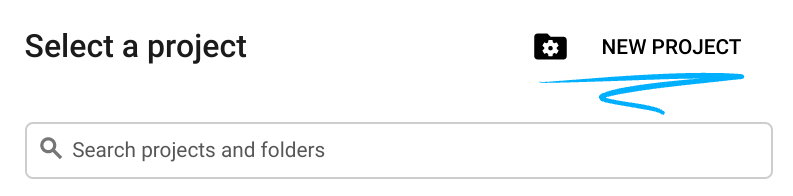
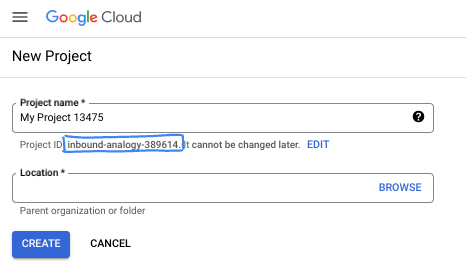
- 项目名称是此项目参与者的显示名称。它是 Google API 尚未使用的字符串。您可以随时对其进行更新。
- 项目 ID 在所有 Google Cloud 项目中是唯一的,并且是不可变的(一经设置便无法更改)。Cloud 控制台会自动生成一个唯一字符串;通常情况下,您无需关注该字符串。在大多数 Codelab 中,您都需要引用项目 ID(通常用
PROJECT_ID标识)。如果您不喜欢生成的 ID,可以再随机生成一个 ID。或者,您也可以尝试自己的项目 ID,看看是否可用。完成此步骤后便无法更改该 ID,并且此 ID 在项目期间会一直保留。 - 此外,还有第三个值,即部分 API 使用的项目编号,供您参考。如需详细了解所有这三个值,请参阅文档。
- 接下来,您需要在 Cloud 控制台中启用结算功能,以便使用 Cloud 资源/API。运行此 Codelab 应该不会产生太多的费用(如果有的话)。若要关闭资源以避免产生超出本教程范围的结算费用,您可以删除自己创建的资源或删除项目。Google Cloud 新用户符合参与 300 美元免费试用计划的条件。
3. 打开 Cloud Shell
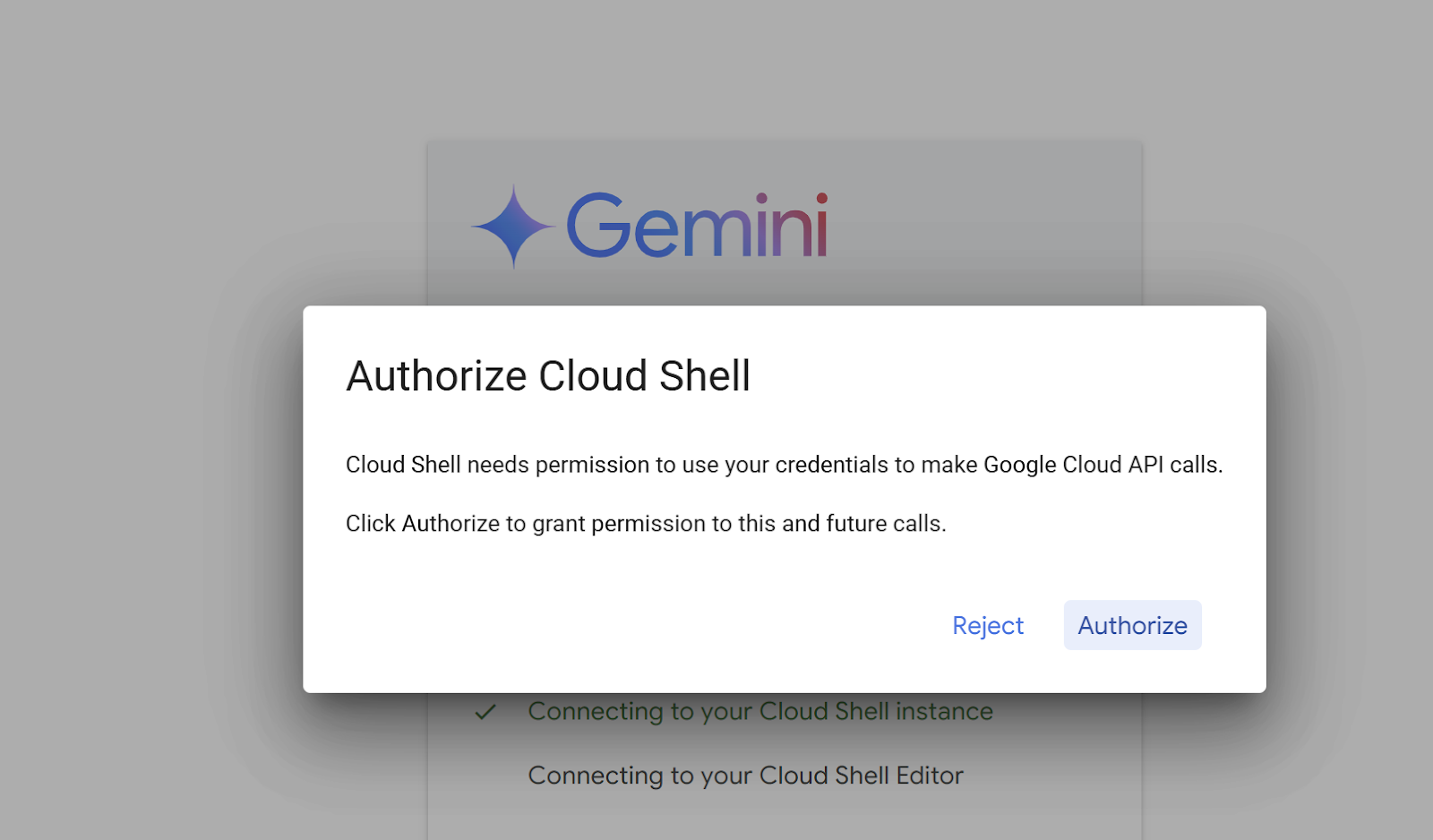
前往 https://shell.cloud.google.com/?show=ide%2Cterminal。出现提示时,点击授权。
确保编辑器和控制台均可见:
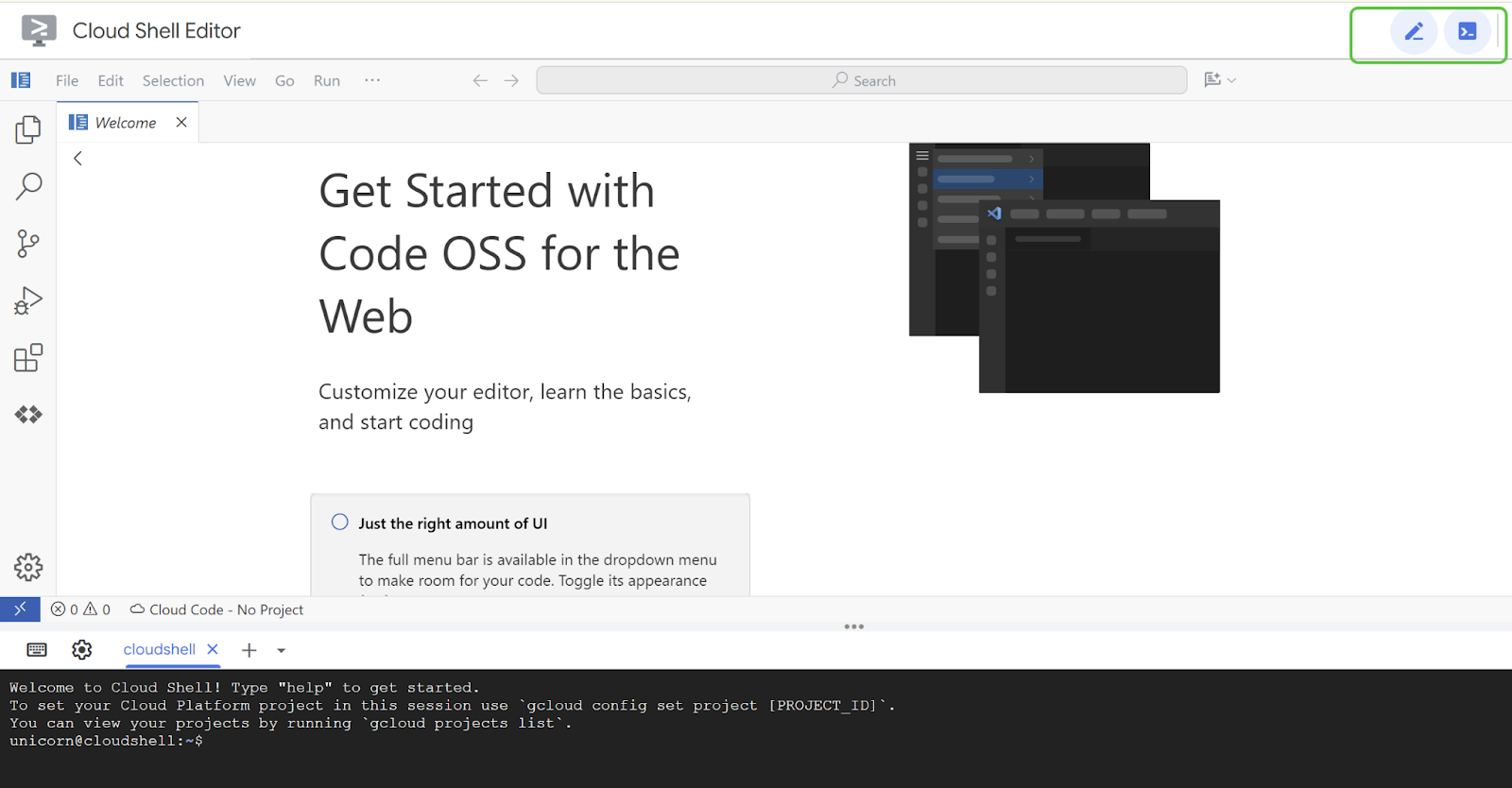
4. 创建辅助脚本
为了让此体验更顺畅,您将创建一个用于设置相关环境变量的辅助脚本。
将下方的 <<Project ID>> 替换为您的项目 ID。
将以下命令复制到 Cloud Shell 终端中,然后按 Enter 键执行命令。
gcloud config set project <<PROJECT_ID>>
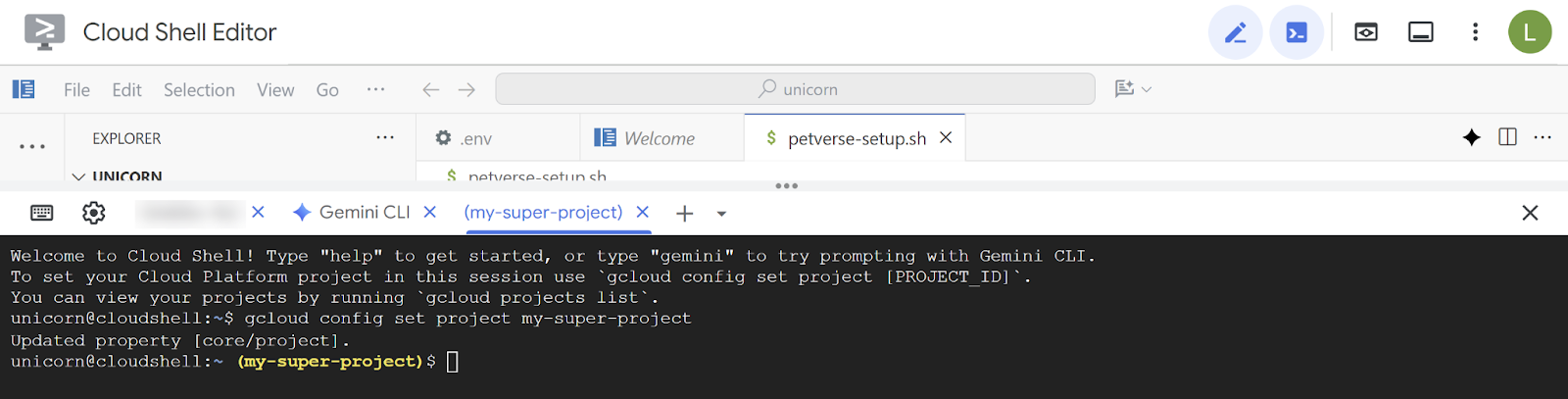
将以下命令复制到 Cloud Shell 终端中,然后按 Enter 键执行命令。此命令将启用必要的服务,并在 Cloud Shell 中创建和修改该文件。
gcloud services enable compute.googleapis.com \
                       cloudresourcemanager.googleapis.com \
                       aiplatform.googleapis.com \
                       storage-component.googleapis.com  \
                       bigqueryconnection.googleapis.com \
run.googleapis.com \
secretmanager.googleapis.com \
cloudbuild.googleapis.com \
artifactregistry.googleapis.com  \
iap.googleapis.com
edit  ~/petverse-setup.sh
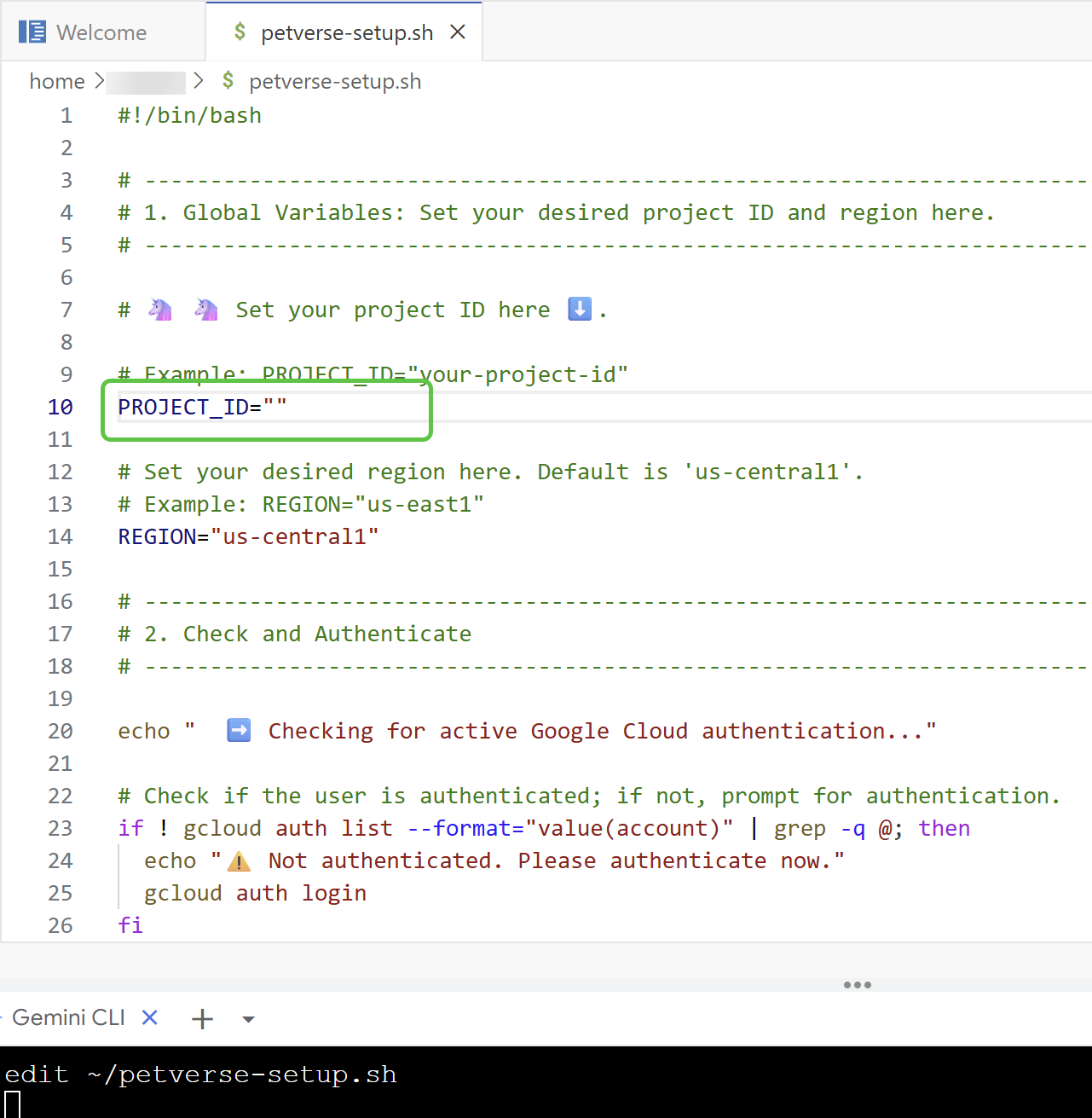
您应该会看到一个以文件名称命名的新标签页。将以下脚本粘贴到新文件中:
#!/bin/bash

# -----------------------------------------------------------------------------
# 1. Global Variables: Set your desired project ID and region here.
# -----------------------------------------------------------------------------

# 🦄 🦄 Set your project ID here ⬇️.

# Example: PROJECT_ID="your-project-id"
PROJECT_ID=""

# Set your desired region here. Default is 'us-central1'.
# Example: REGION="us-east1"
REGION="us-central1"

# -----------------------------------------------------------------------------
# 2. Check and Authenticate
# -----------------------------------------------------------------------------

echo "  ➡️   Checking for active Google Cloud authentication..."

# Check if the user is authenticated; if not, prompt for authentication.
if ! gcloud auth list --format="value(account)" | grep -q @; then
  echo "⚠️   Not authenticated. Please authenticate now."
  gcloud auth login
fi

echo "  ✅   Authentication check passed."

# -----------------------------------------------------------------------------
# 3. Get Project ID from User if not set
# -----------------------------------------------------------------------------

# If PROJECT_ID is not set in the script or as an environment variable,
# prompt the user to choose one.
if [[ -z "$PROJECT_ID" ]] && [[ -n "$DEVSHELL_PROJECT_ID" ]]; then
  PROJECT_ID=$DEVSHELL_PROJECT_ID
fi

if [[ -z "$PROJECT_ID" ]]; then
  echo "  ⚠️   Project ID is not set. Listing available projects:"

  # List projects and store them in an array.
  projects_array=($(gcloud projects list --format="value(projectId)"))

  # Check if projects were found.
  if [[ ${#projects_array[@]} -eq 0 ]]; then
    echo "  ❌   No projects found. Please ensure your account has access to projects."
    exit 1
  fi

  # Display the projects and prompt for input.
  echo " "
  echo "Available Projects:"
  for project in "${projects_array[@]}"; do
    echo "$project"
  done

  echo " "
  read -p "Please enter your desired project ID from the list above: " PROJECT_ID

  # Validate the user's input by checking if it's in the array.
  if [[ ! " ${projects_array[@]} " =~ " ${PROJECT_ID} " ]]; then
    echo "  ❌   Invalid project ID. Please run the script again and select a valid ID."
    exit 1
  fi
fi

echo "  ✅   Project ID set to: $PROJECT_ID"

# -----------------------------------------------------------------------------
# 4. Set Environment Variables
# -----------------------------------------------------------------------------

# Set the project and region for the current session.
echo "  🔄   Setting Google Cloud configuration for this session..."
gcloud config set project "$PROJECT_ID"
gcloud config set compute/region "$REGION"

echo "  ✅   Google Cloud configuration updated."
echo "Project ID: $PROJECT_ID"
echo "Region: $REGION"
echo " "
echo "  🎉 🦄 🦄   Script execution complete. You can now use Google Cloud commands in this shell session."
将 PROJECT_ID 的占位符替换为您的项目名称:
复制以下命令并在终端中执行:
chmod +x petverse-setup.sh
~/petverse-setup.sh
预期输出:

5. 创建存储分区
创建 Cloud Storage 存储分区,并将可用的媒体复制到您自己的存储分区中。您将使用此功能来存储我们可爱宠物的可用媒体内容。您还将创建一个连接,以便通过 BigQuery 访问该存储分区。
在终端中粘贴并执行以下命令:
~/petverse-setup.sh
cd ~/
gcloud storage buckets create gs://$DEVSHELL_PROJECT_ID-petverse --uniform-bucket-level-access --location=us-central1
gcloud storage cp -r gs://sample-data-and-media/petverse/* gs://$DEVSHELL_PROJECT_ID-petverse/
bq mk --dataset --location=us-central1 --project_id=$DEVSHELL_PROJECT_ID petverse
bq mk --connection --location=us-central1 --project_id=$DEVSHELL_PROJECT_ID \
--connection_type=CLOUD_RESOURCE pet-connection
echo "your bucket is gs://$DEVSHELL_PROJECT_ID-petverse "

6. 创建宠物表
现在,您将在 BigQuery 中创建一个表来存储有关宠物的信息。
在浏览器中打开新标签页。前往 https://console.cloud.google.com/bigquery。
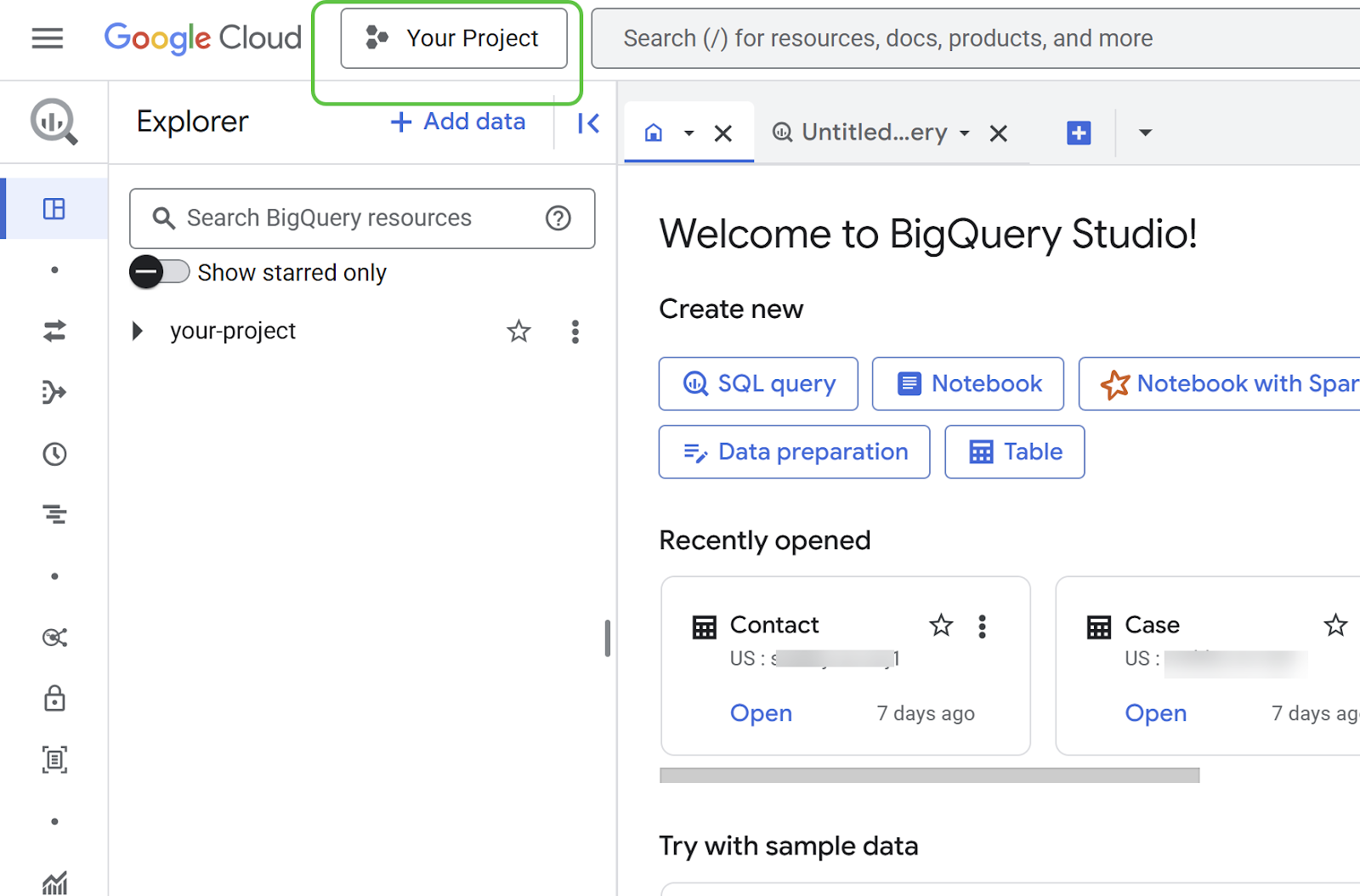
确保您在控制台中选择的项目与您一直使用的项目相同:
现在,您可以使用 pets.csv 文件中的数据创建表格。此文件包含我们宠物的名称、最喜欢的食物、玩具以及其他有趣的信息。
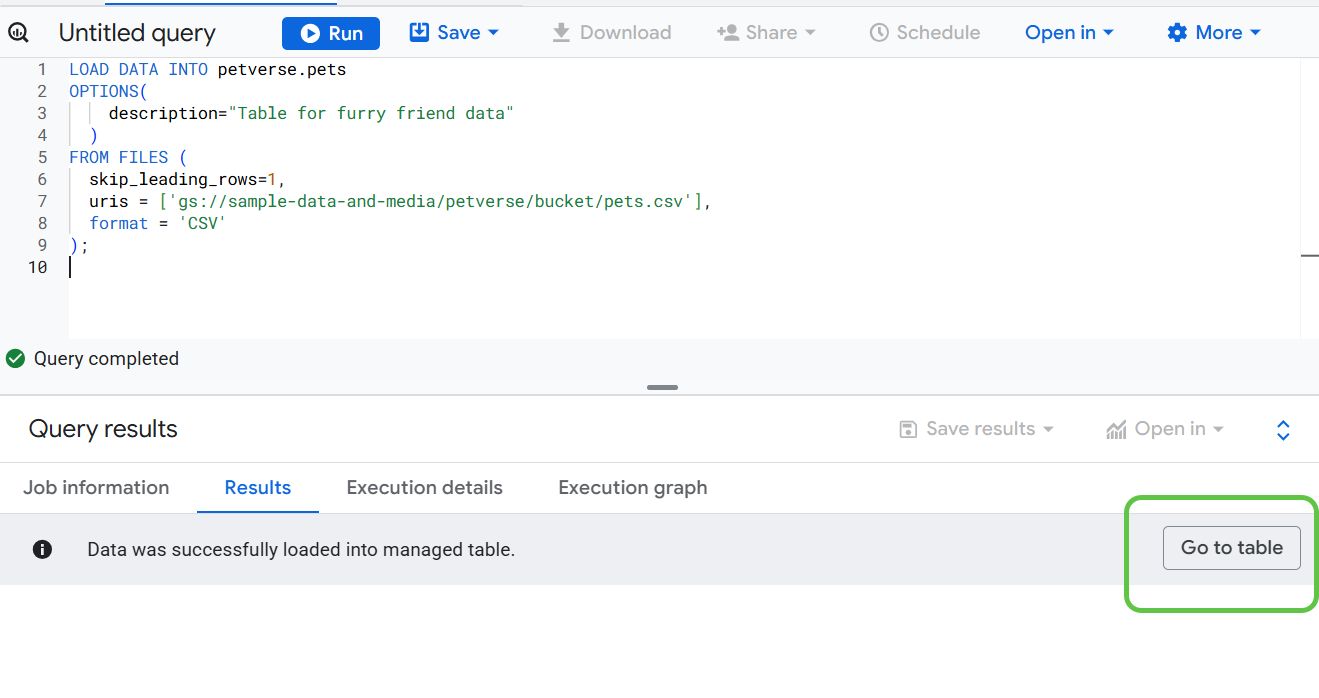
将以下代码复制到新的 SQL 查询中,以创建物理表并加载数据。
LOAD DATA INTO petverse.pets
OPTIONS(
    description="Table for furry friend data"
  )
FROM FILES (
  skip_leading_rows=1,
  uris = ['gs://<<your_bucket_name>>/pets.csv'],
  format = 'CSV'
);
将代码中的存储分区占位符替换为您在上一步中创建的存储分区。
您可以在单独的浏览器标签页中查看所有存储桶,该标签页指向以下网址:https://console.cloud.google.com/storage/browser。
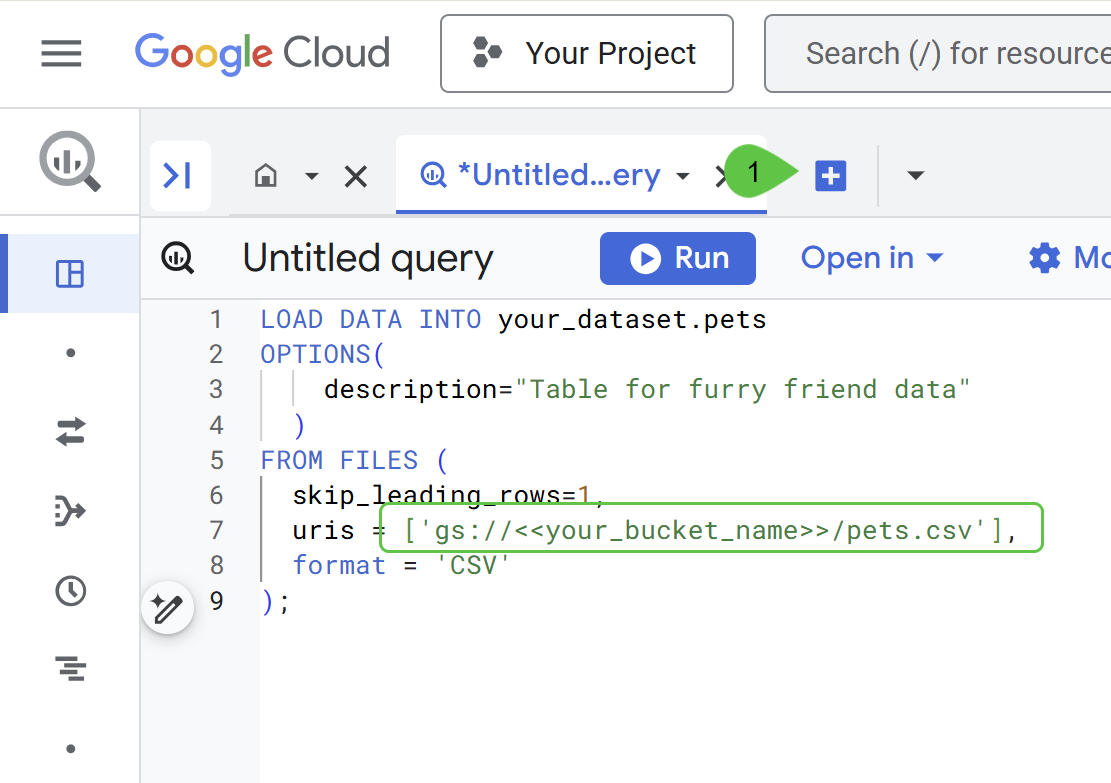
使用运行按钮执行查询。
数据成功加载后,点击前往表格。
点击预览即可查看表的内容。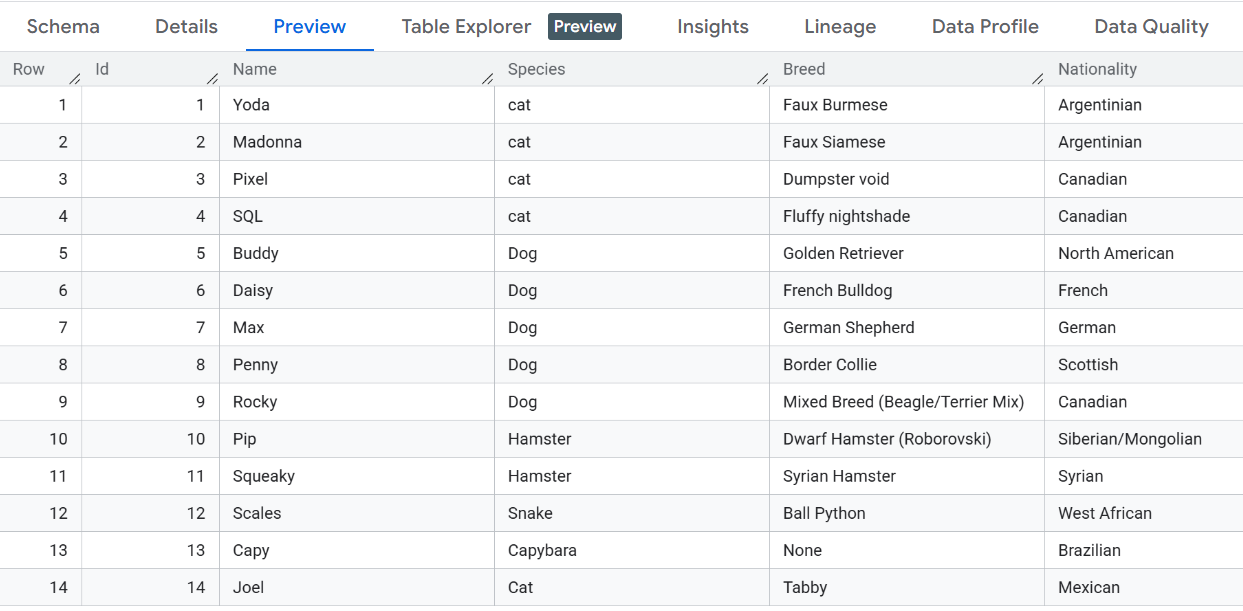
7. 将 BigQuery 连接到存储分区
如果您查看之前创建的存储分区,会发现一组与每只宠物相关的媒体文件。
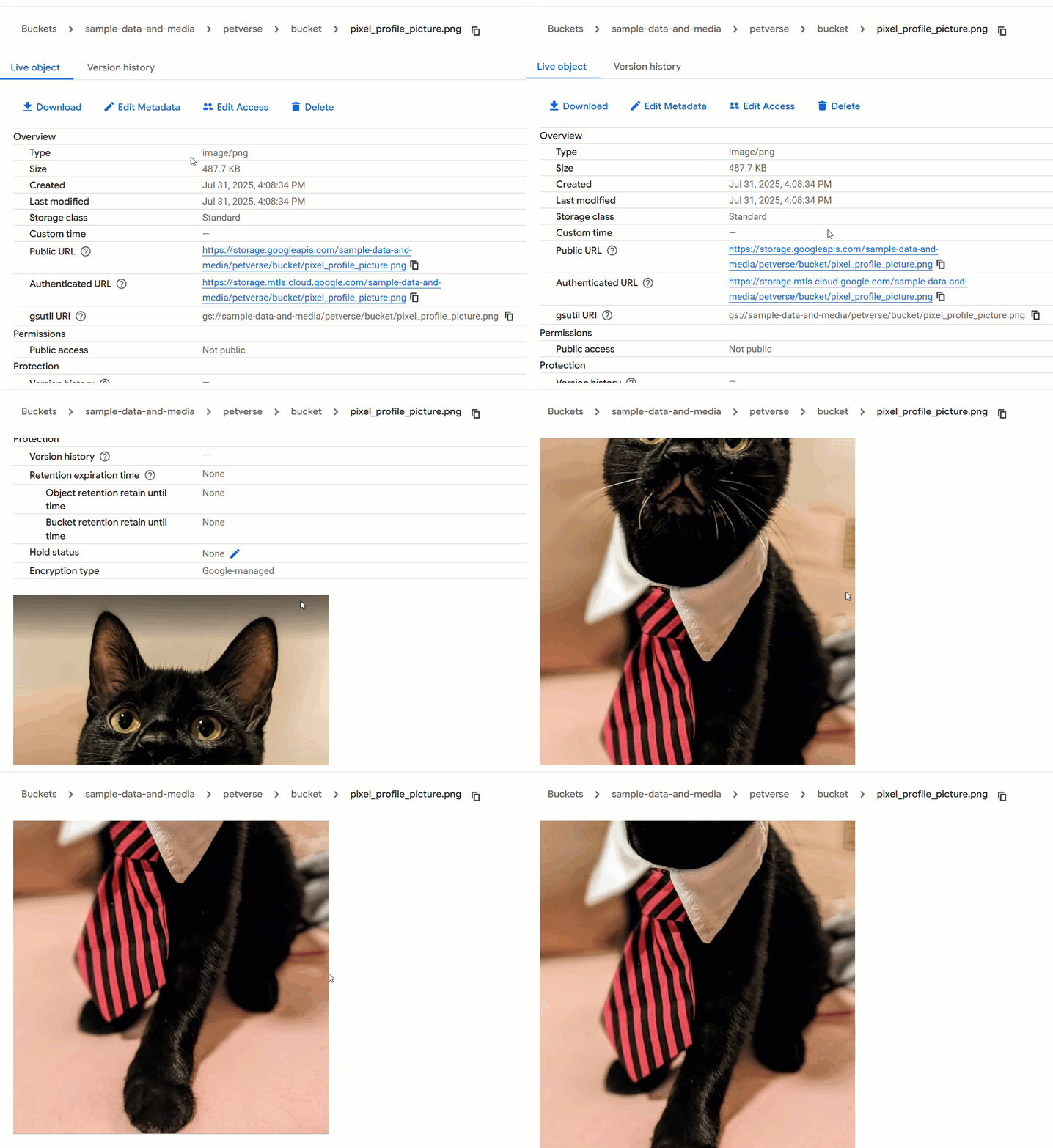
BigQuery 能够读取这些存储分区中的数据,并使用这些文件以及表中的数据。此值类型称为 ObjectRef。
点击外部连接下您之前创建的连接,获取该连接的服务账号 ID。
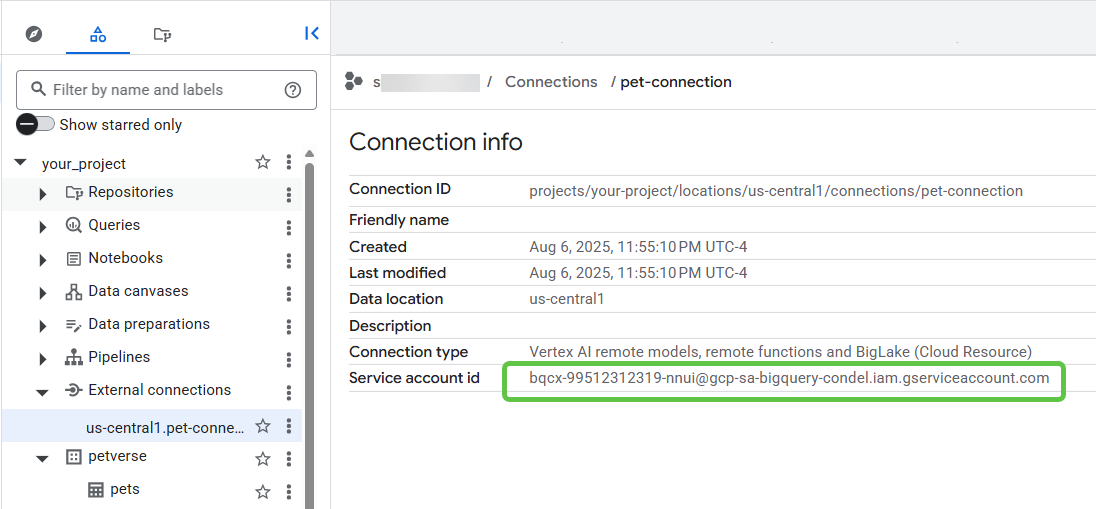
复制服务账号 ID。
在新浏览器标签页中前往 IAM 管理控制台 ( https://console.cloud.google.com/iam-admin/ )。
为服务账号授予 Storage Object Viewer 和 Vertex AI User 角色(您稍后会使用此权限)。
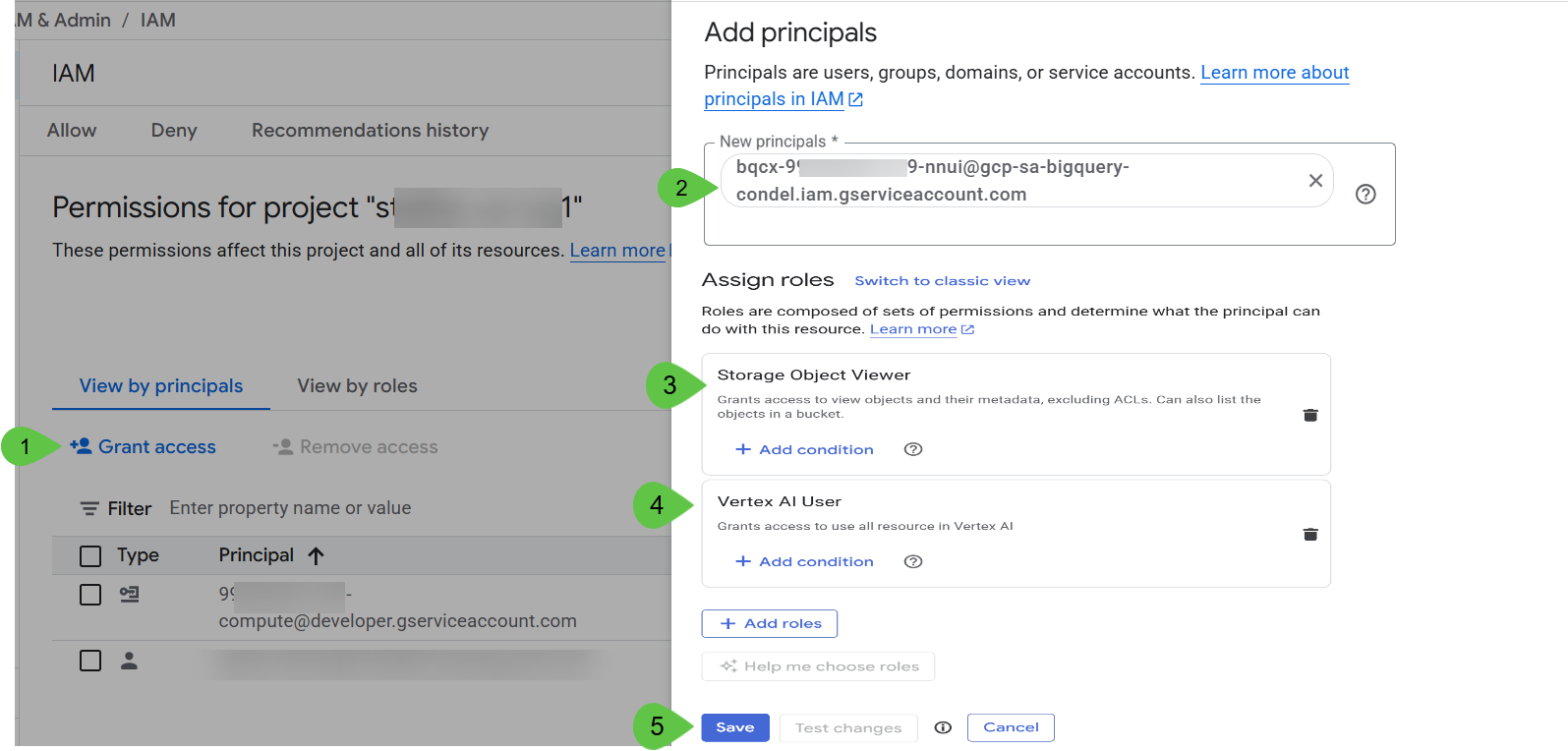
点击保存并等待几分钟。🕰️
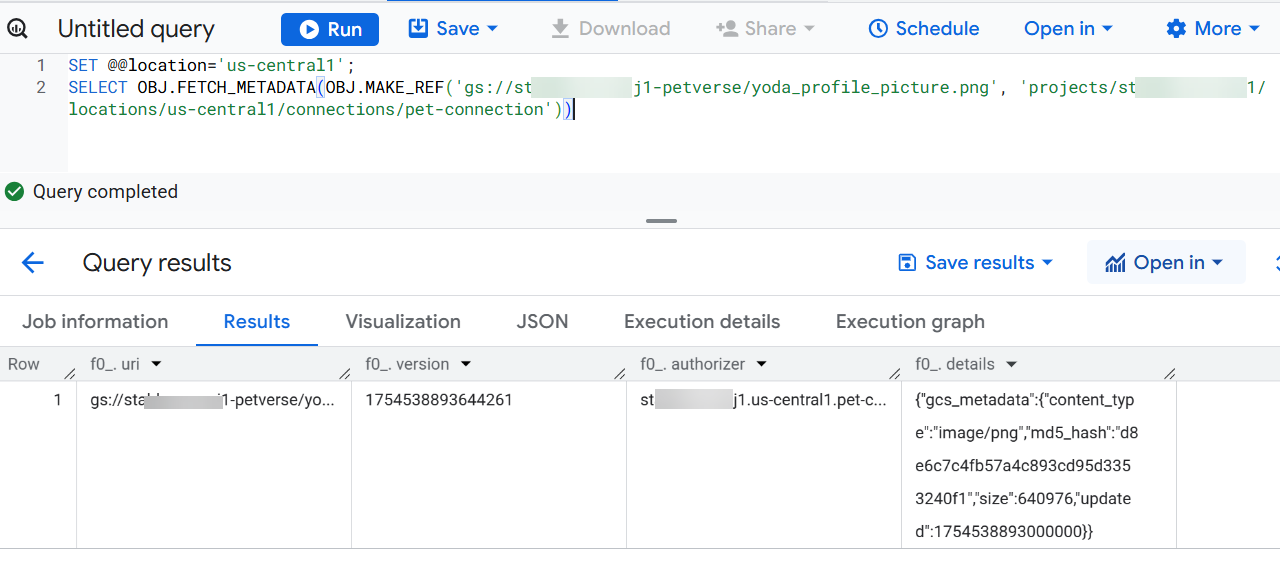
返回到“BigQuery”标签页,在 BigQuery Studio 中使用以下查询来测试 BigQuery 与存储分区之间的连接。
将 <<PROJECT_ID>> 替换为您的项目 ID。
SET @@location='us-central1';
SELECT OBJ.FETCH_METADATA(OBJ.MAKE_REF('gs://<<PROJECT_ID>>-petverse/yoda_profile_picture.png', 'projects/<<PROJECT_ID>>/locations/us-central1/connections/pet-connection'))
点击查看结果。您应该会在结果中看到元数据:
8. 将存储介质添加到结构化数据中
您可以增强 pets 表,以添加一列,其中包含每只宠物(如果有)的个人资料照片。您还将添加另一列,其中包含媒体引用数组,用于存放与每只宠物相关的所有其他文件。
访问多媒体需要连接,您在本 Codelab 的开头创建存储分区后创建了该连接。
将以下命令粘贴到 BigQuery SQL 控制台中,然后执行这些命令,以向 pets 表添加两列。
SET @@location='us-central1';
ALTER TABLE petverse.pets
ADD COLUMN IF NOT EXISTS profile_picture STRUCT<uri STRING, version STRING, authorizer STRING, details JSON>,
ADD COLUMN IF NOT EXISTS additional_media ARRAY<STRUCT<uri STRING, version STRING, authorizer STRING, details JSON>>;
复制以下语句,并将 PROJECT_ID 的占位符替换为您的项目 ID。
SET @@location='us-central1';

UPDATE petverse.pets
SET profile_picture = (SELECT OBJ.FETCH_METADATA(OBJ.MAKE_REF('gs://<<PROJECT_ID>>-petverse/yoda_profile_picture.png', 'projects/<<PROJECT_ID>>/locations/us-central1/connections/pet-connection'))),
    additional_media = [(SELECT OBJ.FETCH_METADATA(OBJ.MAKE_REF('gs://<<PROJECT_ID>>-petverse/additional_media/Yoda_asks_for_cuddles.mp4', 'projects/<<PROJECT_ID>>/locations/us-central1/connections/pet-connection')))]
WHERE Id = 1;

UPDATE petverse.pets
SET profile_picture = (SELECT OBJ.FETCH_METADATA(OBJ.MAKE_REF('gs://<<PROJECT_ID>>-petverse/madonna_profile_picture.jpg', 'projects/<<PROJECT_ID>>/locations/us-central1/connections/pet-connection'))),
    additional_media = [(SELECT OBJ.FETCH_METADATA(OBJ.MAKE_REF('gs://<<PROJECT_ID>>-petverse/additional_media/Madonna_description.wav', 'projects/<<PROJECT_ID>>/locations/us-central1/connections/pet-connection')))]
WHERE Id = 2;

UPDATE petverse.pets
SET profile_picture = (SELECT OBJ.FETCH_METADATA(OBJ.MAKE_REF('gs://<<PROJECT_ID>>-petverse/pixel_profile_picture.png', 'projects/<<PROJECT_ID>>/locations/us-central1/connections/pet-connection'))),
    additional_media = [(SELECT OBJ.FETCH_METADATA(OBJ.MAKE_REF('gs://<<PROJECT_ID>>-petverse/additional_media/pixel_thug_life.mp4', 'projects/<<PROJECT_ID>>/locations/us-central1/connections/pet-connection'))),
                       (SELECT OBJ.FETCH_METADATA(OBJ.MAKE_REF('gs://<<PROJECT_ID>>-petverse/additional_media/pixel_description.wav', 'projects/<<PROJECT_ID>>/locations/us-central1/connections/pet-connection')))]
WHERE Id = 3;

UPDATE petverse.pets
SET profile_picture = (SELECT OBJ.FETCH_METADATA(OBJ.MAKE_REF('gs://<<PROJECT_ID>>-petverse/sql_profile_picture.png', 'projects/<<PROJECT_ID>>/locations/us-central1/connections/pet-connection'))),
    additional_media = [(SELECT OBJ.FETCH_METADATA(OBJ.MAKE_REF('gs://<<PROJECT_ID>>-petverse/additional_media/SQL_description.wav', 'projects/<<PROJECT_ID>>/locations/us-central1/connections/pet-connection'))),
                       (SELECT OBJ.FETCH_METADATA(OBJ.MAKE_REF('gs://<<PROJECT_ID>>-petverse/additional_media/SQL_favorite_toy.mp4', 'projects/<<PROJECT_ID>>/locations/us-central1/connections/pet-connection')))]
WHERE Id = 4;

UPDATE petverse.pets
SET profile_picture = (SELECT OBJ.FETCH_METADATA(OBJ.MAKE_REF('gs://<<PROJECT_ID>>-petverse/buddy_golden_retriever.png', 'projects/<<PROJECT_ID>>/locations/us-central1/connections/pet-connection'))),
    additional_media = NULL
WHERE Id = 5;

UPDATE petverse.pets
SET profile_picture = (SELECT OBJ.FETCH_METADATA(OBJ.MAKE_REF('gs://<<PROJECT_ID>>-petverse/daisy_french_bulldog.png', 'projects/<<PROJECT_ID>>/locations/us-central1/connections/pet-connection'))),
    additional_media = NULL
WHERE Id = 6;

UPDATE petverse.pets
SET profile_picture = (SELECT OBJ.FETCH_METADATA(OBJ.MAKE_REF('gs://<<PROJECT_ID>>-petverse/max_german_shepherd.png', 'projects/<<PROJECT_ID>>/locations/us-central1/connections/pet-connection'))),
    additional_media = [(SELECT OBJ.FETCH_METADATA(OBJ.MAKE_REF('gs://<<PROJECT_ID>>-petverse/additional_media/max_description_tells_jokes.mp4', 'projects/<<PROJECT_ID>>/locations/us-central1/connections/pet-connection')))]
WHERE Id = 7;

UPDATE petverse.pets SET profile_picture = NULL, additional_media = NULL WHERE Id = 8;

UPDATE petverse.pets SET profile_picture = NULL, additional_media = [(SELECT OBJ.FETCH_METADATA(OBJ.MAKE_REF('gs://<<PROJECT_ID>>-petverse/additional_media/rocky_description.mp4', 'projects/<<PROJECT_ID>>/locations/us-central1/connections/pet-connection')))] WHERE Id = 9;

UPDATE petverse.pets
SET profile_picture = (SELECT OBJ.FETCH_METADATA(OBJ.MAKE_REF('gs://<<PROJECT_ID>>-petverse/pip_hamster.png', 'projects/<<PROJECT_ID>>/locations/us-central1/connections/pet-connection'))),
    additional_media = [(SELECT OBJ.FETCH_METADATA(OBJ.MAKE_REF('gs://<<PROJECT_ID>>-petverse/additional_media/pip_Hamster_Wheel_Video_Generated.mp4', 'projects/<<PROJECT_ID>>/locations/us-central1/connections/pet-connection')))]
WHERE Id = 10;

UPDATE petverse.pets SET profile_picture = NULL, additional_media = NULL WHERE Id = 11;

UPDATE petverse.pets
SET profile_picture = (SELECT OBJ.FETCH_METADATA(OBJ.MAKE_REF('gs://<<PROJECT_ID>>-petverse/scales_snake.png', 'projects/<<PROJECT_ID>>/locations/us-central1/connections/pet-connection'))),
    additional_media = NULL
WHERE Id = 12;

UPDATE petverse.pets SET profile_picture = NULL, additional_media = NULL WHERE Id = 13;

UPDATE petverse.pets
SET profile_picture = (SELECT OBJ.FETCH_METADATA(OBJ.MAKE_REF('gs://<<PROJECT_ID>>-petverse/Joel_Profile_Picture.jpg', 'projects/<<PROJECT_ID>>/locations/us-central1/connections/pet-connection'))),
    additional_media = [(SELECT OBJ.FETCH_METADATA(OBJ.MAKE_REF('gs://<<PROJECT_ID>>-petverse/additional_media/Joel_Catwalk.jpg', 'projects/<<PROJECT_ID>>/locations/us-central1/connections/pet-connection'))),
                       (SELECT OBJ.FETCH_METADATA(OBJ.MAKE_REF('gs://<<PROJECT_ID>>-petverse/additional_media/Joel_Flowers.jpg', 'projects/<<PROJECT_ID>>/locations/us-central1/connections/pet-connection'))),
                       (SELECT OBJ.FETCH_METADATA(OBJ.MAKE_REF('gs://<<PROJECT_ID>>-petverse/additional_media/Joel_Plays.jpg', 'projects/<<PROJECT_ID>>/locations/us-central1/connections/pet-connection')))]
WHERE Id = 14;
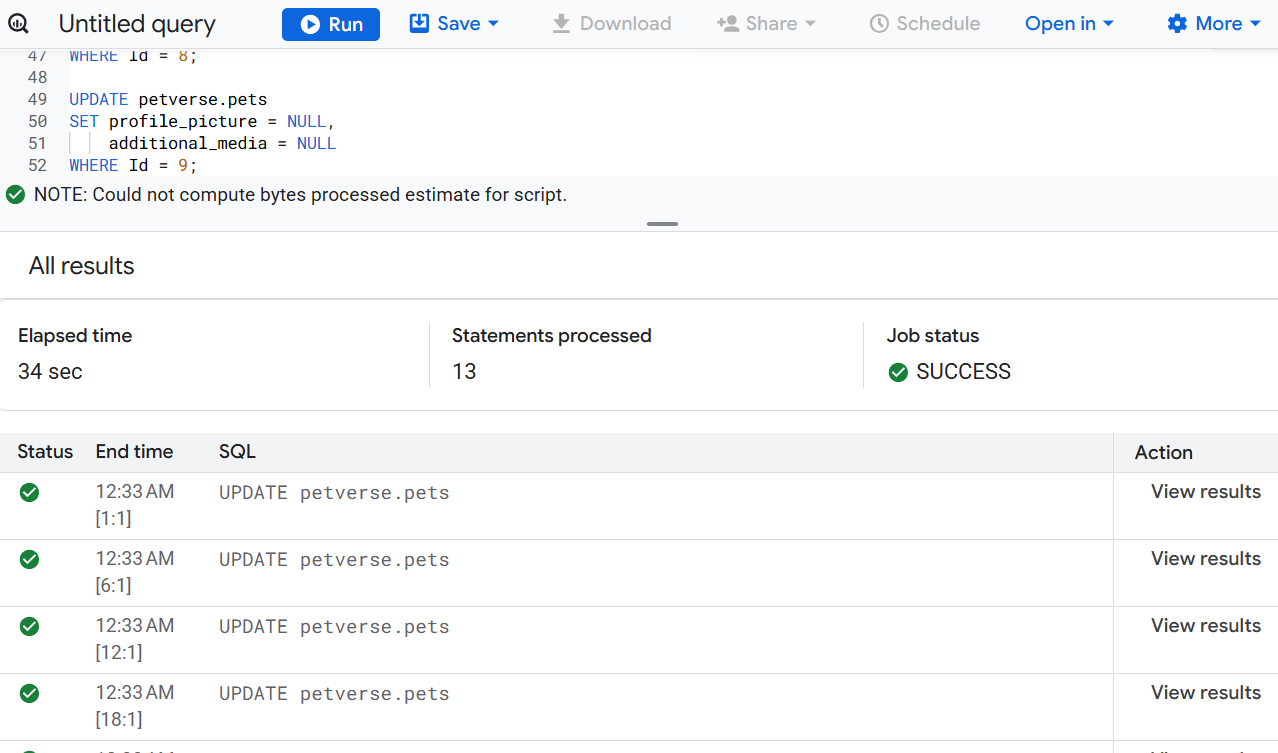
运行语句。几分钟后,您应该会看到执行成功:
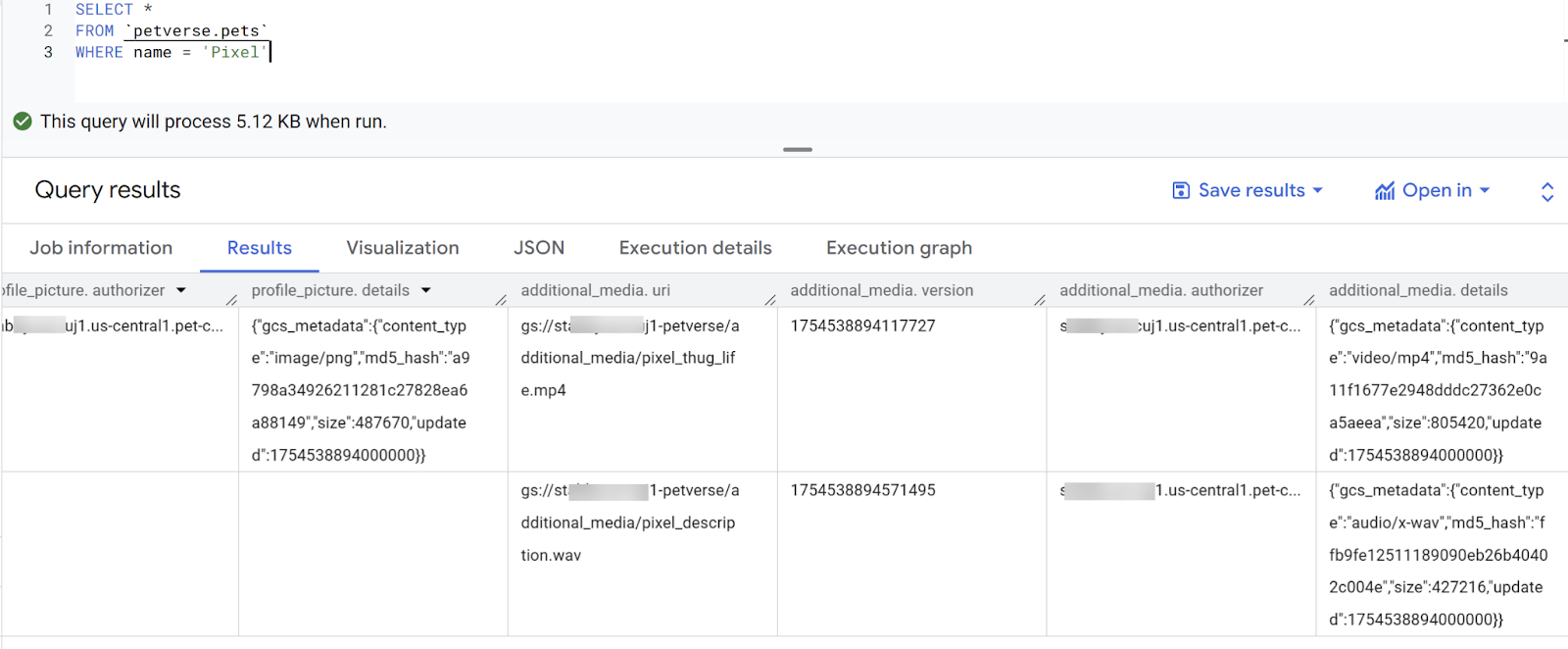
使用表格预览检查结果。您应该会看到名为 Pixel 的猫的现有个人资料照片和其他媒体的元数据。
SELECT *
FROM `petverse.pets`
WHERE name = 'Pixel'
9. 生成宠物说明
如果您预览 pets 表,会发现有些宠物(例如 Yoda、Pixel 或 Rocky)没有自己最喜欢的食物或玩具。
这些问题的答案可能就在与这些宠物相关的视频和音频中。您将使用嵌入式 AI 函数进行检查。
使用以下语句对此进行测试:
SELECT name,
AI.GENERATE(
   prompt=> ('What are this pet\'s favorite toy and favorite foods', additional_media ),
    connection_id => 'us-central1.pet-connection',
    endpoint => 'gemini-2.5-flash',
output_schema => 'food STRING, toy STRING')
FROM petverse.pets
WHERE name = 'Rocky'
您可以在存储分区中看到 Rocky 的视频。
使用以下语句更新缺失的说明:
UPDATE petverse.pets AS p
SET FavoriteFood = aigen.food
FROM
  (
    SELECT Id, name,
          AI.GENERATE(
                prompt=> ('What are this pet\'s favorite toy and favorite foods', additional_media ),
                connection_id => 'us-central1.pet-connection',
                endpoint => 'gemini-2.5-flash',
                output_schema => 'food STRING').food
    FROM petverse.pets ) AS  aigen
WHERE p.Id = aigen.Id
AND p.FavoriteFood IS NULL
AND p.additional_media IS NOT NULL
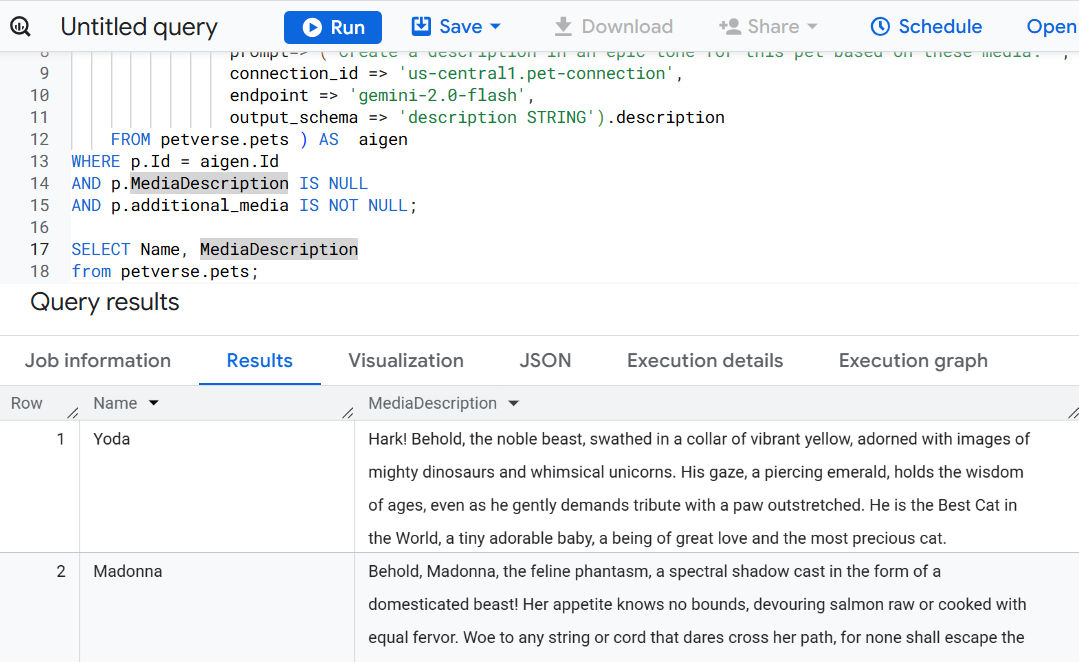
使用以下语句根据宠物多媒体内容在新的列中创建宠物说明:
ALTER TABLE petverse.pets ADD COLUMN MediaDescription STRING;
UPDATE petverse.pets AS p
SET MediaDescription = aigen.description
FROM
  (
    SELECT Id, name,
          AI.GENERATE(
                prompt=> ('Create a description in an epic tone for this pet based on these media: ', additional_media ),
                connection_id => 'us-central1.pet-connection',
                endpoint => 'gemini-2.5-flash',
                output_schema => 'description STRING').description
    FROM petverse.pets ) AS  aigen
WHERE p.Id = aigen.Id
AND p.MediaDescription IS NULL
AND p.additional_media IS NOT NULL
几分钟后,您应该会看到一些广告素材说明:
10. 创建嵌入
创建一个表来存储个人资料照片以及说明和兴趣爱好的嵌入,以便在语义搜索中使用。我们将使用矢量搜索来查找宠物之间的相似性。
SET @@location='us-central1';

CREATE OR REPLACE MODEL petverse.multimodalembedding
  REMOTE WITH CONNECTION `us-central1.pet-connection`
  OPTIONS(ENDPOINT = 'multimodalembedding@001');

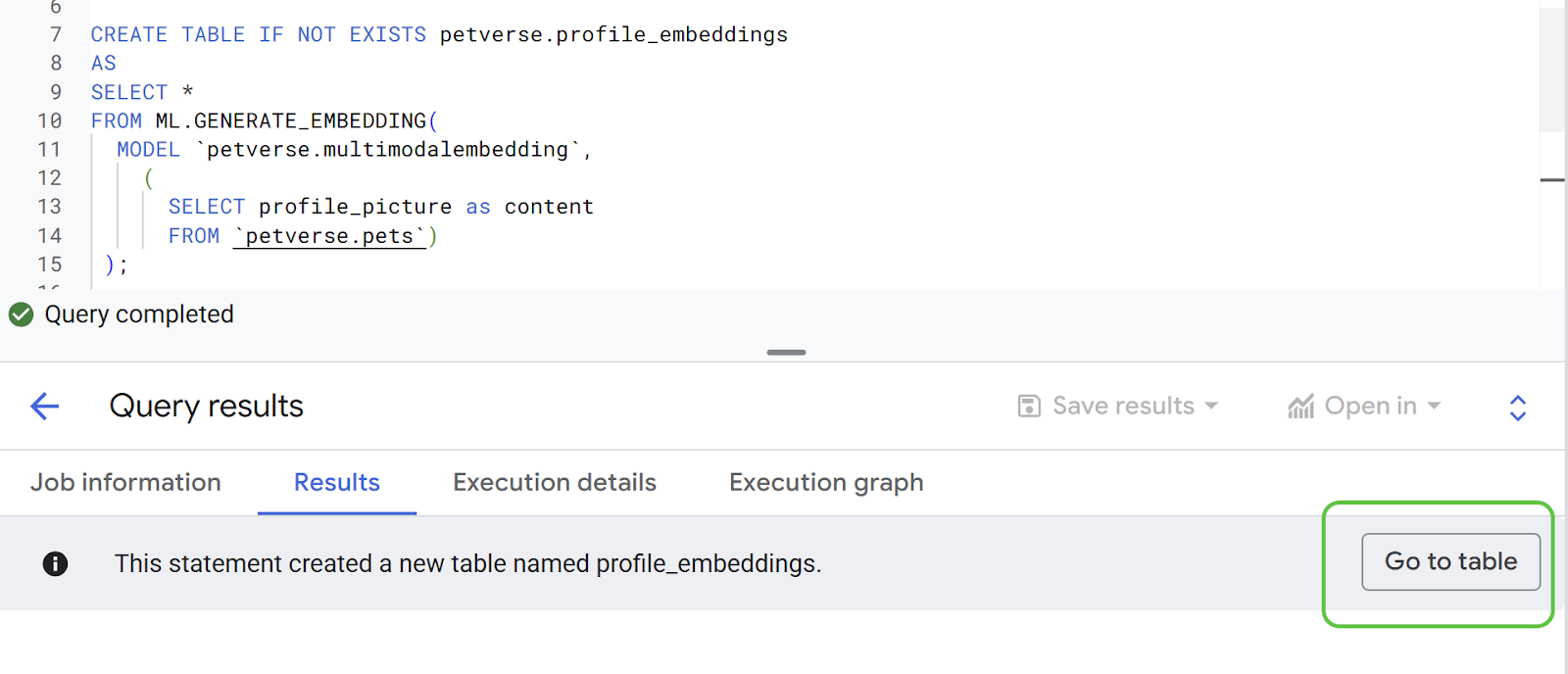
CREATE TABLE IF NOT EXISTS petverse.profile_embeddings
AS
SELECT *
FROM ML.GENERATE_EMBEDDING(
  MODEL petverse.multimodalembedding,
    (
      SELECT profile_picture as content,
      Id
      FROM petverse.pets)
 );

CREATE OR REPLACE MODEL petverse.textembedding
  REMOTE WITH CONNECTION `us-central1.pet-connection`
  OPTIONS (ENDPOINT = 'text-embedding-005');

CREATE OR REPLACE TABLE petverse.text_embeddings AS
SELECT * FROM ML.GENERATE_EMBEDDING(
  MODEL petverse.textembedding,
  (
    SELECT CONCAT(AdoptionStory, ' . This pet\'s hobby is: ', Hobby, ' and their nickname(s) is: ', COALESCE(Nicknames, Name)) AS content,
    Id, Name
    FROM petverse.pets
    WHERE LENGTH(AdoptionStory) > 0 AND LENGTH(Hobby) > 0
  )
)
WHERE LENGTH(ml_generate_embedding_status) = 0;
在“结果”标签页中查看新表。
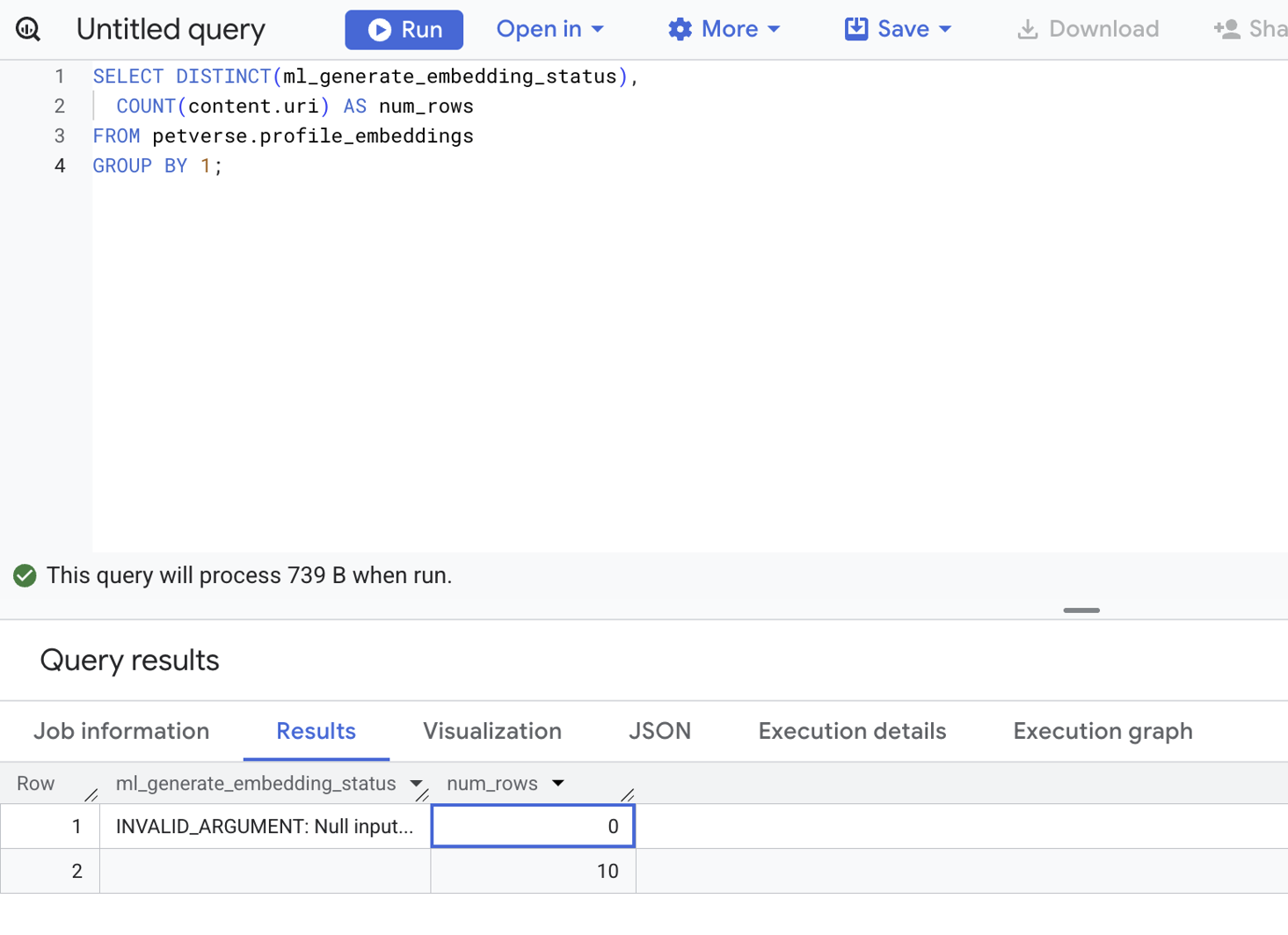
使用以下语句检查所有嵌入的状态:
SELECT DISTINCT(ml_generate_embedding_status),
  COUNT(content.uri) AS num_rows
FROM petverse.profile_embeddings
GROUP BY 1;
如果有任何错误,您会看到状态不为空白。这是正确的输出 - 没有错误记录**:**
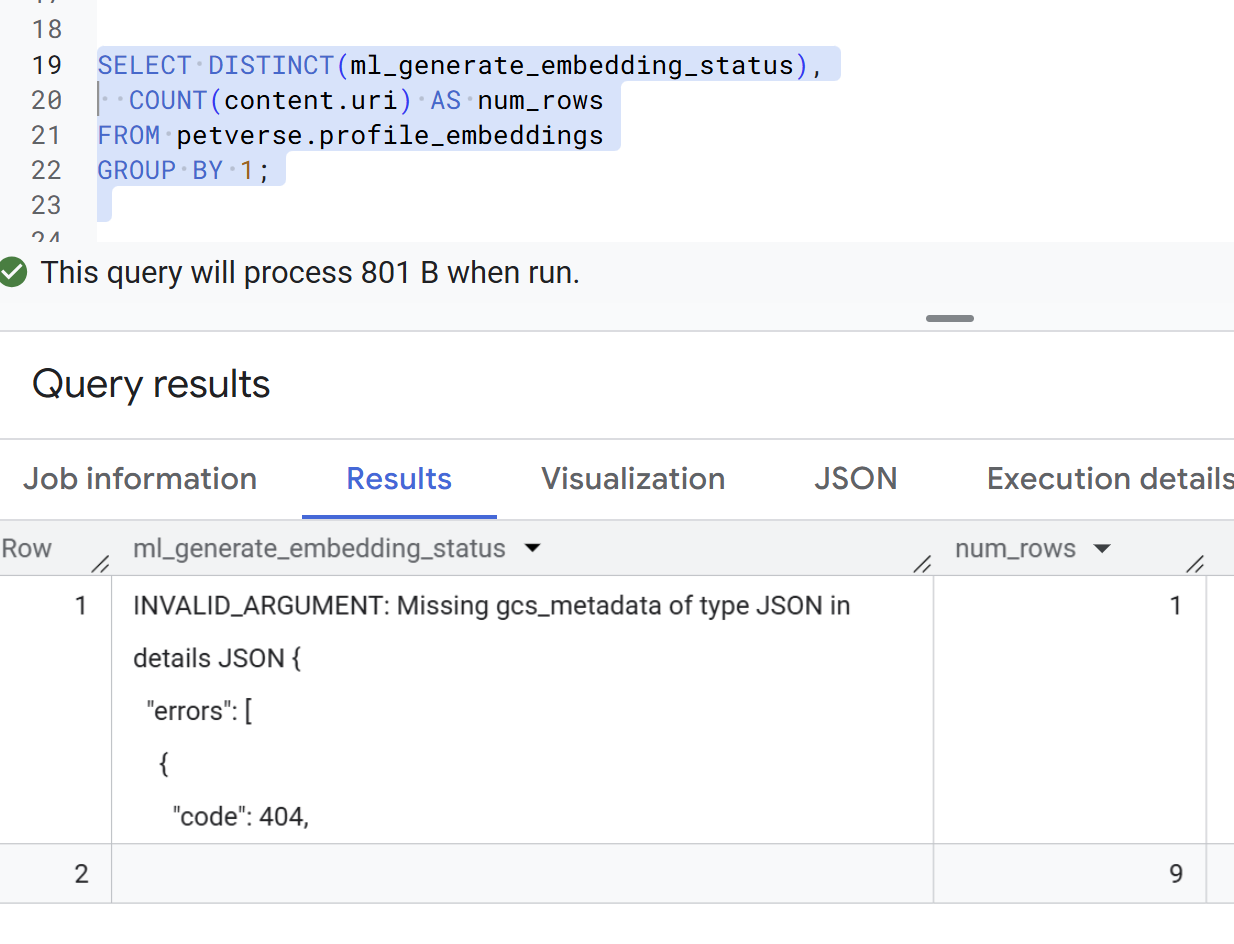
以下是包含错误的记录示例。这些错误不应出现,但需要在继续执行后续步骤之前进行修复:
查找类似宠物
默认数据集中包含类似的宠物。以下是两个示例 Pixel(ID:3)和 SQL(ID:4):
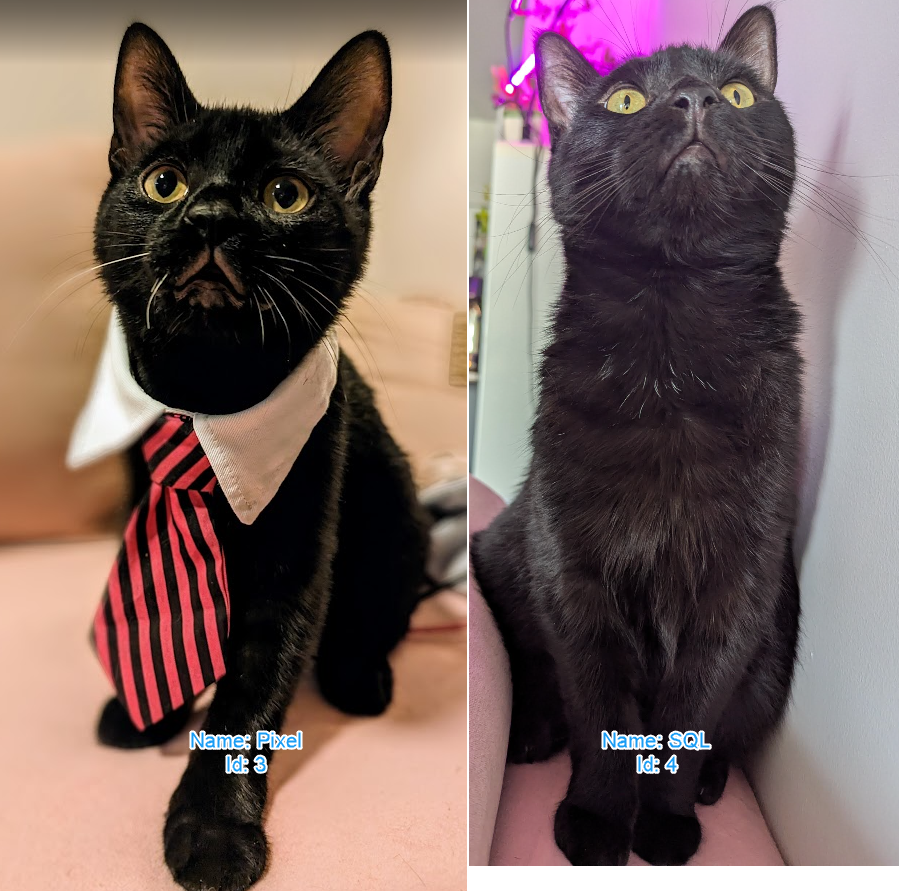
您可以使用嵌入之间的距离来计算相似的宠物:
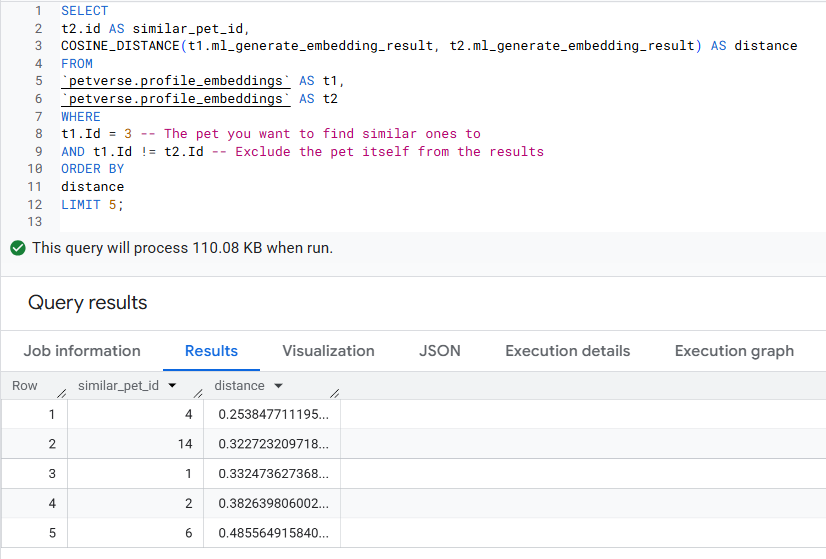
SELECT
t2.id AS similar_pet_id,
COSINE_DISTANCE(t1.ml_generate_embedding_result, t2.ml_generate_embedding_result) AS distance
FROM
petverse.profile_embeddings AS t1,
petverse.profile_embeddings AS t2
WHERE
t1.Id = 3 -- The pet you want to find similar ones to
AND t1.Id != t2.Id -- Exclude the pet itself from the results
AND t1.content.uri IS NOT NULL
AND t2.content.uri IS NOT NULL
ORDER BY
distance
LIMIT 5;
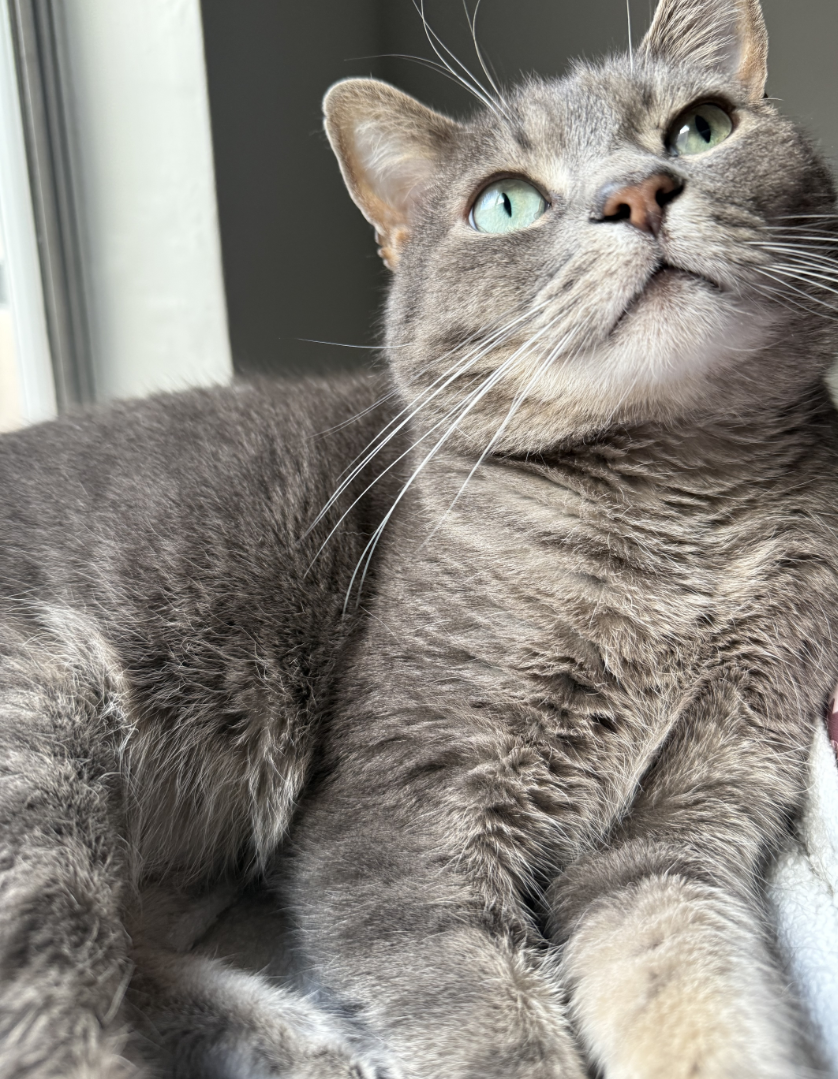
您应该会获得结果,其中包含彼此相似的图片 ID。这会包含图片中的所有内容。在此示例中,Pixel 和 SQL 相似,而下一个最相似的宠物是 Joel(ID:14)。
以下是 Joel 的照片,供您参考:
试用语义搜索
您可以使用 VECTOR_SEARCH 函数在文本嵌入中进行语义搜索。如果此表的规模更大,您将需要为嵌入创建索引。
SELECT query.query, base.content, base.Name
FROM VECTOR_SEARCH(
  TABLE `petverse.text_embeddings`, 'ml_generate_embedding_result',
  (
  SELECT ml_generate_embedding_result, content AS query
  FROM ML.GENERATE_EMBEDDING(
  MODEL `petverse.textembedding`,
  (SELECT 'Pets who like to relax' AS content))
  ),
  top_k => 5, options => '{"fraction_lists_to_search": 0.50}')
ORDER BY distance DESC
尝试更改语义搜索字词 (Pets who like to relax) 以及参数 fraction_lists_to_search,看看会发生什么情况。您可以点击此处详细了解这些函数。
11. 以氛围编程方式制作个人资料页面
您将使用 Cloud Shell 中的 Gemini CLI 快速启动一个简单的演示版 Web 应用。此 Web 应用的提示已简化,旨在演示 Petverse 如何实现。
返回到 Cloud Shell。仅在全屏模式下使用控制台可获得更好的体验:
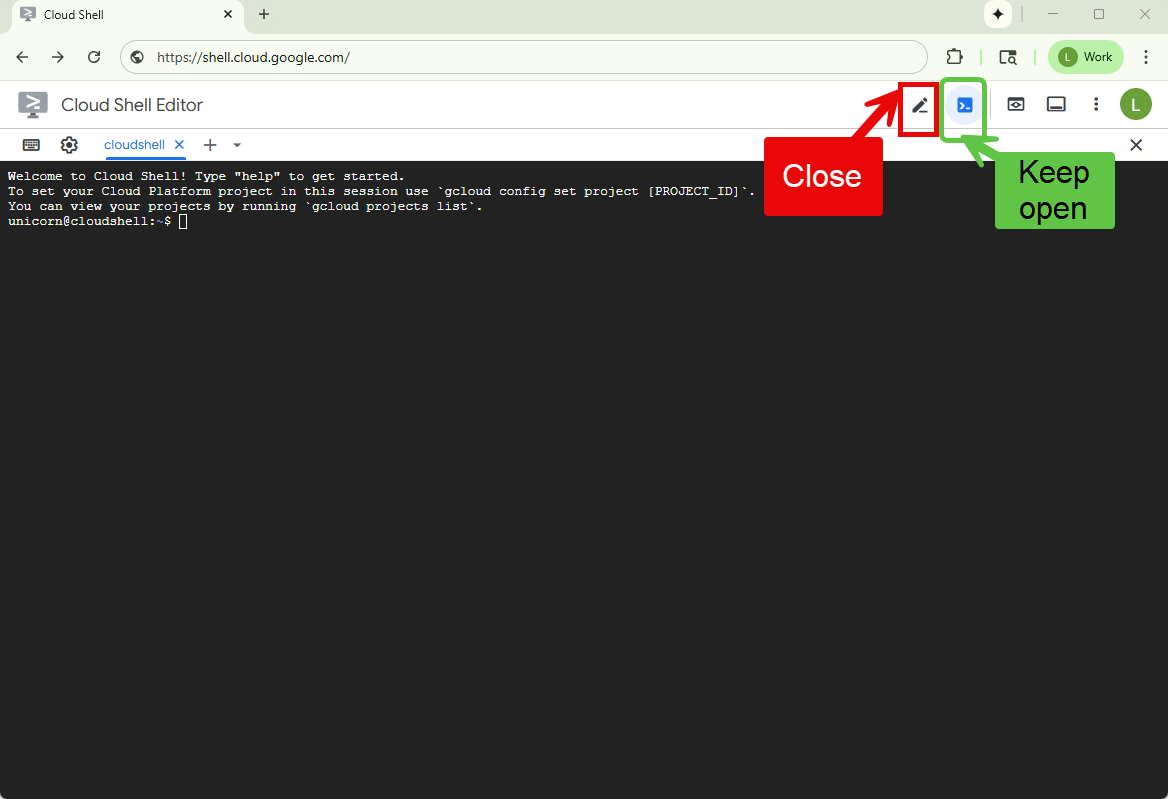
运行初始化脚本以确保已设置环境变量,创建一个目录来包含此项目并执行 Gemini CLI:
~/petverse-setup.sh
mkdir petverse-profiles
cd petverse-profiles
gemini
您应该会看到 Gemini 的 CLI:
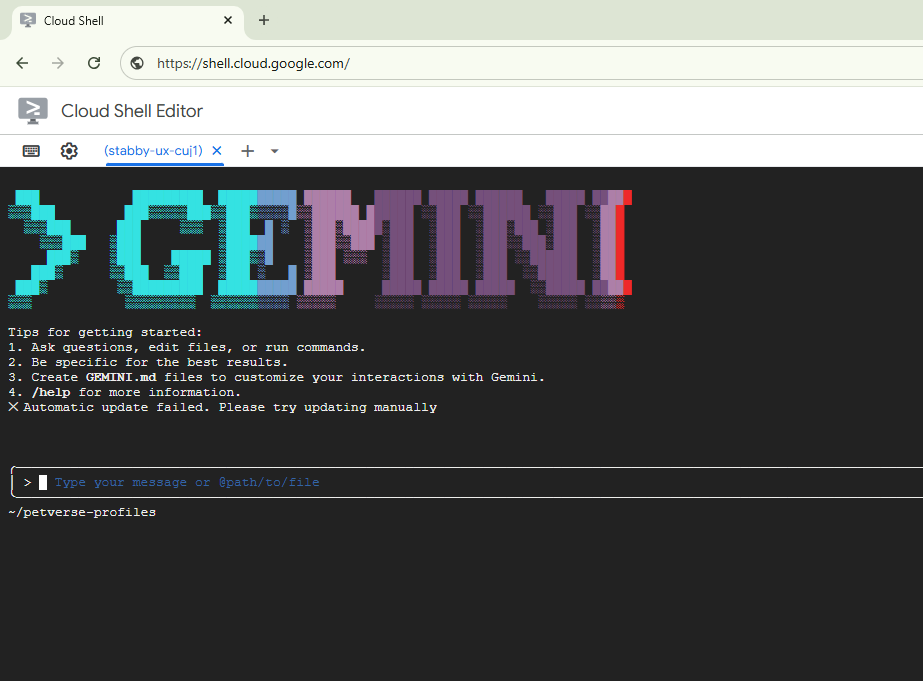
将以下提示中的存储分区名称替换为您的存储分区名称。
将提示粘贴到 Gemini 命令行中。
You are a fullstack engineer creating an application to display the profiles of cats, dogs and other pets stored in BigQuery. The table where these are stored is called pets, in the dataset petverse.
1.Application Requirements: Display the pets with their profile picture, all the other information in the Pets table, and other media that may be available. The pictures are in a GCS bucket, the field in the table pets profile_picture.uri contains the URI for the storage bucket of that profile picture.  The field additional_media is an array of objectref that contains multiple URI to different media stored in a GCS bucket.
Important: In the code, in the values for the URIs retrieved from BigQuery, replace gs://<<YOUR_PROJECT_ID>>-petverse/ with https://storage.mtls.cloud.google.com/<<YOUR_PROJECT_ID>>-petverse/ as follows: replace('gs://', 'https://storage.mtls.cloud.google.com/'). Use the python library. Media can be pictures, videos and audio. Consider these formats in the code. Some pets may not have profile pictures or additional media.
2.Hosting: Create a web application hosted in a single container and service in Cloud Run, use the following syntax to deploy it using IAP. IMPORTANT: DO NOT ADD IAM AUTHENTICATION AND DO NOT ALLOW UNAUTHENTICATED: gcloud beta run deploy SERVICE_NAME  --region=REGION --image=IMAGE_URL  --no-allow-unauthenticated --iap
3.Database access: Display similar pets based on a similarity between embeddings in table petverse.profile_embeddings.
Here's the schema for the pets table in CSV format (Field name, type, mode):
Id,INTEGER,NULLABLE
Name,STRING,NULLABLE
Species,STRING,NULLABLE
Breed,STRING,NULLABLE
Nationality,STRING,NULLABLE
Nicknames,STRING,NULLABLE
Hobby,STRING,NULLABLE
AdoptionStory,STRING,NULLABLE
FavoriteFood,STRING,NULLABLE
FavoriteToy,STRING,NULLABLE
profile_picture,RECORD,NULLABLE
additional_media,RECORD,REPEATED
profile_embeddings,FLOAT,REPEATED
Here's a sample query to check for similarity:
SELECT
t2.id AS similar_pet_id,
COSINE_DISTANCE(t1.ml_generate_embedding_result, t2.ml_generate_embedding_result) AS distance
FROM
petverse.profile_embeddings AS t1,
petverse.profile_embeddings AS t2
WHERE
t1.Id = 3 -- The pet you want to find similar ones to
AND t1.Id != t2.Id -- Exclude the pet itself from the results
AND t1.content.uri IS NOT NULL
AND t2.content.uri IS NOT NULL
ORDER BY
distance
LIMIT 5;
Complement the profile of each pet with a description. Here's an example of the access to such table:
SELECT Name, MediaDescription from petverse.pets;
4.For each access to BigQuery, show the SQL statement that is used in the console logs.
5.Search functionality: Add a search bar for a semantic search for pets. There's a text embedding for the Adoption story, the pet's past-time or hobby and their nicknames in the table: petverse.text_embeddings . This is a sample of semantic search:
SELECT query.query, base.content, base.Name FROM VECTOR_SEARCH(TABLE `petverse.text_embeddings`, 'ml_generate_embedding_result', ( SELECT ml_generate_embedding_result, content AS query FROM ML.GENERATE_EMBEDDING(MODEL `petverse.textembedding`,(SELECT 'Pets who like to relax' AS content))), top_k => 5, options => '{"fraction_lists_to_search": 0.50}') ORDER BY distance DESC
6.Use Python for the backend. Generate the deployment scripts for an authenticated service using IAP with the flags --no-allow-unauthenticated --iap
7. Make the UI look like a modern art museum.
8. Use the gunicorn library. Validate version dependencies.
现在,你将开启自己的冒险之旅。系统会显示方案,并要求您在整个过程中进行确认。
代码和部署在首次尝试时就能正常运行的可能性很小。您需要与 Gemini CLI 迭代,直到它给出正确的答案。
如果您发现该进程陷入循环,请按 CTRL/Command + C 停止该进程,调查问题,然后再次提示。
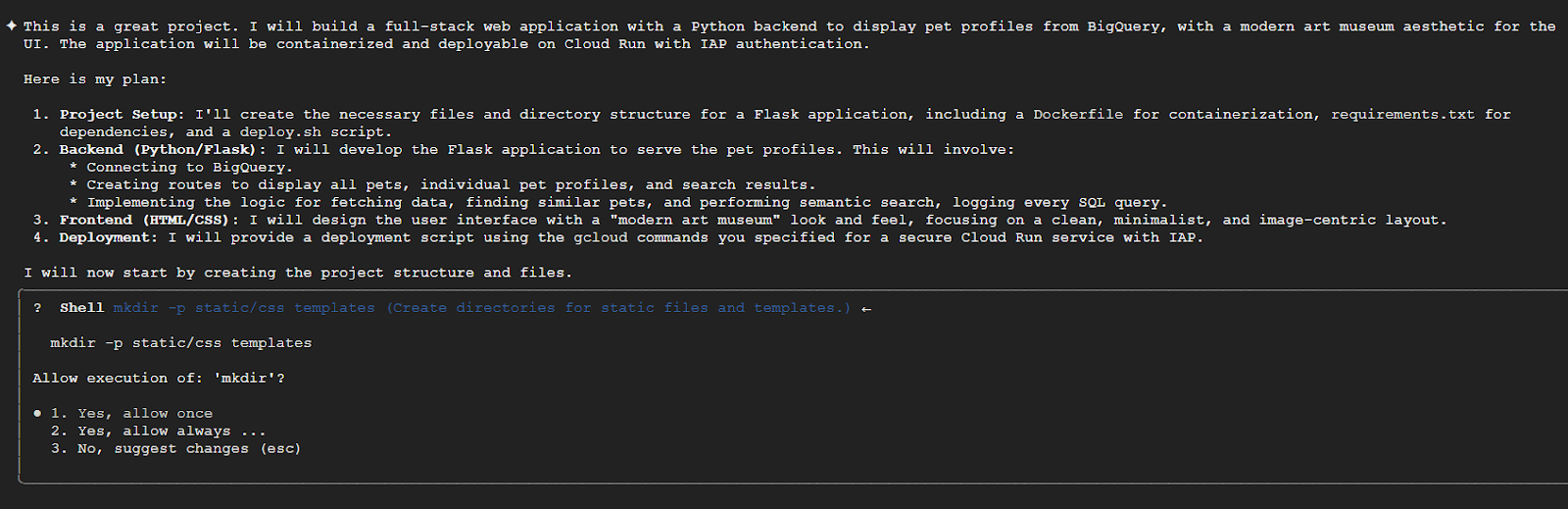
我们建议您仔细阅读每条确认信息,了解 CLI 将执行的操作:
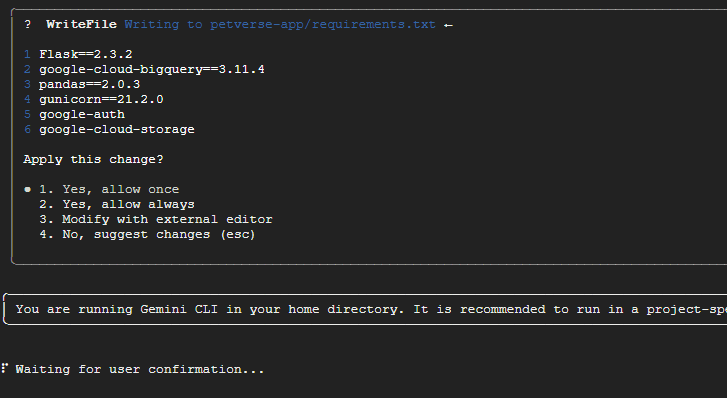
几分钟后,应用应可供执行。有时,控制台似乎卡住了:
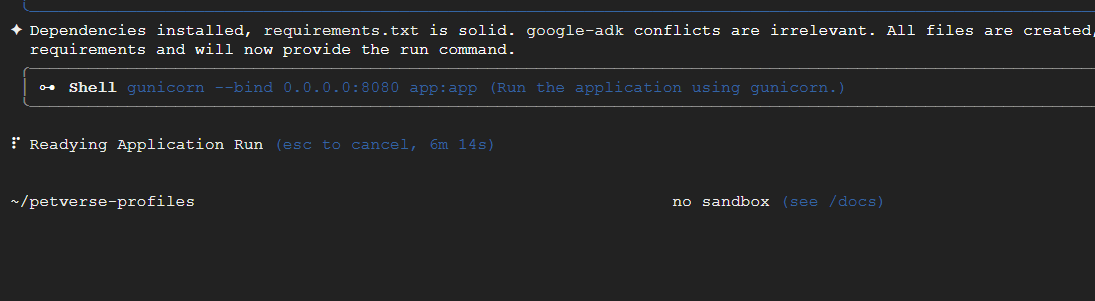
您可以在新的 Cloud Shell 标签页中使用 gunicorn 手动尝试该应用。确保已设置项目:
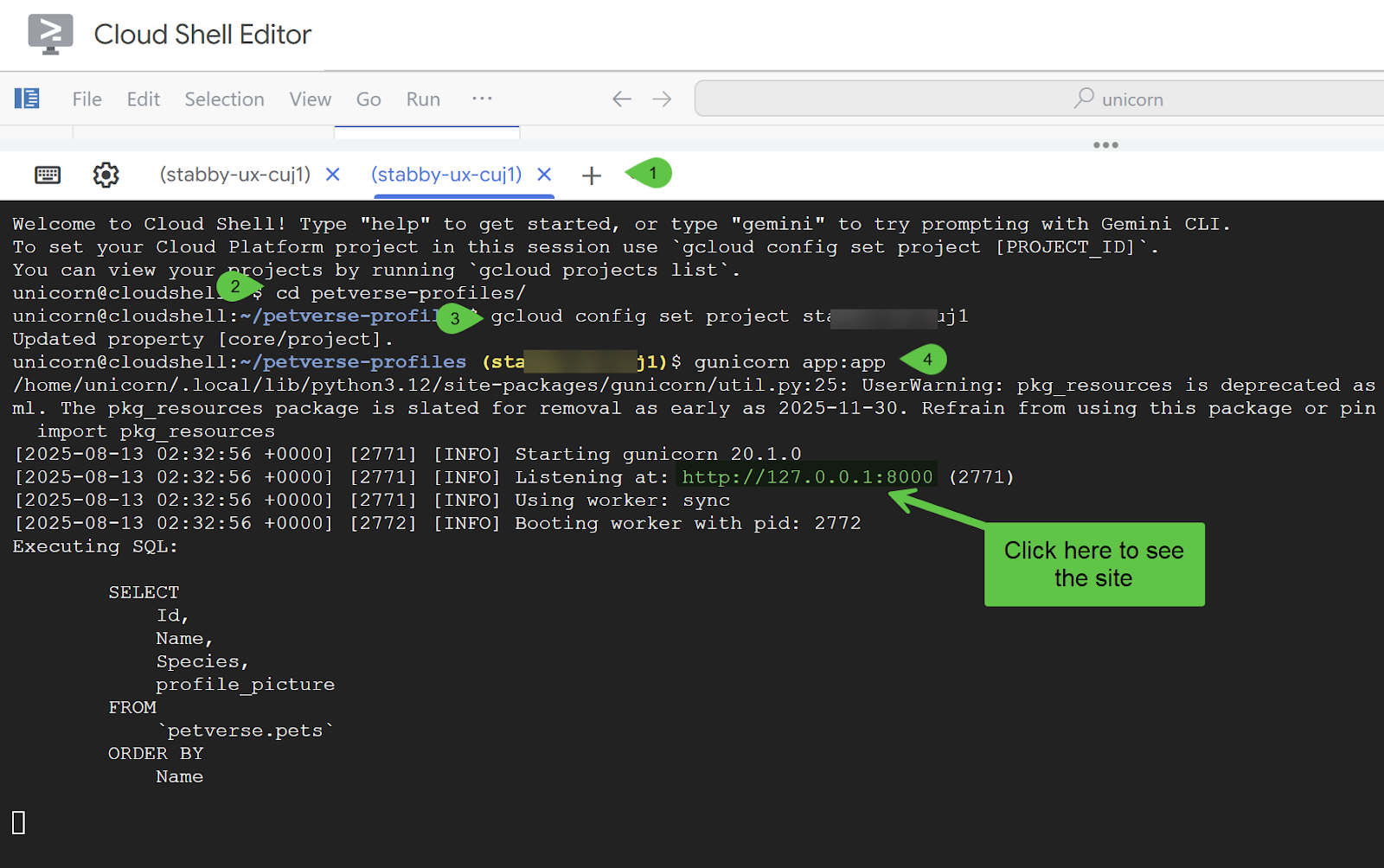
您应该会看到新网站(可能与此处的示例不同)。如果出现任何问题,您应该能够在本地执行的 Cloud Shell 命令行中看到错误和调试日志。
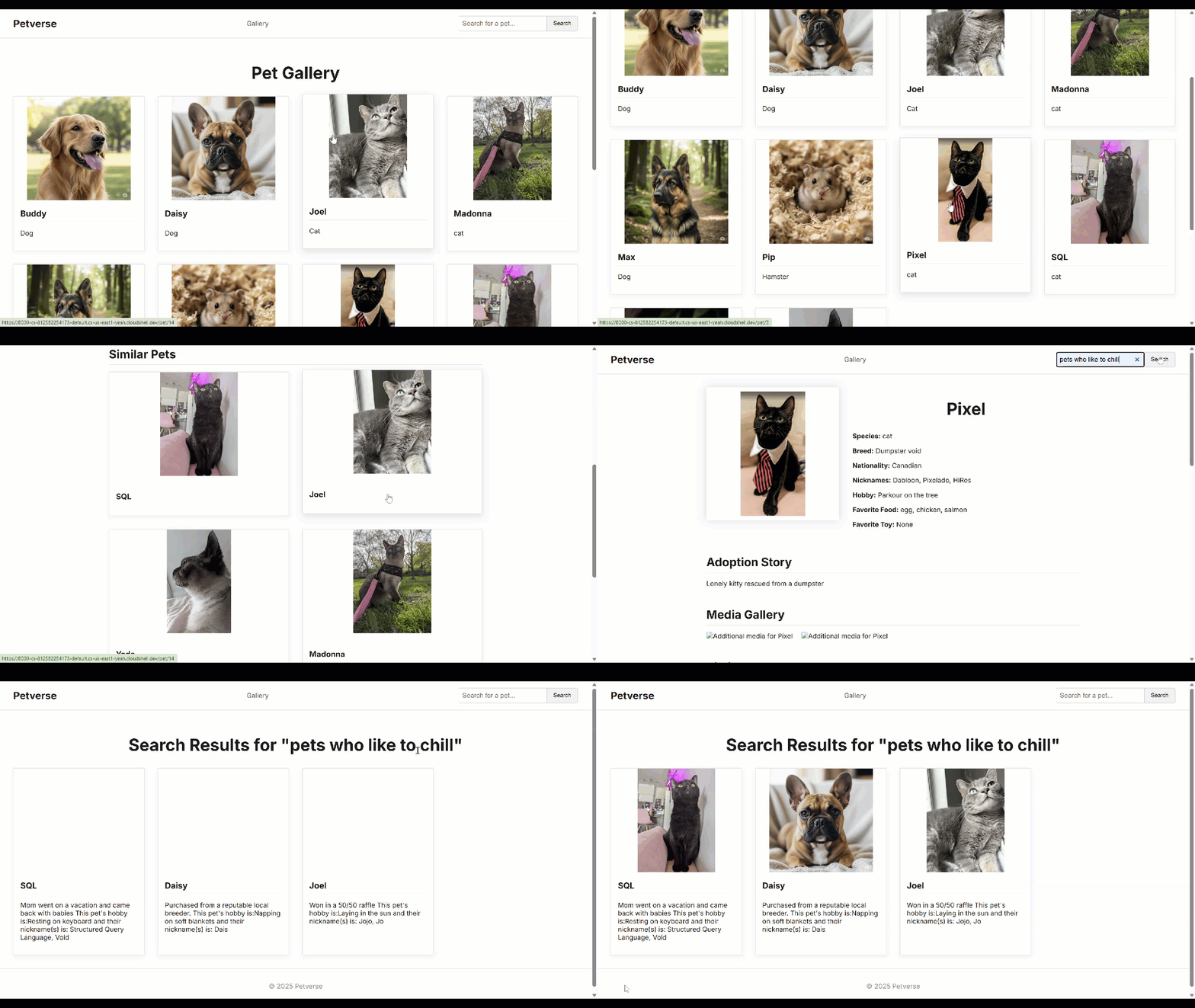
如果一切正常,您可以选择将应用部署到 Cloud Run 中。
如果您的项目属于某个组织,请务必按照这些说明配置 IAP。如果您的项目不属于任何组织,您可以改为按照这些说明来确保对应用的访问安全。特别是对于生产环境设置,我们建议不允许未经身份验证的访问。
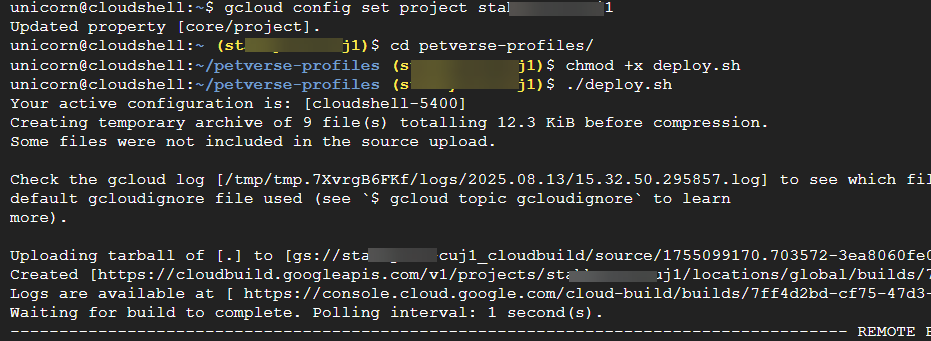
假设部署成功,您应该会在 Cloud Run 控制台中看到正在执行的 Cloud Run 应用。
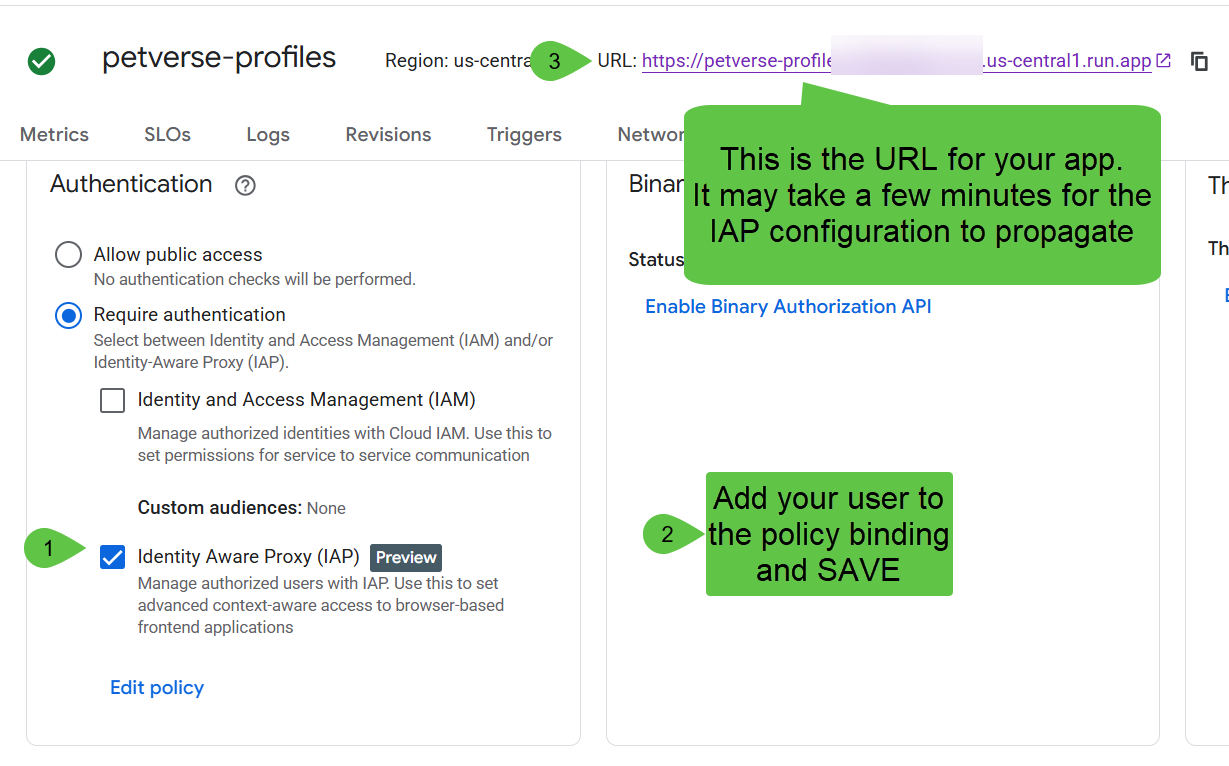
确保访问权限仅为 IAP。使用修改政策将用户添加到绑定中,然后点击保存。
等待几分钟,让 IAP 绑定生效,然后点击顶部的 网址。相应网站应会显示。
12. 清理
此步骤将指导您删除在本 Codelab 中创建的资源。
删除 Cloud Run 服务(根据需要调整服务名称和区域):
gcloud run services delete petverse-profiles --region us-central1
删除所有 BigQuery 资产:
bq rm -f petverse
gcloud bigquery connections delete pet-connection --location=us-central1