

1. 始める前に
⏱️ 所要時間: 3 分
Google Cloud の Gemini Enterprise Agent Platform で CodeMender を使用してアプリケーションを保護する実践的な Codelab へようこそ。
このワークショップでは、クラウド セキュリティ エンジニアの役割を担い、OWASP Juice Shop の監査と保護を行います。OWASP Juice Shop は、Node.js、Express、TypeScript、Angular で構築された、意図的に脆弱性を持たせた業界標準のウェブ アプリケーションです。
従来のセキュリティ スキャン ツール(SAST / DAST)は、数千件の静的セキュリティ検出結果、高い誤検知率、実用的なコード修正の欠如により、開発チームに過大な負担をかけています。デベロッパーは、ログのトリアージ、データフローの追跡、パッチの手動作成に何時間も費やしています。パッチの作成は、既存のアプリケーションの動作を頻繁に中断させます。
CodeMender は、Google の Gemini LLM にファインチューニングされたエージェント ハーネスを組み込むことで、コード セキュリティに革命をもたらします。CodeMender は、Google DeepMind が設計したプロンプト、専門的なセキュリティ スキル、マルチエージェント オーケストレーションを使用して、自律型の AI セキュリティ共同開発者として機能し、ローカルのソース リポジトリ内でソフトウェアの脆弱性を直接検出、検証、修復します。
前提条件
- ウェブ アプリケーションの脆弱性(SQL インジェクションや XSS などの OWASP トップ 10)に関する基本的な理解
- JavaScript / TypeScript と Node.js アプリケーションに関する基本的な知識
- コマンドライン インターフェース(CLI)ツールに関する基本的な知識
学習内容
- Google Cloud Shell で CodeMender(
cm)CLI を設定、認証、初期化する方法。 - リポジトリを自律的にスキャンして、悪用可能な脆弱性を検出する方法(
cm find)。 - 隔離されたサンドボックスで脆弱性を検証し、検証アーティファクト(
cm verify)を検査する方法。 - コンテキストアウェアなセキュリティ パッチを自律的に合成、テスト、適用する方法(
cm fix)。 - トークン テレメトリーを監査し、マルチフォーマットのコンプライアンス レポート(
cm stats、cm report)をエクスポートする方法。
必要なもの
- 課金を有効にした Google Cloud プロジェクト
- アクティブなプロジェクト接続がある Google Cloud Shell(プリインストールされた
gcloud、git、Node.js 18+ を含む) - スターター リポジトリ: OWASP Juice Shop GitHub リポジトリ
2. CodeMender アーキテクチャの概要
⏱️ 所要時間: 4:00
コードのスキャンと修正について詳しく説明する前に、Google Cloud の公式アーキテクチャ標準に沿って、CodeMender が Gemini Enterprise Agent Platform 内でどのように動作するかを理解しておきましょう。
システム アーキテクチャ: エージェントとクライアント デーモン
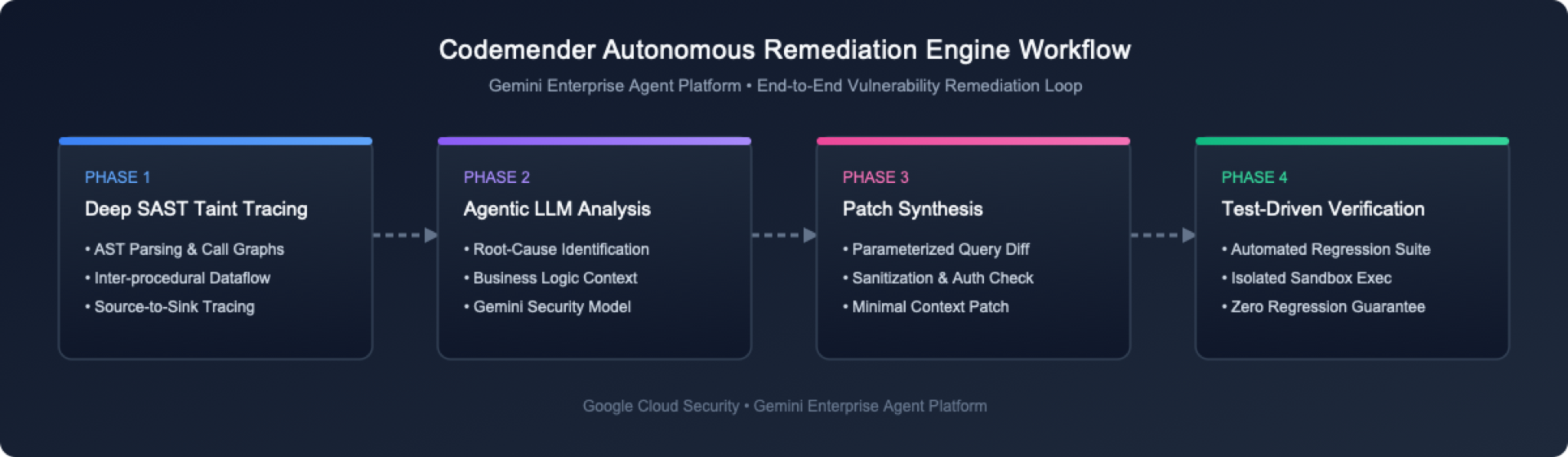
ユーザーの視点から見ると、CodeMender は次の 2 つの主要なアーキテクチャ コンポーネントで構成されています。
ホスト型マルチエージェント プラットフォーム: Google Cloud で実行されるホスト型マルチエージェント システム。コア セキュリティ ビジネス ロジック、LLM プロンプト エンジニアリング、セキュリティ推論を実行します。
ローカル クライアント CLI とサンドボックス デーモン(cm): Google Cloud Shell で実行されるクライアント。CLI(cm find、cm verify、cm fix などのコマンドを発行する)とローカル デーモン(分離されたプロセスレベルのサンドボックス内でエージェントに代わってコマンドを安全に実行する)の両方として機能します。
3 つのコア修復機能
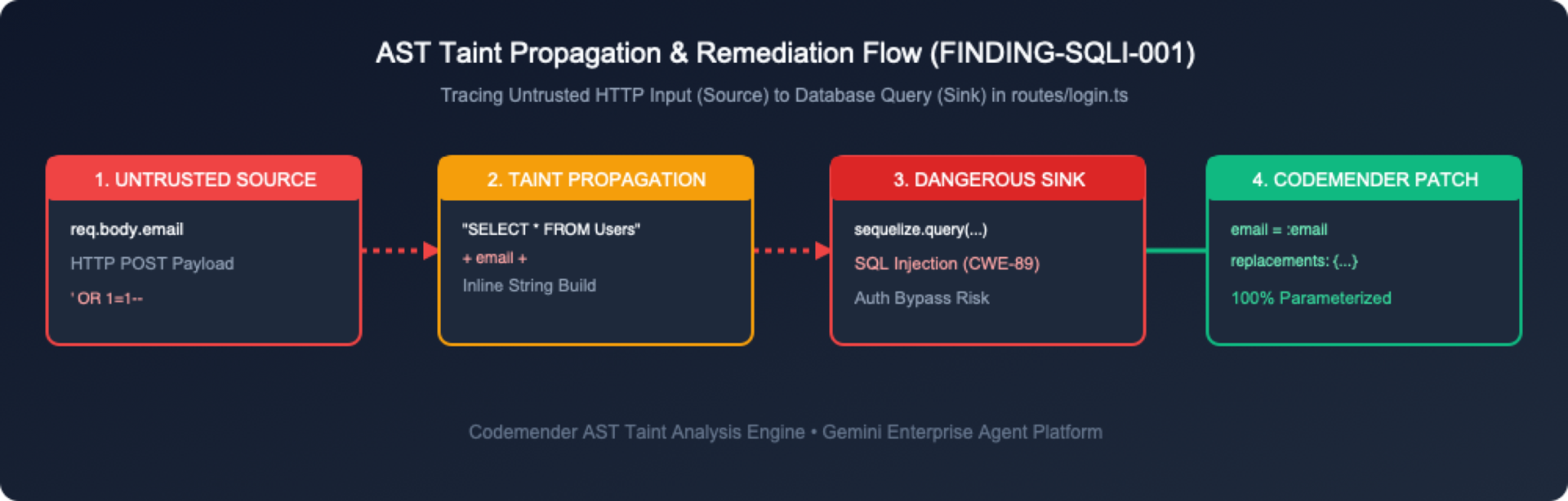
CodeMender は、次の 3 つの統合ステージを通じてコードのセキュリティを処理します。
脆弱性を検出する(cm find): エージェントがガイドする LLM を使用してコードベースをスキャンし、専用のセキュリティ ツールとプロンプト エンジニアリングを活用して、モデルをセキュリティ上の欠陥に集中させます。(または、外部のセキュリティ スキャン ツールから検出結果をインポートすることもできます)。
脆弱性を検証する(cm verify): コードをローカルでビルドし、検出された欠陥を悪用して、悪用可能かどうかを検証します。これにより、誤検出が排除され、.exploit/(info.yaml、PLAN.md、LOG.md、exploit.sh、REPORT.md)に永続的なワークスペース検証アーティファクトが生成されます。
脆弱性を修正する(cm fix): 言語を認識するソースパッチを合成し、ローカル サンドボックス内でプロジェクト ビルドと回帰テストスイート(npm test)を実行して検証します。
3. OWASP Juice Shop 環境を設定する
⏱️ 所要時間: 5 分
このステップでは、Google Cloud ターミナル環境を開き、ターゲット アプリケーション リポジトリを取得します。
ステップ 1: Google Cloud コンソールで Cloud Shell を開く
ブラウザで Google Cloud コンソールに移動します。
上部のナビゲーション バーで、[Cloud Shell をアクティブにする] ボタン(アイコン >_)をクリックします。
Cloud Shell は、gcloud、git、Node.js がプリインストールされ、認証されたブラウザベースの Linux ターミナルを提供します。
ステップ 2: OWASP Juice Shop リポジトリのクローンを作成する
Cloud Shell またはローカル ターミナルで、OWASP Juice Shop リポジトリのクローンを作成します。
git clone https://github.com/juice-shop/juice-shop.git --depth 1
cd juice-shop
ステップ 3: 主要なアプリケーション ファイルを検査する
OWASP Juice Shop は、バックエンドで TypeScript モジュールとともに Express.js を使用します。ディレクトリ構造を簡単に確認します。
ls -la routes/ lib/
認証、ユーザー クエリ、カート管理を処理する主なルートファイルに注目してください。
routes/login.ts: ユーザー認証と未加工の SQL クエリの実行を処理します。
routes/search.ts: 商品検索とレスポンスのレンダリングを処理します。
routes/basket.ts: ユーザーのショッピング カートの取得を処理します。
routes/trackOrder.ts: NoSQL クエリを介して注文の追跡を処理します。
lib/xml.ts: XML の解析とファイルのアップロードを処理します。
lib/insecurity.ts: セッション トークンと暗号化用のヘルパー ユーティリティ。
4. CodeMender CLI(cm)をインストールし、GCP 認証情報を認証する
⏱️ 所要時間: 8:00
このステップでは、必要な Google Cloud API を有効にし、gcloud を使用して IAM 権限を付与し、cm CLI バイナリをダウンロードしてインストールし、アプリケーションのデフォルト認証情報(ADC)を構成します。
ステップ 1: gcloud を介して必要な Google Cloud API を有効にする
CodeMender には、Gemini Enterprise Agent Platform の Agent Platform API(aiplatform.googleapis.com)と Cloud Resource Manager API(cloudresourcemanager.googleapis.com)が必要です。
Cloud Shell またはターミナルで、アクティブなプロジェクト ID を取得し(または Google Cloud コンソールの上部にあるプロジェクトのプルダウンを確認し)、必要なサービス API を有効にします。
# Automatically retrieve and set your active Google Cloud project ID
export PROJECT_ID=$(gcloud config get-value project)
gcloud config set project ${PROJECT_ID}

# Enable required Google Cloud APIs
gcloud services enable \
 aiplatform.googleapis.com \
 cloudresourcemanager.googleapis.com \
 serviceusage.googleapis.com \
 --project=${PROJECT_ID}
API が有効になっていることを確認します。
gcloud services list --enabled --filter="name:(aiplatform.googleapis.com OR cloudresourcemanager.googleapis.com)"
ステップ 2: gcloud を介して IAM 権限を付与する
CodeMender クラウド推論エンジンを操作するには、ユーザーとサービス アカウントに roles/aiplatform.user(Agent Platform ユーザー)IAM ロールが割り当てられている必要があります。
CLI を使用してユーザー アカウントに IAM ロールを付与する
# Get your active authenticated gcloud account email
USER_EMAIL=$(gcloud config get-value account)

# Add IAM policy binding for user account
gcloud projects add-iam-policy-binding ${PROJECT_ID} \
 --member="user:${USER_EMAIL}" \
 --role="roles/aiplatform.user"
ステップ 3: cm CLI を Cloud Shell にダウンロードしてインストールする
Google Cloud Shell では、ユーザーデータは $HOME ディレクトリに永続的に保存されます。次のコマンドを実行して、sudo を必要とせずに cm を ~/bin にインストールします。前のセクションの ~/juice-shop にまだいるため、コマンドは一時ディレクトリにダウンロードされ、その後クリーンアップされます。これにより、インストーラ ファイルが Juice Shop リポジトリに保存されることはありません。
# Download into a temporary directory so nothing lands in the Juice Shop repository
CM_TMP=$(mktemp -d)
curl -L -o "${CM_TMP}/cm-linux-amd64.zip" "https://artifactregistry.googleapis.com/download/v1/projects/cmoc-prod/locations/us/repositories/codemender-cli-production/files/cm:stable:cm-linux-amd64.zip:download?alt=media"
unzip -o "${CM_TMP}/cm-linux-amd64.zip" -d "${CM_TMP}"

# Install into your persistent ~/bin directory and clean up
mkdir -p ~/bin
install -m 0755 "${CM_TMP}/cm" ~/bin/cm
rm -rf "${CM_TMP}"

# Add ~/bin to PATH for this session and future Cloud Shell sessions
export PATH="$HOME/bin:$PATH"
grep -qxF 'export PATH="$HOME/bin:$PATH"' ~/.bashrc || echo 'export PATH="$HOME/bin:$PATH"' >> ~/.bashrc
ステップ 4: cm CLI のインストールを確認する
cm --version を実行して、CLI バイナリが正しくインストールされていることを確認します。
cm --version
予想される出力:
cm version 0.17.0
ステップ 5: Google Cloud のアプリケーションのデフォルト認証情報(ADC)を構成する
cm が Cloud 推論エンジン へのリクエストを認証できるように、Google Cloud のアプリケーションのデフォルト認証情報(ADC)を構成します。
gcloud auth application-default login
[Cloud Shell の承認] というラベルの承認モーダル ダイアログが表示されます。[承認] をクリックしてアクセス権を付与します。
5. CodeMender ワークスペースを初期化して検証する
⏱️ 所要時間: 3 分
cm がインストールされ、認証されたので、ターゲット プロジェクト ディレクトリ内で CodeMender ワークスペースを初期化し、環境設定を確認します。
ステップ 1: CodeMender ワークスペースを初期化する(cm init)
プロジェクト ディレクトリのルートから cm init を実行して、ローカル状態追跡ファイルを初期化し、ベースライン構成を確立します。
cm init
出力:
✅ Initialized CodeMender workspace at /home/user/.codemender
ステップ 2: エンドツーエンドのヘルス診断を実行する(cm health)
エージェント セッションを開始する前に、cm health を実行して、認証情報、構成、接続性、認可を確認します。
cm health
出力:
CodeMender Health Check
───────────────────────
 Backend:   iapi
 Endpoint:  https://aiplatform.googleapis.com
 Location:  global
 Project:   my-gcp-project

 ✓ credentials     passed   (0ms)  Token acquired for project "my-gcp-project"
 ✓ config          passed   (0ms)  Configuration valid (backend "iapi")
 ✓ reachability    passed   (250ms)  Endpoint https://aiplatform.googleapis.com responded
 ✓ authorization   passed   (68ms)  Caller authorized for project "my-gcp-project"

Status: HEALTHY (exit code 0, 319ms)
ステップ 3: 構成パラメータ(config.yaml)を理解する
CodeMender は、.codemender/config.yaml(または ~/.codemender/config.yaml)にワークスペース構成ファイルを作成します。このファイルは、ポリシー境界、ファイル包含ルール、テスト検証フックを定義します。
# CodeMender CLI configuration.
# The server endpoint is baked in at build time (see build profiles).
# Override it here only if you need a different endpoint.

server: {}
location: "global"         # Service location: "global" (default), "us", "eu", or "us-central1" (overridden by $CM_LOCATION)

# Customer-supplied team identifier sent as the X-CodeMender-Team-Id
# telemetry header. Overridden by --team-id flag or $CM_TEAM_ID env var.
# Max 63 chars, must match [A-Za-z0-9._-]. Omit to skip the header.
# team_id: "acme-security"

scan:
 extensions:
   include: [".py", ".java", ".go", ".js", ".jsx", ".mjs", ".cjs", ".ts", ".tsx", ".c", ".cc", ".cpp", ".cxx", ".h", ".hh", ".hpp", ".hxx", ".inl", ".ipp", ".cs", ".rs", ".kt", ".kts", ".rb", ".php", ".sol", ".tf", ".hcl"]
   exclude: [".min.js", ".generated.go", ".pb.go"]
 # A leading "/" matches only that directory at the scan root.
 exclude_dirs: ["node_modules", "vendor", "dist", "/target", "/obj", "/build", ".gradle"]
 max_file_size_kb: 2048   # Maximum file size for discovery (2048 KB / 2 MiB)
 incremental: true

# Restrict agent file access to these directories (all commands).
# When empty, the scan target directory is used as the boundary.
# project_paths: []

output:
 format: table   # "table", "json", "sarif"

tools:
 confirm_commands: true   # Prompt Y/N before running shell commands (default: true)
 confirm_writes: true     # Prompt Y/N before writing/modifying files (default: true)
 # cleanup_candidate_branches: true # Auto-delete temporary candidate branches on completion (default: true)
 # Use --yes flag on find/fix/session resume to skip all confirmations

# Version Control and Automated Testing Guardrails
vcs:
 type: ""               # VCS type: "git", "mercurial", "custom", or "" (auto-detect)
 commands:
   reset: ""            # Shell command to reset codebase (auto-populated for known VCS)
   diff: ""             # Shell command to show changes (auto-populated for known VCS)
   status: ""           # Shell command to list modified files (auto-populated for known VCS)
   stage: ""            # Shell command to stage changes (auto-populated for known VCS)

build:
 command: "npm test"    # Shell command to build/verify changes from the agent

sandbox:
 enabled: true          # Process-level OS sandbox (default: true)
 mounts:
   target_dir: "."
 network:
   profile: "permissive-closed" # Complete network isolation; set to "permissive-open" if build requires internet
security:
 protected_files: []    # Files mounted read-only inside sandbox (e.g. ["~/.ssh/*"])
6. cm find で脆弱性を検出します。
⏱️ 所要時間: 7 分
このステップでは、cm find . --quick を実行して、Juice Shop のコードベース全体でエージェント セキュリティ スキャンを実行します。
ステップ 1: cm find . --quick を実行する
CodeMender v0.16.0 以降、cm find <path> のデフォルトは Deep Scan(
--deep
) を使用して、ファイルごとに詳細な分析を行います。一方、クイックスキャン(
--quick
) は、リポジトリの迅速なトリアージを提供します。cm find . --quick を実行して、OWASP Juice Shop リポジトリ全体でクイックスキャンを実行します(推定実行時間: 684 ファイルのコードベース全体のトリアージで約 8 分)。
cm find . --quick -y --sandbox=false --bypass-warning --model gemini-3.8-flash
cm は、Gemini Enterprise Agent Platform でスキャン セッションを開始し、すべてのリポジトリ モジュールのソースコード ファイルを分析します。
⚠️ Sandbox DISABLED and command approval OFF: the agent can run commands on this machine without asking. Code in the scanned repository could steer it. Re-enable the sandbox or command approval (drop --yes, or set tools.confirm_commands: true) unless you trust the repository.
🔍 Discovering files in /home/user/juice-shop...
  Found 684 source files
🚀 Starting FIND session (mode: QUICK)...
  Server: https://aiplatform.googleapis.com
  Session: ChBjMjI4YWY5MzljZjUzNTQ4EAgaAjg1KgRtYWlu
  Operation: ChBjMjI4YWY5MzljZjUzNTQ4EAgaAjg1KgRtYWlu
📂 Scan target: /home/user/juice-shop
🔒 Sandbox roots (agent can only access these directories):
  • /home/user/juice-shop

📡 Waiting for server (https://aiplatform.googleapis.com)...
────────────────────────────────────────────────────────────
2026-10-29T03:01:47Z [INFO]  🔧 [Step 1] list_dir → /home/user/juice-shop
2026-10-29T03:01:56Z [INFO]  🔧 [Step 2] list_dir → .../juice-shop/routes
2026-10-29T03:02:08Z [INFO]  🔧 [Step 3] read_file → .../juice-shop/server.ts
2026-10-29T03:02:47Z [INFO]  🔧 [Step 7] read_file → .../juice-shop/routes/login.ts
2026-10-29T03:02:56Z [INFO]  🔧 [Step 8] read_file → .../juice-shop/routes/search.ts
2026-10-29T03:03:48Z [INFO]  🔧 [Step 13] read_file → .../juice-shop/routes/fileUpload.ts
2026-10-29T03:04:30Z [INFO]  🔧 [Step 16] read_file → .../juice-shop/routes/userProfile.ts
2026-10-29T03:06:11Z [INFO]  🔧 [Step 25] read_file → .../juice-shop/routes/trackOrder.ts
2026-10-29T03:07:57Z [INFO]  🔧 [Step 33] read_file → .../juice-shop/routes/order.ts
2026-10-29T03:09:30Z [INFO]  ✅ Completed 33 tool steps in 7m48s | Tokens: 2.6M in / 8k out / 2.7M total
────────────────────────────────────────────────────────────

🔒 Found 12 vulnerabilities:

ID        SEVERITY    TYPE                                     FILE                             TITLE                                                                                   CONFIDENCE
────────  ────────    ────                                     ────                             ─────                                                                                   ──────────
43aa7446  🔴 CRITICAL  SQL INJECTION                            routes/login.ts                  SQL Injection in User Login Handler Allows Authentication Bypass                        100%
dd83d0a4  🟠 HIGH      SQL INJECTION                            routes/search.ts                 UNION-Based SQL Injection in Product Search Allows Database Exfiltration                100%
4dfe2409  🟠 HIGH      CODE INJECTION                           routes/userProfile.ts            Remote Code Execution via Eval in User Profile Template Handler                         100%
79d490b0  🟠 HIGH      PATH TRAVERSAL                           routes/fileUpload.ts             Path Traversal (Zip Slip) in Zip File Upload Allows Arbitrary File Overwrite            100%
4f2b050c  🟠 HIGH      XML EXTERNAL ENTITY (XXE)                routes/fileUpload.ts             XML External Entity (XXE) Injection in File Upload Route Leaks System Files             100%
1ece0e25  🟠 HIGH      IMPROPER ACCESS CONTROL                  server.ts                        Missing Authorization on Product Update Endpoint Allows Unauthorized Product Tampering  100%
757fd438  🟠 HIGH      CWE-943                                  routes/trackOrder.ts             NoSQL / JavaScript Injection in Order Tracking Allows Database Record Exfiltration      100%
349bac9f  🟡 MEDIUM    SERVER-SIDE REQUEST FORGERY (SSRF)       routes/profileImageUrlUpload.ts  Server-Side Request Forgery (SSRF) in Profile Image URL Upload Route                    100%
be5e1459  🟡 MEDIUM    OPEN REDIRECT                            routes/redirect.ts               Open Redirect via Inadequate Allowlist Substring Match                                  100%
06ecf8a5  🟡 MEDIUM    INSECURE DIRECT OBJECT REFERENCE (IDOR)  routes/basket.ts                 Insecure Direct Object Reference (IDOR) Allows Access to Arbitrary User Baskets         100%
02f6a293  🟡 MEDIUM    PATH TRAVERSAL                           routes/dataErasure.ts            Local File Read via Insecure Template Layout Parameter in Data Erasure Route            100%
95ee59a3  🟡 MEDIUM    CWE-943                                  routes/updateProductReviews.ts   NoSQL Injection in Product Review Update Endpoint Allows Mass Modification              100%

Summary: 1 CRITICAL, 6 HIGH, 5 MEDIUM

Run 'cm report' for detailed analysis, 'cm verify <finding-id>' to validate, or 'cm fix <finding-id>' to generate a patch.
2026-10-29T03:09:30Z [INFO]  📄 Session log: /home/user/.codemender/logs/20261029T030140Z_ChBjMjI4YWY5MzljZjUzNTQ4EAgaAjg1KgRtYWlu.log
手順 2: cm report でスキャン結果を確認する
cm report -f table を実行して、ローカル SQLite 状態データベースから検出されたすべてのセキュリティ検出結果を表示します。
cm report -f table
出力:
┌──────────┬───────────┬──────┬───┬──────────────────────────────┬────────────────────────────────────────┐
│ID        │Severity   │Status│Fix│File                          │Title                                   │
├──────────┼───────────┼──────┼───┼──────────────────────────────┼────────────────────────────────────────┤
│ 43aa7446 │🔴 CRITICAL│OPEN  │—  │routes/login.ts               │SQL Injection in User Login Handler A...│
│ dd83d0a4 │🟠 HIGH    │OPEN  │—  │routes/search.ts              │UNION-Based SQL Injection in Product ...│
│ 4dfe2409 │🟠 HIGH    │OPEN  │—  │routes/userProfile.ts         │Remote Code Execution via Eval in Use...│
│ 79d490b0 │🟠 HIGH    │OPEN  │—  │routes/fileUpload.ts          │Path Traversal (Zip Slip) in Zip File...│
│ 4f2b050c │🟠 HIGH    │OPEN  │—  │routes/fileUpload.ts          │XML External Entity (XXE) Injection i...│
│ 1ece0e25 │🟠 HIGH    │OPEN  │—  │server.ts                     │Missing Authorization on Product Upda...│
│ 757fd438 │🟠 HIGH    │OPEN  │—  │routes/trackOrder.ts          │NoSQL / JavaScript Injection in Order...│
│ 349bac9f │🟡 MEDIUM  │OPEN  │—  │routes/profileImageUrlUploa...│Server-Side Request Forgery (SSRF) in...│
│ be5e1459 │🟡 MEDIUM  │OPEN  │—  │routes/redirect.ts            │Open Redirect via Inadequate Allowlis...│
│ 06ecf8a5 │🟡 MEDIUM  │OPEN  │—  │routes/basket.ts              │Insecure Direct Object Reference (IDO...│
│ 02f6a293 │🟡 MEDIUM  │OPEN  │—  │routes/dataErasure.ts         │Local File Read via Insecure Template...│
│ 95ee59a3 │🟡 MEDIUM  │OPEN  │—  │routes/updateProductReviews.ts│NoSQL Injection in Product Review Upd...│
└──────────┴───────────┴──────┴───┴──────────────────────────────┴────────────────────────────────────────┘

12 finding(s): 1 CRITICAL, 6 HIGH, 5 MEDIUM · ✅ 0 fixed, 🔴 12 open
📋 Report generated at 2026-10-29 03:10:05 UTC
2026-10-29T03:10:05Z [INFO]  📄 Session log: /home/user/.codemender/logs/20261029T031005Z_pending.log
ステップ 3: 検出結果のライフサイクル状態と重大度レベルを理解する
CodeMender は、次の 4 つの状態からなる正式なライフサイクルを通じて脆弱性を追跡します。
検出結果の状態 | 意味と移行処理 |
| 脆弱性は検出(またはインポート)されていますが、まだ検証、パッチ適用、または却下されていません。 |
| CodeMender がパッチを生成し、差分を適用して、ビルド / テストスイートが合格し、エクスプロイトが失敗することを確認しました。 |
| 信頼度が低い、脅威モデルの対象外、または誤検知として検証されたため、非アクティブとしてマークされています。今後のアラートをミュートします。 |
| 以前に |
重大度の分類
🔴 CRITICAL: 信頼できない境界から直接到達可能な、即時かつ重大なリスク(リモートコード実行、認証されていない SQL インジェクションなど)。
🟠 HIGH: 重大な欠陥(任意のデータベース読み取り、権限昇格など)。特定のユーザー コンテキストまたは連鎖条件が必要。
🟡 MEDIUM: 範囲が限定されているか、ユーザー操作が必要な中程度のリスク(オープン リダイレクト、CSRF など)。
LOW: 多層防御の衛生上の欠陥、または直接的な影響が最小限の偵察ベクトル。
7. 脆弱性を検証し、キャプチャされた検証アーティファクトを確認する
⏱️ 所要時間: 10:00
CodeMender の主な機能の一つは、cm verify を実行するたびに永続的な検証アーティファクトを自動的に生成することです。routes/login.ts(このチュートリアルでは 43aa7446 として図示)で重大な SQL インジェクションの検出結果を確認し、エージェントによって作成されたアーティファクトを確認しましょう。
ステップ 1: cm verify <login-finding-id> を実行する
cm report テーブルから routes/login.ts の検出結果 ID(43aa7446 など)を見つけて、cm verify <finding-id> --sandbox=false --bypass-warning -y を実行します(推定実行時間: 自律型ツールのステップの実行、バックグラウンド サービスの開始、ライブ PoC エクスプロイト スクリプトの実行に約 20 分)。
# Replace 43aa7446 with your actual login.ts finding ID
# --sandbox=false turns off only the OS-level sandbox; the path boundary and command policy stay enforced
cm verify 43aa7446 --sandbox=false --bypass-warning -y --model gemini-3.8-flash
出力:
⚠️ Sandbox DISABLED and command approval OFF: the agent can run commands on this machine without asking. Code in the scanned repository could steer it. Re-enable the sandbox or command approval (drop --yes, or set tools.confirm_commands: true) unless you trust the repository.
🔬 Verifying finding: SQL Injection in User Login Handler Allows Authentication Bypass
  ID: 43aa7446-40de-467d-8ca4-8571dca16036
  File: /home/user/juice-shop/routes/login.ts
  Severity: 🔴 CRITICAL
  Type: SQL INJECTION
Resetting workspace at /home/user/juice-shop

🔧 Running: git checkout HEAD -- . && git clean -fd
Removing .cm_project

✅ Reset complete. Ready for vulnerability research.
🚀 Starting VERIFY session...
  Server: https://aiplatform.googleapis.com
  Session: ChBkZTRhMWU3YTI4MjU5ZDY0EAgaAmU4KgRtYWlu
  Operation: ChBkZTRhMWU3YTI4MjU5ZDY0EAgaAmU4KgRtYWlu
📂 Scan target: /home/user/juice-shop/routes
🔒 Sandbox boundary (agent can explore within):
  • /home/user/juice-shop

📡 Waiting for verification agent (https://aiplatform.googleapis.com)...
────────────────────────────────────────────────────────────
2026-10-29T03:11:31Z [INFO]  🔧 [Step 1] run_command → mkdir -p /home/user/juice-shop/.exploit
2026-10-29T03:11:42Z [INFO]  🔧 [Step 2] read_file → .../juice-shop/routes/login.ts
2026-10-29T03:12:03Z [INFO]  🔧 [Step 4] read_file → .../juice-shop/package.json
2026-10-29T03:12:14Z [INFO]  🔧 [Step 5] write_to_file → .../juice-shop/.exploit/PLAN.md
2026-10-29T03:19:00Z [INFO]  🔧 [Step 25] run_command → npm run build:server
2026-10-29T03:29:20Z [INFO]  🔧 [Step 61] write_to_file → .../juice-shop/.exploit/info.yaml
2026-10-29T03:29:53Z [INFO]  🔧 [Step 63] write_to_file → .../juice-shop/.exploit/LOG.md
2026-10-29T03:30:17Z [INFO]  🔧 [Step 64] write_to_file → .../juice-shop/.exploit/REPORT.md
2026-10-29T03:30:55Z [INFO]  🔧 [Step 66] run_command → git status --short
2026-10-29T03:31:46Z [INFO]  ✅ Completed 66 tool steps in 20m23s | Tokens: 2.8M in / 7k out / 2.8M total
────────────────────────────────────────────────────────────
2026-10-29T03:31:46Z [INFO]  Artifacts manifest written: /home/user/.codemender/artifacts/ChBkZTRhMWU3YTI4MjU5ZDY0EAgaAmU4KgRtYWlu/manifest.json (7 artifacts)
📦 Captured 7 agent artifacts in /home/user/.codemender/artifacts/ChBkZTRhMWU3YTI4MjU5ZDY0EAgaAmU4KgRtYWlu
Pulling artifacts for session ChBkZTRhMWU3YTI4MjU5ZDY0EAgaAmU4KgRtYWlu
Resetting workspace at /home/user/juice-shop

🔧 Running: git checkout HEAD -- . && git clean -fd
Removing .cm_project
Removing .exploit/LOG.md
Removing .exploit/PLAN.md
Removing .exploit/REPORT.md
Removing .exploit/exploit.sh
Removing .exploit/info.yaml
Removing .exploit/server_runner.js

✅ Reset complete. Ready for vulnerability research.
📥 Copying 7 finding artifact(s) to workspace...
  • /home/user/juice-shop/.exploit/LOG.md
  • /home/user/juice-shop/.exploit/PLAN.md
  • /home/user/juice-shop/.exploit/REPORT.md
  • /home/user/juice-shop/.exploit/exploit.sh
  • /home/user/juice-shop/.exploit/info.yaml
  • /home/user/juice-shop/.exploit/server.log
  • /home/user/juice-shop/.exploit/server_runner.js

🚀 Programmatically running exploit script to confirm: /home/user/juice-shop/.exploit/exploit.sh
EXPLOIT SUCCESSFUL

✅ Exploit execution succeeded. Finding VERIFIED (confidence: 100%)

Run 'cm report' to see updated findings.
2026-10-29T03:31:52Z [INFO]  📄 Session log: /home/user/.codemender/logs/20261029T031121Z_ChBkZTRhMWU3YTI4MjU5ZDY0EAgaAmU4KgRtYWlu.log
ステップ 2: 取得した確認用アーティファクトの概要
CodeMender v0.16.0 以降、検証アーティファクトは .exploit/ のリポジトリ ルートで標準化され、~/.codemender/artifacts/<session-id>/ に永続的なコピーが保持されます。これらは修正の一部ではなく、ローカルの作業ファイルであるため、次のセクションでパッチをステージングする前に Git から除外します。ls -la .exploit/ を実行して一覧表示します。
ls -la .exploit/
出力:
total 40
drwxrwxr-x  2 user user 4096 Oct 29 03:31 .
drwxrwxr-x 35 user user 4096 Oct 29 03:31 ..
-rwxr-xr-x  1 user user 3272 Oct 29 03:31 exploit.sh
-rw-r--r--  1 user user  313 Oct 29 03:31 info.yaml
-rw-r--r--  1 user user 2196 Oct 29 03:31 LOG.md
-rw-r--r--  1 user user  771 Oct 29 03:31 PLAN.md
-rw-r--r--  1 user user 6387 Oct 29 03:31 REPORT.md
-rw-rw-r--  1 user user 2438 Oct 29 03:31 server.log
-rw-rw-r--  1 user user  462 Oct 29 03:31 server_runner.js
アーティファクト ファイル | カテゴリ | 目的 |
| メタデータ マニフェスト | 検出結果の UUID、タイトル、重大度( |
| エージェント戦略 | CodeMender 推論エンジンによって自律的に実行される、ステップバイステップの検証計画とチェックリスト。 |
| 実行トレースログ | 各ツール呼び出し、HTTP リクエスト エンドポイント、テスト結果を記録する、タイムスタンプ付きの監査証跡。 |
| ヘルパー ランナー / サーバーログ | テスト用に Juice Shop を起動するためにエージェントが作成したヘルパー スクリプトと、キャプチャされたサーバー出力。 |
| 実行ラッパー / スタンドアロン PoC | ターゲット サービスを起動し、PoC クライアントを呼び出して HTTP 200 レスポンスを検証するシェル スクリプト ラッパー。 |
| 根本原因の分析 | エグゼクティブ サマリー、1 行ずつの脆弱性分析、未加工の SQL の内訳、Sequelize のパラメータ化に関する推奨事項。 |
ステップ 3: 検証アーティファクトのハイライトの詳細な説明
エージェントは実行のたびにこれらのアーティファクトを新たに書き込むため、正確な内容は毎回異なります。Cloud Shell エディタ(または cat)でファイルを開き、次の点を確認します。
アーティファクト | 確認すべき点 |
| 検出結果の完全な ID、タイトル、重大度、信頼度、タグ( |
| エージェントが従ったチェックリスト(報告されたファイルの読み取りから再現スクリプトの作成まで)。 |
| タイムスタンプ付きのアクションと結果(再現スクリプトの各実行の結果を含む)。 |
| スタンドアロンの再現スクリプト: アプリの起動方法、ターゲットとするエンドポイント、成功の判断方法( |
| テスト用に Juice Shop を起動するためにエージェントが作成したヘルパー ファイルと、そのサーバーの出力。 |
| 根本原因の分析: |
8. cm fix を使用して SQL インジェクションを修正する
⏱️ 所要時間: 10:00
routes/login.ts(例の ID 43aa7446)で SQL インジェクションの検出結果を確認し、そのアーティファクトを調べたので、cm fix を実行して、自動化されたパラメータ化クエリパッチを適用しましょう。
ステップ 1: cm fix <login-finding-id> -y を実行する
cm fix <finding-id> --sandbox=false --bypass-warning -y を実行して(43aa7446 は cm report の実際のログイン検出結果 ID に置き換えます)、修正を合成して適用します。
# Replace 43aa7446 with your actual login.ts finding ID
cm fix 43aa7446 --sandbox=false --bypass-warning -y --model gemini-3.8-flash
出力:
⚠️ Sandbox DISABLED and command approval OFF: the agent can run commands on this machine without asking. Code in the scanned repository could steer it. Re-enable the sandbox or command approval (drop --yes, or set tools.confirm_commands: true) unless you trust the repository.
🩹 Fixing finding: SQL Injection in User Login Handler Allows Authentication Bypass
  File: /home/user/juice-shop/routes/login.ts
  Severity: CRITICAL
🔒 Sandbox roots (agent can only access these directories):
  • /home/user/juice-shop
Found latest VERIFY session ChBkZTRhMWU3YTI4MjU5ZDY0EAgaAmU4KgRtYWlu for finding 43aa7446-40de-467d-8ca4-8571dca16036
Pulling artifacts for session ChBkZTRhMWU3YTI4MjU5ZDY0EAgaAmU4KgRtYWlu
Resetting workspace at /home/user/juice-shop

🔧 Running: git checkout HEAD -- . && git clean -fd
Removing .cm_project
Removing .exploit/LOG.md
Removing .exploit/PLAN.md
Removing .exploit/REPORT.md
Removing .exploit/exploit.sh
Removing .exploit/info.yaml
Removing .exploit/server_runner.js

✅ Reset complete. Ready for vulnerability research.
📥 Copying 7 finding artifact(s) to workspace...
  • /home/user/juice-shop/.exploit/LOG.md
  • /home/user/juice-shop/.exploit/PLAN.md
  • /home/user/juice-shop/.exploit/REPORT.md
  • /home/user/juice-shop/.exploit/exploit.sh
  • /home/user/juice-shop/.exploit/info.yaml
  • /home/user/juice-shop/.exploit/server.log
  • /home/user/juice-shop/.exploit/server_runner.js
  Session: ChA0YjllNzFkMTgyM2JmZDQ0EAgaAjdiKgRtYWlu
  Operation: ChA0YjllNzFkMTgyM2JmZDQ0EAgaAjdiKgRtYWlu

📡 Waiting for fix agent (https://aiplatform.googleapis.com)...
────────────────────────────────────────────────────────────
2026-10-29T03:41:30Z [INFO]  🔧 [Step 4] read_file → .../juice-shop/routes/login.ts
2026-10-29T03:41:58Z [INFO]  🔧 [Step 6] run_command → npm run test:server
2026-10-29T03:43:11Z [INFO]  🔧 [Step 9] grep_search → pattern="sequelize\\.query" path=.../juice-shop/routes
2026-10-29T03:43:54Z [INFO]  🔧 [Step 12] read_file → .../juice-shop/routes/vulnCodeSnippet.ts
2026-10-29T03:44:41Z [INFO]  🔧 [Step 13] read_file → .../juice-shop/routes/vulnCodeFixes.ts
2026-10-29T03:53:14Z [INFO]  🔧 [Step 31] search_and_replace → .../juice-shop/routes/login.ts
2026-10-29T03:53:52Z [INFO]  🔧 [Step 33] run_command → npm run build:server
2026-10-29T03:55:23Z [INFO]  🔧 [Step 37] run_command → npm run test:server
2026-10-29T03:55:49Z [INFO]  🔧 [Step 38] run_command → git diff
2026-10-29T03:57:18Z [INFO]  ✅ Completed 43 tool steps in 16m54s | Tokens: 1.6M in / 4k out / 1.6M total
────────────────────────────────────────────────────────────

✨ Patch generated successfully!

diff --git a/routes/login.ts b/routes/login.ts
index fb9fce3..57f3afe 100644
--- a/routes/login.ts
+++ b/routes/login.ts
@@ -31,7 +31,14 @@ export function login () {

  return (req: Request, res: Response, next: NextFunction) => {
    verifyPreLoginChallenges(req) // vuln-code-snippet hide-line
-    models.sequelize.query(`SELECT * FROM Users WHERE email = '${req.body.email || ''}' AND password = '${security.hash(req.body.password || '')}' AND deletedAt IS NULL`, { model: UserModel, plain: true }) // vuln-code-snippet vuln-line loginAdminChallenge loginBenderChallenge loginJimChallenge
+    models.sequelize.query('SELECT * FROM Users WHERE email = :email AND password = :password AND deletedAt IS NULL', {
+      replacements: {
+        email: typeof req.body?.email === 'string' ? req.body.email : '',
+        password: security.hash(typeof req.body?.password === 'string' ? req.body.password : '')
+      },
+      model: UserModel,
+      plain: true
+    }) // vuln-code-snippet vuln-line loginAdminChallenge loginBenderChallenge loginJimChallenge
      .then((authenticatedUser) => { // vuln-code-snippet neutral-line loginAdminChallenge loginBenderChallenge loginJimChallenge
        const user = utils.queryResultToJson(authenticatedUser)
        if (user.data?.id && user.data.totpSecret !== '') {

────────────────────────────────────────────────────────────
2026-10-29T03:57:18Z [INFO]  📄 Session log: /home/user/.codemender/logs/20261029T034021Z_ChA0YjllNzFkMTgyM2JmZDQ0EAgaAjdiKgRtYWlu.log
ステップ 2: cm vcs を使用して VCS のステータスと差分を検査する
cm vcs status と cm vcs diff を実行して、変更されたワークスペース ファイルを表示します。
cm vcs status
cm vcs diff
出力:
📂 CodeMender VCS Status
──────────────────────────────────────────────────
  Directory: /home/user/juice-shop
  Command:   git status --short
──────────────────────────────────────────────────

M routes/login.ts
?? .cm_project
?? .exploit/
2026-10-29T03:59:47Z [INFO]  📄 Session log: /home/user/.codemender/logs/20261029T035947Z_pending.log
2 つの未追跡エントリは CodeMender のローカル ファイルであり、修正の一部ではありません。.exploit/ には cm verify の検証アーティファクトが保持され、.cm_project は CodeMender のプロジェクト ルートをマークします。次のステップで、これらのファイルを commit から除外します。
cm vcs diff:
🔍 Running diff in /home/user/juice-shop: git diff
diff --git a/routes/login.ts b/routes/login.ts
index fb9fce3..57f3afe 100644
--- a/routes/login.ts
+++ b/routes/login.ts
@@ -31,7 +31,14 @@ export function login () {

  return (req: Request, res: Response, next: NextFunction) => {
    verifyPreLoginChallenges(req) // vuln-code-snippet hide-line
-    models.sequelize.query(`SELECT * FROM Users WHERE email = '${req.body.email || ''}' AND password = '${security.hash(req.body.password || '')}' AND deletedAt IS NULL`, { model: UserModel, plain: true }) // vuln-code-snippet vuln-line loginAdminChallenge loginBenderChallenge loginJimChallenge
+    models.sequelize.query('SELECT * FROM Users WHERE email = :email AND password = :password AND deletedAt IS NULL', {
+      replacements: {
+        email: typeof req.body?.email === 'string' ? req.body.email : '',
+        password: security.hash(typeof req.body?.password === 'string' ? req.body.password : '')
+      },
+      model: UserModel,
+      plain: true
+    }) // vuln-code-snippet vuln-line loginAdminChallenge loginBenderChallenge loginJimChallenge
      .then((authenticatedUser) => { // vuln-code-snippet neutral-line loginAdminChallenge loginBenderChallenge loginJimChallenge
        const user = utils.queryResultToJson(authenticatedUser)
        if (user.data?.id && user.data.totpSecret !== '') {
ステップ 3: cm vcs stage を使用して検証済みパッチをステージングする
統合された差分を確認し、修正が品質基準とセキュリティ基準を満たしていることを確認したら、コミット用にパッチをステージングします。cm vcs stage は git add -A を実行するため、ステップ 2 の未追跡の .exploit/ エントリと .cm_project エントリを含む、作業ツリー内のすべての変更をステージングします。まず、Git が commit しないローカル専用の無視ファイル .git/info/exclude に追加して、パッチのみがステージングされるようにします。
# Keep CodeMender's local files out of Git (local-only; not committed)
printf '.exploit/\n.cm_project\n' >> .git/info/exclude
次に、cm vcs stage を使用して変更をステージングします。
cm vcs stage
出力:
📦 CodeMender VCS Stage
──────────────────────────────────────────────────
  Directory: /home/user/juice-shop
  Command:   git add -A
──────────────────────────────────────────────────

2026-10-29T04:00:06Z [INFO]  📄 Session log: /home/user/.codemender/logs/20261029T040006Z_pending.log
✅ Changes staged successfully.
Git でパッチのみがステージングされていることを確認します。
cm vcs status
出力:
📂 CodeMender VCS Status
──────────────────────────────────────────────────
  Directory: /home/user/juice-shop
  Command:   git status --short
──────────────────────────────────────────────────

M  routes/login.ts
.git/info/exclude を更新する前に cm vcs stage を実行した場合は、git restore --staged .exploit .cm_project を使用して CodeMender ファイルのステージングを解除します。ファイルはディスクに残ります。ステージング領域からのみ削除されます。
ステップ 4: パッチを commit し、検証アーティファクトをクリアする
次の検出結果を修正する前に、ステージングされたパッチを commit します。cm fix と cm verify の実行は、ワークスペース(git checkout HEAD -- . && git clean -fd)をリセットすることから始まり、commit されていない変更は破棄されます。次に、ローカルの .exploit/ フォルダを削除して、次の修正がクリーンなワークスペースから開始されるようにします。.exploit/ が無視されるようになったため、git clean -fd は削除されなくなりました。アーティファクトの永続的なコピーは ~/.codemender/artifacts/<session-id>/ に残ります。
git commit -m "fix: use parameterized query in login route"
rm -rf .exploit/
Git で ID の入力を求められた場合は、リポジトリで git config user.name "Your Name" と git config user.email "you@example.com" を実行してから、再度 commit します。
9. パッチの検証、セッションの管理、レポートのエクスポート(cm report)
⏱️ 所要時間: 8:00
AI 生成のセキュリティ修正を適用した後は、cm report を使用してアクティブなセッションを管理し、トークンの使用状況の統計情報を検査して、企業のセキュリティ コンプライアンス レポートを生成することが不可欠です。
ステップ 1: ステートフル セッションを管理する(cm session list / resume / cancel)
CodeMender は、すべてのスキャン、検証、修復タスクをローカル SQLite データベース(~/.codemender/state.db)のステートフル セッションとして追跡します。cm session list を実行してセッションを検査します。
cm session list
出力:
SESSION_ID  TYPE    STATUS       TARGET                          CREATED              RESUMABLE
──────────  ────    ──────       ──────                          ───────              ─────────
ChA0Yjll    FIX     ✅ COMPLETED  ...40de-467d-8ca4-8571dca16036  2026-10-29T03:40:21  —
ChBkZTRh    VERIFY  ✅ COMPLETED  ...40de-467d-8ca4-8571dca16036  2026-10-29T03:11:21  —
ChBjMjI4    FIND    ✅ COMPLETED  /home/user/juice-shop           2026-10-29T03:01:40  —

3 session(s) total
2026-10-22T02:24:43Z [INFO]  📄 Session log: /home/user/.codemender/logs/20261022T022443Z_pending.log
ステップ 2: cm report を実行して、修正された検出結果を確認する
cm report -f table を実行して、更新された検出結果のステータスを表示します(修正された検出結果では、Fix 列に ✅ applied と FIXED が表示されます)。
cm report -f table
出力:
┌──────────┬───────────┬──────┬──────────┬──────────────────────────────┬────────────────────────────────────────┐
│ID        │Severity   │Status│Fix       │File                          │Title                                   │
├──────────┼───────────┼──────┼──────────┼──────────────────────────────┼────────────────────────────────────────┤
│ 43aa7446 │🔴 CRITICAL│FIXED │✅ applied│routes/login.ts               │SQL Injection in User Login Handler A...│
│ dd83d0a4 │🟠 HIGH    │OPEN  │—         │routes/search.ts              │UNION-Based SQL Injection in Product ...│
│ 4dfe2409 │🟠 HIGH    │OPEN  │—         │routes/userProfile.ts         │Remote Code Execution via Eval in Use...│
│ 79d490b0 │🟠 HIGH    │OPEN  │—         │routes/fileUpload.ts          │Path Traversal (Zip Slip) in Zip File...│
│ 4f2b050c │🟠 HIGH    │OPEN  │—         │routes/fileUpload.ts          │XML External Entity (XXE) Injection i...│
│ 1ece0e25 │🟠 HIGH    │OPEN  │—         │server.ts                     │Missing Authorization on Product Upda...│
│ 757fd438 │🟠 HIGH    │OPEN  │—         │routes/trackOrder.ts          │NoSQL / JavaScript Injection in Order...│
│ 349bac9f │🟡 MEDIUM  │OPEN  │—         │routes/profileImageUrlUploa...│Server-Side Request Forgery (SSRF) in...│
│ be5e1459 │🟡 MEDIUM  │OPEN  │—         │routes/redirect.ts            │Open Redirect via Inadequate Allowlis...│
│ 06ecf8a5 │🟡 MEDIUM  │OPEN  │—         │routes/basket.ts              │Insecure Direct Object Reference (IDO...│
│ 02f6a293 │🟡 MEDIUM  │OPEN  │—         │routes/dataErasure.ts         │Local File Read via Insecure Template...│
│ 95ee59a3 │🟡 MEDIUM  │OPEN  │—         │routes/updateProductReviews.ts│NoSQL Injection in Product Review Upd...│
└──────────┴───────────┴──────┴──────────┴──────────────────────────────┴────────────────────────────────────────┘

12 finding(s): 1 CRITICAL, 6 HIGH, 5 MEDIUM · ✅ 1 fixed, 🔴 11 open
📋 Report generated at 2026-10-29 04:01:10 UTC
2026-10-29T04:01:10Z [INFO]  📄 Session log: /home/user/.codemender/logs/20261029T040110Z_pending.log
ステップ 3: cm stats を使用してトークンの使用状況を確認する
cm stats を実行して、スキャンモード(cm find --quick、cm verify、cm fix)全体でローカル トークンの消費量を検査します。
cm stats
出力:
COMMAND          REQUESTS  POLLS  INPUT   OUTPUT  CACHED  THOUGHT  TOOL_CALLS  TOTAL   CACHE_HIT%  THINK_RATIO%  DURATION
───────          ────────  ─────  ─────   ──────  ──────  ───────  ──────────  ─────   ──────────  ────────────  ────────
total            3         186    10.7M   23.1k   9.9M    55.5k    0           10.8M   91.8%       70.7%         35m 54s
cm find --quick  1         33     2.0M    9.4k    1.8M    15.2k    0           2.1M    90.6%       61.8%         05m 44s
cm fix           1         33     870.9k  908     678.6k  20.3k    0           892.2k  77.9%       95.7%         04m 40s
cm verify        1         120    7.8M    12.7k   7.3M    20.0k    0           7.9M    93.6%       61.1%         25m 31s

3 turn(s) across 3 command type(s) in the last 7 days
2026-10-22T02:24:46Z [INFO]  📄 Session log: /home/user/.codemender/logs/20261022T022446Z_pending.log
ステップ 4: インタラクティブな HTML レポート(cm report -f html)を生成してプレビューする
スキャンの検出結果と適用されたパッチを、スタンドアロンのインタラクティブな HTML ダッシュボードとしてエクスポートします。
cm report -f html
cp ~/.codemender/reports/report.html ./report.html
Google Cloud Shell で report.html を表示するには:
Cloud Shell ターミナルでローカル プレビュー ウェブサーバーを起動します。
python3 -m http.server 8080
Cloud Shell の右上にあるツールバーで、ウェブでプレビュー ボタン(目と画面のアイコン)➔ [ポート 8080 でプレビュー] をクリックして、ブラウザでインタラクティブなコンプライアンス ダッシュボードを表示します。
(代替方法)Cloud Shell エディタのファイル エクスプローラで、report.html を右クリックし、[ダウンロード] をクリックして、ローカル ブラウザでファイルを表示します。
ステップ 5: 生成されたインタラクティブ HTML レポートの主な機能
生成されたインタラクティブな HTML レポート(report.html)の主要なコンポーネントの内訳は次のとおりです。
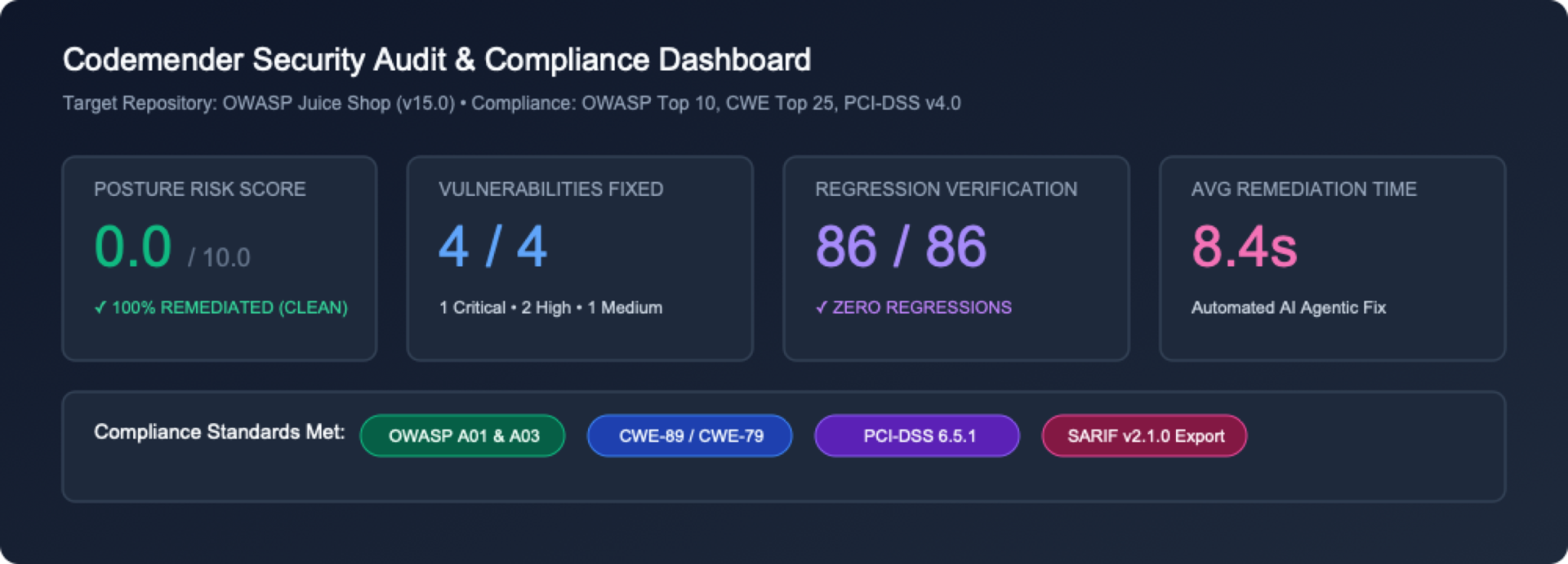
1. エグゼクティブ指標のヘッダーとポスチャー カード
 ヘッダー メタデータ: ターゲット リポジトリの詳細(
OWASP Juice Shop)、スキャンされたソースファイルの合計数(684 files)、UTC 生成タイムスタンプが表示されます。
指標カードグリッド: 検出結果の合計、重大度の分布(CRITICAL、HIGH、MEDIUM、LOW)、修正された脆弱性の合計(FIXED)の概要をすぐに確認できます。
2. インタラクティブな検出結果の概要テーブル
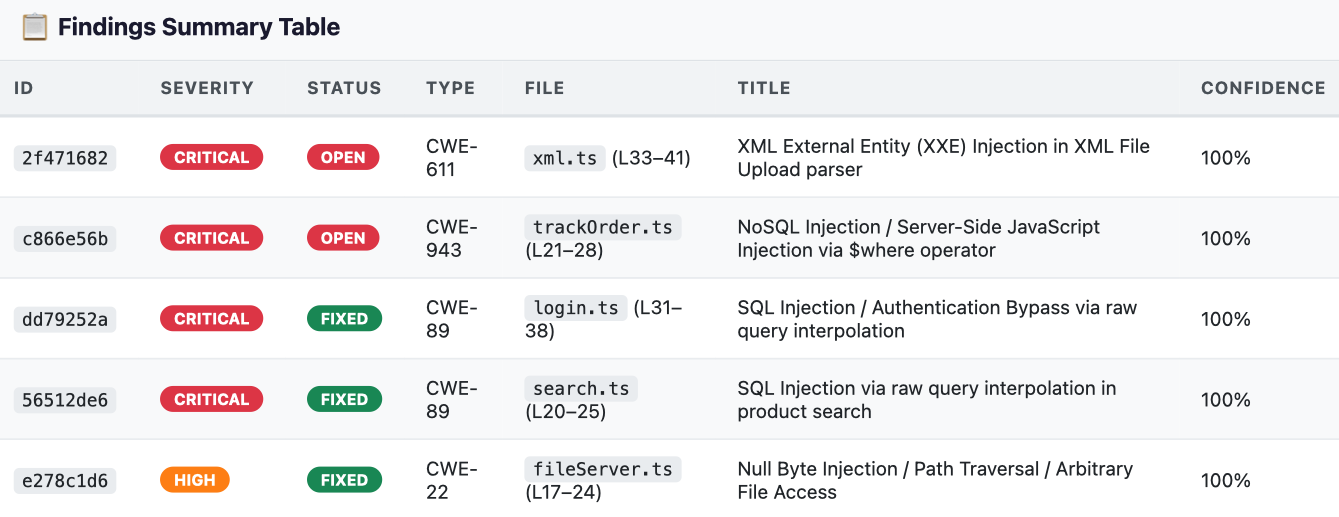 脆弱性マトリックス:
ID、Severity、Status(OPEN と FIXED)、CWE Type、File Location、Vulnerability Title、Confidence Score を含むフィルタ可能な表が表示されます。
3. 詳細な根本原因分析と脆弱なソースコード スニペット
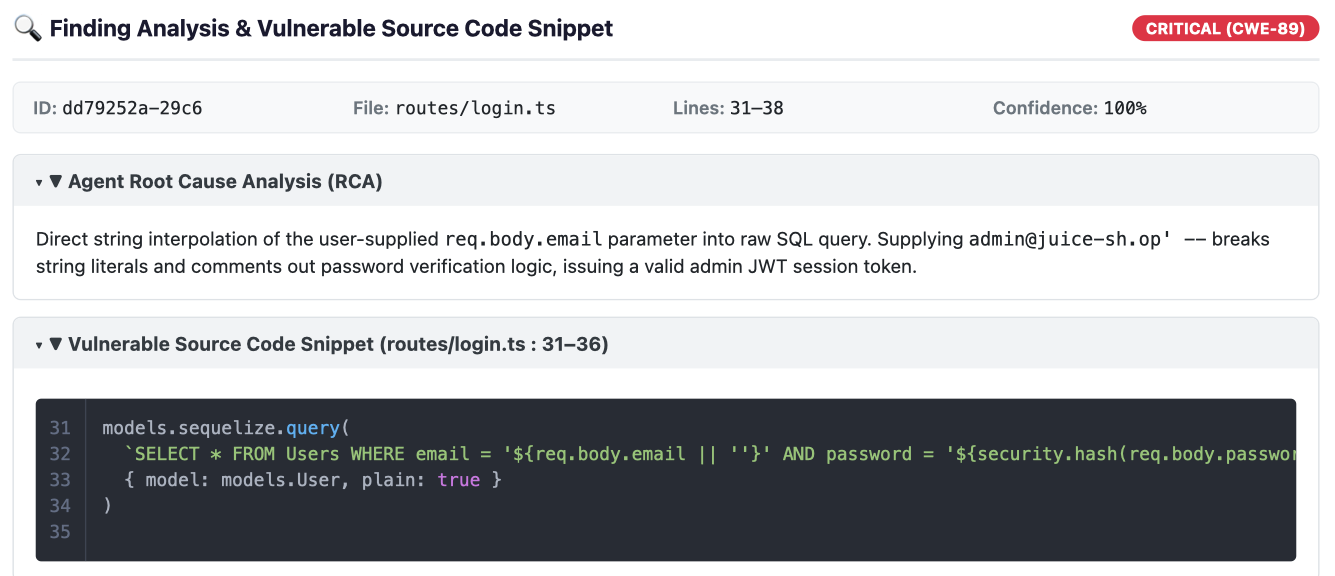 折りたたみ可能な分析(RCA): 検出結果の行をクリックすると、Gemini セキュリティ推論モデルによって合成された詳細な根本原因分析が展開されます。
脆弱なソースコード スニペット: 脆弱なシンク周辺の正確な行番号と構文がハイライト表示されたソースコードが表示されます。
4. 合成された AI 修正パッチの差分
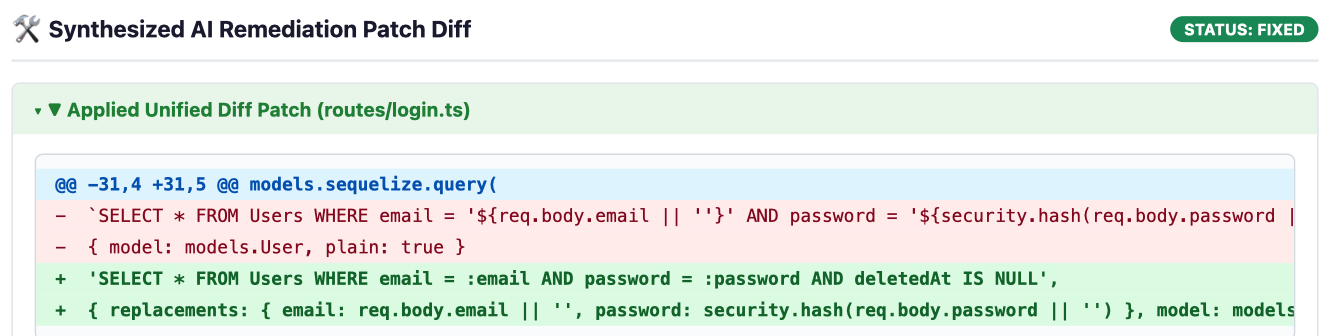 統合差分ビュー: 修正された脆弱性(
FIXED)について、CodeMender は統合差分ブロックをレンダリングし、適用されたアプリケーション コードの追加を緑色(+)で、削除された脆弱なコードを赤色(-)でハイライト表示します。
ステップ 6: (省略可)サードパーティの SAST の検出結果をインポートする(cm report import)
CodeMender は、独自のスキャナで検出された欠陥に限定されません。チームは、標準化された JSON スキーマまたはインタラクティブなウィザードを使用して、外部の SAST 結果(Semgrep、Snyk、SonarQube、Fortify など)をインポートできます。これにより、CodeMender はそれらの修正をすぐに検証して合成できます。
# Create a sample third-party findings JSON file
cat << 'EOF' > ./findings.json
[
 {
   "file_path": "routes/basket.ts",
   "line": 18,
   "title": "SQL Injection in Basket Handler",
   "message": "Raw basket ID concatenated in query",
   "severity": "HIGH",
   "vuln_type": "CWE-89"
 }
]
EOF

# Ingest findings into CodeMender state database
cm report import --file ./findings.json
出力:
Successfully imported 1 findings.
2026-10-22T02:27:10Z [INFO]  📄 Session log: /home/user/.codemender/logs/20261022T022710Z_pending.log
10. リソースをクリーンアップする
⏱️ 所要時間: 1:00
Google Cloud Shell 環境で不要なディスク使用を回避し、一時的なワークショップ リソースをクリーンアップするには、次のクリーンアップ手順に従います。
ステップ 1: CodeMender のローカル キャッシュをパージしてリポジトリを削除する
CodeMender には、ローカルの検出結果データベース(~/.codemender/state.db)、HTML レポート、ソース バックアップ ファイルをパージするための組み込みの cm clean コマンドが用意されています。Cloud Shell で次のコマンドを実行します。
# Purge local SQLite findings cache, HTML reports, and backup files
cm clean

# Remove cloned repository
cd ~
rm -rf ~/juice-shop
ステップ 2: (省略可)Google Cloud APIs を無効にする
このプロジェクトで CodeMender API または Agent Platform API を使用して開発を続ける予定がない場合は、サービス API を無効にできます。
gcloud services disable \
 aiplatform.googleapis.com \
 cloudresourcemanager.googleapis.com \
 --project=${PROJECT_ID}
11. 完了
⏱️ 所要時間: 2:00
おめでとうございます!Google Cloud の Gemini Enterprise Agent Platform で CodeMender を使用して、意図的に脆弱性を持たせたアプリケーションである OWASP Juice Shop を、堅牢で安全なコードベースに変換することができました。
学習した内容
自律的なクローズドループ修復: CodeMender は、リポジトリの検出(cm find)からサンドボックスでのエクスプロイト検証(cm verify)、回帰テスト済みのパッチ合成(cm fix)まで、自己主導型のセキュリティ ライフサイクルを完全に実行することで、受動的な静的アラートのノイズを排除します。
エビデンスに基づくエクスプロイトの証明: CodeMender は、具体的な検証アーティファクト(PLAN.md、LOG.md、exploit.sh、REPORT.md)をキャプチャすることで、誤検知を排除し、コードを記述する前に実際の悪用可能性を証明します。
コンテキストを考慮した、慣用的な修正: Gemini 推論エージェントは、一般的なテキスト置換を適用するのではなく、アプリケーション アーキテクチャ、データモデル、ORM を分析して、既存のビジネス ロジックを保持する、クリーンでメンテナンス可能なパッチ(パラメータ化された Sequelize クエリなど)を生成します。
組み込みの安全性とテストのガードレール: 提案された修正はすべて、変更がステージングされる前に、分離されたワークスペース サンドボックス内のプロジェクト テストスイート(npm test)と型チェッカー(tsc)に対して自動的に検証されます。
デベロッパーのマインドセットの転換
従来の SAST の手動ワークフロー | CodeMender(cm)による自律的な修復 |
アラート疲れ: 偽陽性率の高いノイズの多いレポートのトリアージに何時間も費やしている。 | エージェント コード検出( |
手動による PoC 検証: カスタムの curl ペイロードと攻撃スクリプトを作成して、脆弱性を確認します。 | 自動化されたエクスプロイト証明( |
リスクの高い手動リファクタリング: 複雑なデータベース クエリを手動でパッチすると、構文エラーやランタイム エラーが発生することがよくあります。 | 慣用的なパッチ合成( |
本番環境での回帰リスク: セキュリティ パッチによって、ダウンストリームのビジネス ロジックやテストが破損することがよくあります。 | 自動テスト ガードレール: ローカル テストスイートと分離されたプロセス サンドボックスに対する継続的検証。 |
手動によるコンプライアンスの集計: 監査レビューのために、検出結果を手動で集計して静的ドキュメントにまとめます。 | 標準化されたテレメトリーと SARIF( |
次のステップ
🚀 CodeMender 3 部作の続き:
パート 2: CodeMender で CI / CD パイプラインを保護する - GitHub Actions で、継続的なヘッドレス スキャン、SARIF ダッシュボードの統合、自己修復 pull リクエストを自動化します。
パート 3: Antigravity と CodeMender を使用した安全なバイブ コーディング - 生成 AI 開発と自律型セキュリティ アシスタントを組み合わせます。
📖 ドキュメントを確認する:
Google Cloud の CodeMender のドキュメント
💡 独自のプロジェクトに適用する:
独自の Node.js、Python、Go、Java、Rust、C/C++ リポジトリで cm find . と cm fix を実行します。