

1. 시작하기 전에
⏱️ 소요 시간: 3분
Google Cloud의 Gemini Enterprise Agent Platform에서 CodeMender로 애플리케이션 보호를 위한 실무형 코드랩에 오신 것을 환영합니다.
이 워크숍에서는 클라우드 보안 엔지니어가 되어 Node.js, Express, TypeScript, Angular로 빌드된 업계 표준의 취약한 웹 애플리케이션인 OWASP Juice Shop을 감사하고 보호하는 작업을 수행합니다.
기존 보안 스캔 도구 (SAST/DAST)는 수천 개의 정적 보안 발견 사항, 높은 거짓양성률, 실행 가능한 코드 수정 사항이 없는 상태로 개발팀에 부담을 줍니다. 개발자는 로그를 분류하고, 데이터 흐름을 추적하고, 기존 애플리케이션 동작을 중단시키는 패치를 수동으로 작성하는 데 많은 시간을 소비합니다.
CodeMender는 Google의 Gemini LLM을 중심으로 미세 조정된 에이전트 하네스를 래핑하여 코드 보안을 혁신합니다. CodeMender는 Google DeepMind에서 설계한 프롬프트, 전문 보안 기술, 멀티 에이전트 조정을 사용하여 로컬 소스 저장소 내에서 소프트웨어 취약점을 직접 찾아내고 검증하며 해결하는 자율적인 AI 보안 공동 개발자 역할을 합니다.
기본 요건
- 웹 애플리케이션 취약점 (SQL 삽입, XSS 등 OWASP 상위 10개)에 대한 기본적인 이해
- JavaScript/TypeScript 및 Node.js 애플리케이션에 대한 기본적인 지식
- 명령줄 인터페이스 (CLI) 도구에 대한 기본 지식
학습할 내용
- Google Cloud Shell에서 CodeMender (
cm) CLI를 설정, 인증, 초기화하는 방법 - 저장소를 자율적으로 스캔하여 악용 가능한 취약점을 발견하는 방법 (
cm find) - 격리된 샌드박스에서 취약점을 검증하고 검증 아티팩트를 검사하는 방법 (
cm verify) - 컨텍스트 인식 보안 패치 (
cm fix)를 자율적으로 합성, 테스트, 적용하는 방법 - 토큰 원격 분석을 감사하고 다양한 형식의 규정 준수 보고서 (
cm stats,cm report)를 내보내는 방법
필요한 항목
- 결제가 사용 설정된 Google Cloud 프로젝트
- 활성 프로젝트 연결이 있는 Google Cloud Shell (사전 설치된
gcloud,git, Node.js 18 이상 포함) - 시작 저장소: OWASP Juice Shop GitHub 저장소
2. CodeMender 아키텍처 소개
⏱️ 소요 시간: 4분
코드 스캔 및 해결을 자세히 살펴보기 전에 공식 Google Cloud 아키텍처 표준에 따라 Gemini Enterprise Agent Platform에서 CodeMender가 내부적으로 어떻게 작동하는지 알아보겠습니다.
시스템 아키텍처: 에이전트 및 클라이언트 데몬
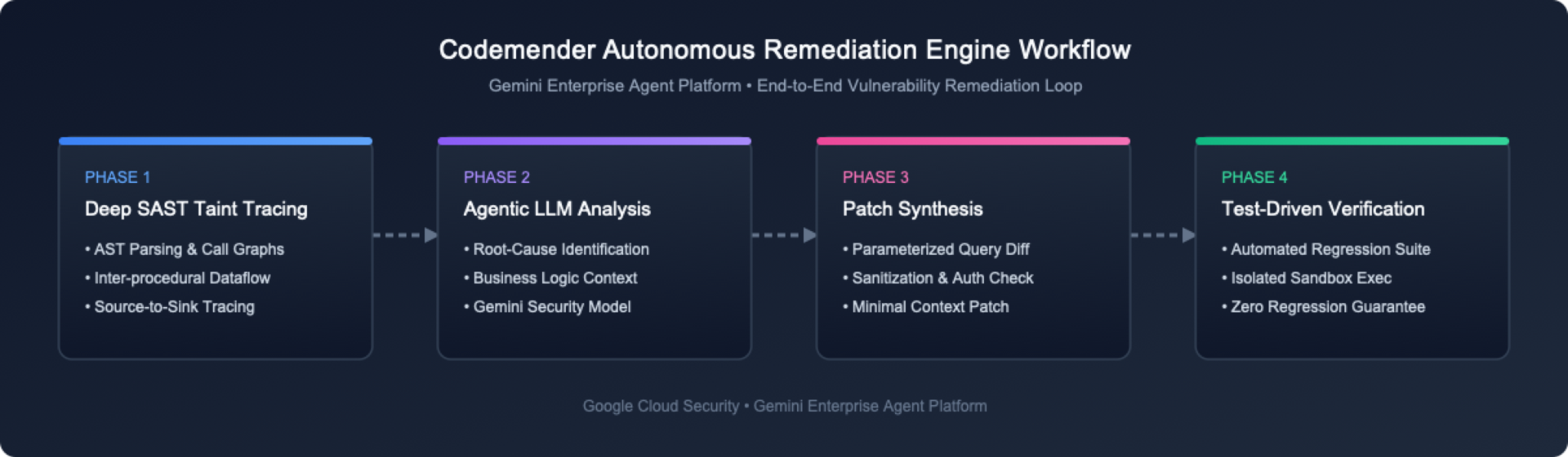
사용자 관점에서 CodeMender는 두 가지 주요 아키텍처 구성요소로 구성됩니다.
호스팅된 멀티 에이전트 플랫폼: Google Cloud에서 실행되는 호스팅된 멀티 에이전트 시스템으로, 핵심 보안 비즈니스 로직, LLM 프롬프트 엔지니어링, 보안 추론을 실행합니다.
로컬 클라이언트 CLI 및 샌드박스 데몬 (cm): Google Cloud Shell에서 실행되는 클라이언트로, CLI(cm find, cm verify, cm fix와 같은 명령어 실행)와 로컬 데몬 (격리된 프로세스 수준 샌드박스 내에서 에이전트를 대신하여 명령어를 안전하게 실행)의 역할을 모두 수행합니다.
3가지 핵심 해결 기능
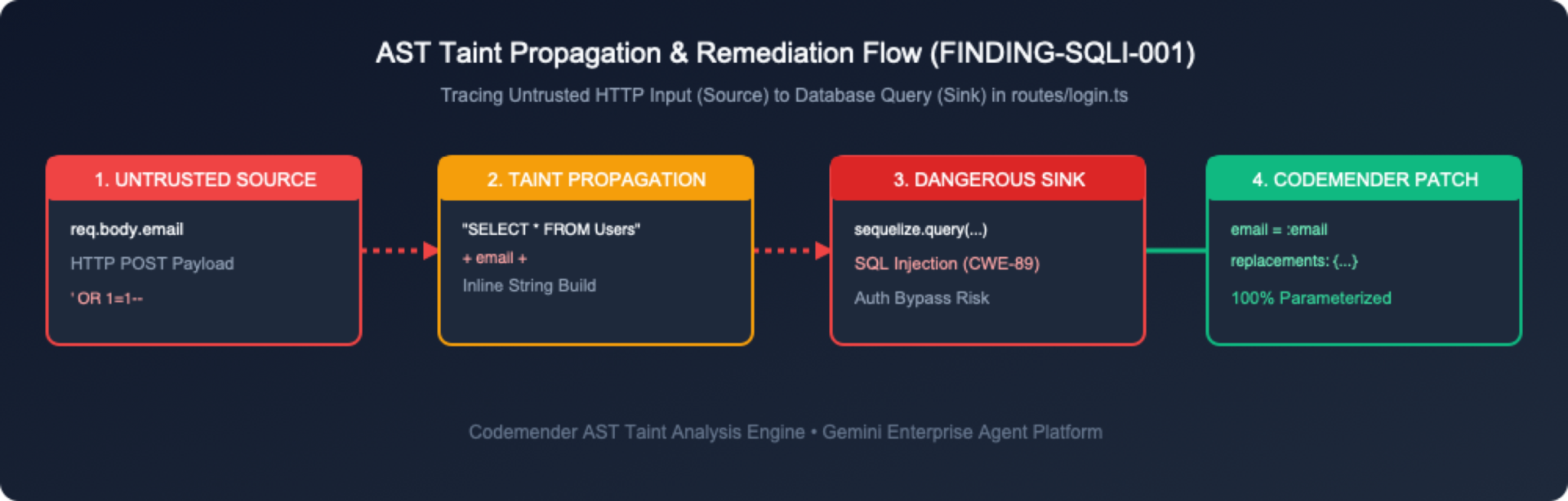
CodeMender는 세 가지 통합 단계를 통해 코드 보안을 처리합니다.
취약점 찾기 (cm find): 에이전트가 안내하는 LLM을 사용하여 코드베이스를 스캔하고, 특수한 보안 도구와 프롬프트 엔지니어링을 활용하여 모델이 보안 결함에 집중하도록 합니다. (또는 외부 보안 스캔 도구에서 발견 항목을 가져올 수 있습니다.)
취약점 확인 (cm verify): 로컬에서 코드를 빌드하고 발견된 결함을 악용하여 악용 가능 여부를 확인합니다. 이렇게 하면 거짓양성이 제거되고 .exploit/ (info.yaml, PLAN.md, LOG.md, exploit.sh, REPORT.md)에 영구 작업공간 확인 아티팩트가 생성됩니다.
취약점 수정 (cm fix): 언어 인식 소스 패치를 합성하고 로컬 샌드박스 내에서 프로젝트 빌드 및 회귀 테스트 모음 (npm test)을 실행하여 이를 확인합니다.
3. OWASP Juice Shop 환경 설정
⏱️ 소요 시간: 5분
이 단계에서는 Google Cloud 터미널 환경을 열고 대상 애플리케이션 저장소를 가져옵니다.
1단계: Google Cloud 콘솔에서 Cloud Shell 열기
브라우저에서 Google Cloud 콘솔로 이동합니다.
상단 탐색 메뉴에서 Cloud Shell 활성화 버튼 (아이콘 >_)을 클릭합니다.
Cloud Shell은 gcloud, git, Node.js가 사전 설치되고 인증된 브라우저 기반 Linux 터미널을 제공합니다.
2단계: OWASP Juice Shop 저장소 클론하기
Cloud Shell 또는 로컬 터미널에서 OWASP Juice Shop 저장소를 클론합니다.
git clone https://github.com/juice-shop/juice-shop.git --depth 1
cd juice-shop
3단계: 주요 애플리케이션 파일 검사
OWASP Juice Shop은 TypeScript 모듈과 함께 백엔드에서 Express.js를 사용합니다. 디렉터리 구조를 간단히 살펴보겠습니다.
ls -la routes/ lib/
인증, 사용자 쿼리, 장바구니 관리를 처리하는 주요 경로 파일을 확인합니다.
routes/login.ts: 사용자 인증 및 원시 SQL 쿼리 실행을 처리합니다.
routes/search.ts: 제품 검색 및 응답 렌더링을 처리합니다.
routes/basket.ts: 사용자 장바구니 검색을 처리합니다.
routes/trackOrder.ts: NoSQL 쿼리를 통해 주문 추적을 처리합니다.
lib/xml.ts: XML 파싱 및 파일 업로드를 처리합니다.
lib/insecurity.ts: 세션 토큰 및 암호화를 위한 도우미 유틸리티입니다.
4. CodeMender CLI (cm) 설치 및 GCP 사용자 인증 정보 인증
⏱️ 소요 시간: 8분
이 단계에서는 필수 Google Cloud API를 사용 설정하고, gcloud를 사용하여 IAM 권한을 부여하고, cm CLI 바이너리를 다운로드 및 설치하고, 애플리케이션 기본 사용자 인증 정보 (ADC)를 구성합니다.
1단계: gcloud를 통해 필수 Google Cloud API 사용 설정
CodeMender를 사용하려면 Gemini Enterprise Agent Platform에서 Agent Platform API (aiplatform.googleapis.com) 및 Cloud Resource Manager API (cloudresourcemanager.googleapis.com)가 필요합니다.
Cloud Shell 또는 터미널에서 활성 프로젝트 ID를 가져오거나 (또는 Google Cloud 콘솔 상단의 프로젝트 드롭다운 확인) 필요한 서비스 API를 사용 설정합니다.
# Automatically retrieve and set your active Google Cloud project ID
export PROJECT_ID=$(gcloud config get-value project)
gcloud config set project ${PROJECT_ID}

# Enable required Google Cloud APIs
gcloud services enable \
 aiplatform.googleapis.com \
 cloudresourcemanager.googleapis.com \
 serviceusage.googleapis.com \
 --project=${PROJECT_ID}
API가 사용 설정되어 있는지 확인합니다.
gcloud services list --enabled --filter="name:(aiplatform.googleapis.com OR cloudresourcemanager.googleapis.com)"
2단계: gcloud를 통해 IAM 권한 부여
CodeMender 클라우드 추론 엔진과 상호작용하려면 사용자 및 서비스 계정에 roles/aiplatform.user (Agent Platform 사용자) IAM 역할이 할당되어 있어야 합니다.
CLI를 통해 사용자 계정에 IAM 역할 부여
# Get your active authenticated gcloud account email
USER_EMAIL=$(gcloud config get-value account)

# Add IAM policy binding for user account
gcloud projects add-iam-policy-binding ${PROJECT_ID} \
 --member="user:${USER_EMAIL}" \
 --role="roles/aiplatform.user"
3단계: Cloud Shell에서 cm CLI 다운로드 및 설치
Google Cloud Shell에서 사용자 데이터는 $HOME 디렉터리에 영구적으로 저장됩니다. 다음 명령어를 실행하여 sudo 없이 cm를 ~/bin에 설치합니다. 이전 섹션의 ~/juice-shop에 아직 있으므로 명령어가 임시 디렉터리에 다운로드되고 나중에 정리됩니다. 이렇게 하면 Juice Shop 저장소에 설치 프로그램 파일이 남지 않습니다.
# Download into a temporary directory so nothing lands in the Juice Shop repository
CM_TMP=$(mktemp -d)
curl -L -o "${CM_TMP}/cm-linux-amd64.zip" "https://artifactregistry.googleapis.com/download/v1/projects/cmoc-prod/locations/us/repositories/codemender-cli-production/files/cm:stable:cm-linux-amd64.zip:download?alt=media"
unzip -o "${CM_TMP}/cm-linux-amd64.zip" -d "${CM_TMP}"

# Install into your persistent ~/bin directory and clean up
mkdir -p ~/bin
install -m 0755 "${CM_TMP}/cm" ~/bin/cm
rm -rf "${CM_TMP}"

# Add ~/bin to PATH for this session and future Cloud Shell sessions
export PATH="$HOME/bin:$PATH"
grep -qxF 'export PATH="$HOME/bin:$PATH"' ~/.bashrc || echo 'export PATH="$HOME/bin:$PATH"' >> ~/.bashrc
4단계: cm CLI 설치 확인
cm --version를 실행하여 CLI 바이너리가 올바르게 설치되었는지 확인합니다.
cm --version
예상 출력:
cm version 0.17.0
5단계: Google Cloud 애플리케이션 기본 사용자 인증 정보 (ADC) 구성
cm에서 클라우드 추론 엔진에 대한 요청을 인증할 수 있도록 Google Cloud 애플리케이션 기본 사용자 인증 정보 (ADC)를 구성합니다.
gcloud auth application-default login
Cloud Shell 승인이라는 승인 모달 대화상자가 표시됩니다. 승인을 클릭하여 액세스 권한을 부여합니다.
5. CodeMender 작업공간 초기화 및 확인
⏱️ 소요 시간: 3분
cm가 설치되고 인증되었으므로 대상 프로젝트 디렉터리 내에서 CodeMender 작업공간을 초기화하고 환경 설정을 확인합니다.
1단계: CodeMender 작업공간 초기화 (cm init)
프로젝트 디렉터리의 루트에서 cm init를 실행하여 로컬 상태 추적 파일을 초기화하고 기준 구성을 설정합니다.
cm init
출력:
✅ Initialized CodeMender workspace at /home/user/.codemender
2단계: 엔드 투 엔드 상태 진단 실행 (cm health)
에이전트 세션을 시작하기 전에 cm health를 실행하여 사용자 인증 정보, 구성, 연결 가능성, 승인을 확인합니다.
cm health
출력:
CodeMender Health Check
───────────────────────
 Backend:   iapi
 Endpoint:  https://aiplatform.googleapis.com
 Location:  global
 Project:   my-gcp-project

 ✓ credentials     passed   (0ms)  Token acquired for project "my-gcp-project"
 ✓ config          passed   (0ms)  Configuration valid (backend "iapi")
 ✓ reachability    passed   (250ms)  Endpoint https://aiplatform.googleapis.com responded
 ✓ authorization   passed   (68ms)  Caller authorized for project "my-gcp-project"

Status: HEALTHY (exit code 0, 319ms)
3단계: 구성 매개변수 이해 (config.yaml)
CodeMender는 .codemender/config.yaml (또는 ~/.codemender/config.yaml)에 작업공간 구성 파일을 만듭니다. 이 파일은 정책 경계, 파일 포함 규칙, 테스트 검증 후크를 정의합니다.
# CodeMender CLI configuration.
# The server endpoint is baked in at build time (see build profiles).
# Override it here only if you need a different endpoint.

server: {}
location: "global"         # Service location: "global" (default), "us", "eu", or "us-central1" (overridden by $CM_LOCATION)

# Customer-supplied team identifier sent as the X-CodeMender-Team-Id
# telemetry header. Overridden by --team-id flag or $CM_TEAM_ID env var.
# Max 63 chars, must match [A-Za-z0-9._-]. Omit to skip the header.
# team_id: "acme-security"

scan:
 extensions:
   include: [".py", ".java", ".go", ".js", ".jsx", ".mjs", ".cjs", ".ts", ".tsx", ".c", ".cc", ".cpp", ".cxx", ".h", ".hh", ".hpp", ".hxx", ".inl", ".ipp", ".cs", ".rs", ".kt", ".kts", ".rb", ".php", ".sol", ".tf", ".hcl"]
   exclude: [".min.js", ".generated.go", ".pb.go"]
 # A leading "/" matches only that directory at the scan root.
 exclude_dirs: ["node_modules", "vendor", "dist", "/target", "/obj", "/build", ".gradle"]
 max_file_size_kb: 2048   # Maximum file size for discovery (2048 KB / 2 MiB)
 incremental: true

# Restrict agent file access to these directories (all commands).
# When empty, the scan target directory is used as the boundary.
# project_paths: []

output:
 format: table   # "table", "json", "sarif"

tools:
 confirm_commands: true   # Prompt Y/N before running shell commands (default: true)
 confirm_writes: true     # Prompt Y/N before writing/modifying files (default: true)
 # cleanup_candidate_branches: true # Auto-delete temporary candidate branches on completion (default: true)
 # Use --yes flag on find/fix/session resume to skip all confirmations

# Version Control and Automated Testing Guardrails
vcs:
 type: ""               # VCS type: "git", "mercurial", "custom", or "" (auto-detect)
 commands:
   reset: ""            # Shell command to reset codebase (auto-populated for known VCS)
   diff: ""             # Shell command to show changes (auto-populated for known VCS)
   status: ""           # Shell command to list modified files (auto-populated for known VCS)
   stage: ""            # Shell command to stage changes (auto-populated for known VCS)

build:
 command: "npm test"    # Shell command to build/verify changes from the agent

sandbox:
 enabled: true          # Process-level OS sandbox (default: true)
 mounts:
   target_dir: "."
 network:
   profile: "permissive-closed" # Complete network isolation; set to "permissive-open" if build requires internet
security:
 protected_files: []    # Files mounted read-only inside sandbox (e.g. ["~/.ssh/*"])
6. cm find로 취약점을 발견합니다 .
⏱️ 소요 시간: 7분
이 단계에서는 cm find . --quick를 실행하여 Juice Shop 코드베이스에서 에이전트 보안 스캔을 실행합니다.
1단계: cm find . --quick 실행
CodeMender v0.16.0부터 cm find <path>는 기본적으로 Deep Scan (
--deep
)은 파일별로 철저한 분석을 수행하는 반면, 빠른 검사 (
--quick
)는 빠른 저장소 분류를 제공합니다. cm find . --quick을 실행하여 OWASP Juice Shop 저장소에서 빠른 스캔을 수행합니다 (예상 실행 시간: 전체 684개 파일 코드베이스 분류에 약 8분).
cm find . --quick -y --sandbox=false --bypass-warning --model gemini-3.8-flash
cm는 Gemini Enterprise Agent Platform에서 스캔 세션을 실행하여 모든 저장소 모듈의 소스 코드 파일을 분석합니다.
⚠️ Sandbox DISABLED and command approval OFF: the agent can run commands on this machine without asking. Code in the scanned repository could steer it. Re-enable the sandbox or command approval (drop --yes, or set tools.confirm_commands: true) unless you trust the repository.
🔍 Discovering files in /home/user/juice-shop...
  Found 684 source files
🚀 Starting FIND session (mode: QUICK)...
  Server: https://aiplatform.googleapis.com
  Session: ChBjMjI4YWY5MzljZjUzNTQ4EAgaAjg1KgRtYWlu
  Operation: ChBjMjI4YWY5MzljZjUzNTQ4EAgaAjg1KgRtYWlu
📂 Scan target: /home/user/juice-shop
🔒 Sandbox roots (agent can only access these directories):
  • /home/user/juice-shop

📡 Waiting for server (https://aiplatform.googleapis.com)...
────────────────────────────────────────────────────────────
2026-10-29T03:01:47Z [INFO]  🔧 [Step 1] list_dir → /home/user/juice-shop
2026-10-29T03:01:56Z [INFO]  🔧 [Step 2] list_dir → .../juice-shop/routes
2026-10-29T03:02:08Z [INFO]  🔧 [Step 3] read_file → .../juice-shop/server.ts
2026-10-29T03:02:47Z [INFO]  🔧 [Step 7] read_file → .../juice-shop/routes/login.ts
2026-10-29T03:02:56Z [INFO]  🔧 [Step 8] read_file → .../juice-shop/routes/search.ts
2026-10-29T03:03:48Z [INFO]  🔧 [Step 13] read_file → .../juice-shop/routes/fileUpload.ts
2026-10-29T03:04:30Z [INFO]  🔧 [Step 16] read_file → .../juice-shop/routes/userProfile.ts
2026-10-29T03:06:11Z [INFO]  🔧 [Step 25] read_file → .../juice-shop/routes/trackOrder.ts
2026-10-29T03:07:57Z [INFO]  🔧 [Step 33] read_file → .../juice-shop/routes/order.ts
2026-10-29T03:09:30Z [INFO]  ✅ Completed 33 tool steps in 7m48s | Tokens: 2.6M in / 8k out / 2.7M total
────────────────────────────────────────────────────────────

🔒 Found 12 vulnerabilities:

ID        SEVERITY    TYPE                                     FILE                             TITLE                                                                                   CONFIDENCE
────────  ────────    ────                                     ────                             ─────                                                                                   ──────────
43aa7446  🔴 CRITICAL  SQL INJECTION                            routes/login.ts                  SQL Injection in User Login Handler Allows Authentication Bypass                        100%
dd83d0a4  🟠 HIGH      SQL INJECTION                            routes/search.ts                 UNION-Based SQL Injection in Product Search Allows Database Exfiltration                100%
4dfe2409  🟠 HIGH      CODE INJECTION                           routes/userProfile.ts            Remote Code Execution via Eval in User Profile Template Handler                         100%
79d490b0  🟠 HIGH      PATH TRAVERSAL                           routes/fileUpload.ts             Path Traversal (Zip Slip) in Zip File Upload Allows Arbitrary File Overwrite            100%
4f2b050c  🟠 HIGH      XML EXTERNAL ENTITY (XXE)                routes/fileUpload.ts             XML External Entity (XXE) Injection in File Upload Route Leaks System Files             100%
1ece0e25  🟠 HIGH      IMPROPER ACCESS CONTROL                  server.ts                        Missing Authorization on Product Update Endpoint Allows Unauthorized Product Tampering  100%
757fd438  🟠 HIGH      CWE-943                                  routes/trackOrder.ts             NoSQL / JavaScript Injection in Order Tracking Allows Database Record Exfiltration      100%
349bac9f  🟡 MEDIUM    SERVER-SIDE REQUEST FORGERY (SSRF)       routes/profileImageUrlUpload.ts  Server-Side Request Forgery (SSRF) in Profile Image URL Upload Route                    100%
be5e1459  🟡 MEDIUM    OPEN REDIRECT                            routes/redirect.ts               Open Redirect via Inadequate Allowlist Substring Match                                  100%
06ecf8a5  🟡 MEDIUM    INSECURE DIRECT OBJECT REFERENCE (IDOR)  routes/basket.ts                 Insecure Direct Object Reference (IDOR) Allows Access to Arbitrary User Baskets         100%
02f6a293  🟡 MEDIUM    PATH TRAVERSAL                           routes/dataErasure.ts            Local File Read via Insecure Template Layout Parameter in Data Erasure Route            100%
95ee59a3  🟡 MEDIUM    CWE-943                                  routes/updateProductReviews.ts   NoSQL Injection in Product Review Update Endpoint Allows Mass Modification              100%

Summary: 1 CRITICAL, 6 HIGH, 5 MEDIUM

Run 'cm report' for detailed analysis, 'cm verify <finding-id>' to validate, or 'cm fix <finding-id>' to generate a patch.
2026-10-29T03:09:30Z [INFO]  📄 Session log: /home/user/.codemender/logs/20261029T030140Z_ChBjMjI4YWY5MzljZjUzNTQ4EAgaAjg1KgRtYWlu.log
2단계: cm report를 통해 검사 결과 검토하기
cm report -f table를 실행하여 로컬 SQLite 상태 데이터베이스에서 발견된 모든 보안 발견 항목을 표시합니다.
cm report -f table
출력:
┌──────────┬───────────┬──────┬───┬──────────────────────────────┬────────────────────────────────────────┐
│ID        │Severity   │Status│Fix│File                          │Title                                   │
├──────────┼───────────┼──────┼───┼──────────────────────────────┼────────────────────────────────────────┤
│ 43aa7446 │🔴 CRITICAL│OPEN  │—  │routes/login.ts               │SQL Injection in User Login Handler A...│
│ dd83d0a4 │🟠 HIGH    │OPEN  │—  │routes/search.ts              │UNION-Based SQL Injection in Product ...│
│ 4dfe2409 │🟠 HIGH    │OPEN  │—  │routes/userProfile.ts         │Remote Code Execution via Eval in Use...│
│ 79d490b0 │🟠 HIGH    │OPEN  │—  │routes/fileUpload.ts          │Path Traversal (Zip Slip) in Zip File...│
│ 4f2b050c │🟠 HIGH    │OPEN  │—  │routes/fileUpload.ts          │XML External Entity (XXE) Injection i...│
│ 1ece0e25 │🟠 HIGH    │OPEN  │—  │server.ts                     │Missing Authorization on Product Upda...│
│ 757fd438 │🟠 HIGH    │OPEN  │—  │routes/trackOrder.ts          │NoSQL / JavaScript Injection in Order...│
│ 349bac9f │🟡 MEDIUM  │OPEN  │—  │routes/profileImageUrlUploa...│Server-Side Request Forgery (SSRF) in...│
│ be5e1459 │🟡 MEDIUM  │OPEN  │—  │routes/redirect.ts            │Open Redirect via Inadequate Allowlis...│
│ 06ecf8a5 │🟡 MEDIUM  │OPEN  │—  │routes/basket.ts              │Insecure Direct Object Reference (IDO...│
│ 02f6a293 │🟡 MEDIUM  │OPEN  │—  │routes/dataErasure.ts         │Local File Read via Insecure Template...│
│ 95ee59a3 │🟡 MEDIUM  │OPEN  │—  │routes/updateProductReviews.ts│NoSQL Injection in Product Review Upd...│
└──────────┴───────────┴──────┴───┴──────────────────────────────┴────────────────────────────────────────┘

12 finding(s): 1 CRITICAL, 6 HIGH, 5 MEDIUM · ✅ 0 fixed, 🔴 12 open
📋 Report generated at 2026-10-29 03:10:05 UTC
2026-10-29T03:10:05Z [INFO]  📄 Session log: /home/user/.codemender/logs/20261029T031005Z_pending.log
3단계: 발견 항목 수명 주기 상태 및 심각도 수준 이해하기
CodeMender는 다음과 같은 공식적인 4단계 수명 주기를 통해 취약점을 추적합니다.
발견 항목 상태 | 의미 및 전환 처리 |
| 취약점이 발견 (또는 가져오기)되었지만 아직 확인, 패치 또는 무시되지 않았습니다. |
| CodeMender가 패치를 생성하고, 차이점을 적용하고, 빌드/테스트 모음이 통과하고 익스플로잇이 실패하는지 확인했습니다. |
| 신뢰도가 낮거나, 위협 모델을 벗어나거나, 거짓양성으로 확인되어 비활성으로 표시되었습니다. 향후 알림을 음소거합니다. |
| 이전에 |
심각도 분류
CRITICAL: 신뢰할 수 없는 경계에서 직접 도달할 수 있는 즉각적이고 심각한 위험 (예: 원격 코드 실행, 인증되지 않은 SQL 삽입)입니다.
HIGH: 특정 사용자 컨텍스트 또는 연쇄 조건이 필요한 심각한 결함 (예: 임의 데이터베이스 읽기, 권한 에스컬레이션)입니다.
MEDIUM: 범위가 제한적이거나 사용자 상호작용이 필요한 중간 위험 (예: 공개 리디렉션, CSRF)
LOW: 직접적인 영향이 최소화된 심층 방어 위생 결함 또는 정찰 벡터입니다.
7. 취약점 확인 및 캡처된 확인 아티팩트 살펴보기
⏱️ 소요 시간: 10분
CodeMender의 주요 기능 중 하나는 cm verify를 실행할 때마다 영구적인 검증 아티팩트를 자동으로 생성하는 것입니다. routes/login.ts (이 튜토리얼에서는 43aa7446로 표시됨)에서 심각한 SQL 삽입 발견 항목을 확인하고 에이전트가 만든 아티팩트를 살펴보겠습니다.
1단계: cm verify <login-finding-id> 실행
cm report 테이블에서 routes/login.ts의 발견 항목 ID (예: 43aa7446)를 찾고 cm verify <finding-id> --sandbox=false --bypass-warning -y를 실행합니다(예상 실행 시간: 자율 도구 단계를 실행하고, 백그라운드 서비스를 시작하고, 실시간 PoC 익스플로잇 스크립트를 실행하는 데 약 20분 소요).
# Replace 43aa7446 with your actual login.ts finding ID
# --sandbox=false turns off only the OS-level sandbox; the path boundary and command policy stay enforced
cm verify 43aa7446 --sandbox=false --bypass-warning -y --model gemini-3.8-flash
출력:
⚠️ Sandbox DISABLED and command approval OFF: the agent can run commands on this machine without asking. Code in the scanned repository could steer it. Re-enable the sandbox or command approval (drop --yes, or set tools.confirm_commands: true) unless you trust the repository.
🔬 Verifying finding: SQL Injection in User Login Handler Allows Authentication Bypass
  ID: 43aa7446-40de-467d-8ca4-8571dca16036
  File: /home/user/juice-shop/routes/login.ts
  Severity: 🔴 CRITICAL
  Type: SQL INJECTION
Resetting workspace at /home/user/juice-shop

🔧 Running: git checkout HEAD -- . && git clean -fd
Removing .cm_project

✅ Reset complete. Ready for vulnerability research.
🚀 Starting VERIFY session...
  Server: https://aiplatform.googleapis.com
  Session: ChBkZTRhMWU3YTI4MjU5ZDY0EAgaAmU4KgRtYWlu
  Operation: ChBkZTRhMWU3YTI4MjU5ZDY0EAgaAmU4KgRtYWlu
📂 Scan target: /home/user/juice-shop/routes
🔒 Sandbox boundary (agent can explore within):
  • /home/user/juice-shop

📡 Waiting for verification agent (https://aiplatform.googleapis.com)...
────────────────────────────────────────────────────────────
2026-10-29T03:11:31Z [INFO]  🔧 [Step 1] run_command → mkdir -p /home/user/juice-shop/.exploit
2026-10-29T03:11:42Z [INFO]  🔧 [Step 2] read_file → .../juice-shop/routes/login.ts
2026-10-29T03:12:03Z [INFO]  🔧 [Step 4] read_file → .../juice-shop/package.json
2026-10-29T03:12:14Z [INFO]  🔧 [Step 5] write_to_file → .../juice-shop/.exploit/PLAN.md
2026-10-29T03:19:00Z [INFO]  🔧 [Step 25] run_command → npm run build:server
2026-10-29T03:29:20Z [INFO]  🔧 [Step 61] write_to_file → .../juice-shop/.exploit/info.yaml
2026-10-29T03:29:53Z [INFO]  🔧 [Step 63] write_to_file → .../juice-shop/.exploit/LOG.md
2026-10-29T03:30:17Z [INFO]  🔧 [Step 64] write_to_file → .../juice-shop/.exploit/REPORT.md
2026-10-29T03:30:55Z [INFO]  🔧 [Step 66] run_command → git status --short
2026-10-29T03:31:46Z [INFO]  ✅ Completed 66 tool steps in 20m23s | Tokens: 2.8M in / 7k out / 2.8M total
────────────────────────────────────────────────────────────
2026-10-29T03:31:46Z [INFO]  Artifacts manifest written: /home/user/.codemender/artifacts/ChBkZTRhMWU3YTI4MjU5ZDY0EAgaAmU4KgRtYWlu/manifest.json (7 artifacts)
📦 Captured 7 agent artifacts in /home/user/.codemender/artifacts/ChBkZTRhMWU3YTI4MjU5ZDY0EAgaAmU4KgRtYWlu
Pulling artifacts for session ChBkZTRhMWU3YTI4MjU5ZDY0EAgaAmU4KgRtYWlu
Resetting workspace at /home/user/juice-shop

🔧 Running: git checkout HEAD -- . && git clean -fd
Removing .cm_project
Removing .exploit/LOG.md
Removing .exploit/PLAN.md
Removing .exploit/REPORT.md
Removing .exploit/exploit.sh
Removing .exploit/info.yaml
Removing .exploit/server_runner.js

✅ Reset complete. Ready for vulnerability research.
📥 Copying 7 finding artifact(s) to workspace...
  • /home/user/juice-shop/.exploit/LOG.md
  • /home/user/juice-shop/.exploit/PLAN.md
  • /home/user/juice-shop/.exploit/REPORT.md
  • /home/user/juice-shop/.exploit/exploit.sh
  • /home/user/juice-shop/.exploit/info.yaml
  • /home/user/juice-shop/.exploit/server.log
  • /home/user/juice-shop/.exploit/server_runner.js

🚀 Programmatically running exploit script to confirm: /home/user/juice-shop/.exploit/exploit.sh
EXPLOIT SUCCESSFUL

✅ Exploit execution succeeded. Finding VERIFIED (confidence: 100%)

Run 'cm report' to see updated findings.
2026-10-29T03:31:52Z [INFO]  📄 Session log: /home/user/.codemender/logs/20261029T031121Z_ChBkZTRhMWU3YTI4MjU5ZDY0EAgaAmU4KgRtYWlu.log
2단계: 캡처된 인증 자료 개요
CodeMender v0.16.0부터 확인 아티팩트는 .exploit/의 저장소 루트에서 표준화되며, 영구 사본은 ~/.codemender/artifacts/<session-id>/에 유지됩니다. 이 파일은 수정사항의 일부가 아닌 로컬 작업 파일이므로 다음 섹션에서 패치를 스테이징하기 전에 Git에서 제외합니다. ls -la .exploit/를 실행하여 나열합니다.
ls -la .exploit/
출력:
total 40
drwxrwxr-x  2 user user 4096 Oct 29 03:31 .
drwxrwxr-x 35 user user 4096 Oct 29 03:31 ..
-rwxr-xr-x  1 user user 3272 Oct 29 03:31 exploit.sh
-rw-r--r--  1 user user  313 Oct 29 03:31 info.yaml
-rw-r--r--  1 user user 2196 Oct 29 03:31 LOG.md
-rw-r--r--  1 user user  771 Oct 29 03:31 PLAN.md
-rw-r--r--  1 user user 6387 Oct 29 03:31 REPORT.md
-rw-rw-r--  1 user user 2438 Oct 29 03:31 server.log
-rw-rw-r--  1 user user  462 Oct 29 03:31 server_runner.js
아티팩트 파일 | 카테고리 | 목적 |
| 메타데이터 매니페스트 | 발견 항목 UUID, 제목, 심각도 ( |
| 상담사 전략 | CodeMender 추론 엔진이 자율적으로 실행하는 단계별 검증 계획 및 체크리스트입니다. |
| 실행 트레이스 로그 | 각 도구 호출, HTTP 요청 엔드포인트, 테스트 결과를 기록하는 타임스탬프가 지정된 감사 추적 |
| 도우미 실행자/서버 로그 | 에이전트가 테스트를 위해 Juice Shop을 시작하기 위해 만든 도우미 스크립트와 캡처된 서버 출력입니다. |
| 실행 래퍼/독립형 PoC | 대상 서비스를 실행하고 PoC 클라이언트를 호출하여 HTTP 200 응답을 검증하는 셸 스크립트 래퍼입니다. |
| 근본 원인 분석 | 핵심 요약, 취약점의 줄별 분석, 원시 SQL 분석, Sequelize 매개변수화 권장사항입니다. |
3단계: 인증 자료 주요 사항에 대한 심층 안내
에이전트는 실행할 때마다 이러한 아티팩트를 새로 작성하므로 정확한 콘텐츠는 매번 다릅니다. Cloud Shell 편집기에서 (또는 cat를 사용하여) 파일을 열고 다음을 찾습니다.
아티팩트 | 확인할 사항 |
| 발견 항목의 전체 ID, 제목, 심각도, 신뢰도, 태그(예: |
| 에이전트가 보고된 파일을 읽는 것부터 재현 스크립트를 작성하는 것까지 따른 체크리스트입니다. |
| 재현 스크립트의 각 실행 결과를 포함한 타임스탬프가 지정된 작업 및 결과 |
| 독립형 재현 스크립트: 앱을 시작하는 방법, 타겟팅하는 엔드포인트, 성공을 결정하는 방법( |
| 테스트를 위해 Juice Shop을 시작하기 위해 에이전트가 만든 도우미 파일과 해당 서버의 출력입니다. |
| 근본 원인 분석: |
8. cm fix로 SQL 삽입 해결
⏱️ 소요 시간: 10분
routes/login.ts (예시 ID 43aa7446)에서 SQL 삽입 발견 항목을 확인하고 아티팩트를 검토했으므로 이제 cm fix를 실행하여 자동화된 파라미터화된 쿼리 패치를 적용해 보겠습니다.
1단계: cm fix <login-finding-id> -y 실행
cm fix <finding-id> --sandbox=false --bypass-warning -y를 실행하여(43aa7446를 cm report의 실제 로그인 발견 항목 ID로 바꿈) 수정사항을 합성하고 적용합니다.
# Replace 43aa7446 with your actual login.ts finding ID
cm fix 43aa7446 --sandbox=false --bypass-warning -y --model gemini-3.8-flash
출력:
⚠️ Sandbox DISABLED and command approval OFF: the agent can run commands on this machine without asking. Code in the scanned repository could steer it. Re-enable the sandbox or command approval (drop --yes, or set tools.confirm_commands: true) unless you trust the repository.
🩹 Fixing finding: SQL Injection in User Login Handler Allows Authentication Bypass
  File: /home/user/juice-shop/routes/login.ts
  Severity: CRITICAL
🔒 Sandbox roots (agent can only access these directories):
  • /home/user/juice-shop
Found latest VERIFY session ChBkZTRhMWU3YTI4MjU5ZDY0EAgaAmU4KgRtYWlu for finding 43aa7446-40de-467d-8ca4-8571dca16036
Pulling artifacts for session ChBkZTRhMWU3YTI4MjU5ZDY0EAgaAmU4KgRtYWlu
Resetting workspace at /home/user/juice-shop

🔧 Running: git checkout HEAD -- . && git clean -fd
Removing .cm_project
Removing .exploit/LOG.md
Removing .exploit/PLAN.md
Removing .exploit/REPORT.md
Removing .exploit/exploit.sh
Removing .exploit/info.yaml
Removing .exploit/server_runner.js

✅ Reset complete. Ready for vulnerability research.
📥 Copying 7 finding artifact(s) to workspace...
  • /home/user/juice-shop/.exploit/LOG.md
  • /home/user/juice-shop/.exploit/PLAN.md
  • /home/user/juice-shop/.exploit/REPORT.md
  • /home/user/juice-shop/.exploit/exploit.sh
  • /home/user/juice-shop/.exploit/info.yaml
  • /home/user/juice-shop/.exploit/server.log
  • /home/user/juice-shop/.exploit/server_runner.js
  Session: ChA0YjllNzFkMTgyM2JmZDQ0EAgaAjdiKgRtYWlu
  Operation: ChA0YjllNzFkMTgyM2JmZDQ0EAgaAjdiKgRtYWlu

📡 Waiting for fix agent (https://aiplatform.googleapis.com)...
────────────────────────────────────────────────────────────
2026-10-29T03:41:30Z [INFO]  🔧 [Step 4] read_file → .../juice-shop/routes/login.ts
2026-10-29T03:41:58Z [INFO]  🔧 [Step 6] run_command → npm run test:server
2026-10-29T03:43:11Z [INFO]  🔧 [Step 9] grep_search → pattern="sequelize\\.query" path=.../juice-shop/routes
2026-10-29T03:43:54Z [INFO]  🔧 [Step 12] read_file → .../juice-shop/routes/vulnCodeSnippet.ts
2026-10-29T03:44:41Z [INFO]  🔧 [Step 13] read_file → .../juice-shop/routes/vulnCodeFixes.ts
2026-10-29T03:53:14Z [INFO]  🔧 [Step 31] search_and_replace → .../juice-shop/routes/login.ts
2026-10-29T03:53:52Z [INFO]  🔧 [Step 33] run_command → npm run build:server
2026-10-29T03:55:23Z [INFO]  🔧 [Step 37] run_command → npm run test:server
2026-10-29T03:55:49Z [INFO]  🔧 [Step 38] run_command → git diff
2026-10-29T03:57:18Z [INFO]  ✅ Completed 43 tool steps in 16m54s | Tokens: 1.6M in / 4k out / 1.6M total
────────────────────────────────────────────────────────────

✨ Patch generated successfully!

diff --git a/routes/login.ts b/routes/login.ts
index fb9fce3..57f3afe 100644
--- a/routes/login.ts
+++ b/routes/login.ts
@@ -31,7 +31,14 @@ export function login () {

  return (req: Request, res: Response, next: NextFunction) => {
    verifyPreLoginChallenges(req) // vuln-code-snippet hide-line
-    models.sequelize.query(`SELECT * FROM Users WHERE email = '${req.body.email || ''}' AND password = '${security.hash(req.body.password || '')}' AND deletedAt IS NULL`, { model: UserModel, plain: true }) // vuln-code-snippet vuln-line loginAdminChallenge loginBenderChallenge loginJimChallenge
+    models.sequelize.query('SELECT * FROM Users WHERE email = :email AND password = :password AND deletedAt IS NULL', {
+      replacements: {
+        email: typeof req.body?.email === 'string' ? req.body.email : '',
+        password: security.hash(typeof req.body?.password === 'string' ? req.body.password : '')
+      },
+      model: UserModel,
+      plain: true
+    }) // vuln-code-snippet vuln-line loginAdminChallenge loginBenderChallenge loginJimChallenge
      .then((authenticatedUser) => { // vuln-code-snippet neutral-line loginAdminChallenge loginBenderChallenge loginJimChallenge
        const user = utils.queryResultToJson(authenticatedUser)
        if (user.data?.id && user.data.totpSecret !== '') {

────────────────────────────────────────────────────────────
2026-10-29T03:57:18Z [INFO]  📄 Session log: /home/user/.codemender/logs/20261029T034021Z_ChA0YjllNzFkMTgyM2JmZDQ0EAgaAjdiKgRtYWlu.log
2단계: cm vcs를 사용하여 VCS 상태 및 차이 검사
cm vcs status 및 cm vcs diff를 실행하여 수정된 작업공간 파일을 확인합니다.
cm vcs status
cm vcs diff
출력:
📂 CodeMender VCS Status
──────────────────────────────────────────────────
  Directory: /home/user/juice-shop
  Command:   git status --short
──────────────────────────────────────────────────

M routes/login.ts
?? .cm_project
?? .exploit/
2026-10-29T03:59:47Z [INFO]  📄 Session log: /home/user/.codemender/logs/20261029T035947Z_pending.log
추적되지 않는 두 항목은 CodeMender의 로컬 파일이며 수정사항의 일부가 아닙니다. .exploit/에는 cm verify의 확인 아티팩트가 포함되고 .cm_project는 CodeMender의 프로젝트 루트를 표시합니다. 다음 단계에서 커밋에 포함하지 않습니다.
cm vcs diff:
🔍 Running diff in /home/user/juice-shop: git diff
diff --git a/routes/login.ts b/routes/login.ts
index fb9fce3..57f3afe 100644
--- a/routes/login.ts
+++ b/routes/login.ts
@@ -31,7 +31,14 @@ export function login () {

  return (req: Request, res: Response, next: NextFunction) => {
    verifyPreLoginChallenges(req) // vuln-code-snippet hide-line
-    models.sequelize.query(`SELECT * FROM Users WHERE email = '${req.body.email || ''}' AND password = '${security.hash(req.body.password || '')}' AND deletedAt IS NULL`, { model: UserModel, plain: true }) // vuln-code-snippet vuln-line loginAdminChallenge loginBenderChallenge loginJimChallenge
+    models.sequelize.query('SELECT * FROM Users WHERE email = :email AND password = :password AND deletedAt IS NULL', {
+      replacements: {
+        email: typeof req.body?.email === 'string' ? req.body.email : '',
+        password: security.hash(typeof req.body?.password === 'string' ? req.body.password : '')
+      },
+      model: UserModel,
+      plain: true
+    }) // vuln-code-snippet vuln-line loginAdminChallenge loginBenderChallenge loginJimChallenge
      .then((authenticatedUser) => { // vuln-code-snippet neutral-line loginAdminChallenge loginBenderChallenge loginJimChallenge
        const user = utils.queryResultToJson(authenticatedUser)
        if (user.data?.id && user.data.totpSecret !== '') {
3단계: cm vcs stage를 사용하여 확인된 패치 스테이징
통합 diff를 검토하고 해결 방법이 품질 및 보안 표준을 충족하는지 확인한 후 커밋을 위해 패치를 스테이징합니다. cm vcs stage는 git add -A를 실행하므로 2단계의 추적되지 않은 .exploit/ 및 .cm_project 항목을 포함하여 작업 트리의 모든 변경사항을 스테이징합니다. 먼저 Git이 커밋하지 않는 로컬 전용 무시 파일인 .git/info/exclude에 추가하여 패치만 스테이징되도록 합니다.
# Keep CodeMender's local files out of Git (local-only; not committed)
printf '.exploit/\n.cm_project\n' >> .git/info/exclude
그런 다음 cm vcs stage를 사용하여 변경사항을 스테이징합니다.
cm vcs stage
출력:
📦 CodeMender VCS Stage
──────────────────────────────────────────────────
  Directory: /home/user/juice-shop
  Command:   git add -A
──────────────────────────────────────────────────

2026-10-29T04:00:06Z [INFO]  📄 Session log: /home/user/.codemender/logs/20261029T040006Z_pending.log
✅ Changes staged successfully.
Git에 패치만 스테이징되었는지 확인합니다.
cm vcs status
출력:
📂 CodeMender VCS Status
──────────────────────────────────────────────────
  Directory: /home/user/juice-shop
  Command:   git status --short
──────────────────────────────────────────────────

M  routes/login.ts
.git/info/exclude를 업데이트하기 전에 cm vcs stage를 실행한 경우 git restore --staged .exploit .cm_project를 사용하여 CodeMender 파일의 스테이징을 취소합니다. 파일은 디스크에 남아 있으며 스테이징 영역에서만 삭제됩니다.
4단계: 패치 커밋 및 확인 아티팩트 삭제
다음 발견 항목을 수정하기 전에 스테이징된 패치를 커밋합니다. 모든 cm fix 및 cm verify 실행은 작업공간 (git checkout HEAD -- . && git clean -fd)을 재설정하여 시작되며, 이로 인해 커밋되지 않은 변경사항이 삭제됩니다. 그런 다음 다음 수정이 깨끗한 작업공간에서 시작되도록 로컬 .exploit/ 폴더를 삭제합니다. 이제 .exploit/가 무시되므로 git clean -fd에서 더 이상 삭제하지 않습니다. 아티팩트의 영구 사본은 ~/.codemender/artifacts/<session-id>/에 남아 있습니다.
git commit -m "fix: use parameterized query in login route"
rm -rf .exploit/
Git에서 ID를 요청하면 저장소에서 git config user.name "Your Name" 및 git config user.email "you@example.com"를 실행한 후 다시 커밋합니다.
9. 패치 검증, 세션 관리, 보고서 내보내기 (cm report)
⏱️ 소요 시간: 8분
AI 생성 보안 수정사항을 적용한 후에는 cm report를 사용하여 활성 세션을 관리하고, 토큰 사용량 통계를 검사하고, 엔터프라이즈 보안 규정 준수 보고서를 생성하는 것이 중요합니다.
1단계: 스테이트풀(Stateful) 세션 관리(cm session list / resume / cancel)
CodeMender는 모든 스캔, 검증, 해결 작업을 로컬 SQLite 데이터베이스(~/.codemender/state.db)에 스테이트풀(Stateful) 세션으로 추적합니다. cm session list를 실행하여 세션을 검사합니다.
cm session list
출력:
SESSION_ID  TYPE    STATUS       TARGET                          CREATED              RESUMABLE
──────────  ────    ──────       ──────                          ───────              ─────────
ChA0Yjll    FIX     ✅ COMPLETED  ...40de-467d-8ca4-8571dca16036  2026-10-29T03:40:21  —
ChBkZTRh    VERIFY  ✅ COMPLETED  ...40de-467d-8ca4-8571dca16036  2026-10-29T03:11:21  —
ChBjMjI4    FIND    ✅ COMPLETED  /home/user/juice-shop           2026-10-29T03:01:40  —

3 session(s) total
2026-10-22T02:24:43Z [INFO]  📄 Session log: /home/user/.codemender/logs/20261022T022443Z_pending.log
2단계: cm report를 실행하여 수정된 발견 항목 확인
cm report -f table를 실행하여 업데이트된 발견 항목 상태를 표시합니다. 이제 해결된 발견 항목은 Fix 열에 ✅ applied와 함께 FIXED가 표시됩니다.
cm report -f table
출력:
┌──────────┬───────────┬──────┬──────────┬──────────────────────────────┬────────────────────────────────────────┐
│ID        │Severity   │Status│Fix       │File                          │Title                                   │
├──────────┼───────────┼──────┼──────────┼──────────────────────────────┼────────────────────────────────────────┤
│ 43aa7446 │🔴 CRITICAL│FIXED │✅ applied│routes/login.ts               │SQL Injection in User Login Handler A...│
│ dd83d0a4 │🟠 HIGH    │OPEN  │—         │routes/search.ts              │UNION-Based SQL Injection in Product ...│
│ 4dfe2409 │🟠 HIGH    │OPEN  │—         │routes/userProfile.ts         │Remote Code Execution via Eval in Use...│
│ 79d490b0 │🟠 HIGH    │OPEN  │—         │routes/fileUpload.ts          │Path Traversal (Zip Slip) in Zip File...│
│ 4f2b050c │🟠 HIGH    │OPEN  │—         │routes/fileUpload.ts          │XML External Entity (XXE) Injection i...│
│ 1ece0e25 │🟠 HIGH    │OPEN  │—         │server.ts                     │Missing Authorization on Product Upda...│
│ 757fd438 │🟠 HIGH    │OPEN  │—         │routes/trackOrder.ts          │NoSQL / JavaScript Injection in Order...│
│ 349bac9f │🟡 MEDIUM  │OPEN  │—         │routes/profileImageUrlUploa...│Server-Side Request Forgery (SSRF) in...│
│ be5e1459 │🟡 MEDIUM  │OPEN  │—         │routes/redirect.ts            │Open Redirect via Inadequate Allowlis...│
│ 06ecf8a5 │🟡 MEDIUM  │OPEN  │—         │routes/basket.ts              │Insecure Direct Object Reference (IDO...│
│ 02f6a293 │🟡 MEDIUM  │OPEN  │—         │routes/dataErasure.ts         │Local File Read via Insecure Template...│
│ 95ee59a3 │🟡 MEDIUM  │OPEN  │—         │routes/updateProductReviews.ts│NoSQL Injection in Product Review Upd...│
└──────────┴───────────┴──────┴──────────┴──────────────────────────────┴────────────────────────────────────────┘

12 finding(s): 1 CRITICAL, 6 HIGH, 5 MEDIUM · ✅ 1 fixed, 🔴 11 open
📋 Report generated at 2026-10-29 04:01:10 UTC
2026-10-29T04:01:10Z [INFO]  📄 Session log: /home/user/.codemender/logs/20261029T040110Z_pending.log
3단계: cm stats를 사용하여 토큰 사용량 확인
cm stats를 실행하여 스캔 모드 (cm find --quick, cm verify, cm fix) 전반의 로컬 토큰 소비를 검사합니다.
cm stats
출력:
COMMAND          REQUESTS  POLLS  INPUT   OUTPUT  CACHED  THOUGHT  TOOL_CALLS  TOTAL   CACHE_HIT%  THINK_RATIO%  DURATION
───────          ────────  ─────  ─────   ──────  ──────  ───────  ──────────  ─────   ──────────  ────────────  ────────
total            3         186    10.7M   23.1k   9.9M    55.5k    0           10.8M   91.8%       70.7%         35m 54s
cm find --quick  1         33     2.0M    9.4k    1.8M    15.2k    0           2.1M    90.6%       61.8%         05m 44s
cm fix           1         33     870.9k  908     678.6k  20.3k    0           892.2k  77.9%       95.7%         04m 40s
cm verify        1         120    7.8M    12.7k   7.3M    20.0k    0           7.9M    93.6%       61.1%         25m 31s

3 turn(s) across 3 command type(s) in the last 7 days
2026-10-22T02:24:46Z [INFO]  📄 Session log: /home/user/.codemender/logs/20261022T022446Z_pending.log
4단계: 대화형 HTML 보고서 생성 및 미리보기 (cm report -f html)
스캔 결과 및 적용된 패치를 독립형 대화형 HTML 대시보드로 내보냅니다.
cm report -f html
cp ~/.codemender/reports/report.html ./report.html
Google Cloud Shell에서 report.html를 보려면 다음 안내를 따르세요.
Cloud Shell 터미널에서 로컬 프리뷰 웹 서버를 시작합니다.
python3 -m http.server 8080
Cloud Shell의 오른쪽 상단 툴바에서 웹 미리보기 버튼 (눈/화면 아이콘) ➔ 포트 8080에서 미리보기를 클릭하여 브라우저에서 대화형 규정 준수 대시보드를 확인합니다.
(대안) Cloud Shell 편집기 파일 탐색기에서 report.html를 마우스 오른쪽 버튼으로 클릭하고 다운로드를 클릭하여 로컬 브라우저에서 파일을 확인합니다.
5단계: 생성된 양방향 HTML 보고서의 주요 기능
다음은 생성된 대화형 HTML 보고서 (report.html)의 주요 구성요소를 분석한 것입니다.
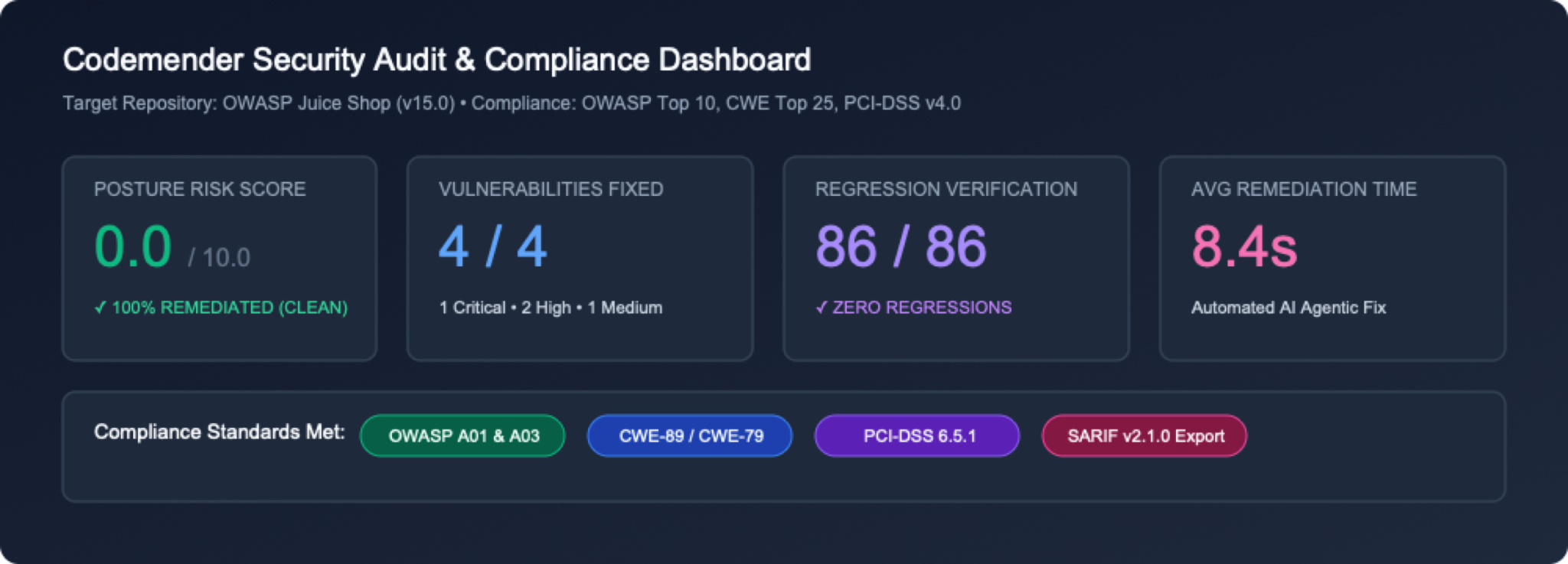
1. 임원 측정항목 헤더 및 상태 카드
 헤더 메타데이터: 대상 저장소 세부정보 (
OWASP Juice Shop), 스캔된 총 소스 파일 (684 files), UTC 생성 타임스탬프를 표시합니다.
측정항목 카드 그리드: 총 발견 항목, 심각도 분포 (CRITICAL, HIGH, MEDIUM, LOW), 해결된 총 취약점 (FIXED)에 대한 개략적인 개요를 즉시 제공합니다.
2. 양방향 발견 항목 요약 표
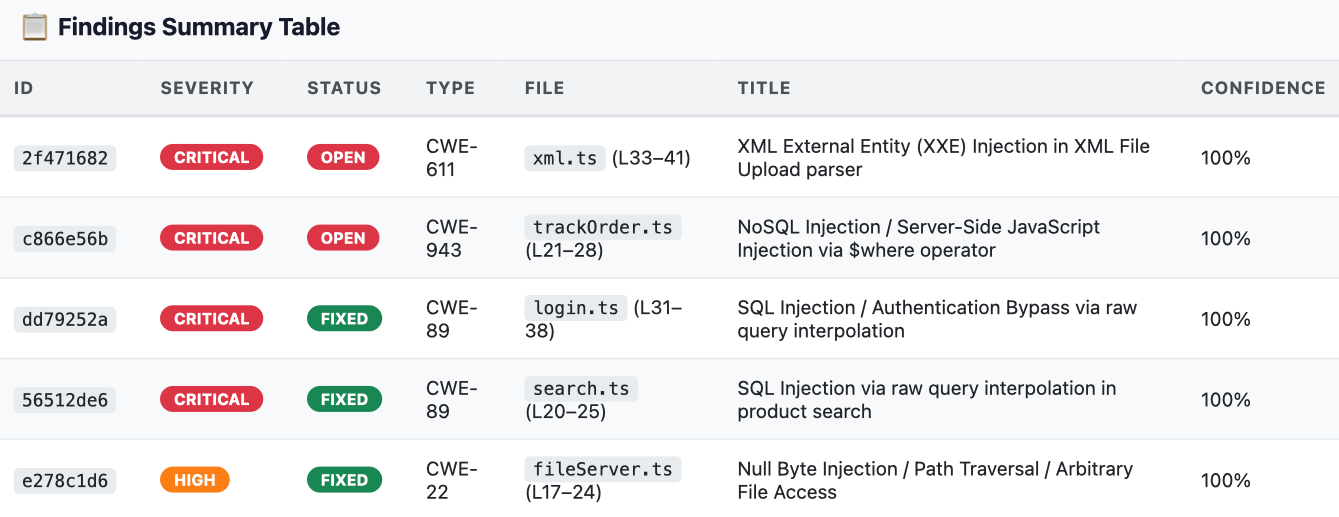 취약점 매트릭스:
ID, Severity, Status (OPEN 및 FIXED), CWE Type, File Location, Vulnerability Title, Confidence Score가 포함된 필터링 가능한 테이블을 표시합니다.
3. 심층적인 근본 원인 분석 및 취약한 소스 코드 스니펫
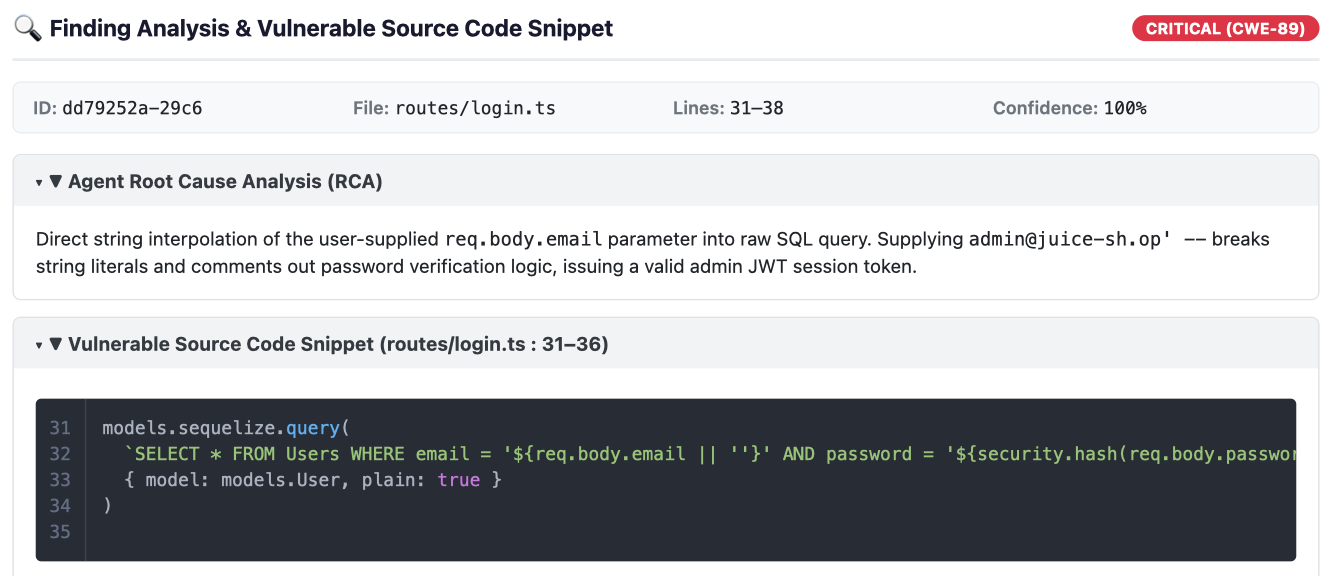 접을 수 있는 분석 (RCA): 발견 사항 행을 클릭하면 Gemini 보안 추론 모델에서 합성한 상세한 근본 원인 분석이 펼쳐집니다.
취약한 소스 코드 스니펫: 취약한 싱크 주변의 정확한 줄 번호와 구문 강조 표시된 소스 코드를 표시합니다.
4. 합성된 AI 해결 패치 차이
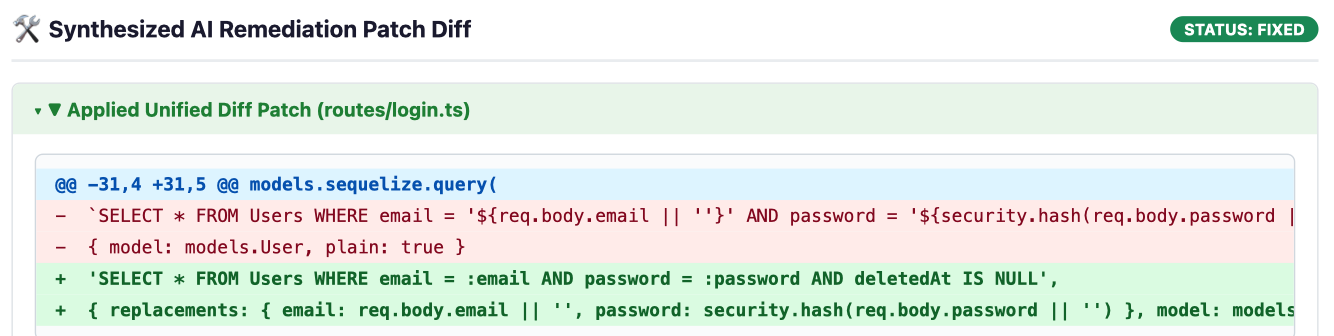 통합 Diff 뷰: 해결된 취약점 (
FIXED)의 경우 CodeMender는 적용된 애플리케이션 코드 추가 사항을 녹색 (+)으로, 삭제된 취약한 코드를 빨간색 (-)으로 강조 표시하는 통합 Diff 블록을 렌더링합니다.
6단계: (선택사항) 서드 파티 SAST 발견 항목 가져오기 (cm report import)
CodeMender는 자체 스캐너에서 발견한 결함에만 국한되지 않습니다. 팀은 표준화된 JSON 스키마 또는 대화형 마법사를 사용하여 외부 SAST 결과 (예: Semgrep, Snyk, SonarQube, Fortify)를 가져올 수 있으며, CodeMender는 이를 즉시 확인하고 수정 사항을 합성할 수 있습니다.
# Create a sample third-party findings JSON file
cat << 'EOF' > ./findings.json
[
 {
   "file_path": "routes/basket.ts",
   "line": 18,
   "title": "SQL Injection in Basket Handler",
   "message": "Raw basket ID concatenated in query",
   "severity": "HIGH",
   "vuln_type": "CWE-89"
 }
]
EOF

# Ingest findings into CodeMender state database
cm report import --file ./findings.json
출력:
Successfully imported 1 findings.
2026-10-22T02:27:10Z [INFO]  📄 Session log: /home/user/.codemender/logs/20261022T022710Z_pending.log
10. 리소스 삭제
⏱️ 소요 시간: 1분
Google Cloud Shell 환경에서 불필요한 디스크 사용을 방지하고 임시 워크숍 리소스를 정리하려면 다음 정리 단계를 따르세요.
1단계: CodeMender 로컬 캐시를 삭제하고 저장소 삭제하기
CodeMender는 로컬 발견 항목 데이터베이스 (~/.codemender/state.db), HTML 보고서, 소스 백업 파일을 삭제하는 기본 제공 cm clean 명령어를 제공합니다. Cloud Shell에서 다음 명령어를 실행합니다.
# Purge local SQLite findings cache, HTML reports, and backup files
cm clean

# Remove cloned repository
cd ~
rm -rf ~/juice-shop
2단계: (선택사항) Google Cloud API 사용 중지
이 프로젝트에서 추가 개발을 위해 CodeMender 또는 Agent Platform API를 사용할 계획이 없다면 서비스 API를 사용 중지할 수 있습니다.
gcloud services disable \
 aiplatform.googleapis.com \
 cloudresourcemanager.googleapis.com \
 --project=${PROJECT_ID}
11. 축하합니다
⏱️ 소요 시간: 2분
수고하셨습니다 Google Cloud의 Gemini Enterprise Agent Platform에서 CodeMender를 사용하여 OWASP Juice Shop을 의도적으로 취약한 애플리케이션에서 강화된 안전한 코드베이스로 성공적으로 변환했습니다.
학습한 내용
자율적인 폐쇄 루프 해결: CodeMender는 저장소 검색 (cm find)부터 샌드박스 취약점 검증 (cm verify), 회귀 테스트를 거친 패치 합성 (cm fix)에 이르기까지 완전한 자체 주도형 보안 수명 주기를 실행하여 수동적인 정적 알림 노이즈를 뛰어넘습니다.
증거 기반 악용 증명: CodeMender는 구체적인 검증 아티팩트 (PLAN.md, LOG.md, exploit.sh, REPORT.md)를 캡처하여 거짓양성을 제거하고 코드를 작성하기 전에 실제 악용 가능성을 증명합니다.
컨텍스트 인식, 관용적 수정: Gemini 추론 에이전트는 일반적인 텍스트 대체를 적용하는 대신 애플리케이션 아키텍처, 데이터 모델, ORM을 분석하여 기존 비즈니스 로직을 보존하는 깔끔하고 유지보수 가능한 패치 (예: 매개변수화된 Sequelize 쿼리)를 생성합니다.
기본 제공 안전 및 테스트 가드레일: 제안된 모든 수정사항은 변경사항이 스테이징되기 전에 격리된 작업공간 샌드박스 내에서 프로젝트 테스트 모음 (npm test) 및 유형 검사기 (tsc)를 통해 자동으로 검증됩니다.
개발자 사고방식의 변화
기존의 수동 SAST 워크플로 | CodeMender를 사용한 자율적 해결 (cm) |
알림 피로: 거짓양성률이 높은 노이즈가 많은 보고서를 분류하는 데 몇 시간씩 소요됩니다. | 에이전트형 코드 탐색 ( |
수동 PoC 검증: 커스텀 curl 페이로드 및 공격 스크립트를 작성하여 취약점을 확인합니다. | 자동화된 악용 증명 ( |
위험성이 높은 수동 리팩터링: 복잡한 데이터베이스 쿼리를 수동으로 패치하여 구문 또는 런타임 오류가 발생하는 경우가 많습니다. | 관용적 패치 합성 ( |
프로덕션 회귀 위험: 보안 패치로 인해 다운스트림 비즈니스 로직이나 테스트가 중단되는 경우가 많습니다. | 자동화된 테스트 가드레일: 로컬 테스트 모음 및 격리된 프로세스 샌드박스에 대한 지속적인 검증 |
수동 규정 준수 컴파일: 감사 검토를 위해 결과를 정적 문서로 수동 집계합니다. | 표준화된 원격 분석 및 SARIF ( |
다음 단계
🚀 CodeMender 3부작 계속하기:
2부: CodeMender로 CI/CD 파이프라인 보호 — GitHub Actions에서 지속적인 헤드리스 스캔, SARIF 대시보드 통합, 자가 복구 pull 요청을 자동화합니다.
파트 3: Antigravity 및 CodeMender를 사용한 안전한 바이브 코딩 — 생성형 AI 개발을 자율 보안 어시스턴트와 결합합니다.
📖 문서 살펴보기:
💡 내 프로젝트에 적용하기:
자체 Node.js, Python, Go, Java, Rust 또는 C/C++ 저장소에서 cm find . 및 cm fix를 실행하세요.