
1. Before you begin
Welcome to the hands-on codelab for Securing Your CI/CD Pipeline with CodeMender.
In modern software delivery, static analysis tools (such as CodeQL) are essential for catching known syntactic patterns, but they often miss nuanced vulnerabilities hidden deep within business logic and generate noisy, unverified alerts.
CodeMender (CLI executable: cm) enhances your CI/CD pipeline—operating alongside existing SAST tools—by deploying Google's Gemini-powered security reasoning agents to:
Uncover complex business logic flaws: Reason about application context and architectural data flows beyond rigid static pattern rules.
Drastically reduce false positives via self-exploit verification: Dynamically prove exploitability in sandboxed environments before alerting developers.
Autonomously remediate verified findings: Synthesize code patches, validate against test suites to prevent regressions, and submit review-ready Pull Requests.
In this codelab, you will integrate CodeMender into the OWASP Juice Shop repository using GitHub Actions and keyless Google Cloud Workload Identity Federation (WIF).
Prerequisites
- Recommended: Basic familiarity with CodeMender concepts (covered in Secure Your Application with CodeMender)
- Basic understanding of GitHub Actions workflows, triggers, and YAML syntax
- Basic familiarity with Git commands and pull request review workflows
- Basic knowledge of Google Cloud IAM concepts (Service Accounts, Roles, and APIs)
- Familiarity with common web application vulnerabilities (such as SQL Injection and XSS)
What you'll learn
- How to configure zero-trust keyless authentication between GitHub Actions and Google Cloud via Workload Identity Federation (WIF)
- How to build an automated vulnerability scanning workflow using CodeMender and
gemini-3.8-flash - How to publish actionable security reports using OASIS SARIF v2.1.0 and native GitHub Actions Job Summaries
- How to construct an autonomous remediation workflow that generates test-verified code patches and opens Pull Requests for human review
- How to enforce automated quality hard gates (
--fail-on) and pipeline caching for high-speed continuous security
What you'll need
- A Google Cloud project with billing enabled and Project Owner/Editor permissions
- A GitHub account with permissions to create repositories, configure Secrets, and manage Actions (you fork OWASP Juice Shop GitHub Repo in Step 3 using the GitHub CLI).
2. Understand CodeMender CI/CD architecture
In modern enterprise DevSecOps, AI-powered security cannot merely be a manual desktop tool. It must operate as an automated gatekeeper (blocking insecure pull requests) and an autonomous co-developer (proposing verified patches directly into Git).
To achieve this, you will implement a Dual-Workflow Architecture powered by Google Cloud Workload Identity Federation (WIF) and Gemini Enterprise reasoning models.
The dual-workflow architecture
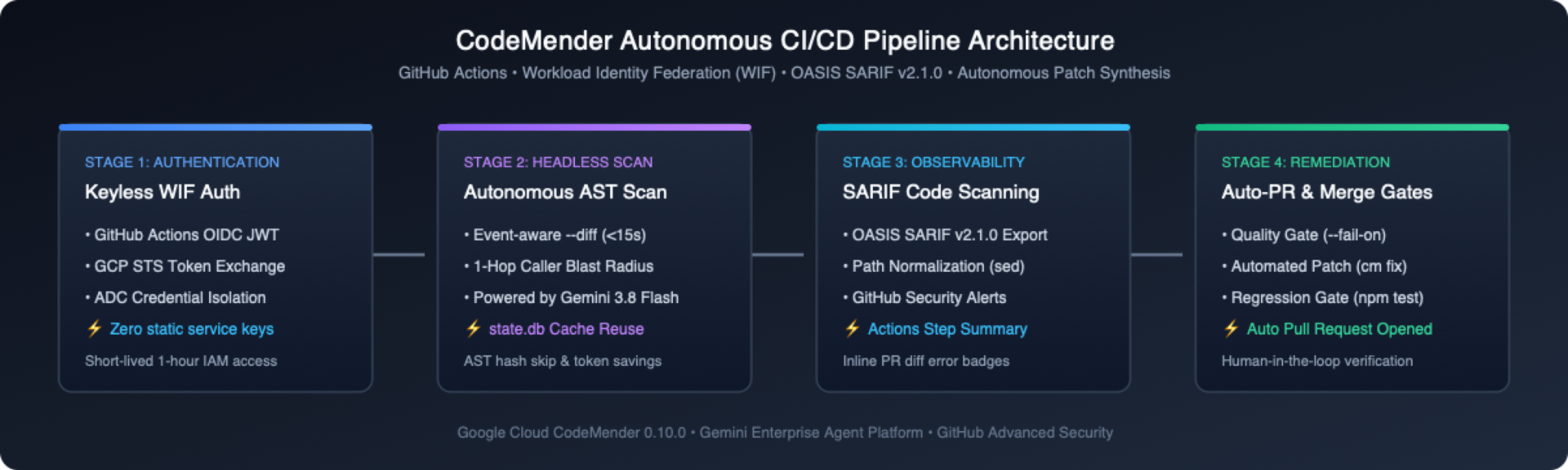
Rather than cramming detection and remediation into a single monolithic script, the pipeline separates security into two decoupled, purpose-built workflows:
Workflow | Primary Trigger | Core Responsibility | Quality Hard Gate |
1. Vulnerability Scanner( | Pull Requests, Main Pushes, Weekly Cron, Manual Dispatch | • Runs fast differential AST scans on PRs (~15s), quick baseline scans on pushes ( | Blocks PR merge if newly introduced High or Critical vulnerabilities are detected ( |
2. Autonomous Remediator( | Manual Trigger ( | • Resumes state from scan artifacts ( | Ensures clean production diffs before opening a PR |
Three core enterprise design principles
As you build these workflows in the upcoming sections, keep these three foundational architectural pillars in mind:
🔑 Zero-Trust Keyless Authentication and Preflight Validation:
No long-lived Google Cloud Service Account JSON keys are stored in GitHub Secrets. The runner generates a short-lived OIDC token exchanged via Google Cloud STS for an ephemeral 1-hour credential, sets persist-credentials: false on Git checkouts, and runs cm health --strict to verify credentials, network reachability, and IAM permissions before consuming model quota.
⚡ Adaptive Scan Routing and Legacy Noise Suppression:
Instead of running slow full-repository audits on every pull request, CodeMender routes each CI event to the optimal scan mode: Pull Requests trigger differential AST analysis (--diff="origin/$BASE_REF") on modified files and 1-hop callers in under 15 seconds; main-branch pushes run single-session quick baseline scans (--quick); and weekly schedules run concurrent file-by-file deep audits (default cm find .). Pre-existing codebase vulnerabilities untouched by a PR are labeled [LEGACY / UNTOUCHED]; they appear in SARIF reports for visibility, but do not block the PR merge gate and do not trigger autofix.
🛡️ Resilient Non-Blocking Security Observability:
Even when --fail-on exits with code 1 to block an insecure PR, guarding report export and SARIF upload steps with steps.scan.outputs.completed == 'true' and hashFiles('results.sarif') != '' guarantees that OASIS SARIF alerts and Job Summaries still publish—while cleanly skipping export and upload if a run is cancelled or aborts on a setup or capacity error (10–60).
3. Authenticate and prepare the target repository in Cloud Shell
To establish keyless authentication and run automated security pipelines, you need an accessible target GitHub repository that you own. In this codelab, you use OWASP Juice Shop—an intentionally vulnerable Node.js web application—as a turnkey security playground.
You will use the GitHub CLI (gh), preinstalled in Google Cloud Shell, to authenticate with GitHub, capture your user details automatically, and prepare your repository in one streamlined flow.
Step 1: Open Cloud Shell and authenticate GitHub CLI
Open the Google Cloud Console and activate Cloud Shell (icon >_ in the top navigation bar).
Authenticate the GitHub CLI (gh) to configure Git credential management:
gh auth login --hostname github.com --git-protocol https --web
Follow the on-screen instructions:
Copy the 8-character one-time code printed in Cloud Shell (e.g., 1234-ABCD).
Press Enter to open https://github.com/login/device in your browser.
Paste the code and click Authorize github.
Step 2: Dynamically export variables and fork OWASP Juice Shop
Run the following commands in Cloud Shell to automatically capture your GitHub username and prepare the repository:
# 1. Automatically capture your GitHub username (customize GITHUB_REPO if desired)
export GITHUB_ORG=$(gh api user -q .login)
export GITHUB_REPO="${GITHUB_REPO:-juice-shop}"
export GITHUB_REPOSITORY="${GITHUB_ORG:+${GITHUB_ORG}/${GITHUB_REPO}}"
echo "Authenticated as: ${GITHUB_REPOSITORY}"

# 2. Fork on GitHub server using GITHUB_REPO as the fork name
gh repo fork juice-shop/juice-shop --fork-name "${GITHUB_REPO}" --default-branch-only --clone=false 2>/dev/null || true

# 3. Shallow clone your fork (downloads only ~15 MB in 3-5 seconds, skipping heavy upstream git history)
[ -d ~/"${GITHUB_REPO}" ] || git clone --depth=1 "https://github.com/${GITHUB_REPOSITORY}.git" ~/"${GITHUB_REPO}" || \
 (sleep 2 && git clone --depth=1 "https://github.com/${GITHUB_REPOSITORY}.git" ~/"${GITHUB_REPO}")
cd ~/"${GITHUB_REPO}"

# 4. Confirm you are in the repository directory
git status
4. Configure Google Cloud Workload Identity Federation via gcloud
In this step, you will use the gcloud CLI in Google Cloud Shell to enable required APIs, create a dedicated CI/CD Service Account, set up the Workload Identity Pool, and establish OIDC trust with your GitHub repository (${GITHUB_REPOSITORY}).
Step 1: Set Google Cloud environment variables
In your Cloud Shell terminal (inside your cloned repository workspace), capture your active Google Cloud Project ID, verify your GitHub repository variable, and define the WIF resource names:
# Capture active Google Cloud Project ID and verify GitHub repository
export PROJECT_ID=$(gcloud config get-value project)
export GITHUB_USER=$(gh api user -q ".login")
export GITHUB_REPO="${GITHUB_REPO:-$(git remote get-url origin 2>/dev/null | sed -E 's#^.*/##; s#\.git$##')}"
export GITHUB_REPO="${GITHUB_REPO:-juice-shop}"
export GITHUB_REPOSITORY="${GITHUB_USER:+${GITHUB_USER}/${GITHUB_REPO}}"

# Define WIF and Service Account resource names
export WORKLOAD_IDENTITY_POOL="codemender-github-pool"
export WORKLOAD_IDENTITY_PROVIDER="codemender-github-provider"
export SERVICE_ACCOUNT_NAME="codemender-ci-runner"

if [ -z "${PROJECT_ID}" ] || [ -z "${GITHUB_REPOSITORY}" ]; then
 echo "ERROR: PROJECT_ID ('${PROJECT_ID}') or GITHUB_REPOSITORY ('${GITHUB_REPOSITORY}') is empty. Check 'gcloud config get-value project' and 'gh auth status'."
else
 echo "Project ID:        ${PROJECT_ID}"
 echo "GitHub Repository: ${GITHUB_REPOSITORY}"
fi
Step 2: Enable required Google Cloud APIs
Enable the IAM API, Security Token Service API, IAM Credentials API, Agent Platform API, and Resource Manager API:
gcloud services enable \
 iam.googleapis.com \
 iamcredentials.googleapis.com \
 sts.googleapis.com \
 aiplatform.googleapis.com \
 cloudresourcemanager.googleapis.com \
 --project=${PROJECT_ID}
Step 3: Create a dedicated CI/CD service account
Create a least-privilege Google Cloud Service Account dedicated to CI/CD pipeline execution (safely reusing it if it already exists):
export SERVICE_ACCOUNT_EMAIL="${SERVICE_ACCOUNT_NAME}@${PROJECT_ID}.iam.gserviceaccount.com"

gcloud iam service-accounts describe "${SERVICE_ACCOUNT_EMAIL}" \
 --project="${PROJECT_ID}" >/dev/null 2>&1 || \
gcloud iam service-accounts create "${SERVICE_ACCOUNT_NAME}" \
 --display-name="CodeMender CI/CD Pipeline Runner" \
 --project="${PROJECT_ID}"

echo "Service Account Email: ${SERVICE_ACCOUNT_EMAIL}"
Step 4: Grant Agent Platform IAM permissions
Grant the roles/aiplatform.user (Agent Platform User) role to the Service Account so it can communicate with the Gemini Enterprise Agent Platform:
gcloud projects add-iam-policy-binding ${PROJECT_ID} \
 --member="serviceAccount:${SERVICE_ACCOUNT_EMAIL}" \
 --role="roles/aiplatform.user"
Step 5: Create the Workload Identity pool
Create the Workload Identity Pool to manage GitHub Actions identity assertions (or automatically restore and enable it if it already exists in your project):
POOL_STATE=$(gcloud iam workload-identity-pools list \
 --location="global" \
 --show-deleted \
 --project="${PROJECT_ID}" \
 --filter="name ~ /${WORKLOAD_IDENTITY_POOL}$" \
 --format="value(state)")

if [ -z "${POOL_STATE}" ]; then
 gcloud iam workload-identity-pools create "${WORKLOAD_IDENTITY_POOL}" \
   --location="global" \
   --display-name="CodeMender GitHub Pool" \
   --project="${PROJECT_ID}"
else
 [ "${POOL_STATE}" = "DELETED" ] && gcloud iam workload-identity-pools undelete "${WORKLOAD_IDENTITY_POOL}" \
   --location="global" \
   --project="${PROJECT_ID}"
 gcloud iam workload-identity-pools update "${WORKLOAD_IDENTITY_POOL}" \
   --location="global" \
   --no-disabled \
   --project="${PROJECT_ID}"
fi
Step 6: Create the Workload Identity provider with GitHub OIDC
Create (or update) the OIDC Provider within the pool, binding issuer URL https://token.actions.githubusercontent.com and mapping GitHub token assertions to Google STS attributes:
PROVIDER_STATE=$(gcloud iam workload-identity-pools providers list \
 --workload-identity-pool="${WORKLOAD_IDENTITY_POOL}" \
 --location="global" \
 --show-deleted \
 --project="${PROJECT_ID}" \
 --filter="name ~ /${WORKLOAD_IDENTITY_PROVIDER}$" \
 --format="value(state)")

if [ -z "${GITHUB_REPOSITORY}" ]; then
 echo "ERROR: GITHUB_REPOSITORY is empty. Re-run Step 1 before configuring the OIDC provider."
elif [ -z "${PROVIDER_STATE}" ]; then
 gcloud iam workload-identity-pools providers create-oidc "${WORKLOAD_IDENTITY_PROVIDER}" \
   --workload-identity-pool="${WORKLOAD_IDENTITY_POOL}" \
   --location="global" \
   --display-name="CodeMender GitHub Provider" \
   --issuer-uri="https://token.actions.githubusercontent.com" \
   --attribute-mapping="google.subject=assertion.sub,attribute.actor=assertion.actor,attribute.repository=assertion.repository,attribute.repository_owner=assertion.repository_owner" \
   --attribute-condition="assertion.repository == '${GITHUB_REPOSITORY}'" \
   --project="${PROJECT_ID}"
else
 [ "${PROVIDER_STATE}" = "DELETED" ] && gcloud iam workload-identity-pools providers undelete "${WORKLOAD_IDENTITY_PROVIDER}" \
   --workload-identity-pool="${WORKLOAD_IDENTITY_POOL}" \
   --location="global" \
   --project="${PROJECT_ID}"
 gcloud iam workload-identity-pools providers update-oidc "${WORKLOAD_IDENTITY_PROVIDER}" \
   --workload-identity-pool="${WORKLOAD_IDENTITY_POOL}" \
   --location="global" \
   --issuer-uri="https://token.actions.githubusercontent.com" \
   --attribute-mapping="google.subject=assertion.sub,attribute.actor=assertion.actor,attribute.repository=assertion.repository,attribute.repository_owner=assertion.repository_owner" \
   --attribute-condition="assertion.repository == '${GITHUB_REPOSITORY}'" \
   --no-disabled \
   --project="${PROJECT_ID}"
fi
Step 7: Allow the GitHub repository to impersonate the service account
Bind the roles/iam.workloadIdentityUser role to allow tokens originating from your repository to impersonate the CI runner Service Account, and verify the policy binding:
# Retrieve the canonical Workload Identity Pool resource ID
export POOL_ID=$(gcloud iam workload-identity-pools describe "${WORKLOAD_IDENTITY_POOL}" \
 --project="${PROJECT_ID}" \
 --location="global" \
 --format="value(name)")

if [ -z "${POOL_ID}" ] || [ -z "${GITHUB_REPOSITORY}" ]; then
 echo "ERROR: POOL_ID ('${POOL_ID}') or GITHUB_REPOSITORY ('${GITHUB_REPOSITORY}') is empty. Re-run Step 1 and Step 5."
else
 # Bind Workload Identity User role to the principalSet of your repository
 gcloud iam service-accounts add-iam-policy-binding "${SERVICE_ACCOUNT_EMAIL}" \
   --project="${PROJECT_ID}" \
   --role="roles/iam.workloadIdentityUser" \
   --member="principalSet://iam.googleapis.com/${POOL_ID}/attribute.repository/${GITHUB_REPOSITORY}"

 # Verify the principalSet binding on the Service Account
 gcloud iam service-accounts get-iam-policy "${SERVICE_ACCOUNT_EMAIL}" \
   --project="${PROJECT_ID}"
fi
Step 8: Retrieve configuration values for GitHub secrets
Retrieve the full resource name of your Workload Identity Provider and store it in an environment variable for automated registration in the next step:
# Retrieve full Workload Identity Provider name
export WORKLOAD_PROVIDER_NAME=$(gcloud iam workload-identity-pools providers describe ${WORKLOAD_IDENTITY_PROVIDER} \
 --workload-identity-pool=${WORKLOAD_IDENTITY_POOL} \
 --location="global" \
 --project=${PROJECT_ID} \
 --format="value(name)")

echo "=========================================================="
echo "WIF CONFIGURATION READY:"
echo "=========================================================="
echo "GCP_WORKLOAD_IDENTITY_PROVIDER: ${WORKLOAD_PROVIDER_NAME}"
echo "GCP_SERVICE_ACCOUNT:            ${SERVICE_ACCOUNT_EMAIL}"
echo "=========================================================="
5. Configure GitHub repository secrets and workflow permissions
Now that Google Cloud WIF is provisioned, you will configure GitHub Repository Secrets and grant the necessary workflow permissions for automated security scanning and auto-remediation Pull Requests.
You can configure these settings directly from Cloud Shell using the GitHub CLI (gh), completely eliminating manual copy-pasting of long resource names.
Step 1: Set repository secrets using GitHub CLI
In your Cloud Shell terminal, run the following commands to securely set the two required repository secrets using the active environment variables:
# 1. Set the Workload Identity Provider resource name
gh secret set GCP_WORKLOAD_IDENTITY_PROVIDER \
 --body "${WORKLOAD_PROVIDER_NAME}" \
 --repo "${GITHUB_REPOSITORY}"

# 2. Set the CI/CD Service Account email
gh secret set GCP_SERVICE_ACCOUNT \
 --body "${SERVICE_ACCOUNT_EMAIL}" \
 --repo "${GITHUB_REPOSITORY}"

# 3. Verify the secrets are registered
gh secret list --repo "${GITHUB_REPOSITORY}"
Step 2: Grant workflow permissions for automated PRs
By default, GitHub Actions workflows run with read-only permissions and cannot create Pull Requests. In Step 9, CodeMender will autonomously generate and submit verified remediation Pull Requests.
Grant write permissions and enable pull request creation directly via the GitHub API:
[ -d .git ] || cd ~/"${GITHUB_REPO:-juice-shop}"
export GITHUB_REPOSITORY="${GITHUB_REPOSITORY:-$(git remote get-url origin 2>/dev/null | sed -E 's#^.*github\.com[:/]##; s#\.git$##')}"

gh api \
 --method PUT \
 -H "Accept: application/vnd.github+json" \
 /repos/${GITHUB_REPOSITORY}/actions/permissions/workflow \
 -f default_workflow_permissions="write" \
 -F can_approve_pull_request_reviews=true
Step 3: Disable inherited upstream Juice Shop workflows
Forking OWASP Juice Shop carries over 16 upstream CI workflows (such as PR Compliance Check, CI/CD Pipeline, and CodeQL Scan) along with an upstream contributor PR template that auto-closes PRs targeting master. Disable all non-CodeMender workflows via the GitHub CLI and remove the upstream files locally so your fork runs strictly CodeMender workflows:
[ -d .git ] || cd ~/"${GITHUB_REPO:-juice-shop}"
export GITHUB_REPOSITORY="${GITHUB_REPOSITORY:-$(git remote get-url origin 2>/dev/null | sed -E 's#^.*github\.com[:/]##; s#\.git$##')}"

# 1. Disable all inherited non-CodeMender workflows in GitHub Actions (and CodeQL default setup if active)
for WF_ID in $(gh workflow list --all --limit 100 --repo "${GITHUB_REPOSITORY}" --json id,path \
 -q '.[] | select((.path | startswith(".github/workflows/")) and (.path | test("codemender-") | not)) | .id'); do
 gh workflow disable "${WF_ID}" --repo "${GITHUB_REPOSITORY}" 2>/dev/null || true
done
gh api -X PATCH "/repos/${GITHUB_REPOSITORY}/code-scanning/default-setup" \
 -f state=not-configured >/dev/null 2>&1 || true

# 2. Remove upstream workflow files and PR template from the local workspace
for f in .github/workflows/*; do
 case "$f" in *codemender-*) ;; *) rm -f "$f" ;; esac
done
rm -f .github/PULL_REQUEST_TEMPLATE.md
6. Build the automated vulnerability scanning workflow with SARIF
In this step, you will author the primary continuous security scanning workflow (.github/workflows/codemender-scan.yml) that runs baseline scans on branch pushes, differential gates on Pull Requests, and SARIF exports to GitHub Code Scanning.
Step 1: Download the CodeMender scanning workflow
Download codemender-scan.yml from the starter repository into .github/workflows/:
[ -d .git ] || cd ~/"${GITHUB_REPO:-juice-shop}"
mkdir -p .github/workflows
curl -fsSL https://raw.githubusercontent.com/edwardc-gcp/codemender-github-actions/main/.github/workflows/codemender-scan.yml \
 -o .github/workflows/codemender-scan.yml
Step 2: Commit, push, and trigger CI scanning
Commit the workflow changes and push directly to your repository's primary branch (master for Juice Shop, or main):
# Stage workflow changes, commit, and push to primary branch
git add -A .github
git commit -m "ci: add CodeMender SARIF security scanning workflow"
git push origin $(git branch --show-current)
In your browser:
Navigate to your forked GitHub repository: https://github.com/YOUR_GITHUB_USER/juice-shop (e.g., https://github.com/octocat/juice-shop).
Click the Actions tab in the top navigation bar.
In the left sidebar under Workflows, select CodeMender Security Scan & SARIF Export.
Trigger or view the workflow execution:
Automatic Trigger: If an automatic run triggered by your push is listed, click it directly to monitor live execution.
Manual On-Demand Trigger (workflow_dispatch): If no run has started yet, click the Run workflow ▾ button on the right, ensure Branch: master is selected (leave the deep_scan checkbox cleared so the rapid --quick baseline scan runs), and click the green Run workflow button.
Click into the executing run and select Autonomous Code Vulnerability Scan to watch the workflow spin up in real-time.
Inside codemender-scan.yml: Event-aware scan routing
While the --quick baseline scan runs in the cloud (~3–5 minutes), inspect how codemender-scan.yml (lines 118–155) routes each GitHub event to its dedicated scan mode inside the runner:
# Excerpt from .github/workflows/codemender-scan.yml
if [ "${{ github.event_name }}" = "pull_request" ]; then
 cm find . \
   --diff="origin/${{ github.base_ref }}" \
   --diff-workers=16 \
   --fail-on="CRITICAL,HIGH" \
   --sandbox=false --yes --bypass-warning || status=$?
elif [ "${{ github.event_name }}" = "schedule" ] || [ "${{ github.event.inputs.deep_scan }}" = "true" ]; then
 cm find . \
   --deep-workers=8 \
   --sandbox=false --yes --bypass-warning || status=$?
else
 cm find . \
   --quick \
   --sandbox=false --yes --bypass-warning || status=$?
fi
Hardened Runner Setup ( lines 27–117): Skips untrusted external fork and dependabot[bot] PRs, checks out with persist-credentials: false, caches ~/.local/bin/cm and ~/.codemender/state.db, and runs cm health --strict before consuming model quota.
Headless Sandbox Boundaries (--sandbox=false --yes --bypass-warning): Disables Linux user-namespace isolation (restricted inside unprivileged GitHub Actions containers) while keeping workspace path boundaries (project_paths) and command_policy.yaml enforced.
Exit-Code Guarded SARIF & Artifact Export ( lines 147–194): Sets steps.scan.outputs.completed=true strictly when cm find exits with 0 (clean) or 1 (--fail-on threshold met). This guarantees that SARIF reports (cm report -f sarif with CVSS severity scores), $GITHUB_STEP_SUMMARY tables (cm report -f md), and codemender-findings.json artifacts still publish when --fail-on blocks a PR—while skipping export on setup or capacity errors (10–60) so empty SARIF files never close existing alerts.
7. Inspect GitHub Code Scanning alerts and security dashboard
After the baseline push workflow finishes, GitHub processes the uploaded SARIF file and populates both the Actions run summary and the repository Security tab.
Step 1: Inspect the native job summary on GitHub Actions
Every workflow run appends a Markdown summary table (cm report -f md) directly to the GitHub Actions run overview:
In your GitHub repository, click the Actions tab.
Select the completed CodeMender Security Scan & SARIF Export run (baseline branch push audits finish with a green ✅ check after publishing SARIF findings).
Scroll down to the 🛡️ CodeMender Security Scan Summary section to inspect the finding breakdown:
🔒 CodeMender Security Report
Summary
Total findings: 28
Severity | Count |
🔴 CRITICAL | 6 |
🟠 HIGH | 16 |
🟡 MEDIUM | 6 |
Status | Count |
🔴 OPEN | 28 |
Findings
ID | Severity | Confidence | Status | Fix | File | Title |
| 🔴 CRITICAL | 100% | OPEN | — |
| Remote Code Execution via Server-Side Code Injection in User Profile |
| 🔴 CRITICAL | 100% | OPEN | — |
| SQL Injection in User Authentication Route |
| 🔴 CRITICAL | 100% | OPEN | — |
| Remote Code Execution via Sandbox Escape in B2B Order Processing |
Step 2: Explore the centralized Code Scanning dashboard
In your GitHub repository top navigation bar, click the Security and quality (or Security) tab.
In the left sidebar under Findings, select Code scanning.
If multiple tools are active, filter Tool to CodeMender (is:open branch:master tool:CodeMender) to inspect the alerts mapped with native CVSS severity badges:
Severity Badge | Vulnerability Headline | Detected Location | Branch |
🔴 Critical | Remote Code Execution via Server-Side Code Injection in User Profile |
|
|
🔴 Critical | SQL Injection in User Authentication Route |
|
|
🔴 Critical | Remote Code Execution via Sandbox Escape in B2B Order Processing |
|
|
Click SQL Injection in User Authentication Route (routes/login.ts:34) to review the tainted dataflow and Root Cause Analysis synthesized by Gemini.
8. Block an insecure Pull Request with differential scanning
Your baseline scan uncovered 28 pre-existing vulnerabilities in OWASP Juice Shop. With traditional static analyzers, those 28 legacy findings would fail every future Pull Request until the entire backlog was fixed—forcing teams to disable merge blocking.
Now you will test CodeMender's PR Differential AST Gate (--diff + --fail-on="CRITICAL,HIGH") in action: opening a Pull Request that introduces a new vulnerability and watching CodeMender isolate the delta, block the merge in ~15–25 seconds, and annotate the exact offending lines.
Step 1: Open a Pull Request introducing a command injection flaw
In Cloud Shell (inside your cloned repository workspace), create a feature branch, add a new Express route containing an OS Command Injection vulnerability, and open a Pull Request against your fork:
[ -d .git ] || cd ~/"${GITHUB_REPO:-juice-shop}"
export GITHUB_REPOSITORY="${GITHUB_REPOSITORY:-$(git remote get-url origin 2>/dev/null | sed -E 's#^.*github\.com[:/]##; s#\.git$##')}"
PRIMARY_BRANCH=$(git symbolic-ref --short refs/remotes/origin/HEAD | sed 's@^origin/@@')

# Reset any previous demo PR/branch so this step can be re-run cleanly
gh pr close feat/diagnostics --repo "${GITHUB_REPOSITORY}" --delete-branch 2>/dev/null || true
git checkout "${PRIMARY_BRANCH}"
git checkout -B feat/diagnostics

# Introduce an Express endpoint vulnerable to OS Command Injection (CWE-78)
cat << 'EOF' > routes/diagnostics.ts
import { execSync } from 'node:child_process'
import { type Request, type Response } from 'express'

export function systemDiagnostics () {
 return (req: Request, res: Response) => {
   const host = String(req.query.host ?? '127.0.0.1')
   const output = execSync(`ping -c 1 ${host}`).toString()
   res.status(200).json({ status: 'ok', output })
 }
}
EOF

git add routes/diagnostics.ts
git commit -m "feat: add network diagnostics endpoint"
git push -f -u origin feat/diagnostics

gh pr create \
 --repo "${GITHUB_REPOSITORY}" \
 --base "${PRIMARY_BRANCH}" \
 --head feat/diagnostics \
 --title "feat: add network diagnostics endpoint" \
 --body "Adds a ping diagnostics handler."
Step 2: Verify the differential merge gate and inline PR annotation
Open the Pull Request URL printed at the end of the terminal output.
Scroll to the Checks box at the bottom of the Pull Request conversation page and watch Autonomous Code Vulnerability Scan:
Delta Speed: Instead of scanning all 680+ files in the repository (~3–5 minutes), cm find . --diff="origin/${PRIMARY_BRANCH}" scopes analysis strictly to routes/diagnostics.ts (and any 1-hop callers), completing the scan in ~15–25 seconds.
Legacy Debt Isolation & Merge Blocking: None of Juice Shop's 28 untouched legacy vulnerabilities fail the check—only the newly introduced CRITICAL Command Injection triggers --fail-on="CRITICAL,HIGH", exiting with status code 1 (red ❌) to block the PR merge!
Click the Files changed tab at the top of the Pull Request:
Because the workflow's exit-code guard (steps.scan.outputs.completed == 'true') still exports and uploads results.sarif when --fail-on exits with code 1, GitHub Code Scanning renders an inline CodeMender — Critical security annotation directly under execSync in routes/diagnostics.ts!
Step 3: Clean up the test PR and return to the primary branch
Switch your Cloud Shell workspace back to the primary branch and close the insecure test Pull Request before proceeding to autonomous remediation:
[ -d .git ] || cd ~/"${GITHUB_REPO:-juice-shop}"
export GITHUB_REPOSITORY="${GITHUB_REPOSITORY:-$(git remote get-url origin 2>/dev/null | sed -E 's#^.*github\.com[:/]##; s#\.git$##')}"
PRIMARY_BRANCH=$(git symbolic-ref --short refs/remotes/origin/HEAD | sed 's@^origin/@@')
git checkout "${PRIMARY_BRANCH}"
gh pr close feat/diagnostics --repo "${GITHUB_REPOSITORY}" --delete-branch
git branch -D feat/diagnostics 2>/dev/null || true
9. Build the autonomous remediation and auto-PR workflow
Now that your Pull Request gate prevents new vulnerabilities from entering the codebase, you will deploy Autonomous Remediation (.github/workflows/codemender-remediate.yml) to actively fix existing vulnerabilities and open review-ready Pull Requests.
Step 1: Download the remediation workflow file
CodeMender provides two remediation templates depending on repository visibility:
Public / Open-Source Repositories (codemender-remediate.yml): Responsible Disclosure Mode—links to GitHub Code Scanning SARIF alerts without exposing raw exploit vectors publicly.
Private / Enterprise Repositories (codemender-remediate-private-repo.yml): Internal Audit Evidence Mode—embeds verification artifacts (PLAN.md, REPORT.md, exploit.sh) inside collapsible PR sections while excluding them from Git commits.
Download the public-safe remediation workflow into your repository:
mkdir -p .github/workflows
curl -fsSL https://raw.githubusercontent.com/edwardc-gcp/codemender-github-actions/main/.github/workflows/codemender-remediate.yml \
 -o .github/workflows/codemender-remediate.yml
Step 2: Commit and trigger the autonomous remediation workflow
Commit and push the remediation workflow to your primary branch:
git add .github/workflows/codemender-remediate.yml
git commit -m "ci: add CodeMender autonomous remediation workflow"
git push origin $(git branch --show-current)
In your browser, navigate to your GitHub repository's Actions tab.
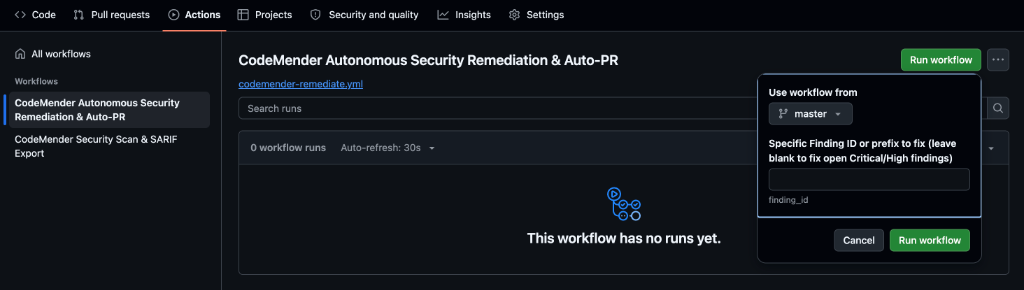
In the left sidebar under Workflows, select CodeMender Autonomous Security Remediation & Auto-PR.
Click the green Run workflow dropdown on the right:
Use workflow from: Ensure the default branch (master) is selected.
Specific Finding ID or prefix to fix: Enter the 8-character prefix for routes/login.ts noted in Step 7 (for example, cd47b38a). Leaving this blank runs batch remediation across all open Critical and High findings (~10–15 minutes); targeting a single ID completes in ~45–60 seconds.
Click the green Run workflow button inside the popover and open the executing run.
Inside codemender-remediate.yml: Autonomous patch synthesis
While CodeMender synthesizes the patch in the cloud (~30–45 seconds), inspect how codemender-remediate.yml (lines 111–184) orchestrates remediation inside the runner:
Zero-Scan Resume (cm report import): Downloads the codemender-findings.json artifact from the scan workflow and imports it into the workspace (cm report import -f codemender-findings.json), falling back to cm find . --quick only if no prior artifact exists.
Headless Patch Synthesis (cm fix): Pins project_paths to $GITHUB_WORKSPACE, pipes < /dev/null to prevent interactive hangs, and passes --no-reset during batch loops so cumulative fixes are preserved across findings:
# Executed inside the GitHub Actions runner (codemender-remediate.yml)
cm fix "${SPECIFIC_TARGET}" --sandbox=false --yes --bypass-warning < /dev/null
Clean Production Commits ( lines 155–252): Purges .cm_project, .exploit/, and temporary files via .git/info/exclude before peter-evans/create-pull-request@v8 opens the branch (codemender/auto-remediation-${{ github.run_id }}), committing strictly production code changes:
--- a/routes/login.ts
+++ b/routes/login.ts
@@ -28,8 +28,8 @@ module.exports = function login () {
-    models.sequelize.query(`SELECT * FROM Users WHERE email = '${req.body.email || ''}' AND password = '${security.hash(req.body.password || '')}' AND deletedAt IS NULL`, { model: models.User })
+    models.sequelize.query('SELECT * FROM Users WHERE email = :email AND password = :password AND deletedAt IS NULL', {
+      replacements: { email: req.body.email || '', password: security.hash(req.body.password || '') },
+      model: models.User
+    })
Step 3: Review the newly opened Pull Request on GitHub
Navigate to the Pull requests tab in your repository and open the new Pull Request (e.g., 🛡️ [CodeMender] Fix: SQL Injection in User Authentication Route).
Click Files changed to confirm that only routes/login.ts is modified, with all internal runtime metadata excluded.
Review the PR description linking directly to the GitHub Code Scanning (SARIF) alert for maintainer sign-off.
10. Troubleshoot edge cases and private repositories
Private repositories without GitHub Advanced Security (GHAS)
Public GitHub repositories receive free, unlimited GitHub Code Scanning SARIF ingestion. However, if you deploy this workflow to a Private Enterprise repository that does not have an active GitHub Advanced Security (GHAS) license, the upload-sarif step will fail with:
HTTP 403: Advanced Security must be enabled for this repository to use code scanning.
Resolution: Standalone Interactive HTML Report Fallback
CodeMender's built-in HTML report generator (cm report -f html) creates a standalone, interactive security dashboard featuring severity metric cards, syntax-highlighted code snippets with line numbers, and an inline patch diff viewer with zero external web dependencies.
To support private repositories without a GHAS license, update .github/workflows/codemender-scan.yml to archive an HTML report artifact instead of uploading SARIF:
Generate the standalone HTML report: In the Export Security Reports & Publish Job Summary step, export an HTML dashboard alongside your Markdown summary using cm report -f html > codemender-audit-report.html.
Archive the report as a workflow artifact: Replace the Upload SARIF Report to GitHub Code Scanning (github/codeql-action/upload-sarif@v4) step with actions/upload-artifact@v4 configured to upload codemender-audit-report.html (for example, under artifact name codemender-security-report).
Inspect locally in any browser: Download codemender-security-report.zip directly from the GitHub Actions workflow run summary page, extract it, and open codemender-audit-report.html in any web browser for visual triage.
Private repository autonomous remediation with embedded audit evidence
In private corporate repositories, engineering and security teams need full visibility into the root cause analysis, exploit proof-of-concept, and remediation plan without needing external tool dashboards. However, committing exploit scripts (exploit.sh) or internal markdown files (PLAN.md, LOG.md) to the repository branch pollutes the git history and can trigger false alerts from other security scanners.
To address this, deploy the dedicated Private Repository Remediation Workflow (codemender-remediate-private-repo.yml):
curl -fsSL https://raw.githubusercontent.com/edwardc-gcp/codemender-github-actions/main/.github/workflows/codemender-remediate-private-repo.yml \
 -o .github/workflows/codemender-remediate.yml
git add .github/workflows/codemender-remediate.yml
git commit -m "ci: switch to private repository remediation workflow with embedded audit evidence"
git push origin $(git branch --show-current)
How private repository remediation works
Dynamic PoC Verification (cm verify): Synthesizes and tests a working exploit before generating the fix to confirm exploitability—automatically skipping cm fix if verification marks an unexploitable finding as DISMISSED.
Embedded PR Audit Collapsibles: Extracts REPORT.md, PLAN.md, and exploit.sh into /tmp/codemender-evidence/ and formats them directly into the Pull Request description inside <details open> collapsible blocks for one-click reviewer inspection.
Artifact Archiving: Archives the complete evidence folder via actions/upload-artifact@v4.
Pristine Git Commits: Purges all runtime metadata and .exploit directories so the Pull Request git commit strictly contains production code changes.
Workload Identity Federation (WIF) troubleshooting checklist
By default, google-github-actions/auth@v2 writes a local federated credential config file during setup, and the actual OAuth 2.0 token exchange occurs when cm health --strict or cm find starts. Use the checklist below to diagnose HTTP 400 or HTTP 403 authentication errors:
Error Symptom | Common Root Cause | Verification & Fix |
HTTP 403 ( | Missing | Confirm |
HTTP 400 ( | OIDC | Re-run Step 4 (Steps 1 and 6) ensuring |
HTTP 400 ( | Malformed | Confirm |
Transient HTTP 403 immediately after setup | Global IAM and Workload Identity Federation propagation can take 1–5 minutes on newly created bindings. | Wait 1–2 minutes and click Re-run failed jobs in GitHub Actions. |
To inspect the live Workload Identity binding on your CI/CD Service Account in Cloud Shell, run:
gcloud iam service-accounts get-iam-policy "${SERVICE_ACCOUNT_EMAIL}" \
 --project="${PROJECT_ID}" \
 --flatten="bindings[].members" \
 --filter="bindings.role=roles/iam.workloadIdentityUser"
Confirm that the output binds roles/iam.workloadIdentityUser to principalSet://iam.googleapis.com/<POOL_ID>/attribute.repository/<GITHUB_USER>/<GITHUB_REPO>:
---
bindings:
 members: principalSet://iam.googleapis.com/.../attribute.repository/<OWNER>/<REPO>
 role: roles/iam.workloadIdentityUser
CI/CD preflight and CLI exit code troubleshooting
CodeMender commands (cm health --strict, cm find, cm verify, and cm fix) return deterministic exit codes so CI/CD pipelines can immediately distinguish security findings from setup or service errors:
Exit Code | Category | Common Root Cause & Remediation |
| Success | Health checks passed or scan completed with no blocking findings. |
| Findings / General |
|
|
| WIF OAuth/ADC token exchange failed ( |
|
| Malformed |
|
| Runner cannot reach |
|
| Service Account is missing |
|
| Preflight |
|
| Agent reached its concurrent active-task limit; re-run the workflow after a brief delay. |
For additional runtime errors—such as Git diff base branch resolution (fetch-depth: 0), resource propagation delays, or GitHub Actions Pull Request creation permissions—refer to the official CodeMender CI/CD Troubleshooting Guide.
11. Clean up resources
To prevent ongoing resource consumption or clean up test configurations in your Google Cloud and GitHub environments, perform the following cleanup steps.
Step 1: Remove GitHub repository secrets and disable workflows via gh CLI
Use the GitHub CLI (gh) to cleanly delete the repository Actions secrets and disable the CodeMender workflows:
# Delete the repository Actions secrets
gh secret delete GCP_WORKLOAD_IDENTITY_PROVIDER --repo "${GITHUB_REPOSITORY}" 2>/dev/null || true
gh secret delete GCP_SERVICE_ACCOUNT --repo "${GITHUB_REPOSITORY}" 2>/dev/null || true

# Disable the CodeMender workflows to prevent unwanted automatic triggers
gh workflow disable codemender-scan.yml --repo "${GITHUB_REPOSITORY}" 2>/dev/null || true
gh workflow disable codemender-remediate.yml --repo "${GITHUB_REPOSITORY}" 2>/dev/null || true
Step 2: Disable or delete Google Cloud Workload Identity Federation resources
Workload Identity Pools, Providers, and Service Accounts incur zero idle cost when not exchanging tokens. Choose the cleanup mode that matches your workflow:
Option A — Pause access (Recommended if you plan to re-run in this project): Disables OIDC token exchange immediately without triggering Google Cloud IAM's 30-day soft-delete retention or Service Account uniqueId propagation delays:
gcloud iam workload-identity-pools providers update-oidc "${WORKLOAD_IDENTITY_PROVIDER}" \
 --workload-identity-pool="${WORKLOAD_IDENTITY_POOL}" \
 --location="global" \
 --disabled \
 --project="${PROJECT_ID}"
Option B — Full teardown: Deletes the WIF Provider, Pool (retained in DELETED state for 30 days), and dedicated Service Account:
# Delete Workload Identity Provider
gcloud iam workload-identity-pools providers delete "${WORKLOAD_IDENTITY_PROVIDER}" \
 --workload-identity-pool="${WORKLOAD_IDENTITY_POOL}" \
 --location="global" \
 --project="${PROJECT_ID}" \
 --quiet

# Delete Workload Identity Pool
gcloud iam workload-identity-pools delete "${WORKLOAD_IDENTITY_POOL}" \
 --location="global" \
 --project="${PROJECT_ID}" \
 --quiet

# Delete CI/CD Service Account
gcloud iam service-accounts delete "${SERVICE_ACCOUNT_EMAIL}" \
 --project="${PROJECT_ID}" \
 --quiet
12. Congratulations
Congratulations! You have completed the Secure Your CI/CD Pipeline with CodeMender codelab!
You have successfully designed, built, and automated a production-grade, zero-trust DevSecOps pipeline using Google Cloud Workload Identity Federation, CodeMender, and GitHub Actions.
What you've covered
Zero-Trust Keyless Authentication: Eliminated risky, long-lived service account JSON keys by binding ephemeral GitHub OIDC tokens to Google Cloud IAM via Workload Identity Federation (WIF).
PR Differential AST Scanning and Legacy Noise Suppression: Scoped continuous scanning to modified files and dependents (--diff="origin/$BASE_REF"), isolating legacy technical debt ([LEGACY / UNTOUCHED]) to keep developer feedback loops under 15 seconds.
Multi-Format Reporting and Native Job Summaries: Combined OASIS SARIF v2.1.0 for centralized GitHub Code Scanning with native Markdown (cm report -f md >> $GITHUB_STEP_SUMMARY) for instant executive visibility directly on CI workflow run pages.
Autonomous Remediation with Human-in-the-Loop Review: Moved beyond passive alert notifications to active remediation pipelines that autonomously synthesize proposed code patches, verify against regression test suites, and open review Pull Requests with audit artifacts for engineer sign-off.
Automated Quality Hard Gates: Enforced strict branch protection and merge gating (--fail-on) to block dangerous vulnerabilities from ever reaching production.
Artifact-Driven State Transfer and Workspace Isolation: Transferred findings seamlessly between CI jobs using cm report import, while using .git/info/exclude to preserve pristine Git history and prevent credential leakage.
Developer mindset shift
Traditional DevSecOps Practice | CodeMender Autonomous CI/CD Pipeline |
Passive Alert Dumping: Scanners print raw terminal logs or static error lists, shifting triage burden entirely onto developers. | Active Co-developer: Synthesizes verified code patches and opens ready-to-merge Pull Requests for engineer sign-off. |
High False Positives: Static AST heuristics flag thousands of theoretical vulnerabilities without proof of exploitability. | 2-Tier Exploit Verification: Dynamic sandbox test generation ( |
Risky Secret Storage: Long-lived service account JSON keys stored in CI secrets risk accidental leaks and credential sprawl. | Zero-Trust WIF: Keyless authentication via ephemeral OIDC tokens exchanged with Google Cloud STS on demand. |
Monolithic Rescans: Every commit triggers full-repository audits, delaying CI workflows and wasting expensive tokens. | Event-Aware AST Routing: Pull Requests execute 15-second differential AST scans ( |
Polluted Repository History: Temporary exploit scripts and attack logs committed directly to repository branches. | Enterprise Workspace Hygiene: Attack evidence embedded cleanly in PR descriptions and workflow artifacts, keeping code commits pure. |
Next steps
🚀 Continue the CodeMender learning journey:
Part 1: Secure Your Application with CodeMender — Master autonomous repository vulnerability discovery, PoC exploit verification, and local patch synthesis.
Shift Left Locally & Serverless Cloud Native CI/CD: Explore the official CI/CD guide's reference implementations for Google Cloud Build (cloudbuild.yaml) and Local Git Pre-commit Hooks (cm find . --diff --staged).
📖 Explore documentation and resources:
Official Google Cloud CodeMender CI/CD Integration Guide
Official Google Cloud CodeMender Documentation
CodeMender GitHub Actions Starter Template Repository
Google Cloud Workload Identity Federation Documentation
💡 Apply to your own repositories:
Fork the starter workflow and secure your organization's Python, Go, Java, Rust, and Node.js repositories with CodeMender!