

1. מבוא
ב-codelab הזה תלמדו איך להשתמש ביכולות של Apache Spark כדי לבצע טרנספורמציה של נתונים בממשק המוכר של BigQuery Studio. תקראו נתונים מ-BigQuery, תבצעו טיוב נתונים והמרה באמצעות PySpark ותכתבו את התוצאות בחזרה לטבלה חדשה ב-BigQuery, והכול מתוך מחברת אחת.
במהלך ה-codelab, תשתמשו בגישה שלב אחר שלב באופן הבא:
- הכנת הפרויקט ב-Google Cloud והפעלת כל ממשקי ה-API הנדרשים בו
- יצירת קטגוריה ב-GCS לתיקייה זמנית
- ייבוא הספריות הנדרשות להרצת Apache Spark
- הפעלת סשן Spark עם מחבר BigQuery
- קריאת נתונים לדוגמה מ-Google Analytics ממערך נתונים ציבורי של BigQuery
- האם לבצע שינוי בנתונים באמצעות נתונים נצברים לפי דפדפן במכשיר (מדדים בסיסיים)
- האם אפשר להשתמש בניתוח מקורות תנועה עם חישובי הכנסות כדי לשנות את הנתונים
- האם להשתמש בניתוח גיאוגרפי כדי לבצע טרנספורמציה של נתונים
- כתיבת נתונים אחרי טרנספורמציה לטבלה ב-BigQuery
סקירה כללית של הארכיטקטורה
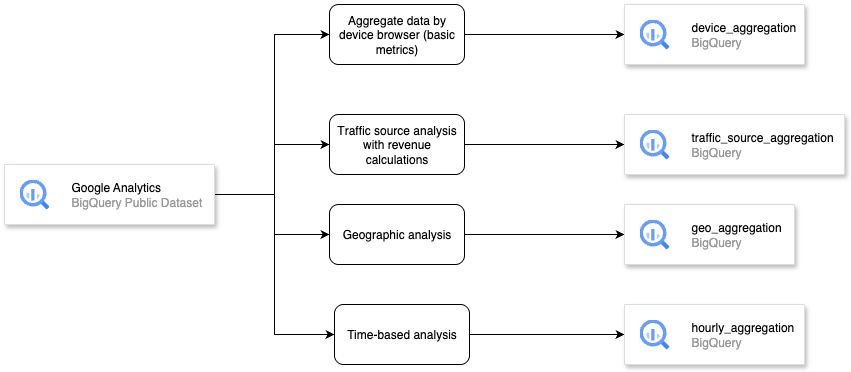
דרישות מוקדמות
- פרויקט ב-Google Cloud Platform (GCP) עם חיוב מופעל.
- BigQuery API ו-BigQuery Connection API מופעלים בפרויקט GCP.
- ידע בסיסי ב-SQL וב-Python.
מה תלמדו
- איך מחלצים נתונים באמצעות Apache Spark ב-BigQuery Studio Notebook
- איך משנים או מצברים נתונים באמצעות Apache Spark ב-BigQuery Studio Notebook
- איך לכתוב נתונים אחרי טרנספורמציה או צבירה של נתונים באמצעות Apache Spark ב-BigQuery Studio Notebook
מה תצטרכו
- דפדפן האינטרנט Chrome
- חשבון Gmail
- פרויקט ב-Cloud עם חיוב מופעל
2. הגדרה בסיסית ודרישות
הגדרת סביבה בקצב עצמי
- נכנסים ל-מסוף Google Cloud ויוצרים פרויקט חדש או משתמשים בפרויקט קיים. אם עדיין אין לכם חשבון Gmail או Google Workspace, אתם צריכים ליצור חשבון.

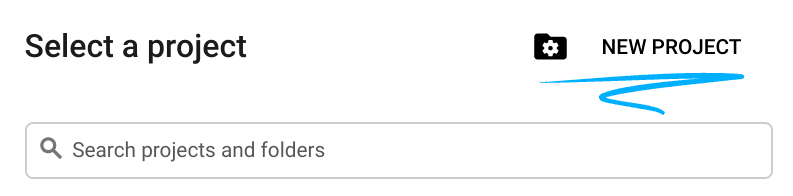
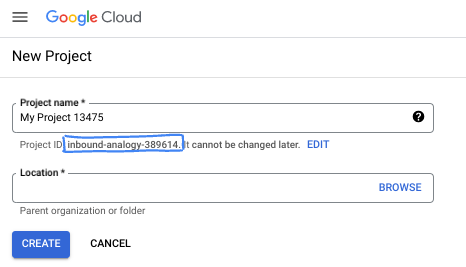
- שם הפרויקט הוא השם המוצג של המשתתפים בפרויקט הזה. זו מחרוזת תווים שלא נמצאת בשימוש ב-Google APIs. תמיד אפשר לעדכן את המיקום.
- מזהה הפרויקט הוא ייחודי לכל הפרויקטים ב-Google Cloud, והוא קבוע (אי אפשר לשנות אותו אחרי שהוא מוגדר). מסוף Cloud יוצר באופן אוטומטי מחרוזת ייחודית, ובדרך כלל לא צריך לדעת מה היא. ברוב ה-Codelabs, תצטרכו להפנות למזהה הפרויקט (בדרך כלל מסומן כ-
PROJECT_ID). אם אתם לא אוהבים את המזהה שנוצר, אתם יכולים ליצור מזהה אקראי אחר. אפשר גם לנסות כתובת משלכם ולבדוק אם היא זמינה. אי אפשר לשנות את הערך הזה אחרי השלב הזה, והוא יישאר כזה למשך הפרויקט. - לידיעתכם, יש ערך שלישי, מספר פרויקט, שחלק מממשקי ה-API משתמשים בו. במאמרי העזרה מפורט מידע נוסף על שלושת הערכים האלה.
- בשלב הבא, תצטרכו להפעיל את החיוב במסוף Cloud כדי להשתמש במשאבי Cloud או בממשקי API של Cloud. השלמת ה-codelab הזה לא תעלה לכם הרבה, אם בכלל. כדי להשבית את המשאבים ולמנוע חיובים נוספים אחרי שתסיימו את המדריך הזה, תוכלו למחוק את המשאבים שיצרתם או למחוק את הפרויקט. משתמשים חדשים ב-Google Cloud זכאים לתוכנית תקופת ניסיון בחינם בשווי 300$.
3. לפני שמתחילים
הפעלת ה-API
לפני שמשתמשים ב-BigQuery Studio Notebooks, צריך להפעיל את ממשקי ה-API הבאים:
- Compute Engine API
- Dataform API
- Vertex AI API
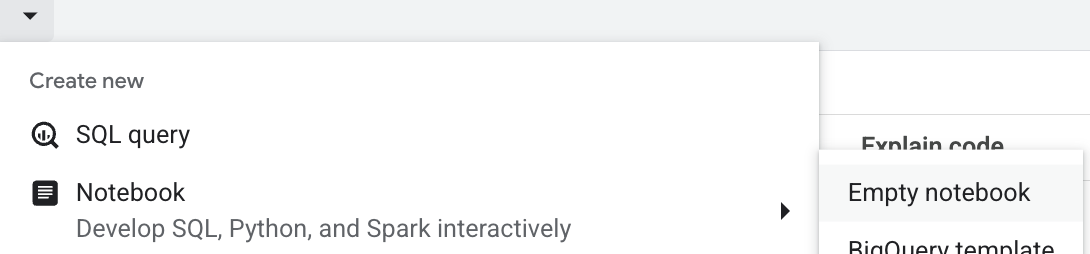
כדי להפעיל את BigQuery באופן ידני, עוברים אל BigQuery. בסרגל הכרטיסיות של חלונית העריכה, לוחצים על החץ לתפריט הנפתח לצד הסימן +, מעבירים את מצביע העכבר מעל Notebook, ואז בוחרים באפשרות תבנית BigQuery, מחברת ריקה או תבנית Spark.
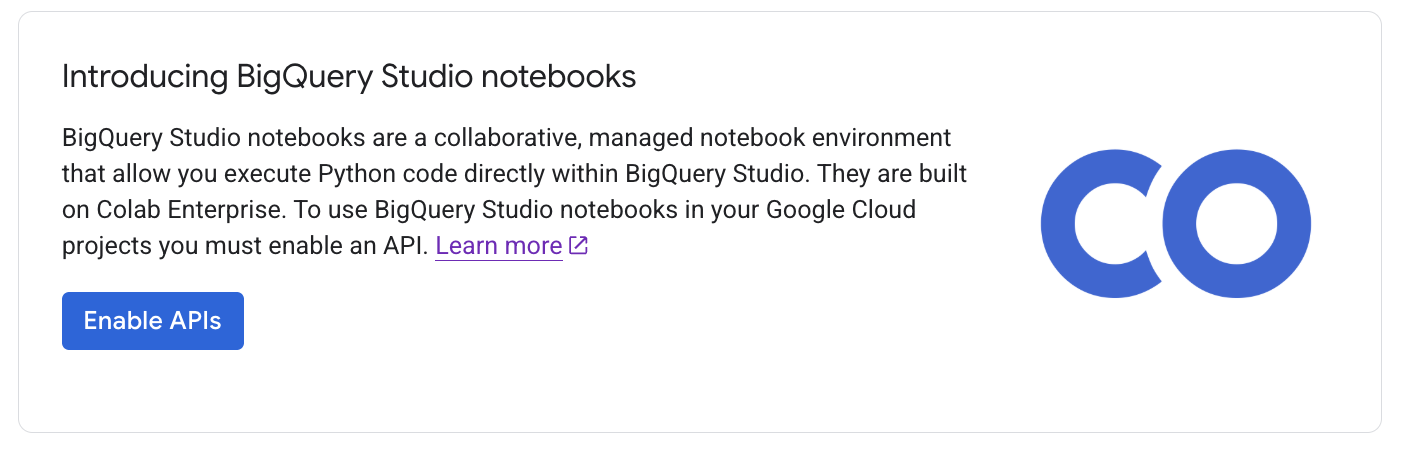
בחלון Enable Core feature API, לוחצים על Enable in BigQuery Unified API
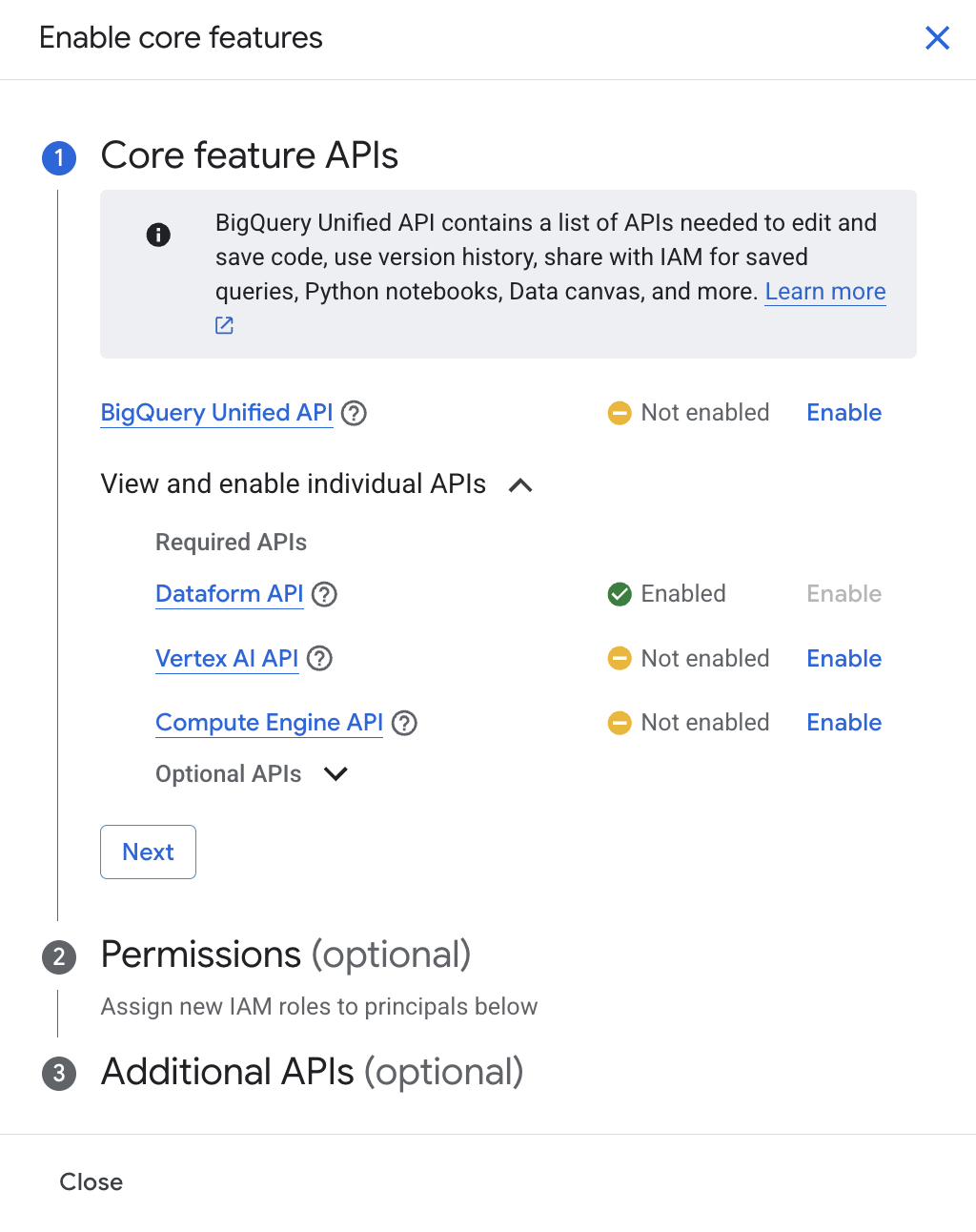
כשמסיימים, מפעילים את האפשרות ולוחצים על סגירה. פרטים נוספים זמינים במאמר בנושא הפעלת BigQuery Studio לניהול נכסים.
4. קריאה של מערך נתונים ציבורי
קודם ניצור קטגוריית GCS לשימוש זמני כדי להריץ Spark ב-BigQuery Studio Notebooks.
- במסוף Google Cloud, עוברים אל BigQuery.
- בסרגל הכרטיסיות של חלונית העריכה, לוחצים על החץ לתפריט הנפתח לצד הסימן +, מעבירים את מצביע העכבר מעל מחברת ואז בוחרים באפשרות מחברת ריקה.
- לוחצים על תא הקוד, מקלידים את סקריפט ה-CLI שבהמשך כדי ליצור קטגוריית GCS, ואז לוחצים על לחצן ההרצה של התא או על Shift + Enter.
!gsutil mb -p <your_project_id> -c STANDARD -l US gs://ioxid2025-<your_project_id>
מעדכנים את הערכים של <your_project_id> בהתאם למה שבחרתם כשיצרתם את הפרויקט ב-Google Cloud. מעדכנים את הערכים של <your_project_id> עם מזהה הפרויקט כדי ליצור שם ייחודי לקטגוריה ב-GCS. אחרי כן לוחצים על לחצן ההרצה של התא או מקישים על Shift + Enter כדי להריץ את תא הקוד.
בשלב הבא, נפעיל סשן Spark. ב-codelab הזה נשתמש בספרייה SparkSession, אבל אפשר להשתמש ב-DataprocSession כדי לנצל את היכולות של Dataproc להרצת Spark ב-BigQuery Studio Notebook.
- לוחצים על תא הקוד ומקלידים את סקריפט ה-CLI שבהמשך כדי להפעיל סשן Spark. לוחצים על לחצן ההרצה של התא או מקישים על Shift + Enter.
# Import required libraries
from pyspark.sql import SparkSession
from pyspark.sql.functions import col, sum, count, countDistinct, when, expr, date_format
from pyspark.sql.types import DecimalType

# Initialize Spark session with BigQuery connector
from pyspark.sql import SparkSession
from pyspark.sql.functions import col, sum, count, countDistinct, when, expr, date_format
from pyspark.sql.types import DecimalType

# Initialize Spark session with BigQuery connector
spark = SparkSession.builder \
 .appName("Google Analytics ETL with Apache Spark") \
 .config("spark.jars.packages", "com.google.cloud.spark:spark-bigquery-with-dependencies_2.12:0.32.0") \
 .getOrCreate()

spark
הפלט המצופה :
SparkSession - in-memory
SparkContext
Spark UI
Version
v3.5.4
Master
local[*]
AppName
Google Analytics ETL with Apache Spark
- לוחצים על תא הקוד ומקלידים את סקריפט ה-CLI שלמטה כדי להגדיר פרויקט GCP ודלי זמני של GCS.
# Set GCP project and temporary bucket
project_id = "your-gcp-project-id"  # Replace with your GCP project ID
bucket = "your-gcs-bucket"  # Replace with your GCS bucket for temporary files spark.conf.set("temporaryGcsBucket", bucket)
מסד נתונים לדוגמה של Google Analytics
מסד הנתונים לדוגמה של Google Analytics מסופק ב-BigQuery דרך התוכנית של Google Cloud למערכי נתונים ציבוריים. מערך הנתונים מספק נתוני Google Analytics 360 עם ערפול קוד (obfuscation) מ-Google Merchandise Store , חנות מסחר אלקטרוני אמיתית שמוכרת מוצרים עם מיתוג של Google, ב-BigQuery. הנתונים הם מ-12 חודשים (אוגוסט 2016 עד אוגוסט 2017). זו דרך מצוינת לנתח נתונים עסקיים וללמוד על היתרונות של שימוש ב-BigQuery לניתוח נתוני Analytics 360. מידע נוסף על הנתונים
הנתונים אופייניים לאתרים של מסחר אלקטרוני, וכוללים:
- נתונים על מקורות תנועה: מידע על המקורות שמהם מגיעים המבקרים באתר, כולל נתונים על תנועה אורגנית, תנועה שמקורה בחיפוש בתשלום ותנועה מרשת המדיה
- נתוני תוכן: מידע על התנהגות המשתמשים באתר, כמו כתובות URL של דפים שמבקרים הציגו, מידע על האינטראקציה של מבקרים עם התוכן וכולי.
- נתוני עסקאות: מידע על העסקאות באתר Google Merchandise Store.
מריצים את הקוד שבהמשך כדי להציג נתונים לדוגמה של 5 המוצרים המובילים ב-Apache Spark
# EXTRACT: Read data from BigQuery
print("Extracting data from BigQuery...")
ga_df = spark.read.format("bigquery") \
   .option("table", "bigquery-public-data.google_analytics_sample.ga_sessions_20170801") \
   .load()

# Show schema sample data
print("Sample data:")
ga_df.show(5, truncate=False)
הפלט הצפוי :
Extracting data from BigQuery...
Sample data:
+---------+-----------+----------+--------------+--------+---------------------------------------------------------------+---------------------------------------------------------------------------------------------------------------------------------------------------------------------------------------+----------------------------------------------------------------------------------------------------------------------------------------------------------------------------------------------------------------------------------------------------------------------------------------------------------------------------------------------------------------------------------------------------------------------------+-------------------------------------------------------------------------------------------------------------------------------------------------------------------------------------------------------------------------------------------------------------------------------+--------------------+-------------------------------------------------------------------------------------------------------------------------------------------------------------------------------------------------------------------------------------------------------------------------------------------------------------------------------------------------------------------------------------------------------------------------------------------------------------------------------------------------------------------------------------------------------------------------------------------------------------------------------------------------------------------------------------------------------------------------------------------------------------------------------------------------------------------------------------------------------------------------------------------------------------------------------------+-------------------+------+--------+---------------+--------------------+
|visitorId|visitNumber|visitId   |visitStartTime|date    |totals                                                         |trafficSource                                                                                                                                                                          |device                                                                                                                                                                                                                                                                                                                                                                                                                      |geoNetwork                                                                                                                                                                                                                                                                     |customDimensions    |hits                                                                                                                                                                                                                                                                                                                                                                                                                                                                                                                                                                                                                                                                                                                                                                                                                                                                                                                                 |fullVisitorId      |userId|clientId|channelGrouping|socialEngagementType|
+---------+-----------+----------+--------------+--------+---------------------------------------------------------------+---------------------------------------------------------------------------------------------------------------------------------------------------------------------------------------+----------------------------------------------------------------------------------------------------------------------------------------------------------------------------------------------------------------------------------------------------------------------------------------------------------------------------------------------------------------------------------------------------------------------------+-------------------------------------------------------------------------------------------------------------------------------------------------------------------------------------------------------------------------------------------------------------------------------+--------------------+-------------------------------------------------------------------------------------------------------------------------------------------------------------------------------------------------------------------------------------------------------------------------------------------------------------------------------------------------------------------------------------------------------------------------------------------------------------------------------------------------------------------------------------------------------------------------------------------------------------------------------------------------------------------------------------------------------------------------------------------------------------------------------------------------------------------------------------------------------------------------------------------------------------------------------------+-------------------+------+--------+---------------+--------------------+
|NULL     |1          |1501591568|1501591568    |20170801|{1, 1, 1, NULL, 1, NULL, NULL, 1, NULL, NULL, NULL, NULL, 1}   |{NULL, (not set), (direct), (none), NULL, NULL, {NULL, NULL, NULL, NULL, NULL, NULL, not available in demo dataset, NULL, NULL, NULL, NULL, NULL}, NULL, NULL}                         |{Chrome, not available in demo dataset, not available in demo dataset, Windows, not available in demo dataset, false, not available in demo dataset, not available in demo dataset, not available in demo dataset, not available in demo dataset, not available in demo dataset, not available in demo dataset, NULL, not available in demo dataset, not available in demo dataset, not available in demo dataset, desktop} |{Europe, Southern Europe, Greece, not available in demo dataset, not available in demo dataset, not available in demo dataset, not available in demo dataset, tellas.gr, not available in demo dataset, not available in demo dataset, not available in demo dataset}          |[]                  |[{1, 0, 5, 46, NULL, true, true, true, https://www.google.gr/, {/google+redesign/bags/google+zipper+front+sports+bag.axd, shop.googlemerchandisestore.com, Page Unavailable, NULL, NULL, /google+redesign/, /bags/, /google+zipper+front+sports+bag.axd, }, NULL, NULL, NULL, {NULL, NULL, NULL, NULL, NULL, NULL, NULL, NULL, shop.googlemerchandisestore.com/google+redesign/bags/google+zipper+front+sports+bag.axd, shop.googlemerchandisestore.com/google+redesign/bags/google+zipper+front+sports+bag.axd, shop.googlemerchandisestore.com/google+redesign/bags/google+zipper+front+sports+bag.axd, 0}, {NULL, true, NULL, NULL}, NULL, [], [], NULL, NULL, {0, 1, NULL}, [], NULL, [], [], [], PAGE, {NULL, NULL, NULL, NULL, (not set), NULL, No,  : }, NULL, NULL, {(not set), Bags, (not set), (not set), (not set), (entrance), (entrance), (entrance), (entrance), (entrance), NULL, 1, NULL, NULL, NULL}, web, []}]     |3418334011779872055|NULL  |NULL    |Organic Search |Not Socially Engaged|
|NULL     |2          |1501589647|1501589647    |20170801|{1, 1, 1, NULL, 1, NULL, NULL, NULL, NULL, NULL, NULL, NULL, 1}|{/analytics/web/, (not set), analytics.google.com, referral, NULL, NULL, {NULL, NULL, NULL, NULL, NULL, NULL, not available in demo dataset, NULL, NULL, NULL, NULL, NULL}, NULL, NULL}|{Chrome, not available in demo dataset, not available in demo dataset, Windows, not available in demo dataset, false, not available in demo dataset, not available in demo dataset, not available in demo dataset, not available in demo dataset, not available in demo dataset, not available in demo dataset, NULL, not available in demo dataset, not available in demo dataset, not available in demo dataset, desktop} |{Asia, Southern Asia, India, Maharashtra, (not set), Mumbai, not available in demo dataset, unknown.unknown, not available in demo dataset, not available in demo dataset, not available in demo dataset}                                                                      |[{4, APAC}]         |[{1, 0, 5, 14, NULL, true, true, true, https://analytics.google.com/analytics/web/, {/google+redesign/shop+by+brand/youtube, shop.googlemerchandisestore.com, Page Unavailable, NULL, NULL, /google+redesign/, /shop+by+brand/, /youtube, }, NULL, NULL, NULL, {NULL, NULL, NULL, NULL, NULL, NULL, NULL, NULL, shop.googlemerchandisestore.com/google+redesign/shop+by+brand/youtube, shop.googlemerchandisestore.com/google+redesign/shop+by+brand/youtube, shop.googlemerchandisestore.com/google+redesign/shop+by+brand/youtube, 0}, {NULL, true, NULL, NULL}, NULL, [], [], NULL, NULL, {0, 1, NULL}, [], NULL, [], [], [], PAGE, {NULL, NULL, NULL, NULL, (not set), NULL, No,  : }, NULL, NULL, {(not set), Brands, (not set), (not set), (not set), (entrance), (entrance), (entrance), (entrance), (entrance), NULL, 1, NULL, NULL, NULL}, web, []}]                                                                        |2474397855041322408|NULL  |NULL    |Referral       |Not Socially Engaged|
|NULL     |1          |1501616621|1501616621    |20170801|{1, 1, 1, NULL, 1, NULL, NULL, 1, NULL, NULL, NULL, NULL, 1}   |{/analytics/web/, (not set), analytics.google.com, referral, NULL, NULL, {NULL, NULL, NULL, NULL, NULL, NULL, not available in demo dataset, NULL, NULL, NULL, NULL, NULL}, NULL, NULL}|{Chrome, not available in demo dataset, not available in demo dataset, Windows, not available in demo dataset, false, not available in demo dataset, not available in demo dataset, not available in demo dataset, not available in demo dataset, not available in demo dataset, not available in demo dataset, NULL, not available in demo dataset, not available in demo dataset, not available in demo dataset, desktop} |{Europe, Northern Europe, United Kingdom, not available in demo dataset, not available in demo dataset, not available in demo dataset, not available in demo dataset, as9105.com, not available in demo dataset, not available in demo dataset, not available in demo dataset} |[{4, EMEA}]         |[{1, 0, 12, 43, NULL, true, true, true, https://analytics.google.com/analytics/web/?utm_source=demoaccount&utm_medium=demoaccount&utm_campaign=demoaccount, {/google+redesign/shop+by+brand/youtube, shop.googlemerchandisestore.com, Page Unavailable, NULL, NULL, /google+redesign/, /shop+by+brand/, /youtube, }, NULL, NULL, NULL, {NULL, NULL, NULL, NULL, NULL, NULL, NULL, NULL, shop.googlemerchandisestore.com/google+redesign/shop+by+brand/youtube, shop.googlemerchandisestore.com/google+redesign/shop+by+brand/youtube, shop.googlemerchandisestore.com/google+redesign/shop+by+brand/youtube, 0}, {NULL, true, NULL, NULL}, NULL, [], [], NULL, NULL, {0, 1, NULL}, [], NULL, [], [], [], PAGE, {NULL, NULL, NULL, NULL, (not set), NULL, No,  : }, NULL, NULL, {(not set), Brands, (not set), (not set), (not set), (entrance), (entrance), (entrance), (entrance), (entrance), NULL, 1, NULL, NULL, NULL}, web, []}]|5870462820713110108|NULL  |NULL    |Referral       |Not Socially Engaged|
|NULL     |1          |1501601200|1501601200    |20170801|{1, 1, 1, NULL, 1, NULL, NULL, 1, NULL, NULL, NULL, NULL, 1}   |{/analytics/web/, (not set), analytics.google.com, referral, NULL, NULL, {NULL, NULL, NULL, NULL, NULL, NULL, not available in demo dataset, NULL, NULL, NULL, NULL, NULL}, NULL, NULL}|{Firefox, not available in demo dataset, not available in demo dataset, Windows, not available in demo dataset, false, not available in demo dataset, not available in demo dataset, not available in demo dataset, not available in demo dataset, not available in demo dataset, not available in demo dataset, NULL, not available in demo dataset, not available in demo dataset, not available in demo dataset, desktop}|{Americas, Northern America, United States, Texas, Dallas-Ft. Worth TX, Dallas, not available in demo dataset, h5colo.com, not available in demo dataset, not available in demo dataset, not available in demo dataset}                                                        |[{4, North America}]|[{1, 0, 8, 26, NULL, true, true, true, https://analytics.google.com/analytics/web/, {/google+redesign/shop+by+brand/youtube, shop.googlemerchandisestore.com, Page Unavailable, NULL, NULL, /google+redesign/, /shop+by+brand/, /youtube, }, NULL, NULL, NULL, {NULL, NULL, NULL, NULL, NULL, NULL, NULL, NULL, shop.googlemerchandisestore.com/google+redesign/shop+by+brand/youtube, shop.googlemerchandisestore.com/google+redesign/shop+by+brand/youtube, shop.googlemerchandisestore.com/google+redesign/shop+by+brand/youtube, 0}, {NULL, true, NULL, NULL}, NULL, [], [], NULL, NULL, {0, 1, NULL}, [], NULL, [], [], [], PAGE, {NULL, NULL, NULL, NULL, (not set), NULL, No,  : }, NULL, NULL, {(not set), Brands, (not set), (not set), (not set), (entrance), (entrance), (entrance), (entrance), (entrance), NULL, 1, NULL, NULL, NULL}, web, []}]                                                                        |9397809171349480379|NULL  |NULL    |Referral       |Not Socially Engaged|
|NULL     |1          |1501615525|1501615525    |20170801|{1, 1, 1, NULL, 1, NULL, NULL, 1, NULL, NULL, NULL, NULL, 1}   |{/analytics/web/, (not set), adwords.google.com, referral, NULL, NULL, {NULL, NULL, NULL, NULL, NULL, NULL, not available in demo dataset, NULL, NULL, NULL, NULL, NULL}, NULL, NULL}  |{Chrome, not available in demo dataset, not available in demo dataset, Windows, not available in demo dataset, false, not available in demo dataset, not available in demo dataset, not available in demo dataset, not available in demo dataset, not available in demo dataset, not available in demo dataset, NULL, not available in demo dataset, not available in demo dataset, not available in demo dataset, desktop} |{Americas, Northern America, United States, not available in demo dataset, not available in demo dataset, not available in demo dataset, not available in demo dataset, (not set), not available in demo dataset, not available in demo dataset, not available in demo dataset}|[{4, North America}]|[{1, 0, 12, 25, NULL, true, true, true, https://adwords.google.com/analytics/web/?__o=cues&authuser=0, {/google+redesign/shop+by+brand/youtube, shop.googlemerchandisestore.com, Page Unavailable, NULL, NULL, /google+redesign/, /shop+by+brand/, /youtube, }, NULL, NULL, NULL, {NULL, NULL, NULL, NULL, NULL, NULL, NULL, NULL, shop.googlemerchandisestore.com/google+redesign/shop+by+brand/youtube, shop.googlemerchandisestore.com/google+redesign/shop+by+brand/youtube, shop.googlemerchandisestore.com/google+redesign/shop+by+brand/youtube, 0}, {NULL, true, NULL, NULL}, NULL, [], [], NULL, NULL, {0, 1, NULL}, [], NULL, [], [], [], PAGE, {NULL, NULL, NULL, NULL, (not set), NULL, No,  : }, NULL, NULL, {(not set), Brands, (not set), (not set), (not set), (entrance), (entrance), (entrance), (entrance), (entrance), NULL, 1, NULL, NULL, NULL}, web, []}]                                                     |6089902943184578335|NULL  |NULL    |Referral       |Not Socially Engaged|
+---------+-----------+----------+--------------+--------+---------------------------------------------------------------+---------------------------------------------------------------------------------------------------------------------------------------------------------------------------------------+----------------------------------------------------------------------------------------------------------------------------------------------------------------------------------------------------------------------------------------------------------------------------------------------------------------------------------------------------------------------------------------------------------------------------+-------------------------------------------------------------------------------------------------------------------------------------------------------------------------------------------------------------------------------------------------------------------------------+--------------------+-------------------------------------------------------------------------------------------------------------------------------------------------------------------------------------------------------------------------------------------------------------------------------------------------------------------------------------------------------------------------------------------------------------------------------------------------------------------------------------------------------------------------------------------------------------------------------------------------------------------------------------------------------------------------------------------------------------------------------------------------------------------------------------------------------------------------------------------------------------------------------------------------------------------------------------+-------------------+------+--------+---------------+--------------------+
only showing top 5 rows
5. צבירת נתונים לפי דפדפן במכשיר (מדדים בסיסיים)
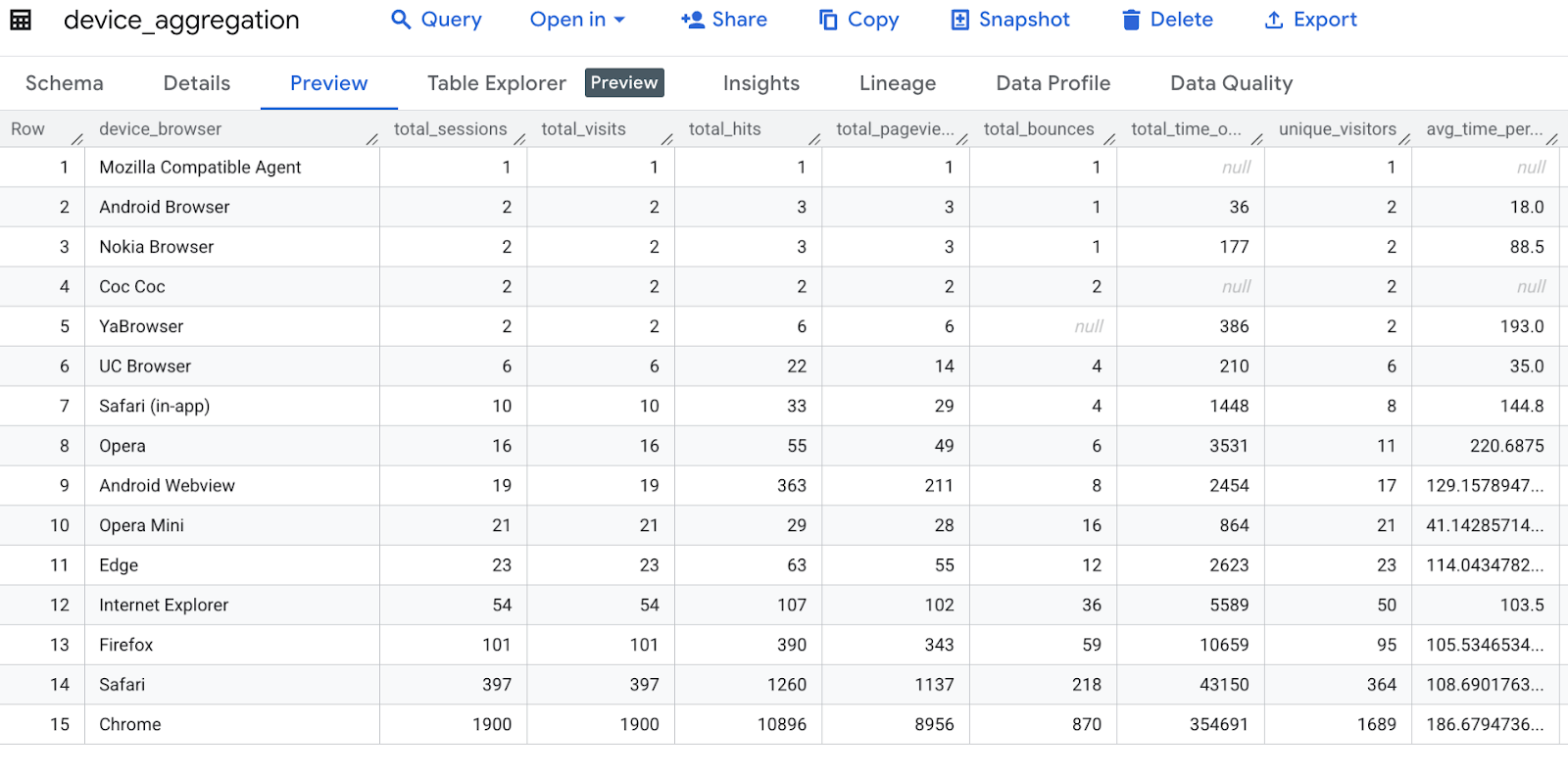
הקוד הזה צובר נתונים של Google Analytics לפי דפדפן במכשיר, מחשב מדדים שונים כמו סך הסשנים, הביקורים, ההיטים, הצפיות בדפים, העזיבות, משך הביקור באתר, המבקרים הייחודיים והזמן הממוצע לכל ביקור, ואז משנה את השם של עמודה וממיין את התוצאות.
print("Transformation 1: Aggregating by device browser...")
device_agg = ga_df.groupBy("device.browser") \
   .agg(
       count("*").alias("total_sessions"),
       sum("totals.visits").alias("total_visits"),
       sum("totals.hits").alias("total_hits"),
       sum("totals.pageviews").alias("total_pageviews"),
       sum("totals.bounces").alias("total_bounces"),
       sum("totals.timeOnSite").alias("total_time_on_site"),
       countDistinct("fullVisitorId").alias("unique_visitors"),
       (sum("totals.timeOnSite")/sum("totals.visits")).alias("avg_time_per_visit")
   ) \
   .withColumnRenamed("browser", "device_browser") \
   .orderBy("total_sessions", ascending=False)

# Show sample transformed data
print("\nDevice Aggregation Sample:")
device_agg.show(5)
הפלט הצפוי :
Transformation 1: Aggregating by device browser...

Device Aggregation Sample:
+-----------------+--------------+------------+----------+---------------+-------------+------------------+---------------+------------------+
|   device_browser|total_sessions|total_visits|total_hits|total_pageviews|total_bounces|total_time_on_site|unique_visitors|avg_time_per_visit|
+-----------------+--------------+------------+----------+---------------+-------------+------------------+---------------+------------------+
|           Chrome|          1900|        1900|     10896|           8956|          870|            354691|           1689|186.67947368421054|
|           Safari|           397|         397|      1260|           1137|          218|             43150|            364|108.69017632241814|
|          Firefox|           101|         101|       390|            343|           59|             10659|             95|105.53465346534654|
|Internet Explorer|            54|          54|       107|            102|           36|              5589|             50|             103.5|
|             Edge|            23|          23|        63|             55|           12|              2623|             23|114.04347826086956|
+-----------------+--------------+------------+----------+---------------+-------------+------------------+---------------+------------------+
only showing top 5 rows
6. ניתוח מקורות תנועה באמצעות חישובי הכנסות
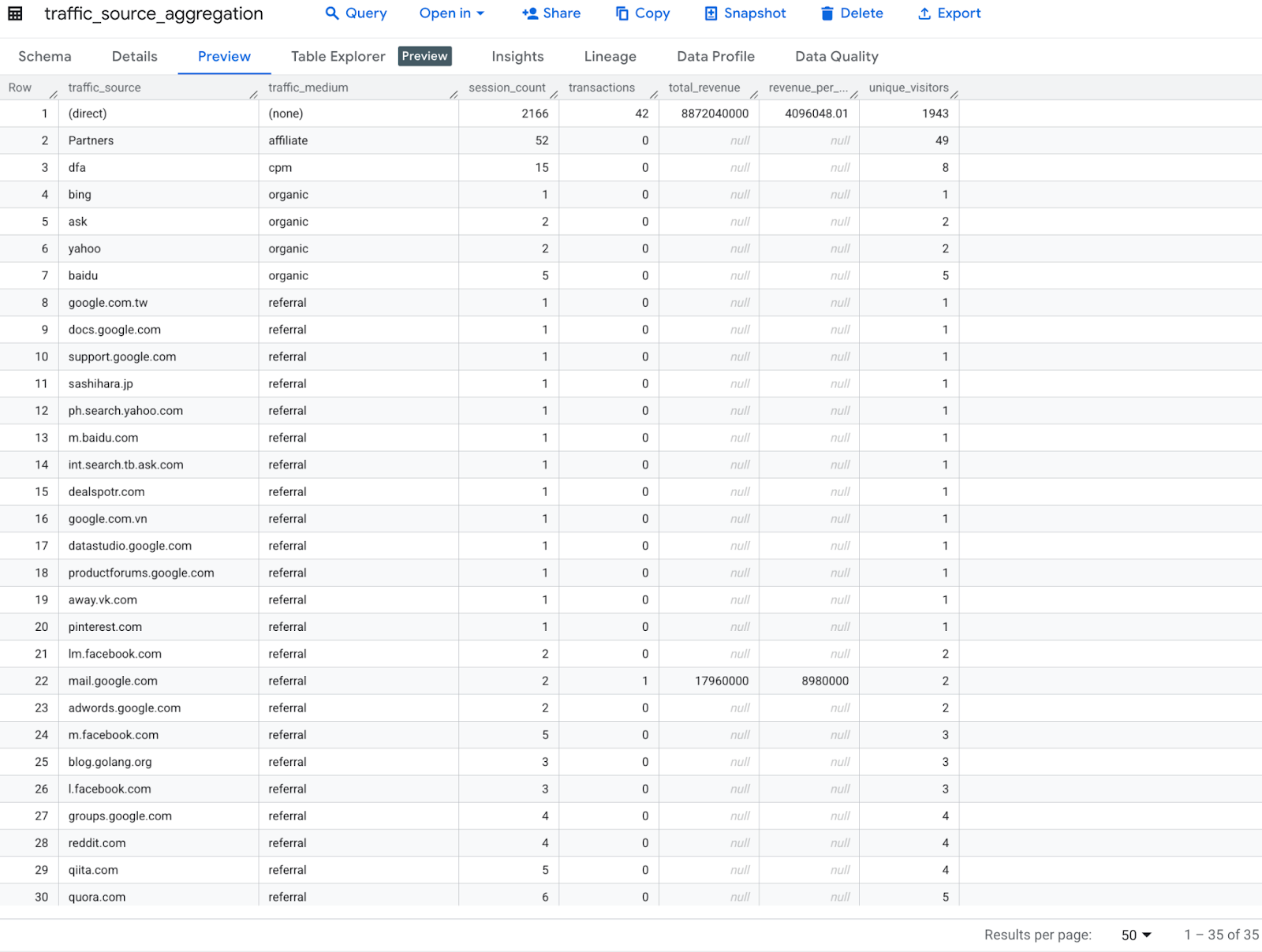
הקוד הזה מנתח את הנתונים של Google Analytics לפי מקור תנועה ואמצעי הגעה לאתר, ומחשב מדדים כמו מספר הסשנים, מספר העסקאות, ההכנסה הכוללת, ההכנסה לכל סשן ומספר המבקרים הייחודיים. לאחר מכן הוא משנה את השמות של העמודות וממיין את התוצאות לפי ההכנסה הכוללת.
print("Transformation 2: Analyzing traffic sources...")
traffic_source_agg = ga_df.groupBy("trafficSource.source", "trafficSource.medium") \
   .agg(
       count("*").alias("session_count"),
       sum(when(col("totals.transactions").isNotNull(), 1).otherwise(0)).alias("transactions"),
       sum("totals.totalTransactionRevenue").cast(DecimalType(20,2)).alias("total_revenue"),
       (sum("totals.totalTransactionRevenue")/count("*")).cast(DecimalType(10,2)).alias("revenue_per_session"),
       countDistinct("fullVisitorId").alias("unique_visitors")
   ) \
   .withColumnRenamed("source", "traffic_source") \
   .withColumnRenamed("medium", "traffic_medium") \
   .orderBy("total_revenue", ascending=False)

print("\nTraffic Source Aggregation Sample:")
traffic_source_agg.show(5)
הפלט הצפוי :
Transformation 2: Analyzing traffic sources...

Traffic Source Aggregation Sample:
+--------------------+--------------+-------------+------------+-------------+-------------------+---------------+
|      traffic_source|traffic_medium|session_count|transactions|total_revenue|revenue_per_session|unique_visitors|
+--------------------+--------------+-------------+------------+-------------+-------------------+---------------+
|            (direct)|        (none)|         2166|          42|8872040000.00|         4096048.01|           1943|
|     mail.google.com|      referral|            2|           1|  17960000.00|         8980000.00|              2|
|       google.com.tw|      referral|            1|           0|         NULL|               NULL|              1|
|analytics.google.com|      referral|           57|           0|         NULL|               NULL|             53|
|           quora.com|      referral|            6|           0|         NULL|               NULL|              5|
+--------------------+--------------+-------------+------------+-------------+-------------------+---------------+
only showing top 5 rows
7. ניתוח גיאוגרפי
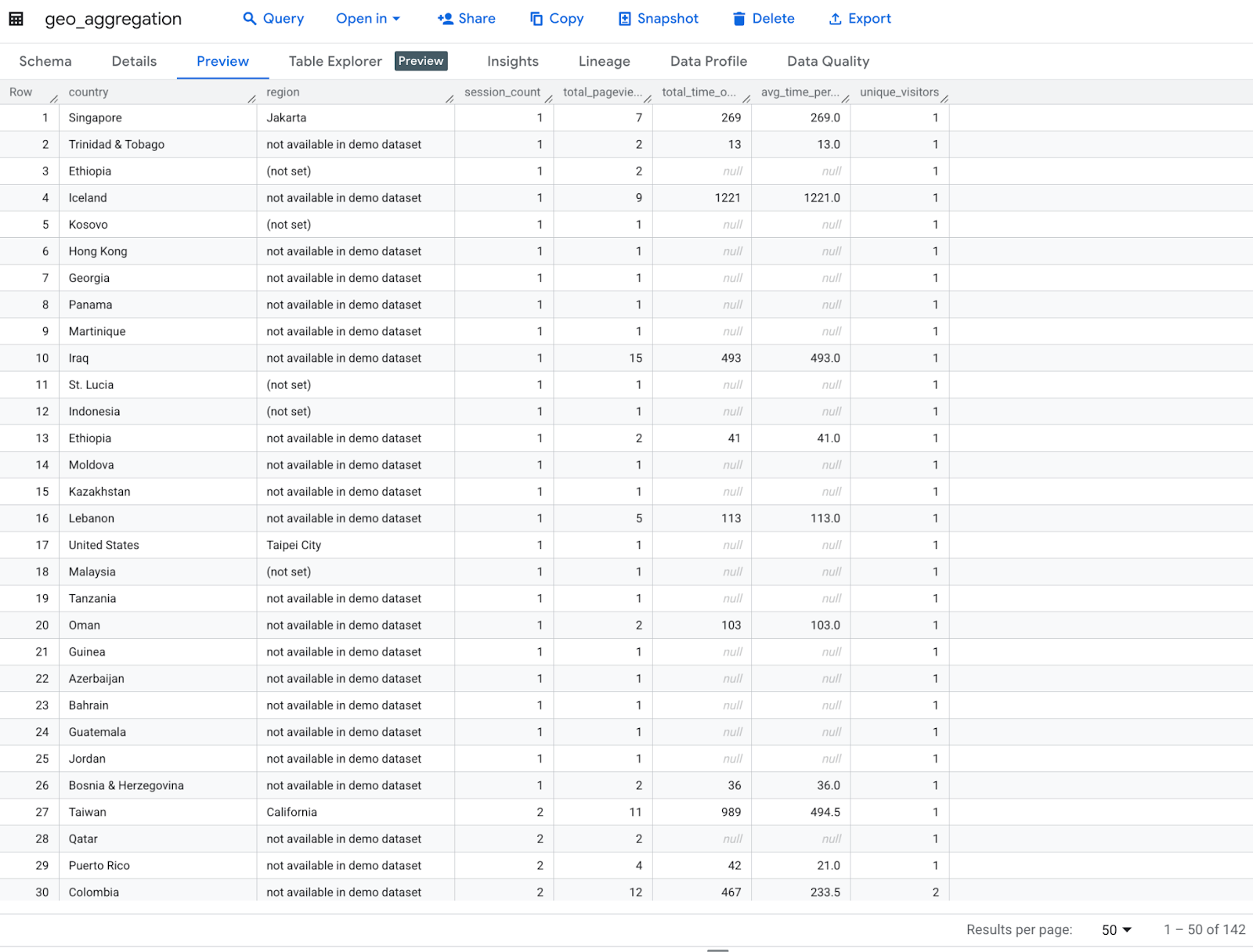
הקוד הזה מבצע ניתוח גיאוגרפי של נתוני Google Analytics לפי מדינה ואזור, ומחשב את מספר הסשנים, מספר הצפיות הכולל בדפים, משך הביקור הכולל באתר, משך הזמן הממוצע לכל סשן ומספר המבקרים הייחודיים. לאחר מכן הוא משנה את השמות של העמודות וממיין לפי מספר הסשנים.
print("Transformation 3: Geographic analysis...")
geo_agg = ga_df.groupBy("geoNetwork.country", "geoNetwork.region") \
   .agg(
       count("*").alias("session_count"),
       sum("totals.pageviews").alias("total_pageviews"),
       sum("totals.timeOnSite").alias("total_time_on_site"),
       (sum("totals.timeOnSite")/count("*")).alias("avg_time_per_session"),
       countDistinct("fullVisitorId").alias("unique_visitors")
   ) \
   .withColumnRenamed("country", "country") \
   .withColumnRenamed("region", "region") \
   .orderBy("session_count", ascending=False)

print("\nGeographic Aggregation Sample:")
geo_agg.show(5)
הפלט הצפוי :
Transformation 3: Geographic analysis...

Geographic Aggregation Sample:
+--------------+--------------------+-------------+---------------+------------------+--------------------+---------------+
|       country|              region|session_count|total_pageviews|total_time_on_site|avg_time_per_session|unique_visitors|
+--------------+--------------------+-------------+---------------+------------------+--------------------+---------------+
| United States|not available in ...|          564|           2326|             97829|  173.45567375886526|            494|
| United States|          California|          420|           3102|            116563|   277.5309523809524|            347|
| United States|            New York|          109|            845|             39976|   366.7522935779817|             84|
|United Kingdom|not available in ...|           82|            161|              7791|   95.01219512195122|             79|
|         India|not available in ...|           62|            139|              2869|  46.274193548387096|             61|
+--------------+--------------------+-------------+---------------+------------------+--------------------+---------------+
only showing top 5 rows
8. ניתוח מבוסס-זמן
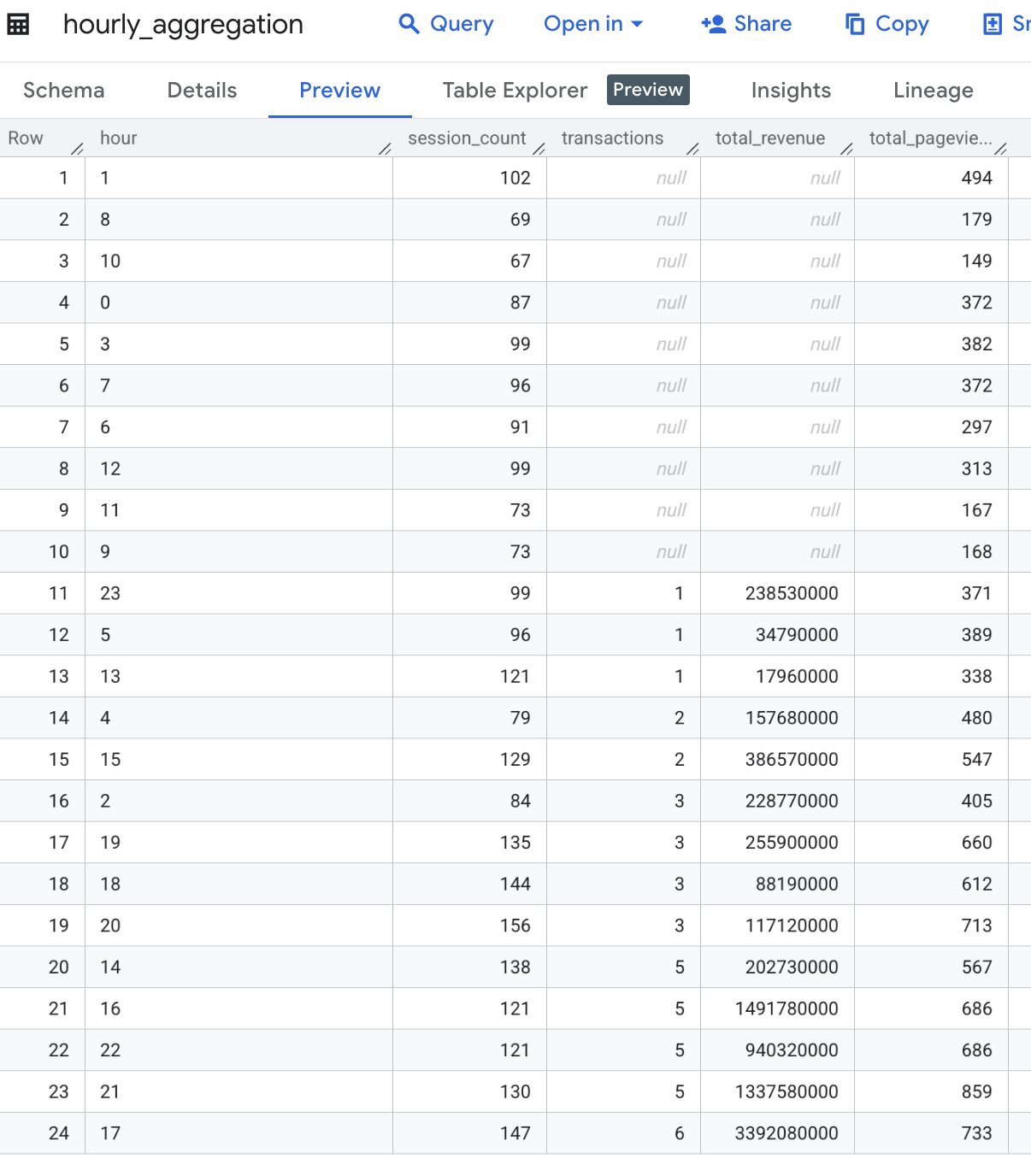
הקוד הזה מבצע ניתוח מבוסס-זמן על ידי חילוץ השעה מהעמודה visitStartTime, ואז מקבץ את הנתונים לפי שעה כדי לחשב את מספר הסשנים, העסקאות, ההכנסה הכוללת ומספר הצפיות הכולל בדף לכל שעה, ולבסוף מסדר את התוצאות לפי שעה.
print("Transformation 4: Time-based analysis...")
hourly_agg = ga_df.withColumn("hour", date_format(col("visitStartTime").cast("timestamp"), "H")) \
   .groupBy("hour") \
   .agg(
       count("*").alias("session_count"),
       sum("totals.transactions").alias("transactions"),
       sum("totals.totalTransactionRevenue").cast(DecimalType(20,2)).alias("total_revenue"),
       sum("totals.pageviews").alias("total_pageviews")
   ) \
   .orderBy("hour")

print("\nHourly Aggregation Sample:")
hourly_agg.show(5)
הפלט המצופה :
Transformation 4: Time-based analysis...

Hourly Aggregation Sample:
+----+-------------+------------+-------------+---------------+
|hour|session_count|transactions|total_revenue|total_pageviews|
+----+-------------+------------+-------------+---------------+
|   0|           87|        NULL|         NULL|            372|
|   1|          102|        NULL|         NULL|            494|
|  10|           67|        NULL|         NULL|            149|
|  11|           73|        NULL|         NULL|            167|
|  12|           99|        NULL|         NULL|            313|
+----+-------------+------------+-------------+---------------+
only showing top 5 rows
9. כתיבת התוצאה לטבלה ב-BigQuery
הקוד הזה מייצא ארבעה אובייקטים של DataFrames מצטברים (device_agg, traffic_source_agg, geo_agg ו-hourly_agg) לטבלאות נפרדות ב-Google BigQuery, ודורס טבלאות קיימות אם הן קיימות, באמצעות שיטת כתיבה ישירה.
# Write to BigQuery tables
print("\nLoading data to BigQuery...")

# Set output tables
device_output_table = f"{project_id}.analytics_sample.device_aggregation"
traffic_output_table = f"{project_id}.analytics_sample.traffic_source_aggregation"
geo_output_table = f"{project_id}.analytics_sample.geo_aggregation"
hourly_output_table = f"{project_id}.analytics_sample.hourly_aggregation"

dataset_id = "demo"  # Replace with your BigQuery dataset ID

# Set BigQuery output table
device_output_table = f"{project_id}.{dataset_id}.device_aggregation"
traffic_output_table = f"{project_id}.{dataset_id}.traffic_source_aggregation"
geo_output_table = f"{project_id}.{dataset_id}.geo_aggregation"
hourly_output_table = f"{project_id}.{dataset_id}.hourly_aggregation"

# Write each DataFrame to BigQuery
device_agg.write \
   .format("bigquery") \
   .option("table", device_output_table) \
   .option("writeMethod", "direct") \
   .mode("overwrite") \
   .save()

traffic_source_agg.write \
   .format("bigquery") \
   .option("table", traffic_output_table) \
   .option("writeMethod", "direct") \
   .mode("overwrite") \
   .save()

geo_agg.write \
   .format("bigquery") \
   .option("table", geo_output_table) \
   .option("writeMethod", "direct") \
   .mode("overwrite") \
   .save()

hourly_agg.write \
   .format("bigquery") \
   .option("table", hourly_output_table) \
   .option("writeMethod", "direct") \
   .mode("overwrite") \
   .save()
בודקים את טבלת הפלט ב-BigQuery כדי לוודא שהנתונים נשמרו בהצלחה אחרי ביצוע שינוי כלשהו
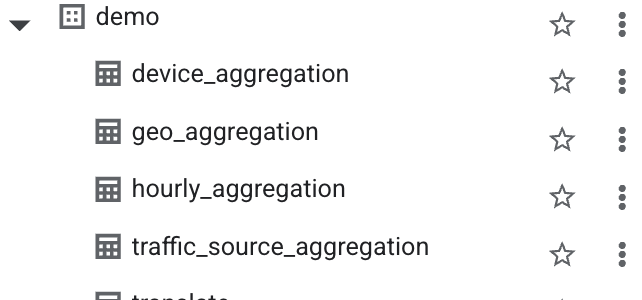
טבלת device_aggregation
טבלת צבירה גיאוגרפית
טבלת hourly_aggregation
traffic_source_aggregation
10. תזמור קוד במחברת BigQuery Studio (אופציונלי)
אפשר לתזמן את הקוד של מחברת BigQuery Studio בדרכים הבאות:
- תזמון קוד של מחברת מתוך מסוף Google Cloud ( חלים תנאי התמחור של מחברות).
- הפעלת קוד של מחברת כעומס עבודה של אצווה ב-Dataproc Serverless ( חלים תמחור של Dataproc Serverless).
ב-Codelab הזה נשתמש בקוד של notebook לתזמון מתוך מסוף Google Cloud.
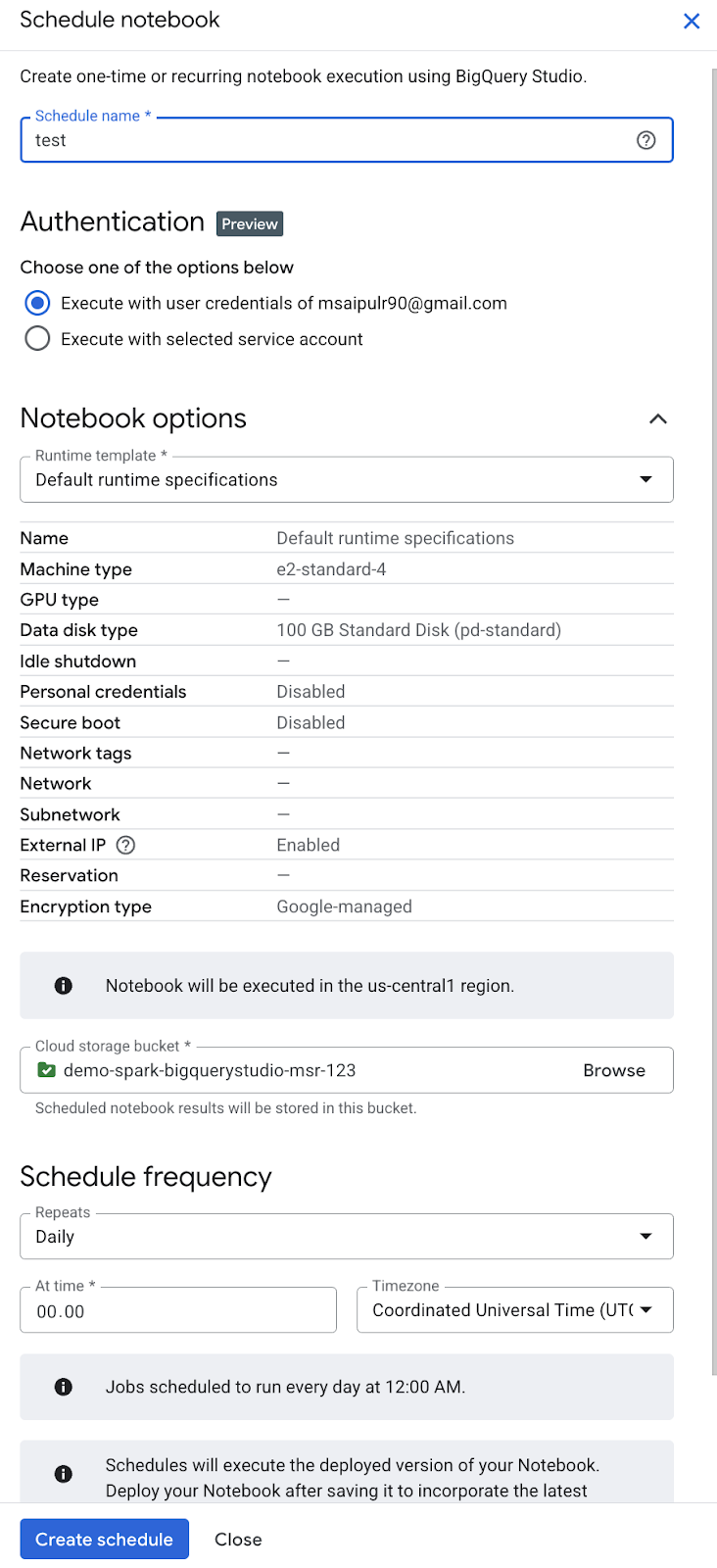
- בסרגל הכלים של מחברת, לוחצים על תזמון.
- בחלונית Schedule Notebook, בשדה Schedule name, מזינים שם לתזמון.
- בקטע Authentication (אימות), מאשרים את ה-notebook באמצעות פרטי הכניסה של משתמש בחשבון Google או באמצעות חשבון שירות.
- כדי להשתמש בפרטי הכניסה של המשתמש בחשבון Google ( תצוגה מקדימה), בוחרים באפשרות Execute with my user credentials (הרצה עם פרטי הכניסה של המשתמש שלי).
- כדי להשתמש בחשבון שירות, בוחרים באפשרות Execute with selected service account (ביצוע באמצעות חשבון השירות שנבחר) ואז בוחרים חשבון שירות.
- בקטע Notebook options (אפשרויות של מחברת), בשדה Runtime template (תבנית זמן ריצה), בוחרים תבנית זמן ריצה של notebook של Colab או את מפרטי זמן הריצה שמוגדרים כברירת מחדל. פרטים על יצירת תבנית של זמן ריצה ב-notebook של Colab זמינים במאמר בנושא יצירת תבנית של זמן ריצה.
- בשדה Cloud Storage bucket, לוחצים על Browse ובוחרים או יוצרים קטגוריה של Cloud Storage. לחשבון השירות שנבחר צריך להיות מוקצה תפקיד ה-IAM Storage Admin (
roles/storage.admin) בדלי שנבחר. מידע נוסף זמין במאמר בנושא הפעלת תזמון של מחברות. - בקטע Schedule frequency:
- בתפריט Repeats (חזרה), בוחרים את התדירות של הפעלות מתוזמנות של מחברות.
- בשדה At time, מזינים את השעה להפעלות המתוזמנות של קובץ ה-notebook.
- בתפריט אזור זמן, בוחרים את אזור הזמן של התזמון.
- לוחצים על יצירת לוח זמנים. אם בחרתם באפשרות Execute with my user credentials (הפעלה עם פרטי הכניסה של המשתמש שלי) כשיטת האימות, אתם צריכים לאשר את חשבון Google ( תצוגה מקדימה).
11. הסרת המשאבים
כדי לא לצבור חיובים לחשבון Google Cloud על המשאבים שבהם השתמשתם ב-Code Lab הזה:
- במסוף Google Cloud, עוברים לדף Manage resources.
- ברשימת הפרויקטים, בוחרים את הפרויקט שרוצים למחוק ולוחצים על Delete.
- כדי למחוק את הפרויקט, כותבים את מזהה הפרויקט בתיבת הדו-שיח ולוחצים על Shut down.
12. מזל טוב
סיימתם לבצע טרנספורמציות וניתוחים של נתונים באמצעות apache spark serverless ב-BigQuery Studio Notebooks. במהלך הקורס למדתם על קבוצות נתונים ציבוריות של Google Cloud, ביצעתם ETL בלי שרת (serverless) באמצעות Apache Spark ב-BigQuery Studio Notebook וארגנתם את BigQuery Studio Notebook. עבודה נהדרת!
השלבים הבאים :
- ארגון מחברת באמצעות חשבון שירות למטרות אוטומציה.
- הוספת סקריפט למעקב אחר משך הזמן של הפעלת עבודת ה-ETL.
- פריסה של notebooks.
- אפשר להשתמש ב-DataprocSparkSession כדי לנצל את היכולות האמיתיות של Apache Spark המבוזר עם Dataproc ללא שרת ב-BigQuery Studio Notebooks.
- יוצרים תהליך מאוחסן ל-Apache Spark ב-BigQuery Studio. כך תוכלו להחיל עקרונות של תכנות מונחה-עצמים כדי לבנות את קוד PySpark בצורה מאורגנת יותר, שניתן לעשות בה שימוש חוזר ולתחזק אותה בקלות.
מקורות מידע :