
1. Overview
Picking a good durian at a roadside stall is a sensory puzzle. Buyers need to tell a genuine Musang King (D197) from a lookalike, judge whether the fruit fell this morning or days ago, and guess whether they will even enjoy its taste.
In this codelab, you build and test a multimodal Durian Sommelier multi-agent system with the Agent Development Kit (ADK) and Agents CLI, and optionally deploy it to Cloud Run with Antigravity CLI (core steps take about 45 minutes; the two optional Antigravity steps add about 20 minutes). Choosing a durian shows where AI perception ends and human senses begin:
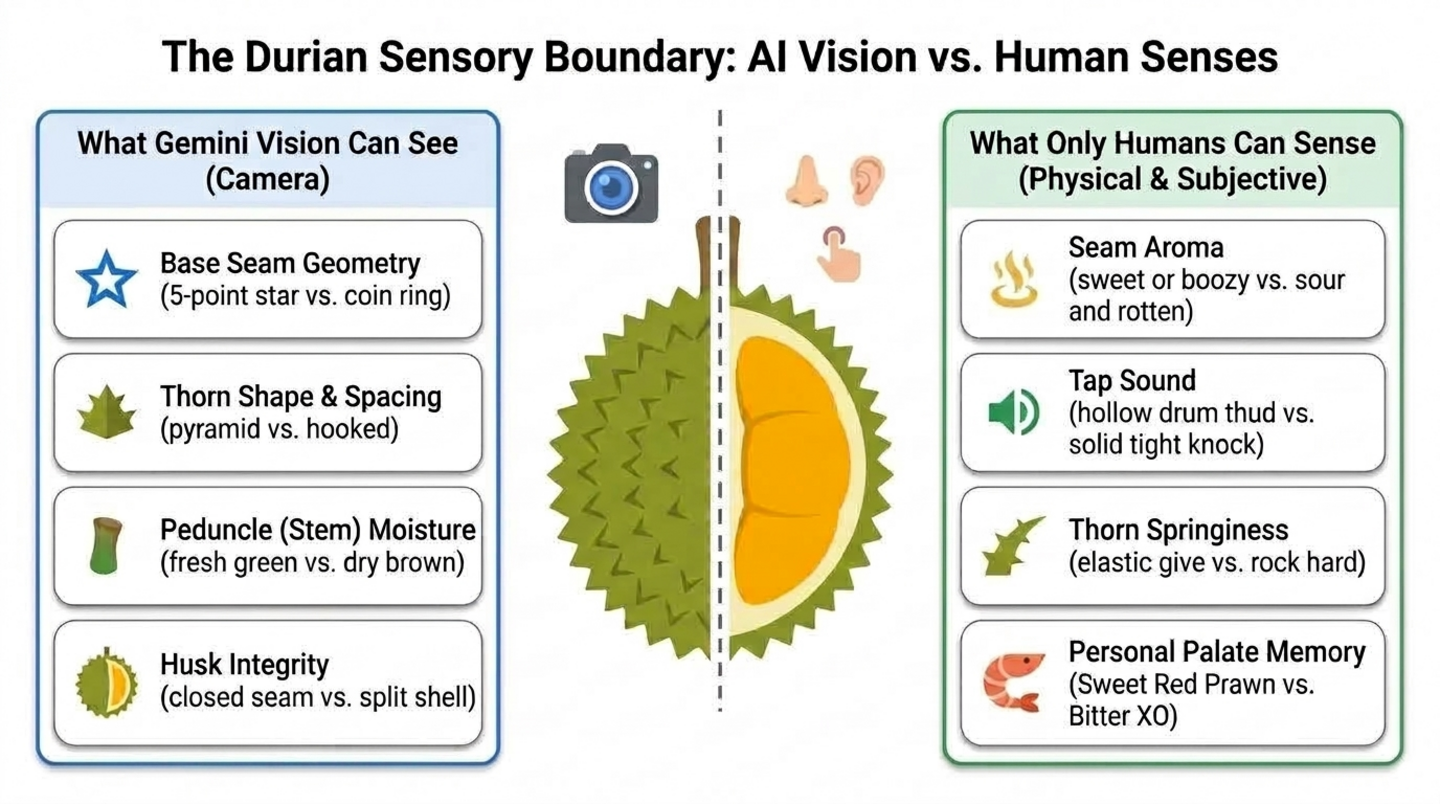
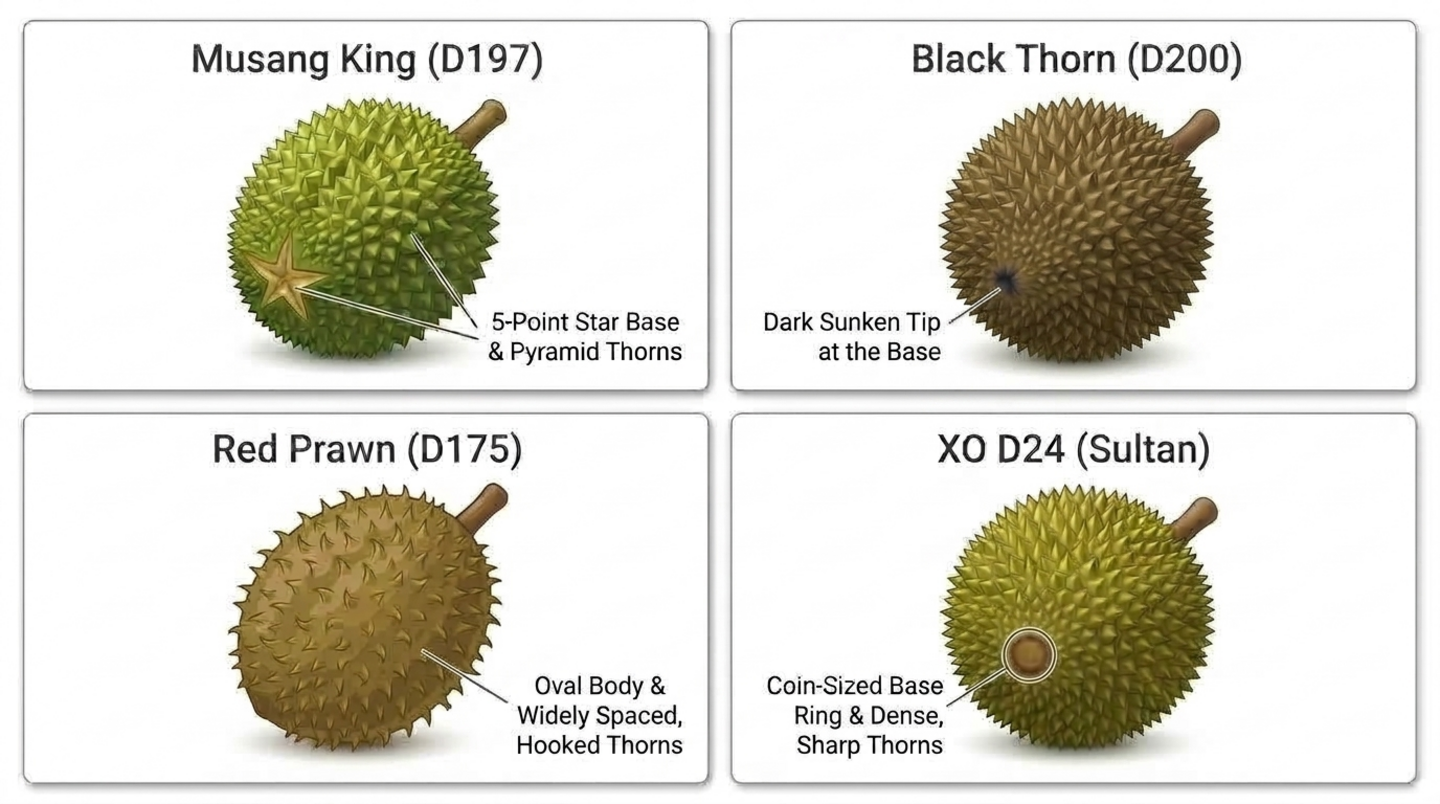
- What AI can see: Gemini can inspect a photo of the shell and spot cultivar markers, such as the five-point star at the base of a Musang King, the dark sunken tip of a Black Thorn (D200), the coin-sized ring of a D24, or a dry, shriveled stem.
- What only a human can sense: A model can't sniff the seam for a boozy note, tap the husk to hear a hollow knock, or press two thorns to feel whether they spring back.
- What the agent must remember: Two perfectly ripe durians still divide buyers. One person loves the bitter, boozy punch of an old-tree XO D24, while another wants the sweet, bitter-free custard of a Red Prawn (D175).
What you'll build
- Stage 1 - Single vision agent: An ADK agent, scaffolded with Agents CLI, that identifies a durian's cultivar and freshness from a photo.
- Stage 2 - Human senses and palate memory: Tools that score what the buyer smells, hears, and feels, plus a tool that saves their taste profile across sessions.
- Stage 3 - Coordinator and specialists: A
durian_advisorcoordinator that calls a vision inspector and a sensory sommelier, then gives one clear verdict. - Stage 4 - Cloud Run agent service: In an optional step, Antigravity CLI deploys your agent with the Agents CLI skills.
- Stage 5 - Cloud Run web chatbot: In another optional step, Antigravity CLI builds and deploys a mobile-friendly chat app that talks to your agent.
Architecture
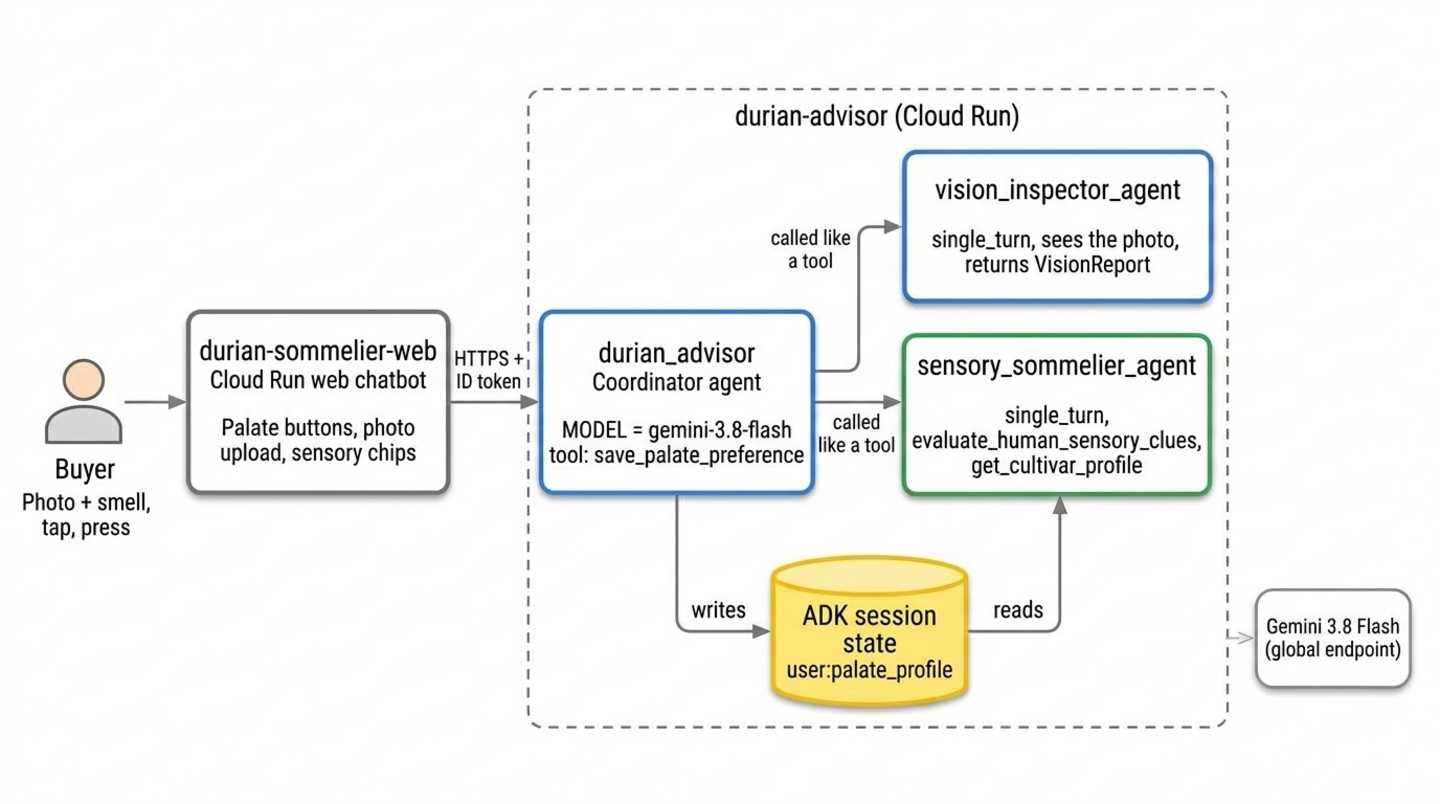
The two Cloud Run services come from the optional Antigravity steps. Without them, you run the same agents in the ADK playground in Cloud Shell.
Prerequisites
- Basic proficiency in Python programming
- Familiarity with command-line tools and generative AI concepts
- No prior experience with ADK, Agents CLI, or Antigravity CLI is required
What you'll learn
- How to scaffold an ADK project with
agents-cli createand build a multimodal agent that reads photos - Where AI perception stops (smell, sound, touch, and personal taste) and how to design human-in-the-loop tools for those senses
- How to remember each user's preferences across sessions with
user:-scoped ADK state - How to split one agent into a coordinator and single-turn specialist agents that it calls like tools
- Optionally, how to give Antigravity CLI the Agents CLI skills so it can deploy your agent and a web chatbot to Cloud Run
What you'll need
- A Google account (use a personal
@gmail.comaccount if claiming workshop credits) - A workshop credit link from your instructor (plus a phone camera to scan the QR code) or an active Cloud Billing account
- Google Chrome (an Incognito window is recommended to avoid mixing personal and work accounts)
2. Claim Google Cloud credits (Optional)
If you're completing this codelab on your own and are eligible, use the Google Developer Program credits banner on this page to claim credits without a credit card. If you're attending a workshop with an event credit link from your instructor, follow the event credit steps in this section.
Claim your event credit
You claim workshop event credits through Google Builders Hub (part of the Google Developer Program).
To claim your event credit, follow these steps:
- Open the workshop credit link in an Incognito window and sign in with your personal
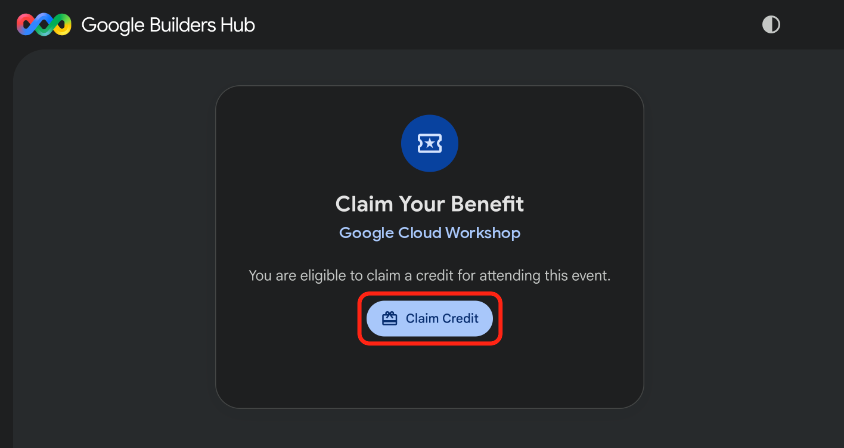
@gmail.comaccount. - On the Claim Your Benefit card, click Claim Credit.
- Optional: If you see a prompt to create a Google Developer Program profile, complete the form.
- When the Scan to Verify You're Human dialog appears, scan the QR code with your phone and complete verification. If the QR code doesn't appear, refresh the page and click Claim Credit again.
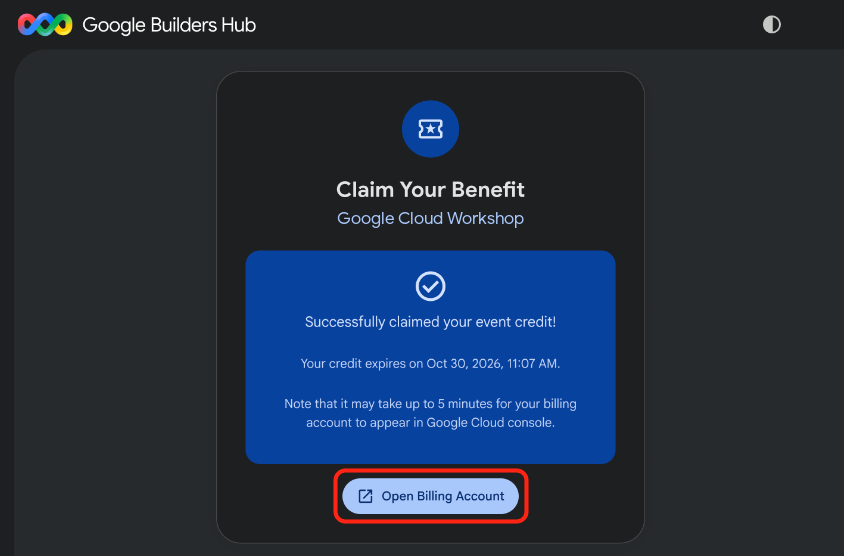
- Confirm that the Successfully claimed your event credit! message appears, and then click Open Billing Account.
🔍 Check your work
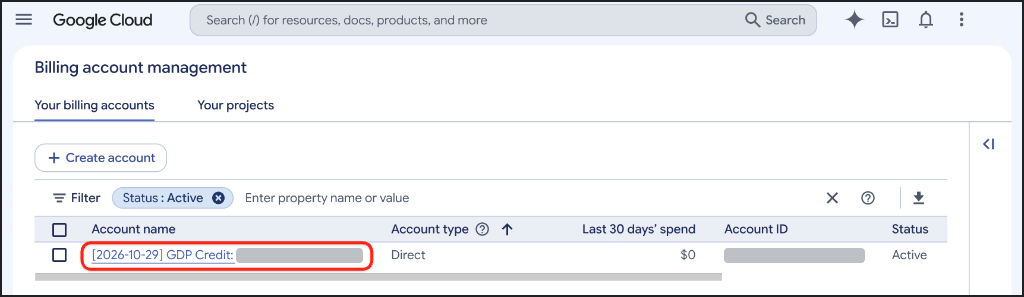
Billing account provisioning can take up to five minutes. To confirm that your credit is active, complete the following steps:
- If the Billing account management page isn't already open, open Google Cloud Billing (or copy the URL into your Incognito window):
https://console.cloud.google.com/billing
- Click the Your billing accounts tab and refresh the page until an account containing GDP Credit shows Active in the Status column.
3. Create a Google Cloud project (Optional)
Create a dedicated Google Cloud project to keep all resources from this codelab isolated so you can remove them cleanly when you finish.
To create a Google Cloud project, follow these steps:
- Open Create a project (or copy the URL into your Incognito window):
https://console.cloud.google.com/projectcreate
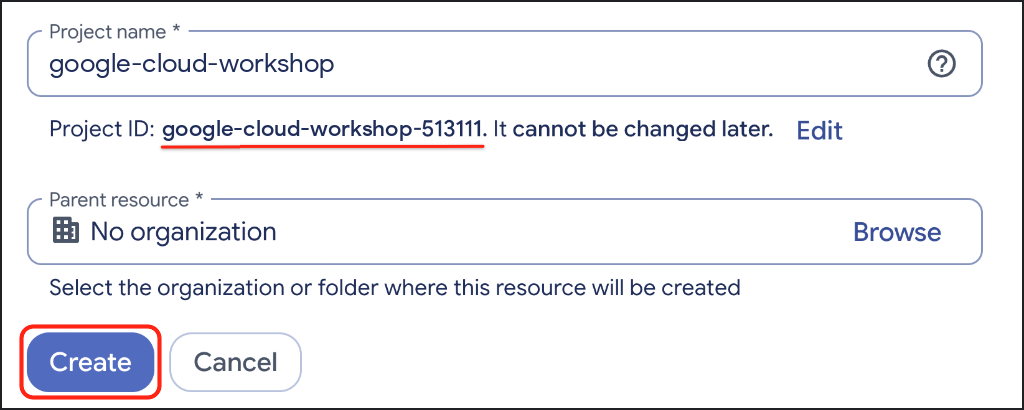
- Enter your project details:
- Project name: Enter a descriptive name, such as
google-cloud-workshop. - Billing account (if shown): Select your GDP Credit account (or your active billing account).
- Parent resource: Leave No organization selected (or select your organization if required).
- Project name: Enter a descriptive name, such as
- Note the generated Project ID, and then click Create.
🔍 Check your work
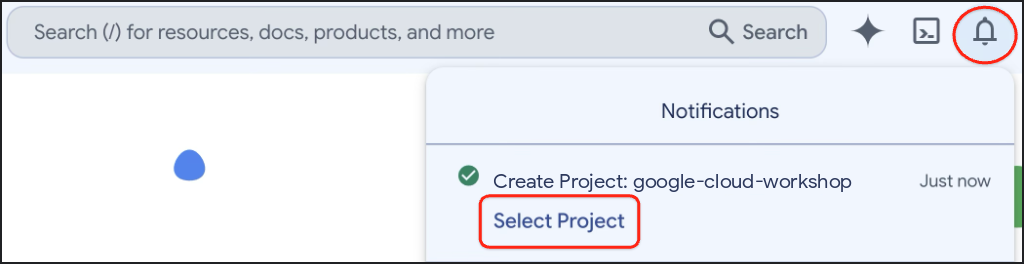
After project creation finishes, open Notifications on the Google Cloud console toolbar, and then click Select Project.
4. Set up your environment
In this section, you set up Google Cloud Shell, enable the Agent Platform API, and install Agents CLI with uv.
Configure Cloud Shell
Launch Cloud Shell
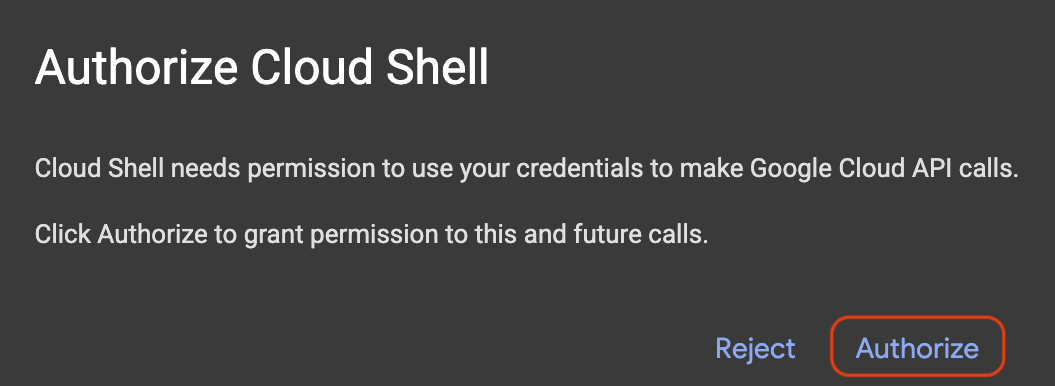
Open Google Cloud Shell with both the code editor and terminal view enabled (or copy the URL into your Incognito window), and click Authorize if prompted:
https://shell.cloud.google.com/?show=ide,terminal
Set your Google Cloud Project ID
Copy and paste the following snippet into your Cloud Shell terminal. It displays a numbered menu of your available Google Cloud projects. Type the number next to your project (for example, 1) and press Enter:
unset CLOUDSDK_CORE_PROJECT
PS3="Select your project (e.g. 1): "
select PROJECT_ID in $(gcloud projects list --format="value(projectId)"); do
  [ -n "$PROJECT_ID" ] && gcloud config set project "$PROJECT_ID" && break
done
Expected prompt:
1) durian-sommelier-workshop-4210
2) my-cloud-project-8812
Select your project (e.g. 1): 1
Updated property [core/project].
[environment: untagged] Read more to tag: g.co/cloud/project-env-tag.
You should now see your selected Project ID highlighted in yellow in the Cloud Shell terminal prompt:

Enable the Agent Platform API
Enable the Agent Platform API, which your agents use to call Gemini:
gcloud services enable aiplatform.googleapis.com
🔍 Check your work
You should see output similar to:
Operation "operations/acat.p2-..." finished successfully.
Install Agents CLI
Make sure uv is available and its tool folder is on your PATH:
which uv || curl -LsSf https://astral.sh/uv/install.sh | sh
export PATH="$HOME/.local/bin:$PATH"
Install Agents CLI as a uv tool:
uv tool install google-agents-cli==1.7.0
uv installs each tool in its own isolated environment and only adds the agents-cli command to your PATH, so your system Python stays untouched. You don't need to install ADK yourself either. Every project that Agents CLI creates gets its own virtual environment with an ADK version that the template was tested against.
🔍 Check your work
Confirm that Agents CLI is ready:
agents-cli --version
You should see output similar to:
agents-cli, version 1.7.0
5. Scaffold a multimodal vision agent
Start small: use Agents CLI to generate an ADK project, then turn its sample agent into a durian vision classifier.
Scaffold the project
Generate the durian-advisor project. --agent adk_python picks the Python ADK template, --deployment-target cloud_run and --region us-central1 prepare it for Cloud Run, --prototype skips CI/CD setup, and --yes accepts the defaults:
cd ~ && agents-cli create durian-advisor \
  --agent adk_python \
  --deployment-target cloud_run \
  --region us-central1 \
  --prototype \
  --yes
You should see output similar to:
> Verifying GCP credentials...
> ✓ Connected to project: your-project-id

✅ Success! Your agent project is ready.
Open the project in the Cloud Shell Editor. This reloads the window and restarts the terminal:
cloudshell workspace ~/durian-advisor
Install the project's dependencies into its own .venv folder:
cd ~/durian-advisor && agents-cli install
Check the environment file
Agents CLI also wrote a .env file that tells ADK to call Gemini through your Google Cloud project:
grep GOOGLE_ ~/durian-advisor/.env
You should see output similar to:
GOOGLE_GENAI_USE_VERTEXAI=true
GOOGLE_CLOUD_PROJECT=your-project-id
GOOGLE_CLOUD_LOCATION=global
Keep GOOGLE_CLOUD_LOCATION=global. Gemini 3.8 Flash is served from the global endpoint, not from regional endpoints such as us-central1, even though your Cloud Run services run in us-central1.
If GOOGLE_CLOUD_PROJECT shows your-gcp-project-id, Agents CLI couldn't detect your project. Set it with:
sed -i "s/your-gcp-project-id/$(gcloud config get-value project)/" ~/durian-advisor/.env
Write the vision classifier
Each cultivar has shell markers that Gemini can spot in a photo:
Open app/agent.py:
cloudshell edit ~/durian-advisor/app/agent.py
Replace its contents with the following code:
"""A single multimodal agent that inspects durian photos."""

from google.adk.agents import Agent
from google.adk.apps import App
from google.adk.models import Gemini
from google.genai import types

MODEL = "gemini-3.8-flash"

INSTRUCTION = """You are a durian visual classifier. Inspect the durian photo or shell description.
1. Base seam: a 5-point star means Musang King (D197). A dark sunken tip means Black Thorn (D200). A coin-sized brown ring means D24. An oval body with widely spaced, hooked thorns means Red Prawn (D175).
2. Stem: plump, moist, and greenish means it fell within about 12 hours. Dry and shriveled means it is days old.
3. Husk: closed seams mean natural ripening. Wide splits or mold mean it is past its best.
Give the likely cultivar and a visual freshness score from 1 to 10. Then list what a photo cannot tell you: the aroma, the tap sound, the thorn springiness, and whether the buyer will enjoy the taste."""

root_agent = Agent(
    name="durian_advisor",
    model=Gemini(model=MODEL, retry_options=types.HttpRetryOptions(attempts=3)),
    description="Classifies durian cultivars and visual freshness from photos.",
    instruction=INSTRUCTION,
)

app = App(root_agent=root_agent, name="app")
A few details matter here:
MODELis the only place the model ID appears. Every agent you add later inherits it, so switching models is a one-line change.retry_optionsretries temporary errors, such as rate limits, up to three times.app = App(...)wraps the agent for both the playground and the Cloud Run server. Keep the app nameappand the agent namedurian_advisor, which match the generated server andagents-cli-manifest.yaml.
Test the agent in the playground
Start the ADK playground:
cd ~/durian-advisor && agents-cli playground
You should see output similar to:
INFO: Uvicorn running on http://127.0.0.1:8080 (Press CTRL+C to quit)
Click Web Preview in the Cloud Shell toolbar and select Preview on port 8080. If the ADK Dev UI asks you to pick an agent, select app. Then send this prompt, or attach your own durian photo with the upload button:
I'm at a stall looking at a round durian with pyramid-shaped thorns and a 5-point star at the base. The stem is green and moist. What cultivar is this, and will it taste sweet?
🔍 Check your work
The agent identifies Musang King (D197) and gives a high freshness score for the moist green stem. Then it admits what a photo can't tell it: the aroma, the tap sound, the thorn springiness, and whether you'll enjoy the taste.
Press Ctrl + C in the terminal to stop the playground before you move on.
6. Add human senses and palate memory
A camera can't smell, hear, or feel, so you'll build tools that ask the buyer to do it. You'll also give the agent a long-term memory of each buyer's taste. In this step you write the tools; in the next step you wire them into agents.
Add the cultivar catalog
Create app/durian_data.py:
cloudshell edit ~/durian-advisor/app/durian_data.py
Paste this reference catalog. Keeping data in its own module keeps the agent code short:
"""Reference catalog of durian cultivars."""

CULTIVAR_CATALOG = {
    "musang_king": {
        "code": "D197",
        "name": "Musang King (Mao Shan Wang)",
        "visual_markers": "5-point star seam at the base, pyramid-shaped thorns",
        "flavor": "rich, bittersweet, buttery custard",
        "bitterness": "medium",
    },
    "black_thorn": {
        "code": "D200",
        "name": "Black Thorn (Ochee)",
        "visual_markers": "Dark sunken tip at the base, round pumpkin-like body",
        "flavor": "sweet, creamy, slightly winey",
        "bitterness": "low",
    },
    "red_prawn": {
        "code": "D175",
        "name": "Red Prawn (Udang Merah)",
        "visual_markers": "Oval body, widely spaced and slightly hooked thorns",
        "flavor": "sweet, floral, soft and sticky",
        "bitterness": "none",
    },
    "xo_d24": {
        "code": "D24",
        "name": "XO D24 (Sultan, old tree)",
        "visual_markers": "Coin-sized brown ring at the base, dense sharp thorns",
        "flavor": "intense, bitter, with a boozy finish",
        "bitterness": "high",
    },
}
Add the sensory tools
Create app/sensory_tools.py:
cloudshell edit ~/durian-advisor/app/sensory_tools.py
Paste the following code:
"""Tools for cultivar lookup and human-in-the-loop sensory checks."""

from typing import Any, Literal

from .durian_data import CULTIVAR_CATALOG

AROMA_POINTS = {"sweet_fragrant": 4, "boozy_fermented": 3, "faint_grassy": 0, "sour_rotten": 0}
TAP_POINTS = {"hollow": 3, "solid": 0}
THORN_POINTS = {"springy": 3, "rigid": 0}


def get_cultivar_profile(cultivar_key: str) -> dict[str, Any]:
    """Looks up the visual markers, flavor, and bitterness of a durian cultivar.

    Args:
        cultivar_key: One of 'musang_king', 'black_thorn', 'red_prawn', or 'xo_d24'.
    """
    key = cultivar_key.strip().lower().replace(" ", "_").replace("-", "_")
    if key not in CULTIVAR_CATALOG:
        return {"status": "NOT_FOUND", "supported": list(CULTIVAR_CATALOG)}
    return {"status": "OK", "cultivar": CULTIVAR_CATALOG[key]}


def evaluate_human_sensory_clues(
    aroma: Literal["sweet_fragrant", "boozy_fermented", "faint_grassy", "sour_rotten"],
    tap_sound: Literal["hollow", "solid"],
    thorn_feel: Literal["springy", "rigid"],
) -> dict[str, Any]:
    """Scores the ripeness clues that only a human buyer can smell, hear, and feel.

    Args:
        aroma: What the buyer smells at the seam of the husk.
        tap_sound: What the buyer hears when tapping the husk.
        thorn_feel: How two thorns feel when the buyer presses them together.
    """
    score = AROMA_POINTS[aroma] + TAP_POINTS[tap_sound] + THORN_POINTS[thorn_feel]
    if aroma == "sour_rotten":
        verdict = "SPOILED"
    elif score >= 7:
        verdict = "RIPE"
    elif score >= 4:
        verdict = "NOT_QUITE_READY"
    else:
        verdict = "UNRIPE"
    return {"status": "OK", "ripeness_score": score, "max_score": 10, "verdict": verdict}
How these tools work:
- ADK turns each function into a tool that the model can call. The docstring becomes the tool description, and the
Argssection explains each parameter. - The
Literal[...]type hints become fixed choices in the tool schema, so Gemini must map "smells a bit boozy" to exactly one allowed value, such asboozy_fermented. get_cultivar_profilereturns an explicitNOT_FOUNDstatus with the supported keys instead of inventing a cultivar.
Add the palate memory tool
Create app/memory_tools.py:
cloudshell edit ~/durian-advisor/app/memory_tools.py
Paste the following code:
"""Tool that remembers each buyer's durian palate across sessions."""

from typing import Any, Literal

from google.adk.tools import ToolContext


def save_palate_preference(
    favorite_flavors: str,
    bitterness_tolerance: Literal["none", "low", "medium", "high"],
    tool_context: ToolContext,
) -> dict[str, Any]:
    """Saves the buyer's durian taste preferences to their long-term profile.

    Args:
        favorite_flavors: Flavors and textures the buyer enjoys, such as
            'sweet, creamy custard'.
        bitterness_tolerance: How much bitterness the buyer enjoys.
    """
    profile = {
        "favorite_flavors": favorite_flavors,
        "bitterness_tolerance": bitterness_tolerance,
    }
    # The "user:" prefix scopes this key to the buyer, so it follows them
    # into every future session of this app.
    tool_context.state["user:palate_profile"] = profile
    return {"status": "SAVED", "palate_profile": profile}
How palate memory works:
- ADK passes in
tool_contextautomatically and hides it from the model, so Gemini only sees the two taste parameters. - The
user:prefix scopes the state key to the user instead of the current session, so the profile follows the buyer into every new conversation. - You don't need a separate "get" tool. Agents read the profile straight into their instructions with the placeholder
{user:palate_profile?}. The?makes the placeholder empty when no profile exists yet, instead of raising an error.
🔍 Check your work
Score a durian that smells boozy, knocks hollow, and has springy thorns:
cd ~/durian-advisor && uv run python -c "from app.sensory_tools import evaluate_human_sensory_clues as score; print(score('boozy_fermented', 'hollow', 'springy'))"
You should see output similar to:
{'status': 'OK', 'ripeness_score': 9, 'max_score': 10, 'verdict': 'RIPE'}
7. Coordinate specialist agents
A single agent that juggles vision rules, sensory scoring, and palate matching in one prompt often gets confused. Instead, you'll give each job to a focused specialist and let a coordinator combine their answers:
vision_inspector_agentreads the cultivar and freshness from the photo and returns a structured report.sensory_sommelier_agentscores what the buyer smelled, heard, and felt, and checks the cultivar against their palate.durian_advisortalks to the buyer, saves their palate, calls each specialist, and writes the final verdict.
Create the vision inspector
Create app/vision_agent.py:
cloudshell edit ~/durian-advisor/app/vision_agent.py
Paste the following code:
"""Vision inspector: reads the cultivar and freshness from a durian photo."""

from google.adk.agents import Agent
from pydantic import BaseModel, Field


class VisionReport(BaseModel):
    cultivar_key: str = Field(
        description="musang_king, black_thorn, red_prawn, xo_d24, or unknown"
    )
    visual_freshness: int = Field(description="1 (stale) to 10 (freshly fallen)")
    evidence: str = Field(description="The visual markers behind your answer")


vision_inspector_agent = Agent(
    name="vision_inspector_agent",
    description="Identifies a durian's cultivar and visual freshness from the buyer's photo or shell description.",
    mode="single_turn",
    # Specialists only see their tool-call input by default. Opt in to the
    # conversation history so this agent can see the uploaded photo.
    include_contents="default",
    # Report back to the coordinator instead of taking over the conversation.
    disallow_transfer_to_parent=True,
    disallow_transfer_to_peers=True,
    output_schema=VisionReport,
    instruction="""You are a durian vision inspector. Examine the durian photo or shell description in the conversation.
Cultivar markers:
- 5-point star seam at the base: musang_king
- Dark sunken tip at the base: black_thorn
- Oval body with widely spaced, slightly hooked thorns: red_prawn
- Coin-sized brown ring at the base and dense, sharp thorns: xo_d24
Freshness: a plump, moist, greenish stem and closed seams score high. A dry, shriveled stem or a split, moldy husk scores low.
If the markers are unclear, use 'unknown'.""",
)
output_schema=VisionReportmakes the specialist return structured data that the coordinator can rely on.include_contents="default"lets this specialist see the conversation, including the uploaded photo. Without it, a single-turn specialist only sees the request that the coordinator passes in.disallow_transfer_to_parentanddisallow_transfer_to_peersremove thetransfer_to_agenttool that ADK would otherwise give this sub-agent. A specialist that sees the whole conversation is tempted to hand the chat back to the coordinator instead of returning its report.
Create the sensory sommelier
Create app/sensory_agent.py:
cloudshell edit ~/durian-advisor/app/sensory_agent.py
Paste the following code:
"""Sensory sommelier: scores the buyer's senses and checks palate fit."""

from google.adk.agents import Agent
from pydantic import BaseModel, Field

from .sensory_tools import evaluate_human_sensory_clues, get_cultivar_profile


class SensoryClues(BaseModel):
    cultivar_key: str = Field(description="Cultivar from the vision inspector")
    aroma: str = Field(description="What the buyer smelled at the seam")
    tap_sound: str = Field(description="What the buyer heard when tapping the husk")
    thorn_feel: str = Field(description="How the thorns felt when pressed together")


sensory_sommelier_agent = Agent(
    name="sensory_sommelier_agent",
    description="Scores the smell, sound, and touch clues the buyer reports, and checks the cultivar against their palate.",
    mode="single_turn",
    # Report back to the coordinator instead of taking over the conversation.
    disallow_transfer_to_parent=True,
    disallow_transfer_to_peers=True,
    input_schema=SensoryClues,
    instruction="""You are a durian sensory sommelier.
Buyer palate profile: {user:palate_profile?}

1. Call evaluate_human_sensory_clues with the buyer's aroma, tap sound, and thorn feel.
2. Call get_cultivar_profile for the cultivar.
3. Compare the cultivar's bitterness with the buyer's bitterness tolerance.
Report the ripeness verdict, the palate fit, and one sentence of advice.""",
    tools=[evaluate_human_sensory_clues, get_cultivar_profile],
)
input_schema=SensoryCluesdefines what the coordinator must pass in: the cultivar and the buyer's three sensory reports, in their own words. The specialist maps those words to the tool's allowed values.{user:palate_profile?}puts the buyer's saved palate into the instruction, so the specialist can judge the fit without a memory lookup.- Neither specialist sets
model. Both inherit the coordinator'sMODEL. - Both specialists use the same two transfer flags, so each one always reports back to the coordinator.
Wire the coordinator
Open app/agent.py:
cloudshell edit ~/durian-advisor/app/agent.py
Replace its contents with the coordinator:
"""Durian advisor: a concierge that coordinates vision and sensory specialists."""

from google.adk.agents import Agent
from google.adk.apps import App
from google.adk.models import Gemini
from google.genai import types

from .memory_tools import save_palate_preference
from .sensory_agent import sensory_sommelier_agent
from .vision_agent import vision_inspector_agent

MODEL = "gemini-3.8-flash"

root_agent = Agent(
    name="durian_advisor",
    model=Gemini(model=MODEL, retry_options=types.HttpRetryOptions(attempts=3)),
    description="Durian concierge that combines what the camera sees with what the buyer senses.",
    instruction="""You are a friendly durian concierge helping a buyer at a fruit stall.
Buyer palate profile: {user:palate_profile?}

1. When the buyer shares taste preferences, call save_palate_preference.
2. When the buyer shows or describes a durian, call vision_inspector_agent.
3. A camera cannot smell, hear, or feel. Unless the buyer already reported the seam aroma, tap sound, and thorn feel, ask them to check. Then call sensory_sommelier_agent.
4. Call one specialist at a time. Finish with ONE verdict covering the cultivar, ripeness, and palate fit. If the durian does not suit their palate, suggest a cultivar that does.""",
    tools=[save_palate_preference],
    sub_agents=[vision_inspector_agent, sensory_sommelier_agent],
)

app = App(root_agent=root_agent, name="app")
Because both specialists use mode="single_turn", ADK gives the coordinator two extra tools named vision_inspector_agent and sensory_sommelier_agent. The instruction refers to them by those names.
Test the coordinator in the playground
Start the playground again:
cd ~/durian-advisor && agents-cli playground
Open Web Preview on port 8080 and have this short conversation with the agent.
Teach it your palate:
Hi! Please remember my taste: I love sweet, creamy custard durians and I can't stand bitterness.
Open the State tab. You should see your saved profile, similar to:
{
  "user:palate_profile": {
    "favorite_flavors": "sweet, creamy custard",
    "bitterness_tolerance": "none"
  }
}
Show it a durian (describe it, or attach a photo):
The vendor is showing me a round durian with a coin-sized brown ring at the base and dense, sharp thorns. The stem is green and moist. Should I buy it?
The coordinator calls vision_inspector_agent, which identifies an XO D24. Then it asks you to smell the seam, tap the husk, and press two thorns together.
Report what you sensed:
It smells a bit boozy, the knock sounds hollow, and the thorns spring back when I press them.
Start fresh: click New Session and ask:
Which durian should I pick today?
🔍 Check your work
- After you report your senses, the coordinator calls
sensory_sommelier_agentand gives one verdict: the XO D24 is ripe (9 out of 10), but its high bitterness clashes with your palate, so ask for a Red Prawn (D175) or Black Thorn (D200) instead. - In the Events tab, you can see
durian_advisorcall each specialist, andsensory_sommelier_agentcallevaluate_human_sensory_cluesandget_cultivar_profile. - In the new session, the agent already knows your palate and recommends a sweet, bitter-free cultivar without asking again.
Press Ctrl + C in the terminal to stop the playground.
8. Deploy with Antigravity (Optional)
You built and tested the agent by hand. Now you'll let Antigravity CLI (agy), Google's AI coding agent for the terminal, deploy it. The Agents CLI skills teach Antigravity how to deploy an ADK agent correctly.
Enable the deployment APIs
Enable the Cloud Run, Cloud Build, and Artifact Registry APIs, which Agents CLI uses to build and host your agent:
gcloud services enable \
  run.googleapis.com \
  cloudbuild.googleapis.com \
  artifactregistry.googleapis.com
You should see output similar to:
Operation "operations/acat.p2-..." finished successfully.
Install the Agents CLI skills
Install the seven Agents CLI skills into your project folder, where Antigravity discovers them automatically:
cd ~/durian-advisor && agents-cli setup --workspace
🔍 Check your work
ls -1 ~/durian-advisor/.agents/skills
You should see output similar to:
google-agents-cli-adk-code
google-agents-cli-deploy
google-agents-cli-eval
google-agents-cli-observability
google-agents-cli-publish
google-agents-cli-scaffold
google-agents-cli-workflow
Start Antigravity CLI
Antigravity CLI is preinstalled in Cloud Shell. Start it from your project folder:
cd ~/durian-advisor && agy --dangerously-skip-permissions
On the first run, Antigravity asks you to sign in with your Google Account, pick a color theme, accept the terms of service, and trust the current folder.
Ask Antigravity to deploy
Paste this prompt into Antigravity:
Use the google-agents-cli-deploy skill to deploy this ADK agent to Cloud Run in us-central1 as a private service. Keep GOOGLE_CLOUD_LOCATION=global so Gemini keeps working, save the exact service URL to .env as AGENT_BASE_URL, and smoke-test the deployed agent with agents-cli run.
Antigravity reads the skill and may run the project's tests first. Then it runs agents-cli deploy, which builds the container with Cloud Build and deploys the durian-advisor service, and sends a test message to the live service. The whole run takes about five to eight minutes.
When Antigravity finishes, exit it by pressing Ctrl + D twice.
🔍 Check your work
Send a message to the deployed agent, using the URL that Antigravity saved:
cd ~/durian-advisor && source .env && agents-cli run --url "$AGENT_BASE_URL" --mode adk "Which durian suits a beginner?"
You should see output similar to:
Querying remote agent: https://durian-advisor-123456789012.us-central1.run.app (mode: adk)
[user]: Which durian suits a beginner?
[durian_advisor]: For beginners, you want a durian that is sweet, creamy, and gentle on the palate, with little to no bitterness...
Now confirm that the service rejects calls without a token:
curl -s -o /dev/null -w "%{http_code}\n" "$AGENT_BASE_URL"
You should see output similar to:
403
9. Vibe-code the web chatbot (Optional)
Your agent is live but private. Now you'll resume the Antigravity conversation, which already knows your agent, its state keys, and its URL, and ask it to build and deploy a web chatbot for durian buyers.
Resume Antigravity
cd ~/durian-advisor && agy --dangerously-skip-permissions
Inside Antigravity, run the following slash command and select your deployment conversation from the list:
/resume
Ask Antigravity to build the chatbot
Paste this prompt:
Build a mobile-friendly "Durian Sommelier" web chatbot in a new web/ folder that talks to our deployed agent at AGENT_BASE_URL (ADK app name "app").

- Add palate quick-set buttons, a photo upload, and one-tap sensory chips: Smells sweet, Smells boozy, Hollow knock, Solid knock, Thorns spring back, Thorns feel stiff.
- Use a small FastAPI server that proxies chat requests to the agent with a Google ID token, because the agent service is private.
- Show only durian_advisor's replies in the chat, not the specialists' intermediate output.
- Keep a stable user ID per browser and reuse one ADK session, creating a new one if it is missing.

Deploy it to Cloud Run as durian-sommelier-web in us-central1 with public access. Run it as a new service account named durian-sommelier-web that can invoke durian-advisor, and print the URL.
Antigravity writes the app, creates the service account, grants it the Cloud Run Invoker role on durian-advisor, and deploys the app with Cloud Build. It usually tests the chat endpoint before it finishes. The whole run takes about ten minutes. When it prints the URL, exit by pressing Ctrl + D twice.
🔍 Check your work
Open the https://durian-sommelier-web-....run.app URL that Antigravity printed, then:
- Tap a palate button, such as the sweet and creamy one. The agent confirms that it saved your palate.
- Upload a durian photo, or type a short description of the shell. The agent identifies the cultivar and asks for your sensory checks.
- Tap the sensory chips that match your durian. The agent replies with one verdict that covers ripeness and palate fit.
10. Clean up
Delete the resources you created so they stop incurring charges.
Delete the Cloud Run services
Delete the web chatbot:
gcloud run services delete durian-sommelier-web --region us-central1 --quiet
Delete the agent service:
gcloud run services delete durian-advisor --region us-central1 --quiet
Delete the service account
Delete the service account that the web chatbot ran as:
gcloud iam service-accounts delete "durian-sommelier-web@$(gcloud config get-value project).iam.gserviceaccount.com" --quiet
Delete the container images
Cloud Run source deployments push each service's container image to an Artifact Registry repository named cloud-run-source-deploy, which other deployments in your project can share. Delete only this codelab's two images and keep the repository.
Delete the agent's image:
gcloud artifacts packages delete durian-advisor --repository cloud-run-source-deploy --location us-central1 --quiet
Delete the web chatbot's image:
gcloud artifacts packages delete durian-sommelier-web --repository cloud-run-source-deploy --location us-central1 --quiet
🔍 Check your work
gcloud run services list --region us-central1
You should see output similar to:
Listed 0 items.
Delete the local files
Remove the project folder, including its skills and virtual environment:
rm -rf ~/durian-advisor
Optionally, uninstall Agents CLI:
uv tool uninstall google-agents-cli
Delete the entire Google Cloud project (Optional)
PROJECT_ID=$(gcloud config get-value project)
gcloud projects delete "$PROJECT_ID" --quiet
11. Congratulations
Congratulations! You built and tested a multimodal Durian Sommelier multi-agent system with ADK and Agents CLI. If you took the optional steps, you also deployed it to Cloud Run with Antigravity CLI.
What you accomplished
- Scaffolded an ADK project with
agents-cli createand built a multimodal vision agent with a singleMODELsetting - Built human-in-the-loop tools for smell, sound, and touch, plus a palate memory stored in
user:-scoped ADK state - Split the agent into a
durian_advisorcoordinator and twosingle_turnspecialists that it calls like tools - (Optional) Used Antigravity CLI with the Agents CLI skills to deploy the agent and a web chatbot to Cloud Run
Next steps
- If you skipped them, come back to the optional Antigravity steps to deploy your agent and a web chatbot to Cloud Run
- Make palate memory durable with a database-backed session service
- Measure answer quality with
agents-cli eval - Explore the Agent Development Kit (ADK) documentation
- Learn more about Agents CLI
- Explore the Cloud Run documentation
- Join the GEAR (Gemini Enterprise Agent Ready) program for workshops and learning pathways