

1. 概要
露店で良いドリアンを選ぶのは、感覚的なパズルです。購入者は、本物のムサンキング(D197)と偽物を見分け、果実が今朝落ちたのか、数日前に落ちたのかを判断し、その味が好みに合うかどうかを推測する必要があります。
この Codelab では、Agent Development Kit(ADK)と Agents CLI を使用して、マルチモーダルなドリアン ソムリエ マルチエージェント システムを構築してテストします。また、必要に応じて、Antigravity CLI を使用して Cloud Run にデプロイします(コアステップには約 45 分かかります。オプションの 2 つの Antigravity ステップには約 20 分かかります)。ドリアンを選ぶと、AI の認識が終わり、人間の感覚が始まる場所がわかります。
- AI が認識できること: Gemini は、殻の写真を調べて、ムサング キングの底にある 5 つ星、ブラック ソーン(D200)の暗くくぼんだ先端、D24 のコインサイズのリング、乾燥してしわが寄った茎など、品種のマーカーを特定できます。
- 人間だけが感知できること: モデルは、縫い目の匂いを嗅いでアルコールのような香りを感知したり、殻を叩いて空洞の音を聞いたり、2 つのトゲを押して弾力性を感じたりすることはできません。
- エージェントが記憶すべきこと: 完全に熟したドリアンが 2 つあっても、購入者の意見は分かれます。ある人は、古木から採れる XO D24 の苦味とアルコールのようなパンチを好み、別の人は、レッド プラウン(D175)の苦味のない甘いカスタードを好みます。
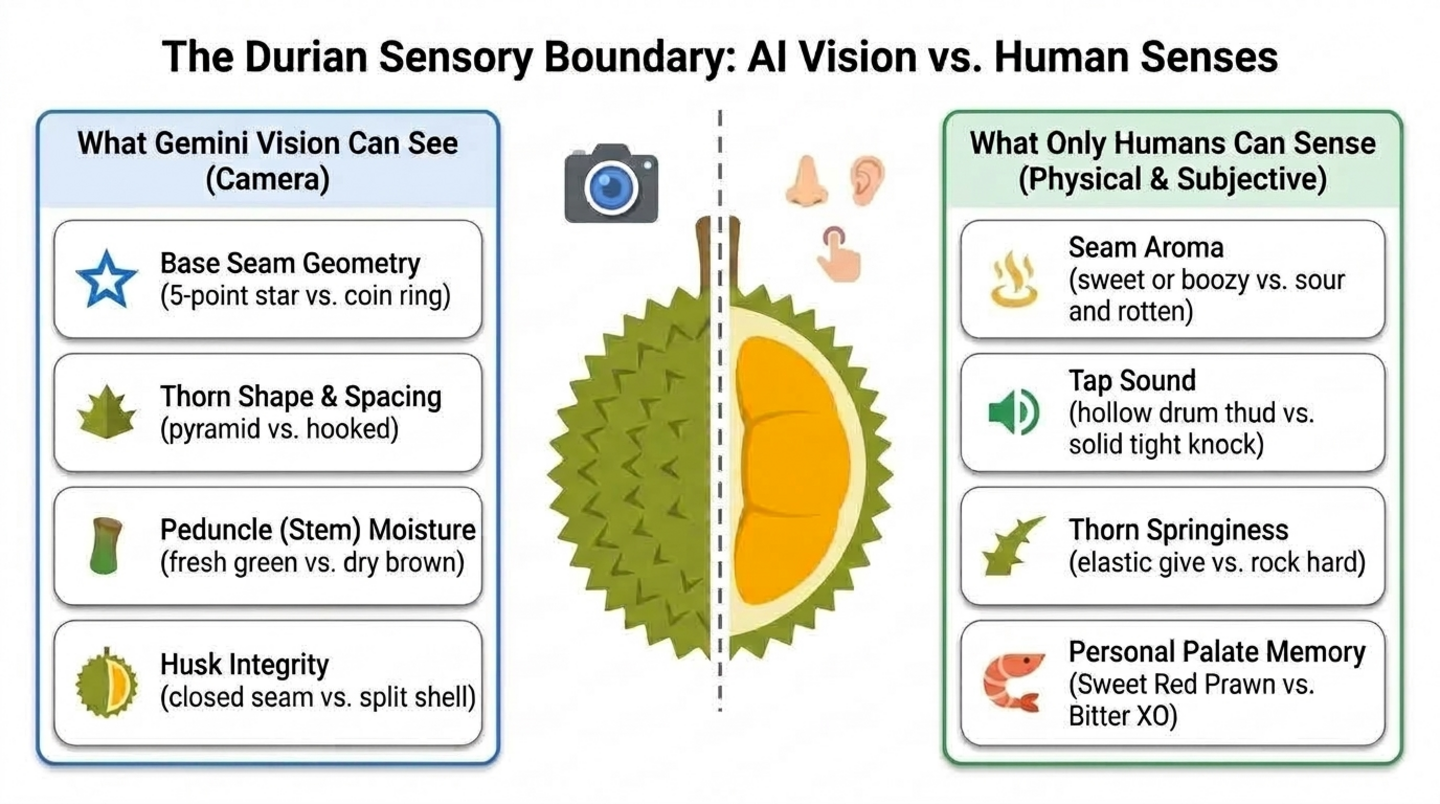
作成するアプリの概要
- ステージ 1 - 単一ビジョン エージェント: Agents CLI でスキャフォールディングされた ADK エージェント。写真からドリアンの品種と鮮度を識別します。
- ステージ 2 - 人間の感覚と味覚の記憶: 購入者が嗅覚、聴覚、触覚で感じたことをスコア化するツールと、セッション間で味覚プロファイルを保存するツール。
- ステージ 3 - コーディネーターとスペシャリスト:
durian_advisorコーディネーターがビジョン インスペクターと感覚ソムリエを呼び出し、1 つの明確な判定を下します。 - ステージ 4 - Cloud Run エージェント サービス: オプションのステップで、Antigravity CLI が Agents CLI スキルを使用してエージェントをデプロイします。
- ステージ 5 - Cloud Run ウェブ chatbot: 別のオプション ステップでは、Antigravity CLI がエージェントと通信するモバイル対応のチャットアプリをビルドしてデプロイします。
アーキテクチャ
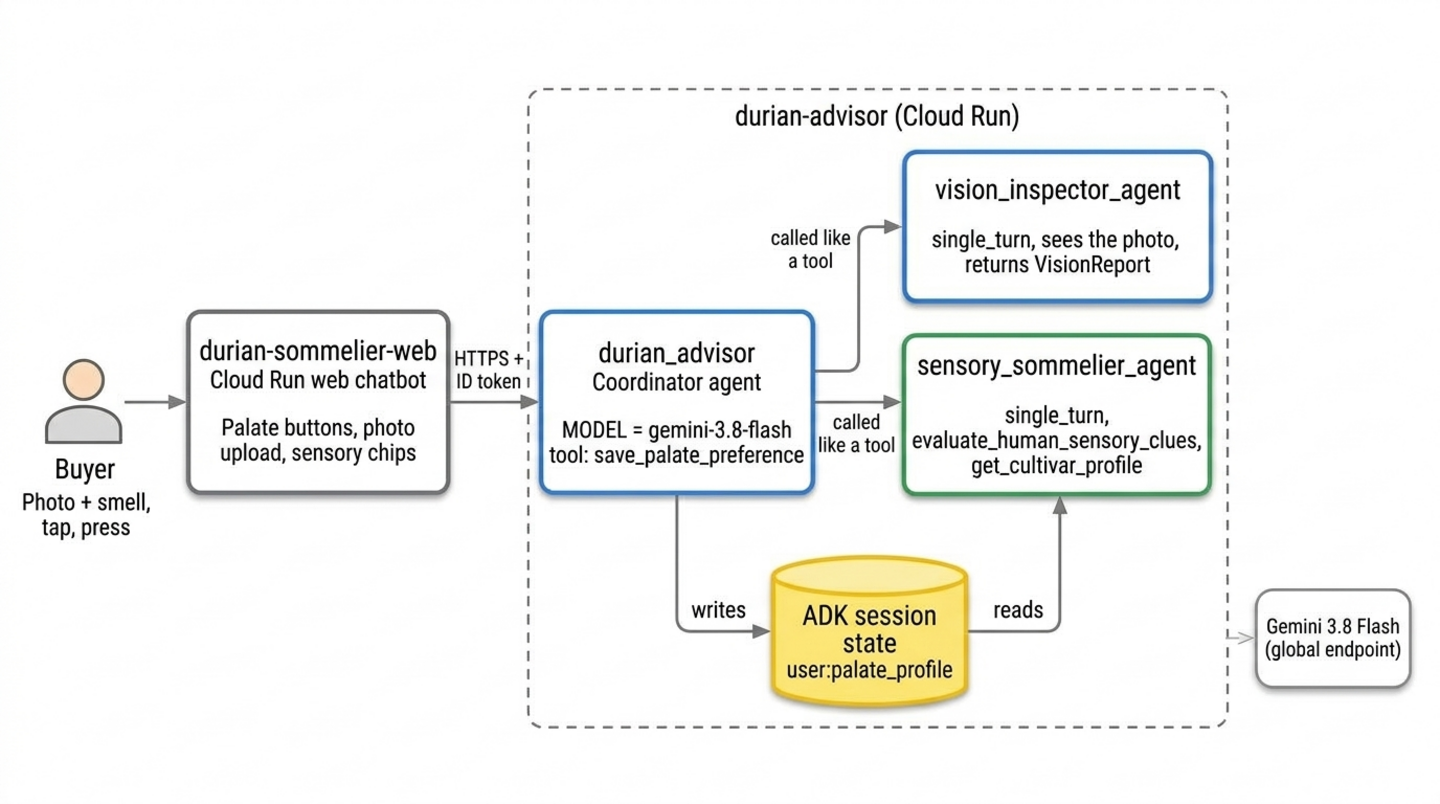
2 つの Cloud Run サービスは、オプションの Antigravity ステップから取得されます。これらがない場合は、Cloud Shell の ADK プレイグラウンドで同じエージェントを実行します。
前提条件
- Python プログラミングの基本的なスキル
- コマンドライン ツールと生成 AI のコンセプトに関する知識
- ADK、Agents CLI、Antigravity CLI の使用経験は不要です。
学習内容
agents-cli createを使用して ADK プロジェクトをスキャフォールディングし、写真を読み取るマルチモーダル エージェントを構築する方法- AI の知覚が及ばない領域(嗅覚、聴覚、触覚、個人の好み)と、それらの感覚に対応する人間参加型ツールの設計方法
user:スコープの ADK 状態を使用して、セッション間で各ユーザーの設定を記憶する方法- 1 つのエージェントを、コーディネーターと、ツールのように呼び出すシングルターン スペシャリスト エージェントに分割する方法
- 必要に応じて、Antigravity CLI に Agents CLI のスキルを付与して、エージェントとウェブ chatbot を Cloud Run にデプロイする方法
必要なもの
- Google アカウント(ワークショップのクレジットを申請する場合は、個人の
@gmail.comアカウントを使用してください) - インストラクターから提供されたワークショップ クレジット リンク(および QR コードをスキャンするためのスマートフォンのカメラ)または有効な Cloud 請求先アカウント
- Google Chrome(個人アカウントと仕事用アカウントの混同を避けるため、シークレット ウィンドウの使用をおすすめします)
2. Google Cloud クレジットを申請する(省略可)
この Codelab を独力で完了し、対象となる場合は、このページの Google Developer Program クレジット バナーを使用して、クレジット カードなしでクレジットを申請してください。インストラクターからイベント クレジット リンクを受け取ってワークショップに参加する場合は、このセクションのイベント クレジットの手順に沿って操作してください。
イベントのクレジットを取得する
ワークショップ イベントのクレジットは、Google Builders Hub(Google Developer Program の一部)から申請します。
イベント クレジットを申請する手順は次のとおりです。
- シークレット ウィンドウでワークショップのクレジット リンクを開き、個人の
@gmail.comアカウントでログインします。 - [特典を申請する] カードで、[クレジットを申請する] をクリックします。
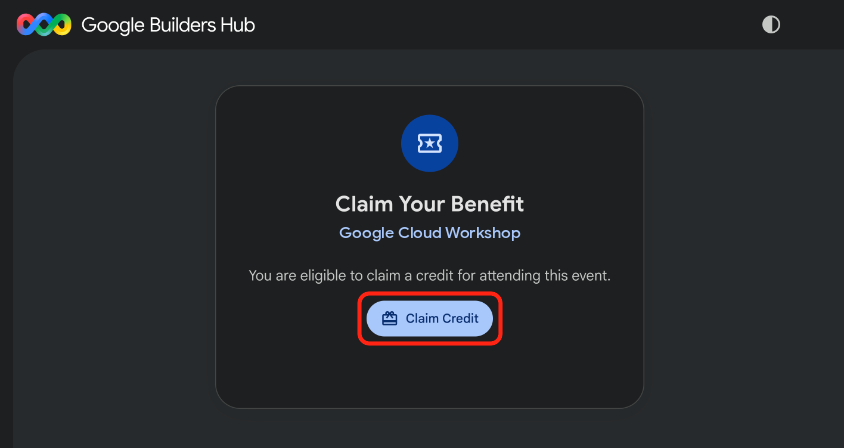
- 省略可: Google Developer Program プロフィールの作成を求めるメッセージが表示されたら、フォームに入力します。
- [Scan to Verify You're Human] ダイアログが表示されたら、スマートフォンで QR コードをスキャンして確認を完了します。QR コードが表示されない場合は、ページを更新して [クレジットを申請] をもう一度クリックします。
- 「イベントのクレジットを取得しました。」というメッセージが表示されたことを確認し、[請求先アカウントを開く] をクリックします。
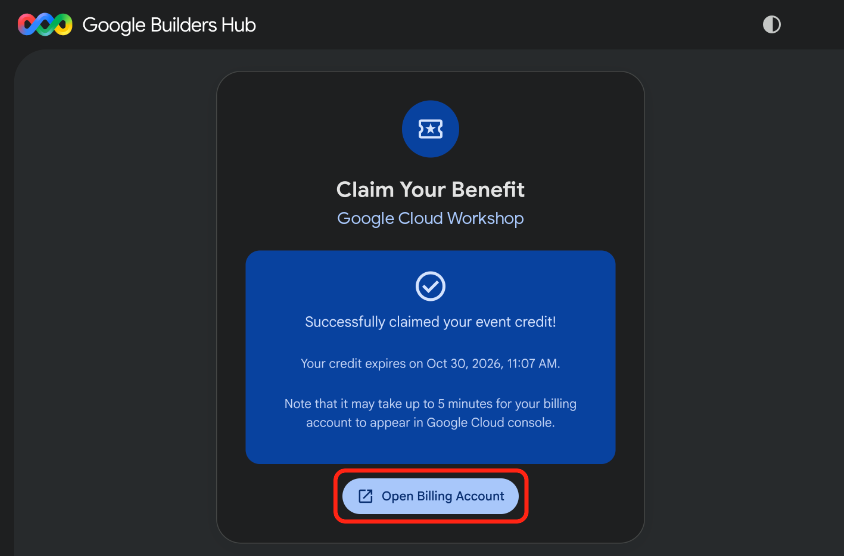
🔍 作業内容を確認する
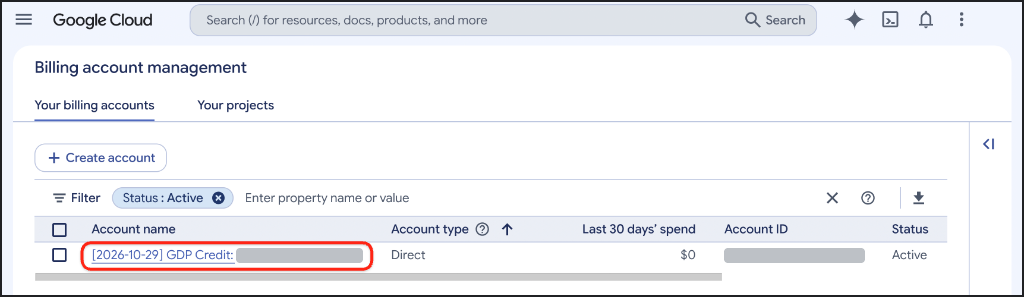
請求先アカウントのプロビジョニングには最大 5 分かかることがあります。クレジットが有効であることを確認するには、次の手順を行います。
- [請求先アカウントの管理] ページがまだ開いていない場合は、Google Cloud Billing を開きます(または、URL をコピーしてシークレット ウィンドウに貼り付けます)。
https://console.cloud.google.com/billing
- [請求先アカウント] タブをクリックし、[GDP クレジット] を含むアカウントの [ステータス] 列に [有効] と表示されるまでページを更新します。
3. Google Cloud プロジェクトを作成する(省略可)
この Codelab のすべてのリソースを分離して、完了時にクリーンに削除できるように、専用の Google Cloud プロジェクトを作成します。
Google Cloud プロジェクトを作成する手順は次のとおりです。
- [プロジェクトを作成] を開きます(または、URL をコピーしてシークレット ウィンドウに貼り付けます)。
https://console.cloud.google.com/projectcreate
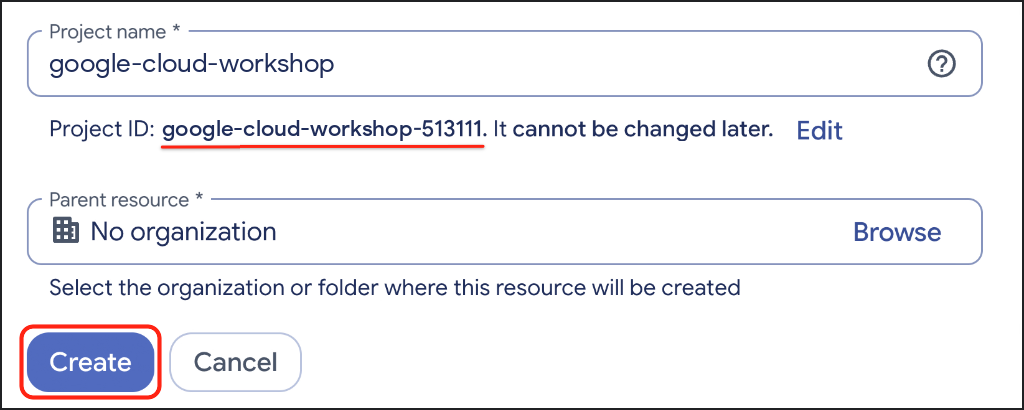
- プロジェクトの詳細を入力します。
- プロジェクト名: わかりやすい名前(
google-cloud-workshopなど)を入力します。 - 請求先アカウント(表示されている場合): GDP クレジット アカウント(または有効な請求先アカウント)を選択します。
- 親リソース: [組織なし] を選択したままにします(必要に応じて組織を選択します)。
- プロジェクト名: わかりやすい名前(
- 生成されたプロジェクト ID をメモし、[作成] をクリックします。
🔍 作業内容を確認する
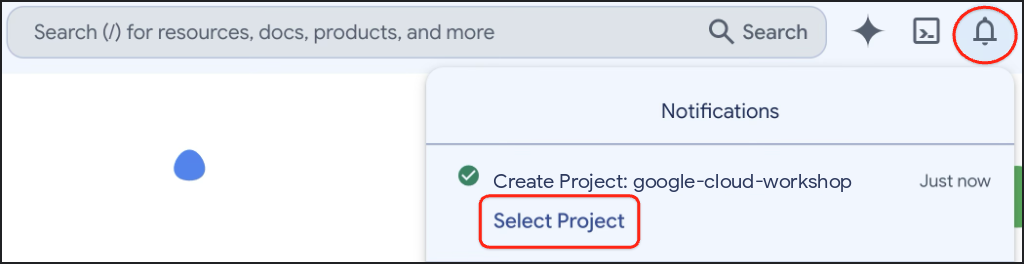
プロジェクトの作成が完了したら、Google Cloud コンソールのツールバーで [通知] を開き、[プロジェクトを選択] をクリックします。
4. 環境を設定する
このセクションでは、Google Cloud Shell を設定し、Agent Platform API を有効にして、uv で Agents CLI をインストールします。
Cloud Shell を構成する
Cloud Shell を起動する
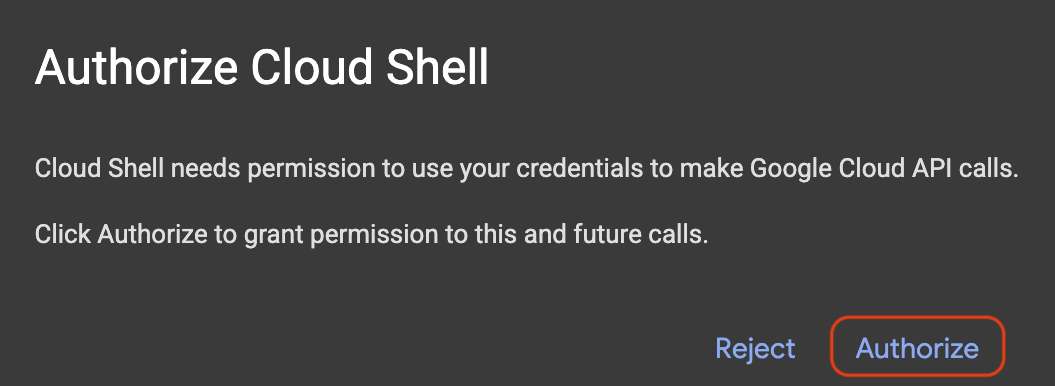
コードエディタとターミナル ビューの両方を有効にして Google Cloud Shell を開きます(または、URL をシークレット ウィンドウにコピーします)。プロンプトが表示されたら、[承認] をクリックします。
https://shell.cloud.google.com/?show=ide,terminal
Google Cloud プロジェクト ID を設定する
次のスニペットをコピーして Cloud Shell ターミナルに貼り付けます。利用可能な Google Cloud プロジェクトの番号付きメニューが表示されます。プロジェクトの横にある番号(例: 1)を入力し、Enter キーを押します。
unset CLOUDSDK_CORE_PROJECT
PS3="Select your project (e.g. 1): "
select PROJECT_ID in $(gcloud projects list --format="value(projectId)"); do
  [ -n "$PROJECT_ID" ] && gcloud config set project "$PROJECT_ID" && break
done
想定されるプロンプト:
1) durian-sommelier-workshop-4210
2) my-cloud-project-8812
Select your project (e.g. 1): 1
Updated property [core/project].
[environment: untagged] Read more to tag: g.co/cloud/project-env-tag.
選択したプロジェクト ID が Cloud Shell ターミナルのプロンプトで黄色でハイライト表示されます。

Agent Platform API を有効にする
エージェントが Gemini を呼び出すために使用する Agent Platform API を有効にします。
gcloud services enable aiplatform.googleapis.com
🔍 作業内容を確認する
次のような出力が表示されます。
Operation "operations/acat.p2-..." finished successfully.
Agents CLI をインストールする
uv が利用可能で、そのツールフォルダが PATH にあることを確認します。
which uv || curl -LsSf https://astral.sh/uv/install.sh | sh
export PATH="$HOME/.local/bin:$PATH"
Agents CLI を uv ツールとしてインストールします。
uv tool install google-agents-cli==1.7.0
uv は各ツールを独自の分離された環境にインストールし、agents-cli コマンドのみを PATH に追加するため、システムの Python は変更されません。ADK を自分でインストールする必要もありません。Agents CLI が作成するすべてのプロジェクトには、テンプレートのテストに使用された ADK バージョンを含む独自の仮想環境が割り当てられます。
🔍 作業内容を確認する
Agents CLI の準備が完了していることを確認します。
agents-cli --version
次のような出力が表示されます。
agents-cli, version 1.7.0
5. マルチモーダル ビジョン エージェントをスキャフォールディングする
まずは小規模なものから始めましょう。Agents CLI を使用して ADK プロジェクトを生成し、そのサンプル エージェントをドリアン画像分類器に変換します。
プロジェクトをスキャフォールディングする
durian-advisor プロジェクトを生成します。--agent adk_python は Python ADK テンプレートを選択し、--deployment-target cloud_run と --region us-central1 は Cloud Run 用に準備します。--prototype は CI / CD の設定をスキップし、--yes はデフォルトを受け入れます。
cd ~ && agents-cli create durian-advisor \
  --agent adk_python \
  --deployment-target cloud_run \
  --region us-central1 \
  --prototype \
  --yes
次のような出力が表示されます。
> Verifying GCP credentials...
> ✓ Connected to project: your-project-id

✅ Success! Your agent project is ready.
Cloud Shell エディタでプロジェクトを開きます。これにより、ウィンドウが再読み込みされ、ターミナルが再起動します。
cloudshell workspace ~/durian-advisor
プロジェクトの依存関係を独自の .venv フォルダにインストールします。
cd ~/durian-advisor && agents-cli install
環境ファイルを確認する
Agents CLI は、Google Cloud プロジェクトを介して Gemini を呼び出すように ADK に指示する .env ファイルも作成しました。
grep GOOGLE_ ~/durian-advisor/.env
次のような出力が表示されます。
GOOGLE_GENAI_USE_VERTEXAI=true
GOOGLE_CLOUD_PROJECT=your-project-id
GOOGLE_CLOUD_LOCATION=global
GOOGLE_CLOUD_LOCATION=global を保持します。Cloud Run サービスが us-central1 で実行されている場合でも、Gemini 3.8 Flash は us-central1 などのリージョン エンドポイントではなく、global エンドポイントから提供されます。
GOOGLE_CLOUD_PROJECT に your-gcp-project-id が表示されている場合、Agents CLI はプロジェクトを検出できませんでした。次のコマンドで設定します。
sed -i "s/your-gcp-project-id/$(gcloud config get-value project)/" ~/durian-advisor/.env
Vision 分類器を作成する
各品種には、Gemini が写真で識別できる殻の特徴があります。
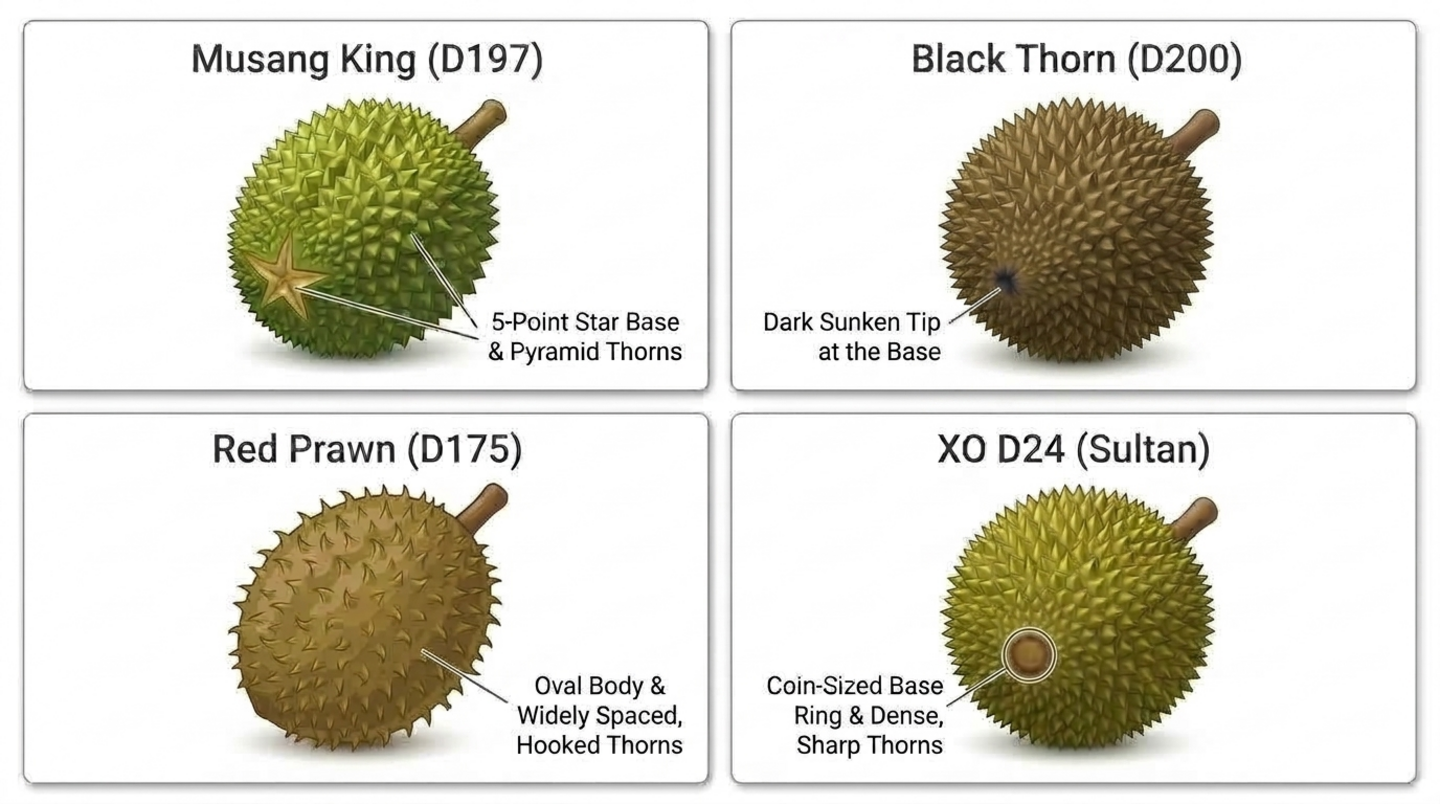
app/agent.py を開きます。
cloudshell edit ~/durian-advisor/app/agent.py
その内容を次のコードに置き換えます。
"""A single multimodal agent that inspects durian photos."""

from google.adk.agents import Agent
from google.adk.apps import App
from google.adk.models import Gemini
from google.genai import types

MODEL = "gemini-3.8-flash"

INSTRUCTION = """You are a durian visual classifier. Inspect the durian photo or shell description.
1. Base seam: a 5-point star means Musang King (D197). A dark sunken tip means Black Thorn (D200). A coin-sized brown ring means D24. An oval body with widely spaced, hooked thorns means Red Prawn (D175).
2. Stem: plump, moist, and greenish means it fell within about 12 hours. Dry and shriveled means it is days old.
3. Husk: closed seams mean natural ripening. Wide splits or mold mean it is past its best.
Give the likely cultivar and a visual freshness score from 1 to 10. Then list what a photo cannot tell you: the aroma, the tap sound, the thorn springiness, and whether the buyer will enjoy the taste."""

root_agent = Agent(
    name="durian_advisor",
    model=Gemini(model=MODEL, retry_options=types.HttpRetryOptions(attempts=3)),
    description="Classifies durian cultivars and visual freshness from photos.",
    instruction=INSTRUCTION,
)

app = App(root_agent=root_agent, name="app")
ここで重要な点がいくつかあります。
- モデル ID が表示されるのは
MODELのみです。後で追加するエージェントはすべてこのモデルを継承するため、モデルの切り替えは 1 行の変更で済みます。 retry_optionsは、レート制限などの一時的なエラーを最大 3 回再試行します。app = App(...)は、プレイグラウンドと Cloud Run サーバーの両方のエージェントをラップします。アプリ名appとエージェント名durian_advisorは、生成されたサーバーとagents-cli-manifest.yamlに一致するため、そのままにします。
プレイグラウンドでエージェントをテストする
ADK プレイグラウンドを起動します。
cd ~/durian-advisor && agents-cli playground
次のような出力が表示されます。
INFO: Uvicorn running on http://127.0.0.1:8080 (Press CTRL+C to quit)
Cloud Shell ツールバーの [ウェブでプレビュー] をクリックし、[ポート 8080 でプレビュー] を選択します。ADK 開発 UI でエージェントの選択を求められたら、app を選択します。次に、このプロンプトを送信するか、アップロード ボタンを使用して独自のドリアンの写真を添付します。
I'm at a stall looking at a round durian with pyramid-shaped thorns and a 5-point star at the base. The stem is green and moist. What cultivar is this, and will it taste sweet?
🔍 作業内容を確認する
エージェントは Musang King(D197)を識別し、湿った緑色の茎に高い鮮度スコアを付けます。そして、写真ではわからないこと(香り、叩いたときの音、トゲの弾力性、味が好みに合うかどうか)を認めます。
次に進む前に、ターミナルで Ctrl + C を押してプレイグラウンドを停止します。
6. 人間の感覚と味覚の記憶を追加する
カメラは匂いを嗅いだり、音を聞いたり、触ったりできないため、購入者にそれらを依頼するツールを作成します。また、各購入者の好みをエージェントに長期的に記憶させます。このステップではツールを作成し、次のステップでそれらをエージェントに組み込みます。
栽培品種カタログを追加する
app/durian_data.py を作成します。
cloudshell edit ~/durian-advisor/app/durian_data.py
この参照カタログを貼り付けます。データを独自のモジュールに保持することで、エージェント コードを短く保つことができます。
"""Reference catalog of durian cultivars."""

CULTIVAR_CATALOG = {
    "musang_king": {
        "code": "D197",
        "name": "Musang King (Mao Shan Wang)",
        "visual_markers": "5-point star seam at the base, pyramid-shaped thorns",
        "flavor": "rich, bittersweet, buttery custard",
        "bitterness": "medium",
    },
    "black_thorn": {
        "code": "D200",
        "name": "Black Thorn (Ochee)",
        "visual_markers": "Dark sunken tip at the base, round pumpkin-like body",
        "flavor": "sweet, creamy, slightly winey",
        "bitterness": "low",
    },
    "red_prawn": {
        "code": "D175",
        "name": "Red Prawn (Udang Merah)",
        "visual_markers": "Oval body, widely spaced and slightly hooked thorns",
        "flavor": "sweet, floral, soft and sticky",
        "bitterness": "none",
    },
    "xo_d24": {
        "code": "D24",
        "name": "XO D24 (Sultan, old tree)",
        "visual_markers": "Coin-sized brown ring at the base, dense sharp thorns",
        "flavor": "intense, bitter, with a boozy finish",
        "bitterness": "high",
    },
}
感覚ツールを追加する
app/sensory_tools.py を作成します。
cloudshell edit ~/durian-advisor/app/sensory_tools.py
次のコードを貼り付けます。
"""Tools for cultivar lookup and human-in-the-loop sensory checks."""

from typing import Any, Literal

from .durian_data import CULTIVAR_CATALOG

AROMA_POINTS = {"sweet_fragrant": 4, "boozy_fermented": 3, "faint_grassy": 0, "sour_rotten": 0}
TAP_POINTS = {"hollow": 3, "solid": 0}
THORN_POINTS = {"springy": 3, "rigid": 0}


def get_cultivar_profile(cultivar_key: str) -> dict[str, Any]:
    """Looks up the visual markers, flavor, and bitterness of a durian cultivar.

    Args:
        cultivar_key: One of 'musang_king', 'black_thorn', 'red_prawn', or 'xo_d24'.
    """
    key = cultivar_key.strip().lower().replace(" ", "_").replace("-", "_")
    if key not in CULTIVAR_CATALOG:
        return {"status": "NOT_FOUND", "supported": list(CULTIVAR_CATALOG)}
    return {"status": "OK", "cultivar": CULTIVAR_CATALOG[key]}


def evaluate_human_sensory_clues(
    aroma: Literal["sweet_fragrant", "boozy_fermented", "faint_grassy", "sour_rotten"],
    tap_sound: Literal["hollow", "solid"],
    thorn_feel: Literal["springy", "rigid"],
) -> dict[str, Any]:
    """Scores the ripeness clues that only a human buyer can smell, hear, and feel.

    Args:
        aroma: What the buyer smells at the seam of the husk.
        tap_sound: What the buyer hears when tapping the husk.
        thorn_feel: How two thorns feel when the buyer presses them together.
    """
    score = AROMA_POINTS[aroma] + TAP_POINTS[tap_sound] + THORN_POINTS[thorn_feel]
    if aroma == "sour_rotten":
        verdict = "SPOILED"
    elif score >= 7:
        verdict = "RIPE"
    elif score >= 4:
        verdict = "NOT_QUITE_READY"
    else:
        verdict = "UNRIPE"
    return {"status": "OK", "ripeness_score": score, "max_score": 10, "verdict": verdict}
これらのツールの仕組み:
- ADK は、各関数をモデルが呼び出すことができるツールに変換します。docstring がツールの説明になり、
Argsセクションで各パラメータが説明されます。 Literal[...]型ヒントはツールスキーマで固定の選択肢になるため、Gemini は「少しお酒の匂いがする」をboozy_fermentedなどの許可された値に正確にマッピングする必要があります。get_cultivar_profileは、栽培品種を作成する代わりに、サポートされているキーを含む明示的なNOT_FOUNDステータスを返します。
味覚記憶ツールを追加する
app/memory_tools.py を作成します。
cloudshell edit ~/durian-advisor/app/memory_tools.py
次のコードを貼り付けます。
"""Tool that remembers each buyer's durian palate across sessions."""

from typing import Any, Literal

from google.adk.tools import ToolContext


def save_palate_preference(
    favorite_flavors: str,
    bitterness_tolerance: Literal["none", "low", "medium", "high"],
    tool_context: ToolContext,
) -> dict[str, Any]:
    """Saves the buyer's durian taste preferences to their long-term profile.

    Args:
        favorite_flavors: Flavors and textures the buyer enjoys, such as
            'sweet, creamy custard'.
        bitterness_tolerance: How much bitterness the buyer enjoys.
    """
    profile = {
        "favorite_flavors": favorite_flavors,
        "bitterness_tolerance": bitterness_tolerance,
    }
    # The "user:" prefix scopes this key to the buyer, so it follows them
    # into every future session of this app.
    tool_context.state["user:palate_profile"] = profile
    return {"status": "SAVED", "palate_profile": profile}
味覚記憶の仕組み:
- ADK は
tool_contextを自動的に渡し、モデルから隠すため、Gemini には 2 つの味パラメータのみが表示されます。 user:プレフィックスは、状態キーのスコープを現在のセッションではなくユーザーに設定するため、プロファイルは購入者の新しい会話ごとに引き継がれます。- 別の「get」ツールは必要ありません。エージェントは、プレースホルダ
{user:palate_profile?}を使用して、プロファイルを指示に直接読み込みます。?は、プロファイルがまだ存在しない場合に、エラーを発生させるのではなく、プレースホルダを空にします。
🔍 作業内容を確認する
アルコールの匂いがして、叩くと空洞のような音がし、弾力のあるトゲがあるドリアンを採点します。
cd ~/durian-advisor && uv run python -c "from app.sensory_tools import evaluate_human_sensory_clues as score; print(score('boozy_fermented', 'hollow', 'springy'))"
次のような出力が表示されます。
{'status': 'OK', 'ripeness_score': 9, 'max_score': 10, 'verdict': 'RIPE'}
7. 専門エージェントを調整する
1 つのプロンプトで視覚ルール、感覚スコアリング、味覚マッチングを処理する単一のエージェントは、混乱することがよくあります。代わりに、各ジョブを専門のスペシャリストに割り当て、コーディネーターがそれらの回答を組み合わせるようにします。
vision_inspector_agentは、写真から品種と鮮度を読み取り、構造化されたレポートを返します。sensory_sommelier_agentは、バイヤーが嗅いだもの、聞いたもの、感じたものをスコア化し、品種をバイヤーの好みに照らし合わせてチェックします。durian_advisorは、購入者と話し、購入者の好みを保存し、各スペシャリストを呼び出して、最終的な判断を書き込みます。
ビジョン インスペクタを作成する
app/vision_agent.py を作成します。
cloudshell edit ~/durian-advisor/app/vision_agent.py
次のコードを貼り付けます。
"""Vision inspector: reads the cultivar and freshness from a durian photo."""

from google.adk.agents import Agent
from pydantic import BaseModel, Field


class VisionReport(BaseModel):
    cultivar_key: str = Field(
        description="musang_king, black_thorn, red_prawn, xo_d24, or unknown"
    )
    visual_freshness: int = Field(description="1 (stale) to 10 (freshly fallen)")
    evidence: str = Field(description="The visual markers behind your answer")


vision_inspector_agent = Agent(
    name="vision_inspector_agent",
    description="Identifies a durian's cultivar and visual freshness from the buyer's photo or shell description.",
    mode="single_turn",
    # Specialists only see their tool-call input by default. Opt in to the
    # conversation history so this agent can see the uploaded photo.
    include_contents="default",
    # Report back to the coordinator instead of taking over the conversation.
    disallow_transfer_to_parent=True,
    disallow_transfer_to_peers=True,
    output_schema=VisionReport,
    instruction="""You are a durian vision inspector. Examine the durian photo or shell description in the conversation.
Cultivar markers:
- 5-point star seam at the base: musang_king
- Dark sunken tip at the base: black_thorn
- Oval body with widely spaced, slightly hooked thorns: red_prawn
- Coin-sized brown ring at the base and dense, sharp thorns: xo_d24
Freshness: a plump, moist, greenish stem and closed seams score high. A dry, shriveled stem or a split, moldy husk scores low.
If the markers are unclear, use 'unknown'.""",
)
output_schema=VisionReportは、コーディネーターが信頼できる構造化データをスペシャリストが返すようにします。include_contents="default"をタップすると、アップロードした写真を含む会話がこのスペシャリストに表示されます。これがないと、シングルターン スペシャリストは、コーディネーターが渡したリクエストしか確認できません。disallow_transfer_to_parentとdisallow_transfer_to_peersは、ADK がこのサブエージェントに提供するtransfer_to_agentツールを削除します。会話全体を確認したスペシャリストは、レポートを返す代わりに、チャットをコーディネーターに戻したくなるかもしれません。
感覚ソムリエを作成する
app/sensory_agent.py を作成します。
cloudshell edit ~/durian-advisor/app/sensory_agent.py
次のコードを貼り付けます。
"""Sensory sommelier: scores the buyer's senses and checks palate fit."""

from google.adk.agents import Agent
from pydantic import BaseModel, Field

from .sensory_tools import evaluate_human_sensory_clues, get_cultivar_profile


class SensoryClues(BaseModel):
    cultivar_key: str = Field(description="Cultivar from the vision inspector")
    aroma: str = Field(description="What the buyer smelled at the seam")
    tap_sound: str = Field(description="What the buyer heard when tapping the husk")
    thorn_feel: str = Field(description="How the thorns felt when pressed together")


sensory_sommelier_agent = Agent(
    name="sensory_sommelier_agent",
    description="Scores the smell, sound, and touch clues the buyer reports, and checks the cultivar against their palate.",
    mode="single_turn",
    # Report back to the coordinator instead of taking over the conversation.
    disallow_transfer_to_parent=True,
    disallow_transfer_to_peers=True,
    input_schema=SensoryClues,
    instruction="""You are a durian sensory sommelier.
Buyer palate profile: {user:palate_profile?}

1. Call evaluate_human_sensory_clues with the buyer's aroma, tap sound, and thorn feel.
2. Call get_cultivar_profile for the cultivar.
3. Compare the cultivar's bitterness with the buyer's bitterness tolerance.
Report the ripeness verdict, the palate fit, and one sentence of advice.""",
    tools=[evaluate_human_sensory_clues, get_cultivar_profile],
)
input_schema=SensoryCluesは、コーディネーターが渡す必要があるもの(栽培品種と購入者の 3 つの感覚レポート)を、独自の言葉で定義します。スペシャリストは、これらの単語をツールの許可された値にマッピングします。{user:palate_profile?}は、購入者の保存済みの好みを指示に組み込むため、スペシャリストは記憶をたどることなく適合性を判断できます。- どちらのスペシャリストも
modelを設定しません。どちらもコーディネーターのMODELを継承します。 - どちらのスペシャリストも同じ 2 つの転送フラグを使用するため、それぞれが常にコーディネーターに報告します。
コーディネーターを接続する
app/agent.py を開きます。
cloudshell edit ~/durian-advisor/app/agent.py
その内容を、次のようにコーディネーターに置き換えます。
"""Durian advisor: a concierge that coordinates vision and sensory specialists."""

from google.adk.agents import Agent
from google.adk.apps import App
from google.adk.models import Gemini
from google.genai import types

from .memory_tools import save_palate_preference
from .sensory_agent import sensory_sommelier_agent
from .vision_agent import vision_inspector_agent

MODEL = "gemini-3.8-flash"

root_agent = Agent(
    name="durian_advisor",
    model=Gemini(model=MODEL, retry_options=types.HttpRetryOptions(attempts=3)),
    description="Durian concierge that combines what the camera sees with what the buyer senses.",
    instruction="""You are a friendly durian concierge helping a buyer at a fruit stall.
Buyer palate profile: {user:palate_profile?}

1. When the buyer shares taste preferences, call save_palate_preference.
2. When the buyer shows or describes a durian, call vision_inspector_agent.
3. A camera cannot smell, hear, or feel. Unless the buyer already reported the seam aroma, tap sound, and thorn feel, ask them to check. Then call sensory_sommelier_agent.
4. Call one specialist at a time. Finish with ONE verdict covering the cultivar, ripeness, and palate fit. If the durian does not suit their palate, suggest a cultivar that does.""",
    tools=[save_palate_preference],
    sub_agents=[vision_inspector_agent, sensory_sommelier_agent],
)

app = App(root_agent=root_agent, name="app")
どちらのスペシャリストも mode="single_turn" を使用しているため、ADK はコーディネーターに vision_inspector_agent と sensory_sommelier_agent という 2 つの追加ツールを提供します。指示では、これらの名前でツールを参照します。
プレイグラウンドでコーディネーターをテストする
プレイグラウンドを再起動します。
cd ~/durian-advisor && agents-cli playground
ポート 8080 でウェブ プレビューを開き、エージェントと次の短い会話を行います。
好みを学習させる:
Hi! Please remember my taste: I love sweet, creamy custard durians and I can't stand bitterness.
[State] タブを開きます。保存したプロファイルが次のように表示されます。
{
  "user:palate_profile": {
    "favorite_flavors": "sweet, creamy custard",
    "bitterness_tolerance": "none"
  }
}
ドリアンを見せる(説明するか、写真を添付する):
The vendor is showing me a round durian with a coin-sized brown ring at the base and dense, sharp thorns. The stem is green and moist. Should I buy it?
コーディネーターは vision_inspector_agent を呼び出し、XO D24 を識別します。次に、縫い目の匂いを嗅ぎ、殻を叩き、2 つのトゲを押し合わせるように指示されます。
感じたことを報告する:
It smells a bit boozy, the knock sounds hollow, and the thorns spring back when I press them.
新しく始める: [新しいセッション] をクリックして、次のように質問します。
Which durian should I pick today?
🔍 作業内容を確認する
- 感覚を報告すると、コーディネーターが
sensory_sommelier_agentに電話をかけ、1 つの判定を下します。XO D24 は熟していますが(10 点中 9 点)、苦味が強いため、代わりに Red Prawn(D175)または Black Thorn(D200)をリクエストしてください。 - [Events] タブで、
durian_advisorが各スペシャリストを呼び出し、sensory_sommelier_agentがevaluate_human_sensory_cluesとget_cultivar_profileを呼び出していることがわかります。 - 新しいセッションでは、エージェントはすでにあなたの好みを把握しており、再度尋ねることなく、甘くて苦味のない品種を推奨します。
ターミナルで Ctrl + C を押して、プレイグラウンドを停止します。
8. Antigravity でデプロイする(省略可)
エージェントを手動で構築してテストしました。次に、Google のターミナル用 AI コーディング エージェントである Antigravity CLI(agy)を使用してデプロイします。Agents CLI スキルは、ADK エージェントを正しくデプロイする方法を Antigravity に指示します。
デプロイメント API を有効にする
Agents CLI がエージェントのビルドとホストに使用する Cloud Run、Cloud Build、Artifact Registry API を有効にします。
gcloud services enable \
  run.googleapis.com \
  cloudbuild.googleapis.com \
  artifactregistry.googleapis.com
次のような出力が表示されます。
Operation "operations/acat.p2-..." finished successfully.
Agents CLI スキルをインストールする
7 つの Agents CLI スキルをプロジェクト フォルダにインストールします。Antigravity は、これらのスキルを自動的に検出します。
cd ~/durian-advisor && agents-cli setup --workspace
🔍 作業内容を確認する
ls -1 ~/durian-advisor/.agents/skills
次のような出力が表示されます。
google-agents-cli-adk-code
google-agents-cli-deploy
google-agents-cli-eval
google-agents-cli-observability
google-agents-cli-publish
google-agents-cli-scaffold
google-agents-cli-workflow
Antigravity CLI を起動する
Antigravity CLI は Cloud Shell にプリインストールされています。プロジェクト フォルダから起動します。
cd ~/durian-advisor && agy --dangerously-skip-permissions
Antigravity を初めて実行すると、Google アカウントでのログイン、カラーテーマの選択、利用規約への同意、現在のフォルダの信頼を求められます。
Antigravity にデプロイを依頼する
このプロンプトを Antigravity に貼り付けます。
Use the google-agents-cli-deploy skill to deploy this ADK agent to Cloud Run in us-central1 as a private service. Keep GOOGLE_CLOUD_LOCATION=global so Gemini keeps working, save the exact service URL to .env as AGENT_BASE_URL, and smoke-test the deployed agent with agents-cli run.
Antigravity はスキルを読み取り、最初にプロジェクトのテストを実行することがあります。次に、agents-cli deploy を実行します。これにより、Cloud Build でコンテナがビルドされ、durian-advisor サービスがデプロイされ、テスト メッセージがライブ サービスに送信されます。実行全体には約 5 ~ 8 分かかります。
Antigravity が終了したら、Ctrl + D を 2 回押して終了します。
🔍 作業内容を確認する
Antigravity が保存した URL を使用して、デプロイされたエージェントにメッセージを送信します。
cd ~/durian-advisor && source .env && agents-cli run --url "$AGENT_BASE_URL" --mode adk "Which durian suits a beginner?"
次のような出力が表示されます。
Querying remote agent: https://durian-advisor-123456789012.us-central1.run.app (mode: adk)
[user]: Which durian suits a beginner?
[durian_advisor]: For beginners, you want a durian that is sweet, creamy, and gentle on the palate, with little to no bitterness...
次に、サービスがトークンなしの呼び出しを拒否することを確認します。
curl -s -o /dev/null -w "%{http_code}\n" "$AGENT_BASE_URL"
次のような出力が表示されます。
403
9. ウェブ chatbot をバイブ コーディングする(省略可)
エージェントは公開されていますが、非公開です。次に、Antigravity との会話を再開します。Antigravity は、エージェント、その状態キー、URL をすでに認識しています。ドリアン購入者向けのウェブ chatbot を構築してデプロイするよう依頼します。
Antigravity を再開
cd ~/durian-advisor && agy --dangerously-skip-permissions
Antigravity 内で次のスラッシュ コマンドを実行し、リストからデプロイの会話を選択します。
/resume
Antigravity に chatbot の作成をリクエストする
次のプロンプトを貼り付けます。
Build a mobile-friendly "Durian Sommelier" web chatbot in a new web/ folder that talks to our deployed agent at AGENT_BASE_URL (ADK app name "app").

- Add palate quick-set buttons, a photo upload, and one-tap sensory chips: Smells sweet, Smells boozy, Hollow knock, Solid knock, Thorns spring back, Thorns feel stiff.
- Use a small FastAPI server that proxies chat requests to the agent with a Google ID token, because the agent service is private.
- Show only durian_advisor's replies in the chat, not the specialists' intermediate output.
- Keep a stable user ID per browser and reuse one ADK session, creating a new one if it is missing.

Deploy it to Cloud Run as durian-sommelier-web in us-central1 with public access. Run it as a new service account named durian-sommelier-web that can invoke durian-advisor, and print the URL.
Antigravity はアプリを作成し、サービス アカウントを作成して、durian-advisor の Cloud Run 起動元ロールを付与し、Cloud Build でアプリをデプロイします。通常、終了前にチャット エンドポイントをテストします。実行全体には約 10 分かかります。URL が出力されたら、Ctrl + D を 2 回押して終了します。
🔍 作業内容を確認する
Antigravity が出力した https://durian-sommelier-web-....run.app URL を開き、次の操作を行います。
- 味覚ボタン(甘くてクリーミーなど)をタップします。エージェントは、あなたの好みを保存したことを確認します。
- ドリアンの写真をアップロードするか、殻の簡単な説明を入力してください。エージェントは品種を特定し、感覚チェックを依頼します。
- ドリアンに当てはまる感覚チップをタップします。エージェントは、熟度と好みに合うかどうかをカバーする 1 つの判定を返します。
10. クリーンアップ
作成したリソースを削除して、課金されないようにします。
Cloud Run サービスを削除する
ウェブ chatbot を削除します。
gcloud run services delete durian-sommelier-web --region us-central1 --quiet
エージェント サービスを削除します。
gcloud run services delete durian-advisor --region us-central1 --quiet
サービス アカウントを削除する
ウェブ chatbot が実行されたサービス アカウントを削除します。
gcloud iam service-accounts delete "durian-sommelier-web@$(gcloud config get-value project).iam.gserviceaccount.com" --quiet
コンテナ イメージを削除する
Cloud Run ソース デプロイでは、各サービスのコンテナ イメージが cloud-run-source-deploy という名前の Artifact Registry リポジトリに push されます。このリポジトリは、プロジェクト内の他のデプロイと共有できます。この Codelab の 2 つのイメージのみを削除し、リポジトリは保持します。
エージェントの画像を削除します。
gcloud artifacts packages delete durian-advisor --repository cloud-run-source-deploy --location us-central1 --quiet
ウェブ chatbot のイメージを削除します。
gcloud artifacts packages delete durian-sommelier-web --repository cloud-run-source-deploy --location us-central1 --quiet
🔍 作業内容を確認する
gcloud run services list --region us-central1
次のような出力が表示されます。
Listed 0 items.
ローカル ファイルを削除する
スキルと仮想環境を含むプロジェクト フォルダを削除します。
rm -rf ~/durian-advisor
必要に応じて、Agents CLI をアンインストールします。
uv tool uninstall google-agents-cli
Google Cloud プロジェクト全体を削除する(省略可)
PROJECT_ID=$(gcloud config get-value project)
gcloud projects delete "$PROJECT_ID" --quiet
11. 完了
おめでとうございます!ADK と Agents CLI を使用して、マルチモーダルなドリアン ソムリエ マルチエージェント システムを構築し、テストしました。オプションの手順を行った場合は、Antigravity CLI を使用して Cloud Run にもデプロイしました。
達成した内容
agents-cli createを使用して ADK プロジェクトをスキャフォールディングし、1 つのMODEL設定でマルチモーダル ビジョン エージェントを構築しました。- 嗅覚、聴覚、触覚に対応した人間参加型ツールを構築し、
user:スコープの ADK 状態に保存された味覚メモリも追加 - エージェントを 1 つの
durian_advisorコーディネーターと、ツールのように呼び出す 2 つのsingle_turnスペシャリストに分割する - (省略可)Agents CLI スキルで Antigravity CLI を使用して、エージェントとウェブ chatbot を Cloud Run にデプロイした
次のステップ
- スキップした場合は、オプションの Antigravity の手順に戻り、エージェントとウェブ chatbot を Cloud Run にデプロイします。
- データベースにバックアップされたセッション サービスを使用して、パレットメモリを永続化する
agents-cli evalで回答の品質を測定する- Agent Development Kit(ADK)のドキュメントを確認する
- Agents CLI の詳細を確認する。
- Cloud Run のドキュメントを確認する。
- GEAR(Gemini Enterprise Agent Ready)プログラムに参加して、ワークショップや学習プログラムを利用する