

1. 개요
길거리 노점에서 좋은 두리안을 고르는 것은 감각적인 퍼즐입니다. 구매자는 진짜 무상킹(D197)과 유사품을 구별하고, 과일이 오늘 아침에 떨어진 것인지 아니면 며칠 전에 떨어진 것인지 판단하고, 맛이 좋을지 추측해야 합니다.
이 Codelab에서는 에이전트 개발 키트(ADK)와 Agents CLI를 사용하여 멀티모달 두리안 소믈리에 멀티 에이전트 시스템을 빌드하고 테스트하며, 원하는 경우 Antigravity CLI를 사용하여 Cloud Run에 배포합니다(핵심 단계는 약 45분 소요, 선택사항인 두 가지 Antigravity 단계는 약 20분 추가 소요). 두리안을 선택하면 AI 인식이 끝나고 인간의 감각이 시작되는 지점을 알 수 있습니다.
- AI가 볼 수 있는 것: Gemini는 껍질 사진을 검사하여 무상킹의 밑부분에 있는 별 모양, 블랙쏜(D200)의 어둡고 움푹 들어간 끝부분, D24의 동전 크기 고리, 마르고 시든 줄기와 같은 품종 마커를 찾아낼 수 있습니다.
- 인간만이 감지할 수 있는 것: 모델은 이음새에서 알코올 향을 맡거나, 껍질을 두드려 속이 빈 소리를 듣거나, 두 개의 가시를 눌러 다시 튀어 오르는지 느낄 수 없습니다.
- 상담사가 기억해야 할 사항: 완벽하게 익은 두리안 두 개가 여전히 구매자를 분열시킵니다. 어떤 사람은 오래된 나무에서 수확한 XO D24의 쌉싸름하고 알코올 향이 나는 맛을 좋아하고, 어떤 사람은 Red Prawn(D175)의 달콤하고 쌉싸름하지 않은 커스터드 맛을 좋아합니다.
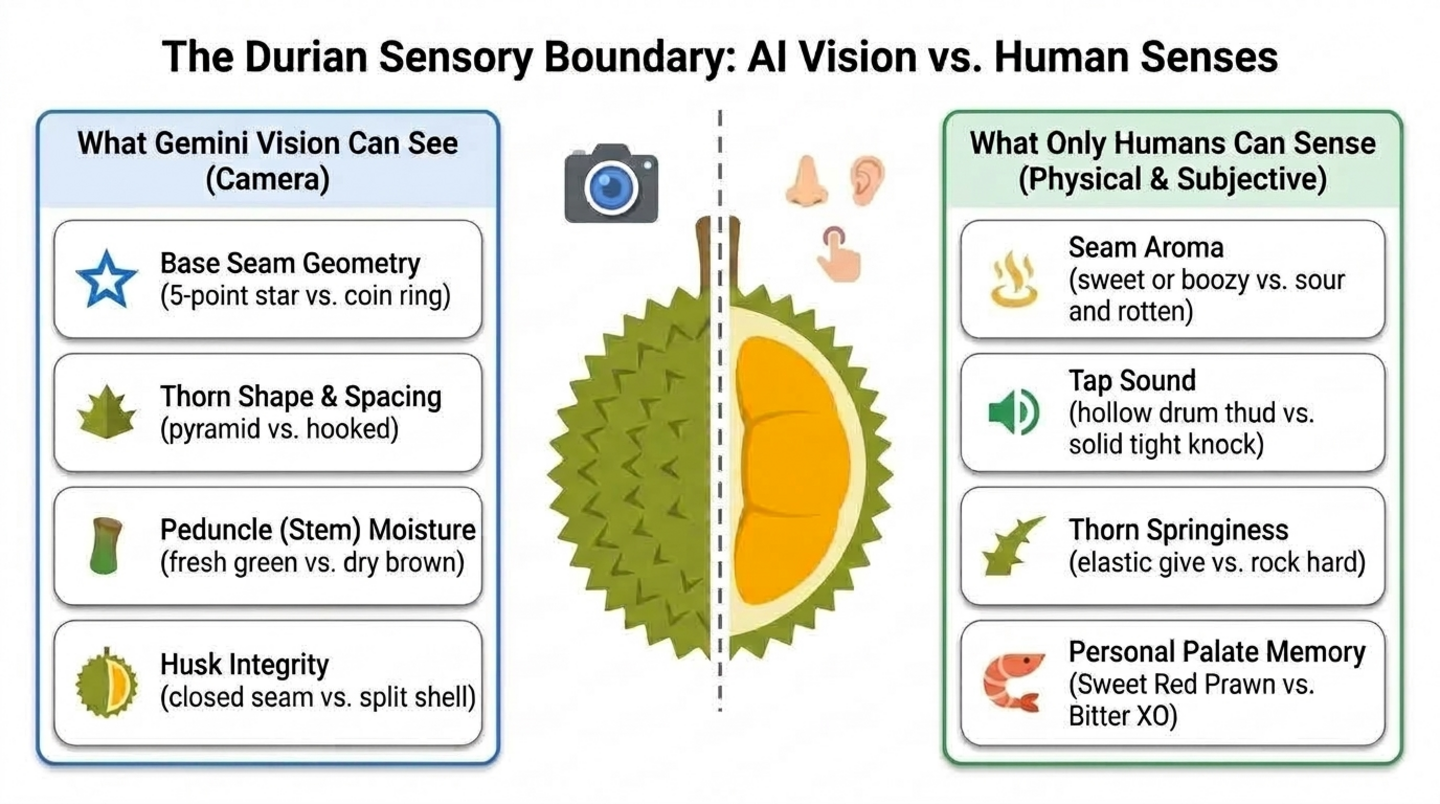
빌드할 항목
- 1단계 - 단일 비전 에이전트: Agents CLI로 스캐폴딩된 ADK 에이전트로, 사진에서 두리안의 품종과 신선도를 식별합니다.
- 2단계 - 인간의 감각 및 미각 기억: 구매자가 냄새 맡고, 듣고, 느끼는 것을 점수화하는 도구와 세션 전반에 걸쳐 맛 프로필을 저장하는 도구입니다.
- 3단계 - 코디네이터 및 전문가: 시각 검사기와 감각 소믈리에를 호출한 후 명확한 판정을 내리는
durian_advisor코디네이터입니다. - 4단계 - Cloud Run 에이전트 서비스: 선택적 단계로, Antigravity CLI가 Agents CLI 기술을 사용하여 에이전트를 배포합니다.
- 5단계 - Cloud Run 웹 챗봇: 또 다른 선택적 단계에서 Antigravity CLI는 에이전트와 대화하는 모바일 친화적인 채팅 앱을 빌드하고 배포합니다.
아키텍처
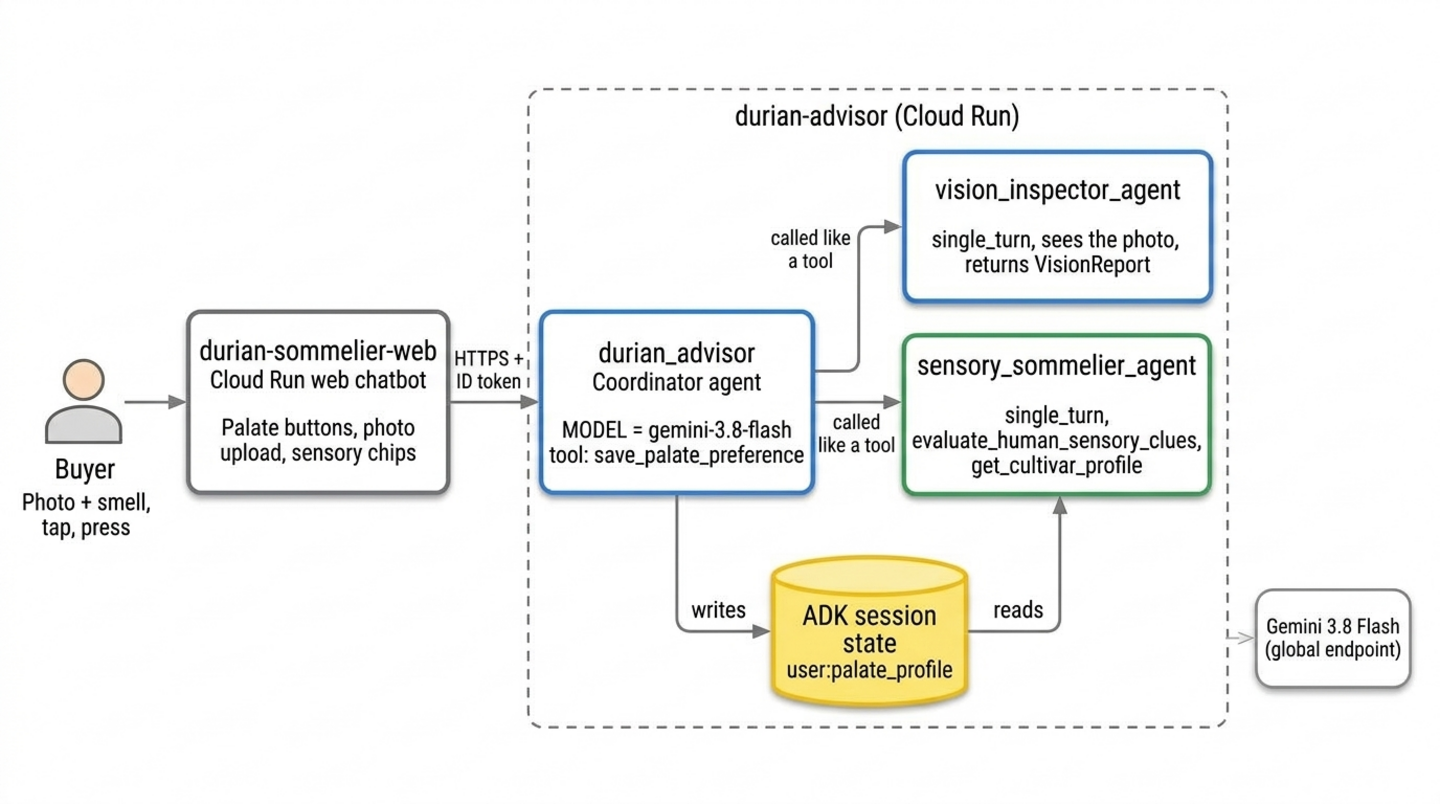
두 Cloud Run 서비스는 선택사항인 Antigravity 단계에서 가져옵니다. 이러한 도구가 없으면 Cloud Shell의 ADK 플레이그라운드에서 동일한 에이전트를 실행합니다.
기본 요건
- Python 프로그래밍에 대한 기본적 숙련도
- 명령줄 도구 및 생성형 AI 개념에 대한 기본 지식
- ADK, Agents CLI 또는 Antigravity CLI에 대한 사전 경험은 필요하지 않습니다.
학습할 내용
agents-cli create로 ADK 프로젝트를 스캐폴딩하고 사진을 읽는 멀티모달 에이전트를 빌드하는 방법- AI 인식이 멈추는 지점(후각, 청각, 촉각, 개인 취향)과 이러한 감각을 위한 휴먼인더루프 도구를 설계하는 방법
user:범위 ADK 상태를 사용하여 세션 간에 각 사용자의 환경설정을 기억하는 방법- 하나의 에이전트를 코디네이터와 도구처럼 호출하는 싱글턴 전문가 에이전트로 분할하는 방법
- 선택사항: Antigravity CLI에 Agents CLI 기술을 부여하여 에이전트와 웹 챗봇을 Cloud Run에 배포하는 방법
필요한 항목
- Google 계정(워크숍 크레딧을 신청하는 경우 개인
@gmail.com계정 사용) - 강사가 제공한 워크숍 크레딧 링크(QR 코드를 스캔할 휴대전화 카메라 포함) 또는 활성 Cloud Billing 계정
- Chrome(개인 계정과 직장 계정이 혼합되지 않도록 시크릿 창을 사용하는 것이 좋음)
2. Google Cloud 크레딧 신청(선택사항)
이 Codelab을 직접 진행하고 있으며 자격 요건을 충족하는 경우 이 페이지의 Google Developer Program 크레딧 배너를 사용하여 신용카드 없이 크레딧을 신청하세요. 강사가 제공한 이벤트 크레딧 링크를 사용하여 워크숍에 참석하는 경우 이 섹션의 이벤트 크레딧 단계를 따르세요.
이벤트 크레딧 신청하기
Google Builders Hub(Google Developer Program의 일부)를 통해 워크숍 이벤트 크레딧을 신청합니다.
이벤트 크레딧을 신청하려면 다음 단계를 따르세요.
- 시크릿 창에서 워크숍 크레딧 링크를 열고 개인
@gmail.com계정으로 로그인합니다. - 혜택 신청 카드에서 크레딧 신청을 클릭합니다.
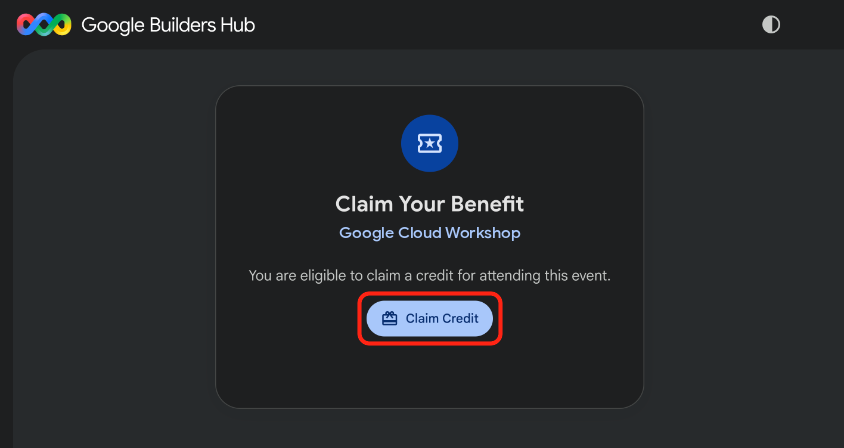
- 선택사항: Google Developer Program 프로필을 만들라는 메시지가 표시되면 양식을 작성합니다.
- 실제 사용자 인증을 위해 스캔 대화상자가 표시되면 휴대전화로 QR 코드를 스캔하고 인증을 완료합니다. QR 코드가 표시되지 않으면 페이지를 새로고침하고 크레딧 받기를 다시 클릭합니다.
- 이벤트 크레딧을 신청했습니다.라는 메시지가 표시되는지 확인한 후 결제 계정 열기를 클릭합니다.
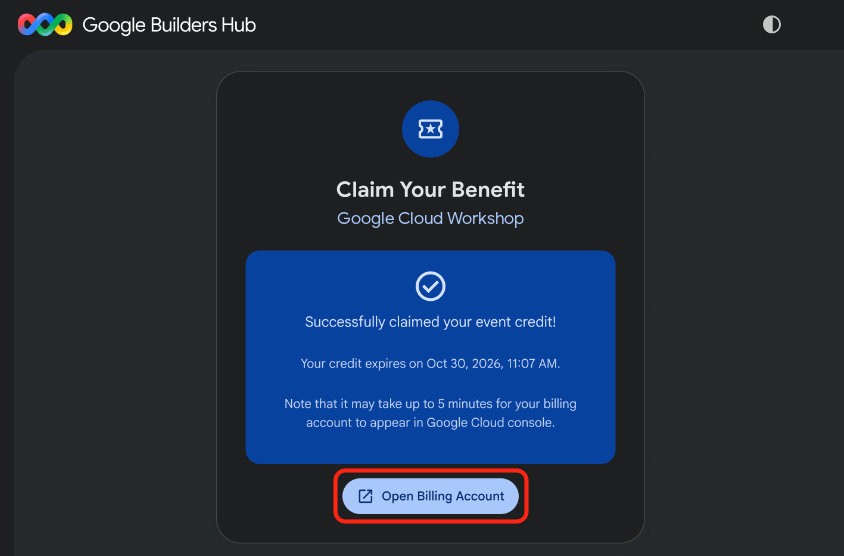
🔍 작업 확인
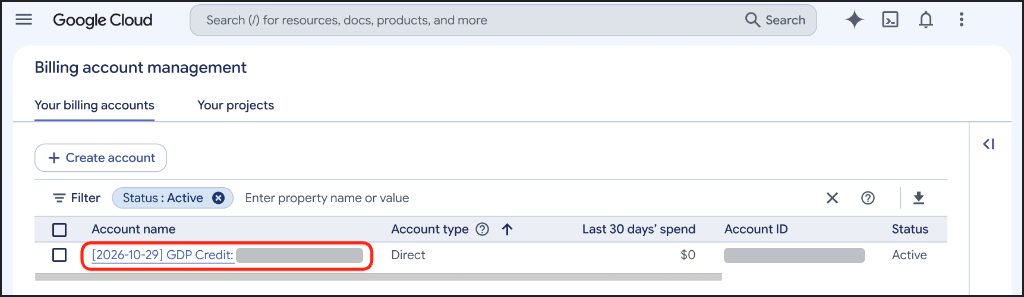
결제 계정 프로비저닝에는 최대 5분이 걸릴 수 있습니다. 크레딧이 활성 상태인지 확인하려면 다음 단계를 완료하세요.
- 결제 계정 관리 페이지가 아직 열려 있지 않으면 Google Cloud Billing을 열거나 URL을 시크릿 창에 복사합니다.
https://console.cloud.google.com/billing
- 결제 계정 탭을 클릭하고 GDP 크레딧이 포함된 계정의 상태 열에 활성이 표시될 때까지 페이지를 새로고침합니다.
3. Google Cloud 프로젝트 만들기(선택사항)
이 Codelab의 모든 리소스를 격리된 상태로 유지하여 완료 시 완전히 삭제할 수 있도록 전용 Google Cloud 프로젝트를 만듭니다.
Google Cloud 프로젝트를 만들려면 다음 단계를 따르세요.
- 프로젝트 만들기를 열거나 URL을 시크릿 창에 복사합니다.
https://console.cloud.google.com/projectcreate
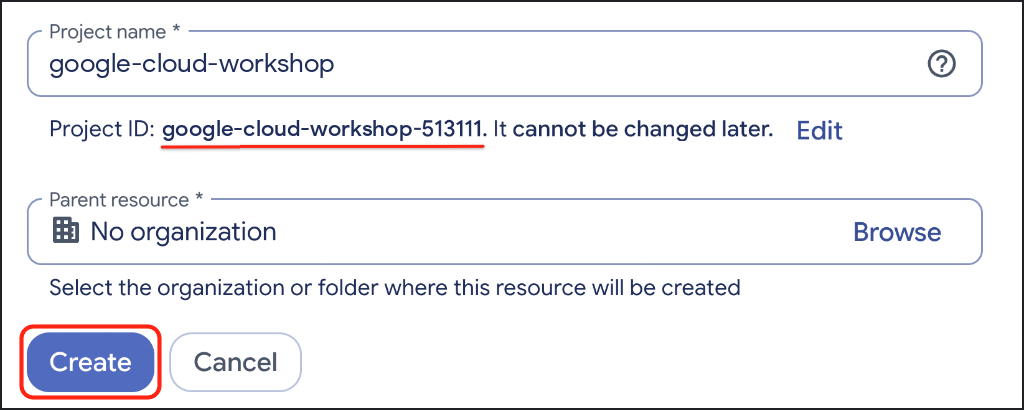
- 프로젝트 세부정보를 입력합니다.
- 프로젝트 이름: 설명이 포함된 이름(예:
google-cloud-workshop)을 입력합니다. - 결제 계정(표시되는 경우): GDP 크레딧 계정(또는 활성 결제 계정)을 선택합니다.
- 상위 리소스: 조직 없음을 선택한 상태로 둡니다(또는 필요한 경우 조직 선택).
- 프로젝트 이름: 설명이 포함된 이름(예:
- 생성된 프로젝트 ID를 기록한 후 만들기를 클릭합니다.
🔍 작업 확인
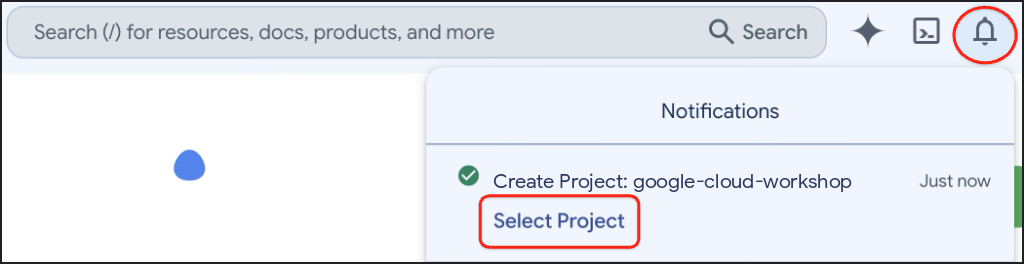
프로젝트 생성이 완료되면 Google Cloud 콘솔 툴바에서 알림을 열고 프로젝트 선택을 클릭합니다.
4. 환경 설정
이 섹션에서는 Google Cloud Shell을 설정하고, Agent Platform API를 사용 설정하고, uv로 Agents CLI를 설치합니다.
Cloud Shell 구성
Cloud Shell 실행
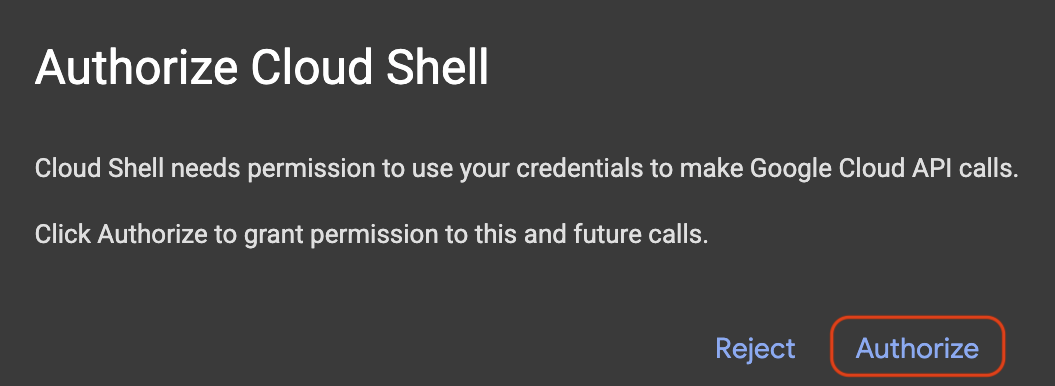
코드 편집기와 터미널 뷰가 모두 사용 설정된 상태로 Google Cloud Shell을 열거나(또는 URL을 시크릿 창에 복사) 메시지가 표시되면 승인을 클릭합니다.
https://shell.cloud.google.com/?show=ide,terminal
Google Cloud 프로젝트 ID 설정
다음 스니펫을 복사하여 Cloud Shell 터미널에 붙여넣습니다. 사용 가능한 Google Cloud 프로젝트의 번호가 매겨진 메뉴가 표시됩니다. 프로젝트 옆에 있는 번호(예: 1)를 입력하고 Enter 키를 누릅니다.
unset CLOUDSDK_CORE_PROJECT
PS3="Select your project (e.g. 1): "
select PROJECT_ID in $(gcloud projects list --format="value(projectId)"); do
  [ -n "$PROJECT_ID" ] && gcloud config set project "$PROJECT_ID" && break
done
예상 프롬프트:
1) durian-sommelier-workshop-4210
2) my-cloud-project-8812
Select your project (e.g. 1): 1
Updated property [core/project].
[environment: untagged] Read more to tag: g.co/cloud/project-env-tag.
이제 Cloud Shell 터미널 프롬프트에 선택한 프로젝트 ID가 노란색으로 강조 표시됩니다.

Agent Platform API 사용 설정
에이전트가 Gemini를 호출하는 데 사용하는 Agent Platform API를 사용 설정합니다.
gcloud services enable aiplatform.googleapis.com
🔍 작업 확인
다음과 비슷한 출력이 표시됩니다.
Operation "operations/acat.p2-..." finished successfully.
Agents CLI 설치
uv를 사용할 수 있고 도구 폴더가 PATH에 있는지 확인합니다.
which uv || curl -LsSf https://astral.sh/uv/install.sh | sh
export PATH="$HOME/.local/bin:$PATH"
Agents CLI를 uv 도구로 설치합니다.
uv tool install google-agents-cli==1.7.0
uv는 각 도구를 자체 격리된 환경에 설치하고 agents-cli 명령어만 PATH에 추가하므로 시스템 Python은 그대로 유지됩니다. ADK를 직접 설치할 필요도 없습니다. Agents CLI에서 만드는 모든 프로젝트에는 템플릿이 테스트된 ADK 버전이 포함된 자체 가상 환경이 있습니다.
🔍 작업 확인
Agents CLI가 준비되었는지 확인합니다.
agents-cli --version
다음과 비슷한 출력이 표시됩니다.
agents-cli, version 1.7.0
5. 멀티모달 비전 에이전트 스캐폴드
작게 시작하기: Agents CLI를 사용하여 ADK 프로젝트를 생성한 다음 샘플 에이전트를 두리안 비전 분류기로 변환합니다.
프로젝트 스캐폴드
durian-advisor 프로젝트를 생성합니다. --agent adk_python는 Python ADK 템플릿을 선택하고, --deployment-target cloud_run 및 --region us-central1는 Cloud Run에 맞게 준비하고, --prototype는 CI/CD 설정을 건너뛰고, --yes는 기본값을 수락합니다.
cd ~ && agents-cli create durian-advisor \
  --agent adk_python \
  --deployment-target cloud_run \
  --region us-central1 \
  --prototype \
  --yes
다음과 비슷한 출력이 표시됩니다.
> Verifying GCP credentials...
> ✓ Connected to project: your-project-id

✅ Success! Your agent project is ready.
Cloud Shell 편집기에서 프로젝트를 엽니다. 그러면 창이 새로고침되고 터미널이 다시 시작됩니다.
cloudshell workspace ~/durian-advisor
프로젝트의 종속 항목을 자체 .venv 폴더에 설치합니다.
cd ~/durian-advisor && agents-cli install
환경 파일 확인
Agents CLI는 Google Cloud 프로젝트를 통해 Gemini를 호출하도록 ADK에 지시하는 .env 파일도 작성했습니다.
grep GOOGLE_ ~/durian-advisor/.env
다음과 비슷한 출력이 표시됩니다.
GOOGLE_GENAI_USE_VERTEXAI=true
GOOGLE_CLOUD_PROJECT=your-project-id
GOOGLE_CLOUD_LOCATION=global
GOOGLE_CLOUD_LOCATION=global 유지 Cloud Run 서비스가 us-central1에서 실행되더라도 Gemini 3.8 Flash는 us-central1과 같은 리전 엔드포인트가 아닌 global 엔드포인트에서 제공됩니다.
GOOGLE_CLOUD_PROJECT에 your-gcp-project-id가 표시되면 Agents CLI에서 프로젝트를 감지할 수 없는 것입니다. 다음과 같이 설정합니다.
sed -i "s/your-gcp-project-id/$(gcloud config get-value project)/" ~/durian-advisor/.env
비전 분류기 작성
각 품종에는 Gemini가 사진에서 발견할 수 있는 껍질 마커가 있습니다.
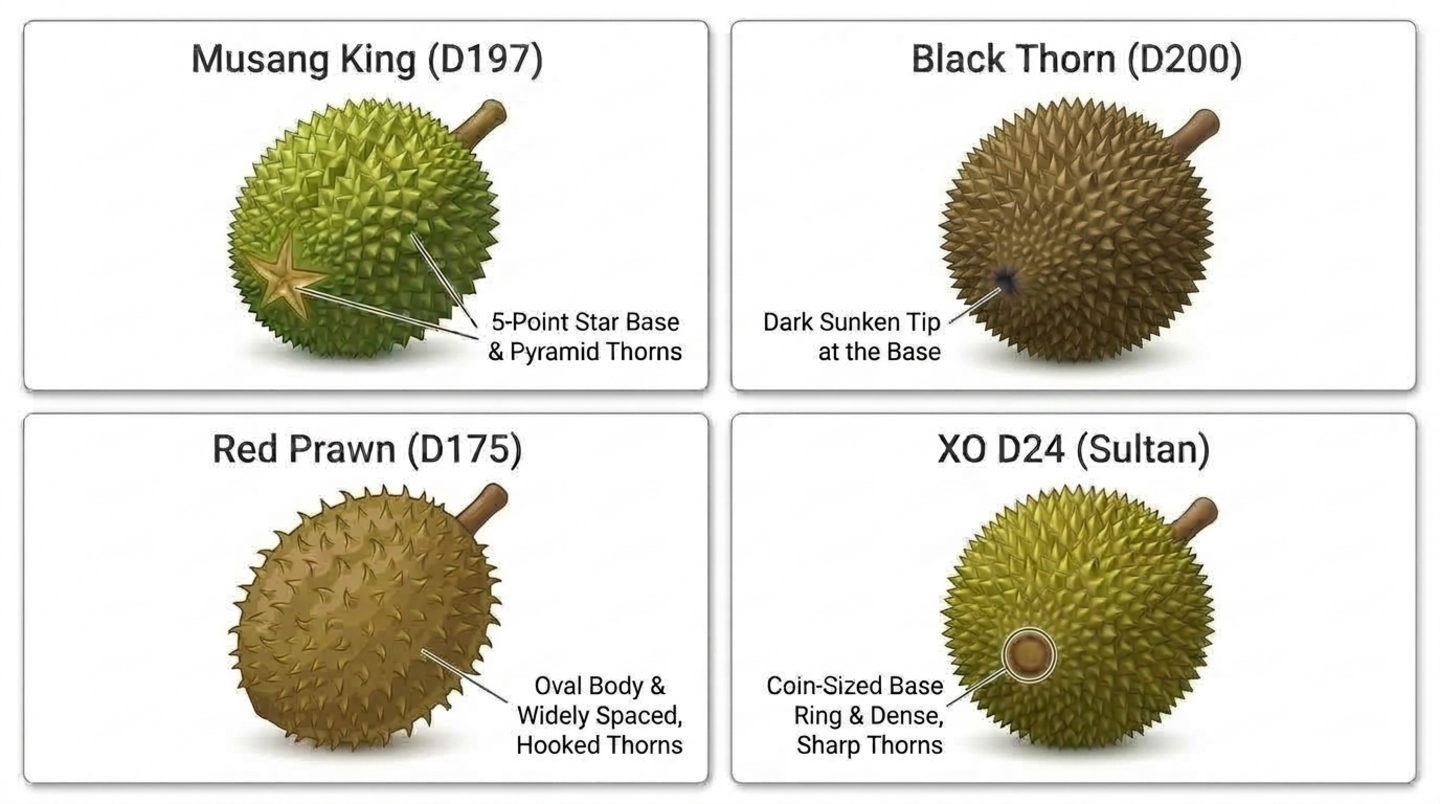
app/agent.py 열기:
cloudshell edit ~/durian-advisor/app/agent.py
파일 내용을 다음 코드로 바꿉니다.
"""A single multimodal agent that inspects durian photos."""

from google.adk.agents import Agent
from google.adk.apps import App
from google.adk.models import Gemini
from google.genai import types

MODEL = "gemini-3.8-flash"

INSTRUCTION = """You are a durian visual classifier. Inspect the durian photo or shell description.
1. Base seam: a 5-point star means Musang King (D197). A dark sunken tip means Black Thorn (D200). A coin-sized brown ring means D24. An oval body with widely spaced, hooked thorns means Red Prawn (D175).
2. Stem: plump, moist, and greenish means it fell within about 12 hours. Dry and shriveled means it is days old.
3. Husk: closed seams mean natural ripening. Wide splits or mold mean it is past its best.
Give the likely cultivar and a visual freshness score from 1 to 10. Then list what a photo cannot tell you: the aroma, the tap sound, the thorn springiness, and whether the buyer will enjoy the taste."""

root_agent = Agent(
    name="durian_advisor",
    model=Gemini(model=MODEL, retry_options=types.HttpRetryOptions(attempts=3)),
    description="Classifies durian cultivars and visual freshness from photos.",
    instruction=INSTRUCTION,
)

app = App(root_agent=root_agent, name="app")
여기서 몇 가지 세부정보가 중요합니다.
MODEL은 모델 ID가 표시되는 유일한 위치입니다. 나중에 추가하는 모든 에이전트가 이를 상속하므로 모델 전환은 한 줄만 변경하면 됩니다.retry_options는 비율 제한과 같은 일시적인 오류를 최대 3회까지 재시도합니다.app = App(...)는 플레이그라운드와 Cloud Run 서버 모두에 대해 에이전트를 래핑합니다. 생성된 서버 및agents-cli-manifest.yaml와 일치하는 앱 이름app및 에이전트 이름durian_advisor을 유지합니다.
플레이그라운드에서 에이전트 테스트
ADK 플레이그라운드를 시작합니다.
cd ~/durian-advisor && agents-cli playground
다음과 비슷한 출력이 표시됩니다.
INFO: Uvicorn running on http://127.0.0.1:8080 (Press CTRL+C to quit)
Cloud Shell 툴바에서 웹 미리보기를 클릭하고 포트 8080에서 미리보기를 선택합니다. ADK 개발 UI에서 에이전트를 선택하라는 메시지가 표시되면 app를 선택합니다. 그런 다음 이 프롬프트를 보내거나 업로드 버튼을 사용하여 두리안 사진을 첨부하세요.
I'm at a stall looking at a round durian with pyramid-shaped thorns and a 5-point star at the base. The stem is green and moist. What cultivar is this, and will it taste sweet?
🔍 작업 확인
에이전트는 무상킹(D197)을 식별하고 촉촉한 녹색 줄기에 높은 신선도 점수를 부여합니다. 그런 다음 사진으로는 알 수 없는 정보, 즉 향, 두드리는 소리, 가시의 탄력성, 맛이 좋을지 여부를 인정합니다.
계속하기 전에 터미널에서 Ctrl + C를 눌러 플레이그라운드를 중지합니다.
6. 인간의 감각과 미각 기억 추가
카메라는 냄새를 맡거나, 소리를 듣거나, 느낄 수 없으므로 구매자에게 이를 요청하는 도구를 빌드합니다. 또한 에이전트에게 각 구매자의 취향에 대한 장기 기억을 제공합니다. 이 단계에서는 도구를 작성하고 다음 단계에서는 도구를 에이전트에 연결합니다.
품종 카탈로그 추가
app/durian_data.py 만들기:
cloudshell edit ~/durian-advisor/app/durian_data.py
이 참조 카탈로그를 붙여넣습니다. 데이터를 자체 모듈에 보관하면 에이전트 코드가 짧아집니다.
"""Reference catalog of durian cultivars."""

CULTIVAR_CATALOG = {
    "musang_king": {
        "code": "D197",
        "name": "Musang King (Mao Shan Wang)",
        "visual_markers": "5-point star seam at the base, pyramid-shaped thorns",
        "flavor": "rich, bittersweet, buttery custard",
        "bitterness": "medium",
    },
    "black_thorn": {
        "code": "D200",
        "name": "Black Thorn (Ochee)",
        "visual_markers": "Dark sunken tip at the base, round pumpkin-like body",
        "flavor": "sweet, creamy, slightly winey",
        "bitterness": "low",
    },
    "red_prawn": {
        "code": "D175",
        "name": "Red Prawn (Udang Merah)",
        "visual_markers": "Oval body, widely spaced and slightly hooked thorns",
        "flavor": "sweet, floral, soft and sticky",
        "bitterness": "none",
    },
    "xo_d24": {
        "code": "D24",
        "name": "XO D24 (Sultan, old tree)",
        "visual_markers": "Coin-sized brown ring at the base, dense sharp thorns",
        "flavor": "intense, bitter, with a boozy finish",
        "bitterness": "high",
    },
}
감각 도구 추가
app/sensory_tools.py 만들기:
cloudshell edit ~/durian-advisor/app/sensory_tools.py
다음 코드를 붙여넣습니다.
"""Tools for cultivar lookup and human-in-the-loop sensory checks."""

from typing import Any, Literal

from .durian_data import CULTIVAR_CATALOG

AROMA_POINTS = {"sweet_fragrant": 4, "boozy_fermented": 3, "faint_grassy": 0, "sour_rotten": 0}
TAP_POINTS = {"hollow": 3, "solid": 0}
THORN_POINTS = {"springy": 3, "rigid": 0}


def get_cultivar_profile(cultivar_key: str) -> dict[str, Any]:
    """Looks up the visual markers, flavor, and bitterness of a durian cultivar.

    Args:
        cultivar_key: One of 'musang_king', 'black_thorn', 'red_prawn', or 'xo_d24'.
    """
    key = cultivar_key.strip().lower().replace(" ", "_").replace("-", "_")
    if key not in CULTIVAR_CATALOG:
        return {"status": "NOT_FOUND", "supported": list(CULTIVAR_CATALOG)}
    return {"status": "OK", "cultivar": CULTIVAR_CATALOG[key]}


def evaluate_human_sensory_clues(
    aroma: Literal["sweet_fragrant", "boozy_fermented", "faint_grassy", "sour_rotten"],
    tap_sound: Literal["hollow", "solid"],
    thorn_feel: Literal["springy", "rigid"],
) -> dict[str, Any]:
    """Scores the ripeness clues that only a human buyer can smell, hear, and feel.

    Args:
        aroma: What the buyer smells at the seam of the husk.
        tap_sound: What the buyer hears when tapping the husk.
        thorn_feel: How two thorns feel when the buyer presses them together.
    """
    score = AROMA_POINTS[aroma] + TAP_POINTS[tap_sound] + THORN_POINTS[thorn_feel]
    if aroma == "sour_rotten":
        verdict = "SPOILED"
    elif score >= 7:
        verdict = "RIPE"
    elif score >= 4:
        verdict = "NOT_QUITE_READY"
    else:
        verdict = "UNRIPE"
    return {"status": "OK", "ripeness_score": score, "max_score": 10, "verdict": verdict}
도구의 작동 방식:
- ADK는 각 함수를 모델이 호출할 수 있는 도구로 변환합니다. docstring은 도구 설명이 되고
Args섹션에서는 각 파라미터를 설명합니다. Literal[...]유형 힌트는 도구 스키마에서 고정된 선택지가 되므로 Gemini는 'smells a bit boozy'를 허용된 값 중 하나(예:boozy_fermented)에 정확하게 매핑해야 합니다.get_cultivar_profile는 품종을 생성하는 대신 지원되는 키와 함께 명시적인NOT_FOUND상태를 반환합니다.
팔레트 메모리 도구 추가
app/memory_tools.py 만들기:
cloudshell edit ~/durian-advisor/app/memory_tools.py
다음 코드를 붙여넣습니다.
"""Tool that remembers each buyer's durian palate across sessions."""

from typing import Any, Literal

from google.adk.tools import ToolContext


def save_palate_preference(
    favorite_flavors: str,
    bitterness_tolerance: Literal["none", "low", "medium", "high"],
    tool_context: ToolContext,
) -> dict[str, Any]:
    """Saves the buyer's durian taste preferences to their long-term profile.

    Args:
        favorite_flavors: Flavors and textures the buyer enjoys, such as
            'sweet, creamy custard'.
        bitterness_tolerance: How much bitterness the buyer enjoys.
    """
    profile = {
        "favorite_flavors": favorite_flavors,
        "bitterness_tolerance": bitterness_tolerance,
    }
    # The "user:" prefix scopes this key to the buyer, so it follows them
    # into every future session of this app.
    tool_context.state["user:palate_profile"] = profile
    return {"status": "SAVED", "palate_profile": profile}
미각 기억의 작동 방식:
- ADK는
tool_context를 자동으로 전달하고 모델에서 숨기므로 Gemini는 두 가지 맛 매개변수만 볼 수 있습니다. user:프리픽스는 상태 키의 범위를 현재 세션이 아닌 사용자로 지정하므로 프로필이 모든 새 대화에서 구매자를 따릅니다.- 별도의 'get' 도구는 필요하지 않습니다. 에이전트는 자리표시자
{user:palate_profile?}를 사용하여 프로필을 요청 사항으로 직접 읽습니다.?는 프로필이 아직 존재하지 않을 때 오류를 발생시키는 대신 자리표시자를 비웁니다.
🔍 작업 확인
술 냄새가 나고, 두드리면 속이 빈 소리가 나며, 가시가 탄력 있는 두리안에 점수를 매깁니다.
cd ~/durian-advisor && uv run python -c "from app.sensory_tools import evaluate_human_sensory_clues as score; print(score('boozy_fermented', 'hollow', 'springy'))"
다음과 비슷한 출력이 표시됩니다.
{'status': 'OK', 'ripeness_score': 9, 'max_score': 10, 'verdict': 'RIPE'}
7. 전문가 에이전트 조정
시각 규칙, 감각 점수, 미각 매칭을 하나의 프롬프트에서 처리하는 단일 에이전트는 혼동을 일으키기 쉽습니다. 대신 각 작업을 전문적인 전문가에게 맡기고 조정자가 답변을 결합하도록 합니다.
vision_inspector_agent는 사진에서 품종과 신선도를 읽고 구조화된 보고서를 반환합니다.sensory_sommelier_agent는 구매자가 맡은 냄새, 들은 소리, 느낀 감각을 점수로 매기고, 품종이 자신의 취향에 맞는지 확인합니다.durian_advisor는 구매자와 대화하고, 구매자의 취향을 저장하고, 각 전문가를 호출하고, 최종 결과를 작성합니다.
비전 검사기 만들기
app/vision_agent.py 만들기:
cloudshell edit ~/durian-advisor/app/vision_agent.py
다음 코드를 붙여넣습니다.
"""Vision inspector: reads the cultivar and freshness from a durian photo."""

from google.adk.agents import Agent
from pydantic import BaseModel, Field


class VisionReport(BaseModel):
    cultivar_key: str = Field(
        description="musang_king, black_thorn, red_prawn, xo_d24, or unknown"
    )
    visual_freshness: int = Field(description="1 (stale) to 10 (freshly fallen)")
    evidence: str = Field(description="The visual markers behind your answer")


vision_inspector_agent = Agent(
    name="vision_inspector_agent",
    description="Identifies a durian's cultivar and visual freshness from the buyer's photo or shell description.",
    mode="single_turn",
    # Specialists only see their tool-call input by default. Opt in to the
    # conversation history so this agent can see the uploaded photo.
    include_contents="default",
    # Report back to the coordinator instead of taking over the conversation.
    disallow_transfer_to_parent=True,
    disallow_transfer_to_peers=True,
    output_schema=VisionReport,
    instruction="""You are a durian vision inspector. Examine the durian photo or shell description in the conversation.
Cultivar markers:
- 5-point star seam at the base: musang_king
- Dark sunken tip at the base: black_thorn
- Oval body with widely spaced, slightly hooked thorns: red_prawn
- Coin-sized brown ring at the base and dense, sharp thorns: xo_d24
Freshness: a plump, moist, greenish stem and closed seams score high. A dry, shriveled stem or a split, moldy husk scores low.
If the markers are unclear, use 'unknown'.""",
)
output_schema=VisionReport는 코디네이터가 신뢰할 수 있는 정형 데이터를 전문가가 반환하도록 합니다.include_contents="default"을(를) 사용하면 이 전문가가 업로드된 사진을 포함한 대화를 볼 수 있습니다. 이 기능이 없으면 단일 차례 전문가는 코디네이터가 전달하는 요청만 볼 수 있습니다.disallow_transfer_to_parent및disallow_transfer_to_peers는 ADK가 이 하위 에이전트에 제공하는transfer_to_agent도구를 삭제합니다. 전체 대화를 보는 전문가는 보고서를 반환하는 대신 채팅을 코디네이터에게 다시 넘기고 싶어 합니다.
감각 소믈리에 만들기
app/sensory_agent.py 만들기:
cloudshell edit ~/durian-advisor/app/sensory_agent.py
다음 코드를 붙여넣습니다.
"""Sensory sommelier: scores the buyer's senses and checks palate fit."""

from google.adk.agents import Agent
from pydantic import BaseModel, Field

from .sensory_tools import evaluate_human_sensory_clues, get_cultivar_profile


class SensoryClues(BaseModel):
    cultivar_key: str = Field(description="Cultivar from the vision inspector")
    aroma: str = Field(description="What the buyer smelled at the seam")
    tap_sound: str = Field(description="What the buyer heard when tapping the husk")
    thorn_feel: str = Field(description="How the thorns felt when pressed together")


sensory_sommelier_agent = Agent(
    name="sensory_sommelier_agent",
    description="Scores the smell, sound, and touch clues the buyer reports, and checks the cultivar against their palate.",
    mode="single_turn",
    # Report back to the coordinator instead of taking over the conversation.
    disallow_transfer_to_parent=True,
    disallow_transfer_to_peers=True,
    input_schema=SensoryClues,
    instruction="""You are a durian sensory sommelier.
Buyer palate profile: {user:palate_profile?}

1. Call evaluate_human_sensory_clues with the buyer's aroma, tap sound, and thorn feel.
2. Call get_cultivar_profile for the cultivar.
3. Compare the cultivar's bitterness with the buyer's bitterness tolerance.
Report the ripeness verdict, the palate fit, and one sentence of advice.""",
    tools=[evaluate_human_sensory_clues, get_cultivar_profile],
)
input_schema=SensoryClues는 코디네이터가 전달해야 하는 항목을 정의합니다. 즉, 품종과 구매자의 세 가지 감각 보고서를 자신의 말로 전달해야 합니다. 전문가는 이러한 단어를 도구의 허용된 값에 매핑합니다.{user:palate_profile?}는 구매자의 저장된 취향을 지침에 포함하므로 전문가가 메모리를 조회하지 않고도 적합성을 판단할 수 있습니다.- 두 전문가 모두
model를 설정하지 않습니다. 둘 다 코디네이터의MODEL를 상속합니다. - 두 전문가 모두 동일한 두 개의 트랜스퍼 플래그를 사용하므로 각 전문가는 항상 코디네이터에게 보고합니다.
코디네이터 연결
app/agent.py 열기:
cloudshell edit ~/durian-advisor/app/agent.py
콘텐츠를 조정자로 바꿉니다.
"""Durian advisor: a concierge that coordinates vision and sensory specialists."""

from google.adk.agents import Agent
from google.adk.apps import App
from google.adk.models import Gemini
from google.genai import types

from .memory_tools import save_palate_preference
from .sensory_agent import sensory_sommelier_agent
from .vision_agent import vision_inspector_agent

MODEL = "gemini-3.8-flash"

root_agent = Agent(
    name="durian_advisor",
    model=Gemini(model=MODEL, retry_options=types.HttpRetryOptions(attempts=3)),
    description="Durian concierge that combines what the camera sees with what the buyer senses.",
    instruction="""You are a friendly durian concierge helping a buyer at a fruit stall.
Buyer palate profile: {user:palate_profile?}

1. When the buyer shares taste preferences, call save_palate_preference.
2. When the buyer shows or describes a durian, call vision_inspector_agent.
3. A camera cannot smell, hear, or feel. Unless the buyer already reported the seam aroma, tap sound, and thorn feel, ask them to check. Then call sensory_sommelier_agent.
4. Call one specialist at a time. Finish with ONE verdict covering the cultivar, ripeness, and palate fit. If the durian does not suit their palate, suggest a cultivar that does.""",
    tools=[save_palate_preference],
    sub_agents=[vision_inspector_agent, sensory_sommelier_agent],
)

app = App(root_agent=root_agent, name="app")
두 전문가 모두 mode="single_turn"를 사용하므로 ADK는 코디네이터에게 vision_inspector_agent 및 sensory_sommelier_agent라는 두 가지 추가 도구를 제공합니다. 요청 사항은 이러한 이름으로 도구를 참조합니다.
플레이그라운드에서 코디네이터 테스트
플레이그라운드를 다시 시작합니다.
cd ~/durian-advisor && agents-cli playground
포트 8080에서 웹 미리보기를 열고 에이전트와 다음과 같이 짧은 대화를 나눕니다.
내 취향 학습시키기:
Hi! Please remember my taste: I love sweet, creamy custard durians and I can't stand bitterness.
상태 탭을 엽니다. 다음과 같이 저장된 프로필이 표시됩니다.
{
  "user:palate_profile": {
    "favorite_flavors": "sweet, creamy custard",
    "bitterness_tolerance": "none"
  }
}
두리안을 보여줍니다(설명하거나 사진을 첨부).
The vendor is showing me a round durian with a coin-sized brown ring at the base and dense, sharp thorns. The stem is green and moist. Should I buy it?
코디네이터가 vision_inspector_agent를 호출하여 XO D24를 식별합니다. 그런 다음 이음새의 냄새를 맡고, 껍질을 두드리고, 두 개의 가시를 함께 누르라고 요청합니다.
감지한 내용 신고:
It smells a bit boozy, the knock sounds hollow, and the thorns spring back when I press them.
새로 시작: 새 세션을 클릭하고 다음과 같이 질문합니다.
Which durian should I pick today?
🔍 작업 확인
- 감각을 보고하면 코디네이터가
sensory_sommelier_agent에 전화를 걸어 한 가지 결과를 알려줍니다. XO D24는 잘 익었지만(10점 만점에 9점) 쓴맛이 강해 입맛에 맞지 않으므로 대신 레드 프론(D175) 또는 블랙 쏜(D200)을 요청하세요. - 이벤트 탭에서
durian_advisor가 각 전문가를 호출하고sensory_sommelier_agent가evaluate_human_sensory_clues및get_cultivar_profile를 호출하는 것을 확인할 수 있습니다. - 새 세션에서 에이전트는 이미 사용자의 취향을 알고 있으며 다시 묻지 않고 달콤하고 쓴맛이 없는 품종을 추천합니다.
터미널에서 Ctrl + C를 눌러 플레이그라운드를 중지합니다.
8. Antigravity로 배포(선택사항)
에이전트를 직접 빌드하고 테스트했습니다. 이제 터미널용 Google AI 코딩 에이전트인 Antigravity CLI(agy)를 사용하여 배포합니다. Agents CLI 스킬은 Antigravity에 ADK 에이전트를 올바르게 배포하는 방법을 알려줍니다.
배포 API 사용 설정
Agents CLI가 에이전트를 빌드하고 호스팅하는 데 사용하는 Cloud Run, Cloud Build, Artifact Registry API를 사용 설정합니다.
gcloud services enable \
  run.googleapis.com \
  cloudbuild.googleapis.com \
  artifactregistry.googleapis.com
다음과 비슷한 출력이 표시됩니다.
Operation "operations/acat.p2-..." finished successfully.
Agents CLI 스킬 설치
프로젝트 폴더에 7개의 Agents CLI 기술을 설치합니다. Antigravity가 자동으로 이를 검색합니다.
cd ~/durian-advisor && agents-cli setup --workspace
🔍 작업 확인
ls -1 ~/durian-advisor/.agents/skills
다음과 비슷한 출력이 표시됩니다.
google-agents-cli-adk-code
google-agents-cli-deploy
google-agents-cli-eval
google-agents-cli-observability
google-agents-cli-publish
google-agents-cli-scaffold
google-agents-cli-workflow
Antigravity CLI 시작
Antigravity CLI는 Cloud Shell에 사전 설치되어 있습니다. 프로젝트 폴더에서 시작합니다.
cd ~/durian-advisor && agy --dangerously-skip-permissions
처음 실행하면 Antigravity에서 Google 계정으로 로그인하고, 색상 테마를 선택하고, 서비스 약관에 동의하고, 현재 폴더를 신뢰하라는 메시지가 표시됩니다.
Antigravity에 배포 요청
Antigravity에 다음 프롬프트를 붙여넣습니다.
Use the google-agents-cli-deploy skill to deploy this ADK agent to Cloud Run in us-central1 as a private service. Keep GOOGLE_CLOUD_LOCATION=global so Gemini keeps working, save the exact service URL to .env as AGENT_BASE_URL, and smoke-test the deployed agent with agents-cli run.
Antigravity는 기술을 읽고 프로젝트의 테스트를 먼저 실행할 수 있습니다. 그런 다음 agents-cli deploy를 실행하여 Cloud Build로 컨테이너를 빌드하고 durian-advisor 서비스를 배포하며 라이브 서비스에 테스트 메시지를 전송합니다. 전체 실행에는 약 5~8분이 소요됩니다.
Antigravity가 완료되면 Ctrl + D를 두 번 눌러 종료합니다.
🔍 작업 확인
Antigravity가 저장한 URL을 사용하여 배포된 에이전트에 메시지를 보냅니다.
cd ~/durian-advisor && source .env && agents-cli run --url "$AGENT_BASE_URL" --mode adk "Which durian suits a beginner?"
다음과 비슷한 출력이 표시됩니다.
Querying remote agent: https://durian-advisor-123456789012.us-central1.run.app (mode: adk)
[user]: Which durian suits a beginner?
[durian_advisor]: For beginners, you want a durian that is sweet, creamy, and gentle on the palate, with little to no bitterness...
이제 서비스가 토큰 없이 호출을 거부하는지 확인합니다.
curl -s -o /dev/null -w "%{http_code}\n" "$AGENT_BASE_URL"
다음과 비슷한 출력이 표시됩니다.
403
9. 웹 챗봇 바이브 코딩(선택사항)
에이전트가 게시되었지만 비공개 상태입니다. 이제 에이전트, 상태 키, URL을 이미 알고 있는 Antigravity 대화를 재개하고 두리안 구매자를 위한 웹 챗봇을 빌드하고 배포하도록 요청합니다.
Antigravity 재개
cd ~/durian-advisor && agy --dangerously-skip-permissions
Antigravity에서 다음 슬래시 명령어를 실행하고 목록에서 배포 대화를 선택합니다.
/resume
Antigravity에 챗봇 빌드 요청
다음 프롬프트를 붙여넣습니다.
Build a mobile-friendly "Durian Sommelier" web chatbot in a new web/ folder that talks to our deployed agent at AGENT_BASE_URL (ADK app name "app").

- Add palate quick-set buttons, a photo upload, and one-tap sensory chips: Smells sweet, Smells boozy, Hollow knock, Solid knock, Thorns spring back, Thorns feel stiff.
- Use a small FastAPI server that proxies chat requests to the agent with a Google ID token, because the agent service is private.
- Show only durian_advisor's replies in the chat, not the specialists' intermediate output.
- Keep a stable user ID per browser and reuse one ADK session, creating a new one if it is missing.

Deploy it to Cloud Run as durian-sommelier-web in us-central1 with public access. Run it as a new service account named durian-sommelier-web that can invoke durian-advisor, and print the URL.
Antigravity는 앱을 작성하고, 서비스 계정을 만들고, durian-advisor에 Cloud Run 호출자 역할을 부여하고, Cloud Build를 사용하여 앱을 배포합니다. 일반적으로 완료되기 전에 채팅 엔드포인트를 테스트합니다. 전체 실행에는 약 10분이 소요됩니다. URL이 출력되면 Ctrl + D를 두 번 눌러 종료합니다.
🔍 작업 확인
Antigravity가 출력한 https://durian-sommelier-web-....run.app URL을 연 다음,
- 달콤하고 부드러운 맛과 같은 맛 버튼을 탭합니다. 상담사가 미각을 보호했다고 확인합니다.
- 두리안 사진을 업로드하거나 껍질에 대한 간단한 설명을 입력합니다. 에이전트가 품종을 식별하고 감각 검사를 요청합니다.
- 두리안과 일치하는 감각 칩을 탭합니다. 상담사는 숙성도와 맛을 모두 포함하는 하나의 답변을 제공합니다.
10. 삭제
요금이 청구되지 않도록 생성한 리소스를 삭제합니다.
Cloud Run 서비스 삭제
웹 챗봇을 삭제합니다.
gcloud run services delete durian-sommelier-web --region us-central1 --quiet
에이전트 서비스를 삭제합니다.
gcloud run services delete durian-advisor --region us-central1 --quiet
서비스 계정 삭제
웹 챗봇이 실행된 서비스 계정을 삭제합니다.
gcloud iam service-accounts delete "durian-sommelier-web@$(gcloud config get-value project).iam.gserviceaccount.com" --quiet
컨테이너 이미지 삭제
Cloud Run 소스 배포는 각 서비스의 컨테이너 이미지를 cloud-run-source-deploy이라는 Artifact Registry 저장소에 푸시하며, 이 저장소는 프로젝트의 다른 배포에서 공유할 수 있습니다. 이 Codelab의 이미지 두 개만 삭제하고 저장소는 유지합니다.
에이전트의 이미지를 삭제합니다.
gcloud artifacts packages delete durian-advisor --repository cloud-run-source-deploy --location us-central1 --quiet
웹 챗봇의 이미지를 삭제합니다.
gcloud artifacts packages delete durian-sommelier-web --repository cloud-run-source-deploy --location us-central1 --quiet
🔍 작업 확인
gcloud run services list --region us-central1
다음과 비슷한 출력이 표시됩니다.
Listed 0 items.
로컬 파일 삭제
스킬 및 가상 환경을 포함한 프로젝트 폴더를 삭제합니다.
rm -rf ~/durian-advisor
(선택사항) Agents CLI를 제거합니다.
uv tool uninstall google-agents-cli
Google Cloud 프로젝트 전체 삭제(선택사항)
PROJECT_ID=$(gcloud config get-value project)
gcloud projects delete "$PROJECT_ID" --quiet
11. 마무리
수고하셨습니다 ADK 및 Agents CLI를 사용하여 멀티모달 두리안 소믈리에 멀티 에이전트 시스템을 빌드하고 테스트했습니다. 선택 단계를 수행한 경우 Antigravity CLI를 사용하여 Cloud Run에 배포했습니다.
실습한 내용
agents-cli create로 ADK 프로젝트를 스캐폴딩하고 단일MODEL설정으로 멀티모달 비전 에이전트를 빌드했습니다.- 후각, 청각, 촉각을 위한 휴먼인더루프 도구와
user:범위의 ADK 상태에 저장된 미각 메모리를 빌드했습니다. - 에이전트를
durian_advisor코디네이터와 도구처럼 호출하는single_turn전문가 2명으로 분할 - (선택사항) Agents CLI 기술과 함께 Antigravity CLI를 사용하여 에이전트와 웹 챗봇을 Cloud Run에 배포했습니다.
다음 단계
- 건너뛴 경우 선택사항인 Antigravity 단계로 돌아가 에이전트와 웹 챗봇을 Cloud Run에 배포합니다.
- 데이터베이스 지원 세션 서비스를 사용하여 Palate 메모리를 지속 가능하게 만들기
agents-cli eval로 답변 품질 측정- 에이전트 개발 키트(ADK) 문서 살펴보기
- Agents CLI에 대해 자세히 알아보기
- Cloud Run 문서 살펴보기
- GEAR(Gemini Enterprise Agent Ready) 프로그램에 참여하여 워크숍과 학습 과정을 이용하세요.