

1. ภาพรวม
การเลือกทุเรียนดีๆ ที่แผงขายริมถนนเป็นปริศนาที่ต้องใช้ประสาทสัมผัส ผู้ซื้อต้องแยกแยะมูซังคิง (D197) ของแท้จากของเลียนแบบให้ได้ ต้องตัดสินว่าผลไม้ร่วงลงมาเมื่อเช้านี้หรือหลายวันก่อน และต้องเดาว่าตนเองจะชอบรสชาติของมันหรือไม่
ใน Codelab นี้ คุณจะได้สร้างและทดสอบระบบ Durian Sommelier แบบหลาย Agent ที่ทำงานได้หลายรูปแบบด้วย Agent Development Kit (ADK) และ Agents CLI และเลือกติดตั้งใช้งานใน Cloud Run ด้วย Antigravity CLI (ขั้นตอนหลักใช้เวลาประมาณ 45 นาที ส่วนขั้นตอน Antigravity ที่ไม่บังคับ 2 ขั้นตอนจะใช้เวลาเพิ่มประมาณ 20 นาที) การเลือกทุเรียนแสดงให้เห็นว่าการรับรู้ของ AI สิ้นสุดลงที่ใด และประสาทสัมผัสของมนุษย์ เริ่มต้นที่ใด
- สิ่งที่ AI มองเห็น: Gemini สามารถตรวจสอบรูปภาพเปลือกทุเรียนและระบุลักษณะเฉพาะของสายพันธุ์ได้ เช่น ดาว 5 แฉกที่ก้นของมูซังคิง ปลายสีเข้มที่ยุบตัวลงของหนามดำ (D200) วงแหวนขนาดเท่าเหรียญของ D24 หรือก้านที่แห้งเหี่ยว
- สิ่งที่มนุษย์เท่านั้นที่สัมผัสได้: โมเดลไม่สามารถดมกลิ่นรอยต่อเพื่อหากลิ่นแอลกอฮอล์ เคาะเปลือกเพื่อฟังเสียงกลวง หรือกดหนาม 2 อันเพื่อดูว่าหนามจะเด้งกลับหรือไม่
- สิ่งที่ตัวแทนต้องจำไว้: ทุเรียนที่สุกพอดี 2 ลูกยังคงทำให้ผู้ซื้อมีความเห็นแตกต่างกัน บางคนชอบรสขมและกลิ่นแอลกอฮอล์แรงๆ ของ XO D24 จากต้นเก่าแก่ ขณะที่บางคนชอบเนื้อคัสตาร์ดหวานๆ ไม่ขมของ Red Prawn (D175)
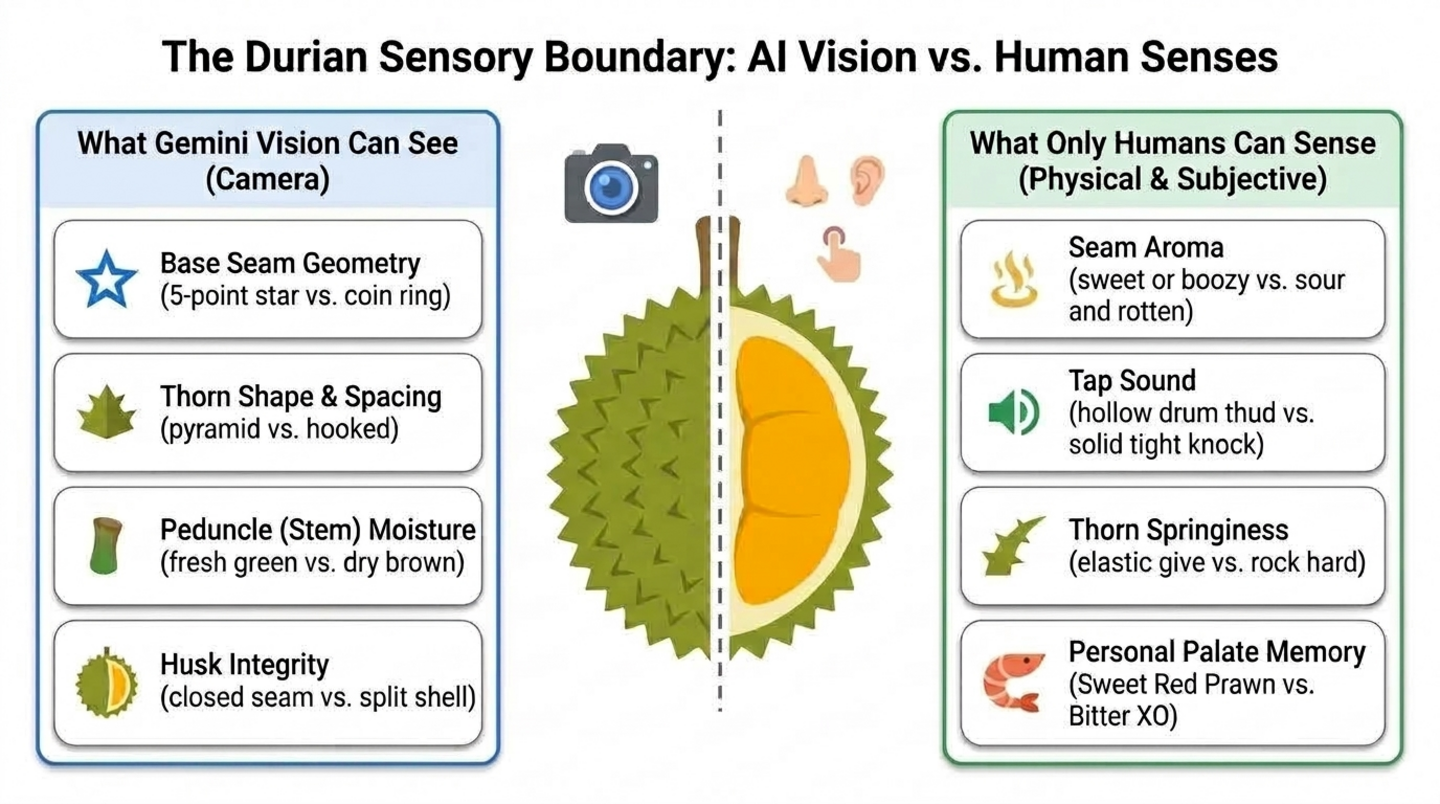
สิ่งที่คุณจะสร้าง
- ระยะที่ 1 - Agent การมองเห็นเดียว: Agent ADK ที่สร้างขึ้นด้วย Agents CLI ซึ่งระบุสายพันธุ์และความสดของทุเรียนจากรูปภาพ
- ระยะที่ 2 - ประสาทสัมผัสของมนุษย์และความทรงจำเกี่ยวกับรสชาติ: เครื่องมือที่ให้คะแนนสิ่งที่ผู้ซื้อได้กลิ่น ได้ยิน และรู้สึก รวมถึงเครื่องมือที่บันทึกโปรไฟล์รสชาติของผู้ซื้อในเซสชันต่างๆ
- ระยะที่ 3 - ผู้ประสานงานและผู้เชี่ยวชาญ: ผู้ประสานงาน
durian_advisorที่เรียกผู้ตรวจสอบการมองเห็นและผู้เชี่ยวชาญด้านประสาทสัมผัส จากนั้นให้คำตัดสินที่ชัดเจนเพียงหนึ่งเดียว - ระยะที่ 4 - บริการ Agent ของ Cloud Run: ในขั้นตอนที่ไม่บังคับ Antigravity CLI จะติดตั้งใช้งาน Agent ด้วยความสามารถของ Agents CLI
- ระยะที่ 5 - แชทบ็อตบนเว็บของ Cloud Run: ในขั้นตอนที่ไม่บังคับอีกขั้นตอนหนึ่ง Antigravity CLI จะสร้างและทำให้ใช้งานได้แอปแชทที่เหมาะกับมือถือซึ่งจะพูดคุยกับตัวแทนของคุณ
สถาปัตยกรรม
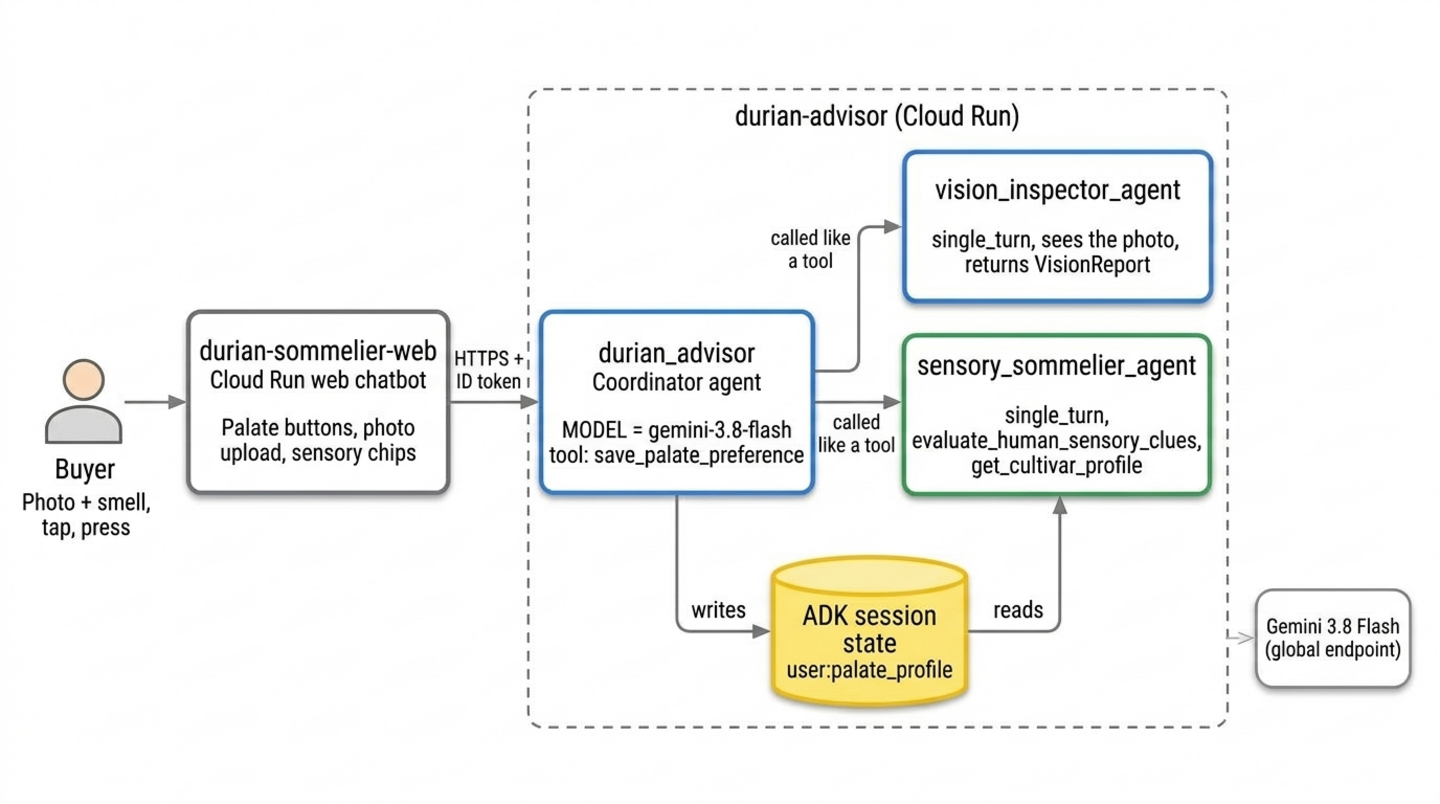
บริการ Cloud Run ทั้ง 2 รายการมาจากขั้นตอน Antigravity ที่ไม่บังคับ หากไม่มี คุณจะเรียกใช้ Agent เดียวกันใน ADK Playground ใน Cloud Shell
ข้อกำหนดเบื้องต้น
- ความสามารถขั้นพื้นฐานในการเขียนโปรแกรม Python
- ความคุ้นเคยกับเครื่องมือบรรทัดคำสั่งและแนวคิด Generative AI
- ไม่จำเป็นต้องมีประสบการณ์การใช้งาน ADK, Agents CLI หรือ Antigravity CLI มาก่อน
สิ่งที่คุณจะได้เรียนรู้
- วิธีสร้างโครงสร้างโปรเจ็กต์ ADK ด้วย
agents-cli createและสร้าง Agent แบบหลายโมดัลที่อ่านรูปภาพได้ - ขีดจำกัดของการรับรู้ของ AI (กลิ่น เสียง การสัมผัส และรสนิยมส่วนตัว) และวิธีออกแบบเครื่องมือแบบมีมนุษย์ร่วมสำหรับประสาทสัมผัสเหล่านั้น
- วิธีจดจำค่ากำหนดของผู้ใช้แต่ละรายในเซสชันต่างๆ ด้วยสถานะ ADK ที่กำหนดขอบเขตเป็น
user: - วิธีแยก Agent 1 รายออกเป็นผู้ประสานงานและ Agent ผู้เชี่ยวชาญแบบเทิร์นเดียวที่เรียกใช้ได้เหมือนเครื่องมือ
- (ไม่บังคับ) วิธีให้ทักษะ Agents CLI แก่ Antigravity CLI เพื่อให้สามารถติดตั้งใช้งาน Agent และแชทบ็อตบนเว็บใน Cloud Run ได้
สิ่งที่คุณต้องมี
- บัญชี Google (ใช้บัญชี
@gmail.comส่วนบุคคลหากต้องการรับเครดิตสำหรับเวิร์กช็อป) - ลิงก์เครดิตเวิร์กช็อปจากผู้สอน (รวมถึงกล้องโทรศัพท์เพื่อสแกนคิวอาร์โค้ด) หรือบัญชีสำหรับการเรียกเก็บเงินใน Cloud ที่ใช้งานอยู่
- Google Chrome (แนะนำให้ใช้หน้าต่างที่ไม่ระบุตัวตนเพื่อหลีกเลี่ยงการใช้บัญชีส่วนตัวและบัญชีงานปะปนกัน)
2. รับเครดิต Google Cloud (ไม่บังคับ)
หากคุณกำลังทำ Codelab นี้ด้วยตนเองและมีสิทธิ์ ให้ใช้แบนเนอร์เครดิต Google Developer Program ในหน้านี้เพื่อรับเครดิตโดยไม่ต้องใช้บัตรเครดิต หากคุณเข้าร่วมเวิร์กช็อปที่มีลิงก์เครดิตกิจกรรมจากผู้สอน ให้ทำตามขั้นตอนเครดิตกิจกรรมในส่วนนี้
รับเครดิตเหตุการณ์
คุณสามารถรับเครดิตสำหรับกิจกรรมเวิร์กช็อปผ่าน Google Builders Hub (ส่วนหนึ่งของ Google Developer Program)
หากต้องการรับเครดิตกิจกรรม ให้ทำตามขั้นตอนต่อไปนี้
- เปิดลิงก์เครดิตเวิร์กช็อปในหน้าต่างที่ไม่ระบุตัวตน แล้วลงชื่อเข้าใช้ด้วยบัญชี
@gmail.comส่วนตัว - ในการ์ดรับสิทธิประโยชน์ ให้คลิกรับเครดิต
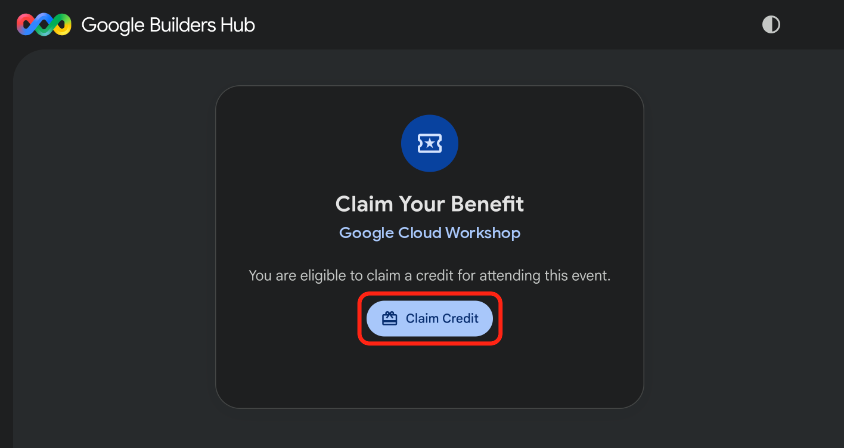
- ไม่บังคับ: หากเห็นข้อความแจ้งให้สร้างโปรไฟล์ Google Developer Program ให้กรอกแบบฟอร์มให้เสร็จสมบูรณ์
- เมื่อกล่องโต้ตอบสแกนเพื่อยืนยันว่าคุณเป็นมนุษย์ปรากฏขึ้น ให้สแกนคิวอาร์โค้ดด้วยโทรศัพท์และทำการยืนยันให้เสร็จสมบูรณ์ หากคิวอาร์โค้ดไม่ปรากฏ ให้รีเฟรชหน้าเว็บแล้วคลิกรับเครดิตอีกครั้ง
- ตรวจสอบว่าข้อความรับเครดิตสำหรับกิจกรรมเรียบร้อยแล้วปรากฏขึ้น แล้วคลิกเปิดบัญชีสำหรับการเรียกเก็บเงิน
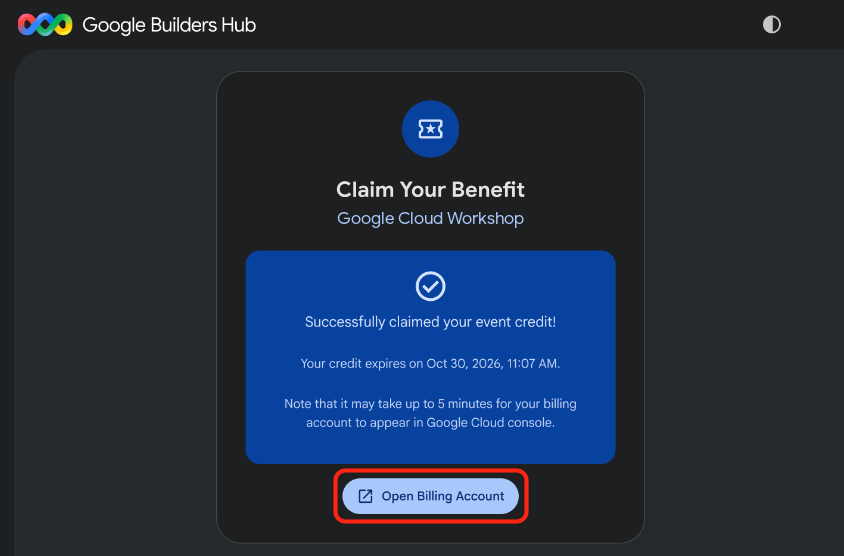
🔍 ตรวจสอบงานของคุณ
การจัดสรรบัญชีสำหรับการเรียกเก็บเงินอาจใช้เวลาสูงสุด 5 นาที หากต้องการยืนยันว่าเครดิตใช้งานได้ ให้ทำตามขั้นตอนต่อไปนี้
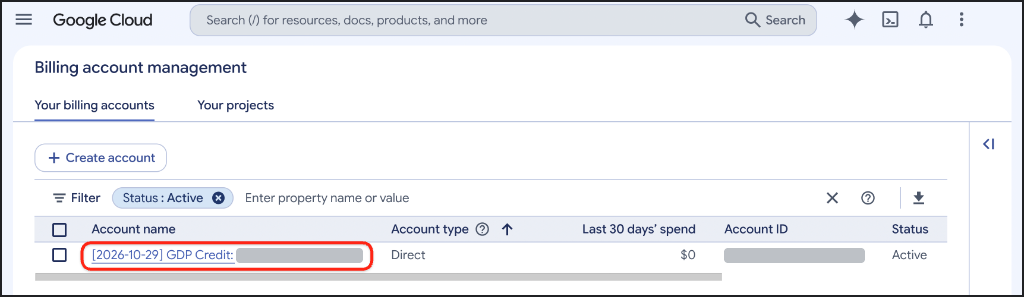
- หากหน้าการจัดการบัญชีสำหรับการเรียกเก็บเงินยังไม่ได้เปิดอยู่ ให้เปิดการเรียกเก็บเงินใน Cloud (หรือคัดลอก URL ลงในหน้าต่างที่ไม่ระบุตัวตน) ดังนี้
https://console.cloud.google.com/billing
- คลิกแท็บบัญชีสำหรับการเรียกเก็บเงินของคุณ แล้วรีเฟรชหน้าจนกว่าบัญชีที่มีเครดิต GDP จะแสดงสถานะใช้งานอยู่ในคอลัมน์สถานะ
3. สร้างโปรเจ็กต์ Google Cloud (ไม่บังคับ)
สร้างโปรเจ็กต์ที่อยู่ในระบบคลาวด์ของ Google โดยเฉพาะเพื่อแยกทรัพยากรทั้งหมดจาก Codelab นี้ไว้ต่างหาก เพื่อให้คุณนำทรัพยากรออกได้อย่างหมดจดเมื่อดำเนินการเสร็จสิ้น
หากต้องการสร้างโปรเจ็กต์ Google Cloud ให้ทำตามขั้นตอนต่อไปนี้
- เปิดสร้างโปรเจ็กต์ (หรือคัดลอก URL ลงในหน้าต่างที่ไม่ระบุตัวตน) ดังนี้
https://console.cloud.google.com/projectcreate
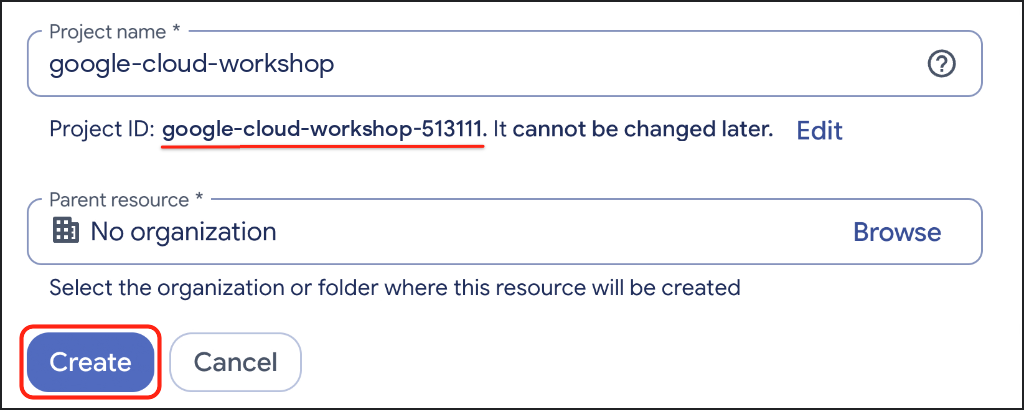
- ป้อนรายละเอียดโปรเจ็กต์ ดังนี้
- ชื่อโปรเจ็กต์: ป้อนชื่อที่สื่อความหมาย เช่น
google-cloud-workshop - บัญชีสำหรับการเรียกเก็บเงิน (หากแสดง): เลือกบัญชีเครดิต GDP (หรือบัญชีสำหรับการเรียกเก็บเงินที่ใช้งานอยู่)
- ทรัพยากรหลัก: เลือกไม่มีองค์กร (หรือเลือกองค์กรของคุณหากจำเป็น)
- ชื่อโปรเจ็กต์: ป้อนชื่อที่สื่อความหมาย เช่น
- จดรหัสโปรเจ็กต์ที่สร้างขึ้น แล้วคลิกสร้าง
🔍 ตรวจสอบงานของคุณ
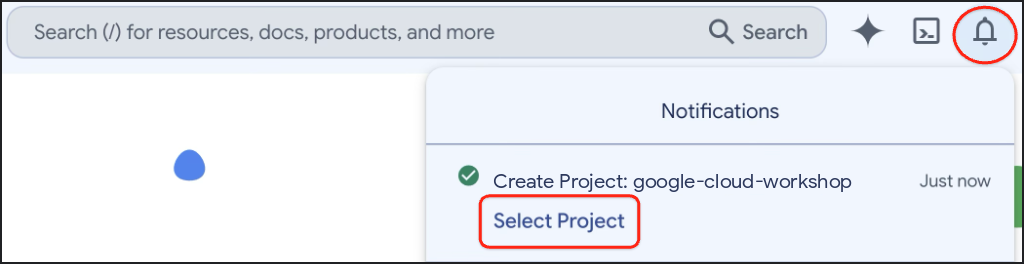
หลังจากสร้างโปรเจ็กต์เสร็จแล้ว ให้เปิดการแจ้งเตือนในแถบเครื่องมือของคอนโซล Google Cloud แล้วคลิกเลือกโปรเจ็กต์
4. ตั้งค่าสภาพแวดล้อม
ในส่วนนี้ คุณจะตั้งค่า Google Cloud Shell, เปิดใช้ Agent Platform API และติดตั้ง Agents CLI ด้วย uv
กำหนดค่า Cloud Shell
เปิดใช้งาน Cloud Shell
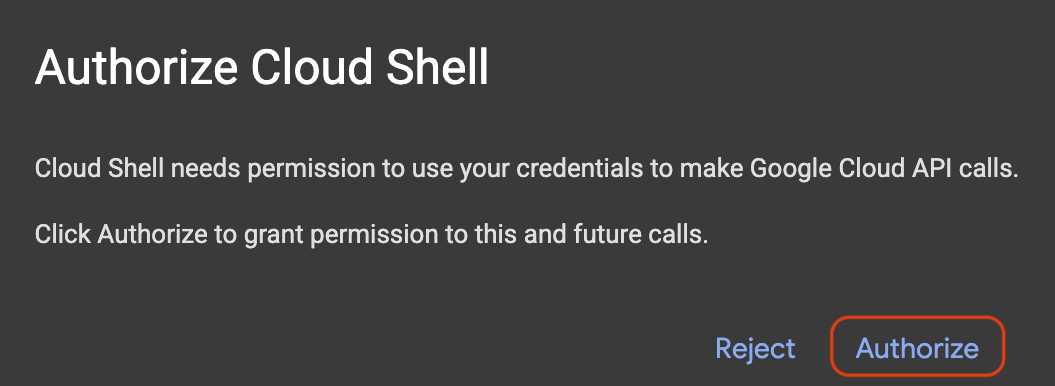
เปิด Google Cloud Shell โดยเปิดใช้ทั้งตัวแก้ไขโค้ดและมุมมองเทอร์มินัล (หรือคัดลอก URL ลงในหน้าต่างที่ไม่ระบุตัวตน) แล้วคลิกให้สิทธิ์หากได้รับข้อความแจ้ง
https://shell.cloud.google.com/?show=ide,terminal
ตั้งค่ารหัสโปรเจ็กต์ Google Cloud
คัดลอกและวางข้อมูลโค้ดต่อไปนี้ลงในเทอร์มินัล Cloud Shell ซึ่งจะแสดงเมนูที่มีหมายเลขกำกับของโปรเจ็กต์ที่อยู่ในระบบคลาวด์ของ Google ที่พร้อมใช้งาน พิมพ์หมายเลขข้างโปรเจ็กต์ (เช่น 1) แล้วกด Enter
unset CLOUDSDK_CORE_PROJECT
PS3="Select your project (e.g. 1): "
select PROJECT_ID in $(gcloud projects list --format="value(projectId)"); do
  [ -n "$PROJECT_ID" ] && gcloud config set project "$PROJECT_ID" && break
done
พรอมต์ที่คาดหวัง:
1) durian-sommelier-workshop-4210
2) my-cloud-project-8812
Select your project (e.g. 1): 1
Updated property [core/project].
[environment: untagged] Read more to tag: g.co/cloud/project-env-tag.
ตอนนี้คุณควรเห็นรหัสโปรเจ็กต์ที่เลือกไฮไลต์เป็นสีเหลืองในพรอมต์เทอร์มินัล Cloud Shell ดังนี้

เปิดใช้ Agent Platform API
เปิดใช้ Agent Platform API ซึ่ง Agent ของคุณใช้เพื่อเรียกใช้ Gemini โดยทำดังนี้
gcloud services enable aiplatform.googleapis.com
🔍 ตรวจสอบงานของคุณ
คุณควรเห็นเอาต์พุตที่คล้ายกับตัวอย่างต่อไปนี้
Operation "operations/acat.p2-..." finished successfully.
ติดตั้ง Agents CLI
ตรวจสอบว่า uv พร้อมใช้งานและโฟลเดอร์เครื่องมืออยู่ใน PATH โดยทำดังนี้
which uv || curl -LsSf https://astral.sh/uv/install.sh | sh
export PATH="$HOME/.local/bin:$PATH"
ติดตั้ง Agents CLI เป็นเครื่องมือ uv โดยทำดังนี้
uv tool install google-agents-cli==1.7.0
uv จะติดตั้งเครื่องมือแต่ละรายการในสภาพแวดล้อมที่แยกต่างหาก และเพิ่มเฉพาะคำสั่ง agents-cli ลงใน PATH เท่านั้น ดังนั้น Python ของระบบจึงไม่ได้รับผลกระทบ และคุณไม่จำเป็นต้องติดตั้ง ADK ด้วยตนเอง ทุกโปรเจ็กต์ที่ Agents CLI สร้างขึ้นจะมีสภาพแวดล้อมเสมือนของตัวเองพร้อมเวอร์ชัน ADK ที่เทมเพลตได้รับการทดสอบ
🔍 ตรวจสอบงานของคุณ
ตรวจสอบว่า CLI ของ Agent พร้อมใช้งานแล้ว โดยทำดังนี้
agents-cli --version
คุณควรเห็นเอาต์พุตที่คล้ายกับตัวอย่างต่อไปนี้
agents-cli, version 1.7.0
5. วางโครงสร้าง Agent การมองเห็นแบบหลายรูปแบบ
เริ่มต้นจากสิ่งเล็กๆ: ใช้ Agents CLI เพื่อสร้างโปรเจ็กต์ ADK จากนั้นเปลี่ยน Agent ตัวอย่างให้เป็นตัวแยกประเภทภาพทุเรียน
สร้างโครงสร้างโปรเจ็กต์
สร้างโปรเจ็กต์ durian-advisor --agent adk_python เลือกเทมเพลต Python ADK, --deployment-target cloud_run และ --region us-central1 เตรียมเทมเพลตสำหรับ Cloud Run, --prototype ข้ามการตั้งค่า CI/CD และ --yes ยอมรับค่าเริ่มต้น:
cd ~ && agents-cli create durian-advisor \
  --agent adk_python \
  --deployment-target cloud_run \
  --region us-central1 \
  --prototype \
  --yes
คุณควรเห็นเอาต์พุตที่คล้ายกับตัวอย่างต่อไปนี้
> Verifying GCP credentials...
> ✓ Connected to project: your-project-id

✅ Success! Your agent project is ready.
เปิดโปรเจ็กต์ใน Cloud Shell Editor การดำเนินการนี้จะโหลดหน้าต่างซ้ำและรีสตาร์ทเทอร์มินัล
cloudshell workspace ~/durian-advisor
ติดตั้งทรัพยากร Dependency ของโปรเจ็กต์ลงในโฟลเดอร์ .venv ของโปรเจ็กต์เอง โดยทำดังนี้
cd ~/durian-advisor && agents-cli install
ตรวจสอบไฟล์สภาพแวดล้อม
นอกจากนี้ Agents CLI ยังเขียนไฟล์ .env ที่บอกให้ ADK เรียกใช้ Gemini ผ่านโปรเจ็กต์ที่อยู่ในระบบคลาวด์ของ Google ด้วย
grep GOOGLE_ ~/durian-advisor/.env
คุณควรเห็นเอาต์พุตที่คล้ายกับตัวอย่างต่อไปนี้
GOOGLE_GENAI_USE_VERTEXAI=true
GOOGLE_CLOUD_PROJECT=your-project-id
GOOGLE_CLOUD_LOCATION=global
เก็บ GOOGLE_CLOUD_LOCATION=global ไว้ Gemini 3.8 Flash แสดงจากปลายทาง global ไม่ใช่จากปลายทางระดับภูมิภาค เช่น us-central1 แม้ว่าบริการ Cloud Run จะทำงานใน us-central1 ก็ตาม
หาก GOOGLE_CLOUD_PROJECT แสดง your-gcp-project-id แสดงว่า Agents CLI ตรวจไม่พบโปรเจ็กต์ของคุณ ตั้งค่าด้วย:
sed -i "s/your-gcp-project-id/$(gcloud config get-value project)/" ~/durian-advisor/.env
เขียนตัวแยกประเภทการมองเห็น
แต่ละสายพันธุ์มีลักษณะเฉพาะของเปลือกที่ Gemini สามารถระบุได้ในรูปภาพ ดังนี้
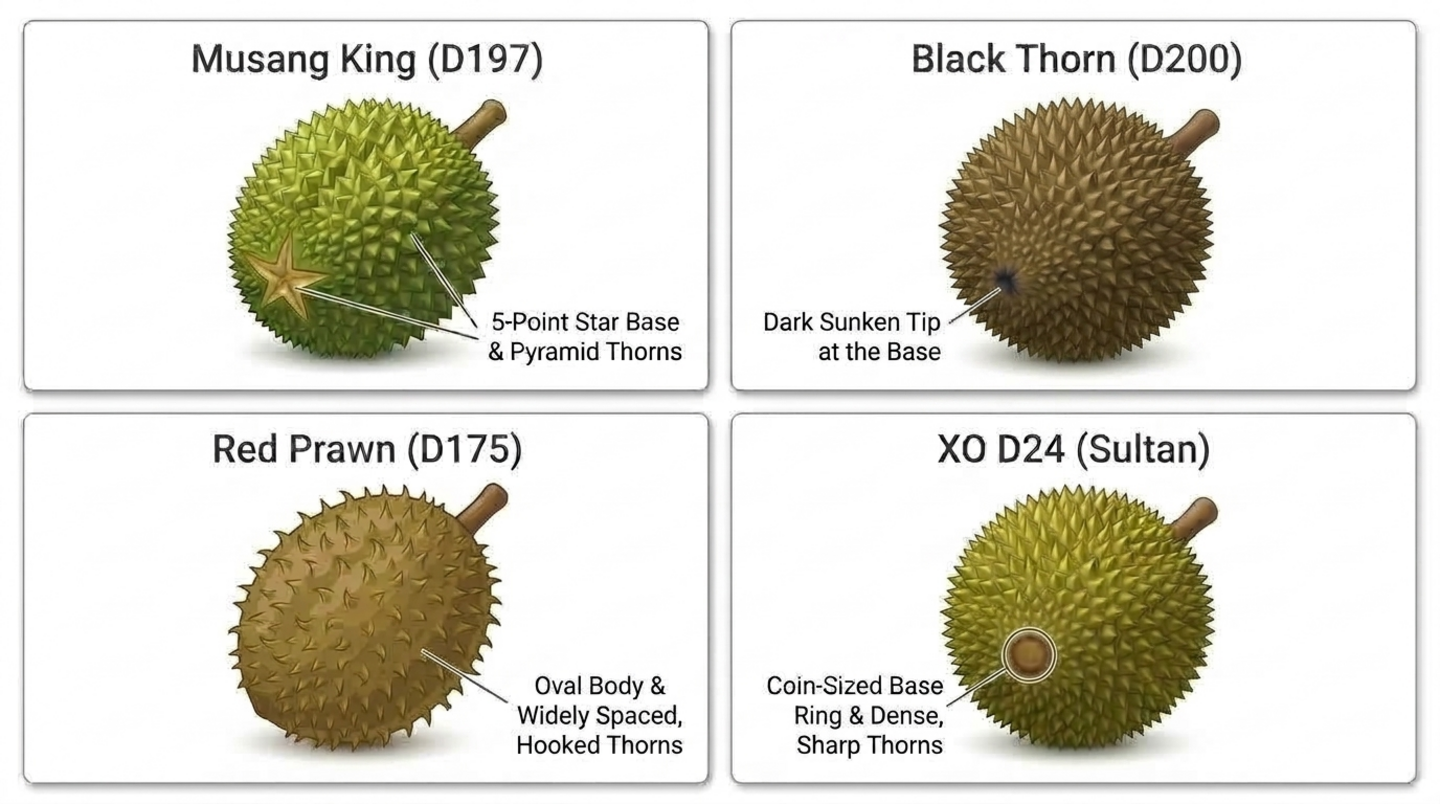
เปิด app/agent.py:
cloudshell edit ~/durian-advisor/app/agent.py
แทนที่เนื้อหาด้วยโค้ดต่อไปนี้
"""A single multimodal agent that inspects durian photos."""

from google.adk.agents import Agent
from google.adk.apps import App
from google.adk.models import Gemini
from google.genai import types

MODEL = "gemini-3.8-flash"

INSTRUCTION = """You are a durian visual classifier. Inspect the durian photo or shell description.
1. Base seam: a 5-point star means Musang King (D197). A dark sunken tip means Black Thorn (D200). A coin-sized brown ring means D24. An oval body with widely spaced, hooked thorns means Red Prawn (D175).
2. Stem: plump, moist, and greenish means it fell within about 12 hours. Dry and shriveled means it is days old.
3. Husk: closed seams mean natural ripening. Wide splits or mold mean it is past its best.
Give the likely cultivar and a visual freshness score from 1 to 10. Then list what a photo cannot tell you: the aroma, the tap sound, the thorn springiness, and whether the buyer will enjoy the taste."""

root_agent = Agent(
    name="durian_advisor",
    model=Gemini(model=MODEL, retry_options=types.HttpRetryOptions(attempts=3)),
    description="Classifies durian cultivars and visual freshness from photos.",
    instruction=INSTRUCTION,
)

app = App(root_agent=root_agent, name="app")
รายละเอียดที่สำคัญมีดังนี้
MODELเป็นที่เดียวที่รหัสโมเดลจะปรากฏ Agent ทุกตัวที่คุณเพิ่มในภายหลังจะรับค่านี้มา ดังนั้นการเปลี่ยนโมเดลจึงเป็นการเปลี่ยนแปลงเพียงบรรทัดเดียวretry_optionsจะลองพยายามแก้ไขข้อผิดพลาดชั่วคราว เช่น การจำกัดอัตราคำขอ สูงสุด 3 ครั้งapp = App(...)จะรวม Agent สำหรับทั้ง Playground และเซิร์ฟเวอร์ Cloud Run เก็บชื่อแอปappและชื่อ Agentdurian_advisorซึ่งตรงกับเซิร์ฟเวอร์ที่สร้างขึ้นและagents-cli-manifest.yaml
ทดสอบ Agent ใน Playground
เริ่มใช้ Playground ของ ADK โดยทำดังนี้
cd ~/durian-advisor && agents-cli playground
คุณควรเห็นเอาต์พุตที่คล้ายกับตัวอย่างต่อไปนี้
INFO: Uvicorn running on http://127.0.0.1:8080 (Press CTRL+C to quit)
คลิกตัวอย่างเว็บในแถบเครื่องมือ Cloud Shell แล้วเลือกแสดงตัวอย่างในพอร์ต 8080 หาก ADK Dev UI ขอให้คุณเลือก Agent ให้เลือก app จากนั้นส่งพรอมต์นี้ หรือแนบรูปภาพทุเรียนของคุณเองด้วยปุ่มอัปโหลด
I'm at a stall looking at a round durian with pyramid-shaped thorns and a 5-point star at the base. The stem is green and moist. What cultivar is this, and will it taste sweet?
🔍 ตรวจสอบงานของคุณ
ตัวแทนระบุว่าเป็นมูซังคิง (D197) และให้คะแนนความสดสูงเนื่องจากก้านสีเขียวชุ่มชื้น จากนั้นจะยอมรับสิ่งที่รูปภาพบอกไม่ได้ เช่น กลิ่น เสียงเคาะ ความยืดหยุ่นของหนาม และคุณจะชอบรสชาติหรือไม่
กด Ctrl + C ในเทอร์มินัลเพื่อหยุด Playground ก่อนดำเนินการต่อ
6. เพิ่มประสาทสัมผัสของมนุษย์และความทรงจำเกี่ยวกับรสชาติ
กล้องไม่สามารถดมกลิ่น ได้ยิน หรือสัมผัสได้ ดังนั้นคุณจะต้องสร้างเครื่องมือที่ขอให้ผู้ซื้อทำสิ่งเหล่านั้น นอกจากนี้ คุณยังจะให้ Agent จดจำรสนิยมของผู้ซื้อแต่ละรายในระยะยาวด้วย ในขั้นตอนนี้ คุณจะเขียนเครื่องมือ และในขั้นตอนถัดไป คุณจะเชื่อมต่อเครื่องมือเหล่านั้นเข้ากับ Agent
เพิ่มแคตตาล็อกพันธุ์พืช
สร้าง app/durian_data.py:
cloudshell edit ~/durian-advisor/app/durian_data.py
วางแคตตาล็อกอ้างอิงนี้ การเก็บข้อมูลไว้ในโมดูลของตัวเองจะช่วยให้โค้ดของ Agent สั้นลง
"""Reference catalog of durian cultivars."""

CULTIVAR_CATALOG = {
    "musang_king": {
        "code": "D197",
        "name": "Musang King (Mao Shan Wang)",
        "visual_markers": "5-point star seam at the base, pyramid-shaped thorns",
        "flavor": "rich, bittersweet, buttery custard",
        "bitterness": "medium",
    },
    "black_thorn": {
        "code": "D200",
        "name": "Black Thorn (Ochee)",
        "visual_markers": "Dark sunken tip at the base, round pumpkin-like body",
        "flavor": "sweet, creamy, slightly winey",
        "bitterness": "low",
    },
    "red_prawn": {
        "code": "D175",
        "name": "Red Prawn (Udang Merah)",
        "visual_markers": "Oval body, widely spaced and slightly hooked thorns",
        "flavor": "sweet, floral, soft and sticky",
        "bitterness": "none",
    },
    "xo_d24": {
        "code": "D24",
        "name": "XO D24 (Sultan, old tree)",
        "visual_markers": "Coin-sized brown ring at the base, dense sharp thorns",
        "flavor": "intense, bitter, with a boozy finish",
        "bitterness": "high",
    },
}
เพิ่มเครื่องมือทางประสาทสัมผัส
สร้าง app/sensory_tools.py:
cloudshell edit ~/durian-advisor/app/sensory_tools.py
วางโค้ดต่อไปนี้
"""Tools for cultivar lookup and human-in-the-loop sensory checks."""

from typing import Any, Literal

from .durian_data import CULTIVAR_CATALOG

AROMA_POINTS = {"sweet_fragrant": 4, "boozy_fermented": 3, "faint_grassy": 0, "sour_rotten": 0}
TAP_POINTS = {"hollow": 3, "solid": 0}
THORN_POINTS = {"springy": 3, "rigid": 0}


def get_cultivar_profile(cultivar_key: str) -> dict[str, Any]:
    """Looks up the visual markers, flavor, and bitterness of a durian cultivar.

    Args:
        cultivar_key: One of 'musang_king', 'black_thorn', 'red_prawn', or 'xo_d24'.
    """
    key = cultivar_key.strip().lower().replace(" ", "_").replace("-", "_")
    if key not in CULTIVAR_CATALOG:
        return {"status": "NOT_FOUND", "supported": list(CULTIVAR_CATALOG)}
    return {"status": "OK", "cultivar": CULTIVAR_CATALOG[key]}


def evaluate_human_sensory_clues(
    aroma: Literal["sweet_fragrant", "boozy_fermented", "faint_grassy", "sour_rotten"],
    tap_sound: Literal["hollow", "solid"],
    thorn_feel: Literal["springy", "rigid"],
) -> dict[str, Any]:
    """Scores the ripeness clues that only a human buyer can smell, hear, and feel.

    Args:
        aroma: What the buyer smells at the seam of the husk.
        tap_sound: What the buyer hears when tapping the husk.
        thorn_feel: How two thorns feel when the buyer presses them together.
    """
    score = AROMA_POINTS[aroma] + TAP_POINTS[tap_sound] + THORN_POINTS[thorn_feel]
    if aroma == "sour_rotten":
        verdict = "SPOILED"
    elif score >= 7:
        verdict = "RIPE"
    elif score >= 4:
        verdict = "NOT_QUITE_READY"
    else:
        verdict = "UNRIPE"
    return {"status": "OK", "ripeness_score": score, "max_score": 10, "verdict": verdict}
วิธีการทำงานของเครื่องมือเหล่านี้
- ADK จะเปลี่ยนแต่ละฟังก์ชันให้เป็นเครื่องมือที่โมเดลสามารถเรียกใช้ได้ Docstring จะกลายเป็นคำอธิบายเครื่องมือ และส่วน
Argsจะอธิบายพารามิเตอร์แต่ละรายการ - คำแนะนำประเภท
Literal[...]จะกลายเป็นตัวเลือกที่แน่นอนในสคีมาเครื่องมือ ดังนั้น Gemini จึงต้องแมป "มีกลิ่นแอลกอฮอล์เล็กน้อย" กับค่าที่อนุญาตเพียงค่าเดียว เช่นboozy_fermented get_cultivar_profileแสดงสถานะNOT_FOUNDที่ชัดเจนพร้อมคีย์ที่รองรับแทนการสร้างคีย์ขึ้นมาเอง
เพิ่มเครื่องมือ Palate Memory
สร้าง app/memory_tools.py:
cloudshell edit ~/durian-advisor/app/memory_tools.py
วางโค้ดต่อไปนี้
"""Tool that remembers each buyer's durian palate across sessions."""

from typing import Any, Literal

from google.adk.tools import ToolContext


def save_palate_preference(
    favorite_flavors: str,
    bitterness_tolerance: Literal["none", "low", "medium", "high"],
    tool_context: ToolContext,
) -> dict[str, Any]:
    """Saves the buyer's durian taste preferences to their long-term profile.

    Args:
        favorite_flavors: Flavors and textures the buyer enjoys, such as
            'sweet, creamy custard'.
        bitterness_tolerance: How much bitterness the buyer enjoys.
    """
    profile = {
        "favorite_flavors": favorite_flavors,
        "bitterness_tolerance": bitterness_tolerance,
    }
    # The "user:" prefix scopes this key to the buyer, so it follows them
    # into every future session of this app.
    tool_context.state["user:palate_profile"] = profile
    return {"status": "SAVED", "palate_profile": profile}
วิธีการทำงานของความทรงจำเกี่ยวกับรสชาติ
- ADK จะส่ง
tool_contextโดยอัตโนมัติและซ่อนจากโมเดล ดังนั้น Gemini จะเห็นเฉพาะพารามิเตอร์รสชาติ 2 รายการเท่านั้น - คำนำหน้า
user:จะกำหนดขอบเขตคีย์สถานะให้กับผู้ใช้แทนเซสชันปัจจุบัน ดังนั้นโปรไฟล์จะติดตามผู้ซื้อไปยังการสนทนาใหม่ทุกครั้ง - คุณไม่จำเป็นต้องใช้เครื่องมือ "get" แยกต่างหาก Agent จะอ่านโปรไฟล์ลงในวิธีการโดยตรงด้วยตัวยึดตำแหน่ง
{user:palate_profile?}?จะทำให้ตัวยึดตำแหน่งว่างเปล่าเมื่อยังไม่มีโปรไฟล์ แทนที่จะแสดงข้อผิดพลาด
🔍 ตรวจสอบงานของคุณ
เลือกทุเรียนที่มีกลิ่นคล้ายแอลกอฮอล์ เคาะแล้วเสียงกลวง และมีหนามที่ยืดหยุ่น
cd ~/durian-advisor && uv run python -c "from app.sensory_tools import evaluate_human_sensory_clues as score; print(score('boozy_fermented', 'hollow', 'springy'))"
คุณควรเห็นเอาต์พุตที่คล้ายกับตัวอย่างต่อไปนี้
{'status': 'OK', 'ripeness_score': 9, 'max_score': 10, 'verdict': 'RIPE'}
7. ประสานงานกับ Agent เฉพาะทาง
เอเจนต์เดียวที่ต้องจัดการกฎการมองเห็น การให้คะแนนทางประสาทสัมผัส และการจับคู่รสชาติในพรอมต์เดียวมักจะสับสน แต่คุณจะมอบหมายงานแต่ละอย่างให้ผู้เชี่ยวชาญเฉพาะด้านและให้ผู้ประสานงานรวมคำตอบเข้าด้วยกันแทน ดังนี้
vision_inspector_agentจะอ่านสายพันธุ์และความสดใหม่จากรูปภาพและแสดงผลเป็นรายงานที่มีโครงสร้างsensory_sommelier_agentจะให้คะแนนสิ่งที่ผู้ซื้อได้กลิ่น ได้ยิน และรู้สึก รวมถึงตรวจสอบสายพันธุ์เทียบกับรสชาติที่ผู้ซื้อชอบdurian_advisorจะพูดคุยกับผู้ซื้อ บันทึกความชอบของผู้ซื้อ โทรหาผู้เชี่ยวชาญแต่ละคน และเขียนคำตัดสินขั้นสุดท้าย
สร้างเครื่องมือตรวจสอบการมองเห็น
สร้าง app/vision_agent.py:
cloudshell edit ~/durian-advisor/app/vision_agent.py
วางโค้ดต่อไปนี้
"""Vision inspector: reads the cultivar and freshness from a durian photo."""

from google.adk.agents import Agent
from pydantic import BaseModel, Field


class VisionReport(BaseModel):
    cultivar_key: str = Field(
        description="musang_king, black_thorn, red_prawn, xo_d24, or unknown"
    )
    visual_freshness: int = Field(description="1 (stale) to 10 (freshly fallen)")
    evidence: str = Field(description="The visual markers behind your answer")


vision_inspector_agent = Agent(
    name="vision_inspector_agent",
    description="Identifies a durian's cultivar and visual freshness from the buyer's photo or shell description.",
    mode="single_turn",
    # Specialists only see their tool-call input by default. Opt in to the
    # conversation history so this agent can see the uploaded photo.
    include_contents="default",
    # Report back to the coordinator instead of taking over the conversation.
    disallow_transfer_to_parent=True,
    disallow_transfer_to_peers=True,
    output_schema=VisionReport,
    instruction="""You are a durian vision inspector. Examine the durian photo or shell description in the conversation.
Cultivar markers:
- 5-point star seam at the base: musang_king
- Dark sunken tip at the base: black_thorn
- Oval body with widely spaced, slightly hooked thorns: red_prawn
- Coin-sized brown ring at the base and dense, sharp thorns: xo_d24
Freshness: a plump, moist, greenish stem and closed seams score high. A dry, shriveled stem or a split, moldy husk scores low.
If the markers are unclear, use 'unknown'.""",
)
output_schema=VisionReportทำให้ผู้เชี่ยวชาญแสดงผล Structured Data ที่ผู้ประสานงานสามารถใช้ได้include_contents="default"อนุญาตให้ผู้เชี่ยวชาญรายนี้ดูการสนทนา รวมถึงรูปภาพที่อัปโหลด หากไม่มีข้อมูลนี้ ผู้เชี่ยวชาญแบบเทิร์นเดียวจะเห็นเฉพาะคำขอที่ผู้ประสานงานส่งมาdisallow_transfer_to_parentและdisallow_transfer_to_peersนำเครื่องมือtransfer_to_agentออก ซึ่ง ADK จะมอบให้แก่ Agent ย่อย นี้ ผู้เชี่ยวชาญที่เห็นการสนทนาทั้งหมดอาจต้องการส่งแชทกลับไปยังผู้ประสานงานแทนที่จะส่งรายงานกลับ
สร้างผู้เชี่ยวชาญด้านประสาทสัมผัส
สร้าง app/sensory_agent.py:
cloudshell edit ~/durian-advisor/app/sensory_agent.py
วางโค้ดต่อไปนี้
"""Sensory sommelier: scores the buyer's senses and checks palate fit."""

from google.adk.agents import Agent
from pydantic import BaseModel, Field

from .sensory_tools import evaluate_human_sensory_clues, get_cultivar_profile


class SensoryClues(BaseModel):
    cultivar_key: str = Field(description="Cultivar from the vision inspector")
    aroma: str = Field(description="What the buyer smelled at the seam")
    tap_sound: str = Field(description="What the buyer heard when tapping the husk")
    thorn_feel: str = Field(description="How the thorns felt when pressed together")


sensory_sommelier_agent = Agent(
    name="sensory_sommelier_agent",
    description="Scores the smell, sound, and touch clues the buyer reports, and checks the cultivar against their palate.",
    mode="single_turn",
    # Report back to the coordinator instead of taking over the conversation.
    disallow_transfer_to_parent=True,
    disallow_transfer_to_peers=True,
    input_schema=SensoryClues,
    instruction="""You are a durian sensory sommelier.
Buyer palate profile: {user:palate_profile?}

1. Call evaluate_human_sensory_clues with the buyer's aroma, tap sound, and thorn feel.
2. Call get_cultivar_profile for the cultivar.
3. Compare the cultivar's bitterness with the buyer's bitterness tolerance.
Report the ripeness verdict, the palate fit, and one sentence of advice.""",
    tools=[evaluate_human_sensory_clues, get_cultivar_profile],
)
input_schema=SensoryCluesกำหนดสิ่งที่ผู้ประสานงานต้องส่งมา ซึ่งได้แก่ พันธุ์พืชและรายงานทางประสาทสัมผัส 3 ฉบับของผู้ซื้อ โดยใช้คำพูดของตนเอง ผู้เชี่ยวชาญจะแมปคำเหล่านั้นกับค่าที่อนุญาตของเครื่องมือ{user:palate_profile?}จะใส่จานสีที่ผู้ซื้อบันทึกไว้ลงในคำสั่ง เพื่อให้ผู้เชี่ยวชาญตัดสินความเหมาะสมได้โดยไม่ต้องค้นหาจากความทรงจำ- ผู้เชี่ยวชาญทั้ง 2 คนไม่ได้ตั้งค่า
modelทั้ง 2 รายการจะรับค่าMODELของผู้ประสานงาน - ผู้เชี่ยวชาญทั้ง 2 คนใช้ธงการโอน 2 อันเดียวกัน ดังนั้นแต่ละคนจึงรายงานกลับไปยังผู้ประสานงานเสมอ
ต่อสายไฟเข้ากับตัวประสาน
เปิด app/agent.py:
cloudshell edit ~/durian-advisor/app/agent.py
แทนที่เนื้อหาด้วยผู้ประสานงานดังนี้
"""Durian advisor: a concierge that coordinates vision and sensory specialists."""

from google.adk.agents import Agent
from google.adk.apps import App
from google.adk.models import Gemini
from google.genai import types

from .memory_tools import save_palate_preference
from .sensory_agent import sensory_sommelier_agent
from .vision_agent import vision_inspector_agent

MODEL = "gemini-3.8-flash"

root_agent = Agent(
    name="durian_advisor",
    model=Gemini(model=MODEL, retry_options=types.HttpRetryOptions(attempts=3)),
    description="Durian concierge that combines what the camera sees with what the buyer senses.",
    instruction="""You are a friendly durian concierge helping a buyer at a fruit stall.
Buyer palate profile: {user:palate_profile?}

1. When the buyer shares taste preferences, call save_palate_preference.
2. When the buyer shows or describes a durian, call vision_inspector_agent.
3. A camera cannot smell, hear, or feel. Unless the buyer already reported the seam aroma, tap sound, and thorn feel, ask them to check. Then call sensory_sommelier_agent.
4. Call one specialist at a time. Finish with ONE verdict covering the cultivar, ripeness, and palate fit. If the durian does not suit their palate, suggest a cultivar that does.""",
    tools=[save_palate_preference],
    sub_agents=[vision_inspector_agent, sensory_sommelier_agent],
)

app = App(root_agent=root_agent, name="app")
เนื่องจากผู้เชี่ยวชาญทั้ง 2 คนใช้ mode="single_turn" ADK จึงให้เครื่องมือเพิ่มเติม 2 รายการแก่ผู้ประสานงาน ซึ่งมีชื่อว่า vision_inspector_agent และ sensory_sommelier_agent คำสั่งจะอ้างอิงถึงตัวแปรเหล่านั้นด้วยชื่อดังกล่าว
ทดสอบ Coordinator ใน Playground
เริ่ม Playground อีกครั้งโดยทำดังนี้
cd ~/durian-advisor && agents-cli playground
เปิดตัวอย่างเว็บในพอร์ต 8080 และสนทนาสั้นๆ กับ Agent
สอนให้ AI รู้จักรสชาติที่คุณชอบ:
Hi! Please remember my taste: I love sweet, creamy custard durians and I can't stand bitterness.
เปิดแท็บสถานะ คุณควรเห็นโปรไฟล์ที่บันทึกไว้ซึ่งมีลักษณะคล้ายกับตัวอย่างต่อไปนี้
{
  "user:palate_profile": {
    "favorite_flavors": "sweet, creamy custard",
    "bitterness_tolerance": "none"
  }
}
แสดงภาพทุเรียน (อธิบายหรือแนบรูปภาพ)
The vendor is showing me a round durian with a coin-sized brown ring at the base and dense, sharp thorns. The stem is green and moist. Should I buy it?
ผู้ประสานงานจะเรียกใช้ vision_inspector_agent ซึ่งระบุ XO D24 จากนั้นระบบจะขอให้คุณดมกลิ่นรอยต่อ แตะเปลือก และกดหนาม 2 อันเข้าด้วยกัน
รายงานสิ่งที่คุณรู้สึก:
It smells a bit boozy, the knock sounds hollow, and the thorns spring back when I press them.
เริ่มต้นใหม่: คลิกเซสชันใหม่ แล้วถามว่า
Which durian should I pick today?
🔍 ตรวจสอบงานของคุณ
- หลังจากที่คุณรายงานความรู้สึกแล้ว ผู้ประสานงานจะโทรหา
sensory_sommelier_agentและให้คำตัดสินหนึ่งข้อ นั่นคือ XO D24 สุกแล้ว (9 เต็ม 10) แต่ความขมที่สูงนั้นไม่ถูกปากคุณ ดังนั้นให้ขอ Red Prawn (D175) หรือ Black Thorn (D200) แทน - ในแท็บกิจกรรม คุณจะเห็น
durian_advisorโทรหาผู้เชี่ยวชาญแต่ละคน และsensory_sommelier_agentโทรหาevaluate_human_sensory_cluesและget_cultivar_profile - ในเซสชันใหม่ Agent รู้จักรสชาติที่คุณชอบอยู่แล้ว จึงแนะนำสายพันธุ์ที่มีรสหวานและไม่ขมโดยไม่ต้องถามอีก
กด Ctrl + C ในเทอร์มินัลเพื่อหยุด Playground
8. ทำให้ใช้งานได้ด้วย Antigravity (ไม่บังคับ)
คุณสร้างและทดสอบ Agent ด้วยตนเอง ตอนนี้คุณจะให้ Antigravity CLI (agy) ซึ่งเป็น AI Agent สำหรับการเขียนโค้ดของ Google สำหรับเทอร์มินัลเป็นผู้ทำให้ใช้งานได้ ทักษะ Agents CLI จะสอน Antigravity เกี่ยวกับวิธีทำให้ Agent ของ ADK ใช้งานได้อย่างถูกต้อง
เปิดใช้ API การติดตั้งใช้งาน
เปิดใช้ Cloud Run, Cloud Build และ Artifact Registry API ซึ่ง Agents CLI ใช้เพื่อสร้างและโฮสต์ Agent ของคุณ
gcloud services enable \
  run.googleapis.com \
  cloudbuild.googleapis.com \
  artifactregistry.googleapis.com
คุณควรเห็นเอาต์พุตที่คล้ายกับตัวอย่างต่อไปนี้
Operation "operations/acat.p2-..." finished successfully.
ติดตั้งทักษะ Agents CLI
ติดตั้งทักษะ CLI ของ Agents ทั้ง 7 รายการลงในโฟลเดอร์โปรเจ็กต์ ซึ่ง Antigravity จะค้นพบโดยอัตโนมัติ
cd ~/durian-advisor && agents-cli setup --workspace
🔍 ตรวจสอบงานของคุณ
ls -1 ~/durian-advisor/.agents/skills
คุณควรเห็นเอาต์พุตที่คล้ายกับตัวอย่างต่อไปนี้
google-agents-cli-adk-code
google-agents-cli-deploy
google-agents-cli-eval
google-agents-cli-observability
google-agents-cli-publish
google-agents-cli-scaffold
google-agents-cli-workflow
เริ่ม Antigravity CLI
Antigravity CLI ติดตั้งมาล่วงหน้าใน Cloud Shell เริ่มจากโฟลเดอร์โปรเจ็กต์ของคุณ
cd ~/durian-advisor && agy --dangerously-skip-permissions
เมื่อเรียกใช้ครั้งแรก Antigravity จะขอให้คุณลงชื่อเข้าใช้ด้วยบัญชี Google, เลือกธีมสี, ยอมรับข้อกำหนดในการให้บริการ และเชื่อถือโฟลเดอร์ปัจจุบัน
ขอให้ Antigravity ติดตั้งใช้งาน
วางพรอมต์นี้ลงใน Antigravity
Use the google-agents-cli-deploy skill to deploy this ADK agent to Cloud Run in us-central1 as a private service. Keep GOOGLE_CLOUD_LOCATION=global so Gemini keeps working, save the exact service URL to .env as AGENT_BASE_URL, and smoke-test the deployed agent with agents-cli run.
Antigravity จะอ่านทักษะและอาจทำการทดสอบของโปรเจ็กต์ก่อน จากนั้นจะเรียกใช้ agents-cli deploy ซึ่งจะสร้างคอนเทนเนอร์ด้วย Cloud Build และติดตั้งใช้งานบริการ durian-advisor รวมถึงส่งข้อความทดสอบไปยังบริการที่ใช้จริง การวิ่งทั้งหมดใช้เวลาประมาณ 5-8 นาที
เมื่อ Antigravity ทำงานเสร็จแล้ว ให้ออกโดยกด Ctrl + D 2 ครั้ง
🔍 ตรวจสอบงานของคุณ
ส่งข้อความไปยัง Agent ที่ติดตั้งใช้งานโดยใช้ URL ที่ Antigravity บันทึกไว้
cd ~/durian-advisor && source .env && agents-cli run --url "$AGENT_BASE_URL" --mode adk "Which durian suits a beginner?"
คุณควรเห็นเอาต์พุตที่คล้ายกับตัวอย่างต่อไปนี้
Querying remote agent: https://durian-advisor-123456789012.us-central1.run.app (mode: adk)
[user]: Which durian suits a beginner?
[durian_advisor]: For beginners, you want a durian that is sweet, creamy, and gentle on the palate, with little to no bitterness...
ตอนนี้ให้ยืนยันว่าบริการปฏิเสธการโทรที่ไม่มีโทเค็น โดยทำดังนี้
curl -s -o /dev/null -w "%{http_code}\n" "$AGENT_BASE_URL"
คุณควรเห็นเอาต์พุตที่คล้ายกับตัวอย่างต่อไปนี้
403
9. เขียนโค้ดแชทบ็อตบนเว็บแบบ Vibe Coding (ไม่บังคับ)
Agent ของคุณพร้อมใช้งานแล้วแต่เป็นแบบส่วนตัว ตอนนี้คุณจะกลับมาสนทนากับ Antigravity ซึ่งรู้จัก Agent, คีย์สถานะ และ URL ของ Agent อยู่แล้ว และขอให้สร้างและติดตั้งใช้งานแชทบ็อตบนเว็บสำหรับผู้ซื้อทุเรียน
กลับมาใช้ Antigravity
cd ~/durian-advisor && agy --dangerously-skip-permissions
ใน Antigravity ให้เรียกใช้คำสั่งเครื่องหมายทับต่อไปนี้ แล้วเลือกการสนทนาการทำให้ใช้งานได้จากรายการ
/resume
ขอให้ Antigravity สร้างแชทบ็อต
วางพรอมต์นี้
Build a mobile-friendly "Durian Sommelier" web chatbot in a new web/ folder that talks to our deployed agent at AGENT_BASE_URL (ADK app name "app").

- Add palate quick-set buttons, a photo upload, and one-tap sensory chips: Smells sweet, Smells boozy, Hollow knock, Solid knock, Thorns spring back, Thorns feel stiff.
- Use a small FastAPI server that proxies chat requests to the agent with a Google ID token, because the agent service is private.
- Show only durian_advisor's replies in the chat, not the specialists' intermediate output.
- Keep a stable user ID per browser and reuse one ADK session, creating a new one if it is missing.

Deploy it to Cloud Run as durian-sommelier-web in us-central1 with public access. Run it as a new service account named durian-sommelier-web that can invoke durian-advisor, and print the URL.
Antigravity เขียนแอป สร้างบัญชีบริการ ให้สิทธิ์บทบาท Cloud Run Invoker ใน durian-advisor และทำให้แอปใช้งานได้ด้วย Cloud Build โดยปกติแล้ว ระบบจะทดสอบปลายทางของแชทก่อนที่จะเสร็จสิ้น การวิ่งทั้งหมดใช้เวลาประมาณ 10 นาที เมื่อพิมพ์ URL แล้ว ให้ออกโดยกด Ctrl + D 2 ครั้ง
🔍 ตรวจสอบงานของคุณ
เปิด URL ของ https://durian-sommelier-web-....run.app ที่ Antigravity พิมพ์ แล้วทำดังนี้
- แตะปุ่มรสชาติ เช่น หวานและครีมมี่ ตัวแทนยืนยันว่าได้บันทึกจานสีของคุณแล้ว
- อัปโหลดรูปภาพทุเรียนหรือพิมพ์คำอธิบายสั้นๆ เกี่ยวกับเปลือก เอเจนต์จะระบุสายพันธุ์และขอให้คุณตรวจสอบทางประสาทสัมผัส
- แตะชิปประสาทสัมผัสที่ตรงกับทุเรียนของคุณ ตัวแทนจะตอบกลับด้วยคำตัดสินเดียวที่ครอบคลุมทั้งความสุกและรสชาติที่เหมาะสม
10. ล้างข้อมูล
ลบทรัพยากรที่คุณสร้างขึ้นเพื่อหยุดการเรียกเก็บเงิน
ลบบริการ Cloud Run
วิธีลบแชทบ็อตบนเว็บ
gcloud run services delete durian-sommelier-web --region us-central1 --quiet
ลบบริการ Agent โดยทำดังนี้
gcloud run services delete durian-advisor --region us-central1 --quiet
ลบบัญชีบริการ
ลบบัญชีบริการที่แชทบ็อตบนเว็บใช้เรียกใช้ โดยทำดังนี้
gcloud iam service-accounts delete "durian-sommelier-web@$(gcloud config get-value project).iam.gserviceaccount.com" --quiet
ลบอิมเมจคอนเทนเนอร์
การติดตั้งใช้งานแหล่งที่มาของ Cloud Run จะพุชอิมเมจคอนเทนเนอร์ของแต่ละบริการไปยังที่เก็บ Artifact Registry ชื่อ cloud-run-source-deploy ซึ่งการติดตั้งใช้งานอื่นๆ ในโปรเจ็กต์สามารถแชร์ได้ ลบเฉพาะรูปภาพ 2 รูปของ Codelab นี้และเก็บที่เก็บไว้
ลบรูปภาพของ Agent โดยทำดังนี้
gcloud artifacts packages delete durian-advisor --repository cloud-run-source-deploy --location us-central1 --quiet
วิธีลบรูปภาพของแชทบ็อตบนเว็บ
gcloud artifacts packages delete durian-sommelier-web --repository cloud-run-source-deploy --location us-central1 --quiet
🔍 ตรวจสอบงานของคุณ
gcloud run services list --region us-central1
คุณควรเห็นเอาต์พุตที่คล้ายกับตัวอย่างต่อไปนี้
Listed 0 items.
ลบไฟล์ในเครื่อง
นำโฟลเดอร์โปรเจ็กต์ออก รวมถึงทักษะและสภาพแวดล้อมเสมือนของโปรเจ็กต์
rm -rf ~/durian-advisor
ถอนการติดตั้ง Agents CLI (ไม่บังคับ) โดยทำดังนี้
uv tool uninstall google-agents-cli
ลบโปรเจ็กต์ Google Cloud ทั้งโปรเจ็กต์ (ไม่บังคับ)
PROJECT_ID=$(gcloud config get-value project)
gcloud projects delete "$PROJECT_ID" --quiet
11. ขอแสดงความยินดี
ยินดีด้วย คุณได้สร้างและทดสอบระบบ Multi-Agent แบบหลายรูปแบบชื่อ Durian Sommelier ด้วย ADK และ Agents CLI แล้ว หากทำตามขั้นตอนที่ไม่บังคับ คุณยังได้ติดตั้งใช้งานใน Cloud Run ด้วย Antigravity CLI ด้วย
สิ่งที่คุณทำสำเร็จ
- สร้างโครงร่างโปรเจ็กต์ ADK ด้วย
agents-cli createและสร้าง Agent การมองเห็นหลายรูปแบบด้วยการตั้งค่าMODELเพียงรายการเดียว - สร้างเครื่องมือแบบมีมนุษย์ร่วมสำหรับกลิ่น เสียง และการสัมผัส รวมถึงความทรงจำเกี่ยวกับรสชาติที่จัดเก็บไว้ในสถานะ ADK ที่กำหนดขอบเขตเป็น
user: - แบ่ง Agent ออกเป็นผู้ประสานงาน
durian_advisor1 คนและผู้เชี่ยวชาญsingle_turn2 คนที่ Agent เรียกใช้เหมือนเครื่องมือ - (ไม่บังคับ) ใช้ Antigravity CLI กับทักษะ Agents CLI เพื่อทำให้ Agent และแชทบ็อตบนเว็บใช้งานได้ใน Cloud Run
ขั้นตอนถัดไป
- หากคุณข้ามขั้นตอนดังกล่าว ให้กลับไปที่ขั้นตอน Antigravity ที่ไม่บังคับเพื่อทำให้ Agent และแชทบ็อตบนเว็บใช้งานได้ใน Cloud Run
- ทำให้ความทรงจำเกี่ยวกับรสชาติคงทนด้วยบริการเซสชันที่สนับสนุนโดยฐานข้อมูล
- วัดคุณภาพคำตอบด้วย
agents-cli eval - ดูเอกสารประกอบของ Agent Development Kit (ADK)
- ดูข้อมูลเพิ่มเติมเกี่ยวกับ CLI ของ Agent
- ดูเอกสารประกอบของ Cloud Run
- เข้าร่วมโปรแกรม GEAR (Gemini Enterprise Agent Ready) เพื่อเข้าร่วมเวิร์กช็อปและเส้นทางการเรียนรู้