

1. 總覽
在路邊攤挑選好榴槤,是一場感官考驗。買家必須分辨真正的貓山王 (D197) 和外觀相似的品種、判斷果實是今天早上還是幾天前掉落,並猜測自己是否會喜歡它的味道。
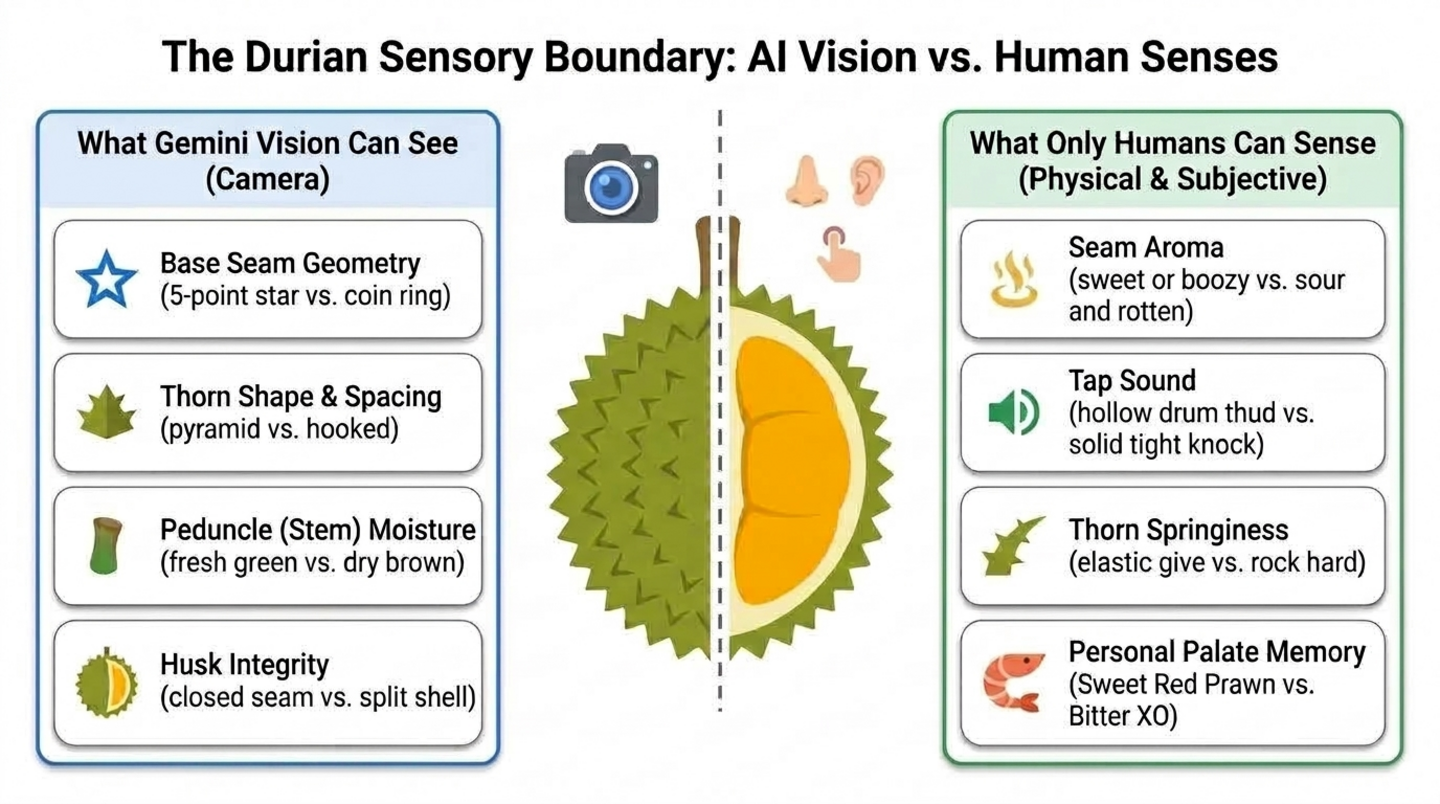
在本程式碼實驗室中,您將使用 Agent Development Kit (ADK) 和 Agents CLI 建構及測試多模態榴槤侍酒師多代理系統,並可選擇使用 Antigravity CLI 將其部署至 Cloud Run (核心步驟約需 45 分鐘;兩個選用的 Antigravity 步驟約需 20 分鐘)。挑選榴槤時,AI 感知和人類感官的差異如下:
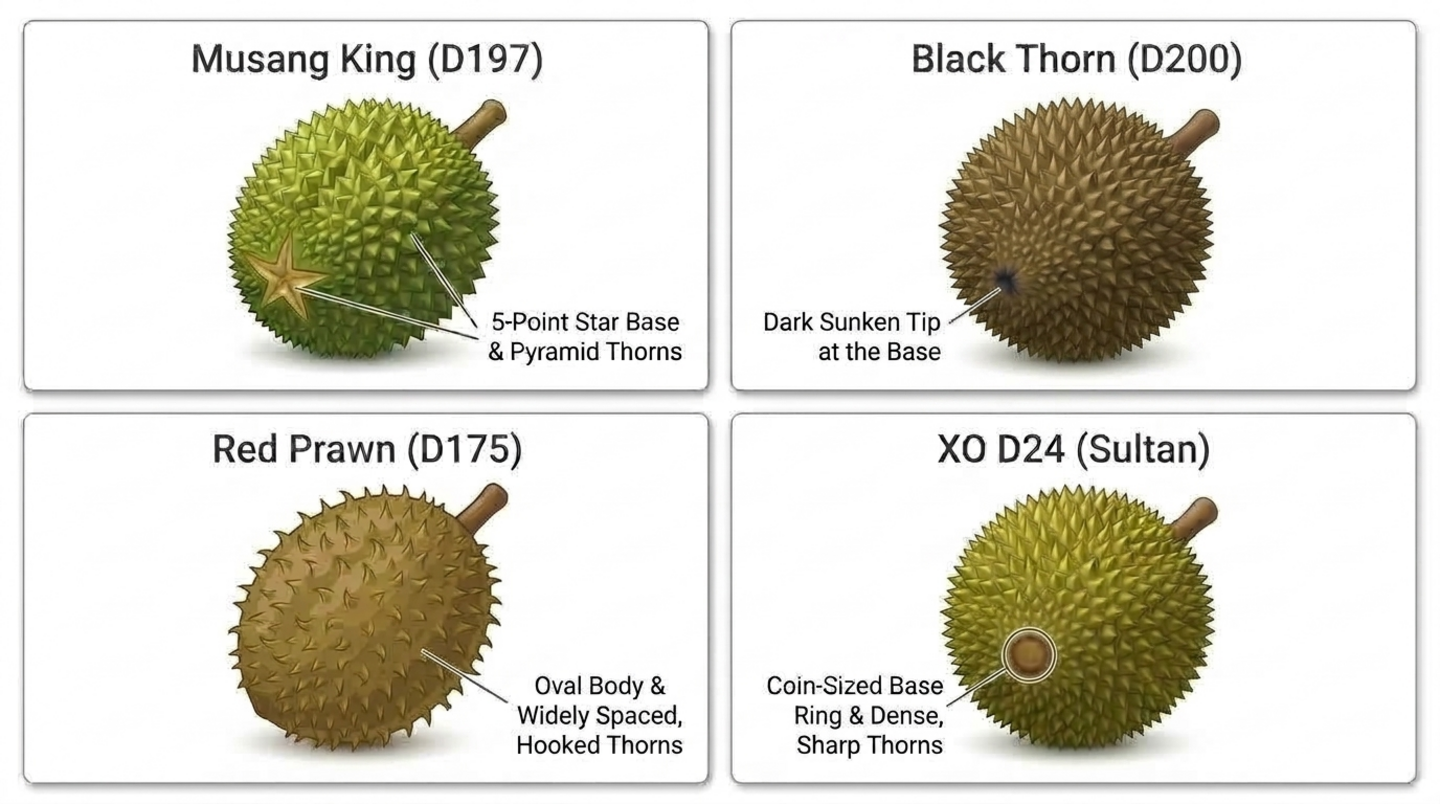
- AI 能辨識的特徵:Gemini 可以檢查榴槤外殼的相片,找出品種標記,例如貓山王底部的五角星、黑刺 (D200) 的深色凹陷尖端、D24 的硬幣大小圓環,或乾燥萎縮的果梗。
- 只有人類才能感知的特徵:模型無法聞出果蒂是否有酒味、輕敲果殼聽聽是否有空洞聲,或按壓兩根刺來感受是否有彈性。
- 代理必須記住的資訊:即使是兩顆完美熟成的榴槤,買家仍有不同看法。有人喜歡老樹 XO D24 的苦澀和酒香,有人則喜歡紅蝦 (D175) 的甜味和不苦的卡士達。
建構項目
- 階段 1 - 單一視覺代理:使用 Agents CLI 建構 ADK 代理,從相片中辨識榴槤的品種和新鮮度。
- 階段 2 - 人類感官和味覺記憶:評估買家嗅覺、聽覺和觸覺的工具,以及儲存不同工作階段味覺資料的工具。
- 階段 3 - 統籌者和專家:
durian_advisor統籌者會呼叫視覺檢查員和感官侍酒師,然後給出明確的評定結果。 - 階段 4 - Cloud Run 代理服務:Antigravity CLI 會使用 Agents CLI 技能部署代理 (選用步驟)。
- 階段 5 - Cloud Run 網頁聊天機器人:在另一個選用步驟中,Antigravity CLI 會建構及部署適合行動裝置的即時通訊應用程式,與代理對話。
架構
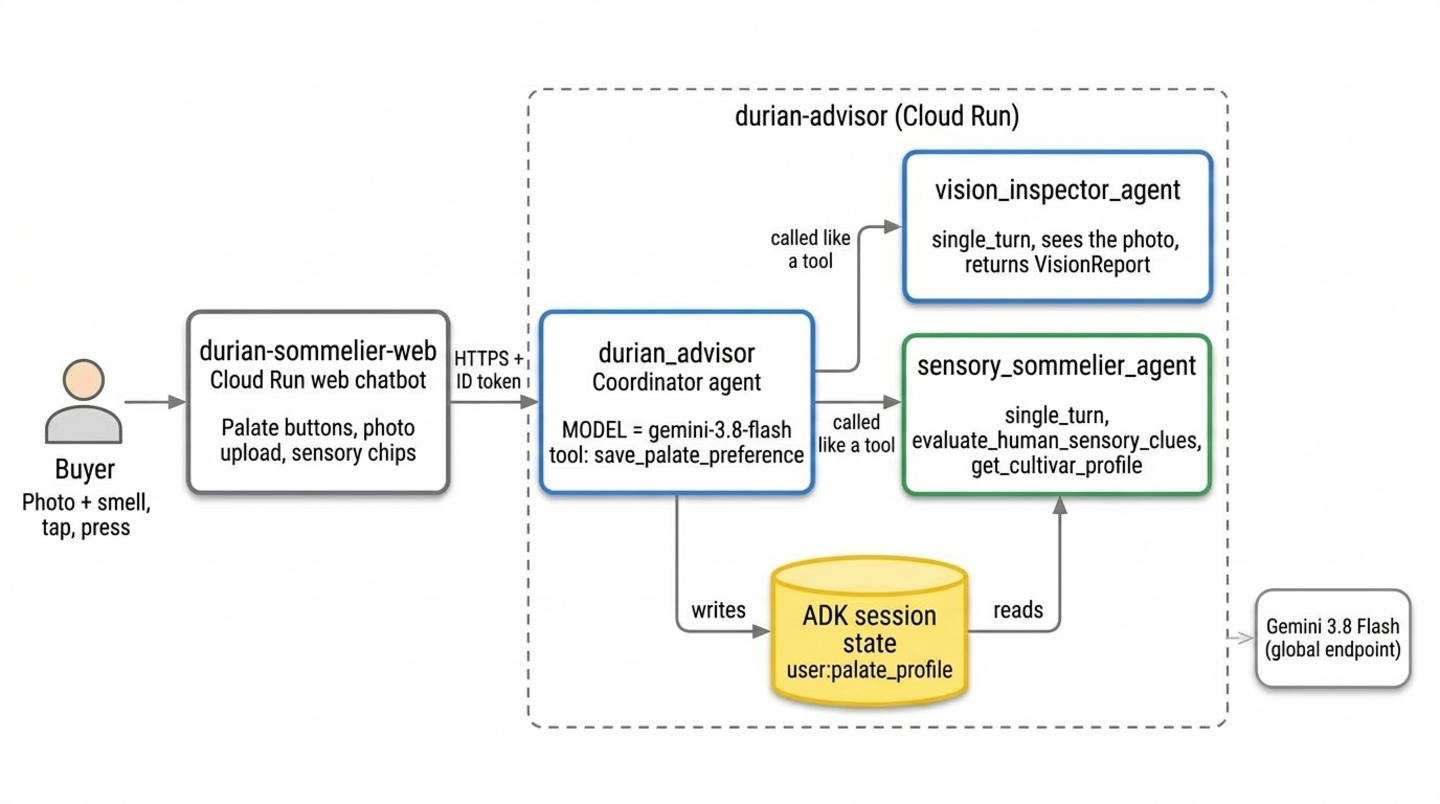
這兩項 Cloud Run 服務來自選用的 Antigravity 步驟。如果沒有,請在 Cloud Shell 的 ADK Playground 執行相同的代理。
必要條件
- 具備 Python 程式設計的基本能力
- 熟悉指令列工具和生成式 AI 概念
- 不需具備 ADK、Agents CLI 或 Antigravity CLI 的使用經驗
課程內容
- 如何使用
agents-cli create建構 ADK 專案,並建構可讀取相片的多模態代理 - AI 感知能力的極限 (嗅覺、聽覺、觸覺和個人品味),以及如何針對這些感官設計人工介入迴路工具
- 如何使用
user:範圍的 ADK 狀態,在不同工作階段記住每位使用者的偏好設定 - 如何將一個代理拆分為協調者和單輪專家代理,並像工具一樣呼叫
- (選用) 如何為 Antigravity CLI 提供 Agents CLI 技能,以便將代理和網路聊天機器人部署至 Cloud Run
軟硬體需求
- Google 帳戶 (如要申請工作坊抵免額,請使用個人
@gmail.com帳戶) - 講師提供的研討會抵免額連結 (以及用於掃描 QR code 的手機相機),或有效的 Cloud Billing 帳戶
- Google Chrome (建議使用無痕視窗,避免混用個人和公司帳戶)
2. 領取 Google Cloud 抵免額 (選用)
如果您是自行完成本程式碼實驗室,且符合資格,請使用本頁面的 Google Developer Program 抵免額橫幅,在不提供信用卡的情況下領取抵免額。如果您參加研討會,並從講師那裡取得活動抵免額連結,請按照本節中的活動抵免額步驟操作。
領取活動抵免額
您可以透過 Google 開發人員中心 (Google Developer Program 的一部分) 領取工作坊活動抵免額。
如要領取活動抵免額,請按照下列步驟操作:
- 在無痕視窗中開啟工作坊抵免額連結,並使用個人
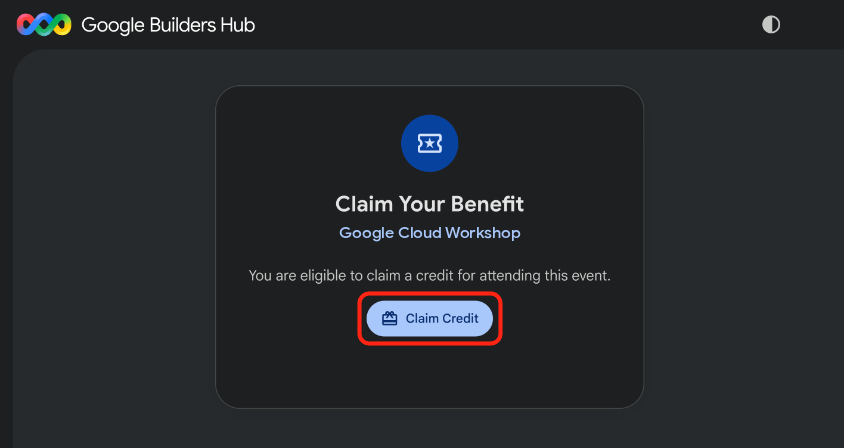
@gmail.com帳戶登入。 - 在「領取福利」資訊卡中,按一下「領取抵免額」。
- 選用:如果系統提示您建立 Google Developer Program 設定檔,請填寫表單。
- 「掃描以驗證您是真人」對話方塊出現時,請使用手機掃描 QR code 並完成驗證。如果 QR code 未顯示,請重新整理頁面,然後再次點選「領取抵免額」。
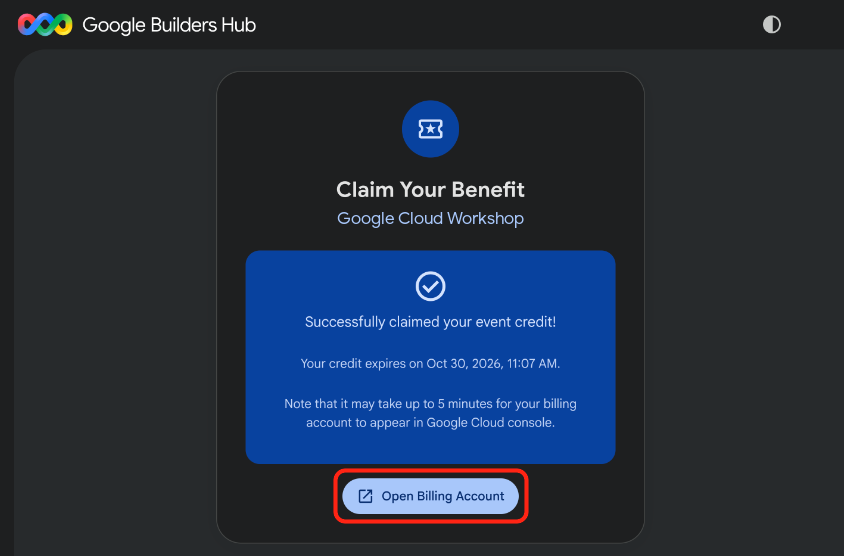
- 確認畫面上顯示「已成功領取活動抵免額!」訊息,然後點選「開啟帳單帳戶」。
🔍 檢查成果
帳單帳戶佈建作業最多可能需要五分鐘。如要確認抵免額是否有效,請完成下列步驟:
- 如果「帳單帳戶管理」頁面尚未開啟,請開啟 Google Cloud Billing (或將網址複製到無痕視窗):
https://console.cloud.google.com/billing
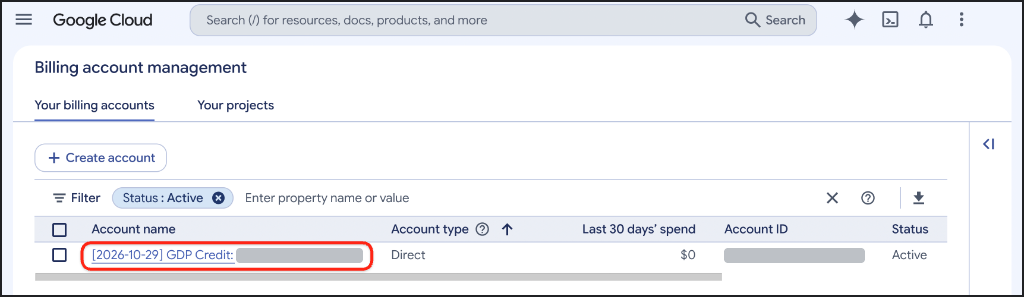
- 按一下「您的帳單帳戶」分頁標籤,然後重新整理頁面,直到包含「GDP Credit」的帳戶在「狀態」欄中顯示「有效」為止。
3. 建立 Google Cloud 專案 (選用)
建立專屬的 Google Cloud 雲端專案,將本程式碼實驗室的所有資源隔離,以便在完成後徹底移除。
如要建立 Google Cloud 專案,請按照下列步驟操作:
- 開啟「建立專案」頁面 (或將網址複製到無痕視窗):
https://console.cloud.google.com/projectcreate
- 輸入專案詳細資料:
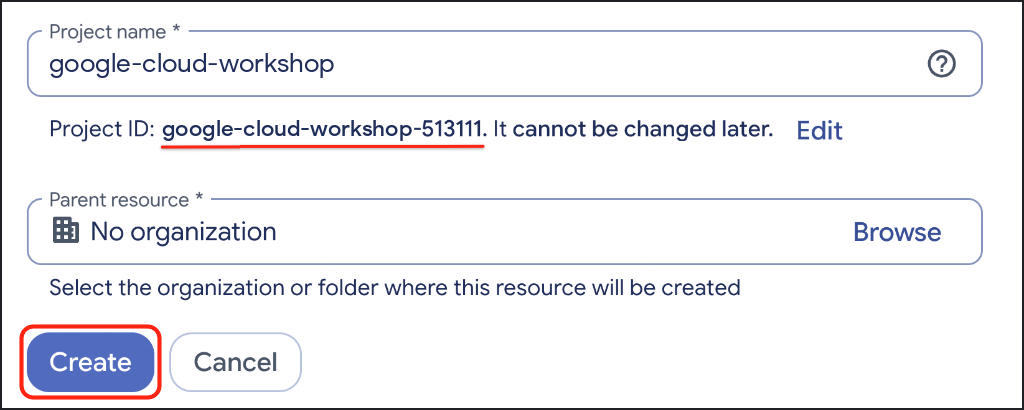
- 專案名稱:輸入描述性名稱,例如
google-cloud-workshop。 - 「帳單帳戶」(如有顯示):選取「GDP Credit」帳戶 (或有效的帳單帳戶)。
- Parent resource (上層資源):保留「No organization」(無組織) 選項 (或視需要選取組織)。
- 專案名稱:輸入描述性名稱,例如
- 記下系統產生的專案 ID,然後點選「建立」。
🔍 檢查成果
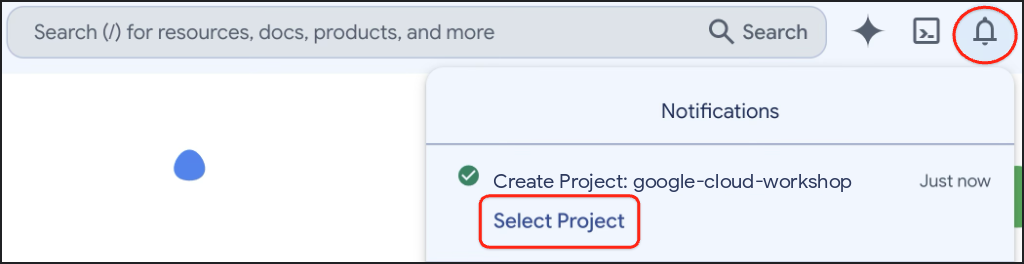
專案建立完成後,開啟 Google Cloud 控制台工具列中的「通知」,然後點選「選取專案」。
4. 設定環境
在本節中,您將設定 Google Cloud Shell、啟用 Agent Platform API,並使用 uv 安裝 Agents CLI。
設定 Cloud Shell
啟動 Cloud Shell
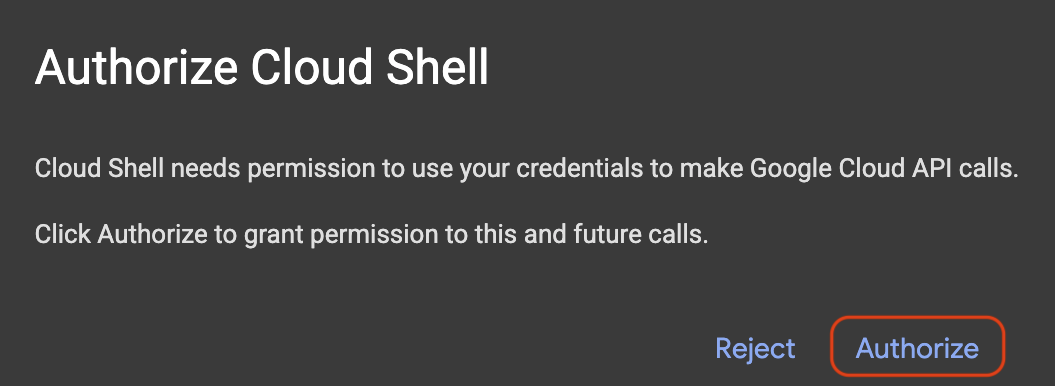
開啟 Google Cloud Shell,並啟用程式碼編輯器和終端機檢視畫面 (或將網址複製到無痕視窗),然後在系統提示時點選「授權」:
https://shell.cloud.google.com/?show=ide,terminal
設定 Google Cloud 專案 ID
複製下列程式碼片段,然後貼到 Cloud Shell 終端機。畫面會顯示可用的 Google Cloud 專案編號選單。輸入專案旁的編號 (例如 1),然後按下 Enter 鍵:
unset CLOUDSDK_CORE_PROJECT
PS3="Select your project (e.g. 1): "
select PROJECT_ID in $(gcloud projects list --format="value(projectId)"); do
  [ -n "$PROJECT_ID" ] && gcloud config set project "$PROJECT_ID" && break
done
預期提示:
1) durian-sommelier-workshop-4210
2) my-cloud-project-8812
Select your project (e.g. 1): 1
Updated property [core/project].
[environment: untagged] Read more to tag: g.co/cloud/project-env-tag.
Cloud Shell 終端機提示中,應該會以黃色醒目顯示所選專案 ID:

啟用 Agent Platform API
啟用 Agent Platform API,讓代理呼叫 Gemini:
gcloud services enable aiplatform.googleapis.com
🔍 檢查成果
畫面會顯示類似以下的輸出:
Operation "operations/acat.p2-..." finished successfully.
安裝 Agents CLI
確認 uv 可用,且其工具資料夾位於 PATH:
which uv || curl -LsSf https://astral.sh/uv/install.sh | sh
export PATH="$HOME/.local/bin:$PATH"
將 Agents CLI 安裝為 uv 工具:
uv tool install google-agents-cli==1.7.0
uv 會在獨立環境中安裝各項工具,且只會將 agents-cli 指令新增至 PATH,因此系統 Python 不會受到影響。您也不需要自行安裝 ADK。Agents CLI 建立的每個專案都有專屬的虛擬環境,並採用範本測試過的 ADK 版本。
🔍 檢查成果
確認 Agents CLI 已準備就緒:
agents-cli --version
畫面會顯示類似以下的輸出:
agents-cli, version 1.7.0
5. 建構多模態 Vision 代理
先從簡單的開始:使用 Agents CLI 生成 ADK 專案,然後將範例代理轉換為榴槤視覺分類器。
建構專案
生成 durian-advisor 專案。--agent adk_python 會挑選 Python ADK 範本,--deployment-target cloud_run 和 --region us-central1 會為 Cloud Run 準備範本,--prototype 會略過 CI/CD 設定,--yes 則會接受預設值:
cd ~ && agents-cli create durian-advisor \
  --agent adk_python \
  --deployment-target cloud_run \
  --region us-central1 \
  --prototype \
  --yes
畫面會顯示類似以下的輸出:
> Verifying GCP credentials...
> ✓ Connected to project: your-project-id

✅ Success! Your agent project is ready.
在 Cloud Shell 編輯器中開啟專案。系統會重新載入視窗並重新啟動終端機:
cloudshell workspace ~/durian-advisor
將專案的依附元件安裝到專屬的 .venv 資料夾:
cd ~/durian-advisor && agents-cli install
檢查環境檔案
Agents CLI 也寫入 .env 檔案,指示 ADK 透過 Google Cloud 雲端專案呼叫 Gemini:
grep GOOGLE_ ~/durian-advisor/.env
畫面會顯示類似以下的輸出:
GOOGLE_GENAI_USE_VERTEXAI=true
GOOGLE_CLOUD_PROJECT=your-project-id
GOOGLE_CLOUD_LOCATION=global
保留 GOOGLE_CLOUD_LOCATION=global。Gemini 3.8 Flash 是透過 global 端點提供,而非 us-central1 等區域端點,即使 Cloud Run 服務是在 us-central1 執行也一樣。
如果 GOOGLE_CLOUD_PROJECT 顯示 your-gcp-project-id,表示 Agents CLI 無法偵測到您的專案。設定方式如下:
sed -i "s/your-gcp-project-id/$(gcloud config get-value project)/" ~/durian-advisor/.env
編寫視覺分類器
每個品種都有 Gemini 可以在相片中辨識出的殼標記:
開啟 app/agent.py:
cloudshell edit ~/durian-advisor/app/agent.py
將內容替換成以下程式碼:
"""A single multimodal agent that inspects durian photos."""

from google.adk.agents import Agent
from google.adk.apps import App
from google.adk.models import Gemini
from google.genai import types

MODEL = "gemini-3.8-flash"

INSTRUCTION = """You are a durian visual classifier. Inspect the durian photo or shell description.
1. Base seam: a 5-point star means Musang King (D197). A dark sunken tip means Black Thorn (D200). A coin-sized brown ring means D24. An oval body with widely spaced, hooked thorns means Red Prawn (D175).
2. Stem: plump, moist, and greenish means it fell within about 12 hours. Dry and shriveled means it is days old.
3. Husk: closed seams mean natural ripening. Wide splits or mold mean it is past its best.
Give the likely cultivar and a visual freshness score from 1 to 10. Then list what a photo cannot tell you: the aroma, the tap sound, the thorn springiness, and whether the buyer will enjoy the taste."""

root_agent = Agent(
    name="durian_advisor",
    model=Gemini(model=MODEL, retry_options=types.HttpRetryOptions(attempts=3)),
    description="Classifies durian cultivars and visual freshness from photos.",
    instruction=INSTRUCTION,
)

app = App(root_agent=root_agent, name="app")
請注意以下幾點:
MODEL是唯一顯示模型 ID 的地方。之後新增的代理都會繼承這個模型,因此只要修改一行程式碼,就能切換模型。retry_options會重試暫時性錯誤 (例如頻率限制),最多三次。app = App(...)會包裝 Playground 和 Cloud Run 伺服器的代理。保留應用程式名稱app和代理名稱durian_advisor,這兩個名稱與產生的伺服器和agents-cli-manifest.yaml相符。
在 Playground 測試代理
啟動 ADK 測試區:
cd ~/durian-advisor && agents-cli playground
畫面會顯示類似以下的輸出:
INFO: Uvicorn running on http://127.0.0.1:8080 (Press CTRL+C to quit)
點選 Cloud Shell 工具列中的「網頁預覽」,然後選取「透過以下通訊埠預覽:8080」。如果 ADK 開發人員 UI 要求您選擇代理,請選取 app。接著傳送這則提示,或使用上傳按鈕附加自己的榴槤相片:
I'm at a stall looking at a round durian with pyramid-shaped thorns and a 5-point star at the base. The stem is green and moist. What cultivar is this, and will it taste sweet?
🔍 檢查成果
代理辨識出貓山王 (D197),並根據濕潤的綠色果梗給予高新鮮度分數。接著,Gemini 會承認自己無法從相片中得知哪些資訊,例如香氣、輕敲聲、刺的彈性,以及你是否會喜歡這個味道。
在終端機中按下 Ctrl + C 停止 Playground,再繼續操作。
6. 加入人類感官和味覺記憶
相機無法聞、聽或感覺,因此您需要建構工具,請買家代勞。您也會讓代理長期記住每位買家的喜好。在這個步驟中,您將編寫工具,並在下一個步驟中將工具連結至代理。
新增品種目錄
建立 app/durian_data.py:
cloudshell edit ~/durian-advisor/app/durian_data.py
貼上這個參考目錄。將資料保留在自己的模組中,可縮短代理程式程式碼:
"""Reference catalog of durian cultivars."""

CULTIVAR_CATALOG = {
    "musang_king": {
        "code": "D197",
        "name": "Musang King (Mao Shan Wang)",
        "visual_markers": "5-point star seam at the base, pyramid-shaped thorns",
        "flavor": "rich, bittersweet, buttery custard",
        "bitterness": "medium",
    },
    "black_thorn": {
        "code": "D200",
        "name": "Black Thorn (Ochee)",
        "visual_markers": "Dark sunken tip at the base, round pumpkin-like body",
        "flavor": "sweet, creamy, slightly winey",
        "bitterness": "low",
    },
    "red_prawn": {
        "code": "D175",
        "name": "Red Prawn (Udang Merah)",
        "visual_markers": "Oval body, widely spaced and slightly hooked thorns",
        "flavor": "sweet, floral, soft and sticky",
        "bitterness": "none",
    },
    "xo_d24": {
        "code": "D24",
        "name": "XO D24 (Sultan, old tree)",
        "visual_markers": "Coin-sized brown ring at the base, dense sharp thorns",
        "flavor": "intense, bitter, with a boozy finish",
        "bitterness": "high",
    },
}
新增感官工具
建立 app/sensory_tools.py:
cloudshell edit ~/durian-advisor/app/sensory_tools.py
貼上下列程式碼:
"""Tools for cultivar lookup and human-in-the-loop sensory checks."""

from typing import Any, Literal

from .durian_data import CULTIVAR_CATALOG

AROMA_POINTS = {"sweet_fragrant": 4, "boozy_fermented": 3, "faint_grassy": 0, "sour_rotten": 0}
TAP_POINTS = {"hollow": 3, "solid": 0}
THORN_POINTS = {"springy": 3, "rigid": 0}


def get_cultivar_profile(cultivar_key: str) -> dict[str, Any]:
    """Looks up the visual markers, flavor, and bitterness of a durian cultivar.

    Args:
        cultivar_key: One of 'musang_king', 'black_thorn', 'red_prawn', or 'xo_d24'.
    """
    key = cultivar_key.strip().lower().replace(" ", "_").replace("-", "_")
    if key not in CULTIVAR_CATALOG:
        return {"status": "NOT_FOUND", "supported": list(CULTIVAR_CATALOG)}
    return {"status": "OK", "cultivar": CULTIVAR_CATALOG[key]}


def evaluate_human_sensory_clues(
    aroma: Literal["sweet_fragrant", "boozy_fermented", "faint_grassy", "sour_rotten"],
    tap_sound: Literal["hollow", "solid"],
    thorn_feel: Literal["springy", "rigid"],
) -> dict[str, Any]:
    """Scores the ripeness clues that only a human buyer can smell, hear, and feel.

    Args:
        aroma: What the buyer smells at the seam of the husk.
        tap_sound: What the buyer hears when tapping the husk.
        thorn_feel: How two thorns feel when the buyer presses them together.
    """
    score = AROMA_POINTS[aroma] + TAP_POINTS[tap_sound] + THORN_POINTS[thorn_feel]
    if aroma == "sour_rotten":
        verdict = "SPOILED"
    elif score >= 7:
        verdict = "RIPE"
    elif score >= 4:
        verdict = "NOT_QUITE_READY"
    else:
        verdict = "UNRIPE"
    return {"status": "OK", "ripeness_score": score, "max_score": 10, "verdict": verdict}
這些工具的運作方式:
- ADK 會將每個函式轉換為模型可呼叫的工具。docstring 會成為工具說明,
Args區段則會說明各個參數。 Literal[...]類型提示會成為工具結構定義中的固定選項,因此 Gemini 必須將「聞起來有點酒味」對應至一個允許的值,例如boozy_fermented。get_cultivar_profile會傳回明確的NOT_FOUND狀態和支援的金鑰,而不是建立品種。
新增 palate memory 工具
建立 app/memory_tools.py:
cloudshell edit ~/durian-advisor/app/memory_tools.py
貼上下列程式碼:
"""Tool that remembers each buyer's durian palate across sessions."""

from typing import Any, Literal

from google.adk.tools import ToolContext


def save_palate_preference(
    favorite_flavors: str,
    bitterness_tolerance: Literal["none", "low", "medium", "high"],
    tool_context: ToolContext,
) -> dict[str, Any]:
    """Saves the buyer's durian taste preferences to their long-term profile.

    Args:
        favorite_flavors: Flavors and textures the buyer enjoys, such as
            'sweet, creamy custard'.
        bitterness_tolerance: How much bitterness the buyer enjoys.
    """
    profile = {
        "favorite_flavors": favorite_flavors,
        "bitterness_tolerance": bitterness_tolerance,
    }
    # The "user:" prefix scopes this key to the buyer, so it follows them
    # into every future session of this app.
    tool_context.state["user:palate_profile"] = profile
    return {"status": "SAVED", "palate_profile": profile}
味覺記憶的運作方式:
- ADK 會自動傳入
tool_context,並對模型隱藏,因此 Gemini 只會看到兩個口味參數。 user:前置字元會將狀態金鑰範圍限定為使用者,而非目前的工作階段,因此買家在每場新對話中都會沿用個人資料。- 不需要另外使用「get」工具。代理會使用預留位置
{user:palate_profile?},直接將設定檔讀入指令。如果尚未建立設定檔,?會將預留位置留空,而不是顯示錯誤。
🔍 檢查成果
挑選有酒香、敲擊聲空洞、果刺有彈性的榴槤:
cd ~/durian-advisor && uv run python -c "from app.sensory_tools import evaluate_human_sensory_clues as score; print(score('boozy_fermented', 'hollow', 'springy'))"
畫面會顯示類似以下的輸出:
{'status': 'OK', 'ripeness_score': 9, 'max_score': 10, 'verdict': 'RIPE'}
7. 協調專用代理
如果單一代理在同一個提示中,同時處理視覺規則、感官評分和口味配對,往往會混淆。而是將每項工作交給專門的專家,並讓協調者整合他們的答案:
vision_inspector_agent會讀取相片中的品種和新鮮度,並傳回結構化報表。sensory_sommelier_agent會為買家聞到、聽到和感受到的內容評分,並根據買家的口味檢查品種。durian_advisor會與買家交談、儲存他們的口味偏好、呼叫各個專家,並撰寫最終評估結果。
建立視覺檢查器
建立 app/vision_agent.py:
cloudshell edit ~/durian-advisor/app/vision_agent.py
貼上下列程式碼:
"""Vision inspector: reads the cultivar and freshness from a durian photo."""

from google.adk.agents import Agent
from pydantic import BaseModel, Field


class VisionReport(BaseModel):
    cultivar_key: str = Field(
        description="musang_king, black_thorn, red_prawn, xo_d24, or unknown"
    )
    visual_freshness: int = Field(description="1 (stale) to 10 (freshly fallen)")
    evidence: str = Field(description="The visual markers behind your answer")


vision_inspector_agent = Agent(
    name="vision_inspector_agent",
    description="Identifies a durian's cultivar and visual freshness from the buyer's photo or shell description.",
    mode="single_turn",
    # Specialists only see their tool-call input by default. Opt in to the
    # conversation history so this agent can see the uploaded photo.
    include_contents="default",
    # Report back to the coordinator instead of taking over the conversation.
    disallow_transfer_to_parent=True,
    disallow_transfer_to_peers=True,
    output_schema=VisionReport,
    instruction="""You are a durian vision inspector. Examine the durian photo or shell description in the conversation.
Cultivar markers:
- 5-point star seam at the base: musang_king
- Dark sunken tip at the base: black_thorn
- Oval body with widely spaced, slightly hooked thorns: red_prawn
- Coin-sized brown ring at the base and dense, sharp thorns: xo_d24
Freshness: a plump, moist, greenish stem and closed seams score high. A dry, shriveled stem or a split, moldy husk scores low.
If the markers are unclear, use 'unknown'.""",
)
output_schema=VisionReport會讓專家傳回結構化資料,供協調員使用。include_contents="default"可讓這位專員查看對話,包括上傳的相片。如果沒有這項功能,單輪專家就只會看到協調者傳入的要求。disallow_transfer_to_parent和disallow_transfer_to_peers會移除 ADK 原本會提供給這個子代理的transfer_to_agent工具。如果專員看到完整對話,可能會想將對話交回給協調員,而不是回傳報告。
建立感官侍酒師
建立 app/sensory_agent.py:
cloudshell edit ~/durian-advisor/app/sensory_agent.py
貼上下列程式碼:
"""Sensory sommelier: scores the buyer's senses and checks palate fit."""

from google.adk.agents import Agent
from pydantic import BaseModel, Field

from .sensory_tools import evaluate_human_sensory_clues, get_cultivar_profile


class SensoryClues(BaseModel):
    cultivar_key: str = Field(description="Cultivar from the vision inspector")
    aroma: str = Field(description="What the buyer smelled at the seam")
    tap_sound: str = Field(description="What the buyer heard when tapping the husk")
    thorn_feel: str = Field(description="How the thorns felt when pressed together")


sensory_sommelier_agent = Agent(
    name="sensory_sommelier_agent",
    description="Scores the smell, sound, and touch clues the buyer reports, and checks the cultivar against their palate.",
    mode="single_turn",
    # Report back to the coordinator instead of taking over the conversation.
    disallow_transfer_to_parent=True,
    disallow_transfer_to_peers=True,
    input_schema=SensoryClues,
    instruction="""You are a durian sensory sommelier.
Buyer palate profile: {user:palate_profile?}

1. Call evaluate_human_sensory_clues with the buyer's aroma, tap sound, and thorn feel.
2. Call get_cultivar_profile for the cultivar.
3. Compare the cultivar's bitterness with the buyer's bitterness tolerance.
Report the ripeness verdict, the palate fit, and one sentence of advice.""",
    tools=[evaluate_human_sensory_clues, get_cultivar_profile],
)
input_schema=SensoryClues定義協調者必須傳入的內容:品種和買家的三份感官報告 (以自己的話描述)。專家會將這些字詞對應至工具允許的值。{user:palate_profile?}會將買家儲存的口味偏好加入指令,讓專家不必查詢記憶,就能判斷是否合適。- 兩位專家都沒有設定
model。兩者都會沿用協調者的MODEL。 - 兩位專家都使用相同的兩個轉移旗標,因此每位專家都會向協調者回報。
連接協調器
開啟 app/agent.py:
cloudshell edit ~/durian-advisor/app/agent.py
將內容替換為協調者:
"""Durian advisor: a concierge that coordinates vision and sensory specialists."""

from google.adk.agents import Agent
from google.adk.apps import App
from google.adk.models import Gemini
from google.genai import types

from .memory_tools import save_palate_preference
from .sensory_agent import sensory_sommelier_agent
from .vision_agent import vision_inspector_agent

MODEL = "gemini-3.8-flash"

root_agent = Agent(
    name="durian_advisor",
    model=Gemini(model=MODEL, retry_options=types.HttpRetryOptions(attempts=3)),
    description="Durian concierge that combines what the camera sees with what the buyer senses.",
    instruction="""You are a friendly durian concierge helping a buyer at a fruit stall.
Buyer palate profile: {user:palate_profile?}

1. When the buyer shares taste preferences, call save_palate_preference.
2. When the buyer shows or describes a durian, call vision_inspector_agent.
3. A camera cannot smell, hear, or feel. Unless the buyer already reported the seam aroma, tap sound, and thorn feel, ask them to check. Then call sensory_sommelier_agent.
4. Call one specialist at a time. Finish with ONE verdict covering the cultivar, ripeness, and palate fit. If the durian does not suit their palate, suggest a cultivar that does.""",
    tools=[save_palate_preference],
    sub_agents=[vision_inspector_agent, sensory_sommelier_agent],
)

app = App(root_agent=root_agent, name="app")
由於兩位專家都使用 mode="single_turn",ADK 會為協調者提供兩個額外工具,分別名為 vision_inspector_agent 和 sensory_sommelier_agent。指令會以這些名稱參照工具。
在 Playground 測試協調器
再次啟動 Playground:
cd ~/durian-advisor && agents-cli playground
在通訊埠 8080 開啟「網頁預覽」,並與代理進行這段簡短對話。
訓練 Gemini 瞭解你的口味:
Hi! Please remember my taste: I love sweet, creamy custard durians and I can't stand bitterness.
開啟「State」分頁標籤,您應該會看到已儲存的設定檔,類似如下:
{
  "user:palate_profile": {
    "favorite_flavors": "sweet, creamy custard",
    "bitterness_tolerance": "none"
  }
}
向 Gemini 顯示榴槤 (描述或附上相片):
The vendor is showing me a round durian with a coin-sized brown ring at the base and dense, sharp thorns. The stem is green and moist. Should I buy it?
協調者會呼叫 vision_inspector_agent,以識別 XO D24。接著,它會要求你聞聞接縫處、輕敲外殼,並將兩根刺壓在一起。
回報你感受到的情況:
It smells a bit boozy, the knock sounds hollow, and the thorns spring back when I press them.
重新開始:點按「新工作階段」,然後輸入以下問題:
Which durian should I pick today?
🔍 檢查成果
- 你回報感官體驗後,協調員打電話給
sensory_sommelier_agent,並給出一個結論:XO D24 已經成熟 (9 分,滿分 10 分),但苦味太重,不合你的口味,因此建議改吃紅蝦 (D175) 或黑刺 (D200)。 - 在「事件」分頁中,您可以看到
durian_advisor呼叫每位專家,以及sensory_sommelier_agent呼叫evaluate_human_sensory_clues和get_cultivar_profile。 - 在新的工作階段中,代理已知道你的口味,因此會直接推薦甜而不苦的品種,不會再次詢問。
在終端機中按下 Ctrl + C 即可停止 Playground。
8. 使用 Antigravity 部署 (選用)
您手動建構及測試代理。接著,您將使用 Antigravity CLI (agy) 部署應用程式。Antigravity CLI 是 Google 的終端機 AI 程式設計代理。Agents CLI 技能會教導 Antigravity 如何正確部署 ADK 代理。
啟用部署 API
啟用 Cloud Run、Cloud Build 和 Artifact Registry API,Agents CLI 會使用這些 API 建構及託管代理:
gcloud services enable \
  run.googleapis.com \
  cloudbuild.googleapis.com \
  artifactregistry.googleapis.com
畫面會顯示類似以下的輸出:
Operation "operations/acat.p2-..." finished successfully.
安裝 Agents CLI 技能
將七項 Agents CLI 技能安裝到專案資料夾,Antigravity 會自動偵測這些技能:
cd ~/durian-advisor && agents-cli setup --workspace
🔍 檢查成果
ls -1 ~/durian-advisor/.agents/skills
畫面會顯示類似以下的輸出:
google-agents-cli-adk-code
google-agents-cli-deploy
google-agents-cli-eval
google-agents-cli-observability
google-agents-cli-publish
google-agents-cli-scaffold
google-agents-cli-workflow
啟動 Antigravity CLI
Antigravity CLI 已預先安裝在 Cloud Shell 中。從專案資料夾啟動:
cd ~/durian-advisor && agy --dangerously-skip-permissions
首次執行 Antigravity 時,系統會要求您登入 Google 帳戶、選擇色彩主題、接受服務條款,並信任目前的資料夾。
要求 Antigravity 部署
將這則提示詞貼到 Antigravity:
Use the google-agents-cli-deploy skill to deploy this ADK agent to Cloud Run in us-central1 as a private service. Keep GOOGLE_CLOUD_LOCATION=global so Gemini keeps working, save the exact service URL to .env as AGENT_BASE_URL, and smoke-test the deployed agent with agents-cli run.
Antigravity 會讀取技能,並可能先執行專案測試。接著,指令碼會執行 agents-cli deploy,透過 Cloud Build 建構容器並部署 durian-advisor 服務,然後傳送測試訊息至實際運作的服務。整個執行作業約需五到八分鐘。
Antigravity 結束後,請按兩下 Ctrl + D 退出。
🔍 檢查成果
使用 Antigravity 儲存的網址,傳送訊息給已部署的代理:
cd ~/durian-advisor && source .env && agents-cli run --url "$AGENT_BASE_URL" --mode adk "Which durian suits a beginner?"
畫面會顯示類似以下的輸出:
Querying remote agent: https://durian-advisor-123456789012.us-central1.run.app (mode: adk)
[user]: Which durian suits a beginner?
[durian_advisor]: For beginners, you want a durian that is sweet, creamy, and gentle on the palate, with little to no bitterness...
現在,請確認服務會拒絕沒有權杖的呼叫:
curl -s -o /dev/null -w "%{http_code}\n" "$AGENT_BASE_URL"
畫面會顯示類似以下的輸出:
403
9. 運用直覺式程式開發技術製作網頁聊天機器人 (選用)
代理已上線,但設為不公開。現在,請繼續與 Antigravity 對話,它已經知道代理、狀態金鑰和網址,請要求它為榴槤買家建構及部署網頁聊天機器人。
繼續使用 Antigravity
cd ~/durian-advisor && agy --dangerously-skip-permissions
在 Antigravity 中執行下列斜線指令,然後從清單中選取部署作業對話:
/resume
要求 Antigravity 建構聊天機器人
貼上這則提示:
Build a mobile-friendly "Durian Sommelier" web chatbot in a new web/ folder that talks to our deployed agent at AGENT_BASE_URL (ADK app name "app").

- Add palate quick-set buttons, a photo upload, and one-tap sensory chips: Smells sweet, Smells boozy, Hollow knock, Solid knock, Thorns spring back, Thorns feel stiff.
- Use a small FastAPI server that proxies chat requests to the agent with a Google ID token, because the agent service is private.
- Show only durian_advisor's replies in the chat, not the specialists' intermediate output.
- Keep a stable user ID per browser and reuse one ADK session, creating a new one if it is missing.

Deploy it to Cloud Run as durian-sommelier-web in us-central1 with public access. Run it as a new service account named durian-sommelier-web that can invoke durian-advisor, and print the URL.
Antigravity 編寫應用程式、建立服務帳戶、授予 durian-advisor 的 Cloud Run 叫用者角色,並使用 Cloud Build 部署應用程式。通常會在結束前測試聊天端點。整個執行作業約需 10 分鐘。輸出網址後,按兩次 Ctrl + D 即可退出。
🔍 檢查成果
開啟 Antigravity 列印的 https://durian-sommelier-web-....run.app 網址,然後:
- 輕觸其中一個風味按鈕,例如「香甜濃郁」。服務專員確認已儲存你的口味偏好。
- 上傳榴槤相片,或輸入簡短的外殼描述。代理會辨識品種,並請你進行感官檢查。
- 輕觸與榴槤相符的感官晶片。代理會回覆一個結論,涵蓋成熟度和口味。
10. 清除
刪除建立的資源,以免產生費用。
刪除 Cloud Run 服務
刪除網頁聊天機器人:
gcloud run services delete durian-sommelier-web --region us-central1 --quiet
刪除代理服務:
gcloud run services delete durian-advisor --region us-central1 --quiet
刪除服務帳戶
刪除網頁聊天機器人執行時使用的服務帳戶:
gcloud iam service-accounts delete "durian-sommelier-web@$(gcloud config get-value project).iam.gserviceaccount.com" --quiet
刪除容器映像檔
Cloud Run 原始碼部署作業會將各項服務的容器映像檔推送至名為 cloud-run-source-deploy 的 Artifact Registry 存放區,專案中的其他部署作業可共用該存放區。只刪除這個程式碼實驗室的兩個映像檔,並保留存放區。
刪除代理的映像檔:
gcloud artifacts packages delete durian-advisor --repository cloud-run-source-deploy --location us-central1 --quiet
刪除網頁聊天機器人的映像檔:
gcloud artifacts packages delete durian-sommelier-web --repository cloud-run-source-deploy --location us-central1 --quiet
🔍 檢查成果
gcloud run services list --region us-central1
畫面會顯示類似以下的輸出:
Listed 0 items.
刪除本機檔案
移除專案資料夾,包括其技能和虛擬環境:
rm -rf ~/durian-advisor
(選用) 解除安裝 Agents CLI:
uv tool uninstall google-agents-cli
刪除整個 Google Cloud 專案 (選用)
PROJECT_ID=$(gcloud config get-value project)
gcloud projects delete "$PROJECT_ID" --quiet
11. 恭喜
恭喜!您已使用 ADK 和 Agents CLI 建構並測試多模態榴槤侍酒師多代理系統。如果您執行了選用步驟,也已使用 Antigravity CLI 將應用程式部署至 Cloud Run。
完成的目標
- 使用
agents-cli create建立 ADK 專案鷹架,並透過單一MODEL設定建構多模態視覺代理 - 建構嗅覺、聽覺和觸覺的人工介入迴路工具,並將味覺記憶儲存在
user:範圍的 ADK 狀態 - 將代理分割為一個
durian_advisor協調者和兩個single_turn專家,並將專家視為工具呼叫 - (選用) 搭配使用 Antigravity CLI 和 Agents CLI 技能,將代理和網頁聊天機器人部署至 Cloud Run
後續步驟
- 如果先前略過,請返回 Antigravity 選用步驟,將代理和網頁聊天機器人部署至 Cloud Run
- 使用資料庫支援的工作階段服務,永久保留口味記憶
- 使用
agents-cli eval評估答案品質 - 探索 Agent Development Kit (ADK) 說明文件
- 進一步瞭解 Agents CLI
- 探索 Cloud Run 說明文件
- 加入 GEAR (Gemini Enterprise Agent Ready) 計畫,參加研討會和學習課程