

1. 1. 概览
在此 Codelab 中,您将构建一个多智能体系统,用于设计 Formula E 街道赛道,并根据一组简化的 FIA 规则获得批准。
您将使用 agents-cli 生成两个标准智能体开发套件 (ADK) 项目,然后编写关键部分:一个智能体技能、三个智能体和一项评估。其他所有内容(项目布局、服务器、依赖项、部署配置)均来自 CLI。
刚接触 Formula E?
您无需了解赛车运动。以下五个术语就足够了:
- Formula E:FIA 的全电动赛车锦标赛。大多数比赛都在市中心的临时街道赛道上进行。
- Homologation(认证):FIA 官方批准赛道可以安全比赛。没有认证,就没有比赛。
- 再生制动:汽车制动时,其电机会为电池充电。刹车越猛,回收的能量越多,因此本 Codelab 的规则要求至少有一个重刹区。
- CAD 图层:赛道设计图纸中的命名图层,例如赛车线、维修区通道和护栏。FIA 会检查这些强制性字段是否存在。
- 攻击模式:车手驶过赛车线外的激活区,即可获得临时动力提升。
您的智能体将扮演两个角色:一个负责设计赛道,另外两个负责为 FIA 检查赛道。
构建内容
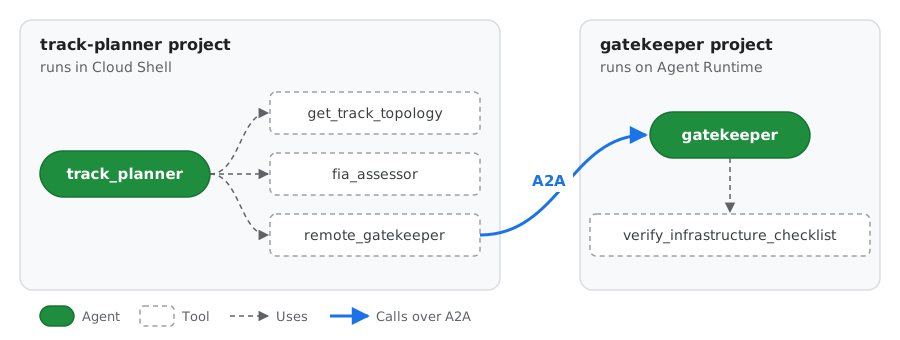
绿色框表示智能体,虚线框表示其工具,这与 ADK Playground 中的绘制方式相同。其中两个工具封装了其他智能体:fia_assessor 是具有 FIA 合规技能的 FIA Assessor 智能体,remote_gatekeeper 通过 A2A 调用另一个项目中的 Gatekeeper 智能体。
代理 | 项目 | 作业 |
|
Lead Architect |
| 阅读场地信息,询问评估者,解决问题,请求守门人批准 |
|
FIA 评估员 |
| 使用 FIA 技能和评分工具检查布局 |
|
数字孪生体 Gatekeeper |
| 运行最终认证核对清单 |
|
学习内容
agents-cli scaffold create如何布局 ADK 项目,以及您需要修改哪些文件。- 如何将领域知识打包为智能体技能(
SKILL.md、references/、scripts/),并使用 ADK 的SkillToolset加载该技能。 - 如何将
thinking_level与每个智能体的作业相匹配。 - 如何使用
agents-cli eval run评估智能体。 - 如何将智能体部署到 Agent Runtime、智能体身份与服务账号有何不同,以及如何通过 A2A 协议调用已部署的智能体。
2. 2. 设置您的环境
准备工作
您需要一个启用了结算功能的 Google Cloud 项目。如果您是在活动中学习此 Codelab,请使用为您提供的账号和项目。
打开 Cloud Shell 并设置项目
打开 Cloud Shell,然后运行以下命令:
# Cloud Shell sometimes opens without a project set. If so, this sets it to
# the first project on your account.
if [ -z "$(gcloud config get-value project 2>/dev/null)" ]; then
  gcloud config set project "$(gcloud projects list --format='value(projectId)' --limit=1)"
fi

export GOOGLE_CLOUD_PROJECT="$(gcloud config get-value project)"
export REGION="us-central1"
export ASSETS="$HOME/devrel-demos/codelabs/formula-e-track-planner"
echo "Project: $GOOGLE_CLOUD_PROJECT  Region: $REGION"
为代理创建凭证
gcloud 已登录,但智能体运行的 Python 代码使用的是应用默认凭证 (ADC),需要单独登录:
gcloud auth application-default login
打开输出的链接,使用同一账号登录,复制验证码,然后将其粘贴回 Cloud Shell。然后设置配额计费项目:
gcloud auth application-default set-quota-project "$GOOGLE_CLOUD_PROJECT"
启用 API
gcloud services enable \
    aiplatform.googleapis.com \
    cloudbuild.googleapis.com \
    artifactregistry.googleapis.com \
    storage.googleapis.com \
    cloudresourcemanager.googleapis.com \
    serviceusage.googleapis.com \
    compute.googleapis.com \
    iam.googleapis.com \
    logging.googleapis.com \
    cloudtrace.googleapis.com
每个 API 的用途:
API | 用于: |
| Gemini 模型和 Agent Runtime |
|
|
| 创建第 7 步中的部署所使用的 Compute Engine 默认服务账号 |
| 存储、日志和跟踪记录,如 Agent Runtime 设置指南中所建议 |
| 容器 build 和映像,作为第 7 步中部署的预防措施 |
许多项目已经启用了其中一些功能。启用已开启的 API 不会产生任何影响。
安装 uv 和 agents-cli
curl -LsSf https://astral.sh/uv/install.sh | sh
export PATH="$HOME/.local/bin:$PATH"
uv tool install google-agents-cli==1.10.0
agents-cli --version
此 Codelab 已在 agents-cli 1.10.0 环境下完成测试,因此请安装该版本,以获得相同的生成文件。
3. 3. 搭建项目并添加素材资源
生成两个项目
agents-cli scaffold create 会生成一个完整的、可部署的 ADK 项目。运行两次,每个代理系统运行一次。
首先是赛道规划器:
cd ~
agents-cli scaffold create track-planner \
  --agent adk \
  --deployment-target agent_runtime \
  --region "$REGION" \
  --prototype \
  --yes
然后是接待员:
cd ~
agents-cli scaffold create gatekeeper \
  --agent adk \
  --deployment-target agent_runtime \
  --region "$REGION" \
  --prototype \
  --yes
标志 | 含义 |
| 从 Python ADK 模板开始 |
| 为 Agent Runtime 生成服务器和配置 |
| 跳过 CI/CD;保持项目精简 |
| 不提示,直接接受默认设置 |
探索布局
生成的项目如下所示。您只需修改标有 ✍️ 的文件:
track-planner/
├── agents-cli-manifest.yaml   # Records the template, deployment target and root agent name
├── pyproject.toml             # Dependencies (google-adk, a2a-sdk, ...)
├── .env                       # Your project and model location, filled in for you
├── Dockerfile                 # Used by `agents-cli deploy`; copies app/ into the image
├── app/
│   ├── agent.py               # ✍️ Your agents
│   ├── fast_api_app.py        # Generated server: ADK API, A2A routes, Agent Runtime routes
│   └── app_utils/             # Generated helpers (A2A, sessions)
└── tests/
    ├── unit/                  # Fast tests with no model calls
    ├── integration/           # Generated server tests
    └── eval/                  # ✍️ eval_config.yaml and datasets for `agents-cli eval`
如需了解每个生成的文件,请参阅 Agents CLI 指南中的项目结构。
试用生成的智能体
在进行任何更改之前,请先运行模板智能体,看看脚手架为您提供了什么。安装依赖项,并在端口 8080 上启动本地 Playground:
cd ~/track-planner
agents-cli install
agents-cli playground --port 8080
如需打开该应用,请点击 Cloud Shell 工具栏中的网页预览按钮(右上角的眼睛图标),然后选择在端口 8080 上预览。
在 Playground 中,向模板智能体提出一个其工具可以回答的问题,例如:
What's the weather in San Francisco?
侧边栏会显示每个事件,包括 get_weather 工具调用及其结果。稍后,您将使用同一视图来跟踪自己的代理。
完成后,返回终端并按 Ctrl+C 停止运行 Playground。
添加 Formula E 素材资源
场地数据、FIA 规则、物理脚本、工具和评估数据集不属于本课程的内容,因此您需要从 GitHub 复制这些内容,而不是手动输入:
cd ~
git clone --depth 1 --filter=blob:none --sparse \
  --branch formula-e-lab-v1 \
  https://github.com/tdsymonds/devrel-demos.git
git -C devrel-demos sparse-checkout set codelabs/formula-e-track-planner

cp -r "$ASSETS/track-planner/." ~/track-planner/
cp -r "$ASSETS/gatekeeper/." ~/gatekeeper/
formula-e-lab-v1 是一个固定的版本标记,因此每个人都会获得相同的文件。$ASSETS 是在第 2 步中设置的,指向您刚刚克隆的文件夹。
这将添加以下文件:
track-planner/
├── app/
│   ├── tools.py                                  # get_track_topology, evaluate_track_layout
│   ├── auth.py                                   # A2A client with per-request token refresh
│   ├── data/circuits.json                        # Five candidate venues
│   └── skills/fia-compliance-skill/
│       ├── references/track_regulations.md       # The FIA rules
│       └── scripts/calculate_regen_zones.py      # Braking-energy calculator
└── tests/
    ├── unit/test_tools.py
    └── eval/datasets/track_eval.json, track_eval_quick.json
gatekeeper/
├── app/tools.py                                  # verify_infrastructure_checklist
└── tests/unit/test_tools.py
安装和测试
(cd ~/track-planner && agents-cli install && uv run pytest tests/unit)
(cd ~/gatekeeper && agents-cli install && uv run pytest tests/unit)
agents-cli install 运行 uv sync,为每个项目创建虚拟环境。所有单元测试都应该通过。
4. 4. 编写 FIA 合规性技能
智能体 Skill 将指令、参考文档和脚本打包到一个文件夹中。ADK 的 SkillToolset 会分三个级别加载它,因此智能体只会读取所需的内容:
级别 | 文件 | 当智能体看到 |
1 |
| 始终(几十个词元) |
2 |
| 当它调用 |
3 |
| 当它调用 |
该技能位于 app/skills/ 中,因为生成的 Dockerfile 仅将 app/ 复制到已部署的映像中。
查看 3 级文件
您在第 3 步中复制了技能的第 3 级文件:
references/track_regulations.md包含评估器检查的规则:长度和宽度限制、每个制动区所需的护栏、强制性 CAD 图层(以及医院路线的医疗图层)、能量回收目标和攻击模式规则。scripts/calculate_regen_zones.py是一个计算器。根据刹车区的入弯速度、出弯速度和刹车距离,它会计算出回收的能量和弯道所需的护栏,因此智能体永远不必猜测物理规律。
运行伦敦赛道第 10 个弯道的脚本,赛车在 82 米内从 215 公里/小时减速到 55 公里/小时:
cd ~/track-planner
uv run python app/skills/fia-compliance-skill/scripts/calculate_regen_zones.py \
  --entry-kph 215 --exit-kph 55 --brake-dist-m 82
赛车在这里回收了大约 508 千瓦的能量,超过了 250 千瓦的目标。在超过 2G 的情况下,它会减速,因此弯道需要 Tecpro 护栏 (F1_TEC3):
{"entry_kph": 215.0, "exit_kph": 55.0, "brake_dist_m": 82.0, "deceleration_g": 2.07, "estimated_regen_kw": 507.7, "meets_250kw_target": true, "required_barrier_layer": "F1_TEC3"}
写入 SKILL.md
创建将技能关联在一起的文件:
cloudshell edit app/skills/fia-compliance-skill/SKILL.md
添加以下内容:
---
name: fia-compliance-skill
description: >
  FIA Formula E street circuit rules: length and width limits, mandatory CAD
  layers, barrier selection, and Gen3 regenerative braking estimates. Use when
  designing, checking or fixing a Formula E circuit layout.
---

# FIA Formula E Compliance

Follow these steps for every circuit you check.

1. **Read the rules.** Call `load_skill_resource` with
   `file_path="references/track_regulations.md"`.
2. **Estimate regeneration for every heavy braking zone.** Call
   `run_skill_script` with `file_path="scripts/calculate_regen_zones.py"` and
   `args={"entry-kph": <entry>, "exit-kph": <exit>, "brake-dist-m": <distance>}`.
   Never guess kW values. Use the highest `estimated_regen_kw` as the
   circuit's peak regeneration.
3. **Check barriers.** Any zone whose `required_barrier_layer` is `F1_TEC3`
   needs the `F1_TEC3` CAD layer.
4. **Report.** List every rule the layout fails and a concrete fix for each
   one.
description是模型在决定何时使用技能时读取的内容,因此它既说明了技能涵盖的内容,也说明了何时使用技能。
了解技能的连接方式
在 Cloud Shell Editor 中打开 app/tools.py:
cloudshell edit app/tools.py
找到 build_fia_skill_toolset 函数:
def build_fia_skill_toolset() -> SkillToolset:
    return SkillToolset(
        skills=[load_skill_from_dir(SKILL_DIR)],
        code_executor=UnsafeLocalCodeExecutor(),
    )
load_skill_from_dir会读取技能文件夹:SKILL.md、references/和scripts/。SkillToolset会将其转换为智能体可以调用的工具:list_skills、load_skill、load_skill_resource和run_skill_script。UnsafeLocalCodeExecutor允许run_skill_script在此机器上运行 Python 脚本。这在实验中没有问题,但在生产环境中,请使用沙盒化执行器。
您将在下一步中将此工具集附加到 Assessor。
5. 5. 编写智能体
Gemini 3 模型使用 thinking_level(LOW、MEDIUM 或 HIGH)控制推理,而不是使用 token 预算。在 ADK 中,您可以使用 types.ThinkingConfig(thinking_level=types.ThinkingLevel.HIGH) 进行设置。根据每个智能体的任务进行匹配:思考量越大,规划越好,但延迟时间和费用也会增加。
Gatekeeper (LOW)
Gatekeeper 只运行确定性核对清单,因此几乎不需要推理。替换模板代理:
cloudshell edit ~/gatekeeper/app/agent.py
"""FIA Digital Twin Gatekeeper agent.

This agent runs in its own project and is deployed to Agent Runtime. The track
planner calls it over the A2A protocol.
"""

from google.adk.agents import Agent
from google.adk.apps import App
from google.adk.models import Gemini
from google.genai import types

from app.tools import verify_infrastructure_checklist

# Tested with Gemini 3.8 Flash. To try Gemini 4 Argon, change this to
# "gemini-4-argon", delete the `temperature` settings below (Argon ignores
# them) and run `uv add "google-genai>=2.30.1"` in this project first.
MODEL = "gemini-3.8-flash"

root_agent = Agent(
    # Must match `root_agent_name` in agents-cli-manifest.yaml.
    name="gatekeeper",
    model=Gemini(
        model=MODEL,
        retry_options=types.HttpRetryOptions(attempts=3),
    ),
    description=(
        "FIA Digital Twin Gatekeeper. Runs the final homologation checklist "
        "for a Formula E circuit blueprint."
    ),
    instruction=(
        "You are the FIA Digital Twin Gatekeeper. For every circuit blueprint "
        "you receive, call `verify_infrastructure_checklist` with its circuit "
        "ID, CAD layers, minimum width and peak regeneration. Reply with the "
        "status and any missing CAD layers. Never approve a blueprint the "
        "checklist rejects."
    ),
    # A deterministic checklist needs little reasoning: keep it fast and cheap.
    generate_content_config=types.GenerateContentConfig(
        temperature=0.0,
        thinking_config=types.ThinkingConfig(
            thinking_level=types.ThinkingLevel.LOW,
        ),
    ),
    tools=[verify_infrastructure_checklist],
)

app = App(
    root_agent=root_agent,
    name="app",
)
在本地运行 Gatekeeper
打开第二个 Cloud Shell 标签页,并在端口 8001 上启动 Gatekeeper 生成的服务器:
cd ~/gatekeeper
APP_URL=http://localhost:8001 uv run uvicorn app.fast_api_app:app --port 8001
返回第一个标签页,查看 Gatekeeper 的 A2A 智能体卡片。其他智能体通过以下方式发现 Gatekeeper 是什么以及它可以做什么:
curl -s http://localhost:8001/a2a/app/.well-known/agent-card.json | jq .
您应该会看到如下所示的 JSON(已缩短):
{
  "name": "gatekeeper",
  "description": "FIA Digital Twin Gatekeeper. Runs the final homologation checklist for a Formula E circuit blueprint.",
  "supportedInterfaces": [
    {"url": "http://localhost:8001/a2a/app", "protocolBinding": "JSONRPC", "protocolVersion": "1.0"}
  ],
  "skills": [
    {"id": "gatekeeper", "name": "model", "description": "FIA Digital Twin Gatekeeper. ..."},
    {"id": "gatekeeper-verify_infrastructure_checklist", "name": "verify_infrastructure_checklist", "description": "Runs the final homologation checklist ..."}
  ]
}
name和description直接来自您的Agent(...)定义。skills列出了智能体可以执行的操作。ADK 使用工具的文档字符串自动添加了verify_infrastructure_checklist。supportedInterfaces会告知调用方将 A2A 请求发送到何处。这就是您使用APP_URL=http://localhost:8001启动服务器的原因:调用方先读取卡片,然后将其请求发送到卡片通告的任何url。
这里的所有内容都不是手动编写的:脚手架服务器会根据您的智能体构建卡片。赛道规划器会读取此卡片,以找到并调用 Gatekeeper。
评估员 (MEDIUM) 和首席架构师 (HIGH)
赛道规划器有两个智能体:
- Assessor 会权衡多条规则,因此会获得
MEDIUM。它被封装在AgentTool中,因此 Lead Architect 可以像调用函数一样调用它,并获得判定结果。 - 首席架构师负责规划、修复和协调,因此会获得
HIGH。它通过RemoteA2aAgent(由app/auth.py中的create_remote_gatekeeper_agent()创建)到达 Gatekeeper,并将其封装在AgentTool中。
为什么要将这两个辅助函数都封装为工具?AgentTool 会将答案返回给调用方,因此首席架构师仍负责编写最终蓝图。如果 Gatekeeper 是 sub_agent,Lead Architect 会将对话移交给它,而 Gatekeeper 的简短状态将成为最终回答。
打开轨道规划器的 app/agent.py 文件:
cloudshell edit ~/track-planner/app/agent.py
复制以下代码,并用其替换 ~/track-planner/app/agent.py 的全部内容:
"""Formula E track planner: Lead Architect, FIA Assessor and remote Gatekeeper.

- The Lead Architect (root agent) designs the circuit and stays in charge.
- The FIA Assessor checks the layout and is called as a tool (`AgentTool`).
- The Gatekeeper runs in a separate project. It is also called as a tool, over
  A2A, so its verdict comes back to the Lead Architect.
"""

from google.adk.agents import Agent
from google.adk.apps import App
from google.adk.models import Gemini
from google.adk.tools.agent_tool import AgentTool
from google.genai import types

from app.auth import create_remote_gatekeeper_agent
from app.tools import build_fia_skill_toolset
from app.tools import evaluate_track_layout
from app.tools import get_track_topology

# Tested with Gemini 3.8 Flash. To try Gemini 4 Argon, change this to
# "gemini-4-argon", delete the `temperature` settings below (Argon ignores
# them) and run `uv add "google-genai>=2.30.1"` in this project first.
MODEL = "gemini-3.8-flash"

fia_skill_toolset = build_fia_skill_toolset()

# 1. FIA Assessor: MEDIUM thinking to weigh several rules without much latency.
assessor_agent = Agent(
    name="fia_assessor",
    model=Gemini(
        model=MODEL,
        retry_options=types.HttpRetryOptions(attempts=3),
    ),
    description=(
        "FIA safety and energy assessor. Audits a proposed circuit against "
        "the geometry, regeneration and CAD layer rules."
    ),
    instruction=(
        "You are the FIA Assessor. Load the `fia-compliance-skill` and follow "
        "it. Estimate regeneration for each braking zone with "
        "`calculate_regen_zones.py`, then call `evaluate_track_layout` with "
        "the highest value. Reply with the verdict, the score and every "
        "remediation note."
    ),
    generate_content_config=types.GenerateContentConfig(
        temperature=0.1,
        thinking_config=types.ThinkingConfig(
            thinking_level=types.ThinkingLevel.MEDIUM,
        ),
    ),
    tools=[fia_skill_toolset, evaluate_track_layout],
)

# 2. Remote Gatekeeper, reached over A2A (see app/auth.py).
remote_gatekeeper = create_remote_gatekeeper_agent()

# 3. Lead Architect: HIGH thinking for multi-step planning and trade-offs.
root_agent = Agent(
    # Must match `root_agent_name` in agents-cli-manifest.yaml.
    name="track_planner",
    model=Gemini(
        model=MODEL,
        retry_options=types.HttpRetryOptions(attempts=3),
    ),
    description=(
        "Lead Formula E circuit architect. Designs FIA-compliant street "
        "circuits and gets them homologated."
    ),
    instruction=(
        "You are the Lead Formula E Circuit Architect. For every request:\n"
        "1. Call `get_track_topology` for the venue.\n"
        "2. Call the `fia_assessor` tool with the full topology.\n"
        "3. If the Assessor rejects the layout, propose concrete fixes (for "
        "example widen a sector to 10.0m or add missing CAD layers) and "
        "re-assess the fixed layout.\n"
        "4. Once the Assessor passes it, call the `remote_gatekeeper` tool "
        "with the circuit ID, CAD layers, minimum width and peak "
        "regeneration for final approval.\n"
        "5. Finish with a short blueprint: circuit ID, length, minimum width, "
        "peak regeneration, every CAD layer by name, and the Gatekeeper's "
        "status."
    ),
    generate_content_config=types.GenerateContentConfig(
        temperature=0.2,
        thinking_config=types.ThinkingConfig(
            thinking_level=types.ThinkingLevel.HIGH,
        ),
    ),
    # Both helpers are tools, so their answers come back to the Lead Architect
    # and it writes the final blueprint.
    tools=[
        get_track_topology,
        AgentTool(agent=assessor_agent),
        AgentTool(agent=remote_gatekeeper),
    ],
)

app = App(
    root_agent=root_agent,
    name="app",
)
在 Playground 中运行整个系统
确保 Gatekeeper 仍在第二个标签页中运行。在第一个标签页中,启动 Track Planner 的 Playground:
cd ~/track-planner
agents-cli playground --port 8080
点击网页预览 > 在端口 8080 上预览,如第 3 步中所述。
询问符合以下规则的场馆中的赛道:
Design and homologate a Formula E circuit at Tokyo Bay.
在智能体运行期间,观察事件面板。您应该会依次看到:
get_track_topology:首席架构师加载东京湾数据。fia_assessor:首席建筑师将布局交给评估员,评估员会调用load_skill、load_skill_resource和run_skill_script(每个制动区调用一次),然后调用evaluate_track_layout。remote_gatekeeper:Lead Architect 通过 A2A 调用 Gatekeeper。您会在第二个标签页中看到记录的请求。- 一份来自首席建筑师的最终蓝图,其中列出了每个 CAD 图层和 Gatekeeper 的 APPROVED 状态。
点击任意事件即可查看其确切的输入和输出。
现在,启动新会话,并尝试一个不符合规则的场馆:
Can the Monaco Harbour layout be homologated? If not, fix it and try again.
这次,评估员拒绝了 6.8 米的减速弯道,首席架构师提出了更宽的弯道,修正后的布局在到达守门人之前又回到了评估员手中。
完成后,在第一个标签页中按 Ctrl+C 停止运行 Playground。让 Gatekeeper 在第二个标签页中继续运行:您在下一步中需要用到它。
6. 6. 评估智能体
agents-cli eval run 会针对数据集运行智能体,记录每个轮次和工具调用,并对结果进行评分。您可以决定在 tests/eval/eval_config.yaml 中衡量哪些内容。
查看数据集
在 Cloud Shell Editor 中打开数据集:
cd ~/track-planner
cloudshell edit tests/eval/datasets/track_eval.json
该文件包含 eval_cases 列表。每个用例都有一个 eval_case_id、一个 prompt(用户提出的问题)和一个 reference(理想的回答)。LLM 评判员会将智能体的回答与参考答案进行比较。
| 测试内容 |
| 通过所有规则并获得批准的场地 |
| 6.8 米的减速弯道不符合宽度规则 |
| 4350 米的赛道不符合长度规则 |
| 布局缺少强制性 CAD 图层 |
| 刹车区低于 250 kW 目标 |
| 需要医疗 CAD 图层的医院访问权限 |
| 赛车线上的攻击模式区域 |
| 多轮对话:摩纳哥被拒绝,用户要求修正,修正后的布局应获得批准 |
最后一个用例使用 agent_data,而不是 prompt。它会重放对话的前几轮,以便您测试智能体如何处理后续请求,而不仅仅是单个问题。
同一文件夹中的 track_eval_quick.json 仅包含两种情况:情况 1(单个问题)和情况 8(对话)。您将运行该查询,因为它速度更快,使用的配额更少。
写入指标
数据集会说明要向代理询问什么。eval_config.yaml 介绍了如何对答案进行评分。agents-cli eval run 会在代理回答完每个案例后读取这些回答,并针对每个回答运行每个指标。
打开脚手架生成的文件:
cloudshell edit tests/eval/eval_config.yaml
它已经包含一个通用 LLM 评判员 (custom_response_quality) 和一个仅统计轮数的 agent_turn_count 指标。对于任何智能体来说,这都是一个不错的开场白,但它没有提及 Formula E。您将保留该评判员,并添加一个指标来检查此网域特有的规则。
良好的评估通常会结合使用两种指标:
种类 | 评分方法 | 适用场景 | 权衡 |
LLM-as-a-judge | 模型会读取答案和支持请求的 | 模糊质量:回答是否正确、完整且清晰? | 每次运行会产生一次模型调用费用;每次运行的得分可能略有不同 |
代码指标 | 一个简短的 Python 函数会检查答案 | 确切、可核查的事实:回答中是否包含必须存在的内容? | 仅检查您可以在代码中表达的内容 |
将该文件的内容替换为:
metrics_to_run:
  - custom_response_quality
  - fia_cad_layer_compliance

custom_metrics:
  # LLM-as-a-judge. response_quality.py is generated by `agents-cli scaffold
  # create`; it grades the final answer against the case's `reference`.
  - name: custom_response_quality
    custom_function_file: response_quality.py

  # Deterministic code metric: an approved blueprint must name every
  # mandatory FIA CAD layer.
  - name: fia_cad_layer_compliance
    custom_function: |
      def evaluate(instance):
          response = str(instance.get("response") or "")
          reference = str(instance.get("reference") or "")
          # Only approvals must list every layer. Rejections and other
          # questions (such as Attack Mode) don't, so skip them.
          if "APPROVED" not in reference:
              return {"score": 1.0, "explanation": "Not an approval case."}
          required = [
              "F1_TRACK_CENTRELINE",
              "F1_PIT_ENTRY_SPEED_LIMIT_LANE",
              "F1_WALL_TEMP",
              "F1_TEC3",
          ]
          missing = [layer for layer in required if layer not in response]
          return {
              "score": round(1 - len(missing) / len(required), 2),
              "explanation": "Missing: " + (", ".join(missing) or "none"),
          }
各部分的作用:
metrics_to_run按名称列出要运行的指标。在此处移除名称会关闭该指标,但不会将其删除。custom_response_quality是 LLM 评判模型。custom_function_file指向由基架生成的tests/eval/response_quality.py。如果你想查看评判提示,请打开它。fia_cad_layer_compliance是您的代码指标,以内嵌方式写在custom_function下。对于每个用例,它都会收到一个instance(提示、智能体的最终response和reference)。对于预期答案为批准的用例,它会检查回答是否列出了所有四个强制性 CAD 层,并列出所有缺失的层。例如,如果蓝图省略了F1_TEC3,则得分为 0.75。其他情况得分为 1.0,因为拒绝或攻击模式回答不需要列出每一层。
为什么要检查 CAD 图层?即使一个已批准的蓝图读起来很通顺,但如果它遗漏了强制性层,那也是错误的,而 LLM 评判员可能会忽略这一点。代码检查在每次运行时都会以相同的方式应用相同的规则。
运行评估
让本地 Gatekeeper 在第二个标签页中保持运行状态,然后运行以下命令:
agents-cli eval run \
  --dataset tests/eval/datasets/track_eval_quick.json \
  --config tests/eval/eval_config.yaml \
  --concurrency 1
ls artifacts/grade_results/
评估需要几分钟时间。每个用例都会运行整个多智能体流程,其中首席架构师在 HIGH 上思考时会进行大约 10 次模型调用,因此 Step 1/2: eval generate 是速度较慢的部分。它没有卡住。
完成后,使用 Cloud Shell 编辑器打开 artifacts/grade_results/ 中的 HTML 报告。fia_cad_layer_compliance 得分较低表示首席架构师的最终回答遗漏了某些层。请尝试收紧其指令,然后重新运行评估。
7. 7. 将 Gatekeeper 部署到 Agent Runtime
您只需部署 Gatekeeper。赛道规划器会在 Cloud Shell 中持续运行并调用它。
打开新的 Cloud Shell 标签页
部署需要 5 到 8 分钟,因此请在第 6 步中的评估完成时,在新标签页中执行此操作:
- 点击 Cloud Shell 工具栏中的打开新标签页 (+)。
- 新标签页不会保留第 2 步中的变量,因此请重新设置这些变量:
export GOOGLE_CLOUD_PROJECT="$(gcloud config get-value project)"
export REGION="us-central1"
export ASSETS="$HOME/devrel-demos/codelabs/formula-e-track-planner"
export PATH="$HOME/.local/bin:$PATH"
echo "Project: $GOOGLE_CLOUD_PROJECT  Region: $REGION"
让本地 Gatekeeper 在第二个标签页中继续运行:评估仍会使用它,并且部署不需要停止它。
部署
在新标签页中,部署 Gatekeeper。它以项目的 Compute Engine 默认服务账号身份运行:
cd ~/gatekeeper
PROJECT_NUMBER=$(gcloud projects describe "$GOOGLE_CLOUD_PROJECT" --format="value(projectNumber)")
agents-cli deploy \
  --no-agent-identity \
  --service-account "${PROJECT_NUMBER}-compute@developer.gserviceaccount.com" \
  --project "$GOOGLE_CLOUD_PROJECT" \
  --region "$REGION" \
  --no-confirm-project
部署大约需要 5 到 8 分钟。在运行期间,请勿关闭 Cloud Shell 标签页。如果日志流断开连接,请使用 agents-cli deploy --status 检查进度。在等待期间,请返回第 6 步并阅读评估报告。
检查智能体的身份
agents-cli 会在 deployment_metadata.json 中记录已部署的资源:
export RUNTIME_ID=$(jq -r .remote_agent_runtime_id ~/gatekeeper/deployment_metadata.json)
echo "$RUNTIME_ID"

curl -s -H "Authorization: Bearer $(gcloud auth print-access-token)" \
  "https://${REGION}-aiplatform.googleapis.com/v1beta1/${RUNTIME_ID}" \
  | jq -r .spec.effectiveIdentity
输出的第二行是 Gatekeeper 运行时的身份:
部署方式 | 输出示例 |
服务账号(默认) |
|
Agent Identity |
|
服务账号由项目中使用它的所有内容共享。智能体身份属于此智能体,因此您可以为其授予所需的确切角色,并在审核日志中单独查看其操作。
8. 8. 通过 A2A 连接到已部署的 Gatekeeper
Agent Runtime 在经过身份验证的 /api 路径后,提供 Gatekeeper 生成的 A2A 路由。
确保第 6 步中的评估已完成,然后在第二个标签页中停止本地 Gatekeeper (Ctrl+C)。从现在开始,赛道规划器会调用已部署的规划器。在第一个标签页中,将轨道规划器指向该文件:
export RUNTIME_ID=$(jq -r .remote_agent_runtime_id ~/gatekeeper/deployment_metadata.json)
: "${RUNTIME_ID:?No deployed Gatekeeper found. Complete Step 7 first.}"
cd ~/track-planner
echo "GATEKEEPER_A2A_URL=https://${REGION}-aiplatform.googleapis.com/reasoningEngines/v1/${RUNTIME_ID}/api/a2a/app" >> .env
客户端刷新令牌的原因
打开 app/auth.py。Google Cloud 访问令牌会在一小时后过期,因此在启动时设置固定 Authorization 标头的客户端会在一小时后开始失败,并显示 401 Unauthorized。GoogleAuthRefresh 会将 httpx.Auth 子类化,并检查每个请求的凭据,在需要时刷新凭据。create_remote_gatekeeper_agent() 仅会将其附加到 https:// 网址。
端到端运行
再次启动 Playground,以便它获取新的 GATEKEEPER_A2A_URL:
agents-cli playground --port 8080
依次点击网页预览 > 在端口 8080 上预览,开始新会话,然后询问:
Assess the Monaco Harbour layout, widen the chicane to 11m, and get Gatekeeper approval.
这些事件看起来与第 5 步中的事件相同,但 remote_gatekeeper 调用现在会发送到 Agent Runtime 上的 Gatekeeper,而不是您的第二个标签页。
查看 Agent Runtime 上的来电
证明请求确实通过 A2A 到达了已部署的 Gatekeeper:
- 在 Cloud 控制台中,搜索 Agent Platform,然后打开左侧菜单中的部署。
- 选择 gatekeeper。
- 打开会话标签页。
您会看到一个新会话,其用户 ID 以 A2A_USER_ 开头。Gatekeeper 的 A2A 服务器在您的轨道规划器调用它时创建了该文件。打开同一页面上的跟踪记录标签页,查看 Gatekeeper 的模型调用及其针对该请求的 verify_infrastructure_checklist 工具调用。
可选:同时部署轨道规划器
到目前为止,赛道规划器在 Cloud Shell 中运行,因此它对 Gatekeeper 的 A2A 调用使用的是您的凭证。同时部署规划器,两个智能体都在 Agent Runtime 上运行,并使用各自的已部署身份相互调用。
按 Ctrl+C 停止 Playground,然后以与 Gatekeeper 相同的方式部署 Planner:
cd ~/track-planner
PROJECT_NUMBER=$(gcloud projects describe "$GOOGLE_CLOUD_PROJECT" --format="value(projectNumber)")
agents-cli deploy \
  --no-agent-identity \
  --service-account "${PROJECT_NUMBER}-compute@developer.gserviceaccount.com" \
  --project "$GOOGLE_CLOUD_PROJECT" \
  --region "$REGION" \
  --no-confirm-project
两个代理都以同一 Compute Engine 服务账号身份运行。保留 --service-account:如果没有它,规划器将作为 Agent Runtime 的默认服务代理运行,并且无法调用 Gatekeeper(请参阅第 7 步中的为什么使用此服务账号?)。
部署的规划师如何联系到接待员:
agents-cli deploy会将.env中的值复制到部署中,以便规划器获取您在上面添加的GATEKEEPER_A2A_URL。- 在 Agent Runtime 中,
app/auth.py中的GoogleAuthRefresh会采用规划器的已部署身份,而不是您的身份。
部署大约需要 5 到 8 分钟。完成后,检查规划器以何种身份运行:
export PLANNER_ID=$(jq -r .remote_agent_runtime_id deployment_metadata.json)
curl -s -H "Authorization: Bearer $(gcloud auth print-access-token)" \
  "https://${REGION}-aiplatform.googleapis.com/v1beta1/${PLANNER_ID}" \
  | jq -r .spec.effectiveIdentity
如需试用已部署的系统,请执行以下操作:
- 在 Cloud 控制台中,返回到 Agent Platform > 部署。
- 选择 track-planner,然后打开 Playground 标签页。
- 请输入:
Design and homologate a Formula E circuit at Tokyo Bay. - 等待 Gatekeeper 状态为 APPROVED 的蓝图。
- 返回部署,选择 gatekeeper,然后打开会话标签页。最新的
A2A_USER_会话来自已部署的规划器,而不是 Cloud Shell。
在下一步中进行清理时,请一并删除规划器:
curl -X DELETE -H "Authorization: Bearer $(gcloud auth print-access-token)" \
  "https://${REGION}-aiplatform.googleapis.com/v1beta1/${PLANNER_ID}?force=true"
9. 9. 问题排查和清理
问题排查
问题 | 修复 |
| 在 Cloud 控制台中接受《服务条款》,然后重试。 |
项目为 | 重新运行第 2 步中的项目命令。 |
| 运行 |
| 完成第 4 步,或将 |
| 启动本地 Gatekeeper(第 5 步),或将 |
| 您的账号无法使用代理身份。按照第 7 步中的清理框操作,然后使用服务账号进行部署。 |
已部署的轨道规划器从 Gatekeeper 报告 | 不允许规划器的身份调用 Gatekeeper。如第 7 步所述,使用 |
| 您已达到 Gemini 配额。请稍等片刻,或将 |
| 请停止其他服务器,或选择其他 |
清理
删除已部署的 Gatekeeper,使其不再继续运行:
export RUNTIME_ID=$(jq -r .remote_agent_runtime_id ~/gatekeeper/deployment_metadata.json)
: "${RUNTIME_ID:?No deployed Gatekeeper found.}"
curl -X DELETE -H "Authorization: Bearer $(gcloud auth print-access-token)" \
  "https://${REGION}-aiplatform.googleapis.com/v1beta1/${RUNTIME_ID}?force=true"
如果您是专门为此 Codelab 创建的项目,则可以改为删除整个项目。如果您在参加活动,请保留您收到的项目,除非组织者另有说明。
要点回顾
agents-cli scaffold create为您提供了一个标准的可部署 ADK 项目;您只需编写智能体、技能和评估。- 智能体技能可将领域知识排除在提示之外,直到智能体需要这些知识。
thinking_level可让您针对每个代理在推理深度和速度之间进行权衡。agents-cli eval run可将“它有效吗?”转化为您可以跟踪的分数。- 借助 Agent Identity 和 A2A,独立部署的智能体可以安全地协同工作。