
1. Introduction
The Gemini CLI Security Extension is a Google-built open source Gemini CLI extension that analyzes code for security risks and vulnerabilities. You can use the Security extension with Gemini CLI to identify security issues locally, just as you would with any other Gemini CLI extension. You can also invoke it to review Pull Requests on GitHub. In this codelab, we will go over how to use the Security extension in your GitHub repository.
What you'll do
- Configure secure authentication from GitHub to Google Cloud
- Create a GitHub Actions workflow that calls on the Gemini CLI Security Extension
- Run a security review on a new or existing PR using GitHub Actions
What you'll learn
- How to use Workload Identity Federation for secure authentication from GitHub Actions to Google Cloud
- Learn the benefits of using a Workload Identity Pool and Workload Identity Provider over a Gemini API key for authentication
- How to run a security review with PRs
- How to interpret security reviews returned by the Security extension
What you'll need
- A web browser
- A GitHub account and repository
- A Google Cloud project
This codelab is designed for developers familiar with the CI/CD workflow on GitHub. You are not expected to have familiarity with Gemini CLI or Gemini CLI extensions. If you want to learn how extensions work, check out the codelab: Getting Started with Gemini CLI Extensions.
In this codelab, you will learn how to set up the Gemini CLI Security Extension in your GitHub repository. We won't suggest code for you to open a PR against your repository to trigger a security vulnerability finding.
2. Before you begin
Create or select a project
- In the Google Cloud Console, on the project selector page, select or create a Google Cloud project.
- Make sure that billing is enabled for your Cloud project. Learn how to verify billing.
- Open Cloud Shell, a command-line environment running in Google Cloud. Click Activate Cloud Shell at the top of the Google Cloud console.

- Once connected to Cloud Shell, check that you're authenticated and the project is set to your project ID using the following command:
gcloud auth list
- Run the following command to confirm that the
gcloudcommand is configured to use your project.
gcloud config list project
- If your project is not set, use the following command to set it:
gcloud config set project ${GOOGLE_CLOUD_PROJECT}
3. Set up auth from GitHub to Google Cloud
How it works
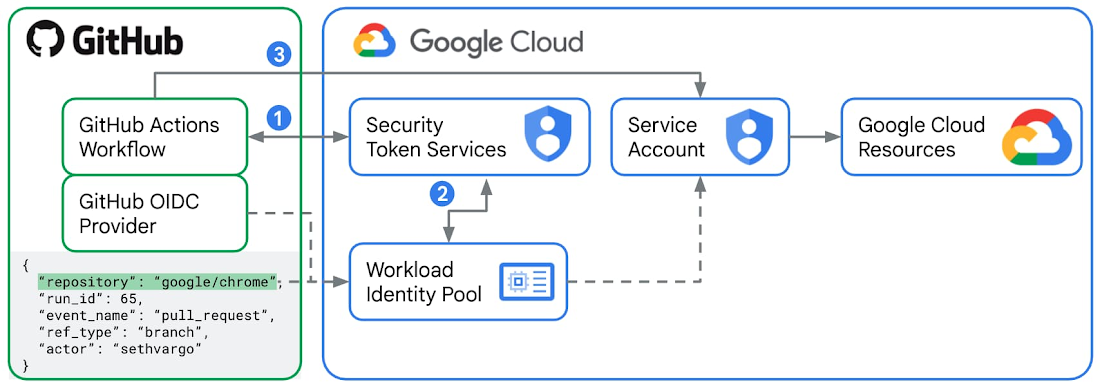
Workload Identity Federation is the recommended way to authenticate from GitHub Actions to Google Cloud.
- For every GitHub Actions workflow run job, GitHub as an external Identity Provider issues a signed JWT (JSON Web Token). This token contains "claims" such as
repository,workflow, andjob_workflow_ref, which act as a digital identity card for that specific runner. In this lab, you will create a GitHub Actions workflow with a job that uses thegoogle-github-actions/run-gemini-cliaction, which will request a JWT from GitHub and send this token to the Security Token Service (STS) in Google Cloud. - You will configure a Workload Identity Pool and a Provider in Google Cloud by setting the issuer URL to the official GitHub token service URL
https://token.actions.githubusercontent.comand defining your "Attribute Mappings", which typically include repository and branch names. Google Cloud STS validates the JWT against the Workload Identity Pool rules. If everything, including the attribute mappings, checks out, the STS exchanges the GitHub token for a short-lived Google Cloud Federated Access Token. - Now the
google-github-actions/run-gemini-cliaction in your GitHub Actions workflow can use the short-lived Google Cloud Federated Access Token to "impersonate" a connected Service Account to the Workload Identity Pool. The connected Service Account needs to have the necessary IAM roles and permissions to access any Google Cloud resources and services.
Benefits of using Workload Identity Federation over Gemini API Key
It is possible to authenticate Gemini CLI calls originated from GitHub Actions using a Gemini API Key, which involves creating a new GitHub Actions secret named GEMINI_API_KEY with the appropriate key value. However, this is discouraged for the following security reasons:
- Gemini API keys can have broad permissions from their respective IAM role bindings. When compromised, they open up access to a broad range of Google Cloud resources and services. Workload Identity Federation makes use of service accounts and short-lived access tokens, which tightens auth significantly.
- Gemini API keys are also challenging to manage at scale. Identifying which workflows are using an exposed key takes time. Rotating the keys manually also takes time. On the other hand, you can easily look up, edit, and delete Workload Identity pools and providers associated with your repository from the Cloud Console.
- With Gemini API keys, you have to always double-check that you aren't accidentally exposing them in any access or debug logs. With Workload Identity Federation, you don't store any GitHub Actions workflows secrets but variables, which are inherently less sensitive.
Configure GitHub Actions and Google Cloud
- In your Cloud Shell, log into your GitHub account.
gh auth login
- Create a new file
setup_workload_identity.shand copy and paste the code below into it.
set -e
# Colors for output
RED='\033[0;31m'
GREEN='\033[0;32m'
YELLOW='\033[1;33m'
BLUE='\033[0;34m'
NC='\033[0m' # No Color
# Helper functions
print_info() {
echo -e "${BLUE}ℹ️ $1${NC}"
}
print_success() {
echo -e "${GREEN}✅ $1${NC}"
}
print_warning() {
echo -e "${YELLOW}⚠️ $1${NC}"
}
print_error() {
echo -e "${RED}❌ $1${NC}"
}
print_header() {
echo -e "${BLUE}🚀 $1${NC}"
}
# Default values
GOOGLE_CLOUD_PROJECT=""
GOOGLE_CLOUD_LOCATION="global"
GITHUB_REPO=""
POOL_NAME=""
PROVIDER_NAME=""
# Show help
show_help() {
cat << EOF
Universal Direct Workload Identity Federation Setup for GitHub Actions
USAGE:
$0 --repo OWNER/REPO [OPTIONS]
REQUIRED:
-r, --repo OWNER/REPO GitHub repository (e.g., google/my-repo)
-p, --project GOOGLE_CLOUD_PROJECT Google Cloud project ID
OPTIONS:
--pool-name NAME Custom workload identity pool name (default: auto-generated)
--provider-name NAME Custom workload identity provider name (default: auto-generated)
-h, --help Show this help
EXAMPLES:
# Basic setup for a repository
$0 --repo google/my-repo --project my-gcp-project
# Custom pool name
$0 --repo google/my-repo --project my-gcp-project --pool-name my-pool
# Custom pool and provider names
$0 --repo google/my-repo --project my-gcp-project --pool-name my-pool --provider-name my-provider
ABOUT DIRECT WORKLOAD IDENTITY FEDERATION:
This script sets up Direct Workload Identity Federation (preferred method).
- No intermediate service accounts required
- Direct authentication from GitHub Actions to GCP resources
- Maximum token lifetime of 10 minutes
- You grant permissions directly to the Workload Identity Pool on GCP resources
EOF
}
# Parse command line arguments
while [[ $# -gt 0 ]]; do
case $1 in
-r|--repo)
GITHUB_REPO="$2"
shift 2
;;
-p|--project)
GOOGLE_CLOUD_PROJECT="$2"
shift 2
;;
--pool-name)
POOL_NAME="$2"
shift 2
;;
--provider-name)
PROVIDER_NAME="$2"
shift 2
;;
-l|--location)
GOOGLE_CLOUD_LOCATION="$2"
shift 2
;;
-h|--help)
show_help
exit 0
;;
*)
print_error "Unknown option: $1"
echo "Use --help for usage information."
exit 1
;;
esac
done
# Validate required arguments
if [[ -z "${GITHUB_REPO}" ]]; then
print_error "Repository is required. Use --repo OWNER/REPO"
echo ""
echo "💡 To find your repository name:"
echo " 1. Go to your GitHub repository"
echo " 2. The URL shows: https://github.com/OWNER/REPOSITORY"
echo " 3. Use: OWNER/REPOSITORY (e.g., google/golang)"
echo ""
echo "Use --help for usage information."
exit 1
fi
if [[ -z "${GOOGLE_CLOUD_PROJECT}" ]]; then
print_error "GCP project is required. Use --project GOOGLE_CLOUD_PROJECT"
echo ""
echo "💡 To find your project ID:"
echo " 1. Go to your Google Cloud console"
echo " 2. The URL displays: https://console.cloud.google.com/welcome?project=GOOGLE_CLOUD_PROJECT"
echo ""
echo "Use --help for usage information."
exit 1
fi
# Validate repository format
if [[ ! "${GITHUB_REPO}" =~ ^[a-zA-Z0-9._-]+/[a-zA-Z0-9._-]+$ ]]; then
print_error "Invalid repository format '${GITHUB_REPO}'"
echo "Expected format: owner/repo (e.g., google/my-repo)"
exit 1
fi
# Extract repository components
REPO_OWNER=$(echo "${GITHUB_REPO}" | cut -d'/' -f1)
# Generate unique names based on repository
REPO_HASH_INPUT=$(echo -n "${GITHUB_REPO}")
REPO_HASH_SHA=$(echo "${REPO_HASH_INPUT}" | shasum -a 256)
REPO_HASH=$(echo "${REPO_HASH_SHA}" | cut -c1-8)
# Use custom pool name if provided, otherwise generate one
if [[ -z "${POOL_NAME}" ]]; then
POOL_NAME="github-${REPO_HASH}"
fi
# Use custom provider name if provided, otherwise generate one
if [[ -z "${PROVIDER_NAME}" ]]; then
PROVIDER_NAME="gh-${REPO_HASH}"
fi
print_header "Starting Direct Workload Identity Federation setup"
echo "📦 Repository: ${GITHUB_REPO}"
echo "☁️ Project: ${GOOGLE_CLOUD_PROJECT}"
echo "🏊 Pool: ${POOL_NAME}"
echo "🆔 Provider: ${PROVIDER_NAME}"
echo ""
# Verify gcloud authentication
print_info "Verifying gcloud authentication..."
GCLOUD_AUTH_LIST_RAW=$(gcloud auth list --filter=status:ACTIVE --format="value(account)")
GCLOUD_AUTH_LIST=$(echo "${GCLOUD_AUTH_LIST_RAW}" | head -1)
if [[ -z "${GCLOUD_AUTH_LIST}" ]]; then
print_error "No active gcloud authentication found"
echo "Please run: gcloud auth login"
exit 1
fi
# Test project access
if ! gcloud projects describe "${GOOGLE_CLOUD_PROJECT}" > /dev/null 2>&1; then
print_error "Cannot access project '${GOOGLE_CLOUD_PROJECT}'"
echo "Please verify:"
echo " 1. Project ID is correct"
echo " 2. You have permissions on this project"
echo " 3. Project exists and is not deleted"
exit 1
fi
print_success "Authentication and project access verified"
# Step 1: Enable required APIs
print_header "Step 1: Enabling required Google Cloud APIs"
required_apis=(
"aiplatform.googleapis.com"
"cloudaicompanion.googleapis.com"
"cloudresourcemanager.googleapis.com"
"cloudtrace.googleapis.com"
"iam.googleapis.com"
"iamcredentials.googleapis.com"
"logging.googleapis.com"
"monitoring.googleapis.com"
"sts.googleapis.com"
)
gcloud services enable "${required_apis[@]}" --project="${GOOGLE_CLOUD_PROJECT}"
print_success "APIs enabled successfully."
# Step 2: Create Workload Identity Pool
print_header "Step 2: Creating Workload Identity Pool"
if ! gcloud iam workload-identity-pools describe "${POOL_NAME}" \
--project="${GOOGLE_CLOUD_PROJECT}" \
--location="${GOOGLE_CLOUD_LOCATION}" &> /dev/null; then
print_info "Creating Workload Identity Pool: ${POOL_NAME}"
gcloud iam workload-identity-pools create "${POOL_NAME}" \
--project="${GOOGLE_CLOUD_PROJECT}" \
--location="${GOOGLE_CLOUD_LOCATION}" \
--display-name="GitHub Actions Pool"
print_success "Workload Identity Pool created"
else
print_info "Workload Identity Pool '${POOL_NAME}' exists. Verifying state..."
# Fetch the current state of the existing pool.
POOL_STATE=$(gcloud iam workload-identity-pools describe "${POOL_NAME}" \
--project="${GOOGLE_CLOUD_PROJECT}" \
--location="${GOOGLE_CLOUD_LOCATION}" \
--format="value(state)")
if [[ "${POOL_STATE}" == "ACTIVE" ]]; then
# Pool exists and is in the correct state.
print_success "Workload Identity Pool already exists and is ACTIVE."
else
if [[ "${POOL_STATE}" == "DELETED" ]]; then
# Pool exists but is DELETED. Undelete the pool.
print_warning "Workload Identity Pool already exists but is in a DELETED state. Running 'undelete'."
gcloud iam workload-identity-pools undelete "${POOL_NAME}" \
--project="${GOOGLE_CLOUD_PROJECT}" \
--location="${GOOGLE_CLOUD_LOCATION}"
else
# Pool exists but is in an unexpected state.
print_error "Pool '${POOL_NAME}' is in an unexpected state: '${POOL_STATE}'. Expected states are: {'ACTIVE', 'DELETED'}. Exiting"
exit 1
fi
fi
fi
# Get the pool ID
WIF_POOL_ID=$(gcloud iam workload-identity-pools describe "${POOL_NAME}" \
--project="${GOOGLE_CLOUD_PROJECT}" \
--location="${GOOGLE_CLOUD_LOCATION}" \
--format="value(name)")
# Step 3: Create Workload Identity Provider
print_header "Step 3: Creating Workload Identity Provider"
ATTRIBUTE_CONDITION="assertion.repository_owner == '${REPO_OWNER}'"
if ! gcloud iam workload-identity-pools providers describe "${PROVIDER_NAME}" \
--project="${GOOGLE_CLOUD_PROJECT}" \
--location="${GOOGLE_CLOUD_LOCATION}" \
--workload-identity-pool="${POOL_NAME}" &> /dev/null; then
print_info "Creating Workload Identity Provider: ${PROVIDER_NAME}"
gcloud iam workload-identity-pools providers create-oidc "${PROVIDER_NAME}" \
--project="${GOOGLE_CLOUD_PROJECT}" \
--location="${GOOGLE_CLOUD_LOCATION}" \
--workload-identity-pool="${POOL_NAME}" \
--display-name="${PROVIDER_NAME}" \
--attribute-mapping="google.subject=assertion.sub,attribute.actor=assertion.actor,attribute.repository=assertion.repository,attribute.repository_owner=assertion.repository_owner" \
--attribute-condition="${ATTRIBUTE_CONDITION}" \
--issuer-uri="https://token.actions.githubusercontent.com"
print_success "Workload Identity Provider created"
else
print_info "Workload Identity Provider '${PROVIDER_NAME}' exists. Verifying state..."
# Fetch the current state of the existing provider.
PROVIDER_STATE=$(gcloud iam workload-identity-pools providers describe "${PROVIDER_NAME}" \
--project="${GOOGLE_CLOUD_PROJECT}" \
--location="${GOOGLE_CLOUD_LOCATION}" \
--workload-identity-pool="${POOL_NAME}" \
--format="value(state)")
if [[ "${PROVIDER_STATE}" == "ACTIVE" ]]; then
# Provider exists and is in the correct state.
print_success "Workload Identity Provider already exists and is ACTIVE."
else
if [[ "${PROVIDER_STATE}" == "DELETED" ]]; then
# Provider exists but is DELETED. Undelete the provider.
print_warning "Workload Identity Provider already exists but is in a DELETED state. Running 'undelete'."
gcloud iam workload-identity-pools providers undelete "${PROVIDER_NAME}" \
--project="${GOOGLE_CLOUD_PROJECT}" \
--location="${GOOGLE_CLOUD_LOCATION}" \
--workload-identity-pool="${POOL_NAME}"
else
# Provider exists but is in an unexpected state.
print_error "Provider '${PROVIDER_NAME}' is in an unexpected state: '${PROVIDER_STATE}'. Expected states are: {'ACTIVE', 'DELETED'}. Exiting"
exit 1
fi
fi
fi
# Step 4: Grant required permissions to the Workload Identity Pool
print_header "Step 4: Granting required permissions to Workload Identity Pool"
PRINCIPAL_SET="principalSet://iam.googleapis.com/${WIF_POOL_ID}/attribute.repository/${GITHUB_REPO}"
print_info "Skipped: Granting required permissions directly to the Workload Identity Pool..."
# Step 5: Create and Configure Service Account for Gemini CLI
print_header "Step 5: Create and Configure Service Account for Gemini CLI"
SERVICE_ACCOUNT_NAME="gemini-cli-${REPO_HASH}"
SERVICE_ACCOUNT_EMAIL="${SERVICE_ACCOUNT_NAME}@${GOOGLE_CLOUD_PROJECT}.iam.gserviceaccount.com"
# Create service account if it doesn't exist
if ! gcloud iam service-accounts describe "${SERVICE_ACCOUNT_EMAIL}" --project="${GOOGLE_CLOUD_PROJECT}" &> /dev/null; then
print_info "Creating Service Account: ${SERVICE_ACCOUNT_NAME}"
gcloud iam service-accounts create "${SERVICE_ACCOUNT_NAME}" \
--project="${GOOGLE_CLOUD_PROJECT}" \
--display-name="Gemini CLI Service Account"
print_success "Service Account created: ${SERVICE_ACCOUNT_EMAIL}"
else
print_success "Service Account already exists: ${SERVICE_ACCOUNT_EMAIL}"
fi
# Grant permissions to the service account on the project
print_info "Granting 'Cloud AI Companion User' role to Service Account..."
gcloud projects add-iam-policy-binding "${GOOGLE_CLOUD_PROJECT}" \
--role="roles/cloudaicompanion.user" \
--member="serviceAccount:${SERVICE_ACCOUNT_EMAIL}" \
--condition=None
# Allow the service account to generate an access tokens
print_info "Granting 'Service Account Token Creator' role to Service Account..."
gcloud projects add-iam-policy-binding "${GOOGLE_CLOUD_PROJECT}" \
--role="roles/iam.serviceAccountTokenCreator" \
--member="serviceAccount:${SERVICE_ACCOUNT_EMAIL}" \
--condition=None
# Grant logging permissions to the service account
print_info "Granting 'Logging Writer' role to Service Account..."
gcloud projects add-iam-policy-binding "${GOOGLE_CLOUD_PROJECT}" \
--role="roles/logging.logWriter" \
--member="serviceAccount:${SERVICE_ACCOUNT_EMAIL}" \
--condition=None
# Grant monitoring permissions to the service account
print_info "Granting 'Monitoring Editor' role to Service Account..."
gcloud projects add-iam-policy-binding "${GOOGLE_CLOUD_PROJECT}" \
--role="roles/monitoring.editor" \
--member="serviceAccount:${SERVICE_ACCOUNT_EMAIL}" \
--condition=None
# Grant tracing permissions to the service account
print_info "Granting 'Cloud Trace Agent' role to Service Account..."
gcloud projects add-iam-policy-binding "${GOOGLE_CLOUD_PROJECT}" \
--role="roles/cloudtrace.agent" \
--member="serviceAccount:${SERVICE_ACCOUNT_EMAIL}" \
--condition=None
# Grant Vertex AI permissions to the service account
print_info "Granting 'Vertex AI User' role to Service Account..."
gcloud projects add-iam-policy-binding "${GOOGLE_CLOUD_PROJECT}" \
--role="roles/aiplatform.user" \
--member="serviceAccount:${SERVICE_ACCOUNT_EMAIL}" \
--condition=None
# Allow the Workload Identity Pool to impersonate the Service Account
print_info "Allowing GitHub Actions from '${GITHUB_REPO}' to impersonate the Service Account..."
gcloud iam service-accounts add-iam-policy-binding "${SERVICE_ACCOUNT_EMAIL}" \
--project="${GOOGLE_CLOUD_PROJECT}" \
--role="roles/iam.workloadIdentityUser" \
--member="${PRINCIPAL_SET}"
print_success "GitHub Actions can now impersonate ${SERVICE_ACCOUNT_NAME}"
# Get the full provider name for output
WIF_PROVIDER_FULL=$(gcloud iam workload-identity-pools providers describe "${PROVIDER_NAME}" \
--project="${GOOGLE_CLOUD_PROJECT}" \
--location="${GOOGLE_CLOUD_LOCATION}" \
--workload-identity-pool="${POOL_NAME}" \
--format="value(name)")
# Step 6: Output configuration
print_header "🎉 Setup Complete!"
echo ""
print_success "Direct Workload Identity Federation has been configured for your repository!"
echo ""
print_header "Permissions Granted"
echo ""
print_success "The following permissions have been automatically granted to your repository:"
echo "• roles/logging.logWriter - Write logs to Cloud Logging"
echo "• roles/monitoring.editor - Create and update metrics in Cloud Monitoring"
echo "• roles/cloudtrace.agent - Send traces to Cloud Trace"
echo "• roles/aiplatform.user - Use Vertex AI for model inference"
echo ""
print_success "A Service Account (${SERVICE_ACCOUNT_EMAIL}) was created with the following roles:"
echo "• roles/cloudaicompanion.user - Use Code Assist for model inference"
echo "• roles/iam.serviceAccountTokenCreator"
echo ""
# Check for `gh` CLI and set variables automatically if available
if command -v gh &> /dev/null; then
print_info "The 'gh' CLI is installed. Setting variables automatically..."
gh variable set GCP_WIF_PROVIDER --body "${WIF_PROVIDER_FULL}" --repo "${GITHUB_REPO}"
gh variable set GOOGLE_CLOUD_PROJECT --body "${GOOGLE_CLOUD_PROJECT}" --repo "${GITHUB_REPO}"
gh variable set GOOGLE_CLOUD_LOCATION --body "${GOOGLE_CLOUD_LOCATION}" --repo "${GITHUB_REPO}"
gh variable set SERVICE_ACCOUNT_EMAIL --body "${SERVICE_ACCOUNT_EMAIL}" --repo "${GITHUB_REPO}"
gh variable set GOOGLE_GENAI_USE_VERTEXAI --body "true" --repo "${GITHUB_REPO}"
print_success "GitHub variables have been set automatically!"
else
print_warning "The 'gh' CLI was not found. Either install it and rerun this script OR set the below variables manually."
echo " For manual setup, go to https://github.com/${GITHUB_REPO}/settings/variables/actions and add the following repository variables:"
echo ""
echo "🔑 Variable Name: GCP_WIF_PROVIDER"
echo " Variable Value: ${WIF_PROVIDER_FULL}"
echo ""
echo "☁️ Variable Name: GOOGLE_CLOUD_PROJECT"
echo " Variable Value: ${GOOGLE_CLOUD_PROJECT}"
echo ""
echo "☁️ Variable Name: GOOGLE_CLOUD_LOCATION"
echo " Variable Value: ${GOOGLE_CLOUD_LOCATION}"
echo ""
echo "☁️ Variable Name: SERVICE_ACCOUNT_EMAIL"
echo " Variable Value: ${SERVICE_ACCOUNT_EMAIL}"
echo ""
fi
print_success "Setup completed successfully! 🚀"
- Make the script into an executable.
chmod +x setup_workload_identity.sh
- Run the script.
./setup_workload_identity.sh --repo {OWNER/REPO} --project {GOOGLE_CLOUD_PROJECT}
4. Create a GitHub Actions workflow
- Check out a GitHub repository that you own.
git clone {YOUR_REPO}
cd {YOUR REPO}
- Create a GitHub Actions workflow that calls on the slash command
/security:analyze-github-prby copying an example workflowymlscript from the/gemini-cli-extensions/securityrepo.
git checkout -b workflow
mkdir .github/ && cd .github/
mkdir workflows/ && cd workflows/
curl -L https://raw.githubusercontent.com/gemini-cli-extensions/security/refs/heads/main/.github/workflows/gemini-review.yml -o gemini-review.yml
- Push the GitHub Actions workflow to your remote origin on GitHub.
git add .github/workflows/gemini-review.yml
git commit -m "add new gha workflow"
git push --set-upstream origin workflow
5. Run security analysis workflow on new and existing PRs
Start a new PR in your GitHub repository or post a new comment "@gemini-cli /review" as a repo owner or contributor. This will start a security review on the PR. The Gemini CLI Security Extension from the GitHub Actions workflow that you have committed to your repo will tag any security issues it finds by severity categories from "Critical", "High", "Medium", to "Low".
Here is an example of a security review on a new PR and an example of a security review on an existing PR.
6. Further exploration
We encourage you to explore a growing list of custom commands featuring new security capabilities in the Gemini CLI Security extension and start using it in your workflows. For example:
/security:scan-depscross-references your project's dependencies with OSV.dev.
Check out the release notes for the latest features and bug fixes too.
7. Congratulations
Congratulations, you've successfully configured your GitHub repository to use the Gemini CLI Security Extension to analyze PRs for security risks and vulnerabilities.