

1. はじめに 👋
この Codelab では、デベロッパーとして Gemini エコシステムについて知っておくべきことをすべて学びます。具体的には、さまざまな Gemini モデル、Gemini を搭載したさまざまなツール、Gemini と統合するための Google Gen AI SDK について学びます。また、長いコンテキスト、思考モード、空間認識、Live API、ネイティブの画像とオーディオ出力など、Gemini のさまざまな機能についても説明します。
この Codelab を終える頃には、Gemini エコシステムについてしっかりと理解できるようになります。
💡 学習内容
- さまざまな Gemini モデル。
- Gemini モデルを搭載したツール。
- Google Gen AI SDK を使用して Gemini と統合する方法。
- Gemini の長いコンテキスト ウィンドウ。
- Gemini の思考モード。
- Google 検索、Google マップなどのさまざまな組み込みツール。
- Interactions API を使用してリサーチ エージェントとやり取りする方法。
- 画像とテキスト読み上げの生成。
- Gemini の空間認識。
- 音声と動画によるリアルタイムのやり取りのための Live API。
⚠️ 必要なもの
- Google AI Studio サンプルの API キー。
- Google Cloud サンプルの課金が有効な Google Cloud プロジェクト。
- ローカル開発環境または Google Cloud の Cloud Shell エディタ。
2. Gemini ファミリー 🫂
Gemini は、あらゆるアイデアを形にする Google の AI モデルです。マルチモーダル理解、エージェント コーディング、バイブ コーディングに最適なモデルです。これらはすべて、最先端の推論技術を基盤として構築されています。Gemini モデルの概要については、こちらの動画をご覧ください。
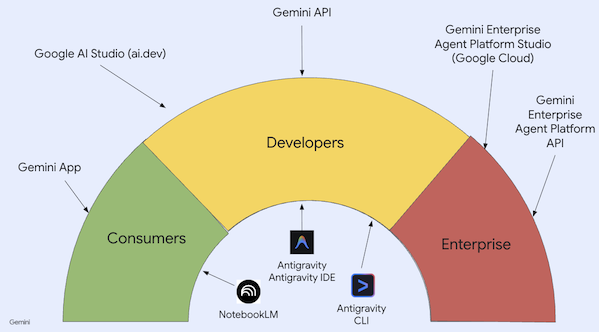
Gemini は単なるモデルではありません。Gemini モデルを使用する Google サービスの包括的なブランドでもあります。
Gemini モデルを使用します。消費者向けの Gemini アプリ と NotebookLM から、デベロッパー向けの AI Studio 、企業向けの Google Cloud の Agent Platform まで、Gemini サービスは多岐にわたります。また、Gemini を搭載した Antigravity、Antigravity IDE、Antigravity CLI などのデベロッパー ツールもあります。
3. Gemini を搭載したツール 🧰
Gemini を搭載したツールを簡単に見ていきましょう。
Gemini アプリ 💬
Gemini アプリ(gemini.google.com)は、チャットベースの消費者向けアプリケーションです。さまざまな思考レベルでさまざまな Gemini モデル(Flash-Lite、Flash、Pro)を操作する最も簡単な方法です。
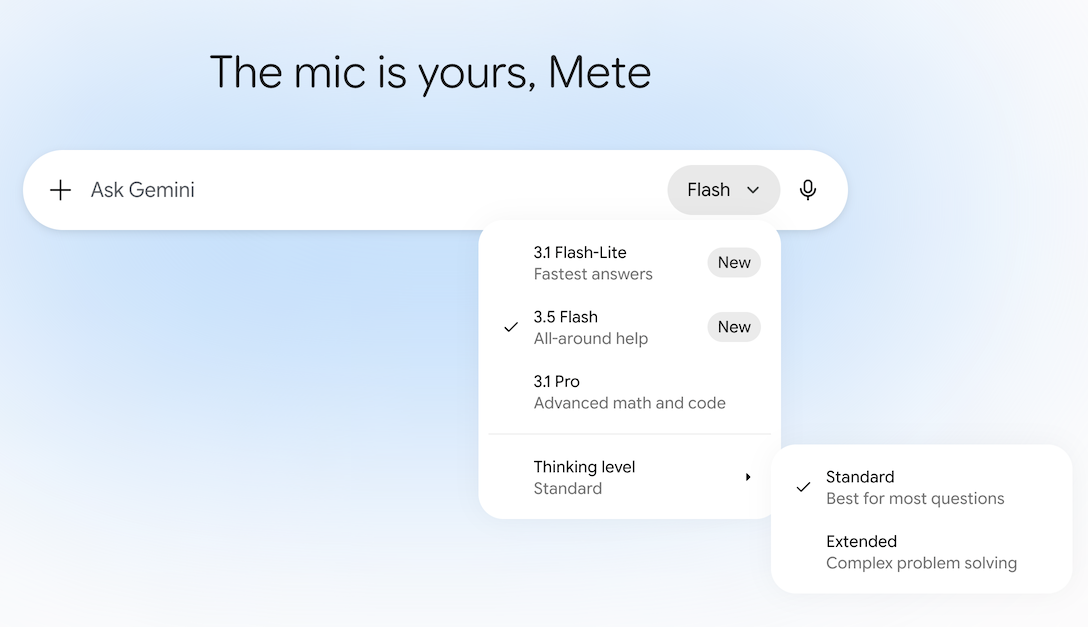
また、Deep Research、画像、動画、音楽生成などのツールも備えています。Gemini アプリは日常使いに最適です。
NotebookLM 📓
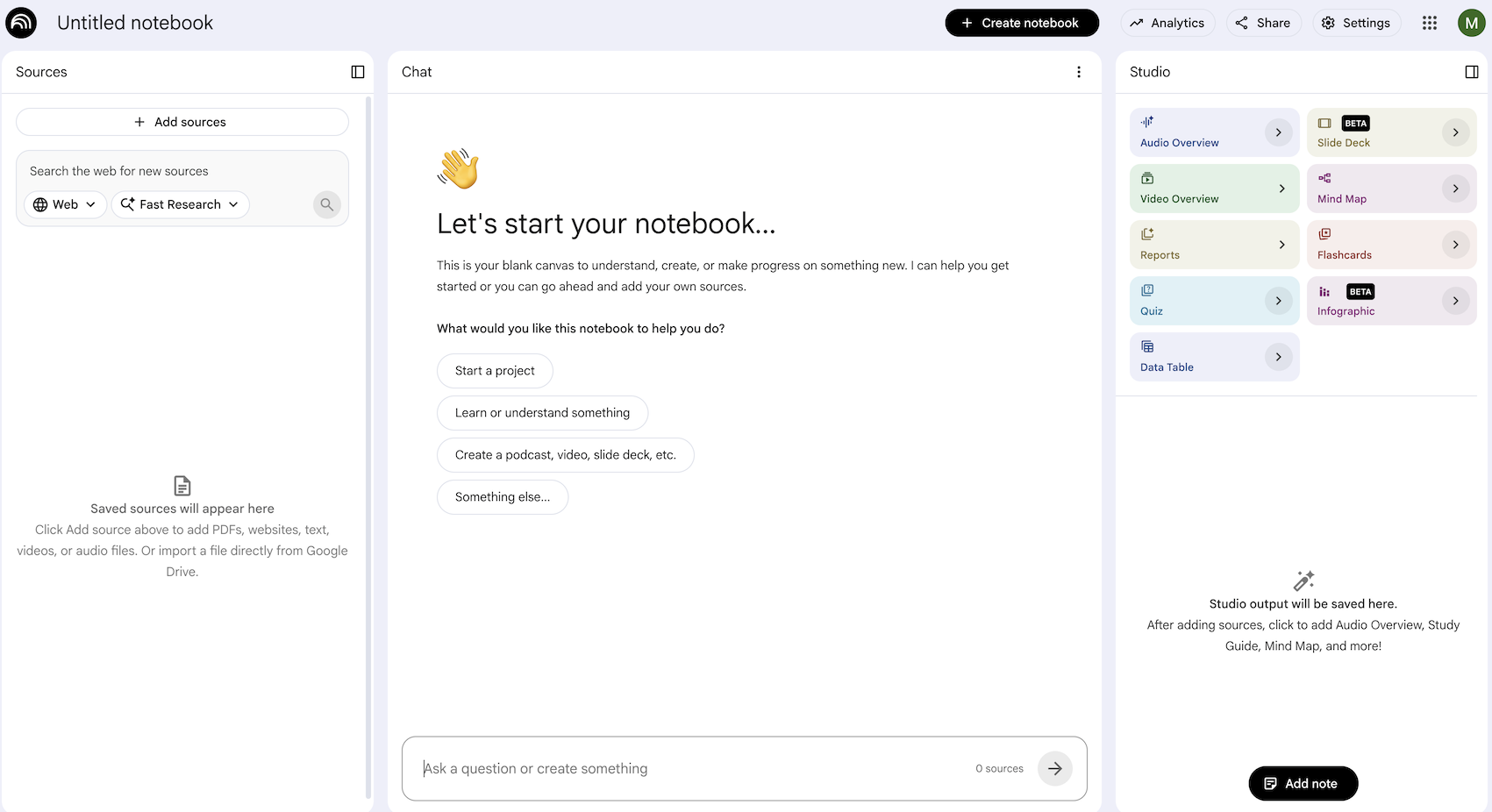
NotebookLM(notebooklm.google.com)は、AI を活用したリサーチ パートナーです。PDF、ウェブサイト、YouTube 動画、音声ファイル、Google ドキュメント、Google スライドなどをアップロードすると、NotebookLM がそれらを要約し、トピック間の興味深い関連性を導き出します。これらはすべて、最新バージョンの Gemini のマルチモーダル解析機能によって実現されます。また、アップロードしたソースから、興味深く魅力的な音声解説、動画解説、インフォグラフィックなどを生成します。
Google AI Studio 🎨
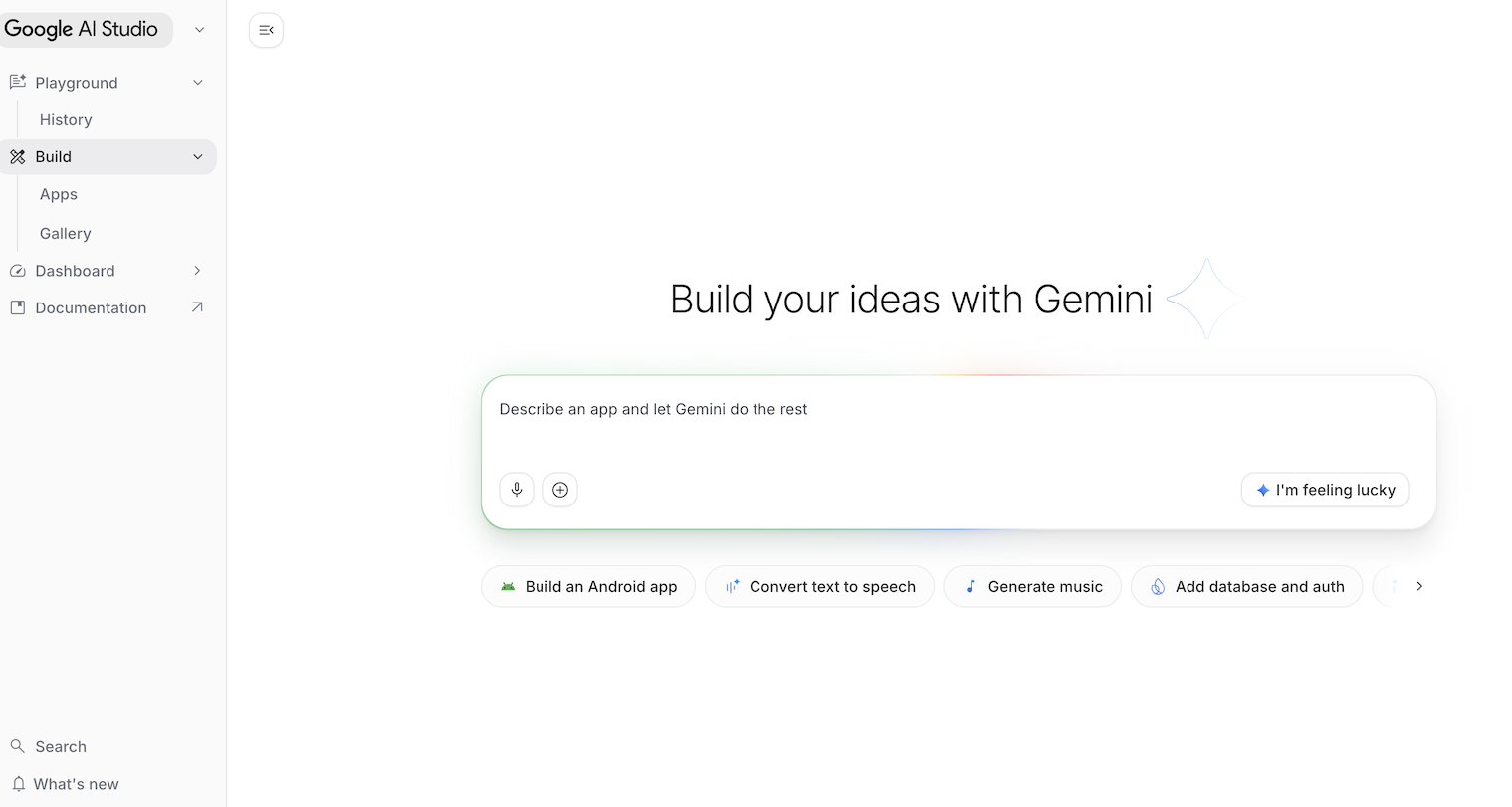
Google AI Studio(ai.dev)は、Gemini を使ったビルドを開始する最速の方法です。Google AI Studio の [Playground] パネルでは、[Models] セクションでさまざまなモデルを試して、テキスト、画像、動画を生成したり、Gemini Live API を使用してリアルタイムの音声と動画を試したりできます。
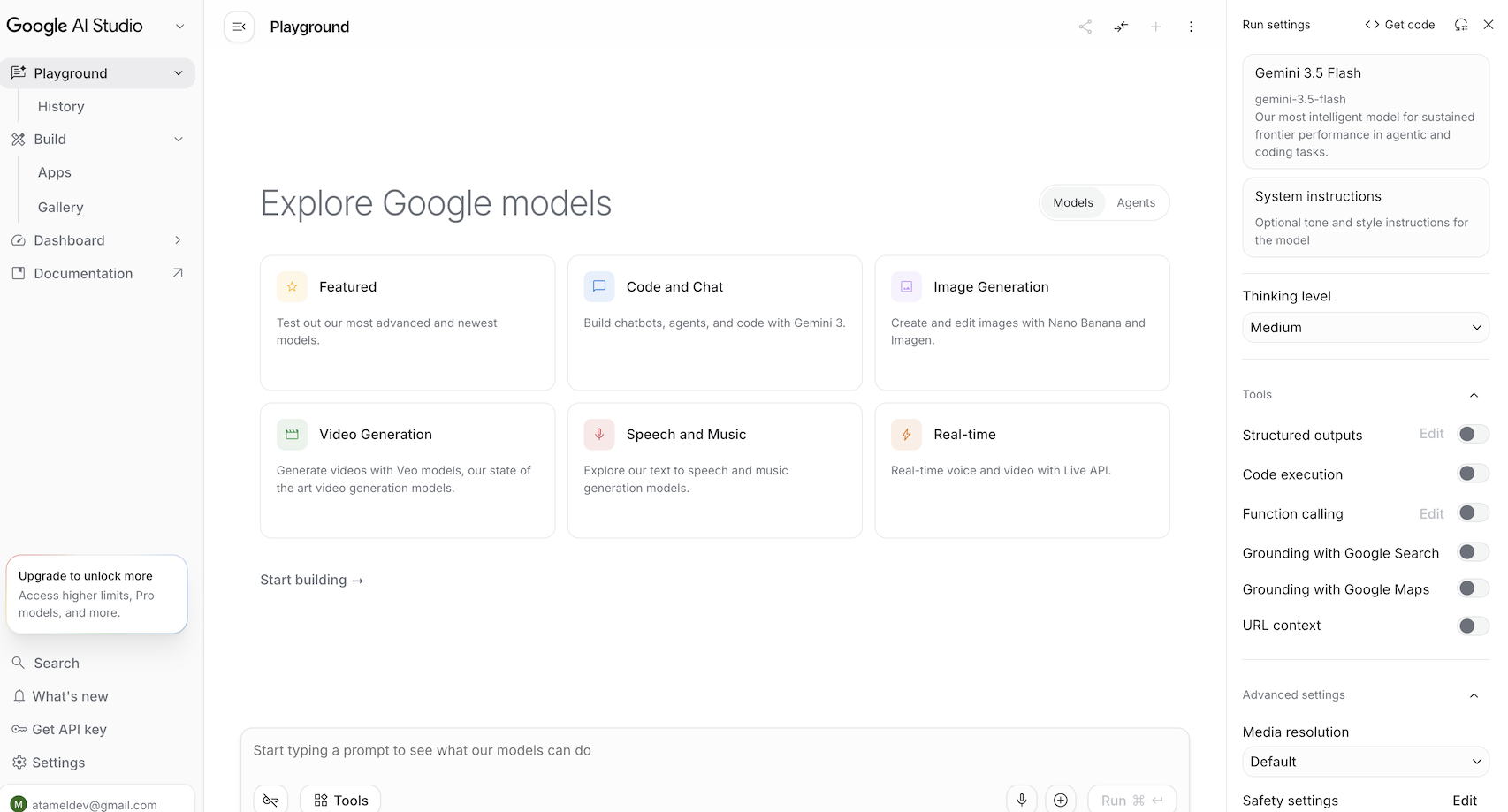
[Agents] セクションでは、Gemini のマネージド エージェントを試すことができます。Google AI Studio の [Build] パネルでは、フルスタックのウェブ アプリケーションをバイブ コーディングして Google Cloud の Cloud Run にデプロイし、コードを GitHub に push できます。Android アプリをビルドすることもできます。
Gemini Enterprise Agent Platform Studio ☁️
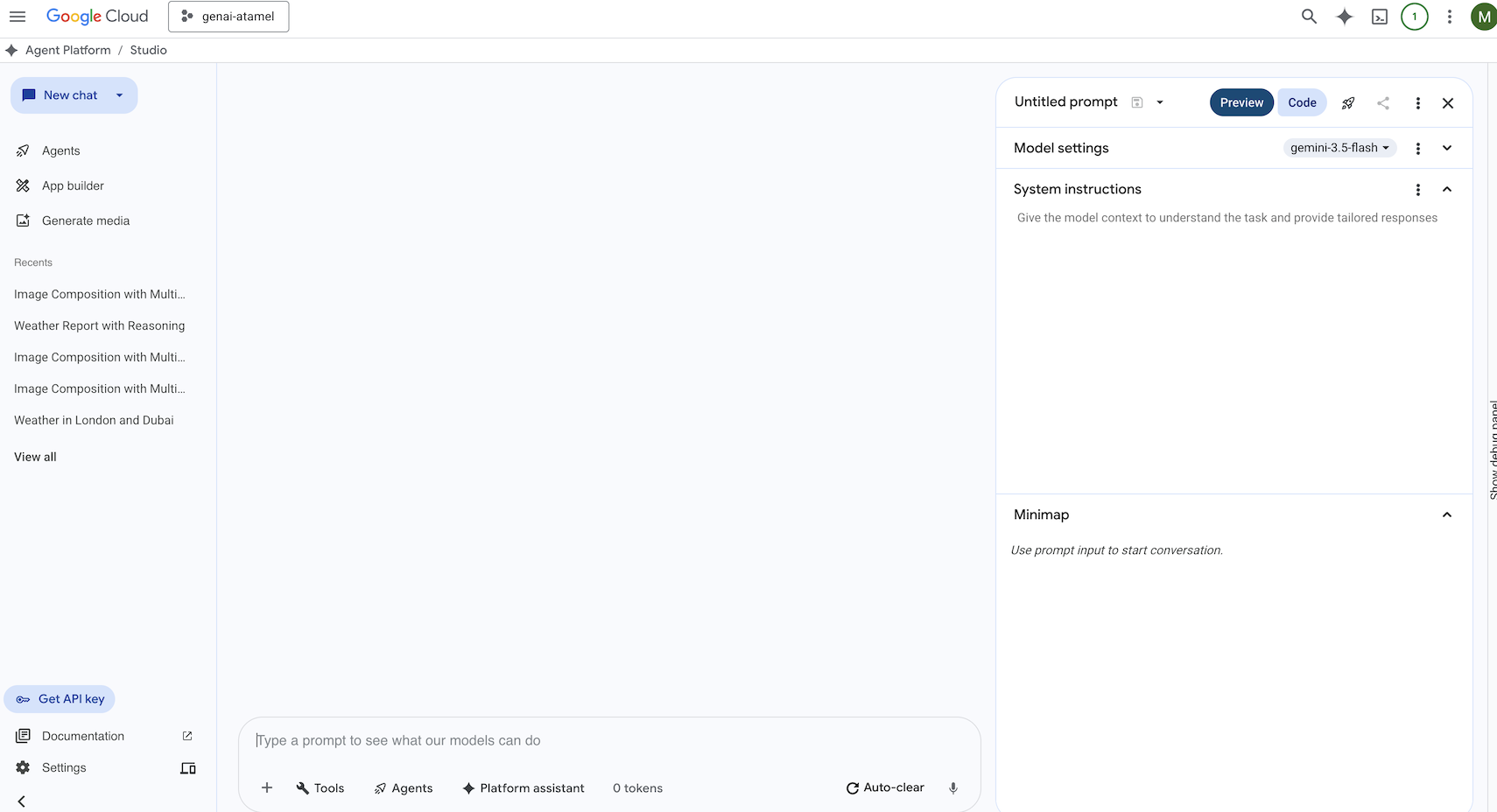
Gemini Enterprise Agent Platform は、Google Cloud で生成 AI を構築して使用するための、フルマネージド統合 AI 開発プラットフォームです。Gemini Enterprise Agent Platform Studio(console.cloud.google.com/agent-platform)は、エンタープライズ対応の生成 AI アプリケーションのテスト、チューニング、デプロイに役立ちます。
Google Antigravity 🚀
Antigravity (antigravity.google)は、エージェント型開発プラットフォームです。Antigravity を使用すると、デベロッパーはタスク指向のより高いレベルで作業し、ワークスペース全体でエージェントを管理できます。また、使い慣れた AI 駆動型 IDE エクスペリエンスである Antigravity IDE と、コマンドライン インターフェース用の Antigravity CLI も備えています。
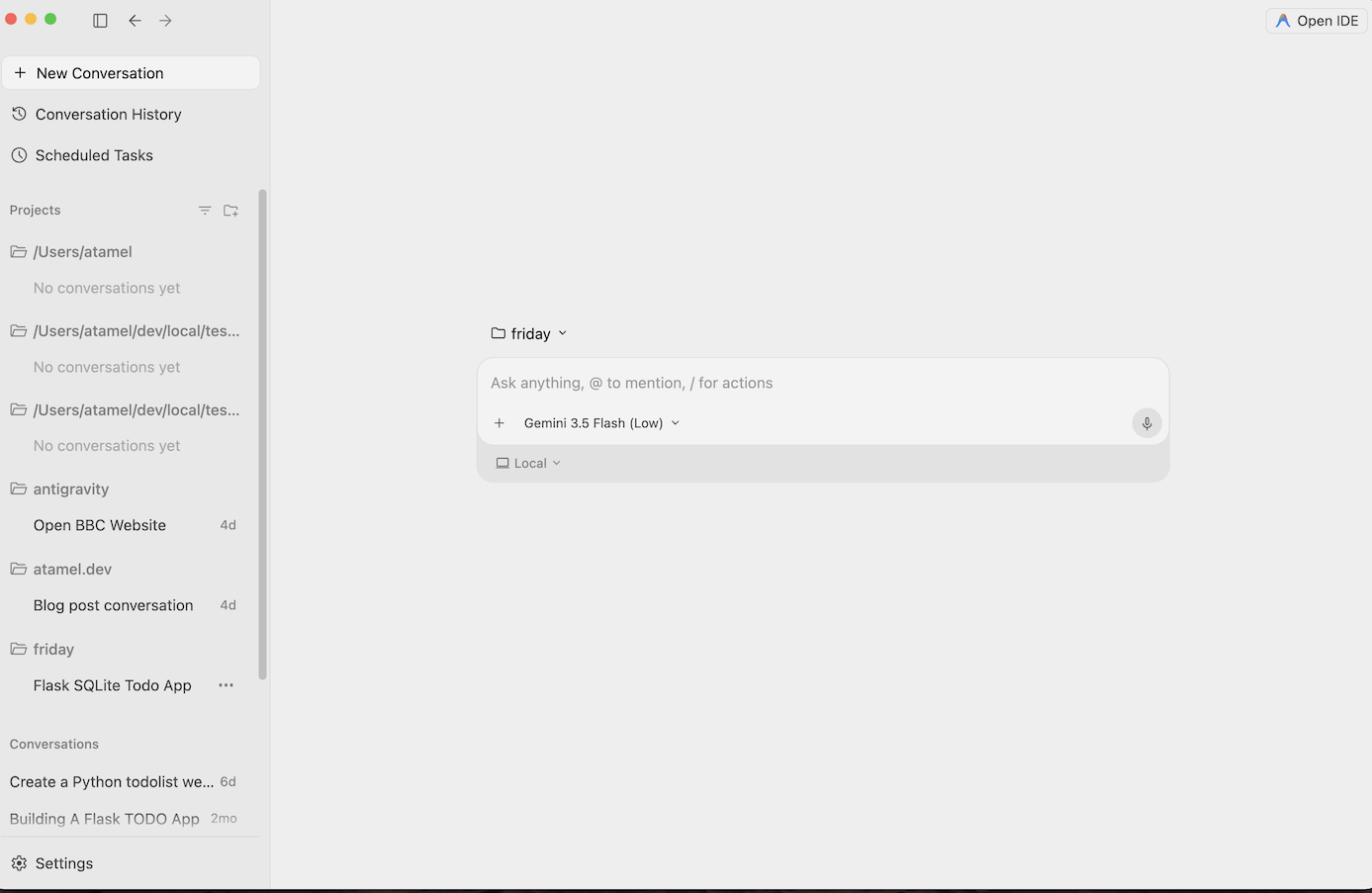
これらのツールは自由にダウンロードして試すことができます。 使用するツールに関する一般的なガイダンスは次のとおりです。
- 初めて使用する場合は、Gemini アプリを使用して質問したり、基本的なコードを生成したりします。
- ウェブ アプリケーションをバイブ コーディングする場合は、Google AI Studio を選択します。
- ローカル開発環境のコンテキストを使用して複雑なアプリケーションを構築する場合は、Google Antigravity を選択します。
- Google Cloud をデプロイまたはすでに使用していて、エンタープライズ レベルのサポートと機能を必要とする場合は、Agent Platform とその Studio を選択します。
もちろん、これらのツールを組み合わせて使用することもできます。たとえば、AI Studio でバイブ コーディングを開始して GitHub に push し、Antigravity を使用してコーディングを続行し、Google Cloud にデプロイします。
4. Gemini モデル 🧠
Gemini モデルは、数か月ごとに新しいバージョンがリリースされ、常に改善されています。現在(2026 年 2 月)の時点で、Google Cloud で提供されているモデルは次のとおりです。
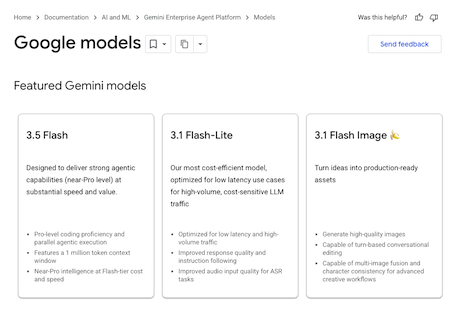
他にも、一般提供されている Gemini モデル、プレビュー版 Gemini モデル、オープン Gemma モデル、エンベディング モデル、Imagegen モデル、Veo モデルなど、さまざまなモデルがあります。
Google モデルのドキュメント ページにアクセスして、さまざまなユースケースで Google Cloud で利用できる主要なモデルをご確認ください。
5. Google Gen AI SDK 📦
Gemini をアプリケーションと統合するには、Google Gen AI SDK を使用します。
前述のとおり、Gemini モデルには Google AI Studio または Agent Platform Studio からアクセスできます。Google Gen AI SDK は、Google AI API と Google Cloud API の両方を介して Gemini モデルへの統合インターフェースを提供します。いくつかの例外を除き、1 つのプラットフォームで実行されるコードは両方のプラットフォームで実行されます。
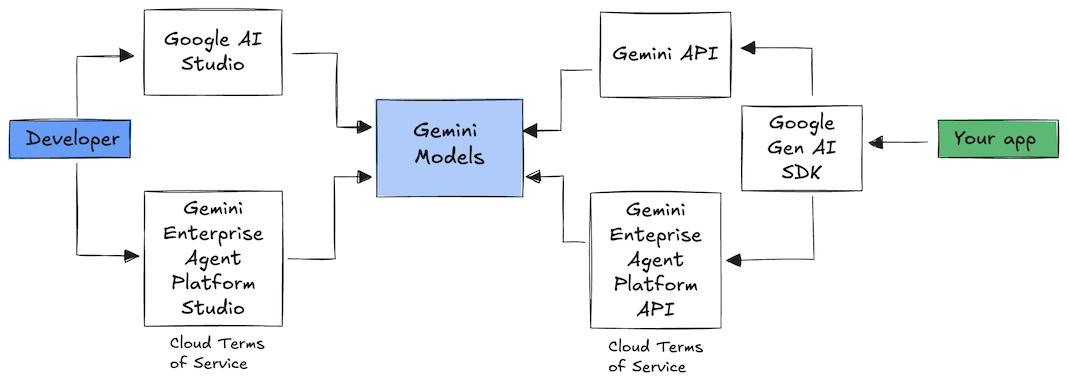
Google Gen AI SDK は現在、 Python、 Go、 Node、 Java、および C# をサポートしています。
たとえば、Python で Google AI の Gemini と通信する方法は次のとおりです。
client = genai.Client(
  api_key=your-gemini-api-key)

response = client.models.generate_content(
  model="gemini-3.5-flash",
  contents="Why is the sky blue?")
Google Cloud の Agent Platform で Gemini に対して同じ操作を行うには、クライアントの初期化を変更するだけで、残りは同じです。
client = genai.Client(
  vertexai=True,
  project=your-google-cloud-project,
  location="us-central1")

response = client.models.generate_content(
  model="gemini-3.5-flash",
  contents="Why is the sky blue?")
これらのサンプルを自分で実行するには、 main.py を github.com/meteatamel/genai-samples/tree/main/vertexai/gemini2/hello-world で実行します。
6. Interactions API 🔄
Interactions API(ベータ版)は、Gemini モデルとエージェントを操作するための新しい統合インターフェースです。 generateContent API の改良版として、状態管理、ツール オーケストレーション、長時間実行タスクを簡素化します。
新しい API との基本的なやり取りは次のようになります。
interaction =  client.interactions.create(
    model="gemini-3.5-flash",
    input="Tell me a short joke."
)
print(interaction.outputs[-1].text)
前のやり取りのインタラクション ID を渡すことで、ステートフルな会話を行うことができます。
interaction1 = client.interactions.create(
    model="gemini-3.5-flash",
    input="Hi, my name is Phil."
)
print(f"Model: {interaction1.outputs[-1].text}")

interaction2 = client.interactions.create(
    model="gemini-3.5-flash",
    input="What is my name?",
    previous_interaction_id=interaction1.id
)
print(f"Model: {interaction2.outputs[-1].text}")
Interactions API は、エージェントの構築と操作を目的として設計されており、関数呼び出し、組み込みツール、構造化出力、Model Context Protocol(MCP)をサポートしています。Deep Research エージェントでの使用方法については、以下のエージェント 🤖 ステップをご覧ください。
これらのサンプルを自分で実行するには、 main.py を github.com/meteatamel/genai-samples/blob/main/vertexai/interactions-api で実行します。
7. 長いコンテキスト ウィンドウ 🪟
多くの Gemini モデルには、100 万トークン以上の大きなコンテキスト ウィンドウが付属しています。これまで、大規模言語モデル(LLM)は、一度にモデルに渡すことができるテキスト(またはトークン)の量によって大幅に制限されていました。Gemini の長いコンテキスト ウィンドウは、多くの新しいユースケースとデベロッパー パラダイムを実現します。
長いコンテキスト ウィンドウの動作を確認するには、Agent Platform Studio のプロンプト ギャラリーに移動して、Extract Video Chapters プロンプトを選択します。このプロンプトは、動画コンテンツをチャプターに分割し、各チャプターに概要を示します。
提供された動画で実行すると、次のような出力が表示されます。
[
  {
    "timecode": "00:00",
    "chapterSummary": "The video opens with scenic views of Rio de Janeiro, introducing the \"Marvelous City\" and its famous beaches like Ipanema and Copacabana, before pivoting to the existence of the favelas."
  },
  {
    "timecode": "00:20",
    "chapterSummary": "The narrator describes the favelas, home to one in five Rio residents, highlighting that while often associated with crime and poverty, this is only a small part of their story."
  },
  {
    "timecode": "00:36",
    "chapterSummary": "Google introduces its project to map the favelas, emphasizing that providing addresses to these uncharted areas is a crucial step in giving residents an identity."
  },
  {
    "timecode": "00:43",
    "chapterSummary": "The video concludes by focusing on the people of the favelas, inviting viewers to go beyond the map and explore their world through a 360-degree experience."
  }
]
これは、Gemini の長いコンテキスト ウィンドウのおかげで実現できます。
8. 思考モード 🧠
Gemini モデルは、複雑なタスクの推論を大幅に改善する内部思考プロセスを使用します。思考レベル(Gemini 3)と予算(Gemini 2.5)は、思考動作を制御します。include_thoughts フラグを有効にすると、モデルの生の思考を確認することもできます。
思考モードの動作を確認するには、Google AI Studio(ai.dev)を開いて新しいチャットを開始します。右側のサイドパネルで、思考レベルを設定できます。
右上の [Get code] ボタンをクリックすると、次のようにコードで思考レベルを設定する方法を確認できます。
response = client.models.generate_content(
    model="gemini-3.5-flash",
    contents="How does AI work?",
    config=types.GenerateContentConfig(
        thinking_config=types.ThinkingConfig(
          thinking_level="low",
          include_thoughts=True
        )
    ),
)
さまざまなプロンプトとさまざまな思考レベルを試して、モデルの動作を確認してください。
9. ツール 🧰
Gemini には、Google 検索、Google マップ、コード実行、コンピュータ使用、ファイル検索など、さまざまな組み込みツールが用意されています。関数呼び出しを使用してカスタムツールを定義することもできます。使用方法を簡単に見ていきましょう。
Google 検索 🔎
Google 検索の検索結果でモデルの回答をグラウンディングすることで、より正確で最新、かつ関連性の高い回答を得ることができます。
Agent Platform Studio(console.cloud.google.com/agent-platform/studio)または Google AI Studio(ai.dev)で、新しいチャットを開始し、Google 検索のグラウンディングがオフになっていることを確認します。
次に、現在地の今日の天気について質問します。次に例を示します。
How's the weather in London today?
通常、モデルは最新情報にアクセスできないため、過去の日の回答が返されます。次に例を示します。
In London today (Friday, May 24, 2025), the weather is a bit of a mixed bag, typical for late May.
次に、Google 検索のグラウンディングを有効にして、同じ質問をします。グラウンディング ソースへのリンクを含む最新の天気情報が表示されます。
In London today (Wednesday, February 11, 2026), the weather is cool and mostly cloudy with a chance of light rain.
コードで Google 検索のグラウンディングを行う方法は次のとおりです。[Code] ボタンをクリックして、グラウンディング サンプルを取得することもできます。
google_search_tool = Tool(google_search=GoogleSearch())
response = client.models.generate_content(
    model="gemini-3.5-flash",
    contents="How's the weather like today in London?",
    config=GenerateContentConfig(tools=[google_search_tool])
)
Google マップ 🗺️
2 億 5, 000 万件以上の場所に関する情報にアクセスできる Google マップでモデルの回答をグラウンディングすることもできます。
動作を確認するには、Agent Platform Studio のモデル設定のグラウンディング セクションで Google 検索の代わりに Google マップを選択し、マップデータを必要とする質問をします。次に例を示します。
Can you show me some Greek restaurants and their map coordinates near me?
コードは次のようになります。
google_maps_tool = Tool(google_maps=GoogleMaps())
response = client.models.generate_content(
    model="gemini-3.5-flash",
    contents="What are the best restaurants near here?",
    config=GenerateContentConfig(tools=[google_maps_tool]),
       # Optional: Provide location context (this is in Los Angeles)
        tool_config=ToolConfig(
          retrieval_config=types.RetrievalConfig(
            lat_lng=types.LatLng(
                latitude=34.050481, longitude=-118.248526))),
)
コードの実行 🧑💻
Gemini は、サポートされているライブラリ(pandas、numpy、PyPDF2 など)のリストを使用して Python コードを生成して実行できます。これは、コードベースの推論(方程式を解くなど)を活用するアプリケーションに便利です。
試すには、Google AI Studio に切り替えて新しいチャットを開始し、[Code execution] 切り替えがオンになっていることを確認します。次に、コード実行ツールが役立つ可能性のある質問をします。次に例を示します。
What is the sum of the first 50 prime numbers?
Gemini は Python コードを生成して実行します。最終的に、正解は 5117 です。
コードからコード実行ツールを実行するには、次のようにします。
code_execution_tool = Tool(code_execution=ToolCodeExecution())
response = client.models.generate_content(
  model="gemini-3.5-flash",
  contents="What is the sum of the first 50 prime numbers?",
  config=GenerateContentConfig(
    tools=[code_execution_tool],
    temperature=0))
コンピュータ使用 🖥️
Gemini コンピュータ使用モデル(プレビュー版)を使用すると、ブラウザ制御エージェントを構築してタスクを自動化できます。次のようなループで動作します。
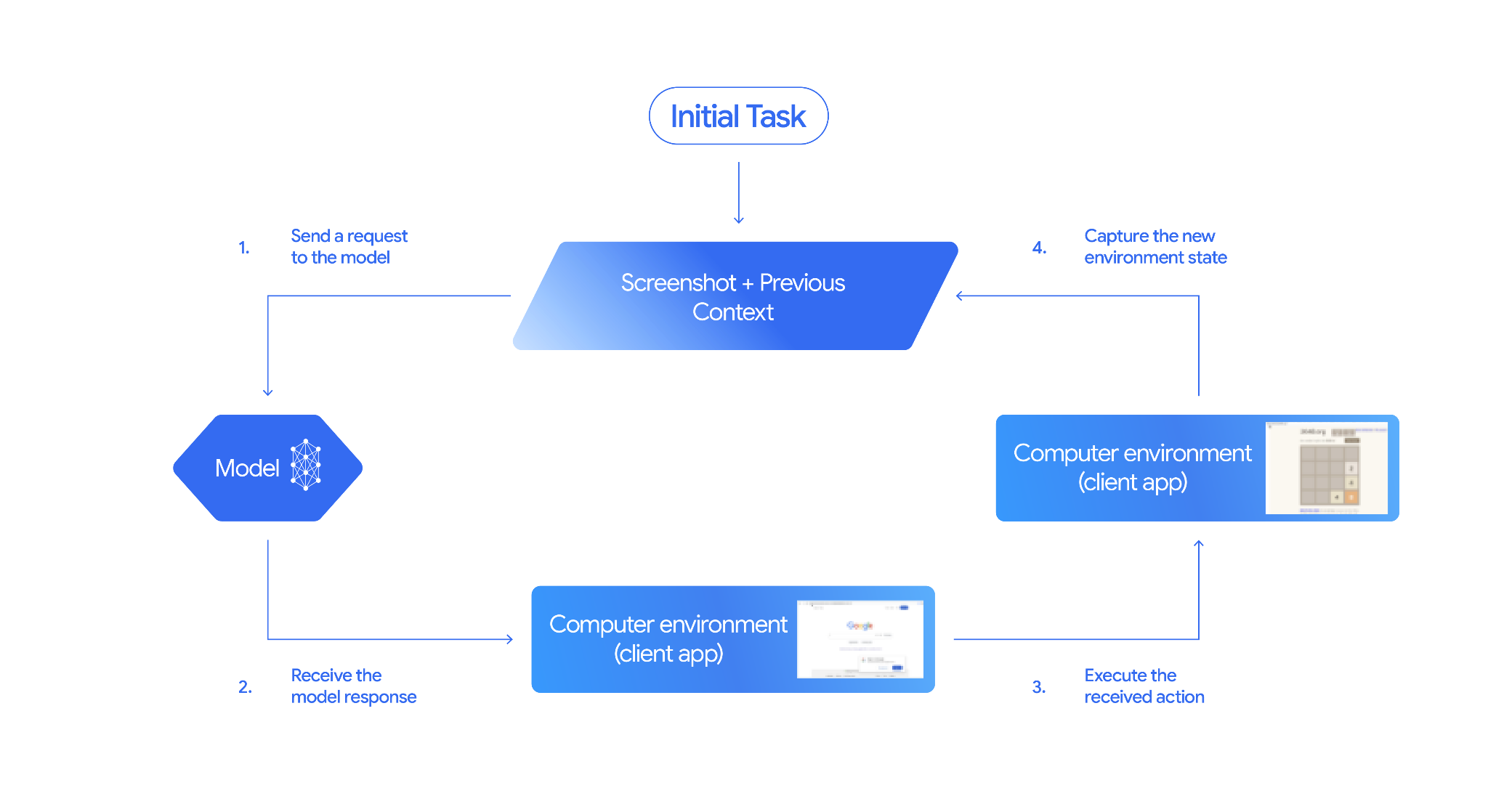
動作を確認するには、 main.py を github.com/google-gemini/computer-use-preview で実行します。リポジトリの手順に沿って、Python 仮想環境を作成し、依存関係をインストールします。
たとえば、Google AI Studio から API キーを取得し、Gemini にフライトを検索するように依頼できます。
export GEMINI_API_KEY=your-api-key

python main.py --query "Find me top 5 fights sorted by price with the following constraints:

Flight site to use: www.google.com/travel/flights
From: London
To: Larnaca
One-way or roundtrip: One way
Date to leave: Sometime next week
Date to return: N/A
Travel preferences:
-Direct flights
-No flights before 10am
-Carry-on luggage"
Gemini がシークレット ブラウザを開き、フライトの検索を開始します。
ファイル検索 📁
ファイル検索ツールを使用すると、検索拡張生成(RAG)を簡単に行うことができます。ファイルをアップロードするだけで、チャンク化、エンベディング、検索の RAG の詳細がすべて行われます。
動作を確認するには、 main.py を github.com/meteatamel/genai-beyond-basics/blob/main/samples/grounding/file-search-tool で実行します。
Google AI Studio から API キーを取得し、ファイル検索ストアを作成します。
export GEMINI_API_KEY=your-gemini-api-key

python main.py create_store my-file-search-store
PDF をストアにアップロードします。
python main.py upload_to_store fileSearchStores/myfilesearchstore-5a9x71ifjge9 cymbal-starlight-2024.pdf
ストアを指す PDF について質問します。
python main.py generate_content "What's the cargo capacity of Cymbal Starlight?" fileSearchStores/myfilesearchstore-5a9x71ifjge9
PDF でグラウンディングされたレスポンスが返されます。
Generating content with file search store: fileSearchStores/myfilesearchstore-5a9x71ifjge9
Response: The Cymbal Starlight 2024 has a cargo capacity of 13.5 cubic feet, which is located in the trunk of the vehicle. It is important to distribute the weight evenly and not overload the trunk, as this could impact the vehicle's handling and stability. The vehicle can also accommodate up to two suitcases in the trunk, and it is recommended to use soft-sided luggage to maximize space and cargo straps to secure it while driving.
Grounding sources:  cymbal-starlight-2024.pdf
関数呼び出し 📲
組み込みツールでは不十分な場合は、Gemini で独自のツール(関数)を定義することもできます。関数をツールとして送信するだけです(関数の詳細な OpenAPI 仕様を送信するのではなく)。モデルと SDK によって自動的にツールとして使用されます。
たとえば、場所の緯度と経度を返す関数を作成できます。
def location_to_lat_long(location: str):
    """Given a location, returns the latitude and longitude

    Args:
        location: The location for which to get the weather.

    Returns:
        The latitude and longitude information in JSON.
    """
    logger.info(f"Calling location_to_lat_long({location})")
    url = f"https://geocoding-api.open-meteo.com/v1/search?name={location}&count=1"
    return api_request(url)
緯度と経度から天気情報を返す関数を作成することもできます。
def lat_long_to_weather(latitude: str, longitude: str):
"""Given a latitude and longitude, returns the weather information
Args:
latitude: The latitude of a location
longitude: The longitude of a location
Returns:
The weather information for the location in JSON.
"""
logger.info(f"Calling lat_long_to_weather({latitude}, {longitude})")
url = (f"https://api.open-meteo.com/v1/forecast?latitude={latitude}&longitude={longitude}¤t=temperature_2m,"
f"relative_humidity_2m,surface_pressure,wind_speed_10m,wind_direction_10m&forecast_days=1")
return api_request(url)
これらの 2 つの関数をツールとして Gemini に渡し、それを使用して場所の天気情報を取得します。
def generate_content_with_function_calls():
    client = genai.Client(
        vertexai=True,
        project=PROJECT_ID,
        location=LOCATION)

    response = client.models.generate_content(
        model=MODEL_ID,
        contents=PROMPT,
        config=GenerateContentConfig(
            system_instruction=[
                "You are a helpful weather assistant.",
                "Your mission is to provide weather information for different cities."
                "Make sure your responses are in plain text format (no markdown) and include all the cities asked.",
            ],
            tools=[location_to_lat_long, lat_long_to_weather],
            temperature=0),
    )

    print(response.text)
    #print(response.automatic_function_calling_history)
動作を確認するには、 main_genaisdk.py を github.com/meteatamel/genai-beyond-basics/blob/main/samples/function-calling/weather で実行します。
10. エージェント 🤖
Gemini の Interactions API は、エージェントの構築と操作を目的として設計されています。Gemini Deep Research Agent などの特殊なエージェントを使用できます。Gemini Deep Research Agent は、複数ステップのリサーチタスクを自律的に計画、実行、統合します。ウェブ検索と独自のデータを使用して複雑な情報環境をナビゲートし、引用付きの詳細なレポートを作成します。
Interaction API で Deep Research エージェントを使用する方法は次のとおりです。
interaction = client.interactions.create(
    input="Research the history of the Google TPUs.",
    agent="deep-research-pro-preview-12-2025",
    background=True
)

while True:
    if interaction.status == "completed":
        print("\nFinal Report:\n",
interaction.outputs[-1].text)
        break
このサンプルを自分で実行するには、 main.py を github.com/meteatamel/genai-samples/blob/main/vertexai/interactions-api で実行します。
export GOOGLE_API_KEY=your-api-key
python main.py agent
しばらくすると、調査結果が表示されます。
User: Research the history of the Google TPUs with a focus on 2025 and 2026

Status: in_progress
Status: in_progress
Status: in_progress
...
Model Final Report:
 # Architectural Convergence and Commercial Expansion: The History of Google TPUs (2015–2026)

## Key Findings
*   **Strategic Pivot (2025):** Google transitioned the Tensor Processing Unit (TPU) from a primarily internal differentiator to a commercial merchant-silicon competitor, epitomized by the massive "Ironwood" (TPU v7) deployment and external sales strategy.
*   **Technological Leap:** The introduction of TPU v7 "Ironwood" in 2025 marked a paradigm shift, utilizing 3nm process technology to deliver 42.5 exaFLOPS per pod, directly challenging NVIDIA's Blackwell architecture in the high-performance computing (HPC) sector.
...
11. 画像生成 📷
Nano Banana 🍌 は、Gemini のネイティブ画像生成機能の名前です。Gemini は、テキスト、画像、またはその両方を組み合わせて、会話形式で画像を生成して処理できます。これにより、ビジュアルを制御して作成、編集、反復処理できます。
Nano Banana は、Gemini API で利用できる 2 つの異なるモデルを指します。
- Nano Banana: Gemini Flash Image モデル。このモデルは、高速かつ効率的に設計されており、大量の低レイテンシ タスク向けに最適化されています。
- Nano Banana Pro: Gemini Pro Image モデル。このモデルは、プロフェッショナルなアセット制作向けに設計されており、高度な推論を使用して複雑な指示に従い、高精細なテキストをレンダリングします。
既存の画像を渡して、Nano Banana に画像を編集するように依頼するコード スニペットを次に示します。
from google import genai
from google.genai import types
from PIL import Image

client = genai.Client()

prompt = (
    "Create a picture of my cat eating a nano-banana in a "
    "fancy restaurant under the Gemini constellation",
)

image = Image.open("/path/to/cat_image.png")

response = client.models.generate_content(
    model="gemini-3.1-flash-image",
    contents=[prompt, image],
)

for part in response.parts:
    if part.text is not None:
        print(part.text)
    elif part.inline_data is not None:
        image = part.as_image()
        image.save("generated_image.png")
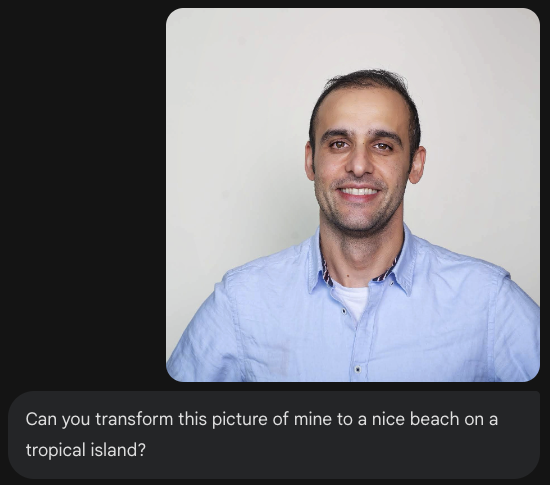
Nano Banana は、Gemini アプリ、AI Studio、Agent Platform Studio で利用できます。試す最も簡単な方法は、Gemini アプリです。Gemini アプリ(gemini.google.com)で、Tools の 🍌 Create images を選択します。次に、画像をアップロードして、何か面白いことを試してみてください。たとえば、次のように話しかけます。
Can you transform this picture of mine to a nice beach on a tropical island?

12. テキスト読み上げの生成 🎶
Gemini は、Gemini のテキスト読み上げ(TTS)生成機能を使用して、テキスト入力を単一話者または複数話者の音声に変換できます。TTS 生成は制御可能で、自然言語を使用してインタラクションを構造化し、音声のスタイル、アクセント、速度、トーンをガイドできます。
TTS 機能は、インタラクティブで構造化されていない音声、マルチモーダル入力と出力向けに設計された Live API を介して提供される音声生成とは異なります。Live API は動的な会話コンテキストに優れていますが、Gemini API を介した TTS は、ポッドキャストやオーディオブックの生成など、スタイルとサウンドを細かく制御して正確なテキストの朗読を必要とするシナリオ向けに調整されています。
単一話者 TTS のコード スニペットを次に示します。
`
from google import genai
from google.genai import types
import wave

# Set up the wave file to save the output:
def wave_file(filename, pcm, channels=1, rate=24000, sample_width=2):
   with wave.open(filename, "wb") as wf:
      wf.setnchannels(channels)
      wf.setsampwidth(sample_width)
      wf.setframerate(rate)
      wf.writeframes(pcm)

client = genai.Client()

response = client.models.generate_content(
   model="gemini-3.1-flash-tts-preview",
   contents="Say cheerfully: Have a wonderful day!",
   config=types.GenerateContentConfig(
      response_modalities=["AUDIO"],
      speech_config=types.SpeechConfig(
         voice_config=types.VoiceConfig(
            prebuilt_voice_config=types.PrebuiltVoiceConfig(
               voice_name='Kore',
            )
         )
      ),
   )
)

data = response.candidates[0].content.parts[0].inline_data.data

file_name='out.wav'
wave_file(file_name, data) # Saves the file to current directory
その他のサンプルについては、 テキスト読み上げ(TTS)生成のドキュメントをご覧ください。
Google AI Studio の Playground で音声の生成を試すこともできます。 generate-speech アプリでさまざまなプロンプトを試してください。
13. 空間認識 🌐
Gemini は、高度なオブジェクト検出と空間認識を備えています。これを理解する最も簡単な方法は、実際に動作を確認することです。
Google AI Studio スターター アプレットに移動し、空間認識アプリに移動します。
.env ファイルを Google AI Studio キーで更新し、src/consts.tsx のモデルを最新のモデルのいずれかに更新します。依存関係をインストールしてアプリを起動します。
npm install
npm run dev
http://localhost:8000/ に移動します。
これで、画像を選択して、Gemini で画像内のアイテムを検出できます。
たとえば、さまざまな画像で「影」や「果物」を検出できます。
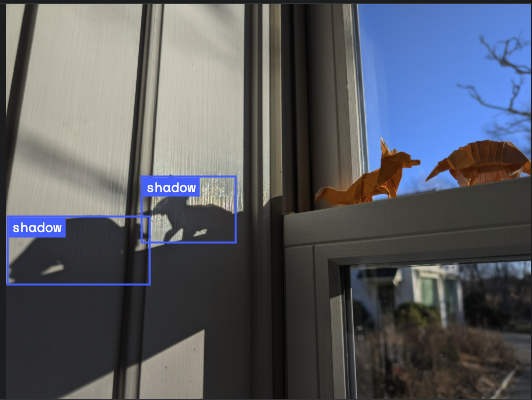
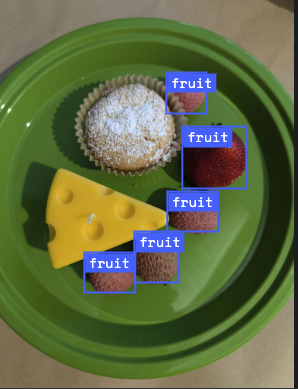
さまざまな画像を試して、Gemini がさまざまなオブジェクトをどの程度検出してラベル付けできるかを確認してください。
14. Live API 🎤
Live API を使用すると、Gem API と音声と動画によるやり取りを低レイテンシかつリアルタイムで行うことができます。音声、動画、テキストの連続ストリームを処理して、人間のような音声による応答を即座に提供し、ユーザーに自然な会話エクスペリエンスを提供します。
Google AI Studio の Live API または Agent Platform Studio の Live API を試してみてください。どちらのアプリでも、音声、動画、画面を共有して、Gemini とライブ会話を行うことができます。
動画または画面の共有を開始し、音声で Gemini に一般的なことを質問します。次に例を示します。
Can you describe what you see on the screen?
Gemini からの回答がどれほど自然に聞こえるかに驚かれることでしょう。
15. まとめ
この Codelab では、Gemini ファミリーのサービスから始まり、統合された Google Gen AI SDK を使用してモデルをアプリケーションに統合する方法を学びました。長いコンテキスト ウィンドウ、思考モード、組み込みのグラウンディング ツール、Live API、空間認識など、Gemini の最先端の機能について説明しました。リファレンス ドキュメントを詳しく調べて、Gemini の可能性を最大限に引き出すことをおすすめします。