

1. 简介 👋
在此 Codelab 中,您将以开发者的身份全面了解 Gemini 生态系统。更具体地说,您将了解不同的 Gemini 模型、由 Gemini 提供支持的不同工具,以及用于与 Gemini 集成的 Google Gen AI SDK。您还将探索 Gemini 的各种功能,例如长上下文、思考模式、空间理解、Live API、原生图片和音频输出等。
完成此 Codelab 后,您应该对 Gemini 生态系统有扎实的了解。
💡学习内容
- 不同的 Gemini 模型。
- 由 Gemini 模型提供支持的工具。
- 如何使用 Google Gen AI SDK 与 Gemini 集成。
- Gemini 的长上下文窗口。
- Gemini 的思考模式。
- 不同的内置工具,例如 Google 搜索、Google 地图。
- 如何使用 Interactions API 与研究代理互动。
- 图片和文字转语音生成。
- Gemini 的空间理解能力。
- 用于实时语音和视频互动的 Live API。
⚠️ 所需条件
- Google AI Studio 示例的 API 密钥。
- 启用了结算功能的 Google Cloud 项目,用于 Google Cloud 示例。
- 本地开发环境或 Google Cloud 中的 Cloud Shell 编辑器。
2. Gemini 系列产品 🫂
Gemini 是 Google 的 AI 模型,可将任何创意变为现实。它建立在前沿的推理技术基础上,是一款出色的多模态理解模型,也是一款出色的智能体和氛围编程模型。您可以观看此视频,快速了解 Gemini 模型:
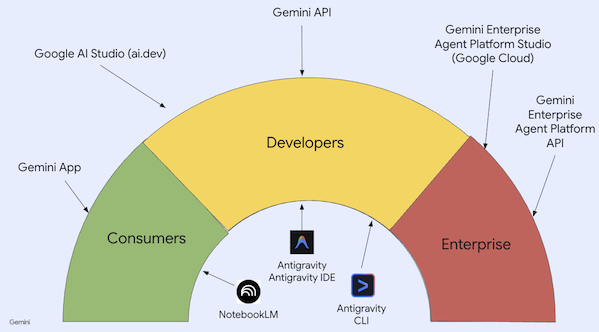
Gemini 不仅仅是一个模型。它也是 Google 产品中使用的伞式品牌
利用 Gemini 模型。Gemini 产品种类繁多,从面向消费者的 Gemini 应用和 NotebookLM 到面向开发者的 AI Studio,再到面向企业的 Google Cloud Agent Platform,应有尽有。此外,还有由 Gemini 提供支持的开发者工具,例如 Antigravity、Antigravity IDE 和 Antigravity CLI。
3. 由 Gemini 提供支持的工具 🧰
我们来简要了解一下由 Gemini 提供支持的工具。
Gemini 应用 💬
Gemini 应用 ( gemini.google.com) 是一款基于对话的消费者应用。这是以不同思维水平与不同 Gemini 模型(Flash-Lite、Flash、Pro)互动最简单的方式。
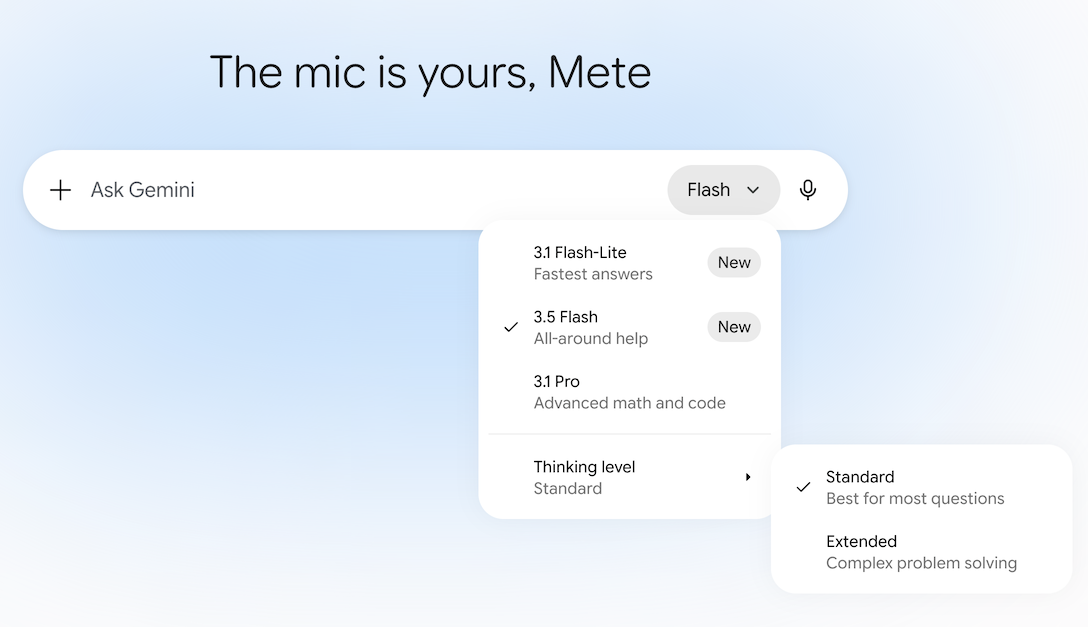
它还提供 Deep Research、图片、视频、音乐创作等工具。Gemini 应用非常适合日常使用。
NotebookLM 📓
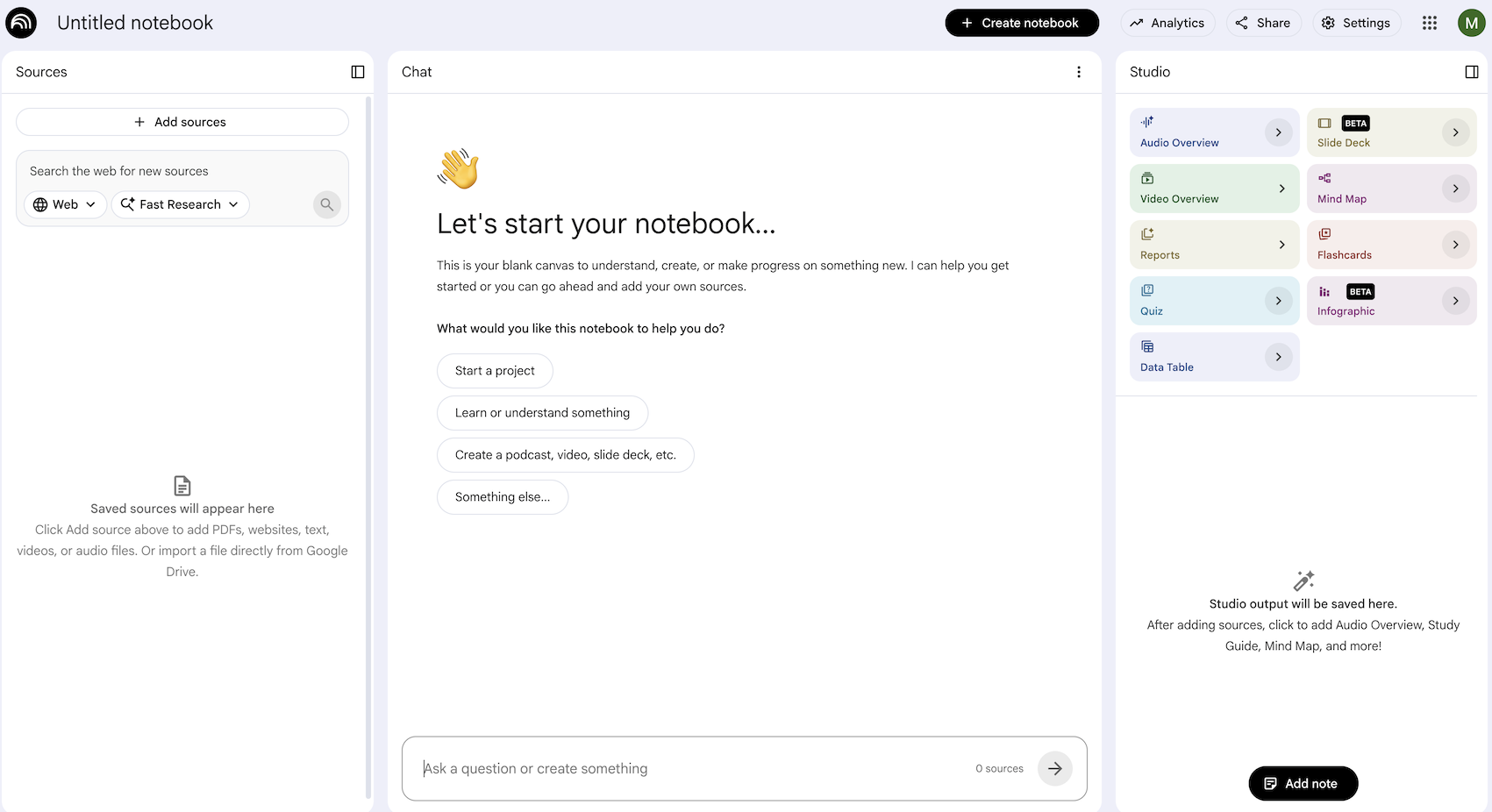
NotebookLM ( notebooklm.google.com) 是一款 AI 赋能的研究助手。只需上传 PDF、网站、YouTube 视频、音频文件、Google 文档、Google 幻灯片等内容,NotebookLM 就能为您总结要点,并巧妙地将不同主题关联起来,这一切都离不开最新版 Gemini 的多模态理解能力。它还可以根据您上传的来源生成有趣且富有吸引力的音频概览、视频概览、信息图等。
Google AI Studio 🎨
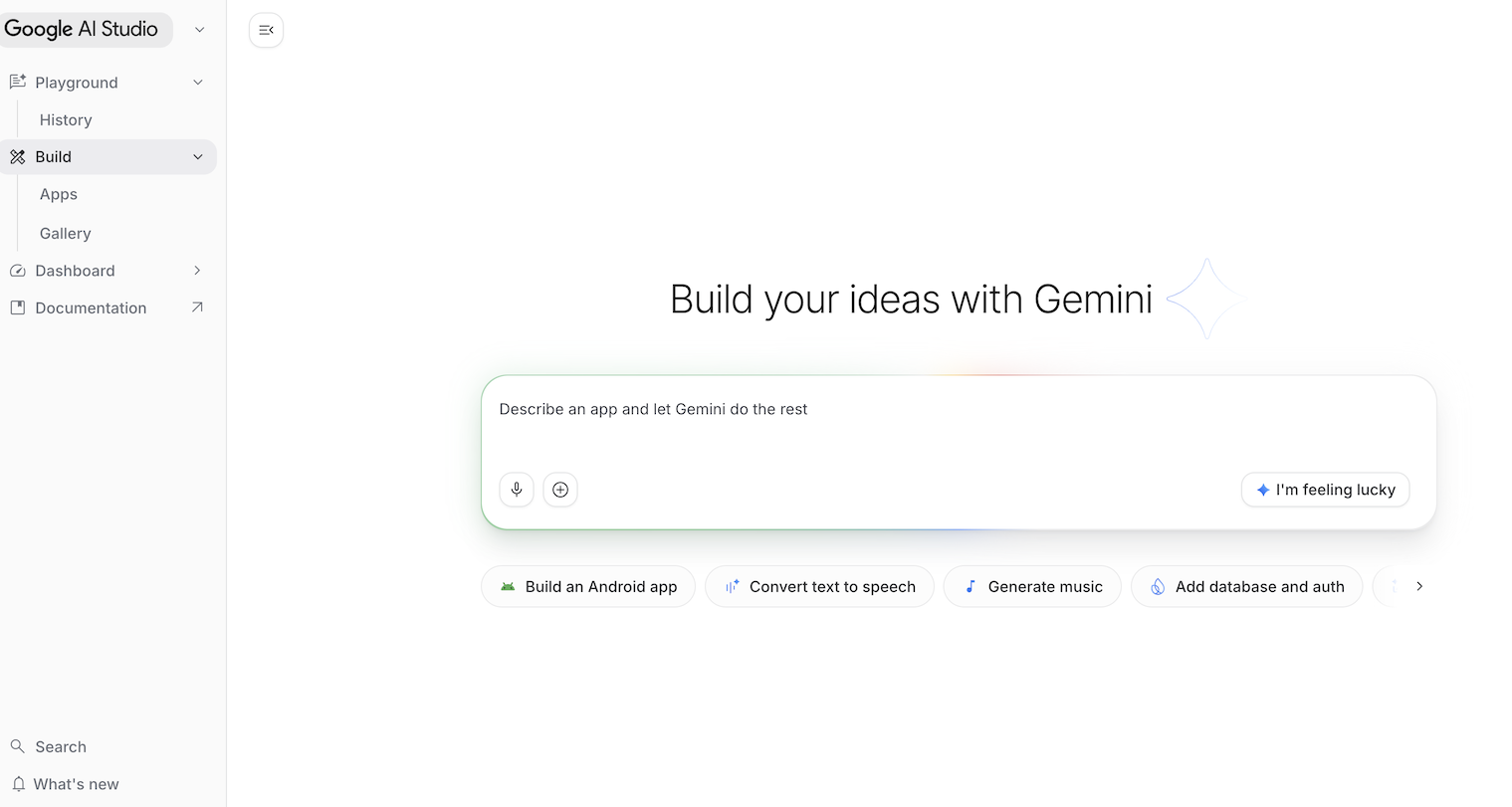
Google AI Studio ( ai.dev) 是开始使用 Gemini 构建应用的最快捷方式。借助 Google AI Studio 中的游乐场面板,您可以在模型部分尝试使用不同的模型来生成文本、图片和视频,还可以通过 Gemini Live API 试用实时语音和视频功能。
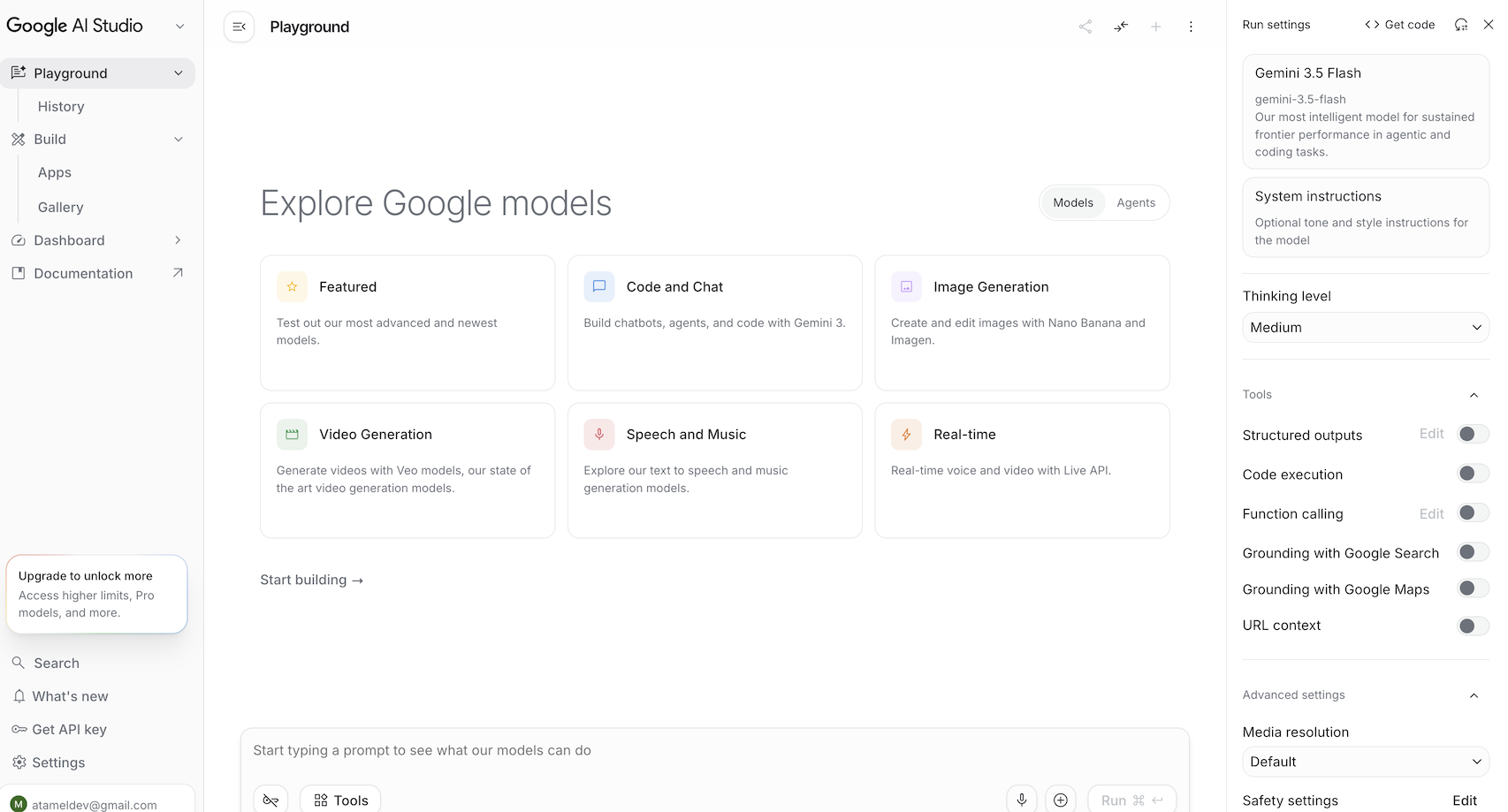
在代理部分下,您可以试用 Gemini 中的受管理代理。借助 Google AI Studio 中的构建面板,您可以进行氛围编码,构建全栈 Web 应用,并将其部署到 Google Cloud 上的 Cloud Run,以及将代码推送到 GitHub。您还可以构建 Android 应用。
Gemini Enterprise Agent Platform Studio ☁️
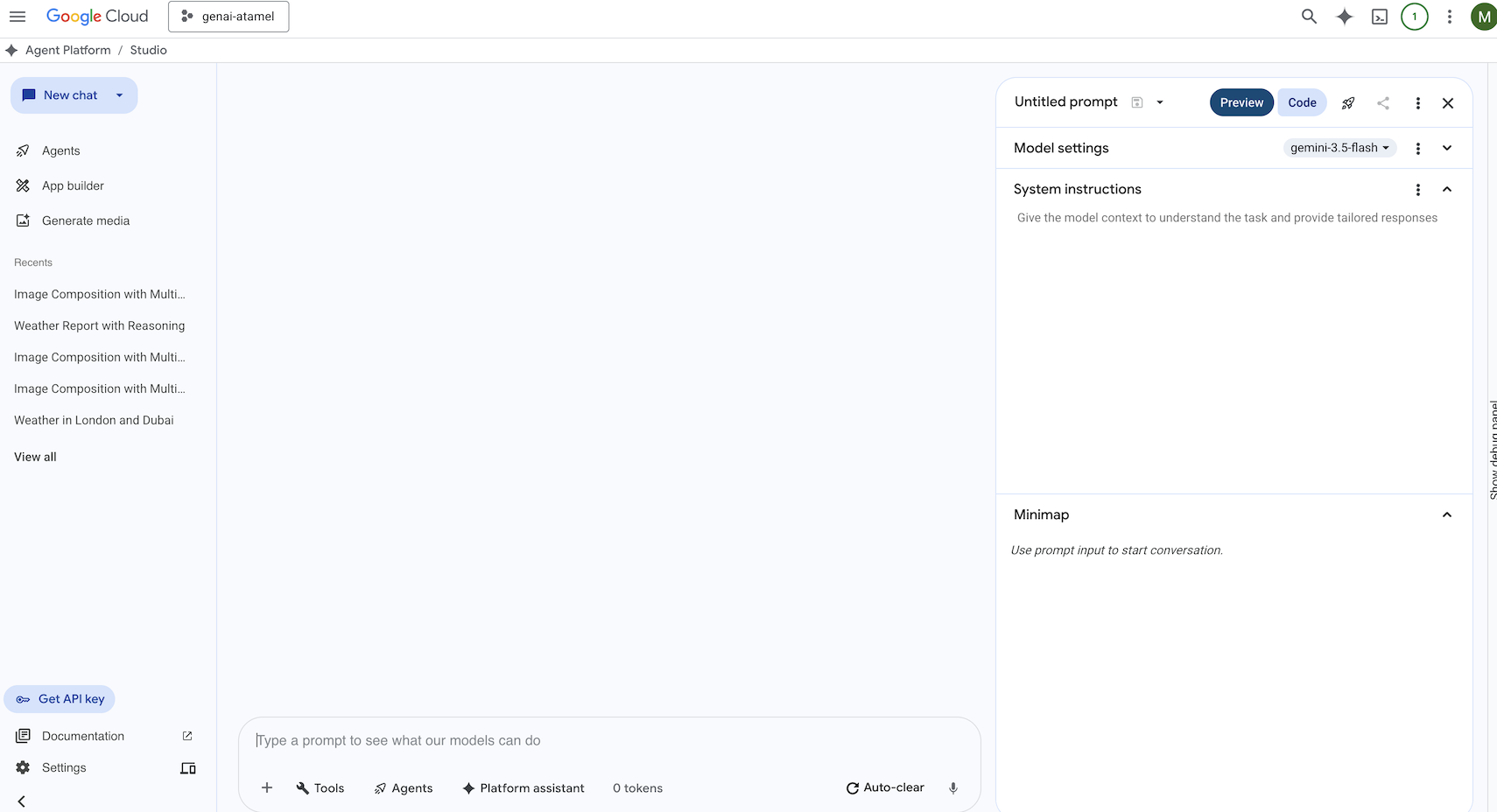
Gemini Enterprise Agent Platform 是一个全托管式统一 AI 开发平台,用于在 Google Cloud 中构建和使用生成式 AI。Gemini Enterprise Agent Platform Studio ( console.cloud.google.com/agent-platform) 可帮助您测试、调优和部署企业级生成式 AI 应用。
Google Antigravity 🚀
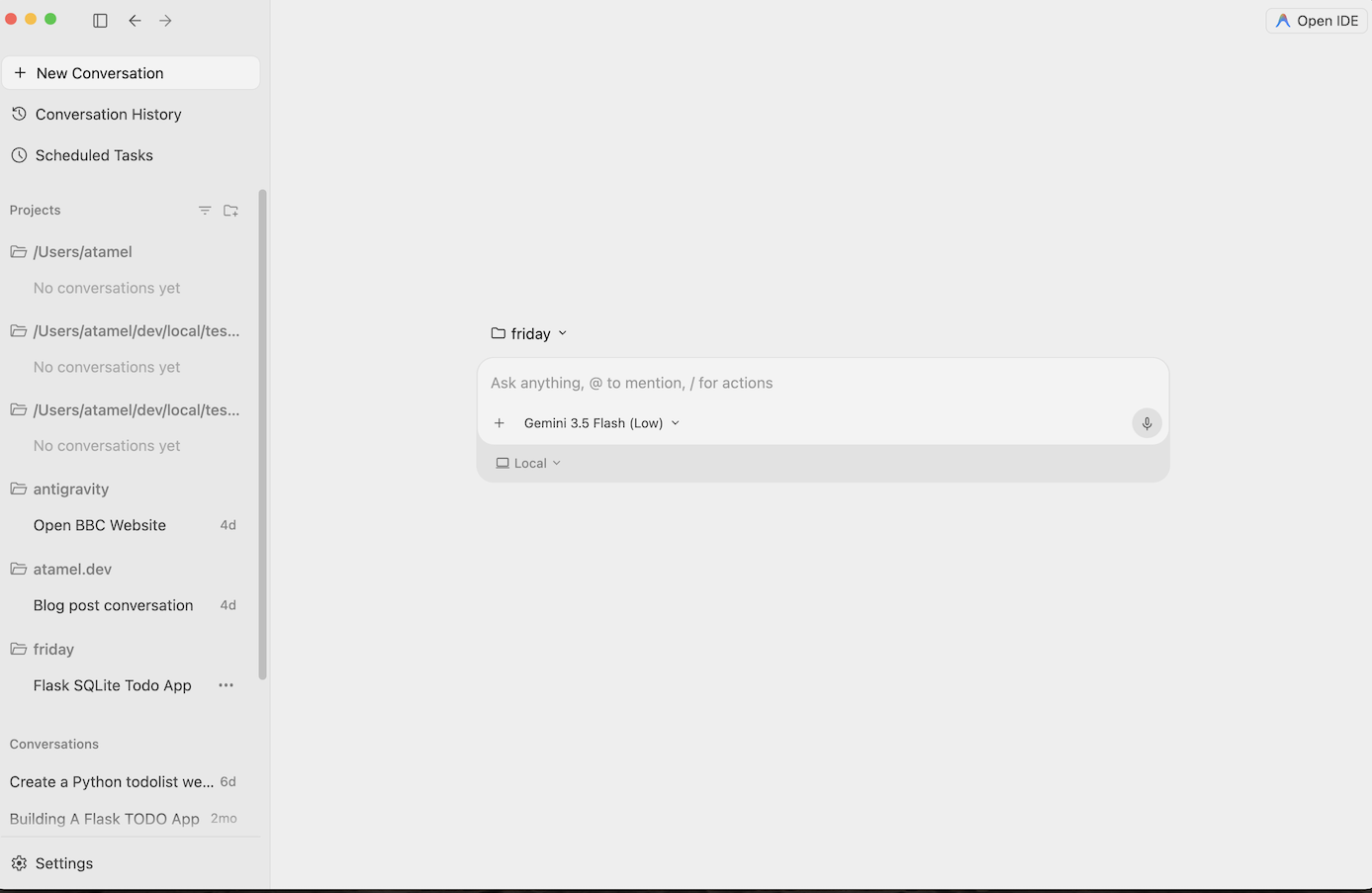
Antigravity ( antigravity.google) 是一个智能体式开发平台。Antigravity 可让开发者在更高的任务导向型级别上进行操作,从而跨工作区管理智能体。它还提供 Antigravity IDE(熟悉的 AI 驱动型 IDE 体验)和 Antigravity CLI(命令行界面)。
欢迎下载并试用这些工具。以下是关于何时使用哪种工具的一些常规指南:
- 如果您是新手,可能只会使用 Gemini 应用提问或生成一些基本代码。
- 如果您正在进行氛围编码,那么 Google AI Studio 可能是您的首选工具。
- 如果您想在本地开发环境的背景下构建复杂的应用,则应选择 Google Antigravity。
- 如果您想部署或已在使用 Google Cloud,并且需要企业级支持和功能,那么 Agent Platform 及其工作室是您的理想之选。
当然,您也可以搭配使用这些工具。例如,您可以先在 AI Studio 中进行氛围编程,然后将代码推送到 GitHub,再使用 Antigravity 继续编码,最后部署到 Google Cloud。
4. Gemini 模型 🧠
Gemini 模型会不断改进,每隔几个月就会推出新版本。截至今天(2026 年 2 月),Google Cloud 上的精选模型如下:
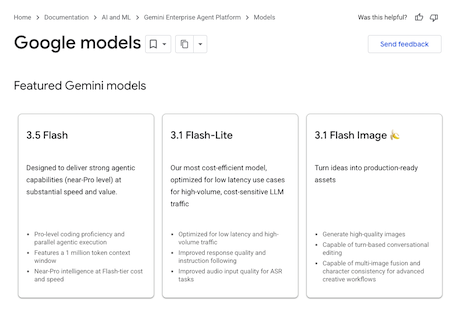
还有许多其他已正式推出的 Gemini 模型、预览版 Gemini 模型、开放式 Gemma 模型、嵌入模型、Imagegen 模型、Veo 模型等。
如需了解详情,请访问 Google 模型文档页面,探索 Google Cloud 上适用于不同应用场景的主要模型。
5. Google Gen AI SDK 📦
如需将 Gemini 与您的应用集成,您可以使用 Google Gen AI SDK。
正如我们之前讨论的那样,您可以通过 Google AI Studio 或 Agent Platform Studio 访问 Gemini 模型。Google Gen AI SDK 通过 Google AI API 和 Google Cloud API 提供与 Gemini 模型交互的统一接口。除了少数例外情况,在一个平台上运行的代码都会在两个平台上运行。
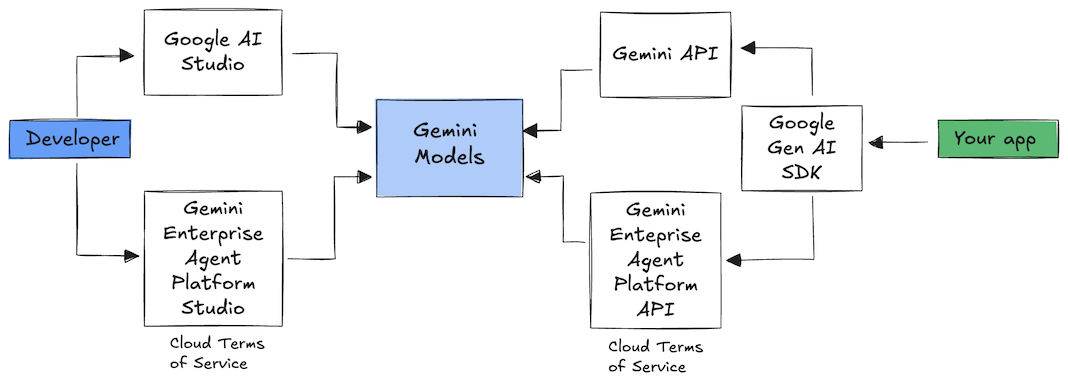
Google Gen AI SDK 目前支持 Python、Go、Node、Java 和 C#。
例如,以下是在 Python 中与 Google AI 中的 Gemini 对话的方式:
client = genai.Client(
  api_key=your-gemini-api-key)

response = client.models.generate_content(
  model="gemini-3.5-flash",
  contents="Why is the sky blue?")
若要对 Google Cloud 中 Agent Platform 中的 Gemini 执行相同的操作,您只需更改客户端初始化,其余部分保持不变:
client = genai.Client(
  vertexai=True,
  project=your-google-cloud-project,
  location="us-central1")

response = client.models.generate_content(
  model="gemini-3.5-flash",
  contents="Why is the sky blue?")
如需自行运行这些示例,您可以在 github.com/meteatamel/genai-samples/tree/main/vertexai/gemini2/hello-world 中运行 main.py。
6. Interactions API 🔄
Interactions API(Beta 版)是一个新的统一接口,用于与 Gemini 模型和智能体进行交互。作为 generateContent API 的改进替代方案,它简化了状态管理、工具编排和长时间运行的任务。
以下是与新 API 进行基本互动的方式:
interaction =  client.interactions.create(
    model="gemini-3.5-flash",
    input="Tell me a short joke."
)
print(interaction.outputs[-1].text)
您可以通过传递上一次互动的互动 ID 来进行有状态的对话:
interaction1 = client.interactions.create(
    model="gemini-3.5-flash",
    input="Hi, my name is Phil."
)
print(f"Model: {interaction1.outputs[-1].text}")

interaction2 = client.interactions.create(
    model="gemini-3.5-flash",
    input="What is my name?",
    previous_interaction_id=interaction1.id
)
print(f"Model: {interaction2.outputs[-1].text}")
Interactions API 旨在用于构建智能体并与之互动,支持函数调用、内置工具、结构化输出和 Model Context Protocol (MCP)。如需了解如何将该功能与 Deep Research Agent 搭配使用,请参阅下文中的“代理”步骤 🤖。
如需自行运行这些示例,您可以在 github.com/meteatamel/genai-samples/blob/main/vertexai/interactions-api 中运行 main.py。
7. 长上下文窗口 🪟
许多 Gemini 模型都配备了 100 万个或更多 token 的大型上下文窗口。过去,大语言模型 (LLM) 受到一次可传递给模型的文本(或 token)数量的极大限制。Gemini 的长上下文窗口发掘了许多新的应用场景和开发者模式。
如需查看长上下文窗口的实际效果,您可以前往 Agent Platform Studio 提示库,然后选择 Extract Video Chapters 提示。此提示会将视频内容分组为多个章节,并为每个章节提供摘要。
使用提供的视频运行该脚本后,您应该会获得类似于以下内容的输出:
[
  {
    "timecode": "00:00",
    "chapterSummary": "The video opens with scenic views of Rio de Janeiro, introducing the \"Marvelous City\" and its famous beaches like Ipanema and Copacabana, before pivoting to the existence of the favelas."
  },
  {
    "timecode": "00:20",
    "chapterSummary": "The narrator describes the favelas, home to one in five Rio residents, highlighting that while often associated with crime and poverty, this is only a small part of their story."
  },
  {
    "timecode": "00:36",
    "chapterSummary": "Google introduces its project to map the favelas, emphasizing that providing addresses to these uncharted areas is a crucial step in giving residents an identity."
  },
  {
    "timecode": "00:43",
    "chapterSummary": "The video concludes by focusing on the people of the favelas, inviting viewers to go beyond the map and explore their world through a 360-degree experience."
  }
]
这完全得益于 Gemini 的长上下文窗口!
8. 思考模式 🧠
Gemini 模型采用内部思考流程,可显著提升其在处理复杂任务时的推理能力。思考级别(Gemini 3)和预算(Gemini 2.5)可控制思考行为。您还可以启用 include_thoughts 标志,查看模型的原始想法。
为了直观了解思考模式的实际效果,我们打开 Google AI Studio ( ai.dev) 并开始新的对话。在右侧面板中,您可以设置思考水平。
如果您点击右上角的 Get code 按钮,还可以查看如何在代码中设置思考等级,如下所示:
response = client.models.generate_content(
    model="gemini-3.5-flash",
    contents="How does AI work?",
    config=types.GenerateContentConfig(
        thinking_config=types.ThinkingConfig(
          thinking_level="low",
          include_thoughts=True
        )
    ),
)
尝试使用不同的提示和不同的思考级别,看看模型的行为。
9. 工具 🧰
Gemini 随附多项内置工具,例如 Google 搜索、Google 地图、代码执行、电脑使用、文件搜索等。您还可以使用函数调用功能定义自定义工具。我们来简要了解一下如何使用这些功能。
Google 搜索 🔎
您可以依托 Google 搜索结果对模型回答进行接地,从而获得更准确、更相关且时效性更强的回答。
在 Agent Platform Studio ( console.cloud.google.com/agent-platform/studio) 或 Google AI Studio ( ai.dev) 中,您可以开始新的对话,并确保 Google 搜索基础知识处于关闭状态。
然后,您可以询问您所在位置的今日天气。例如:
How's the weather in London today?
您通常会收到过去一天的回答,因为该模型无法访问最新信息。例如:
In London today (Friday, May 24, 2025), the weather is a bit of a mixed bag, typical for late May.
现在,启用 Google 搜索接地,然后问同样的问题。您应该会看到最新的天气信息,其中包含指向事实依据来源的链接:
In London today (Wednesday, February 11, 2026), the weather is cool and mostly cloudy with a chance of light rain.
这样,您就可以在代码中实现 Google 搜索接地。您还可以点击“代码”按钮来获取基础示例:
google_search_tool = Tool(google_search=GoogleSearch())
response = client.models.generate_content(
    model="gemini-3.5-flash",
    contents="How's the weather like today in London?",
    config=GenerateContentConfig(tools=[google_search_tool])
)
Google 地图 🗺️
您还可以依托 Google 地图(可访问超过 2.5 亿个地点的信息)对模型回答进行接地。
如需查看实际效果,您可以在 Agent Platform 工作室的模型设置中的“接地”部分选择 Google 地图,而不是 Google 搜索,然后提出需要使用 Google 地图数据的问题,例如:
Can you show me some Greek restaurants and their map coordinates near me?
相应代码如下所示:
google_maps_tool = Tool(google_maps=GoogleMaps())
response = client.models.generate_content(
    model="gemini-3.5-flash",
    contents="What are the best restaurants near here?",
    config=GenerateContentConfig(tools=[google_maps_tool]),
       # Optional: Provide location context (this is in Los Angeles)
        tool_config=ToolConfig(
          retrieval_config=types.RetrievalConfig(
            lat_lng=types.LatLng(
                latitude=34.050481, longitude=-118.248526))),
)
代码执行 🧑💻
Gemini 可以生成并运行 Python 代码,并使用一系列受支持的库(pandas、numpy、PyPDF2 等)。对于可受益于代码驱动型推理(例如求解方程)的应用,该功能非常实用
如需试用此功能,请切换到 Google AI Studio,开始新对话,并确保 Code execution 开关处于开启状态。然后,提出一个可能需要使用代码执行工具的问题。例如:
What is the sum of the first 50 prime numbers?
Gemini 应生成一些 Python 代码并运行。最终,正确答案是 5117。
您可以从代码中运行代码执行工具,如下所示:
code_execution_tool = Tool(code_execution=ToolCodeExecution())
response = client.models.generate_content(
  model="gemini-3.5-flash",
  contents="What is the sum of the first 50 prime numbers?",
  config=GenerateContentConfig(
    tools=[code_execution_tool],
    temperature=0))
计算机使用 🖥️
Gemini Computer Use 模型(预览版)可让您构建浏览器控制智能体来自动执行任务。它以如下循环方式运行:
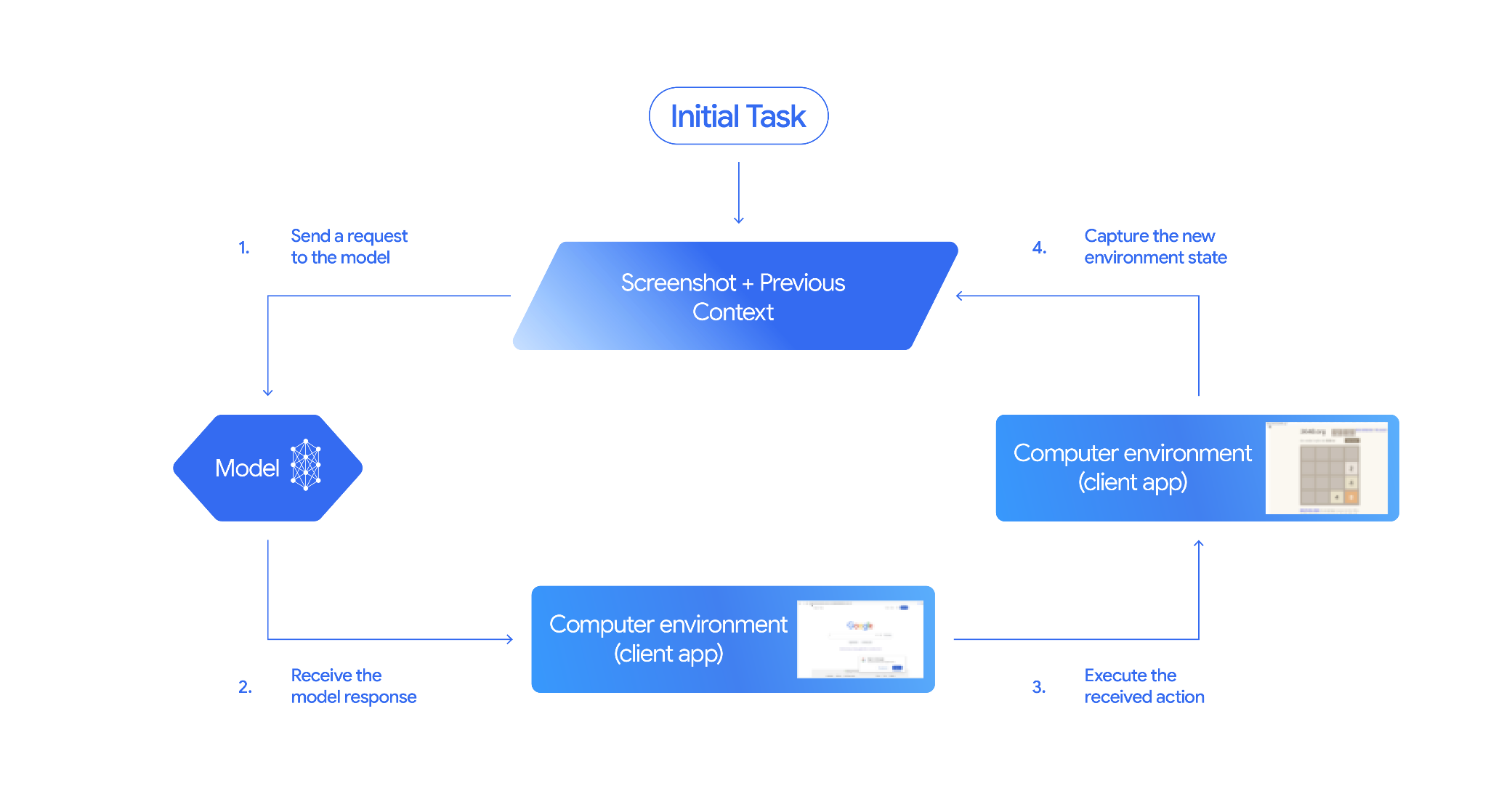
如需查看实际效果,您可以在 github.com/google-gemini/computer-use-preview 中运行 main.py。按照代码库中的说明创建 Python 虚拟环境并安装依赖项。
举例来说,您可以从 Google AI Studio 获取 API 密钥,然后让 Gemini 为您搜索航班:
export GEMINI_API_KEY=your-api-key

python main.py --query "Find me top 5 fights sorted by price with the following constraints:

Flight site to use: www.google.com/travel/flights
From: London
To: Larnaca
One-way or roundtrip: One way
Date to leave: Sometime next week
Date to return: N/A
Travel preferences:
-Direct flights
-No flights before 10am
-Carry-on luggage"
您应该会看到 Gemini 打开无痕模式浏览器,并开始为您搜索航班!
文件搜索 📁
文件搜索工具可轻松实现检索增强生成 (RAG)。只需上传文件,它就会为您完成分块、嵌入、检索等所有 RAG 详细信息。
如需查看其实际效果,您可以在 github.com/meteatamel/genai-beyond-basics/blob/main/samples/grounding/file-search-tool 中运行 main.py。
从 Google AI Studio 获取 API 密钥,并创建文件搜索存储区:
export GEMINI_API_KEY=your-gemini-api-key

python main.py create_store my-file-search-store
将 PDF 上传到商店:
python main.py upload_to_store fileSearchStores/myfilesearchstore-5a9x71ifjge9 cymbal-starlight-2024.pdf
提出有关指向存储区的 PDF 的问题:
python main.py generate_content "What's the cargo capacity of Cymbal Starlight?" fileSearchStores/myfilesearchstore-5a9x71ifjge9
您应该会收到基于 PDF 的回答:
Generating content with file search store: fileSearchStores/myfilesearchstore-5a9x71ifjge9
Response: The Cymbal Starlight 2024 has a cargo capacity of 13.5 cubic feet, which is located in the trunk of the vehicle. It is important to distribute the weight evenly and not overload the trunk, as this could impact the vehicle's handling and stability. The vehicle can also accommodate up to two suitcases in the trunk, and it is recommended to use soft-sided luggage to maximize space and cargo straps to secure it while driving.
Grounding sources:  cymbal-starlight-2024.pdf
函数调用 📲
如果内置工具不够用,您还可以在 Gemini 中定义自己的工具(函数)。您只需提交一个 Python 函数作为工具(而不是提交该函数的详细 OpenAPI 规范)。它会自动用作模型和 SDK 的工具。
例如,您可以创建一个函数来返回某个位置的纬度和经度:
def location_to_lat_long(location: str):
    """Given a location, returns the latitude and longitude

    Args:
        location: The location for which to get the weather.

    Returns:
        The latitude and longitude information in JSON.
    """
    logger.info(f"Calling location_to_lat_long({location})")
    url = f"https://geocoding-api.open-meteo.com/v1/search?name={location}&count=1"
    return api_request(url)
您还可以使用一个函数来返回指定纬度和经度的天气信息:
def lat_long_to_weather(latitude: str, longitude: str):
"""Given a latitude and longitude, returns the weather information
Args:
latitude: The latitude of a location
longitude: The longitude of a location
Returns:
The weather information for the location in JSON.
"""
logger.info(f"Calling lat_long_to_weather({latitude}, {longitude})")
url = (f"https://api.open-meteo.com/v1/forecast?latitude={latitude}&longitude={longitude}¤t=temperature_2m,"
f"relative_humidity_2m,surface_pressure,wind_speed_10m,wind_direction_10m&forecast_days=1")
return api_request(url)
现在,您可以将这两个函数作为工具传递给 Gemini,让它使用这些工具来获取某个位置的天气信息:
def generate_content_with_function_calls():
    client = genai.Client(
        vertexai=True,
        project=PROJECT_ID,
        location=LOCATION)

    response = client.models.generate_content(
        model=MODEL_ID,
        contents=PROMPT,
        config=GenerateContentConfig(
            system_instruction=[
                "You are a helpful weather assistant.",
                "Your mission is to provide weather information for different cities."
                "Make sure your responses are in plain text format (no markdown) and include all the cities asked.",
            ],
            tools=[location_to_lat_long, lat_long_to_weather],
            temperature=0),
    )

    print(response.text)
    #print(response.automatic_function_calling_history)
如需查看实际效果,您可以在 github.com/meteatamel/genai-beyond-basics/blob/main/samples/function-calling/weather 中运行 main_genaisdk.py。
10. 智能体 🤖
Gemini 的 Interactions API 专为构建代理和与代理互动而设计。您可以使用 Gemini Deep Research Agent 等专业代理。Gemini Deep Research Agent 可自主规划、执行和整合多步骤研究任务。它会使用网络搜索和您自己的数据来浏览复杂的信息环境,从而生成详细的报告并提供引用。
以下展示了如何将 Deep Research 智能体与 Interaction API 搭配使用:
interaction = client.interactions.create(
    input="Research the history of the Google TPUs.",
    agent="deep-research-pro-preview-12-2025",
    background=True
)

while True:
    if interaction.status == "completed":
        print("\nFinal Report:\n",
interaction.outputs[-1].text)
        break
如需自行运行此示例,您可以在 github.com/meteatamel/genai-samples/blob/main/vertexai/interactions-api 中运行 main.py。
export GOOGLE_API_KEY=your-api-key
python main.py agent
过一段时间后,您应该会看到研究结果:
User: Research the history of the Google TPUs with a focus on 2025 and 2026

Status: in_progress
Status: in_progress
Status: in_progress
...
Model Final Report:
 # Architectural Convergence and Commercial Expansion: The History of Google TPUs (2015–2026)

## Key Findings
*   **Strategic Pivot (2025):** Google transitioned the Tensor Processing Unit (TPU) from a primarily internal differentiator to a commercial merchant-silicon competitor, epitomized by the massive "Ironwood" (TPU v7) deployment and external sales strategy.
*   **Technological Leap:** The introduction of TPU v7 "Ironwood" in 2025 marked a paradigm shift, utilizing 3nm process technology to deliver 42.5 exaFLOPS per pod, directly challenging NVIDIA's Blackwell architecture in the high-performance computing (HPC) sector.
...
11. 图片生成 📷
Nano Banana 🍌 是 Gemini 原生图片生成功能的名称。Gemini 能够以对话方式生成并处理图片,您可以使用文本、图片或两者结合的方式与 Gemini 对话。这样,您就可以灵活地创建、修改和迭代视觉内容。
Nano Banana 是指 Gemini API 中提供的两种不同的模型:
- Nano Banana:Gemini Flash Image 模型。此模型专为速度和效率而设计,针对大规模低延迟任务进行了优化。
- Nano Banana Pro:Gemini Pro Image 模型。此模型专为专业级素材生产而设计,依托高级推理能力,可执行复杂指令并实现高保真文本生成。
以下代码段展示了如何传递现有图片并让 Nano Banana 编辑该图片:
from google import genai
from google.genai import types
from PIL import Image

client = genai.Client()

prompt = (
    "Create a picture of my cat eating a nano-banana in a "
    "fancy restaurant under the Gemini constellation",
)

image = Image.open("/path/to/cat_image.png")

response = client.models.generate_content(
    model="gemini-3.1-flash-image",
    contents=[prompt, image],
)

for part in response.parts:
    if part.text is not None:
        print(part.text)
    elif part.inline_data is not None:
        image = part.as_image()
        image.save("generated_image.png")
您可在 Gemini 应用、AI Studio 或 Agent Platform Studio 中使用 Nano Banana。最简单的试用方法是在 Gemini 应用中进行。在 Gemini 应用 ( gemini.google.com) 中,选择 Tools 下的 🍌 Create images。然后,上传一张图片,尝试一些有趣的功能。例如,你可以说:
Can you transform this picture of mine to a nice beach on a tropical island?


12. Text-to-Speech Generation 🎶
Gemini 可以使用 Gemini 文字转语音 (TTS) 生成功能将文本输入转换为单人或多人音频。TTS 生成是可控的,这意味着您可以使用自然语言来构建互动,并指导音频的风格、口音、语速和语气。
TTS 功能不同于通过 Live API 提供的语音生成功能,后者专为交互式非结构化音频以及多模态输入和输出而设计。虽然 Live API 在动态对话上下文中表现出色,但通过 Gemini API 实现的 TTS 专门针对需要精确朗读文本并对风格和声音进行精细控制的场景,例如播客或有声读物生成。
以下是单音箱 TTS 的代码段:
`
from google import genai
from google.genai import types
import wave

# Set up the wave file to save the output:
def wave_file(filename, pcm, channels=1, rate=24000, sample_width=2):
   with wave.open(filename, "wb") as wf:
      wf.setnchannels(channels)
      wf.setsampwidth(sample_width)
      wf.setframerate(rate)
      wf.writeframes(pcm)

client = genai.Client()

response = client.models.generate_content(
   model="gemini-3.1-flash-tts-preview",
   contents="Say cheerfully: Have a wonderful day!",
   config=types.GenerateContentConfig(
      response_modalities=["AUDIO"],
      speech_config=types.SpeechConfig(
         voice_config=types.VoiceConfig(
            prebuilt_voice_config=types.PrebuiltVoiceConfig(
               voice_name='Kore',
            )
         )
      ),
   )
)

data = response.candidates[0].content.parts[0].inline_data.data

file_name='out.wav'
wave_file(file_name, data) # Saves the file to current directory
您可以在语音转文本生成 (TTS) 文档中查看更多示例。
您还可以在 Google AI Studio Playground 中尝试生成语音。在 generate-speech 应用中尝试使用不同的提示。
13. 空间理解 🌐
Gemini 具有先进的对象检测和空间理解能力。要理解这一点,最简单的方法是实际操作一下。
前往 Google AI Studio Starter Applets,然后前往 Spatial Understanding 应用。
使用您的 Google AI Studio 密钥更新 .env 文件,并将 src/consts.tsx 中的模型更新为最新模型之一。安装依赖项并启动应用:
npm install
npm run dev
现在,您可以开始选择一些图片,并尝试使用 Gemini 检测图片中的一些物品。
例如,您可以检测不同图片中的“阴影”或“水果”:
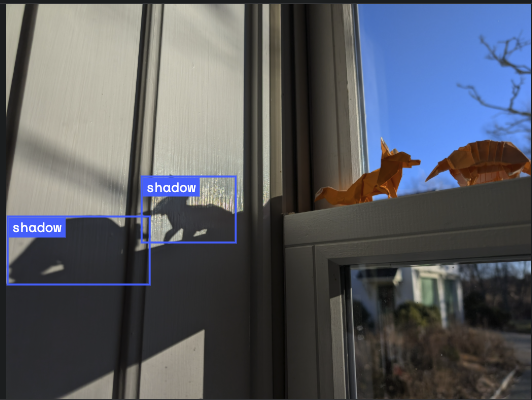
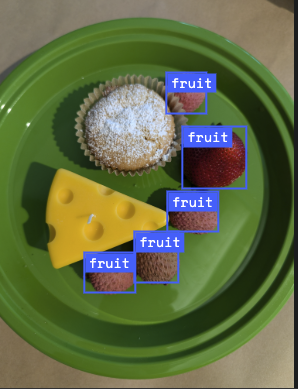
尝试使用不同的图片,看看 Gemini 在检测和标记不同对象方面的表现如何。
14. Live API 🎤
借助 Live API,您可以与 Gemini 进行低延迟的实时语音和视频互动。它能够处理连续的音频、视频或文本流,以提供即时、自然逼真的语音回答,从而为用户打造自然的对话式体验。
不妨前往 Google AI Studio 试用 Live API,或前往 Agent Platform Studio 试用 Live API。在这两款应用中,你都可以分享语音、视频和屏幕内容,并与 Gemini 进行实时对话。
您可以开始共享视频或屏幕,并通过语音向 Gemini 询问一般性问题。例如:
Can you describe what you see on the screen?
您会惊讶于 Gemini 回答的自然程度。
15. 总结
在此 Codelab 中,我们介绍了 Gemini 生态,首先介绍了 Gemini 产品系列,然后学习了如何使用统一的 Google Gen AI SDK 将模型集成到我们的应用中。我们探索了 Gemini 的尖端功能,包括长上下文窗口、思考模式、内置的接地工具、Live API 和空间理解。我们建议您深入了解参考文档,并继续探索 Gemini 的全部潜力。