
1. Welcome, Gemini Developer!
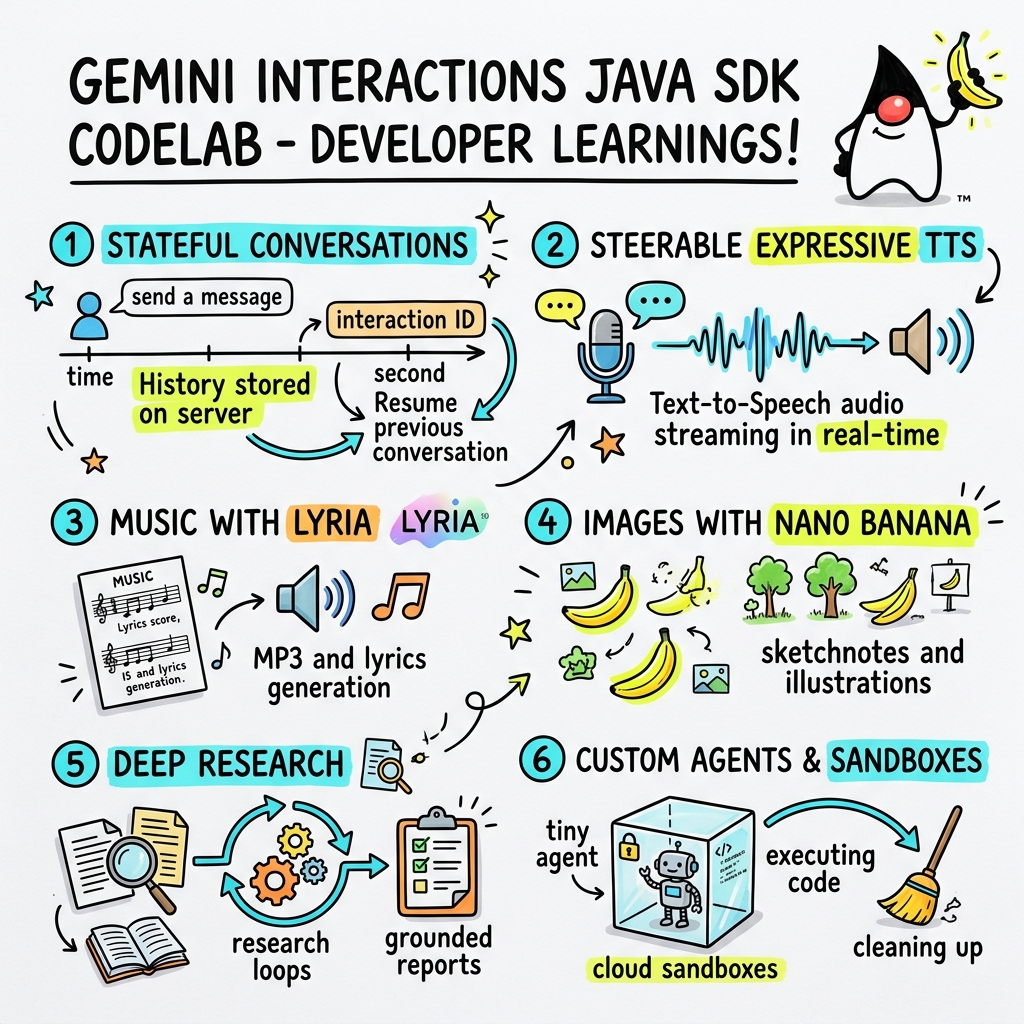
In this codelab, you'll learn how to build next-generation AI applications in Java using the custom Gemini Interactions SDK.
What is the Gemini Interactions API?
Traditional LLM APIs are stateless and request-response driven. To build a multi-turn chat assistant or a complex agentic loop, developers have historically had to manage conversation state, history truncation, tool call orchestration, and execution loops entirely in client-side application code.
The Gemini Interactions API shifts this complexity to the server. It is a stateful, session-based API where Google's infrastructure hosts and manages the conversation graph. A single Interaction represents a stateful session. When you interact with it, the API returns a rich, structured timeline composed of polymorphic Steps—such as:
ThoughtStep: The model's internal reasoning process.ModelOutputStep: Text, audio, or image content generated by the model.ToolCallStep&ToolResultStep: System or model-initiated tool invocations.UserInteractionStep: Points where the system pauses to request human input or approval.
What are Managed Agents?
Orchestrating autonomous agents—handling loops, retry logic, tool execution environments, and state management—is notoriously difficult.
Managed Agents are a platform-level solution provided by the Gemini Interactions API. Instead of running agent loops locally, you can provision specialized agents directly on Google's infrastructure:
- Built-in Agents: Ready-to-use specialized agents, such as the Deep Research agent, which performs multi-step web research, aggregates findings, and generates comprehensive reports.
- Custom Managed Agents: Autonomous entities that you define. You provide system instructions, attach tools (like Google Search or a Bash execution environment), and configure a Cloud Sandbox—a secure, isolated, and containerized runtime environment with customizable network egress rules (e.g. allowing access only to specific domains like GitHub).
By using the Gemini Interactions Java SDK, you can easily bootstrap, coordinate, and collaborate with these managed agents in standard Java applications.
What you'll learn
- How to navigate the new polymorphic
Step-based architecture. - How to stream expressive TTS audio directly to speakers.
- How to generate music (MP3 + Lyrics) with Lyria.
- How to generate visual sketchnotes with Gemini 3 Pro Image.
- How to steer the Deep Research agent using Collaborative Planning.
- How to provision a custom agent with network egress rules and tools.
What you'll need
- Java 21 or higher.
- Apache Maven.
- A text editor or IDE (IntelliJ IDEA, VS Code, etc.).
- A Gemini API Key (from Google AI Studio).
2. Setup: Project & API Key
Create Maven Project
Bootstrap a new Maven project from your terminal using the following command:
mvn archetype:generate \
    -DgroupId=com.example \
    -DartifactId=gemini-interactions-demo \
    -DarchetypeGroupId=org.apache.maven.archetypes \
    -DarchetypeArtifactId=maven-archetype-quickstart \
    -DarchetypeVersion=1.5 \
    -DinteractiveMode=false
Navigate into your newly created project directory:
cd gemini-interactions-demo
Open your pom.xml file and configure it:
- Update the Java version properties to target Java 21:
<properties> <maven.compiler.source>21</maven.compiler.source> <maven.compiler.target>21</maven.compiler.target> </properties> - Add the SDK dependency inside the
<dependency>
    <groupId>io.github.glaforge</groupId>
    <artifactId>gemini-interactions-api-sdk</artifactId>
    <version>0.10.1</version>
</dependency>
Configure API Key
Get a Gemini API key from Google AI Studio.
Set the key as an environment variable in your terminal:
macOS / Linux:
export GEMINI_API_KEY="your_actual_api_key"
Windows (Command Prompt):
set GEMINI_API_KEY="your_actual_api_key"
3. Hello World: Navigating the Step Architecture
The Interactions API introduced a polymorphic, step-based timeline architecture. Instead of returning a flat list of outputs, the API returns a sequence of typed Step objects (e.g., ModelOutputStep, ThoughtStep, FunctionCallStep).
In this step, you will write a simple interaction to understand how to extract the final model output from this structure.
Create HelloInteractions.java
Create the file src/main/java/com/example/HelloInteractions.java with the following content:
package com.example;

import io.github.glaforge.gemini.interactions.GeminiInteractionsClient;
import io.github.glaforge.gemini.interactions.model.*;
import io.github.glaforge.gemini.interactions.model.InteractionParams.ModelInteractionParams;

public class HelloInteractions {
    public static void main(String[] args) {
        // 1. Initialize the client
        GeminiInteractionsClient client = GeminiInteractionsClient.builder()
            .apiKey(System.getenv("GEMINI_API_KEY"))
            .build();

        // 2. Build the request
        ModelInteractionParams request = ModelInteractionParams.builder()
            .model("gemini-3.5-flash")
            .input("Explain the difference between a library and a framework in one sentence.")
            .build();

        // 3. Send request
        Interaction response = client.create(request);

        // 4. Navigate the step-based architecture to get the output
        response.steps().stream()
            .filter(step -> step instanceof Step.ModelOutputStep)
            .map(step -> (Step.ModelOutputStep) step)
            .findFirst()
            .ifPresent(step -> System.out.println(step.content().get(0)));
    }
}
Run the Code
Compile and run the class:
mvn compile exec:java -Dexec.mainClass=com.example.HelloInteractions
4. Steerable Audio: Streaming Expressive TTS
Gemini 3.1 Flash introduces steerable Text-to-Speech (TTS). You can control the voice's pacing, tone, and environment using prompts, and use emotional tags (like [excitedly] or [whispers]) mid-sentence.
In this step, you will generate expressive audio and stream it directly to your speakers.
Create StreamingDJ.java
Create the file src/main/java/com/example/StreamingDJ.java with the following content:
package com.example;

import io.github.glaforge.gemini.interactions.GeminiInteractionsClient;
import io.github.glaforge.gemini.interactions.model.*;
import io.github.glaforge.gemini.interactions.model.Config.SpeechConfig;
import io.github.glaforge.gemini.interactions.model.InteractionParams.ModelInteractionParams;
import javax.sound.sampled.*;
import java.util.Base64;
import java.util.stream.Stream;

public class StreamingDJ {
    public static void main(String[] args) throws Exception {
        GeminiInteractionsClient client = GeminiInteractionsClient.builder()
            .apiKey(System.getenv("GEMINI_API_KEY"))
            .build();

        // Prompt defining the voice profile and emotional tags
        String prompt = """
            # AUDIO PROFILE: Jaz R.
            ## THE SCENE: London Studio
            ### DIRECTOR'S NOTES
            Accent: Jaz is a DJ from Brixton, London.
            Style: Bouncy, energetic, high-speed delivery.

            #### TRANSCRIPT
            [excitedly] Yes, massive vibes in the studio!
            [whispers] But keep it down, the boss is coming...
            [shouting] Turn this up! Let's go!
            """;

        ModelInteractionParams request = ModelInteractionParams.builder()
            .model("gemini-3.1-flash-tts-preview")
            .input(prompt)
            .responseModalities(Interaction.Modality.AUDIO)
            .speechConfig(new SpeechConfig("Algenib", "en-GB"))
            .stream(true) // Enable streaming
            .build();

        System.out.println("Streaming audio from Gemini...");

        try (Stream<Events> eventStream = client.stream(request)) {
            // Configure the Java Audio System for 24kHz Mono 16-bit PCM
            AudioFormat format = new AudioFormat(24000, 16, 1, true, false);
            DataLine.Info info = new DataLine.Info(SourceDataLine.class, format);

            try (SourceDataLine line = (SourceDataLine) AudioSystem.getLine(info)) {
                line.open(format);
                line.start();

                // Process the stream and play audio chunks as they arrive
                eventStream.forEach(event -> {
                    if (event instanceof Events.StepDelta cd && cd.delta() instanceof Events.AudioDelta audioDelta) {
                        byte[] audioData = Base64.getDecoder().decode(audioDelta.data());
                        line.write(audioData, 0, audioData.length);
                    }
                });
                line.drain();
            }
        }
    }
}
Run the Code
mvn compile exec:java -Dexec.mainClass=com.example.StreamingDJ
Listen to the Output
Here is an audio example of what you will hear when running the code (using the Algenib voice with emotional tags):
5. Music Generation with Lyria 3
Using the DeepMind Lyria 3 model, you can generate music and jingles. By requesting dual response modalities (AUDIO and TEXT), you can retrieve both the generated audio (MP3) and the song lyrics.
Create MusicGenerator.java
Create the file src/main/java/com/example/MusicGenerator.java with the following content:
package com.example;

import io.github.glaforge.gemini.interactions.GeminiInteractionsClient;
import io.github.glaforge.gemini.interactions.model.*;
import io.github.glaforge.gemini.interactions.model.InteractionParams.ModelInteractionParams;
import io.github.glaforge.gemini.interactions.model.Content.AudioContent;
import java.nio.file.Files;
import java.nio.file.Paths;

public class MusicGenerator {
    public static void main(String[] args) throws Exception {
        GeminiInteractionsClient client = GeminiInteractionsClient.builder()
            .apiKey(System.getenv("GEMINI_API_KEY"))
            .build();

        ModelInteractionParams request = ModelInteractionParams.builder()
            .model("models/lyria-3-clip-preview") // 30-second clip
            .input("An uplifting rock song with acoustic guitars about coding in Java.")
            .responseModalities(
                Interaction.Modality.AUDIO,
                Interaction.Modality.TEXT) // Request both MP3 and Lyrics
            .build();

        System.out.println("Generating music (this might take a moment)...");
        Interaction response = client.create(request);

        // 1. Print the lyrics (TEXT output)
        System.out.println("\n--- Generated Lyrics ---");
        response.steps().stream()
            .filter(step -> step instanceof Step.ModelOutputStep)
            .flatMap(step -> ((Step.ModelOutputStep) step).content().stream())
            .filter(content -> content instanceof Content.TextContent)
            .forEach(content -> System.out.println(((Content.TextContent) content).text()));

        // 2. Save the MP3 (AUDIO output)
        response.steps().stream()
            .filter(step -> step instanceof Step.ModelOutputStep)
            .flatMap(step -> ((Step.ModelOutputStep) step).content().stream())
            .filter(content -> content instanceof AudioContent)
            .map(content -> (AudioContent) content)
            .findFirst()
            .ifPresent(audio -> {
                try {
                    Files.write(Paths.get("coding_song.mp3"), audio.data());
                    System.out.println("\nSuccess: Song saved to coding_song.mp3");
                } catch (Exception e) {
                    e.printStackTrace();
                }
            });
    }
}
Run the Code
mvn compile exec:java -Dexec.mainClass=com.example.MusicGenerator
Listen to the Generated Song
Here is the generated MP3 file (coding_song.mp3) containing the music and lyrics:
6. Visualizing with Sketchnotes (Nano Banana Pro)
Gemini 3 Pro Image (also known as Nano Banana Pro) can generate images. By requesting the IMAGE modality, you can generate infographics, diagrams, or sketchnotes based on text input.
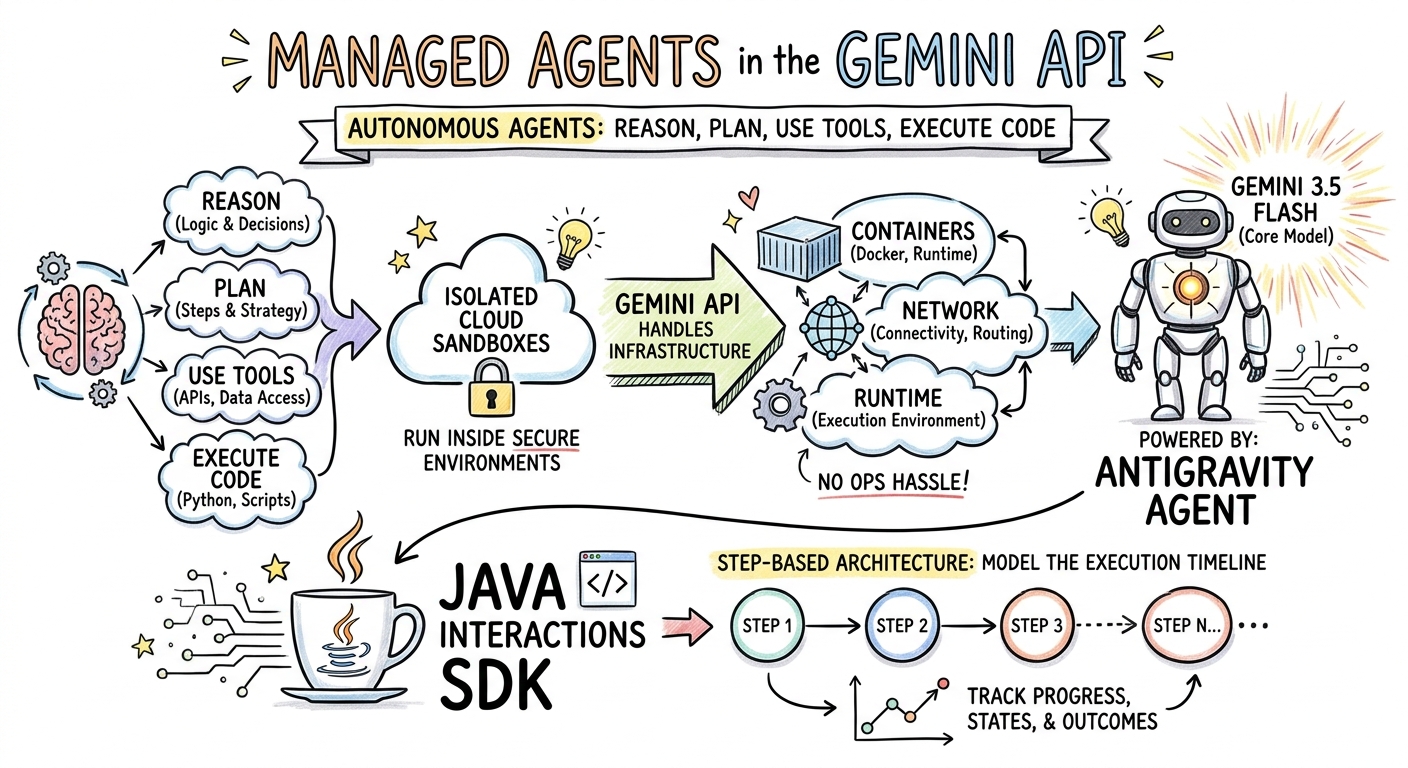
In this step, you will generate a sketchnote summary of an article about Managed Agents and save it as a PNG file.
Create ImageGenerator.java
Create the file src/main/java/com/example/ImageGenerator.java with the following content:
package com.example;

import io.github.glaforge.gemini.interactions.GeminiInteractionsClient;
import io.github.glaforge.gemini.interactions.model.*;
import io.github.glaforge.gemini.interactions.model.InteractionParams.ModelInteractionParams;
import io.github.glaforge.gemini.interactions.model.Content.ImageContent;
import java.nio.file.Files;
import java.nio.file.Paths;

public class ImageGenerator {
    public static void main(String[] args) throws Exception {
        GeminiInteractionsClient client = GeminiInteractionsClient.builder()
            .apiKey(System.getenv("GEMINI_API_KEY"))
            .build();

        String articleSummary = """
            Managed Agents in the Gemini API allow developers to run autonomous agents
            that reason, plan, use tools, and execute code inside isolated cloud sandboxes.
            The Gemini API handles the infrastructure (containers, network, runtime).
            It is powered by the Antigravity agent running on Gemini 3.5 Flash.
            The Java Interactions SDK supports these capabilities, utilizing a Step-based
            architecture to model the execution timeline.
            """;

        ModelInteractionParams request = ModelInteractionParams.builder()
            .model("gemini-3-pro-image-preview")
            .input(String.format("""
                Create a hand-drawn and hand-written sketchnote
                style summary infographic, with a pure white background,
                about the following information:

                %s
                """, articleSummary))
            .responseModalities(Interaction.Modality.IMAGE) // Request IMAGE modality
            .build();

        System.out.println("Generating sketchnote (this might take a moment)...");
        Interaction response = client.create(request);

        // Save the generated image
        response.steps().stream()
            .filter(step -> step instanceof Step.ModelOutputStep)
            .flatMap(step -> ((Step.ModelOutputStep) step).content().stream())
            .filter(content -> content instanceof ImageContent)
            .map(content -> (ImageContent) content)
            .findFirst()
            .ifPresent(image -> {
                try {
                    Files.write(Paths.get("sketchnote.png"), image.data());
                    System.out.println("Success: Sketchnote saved to sketchnote.png");
                } catch (Exception e) {
                    e.printStackTrace();
                }
            });
    }
}
Run the Code
mvn compile exec:java -Dexec.mainClass=com.example.ImageGenerator
Generated Sketchnote
Here is the generated sketchnote (sketchnote.png) created by the model:
7. Steering Agents: Collaborative Deep Research
Deep Research is a powerful agent that can execute multi-step research tasks. However, instead of running immediately, you can use Collaborative Planning to review, modify, and steer the research plan before the agent starts gathering data.
You will implement a multi-turn conversation that uses the same server-side state (previousInteractionId) to refine a plan.
Create CollaborativeResearch.java
Create the file src/main/java/com/example/CollaborativeResearch.java with the following content:
package com.example;

import io.github.glaforge.gemini.interactions.GeminiInteractionsClient;
import io.github.glaforge.gemini.interactions.model.*;
import io.github.glaforge.gemini.interactions.model.InteractionParams.AgentInteractionParams;
import io.github.glaforge.gemini.interactions.model.Config.DeepResearchAgentConfig;
import io.github.glaforge.gemini.interactions.model.Config.ThinkingSummaries;
import io.github.glaforge.gemini.interactions.model.Config.Visualization;

public class CollaborativeResearch {
    public static void main(String[] args) throws Exception {
        GeminiInteractionsClient client = GeminiInteractionsClient.builder()
            .apiKey(System.getenv("GEMINI_API_KEY"))
            .build();

        String agentModel = "deep-research-preview-04-2026";

        // --- Phase 1: Request a Plan ---
        System.out.println("Phase 1: Requesting research plan...");
        AgentInteractionParams planParams = AgentInteractionParams.builder()
            .agent(agentModel)
            .input("Research the latest generations of Google Cloud TPUs (TPU7x and the 8th generation TPU 8t and TPU 8i).")
            .agentConfig(new DeepResearchAgentConfig(
                "deep-research",
                ThinkingSummaries.AUTO,
                Visualization.AUTO,
                true // TRUE enables collaborative planning
            ))
            .background(true)
            .store(true)
            .build();

        Interaction planInteraction = client.create(planParams);
        planInteraction = waitForCompletion(client, planInteraction.id());

        System.out.println("\n--- Proposed Plan ---");
        printOutputText(planInteraction);

        // --- Phase 2: Refine the Plan ---
        System.out.println("\nPhase 2: Refining research plan...");
        AgentInteractionParams refineParams = AgentInteractionParams.builder()
            .agent(agentModel)
            .input("Focus on comparing the architectural, performance, and scaling differences between the TPU7x generation and the two flavors of the eighth generation: TPU 8t (optimized for training at scale) and TPU 8i (optimized for low-latency reasoning and inference).")
            .agentConfig(new DeepResearchAgentConfig(
                "deep-research",
                ThinkingSummaries.AUTO,
                Visualization.AUTO,
                true // Keep collaborative planning TRUE to iterate
            ))
            .previousInteractionId(planInteraction.id()) // Resume session
            .background(true)
            .store(true)
            .build();

        Interaction refinedInteraction = client.create(refineParams);
        refinedInteraction = waitForCompletion(client, refinedInteraction.id());

        System.out.println("\n--- Refined Plan ---");
        printOutputText(refinedInteraction);

        // --- Phase 3: Approve and Execute ---
        System.out.println("\nPhase 3: Approving plan and starting deep research (this will take a few minutes)...");
        AgentInteractionParams executeParams = AgentInteractionParams.builder()
            .agent(agentModel)
            .input("Plan looks good, execute!")
            .agentConfig(new DeepResearchAgentConfig(
                "deep-research",
                ThinkingSummaries.AUTO,
                Visualization.AUTO,
                false // FALSE approves the plan and executes the research
            ))
            .previousInteractionId(refinedInteraction.id()) // Resume session
            .background(true)
            .store(true)
            .build();

        Interaction finalReport = client.create(executeParams);
        finalReport = waitForCompletion(client, finalReport.id());

        System.out.println("\n--- Final Research Report ---");
        printOutputText(finalReport);
    }

    private static Interaction waitForCompletion(GeminiInteractionsClient client, String id) throws Exception {
        Interaction interaction = client.get(id);
        while (interaction.status() != Interaction.Status.COMPLETED && interaction.status() != Interaction.Status.FAILED) {
            Thread.sleep(5000);
            interaction = client.get(id);
        }
        if (interaction.status() == Interaction.Status.FAILED) {
            throw new RuntimeException("Interaction failed. Status: " + interaction.status());
        }
        return interaction;
    }

    private static void printOutputText(Interaction interaction) {
        interaction.steps().stream()
            .filter(step -> step instanceof Step.ModelOutputStep)
            .flatMap(step -> ((Step.ModelOutputStep) step).content().stream())
            .filter(content -> content instanceof Content.TextContent)
            .forEach(content -> System.out.println(((Content.TextContent) content).text()));
    }
}
Run the Code
mvn compile exec:java -Dexec.mainClass=com.example.CollaborativeResearch
Generated Report Output
The Deep Research agent will produce a comprehensive, structured report. You can view the full report generated by the example run here:
View the generated Deep Research Report (tpu_history_report.md)
8. Custom Agents & Cloud Sandboxes
For complex developer tasks, you can provision Custom Agents. You define their system instructions, equip them with tools (like Code Execution/Bash), and configure their remote environment (like network egress rules).
In this step, you will provision an agent that has secure internet access to github.com and instruct it to clone a repository and analyze its configuration files inside its cloud sandbox.
Create GitHubAnalyzer.java
Create the file src/main/java/com/example/GitHubAnalyzer.java with the following content:
package com.example;

import io.github.glaforge.gemini.interactions.GeminiInteractionsClient;
import io.github.glaforge.gemini.interactions.model.*;
import io.github.glaforge.gemini.interactions.model.InteractionParams.AgentInteractionParams;
import java.util.List;

public class GitHubAnalyzer {
    public static void main(String[] args) throws Exception {
        GeminiInteractionsClient client = GeminiInteractionsClient.builder()
            .apiKey(System.getenv("GEMINI_API_KEY"))
            .build();

        String agentId = "github-analyzer-codelab";

        // 1. Define the Custom Agent with Network Egress and Tools
        Agent customAgent = Agent.builder()
            .id(agentId)
            .description("Clones and analyzes GitHub repos.")
            .baseAgent("antigravity-preview-05-2026")
            .baseEnvironment(new EnvironmentConfig(
                new EnvironmentNetworkEgressAllowlist(List.of(
                    new AllowlistEntry("github.com") // Allow git clone over HTTPS
                )),
                List.of()
            ))
            .systemInstruction("You are an architect. Clone the repo, inspect files, and write a summary.")
            .tools(List.of(
                new AgentTool.CodeExecution(), // Enables terminal bash execution in sandbox
                new AgentTool.GoogleSearch()
            ))
            .build();

        // 2. Provision the Agent
        System.out.println("Provisioning custom agent in the cloud...");
        client.createAgent(customAgent);

        try {
            // 3. Start the Interaction
            AgentInteractionParams params = AgentInteractionParams.builder()
                .agent(agentId)
                .input("Clone https://github.com/glaforge/gemini-interactions-api-sdk and explain its pom.xml structure.")
                .environment("remote") // Crucial: Run in cloud sandbox
                .build();

            System.out.println("Starting clone and analysis (polling status)...");
            Interaction interaction = client.create(params);

            // 4. Poll for completion
            while (interaction.status() != Interaction.Status.COMPLETED) {
                System.out.println("Agent working... Status: " + interaction.status());
                Thread.sleep(5000);
                interaction = client.get(interaction.id());
            }

            // 5. Output the results
            System.out.println("\n--- Architectural Analysis ---");
            interaction.steps().stream()
                .filter(step -> step instanceof Step.ModelOutputStep)
                .flatMap(step -> ((Step.ModelOutputStep) step).content().stream())
                .filter(content -> content instanceof Content.TextContent)
                .forEach(content -> System.out.println(((Content.TextContent) content).text()));

        } finally {
            // 6. Clean up resources
            client.deleteAgent(agentId);
            System.out.println("\nCustom agent resource deleted from cloud.");
        }
    }
}
Run the Code
mvn compile exec:java -Dexec.mainClass=com.example.GitHubAnalyzer
Generated Analysis Output
You can view the full architectural analysis report produced by the custom agent after cloning the repository here:
9. Congratulations!
You have completed the codelab and learned how to build complex, multi-modal, and agentic workflows in Java using the Gemini Interactions SDK.
What you've accomplished:
- Navigated the Step Architecture: Used the new polymorphic step architecture to query standard models.
- Streamed Expressive TTS: Used Director's Notes and inline emotional tags to stream audio in real-time.
- Generated Music: Generated MP3 tracks and lyrics with Lyria 3.
- Generated Sketchnotes: Created visual summaries using Gemini 3 Pro Image (Nano Banana Pro).
- Steered Deep Research: Utilized Collaborative Planning to refine research plans.
- Provisioned Custom Agents: Created sandboxed environments with custom network egress control to execute code securely.
Learn More:
- Explore the SDK source code and more test cases on GitHub: glaforge/gemini-interactions-api-sdk
- Read more about agentic design patterns on Guillaume's blog: glaforge.dev