

1. مرحبًا بك، أيها المطوّر في Gemini!
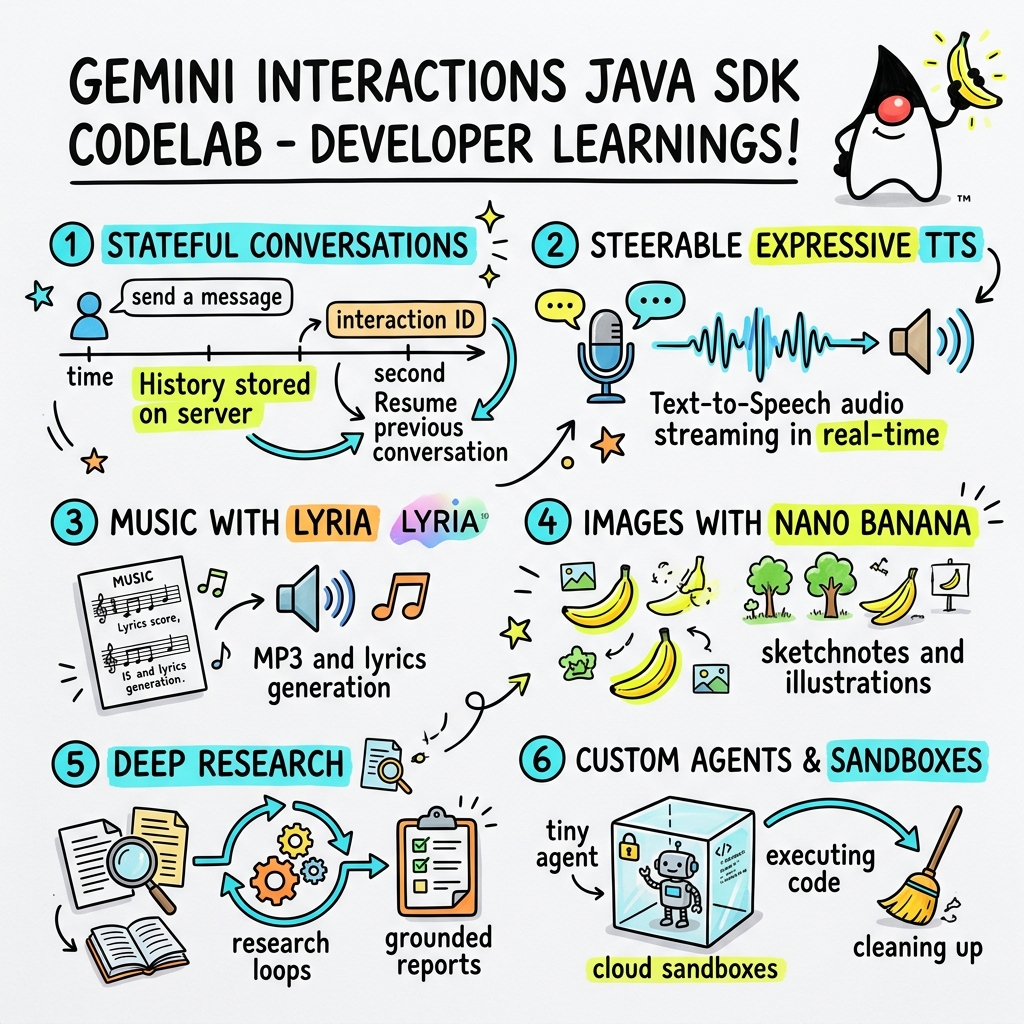
في هذا الدرس التطبيقي حول الترميز، ستتعلّم كيفية إنشاء تطبيقات الذكاء الاصطناعي من الجيل التالي بلغة Java باستخدام حزمة تطوير البرامج (SDK) المخصّصة لتفاعلات Gemini.
ما هي Gemini Interactions API؟
تكون واجهات برمجة التطبيقات التقليدية للنماذج اللغوية الكبيرة عديمة الحالة وتستند إلى الطلبات والاستجابات. لإنشاء مساعد محادثة متعدد الأدوار أو حلقة معقّدة قائمة على الوكلاء، كان على المطوّرين في السابق إدارة حالة المحادثة واقتطاع السجلّ وتنظيم عمليات استدعاء الأدوات وحلقات التنفيذ بالكامل في الرمز البرمجي للتطبيق من جهة العميل.
تنقل واجهة Gemini Interactions API هذه التعقيدات إلى الخادم. وهي واجهة برمجة تطبيقات مستندة إلى الجلسة وتحتفظ بالحالة، حيث تستضيف بنية Google الأساسية الرسم البياني للمحادثة وتديره. يمثّل التفاعل الواحد جلسة تحتفظ بالحالة. وعند التفاعل معها، تعرض واجهة برمجة التطبيقات مخططًا زمنيًا منسقًا وغنيًا يتألف من خطوات متعددة الأشكال، مثل:
ThoughtStep: عملية الاستدلال الداخلي التي يجريها النموذج-
ModelOutputStep: محتوى نصي أو صوتي أو مرئي تم إنشاؤه بواسطة النموذج -
ToolCallStepوToolResultStep: عمليات استدعاء الأدوات التي يبدأها النظام أو النموذج. -
UserInteractionStep: النقاط التي يتوقف فيها النظام مؤقتًا لطلب إدخال بيانات أو موافقة من المستخدم.
ما هي "الوكالات المُدارة"؟
من الصعب جدًا تنسيق العمل بين البرامج المستقلة، مثل التعامل مع الحلقات ومنطق إعادة المحاولة وبيئات تنفيذ الأدوات وإدارة الحالة.
الوكلاء المُدارون هم حلّ على مستوى المنصة توفّره واجهة Gemini Interactions API. وبدلاً من تشغيل حلقات الوكيل محليًا، يمكنك توفير وكلاء متخصصين مباشرةً على البنية الأساسية من Google:
- الوكلاء المضمّنون: وكلاء متخصصون جاهزون للاستخدام، مثل وكيل Deep Research الذي يجري بحثًا على الويب من عدة خطوات ويجمع النتائج وينشئ تقارير شاملة.
- الوكلاء المُدارون المخصّصون: كيانات مستقلة تحدّدها أنت، وتوفّر تعليمات النظام، وتُرفق أدوات (مثل "بحث Google" أو بيئة تنفيذ Bash)، وتضبط Cloud Sandbox، وهي بيئة وقت تشغيل آمنة ومعزولة ومضمّنة في حاوية مع قواعد خروج شبكة قابلة للتخصيص (مثل السماح بالوصول إلى نطاقات معيّنة فقط مثل GitHub).
باستخدام حزمة تطوير البرامج (SDK) في Java الخاصة بتفاعلات Gemini، يمكنك بسهولة إعداد هذه البرامج المُدارة وتنسيقها والتعاون معها في تطبيقات Java العادية.
أهداف الدورة التعليمية
- كيفية التنقّل في البنية الجديدة المستندة إلى
Stepالمتعدّد الأشكال - كيفية بث الصوت باستخدام ميزة "تحويل النص إلى كلام" التعبيرية مباشرةً إلى مكبّرات الصوت
- كيفية إنشاء الموسيقى (ملف MP3 + كلمات الأغاني) باستخدام Lyria
- كيفية إنشاء ملاحظات مرئية باستخدام Gemini 3 Pro Image
- كيفية توجيه وكيل Deep Research باستخدام "التخطيط التعاوني"
- كيفية توفير وكيل مخصّص باستخدام قواعد وأدوات خروج الشبكة
المتطلبات
- الإصدار 21 من Java أو إصدار أحدث
- Apache Maven
- محرّر نصوص أو بيئة تطوير متكاملة (IDE) (مثل IntelliJ IDEA أو VS Code أو غيرهما)
- مفتاح Gemini API (من Google AI Studio)
2. الإعداد: المشروع ومفتاح واجهة برمجة التطبيقات
إنشاء مشروع Maven
ابدأ مشروع Maven جديدًا من الوحدة الطرفية باستخدام الأمر التالي:
mvn archetype:generate \
    -DgroupId=com.example \
    -DartifactId=gemini-interactions-demo \
    -DarchetypeGroupId=org.apache.maven.archetypes \
    -DarchetypeArtifactId=maven-archetype-quickstart \
    -DarchetypeVersion=1.5 \
    -DinteractiveMode=false
انتقِل إلى دليل المشروع الذي تم إنشاؤه حديثًا:
cd gemini-interactions-demo
افتح ملف pom.xml وقم بإعداده:
- عدِّل خصائص إصدار Java لاستهداف Java 21:
<properties> <maven.compiler.source>21</maven.compiler.source> <maven.compiler.target>21</maven.compiler.target> </properties> - أضِف العنصر التابع لحزمة تطوير البرامج (SDK) داخل الحظر
<dependency>
    <groupId>io.github.glaforge</groupId>
    <artifactId>gemini-interactions-api-sdk</artifactId>
    <version>0.10.1</version>
</dependency>
ضبط مفتاح واجهة برمجة التطبيقات
احصل على مفتاح Gemini API من Google AI Studio.
اضبط المفتاح كمتغيّر بيئة في نافذة الأوامر:
نظام التشغيل macOS / Linux:
export GEMINI_API_KEY="your_actual_api_key"
نظام التشغيل Windows (موجّه الأوامر):
set GEMINI_API_KEY="your_actual_api_key"
3- Hello World: التنقّل في بنية الخطوات
قدّمت واجهة Interactions API بنية مخطّط زمني متعددة الأشكال ومستندة إلى الخطوات. بدلاً من عرض قائمة مسطّحة من النتائج، تعرض واجهة برمجة التطبيقات تسلسلاً من عناصر Step ذات الأنواع المحدّدة (مثل ModelOutputStep وThoughtStep وFunctionCallStep).
في هذه الخطوة، ستكتب تفاعلاً بسيطًا لفهم كيفية استخراج مخرجات النموذج النهائية من هذه البنية.
إنشاء HelloInteractions.java
أنشئ الملف src/main/java/com/example/HelloInteractions.java مع المحتوى التالي:
package com.example;

import io.github.glaforge.gemini.interactions.GeminiInteractionsClient;
import io.github.glaforge.gemini.interactions.model.*;
import io.github.glaforge.gemini.interactions.model.InteractionParams.ModelInteractionParams;

public class HelloInteractions {
    public static void main(String[] args) {
        // 1. Initialize the client
        GeminiInteractionsClient client = GeminiInteractionsClient.builder()
            .apiKey(System.getenv("GEMINI_API_KEY"))
            .build();

        // 2. Build the request
        ModelInteractionParams request = ModelInteractionParams.builder()
            .model("gemini-3.5-flash")
            .input("Explain the difference between a library and a framework in one sentence.")
            .build();

        // 3. Send request
        Interaction response = client.create(request);

        // 4. Navigate the step-based architecture to get the output
        response.steps().stream()
            .filter(step -> step instanceof Step.ModelOutputStep)
            .map(step -> (Step.ModelOutputStep) step)
            .findFirst()
            .ifPresent(step -> System.out.println(step.content().get(0)));
    }
}
تشغيل الرمز
تجميع الصف وتشغيله:
mvn compile exec:java -Dexec.mainClass=com.example.HelloInteractions
4. Steerable Audio: Streaming Expressive TTS
يقدّم Gemini 3.1 Flash ميزة "تحويل النص إلى كلام" قابلة للتوجيه. يمكنك التحكّم في سرعة الصوت ونبرته وبيئته باستخدام الطلبات، واستخدام علامات عاطفية (مثل [excitedly] أو [whispers]) في منتصف الجملة.
في هذه الخطوة، ستنشئ محتوًى صوتيًا معبّرًا وتنقله مباشرةً إلى مكبّرات الصوت.
إنشاء StreamingDJ.java
أنشئ الملف src/main/java/com/example/StreamingDJ.java مع المحتوى التالي:
package com.example;

import io.github.glaforge.gemini.interactions.GeminiInteractionsClient;
import io.github.glaforge.gemini.interactions.model.*;
import io.github.glaforge.gemini.interactions.model.Config.SpeechConfig;
import io.github.glaforge.gemini.interactions.model.InteractionParams.ModelInteractionParams;
import javax.sound.sampled.*;
import java.util.Base64;
import java.util.stream.Stream;

public class StreamingDJ {
    public static void main(String[] args) throws Exception {
        GeminiInteractionsClient client = GeminiInteractionsClient.builder()
            .apiKey(System.getenv("GEMINI_API_KEY"))
            .build();

        // Prompt defining the voice profile and emotional tags
        String prompt = """
            # AUDIO PROFILE: Jaz R.
            ## THE SCENE: London Studio
            ### DIRECTOR'S NOTES
            Accent: Jaz is a DJ from Brixton, London.
            Style: Bouncy, energetic, high-speed delivery.

            #### TRANSCRIPT
            [excitedly] Yes, massive vibes in the studio!
            [whispers] But keep it down, the boss is coming...
            [shouting] Turn this up! Let's go!
            """;

        ModelInteractionParams request = ModelInteractionParams.builder()
            .model("gemini-3.1-flash-tts-preview")
            .input(prompt)
            .responseModalities(Interaction.Modality.AUDIO)
            .speechConfig(new SpeechConfig("Algenib", "en-GB"))
            .stream(true) // Enable streaming
            .build();

        System.out.println("Streaming audio from Gemini...");

        try (Stream<Events> eventStream = client.stream(request)) {
            // Configure the Java Audio System for 24kHz Mono 16-bit PCM
            AudioFormat format = new AudioFormat(24000, 16, 1, true, false);
            DataLine.Info info = new DataLine.Info(SourceDataLine.class, format);

            try (SourceDataLine line = (SourceDataLine) AudioSystem.getLine(info)) {
                line.open(format);
                line.start();

                // Process the stream and play audio chunks as they arrive
                eventStream.forEach(event -> {
                    if (event instanceof Events.StepDelta cd && cd.delta() instanceof Events.AudioDelta audioDelta) {
                        byte[] audioData = Base64.getDecoder().decode(audioDelta.data());
                        line.write(audioData, 0, audioData.length);
                    }
                });
                line.drain();
            }
        }
    }
}
تشغيل الرمز
mvn compile exec:java -Dexec.mainClass=com.example.StreamingDJ
الاستماع إلى الناتج
في ما يلي مثال صوتي لما ستسمعه عند تشغيل الرمز (باستخدام صوت Algenib مع علامات المشاعر):
الاستماع إلى الناتج الذي تم إنشاؤه باستخدام ميزة "تحويل النص إلى كلام" (tts_output.wav)
5- إنشاء الموسيقى باستخدام Lyria 3
باستخدام نموذج DeepMind Lyria 3، يمكنك إنشاء موسيقى وأغانٍ قصيرة. من خلال طلب طريقتَي عرض مزدوجتَين للردود (AUDIO وTEXT)، يمكنك استرداد كلّ من الصوت الذي تم إنشاؤه (MP3) وكلمات الأغنية.
إنشاء MusicGenerator.java
أنشئ الملف src/main/java/com/example/MusicGenerator.java مع المحتوى التالي:
package com.example;

import io.github.glaforge.gemini.interactions.GeminiInteractionsClient;
import io.github.glaforge.gemini.interactions.model.*;
import io.github.glaforge.gemini.interactions.model.InteractionParams.ModelInteractionParams;
import io.github.glaforge.gemini.interactions.model.Content.AudioContent;
import java.nio.file.Files;
import java.nio.file.Paths;

public class MusicGenerator {
    public static void main(String[] args) throws Exception {
        GeminiInteractionsClient client = GeminiInteractionsClient.builder()
            .apiKey(System.getenv("GEMINI_API_KEY"))
            .build();

        ModelInteractionParams request = ModelInteractionParams.builder()
            .model("models/lyria-3-clip-preview") // 30-second clip
            .input("An uplifting rock song with acoustic guitars about coding in Java.")
            .responseModalities(
                Interaction.Modality.AUDIO,
                Interaction.Modality.TEXT) // Request both MP3 and Lyrics
            .build();

        System.out.println("Generating music (this might take a moment)...");
        Interaction response = client.create(request);

        // 1. Print the lyrics (TEXT output)
        System.out.println("\n--- Generated Lyrics ---");
        response.steps().stream()
            .filter(step -> step instanceof Step.ModelOutputStep)
            .flatMap(step -> ((Step.ModelOutputStep) step).content().stream())
            .filter(content -> content instanceof Content.TextContent)
            .forEach(content -> System.out.println(((Content.TextContent) content).text()));

        // 2. Save the MP3 (AUDIO output)
        response.steps().stream()
            .filter(step -> step instanceof Step.ModelOutputStep)
            .flatMap(step -> ((Step.ModelOutputStep) step).content().stream())
            .filter(content -> content instanceof AudioContent)
            .map(content -> (AudioContent) content)
            .findFirst()
            .ifPresent(audio -> {
                try {
                    Files.write(Paths.get("coding_song.mp3"), audio.data());
                    System.out.println("\nSuccess: Song saved to coding_song.mp3");
                } catch (Exception e) {
                    e.printStackTrace();
                }
            });
    }
}
تشغيل الرمز
mvn compile exec:java -Dexec.mainClass=com.example.MusicGenerator
الاستماع إلى الأغنية من إنشاء الذكاء الاصطناعي
في ما يلي ملف MP3 الذي تم إنشاؤه (coding_song.mp3) والذي يحتوي على الموسيقى وكلمات الأغنية:
الاستماع إلى الأغنية الموسيقية التي تم إنشاؤها (coding_song.mp3)
6. تصوُّر الأفكار باستخدام Sketchnotes (Nano Banana Pro)
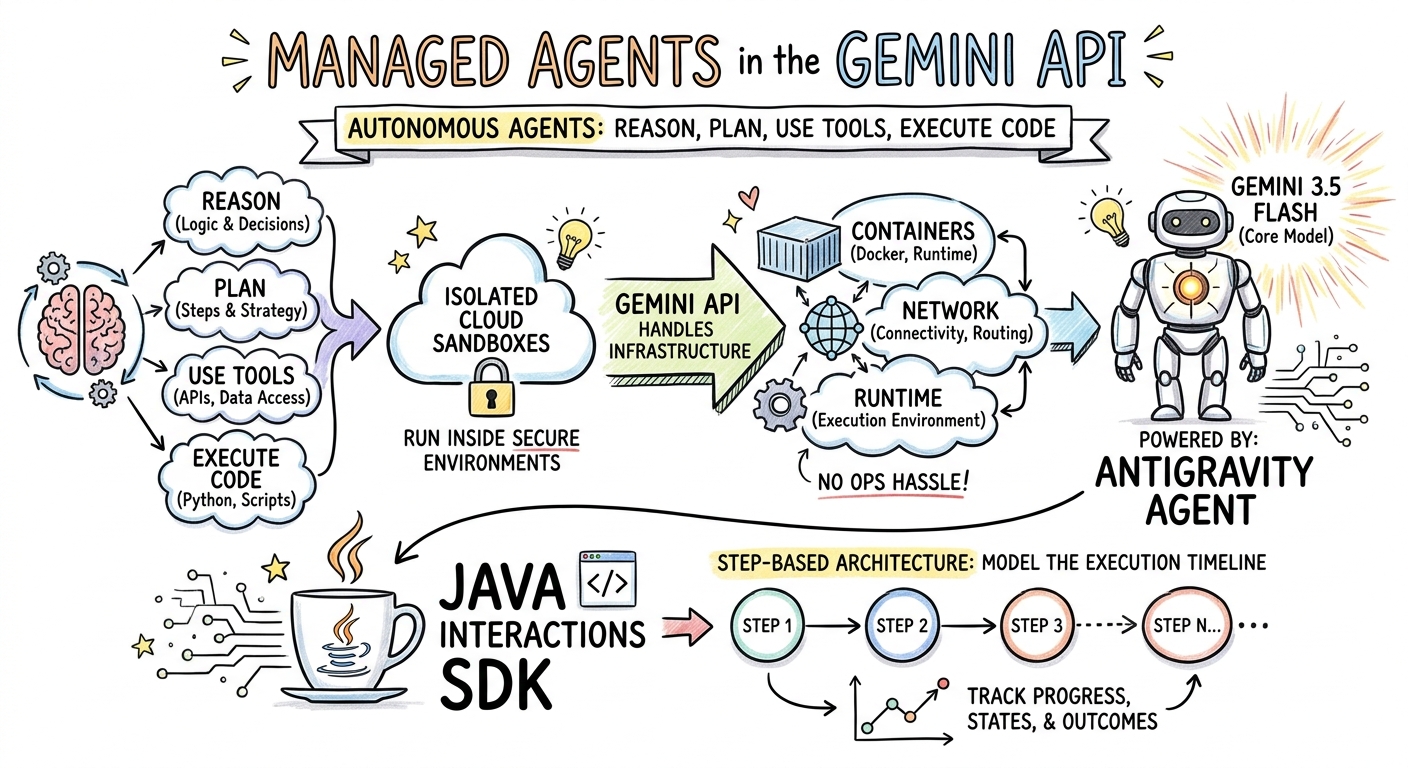
يمكن لـ "صور Gemini 3 Pro" (المعروفة أيضًا باسم Nano Banana Pro) إنشاء صور. من خلال طلب نمط IMAGE، يمكنك إنشاء مخططات بيانية أو رسومات تخطيطية أو ملاحظات مرسومة استنادًا إلى إدخال نصي.
في هذه الخطوة، ستنشئ ملخّصًا على شكل رسم توضيحي سريع لمقالة حول "الوكلاء المُدارون" وتحفظه كملف PNG.
إنشاء ImageGenerator.java
أنشئ الملف src/main/java/com/example/ImageGenerator.java مع المحتوى التالي:
package com.example;

import io.github.glaforge.gemini.interactions.GeminiInteractionsClient;
import io.github.glaforge.gemini.interactions.model.*;
import io.github.glaforge.gemini.interactions.model.InteractionParams.ModelInteractionParams;
import io.github.glaforge.gemini.interactions.model.Content.ImageContent;
import java.nio.file.Files;
import java.nio.file.Paths;

public class ImageGenerator {
    public static void main(String[] args) throws Exception {
        GeminiInteractionsClient client = GeminiInteractionsClient.builder()
            .apiKey(System.getenv("GEMINI_API_KEY"))
            .build();

        String articleSummary = """
            Managed Agents in the Gemini API allow developers to run autonomous agents
            that reason, plan, use tools, and execute code inside isolated cloud sandboxes.
            The Gemini API handles the infrastructure (containers, network, runtime).
            It is powered by the Antigravity agent running on Gemini 3.5 Flash.
            The Java Interactions SDK supports these capabilities, utilizing a Step-based
            architecture to model the execution timeline.
            """;

        ModelInteractionParams request = ModelInteractionParams.builder()
            .model("gemini-3-pro-image-preview")
            .input(String.format("""
                Create a hand-drawn and hand-written sketchnote
                style summary infographic, with a pure white background,
                about the following information:

                %s
                """, articleSummary))
            .responseModalities(Interaction.Modality.IMAGE) // Request IMAGE modality
            .build();

        System.out.println("Generating sketchnote (this might take a moment)...");
        Interaction response = client.create(request);

        // Save the generated image
        response.steps().stream()
            .filter(step -> step instanceof Step.ModelOutputStep)
            .flatMap(step -> ((Step.ModelOutputStep) step).content().stream())
            .filter(content -> content instanceof ImageContent)
            .map(content -> (ImageContent) content)
            .findFirst()
            .ifPresent(image -> {
                try {
                    Files.write(Paths.get("sketchnote.png"), image.data());
                    System.out.println("Success: Sketchnote saved to sketchnote.png");
                } catch (Exception e) {
                    e.printStackTrace();
                }
            });
    }
}
تشغيل الرمز
mvn compile exec:java -Dexec.mainClass=com.example.ImageGenerator
ملاحظات مرسومة تم إنشاؤها
في ما يلي ملاحظات مرسومة (sketchnote.png) أنشأها النموذج:
7. Steering Agents: أبحاث متقدّمة تعاونية
Deep Research هي وكيل قوي يمكنه تنفيذ مهام بحث متعددة الخطوات، ولكن بدلاً من تنفيذها على الفور، يمكنك استخدام ميزة التخطيط التعاوني لمراجعة خطة البحث وتعديلها وتوجيهها قبل أن يبدأ الوكيل في جمع البيانات.
ستنفّذ محادثة متعدّدة الأدوار تستخدم حالة من جهة الخادم نفسها (previousInteractionId) لتحسين خطة.
إنشاء CollaborativeResearch.java
أنشئ الملف src/main/java/com/example/CollaborativeResearch.java مع المحتوى التالي:
package com.example;

import io.github.glaforge.gemini.interactions.GeminiInteractionsClient;
import io.github.glaforge.gemini.interactions.model.*;
import io.github.glaforge.gemini.interactions.model.InteractionParams.AgentInteractionParams;
import io.github.glaforge.gemini.interactions.model.Config.DeepResearchAgentConfig;
import io.github.glaforge.gemini.interactions.model.Config.ThinkingSummaries;
import io.github.glaforge.gemini.interactions.model.Config.Visualization;

public class CollaborativeResearch {
    public static void main(String[] args) throws Exception {
        GeminiInteractionsClient client = GeminiInteractionsClient.builder()
            .apiKey(System.getenv("GEMINI_API_KEY"))
            .build();

        String agentModel = "deep-research-preview-04-2026";

        // --- Phase 1: Request a Plan ---
        System.out.println("Phase 1: Requesting research plan...");
        AgentInteractionParams planParams = AgentInteractionParams.builder()
            .agent(agentModel)
            .input("Research the latest generations of Google Cloud TPUs (TPU7x and the 8th generation TPU 8t and TPU 8i).")
            .agentConfig(new DeepResearchAgentConfig(
                "deep-research",
                ThinkingSummaries.AUTO,
                Visualization.AUTO,
                true // TRUE enables collaborative planning
            ))
            .background(true)
            .store(true)
            .build();

        Interaction planInteraction = client.create(planParams);
        planInteraction = waitForCompletion(client, planInteraction.id());

        System.out.println("\n--- Proposed Plan ---");
        printOutputText(planInteraction);

        // --- Phase 2: Refine the Plan ---
        System.out.println("\nPhase 2: Refining research plan...");
        AgentInteractionParams refineParams = AgentInteractionParams.builder()
            .agent(agentModel)
            .input("Focus on comparing the architectural, performance, and scaling differences between the TPU7x generation and the two flavors of the eighth generation: TPU 8t (optimized for training at scale) and TPU 8i (optimized for low-latency reasoning and inference).")
            .agentConfig(new DeepResearchAgentConfig(
                "deep-research",
                ThinkingSummaries.AUTO,
                Visualization.AUTO,
                true // Keep collaborative planning TRUE to iterate
            ))
            .previousInteractionId(planInteraction.id()) // Resume session
            .background(true)
            .store(true)
            .build();

        Interaction refinedInteraction = client.create(refineParams);
        refinedInteraction = waitForCompletion(client, refinedInteraction.id());

        System.out.println("\n--- Refined Plan ---");
        printOutputText(refinedInteraction);

        // --- Phase 3: Approve and Execute ---
        System.out.println("\nPhase 3: Approving plan and starting deep research (this will take a few minutes)...");
        AgentInteractionParams executeParams = AgentInteractionParams.builder()
            .agent(agentModel)
            .input("Plan looks good, execute!")
            .agentConfig(new DeepResearchAgentConfig(
                "deep-research",
                ThinkingSummaries.AUTO,
                Visualization.AUTO,
                false // FALSE approves the plan and executes the research
            ))
            .previousInteractionId(refinedInteraction.id()) // Resume session
            .background(true)
            .store(true)
            .build();

        Interaction finalReport = client.create(executeParams);
        finalReport = waitForCompletion(client, finalReport.id());

        System.out.println("\n--- Final Research Report ---");
        printOutputText(finalReport);
    }

    private static Interaction waitForCompletion(GeminiInteractionsClient client, String id) throws Exception {
        Interaction interaction = client.get(id);
        while (interaction.status() != Interaction.Status.COMPLETED && interaction.status() != Interaction.Status.FAILED) {
            Thread.sleep(5000);
            interaction = client.get(id);
        }
        if (interaction.status() == Interaction.Status.FAILED) {
            throw new RuntimeException("Interaction failed. Status: " + interaction.status());
        }
        return interaction;
    }

    private static void printOutputText(Interaction interaction) {
        interaction.steps().stream()
            .filter(step -> step instanceof Step.ModelOutputStep)
            .flatMap(step -> ((Step.ModelOutputStep) step).content().stream())
            .filter(content -> content instanceof Content.TextContent)
            .forEach(content -> System.out.println(((Content.TextContent) content).text()));
    }
}
تشغيل الرمز
mvn compile exec:java -Dexec.mainClass=com.example.CollaborativeResearch
ناتج التقرير الذي تم إنشاؤه
سينشئ وكيل Deep Research تقريرًا شاملاً ومنظَّمًا. يمكنك الاطّلاع على التقرير الكامل الذي تم إنشاؤه من خلال عملية التشغيل النموذجية هنا:
عرض تقرير Deep Research الذي تم إنشاؤه (tpu_history_report.md)
8. الوكلاء المخصّصون والبيئات المحمية على السحابة الإلكترونية
بالنسبة إلى مهام المطوّرين المعقّدة، يمكنك توفير وكلاء مخصّصين. يمكنك تحديد تعليمات النظام الخاصة بها، وتزويدها بأدوات (مثل Code Execution/Bash)، وضبط بيئتها البعيدة (مثل قواعد الخروج من الشبكة).
في هذه الخطوة، عليك توفير وكيل لديه إذن وصول آمن إلى الإنترنت في github.com، وإصدار تعليمات له لاستنساخ مستودع وتحليل ملفات الإعداد داخله في البيئة التجريبية السحابية.
إنشاء GitHubAnalyzer.java
أنشئ الملف src/main/java/com/example/GitHubAnalyzer.java مع المحتوى التالي:
package com.example;

import io.github.glaforge.gemini.interactions.GeminiInteractionsClient;
import io.github.glaforge.gemini.interactions.model.*;
import io.github.glaforge.gemini.interactions.model.InteractionParams.AgentInteractionParams;
import java.util.List;

public class GitHubAnalyzer {
    public static void main(String[] args) throws Exception {
        GeminiInteractionsClient client = GeminiInteractionsClient.builder()
            .apiKey(System.getenv("GEMINI_API_KEY"))
            .build();

        String agentId = "github-analyzer-codelab";

        // 1. Define the Custom Agent with Network Egress and Tools
        Agent customAgent = Agent.builder()
            .id(agentId)
            .description("Clones and analyzes GitHub repos.")
            .baseAgent("antigravity-preview-05-2026")
            .baseEnvironment(new EnvironmentConfig(
                new EnvironmentNetworkEgressAllowlist(List.of(
                    new AllowlistEntry("github.com") // Allow git clone over HTTPS
                )),
                List.of()
            ))
            .systemInstruction("You are an architect. Clone the repo, inspect files, and write a summary.")
            .tools(List.of(
                new AgentTool.CodeExecution(), // Enables terminal bash execution in sandbox
                new AgentTool.GoogleSearch()
            ))
            .build();

        // 2. Provision the Agent
        System.out.println("Provisioning custom agent in the cloud...");
        client.createAgent(customAgent);

        try {
            // 3. Start the Interaction
            AgentInteractionParams params = AgentInteractionParams.builder()
                .agent(agentId)
                .input("Clone https://github.com/glaforge/gemini-interactions-api-sdk and explain its pom.xml structure.")
                .environment("remote") // Crucial: Run in cloud sandbox
                .build();

            System.out.println("Starting clone and analysis (polling status)...");
            Interaction interaction = client.create(params);

            // 4. Poll for completion
            while (interaction.status() != Interaction.Status.COMPLETED) {
                System.out.println("Agent working... Status: " + interaction.status());
                Thread.sleep(5000);
                interaction = client.get(interaction.id());
            }

            // 5. Output the results
            System.out.println("\n--- Architectural Analysis ---");
            interaction.steps().stream()
                .filter(step -> step instanceof Step.ModelOutputStep)
                .flatMap(step -> ((Step.ModelOutputStep) step).content().stream())
                .filter(content -> content instanceof Content.TextContent)
                .forEach(content -> System.out.println(((Content.TextContent) content).text()));

        } finally {
            // 6. Clean up resources
            client.deleteAgent(agentId);
            System.out.println("\nCustom agent resource deleted from cloud.");
        }
    }
}
تشغيل الرمز
mvn compile exec:java -Dexec.mainClass=com.example.GitHubAnalyzer
ناتج التحليل الذي تم إنشاؤه
يمكنك الاطّلاع على تقرير التحليل المعماري الكامل الذي أنشأه العميل المخصّص بعد استنساخ المستودع هنا:
9- تهانينا!
لقد أكملت الدرس التطبيقي حول الترميز وتعرّفت على كيفية إنشاء مهام سير عمل معقّدة ومتعددة الوسائط وتتضمّن وكلاء في Java باستخدام حزمة تطوير البرامج (SDK) الخاصة بتفاعلات Gemini.
الإنجازات التي حقّقتها:
- التنقّل في بنية الخطوات: تم استخدام بنية الخطوات الجديدة المتعدّدة الأشكال للاستعلام عن النماذج العادية.
- تقنية "تحويل النص إلى كلام" التعبيرية للبث: تم استخدام "ملاحظات المخرج" وعلامات عاطفية مضمّنة لبث الصوت في الوقت الفعلي.
- الموسيقى من إنشاء الذكاء الاصطناعي: مقاطع MP3 وكلمات تم إنشاؤها باستخدام Lyria 3
- الملاحظات المرئية من إنشاء الذكاء الاصطناعي: تم إنشاء ملخّصات مرئية باستخدام "صور Gemini 3 Pro" (Nano Banana Pro).
- Deep Research الموجّهة: تم استخدام ميزة "التخطيط التعاوني" لتحسين خطط البحث.
- الوكلاء المخصّصون المزوّدون: تم إنشاء بيئات معزولة مع إمكانية التحكّم المخصّص في نقل البيانات من الشبكة لتنفيذ الرموز البرمجية بأمان.
مزيد من المعلومات:
- يمكنك استكشاف الرمز المصدري لحزمة SDK والمزيد من حالات الاختبار على GitHub: glaforge/gemini-interactions-api-sdk
- يمكنك الاطّلاع على مزيد من المعلومات حول أنماط التصميم المستندة إلى الوكلاء في مدوّنة Guillaume: glaforge.dev