

1. שלום, מפתח Gemini!
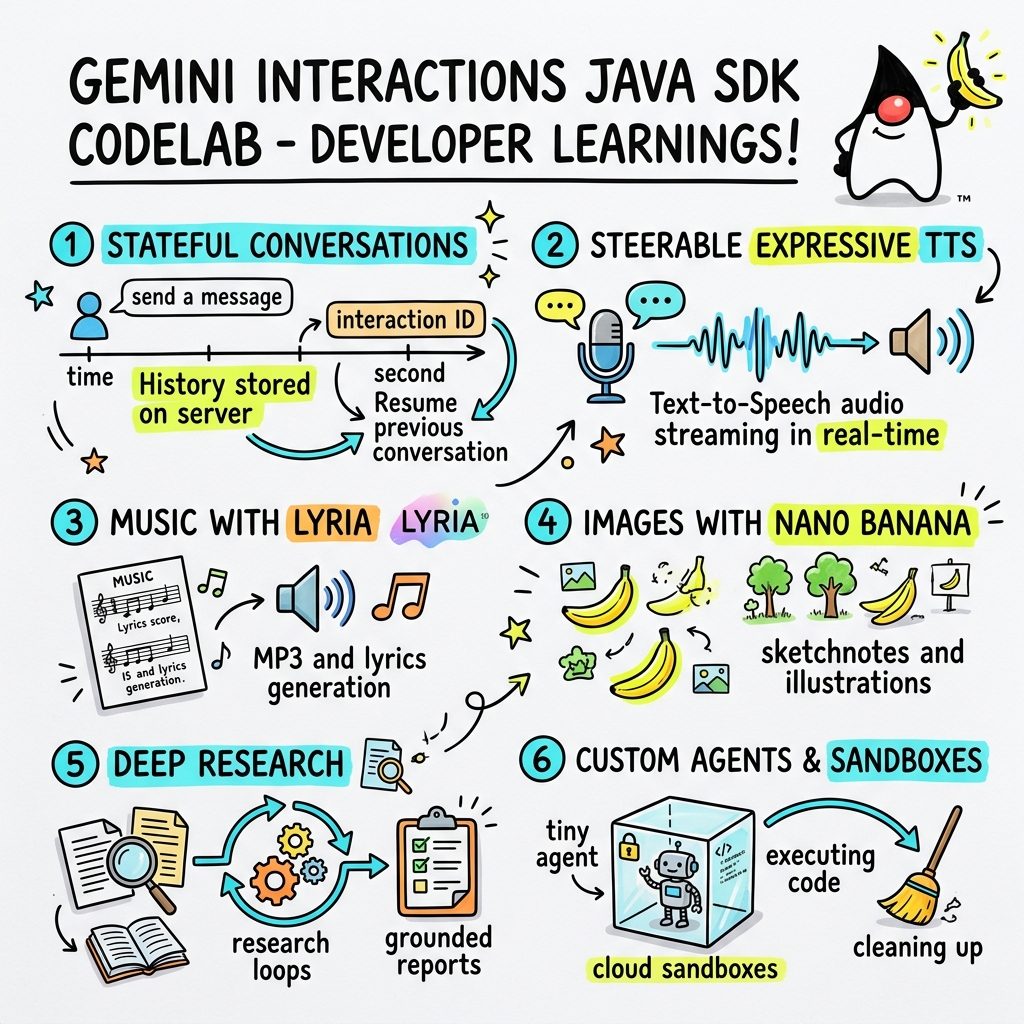
בשיעור Codelab הזה נסביר איך ליצור אפליקציות AI מהדור הבא ב-Java באמצעות Gemini Interactions SDK בהתאמה אישית.
מה זה Gemini Interactions API?
ממשקי API מסורתיים של LLM הם חסרי מצב (stateless) ומונעים על ידי בקשות ותגובות. בעבר, כדי ליצור עוזר צ'אט עם כמה תפניות או לולאה מורכבת של סוכן, מפתחים נאלצו לנהל את מצב השיחה, את קיטוע ההיסטוריה, את תזמור קריאות הכלים ואת לולאות ההרצה באופן מלא בקוד האפליקציה בצד הלקוח.
Gemini Interactions API מעביר את המורכבות הזו לשרת. זהו API מבוסס-סשן עם שמירת מצב, שבו התשתית של Google מארחת ומנהלת את גרף השיחה. אינטראקציה יחידה מייצגת סשן עם שמירת מצב. כשמבצעים אינטראקציה עם ה-API, הוא מחזיר ציר זמן מובנה ועשיר שמורכב משלבים פולימורפיים, כמו:
-
ThoughtStep: תהליך הנימוק הפנימי של המודל. -
ModelOutputStep: תוכן טקסט, אודיו או תמונה שנוצר על ידי המודל. -
ToolCallStepו-ToolResultStep: הפעלות של כלים שהמערכת או המודל יזמו. -
UserInteractionStep: נקודות שבהן המערכת מושהית כדי לבקש קלט או אישור מבני אדם.
מהם סוכנים מנוהלים?
קשה מאוד לתזמן סוכנים אוטונומיים – לטפל בלולאות, בלוגיקה של ניסיונות חוזרים, בסביבות של הפעלת כלים ובניהול מצב.
Managed Agents הם פתרון ברמת הפלטפורמה שמסופק על ידי Gemini Interactions API. במקום להריץ לולאות של סוכנים באופן מקומי, אתם יכולים להקצות סוכנים מיוחדים ישירות בתשתית של Google:
- סוכנים מובנים: סוכנים מיוחדים שמוכנים לשימוש, כמו הסוכן Deep Research, שמבצע מחקר אינטרנטי בכמה שלבים, אוסף ממצאים ויוצר דוחות מקיפים.
- סוכנים מנוהלים בהתאמה אישית: ישויות אוטונומיות שאתם מגדירים. אתם מספקים הוראות למערכת, מצרפים כלים (כמו חיפוש Google או סביבת הרצה של Bash) ומגדירים ארגז חול ב-Cloud – סביבת זמן ריצה מאובטחת, מבודדת ובקונטיינר עם כללי יציאה מהרשת שניתנים להתאמה אישית (למשל, מתן גישה רק לדומיינים ספציפיים כמו GitHub).
באמצעות Gemini Interactions Java SDK, אתם יכולים בקלות להפעיל, לתאם ולשתף פעולה עם הסוכנים המנוהלים האלה באפליקציות Java רגילות.
מה תלמדו
- איך לנווט בארכיטקטורה החדשה שמבוססת על
Step. - איך להזרים אודיו של TTS ישירות לרמקולים.
- איך ליצור מוזיקה (MP3 + מילים) באמצעות Lyria.
- איך יוצרים תרשימי סיכום חזותיים באמצעות Gemini 3 Pro Image.
- איך מכוונים את סוכן Deep Research באמצעות Collaborative Planning.
- איך מקצים סוכן בהתאמה אישית עם כלים וכללים ליציאה מהרשת.
הדרישות
- Java 21 ואילך.
- Apache Maven.
- עורך טקסט או סביבת פיתוח משולבת (IDE) (למשל IntelliJ IDEA, VS Code וכו').
- מפתח Gemini API (מ-Google AI Studio).
2. הגדרה: פרויקט ומפתח API
יצירת פרויקט Maven
מאתחלים פרויקט Maven חדש מהטרמינל באמצעות הפקודה הבאה:
mvn archetype:generate \
    -DgroupId=com.example \
    -DartifactId=gemini-interactions-demo \
    -DarchetypeGroupId=org.apache.maven.archetypes \
    -DarchetypeArtifactId=maven-archetype-quickstart \
    -DarchetypeVersion=1.5 \
    -DinteractiveMode=false
מנווטים לספריית הפרויקט החדשה שיצרתם:
cd gemini-interactions-demo
פותחים את קובץ pom.xml ומגדירים אותו:
- מעדכנים את מאפייני הגרסה של Java כדי לכוון ל-Java 21:
<properties> <maven.compiler.source>21</maven.compiler.source> <maven.compiler.target>21</maven.compiler.target> </properties> - מוסיפים את יחסי התלות של ה-SDK בתוך הבלוק
<dependency>
    <groupId>io.github.glaforge</groupId>
    <artifactId>gemini-interactions-api-sdk</artifactId>
    <version>0.10.1</version>
</dependency>
הגדרת מפתח API
מקבלים מפתח Gemini API מ-Google AI Studio.
מגדירים את המפתח כמשתנה סביבה בטרמינל:
macOS / Linux:
export GEMINI_API_KEY="your_actual_api_key"
Windows (שורת הפקודה):
set GEMINI_API_KEY="your_actual_api_key"
3. Hello World: ניווט בארכיטקטורת השלבים
ב-Interactions API הושקה ארכיטקטורה פולימורפית של ציר זמן שמבוססת על שלבים. במקום להחזיר רשימה שטוחה של פלטים, ה-API מחזיר רצף של אובייקטים מוקלדים Step (לדוגמה, ModelOutputStep, ThoughtStep, FunctionCallStep).
בשלב הזה, תכתבו אינטראקציה פשוטה כדי להבין איך לחלץ את פלט המודל הסופי מהמבנה הזה.
יצירה של HelloInteractions.java
יוצרים את הקובץ src/main/java/com/example/HelloInteractions.java עם התוכן הבא:
package com.example;

import io.github.glaforge.gemini.interactions.GeminiInteractionsClient;
import io.github.glaforge.gemini.interactions.model.*;
import io.github.glaforge.gemini.interactions.model.InteractionParams.ModelInteractionParams;

public class HelloInteractions {
    public static void main(String[] args) {
        // 1. Initialize the client
        GeminiInteractionsClient client = GeminiInteractionsClient.builder()
            .apiKey(System.getenv("GEMINI_API_KEY"))
            .build();

        // 2. Build the request
        ModelInteractionParams request = ModelInteractionParams.builder()
            .model("gemini-3.5-flash")
            .input("Explain the difference between a library and a framework in one sentence.")
            .build();

        // 3. Send request
        Interaction response = client.create(request);

        // 4. Navigate the step-based architecture to get the output
        response.steps().stream()
            .filter(step -> step instanceof Step.ModelOutputStep)
            .map(step -> (Step.ModelOutputStep) step)
            .findFirst()
            .ifPresent(step -> System.out.println(step.content().get(0)));
    }
}
הרצת הקוד
קומפילציה והרצה של הכיתה:
mvn compile exec:java -Dexec.mainClass=com.example.HelloInteractions
4. Steerable Audio: Streaming Expressive TTS
Gemini 3.1 Flash כולל המרת טקסט לדיבור (TTS) עם אפשרות לכוונן את התוצאה. אתם יכולים לשלוט בקצב, בטון ובסביבה של הקול באמצעות הנחיות, ולהשתמש בתגי רגש (כמו [excitedly] או [whispers]) באמצע משפט.
בשלב הזה, תיצרו אודיו עם הבעה ותשמיעו אותו ישירות ברמקולים.
יצירה של StreamingDJ.java
יוצרים את הקובץ src/main/java/com/example/StreamingDJ.java עם התוכן הבא:
package com.example;

import io.github.glaforge.gemini.interactions.GeminiInteractionsClient;
import io.github.glaforge.gemini.interactions.model.*;
import io.github.glaforge.gemini.interactions.model.Config.SpeechConfig;
import io.github.glaforge.gemini.interactions.model.InteractionParams.ModelInteractionParams;
import javax.sound.sampled.*;
import java.util.Base64;
import java.util.stream.Stream;

public class StreamingDJ {
    public static void main(String[] args) throws Exception {
        GeminiInteractionsClient client = GeminiInteractionsClient.builder()
            .apiKey(System.getenv("GEMINI_API_KEY"))
            .build();

        // Prompt defining the voice profile and emotional tags
        String prompt = """
            # AUDIO PROFILE: Jaz R.
            ## THE SCENE: London Studio
            ### DIRECTOR'S NOTES
            Accent: Jaz is a DJ from Brixton, London.
            Style: Bouncy, energetic, high-speed delivery.

            #### TRANSCRIPT
            [excitedly] Yes, massive vibes in the studio!
            [whispers] But keep it down, the boss is coming...
            [shouting] Turn this up! Let's go!
            """;

        ModelInteractionParams request = ModelInteractionParams.builder()
            .model("gemini-3.1-flash-tts-preview")
            .input(prompt)
            .responseModalities(Interaction.Modality.AUDIO)
            .speechConfig(new SpeechConfig("Algenib", "en-GB"))
            .stream(true) // Enable streaming
            .build();

        System.out.println("Streaming audio from Gemini...");

        try (Stream<Events> eventStream = client.stream(request)) {
            // Configure the Java Audio System for 24kHz Mono 16-bit PCM
            AudioFormat format = new AudioFormat(24000, 16, 1, true, false);
            DataLine.Info info = new DataLine.Info(SourceDataLine.class, format);

            try (SourceDataLine line = (SourceDataLine) AudioSystem.getLine(info)) {
                line.open(format);
                line.start();

                // Process the stream and play audio chunks as they arrive
                eventStream.forEach(event -> {
                    if (event instanceof Events.StepDelta cd && cd.delta() instanceof Events.AudioDelta audioDelta) {
                        byte[] audioData = Base64.getDecoder().decode(audioDelta.data());
                        line.write(audioData, 0, audioData.length);
                    }
                });
                line.drain();
            }
        }
    }
}
הרצת הקוד
mvn compile exec:java -Dexec.mainClass=com.example.StreamingDJ
האזנה לפלט
הנה דוגמה לאודיו שתשמעו כשמריצים את הקוד (באמצעות הקול Algenib עם תגי רגשות):
5. יצירת מוזיקה באמצעות Lyria 3
בעזרת מודל DeepMind Lyria 3, אתם יכולים ליצור מוזיקה וג'ינגלים. אם מבקשים שני סוגי תשובות (AUDIO ו-TEXT), אפשר לקבל גם את האודיו שנוצר (MP3) וגם את מילות השיר.
יצירה של MusicGenerator.java
יוצרים את הקובץ src/main/java/com/example/MusicGenerator.java עם התוכן הבא:
package com.example;

import io.github.glaforge.gemini.interactions.GeminiInteractionsClient;
import io.github.glaforge.gemini.interactions.model.*;
import io.github.glaforge.gemini.interactions.model.InteractionParams.ModelInteractionParams;
import io.github.glaforge.gemini.interactions.model.Content.AudioContent;
import java.nio.file.Files;
import java.nio.file.Paths;

public class MusicGenerator {
    public static void main(String[] args) throws Exception {
        GeminiInteractionsClient client = GeminiInteractionsClient.builder()
            .apiKey(System.getenv("GEMINI_API_KEY"))
            .build();

        ModelInteractionParams request = ModelInteractionParams.builder()
            .model("models/lyria-3-clip-preview") // 30-second clip
            .input("An uplifting rock song with acoustic guitars about coding in Java.")
            .responseModalities(
                Interaction.Modality.AUDIO,
                Interaction.Modality.TEXT) // Request both MP3 and Lyrics
            .build();

        System.out.println("Generating music (this might take a moment)...");
        Interaction response = client.create(request);

        // 1. Print the lyrics (TEXT output)
        System.out.println("\n--- Generated Lyrics ---");
        response.steps().stream()
            .filter(step -> step instanceof Step.ModelOutputStep)
            .flatMap(step -> ((Step.ModelOutputStep) step).content().stream())
            .filter(content -> content instanceof Content.TextContent)
            .forEach(content -> System.out.println(((Content.TextContent) content).text()));

        // 2. Save the MP3 (AUDIO output)
        response.steps().stream()
            .filter(step -> step instanceof Step.ModelOutputStep)
            .flatMap(step -> ((Step.ModelOutputStep) step).content().stream())
            .filter(content -> content instanceof AudioContent)
            .map(content -> (AudioContent) content)
            .findFirst()
            .ifPresent(audio -> {
                try {
                    Files.write(Paths.get("coding_song.mp3"), audio.data());
                    System.out.println("\nSuccess: Song saved to coding_song.mp3");
                } catch (Exception e) {
                    e.printStackTrace();
                }
            });
    }
}
הרצת הקוד
mvn compile exec:java -Dexec.mainClass=com.example.MusicGenerator
האזנה לשיר שנוצר
זהו קובץ ה-MP3 שנוצר (coding_song.mp3) עם המוזיקה והמילים:
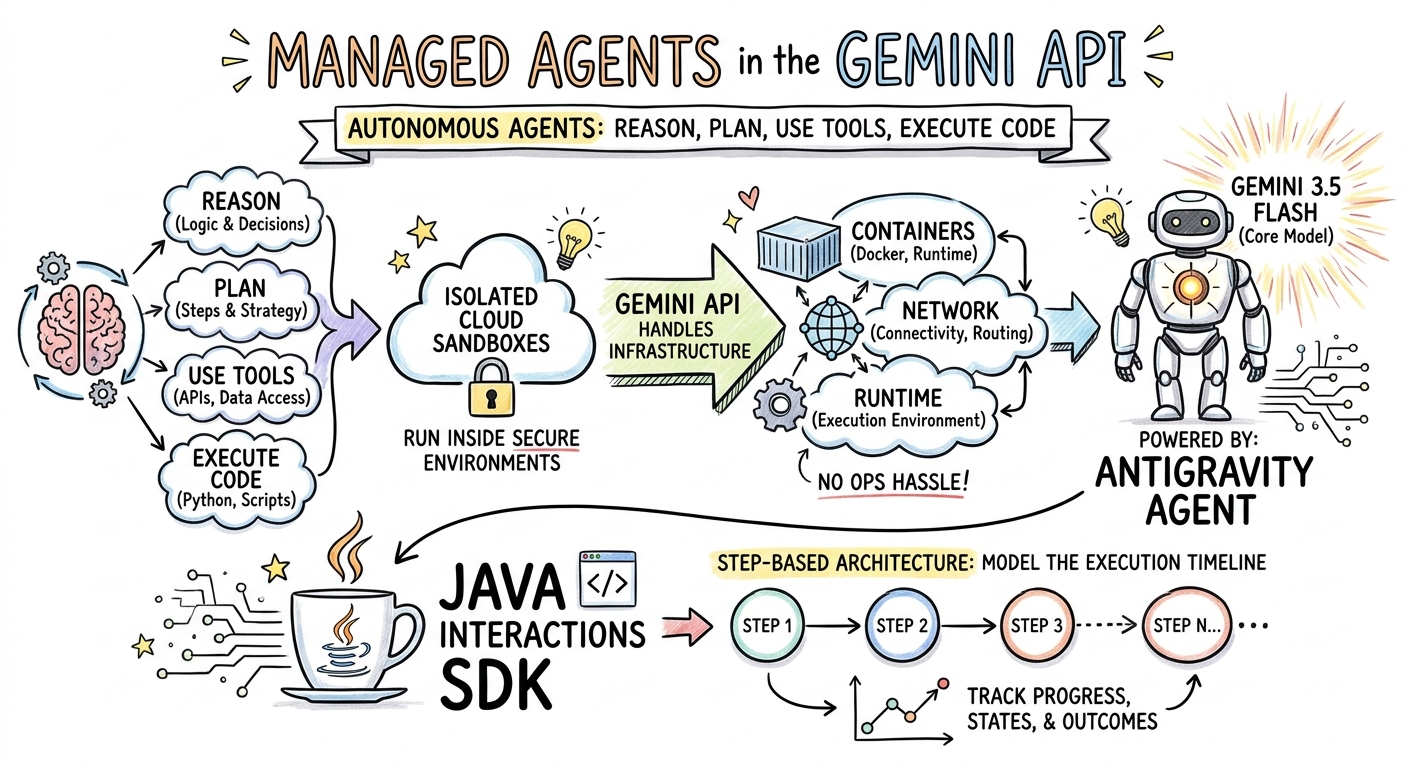
6. יצירת תמונות באמצעות Sketchnotes (Nano Banana Pro)
Gemini 3 Pro Image (שנקרא גם Nano Banana Pro) יכול ליצור תמונות. אם מבקשים את המודליות IMAGE, אפשר ליצור אינפוגרפיקות, דיאגרמות או סיכומים ויזואליים על סמך קלט טקסט.
בשלב הזה, תיצרו סיכום של מאמר על סוכנים מנוהלים בפורמט סקצ'נוט ותשמרו אותו כקובץ PNG.
יצירה של ImageGenerator.java
יוצרים את הקובץ src/main/java/com/example/ImageGenerator.java עם התוכן הבא:
package com.example;

import io.github.glaforge.gemini.interactions.GeminiInteractionsClient;
import io.github.glaforge.gemini.interactions.model.*;
import io.github.glaforge.gemini.interactions.model.InteractionParams.ModelInteractionParams;
import io.github.glaforge.gemini.interactions.model.Content.ImageContent;
import java.nio.file.Files;
import java.nio.file.Paths;

public class ImageGenerator {
    public static void main(String[] args) throws Exception {
        GeminiInteractionsClient client = GeminiInteractionsClient.builder()
            .apiKey(System.getenv("GEMINI_API_KEY"))
            .build();

        String articleSummary = """
            Managed Agents in the Gemini API allow developers to run autonomous agents
            that reason, plan, use tools, and execute code inside isolated cloud sandboxes.
            The Gemini API handles the infrastructure (containers, network, runtime).
            It is powered by the Antigravity agent running on Gemini 3.5 Flash.
            The Java Interactions SDK supports these capabilities, utilizing a Step-based
            architecture to model the execution timeline.
            """;

        ModelInteractionParams request = ModelInteractionParams.builder()
            .model("gemini-3-pro-image-preview")
            .input(String.format("""
                Create a hand-drawn and hand-written sketchnote
                style summary infographic, with a pure white background,
                about the following information:

                %s
                """, articleSummary))
            .responseModalities(Interaction.Modality.IMAGE) // Request IMAGE modality
            .build();

        System.out.println("Generating sketchnote (this might take a moment)...");
        Interaction response = client.create(request);

        // Save the generated image
        response.steps().stream()
            .filter(step -> step instanceof Step.ModelOutputStep)
            .flatMap(step -> ((Step.ModelOutputStep) step).content().stream())
            .filter(content -> content instanceof ImageContent)
            .map(content -> (ImageContent) content)
            .findFirst()
            .ifPresent(image -> {
                try {
                    Files.write(Paths.get("sketchnote.png"), image.data());
                    System.out.println("Success: Sketchnote saved to sketchnote.png");
                } catch (Exception e) {
                    e.printStackTrace();
                }
            });
    }
}
הרצת הקוד
mvn compile exec:java -Dexec.mainClass=com.example.ImageGenerator
הערה ויזואלית שנוצרה
זוהי רשימת התמונות שנוצרה (sketchnote.png) על ידי המודל:
7. סוכני הכוונה: Deep Research שיתופי פעולה
Deep Research הוא סוכן רב עוצמה שיכול לבצע משימות מחקר מרובות שלבים. עם זאת, במקום להפעיל את התוכנית באופן מיידי, אפשר להשתמש בתכנון משותף כדי לבדוק, לשנות ולכוון את תוכנית המחקר לפני שהסוכן מתחיל לאסוף נתונים.
תטמיעו שיחה מרובת תפניות שמשתמשת באותו מצב בצד השרת (previousInteractionId) כדי לשפר תוכנית.
יצירה של CollaborativeResearch.java
יוצרים את הקובץ src/main/java/com/example/CollaborativeResearch.java עם התוכן הבא:
package com.example;

import io.github.glaforge.gemini.interactions.GeminiInteractionsClient;
import io.github.glaforge.gemini.interactions.model.*;
import io.github.glaforge.gemini.interactions.model.InteractionParams.AgentInteractionParams;
import io.github.glaforge.gemini.interactions.model.Config.DeepResearchAgentConfig;
import io.github.glaforge.gemini.interactions.model.Config.ThinkingSummaries;
import io.github.glaforge.gemini.interactions.model.Config.Visualization;

public class CollaborativeResearch {
    public static void main(String[] args) throws Exception {
        GeminiInteractionsClient client = GeminiInteractionsClient.builder()
            .apiKey(System.getenv("GEMINI_API_KEY"))
            .build();

        String agentModel = "deep-research-preview-04-2026";

        // --- Phase 1: Request a Plan ---
        System.out.println("Phase 1: Requesting research plan...");
        AgentInteractionParams planParams = AgentInteractionParams.builder()
            .agent(agentModel)
            .input("Research the latest generations of Google Cloud TPUs (TPU7x and the 8th generation TPU 8t and TPU 8i).")
            .agentConfig(new DeepResearchAgentConfig(
                "deep-research",
                ThinkingSummaries.AUTO,
                Visualization.AUTO,
                true // TRUE enables collaborative planning
            ))
            .background(true)
            .store(true)
            .build();

        Interaction planInteraction = client.create(planParams);
        planInteraction = waitForCompletion(client, planInteraction.id());

        System.out.println("\n--- Proposed Plan ---");
        printOutputText(planInteraction);

        // --- Phase 2: Refine the Plan ---
        System.out.println("\nPhase 2: Refining research plan...");
        AgentInteractionParams refineParams = AgentInteractionParams.builder()
            .agent(agentModel)
            .input("Focus on comparing the architectural, performance, and scaling differences between the TPU7x generation and the two flavors of the eighth generation: TPU 8t (optimized for training at scale) and TPU 8i (optimized for low-latency reasoning and inference).")
            .agentConfig(new DeepResearchAgentConfig(
                "deep-research",
                ThinkingSummaries.AUTO,
                Visualization.AUTO,
                true // Keep collaborative planning TRUE to iterate
            ))
            .previousInteractionId(planInteraction.id()) // Resume session
            .background(true)
            .store(true)
            .build();

        Interaction refinedInteraction = client.create(refineParams);
        refinedInteraction = waitForCompletion(client, refinedInteraction.id());

        System.out.println("\n--- Refined Plan ---");
        printOutputText(refinedInteraction);

        // --- Phase 3: Approve and Execute ---
        System.out.println("\nPhase 3: Approving plan and starting deep research (this will take a few minutes)...");
        AgentInteractionParams executeParams = AgentInteractionParams.builder()
            .agent(agentModel)
            .input("Plan looks good, execute!")
            .agentConfig(new DeepResearchAgentConfig(
                "deep-research",
                ThinkingSummaries.AUTO,
                Visualization.AUTO,
                false // FALSE approves the plan and executes the research
            ))
            .previousInteractionId(refinedInteraction.id()) // Resume session
            .background(true)
            .store(true)
            .build();

        Interaction finalReport = client.create(executeParams);
        finalReport = waitForCompletion(client, finalReport.id());

        System.out.println("\n--- Final Research Report ---");
        printOutputText(finalReport);
    }

    private static Interaction waitForCompletion(GeminiInteractionsClient client, String id) throws Exception {
        Interaction interaction = client.get(id);
        while (interaction.status() != Interaction.Status.COMPLETED && interaction.status() != Interaction.Status.FAILED) {
            Thread.sleep(5000);
            interaction = client.get(id);
        }
        if (interaction.status() == Interaction.Status.FAILED) {
            throw new RuntimeException("Interaction failed. Status: " + interaction.status());
        }
        return interaction;
    }

    private static void printOutputText(Interaction interaction) {
        interaction.steps().stream()
            .filter(step -> step instanceof Step.ModelOutputStep)
            .flatMap(step -> ((Step.ModelOutputStep) step).content().stream())
            .filter(content -> content instanceof Content.TextContent)
            .forEach(content -> System.out.println(((Content.TextContent) content).text()));
    }
}
הרצת הקוד
mvn compile exec:java -Dexec.mainClass=com.example.CollaborativeResearch
פלט של דוח שנוצר
סוכן Deep Research יפיק דוח מקיף ומובנה. אפשר לראות את הדוח המלא שנוצר על ידי ההרצה לדוגמה כאן:
8. סוכנים מותאמים אישית וארגזי חול בענן
למשימות פיתוח מורכבות, אפשר להקצות סוכנים בהתאמה אישית. אתם מגדירים את הוראות המערכת שלהם, מציידים אותם בכלים (כמו Code Execution/Bash) ומגדירים את הסביבה המרוחקת שלהם (כמו כללי יציאה מהרשת).
בשלב הזה, תקצו סוכן עם גישה מאובטחת לאינטרנט אל github.com ותנחו אותו לשכפל מאגר ולנתח את קובצי ההגדרות שלו בארגז החול בענן.
יצירה של GitHubAnalyzer.java
יוצרים את הקובץ src/main/java/com/example/GitHubAnalyzer.java עם התוכן הבא:
package com.example;

import io.github.glaforge.gemini.interactions.GeminiInteractionsClient;
import io.github.glaforge.gemini.interactions.model.*;
import io.github.glaforge.gemini.interactions.model.InteractionParams.AgentInteractionParams;
import java.util.List;

public class GitHubAnalyzer {
    public static void main(String[] args) throws Exception {
        GeminiInteractionsClient client = GeminiInteractionsClient.builder()
            .apiKey(System.getenv("GEMINI_API_KEY"))
            .build();

        String agentId = "github-analyzer-codelab";

        // 1. Define the Custom Agent with Network Egress and Tools
        Agent customAgent = Agent.builder()
            .id(agentId)
            .description("Clones and analyzes GitHub repos.")
            .baseAgent("antigravity-preview-05-2026")
            .baseEnvironment(new EnvironmentConfig(
                new EnvironmentNetworkEgressAllowlist(List.of(
                    new AllowlistEntry("github.com") // Allow git clone over HTTPS
                )),
                List.of()
            ))
            .systemInstruction("You are an architect. Clone the repo, inspect files, and write a summary.")
            .tools(List.of(
                new AgentTool.CodeExecution(), // Enables terminal bash execution in sandbox
                new AgentTool.GoogleSearch()
            ))
            .build();

        // 2. Provision the Agent
        System.out.println("Provisioning custom agent in the cloud...");
        client.createAgent(customAgent);

        try {
            // 3. Start the Interaction
            AgentInteractionParams params = AgentInteractionParams.builder()
                .agent(agentId)
                .input("Clone https://github.com/glaforge/gemini-interactions-api-sdk and explain its pom.xml structure.")
                .environment("remote") // Crucial: Run in cloud sandbox
                .build();

            System.out.println("Starting clone and analysis (polling status)...");
            Interaction interaction = client.create(params);

            // 4. Poll for completion
            while (interaction.status() != Interaction.Status.COMPLETED) {
                System.out.println("Agent working... Status: " + interaction.status());
                Thread.sleep(5000);
                interaction = client.get(interaction.id());
            }

            // 5. Output the results
            System.out.println("\n--- Architectural Analysis ---");
            interaction.steps().stream()
                .filter(step -> step instanceof Step.ModelOutputStep)
                .flatMap(step -> ((Step.ModelOutputStep) step).content().stream())
                .filter(content -> content instanceof Content.TextContent)
                .forEach(content -> System.out.println(((Content.TextContent) content).text()));

        } finally {
            // 6. Clean up resources
            client.deleteAgent(agentId);
            System.out.println("\nCustom agent resource deleted from cloud.");
        }
    }
}
הרצת הקוד
mvn compile exec:java -Dexec.mainClass=com.example.GitHubAnalyzer
פלט ניתוח שנוצר על ידי AI
אחרי שיבוט המאגר, אפשר לראות כאן את דוח ניתוח הארכיטקטורה המלא שנוצר על ידי הסוכן המותאם אישית:
הצגת הפלט של הכלי לניתוח GitHub (github_analysis_report.md)
9. מעולה!
סיימתם את שיעור ה-Codelab ולמדתם איך ליצור תהליכי עבודה מורכבים, מבוססי-סוכנים ו-multimodal ב-Java באמצעות Gemini Interactions SDK.
מה השגתם:
- התמצאות בארכיטקטורת השלבים: שימוש בארכיטקטורת השלבים הפולימורפית החדשה כדי לשלוח שאילתות למודלים סטנדרטיים.
- המרת טקסט לדיבור (TTS) עם הבעה בסטרימינג: נעשה שימוש בהערות הבמאי ובתגי רגשות מוטבעים כדי להזרים אודיו בזמן אמת.
- מוזיקה שנוצרה על ידי AI: רצועות MP3 ומילים שנוצרו על ידי Lyria 3.
- סיכומים ויזואליים שנוצרו על ידי AI: סיכומים ויזואליים שנוצרו באמצעות Gemini 3 Pro Image (Nano Banana Pro).
- Steered Deep Research: נעשה שימוש ב-Collaborative Planning כדי לשפר את תוכניות המחקר.
- סוכנים ייעודיים שהוקצו: נוצרו סביבות ארגז חול עם בקרה מותאמת אישית על יציאה מהרשת כדי להריץ קוד בצורה מאובטחת.
למידע נוסף:
- אפשר לעיין בקוד המקור של ה-SDK ובמקרים נוספים לבדיקה ב-GitHub: glaforge/gemini-interactions-api-sdk
- בבלוג של Guillaume אפשר לקרוא מידע נוסף על דפוסי עיצוב של סוכנים: glaforge.dev