

1. Hoş geldiniz, Gemini geliştiricisi!
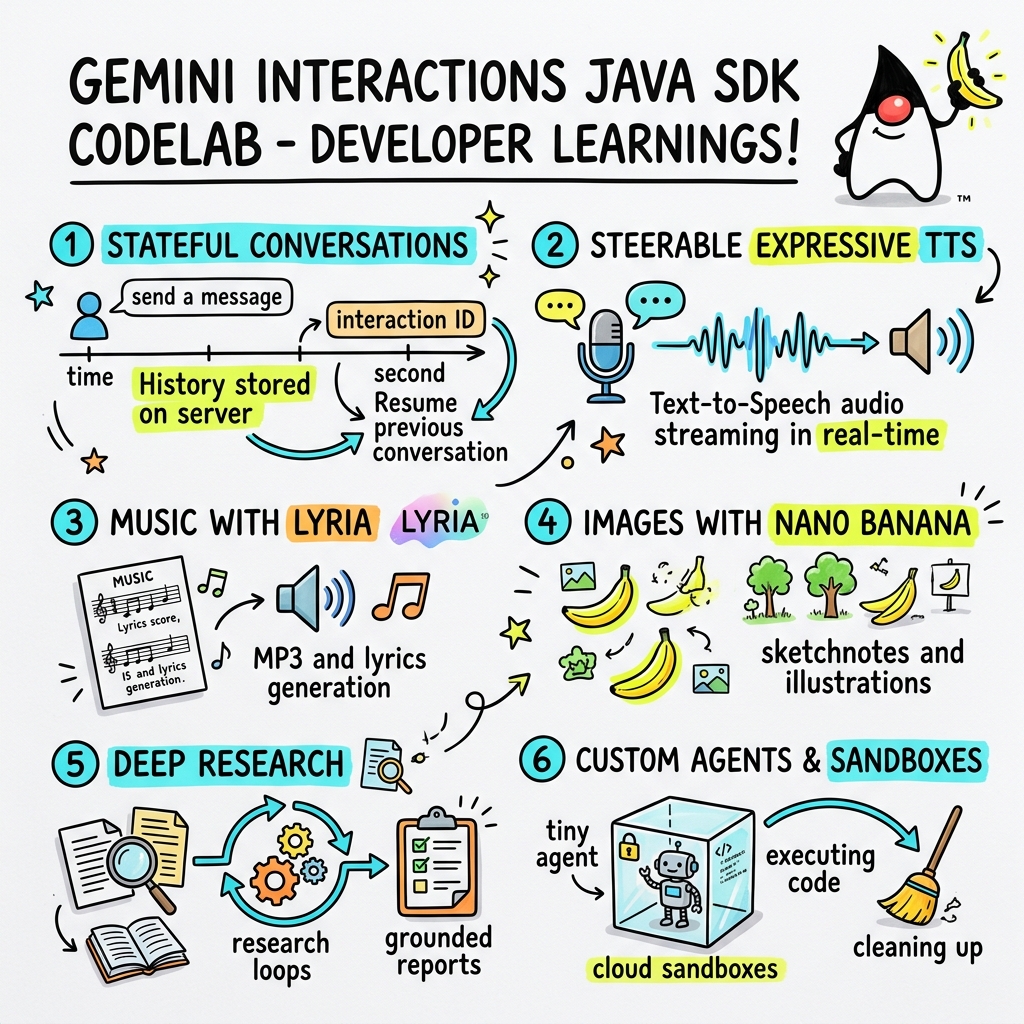
Bu codelab'de, özel Gemini Interactions SDK'yı kullanarak Java'da yeni nesil yapay zeka uygulamaları oluşturmayı öğreneceksiniz.
Gemini Interactions API nedir?
Geleneksel LLM API'leri durum bilgisizdir ve istek-yanıt odaklıdır. Geçmişte geliştiricilerin çok turlu bir sohbet asistanı veya karmaşık bir aracı döngüsü oluşturmak için görüşme durumunu, geçmişi kısaltmayı, araç çağrısı düzenlemeyi ve yürütme döngülerini tamamen istemci tarafı uygulama kodunda yönetmesi gerekiyordu.
Gemini Interactions API, bu karmaşıklığı sunucuya taşır. Google'ın altyapısının, görüşme grafiğini barındırdığı ve yönettiği, oturum tabanlı ve durum bilgisi olan bir API'dir. Tek bir Etkileşim, durum bilgisi olan bir oturumu temsil eder. API ile etkileşim kurduğunuzda, polimorfik Adımlardan oluşan zengin ve yapılandırılmış bir zaman çizelgesi döndürülür. Örneğin:
ThoughtStep: Modelin dahili muhakeme süreci.ModelOutputStep: Model tarafından oluşturulan metin, ses veya resim içeriği.ToolCallStep&ToolResultStep: Sistem veya model tarafından başlatılan araç çağrıları.UserInteractionStep: Sistemin kullanıcı girişi veya onayı istemek için durakladığı noktalar.
Yönetilen Ajanlar nedir?
Otonom aracıları düzenlemek (döngüleri, yeniden deneme mantığını, araç yürütme ortamlarını ve durum yönetimini ele almak) oldukça zordur.
Yönetilen aracılar, Gemini Interactions API tarafından sağlanan platform düzeyinde bir çözümdür. Aracı döngülerini yerel olarak çalıştırmak yerine, doğrudan Google'ın altyapısında özel aracılar sağlayabilirsiniz:
- Yerleşik Ajanlar: Çok adımlı web araştırması yapan, bulguları toplayan ve kapsamlı raporlar oluşturan Deep Research ajanı gibi kullanıma hazır uzmanlaşmış ajanlar.
- Özel Yönetilen Aracı: Sizin tanımladığınız bağımsız varlıklar. Sistem talimatları sağlarsınız, araçlar (ör.Google Arama veya Bash yürütme ortamı) eklersiniz ve özelleştirilebilir ağ çıkış kurallarına (ör. yalnızca GitHub gibi belirli alanlara erişime izin verme) sahip güvenli, yalıtılmış ve kapsayıcılı bir çalışma zamanı ortamı olan Cloud Sandbox'ı yapılandırırsınız.
Gemini Interactions Java SDK'sını kullanarak standart Java uygulamalarında bu yönetilen aracıları kolayca başlatabilir, koordine edebilir ve onlarla işbirliği yapabilirsiniz.
Neler öğreneceksiniz?
- Yeni çok biçimli
Steptabanlı mimaride gezinme - İfade içeren TTS sesini doğrudan hoparlörlere aktarma
- Lyria ile nasıl müzik (MP3 + Şarkı Sözleri) üretilir?
- Gemini 3 Pro Image ile görsel notlar oluşturma
- Ortak Planlama'yı kullanarak Deep Research temsilcisini yönlendirme
- Ağ çıkışı kuralları ve araçlarıyla özel bir aracı sağlama
İhtiyacınız olanlar
- Java 21 veya sonraki sürümler.
- Apache Maven.
- Bir metin düzenleyici veya IDE (IntelliJ IDEA, VS Code vb.)
- Gemini API anahtarı (Google AI Studio'dan).
2. Kurulum: Proje ve API anahtarı
Maven projesi oluşturma
Aşağıdaki komutu kullanarak terminalinizden yeni bir Maven projesi başlatın:
mvn archetype:generate \
    -DgroupId=com.example \
    -DartifactId=gemini-interactions-demo \
    -DarchetypeGroupId=org.apache.maven.archetypes \
    -DarchetypeArtifactId=maven-archetype-quickstart \
    -DarchetypeVersion=1.5 \
    -DinteractiveMode=false
Yeni oluşturduğunuz proje dizinine gidin:
cd gemini-interactions-demo
pom.xml dosyanızı açın ve yapılandırın:
- Java sürümü özelliklerini Java 21'i hedefleyecek şekilde güncelleyin:
<properties> <maven.compiler.source>21</maven.compiler.source> <maven.compiler.target>21</maven.compiler.target> </properties> - SDK bağımlılığını
<dependency>
    <groupId>io.github.glaforge</groupId>
    <artifactId>gemini-interactions-api-sdk</artifactId>
    <version>0.10.1</version>
</dependency>
API anahtarını yapılandırma
Google AI Studio'dan Gemini API anahtarı alın.
Anahtarı terminalinizde ortam değişkeni olarak ayarlayın:
macOS / Linux:
export GEMINI_API_KEY="your_actual_api_key"
Windows (Komut İstemi):
set GEMINI_API_KEY="your_actual_api_key"
3. Hello World: Navigating the Step Architecture
Etkileşimler API'si, çok biçimli ve adıma dayalı bir zaman çizelgesi mimarisi sunar. API, düz bir çıktı listesi döndürmek yerine türü belirlenmiş Step nesnelerin (ör. ModelOutputStep, ThoughtStep, FunctionCallStep) bir dizisini döndürür.
Bu adımda, son model çıkışını bu yapıdan nasıl çıkaracağınızı anlamak için basit bir etkileşim yazacaksınız.
HelloInteractions.java oluştur
Aşağıdaki içeriğe sahip src/main/java/com/example/HelloInteractions.java dosyasını oluşturun:
package com.example;

import io.github.glaforge.gemini.interactions.GeminiInteractionsClient;
import io.github.glaforge.gemini.interactions.model.*;
import io.github.glaforge.gemini.interactions.model.InteractionParams.ModelInteractionParams;

public class HelloInteractions {
    public static void main(String[] args) {
        // 1. Initialize the client
        GeminiInteractionsClient client = GeminiInteractionsClient.builder()
            .apiKey(System.getenv("GEMINI_API_KEY"))
            .build();

        // 2. Build the request
        ModelInteractionParams request = ModelInteractionParams.builder()
            .model("gemini-3.5-flash")
            .input("Explain the difference between a library and a framework in one sentence.")
            .build();

        // 3. Send request
        Interaction response = client.create(request);

        // 4. Navigate the step-based architecture to get the output
        response.steps().stream()
            .filter(step -> step instanceof Step.ModelOutputStep)
            .map(step -> (Step.ModelOutputStep) step)
            .findFirst()
            .ifPresent(step -> System.out.println(step.content().get(0)));
    }
}
Kodu Çalıştırma
Sınıfı derleyin ve çalıştırın:
mvn compile exec:java -Dexec.mainClass=com.example.HelloInteractions
4. Yönlendirilebilir Ses: Etkileyici TTS Akışı
Gemini 3.1 Flash, yönlendirilebilir metin okuma (TTS) özelliğini sunar. İstemleri kullanarak sesin hızını, tonunu ve ortamını kontrol edebilir, cümle ortasında duygusal etiketler (ör. [excitedly] veya [whispers]) kullanabilirsiniz.
Bu adımda, etkileyici bir ses oluşturup doğrudan hoparlörlerinize aktaracaksınız.
StreamingDJ.java oluştur
Aşağıdaki içeriğe sahip src/main/java/com/example/StreamingDJ.java dosyasını oluşturun:
package com.example;

import io.github.glaforge.gemini.interactions.GeminiInteractionsClient;
import io.github.glaforge.gemini.interactions.model.*;
import io.github.glaforge.gemini.interactions.model.Config.SpeechConfig;
import io.github.glaforge.gemini.interactions.model.InteractionParams.ModelInteractionParams;
import javax.sound.sampled.*;
import java.util.Base64;
import java.util.stream.Stream;

public class StreamingDJ {
    public static void main(String[] args) throws Exception {
        GeminiInteractionsClient client = GeminiInteractionsClient.builder()
            .apiKey(System.getenv("GEMINI_API_KEY"))
            .build();

        // Prompt defining the voice profile and emotional tags
        String prompt = """
            # AUDIO PROFILE: Jaz R.
            ## THE SCENE: London Studio
            ### DIRECTOR'S NOTES
            Accent: Jaz is a DJ from Brixton, London.
            Style: Bouncy, energetic, high-speed delivery.

            #### TRANSCRIPT
            [excitedly] Yes, massive vibes in the studio!
            [whispers] But keep it down, the boss is coming...
            [shouting] Turn this up! Let's go!
            """;

        ModelInteractionParams request = ModelInteractionParams.builder()
            .model("gemini-3.1-flash-tts-preview")
            .input(prompt)
            .responseModalities(Interaction.Modality.AUDIO)
            .speechConfig(new SpeechConfig("Algenib", "en-GB"))
            .stream(true) // Enable streaming
            .build();

        System.out.println("Streaming audio from Gemini...");

        try (Stream<Events> eventStream = client.stream(request)) {
            // Configure the Java Audio System for 24kHz Mono 16-bit PCM
            AudioFormat format = new AudioFormat(24000, 16, 1, true, false);
            DataLine.Info info = new DataLine.Info(SourceDataLine.class, format);

            try (SourceDataLine line = (SourceDataLine) AudioSystem.getLine(info)) {
                line.open(format);
                line.start();

                // Process the stream and play audio chunks as they arrive
                eventStream.forEach(event -> {
                    if (event instanceof Events.StepDelta cd && cd.delta() instanceof Events.AudioDelta audioDelta) {
                        byte[] audioData = Base64.getDecoder().decode(audioDelta.data());
                        line.write(audioData, 0, audioData.length);
                    }
                });
                line.drain();
            }
        }
    }
}
Kodu Çalıştırma
mvn compile exec:java -Dexec.mainClass=com.example.StreamingDJ
Çıkışı Dinleme
Kodu çalıştırdığınızda duyacağınız sesin bir örneğini aşağıda bulabilirsiniz (duygusal etiketlerle Algenib sesi kullanılarak):
5. Lyria 3 ile müzik üretme
DeepMind Lyria 3 modelini kullanarak müzik ve jingle oluşturabilirsiniz. Çift yanıt biçimi (AUDIO ve TEXT) isteyerek hem oluşturulan sesi (MP3) hem de şarkı sözlerini alabilirsiniz.
MusicGenerator.java oluştur
Aşağıdaki içeriğe sahip src/main/java/com/example/MusicGenerator.java dosyasını oluşturun:
package com.example;

import io.github.glaforge.gemini.interactions.GeminiInteractionsClient;
import io.github.glaforge.gemini.interactions.model.*;
import io.github.glaforge.gemini.interactions.model.InteractionParams.ModelInteractionParams;
import io.github.glaforge.gemini.interactions.model.Content.AudioContent;
import java.nio.file.Files;
import java.nio.file.Paths;

public class MusicGenerator {
    public static void main(String[] args) throws Exception {
        GeminiInteractionsClient client = GeminiInteractionsClient.builder()
            .apiKey(System.getenv("GEMINI_API_KEY"))
            .build();

        ModelInteractionParams request = ModelInteractionParams.builder()
            .model("models/lyria-3-clip-preview") // 30-second clip
            .input("An uplifting rock song with acoustic guitars about coding in Java.")
            .responseModalities(
                Interaction.Modality.AUDIO,
                Interaction.Modality.TEXT) // Request both MP3 and Lyrics
            .build();

        System.out.println("Generating music (this might take a moment)...");
        Interaction response = client.create(request);

        // 1. Print the lyrics (TEXT output)
        System.out.println("\n--- Generated Lyrics ---");
        response.steps().stream()
            .filter(step -> step instanceof Step.ModelOutputStep)
            .flatMap(step -> ((Step.ModelOutputStep) step).content().stream())
            .filter(content -> content instanceof Content.TextContent)
            .forEach(content -> System.out.println(((Content.TextContent) content).text()));

        // 2. Save the MP3 (AUDIO output)
        response.steps().stream()
            .filter(step -> step instanceof Step.ModelOutputStep)
            .flatMap(step -> ((Step.ModelOutputStep) step).content().stream())
            .filter(content -> content instanceof AudioContent)
            .map(content -> (AudioContent) content)
            .findFirst()
            .ifPresent(audio -> {
                try {
                    Files.write(Paths.get("coding_song.mp3"), audio.data());
                    System.out.println("\nSuccess: Song saved to coding_song.mp3");
                } catch (Exception e) {
                    e.printStackTrace();
                }
            });
    }
}
Kodu Çalıştırma
mvn compile exec:java -Dexec.mainClass=com.example.MusicGenerator
Üretilen şarkıyı dinleme
Müzik ve şarkı sözlerini içeren oluşturulmuş MP3 dosyası (coding_song.mp3):
6. Sketchnotes ile görselleştirme (Nano Banana Pro)
Gemini 3 Pro Image (Nano Banana Pro olarak da bilinir) ile görüntü oluşturabilirsiniz. IMAGE biçimini isteyerek metin girişine dayalı infografikler, diyagramlar veya not çizimleri oluşturabilirsiniz.
Bu adımda, yönetilen aracılarla ilgili bir makalenin görsel not özetini oluşturacak ve PNG dosyası olarak kaydedeceksiniz.
ImageGenerator.java oluştur
Aşağıdaki içeriğe sahip src/main/java/com/example/ImageGenerator.java dosyasını oluşturun:
package com.example;

import io.github.glaforge.gemini.interactions.GeminiInteractionsClient;
import io.github.glaforge.gemini.interactions.model.*;
import io.github.glaforge.gemini.interactions.model.InteractionParams.ModelInteractionParams;
import io.github.glaforge.gemini.interactions.model.Content.ImageContent;
import java.nio.file.Files;
import java.nio.file.Paths;

public class ImageGenerator {
    public static void main(String[] args) throws Exception {
        GeminiInteractionsClient client = GeminiInteractionsClient.builder()
            .apiKey(System.getenv("GEMINI_API_KEY"))
            .build();

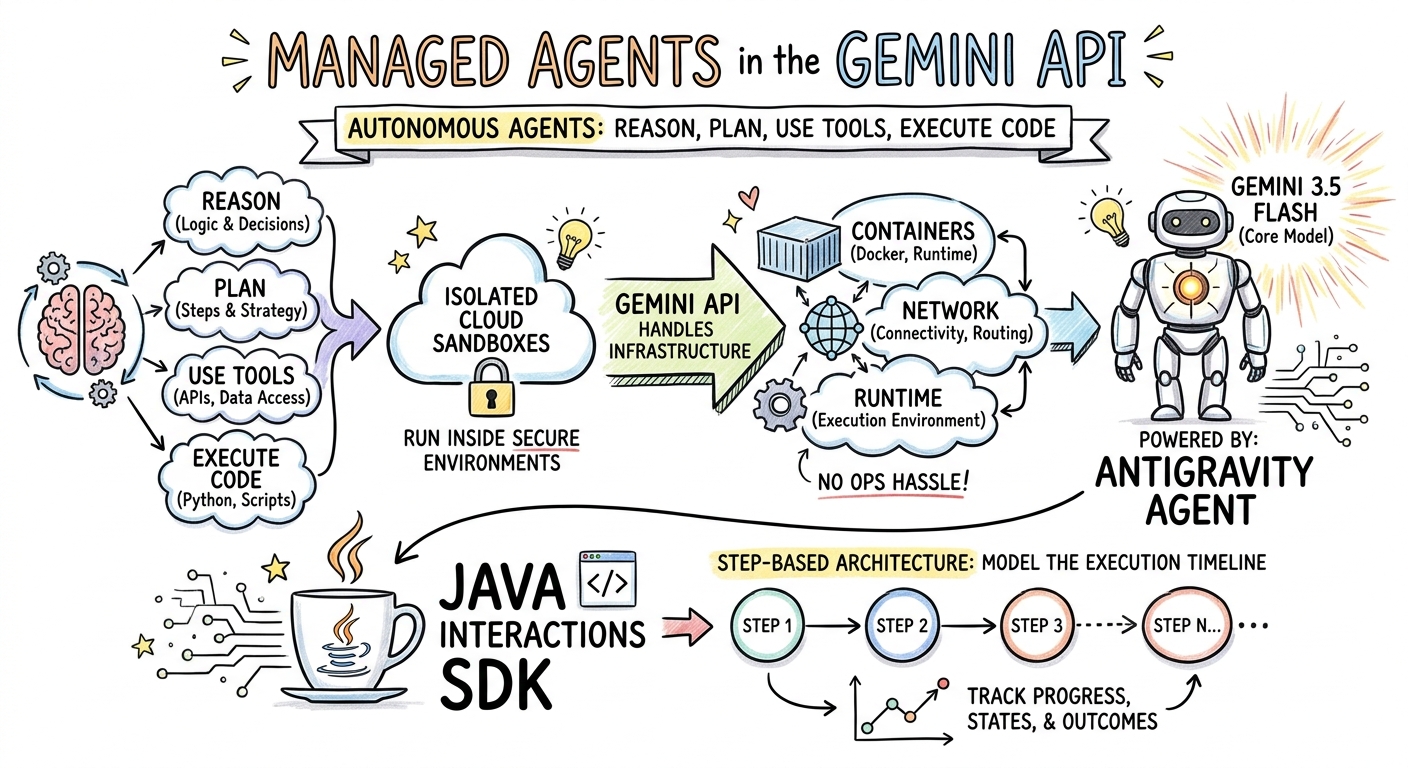
        String articleSummary = """
            Managed Agents in the Gemini API allow developers to run autonomous agents
            that reason, plan, use tools, and execute code inside isolated cloud sandboxes.
            The Gemini API handles the infrastructure (containers, network, runtime).
            It is powered by the Antigravity agent running on Gemini 3.5 Flash.
            The Java Interactions SDK supports these capabilities, utilizing a Step-based
            architecture to model the execution timeline.
            """;

        ModelInteractionParams request = ModelInteractionParams.builder()
            .model("gemini-3-pro-image-preview")
            .input(String.format("""
                Create a hand-drawn and hand-written sketchnote
                style summary infographic, with a pure white background,
                about the following information:

                %s
                """, articleSummary))
            .responseModalities(Interaction.Modality.IMAGE) // Request IMAGE modality
            .build();

        System.out.println("Generating sketchnote (this might take a moment)...");
        Interaction response = client.create(request);

        // Save the generated image
        response.steps().stream()
            .filter(step -> step instanceof Step.ModelOutputStep)
            .flatMap(step -> ((Step.ModelOutputStep) step).content().stream())
            .filter(content -> content instanceof ImageContent)
            .map(content -> (ImageContent) content)
            .findFirst()
            .ifPresent(image -> {
                try {
                    Files.write(Paths.get("sketchnote.png"), image.data());
                    System.out.println("Success: Sketchnote saved to sketchnote.png");
                } catch (Exception e) {
                    e.printStackTrace();
                }
            });
    }
}
Kodu Çalıştırma
mvn compile exec:java -Dexec.mainClass=com.example.ImageGenerator
Üretilen Sketchnote
Model tarafından oluşturulan üretken notu (sketchnote.png) aşağıda görebilirsiniz:
7. Steering Agents: Collaborative Deep Research
Deep Research, çok adımlı araştırma görevlerini yürütebilen güçlü bir temsilcidir. Ancak hemen çalıştırmak yerine, temsilci veri toplamaya başlamadan önce araştırma planını incelemek, değiştirmek ve yönlendirmek için Ortak Planlama'yı kullanabilirsiniz.
Bir planı iyileştirmek için aynı sunucu tarafı durumunu (previousInteractionId) kullanan çok turlu bir görüşme uygulayacaksınız.
CollaborativeResearch.java oluştur
Aşağıdaki içeriğe sahip src/main/java/com/example/CollaborativeResearch.java dosyasını oluşturun:
package com.example;

import io.github.glaforge.gemini.interactions.GeminiInteractionsClient;
import io.github.glaforge.gemini.interactions.model.*;
import io.github.glaforge.gemini.interactions.model.InteractionParams.AgentInteractionParams;
import io.github.glaforge.gemini.interactions.model.Config.DeepResearchAgentConfig;
import io.github.glaforge.gemini.interactions.model.Config.ThinkingSummaries;
import io.github.glaforge.gemini.interactions.model.Config.Visualization;

public class CollaborativeResearch {
    public static void main(String[] args) throws Exception {
        GeminiInteractionsClient client = GeminiInteractionsClient.builder()
            .apiKey(System.getenv("GEMINI_API_KEY"))
            .build();

        String agentModel = "deep-research-preview-04-2026";

        // --- Phase 1: Request a Plan ---
        System.out.println("Phase 1: Requesting research plan...");
        AgentInteractionParams planParams = AgentInteractionParams.builder()
            .agent(agentModel)
            .input("Research the latest generations of Google Cloud TPUs (TPU7x and the 8th generation TPU 8t and TPU 8i).")
            .agentConfig(new DeepResearchAgentConfig(
                "deep-research",
                ThinkingSummaries.AUTO,
                Visualization.AUTO,
                true // TRUE enables collaborative planning
            ))
            .background(true)
            .store(true)
            .build();

        Interaction planInteraction = client.create(planParams);
        planInteraction = waitForCompletion(client, planInteraction.id());

        System.out.println("\n--- Proposed Plan ---");
        printOutputText(planInteraction);

        // --- Phase 2: Refine the Plan ---
        System.out.println("\nPhase 2: Refining research plan...");
        AgentInteractionParams refineParams = AgentInteractionParams.builder()
            .agent(agentModel)
            .input("Focus on comparing the architectural, performance, and scaling differences between the TPU7x generation and the two flavors of the eighth generation: TPU 8t (optimized for training at scale) and TPU 8i (optimized for low-latency reasoning and inference).")
            .agentConfig(new DeepResearchAgentConfig(
                "deep-research",
                ThinkingSummaries.AUTO,
                Visualization.AUTO,
                true // Keep collaborative planning TRUE to iterate
            ))
            .previousInteractionId(planInteraction.id()) // Resume session
            .background(true)
            .store(true)
            .build();

        Interaction refinedInteraction = client.create(refineParams);
        refinedInteraction = waitForCompletion(client, refinedInteraction.id());

        System.out.println("\n--- Refined Plan ---");
        printOutputText(refinedInteraction);

        // --- Phase 3: Approve and Execute ---
        System.out.println("\nPhase 3: Approving plan and starting deep research (this will take a few minutes)...");
        AgentInteractionParams executeParams = AgentInteractionParams.builder()
            .agent(agentModel)
            .input("Plan looks good, execute!")
            .agentConfig(new DeepResearchAgentConfig(
                "deep-research",
                ThinkingSummaries.AUTO,
                Visualization.AUTO,
                false // FALSE approves the plan and executes the research
            ))
            .previousInteractionId(refinedInteraction.id()) // Resume session
            .background(true)
            .store(true)
            .build();

        Interaction finalReport = client.create(executeParams);
        finalReport = waitForCompletion(client, finalReport.id());

        System.out.println("\n--- Final Research Report ---");
        printOutputText(finalReport);
    }

    private static Interaction waitForCompletion(GeminiInteractionsClient client, String id) throws Exception {
        Interaction interaction = client.get(id);
        while (interaction.status() != Interaction.Status.COMPLETED && interaction.status() != Interaction.Status.FAILED) {
            Thread.sleep(5000);
            interaction = client.get(id);
        }
        if (interaction.status() == Interaction.Status.FAILED) {
            throw new RuntimeException("Interaction failed. Status: " + interaction.status());
        }
        return interaction;
    }

    private static void printOutputText(Interaction interaction) {
        interaction.steps().stream()
            .filter(step -> step instanceof Step.ModelOutputStep)
            .flatMap(step -> ((Step.ModelOutputStep) step).content().stream())
            .filter(content -> content instanceof Content.TextContent)
            .forEach(content -> System.out.println(((Content.TextContent) content).text()));
    }
}
Kodu Çalıştırma
mvn compile exec:java -Dexec.mainClass=com.example.CollaborativeResearch
Oluşturulan Rapor Çıkışı
Deep Research ajanı, kapsamlı ve yapılandırılmış bir rapor oluşturur. Örnek çalıştırma tarafından oluşturulan raporun tamamını burada görüntüleyebilirsiniz:
Oluşturulan Deep Research raporunu (tpu_history_report.md) görüntüleyin
8. Özel Aracılar ve Bulut Korumalı Alanları
Karmaşık geliştirici görevleri için Özel Aracıları sağlayabilirsiniz. Bunların sistem talimatlarını tanımlar, araçlarla (ör. Kod Yürütme/Bash) donatır ve uzak ortamlarını (ör. ağ çıkışı kuralları) yapılandırırsınız.
Bu adımda, github.com için güvenli internet erişimi olan bir aracı sağlayacak ve bu aracı, bir depoyu klonlayıp yapılandırma dosyalarını bulut sanal alanında analiz etmesi için yönlendireceksiniz.
GitHubAnalyzer.java oluştur
Aşağıdaki içeriğe sahip src/main/java/com/example/GitHubAnalyzer.java dosyasını oluşturun:
package com.example;

import io.github.glaforge.gemini.interactions.GeminiInteractionsClient;
import io.github.glaforge.gemini.interactions.model.*;
import io.github.glaforge.gemini.interactions.model.InteractionParams.AgentInteractionParams;
import java.util.List;

public class GitHubAnalyzer {
    public static void main(String[] args) throws Exception {
        GeminiInteractionsClient client = GeminiInteractionsClient.builder()
            .apiKey(System.getenv("GEMINI_API_KEY"))
            .build();

        String agentId = "github-analyzer-codelab";

        // 1. Define the Custom Agent with Network Egress and Tools
        Agent customAgent = Agent.builder()
            .id(agentId)
            .description("Clones and analyzes GitHub repos.")
            .baseAgent("antigravity-preview-05-2026")
            .baseEnvironment(new EnvironmentConfig(
                new EnvironmentNetworkEgressAllowlist(List.of(
                    new AllowlistEntry("github.com") // Allow git clone over HTTPS
                )),
                List.of()
            ))
            .systemInstruction("You are an architect. Clone the repo, inspect files, and write a summary.")
            .tools(List.of(
                new AgentTool.CodeExecution(), // Enables terminal bash execution in sandbox
                new AgentTool.GoogleSearch()
            ))
            .build();

        // 2. Provision the Agent
        System.out.println("Provisioning custom agent in the cloud...");
        client.createAgent(customAgent);

        try {
            // 3. Start the Interaction
            AgentInteractionParams params = AgentInteractionParams.builder()
                .agent(agentId)
                .input("Clone https://github.com/glaforge/gemini-interactions-api-sdk and explain its pom.xml structure.")
                .environment("remote") // Crucial: Run in cloud sandbox
                .build();

            System.out.println("Starting clone and analysis (polling status)...");
            Interaction interaction = client.create(params);

            // 4. Poll for completion
            while (interaction.status() != Interaction.Status.COMPLETED) {
                System.out.println("Agent working... Status: " + interaction.status());
                Thread.sleep(5000);
                interaction = client.get(interaction.id());
            }

            // 5. Output the results
            System.out.println("\n--- Architectural Analysis ---");
            interaction.steps().stream()
                .filter(step -> step instanceof Step.ModelOutputStep)
                .flatMap(step -> ((Step.ModelOutputStep) step).content().stream())
                .filter(content -> content instanceof Content.TextContent)
                .forEach(content -> System.out.println(((Content.TextContent) content).text()));

        } finally {
            // 6. Clean up resources
            client.deleteAgent(agentId);
            System.out.println("\nCustom agent resource deleted from cloud.");
        }
    }
}
Kodu Çalıştırma
mvn compile exec:java -Dexec.mainClass=com.example.GitHubAnalyzer
Üretilen Analiz Çıkışı
Depoyu klonladıktan sonra özel aracı tarafından oluşturulan tam mimari analiz raporunu burada görüntüleyebilirsiniz:
GitHub Analiz Aracı Çıkışını Görüntüleme (github_analysis_report.md)
9. Tebrikler!
Codelab'i tamamladınız ve Gemini Interactions SDK'yı kullanarak Java'da karmaşık, çok formatlı ve ajan tabanlı iş akışları oluşturmayı öğrendiniz.
Başarılarınız:
- Adım mimarisinde gezinme: Standart modelleri sorgulamak için yeni polimorfik adım mimarisini kullanma.
- Akışla Aktarılan İfade Edici TTS: Sesin anlık olarak aktarılması için Yönetmen Notları ve satır içi duygusal etiketler kullanıldı.
- Üretilmiş Müzik: Lyria 3 ile üretilmiş MP3 parçalar ve şarkı sözleri.
- Üretilmiş Notlar: Gemini 3 Pro Image (Nano Banana Pro) kullanılarak oluşturulan görsel özetler.
- Yönlendirilmiş Deep Research: Araştırma planlarını iyileştirmek için Ortak Planlama'yı kullandı.
- Sağlanan Özel Temsilciler: Kodu güvenli bir şekilde yürütmek için özel ağ çıkışı kontrolüyle korumalı alan ortamları oluşturulur.
Daha Fazla Bilgi:
- GitHub'da SDK kaynak kodunu ve daha fazla test senaryosunu inceleyin: glaforge/gemini-interactions-api-sdk
- Guillaume'un blogunda (glaforge.dev) agentic tasarım kalıpları hakkında daha fazla bilgi edinin.