

1. Chào mừng bạn, nhà phát triển Gemini!
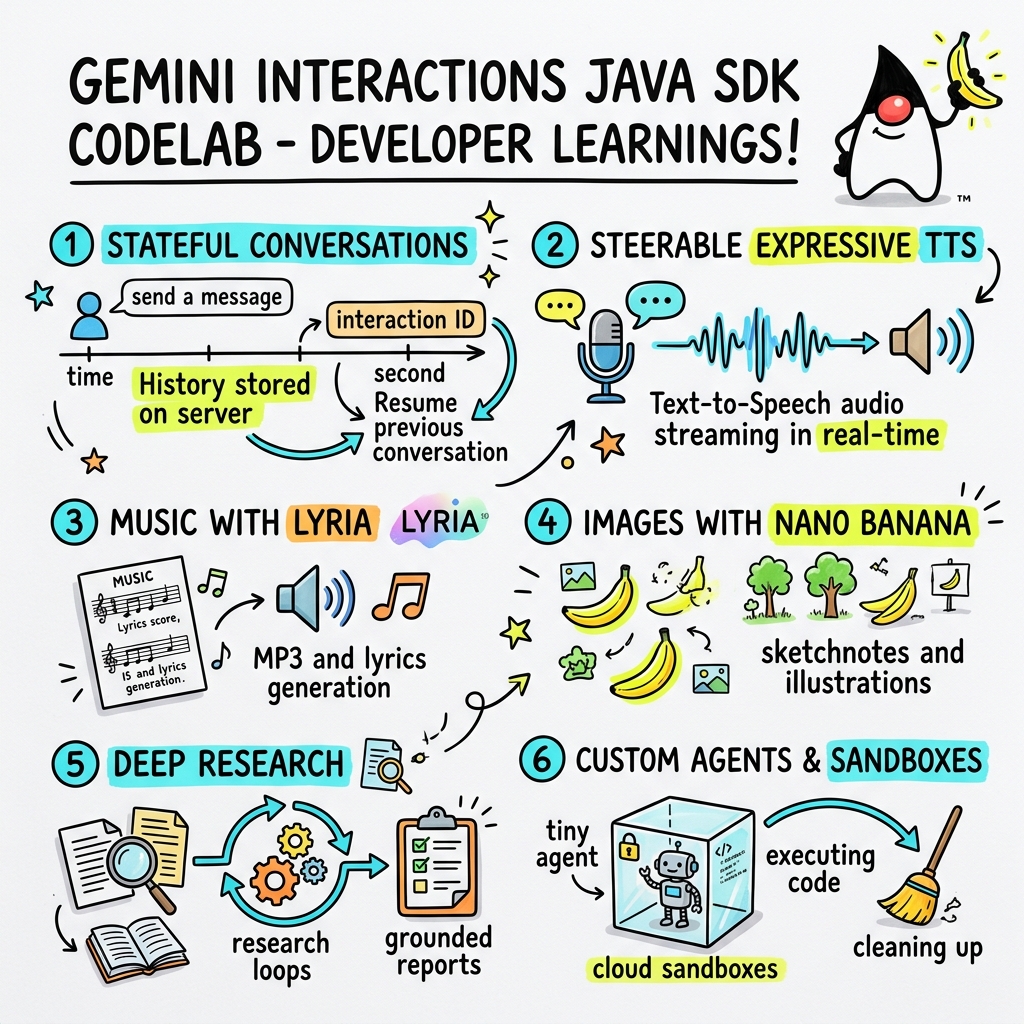
Trong lớp học lập trình này, bạn sẽ tìm hiểu cách xây dựng các ứng dụng AI thế hệ tiếp theo bằng Java thông qua SDK tương tác Gemini tuỳ chỉnh.
API tương tác Gemini là gì?
Các API LLM truyền thống là API không trạng thái và dựa trên yêu cầu-phản hồi. Để xây dựng một trợ lý trò chuyện nhiều lượt hoặc một vòng lặp tác nhân phức tạp, trước đây, nhà phát triển phải quản lý trạng thái cuộc trò chuyện, việc cắt bớt nhật ký, việc điều phối lệnh gọi công cụ và các vòng lặp thực thi hoàn toàn trong mã ứng dụng phía máy khách.
API tương tác Gemini chuyển sự phức tạp này sang máy chủ. Đây là một API có trạng thái, dựa trên phiên, trong đó cơ sở hạ tầng của Google lưu trữ và quản lý biểu đồ cuộc trò chuyện. Một Tương tác duy nhất đại diện cho một phiên có trạng thái. Khi bạn tương tác với API này, API sẽ trả về một dòng thời gian phong phú, có cấu trúc, bao gồm các Bước đa hình, chẳng hạn như:
ThoughtStep: Quá trình suy luận nội bộ của mô hình.ModelOutputStep: Nội dung văn bản, âm thanh hoặc hình ảnh do mô hình tạo.ToolCallStepvàToolResultStep: Lệnh gọi công cụ do hệ thống hoặc mô hình khởi tạo.UserInteractionStep: Các điểm mà hệ thống tạm dừng để yêu cầu người dùng nhập hoặc phê duyệt.
Tác nhân được quản lý là gì?
Việc điều phối các tác nhân tự động (xử lý các vòng lặp, logic thử lại, môi trường thực thi công cụ và quản lý trạng thái) là một việc rất khó.
Tác nhân được quản lý là giải pháp ở cấp nền tảng do API tương tác Gemini cung cấp. Thay vì chạy các vòng lặp tác nhân cục bộ, bạn có thể cung cấp các tác nhân chuyên biệt trực tiếp trên cơ sở hạ tầng của Google:
- Tác nhân tích hợp: Các tác nhân chuyên biệt sẵn sàng sử dụng, chẳng hạn như tác nhân Deep Research (Nghiên cứu chuyên sâu), tác nhân này thực hiện nghiên cứu trên web nhiều bước, tổng hợp thông tin tìm thấy và tạo báo cáo toàn diện.
- Tác nhân được quản lý tuỳ chỉnh: Các thực thể tự động do bạn xác định. Bạn cung cấp hướng dẫn cho hệ thống, đính kèm các công cụ (như Google Tìm kiếm hoặc môi trường thực thi Bash) và định cấu hình Hộp cát trên đám mây – một môi trường thời gian chạy an toàn, biệt lập và được chứa trong vùng chứa với các quy tắc truyền dữ liệu ra ngoài mạng có thể tuỳ chỉnh (ví dụ: chỉ cho phép truy cập vào các miền cụ thể như GitHub).
Khi sử dụng SDK tương tác Gemini cho Java, bạn có thể dễ dàng khởi động, điều phối và cộng tác với các tác nhân được quản lý này trong các ứng dụng Java tiêu chuẩn.
Kiến thức bạn sẽ học được
- Cách khám phá kiến trúc mới dựa trên
Stepđa hình. - Cách truyền trực tuyến âm thanh TTS biểu cảm trực tiếp đến loa.
- Cách tạo nhạc (MP3 + Lời bài hát) bằng Lyria.
- Cách tạo bản ghi chú bằng hình ảnh bằng Gemini 3 Pro Image.
- Cách điều hướng tác nhân Deep Research bằng tính năng Lập kế hoạch cộng tác.
- Cách cung cấp tác nhân tuỳ chỉnh với các quy tắc và công cụ truyền dữ liệu ra ngoài mạng.
Bạn cần có
- Java 21 trở lên.
- Apache Maven.
- Trình soạn thảo văn bản hoặc IDE (IntelliJ IDEA, VS Code, v.v.).
- Khoá API Gemini (từ Google AI Studio).
2. Thiết lập: Dự án và khoá API
Tạo dự án Maven
Khởi động dự án Maven mới từ thiết bị đầu cuối bằng lệnh sau:
mvn archetype:generate \
    -DgroupId=com.example \
    -DartifactId=gemini-interactions-demo \
    -DarchetypeGroupId=org.apache.maven.archetypes \
    -DarchetypeArtifactId=maven-archetype-quickstart \
    -DarchetypeVersion=1.5 \
    -DinteractiveMode=false
Chuyển đến thư mục dự án mới tạo:
cd gemini-interactions-demo
Mở tệp pom.xml và định cấu hình tệp đó:
- Cập nhật các thuộc tính phiên bản Java để nhắm đến Java 21:
<properties> <maven.compiler.source>21</maven.compiler.source> <maven.compiler.target>21</maven.compiler.target> </properties> - Thêm phần phụ thuộc SDK vào bên trong khối
<dependency>
    <groupId>io.github.glaforge</groupId>
    <artifactId>gemini-interactions-api-sdk</artifactId>
    <version>0.10.1</version>
</dependency>
Định cấu hình khoá API
Lấy khoá API Gemini từ Google AI Studio.
Đặt khoá làm biến môi trường trong thiết bị đầu cuối:
macOS / Linux:
export GEMINI_API_KEY="your_actual_api_key"
Windows (Dấu nhắc lệnh):
set GEMINI_API_KEY="your_actual_api_key"
3. Xin chào thế giới: Khám phá kiến trúc bước
API tương tác đã giới thiệu kiến trúc dòng thời gian đa hình, dựa trên bước. Thay vì trả về danh sách phẳng các kết quả đầu ra, API sẽ trả về một chuỗi các đối tượng được nhập Step (ví dụ: ModelOutputStep, ThoughtStep, FunctionCallStep).
Trong bước này, bạn sẽ viết một tương tác đơn giản để hiểu cách trích xuất đầu ra của mô hình cuối cùng từ cấu trúc này.
Tạo HelloInteractions.java
Tạo tệp src/main/java/com/example/HelloInteractions.java với nội dung sau:
package com.example;

import io.github.glaforge.gemini.interactions.GeminiInteractionsClient;
import io.github.glaforge.gemini.interactions.model.*;
import io.github.glaforge.gemini.interactions.model.InteractionParams.ModelInteractionParams;

public class HelloInteractions {
    public static void main(String[] args) {
        // 1. Initialize the client
        GeminiInteractionsClient client = GeminiInteractionsClient.builder()
            .apiKey(System.getenv("GEMINI_API_KEY"))
            .build();

        // 2. Build the request
        ModelInteractionParams request = ModelInteractionParams.builder()
            .model("gemini-3.5-flash")
            .input("Explain the difference between a library and a framework in one sentence.")
            .build();

        // 3. Send request
        Interaction response = client.create(request);

        // 4. Navigate the step-based architecture to get the output
        response.steps().stream()
            .filter(step -> step instanceof Step.ModelOutputStep)
            .map(step -> (Step.ModelOutputStep) step)
            .findFirst()
            .ifPresent(step -> System.out.println(step.content().get(0)));
    }
}
Chạy mã
Biên dịch và chạy lớp:
mvn compile exec:java -Dexec.mainClass=com.example.HelloInteractions
4. Âm thanh có thể điều hướng: Truyền trực tuyến TTS biểu cảm
Gemini 3.1 Flash giới thiệu tính năng Chuyển văn bản sang lời nói (TTS) có thể điều hướng. Bạn có thể kiểm soát tốc độ, âm điệu và môi trường của giọng nói bằng cách sử dụng câu lệnh và sử dụng các thẻ cảm xúc (như [excitedly] hoặc [whispers]) ở giữa câu.
Trong bước này, bạn sẽ tạo âm thanh biểu cảm và truyền trực tuyến âm thanh đó trực tiếp đến loa.
Tạo StreamingDJ.java
Tạo tệp src/main/java/com/example/StreamingDJ.java với nội dung sau:
package com.example;

import io.github.glaforge.gemini.interactions.GeminiInteractionsClient;
import io.github.glaforge.gemini.interactions.model.*;
import io.github.glaforge.gemini.interactions.model.Config.SpeechConfig;
import io.github.glaforge.gemini.interactions.model.InteractionParams.ModelInteractionParams;
import javax.sound.sampled.*;
import java.util.Base64;
import java.util.stream.Stream;

public class StreamingDJ {
    public static void main(String[] args) throws Exception {
        GeminiInteractionsClient client = GeminiInteractionsClient.builder()
            .apiKey(System.getenv("GEMINI_API_KEY"))
            .build();

        // Prompt defining the voice profile and emotional tags
        String prompt = """
            # AUDIO PROFILE: Jaz R.
            ## THE SCENE: London Studio
            ### DIRECTOR'S NOTES
            Accent: Jaz is a DJ from Brixton, London.
            Style: Bouncy, energetic, high-speed delivery.

            #### TRANSCRIPT
            [excitedly] Yes, massive vibes in the studio!
            [whispers] But keep it down, the boss is coming...
            [shouting] Turn this up! Let's go!
            """;

        ModelInteractionParams request = ModelInteractionParams.builder()
            .model("gemini-3.1-flash-tts-preview")
            .input(prompt)
            .responseModalities(Interaction.Modality.AUDIO)
            .speechConfig(new SpeechConfig("Algenib", "en-GB"))
            .stream(true) // Enable streaming
            .build();

        System.out.println("Streaming audio from Gemini...");

        try (Stream<Events> eventStream = client.stream(request)) {
            // Configure the Java Audio System for 24kHz Mono 16-bit PCM
            AudioFormat format = new AudioFormat(24000, 16, 1, true, false);
            DataLine.Info info = new DataLine.Info(SourceDataLine.class, format);

            try (SourceDataLine line = (SourceDataLine) AudioSystem.getLine(info)) {
                line.open(format);
                line.start();

                // Process the stream and play audio chunks as they arrive
                eventStream.forEach(event -> {
                    if (event instanceof Events.StepDelta cd && cd.delta() instanceof Events.AudioDelta audioDelta) {
                        byte[] audioData = Base64.getDecoder().decode(audioDelta.data());
                        line.write(audioData, 0, audioData.length);
                    }
                });
                line.drain();
            }
        }
    }
}
Chạy mã
mvn compile exec:java -Dexec.mainClass=com.example.StreamingDJ
Nghe kết quả đầu ra
Sau đây là ví dụ về âm thanh mà bạn sẽ nghe thấy khi chạy mã (sử dụng giọng Algenib với các thẻ cảm xúc):
5. Tạo nhạc bằng Lyria 3
Khi sử dụng mô hình DeepMind Lyria 3, bạn có thể tạo nhạc và nhạc hiệu. Bằng cách yêu cầu các phương thức phản hồi kép (AUDIO và TEXT), bạn có thể truy xuất cả âm thanh được tạo (MP3) và lời bài hát.
Tạo MusicGenerator.java
Tạo tệp src/main/java/com/example/MusicGenerator.java với nội dung sau:
package com.example;

import io.github.glaforge.gemini.interactions.GeminiInteractionsClient;
import io.github.glaforge.gemini.interactions.model.*;
import io.github.glaforge.gemini.interactions.model.InteractionParams.ModelInteractionParams;
import io.github.glaforge.gemini.interactions.model.Content.AudioContent;
import java.nio.file.Files;
import java.nio.file.Paths;

public class MusicGenerator {
    public static void main(String[] args) throws Exception {
        GeminiInteractionsClient client = GeminiInteractionsClient.builder()
            .apiKey(System.getenv("GEMINI_API_KEY"))
            .build();

        ModelInteractionParams request = ModelInteractionParams.builder()
            .model("models/lyria-3-clip-preview") // 30-second clip
            .input("An uplifting rock song with acoustic guitars about coding in Java.")
            .responseModalities(
                Interaction.Modality.AUDIO,
                Interaction.Modality.TEXT) // Request both MP3 and Lyrics
            .build();

        System.out.println("Generating music (this might take a moment)...");
        Interaction response = client.create(request);

        // 1. Print the lyrics (TEXT output)
        System.out.println("\n--- Generated Lyrics ---");
        response.steps().stream()
            .filter(step -> step instanceof Step.ModelOutputStep)
            .flatMap(step -> ((Step.ModelOutputStep) step).content().stream())
            .filter(content -> content instanceof Content.TextContent)
            .forEach(content -> System.out.println(((Content.TextContent) content).text()));

        // 2. Save the MP3 (AUDIO output)
        response.steps().stream()
            .filter(step -> step instanceof Step.ModelOutputStep)
            .flatMap(step -> ((Step.ModelOutputStep) step).content().stream())
            .filter(content -> content instanceof AudioContent)
            .map(content -> (AudioContent) content)
            .findFirst()
            .ifPresent(audio -> {
                try {
                    Files.write(Paths.get("coding_song.mp3"), audio.data());
                    System.out.println("\nSuccess: Song saved to coding_song.mp3");
                } catch (Exception e) {
                    e.printStackTrace();
                }
            });
    }
}
Chạy mã
mvn compile exec:java -Dexec.mainClass=com.example.MusicGenerator
Nghe bài hát được tạo
Sau đây là tệp MP3 được tạo (coding_song.mp3) chứa nhạc và lời bài hát:
6. Trực quan hoá bằng bản ghi chú bằng hình ảnh (Nano Banana Pro)
Gemini 3 Pro Image (còn được gọi là Nano Banana Pro) có thể tạo hình ảnh. Bằng cách yêu cầu phương thức IMAGE, bạn có thể tạo bản đồ hoạ thông tin, sơ đồ hoặc bản ghi chú bằng hình ảnh dựa trên nội dung văn bản đầu vào.
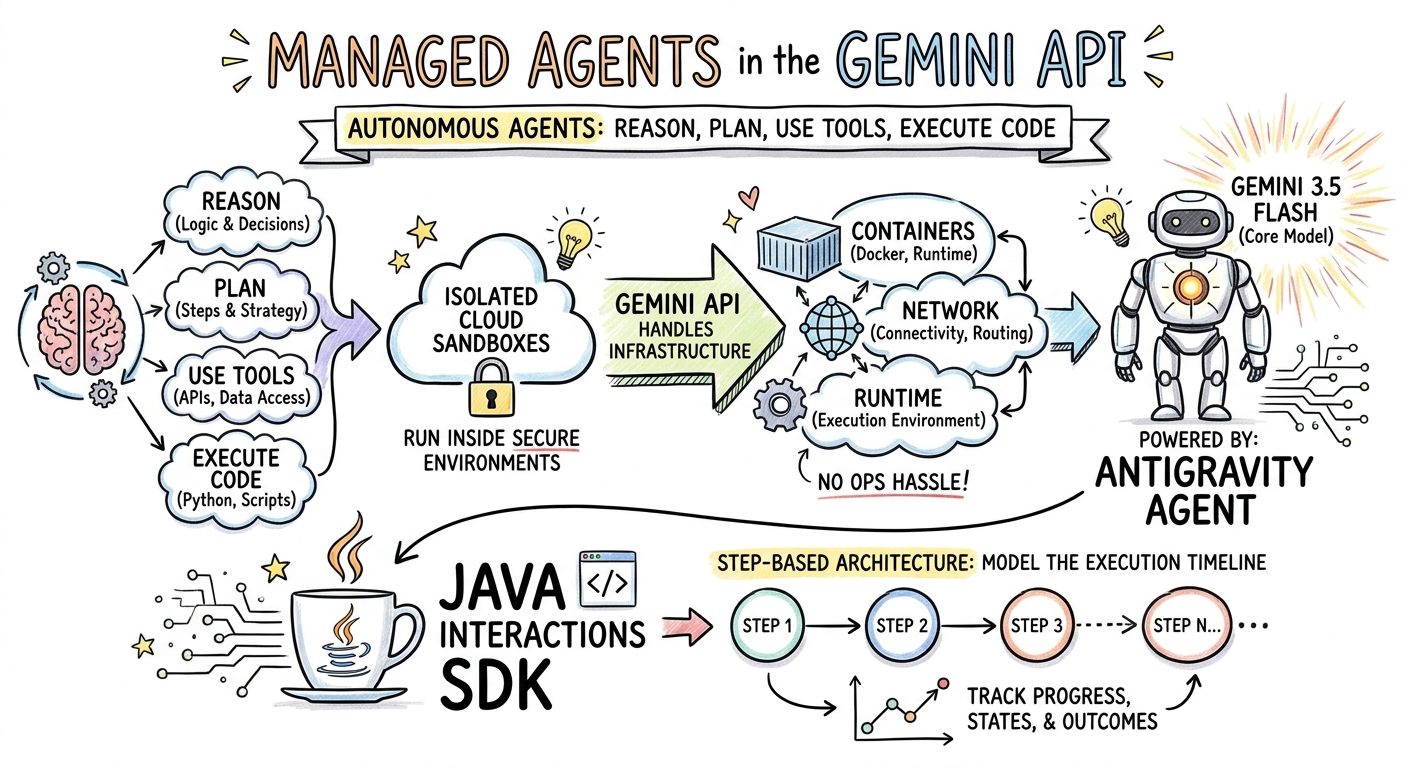
Trong bước này, bạn sẽ tạo bản tóm tắt bằng bản ghi chú bằng hình ảnh của một bài viết về Tác nhân được quản lý và lưu bản tóm tắt đó dưới dạng tệp PNG.
Tạo ImageGenerator.java
Tạo tệp src/main/java/com/example/ImageGenerator.java với nội dung sau:
package com.example;

import io.github.glaforge.gemini.interactions.GeminiInteractionsClient;
import io.github.glaforge.gemini.interactions.model.*;
import io.github.glaforge.gemini.interactions.model.InteractionParams.ModelInteractionParams;
import io.github.glaforge.gemini.interactions.model.Content.ImageContent;
import java.nio.file.Files;
import java.nio.file.Paths;

public class ImageGenerator {
    public static void main(String[] args) throws Exception {
        GeminiInteractionsClient client = GeminiInteractionsClient.builder()
            .apiKey(System.getenv("GEMINI_API_KEY"))
            .build();

        String articleSummary = """
            Managed Agents in the Gemini API allow developers to run autonomous agents
            that reason, plan, use tools, and execute code inside isolated cloud sandboxes.
            The Gemini API handles the infrastructure (containers, network, runtime).
            It is powered by the Antigravity agent running on Gemini 3.5 Flash.
            The Java Interactions SDK supports these capabilities, utilizing a Step-based
            architecture to model the execution timeline.
            """;

        ModelInteractionParams request = ModelInteractionParams.builder()
            .model("gemini-3-pro-image-preview")
            .input(String.format("""
                Create a hand-drawn and hand-written sketchnote
                style summary infographic, with a pure white background,
                about the following information:

                %s
                """, articleSummary))
            .responseModalities(Interaction.Modality.IMAGE) // Request IMAGE modality
            .build();

        System.out.println("Generating sketchnote (this might take a moment)...");
        Interaction response = client.create(request);

        // Save the generated image
        response.steps().stream()
            .filter(step -> step instanceof Step.ModelOutputStep)
            .flatMap(step -> ((Step.ModelOutputStep) step).content().stream())
            .filter(content -> content instanceof ImageContent)
            .map(content -> (ImageContent) content)
            .findFirst()
            .ifPresent(image -> {
                try {
                    Files.write(Paths.get("sketchnote.png"), image.data());
                    System.out.println("Success: Sketchnote saved to sketchnote.png");
                } catch (Exception e) {
                    e.printStackTrace();
                }
            });
    }
}
Chạy mã
mvn compile exec:java -Dexec.mainClass=com.example.ImageGenerator
Bản ghi chú bằng hình ảnh được tạo
Sau đây là bản ghi chú bằng hình ảnh được tạo (sketchnote.png) do mô hình tạo:
7. Điều hướng tác nhân: Nghiên cứu chuyên sâu cộng tác
Deep Research là một tác nhân mạnh mẽ có thể thực thi các tác vụ nghiên cứu nhiều bước. Tuy nhiên, thay vì chạy ngay lập tức, bạn có thể sử dụng tính năng Lập kế hoạch cộng tác để xem xét, sửa đổi và điều hướng kế hoạch nghiên cứu trước khi tác nhân bắt đầu thu thập dữ liệu.
Bạn sẽ triển khai cuộc trò chuyện nhiều lượt sử dụng cùng một trạng thái phía máy chủ (previousInteractionId) để tinh chỉnh kế hoạch.
Tạo CollaborativeResearch.java
Tạo tệp src/main/java/com/example/CollaborativeResearch.java với nội dung sau:
package com.example;

import io.github.glaforge.gemini.interactions.GeminiInteractionsClient;
import io.github.glaforge.gemini.interactions.model.*;
import io.github.glaforge.gemini.interactions.model.InteractionParams.AgentInteractionParams;
import io.github.glaforge.gemini.interactions.model.Config.DeepResearchAgentConfig;
import io.github.glaforge.gemini.interactions.model.Config.ThinkingSummaries;
import io.github.glaforge.gemini.interactions.model.Config.Visualization;

public class CollaborativeResearch {
    public static void main(String[] args) throws Exception {
        GeminiInteractionsClient client = GeminiInteractionsClient.builder()
            .apiKey(System.getenv("GEMINI_API_KEY"))
            .build();

        String agentModel = "deep-research-preview-04-2026";

        // --- Phase 1: Request a Plan ---
        System.out.println("Phase 1: Requesting research plan...");
        AgentInteractionParams planParams = AgentInteractionParams.builder()
            .agent(agentModel)
            .input("Research the latest generations of Google Cloud TPUs (TPU7x and the 8th generation TPU 8t and TPU 8i).")
            .agentConfig(new DeepResearchAgentConfig(
                "deep-research",
                ThinkingSummaries.AUTO,
                Visualization.AUTO,
                true // TRUE enables collaborative planning
            ))
            .background(true)
            .store(true)
            .build();

        Interaction planInteraction = client.create(planParams);
        planInteraction = waitForCompletion(client, planInteraction.id());

        System.out.println("\n--- Proposed Plan ---");
        printOutputText(planInteraction);

        // --- Phase 2: Refine the Plan ---
        System.out.println("\nPhase 2: Refining research plan...");
        AgentInteractionParams refineParams = AgentInteractionParams.builder()
            .agent(agentModel)
            .input("Focus on comparing the architectural, performance, and scaling differences between the TPU7x generation and the two flavors of the eighth generation: TPU 8t (optimized for training at scale) and TPU 8i (optimized for low-latency reasoning and inference).")
            .agentConfig(new DeepResearchAgentConfig(
                "deep-research",
                ThinkingSummaries.AUTO,
                Visualization.AUTO,
                true // Keep collaborative planning TRUE to iterate
            ))
            .previousInteractionId(planInteraction.id()) // Resume session
            .background(true)
            .store(true)
            .build();

        Interaction refinedInteraction = client.create(refineParams);
        refinedInteraction = waitForCompletion(client, refinedInteraction.id());

        System.out.println("\n--- Refined Plan ---");
        printOutputText(refinedInteraction);

        // --- Phase 3: Approve and Execute ---
        System.out.println("\nPhase 3: Approving plan and starting deep research (this will take a few minutes)...");
        AgentInteractionParams executeParams = AgentInteractionParams.builder()
            .agent(agentModel)
            .input("Plan looks good, execute!")
            .agentConfig(new DeepResearchAgentConfig(
                "deep-research",
                ThinkingSummaries.AUTO,
                Visualization.AUTO,
                false // FALSE approves the plan and executes the research
            ))
            .previousInteractionId(refinedInteraction.id()) // Resume session
            .background(true)
            .store(true)
            .build();

        Interaction finalReport = client.create(executeParams);
        finalReport = waitForCompletion(client, finalReport.id());

        System.out.println("\n--- Final Research Report ---");
        printOutputText(finalReport);
    }

    private static Interaction waitForCompletion(GeminiInteractionsClient client, String id) throws Exception {
        Interaction interaction = client.get(id);
        while (interaction.status() != Interaction.Status.COMPLETED && interaction.status() != Interaction.Status.FAILED) {
            Thread.sleep(5000);
            interaction = client.get(id);
        }
        if (interaction.status() == Interaction.Status.FAILED) {
            throw new RuntimeException("Interaction failed. Status: " + interaction.status());
        }
        return interaction;
    }

    private static void printOutputText(Interaction interaction) {
        interaction.steps().stream()
            .filter(step -> step instanceof Step.ModelOutputStep)
            .flatMap(step -> ((Step.ModelOutputStep) step).content().stream())
            .filter(content -> content instanceof Content.TextContent)
            .forEach(content -> System.out.println(((Content.TextContent) content).text()));
    }
}
Chạy mã
mvn compile exec:java -Dexec.mainClass=com.example.CollaborativeResearch
Kết quả đầu ra của báo cáo được tạo
Tác nhân Deep Research sẽ tạo ra một báo cáo toàn diện, có cấu trúc. Bạn có thể xem toàn bộ báo cáo được tạo bằng ví dụ chạy tại đây:
8. Tác nhân tuỳ chỉnh và hộp cát trên đám mây
Đối với các tác vụ phức tạp của nhà phát triển, bạn có thể cung cấp Tác nhân tuỳ chỉnh. Bạn xác định hướng dẫn cho hệ thống, trang bị cho các tác nhân này các công cụ (như Thực thi mã/Bash) và định cấu hình môi trường từ xa của chúng (như các quy tắc truyền dữ liệu ra ngoài mạng).
Trong bước này, bạn sẽ cung cấp một tác nhân có quyền truy cập Internet an toàn vào github.com và hướng dẫn tác nhân này sao chép một kho lưu trữ và phân tích các tệp cấu hình của kho lưu trữ đó bên trong hộp cát trên đám mây.
Tạo GitHubAnalyzer.java
Tạo tệp src/main/java/com/example/GitHubAnalyzer.java với nội dung sau:
package com.example;

import io.github.glaforge.gemini.interactions.GeminiInteractionsClient;
import io.github.glaforge.gemini.interactions.model.*;
import io.github.glaforge.gemini.interactions.model.InteractionParams.AgentInteractionParams;
import java.util.List;

public class GitHubAnalyzer {
    public static void main(String[] args) throws Exception {
        GeminiInteractionsClient client = GeminiInteractionsClient.builder()
            .apiKey(System.getenv("GEMINI_API_KEY"))
            .build();

        String agentId = "github-analyzer-codelab";

        // 1. Define the Custom Agent with Network Egress and Tools
        Agent customAgent = Agent.builder()
            .id(agentId)
            .description("Clones and analyzes GitHub repos.")
            .baseAgent("antigravity-preview-05-2026")
            .baseEnvironment(new EnvironmentConfig(
                new EnvironmentNetworkEgressAllowlist(List.of(
                    new AllowlistEntry("github.com") // Allow git clone over HTTPS
                )),
                List.of()
            ))
            .systemInstruction("You are an architect. Clone the repo, inspect files, and write a summary.")
            .tools(List.of(
                new AgentTool.CodeExecution(), // Enables terminal bash execution in sandbox
                new AgentTool.GoogleSearch()
            ))
            .build();

        // 2. Provision the Agent
        System.out.println("Provisioning custom agent in the cloud...");
        client.createAgent(customAgent);

        try {
            // 3. Start the Interaction
            AgentInteractionParams params = AgentInteractionParams.builder()
                .agent(agentId)
                .input("Clone https://github.com/glaforge/gemini-interactions-api-sdk and explain its pom.xml structure.")
                .environment("remote") // Crucial: Run in cloud sandbox
                .build();

            System.out.println("Starting clone and analysis (polling status)...");
            Interaction interaction = client.create(params);

            // 4. Poll for completion
            while (interaction.status() != Interaction.Status.COMPLETED) {
                System.out.println("Agent working... Status: " + interaction.status());
                Thread.sleep(5000);
                interaction = client.get(interaction.id());
            }

            // 5. Output the results
            System.out.println("\n--- Architectural Analysis ---");
            interaction.steps().stream()
                .filter(step -> step instanceof Step.ModelOutputStep)
                .flatMap(step -> ((Step.ModelOutputStep) step).content().stream())
                .filter(content -> content instanceof Content.TextContent)
                .forEach(content -> System.out.println(((Content.TextContent) content).text()));

        } finally {
            // 6. Clean up resources
            client.deleteAgent(agentId);
            System.out.println("\nCustom agent resource deleted from cloud.");
        }
    }
}
Chạy mã
mvn compile exec:java -Dexec.mainClass=com.example.GitHubAnalyzer
Kết quả phân tích được tạo
Bạn có thể xem toàn bộ báo cáo phân tích kiến trúc do tác nhân tuỳ chỉnh tạo sau khi sao chép kho lưu trữ tại đây:
9. Xin chúc mừng!
Bạn đã hoàn thành lớp học lập trình này và học cách xây dựng các quy trình làm việc phức tạp, đa phương thức và dựa trên tác nhân trong Java bằng SDK tương tác Gemini.
Những gì bạn đã hoàn thành:
- Khám phá kiến trúc bước: Sử dụng kiến trúc bước đa hình mới để truy vấn các mô hình tiêu chuẩn.
- Truyền trực tuyến TTS biểu cảm: Sử dụng Ghi chú của đạo diễn và các thẻ cảm xúc nội tuyến để truyền trực tuyến âm thanh theo thời gian thực.
- Tạo nhạc: Tạo các bản nhạc và lời bài hát MP3 bằng Lyria 3.
- Tạo bản ghi chú bằng hình ảnh: Tạo bản tóm tắt bằng hình ảnh bằng Gemini 3 Pro Image (Nano Banana Pro).
- Điều hướng Deep Research: Sử dụng tính năng Lập kế hoạch cộng tác để tinh chỉnh kế hoạch nghiên cứu.
- Cung cấp tác nhân tuỳ chỉnh: Tạo môi trường hộp cát có quyền kiểm soát truyền dữ liệu ra ngoài mạng tuỳ chỉnh để thực thi mã một cách an toàn.
Tìm hiểu thêm:
- Khám phá mã nguồn SDK và các trường hợp kiểm thử khác trên GitHub: glaforge/gemini-interactions-api-sdk
- Đọc thêm về các mẫu thiết kế dựa trên tác nhân trên blog của Guillaume: glaforge.dev