
1. Overview
AI agents are rapidly growing in popularity, revolutionizing task automation and decision-making with their ability to operate autonomously, learn, and interact with their environment to achieve goals.
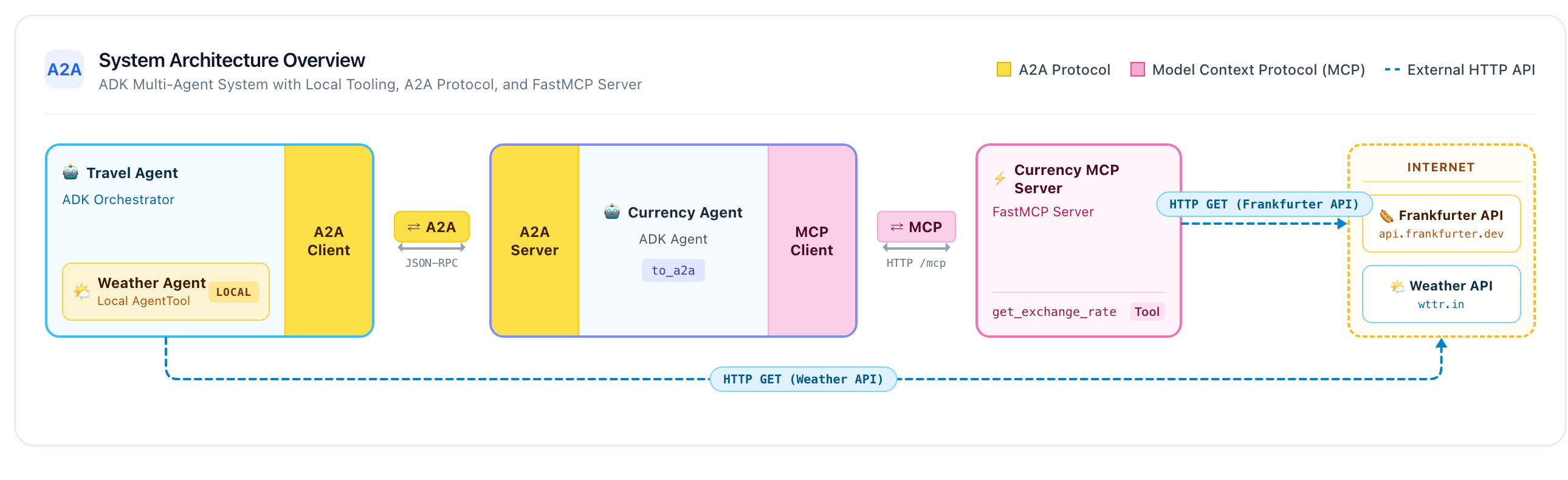
This codelab will help you get started by building an end-to-end multi-agent system. You'll build a currency MCP server, build a currency agent that consumes the MCP server and is exposed over the Agent2Agent (A2A) protocol, build a travel agent with an in-process weather subagent that consumes the currency agent over A2A, and finally deploy all services to Cloud Run.
Core Technologies
Model Context Protocol (MCP)
Model Context Protocol (MCP) is an open protocol that standardizes how applications provide context and tools to LLMs. Think of MCP like a USB-C port for AI applications: it provides a standardized way to connect AI models to external data sources, APIs, and tools.
In this codelab, the currency_mcp_server exposes a get_exchange_rate tool over Streamable HTTP (/mcp), backed by the public Frankfurter API.
Agent Development Kit (ADK)
Agent Development Kit (ADK) is a flexible orchestration framework for developing and deploying AI agents. ADK is model-agnostic, deployment-agnostic, and built for compatibility with other frameworks. ADK makes agent development feel like standard software engineering, making it easy to create, test, and orchestrate complex agentic workflows.
ADK handles user conversations, serves the interactive Web UI, connects to MCP tools via McpToolset, and manages A2A communications.
Agent2Agent (A2A) Protocol
The Agent2Agent (A2A) Protocol is an open standard designed to enable communication and collaboration between AI agents. Just like how MCP standardizes agent-to-tool connections, A2A standardizes agent-to-agent collaboration! In a world where agents are built across diverse frameworks, hosting environments, and organizations, A2A provides a common language for discovery and task delegation.
ADK exposes currency_agent as an A2A service (to_a2a) and allows travel_agent to consume it remotely as an AgentTool (RemoteA2aAgent).
Local Subagents vs. Remote A2A Agents
This architecture highlights a crucial pattern in multi-agent design:
- Local Agent Tool (
weather_agent): Runs in-process within the orchestrator as anAgentTool, with zero network latency or protocol serialization overhead. - Remote Agent Tool (
currency_agent): Runs as an independent microservice, called across the network via the A2A protocol.
What you'll learn
- How to create and test a local MCP server using FastMCP over Streamable HTTP
- How to build an Agent with ADK that uses MCP tools (
McpToolset) - How to expose an ADK agent as an A2A server (
to_a2a) - How to test an A2A server using the A2A Python Client (
a2a.client) - How to build an orchestrator agent that combines local subagent tools with remote A2A agents
- How to run and test the complete multi-agent system locally with the ADK Web UI
- How to containerize and deploy all three components to Google Cloud Run
What you'll need
- A browser, such as Chrome.
- A Google Cloud project with billing enabled.
2. Before you begin
Create a project
If you don't have a Google Cloud project, create one.
In the Google Cloud Console, on the project selector page, select or create a Google Cloud project.
Also make sure that billing is enabled for your Cloud project. Learn how to check if billing is enabled on a project.
Activate Cloud Shell
Google Cloud Shell is an interactive, browser-based development environment provided directly within the Google Cloud Console. It's the easiest way to get started with Google Cloud without needing to install tools locally.
Activate Cloud Shell by clicking this link. You can toggle between Cloud Shell Terminal (for running cloud commands) and Editor (for viewing files) by clicking on the corresponding button in Cloud Shell.
Once connected to Cloud Shell, verify that you're authenticated:
gcloud auth list
Confirm that the gcloud command knows about your project:
gcloud config list project
Set your project ID:
export PROJECT_ID=<YOUR_GOOGLE_CLOUD_PROJECT_ID>
gcloud config set project $PROJECT_ID
Enable Cloud APIs
Enable the required APIs for Cloud Run, Cloud Build, Artifact Registry, and Vertex AI:
gcloud services enable run.googleapis.com \
                       cloudbuild.googleapis.com \
                       artifactregistry.googleapis.com \
                       aiplatform.googleapis.com
Get the code
Clone the repository and navigate to the python directory:
git clone https://github.com/meteatamel/getting-started-mcp-a2a-adk.git
cd getting-started-mcp-a2a-adk/python
Install dependencies with uv
uv is a fast Python package and project manager. It is pre-installed in Cloud Shell. If running locally, you can install it as follows:
# macOS and Linux
curl -LsSf https://astral.sh/uv/install.sh | sh

# Windows (PowerShell)
# powershell -ExecutionPolicy ByPass -c "irm https://astral.sh/uv/install.ps1 | iex"
The Python directory is structured as a unified uv
Workspace. Install all dependencies across all workspace members (currency_mcp_server, currency_agent, and travel_agent) into a single virtual environment by running:
uv sync
Configure environment variables
Configure environment variables in a .env file in the python directory:
Option A: Gemini Enterprise (Google Cloud / Cloud Shell)
echo "GOOGLE_GENAI_USE_ENTERPRISE=TRUE" >> .env \
&& echo "GOOGLE_CLOUD_PROJECT=$PROJECT_ID" >> .env \
&& echo "GOOGLE_CLOUD_LOCATION=global" >> .env
Option B: Google AI Studio (Local API key)
If you prefer using an API key from Google AI Studio instead:
echo "GOOGLE_API_KEY=<your_api_key_here>"<>>/span>  .env \
&& echo "GOOGLE_GENAI_USE_ENTERPRISE=FALSE" >> .env
3. Create the Currency MCP Server
Before creating your agents, you will first explore the MCP server that exposes the currency conversion tool.
An MCP server lets you write lightweight programs to expose capabilities as tools. An agent (or multiple agents) can then access these tools using the standardized Model Context Protocol.
The FastMCP Python package can be leveraged to create an MCP server that exposes a single tool called get_exchange_rate. The get_exchange_rate tool calls the Frankfurter API to get the current exchange rate between two currencies.
The code for the MCP server is located in currency_mcp_server/server.py:
import asyncio
import logging
import os

import httpx
from fastmcp import FastMCP

logger = logging.getLogger(__name__)
logging.basicConfig(format="[%(levelname)s]: %(message)s", level=logging.INFO)

mcp = FastMCP("Currency MCP Server 💵")


@mcp.tool()
def get_exchange_rate(
    currency_from: str = "USD",
    currency_to: str = "EUR",
    currency_date: str = "latest",
):
    """Use this to get current exchange rate.

    Args:
        currency_from: The currency to convert from (e.g., "USD").
        currency_to: The currency to convert to (e.g., "EUR").
        currency_date: The date for the exchange rate or "latest". Defaults to "latest".

    Returns:
        A dictionary containing the exchange rate data, or an error message if the request fails.
    """
    logger.info(
        f"--- 🛠️ Tool: get_exchange_rate called for converting {currency_from} to {currency_to} ---"
    )
    try:
        response = httpx.get(
            f"https://api.frankfurter.dev/v1/{currency_date}",
            params={"from": currency_from, "to": currency_to},
        )
        response.raise_for_status()

        data = response.json()
        if "rates" not in data:
            logger.error(f"❌ rates not found in response: {data}")
            return {"error": "Invalid API response format."}
        logger.info(f"✅ API response: {data}")
        return data
    except httpx.HTTPError as e:
        logger.error(f"❌ API request failed: {e}")
        return {"error": f"API request failed: {e}"}
    except ValueError:
        logger.error("❌ Invalid JSON response from API")
        return {"error": "Invalid JSON response from API."}


if __name__ == "__main__":
    port = int(os.getenv("PORT", 8080))
    logger.info(f"🚀 MCP server started on port {port}")
    # Could also use 'sse' transport, host="0.0.0.0" required for Cloud Run.
    asyncio.run(
        mcp.run_async(
            transport="http",
            host="0.0.0.0",
            port=port,
        )
    )
Start the MCP server locally
Start the MCP server in your terminal:
uv run python currency_mcp_server/server.py
The server starts on port 8080 with the Streamable HTTP endpoint available at /mcp (http://localhost:8080/mcp).
Test the MCP server
Open a second terminal window (leaving the MCP server running in the first), navigate to the python folder (cd getting-started-mcp-a2a-adk/python), and run the test script:
uv run python currency_mcp_server/test_server.py
The test script connects to the MCP endpoint using FastMCP's Client, lists the tools, and invokes get_exchange_rate:
Connecting to MCP server at: http://localhost:8080/mcp
--- 🛠️  Tool found: get_exchange_rate ---
--- 🪛  Calling get_exchange_rate tool for USD to EUR ---
--- ✅  Success: {"amount":1.0,"base":"USD","date":"2026-09-29","rates":{"EUR":0.84919}} ---
Awesome! You have a working MCP server exposing a live currency tool. Keep this terminal open for the next steps.
4. Create the Currency Agent with ADK
Now it is time to create the Currency Agent using Agent Development Kit (ADK).
ADK provides built-in support for MCP tools through the McpToolset class. The Currency Agent connects to our MCP server using StreamableHTTPConnectionParams.
Take a look at the currency agent definition in currency_agent/agent.py:
import logging
import os
from urllib.parse import urlparse

from dotenv import load_dotenv
from google.adk.agents import LlmAgent
from google.adk.a2a.utils.agent_to_a2a import to_a2a
from google.adk.tools.mcp_tool import McpToolset, StreamableHTTPConnectionParams

logger = logging.getLogger(__name__)
logging.basicConfig(format="[%(levelname)s]: %(message)s", level=logging.INFO)

load_dotenv()

SYSTEM_INSTRUCTION = (
    "You are a specialized assistant for currency conversions. "
    "Your sole purpose is to use the 'get_exchange_rate' tool to answer questions about currency exchange rates. "
    "If the user asks about anything other than currency conversion or exchange rates, "
    "politely state that you cannot help with that topic and can only assist with currency-related queries. "
    "Do not attempt to answer unrelated questions or use tools for other purposes."
)

mcp_server_url = os.getenv("MCP_SERVER_URL", "http://localhost:8080/mcp")
if not mcp_server_url.endswith("/mcp"):
    mcp_server_url = f"{mcp_server_url.rstrip('/')}/mcp"

logger.info(f"--- 🔧 Loading MCP tools from MCP Server at {mcp_server_url}... ---")
logger.info("--- 🤖 Creating ADK Currency Agent... ---")

root_agent = LlmAgent(
    model="gemini-3.8-flash",
    name="currency_agent",
    description="An agent that can help with currency conversions",
    instruction=SYSTEM_INSTRUCTION,
    tools=[
        McpToolset(
            connection_params=StreamableHTTPConnectionParams(
                url=mcp_server_url
            )
        )
    ],
)
Notice how McpToolset automatically discovers and loads the get_exchange_rate tool directly from the running MCP server over HTTP.
Test the Currency Agent with ADK Web UI
You can test the agent in isolation using ADK's development web interface. In your second terminal, run:
uv run adk web --allow_origins "*" currency_agent
Open your browser at http://localhost:8000 (or click Web Preview in Cloud Shell).
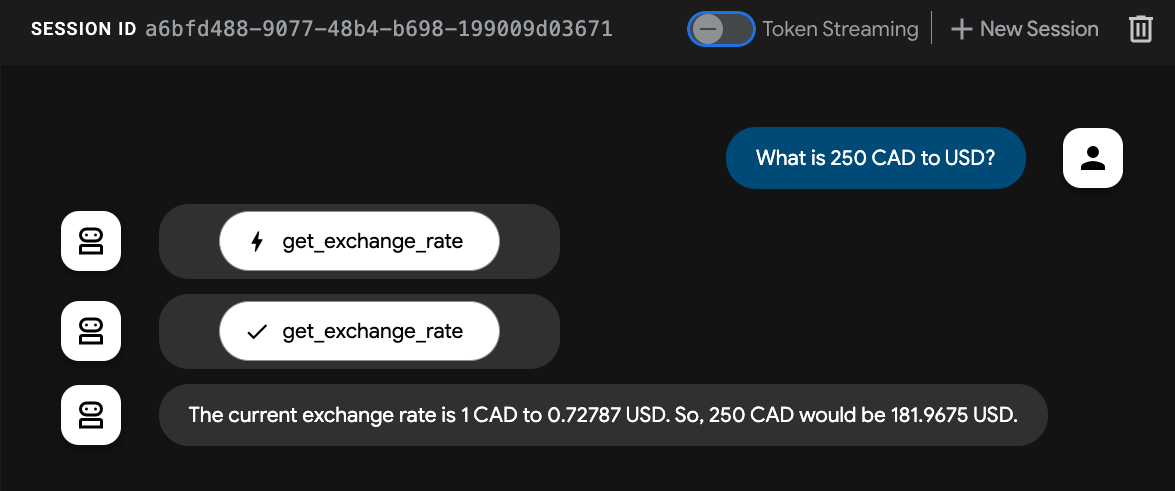
Ask the agent:
"What is 250 USD in EUR?"
You'll see the agent invoke the get_exchange_rate MCP tool and return the converted amount. Stop the adk web process using Ctrl+C before proceeding.
5. Agent2Agent (A2A) Protocol
The Agent2Agent (A2A) Protocol is an open standard designed to enable communication and collaboration between AI agents.
In modern multi-agent systems, agents are often built using different frameworks (ADK, LangChain, CrewAI, AutoGen) and deployed on different infrastructure. A2A breaks down these silos by defining a standardized communication contract.
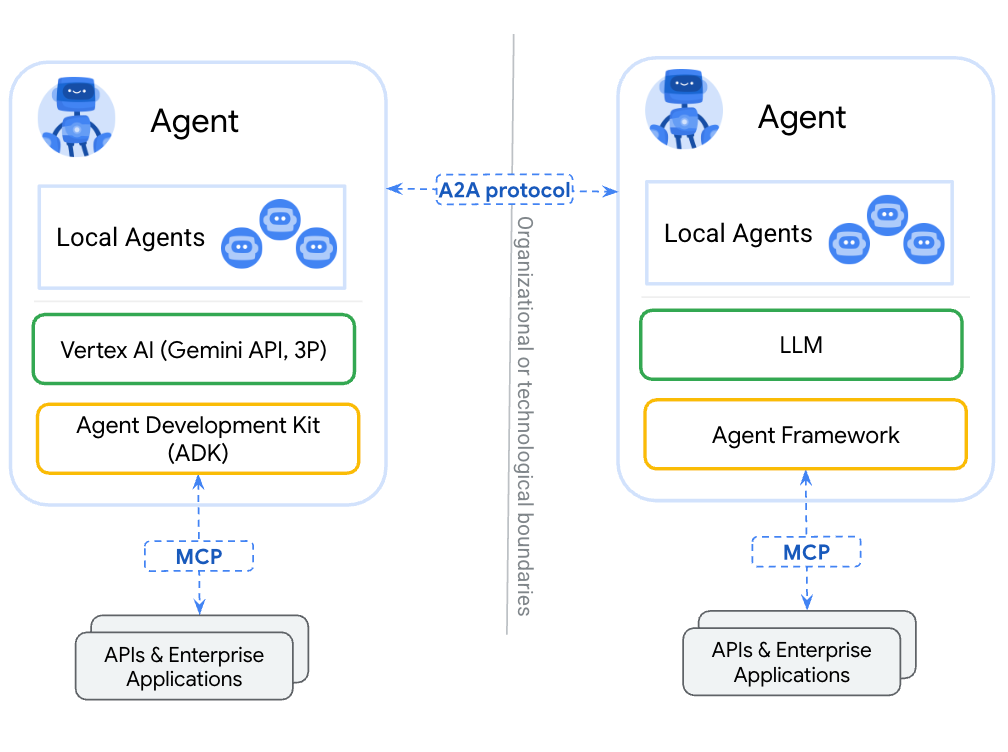
Key Concepts of A2A
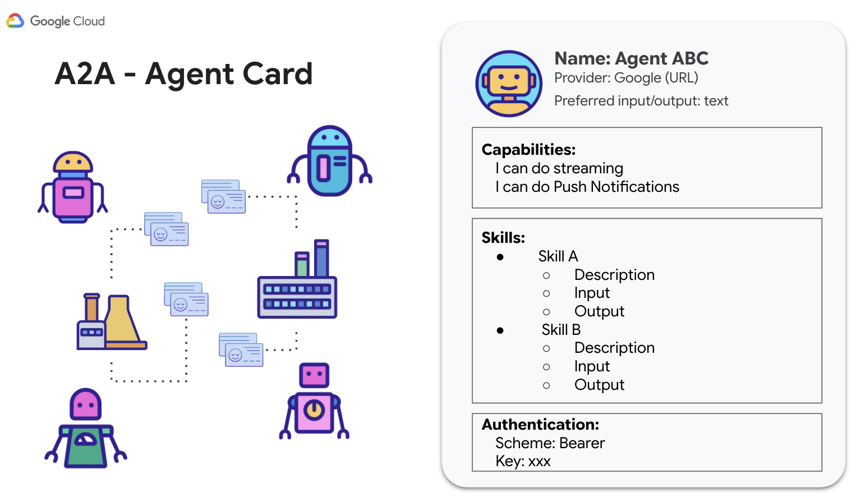
- Agent Discovery (Agent Card): Every A2A-compliant agent advertises its capabilities, supported I/O modes, authentication requirements, and skills via a standard JSON file hosted at
/.well-known/agent-card.json. - Agent Skills (
AgentSkill): Specific capabilities or tools that the agent can execute. Other agents read these skills to decide when to delegate tasks. - JSON-RPC Communication: Agents exchange structured messages, tasks, and artifacts over standard transports such as HTTP JSON-RPC 2.0.
In the next step, you'll expose our ADK Currency Agent as an A2A server so other agents can discover it and delegate currency conversion tasks to it!
6. Expose the Currency Agent as an A2A Server
ADK makes turning any LlmAgent into an A2A-compatible server effortless with the to_a2a() utility function.
Review the bottom portion of currency_agent/agent.py:
# Make the agent A2A-compatible
PORT = int(os.getenv("PORT", 8081))
AGENT_URL = os.getenv("AGENT_URL")

if AGENT_URL:
    parsed = urlparse(AGENT_URL)
    protocol = parsed.scheme or "https"
    host = parsed.hostname
    port = parsed.port or 443
else:
    protocol = "http"
    host = "localhost"
    port = PORT

a2a_app = to_a2a(root_agent, host=host, port=port, protocol=protocol)

if __name__ == "__main__":
    import uvicorn

    logger.info(f"🚀 Starting currency_agent on port {PORT}")
    uvicorn.run(a2a_app, host="0.0.0.0", port=PORT)
The to_a2a() helper automatically:
- Inspects the
LlmAgent's tools and instructions. - Generates an A2A
AgentCarddescribing its skills (e.g.currency_agent-get_exchange_rate). - Wraps the agent in a FastAPI application (
a2a_app) supporting JSON-RPC endpoints. - Dynamically configures the advertised
urlin the Agent Card based onAGENT_URL(or localhost).
Start the Currency Agent A2A Server
In your second terminal, start the currency agent:
uv run python currency_agent/agent.py
The server starts on port 8081:
[INFO]: --- 🔧 Loading MCP tools from MCP Server at http://localhost:8080/mcp... ---
[INFO]: --- 🤖 Creating ADK Currency Agent... ---
[INFO]: 🚀 Starting currency_agent on port 8081
INFO:     Started server process
INFO:     Waiting for application startup.
INFO:     Application startup complete.
INFO:     Uvicorn running on http://0.0.0.0:8081 (Press CTRL+C to quit)
Inspect the Agent Card
In your browser, visit the Agent Card endpoint: http://localhost:8081/.well-known/agent-card.json
You will see the auto-generated JSON metadata:
{
  "name": "currency_agent",
  "description": "An agent that can help with currency conversions",
  "supportedInterfaces": [
    {
      "url": "http://localhost:8081",
      "protocolBinding": "JSONRPC",
      "protocolVersion": "1.0"
    }
  ],
  "version": "0.0.1",
  "capabilities": {
    "streaming": true
  },
  "defaultInputModes": [
    "text/plain"
  ],
  "defaultOutputModes": [
    "text/plain"
  ],
  "skills": [
    {
      "id": "currency_agent",
      "name": "model",
      "description": "An agent that can help with currency conversions",
      "tags": [
        "llm"
      ]
    },
    {
      "id": "currency_agent-get_exchange_rate",
      "name": "get_exchange_rate",
      "description": "Use this to get current exchange rate.",
      "tags": [
        "llm",
        "tools"
      ]
    }
  ]
}
Test with the A2A Client
Open a third terminal, navigate to the python folder (cd getting-started-mcp-a2a-adk/python), and test the A2A endpoint using the dedicated A2A test client script:
uv run python currency_agent/test_a2aclient.py
The client resolves the agent card using A2ACardResolver and dispatches a JSON-RPC message:
🔄 Fetching the agent card at http://localhost:8081
✅ Successfully fetched the agent card
====================================================
                     AgentCard
====================================================
Name        : currency_agent
Description : An agent that can help with currency conversions
Interfaces  : [0] http://localhost:8081  (JSONRPC 1.0)
Skills      : currency_agent, currency_agent-get_exchange_rate
====================================================
🔄 Initializing a non-streaming client
Sending request: "how much is 100 USD in GBP?"
Response:
100 USD is currently equal to approximately 73.37 GBP...
The Currency Agent is now operating as a fully functional A2A server!
7. Build the Travel Agent
Now you will build the orchestrating Travel Agent. This agent showcases how an ADK agent can effortlessly combine two different tool paradigms:
- Local Agent Tool (
weather_agent): An in-process ADK subagent running in the same Python runtime, avoiding any network or serialization latency. - Remote Agent Tool (
currency_agent): An external agent connected over the network via the A2A protocol usingRemoteA2aAgent.
                    +-----------------------------+
                    |        travel_agent         |
                    | (Orchestrator with Web UI)  |
                    +--------------+--------------+
                                   |
             +---------------------+---------------------+
             | (In-process call)                         | (A2A Network Hop)
             v                                           v
+-------------------------+                 +-------------------------+
|   weather_agent         |                 |   currency_agent        |
|  (Local AgentTool)      |                 |  (Remote A2A Agent)     |
|  Calls wttr.in API      |                 |  Calls Currency MCP Svc |
+-------------------------+                 +-------------------------+
1. The Local Weather Subagent
Take a look at travel_agent/subagents/weather_agent.py:
import logging
import httpx
from google.adk.agents import LlmAgent

logger = logging.getLogger(__name__)

SYSTEM_INSTRUCTION = (
    "You are a specialized assistant for providing weather forecasts and conditions for travel destinations. "
    "Your sole purpose is to use the 'get_weather' tool to fetch weather information. "
    "Provide clear, concise summaries of current weather conditions, temperatures, and forecasts to help travelers pack and plan."
)


def get_weather(location: str = "London") -> dict:
    """Gets the current weather and forecast for a given location or city."""
    logger.info(f"--- 🌤️ Tool: get_weather called for {location} ---")
    try:
        response = httpx.get(
            f"https://wttr.in/{location}?format=j1",
            headers={"User-Agent": "curl/7.68.0"},
            timeout=8.0,
        )
        response.raise_for_status()
        data = response.json()
        current = data["current_condition"][0]
        return {
            "location": location,
            "condition": current.get("weatherDesc", [{}])[0].get("value", "Unknown"),
            "temperature_celsius": f"{current.get('temp_C', 'N/A')}°C",
            "temperature_fahrenheit": f"{current.get('temp_F', 'N/A')}°F",
            "humidity": f"{current.get('humidity', 'N/A')}%",
            "wind_speed_kmph": f"{current.get('windspeedKmph', 'N/A')} km/h",
        }
    except Exception as e:
        logger.warning(f"⚠️ Weather lookup failed: {e}. Returning simulated estimate.")
        return {
            "location": location,
            "condition": "Partly Cloudy",
            "temperature_celsius": "20°C",
            "temperature_fahrenheit": "68°F",
            "humidity": "55%",
            "wind_speed_kmph": "10 km/h",
            "note": f"Live data unavailable ({e}); showing estimated conditions.",
        }


weather_agent = LlmAgent(
    model="gemini-3.8-flash",
    name="weather_agent",
    description="A local specialist agent that provides current weather reports and forecasts for travel destinations.",
    instruction=SYSTEM_INSTRUCTION,
    tools=[get_weather],
)
The weather agent is an LlmAgent with a function tool that fetches real-time weather from wttr.in with a resilient fallback.
2. The Travel Agent Orchestrator
Now look at travel_agent/agent.py:
import logging
import os
from dotenv import load_dotenv
from google.adk.agents import LlmAgent
from google.adk.tools.agent_tool import AgentTool
from google.adk.agents.remote_a2a_agent import RemoteA2aAgent, AGENT_CARD_WELL_KNOWN_PATH

try:
    from travel_agent.subagents.weather_agent import weather_agent
except ImportError:
    from subagents.weather_agent import weather_agent

logger = logging.getLogger(__name__)
logging.basicConfig(format="[%(levelname)s]: %(message)s", level=logging.INFO)

load_dotenv()

SYSTEM_INSTRUCTION = (
    "You are a helpful travel assistant. You help users plan trips, recommend places, "
    "and answer travel-related questions.\n\n"
    "- Whenever a user asks about currency exchange rates or money conversions, "
    "delegate the request to the 'currency_agent' tool.\n"
    "- Whenever a user asks about the weather, climate, or forecasts for a destination, "
    "delegate the request to the 'weather_agent' tool."
)

CURRENCY_AGENT_URL = os.getenv("CURRENCY_AGENT_URL", "http://localhost:8081").rstrip("/")

logger.info(
    "--- 🔗 Connecting to Remote A2A Currency Agent at %s... ---",
    CURRENCY_AGENT_URL,
)

currency_remote_agent = RemoteA2aAgent(
    name="currency_agent",
    agent_card=f"{CURRENCY_AGENT_URL}{AGENT_CARD_WELL_KNOWN_PATH}",
    description="An agent that can help with currency conversions and exchange rates.",
)

logger.info("--- 🤖 Creating ADK Travel Agent... ---")

root_agent = LlmAgent(
    model="gemini-3.8-flash",
    name="travel_agent",
    description="A travel assistant that can help plan trips, check weather forecasts via the local weather agent, and convert currencies via the remote currency agent.",
    instruction=SYSTEM_INSTRUCTION,
    tools=[
        AgentTool(agent=currency_remote_agent),
        AgentTool(agent=weather_agent),
    ],
)

if __name__ == "__main__":
    import uvicorn
    from google.adk.cli.fast_api import get_fast_api_app

    PORT = int(os.getenv("PORT", 8082))
    logger.info(f"🚀 Starting travel_agent Web UI on port {PORT}")
    app = get_fast_api_app(web=True, allow_origins=["*"], agents_dir=os.path.dirname(__file__) or ".")
    uvicorn.run(app, host="0.0.0.0", port=PORT)
Key highlights:
RemoteA2aAgentfetches the Currency Agent's card fromhttp://localhost:8081/.well-known/agent-card.json.- Both
currency_remote_agentandweather_agentare wrapped using ADK'sAgentTool. - Running
travel_agent/agent.pydirectly boots the ADK Web UI on port8082usingget_fast_api_app(web=True).
8. Run and Test the Multi-Agent System Locally
You now have all three components ready! Let's run and test the complete system locally.
Running all three services
Ensure the services are running across three separate terminal windows (from the getting-started-mcp-a2a-adk/python directory) in the following order:
Terminal 1 (Currency MCP Server):
uv run python currency_mcp_server/server.py
(Running on port 8080)
Terminal 2 (Currency A2A Agent):
uv run python currency_agent/agent.py
(Running on port 8081)
Terminal 3 (Travel Agent with Web UI):
uv run python travel_agent/agent.py
(Running on port 8082)
Test via the ADK Web UI
Open your browser at http://localhost:8082 (or use Web Preview on port 8082 in Cloud Shell).
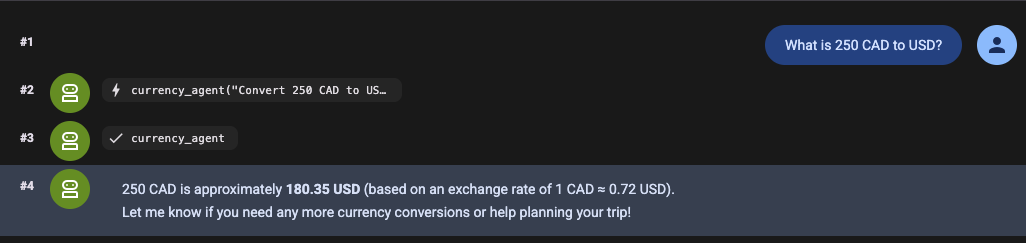
Ask the Travel Agent a compound question requiring both tools:
"I'm planning a trip to London. What is the weather like and how much is 200 EUR in GBP?"
Watch the execution flow:
- The Travel Agent receives the request in the Web UI.
- It delegates the weather question in-process to the local
weather_agent, which fetches current conditions fromwttr.in. - It delegates the currency conversion over the A2A protocol to
currency_agenton port 8081. - The
currency_agentcalls thecurrency_mcp_serveron port 8080 over MCP to fetch the exchange rate. - All results are synthesized and returned to you in a unified, helpful answer!
Test via the Command Line
You can also test queries directly from the CLI without opening a browser:
uv run adk run travel_agent "What is the weather in London and how much is 100 USD in EUR?"
Now that everything works seamlessly on your local machine, let's deploy the entire system to Google Cloud Run!
9. Deploy the Multi-Agent System to Cloud Run
Each component has its own Dockerfile and self-contained pyproject.toml so it can be built and deployed independently to Cloud Run.
Using gcloud, you will deploy each service and automatically wire their URLs together.
Set environment variables
Set your Cloud project ID and target region:
export PROJECT_ID=<YOUR_GOOGLE_CLOUD_PROJECT_ID>
export REGION=us-central1
Step 1: Deploy the Currency MCP Server
Deploy the MCP server directly from source:
# 1. Deploy MCP server
gcloud run deploy currency-mcp-server \
  --source currency_mcp_server \
  --region $REGION \
  --allow-unauthenticated

# 2. Capture the deployed MCP server URL
MCP_SERVER_URL=$(gcloud run services describe currency-mcp-server --region $REGION --format='value(status.url)')/mcp
echo "MCP Server URL: $MCP_SERVER_URL"
Step 2: Deploy the Currency Agent
Since currency-agent's public URL is assigned on its first deployment, deploy the service first, capture its URL, and update its AGENT_URL environment variable so its A2A Agent Card advertises the correct public HTTPS address:
# 1. Deploy Currency Agent connected to the deployed MCP Server
gcloud run deploy currency-agent \
  --source currency_agent \
  --region $REGION \
  --allow-unauthenticated \
  --update-env-vars MCP_SERVER_URL="$MCP_SERVER_URL",GOOGLE_GENAI_USE_ENTERPRISE="true",GOOGLE_CLOUD_PROJECT="$PROJECT_ID",GOOGLE_CLOUD_LOCATION="global"

# 2. Capture its assigned Cloud Run URL
CURRENCY_AGENT_URL=$(gcloud run services describe currency-agent --region $REGION --format='value(status.url)')
echo "Currency Agent URL: $CURRENCY_AGENT_URL"

# 3. Update AGENT_URL so the agent advertises its public HTTPS endpoint in its Agent Card
gcloud run services update currency-agent \
  --region $REGION \
  --update-env-vars AGENT_URL="$CURRENCY_AGENT_URL"
Step 3: Deploy the Travel Agent
Now deploy the Travel Agent, configuring it with the CURRENCY_AGENT_URL:
# 1. Deploy Travel Agent (with ADK Web UI) connected to Currency Agent
gcloud run deploy travel-agent \
  --source travel_agent \
  --region $REGION \
  --allow-unauthenticated \
  --update-env-vars CURRENCY_AGENT_URL="$CURRENCY_AGENT_URL",GOOGLE_GENAI_USE_ENTERPRISE="true",GOOGLE_CLOUD_PROJECT="$PROJECT_ID",GOOGLE_CLOUD_LOCATION="global"

# 2. Capture its assigned Cloud Run URL
TRAVEL_AGENT_URL=$(gcloud run services describe travel-agent --region $REGION --format='value(status.url)')
echo "Travel Agent URL: $TRAVEL_AGENT_URL"
10. Test the Multi-Agent System in Cloud Run
With all three microservices deployed, let's verify each layer in Cloud Run.
1. Test the remote MCP server
Test the deployed Cloud Run MCP server from your command line:
MCP_SERVER_URL="$MCP_SERVER_URL" uv run python currency_mcp_server/test_server.py
You should see the tool listed and successfully invoked on Cloud Run.
2. Test the Currency Agent over A2A
Test the deployed Currency Agent using the A2A test client:
AGENT_URL="$CURRENCY_AGENT_URL" uv run python currency_agent/test_a2aclient.py
The client will fetch the remote Agent Card from Cloud Run and exchange messages over HTTPS JSON-RPC.
3. Test the Travel Agent Web UI in Cloud Run
Open $TRAVEL_AGENT_URL in your browser!
The complete ADK Web UI is served directly from Cloud Run. Try asking:
"I'm planning a trip to Tokyo. What is the weather like and how much is 500 USD in JPY?"
[Browser]
   │
   ▼ (HTTPS)
[Cloud Run: travel-agent]
   ├──> Local in-process tool: weather_agent (wttr.in)
   └──> A2A JSON-RPC (HTTPS)
           │
           ▼
        [Cloud Run: currency-agent]
           └──> MCP Streamable HTTP (HTTPS)
                   │
                   ▼
                [Cloud Run: currency-mcp-server] (Frankfurter API)
All three services scale independently on serverless infrastructure, communicating seamlessly via open protocols!
11. Congratulations & Clean Up
What you've accomplished
Congratulations! You have built and deployed a production-grade multi-agent system:
- Model Context Protocol (MCP): Created a FastMCP server exposing live API tools over Streamable HTTP.
- Agent Development Kit (ADK): Built modular agents using
LlmAgent, connected MCP tools withMcpToolset, and hosted the ADK Web UI. - Agent2Agent (A2A) Protocol: Exposed an agent as an A2A service (
to_a2a), published Agent Cards (agent-card.json), and consumed remote agents usingRemoteA2aAgent. - Multi-Agent Architecture: Combined local in-process subagents (
weather_agent) with distributed remote agents (currency_agent). - Cloud Run Serverless Deployment: Containerized and deployed all three services with automated configuration wiring.
For the full code (including both the Python and Java implementations) and future updates, visit the getting-started-mcp-a2a-adk repository.
Clean up
To avoid incurring charges to your Google Cloud account for the Cloud Run services created in this codelab:
Delete the deployed Cloud Run services:
gcloud run services delete currency-mcp-server --region $REGION --quiet
gcloud run services delete currency-agent --region $REGION --quiet
gcloud run services delete travel-agent --region $REGION --quiet
Alternatively, if you created a dedicated project for this codelab, you can shut down the entire project:
gcloud projects delete $PROJECT_ID